lock AUDI S4 2019 Workshop Manual
[x] Cancel search | Manufacturer: AUDI, Model Year: 2019, Model line: S4, Model: AUDI S4 2019Pages: 392, PDF Size: 99.53 MB
Page 126 of 392

Assistsystems
fExitwarning— Theexitwarningsystemcanbeavailablefor
Appliesto:vehicleswithexitwarningsystemuptoapproximatelythreeminutesafterun-
lockingthevehicleandopeningthedooras
wellasafterswitchingofftheignition.Then
thedisplaysflashbrieflyandthesystem
switchesoff.
—Theexitwarningsystemdoesnotrespond
topeopleandcannotwarnyouaboutevery
typeofapproachingobjects,suchascyclists.
Alwaysmonitorthetrafficaswellastheve-
hicle'ssurroundingswithdirecteyecontact.
ZAWARNING
Theexitwarningsystemissubjecttolimita-
tionsandcannotwarnyoubeforeeveryim-
pendingcollision:
—Ifthevehicleistoowidefortheparking
spaceandcoveredbytheneighboringvehi-
cles.
B8W-0102
—Approachingobjectsorpeoplesuchascy-
clistsorskateboardersmaynot be detected
undercertaincircumstances.
Fig.124Door:ingstri:
osScieveee—The systemdoesnotreacttostationaryob-
jects.
—Theviewoftheradarsensorsmaybeim-
pairedbyleaves,snow,heavysprayordirt.
Clean
theareainfrontofthesensors
=page122,fig.122.
Whenthevehicleisstationary,theexitwarning
systemwarnsthepassengersofapossiblecolli-
sionwhenopeningthedoor.Withinthelimitsof
thesystem,thesystemmonitorstheareasbe-
hindandnexttothevehicleusingtheradarsen-
sors>page122,fig.122.MovingobjectsthatCG)N
areapproachingfrombehind,suchascars,areeto
detected©fig.123.Alsoreadtheinformationin>@inGeneral
informationonpage123.
Whenyouopenthedoor,thewarningstriponfpag
theaffecteddoorblinks>fig.124ifanotherG@)Tips
roaduserisdetectedandthesituationisclassi-=
fiedascritical.Thedisplayintheexteriormirror
ontheaffectedsideflashesatthesametime.If
thedoorisalreadyopen andanotherroaduseris
detectedandthesituationisclassifiedascritical,
thenthecorrespondingdisplaysturnon.
— Theexitwarningsystemisswitchedonand
offthroughthesideassist>page123.The
exitwarningindicatorsturnonduringthe
adjustmentprocess.
— Thedisplaybrightnessfortheexitwarning
systemcannotbeadjusted.
WARNING
—Alwayspayattentiontotrafficandtothe
areaaroundyourvehicle.Theexitwarning
systemdoesnotreplacetheattentionofthe
vehicleoccupants.Thevehicleoccupantsare
alwaysresponsibleforopeningthedoors
andexitingthevehicle.
124
Page 134 of 392
Parkingaid
—Automatictransmission:the"P"selector
leverpositionisengagedandreleasedagain
Rearviewcamera
Introduction
Appliesto:vehicleswith rearviewcamera
B8V-0629
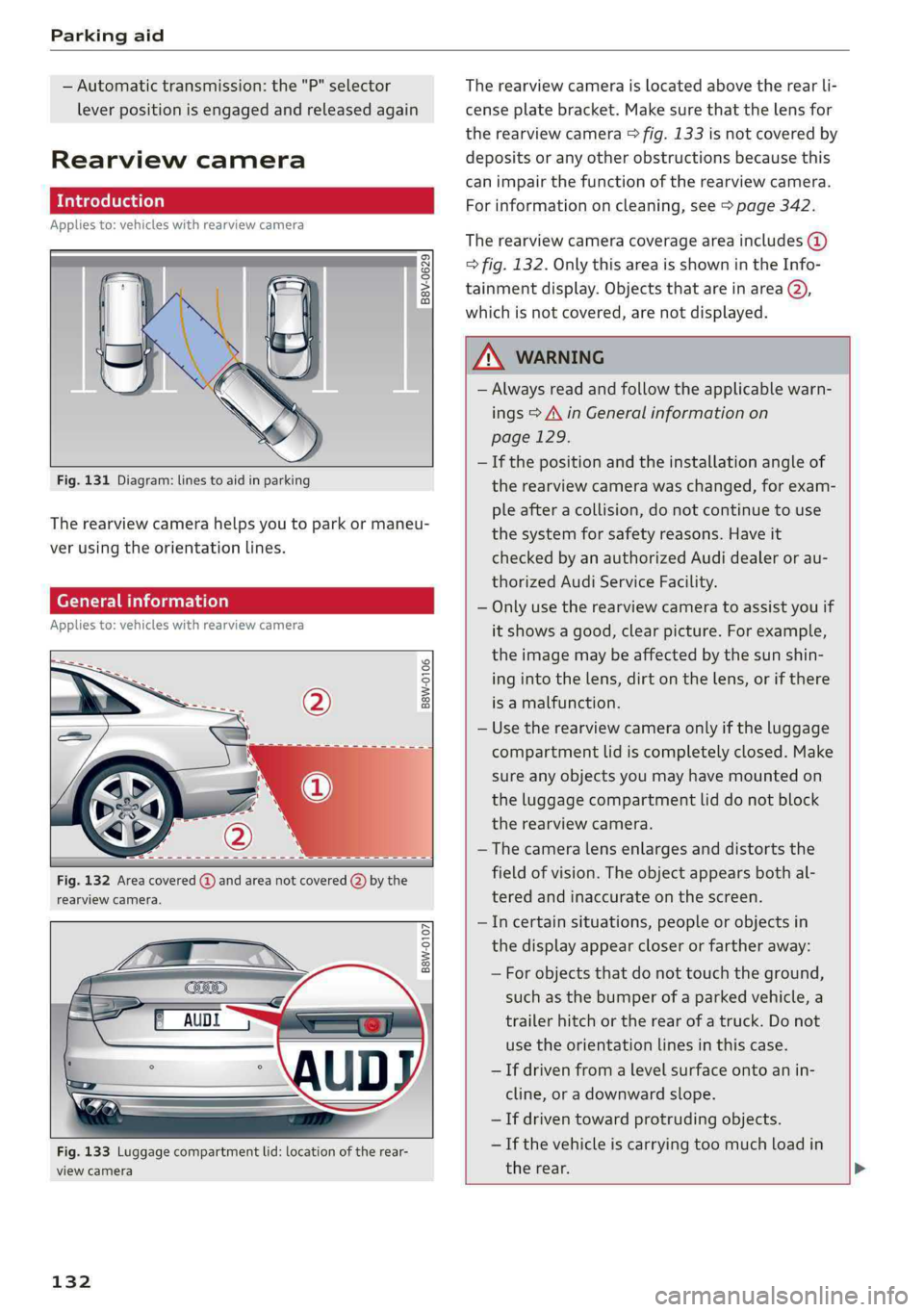
Fig.131Diagram:linestoaidinparking
Therearviewcamerahelpsyoutoparkormaneu-
verusingtheorientationlines.
Generalinformation
Appliesto:vehicleswithrearviewcamera
B8W-0106
Fig.132Areacovered@andareanotcovered(2)bythe
rearviewcamera.
B8W-0107
Fig.133Luggagecompartmentlid:locationoftherear-
viewcamera
132
Therearviewcameraislocatedabovetherearli-
censeplatebracket.Makesurethatthelensfor
therearviewcamera>fig.133isnotcoveredby
depositsoranyotherobstructionsbecausethis
can impairthefunctionoftherearviewcamera.
Forinformationoncleaning,see>page342.
Therearviewcameracoverageareaincludes(@)
>fig.132.OnlythisareaisshownintheInfo-
tainmentdisplay.ObjectsthatareinareaQ),
whichisnotcovered,arenotdisplayed.
ZAWARNING
—Alwaysreadandfollowtheapplicablewarn-
ings>A\inGeneralinformationon
page129.
—Ifthepositionandtheinstallationangleof
therearviewcamerawaschanged,forexam-
pleafteracollision,donotcontinuetouse
the
systemforsafetyreasons.Haveit
checkedby anauthorizedAudidealeror au-
thorizedAudiServiceFacility.
—Onlyusetherearviewcameratoassistyouif
itshowsagood,clearpicture.Forexample,
theimagemaybeaffectedbythesunshin-
ingintothelens,dirtonthelens,orifthere
isamalfunction.
—Usetherearviewcameraonlyiftheluggage
compartmentlidiscompletelyclosed.Make
sureanyobjectsyoumayhavemountedon
theluggagecompartmentliddonotblock
therearviewcamera.
— Thecameralensenlargesanddistortsthe
fieldofvision.Theobjectappearsbothal-
teredandinaccurateonthescreen.
—Incertainsituations,peopleor objectsin
thedisplayappearcloserorfartheraway:
—Forobjectsthatdonottouchtheground,
suchasthebumperofaparkedvehicle,a
trailerhitchortherearofatruck.Donot
use theorientationlinesinthiscase.
—Ifdrivenfromalevelsurfaceontoanin-
cline,oradownwardslope.
—Ifdriventowardprotrudingobjects.
—Ifthevehicleiscarryingtoomuchloadin
therear.
Page 136 of 392
Parkingaid
Generalinformation
Appliesto:vehicleswithperipheralcameras
B8W-0108
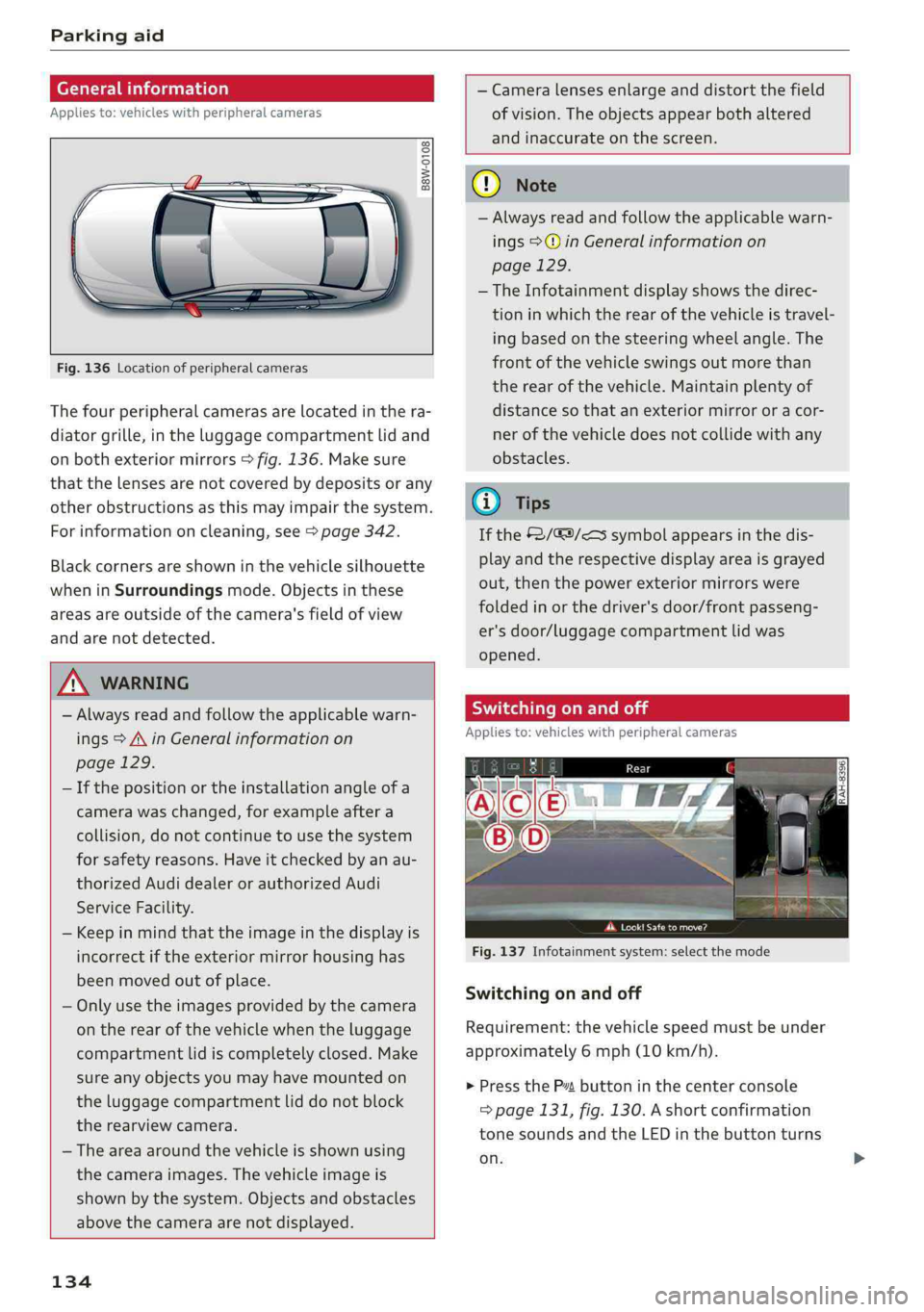
Fig.136Locationofperipheralcameras
Thefourperipheralcamerasarelocatedinthera-
diatorgrille,intheluggagecompartmentlidand
onbothexteriormirrors>fig.136.Makesure
thatthelensesarenotcoveredbydepositsorany
otherobstructionsasthismayimpairthesystem.
Forinformationoncleaning,see>page342.
Blackcornersareshowninthevehiclesilhouette
wheninSurroundingsmode.Objectsinthese
areasareoutsideofthecamera'sfieldofview
andarenotdetected.
ZA\WARNING
—Alwaysreadandfollowtheapplicablewarn-
ings>A\inGeneralinformationon
page129.
—Ifthepositionortheinstallationangleofa
camerawaschanged,forexampleaftera
collision,donotcontinuetousethesystem
forsafetyreasons.Haveitcheckedbyanau-
thorizedAudidealerorauthorizedAudi
ServiceFacility.
—Keepinmindthattheimageinthedisplayis
incorrectiftheexteriormirrorhousinghas
beenmovedoutofplace.
—Onlyuse theimagesprovidedby thecamera
ontherearofthevehiclewhentheluggage
compartmentlidiscompletelyclosed.Make
sureanyobjectsyoumayhavemountedon
theluggagecompartmentliddonotblock
therearviewcamera.
— Theareaaroundthevehicleisshownusing
thecameraimages.Thevehicleimageis
shownbythesystem.Objectsandobstacles
abovethecameraarenotdisplayed.
134
—Cameralensesenlargeanddistortthefield
ofvision.Theobjectsappearbothaltered
andinaccurateonthescreen.
@)Note
—Alwaysreadandfollowtheapplicablewarn-
ings>@inGeneralinformationon
page129.
— TheInfotainmentdisplayshowsthedirec-
tioninwhichtherearofthevehicleistravel-
ing
basedonthesteeringwheelangle.The
frontofthevehicleswingsoutmorethan
therearofthevehicle.Maintainplentyof
distanceso thatanexteriormirrororacor-
nerofthevehicledoesnotcollidewithany
obstacles.
@Tips
Ifthe2/&9/
out,thenthepowerexteriormirrorswere
foldedinorthedriver'sdoor/frontpasseng-
er'sdoor/luggagecompartmentlid was
opened.
Switchingonandoff
Appliesto:vehicleswithperipheralcameras
Pcaa
Fig.137Infotainmentsystem:selectthemode
Switchingonandoff
Requirement:thevehiclespeedmustbeunder
approximately6mph(10km/h).
>PresstheP”buttoninthecenterconsole
=>page131,fig.130.Ashortconfirmation
tonesoundsandtheLEDinthebuttonturns
on.
Page 140 of 392
IntelligentTechnology
IntelligentTechnology
ElectronicStabilization
Control(ESC)
ElectronicStabilizationControl(ESC)supports
driversafety.Itreducestheriskofslippingand
improvesdrivingstability.ESCdetectscriticalsit-
uations,suchasifthevehicleisoversteeringor
understeering,orifthewheelsare spinning.The
brakesareappliedortheenginetorqueisre-
ducedinordertostabilizethevehicle.Whenthe
ESCengages,theBindicatorlightflashesinthe
instrumentcluster.
ThefollowingsystemsareintegratedintheESC:
Anti-lockbrakingsystem(ABS)
ABSpreventsthewheelsfromlockingwhenbrak-
ing.Thevehiclecanstillbesteeredevenduring
hardbraking.Applysteadypressuretothebrake
pedal.Donotpumpthepedal.Apulsinginthe
brakepedalindicatesthatthesystemisacting to
stabilizethevehicle.
Brakeassistsystem
Thebrakeassistsystemcandecreasebrakingdis-
tance.Itincreasesbrakingpowerwhenthe driver
pressesthebrakepedalquicklyinemergencysit-
uations.Youmustpressandholdthebrakepedal
untilthedangeroussituationisover.Invehicles
withadaptivecruisecontrol*,thebrakeassist
systemismoresensitiveifthedistancedetected
tothevehicledrivingaheadistoosmall.
Anti-SlipRegulation(ASR)
ASRreducesenginepowerwhenthedrivewheels
beginspinningandadaptstheforcetotheroad
conditions.Thismakesiteasiertostart,acceler-
ateanddriveuphills.
ElectronicDifferentialLock(EDL)
TheEDLappliesthe brakestowheelsthatare
slippingandtransfersthedrivepowertotheoth-
erwheels.Thisfunctionisnotavailableathigher
speeds.
138
Inextremecases,EDLautomaticallyswitchesoff
tokeepthebrakeonthebrakedwheelfromover-
heating.Thevehicleisstillfunctioningcorrectly.
EDLwillswitchonagainautomaticallywhencon-
ditionshavereturnedtonormal.
Powersteering
The ESCcanalsosupportvehiclestability
throughsteering.
Selectivewheeltorquecontrol
Selectivewheeltorquecontrolisusedwhendriv-
ingoncurves.Brakingistargetedtowardthe
wheelsontheinsideofthecurveasneeded.This
allowsmoreprecisedrivingincurves.
Automaticpost-collisionbrakingsystem
The“automaticpost-collisionbrakingsystem”
canhelptoreducetheriskofslidingandofaddi-
tionalcollisionsafteranaccident.Iftheairbag
controlmoduledetectsacollision,thevehicleis
braked bytheESC.
Thevehicledoesnotbrakeautomaticallyifoneof
thefollowingoccurs:
—Thedriverpressestheacceleratorpedal
—TheESC,thebrakesystem,orthevehicleelec-
tricalsystemisnotfunctioning
ZAWARNING
— The ESCanditsintegratedsystemscannot
overcomethelimitsimposedbynatural
physicallaws.Thisisespeciallyimportanton
slipperyorwetroads.Ifthesystemsbegin
actingtostabilizeyourvehicle,youshould
immediatelyalteryourspeedtomatchthe
roadandtrafficconditions.Donotletthein-
creasedsafetyprovidedtemptyouintotak-
ingrisks.Thiscouldincreaseyourriskofa
collision.
—Pleasenotetheriskofacollisionincreases
whendrivingfast,especiallythroughcurves
andonslipperyorwetroads,andwhendriv-
ingtooclosetoobjectsahead.The ESC and
itsintegratedsystemscannotalwayspre-
ventcollisions-thereisstillariskofacci-
dents!
Page 142 of 392
IntelligentTechnology
Appliesto:allroad
Youshouldonlyswitchsportmode/offroad
modeonorswitchESC/ASRoffifyourdriving
abilitiesandroadconditionspermit.
—Thestabilizationfunctionislimitedwhen
sportmode/offroadmodeisswitchedon.
Thedrivingwheelscouldspinandthevehi-
clecouldswerve,especiallyonslickorslip-
peryroadsurfaces.
—Thereisnovehiclestabilizationwhen
ESC/ASRareswitchedoff.
Hilldescentassist
Appliesto:allroad
Hilldescentassistmakesitpossibletodrive
downahillataconstantspeed.
a
Q
gz
=& a
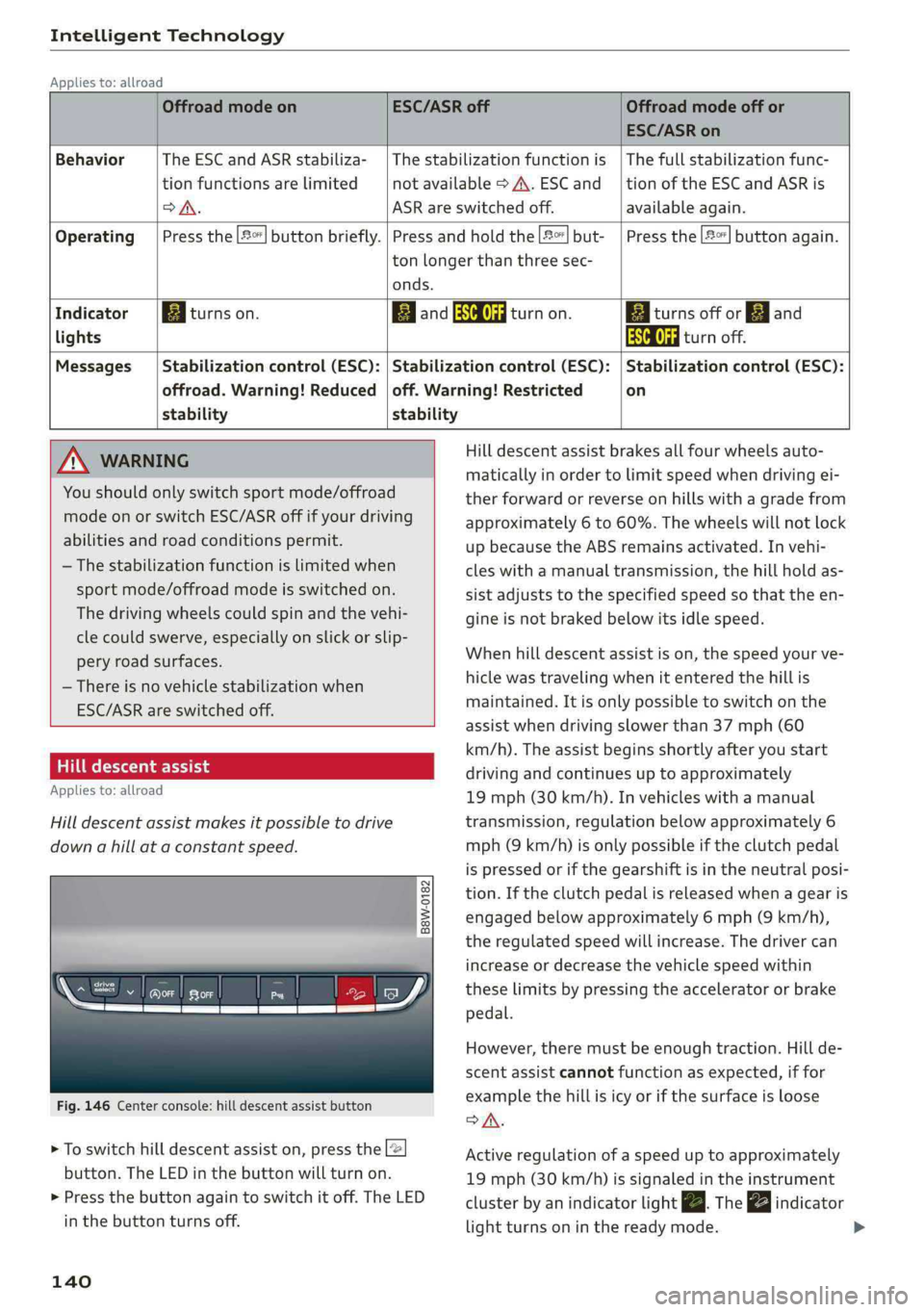
Fig.146Centerconsole:hilldescentassistbutton
>Toswitchhilldescentassiston,presstheL@
button.TheLEDinthebuttonwillturnon.
>»Pressthebuttonagaintoswitchitoff.The LED
inthe buttonturnsoff.
140
OffroadmodeonESC/ASRoffOffroadmodeoffor
ESC/ASRon
BehaviorThe ESC andASRstabiliza-|Thestabilizationfunctionis|Thefullstabilizationfunc-
tionfunctionsarelimitednotavailable>A\.ESCand__|tionoftheESCandASRis
DSA.ASRareswitchedoff.available again.
Operating|Pressthe|#°*]buttonbriefly.|Pressandholdthe||but-|Pressthe|#°"|buttonagain.
tonlongerthanthreesec-
onds.
IndicatorEgiturnson.ElandSaturnon.Eaiturnsoffor[gjand
lightsEaturnoff.
Messages|Stabilizationcontrol(ESC):|Stabilizationcontrol(ESC):|Stabilizationcontrol(ESC):
offroad.Warning!Reduced|off.Warning!Restrictedon
stability stability
AWARNINGHilldescentassistbrakesallfourwheelsauto-
maticallyinordertolimitspeedwhendrivingei-
therforwardorreverseonhillswithagradefrom
approximately6to60%.Thewheelswillnotlock
upbecausetheABSremainsactivated.Invehi-
cleswithamanualtransmission,thehillholdas-
sistadjuststothespecifiedspeedso thattheen-
gineisnot brakedbelowitsidlespeed.
Whenhilldescentassistison,thespeedyourve-
hiclewastravelingwhenitentered thehillis
maintained.Itisonlypossible toswitchonthe
assistwhendrivingslowerthan37mph(60
km/h).Theassistbeginsshortlyafteryoustart
drivingandcontinuesuptoapproximately
19mph(30km/h).Invehicleswithamanual
transmission,regulationbelowapproximately6
mph(9km/h)isonlypossibleiftheclutchpedal
ispressedorifthegearshiftisintheneutralposi-
tion.Iftheclutchpedalisreleasedwhenagearis
engagedbelowapproximately6mph(9km/h),
the regulatedspeedwillincrease.Thedrivercan
increaseordecreasethevehiclespeedwithin
theselimitsbypressingtheacceleratororbrake
pedal.
However,theremustbeenoughtraction.Hillde-
scentassistcannotfunctionasexpected,iffor
examplethehillisicyorifthesurfaceisloose
SA.
Activeregulationofaspeeduptoapproximately
19mph(30km/h)issignaledintheinstrument
clusterby anindicatorlightZBTheindicator
lightturnsoninthereadymode.
Page 165 of 392
8W0012721BG
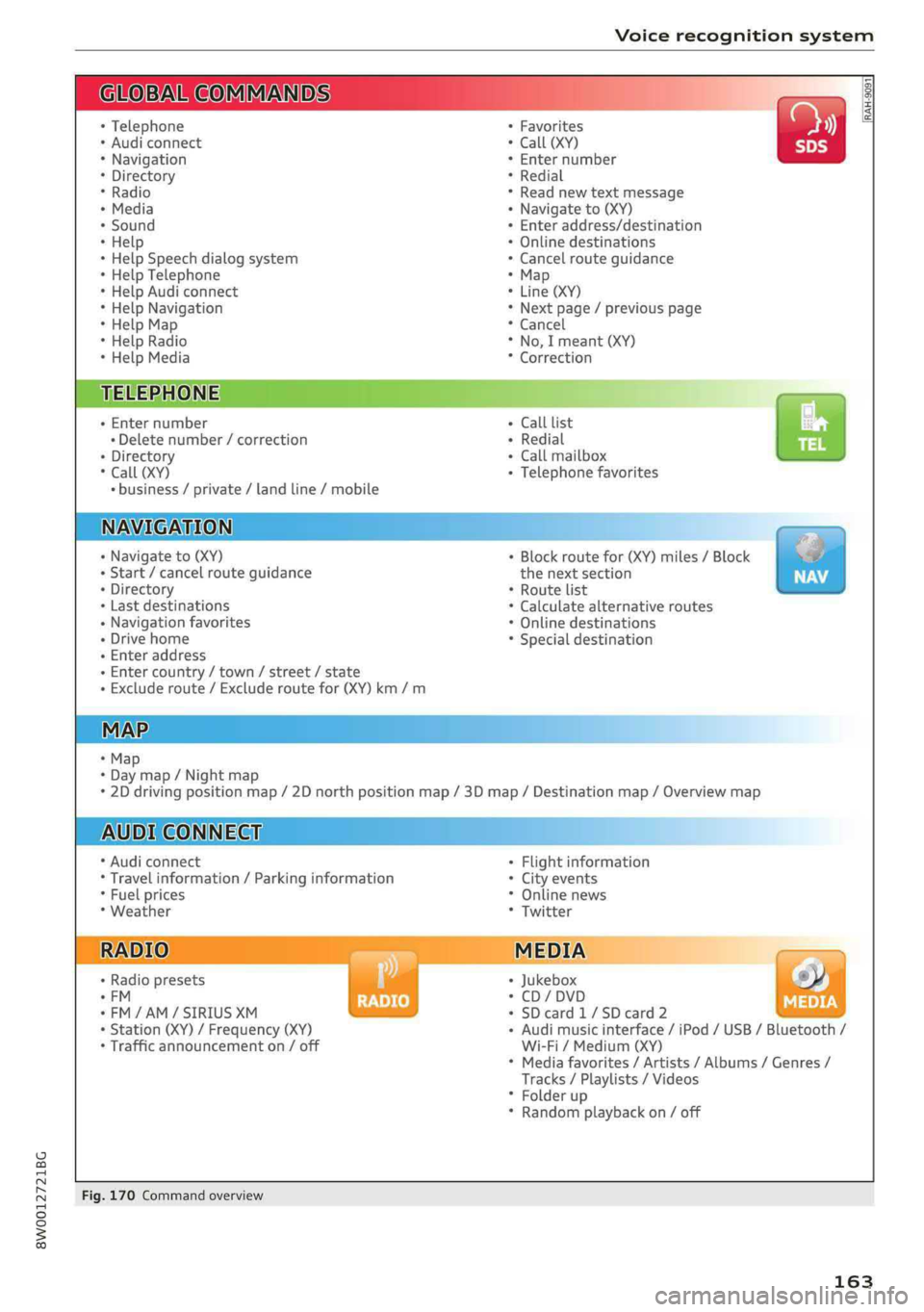
Voicerecognitionsystem
OBARECOMMANDS
RAH-9091
*Telephone+Favorites
+Audiconnect*Call(XY)
*Navigation*Enternumber
*Directory*Redial
*Radio*Readnewtextmessage
*Media+Navigateto(XY)
+Sound+Enteraddress/destination
*Help+Onlinedestinations
+HelpSpeechdialogsystem*Cancelrouteguidance
*HelpTelephone*Map
*HelpAudiconnect+Line(XY)
*HelpNavigation*Next page/previouspage
*HelpMap*Cancel
*HelpRadio*No,Imeant(XY)
*HelpMedia*Correction
TELEPHONE:
+Enternumber+CalllistCs
+Deletenumber/correction+Redialsie
+Directory+Callmailbox
*Call(XY)+Telephonefavorites
*business/private/landline/mobile
NAVIGATION;
+Navigateto(XY)+Block routefor(XY)miles/Block
+Start/cancelrouteguidancethenextsection
+Directory*Routelist
+Lastdestinations*Calculatealternativeroutes
+Navigationfavorites*Onlinedestinations
+Drivehome*Specialdestination
-Enteraddress
+Entercountry/town/street/state
+Excluderoute/Excluderoutefor(XY)km/m
+Map
*Daymap/Nightmap
*2Ddrivingpositionmap/2Dnorthpositionmap/3Dmap/Destinationmap/Overviewmap
AUDICONNECT
*AudiconnectFlightinformation
*Travelinformation/Parkinginformation*Cityevents
*Fuelprices*Onlinenews
*Weather*Twitter
RADIO)MEDIA
+Radiopresets|*Jukeboxs))
°FM*CD/DVD
*FM/AM/SIRIUSXM seedy+SDcard1/SDcard2BRS
+Station(XY)/Frequency(XY)-Audimusicinterface/iPod/USB/Bluetooth/
*Trafficannouncementon/offWi-Fi/Medium(XY)
*Mediafavorites/Artists/Albums/Genres/
Tracks/Playlists/Videos
*Folderup
*Randomplaybackon/off
Fig.170Commandoverview
163
Page 170 of 392
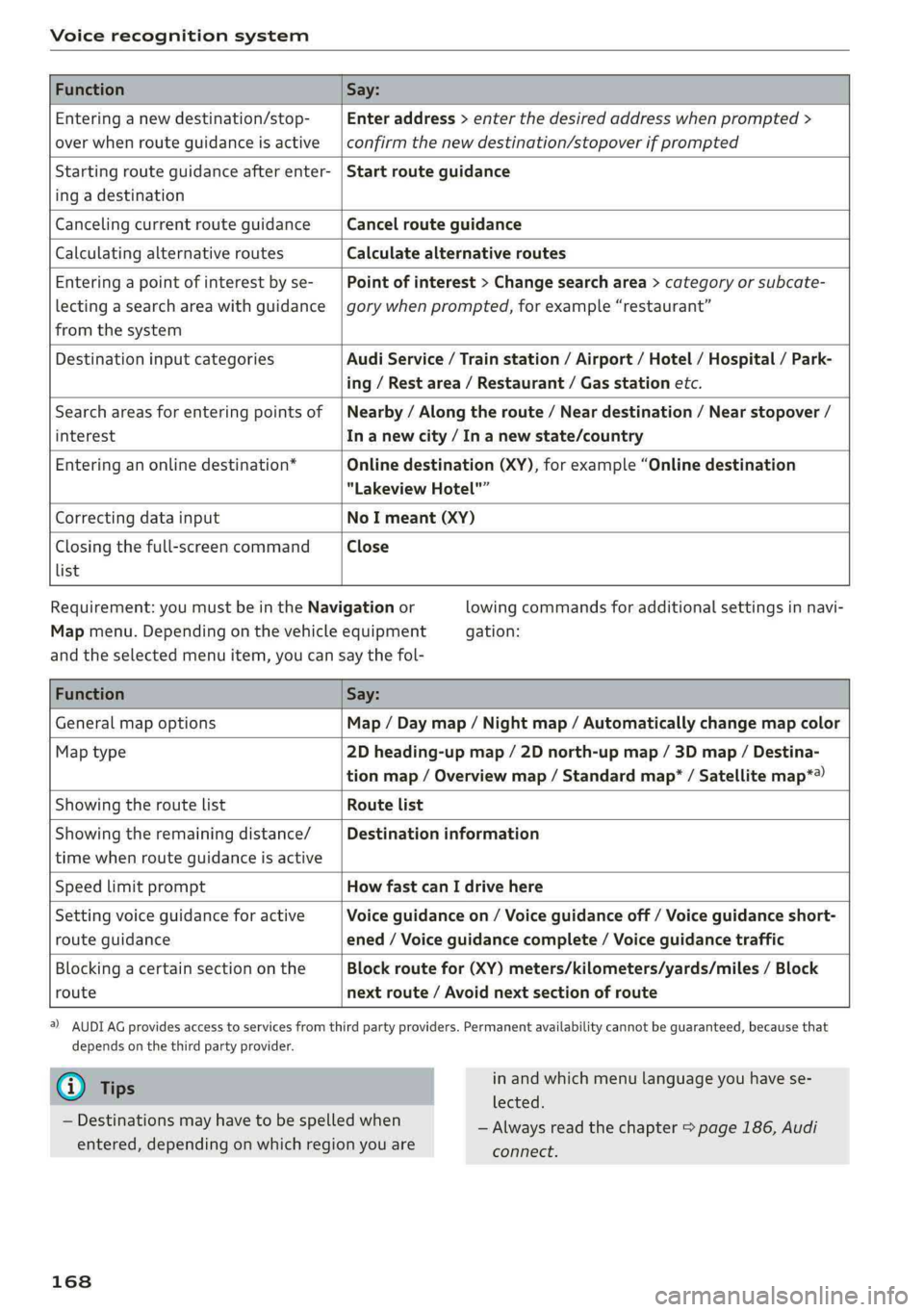
Voicerecognitionsystem
FunctionSay:
Enteringanewdestination/stop-
overwhenrouteguidanceisactive
Enteraddress>enterthedesiredaddresswhenprompted>
confirmthenewdestination/stopoverifprompted
Startingrouteguidanceafterenter-
ingadestination
Startrouteguidance
CancelingcurrentrouteguidanceCancelrouteguidance
CalculatingalternativeroutesCalculatealternativeroutes
Enteringapointofinterestbyse-
lectingasearchareawithguidance
fromthesystem
Pointofinterest>Changesearcharea>categoryorsubcate-
gorywhenprompted,forexample“restaurant”
DestinationinputcategoriesAudiService/Trainstation/Airport/Hotel/Hospital/Park-
ing/Restarea/Restaurant/Gasstationetc.
Searchareasforenteringpointsof
interest
Nearby/Alongtheroute/Neardestination/Nearstopover/
In anewcity/In anewstate/country
Enteringanonlinedestination*Onlinedestination(XY),forexample“Onlinedestination
"LakeviewHotel"”
CorrectingdatainputNoImeant(XY)
Closingthefull-screencommand
list
Close
Requirement: youmustbeintheNavigationor
Mapmenu.Dependingonthevehicleequipment
lowingcommandsforadditionalsettingsinnavi-
gation:
andtheselectedmenuitem,youcansaythefol-
FunctionSay:
GeneralmapoptionsMap/Daymap/Nightmap/Automaticallychangemapcolor
Maptype2Dheading-upmap/2Dnorth-upmap/3Dmap/Destina-
tionmap/Overviewmap/Standardmap*/Satellitemap*®)
Showingtheroute listRoutelist
Showingtheremainingdistance/
timewhenrouteguidanceisactive
Destinationinformation
SpeedlimitpromptHowfastcanIdrivehere
Settingvoiceguidanceforactive
routeguidance
Voiceguidanceon/Voiceguidanceoff/Voiceguidanceshort-
ened/Voiceguidancecomplete/Voiceguidancetraffic
Blockingacertainsectiononthe
route
Blockroutefor(XY)meters/kilometers/yards/miles/Block
nextroute/Avoidnextsectionofroute
)AUDIAGprovidesaccesstoservicesfromthirdpartyproviders.Permanentavailabilitycannotbeguaranteed,becausethat
dependsonthethirdpartyprovider.
@Tips
—Destinationsmayhavetobespelledwhen
entered,dependingonwhichregionyouare
168
inandwhichmenulanguageyouhavese-
lected.
—Alwaysreadthe chapter>page186,Audi
connect.
Page 177 of 392
8W0012721BG
Telephone
@)Note
ApplicabletoCanada
InCanada,operationofaZoneEnhancer,
suchasan AudiPhoneBox,issubjecttothe
followingrequirementsoftheInnovation,
ScienceandEconomicDevelopmentCanada
(ISED):
—ThisisaCONSUMERdevice.
—BEFOREUSE,youMUSTmeetallrequire-
mentssetoutinCPC-2-1-05.
—YouMUSToperatethisdevicewithapproved
antennas
andcablesasspecifiedbythe
manufacturer.AntennasMUSTNOTbein-
stalledwithin20cmofanyperson.
—YouMUSTceaseoperatingthisdeviceim-
mediatelyifrequestedbyISEDoralicensed
wirelessserviceprovider.
—WARNING:£911locationinformationmay
notbeprovidedormaybeinaccuratefor
callsservedbyusingthisdevice.
G)Tips
— TheAudiphoneboxisnotavailableinall
countries.Foradditionalinformation,con-
tactanauthorizedAudidealership.
—Placingthemobiledeviceinabagorprotec-
tivesleeveinsidetheAudiphoneboxcanin-
terferewiththeconnectiontotheexternal
antenna®*.
—Metallicobjectsinthe Audiphoneboxblock
thewirelesschargingofyourmobiledevice
andcallsmadeusingtheexteriorantenna’*.
— Thechargingtimeandtemperaturewillvary
dependingonthemobiledevicebeingused.
—Yourmobiledevicecanonlybechargedin
theAudiphoneboxwhentheignitionis
switchedon.
—Toreducetheriskofmalfunctions,make
surethemobiledeviceispositionedcorrect-
ly inthe Audiphonebox.
— Themaximumchargingoutputis5watts.
—Strongtransmissionqualitycannotbeguar-
anteedifmorethanonemobiledeviceisin
thebox.”
—Onlyonemobiledeviceatatimecanbe
chargedwirelesslyintheAudiphonebox.
—AudirecommendsusingAudiGenuineAc-
cessories.Audihasverifiedtheirreliability,
safety,andsuitability.
—YoucanpurchaseaUSBadapterfromanau-
thorizedAudidealerorauthorizedAudi
ServiceFacility,oratspecialtystores.
Usingthetelephone
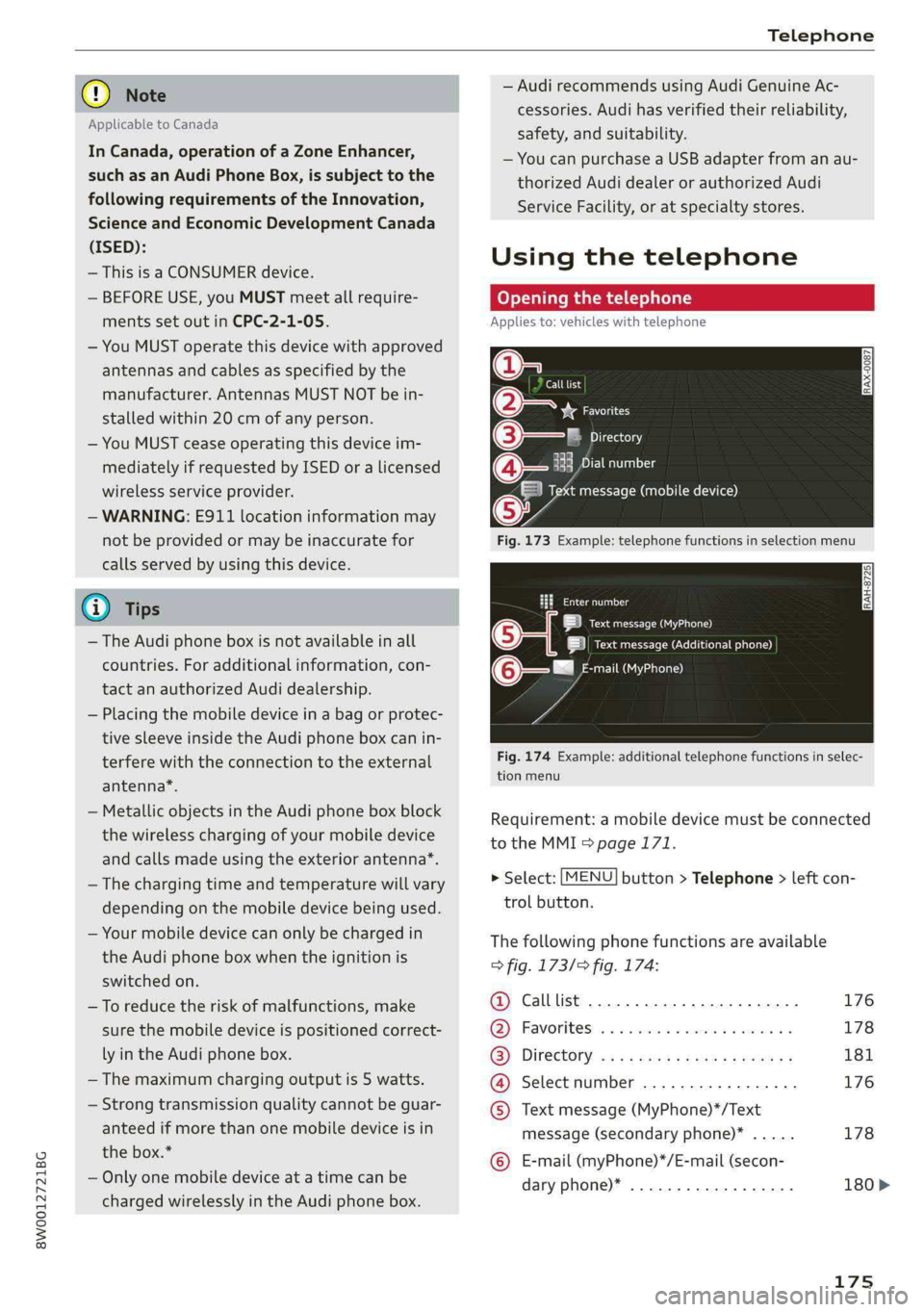
Openingthetelephone
Appliesto:vehicleswithtelephone
Calllist
(2yeFavorites
©—PTicraxelay
EePrelia)1g
Taimessage(mobiledevice)
Fig.173Example:telephonefunctionsinselectionmenu
taeeal
LaueOa)
|ieectursecreueenen)
mail(MyPhone)@-—"
Fig.174Example:additionaltelephonefunctionsinselec-
tionmenu
Requirement:amobiledevicemustbeconnected
totheMMI>page171.
>Select:[MENU]button>Telephone>leftcon-
trolbutton.
Thefollowingphonefunctionsareavailable
>fig.173/>fig.174:
@Calllist.............0ceceee176
@®Favorites.........0.ceeeeeee178
(3)DIFECUOTYwcx xcaysxaessypeness181
@Selectnumber.................176
©Textmessage(MyPhone)*/Text
message(secondaryphone)*.....178
©E-mail(myPhone)*/E-mail(secon-
daryphone)*..................180>
175
Page 193 of 392
8W0012721BG
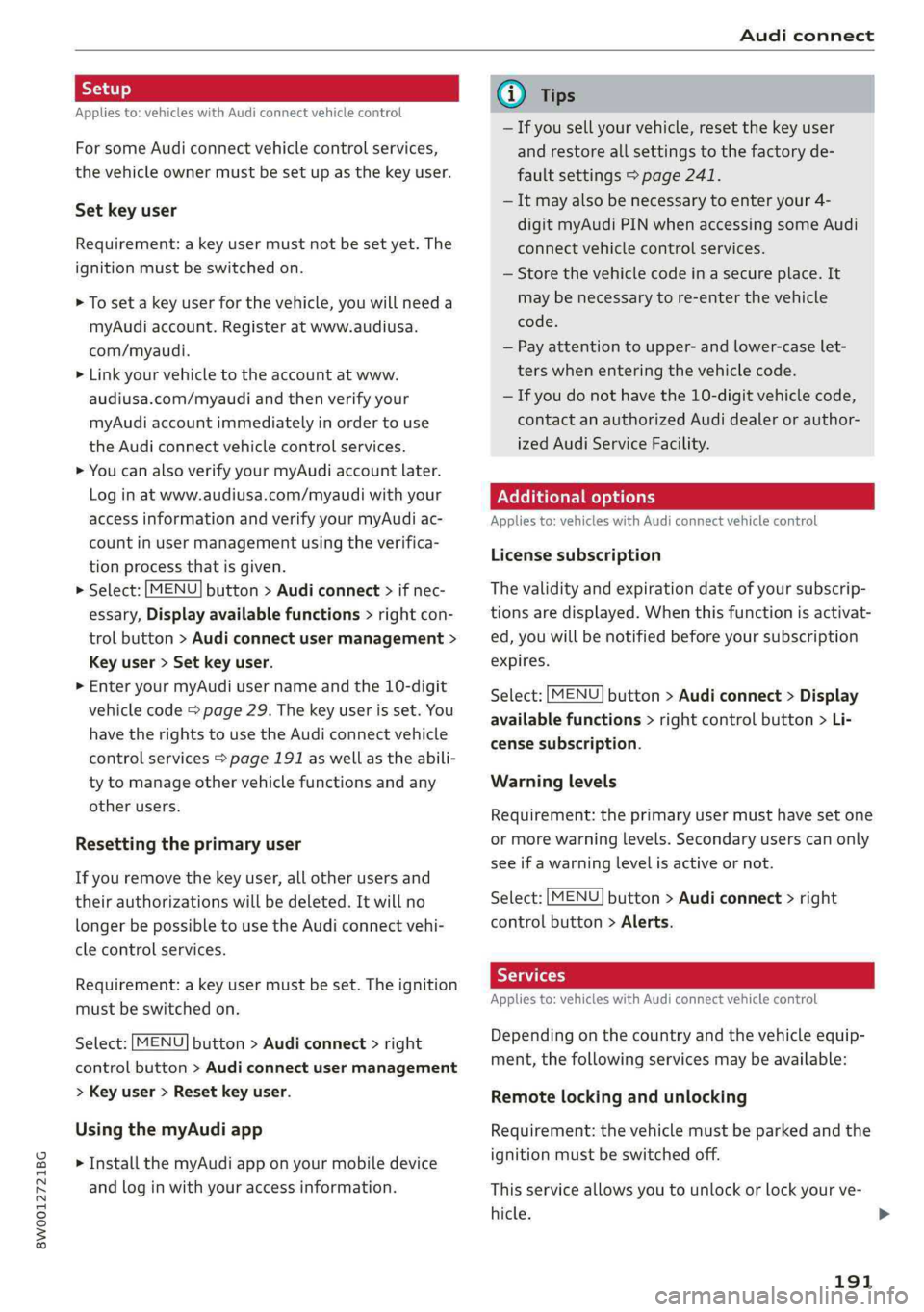
Audiconnect
Appliesto:vehicleswithAudiconnectvehiclecontrol
ForsomeAudiconnectvehiclecontrolservices,
thevehicleownermustbesetupasthekeyuser.
Setkeyuser
Requirement:akeyusermustnotbesetyet.The
ignitionmustbe switchedon.
>Tosetakeyuserforthevehicle,youwillneeda
myAudiaccount.Registeratwww.audiusa.
com/myaudi.
>Linkyourvehicletotheaccountatwww.
audiusa.com/myaudiandthenverifyyour
myAudiaccountimmediatelyinordertouse
the Audiconnectvehiclecontrolservices.
»YoucanalsoverifyyourmyAudiaccountlater.
Log
inatwww.audiusa.com/myaudiwithyour
accessinformationandverifyyourmyAudiac-
countinusermanagementusingtheverifica-
tionprocessthatisgiven.
>Select:[MENU]button>Audiconnect>ifnec-
essary,Displayavailablefunctions>rightcon-
trolbutton>Audiconnectusermanagement>
Keyuser>Set keyuser.
>
EnteryourmyAudiusernameandthe10-digit
vehiclecode=page29.Thekeyuserisset.You
havetherightstouse the Audiconnectvehicle
controlservices>page191aswellastheabili-
tytomanageothervehiclefunctionsandany
otherusers.
Resettingtheprimaryuser
Ifyouremovethekeyuser,allotherusersand
theirauthorizationswillbedeleted.Itwillno
longerbepossible touse the Audiconnectvehi-
clecontrolservices.
Requirement:akeyusermustbe set.Theignition
mustbe switchedon.
Select:[MENU]button>Audiconnect>right
controlbutton>Audiconnectusermanagement
>Keyuser>Resetkeyuser.
UsingthemyAudiapp
>InstallthemyAudiapponyourmobiledevice
andloginwithyouraccessinformation.
@Tips
—Ifyousellyourvehicle,resetthekeyuser
andrestoreallsettings tothefactoryde-
faultsettings>page241.
—Itmayalsobenecessarytoenteryour4-
digitmyAudiPINwhenaccessingsomeAudi
connectvehiclecontrolservices.
—Storethevehiclecodeinasecureplace.It
maybenecessarytore-enterthevehicle
code.
—Payattentiontoupper-andlower-caselet-
terswhenenteringthevehiclecode.
—Ifyoudonot havethe10-digitvehiclecode,
contactanauthorizedAudidealerorauthor-
izedAudiServiceFacility.
Additionaloptions
Appliesto:vehicleswith Audiconnectvehiclecontrol
Licensesubscription
Thevalidityandexpirationdateofyoursubscrip-
tionsaredisplayed.Whenthisfunctionisactivat-
ed,youwillbenotifiedbeforeyoursubscription
expires.
Select:[MENU]button>Audiconnect>Display
availablefunctions>rightcontrolbutton>Li-
censesubscription.
Warninglevels
Requirement:theprimaryusermusthavesetone
ormorewarninglevels.Secondaryuserscanonly
seeifawarninglevelisactiveornot.
Select:[MENU]button>Audiconnect>right
controlbutton>Alerts.
Appliesto:vehicleswith Audiconnectvehiclecontrol
Depending onthecountryandthevehicleequip-
ment,thefollowingservicesmaybeavailable:
Remotelockingandunlocking
Requirement:thevehiclemustbeparkedandthe
ignitionmustbeswitchedoff.
Thisserviceallowsyoutounlockor lockyourve-
hicle.>
191
Page 228 of 392
— Depending ontheInternetconnectionand
networktraffic,theconnectionmaydiscon-
nectedwhenonlinemediasourcesareplay-
ing.
—OnlinemediaandInternetradiousagede-
pendsontheserviceavailabilityofthethird
partyprovider.
—AudiAGsimplymakestheaccesstoonline
mediaservicespossiblethroughtheMMI
anddoesnottakeanyresponsibilityforthe
contentsoftheonlinemediaservices.
—Alwaysreadthe chapter>page186,Audi
connect.
— Depending onthemobiledevicebeingused,
theremaybeinterruptionsduringmedia
playbackandwhenusingthemyAudiapp.
Topreventinterruptionswhenusingamo-
biledevice,donotlockthescreenonyour
mobiledeviceandkeepthemyAudiappin
theforeground.
—ContactanauthorizedAudidealeror au-
thorizedAudiServiceFacilityforadditional
informationaboutonlinemedia.
Multimediaconnections
USBadapterforAudimusicinterfaceor
USBchargingport
Dependingonthevehicleequipment,youcan
connectyourmobiledevices(suchas asmart-
phoneorMP3player)totheAudimusicinterface
oraUSBchargingportusingaspecialUSB
adapter.
ao
ee
alS
_<
Fig.205AudiGenuineAccessories:USBadapter
[RAH-9202
ae
\
226
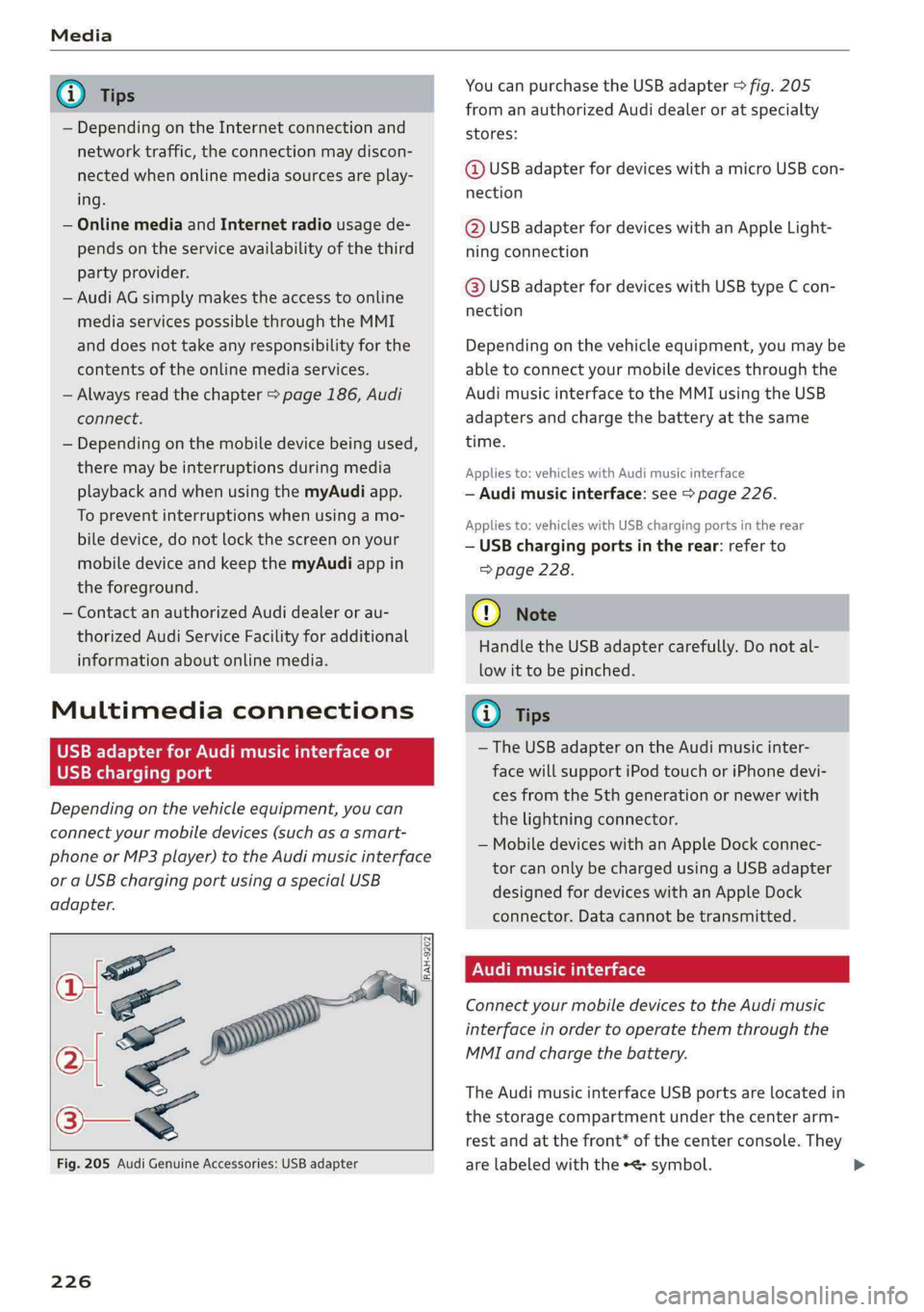
YoucanpurchasetheUSBadapter>fig.205
fromanauthorizedAudidealeroratspecialty
stores:
@USBadapterfordeviceswithamicroUSBcon-
nection
@USBadapterfordeviceswithanAppleLight-
ningconnection
@USBadapterfordeviceswithUSBtypeCcon-
nection
Dependingonthevehicleequipment,youmaybe
abletoconnectyourmobiledevicesthroughthe
Audi
musicinterfacetotheMMIusingtheUSB
adaptersandchargethebatteryatthesame
time.
Appliesto:vehicleswithAudimusicinterface
—Audimusicinterface:see>page226.
Appliesto:vehicleswithUSBchargingportsintherear
—USBchargingportsintherear:referto
=>page228.
@)Note
HandletheUSBadaptercarefully.Donotal-
lowittobepinched.
(i)Tips
— TheUSBadapteronthe Audimusicinter-
facewillsupportiPodtouchoriPhonedevi-
cesfromthe5thgenerationornewerwith
thelightningconnector.
—MobiledeviceswithanAppleDockconnec-
torcanonlybechargedusingaUSBadapter
designedfordeviceswithanAppleDock
connector.Datacannotbetransmitted.
NUTTae)
ConnectyourmobiledevicestotheAudimusic
interfaceinordertooperatethemthroughthe
MMIandchargethebattery.
TheAudimusicinterfaceUSBportsarelocatedin
thestoragecompartmentunderthecenterarm-
restandatthefront*ofthecenterconsole.They
arelabeledwiththe«<>symbol.