lighting AUDI S4 2019 Owners Manual
[x] Cancel search | Manufacturer: AUDI, Model Year: 2019, Model line: S4, Model: AUDI S4 2019Pages: 392, PDF Size: 99.53 MB
Page 4 of 392
Tableofcontents
AboutthisOwner'sManual......
SUIMIMAFY:« «225%:222%:seenseos
QuikaCCESShis:6 iesia6weesasewe
Cockpitoverview.............-0000-5
Indicatorlightsoverview...........0..
Displayandoperation............
Instrumentcluster...............
Instrumentclusteroverview...........
Coolanttemperatureindicator.........
Tachometer.........0.0 eeeeeeee
Fulellevélse.:2wessysewssoeeesoees
Odometersiceosisiecsoreseseemeeomens
Multifunctionsteeringwheelplus......
Multifunctionsteeringwheel..........
Vehiclefunctions«csv.eeveeweveo
MessageS...0...eeeeee
Head-updisplay..................
Description...............0..000000.
Startinganddriving.............
Openingandclosing.............
Centrallocking..................000-
Luggagecompartmentlid.............
Childisatiety,LOKsecnsicex +emersin« iwnisne+oisens
PowerwindowS............000e0eee
Sliding/tiltingsunroof................
Panoramicglassroof.................
Valetparking............-.000eee eee
Garagedooropener........eeeeeeneee
LightsandVision.................
EXteriorlightingsasy ¢sewszoeees2eee
Interiorlightingie:+«sewssswesseeee
Vision...eeeee
Windshieldwipers...............0005
Digital.compass':«sci:«5eewseemeeeeee
FROMUESCALS cnnisens6 &casiseiswoeeocins© #somes&ot
Headrestraints...........00.00eee eee
MEIOryFUTICEION«ccs: ©nem&oaesyee
co
©
©
10
13
13
13
14 14
1515 15
18
19
21
2727
28
28
28
35
40
4142 43 43
44
4747
50
SL
53
56 58 58 58 59 60
Stowingandusing...............62
Ashtray...6.6ceceeeeeeeeeeeee62
Cigarettelight@r’:secsssnews2 2sewsxee62
POWEPSOUNCESsisiccacocnciveneoooreswvaero62
Storage...eeeeeeeee63
Luggagecompartment...............64
ROOPPACKE.5 &income«wvsenvavewaaminesawaraww70
Warmandcold...................va
Climatecontrolsystem...............ZA
3-zonedeluxeautomaticclimatecontrol.72
Steeringwheelheating...............74
BGRAINGE:&csevessa 6smswes5 &eueenceooareaswoaa76
Generalinformation.................76
STEERING&qua5=nowy2 &OEEEEReste7
ShiftingintoGeticvssecssocomersveoe77
Startingandstoppingtheengine.......78
Start/StopSystem«exessseveaxoesge80
Electromechanicalparkingbrake.......82
Starting todrive.......2...eeeeee83
DrivingOfffOad«2e0:: =2ae8semeeeseee84
Automatictransmission..............85
Trailertowing....................93
Drivingwithiatrailers«sae«»sausocaw93
Driverassistance.................95
Assistsystems...................95
Speedwarningsystem..............--95
Cruise controlsystem.............0-.95
Camera-basedtrafficsignrecognition...97
WeaPeCHIM)Hawcsis&wsaeewnss«suawessa xssieoants99
Predictiveefficiencyassist.............100
Audi adaptivecruisecontrol...........102
Audiprevsensess=sscosx 6sewssveaeooawe112
Audiactivelaneassist................117
AudiSidéSSSiStisy: «qwax:« 3wmee2smeme= 2121
Audidriverselect)s«isisiisnsa vaave126
Parkingaid.......................129
Generalinformation.................129
Rearparkingsystem............-.4..130
Parkingsystemplus.............-.05.130
Rearviewcamerasacs< .eeuisseesoes132
PeripheralcameraS........0.02.eee133
Page 29 of 392
8W0012721BG
Head-updisplay
Head-updisplay
Description
Appliesto:vehicleswithhead-updisplay
0 as
ge32%oS
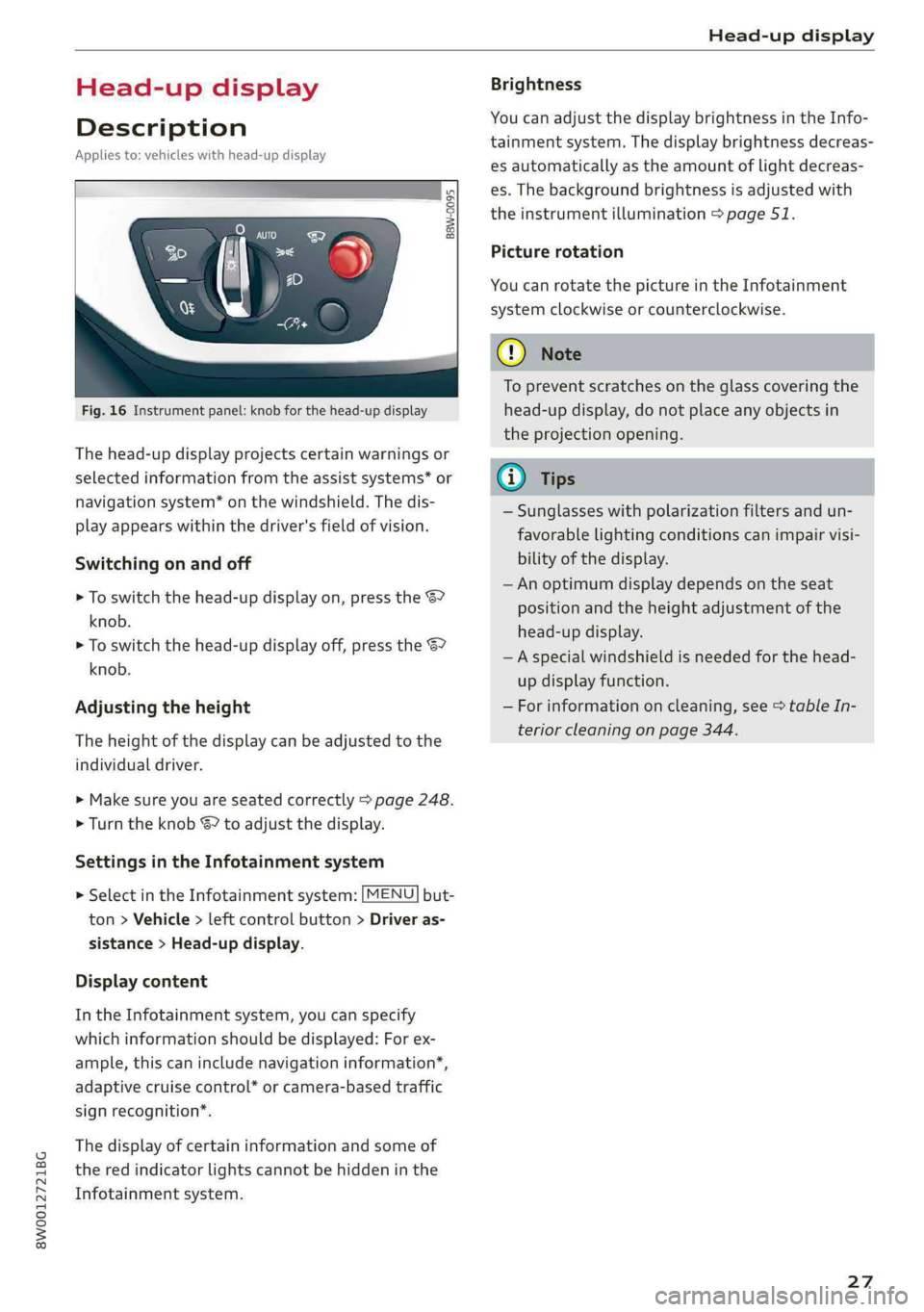
Fig.16Instrumentpanel:knobforthehead-updisplay
Thehead-updisplayprojectscertainwarningsor
selectedinformationfromtheassistsystems*or
navigationsystem*onthewindshield.Thedis-
playappearswithinthedriver'sfieldofvision.
Switchingonandoff
>Toswitchthehead-updisplayon,pressthe67
knob.
>Toswitchthehead-updisplayoff,presstheS7
knob.
Adjustingtheheight
Theheightofthedisplaycan beadjustedtothe
individualdriver.
>Makesureyouareseatedcorrectly>page248.
>Turn theknobS?toadjustthedisplay.
SettingsintheInfotainmentsystem
>SelectintheInfotainmentsystem:[MENU]but-
ton>Vehicle> leftcontrolbutton>Driveras-
sistance>Head-updisplay.
Displaycontent
IntheInfotainmentsystem,youcanspecify
whichinformationshould bedisplayed:Forex-
ample,thiscanincludenavigationinformation”,
adaptivecruisecontrol*orcamera-basedtraffic
signrecognition*.
Thedisplay ofcertaininformationandsomeof
thered indicatorlightscannotbehiddeninthe
Infotainmentsystem.
Brightness
YoucanadjustthedisplaybrightnessintheInfo-
tainmentsystem.Thedisplaybrightnessdecreas-
esautomaticallyastheamountoflightdecreas-
es.Thebackgroundbrightnessisadjusted with
theinstrumentillumination>page51.
Picturerotation
YoucanrotatethepictureintheInfotainment
systemclockwiseorcounterclockwise.
CG)Note
Topreventscratchesontheglasscoveringthe
head-updisplay,donotplaceanyobjectsin
theprojectionopening.
@)Tips
—Sunglasseswithpolarizationfiltersandun-
favorable
lightingconditionscanimpairvisi-
bilityofthedisplay.
— Anoptimumdisplaydependsontheseat
positionandthe heightadjustmentofthe
head-updisplay.
—Aspecialwindshieldisneededforthe head-
updisplayfunction.
—Forinformationoncleaning,see>tableIn-
teriorcleaningonpage344.
27
Page 31 of 392
8W0012721BG
Openingandclosing
—Appliesto:allroad:Iftheconveniencekey
thatwaslastusedisdetectedinsidetheve-
hicle,thenitwillnotbepossibletolockthe
vehiclefromtheoutside.Theturnsignals
willflashseveraltimestoindicatethis.If
youdonotopenthevehiclewithinashort
timetoremovethevehiclekey,thentheve-
hiclewilllockautomatically.Thisprevents
thevehiclefrombeingleftunlockedforlong
periodsoftime.Thekeywillthenbelocked
insidethevehicle.
@)Tips
—Donotleavevaluablesunattendedintheve-
hicle.Alockedvehicleisnota safe!
—TheLEDinthedriver'sdoorrailblinkswhen
youlockthevehicle.IftheLEDlightsupfor
approximately30secondsafterlocking,
thereisamalfunctioninthecentral locking
system.Havetheproblemcorrectedby an
authorizedAudidealerorauthorizedAudi
ServiceFacility.
BFV-0278
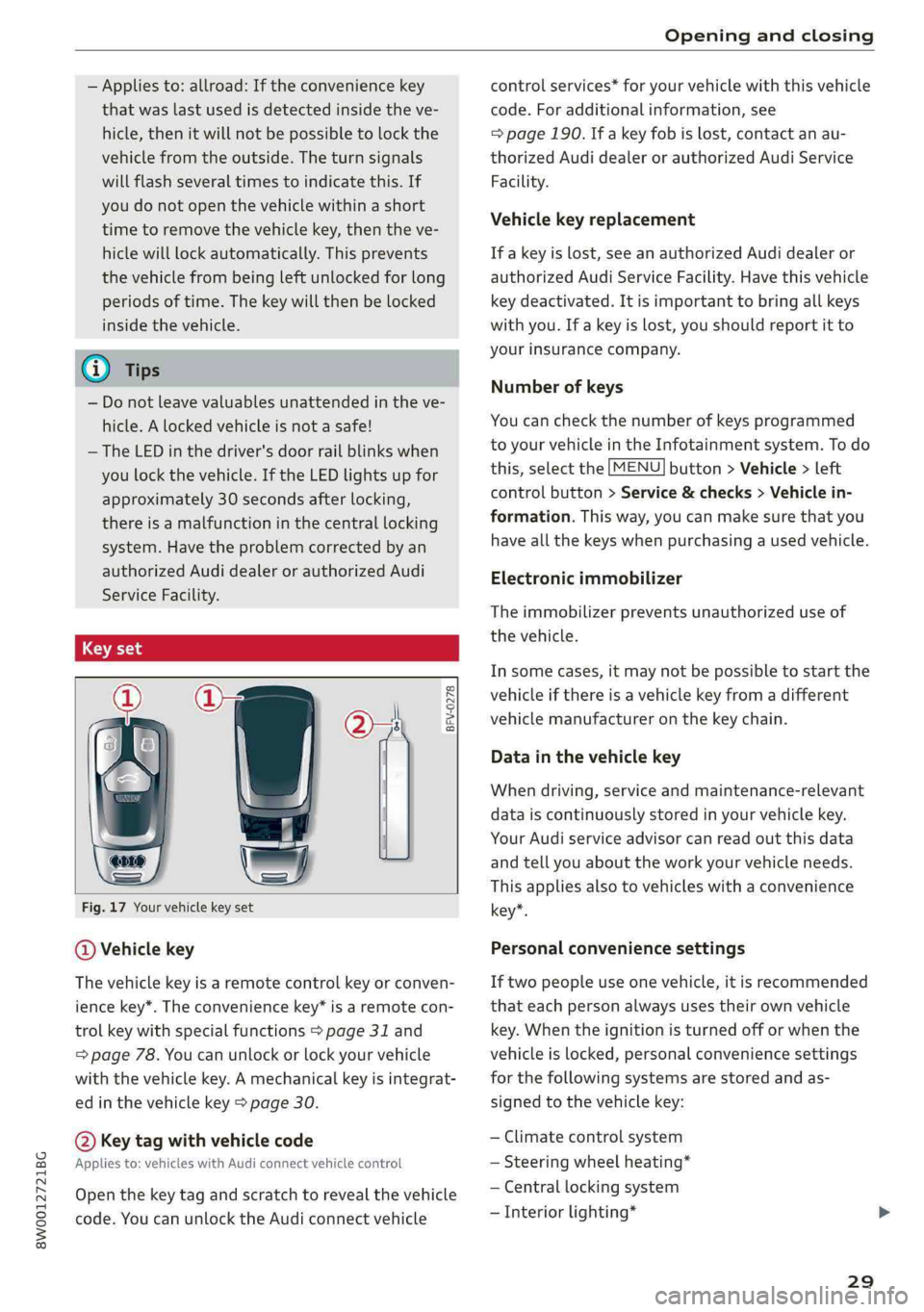
Fig.17Yourvehiclekeyset
@Vehiclekey
Thevehiclekeyisaremotecontrolkeyorconven-
iencekey*.Theconveniencekey*isaremotecon-
trolkeywithspecialfunctions>page31and
=page78.Youcanunlockorlockyourvehicle
withthevehiclekey.Amechanicalkeyisintegrat-
edinthevehiclekey>page30.
@Keytagwithvehiclecode
Appliesto:vehicleswithAudiconnectvehiclecontrol
Openthekey tagandscratch torevealthevehicle
code.YoucanunlocktheAudiconnectvehicle
controlservices*foryourvehiclewiththisvehicle
code.Foradditionalinformation,see
=page190.Ifakeyfobislost,contactanau-
thorizedAudidealerorauthorizedAudiService
Facility.
Vehiclekeyreplacement
If akeyislost,seeanauthorizedAudidealeror
authorizedAudiServiceFacility.Havethisvehicle
keydeactivated.Itisimportanttobringallkeys
withyou.Ifakeyislost,youshouldreportitto
yourinsurancecompany.
Numberofkeys
Youcan checkthenumberofkeysprogrammed
toyourvehicleintheInfotainmentsystem.Todo
this,selectthe[MENU]button>Vehicle>left
controlbutton>Service&checks>Vehiclein-
formation.Thisway,youcanmakesurethatyou
haveallthekeyswhenpurchasingausedvehicle.
Electronicimmobilizer
Theimmobilizerpreventsunauthorizeduseof
thevehicle.
Insomecases,itmaynotbepossible tostartthe
vehicleifthereisavehiclekeyfromadifferent
vehiclemanufactureronthe keychain.
Datainthevehiclekey
Whendriving,serviceandmaintenance-relevant
dataiscontinuouslystoredinyourvehiclekey.
YourAudiserviceadvisorcanreadoutthisdata
andtellyouabouttheworkyourvehicleneeds.
This appliesalsotovehicleswithaconvenience
*key*.
Personalconveniencesettings
Iftwopeopleuseonevehicle,itisrecommended
thateachpersonalwaysusestheirownvehicle
key.Whentheignitionisturnedofforwhenthe
vehicleislocked,personalconveniencesettings
forthefollowingsystemsarestoredandas-
signedtothevehiclekey:
—Climatecontrolsystem
—Steeringwheelheating*
—Centrallockingsystem
—Interiorlighting*
29
Page 32 of 392
Openingandclosing
—Exteriorlighting
—Rainsensor
—Memoryfunction*
—Parkingaid*
—Adaptivecruisecontrol*
—Active laneassist*
—Sideassist*
—Trafficjamassist*
—Distancewarning*
—Audipresense*
—Speedwarning*
Thestoredsettings areautomaticallyrecalled
whenyouunlock thevehicle,openthedoorsor
turnontheignition.
®Note
Protectthekeyagainsthightemperatures
anddirectsunlight.
G)Tips
— Thevehiclekeyfunctioncanbetemporarily
disruptedbyinterferencefromtransmitters
nearthevehicleworkinginthesamefre-
quencyrange(suchasamobiledeviceorra-
dioequipment).Alwayscheckifyourvehicle
islocked.
—Foranexplanationonconformitywiththe
FCCregulationsintheUnitedStatesandthe
IndustryCanadaregulations,see
=>page370.
Removingthemechanicalkey
BFV-0279
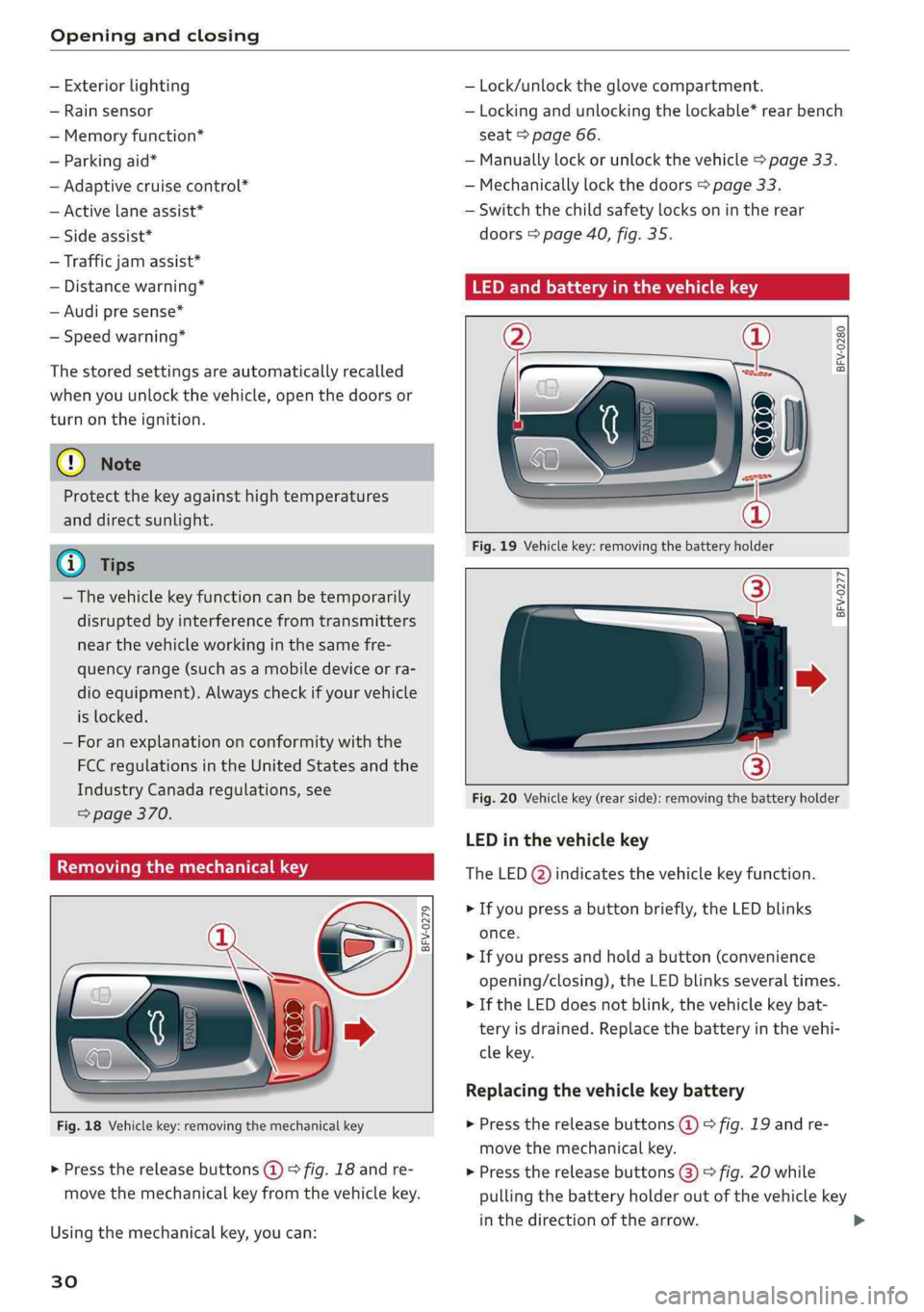
Fig.18Vehiclekey:removingthemechanicalkey
>Pressthereleasebuttons(@©fig.18andre-
movethemechanicalkeyfromthevehiclekey.
Usingthemechanicalkey,youcan:
30
—Lock/unlocktheglovecompartment.
—Lockingandunlockingthelockable*rearbench
seat>page66.
—Manuallylock orunlockthevehicle>page33.
—Mechanicallylockthedoors>page33.
—Switchthechildsafetylocksonintherear
doors>page40,fig.35.
LEDandbatteryinthevehiclekey
BFV-0280
Fig.19Vehiclekey:removingthebatteryholder
BFV-0277
Fig.20Vehiclekey(rearside):removingthebatteryholder
LEDinthevehiclekey
TheLED(@)indicatesthevehiclekeyfunction.
>Ifyoupressabuttonbriefly,theLEDblinks
once.
>Ifyoupressandholdabutton(convenience
opening/closing),theLEDblinksseveraltimes.
>IftheLEDdoesnotblink,thevehiclekeybat-
teryisdrained.Replacethebatteryinthevehi-
clekey.
Replacingthevehiclekeybattery
>Pressthereleasebuttons()>fig.19andre-
movethemechanicalkey.
>Pressthereleasebuttons(3)>fig.20while
pullingthebatteryholderoutofthevehiclekey
inthedirectionofthearrow.
Page 49 of 392
8W0012721BG
LightsandVision
LightsandVision
Exteriorlighting
Switchingthelightsonandoff
iSg ge
=o3
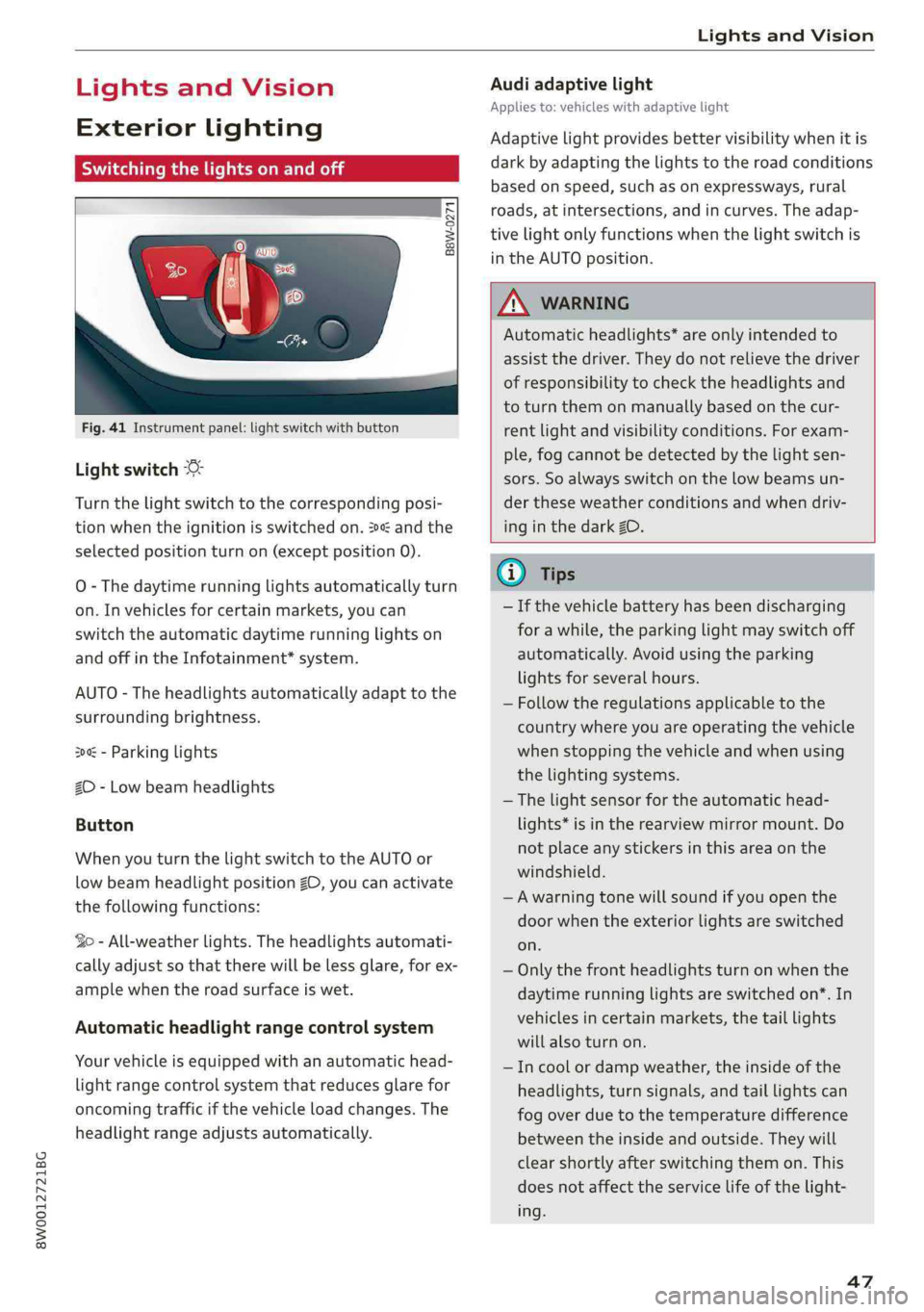
Fig.41Instrumentpanel:lightswitchwithbutton
Lightswitch©:
Turnthelightswitchtothecorrespondingposi-
tionwhentheignitionisswitchedon.2andthe
selectedpositionturnon(exceptposition0).
O-Thedaytimerunninglightsautomaticallyturn
on.Invehiclesforcertainmarkets,youcan
switchtheautomaticdaytimerunninglightson
andoffintheInfotainment*system.
AUTO-Theheadlightsautomaticallyadapttothe
surroundingbrightness.
300-Parkinglights
2D-Lowbeamheadlights
Button
WhenyouturnthelightswitchtotheAUTOor
lowbeamheadlightpositionZO,youcanactivate
thefollowingfunctions:
So-All-weatherlights.Theheadlightsautomati-
callyadjustsothattherewillbelessglare,forex-
amplewhentheroadsurfaceiswet.
Automaticheadlightrangecontrolsystem
Yourvehicleisequippedwithanautomatichead-
lightrangecontrolsystemthatreducesglarefor
oncomingtrafficifthevehicleloadchanges.The
headlightrangeadjusts automatically.
Audiadaptivelight
Appliesto:vehicleswithadaptivelight
Adaptivelightprovidesbettervisibilitywhenitis
darkbyadaptingthelightstotheroadconditions
basedonspeed,suchasonexpressways,rural
roads,at intersections,andincurves.Theadap-
tivelightonlyfunctionswhenthelightswitchis
intheAUTOposition.
ZXWARNING
Automaticheadlights”areonlyintendedto
assistthedriver.They donotrelievethedriver
ofresponsibilitytochecktheheadlightsand
toturnthemonmanuallybasedonthecur-
rentlightandvisibilityconditions.Forexam-
ple,fogcannotbe detectedbythelightsen-
sors.Soalwaysswitchonthelowbeamsun-
der theseweatherconditionsandwhendriv-
inginthedarkZO.
G@)Tips
—Ifthevehiclebatteryhasbeendischarging
forawhile,theparkinglightmayswitchoff
automatically.Avoidusingtheparking
lightsforseveralhours.
—Follow theregulationsapplicabletothe
countrywhereyouareoperatingthevehicle
whenstoppingthevehicleandwhenusing
thelightingsystems.
—Thelightsensorfortheautomatichead-
lights*isintherearviewmirrormount.Do
notplaceanystickersinthisareaonthe
windshield.
—Awarningtonewillsoundifyouopenthe
doorwhentheexteriorlightsareswitched
on.
—Onlythefrontheadlightsturnonwhenthe
daytimerunninglightsareswitchedon*.In
vehiclesincertainmarkets,thetaillights
willalsoturnon.
—Incoolordampweather,theinsideofthe
headlights,turnsignals,andtaillightscan
fog
overduetothetemperaturedifference
betweenthe insideandoutside.Theywill
clearshortlyafterswitchingthemon.This
doesnotaffecttheservicelifeofthelight-
ing.
47
Page 51 of 392

8W0012721BG
LightsandVision
Headlightassistant:malfunction!Seeown-
er'smanual
DrivetoanauthorizedAudidealerorauthorized
AudiServiceFacilityimmediatelytohavethe
malfunctioncorrected.Youcanstillswitchthe
highbeamsonoroffmanually.
Headlightassistant:currentlyunavailable.
Cameraviewrestrictedduetosurroundings.
Seeowner'smanual
Thecameraviewisblocked,forexamplebya
stickerordebris.
Thesensorislocated betweentheinteriorrear-
viewmirrorandthewindshield.Donotplaceany
stickersinthisareaonthewindshield.
ZAWARNING
Highbeamassistantisonlyintendedtoassist
thedriver.Thedriverisstillresponsiblefor
controllingtheheadlightsandmayneedto
switchthemonandoffmanuallydepending
onlightandvisibilityconditions.Itmaybe
necessarytooperatethemmanuallyinsitua-
tionssuchas:
—Inadverseweatherconditionssuchasfog,
heavyrain,blowingsnoworsprayingwater.
—Onroadswhereoncomingtrafficmaybe
partiallyobscured,suchasexpressways.
—Whenthereareroadusersthatdonot have
sufficientlighting,suchasbicyclersorvehi-
cleswithdirtytaillamps.
—Intightcurvesandonsteephills.
—Inpoorlylitareas.
—Withstrongreflectors,suchassigns.
—Iftheareaofthewindshieldnearthesensor
isfoggedover,dirty,icyorcoveredwitha
sticker.
Adjustingtheexterior lighting
ThefunctionsareadjustedintheInfotainment
system.
> SelectintheInfotainmentsystem:[MENU]but-
ton>Vehicle> leftcontrolbutton>Vehicle
settings>Exteriorlighting.
Automaticheadlights
YoucanadjustthefollowingsettingsintheAuto-
matic
headlightsmenu:
Activationtime-youcanadjustiftheheadlights
switchonEarly,MediumorLateaccordingtothe
sensitivityofthelightsensor.
Headlightassistant*-youcanswitchthehigh
beamassistant*onandoff.
Entry/exitlighting
Whenitisdark,theEntry/exitlightingillumi-
natestheareaaroundthevehiclewhenunlocking
the
vehicleandafterswitchingofftheignition
andopeningthedriver'sdoor.
TheEntry/exitlightingonlyworkswhenitisdark
andthelightswitchisintheAUTOposition.
Daytimerunninglights
USAmodels:thedaytimerunninglightscanbe
switchedon/off.SelectOnorOff.
Canadamodels:thisfunctioncannotbe switched
off.Theyactivateautomaticallyeachtimetheig-
nitionisswitchedon.
Emergencyflashers
Fig.43Centerconsole:emergencyflasherbutton
Theemergencyflashersmakesotherdrivers
awareofyourvehicleindangeroussituations.
»PresstheAbuttontoswitchtheemergency
flashersonoroff.
Youcanindicatealanechangeoraturnwhenthe
emergencyflashersareswitchedonbyusingthe
turnsignallever.Theemergencyflashersstop
temporarily.
49
Page 52 of 392
LightsandVision
Theemergencyflashersalsoworkwhentheigni-
tionisturnedoff.
)Tips
Youshouldswitchtheemergencyflasherson
if:
—youarethelastcarinatrafficjamsothat
allothervehiclesapproachingfrombehind
can seeyourvehicle
—yourvehiclehasbrokendownoryouare
havinganemergency
—yourvehicleisbeingtowedorifyouaretow-
inganothervehicle
Interiorlighting
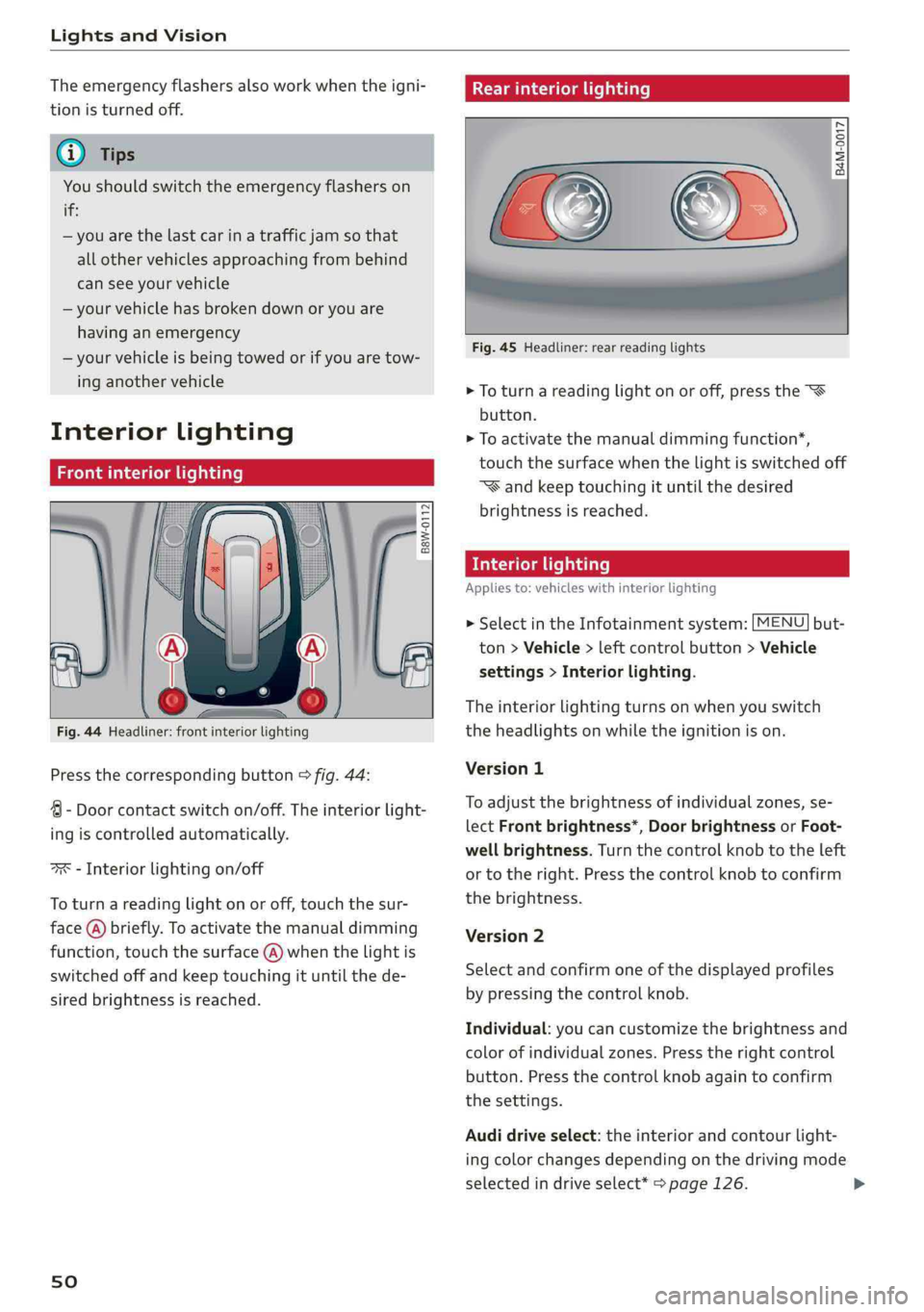
Frontinteriorlighting
B8W-0112
Fig.44Headliner:frontinteriorlighting
Pressthecorrespondingbutton>fig.44:
4-Doorcontactswitchon/off.Theinteriorlight-
ingiscontrolledautomatically.
ax-Interiorlightingon/off
Toturnareadinglightonoroff,touchthesur-
face(@)briefly.Toactivatethemanualdimming
function,touchthesurface(@)whenthelightis
switchedoffandkeeptouchingituntilthede-
siredbrightnessisreached.
sO
Rearinteriorlighting
=
8 2 3
Fig.45Headliner:rearreadinglights
>Toturnareadinglightonoroff,pressthe
button.
>Toactivatethemanualdimmingfunction*,
touchthesurfacewhenthelightisswitchedoff
“Wandkeeptouchingituntilthedesired
brightnessisreached.
Interiorlighting
Appliesto:vehicleswithinteriorlighting
>SelectintheInfotainmentsystem:[MENU]but-
ton>Vehicle>leftcontrolbutton>Vehicle
settings>Interiorlighting.
Theinteriorlightingturnsonwhenyouswitch
theheadlightsonwhiletheignitionison.
Version1
To
adjustthebrightnessofindividualzones,se-
lectFrontbrightness*,DoorbrightnessorFoot-
wellbrightness.Turnthecontrolknobtotheleft
ortotheright.Pressthecontrolknobtoconfirm
thebrightness.
Version2
Selectandconfirmoneofthedisplayedprofiles
bypressingthecontrolknob.
Individual:youcancustomizethebrightnessand
colorofindividualzones.Presstherightcontrol
button.Pressthecontrolknobagaintoconfirm
thesettings.
Audidriveselect:theinteriorandcontourlight-
ingcolorchangesdependingonthedrivingmode
selectedindriveselect*>page126.
Page 55 of 392

8W0012721BG
LightsandVision
— TheautomaticdimmingmirrorsdonotdimWindshieldwipers
whentheinteriorlightingisturnedonor
thereversegearisselected.Switchingthewiperson
:
a
2
\s
Fig.48Sunvisor=
a
Sunvisor
Thesunvisorsforthedriverandfrontpassenger
canbereleasedfromtheirmountsandturnedto-
wardthedoors©fig.48@.
Theycanalsobemovedbackandforthlength-
wiseinthisposition.-;;:
Fig.51allroad:rearwindowwiperoperation
Vanitymirror
Movethewindshieldwiperlevertothecorre-
Themirrorlighting*switchesonwhenthecoverspondingposition:
overthevanitymirror@)opens.
@-Windshieldwipersoff
@-Rainsensormode.Thewindshieldwipers
Appliesto:vehicleswithsunshadeswitchononcethevehiclespeedexceedsapprox-
imately2mph(4km/h)anditisraining.The
higherthesensitivityoftherainsensorthatisset
(switch@)totheright),theearlierthewind-
shieldwipersreacttomoistureonthewind-
shield.Youcandeactivatetherainsensormode
intheInfotainmentsystem,whichswitchesthe
intermittentmodeon.Todothis,select:[MENU
button>Vehicle>leftcontrolbutton>Driveras-
sistance>Rainsensor.Inintermittentmode,
youcanadjusttheintervaltimeusingtheswitch
<=
B4M-0166|
Fig.49Reardoor:sunshade®
Reardoorsunshade @-Slowwiping
>Pullthesunshadeoutandattachittothere-@-Fastwiping
tainerontheupperdoorframe>fig.49.
[email protected]
tionlonger,thewipersswitchfromslowwiping
tofastwiping.>
53
Page 96 of 392
Trailertowing
Outsidemirrors
Ifyoucannotseethetrafficbehindthetrailer
withthestandardexterior mirrors,thenyou
mustattachadditionalexterior mirrors.Adjust
themsoyouhaveasufficientvisibilitybehind
you.
Exterior lighting
Followthelegalregulationsregardingthelight-
ingequipmentonyourtrailer.Contactanauthor-
izedAudidealerorauthorizedAudiServiceFacili-
tyformoreinformation.
Beforeyoustartdriving,checkalllightingequip-
mentonthetrailerwhileitishitchedtothevehi-
cle.
Theheadlightrangecontrolautomaticallyad-
juststhelightrangeoftheheadlights.
Safetychains
Makesurethesafetychainsarecorrectlyapplied
whenpullingatrailer.Thechainsshouldhang
enoughsothatthetrailercandrivearound
curves.However,theymustnottouchthe
ground.
©)Note
Attachmentsretrofittedonthevehiclemay
causedamage,especiallyonthetrailerhitch
ballhead.Incasesofdamage,havethefunc-
tioncheckedby anauthorizedAudidealeror
authorizedAudiServiceFacility.
G)Tips
—Blockthewheelswithchockswhenparking
oninclinesifthetrailerisloaded.
—Havingthevehicleinspectedbetweenthe
inspectionintervalsisrecommendedifyou
towatrailerfrequently.
—Avoiddrivingwithatrailerduringthevehi-
clebreak-inperiod.
94
Drivingwithatrailer
Drivingwithatrailerrequiresextracaution.
Speed
Adheretothelegalspeedlimits.Followthelegal
regulationsspecifictothecountry.
Asthespeedincreases,thedrivingstabilityof
thetrailerdecreases.Thereforeyoushould not
exceedthemaximumlegalspeedlimitwhen
thereareunfavorableroad,weather,and/orwind
conditions.Thisespeciallyapplieswhendriving
downhill.
Hill
Whenyoustartdrivinguphillordownhill,trailers
maytiltorswaysoonerthanwhendrivingona
levelsurface.Ifsmallswayingmovementshave
alreadyoccurred,youcanstabilizethetrailerby
firmlybrakingimmediately.Nevertryto
“straightenout”thetrailerbyaccelerating.
Downshiftbeforedrivingonhillstoutilizetheen-
ginebrakingeffect>A\.
Brakes
Whenusingatrailerwithoverrunbrakes,first
brake
gentlythenquickly.Thisreducestheriskof
jerkingwhilebrakingifthetrailerwheelslockup.
Enginecoolanttemperature
Payattentionspecificallytothecoolanttempera-
turedisplaywhentherearehighoutsidetemper-
atures,andwhendrivingonlonginclines
=page14.Shifttoahighergearinatimelyman-
ner.
ZA\WARNING
Constantbrakingcausesthebrakestoover-
heatandcansubstantiallyreducebrakingper-
formance,increasebrakingdistance,orcause
completefailureofthebrakesystem.
Page 121 of 392
8W0012721BG
Assistsystems
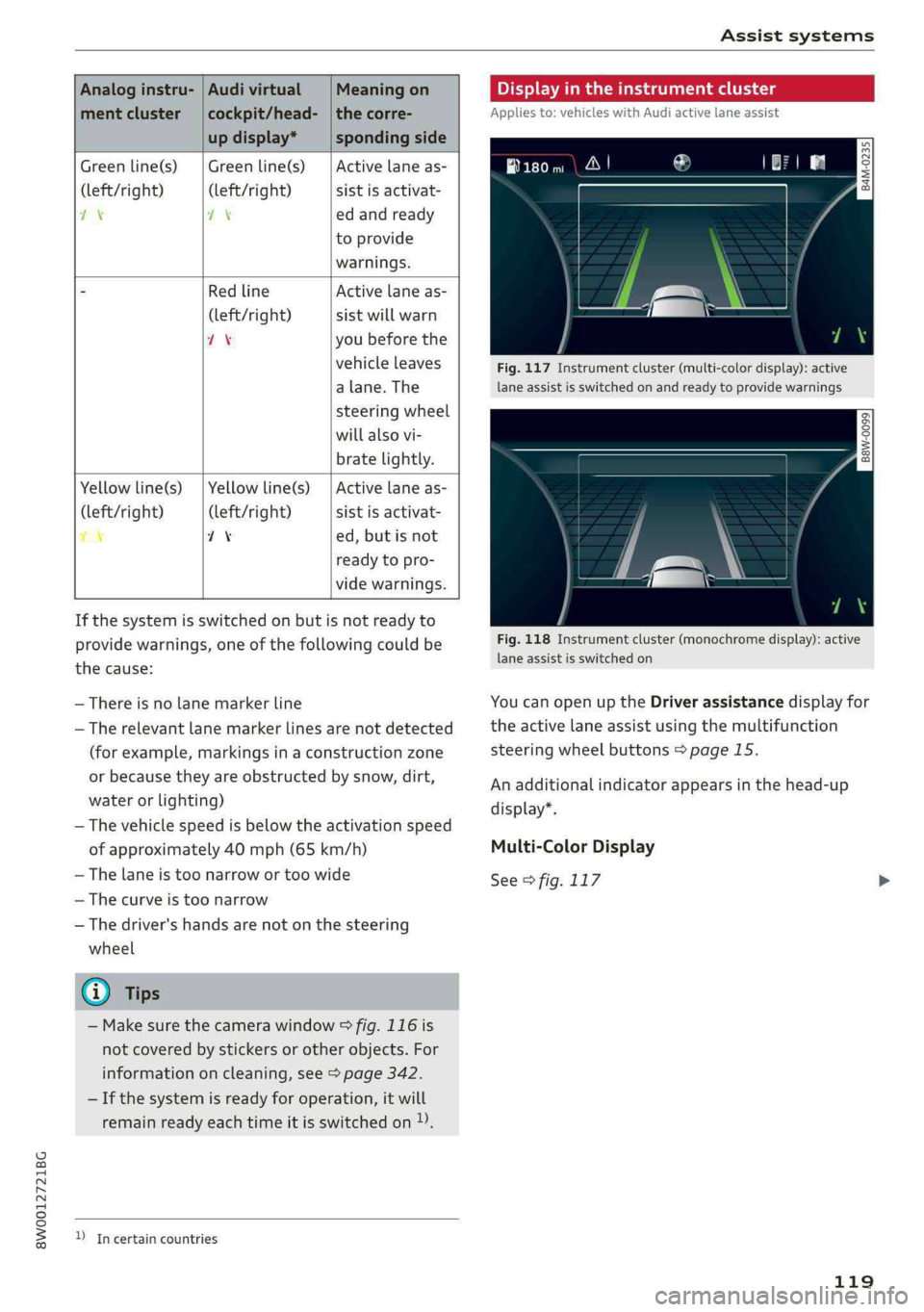
Analoginstru-|AudivirtualMeaningon
mentcluster|cockpit/head-|thecorre-
updisplay*spondingside
Greenline(s)|Greenline(s)|Activelaneas-
(left/right)(left/right)sistisactivat-
21Xedandready
toprovide
warnings.
“RedlineActivelaneas-
(left/right)sistwillwarn
1Xyoubefore the
vehicleleaves
a lane.The
steeringwheel
willalsovi-
bratelightly.
Yellowline(s)
(left/right)
7%
Yellowline(s)
(left/right)
71%
Activelaneas-
sistisactivat-
ed,butisnot
readytopro-
videwarnings.
Ifthesystemisswitchedonbutisnotreadyto
providewarnings,oneofthefollowingcouldbe
thecause:
—Thereisnolane markerline
—Therelevant lane markerlinesarenotdetected
(forexample,markingsinaconstructionzone
orbecausetheyareobstructedbysnow,dirt,
waterorlighting)
—Thevehiclespeedisbelowtheactivationspeed
ofapproximately40mph(65km/h)
—Thelaneistoonarrowortoowide
—Thecurveistoonarrow
—Thedriver'shandsarenotonthesteering
wheel
@Tips
—Makesurethecamerawindow>fig.116is
notcoveredbystickersorotherobjects.For
informationoncleaning,see>page342.
—Ifthesystemisreadyforoperation,itwill
remainreadyeachtimeitisswitchedon)).
DIncertaincountries
Displayintheinstrumentcluster
Appliesto:vehicleswithAudiactivelaneassist
Pee
ry2Sg
|
== a
Fig.117Instrumentcluster(multi-colordisplay):active
laneassistisswitchedonandreadytoprovidewarnings
B8W-0099
Fig.118Instrumentcluster(monochromedisplay):active
laneassistisswitchedon
YoucanopenuptheDriverassistancedisplayfor
theactivelaneassistusingthemultifunction
steeringwheelbuttons>page15.
Anadditionalindicatorappearsinthehead-up
display”.
Multi-ColorDisplay
See>fig.117
119