Park AUDI S4 2020 User Guide
[x] Cancel search | Manufacturer: AUDI, Model Year: 2020, Model line: S4, Model: AUDI S4 2020Pages: 296, PDF Size: 80.45 MB
Page 41 of 296

8W1012721BB
Opening and closing
Opening and closing the luggage
compartment lid with foot motion (kicking
movement)
Applies to: vehicles with sensor-controlled luggage compart-
ment lid
re a S 2
<
go a
Fig. 32 Vehicle rear: foot motion (example)
The luggage compartment lid can be opened and
closed automatically 1) > A\ in General informa-
tion on page 36.
Requirements: you must be carrying your conven-
ience key* with you. The ignition must be switch-
ed off. You must be standing at the center behind
the luggage compartment lid.
> Move your foot back and forth under the bump-
er one time > fig. 32. Do not touch the bumper.
Make sure you have firm footing. The luggage
compartment lid will open or close )) once the
system detects the movement. The automatic
opening or closing will be canceled if you re-
peat one of the movements described.
ZX WARNING
Follow the safety precautions > page 36.
@ Tips
The luggage compartment lid will only open
or close )) if you perform the movement as
described. This prevents the luggage com-
partment lid from opening or closing due to
similar movements ), such as when you walk
between the rear of the vehicle and your ga-
rage door. In some situations, the function
may be limited or temporarily unavailable.
This may happen if:
D_ The closing function applies to vehicles that also have au-
tomatic luggage compartment lid operation.
— You are standing too close to the bumper or
too far away from it
— The luggage compartment lid was closed or
opened immediately beforehand
— You park close to a hedge and the branches
move back and forth under the vehicle for a
long period of time
— You clean your vehicle, for example with a
pressure washer or in a car wash
— There is heavy rain
— The bumper is very dirty, for example after
driving on salt-covered roads
— There is interference to the vehicle key's ra-
dio signal, such as from mobile devices or
remote controls
39
Page 46 of 296

Opening and closing
Panoramic glass roof
Operating the pa mic glass roof a
roof sunshade
Applies to: vehicles with panoramic glass roof and roof sun-
shade
Fig. 40 Headliner: panoramic glass roof and sunshade*
buttons
The control buttons are equipped with a two-
stage function.
When tilting or opening the roof, the roof sun-
shade will open partially or halfway if the sun-
shade is closed.
Operating the roof sunshade
The roof sunshade cannot be closed completely if
the roof is open.
> Opening and closing the sunshade: push the
switch in the headliner @) briefly toward the
rear or forward to the second level.
> Partially opening the sunshade: press the
switch to the first level until the sunshade
reaches the desired position.
Operating the roof
> Tilting the roof: press the &> switch in the
headliner briefly upward to the second level (4).
> Closing the tilted roof: pull the > switch
downward briefly to the second Level.
> Opening the roof: slide the 2S switch back
briefly twice in a row to the second level (2).
> Closing the roof: push the 2S switch forward
briefly to the second level.
> Opening or closing partially: slide the A>
switch to the first level and hold it there until
the roof reaches the desired position.
44
Quick opening
You can also open the roof and roof sunshade in
one movement.
> Push the 2S switch back briefly to the second
level @) twice in a row.
Roof emergency closing
If an object is detected when closing, the roof
will open again automatically. In this case, you
can
then close it with the power emergency clos-
ing function.
> Within five seconds after the sunroof opens au-
tomatically, pull the applicable button until the
roof is closed.
ZA WARNING
To reduce the risk of injury, always pay atten-
tion when closing the roof. Always switch the
ignition off and take the key with you when
leaving the vehicle.
() Note
Always close the roof when you leave the vehi-
cle and when there is precipitation to reduce
the risk of damage to the interior equipment,
particularly the electronic equipment.
@) Tips
— After switching off the ignition, the roof and
sunshades can still be operated for several
minutes as long as neither of the front
doors have been opened.
— It is not possible to open the roof when
temperatures are too low.
Valet parking
Applies to: vehicles with valet parking function
The valet parking function can protect the lug-
gage compartment from unauthorized access.
The [VALET] button for valet parking is in the
glove compartment.
Page 47 of 296
8W1012721BB
Opening and closing
You can switch the valet parking function on, for
example when someone else is parking your vehi-
cle ). The vehicle can be driven, locked, and un-
locked using the vehicle key, but access to the
luggage compartment is blocked.
> Remove the mechanical key > page 34.
> Press the [VALET] button in the glove compart-
ment. The LED in the button turns on if the
function is switched on.
> Lock the glove compartment with the mechani-
cal key.
» Applies to: vehicles with lockable pass-through
and lockable rear seat backrests: To secure the
luggage compartment from the vehicle interior,
lock the pass-through and the rear seat backr-
ests using the mechanical key > page 84 or
=> page 82.
> Give your vehicle key to the service personnel
who are parking your vehicle and keep the me-
chanical key.
The following buttons are deactivated when the
valet parking function is switched on:
— <3 button in the driver's door
— Zs button on the vehicle key
— Handle in the luggage compartment lid
If the valet parking function is switched on, a
message will appear every time the ignition is
switched on.
@ Tips
Please note that the luggage compartment
can still be accessed from the vehicle interior
in vehicles with fixed rear seat backrests or
ones that cannot be locked, even when the
valet parking function is switched on.
Garage door opener
Applies to: vehicles with garage door opener
With the garage door opener, you can activate
systems such as the garage doors, security sys-
D_ This function is not available in all countries.
2) The possible number of hand-held transmitters depends
on the equipment.
tems or house lights from inside your vehicle.
These functions are operated in the MMI. Multi-
ple receivers can be programmed, which can con-
trol the functions of up to eight2) hand-held
transmitters.
Z\ WARNING
— When operating or programming the garage
door opener, make sure that no people or
objects are in the area immediately sur-
rounding the equipment. People can be in-
jured or property can be damaged if struck
when closing.
— Do not allow yourself to be distracted from
traffic by the viewing and operating the dis-
plays.
G@) Tips
— Ifyou sell your vehicle, reset all settings to
the factory default settings > page 207.
—For an explanation on conformity with the
FCC regulations in the United States and the
Industry Canada regulations, see
=> page 275.
(i) Tips
Before you program your system to the ga-
rage door opener, first check the compatibili-
ty:
— Ask an authorized Audi dealer or authorized
Audi Service Facility or check at www.
homelink.com. You can also find more infor-
mation about HomeLink there.
— You can display information about Home-
Link (compatibility level/status/country
code/HomeLink generation) in the MMI:
— Select on the home screen: VEHICLE > Set-
tings & Service > Garage door opener > (.
Applies to: vehicles with garage door opener
Requirements: the remote control transmitter
must be programmed > page 46, the vehicle
4s
>
Page 50 of 296

Lights and Vision
Lights and Vision
Exterior lighting
Switching the lights on and off
Fig. 41 Instrument panel: light switch with button
@ Light switch &
Turn the light switch @ to the corresponding po-
sition when the ignition is switched on. 2a and
the selected position turn on (except position 0).
O
- The daytime running lights* will automatical-
ly turn on. In vehicles for some markets, you can
switch the automatic daytime running lights on
and off in the MMI.
AUTO - The headlights will automatically adapt to
the surrounding brightness.
300 — Parking lights
2D - Low beam headlights
@ All-weather lights &
Requirement: the light switch must be in the AU-
TO or ZO position.
The headlights automatically adjust so that there
will be less glare, for example when the road sur-
face is wet.
Automatic headlight range control
Your vehicle is equipped with automatic head-
light range control. It reduces glare for oncoming
traffic if the vehicle load changes. The headlight
range adjusts automatically.
Audi adaptive light
Applies to: vehicles with adaptive light
Audi adaptive light provides better visibility when
driving in the dark. The lights are adapted to the
48
road conditions based on speed, such as when
driving on expressways, rural roads, at intersec-
tions, and around curves. The adaptive lights only
function when the light switch is in the AUTO po-
sition and the all-weather lights are switched off.
ZX WARNING
— Follow the safety precautions and note the
limits of the assist systems, sensors, and
cameras > page 114.
— Automatic headlights are only intended to
assist the driver. They do not relieve the
driver of responsibility to check the head-
lights and to turn them on manually based
on the current light and visibility conditions.
For example, fog cannot be detected by the
light sensors. So always switch on the low
beams ZO under these weather conditions
and when driving in the dark.
@) Tips
— If the vehicle battery has been discharging
for a while, the parking light may switch off
automatically. Avoid using the parking
lights for several hours.
— Follow the regulations applicable to the
country where you are operating the vehicle
when stopping the vehicle and when using
the lighting systems.
—Awarning tone will sound if you open the
door when the exterior lights are switched
on.
— Only the front headlights turn on when the
daytime running lights are switched on*. In
vehicles in certain markets, the tail lights
will also turn on.
—Incool or damp weather, the inside of the
headlights, turn signals, and tail lights can
fog
over due to the temperature difference
between the inside and outside. They will
clear shortly after switching them on. This
does not affect the service life of the light-
ing.
Page 55 of 296

8W1012721BB
Lights and Vision
0 - Deactivates all adjustment functions.
Q/ ®- Selects the left or right exterior mirror.
To adjust the mirror glass in a mirror, press the
knob in the desired direction.
GR - Heats the mirror glass depending on the out-
side temperature.
S) - Folds the exterior mirrors*. To fold the mir-
rors out, turn the knob to one of the other posi-
tions. In the MMI, you can select if the mirrors
fold in automatically when you lock the vehicle
> page 31.
Front passenger's exterior mirror tilt
function*
Requirement: the knob must be in the position
for the front passenger’s exterior mirror.
To help you see the curb when backing into a
parking space, the surface of the mirror will tilt
slightly when reverse gear is selected.
You can adjust the mirror surface by turning the
knob in the desired direction.
The mirror moves from the reversing position
back to the original position:
— When you switch the ignition off
— Once you drive forward at speeds faster than 9
mph (15 km/h)
— When the knob is no longer in the position for
the front passenger exterior mirror
Z\ WARNING
Curved mirror surfaces (for example convex)
enlarge the field of vision. However, they
make objects in the mirror appear smaller and
farther away. When using these mirrors to es-
timate your distance to vehicles behind you
when changing lanes, you could estimate in-
correctly, which increases the risk of an acci-
dent.
@) Note
— Applies to: vehicles with power folding exte-
rior mirrors: If the mirror housing was
moved by outside forces (such as an impact
when maneuvering), you must use the pow-
er folding function to fold the mirror all the
way out. The mirrors will make a loud noise
when they latch into place. The mirror hous-
ing must not be moved back into place by
hand because this could impair the function
of the mirror mechanism.
— Applies to: vehicles without power folding
exterior mirrors: If the mirror housing was
moved by outside forces (such as an impact
when maneuvering), you must move it back
in place by hand.
— If you wash the vehicle in an automatic car
wash, you must fold the exterior mirrors in
to reduce the risk of damage to the mirrors.
Never fold power folding exterior mirrors*
by hand. Only fold them in and out using
the power controls.
@) Tips
—If the power adjusting function malfunc-
tions, the glass in both mirrors can be ad-
justed by pressing on the edge of it by hand.
— Certain settings are automatically stored
and assigned to the active user.
Dimming the mirrors
Manual dimming rearview mirror
> Pull the lever on the bottom of the mirror back.
Automatic dimming rearview mirror*
> The interior and exterior mirrors* dim automat-
ically when light shines on them, for example
from headlights on a vehicle behind you.
Z\ WARNING
— If the glass on an automatic dimming mir-
ror* breaks, electrolyte can leak out. This
liquid can irritate the skin, eyes and respira-
tory system. If there is contact with the flu-
id, flush immediately with plenty of water.
Consult a physician if necessary.
— Repeated or long-term exposure to electro-
lyte fluid can lead to irritation of the air-
ways, especially in people with asthma or
other respiratory conditions. Take deep >
53
Page 94 of 296
Driving
Driving
Starting the vehicle
eta
Applies to: vehicles with convenience key
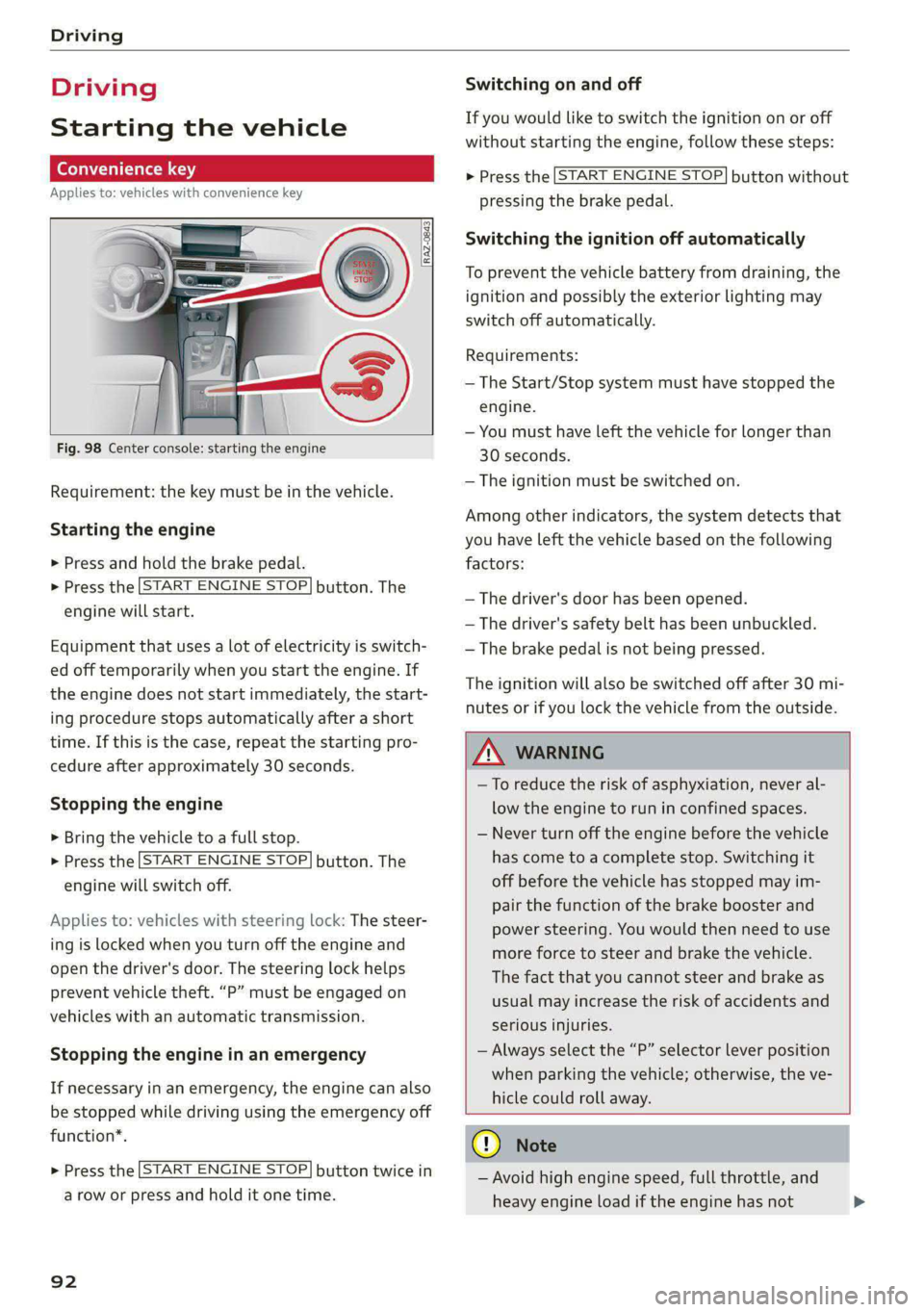
Fig. 98 Center console: starting the engine
Requirement: the key must be in the vehicle.
Starting the engine
> Press and hold the brake pedal.
> Press the [START ENGINE STOP] button. The
engine will start.
Equipment that uses a lot of electricity is switch-
ed off temporarily when you start the engine. If
the engine does not start immediately, the start-
ing procedure stops automatically after a short
time. If this is the case, repeat the starting pro-
cedure after approximately 30 seconds.
Stopping the engine
> Bring the vehicle to a full stop.
> Press the [START ENGINE STOP] button. The
engine will switch off.
Applies to: vehicles with steering lock: The steer-
ing is locked when you turn off the engine and
open the driver's door. The steering lock helps
prevent vehicle theft. “P” must be engaged on
vehicles with an automatic transmission.
Stopping the engine in an emergency
If necessary in an emergency, the engine can also
be stopped while driving using the emergency off
function*.
> Press the [START ENGINE STOP] button twice in
a row or press and hold it one time.
92
Switching on and off
If you would like to switch the ignition on or off
without starting the engine, follow these steps:
> Press the [START ENGINE STOP] button without
pressing the brake pedal.
Switching the ignition off automatically
To prevent the vehicle battery from draining, the
ignition and possibly the exterior lighting may
switch off automatically.
Requirements:
— The Start/Stop system must have stopped the
engine.
— You must have left the vehicle for longer than
30 seconds.
— The ignition must be switched on.
Among other indicators, the system detects that
you have left the vehicle based on the following
factors:
— The driver's door has been opened.
— The driver's safety belt has been unbuckled.
— The brake pedal is not being pressed.
The ignition will also be switched off after 30 mi-
nutes or if you lock the vehicle from the outside.
ZA\ WARNING
—To reduce the risk of asphyxiation, never al-
low the engine to run in confined spaces.
— Never turn off the engine before the vehicle
has come to a complete stop. Switching it
off before the vehicle has stopped may im-
pair the function of the brake booster and
power steering. You would then need to use
more force to steer and brake the vehicle.
The fact that you cannot steer and brake as
usual may increase the risk of accidents and
serious
injuries.
— Always select the “P” selector lever position
when parking the vehicle; otherwise, the ve-
hicle could roll away.
@) Note
— Avoid high engine speed, full throttle, and
heavy engine load if the engine has not
Page 95 of 296
8W1012721BB
Driving
reached operating temperature yet. You
could damage the engine.
— If the engine has been under heavy load for
an extended period of time, heat builds up
in the engine compartment after the engine
is switched off and there is a risk of damag-
ing the engine. For this reason, let the en-
gine run at idle for approximately two mi-
nutes before shutting it off.
@ Tips
— Brief noises are normal when starting and
stopping the vehicle and are no cause for
concern.
— For up to 10 minutes after stopping the en-
gine, the radiator fan may turn on again au-
tomatically or it may continue to run, even if
the ignition is switched off.
— It may not be possible to start the vehicle in
extremely low temperatures.
— Power will be fully available once the engine
is at operating temperature.
Messages
E Engine start system: malfunction! Please
contact Service
There is a malfunction in the engine start system.
Drive immediately to an authorized Audi dealer
or authorized Audi Service Facility to have the
malfunction repaired.
BB Remote control key: key not detected. Is the
key
still in the vehicle?
The vehicle key was removed from the vehicle
while the engine is running. If the vehicle key is
no longer in the vehicle, you cannot switch the ig-
nition on or start the engine once you stop it. You
also cannot lock the vehicle from the outside.
Remote control key: hold back of key
against the designated area. See owner's man-
ual
The battery in the vehicle key may be drained or
there may be a malfunction. To start the vehicle,
you must also hold the vehicle key against the lo-
cation shown ?) > page 92, fig. 98.
If the malfunction remains, drive immediately to
an authorized Audi dealer or authorized Audi
Service Facility to have the malfunction correct-
ed.
When driving
Starting to drive, stopping, and parking
Starting from a stop
>» Press and hold the brake pedal.
> Start the engine.
> Select a gear.
> Release the parking brake.
> Release the brake pedal. The vehicle may roll.
> Press the accelerator pedal to accelerate.
Stopping and parking
> Bring the vehicle to a full stop and press and
hold the brake pedal.
> Set the parking brake.
> Select the “P” selector lever position to secure
the vehicle from rolling away.
> Turn the steering wheel when parking on in-
clines so that the wheels will roll into the curb
if the vehicle starts moving.
> Switch off the ignition before leaving the vehi-
cle.
On hills, activate the parking brake first and then
shift into the "P" selector lever position. This pre-
vents too much stress from being placed on the
locking mechanism.
ZA\ WARNING
— Always set the parking brake when leaving
your vehicle, even if for a short period of
time. If the parking brake is not set, the ve-
hicle could roll away, increasing the risk of
an accident.
— Do not leave your vehicle unattended while
the engine is running, because this increases
the risk of an accident.
— If the parking brake is set, it can release au-
tomatically when the accelerator pedal is
pressed. To reduce the risk of an accident,
do not inadvertently press the accelerator
pedal and always shift into “P” when the ve-
hicle is stopped.
93
Page 96 of 296
Driving
— If you leave the vehicle, switch the ignition
off and take the key with you. This is espe-
cially important when leaving persons or an-
imals in the vehicle. Otherwise, the vehicle
could start unintentionally, the parking
brake could release, or electronic equipment
could activate, which increases the risk of an
accident.
— No persons or animals should be left in a
locked vehicle. Locked doors make it more
difficult for emergency workers to enter the
vehicle, which puts lives at risk.
— If you do not begin driving immediately af-
ter releasing the brake pedal, your vehicle
may begin to roll backward. Press the brake
pedal or set the parking brake immediately.
@) Note
If you have to stop on an incline, always press
the brake pedal to hold the vehicle in place to
reduce the risk of the vehicle rolling back-
ward. Do not try to hold the vehicle in place
by pressing and holding the accelerator pedal.
The transmission can overheat, which increas-
es the risk of damage.
Hill hold assist
If you take your foot off of the brake pedal when
driving on hills, the braking force will be held for
several seconds. At that time, you can start driv-
ing without the vehicle rolling backward.
Requirement: the driver's door must be closed,
the engine must be on, and the vehicle must be
traveling uphill.
> To activate hill hold assist, press and hold the
brake pedal for several seconds while the vehi-
cle is stationary.
ZA\ WARNING
— If you do not begin driving immediately af-
ter releasing the brake pedal, your vehicle
may begin to roll backward. Press the brake
pedal or set the parking brake immediately.
— The hill hold assist cannot hold the vehicle
on inclines in every scenario (for example,
on slippery or icy ground).
94
Gears and driving programs
@Q—
2)—*
RAZ-0410]|
i
R
t
N
tt.
D/S
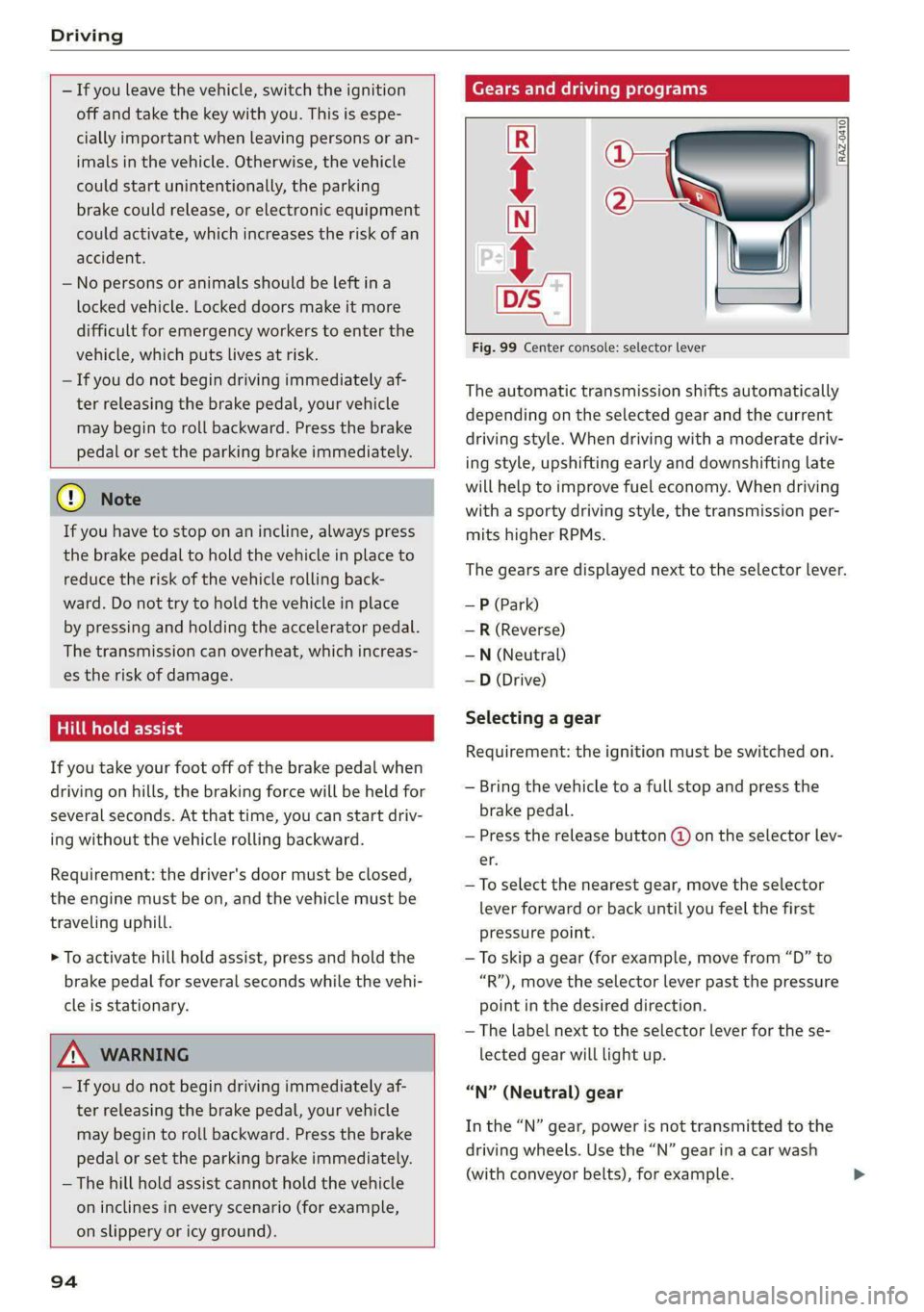
Fig. 99 Center console: selector lever
The automatic transmission shifts automatically
depending on the selected gear and the current
driving style. When driving with a moderate driv-
ing style, upshifting early and downshifting late
will help to improve fuel economy. When driving
with a sporty driving style, the transmission per-
mits higher RPMs.
The gears are displayed next to the selector lever.
— P (Park)
— R (Reverse)
—N (Neutral)
—D (Drive)
Selecting a gear
Requirement: the ignition must be switched on.
— Bring the vehicle to a full stop and press the
brake pedal.
— Press the release button (@) on the selector lev-
er.
—To select the nearest gear, move the selector
lever forward or back until you feel the first
pressure point.
—To skip a gear (for example, move from “D” to
“R”), move the selector lever past the pressure
point in the desired direction.
— The label next to the selector lever for the se-
lected gear will light up.
“N” (Neutral) gear
In the “N” gear, power is not transmitted to the
driving wheels. Use the “N” gear in a car wash
(with conveyor belts), for example.
Page 97 of 296
8W1012721BB
Driving
If you unintentionally select “N” while driving
(faster than 1 mph (2 km/h)), you can also shift
back to “D” without pressing the brake pedal.
For safety reasons, the vehicle cannot be locked
when the transmission is in the "N” gear.
“Pp” (Park) gear
Requirement: the ignition must be switched on.
The vehicle is secured from rolling away by the
parking lock when in the “P” gear.
— Bring the vehicle to a full stop and press the
brake pedal.
— Press the “P” button (2) on the selector lever.
— The “P” next to the selector lever will light up.
“P” engages automatically if you switch the en-
gine off while the “D” or “R” gear is selected. If
you switch the engine off in “N”, “P” will engage
automatically after approximately 30 minutes.
If you want to switch from “P” to “D” or “R”, the
engine must be running.
If you cannot shift out of “P”, for example be-
cause the vehicle has no power, you may need to
use the emergency release for the parking lock
=> page 97.
Selecting a driving program
Various driving programs can be selected when in
the “D” gear. The programs influence when the
transmission shifts and how the accelerator ped-
al responds.
The selected driving program is displayed in the
instrument cluster.
— D (Drive): normal driving mode
—S (Sport): sporty driving mode
If you select the Dynamic mode in Audi drive se-
lect*, the “S” driving program will be activated.
When the ignition is switched off, the driving pro-
gram may be reset to “D”.
To switch between the current driving program
and “S”, push the selector lever toward the rear.
ZX WARNING
— Before starting to drive, check if the desired
gear is displayed next to the selector lever.
— Always secure your vehicle from rolling
away. Press the brake pedal or shift to “P”.
When leaving the vehicle, also set the park-
ing brake.
— Power is still transmitted to the wheels
when the engine is running at idle. To pre-
vent the vehicle from “creeping”, you must
keep your foot on the brake in all selector
lever positions (except "P" and "N") when
the engine is running.
—To reduce the risk of an accident, do not
press the accelerator pedal when changing
gears if the vehicle is stationary and the en-
gine is running.
— Never select the “R" or "P” gears while driv-
ing. Doing so could cause an accident.
—The vehicle can roll even if the ignition is
switched off.
G) Tips
If you shift between “D” and “R” within one
second, you do not need to press the brake
pedal. This makes it possible to “rock” if it is
stuck, for example.
95
Page 99 of 296

8W1012721BB
Driving
Manually releasing the parking lock
B8W-0047
B8W-0162
Fig. 103 Front cup holder: parking lock emergency release
The emergency release is located in the front cup
holder under a cover.
You will need the screwdriver and the socket
wrench from the vehicle tool kit in order to re-
lease > page 253. Use the flat side of the reversi-
ble screwdriver blade.
You need a narrow flat-head screwdriver to re-
lease.
Releasing the parking lock using the
emergency release
> Set the parking brake to secure your vehicle
from rolling away. If this is not possible, secure
your vehicle from rolling using another meth-
od.
> Remove the rubber mat.
> Pry the cover off the opening using the screw-
driver inserted in the slot.
> Insert the socket wrench from the vehicle tool
kit into the opening.
> Turn the socket wrench clockwise until it stops
@ and press it downward until it locks into
place @).
> Leave the socket wrench inserted.
Resetting the parking lock
> Press the brake pedal and start the engine.
> Keep the brake pedal pressed and engage the
following selector lever positions one after the
other: "N","D", and back to "N".
> Turn the engine off again.
> Grasp the socket wrench with both hands and
carefully pull it upward to remove.
> Reinsert the cover and rubber mat.
ZA\ WARNING
— The parking lock may only be released using
the emergency release if the parking brake
is set. If it is not working, secure the vehicle
from rolling using the brake pedal or other
suitable means, such as blocking a front and
a rear wheel. An unsecured vehicle may roll
away, which increases the risk of an acci-
dent.
— Only activate the emergency release while
ona level surface or a slight slope.
—To reduce the risk of an accident, you must
not drive when the emergency release is ac-
tivated.
@) Note
Due to the risk of damage, carefully remove
the socket wrench when you reset the parking
lock.
Messages
& Transmission: malfunction! Safely stop vehi-
cle
Do not continue driving. Stop the vehicle as soon
as possible in a safe location and secure it so it
does not roll. See an authorized Audi dealer or
authorized Audi Service Facility for assistance.
i Transmission: too hot. Please stop vehicle
Do not continue driving. Select "P" and contact an
authorized Audi dealer or authorized Audi Service
Facility for assistance.
fs] Transmission: too hot. Please adapt driving
style
97
>