Park AUDI S4 2020 Service Manual
[x] Cancel search | Manufacturer: AUDI, Model Year: 2020, Model line: S4, Model: AUDI S4 2020Pages: 296, PDF Size: 80.45 MB
Page 174 of 296
Audi connect
Applies to: vehicles with Audi connect vehicle control
Depending on the country and the vehicle equip-
ment, the following services may be available:
Locking and unlocking the vehicle by remote
control
Requirement: the vehicle must be parked and the
ignition must be switched off.
This service allows you to unlock or lock your ve-
hicle.
Vehicle status report
This service transfers driver information system
data to a server. Depending on the vehicle equip-
ment, certain data may be accessed, such as the
remaining range or mileage. The values may dif-
fer from the values displayed in the vehicle.
Car Finder
This service transmits the parking location to a
server when the ignition is switched off. The vehi-
cle location, your location, or the route to your
vehicle can be displayed. The new parking loca-
tion cannot be determined with this service if the
vehicle is moved after shutting the vehicle off
and without switching the ignition on and off
again, for example if the vehicle is towed or sto-
len.
Online Audi service request
Requirement: the service must be activated on-
line at my.audi.com and an authorized Audi deal-
er or authorized Audi service facility must be se-
lected.
This service transmits service-relevant data to
your selected authorized Audi dealer or author-
ized Audi service facility. They will contact you
before your next service appointment.
Stolen Vehicle Locator
This service assists you in locating your vehicle if
it is stolen.
— Contact the police. You receive a Case ID.
— Call the service hotline and give your Case ID.
172
The service hotline will forward the established
data to the police. You receive the Audi Service
hotline number when you purchase your vehicle.
Alert services
Requirement: a key user must be set in the vehi-
cle > page 171.
You can adjust the following services in the
myAudi app. You will be notified by a push notifi-
cation and/or e-mail if an alarm is triggered for
your vehicle.
— Geofencing Alert: a permitted/prohibited zone
was entered.
— Speed Alert: a set speed was exceeded.
— Valet Alert: a set speed was exceeded or a per-
mitted/prohibited zone was entered.
Z\ WARNING
Do not ignore messages and warning or indi-
cator lights that turn on in the vehicle be-
cause of the information in the vehicle status
report. This could lead to break downs in on
the road, accidents and serious injuries.
G) Tips
For some services, you can select if you would
like to be notified with a push notification
and/or an e-mail.
Settings
Wi-Fi settings
Applies to: vehicles with Wi-Fi hotspot
Requirement: the ignition must be switched on.
> Applies to: MMI: Select on the home screen:
SETTINGS > Connection settings > Wi-Fi.
Depending on the country and the vehicle equip-
ment, the following functions may be available:
Wi-Fi
When the function is switched on, the MMI's Wi-
Fi hotspot is active and Wi-Fi devices can be con-
nected to the hotspot.
Page 181 of 296
8W1012721BB
Navigation
> Press on a suggested address. The Details
menu will be displayed.
> Press Start.
G) Tips
— Ifa contact is grayed out, there is no ad-
dress stored for that contact.
— Navigation to geographic coordinates for a
contact is not possible.
Loading received destinations and routes
Applies to: vehicles with a navigation system and Audi con-
nect Infotainment
You can search for destinations or routes in the
myAudi app and send to the vehicle.
Requirement: the MMI and the mobile device
must be connected to the Internet > page 169,
Audi connect. You must have the myAudi app in-
stalled on your mobile device.
> Send a destination or route in the myAudi app
to the vehicle.
> Applies to: MMI: Select on the home screen:
NAVIGATION > (&5) > Receiv. destns. & routes.
> Make sure you are logged into the vehicle and
the myAudi app with the same myAudi account.
The received destination and routes will be
loaded automatically.
> Navigating to a destination: press on a desti-
nation.
> Deleting destinations: select: Z > one or more
entries or Select all > Delete > (Done).
Destination details
Applies to: vehicles with navigation system
RAX-0148,
SAR
{0} eset exe ae os 3)
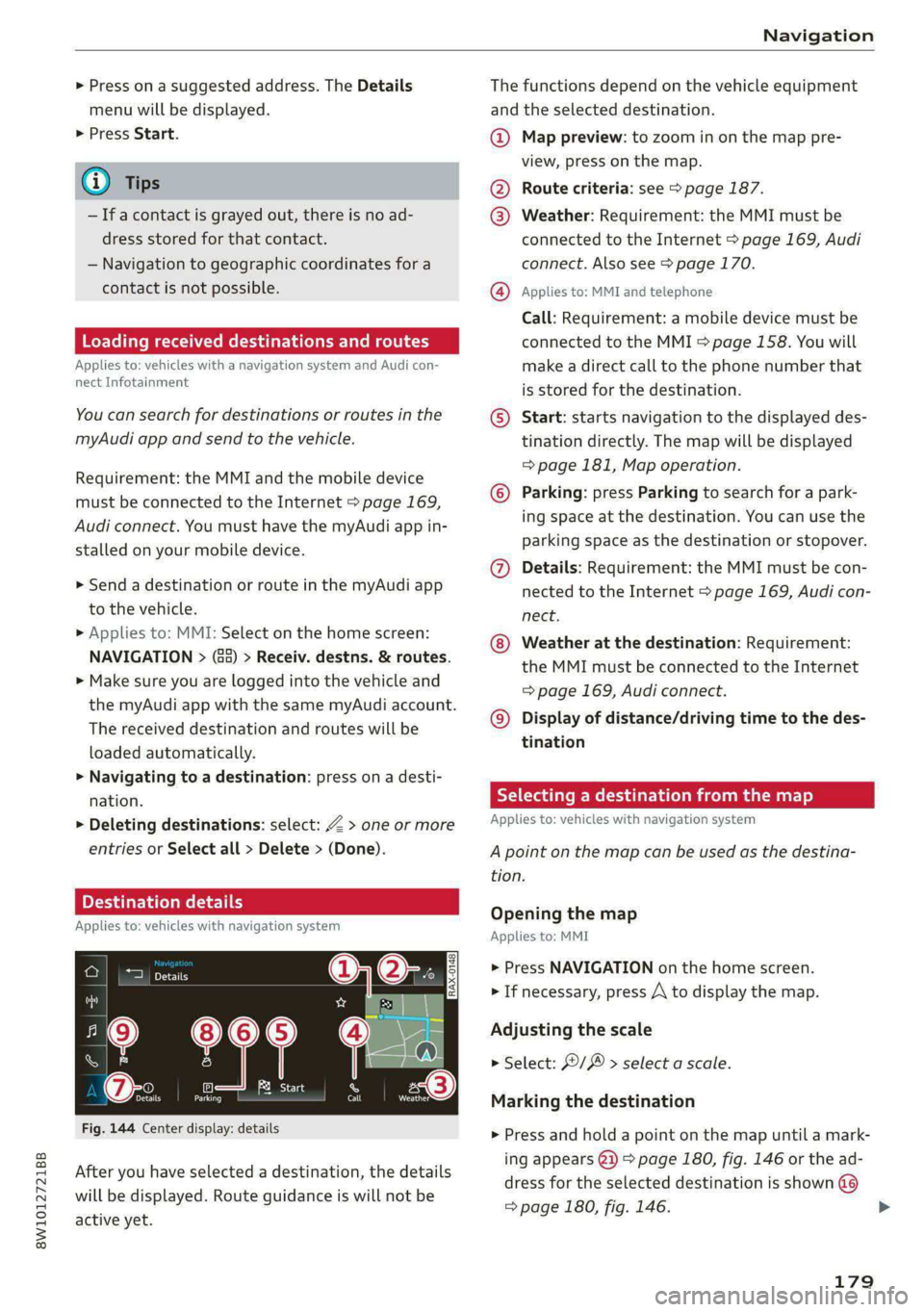
Fig. 144 Center display: details
After you have selected a destination, the details
will be displayed. Route guidance is will not be
active yet.
The functions depend on the vehicle equipment
and the selected destination.
@ Map preview: to zoom in on the map pre-
view, press on the map.
@ Route criteria: see > page 187.
@ Weather: Requirement: the MMI must be
connected to the Internet > page 169, Audi
connect. Also see > page 170.
@ Applies to: MMI and telephone
Call: Requirement: a mobile device must be
connected to the MMI > page 158. You will
make a direct call to the phone number that
is stored for the destination.
© Start: starts navigation to the displayed des-
tination directly. The map will be displayed
= page 181, Map operation.
© Parking: press Parking to search for a park-
ing space at the destination. You can use the
parking space as the destination or stopover.
@ Details: Requirement: the MMI must be con-
nected to the Internet > page 169, Audi con-
nect.
Weather at the destination: Requirement:
the MMI must be connected to the Internet
=> page 169, Audi connect.
© Display of distance/driving time to the des-
tination
Selecting a destination from the map
Applies to: vehicles with navigation system
A point on the map can be used as the destina-
tion.
Opening the map
Applies to: MMI
> Press NAVIGATION on the home screen.
> If necessary, press A to display the map.
Adjusting the scale
> Select: / > select a scale.
Marking the destination
> Press and hold a point on the map until a mark-
ing appears @2) > page 180, fig. 146 or the ad-
dress for the selected destination is shown @
=> page 180, fig. 146.
179
>
Page 185 of 296
8W1012721BB
Navigation
Additional functions
Favorites
Applies to: vehicles with navigation system
You can access frequent destinations in the fa-
vorites. You can quickly and easily start route
guidance using the home address or business ad-
dress function.
Accessing favorites
> Applies to: MMI: Select on the home screen:
NAVIGATION > (&&) > Favorites.
If you use myAudi navigation, your favorites will
be synchronized with your myAudi account
=>page 176.
Storing favorites
> Press v¥ in the Details menu > page 179,
fig. 144.
Storing a home address or business address
> Press Home address or Business address.
When accessed for the first time, you will be
prompted to set the address.
> Select: Create now > enter a destination > OK.
Editing a favorite
Requirement: the favorites list must be dis-
played.
> Setting a favorite as a destination: press ona
favorite.
> Deleting favorites: in the Details menu, press
¥& > page 179, fig. 144, or select: Z > one or
more entries or Select all > Delete > (Done).
> Moving a favorite: press Z. Touch the $ sym-
bol and move the entry to the desired position.
Press Done.
Gi) Tips
— After deleting the home address or business
address, only the address is deleted and the
entry will still be displayed in the favorites.
) Audi provides access to services from third party provid-
ers. Permanent availability cannot be guaranteed, because
that depends on the third party provider.
— Please note when moving favorites that
items 1 and 2 are reserved for the home ad-
dress and business address.
(eye de-\- a rll]
Applies to: navigation system and on-street parking
In supported areas, you can display parking
along the route.
Requirement: the Parking notification must be
switched on > page 20, Notification center. The
MMI must be connected to the Internet
=> page 169, Audi connect. Route guidance must
be active, you must be close to your destination,
and a notification must be displayed or an item
on the map must be marked.
> Press on the notification. Or: press on &l on the
map.
> To navigate to a parking: space, press ona col-
ored marking on the map.
> Select: F4 > Start.
Depending on availability, colored markings on
the map indicate the probability of open parking
spaces.
Color Meaning
Green | High probability
Orange |Medium probability
Red Low probability
Satellite map
Applies to: vehicles with navigation system and satellite map
You can display the navigation map with satel-
lite images.
Requirement: the MMI must be connected to the
Internet > page 169, Audi connect.
> Applies to: MMI: Select on the home screen:
NAVIGATION > <} > Map settings > Satellite
map.
The map view is based on data packets received
from the Internet in the form of satellite images, >
183
Page 214 of 296

Checking and Filling
> Turn the fuel cap clockwise until it clicks into
place.
> Close the fuel filler door and then press on the
left side until it latches.
The correct fuel type for your vehicle can be
found on a label located on the inside of the fuel
filler door. For additional information on fuel, see
=> page 210.
For the tank capacity in your vehicle, refer to the
Technical Data > page 278.
To reduce the risk of fuel leaking out or vapors
escaping, make sure that the fuel tank is closed
correctly. Otherwise the [gg indicator light will
turn on.
If the central locking system malfunctions, there
is a fuel filler door emergency release
=> page 213.
ZA\ WARNING
Improper fueling procedures and improper
handling of fuel can lead to explosions, fires,
severe burns, and other injuries.
— Do not smoke. Keep away from open flames.
— The ignition must be switched off when re-
fueling.
— Mobile devices, radio devices, and other ra-
dio equipment should always be switched
off when refueling. Electromagnetic rays
could cause sparks and start a fire.
— If you do not insert the fuel pump nozzle all
the way into the filler tube, then fuel can
leak out. Spilled fuel can ignite and start a
fire.
— Never get into the vehicle when refueling. If
there is an exceptional situation where you
must enter the vehicle, close the door and
touch a metal surface before touching the
fuel pump nozzle again. This will reduce the
risk of electrostatic discharge that can cause
flying sparks. Sparks can start a fire when
refueling.
Z\ WARNING
Transporting fuel containers inside the vehicle
is not recommended. Fuel could leak out of
the container and ignite, especially during an
accident. This can cause explosions, fires, and
injuries.
— If you must transport fuel in a fuel contain-
er, note the following:
— Always place the fuel container on the
ground before filling. Never fill the fuel
container with fuel while it is inside or on
the vehicle. Electrostatic discharge can oc-
cur while refueling and the fuel vapors
could ignite.
— When using fuel containers made of met-
al, the fuel pump nozzle must always re-
main in contact with the container to re-
duce the risk of static charge.
— Insert the fuel pump nozzle as far as pos-
sible into the filler opening while refuel-
ing.
— Follow the applicable legal regulations in
the country where you are driving when
using, storing and transporting fuel con-
tainers.
— Make sure that the fuel container meets
the industry standards, for example ANSI
or ASTM F852-86.
1) Depending on the engine and country
212
() Note
— Remove fuel that has overflowed onto any
vehicle
components immediately to reduce
the risk of damage to the vehicle.
— Never drive until the fuel tank is completely
empty. The irregular supply of fuel that re-
sults from that can cause engine misfires.
Uncombusted fuel may enter the exhaust
system and increase the risk of damage to
the catalytic converter.
@) For the sake of the environment
— Do not overfill the fuel tank, or fuel could
leak out when the vehicle is warming up.
— Fuel should never enter the sewer system or
come into contact with the ground.
Page 215 of 296

8W1012721BB
Checking and Filling
@) Tips
The fuel filler door on your vehicle does not
lock if you lock the vehicle from the inside us-
ing
the central locking switch.
Fuel filler door emergency release
If the central locking system malfunctions, the
fuel filler door can be unlocked manually.
Fig. 158 Right side trim panel in the luggage compart-
ment: opening the trim panel
Fig. 159 Luggage compartment: fuel filler door emergency
release
The emergency opening mechanism is located
behind the right side trim panel in the luggage
compartment.
> Open the cover in the side panel > fig. 158.
> To unlock the fuel filler door, loosen the loop
from the retainer and then pull on the loop
carefully > fig. 159 >@).
> Press on the left side of the fuel filler door to
open it > page 211, fig. 156.
® Note
Only pull on the loop until you feel resistance.
You will not hear it release. If you continue to
pull, you could damage the emergency re-
lease mechanism.
Emissions control
system
General information
ZA\ WARNING
The temperature of the exhaust system is
high, both when driving and after stopping
the engine.
— Never touch the exhaust tail pipes once they
have
become hot. This could result in burns.
— Do not park your vehicle over flammable
materials such as grass or leaves because
the high temperature of the emissions sys-
tem could start a fire.
— Do not apply underbody protectant in the
exhaust system area, because this increases
the risk of fire.
(ele) Nidtml alg
Follow the safety precautions > page 213, Gener-
al information.
The vehicle may only be driven with unleaded
gasoline, or the catalytic converter will be de-
stroyed.
Never drive until the tank is completely empty.
The irregular supply of fuel that results from that
can cause engine misfires. Uncombusted fuel
could enter the exhaust system, which could
cause overheating and damage to the catalytic
converter.
Malfunction Indicator Lamp (MIL)
If the S indicator light blinks or turns on, there
is a malfunction that is causing poor emissions
quality and that could damage the catalytic con-
verter. Drive slowly to an authorized Audi dealer
or authorized Audi Service Facility to have the
malfunction corrected.
213
Page 216 of 296
Checking and Filling
The indicator light can also turn on if the fuel fill-
er cap is not closed correctly > page 211).
Engine compartment
General information
Special care is required if you are working in the
motor compartment
For work in the motor compartment, such as
checking and filling fluids, there is a risk of in-
jury, scalding, accidents, and burns. For this
reason, follow all the warnings and general
safety precautions provided in the following in-
formation. The engine compartment is a dan-
gerous area in the vehicle. > A.
ZA WARNING
— Turn the engine off.
— Switch the ignition off.
— Set the parking brake.
— Select the “P” (Park) selector lever position.
— Allow the engine to cool.
— Keep children away from the engine com-
partment.
— Never spill fluids on a hot engine. These flu-
ids (such as the freeze protection contained
in the coolant) can catch fire.
— Avoid short circuits in the electrical system.
— Never reach into the radiator fan. The fan is
temperature-controlled and can turn on
suddenly, even when the ignition is switched
off.
— Never open the hood when there is steam or
coolant escaping from the engine compart-
ment, because there is a risk that you could
be burned. Wait until no steam or coolant is
escaping.
— The cap on the coolant expansion tank must
never be opened when the coolant is hot.
The cooling system is under pressure. There
is a risk of burns
—To protect your face, hands, and arms from
hot steam or coolant, cover the cap with a
— Do not remove the engine cover under any
circumstances. This increases the risk of
burns.
— Due to the risk of electric shock, never touch
the ignition cable or other components in
the electronic high-voltage ignition system
when the engine is running or is starting.
— Ifa gear is engaged while the vehicle is sta-
tionary and the engine is running, do not
press the accelerator pedal inadvertently.
Pressing the accelerator pedal will cause the
vehicle to move, and this could result in an
accident.
— If inspections or repairs must be performed
while the engine is running, moving compo-
nents (such as the ribbed belt, generator,
and radiator fan) pose an additional risk.
— Set the parking brake first and select the
“P” (Park) selector lever position.
— Always make sure that no parts of the
body, jewelry, ties, loose clothing, and
long hair can be caught in moving engine
components. Before any work, always re-
move any jewelry and/or ties, tie back long
hair, and make sure all clothing fits close
to the body to reduce the risk of anything
becoming caught in engine components.
— Pay attention to the following warnings list-
ed when work on the fuel system or on the
electrical equipment is required.
— Do not smoke.
— Never work near open flames.
— Always have a working fire extinguisher
nearby.
— All work on the battery or electrical system
in your vehicle can result in injuries, chemi-
cal burns, accidents, or burns. Because of
this, all work must be performed only by an
authorized Audi dealer or authorized Audi
Service Facility.
— Limit your exposure to exhaust and chemi-
cals to as short a time as possible.
thick cloth when opening.
ZA\ WARNING
California Proposition 65 Warning:
1) Depending on the engine and country
214
Page 219 of 296
8W1012721BB
Checking and Filling
Audi recommends
Sbastrol | ZIDIGE Prarzssional
Audi recommends using the LongLife high-per-
formance engine oil from Audi Genuine Parts.
I Tet
Engine oil pressure
i Turn off engine. Oil pressure too low
Stop driving and switch the engine off. Check the
engine oil level > page 217.
— If the engine oil level is too low, add engine oil
=> page 218. Only continue driving once the in-
dicator light turns off.
— If the engine oil level is correct and the indica-
tor light still turns on, turn the engine off and
do not continue driving. See an authorized Audi
dealer or authorized Audi Service Facility for as-
sistance.
Engine oil level
Applies to: vehicles with oil level warning
3 Please add oil immediately
Stop driving and switch the engine off. Check the
engine oil level > page 217 and add engine oil
immediately > page 218.
2 Please add max. x qt (x I) oil. You can con-
tinue driving
Add the amount of oil shown immediately
=> page 218.
Reducing the oil level
3 Please reduce oil level
There is too much oil in the engine and there is a
risk of damaging the catalytic converter or en-
gine. Drive to an authorized Audi dealer or au-
thorized Audi Service Facility immediately to have
engine oil extracted if necessary. Avoid high en-
gine speeds, full acceleration, and heavy engine
loads.
Engine oil sensor
2 Oil level sensor: oil change necessary. Please
contact Service
Fuel has entered the engine oil. This will cause
the engine oil level to rise slowly and the engine
oil quality to decrease. Do not extract engine oil
to reduce the level, because this will increase the
risk of engine damage. Drive to an authorized
Audi dealer or authorized Audi Service Facility im-
mediately to have engine oil extracted.
& Oil level system: malfunction! Please con-
tact Service
The sensor that checks the engine oil level has
malfunctioned. Drive immediately to an author-
ized Audi dealer or authorized Audi Service Facili-
ty to have the malfunction repaired.
& Oil pressure sensor: malfunction! Please
contact Service
The sensor that checks the engine oil pressure
has malfunctioned. Drive immediately to an au-
thorized Audi dealer or authorized Audi Service
Facility to have the malfunction repaired.
Engine warm-up request
i Please drive to warm up engine
Fuel has entered the engine oil, either due to low
outside temperatures or frequent short drives.
Drive until the engine is warm so that the fuel in
the engine oil will evaporate. Avoid high engine
speeds, full accelerating, and heavy engine loads
when doing this.
G@) Tips
The oil pressure warning EE is not an oil level
indicator. Always check the oil level regularly.
Checking the engine oil level
The engine oil level can be checked in the MMI.
Observe the safety precautions > A\ in General
information on page 214.
> Park the vehicle on a level surface.
» Shut the engine off when it is warm.
> Switch only the ignition back on.
> Wait approximately two minutes.
> Applies to: MMI: Select on the home screen:
VEHICLE > Settings & Service > Oil level.
217
>
Page 223 of 296
8W1012721BB
Checking and Filling
— Only refill with new coolant.
— Radiator sealant must not be mixed with
the coolant.
— Due to the risk of engine damage, the cool-
ing system should only be refilled by an au-
thorized Audi dealer or authorized Audi
Service Facility. An authorized Audi dealer or
authorized Audi Service Facility can also pro-
vide you with important information about
the recommended coolant additive.
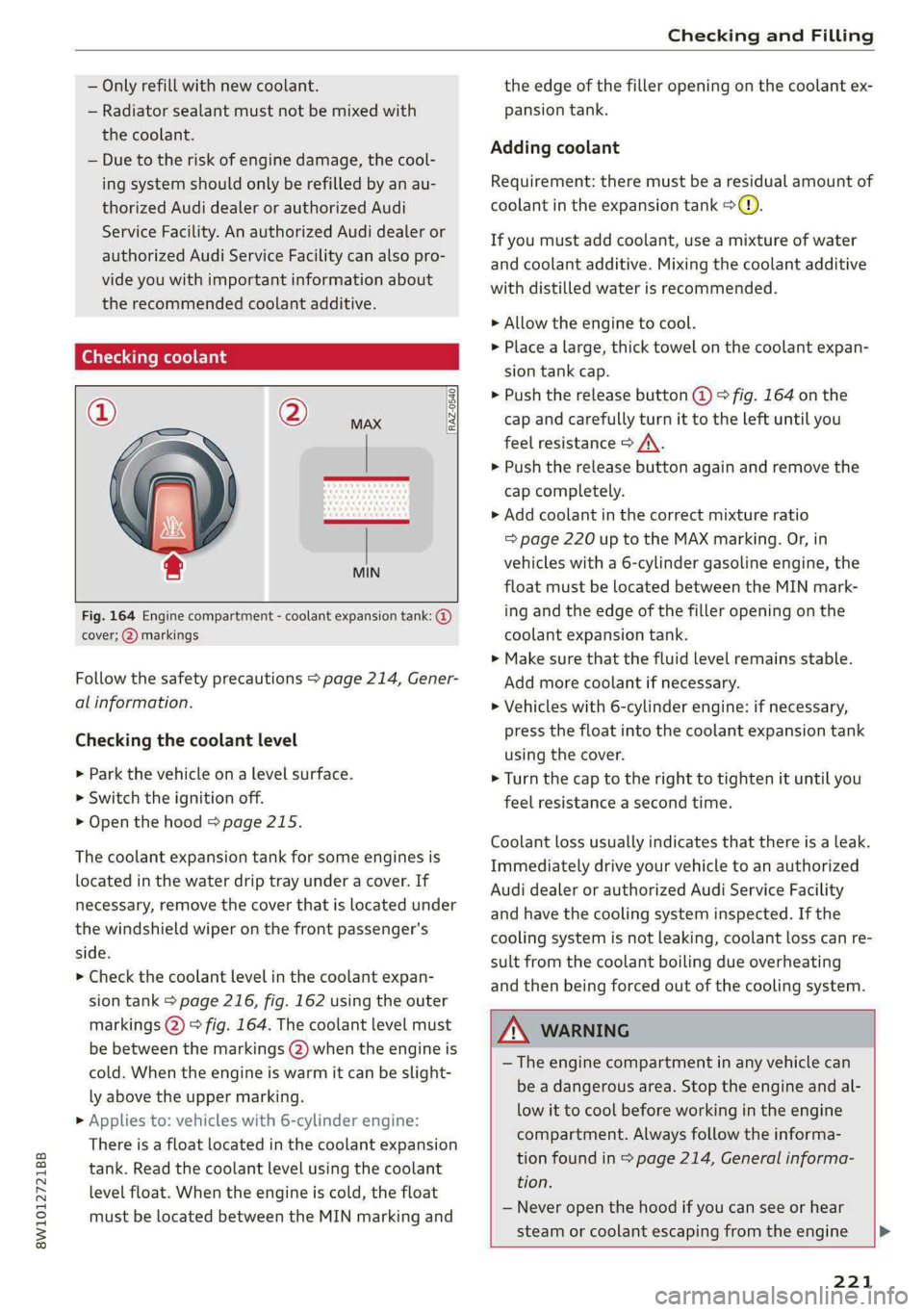
RAZ-0540
MIN
Fig. 164 Engine compartment - coolant expansion tank: @
cover; (2) markings
Follow the safety precautions > page 214, Gener-
al information.
Checking the coolant level
> Park the vehicle on a level surface.
> Switch the ignition off.
> Open the hood > page 215.
The coolant expansion tank for some engines is
located in the water drip tray under a cover. If
necessary, remove the cover that is located under
the windshield wiper on the front passenger's
side.
> Check the coolant level in the coolant expan-
sion tank > page 216, fig. 162 using the outer
markings (2) > fig. 164. The coolant level must
be between the markings (2) when the engine is
cold. When the engine is warm it can be slight-
ly above the upper marking.
>» Applies to: vehicles with 6-cylinder engine:
There is a float located in the coolant expansion
tank. Read the coolant level using the coolant
level float. When the engine is cold, the float
must be located between the MIN marking and
the edge of the filler opening on the coolant ex-
pansion tank.
Adding coolant
Requirement: there must be a residual amount of
coolant in the expansion tank >(@).
If you must add coolant, use a mixture of water
and coolant additive. Mixing the coolant additive
with distilled water is recommended.
> Allow the engine to cool.
>» Place a large, thick towel on the coolant expan-
sion tank cap.
> Push the release button @) © fig. 164 on the
cap and carefully turn it to the left until you
feel resistance > /\.
> Push the release button again and remove the
cap completely.
> Add coolant in the correct mixture ratio
=> page 220 up to the MAX marking. Or, in
vehicles with a 6-cylinder gasoline engine, the
float must be located between the MIN mark-
ing and the edge of the filler opening on the
coolant expansion tank.
> Make sure that the fluid level remains stable.
Add more coolant if necessary.
> Vehicles with 6-cylinder engine: if necessary,
press the float into the coolant expansion tank
using the cover.
> Turn the cap to the right to tighten it until you
feel resistance a second time.
Coolant loss usually indicates that there is a leak.
Immediately drive your vehicle to an authorized
Audi dealer or authorized Audi Service Facility
and have the cooling system inspected. If the
cooling system is not leaking, coolant loss can re-
sult from the coolant boiling due overheating
and then being forced out of the cooling system.
Z\ WARNING
— The engine compartment in any vehicle can
be a dangerous area. Stop the engine and al-
low it to cool before working in the engine
compartment. Always follow the informa-
tion found in > page 214, General informa-
tion.
— Never open the hood if you can see or hear
steam or coolant escaping from the engine >
221
Page 226 of 296

Checking and Filling
Only use the connections in the engine com-
partment > page 225.
A WARNING
California Proposition 65 Warning:
— Battery posts, terminals and related acces-
sories contain lead and lead compounds,
chemicals known to the State of California
to cause cancer and reproductive harms.
Wash hands after handling.
@) Note
— If the vehicle will be parked for long periods
of time, protect the battery against the cold
so that it will not be destroyed by “freezing”
= page 225, Charging the battery.
— There are electrical components under the
cargo floor behind a trim panel that warm
up during operation. To reduce the risk of
the components overheating, do not store
objects such as blankets under the cargo
floor. If the components overheat, they will
switch off temporarily. This will be indicated
by a message that will be displayed in the
instrument cluster until the temperature re-
turns to normal.
1M F-Te Moyea]
Explanation of warnings:
Always wear eye protection.
Battery acid is highly corrosive. Always
wear protective gloves and eye protection.
Fire, sparks, open flame, and smoking are
forbidden.
A highly explosive mixture of gases can
form when charging batteries.
Always keep children away from battery
acid and the battery.
Always follow the instructions in the oper-
ating manual.
5e@
>
@
LE
©
@) For the sake of the environment
~ ¥ Lead-acid batteries must be disposed of
using methods that will not harm the environ-
224
ment. Do not dispose of them in household
trash. They contain harmful substances, such
as sulfuric acid and lead, and also recyclable
raw materials. Contact an authorized Audi
dealer or authorized Audi Service Facility for
more information.
Other battery types
Explanation of warnings:
Fire, sparks, open flame, and smoking are
®& forbidden.
Always keep children away from battery
@) acid and the battery.
@/ | Always follow the instructions in the oper-
CQ | ating manual.
ZA WARNING
All work on the batteries must only be per-
formed by an authorized Audi dealer or au-
thorized Audi Service Facility.
— Gases that escape from these different bat-
tery types can be poisonous or flammable.
— The contents of these battery types can be
corrosive. If any battery contents come into
contact with the skin, flush the affected
area for at least 15 minutes with clean wa-
ter. Then wash the affected area with soap.
Have the affected area examined by a medi-
cal professional.
@) Note
Components must not be connected to the
battery terminals and wires on these battery
types because this increases the risk of dam-
age, for example due to overvoltage.
@) For the sake of the environment
<2 Hf These types of batteries must be dis-
posed of using methods that will not harm
the environment. Do not dispose of them in
household trash. They contain harmful sub-
stances and recyclable raw materials. Contact
an authorized Audi dealer or authorized Audi
Service Facility for more information.
Page 254 of 296
Care and cleaning
— Never treat leather with solvents, floor
polish, shoe polish, spot remover or simi-
lar products.
— Objects with sharp edges, such as zippers
or rivets on clothing or belts, can cause
damage to the surface.
— Never use steam cleaners, brushes, hard
sponges, etc. when cleaning.
— Do not turn on the seat heating* to dry
the seat.
—To help prevent the leather from fading,
do not leave the vehicle in direct sunlight
for long periods of time. If leaving the ve-
hicle parked for long periods of time, you
should cover the leather to protect it from
direct sunlight.
G) Tips
— Insects are easier to remove from paint that
has been freshly waxed.
— Regular waxing can prevent rust spots from
forming.
— Decorative decals can age due to environ-
mental conditions, which can result in dam-
age such as brittleness. The color may fade
if exposed to excessive sunlight.
Taking your vehicle out
of service
If you would like to take your vehicle out of serv-
ice for a long period of time, contact an author-
ized Audi dealer or authorized Audi Service Facili-
ty. They will advise you of important measures,
such as corrosion protection, service, and storage
procedures. Also follow the information about
the vehicle battery > page 223.
252