Rear lid AUDI S4 2020 User Guide
[x] Cancel search | Manufacturer: AUDI, Model Year: 2020, Model line: S4, Model: AUDI S4 2020Pages: 296, PDF Size: 80.45 MB
Page 43 of 296
8W1012721BB
Opening and closing
Opening the luggage compartment lid
bicelumMiarsie(-M ame (94
Applies to: vehicles with fixed rear backrests
RAZ-0146,
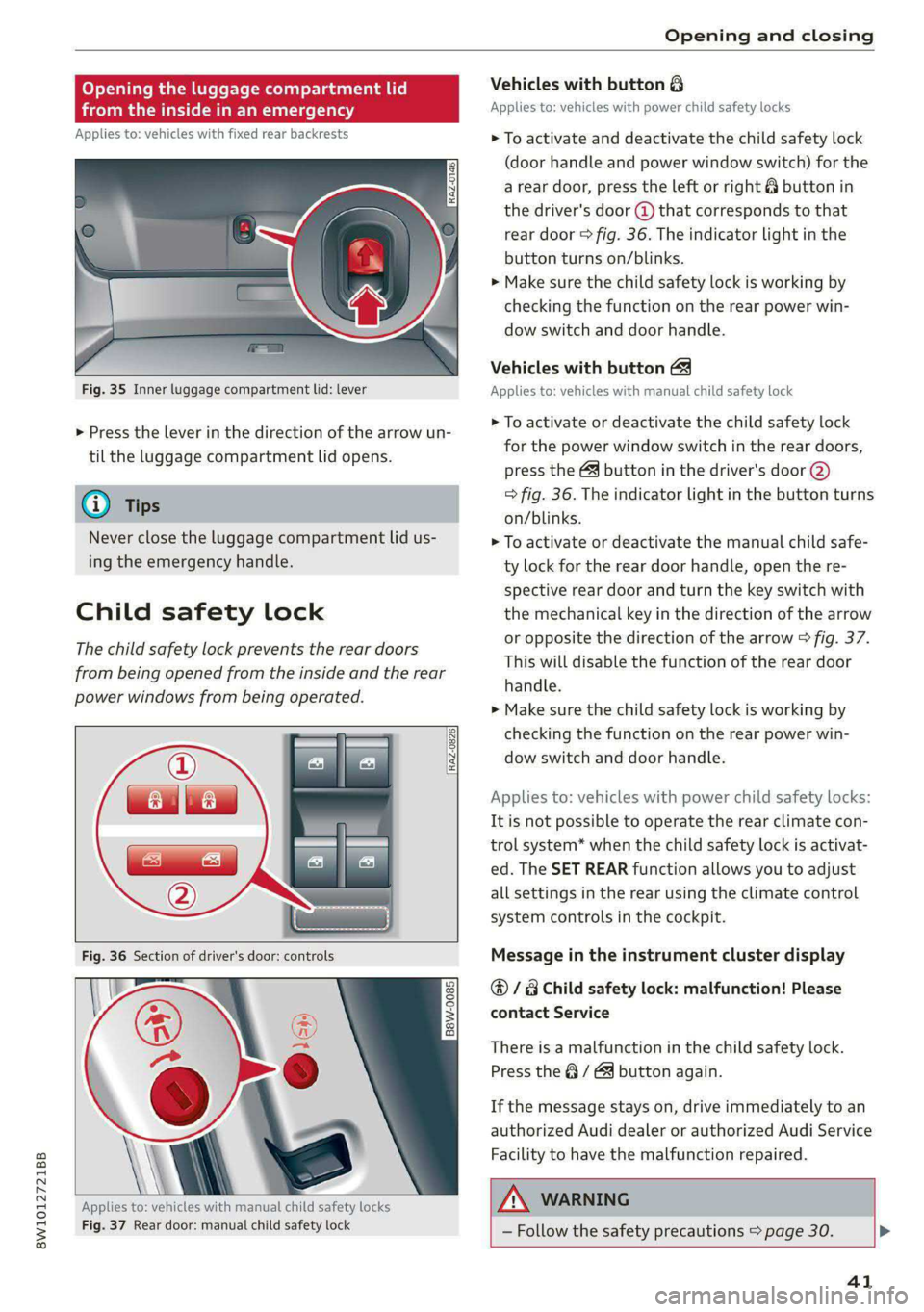
Fig. 35 Inner luggage compartment lid: lever
> Press the lever in the direction of the arrow un-
til the luggage compartment lid opens.
@ Tips
Never close the luggage compartment lid us-
ing
the emergency handle.
Child safety lock
The child safety lock prevents the rear doors
from being opened from the inside and the rear
power windows from being operated.
RAZ-0826
B8W-0085
Applies to: vehicles with manual child safety locks
Fig. 37 Rear door: manual child safety lock
Vehicles with button 8
Applies to: vehicles with power child safety locks
> To activate and deactivate the child safety lock
(door handle and power window switch) for the
a rear door, press the left or right @ button in
the driver's door @ that corresponds to that
rear door > fig. 36. The indicator light in the
button turns on/blinks.
> Make sure the child safety lock is working by
checking the function on the rear power win-
dow switch and door handle.
Vehicles with button
Applies to: vehicles with manual child safety lock
> To activate or deactivate the child safety lock
for the power window switch in the rear doors,
press the & button in the driver's door (2)
> fig. 36. The indicator light in the button turns
on/blinks.
> To activate or deactivate the manual child safe-
ty lock for the rear door handle, open the re-
spective rear door and turn the key switch with
the mechanical key in the direction of the arrow
or opposite the direction of the arrow > fig. 37.
This will disable the function of the rear door
handle.
> Make sure the child safety lock is working by
checking the function on the rear power win-
dow switch and door handle.
Applies to: vehicles with power child safety locks:
It is not possible to operate the rear climate con-
trol system* when the child safety lock is activat-
ed. The SET REAR function allows you to adjust
all settings in the rear using the climate control
system controls in the cockpit.
Message in the instrument cluster display
@/ Child safety lock: malfunction! Please
contact Service
There is a malfunction in the child safety lock.
Press the @ / 4 button again.
If the message stays on, drive immediately to an
authorized Audi dealer or authorized Audi Service
Facility to have the malfunction repaired.
ZX WARNING
— Follow the safety precautions > page 30. >
41
Page 46 of 296

Opening and closing
Panoramic glass roof
Operating the pa mic glass roof a
roof sunshade
Applies to: vehicles with panoramic glass roof and roof sun-
shade
Fig. 40 Headliner: panoramic glass roof and sunshade*
buttons
The control buttons are equipped with a two-
stage function.
When tilting or opening the roof, the roof sun-
shade will open partially or halfway if the sun-
shade is closed.
Operating the roof sunshade
The roof sunshade cannot be closed completely if
the roof is open.
> Opening and closing the sunshade: push the
switch in the headliner @) briefly toward the
rear or forward to the second level.
> Partially opening the sunshade: press the
switch to the first level until the sunshade
reaches the desired position.
Operating the roof
> Tilting the roof: press the &> switch in the
headliner briefly upward to the second level (4).
> Closing the tilted roof: pull the > switch
downward briefly to the second Level.
> Opening the roof: slide the 2S switch back
briefly twice in a row to the second level (2).
> Closing the roof: push the 2S switch forward
briefly to the second level.
> Opening or closing partially: slide the A>
switch to the first level and hold it there until
the roof reaches the desired position.
44
Quick opening
You can also open the roof and roof sunshade in
one movement.
> Push the 2S switch back briefly to the second
level @) twice in a row.
Roof emergency closing
If an object is detected when closing, the roof
will open again automatically. In this case, you
can
then close it with the power emergency clos-
ing function.
> Within five seconds after the sunroof opens au-
tomatically, pull the applicable button until the
roof is closed.
ZA WARNING
To reduce the risk of injury, always pay atten-
tion when closing the roof. Always switch the
ignition off and take the key with you when
leaving the vehicle.
() Note
Always close the roof when you leave the vehi-
cle and when there is precipitation to reduce
the risk of damage to the interior equipment,
particularly the electronic equipment.
@) Tips
— After switching off the ignition, the roof and
sunshades can still be operated for several
minutes as long as neither of the front
doors have been opened.
— It is not possible to open the roof when
temperatures are too low.
Valet parking
Applies to: vehicles with valet parking function
The valet parking function can protect the lug-
gage compartment from unauthorized access.
The [VALET] button for valet parking is in the
glove compartment.
Page 47 of 296
8W1012721BB
Opening and closing
You can switch the valet parking function on, for
example when someone else is parking your vehi-
cle ). The vehicle can be driven, locked, and un-
locked using the vehicle key, but access to the
luggage compartment is blocked.
> Remove the mechanical key > page 34.
> Press the [VALET] button in the glove compart-
ment. The LED in the button turns on if the
function is switched on.
> Lock the glove compartment with the mechani-
cal key.
» Applies to: vehicles with lockable pass-through
and lockable rear seat backrests: To secure the
luggage compartment from the vehicle interior,
lock the pass-through and the rear seat backr-
ests using the mechanical key > page 84 or
=> page 82.
> Give your vehicle key to the service personnel
who are parking your vehicle and keep the me-
chanical key.
The following buttons are deactivated when the
valet parking function is switched on:
— <3 button in the driver's door
— Zs button on the vehicle key
— Handle in the luggage compartment lid
If the valet parking function is switched on, a
message will appear every time the ignition is
switched on.
@ Tips
Please note that the luggage compartment
can still be accessed from the vehicle interior
in vehicles with fixed rear seat backrests or
ones that cannot be locked, even when the
valet parking function is switched on.
Garage door opener
Applies to: vehicles with garage door opener
With the garage door opener, you can activate
systems such as the garage doors, security sys-
D_ This function is not available in all countries.
2) The possible number of hand-held transmitters depends
on the equipment.
tems or house lights from inside your vehicle.
These functions are operated in the MMI. Multi-
ple receivers can be programmed, which can con-
trol the functions of up to eight2) hand-held
transmitters.
Z\ WARNING
— When operating or programming the garage
door opener, make sure that no people or
objects are in the area immediately sur-
rounding the equipment. People can be in-
jured or property can be damaged if struck
when closing.
— Do not allow yourself to be distracted from
traffic by the viewing and operating the dis-
plays.
G@) Tips
— Ifyou sell your vehicle, reset all settings to
the factory default settings > page 207.
—For an explanation on conformity with the
FCC regulations in the United States and the
Industry Canada regulations, see
=> page 275.
(i) Tips
Before you program your system to the ga-
rage door opener, first check the compatibili-
ty:
— Ask an authorized Audi dealer or authorized
Audi Service Facility or check at www.
homelink.com. You can also find more infor-
mation about HomeLink there.
— You can display information about Home-
Link (compatibility level/status/country
code/HomeLink generation) in the MMI:
— Select on the home screen: VEHICLE > Set-
tings & Service > Garage door opener > (.
Applies to: vehicles with garage door opener
Requirements: the remote control transmitter
must be programmed > page 46, the vehicle
4s
>
Page 65 of 296

8W1012721BB
Sitting correctly and safely
— Push the lever upward firmly so that the
steering wheel position does not change un-
intentionally while driving, which would in-
crease the risk of an accident.
Head restraints
General information
Applies to: vehicles with adjustable head restraints
B4G-0454
Fig. 60 Correctly adjusted head restraints
Make sure that:
— The upper edge of the head restraint is as even
as possible with the top of your head
— The head restraint is as close as possible to the
back of the head
— The head restraints in any occupied rear seats
are all the way up
Z\ WARNING
— There is one head restraint for each seating
position. All vehicle occupants must adjust
the head restraint correctly before every
trip. Having head restraints that are not ad-
justed correctly or not installed in the vehi-
cle increases the risk of a neck injury during
sudden or unexpected driving or braking
maneuvers or in a collision.
— Only remove the rear seat head restraints if
it is necessary to install a child safety seat
=> page 72. Stow the removed head re-
straints securely, for example in the luggage
compartment. Reinstall the head restraints
immediately once the child safety seat has
been removed. Driving without head re-
straints increases the risk of serious neck in-
juries.
Front head restraints
Applies to: vehicles with adjustable head restraints
[RAZ-0683]
Fig. 61 Front seat: adjusting the head restraint
Adjusting the head restraints
Applies to: vehicles with manually adjustable head restraints
> To adjust the head restraint upward or forward,
slide it until it locks into place.
> To adjust the head restraint downward or back-
ward, press the button on the side and slide the
head restraint. Release the button and slide the
head restraint farther until it locks into place.
Rear head restraints
Applies to: vehicles with adjustable head restraints
Fig. 62 Rear seat: adjusting or removing the head restraint
Adjusting the head restraints
> To adjust the head restraint upward, slide it un-
til it locks into place.
> To adjust the head restraint downward, press
the button @) and slide the head restraint. Re-
lease the button and slide the head restraint
farther until it locks into place.
Removing the headrests
Applies to: vehicles with removable head restraints
> Fold the backrest forward slightly > page 82.
> Move the head restraint upward all the way. >
63
Page 66 of 296
Sitting correctly and safely
> Insert a suitable object, such as the the extend-
ed vehicle key or mechanical key, into the re-
lease point @ on the inside or outside of the
base.
> Press the button @) and pull the head restraint
out of the backrest.
Installing the headrests
> Fold the backrest forward slightly > page 82.
>» Slide the posts on the head restraint down into
the guides until the posts click into place.
> Press the button @) and slide the head restraint
all the way down. It should not be possible to
remove the head restraint from the backrest
without pressing the button.
Safety belts
Each seat is equipped with a three-point safety
belt. Safety belts that are worn correctly are the
most effective way to reduce the risk of serious or
fatal injuries in a collision. Therefore, wear your
safety belt correctly and make sure that all vehi-
cle passengers are also wearing their safety belts
correctly when the vehicle is moving.
Even though your vehicle is equipped with an air-
bag system, every vehicle passenger must still al-
ways wear the appropriate safety belt. In addi-
tion to their normal protective function, safety
belts also hold vehicle occupants in the correct
seating position in the event of a collision so that
the airbags can deploy correctly and provide addi-
tional protection. Safety belts provide protection
during collisions when the airbags do not deploy
or if they have already deployed.
Z\ WARNING
The risk of serious or fatal injury increases if
the safety belt is not fastened, if it is worn in-
correctly, or if it is damaged.
— All vehicle occupants, including the driver,
must fasten their safety belts correctly be-
fore every trip and must always keep their
safety belts fastened during the trip, regard-
less of whether the seat is equipped with an
airbag or not. This also applies to children
64
that are seated in a child safety seat that is
appropriate for their weight and age and
that is secured with a safety belt.
In the event of a collision, vehicle occupants
that are not wearing safety belts could be
propelled through the vehicle interior and
collide with vehicle components, such as the
steering wheel, instrument panel, wind-
shield, or doors. In some situations, vehicle
occupants could also be ejected from the ve-
hicle. Vehicle occupants in the rear seats
who do not wear safety belts not only en-
danger themselves, but also other people in
the vehicle.
Only one person may be fastened with a
safety belt at a time. Never secure more
than one person, including children, with a
single safety belt.
Never allow children or infants to ride on an-
other person's lap and be belted into the
safety belt with them.
Insert the belt buckle only in the belt latch
belonging to the corresponding seat, so that
the protective function is not impaired.
To ensure the maximum protective function
of the safety belts, all vehicle passengers
must sit in the correct seating position
=> page 59.
Check the condition of your vehicle’s safety
belts regularly > page 248. If you find dam-
age to the belt webbing, the belt connec-
tions, the retractor, or the buckle, have the
damaged safety belt replaced by an author-
ized Audi dealer or authorized Audi Service
Facility.
The safety belts must not be removed or
modified in any way. Do not attempt to re-
pair the safety belts yourself.
Safety belts that are strained during an acci-
dent, and thus stretched, must be replaced
by an authorized Audi dealer or authorized
Audi Service Facility.
Page 68 of 296
Sitting correctly and safely
rivets on clothing in the area where the safety
belt is worn. Otherwise, the safety belt could
be damaged.
aC mice ate mt Lime
B4H-0462
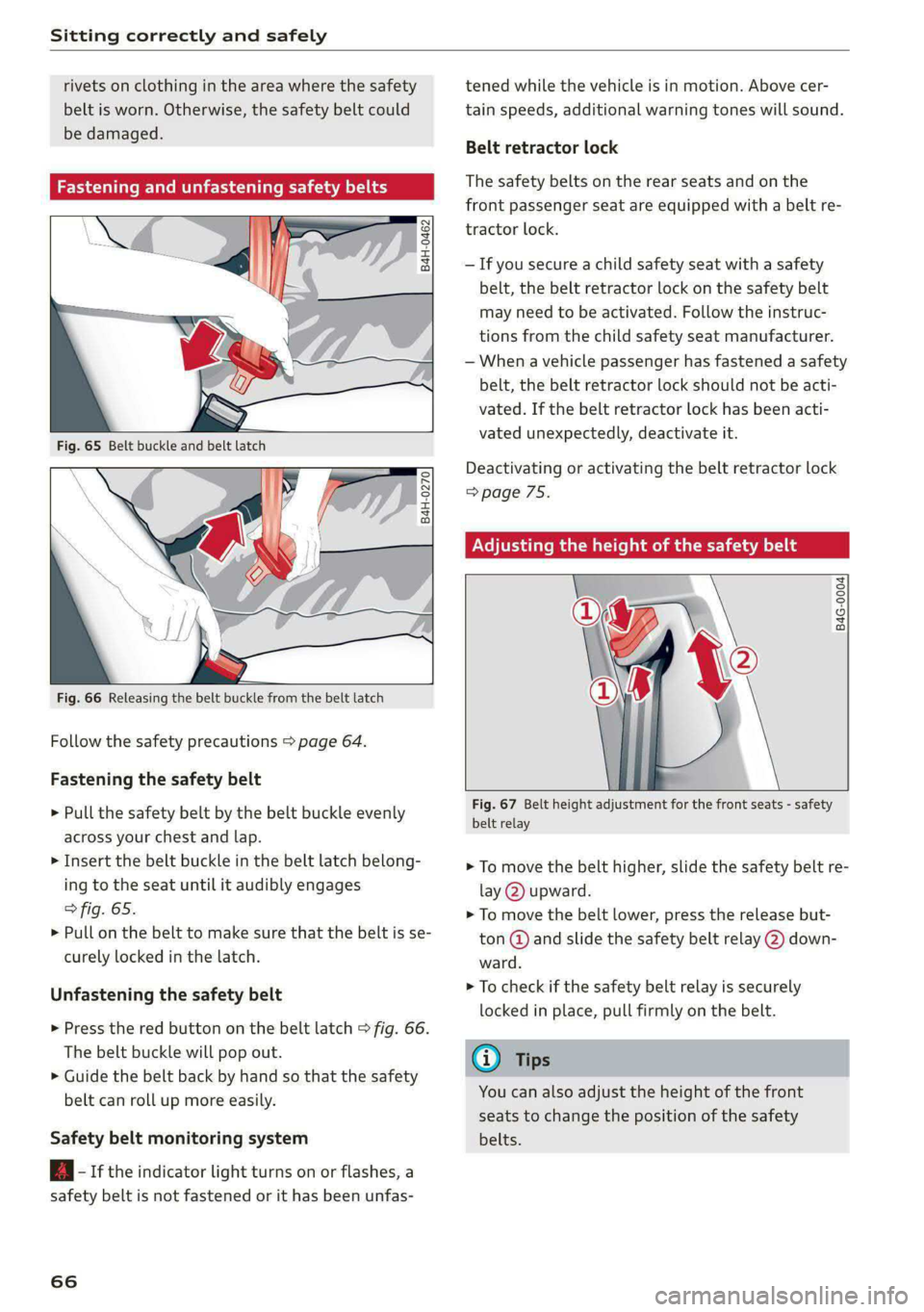
° Rg a 2
z| x oO
Fig. 66 Releasing the belt buckle from the belt latch
Follow the safety precautions > page 64.
Fastening the safety belt
> Pull the safety belt by the belt buckle evenly
across your chest and lap.
> Insert the belt buckle in the belt latch belong-
ing to the seat until it audibly engages
> fig. 65.
> Pull on the belt to make sure that the belt is se-
curely locked in the latch.
Unfastening the safety belt
> Press the red button on the belt latch > fig. 66.
The belt buckle will pop out.
> Guide the belt back by hand so that the safety
belt can roll up more easily.
Safety belt monitoring system
B- If the indicator light turns on or flashes, a
safety belt is not fastened or it has been unfas-
66
tened while the vehicle is in motion. Above cer-
tain speeds, additional warning tones will sound.
Belt retractor lock
The safety belts on the rear seats and on the
front passenger seat are equipped with a belt re-
tractor lock.
— If you secure a child safety seat with a safety
belt, the belt retractor lock on the safety belt
may need to be activated. Follow the instruc-
tions from the child safety seat manufacturer.
— When a vehicle passenger has fastened a safety
belt, the belt retractor lock should not be acti-
vated. If the belt retractor lock has been acti-
vated unexpectedly, deactivate it.
Deactivating or activating the belt retractor lock
=> page 75.
Adjusting the height of the safety belt
B4G-0004
Fig. 67 Belt height adjustment for the front seats - safety
belt relay
> To move the belt higher, slide the safety belt re-
lay @ upward.
> To move the belt lower, press the release but-
ton @ and slide the safety belt relay @) down-
ward.
> To check if the safety belt relay is securely
locked in place, pull firmly on the belt.
@ Tips
You can also adjust the height of the front
seats to change the position of the safety
belts.
Page 80 of 296

Stowing and using
Stowing and using
Power sources
When the ignition is switched on, you may be
able to use the power sources for external devi-
ces, depending on the vehicle equipment.
12 volt sockets
You can connect electrical accessories to the 12
volt sockets. The power usage must not exceed
120 watts.
The 12 volt sockets are labeled with the 12V
symbol. They are located in the front center con-
sole, in the rear* and on the side trim panel in the
luggage compartment*.
USB ports
Applies to: vehicles with USB input
You can charge mobile devices using the USB
ports. The USB ports are labeled with the «> or
[4 symbol or CHARGE ONLY.
ZA WARNING
—To reduce the risk of fatal injury, store all
connected devices securely when driving so
that they do not move around inside the ve-
hicle when braking or in the event of an acci-
dent.
— Incorrect usage can lead to serious injuries
or burns. To reduce the risk of injuries, never
leave children unattended in the vehicle
with the vehicle key.
@) Note
— Read the operating manuals for the con-
nected devices.
—To reduce the risk of damage to the vehicle
electrical system, never attempt to charge
the vehicle battery by connecting accesso-
ries that provide power to the power sour-
ces.
— Do not connect any device whose network
class (voltage) does not match the network
class designed for the socket.
— Disconnect the connectors from the power
sources carefully to reduce the risk of dam-
aging them.
78
Cup holders
Fig. 74 Rear center armrest*: cup holders
Your vehicle has cup holders in the front center
console and in the rear center armrest*.
Cup holders in the rear center armrest*
> Fold the center armrest* downward.
> To open the cup holders, pull the top cover on
the cup holders forward > fig. 74.
> To close the cup holder, fold the cover back un-
til it clicks into place.
ZX WARNING
— Do not put any hot beverages in the cup
holder while the vehicle is moving. Hot bev-
erages could spill, which increases the risk
of injury.
— Do not use any breakable beverage contain-
ers (for example, made out of glass or por-
celain). You could be injured by them in the
event of an accident.
@) Note
Beverage containers in the cup holders should
always
have a lid. Otherwise, the liquid inside
could spill and cause damage to vehicle
equipment.
Storage areas and
compartments
Depending on the vehicle equipment, there may
be a variety of storage areas, compartments, and
retainers at various locations in the vehicle. >
Page 82 of 296

Stowing and using
— Applies to: vehicles with luggage compart-
ment cover: The luggage compartment cov-
er must always be securely fastened when in
use to reduce the risk of an accident.
— Loose objects can be thrown around the ve-
hicle interior during sudden driving or brak-
ing maneuvers, which increases the risk of
an accident. Always stow objects securely in
the luggage compartment and secure them
at the tie-downs. Use straps suitable for
heavy objects.
— If pieces of luggage or objects are secured
to the tie-downs with unsuitable or dam-
aged straps, this can increase the risk of in-
jury during braking maneuvers or accidents.
— When transporting heavy objects, the vehi-
cle characteristics will change due to the
shift in the center of gravity, which increases
the risk of an accident. You may need to
adapt your driving style and speed to the
current conditions.
— The cargo net is only strong enough to se-
cure light objects. Heavy objects are not ade-
quately secured. Attempting to secure heavy
objects increases the risk of injury.
— Never exceed the permitted axle and load
and vehicle weight > page 278.
— Never secure a child safety seat to the tie-
downs.
— Never leave your vehicle unattended, espe-
cially if the luggage compartment lid is
open. Children could enter the luggage com-
partment and close the luggage compart-
ment lid from the inside. This creates the
risk of fatal injury, since the children would
be locked in and may not be able to escape
by themselves.
— Do not allow children to play in or on the ve-
hicle. Close and lock the luggage compart-
ment lid as well as all other doors when you
leave
the vehicle.
— Never transport passengers in the luggage
compartment. Every passenger must be cor-
rectly secured with the safety belts in the
vehicle > page 64.
— Be careful when releasing the backrest and
folding
it forward. To reduce the risk of be-
ing pinched, pay attention and check when
folding backrests forward.
— The backrest must be securely latched so
objects cannot slide forward out of the lug-
gage compartment during sudden braking.
— The backrest must be latched securely to en-
sure that the safety belt is protecting the
center seating position.
— Always pull forward on the backrest to make
sure it is check if it is correctly locked in
place.
80
() Note
—To reduce the risk of damage, move the rear
head restraints down before folding the rear
backrests forward > page 63.
— When folding the backrest forward, make
sure the outer safety belts are in the belt
guide recess so that they do not get pinched
in the backrest lock and damaged. Other ob-
jects should be removed from the rear
bench seat to protect the backrest from
damage.
— To reduce the risk of damaging the front
seats, make sure there is enough space be-
tween the front seat and the rear seat
equipment when folding the center backrest
forward.
— If you move the front seat back when the
rear seat backrest is folded forward, you
could damage the head restraints on the
rear seat.
— Make sure that the heating grid strips for
the rear window defogger are not damaged
by abrasive objects.
— Applies to: vehicles with manual luggage
compartment cover: Let the luggage com-
partment cover roll up slowly to reduce the
risk of damage.
— Applies to: vehicles with partition net: Let
the partition net roll up slowly to reduce the
risk of damage.
(i) Tips
— The tire pressure must be adapted to the
load > page 237.
— You can purchase straps at specialty stores.
Page 105 of 296
8W1012721BB
Driving
manually or automatically when you start to
drive.
Setting and releasing the parking brake
> Setting: pull the ©) switch.
> ris appears, the parking brake is hold-
ing the vehicle. You can remove your foot from
the brake pedal.
> Releasing: when the ignition is switched on,
press and hold the brake pedal and press the ©)
button.
If the red indicator light flashes, the braking
force has not built up enough or it has decreased.
You can also secure the vehicle by selecting the
“P” gear or pressing the brake pedal. Make sure
the indicator light is off before you start driving.
Automatically releasing the parking brake
when starting to drive
Requirement: the driver's door must be closed
and the driver’s safety belt must be fastened.
> Press the accelerator pedal to start to drive.
ZA\ WARNING
—To reduce the risk of an accident, always
make sure the vehicle is situated safely
while stationary.
— If the parking brake is set, it can release au-
tomatically when the accelerator pedal is
pressed. To reduce the risk of an accident,
do not inadvertently press the accelerator
pedal and always shift into “P” when the ve-
hicle is stopped.
— If the power supply fails, you cannot set the
parking brake once it is released, or release
it if it is set. In this case, park the vehicle on
level ground and secure it by engaging the
"P” gear. Contact an authorized Audi dealer
or authorized Audi Service Facility for assis-
tance.
@) Tips
— On steep inclines, especially when in trailer
mode, the vehicle may roll backwards unin-
tentionally when starting to drive. To re-
duces the risk of this happening, pull and
hold the ©) switch while pressing the accel-
erator pedal. If enough drive power has
built up at the wheels and the vehicle does
not roll backwards, then release the switch
to start to drive.
— If you leave the vehicle when “D” or “R” are
engaged, the parking brake will be set auto-
matically.
— Noises when the parking brake is set and re-
leased are normal and are not a cause for
concern.
— The parking brake goes through a self-test
cycle at regular intervals when the vehicle is
stopped. Any noises associated with this are
normal.
Emergency braking function
Emergency braking should only be used in an
emergency, if the standard brake pedal is mal-
functioning or obstructed. When the emergency
braking function is activated, the braking effect is
similar to a heavy braking maneuver.
> Pull and hold the ©) switch while driving.
» An audio warning signal will sound and emer-
gency braking will begin.
> If you press the accelerator pedal, emergency
braking will be canceled.
ZA WARNING
Heavy braking while driving through curves or
in poor road or weather conditions can cause
the vehicle to slide or the rear of the vehicle to
swerve, which increases the risk of an acci-
dent.
Ea / @ Parking brake: malfunction! Safely
stop vehicle. See owner's manual
EG / @ Parking brake: malfunction! Please
release parking brake
If one of the two messages appears, there is a
malfunction in the parking brake. If the message
appears while stationary, check if the parking
brake is released and can be reset. If this is the
case,
switch the ignition off and back on.
103
Page 119 of 296
8W1012721BB
Assist systems
Rear area
Depending on the vehicle equipment, the follow-
ing sensors and cameras may be installed:
— Rearview camera in the luggage compartment
lid
— Radar sensors at the rear corners of the vehicle
— Rear and side ultrasonic sensors
G) Tips
— The locations of the sensors may differ
slightly depending on vehicle equipment.
— Some sensors are installed under vehicle
components and cannot be seen from the
outside.
117