service AUDI S4 CABRIOLET 2009 User Guide
[x] Cancel search | Manufacturer: AUDI, Model Year: 2009, Model line: S4 CABRIOLET, Model: AUDI S4 CABRIOLET 2009Pages: 340, PDF Size: 77.32 MB
Page 37 of 340
Defective light bulb warning The defective light bulb warning tells you when a vehicle
light bulb has become defective.
If a defective bulb has been detected by the system or a light bulb
burns out, the symbol with a message appears in the display to
tell you which bulb is burnt out and where it is located. For example:
R ear left tu rn signal
After 5 seconds, the message disappears . If you want to reca ll the
message into the display, press the CHECK button .
There are three reasons why the defective bulb message would appear in the display:
• the light bu lb has burnt out~
page 302.
• the fuse is "blown"~ page 300, "Replacing a fuse" .
• the wire connection to the light bulb is defective .
Have the bulb replaced or the connection repaired by your autho
rized Audi Service department .
& WARNING
• Light bulb s are pre ssur ized and cou ld e xplode while they are
being changed causing se rio us pe rsona l injury .
• Work with du e care when h andling the high -voltage sect ion of
gas disc ha rg e !x enon ) la mp s* . F a il ing to do so cou ld r esult in death
o r seriou s inju ry! •
Contro ls and eq uip
ment
Dri ver informa tio n di spl ay
Speed warning system
Overview
The spee d warning system helps you to keep your driving
speed below a set speed limit.
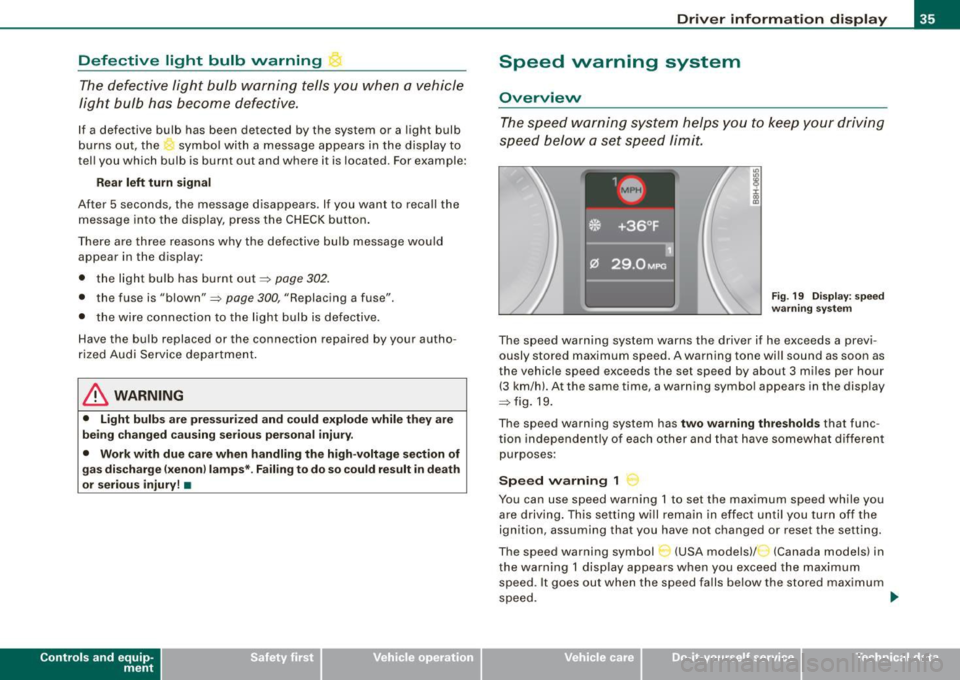
Fig. 19 D ispl ay : s pee d
wa rning sy st em
The speed warning system warns the driver if he exceeds a previ
ously stored maximum speed . A warning tone wi ll sound as soon as
the vehicle speed exceeds the set speed by about 3 miles per hour (3 km/hl. At the same time, a warning symbo l appears in the display
~fig.19.
The speed warning system has
two warning thre sh old s that func
tion independently of each other and that have somewhat different
purposes :
Speed warning 1
You can use speed warning 1 to set the maximum speed while you
are driving . This setting will remain in effect un til you turn off the
ignition, assuming that you have not changed or reset the setting.
The speed warning symbol
C-~ (USA models)/ (Canada models) in
the warning 1 display appears when you exceed the maximum speed . It goes out when the speed falls below the stored maximum
speed. .,
~ehicle care Technical data
Page 42 of 340
Driver inf orma tion d ispl ay
Some functions in your vehicle can be set, activated, and controlled
by
M enu s (e.g. Acoustic Park Assist*). With these menus you can
a lso select the information shown in the DIS disp lay, which operates
only with the ignition switched on. Operation is controlled by the
!Reset) button and the rocker switch on the wiper lever~
page 39,
fig. 25.
The
Start m enu shows you the different disp lay types :
Set
Check
Menu off
H el p
Each display type in the Start menu contains a submenu with addi
tional options.
S et
Check
Me nu off
H elp
Clock ~ page40
Computer
Speed alarm (speed
~ page35
warning)
Language (6 languages)
=> page40
Units (distance, fuel con-~ page40
sumption, temperature)
Service
~ page 17
All of the messages shown in vehicles without menu disp lay appear on the display screen.
The Help function helps you to make the right selection.
•
Navigating the menu
Use the rocker switch on the windshield wiper lever and
the[ResetJ button to operate the menu and carry out
inquiries and selections.
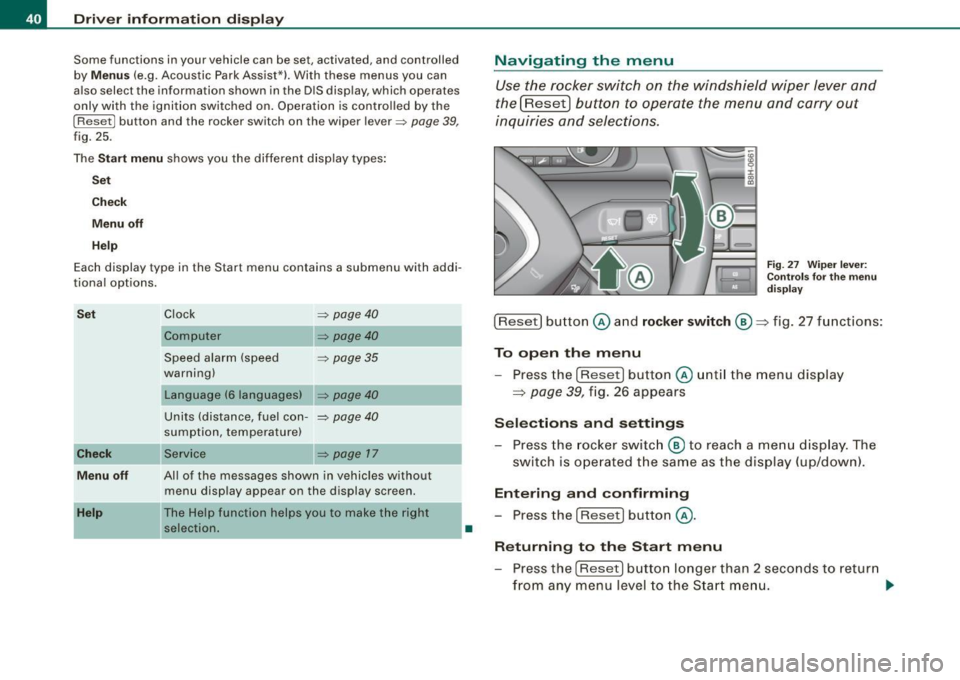
F ig . 27 Wipe r leve r:
Con trols for t he m en u
d is pl ay
!Reset] button @and rocker switch @=> fig. 27 functions:
To op en th e menu
- Press the
!Reset! button @unti l the menu display
=> page 39, fig. 26 appears
Sele ctions and setting s
- Press the rocker switc h
@ to reach a me nu display . The
switch is ope rated the sam e as the display (up/down).
Entering and confirming
- Press the
I Reset I button @.
R eturning to th e Start menu
- Press the
[Reset) butto n longer than 2 seconds to retur n
from any menu level to the Star t m en u. •
Page 112 of 340
• .___w __ a _r _m _ a _n_d_ c_ o _ ld __________________________________________________ _
Warm and cold
Climate controls
Description
The air conditioner is fully automatic and is designed to
maintain a comfortable and uniform climate inside the
vehicle.
We recommend the following settings:
- Select and set a temperature between 64 °F (+22 °C) and
86 °F (+29 °C).
- Press the !AUTO
I button.
With this setting, you attain maximum comfort in the least amount
of time. Change this setting, as desired, to meet your personal
needs.
The climate controls are a combination of heating, ventilation and cooling systems, which automatically reduce humidity and cool the
air inside your vehicle.
The air temperature, air flow and air distribution are automatically regulated to achieve and maintain the desired passenger compart
ment temperature as quickly as possible.
The system automatically compensates for changes in the outside
temperature and for the intensity of the sunlight entering the
vehicle. We recommend you use the
Automatic mode=> page 112
for year -round comfort.
Please note the following:
Turn on the air conditioner to reduce humidity in the vehicle. This
also prevent the windows from fogging up. When the outside temperature is high and the air is very
humid,
condensation from the evaporator may drip under the vehicle. This
is normal and does not indicate a leak.
I f the outside temperature is low, the fan normally only switches to
a higher speed once the engine coolant has warmed up sufficiently.
The air conditioner temporarily switches off when you drive off from a standstill using full throttle to save engine power.
The compressor also switches off if the coolant temperature is too
high so that the engine can be adequately cooled under extreme
loads.
Air pollutants filter
The air pollutants filter (a combined particle filter and activated charcoal filter) reduces or eliminates outside air pollution (dust, or
pollen) from entering the vehicle.
The air pollutants filter must be changed at the intervals specified in your Warranty
& Maintenance booklet, so that the air conditioner
can properly work.
If you drive your vehicle in an area with high air pollution, the filter
may need to be changed more frequently than specified in your
Audi Warranty
& Maintenance booklet. If in doubt, ask your autho
rized Audi Service Advisor for advice.
Key coded settings
The air conditioner settings selected are automatically stored and
assigned to the key being used. When the vehicle is started, the air
conditioner automatically selects the settings assigned to that key.
These settings will differ depending if the roof is opened or closed.
This way every driver will maintain his/her own personal settings
and does not have to reset them manually.
~
Page 149 of 340
________________________________________________ D_r_iv _ i _n...: g=--- S_ a_ fe--= ly'---------"'
- Make sure that all lights and signals are operating
correctly.
- Make sure that the tire pressure is correct.
- Make sure that all windows are clean and afford good
visibility to the outside.
- Secure all luggage and other items carefully~
page 107.
-Make sure that nothing can interfere with the pedals.
- Adjust front seat, head restraint and mirrors correctly for
your height.
- Instruct passengers to adjust the head restraints
according to their height.
- Make sure to use the right child restraint correctly to
protect children~
page 190, "Child Safety".
- Sit properly in your seat and make sure that your passen
gers do the same
~ page 92, "General recommenda
t ions" .
- Fasten your safety belt and wear it properly. Also instruct
your passengers to fasten their safety belts properly
~ page 159. •
What impairs driving safety?
Safe driving is directly related to the condition of the
vehicle, the driver as well as the driver's ability to concen
trate on the road without being distracted.
The driver is responsible for the safety of the vehicle and all
of its occupants. If your ability to drive is impaired, safety
risks for everybody in the vehicle increase and you also
Controls and equip
ment Safety first Vehicle operation
become a
hazard to everyone else on the road ~& .There
fore:
- Do not let yourself be distracted by passengers or by
using a cellular telephone.
- NEVER drive when your driving ability is impaired (by
medications, alcohol, drugs, etc.I.
- Observe all traffic laws, rules of the road and speed limits
and plain common sense.
- ALWAYS adjust your speed to road, traffic and weather
conditions.
- Take frequent breaks on long trips. Do not drive for more
than two hours at a stretch.
- Do NOT drive when you are tired, under pressure or when
you are stressed.
& WARNING
Impaired driving safety increases the risk of serious personal
injury and death whenever a vehicle is being used. •
Vehicle care Do-it-yourself service Technical data
Page 151 of 340
__________________________________________________ D _r_iv _ in_ g=- S_ a_f _e _l..:.. Y _ ....... 911
& WARNING (continued)
• Always adjust the driver's seat and the steering wheel so that
there are at least 4 inches 110 cm) between the knees and the
lower part of the instrument panel.
• Always hold the steering wheel on the outside of the steering
wheel rim with your hands at the 9 o'clock and 3 o'clock positions
to help reduce the risk of personal injury if the driver's airbag inflates .
• Never hold the steering wheel at the 12 o'clock position or with
your hands at other positions inside the steering wheel rim or on
the steering wheel hub. Holding the steering wheel the wrong way can cause serious injuries to the hands, arms and head if the
driver's airbag inflates
• Pointing the steering wheel toward your face decreases the
ability of the supplemental driver's airbag to protect you in a colli
sion .
• Always sit in an upright position and never lean against or
place any part of your body too close to the area where the airbags
are located.
• Before driving, always adjust the front seats and head
restraints properly and make sure that all passengers are properly
restrained.
• Never adjust the seats while the vehicle is moving. Your seat
may move unexpectedly and you could lose control of the vehicle.
• Never drive with the backrest reclined or tilted far back! The
farther the backrests are tilted back, the greater the risk of injury
due to incorrect positioning of the safety belt and improper
seating position.
• Children must always ride in child seats
=> page 190. Special
precautions apply when installing a child seat on the front
passenger seat
=> page 168. •
Controls and equip
ment Safety first
Vehicle operation
Proper seating position for the front
passenger
The proper front passenger seating position is important
for safe, relaxed driving.
For your own safety and to reduce the risk of injury in the
event of an accident, we recommend that you adjust the
seat for the front passenger to the following pos ition:
- Move the front passenger seat back as far as possible.
There must be a minimum of 10 inches (25 cm) between
the breastbone and the instrument panel =>
&.
- Adjust the angle of the seatback so that it is in an upright
position and your back comes in full contact with it
whenever the vehicle is moving.
- Adjust the head restraint so that the upper edge is as
even with the top of your head as possible but not lower
than eye level and so that it is as close to the back of your
head as possible =>
page 151.
-Keep both feet flat on the floor in front of the front
passenger seat.
- Fasten and wear safety belts correctly=>
page 163.
For detailed information on how to adjust the front passenger's
seat, see => page 92.
LJ}. WARNING
Front seat passengers who are unbelted, out of position or too
close to the airbag can be seriously injured or killed by the airbag
as it unfolds. To help reduce the risk of serious personal injury :
jll,,
Vehicle care Do-it-yourself service Technical data
Page 153 of 340
Driving Safely ---------------=------=~
Proper adjustment of head restraints
Correctly adjusted head restraints are an important part
of your vehicle's occupant restraint system and can help
to reduce the risk of injuries in accident situations.
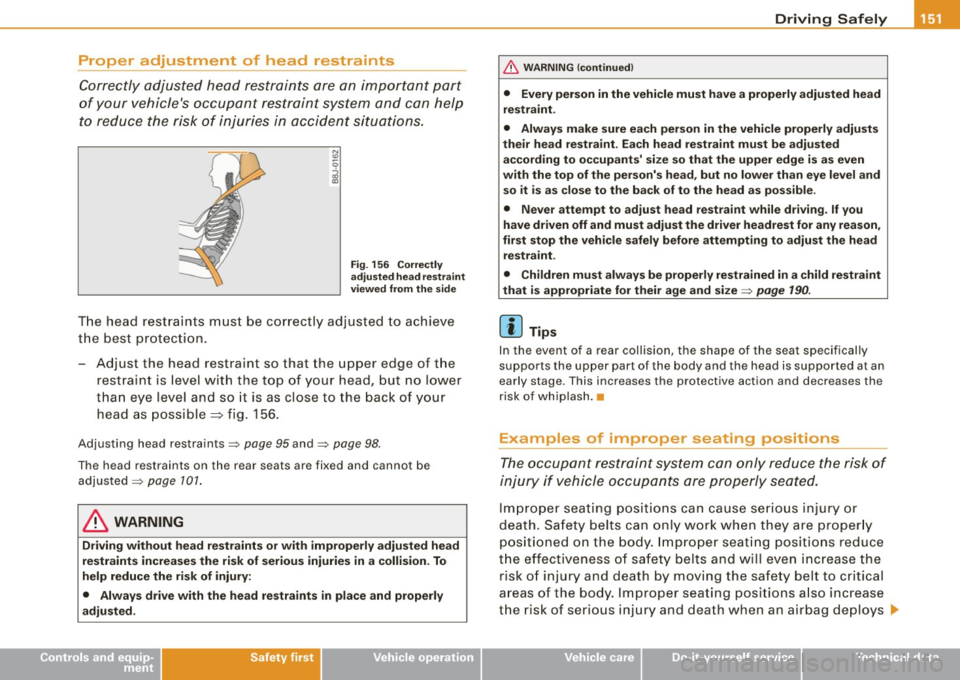
Fig . 156 Correctly
adjusted head restraint
viewed from the side
The head restraints must be correctly adjusted to achieve
the best protection.
- Adjust the head restraint so that the upper edge of the
restraint is level with the top of your head, but no lower
than eye level and so it is as close to the back of your
head as possible
=> fig . 156.
Adjusting head restraints=> page 95 and=> page 98.
The head restraints on the rear seats are fixed and cannot be
adjusted =>
page 101.
& WARNING
Driving without head restraints or with improperly adjusted head
restraints increases the risk of serious injuries in a collision . To
help reduce the risk of injury:
• Always drive with the head restraints in place and properly
adjusted .
Controls and equip ment Safety first Vehicle operation
& WARNING
(continued)
• Every person in the vehicle must have a properly adjusted head
restraint.
• Always make sure each person in the vehicle properly adjusts
their head restraint. Each head restraint must be adjusted
according to occupants' size so that the upper edge is as even
with the top of the person's head, but no lower than eye level and
so it is as close to the back of to the head as possible .
• Never attempt to adjust head restraint while driving. If you
have driven off and must adjust the driver headrest for any reason,
first stop the vehicle safely before attempting to adjust the head
restraint .
• Children must always be properly restrained in a child restraint
that is appropriate for their age and size=>
page 190.
[ i] Tips
In the event of a rear collision, the shape of the seat specifically
supports the upper part of the body and the head is supported at an
early stage. This increases the protective action and decreases the
risk of whiplash. •
Examples of improper seating positions
The occupant restraint system can only reduce the risk of
injury if vehicle occupants ore properly seated.
Improper seating positions can cause serious injury or
death. Safety belts can only work when they are properly
positioned on the body. Improper seating positions reduce
the effectiveness of safety belts and will even increase the risk of injury and death by moving the safety belt to critical
areas of the body. Improper seating positions also increase
the risk of serious injury and death when an airbag deploys ..,
Vehicle care Do-it-yourself service Technical data
Page 155 of 340
________________________________________________ D_r_iv _ i _n_, g,::._ S_ a_ fe__, ly'-------.J"'
Only use floor mats that leave the pedal area free and can be
secured with floor mat fasteners.
If a brake circuit fails, increased brake pedal travel is required to
bring the vehicle to a full stop.
& WARNING
Pedals that cannot move freely can cause loss of vehicle control
and increase the risk of serious injury.
• Never place any objects in the driver's footwell. An object could
get into the pedal area and interfere with pedal function . In case
of sudden braking or an accident, you would not be able to brake
or accelerate!
• Always make sure that nothing can fall or move into the
driver's footwell. •
Floor mats on the driver side
Always use floor mats that can be securely attached to
the floor mat fasteners and do not interfere with the free
movement of the pedals.
-Make sure that the floor mats are properly secured and
cannot move and interfere with the pedals~&.
Use only floor mats that leave the pedal area unobstructed and that
are firmly secured so that they cannot slip out of position. You can
obtain suitable floor mats from your authorized Audi Dealer.
Floor mat fasteners are installed in your Audi.
Floor mats used in your vehicle must be attached to these fasteners.
Properly securing the floor mats will prevent them from sliding into
positions that could interfere with the pedals or impair safe opera
tion of your vehicle in other ways .
Controls and equip
ment Safety first Vehicle operation
& WARNING
Pedals that cannot move freely can result in a loss of vehicle
control and increase the risk of serious personal injury.
•
Always make sure that floor mats are properly secured .
• Never place or install floor mats or other floor coverings in the
vehicle that cannot be properly secured in place to prevent them
from slipping and interfering with the pedals or the ability to control the vehicle.
• Never place or install floor mats or other floor coverings on top
of already installed floor mats. Additional floor mats and other
coverings will reduce the size of the pedal area and interfere with
the pedals.
• Always properly reinstall and secure floor mats that have been
taken out for cleaning .
• Always make sure that objects cannot fall into the driver foot
well while the vehicle is moving. Objects can become trapped
under the brake pedal and accelerator pedal causing a loss of
vehicle control . •
Stowing luggage
Loading the luggage compartment
All luggage and other objects must be properly stowed
and secured in the luggage compartment.
Loose items in the luggage compartment can shift
suddenly, changing vehicle handling characteristics. Loose
items can also increase the risk of serious personal injury in
a sudden vehicle maneuver or in a collision.
- Distribute the load evenly in the luggage compartment . ..,
Vehicle care Do-it-yourself service Technical data
Page 157 of 340
• The tire pressure must correspond to the load -see the tire pres
s ur e s tick er on d river 's s ide B-p ill ar o r insid e t he f uel fill er fla p.•
Reporting Safety Defects
Applicable to U.S.A.
If you believe that your vehicle has a defect
which could cause a crash or could cause injury or death, you should immediately inform
the National Highway Traffic Safety Adminis
tration (NHTSA) in addition to notifying Audi of
America, Inc.
If NHTSA re ceives similar complaints, it may
open an investigation, and if it finds that a
safety defects exists in a group of vehicles , it
may order a recall and remedy campaign.
However , NHTSA cannot become involved in
individual problems between you , your dealer,
or Audi of America , Inc.
To contact NHTSA , you may call the Vehicle
Safety Hotline toll -free at:
Tel.: 1 -888 -327 -4236 (TTY: 1 -800 -424 -9153)
or write to:
Admini strator
NHTSA
1200 New Jersey Avenue , SE
Controls and equip
ment Safety first Vehicle operation
Driving Safely 1111
Washington
, D.C. 20590
You can also obtain other information about motor vehicle safety from:
http: //www.safercar.gov
Applicable to Canada
Canadian customers who wish to report a
safety -related defect to Tran sport Canada ,
Defect Investigations and Recall s, may tele
phone the toll free hotline:
Tel.: 1 -800 -333 -0371
or conta ct Transport Canada by mail at:
Road Safet y and Moto r Veh icle Regulation
Directorate
Transport Canada
Tower C, Place de Ville, 330 Sparks Street
Ottawa, ON K1 A 0N5
For additional road safety information , please
vi sit the Road Safety web site at:
http:/ /www.tc.gc.ca /roadsafety /menu.htm •
Vehicle care Do-it-yourself service Technical data
Page 160 of 340
___ D_ r _i_v _i_n ..;;:g ::;,._ S_ a_ f_ e---= ly'----------------------------------------------------
- Then press the rollover bar all the way down until you
hear it engage.
Check to make sure the rollover bar is securely engaged
before you release your grip on the bar.
Close the cover @~ page
157, fig. 160 .
- Perform the same procedure on the second rollover bar.
- You can now open and close the power top again.
& WARNING
• If there is a problem in the rollover protection system, the
system must be checked by a professional mechanic as soon as
possible.
If this is not done, there is a risk that the rollover protec
tion system may not be activated in the event of an accident.
• No modifications of rollover protection system components
are permitted.
• Work on the rollover protection system must only be done by a
professional mechanic . Improperly performed work can cause the
system to fail or release unintentionally, possibly causing an
injury!
• Always have your vehicle serviced whenever the service
interval display indicates that it is time for service . This will ensure
that the system will operate properly over the long term. The roll over protection system must be checked by a professional
mechanic every two years or sooner. •
Page 161 of 340
_______________________________________________ S_a _f _e _t -=-y _ b_ e_lt _s ______ lffllll
Safety belts
General notes
Always wear safety belts!
Wearing safety belts correctly saves lives!
This chapter explains why safety belts are necessary, how
they work and how to adjust and wear them correctly.
- Read all the information that follows and heed all of the
instructions and WARNINGS.
& WARNING
Not wearing safety belts or wearing them improperly increases
the risk of serious personal injury and death.
• Safety belts are the single most effective means available to
reduce the risk of serious injury and death in automobile acci
dents. For your protection and that of your passengers, always
correctly wear safety belts when the vehicle is moving.
• Pregnant women, injured, or physically impaired persons must
also use safety belts . Like all vehicle occupants, they are more
likely to be seriously injured if they do not wear safety belts. The
best way to protect a fetus is to protect the mother -throughout
the entire pregnancy. •
Number of seats
Your vehicle has a total of four seating positions : two in the front
and two in the rear. Each seating posi tion has a safety belt .
Controls and equip ment Safety first
Vehicle operation
& WARNING
Not wearing safety belts or wearing them improperly increases
the risk of serious personal injury and death.
• Never strap more than one person, including small children,
into any belt. It is especially dangerous to place a safety belt over
a child sitting on your lap.
• Never let more people ride in the vehicle than there are safety
belts available.
• Be sure everyone riding in the vehicle is properly restrained
with a separate safety belt or child restraint. •
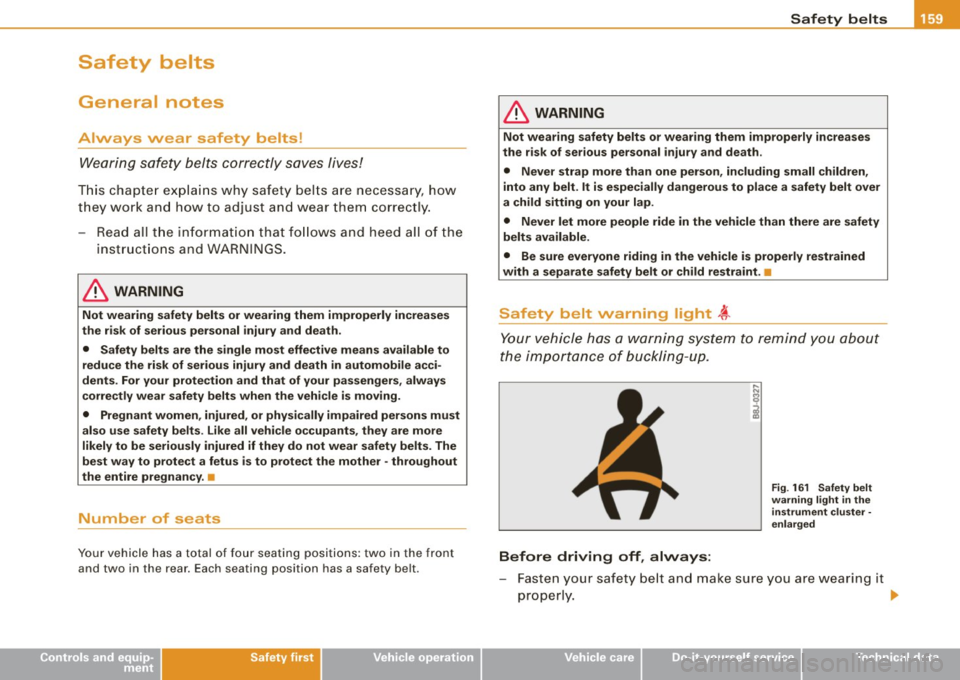
Safety belt warning light ~
Your vehicle has a warning system to remind you about
the importance of buckling-up.
Before driving off, always:
Fig. 161 Safety belt
warning light in the
instrument cluster ·
enlarged
- Fasten your safety belt and make sure you are wearing it
properly. .,
Vehicle care Do-it-yourself service Technical data