warning AUDI S4 CABRIOLET 2009 Workshop Manual
[x] Cancel search | Manufacturer: AUDI, Model Year: 2009, Model line: S4 CABRIOLET, Model: AUDI S4 CABRIOLET 2009Pages: 340, PDF Size: 77.32 MB
Page 76 of 340
Power top
Step 7: Closing the power top
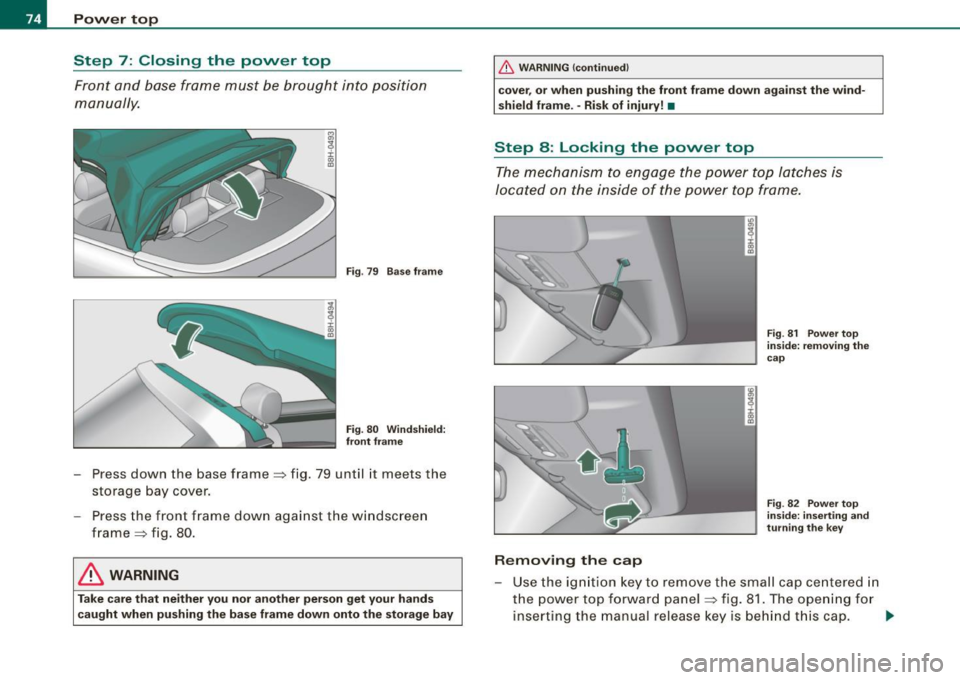
Front and base frame must be brought into position
manually.
Fig . 79 Base frame
Fig . 80 Windshield:
front frame
- Press down the base frame => fig. 79 until it meets the
storage bay cover.
Press the front frame down against the windscreen
frame => fig. 80.
& WARNING
Take care that neither you nor another person get your hands
caught when pushing the base frame down onto the storage bay
_& WARNING (continued)
cover, or when pushing the front frame down against the wind
shield frame. -Risk of injury! •
Step 8: Locking the power top
The mechanism to engage the power top latches is
located on the inside of the power top frame.
ID
~ i. ., a,
Removing the cap
Fig. 81 Power top
inside: removing the
cap
Fig . 82 Power top
inside: inserting and
turning the key
- Use t he ignition key to remove the small cap centered in
the power top forward panel:::::, fig. 81. The opening for
inserting the manual release key is behind this cap. ..,,
Page 78 of 340
Clear vision
Clear vision
Lights
Switching the headlights on and off ·'t!-·
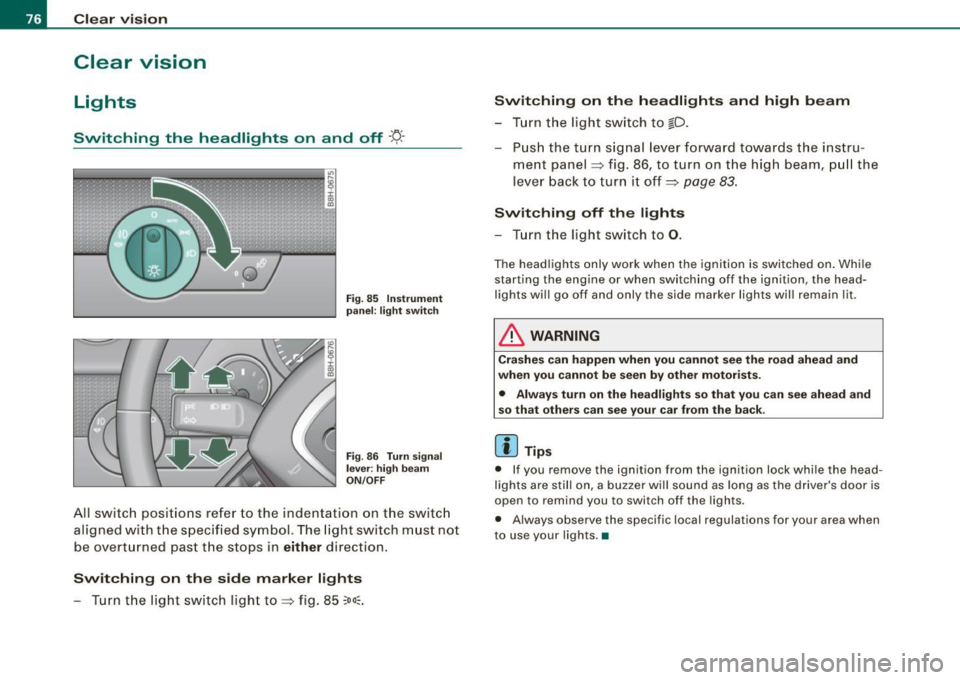
Fi g. 85 Ins tru ment
pan el: lig ht sw itc h
Fi g.
86 Turn sig nal
lev er: high beam
ON /OFF
All switch pos itions refer to the indentation on the switc h
aligned with the spec if ied symbol. The light switch m ust not
be overt urned past the stops in either direction .
Switching on the side marker lights
- Turn t he light switch light to=> fig. 85
;oo:: .
Switching on the headlights and high beam
- T urn the light switch to ~D.
- Push the turn signa l lever forward towa rds the ins tru -
ment panel => fig. 86, to turn on the high beam, pu ll the
lever back to turn it off=>
page 83.
Swit ching off th e lights
- T urn the light switch to
0 .
The headlights only work when the ignition is switched on . While
starting the engine or when sw itching off the ignition , the head
lights wi ll go of f and only the side marker lights wil l remain lit .
& WARNING
Crashe s can happen when you cannot se e t he ro ad ah ead and
whe n you c annot b e seen by othe r motori sts.
• Alway s turn on the headlights so that you can see ahead and
s o that other s can see y our car fr om the b ack.
[ i ] Tip s
• If you remove the ignition from the ign ition lock whi le the head
lights are still on, a bu zzer will sound as long as the driver 's door is
open to remind you to switch off the lights .
• Always observe the specific local regulations for your area when
to use your lights .•
Page 79 of 340
Applies 10 vehic les: with light senso r package
Sensor activated head -and tail light control
In the "AUTO" position, light sensors monitor outside light
conditions and s witch the head- and t ail lights on and off
as required.
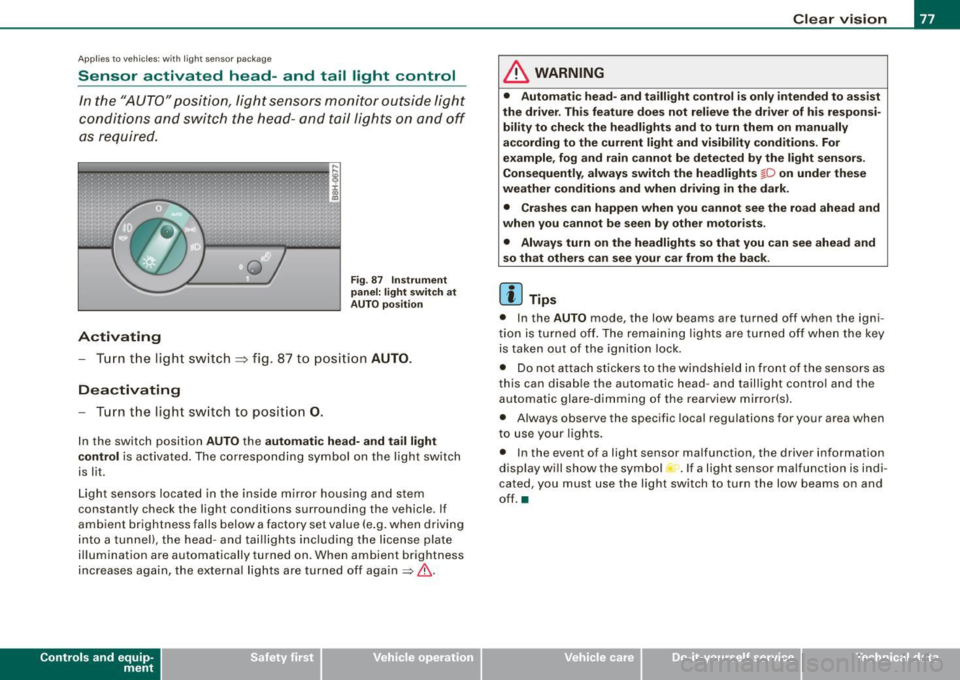
Activating
F ig . 87 Instru men t
p an el: li ght sw itch at
A UTO pos ition
- Tur n the light switch ~ fig. 87 to positi on AUTO.
Deactivating
- Turn the light switch to posit ion 0.
In the switch position AUTO the automati c head -a nd ta il light
contr ol
is activated . The corresponding symbol on the light switch
is lit.
Light sensors located in the ins ide mirror housing and stem
constantly check the light conditions surrounding the vehicle . If
ambient brightness falls below a factory set value (e .g. when driving
into a tunnel), the head -and tai llights including the license plate
illumination are automatically turned on. When ambient brightness
increases again, the external lights are turned off again
=> & -
Contro ls and eq uip
ment
Cle ar v ision
& WARNING
• Autom ati c head - and tailli ght control is only int ended to a ss is t
the driver . Th is feature does not reli ev e th e driver of h is res pon si
bilit y to che ck the headl ights and to turn them on m anuall y
according to the current light and vi sibilit y condition s. For
e xa mple , fo g and r ain cannot be dete cted by the light s en sor s.
Consequently , alw ay s swit ch th e headlights
fD on under the se
we ather condition s and when driving in th e da rk .
• Crashe s can happen when you cannot s ee the road ahead and
w hen you cannot be seen by oth er m otori sts .
• Alway s turn on the headlight s so that you can see ahead and
s o that others ca n s ee your car fr om th e back.
[ i ] Tip s
• In the AUTO mode , the low beams are turned off when the igni
tion is turned off. The remaining lights are turned off when the key is taken out of the ignition lock.
• Do not at tach stickers to the windshield in front of the sensors as
this can disable the automatic head- and taillight contro l and the
automatic glare -dimming of the rearview mirror(s).
• Always observe the specific local regulations for your area when
to use your lights .
• In the event of a light sensor malfunction, the driver information
display wi ll show the sy mbol -.
If a light sensor malfu nction is indi
cated, you must use the light switch to turn the low beams on and
off. a
~ehicle care irechnical data
Page 80 of 340
Clear vision
Ap plies to vehi cles: with d ayt ime running ligh ts
Daytime running lights (DRL) (USA models)
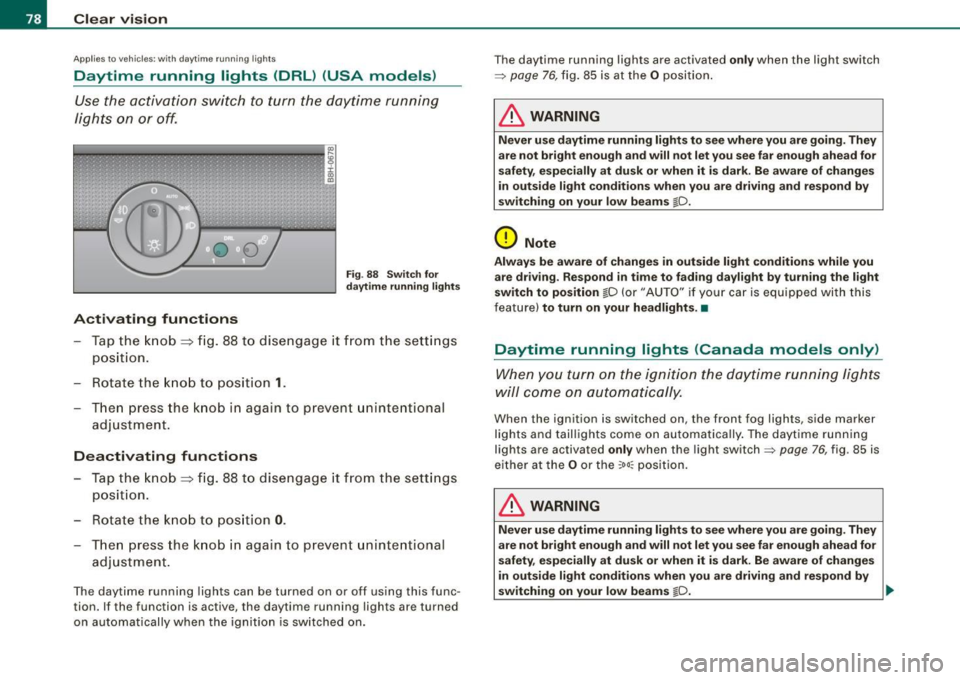
Use the activation switch to turn the daytime running
lights on or off.
Activating functions
Fi g. 88 Sw itch for
d ayt ime runn ing light s
-Tap the knob ==> fig. 88 to dise ngage it from the sett ings
position.
- Rot ate the k nob to positi on
1.
T hen p ress the knob i n again to prevent unintentional
adjustment .
Deactivating functions
-Tap the knob==> fig. 88 to disengage it from the sett ings
posit ion.
- Rota te th e kn ob to p osition
0 .
- T hen p ress the knob in aga in to p reve nt uninte ntiona l
adjustment .
The daytime running lights can be turned on or off using this func
tion. If the function is active, the daytime running lights are turned
on automatically when the ignition is sw itched on . The daytime running lights are activated
only when the light switch
=>
page 76, fig. 85 is at the O posi tion .
& WARNING
Never u se daytime running lights to see where you are going. They
are not bright enough and will not let you see f ar enough ahead for
s afety , e spe cially at dusk or when it i s dark. Be aware of change s
i n out side light condition s when you are driving and re spond by
s witching on your low beams
@-0.
0 Note
Alway s be aware of change s in outside light conditions while you
are dr iving . Re spond in tim e to fading da ylight b y turning the light
s witch to po sition
@-0 {or "AUTO" if you r car is equipped with this
feature)
to turn on your headlight s.•
Daytime running lights (Canada models only)
When yo u tur n on the igni tion t he da ytime running ligh ts
w ill c ome on au toma tic ally.
When the ignition is switched on , the front fog lights, side marker
lights and taillights come on au toma tica lly . The daytime runn ing
lights are activated
only when the light switch=> page 76, fig. 85 is
e ithe r at the
O or the ~o o:: pos ition.
& WARNING
Never u se dayt ime running lights to see where you ar e going. They
ar e not bright enough and will not let y ou see far eno ugh ahead for
s afet y, espe cially at dusk or when it is dark. Be aware of changes
i n out side light conditions whe n you are dri ving a nd respond by
s witching on your low beam s
@-0. ~
Page 84 of 340
Clear vision
inst rument panel ill umination will automaticall y become dimmer
a s the daylight fades away and eventually will go out completely
when out side l ight i s very low . Thi s is to remind you , the dri ver , to
s witch on the headlights befor e it g ets too dark.
• Canada model s: instrument panel illumination will stay bright
re gardles s of the intensity of ambient light . Alway s be aware of
c hange s in outside light cond itions while you are d riv ing . Resp ond
in time to f ading dayl ight by turning the ligh t switch to po sit ion
io
(or "AUTO" if your car is equipped with this feature) to turn on your
he adl ights . •
Ap plie s to vehic le s: wi th x eno n hea dlig ht s
Xenon headlights
After s tarting the engine, the xenon headligh ts are automatically
adjusted to the load and angle of the vehicle (for example, during
acce leration and brak ing) . This prevents oncoming tra ffic from
experienc ing unnecessa ry glare from your head lights .
If the system is not operating properly, a warning sy mbol in the
Auto -Check Contro l is displayed:::::,
page 34. •
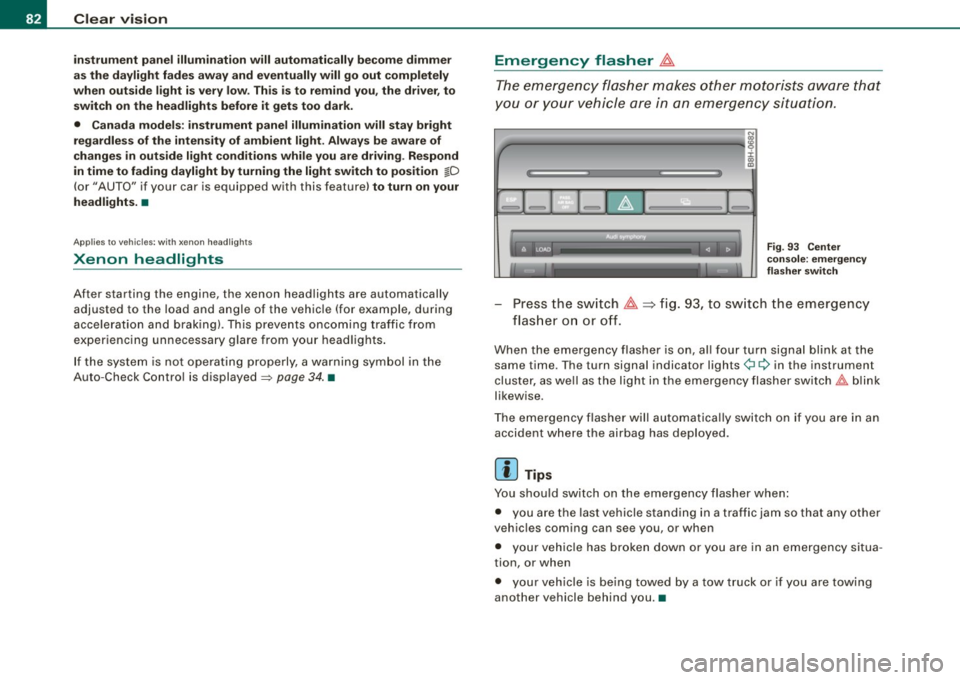
Emergency flasher &.
The emergency flasher makes other mot orists aw are that
y o u or your vehicle are in an emergency situation.
1Jia---------------...,i ij ::c .,
"'
-
Fig. 9 3 Ce nter
cons ole: e mergen cy
fla sher swit ch
Press the sw itch ~~fig . 93, to sw itch the emergency
fl ash er o n or o ff.
When the emergency flasher is on, al l four turn signa l blink at the
same time . The turn signal indicator lights¢¢ in the instrument
cluster, as we ll as the light in the emergency flasher sw itch
t!:;,,. b link
likewise .
The emergency flasher will automatica lly switch on if you are in an
accident where the airbag has deployed .
[ i ] Tips
You should switch on the emergency flasher when :
• you are the last vehicle stand ing in a t raffic jam so that any other
veh ic les coming can see you , or when
• your vehic le has broken down or you are in an emergency situa
tion, or when
• your veh ic le is being towed by a tow truck or if you are towing
another vehicle behind you .•
Page 88 of 340
Clear vision
& WARNING
• Wiper blade s are cru cial fo r safe driving ! O nly when they are in
good cond it ion are they able to clear the window s properly to
p ro vi de un comp romi sed vis ibility . Worn or damaged wiper blade s
are a safety hazard
=> page 8 7, "In stalling new w ipe r blades "!
• The rain sen sor is onl y de signed to a ssis t and support the
driver. It remain s ent irely the driver' s re spon sibility to monitor
o ut side weather condit ion s a nd to manually acti vate the wipers a s
soon a s rain or drizzle reduces vi sibility through the wind shield .
• The wind shield mu st not be treat ed w ith water -repellent mate
rials. They can increase glare under poor visibility conditions such
a s w etne ss, darknes s, or when the sun i s lo w on t he horizon . In
addition , they can cause the windshield wipers to chatter .
0 Note
In freezing or near freezing conditions :
• Always check that the wiper blades are not frozen to the g lass
before you turn the wipers on. Loosen a wiper b lade which is frozen
in place before operating the wipers to prevent damage to the wiper
b lade or the wipe r motor.
• Do not use the wipers to clear a frosted window . Using the
wipe rs as a convenient ice scraper wil l destroy the wiper blades .
• Before you take your vehicle to an automatic car wash , make sure
you have the wi ndshield w iper system switched off (lever in position
0), otherwise the windshield wiper system could get damaged in the
car wash if it should suddenly come on .
[ i ] Tips
• The rain sensor is part of the interva l wiping system . Turning off
the ignition will also deactivate the rain sensor. To reactivate the sensor, switch off the interva l wiping function, then switch it back
on aga in. • I
f you switch off the ignition with the windshield wiper lever sti ll
in the interva l wipe position and then come back a while late r and
drive off, the rain sensor will reactivate itself after the vehicle speed
has exceeded 4 mph (6 km/h) .
• Worn or dirty windshield wiper b lades cause smearing which
can affect the operation of the rain sensor . Check the condition of
your windshield wiper b lades regularly .
• Make sure the washer fluid reservoir in the engine co mpartment
is topped off before going on a long trip. Look up=>
page 266 for
checking and f illing the washer container .•
Headlight washer system
The headlight washer system cleans the headlights.
Operate the w indshie ld wiper/washer system, leve r posi
tion
© =>page 85, fig. 97, w ith the head lig hts switched
on
by h old ing the lever for longer than o ne second .
The washer jets extend forward out of the front bumper driven by
water pressure to s pray the front headlights with water .
You should inspec t the head lights regu larly (for examp le when refu
e ling) and c lean off any so lid dirt or insects from the lenses .
To ensure the sys tem works proper ly in winter, keep the washer jets
free of snow and
remove any ice using a de -icing spray .•
Page 89 of 340
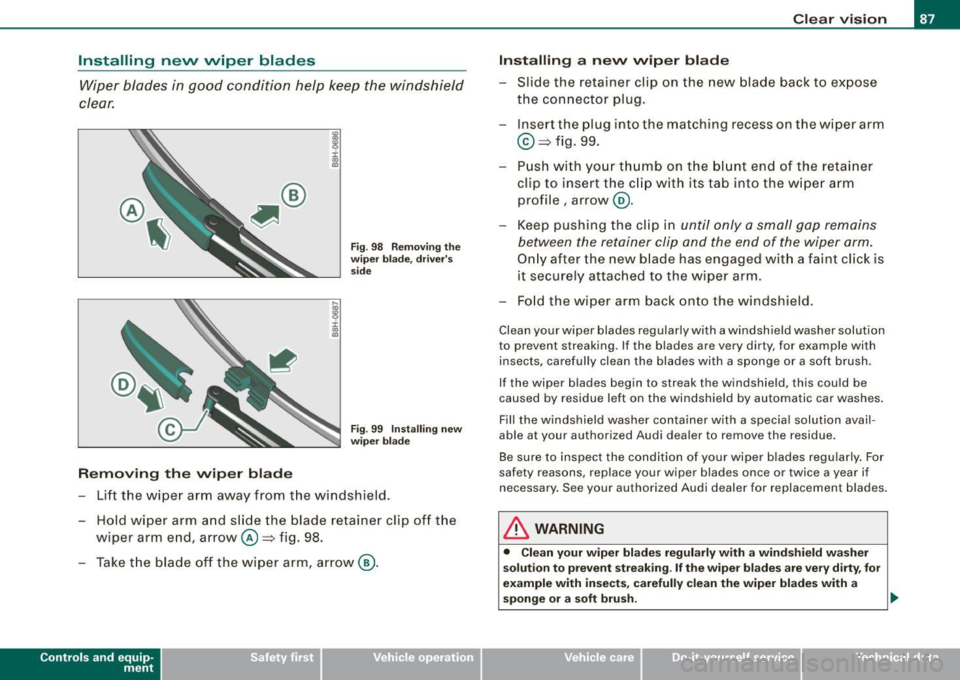
Installing nevv wiper blades Wiper blades in good condition help keep the win dshield
clear.
i .,
"'
R emoving th e wiper b lade
Fig . 9 8 R emoving t he
w iper bl ad e, d river 's
s id e
F ig . 99 Insta lling n ew
w iper b lad e
- Lift the wiper arm away from the windshield .
- Hold wiper arm and slide the blade retainer clip off the wiper arm end, arrow@~ fig. 98.
- Take t he b lade off the wiper arm, arrow @.
Contro ls and eq uip
ment
Cle ar v ision
Installing a n ew wip er blade
- Slide the retainer clip on the new blade back to expose
the connector plug.
- Inse rt the plug into the matching recess on the wiper arm
@ ~fig. 99.
- Push wi th yo ur t hu mb on the b lunt en d of the reta iner
clip to insert the c lip with its ta b into the wiper arm
profile, arrow@.
- Keep pushing the c lip in until only a small gap remains
between the retainer clip and the end of the wiper arm.
On ly after the new b lade has engaged wit h a faint c lick is
it securely attached to the wiper arm.
- Fo ld the wi per arm back onto the win dshield .
Clean your wiper b lades regularly with a windshield washer solution
to prevent streaking. If the blades are very dirty, for example with
insects, carefully clean the blades with a sp onge or a soft brush.
If the wiper blades begin to streak the windshield, this could be
caused by residue left on the windshield by automatic car washes .
Fill the windshield washer container with a spec ia l solution avail
able at your authorized Audi dealer to
remove the residue.
Be sure to inspect the condition of your wiper b lades regu lar ly . For
safety reasons, rep lace your wiper blades once or twice a year if
necessary . See your authorized Audi deale r for replacement b lades.
& WARNING
• Clean your wiper blade s regul arly wi th a wind shie ld washer
s olut ion to p re v ent streaking . If the wiper bl ade s ar e ver y dirty , for
example with in sects , car efully clean the wiper blade s with a
sponge or a soft bru sh. .,_
~ehicle care irechnical data
Page 91 of 340
& WARNING
The glass of the inside rearview mirror is layered and contains an
electrolyte to achieve its properties. Be aware of liquid electrolyte
leaking from a broken mirror glass. This liquid can cause irritation
to skin, eyes, and respiratory system. If you get electrolyte in your
eyes or on your skin, immediately rinse with plenty of water. If irri
tation persists, seek medical attention.
0 Note
Liquid electrolyte leaked from a broken mirror glass will damage any
plastic surfaces it comes in contact with. Clean up spilled electrolyte
immediately with clear water and a sponge.
[ i] Tips
• If you switch off the automatic dimming function on the inside
mirror, automatic dimming of the outside mirrors will likewise be
disabled.
• Check to make sure there are no objects preventing light from
reaching the inside mirror.
• Do not attach any stickers to the windshield in front of the light
sensor, as this would interfere with the automatic operation of the
headlights and the automatic dimming of the inside mirror.•
Controls and eq uip
ment
Clear vision
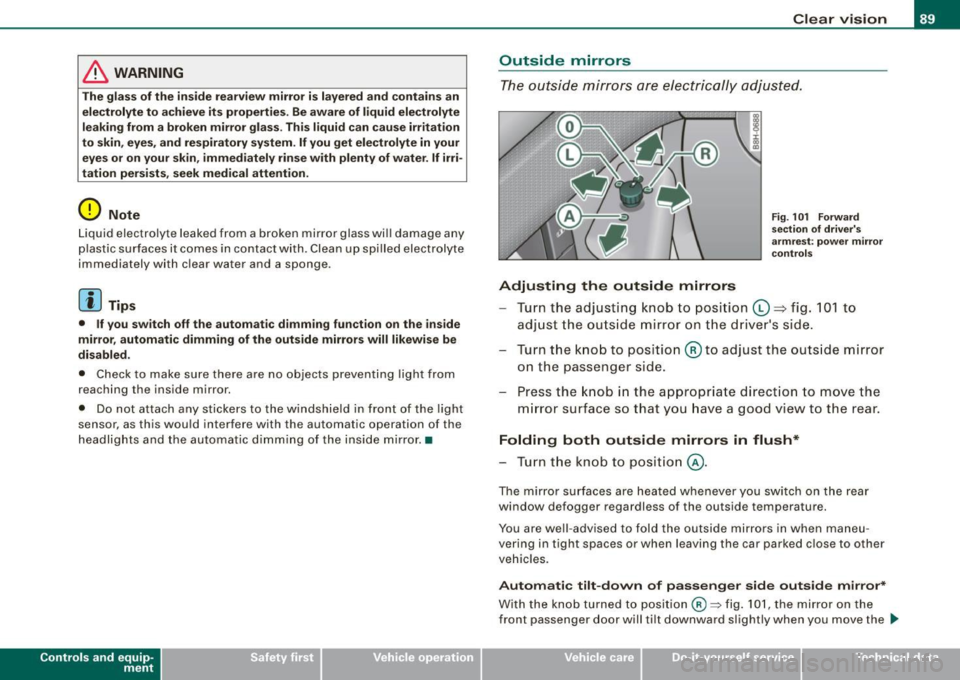
Outside mirrors
The outside mirrors are electrically adjusted.
Adjusting the outside mirrors
Fig. 101 Forward
section of driver's
armrest: power mirror
controls
Turn the adjusting knob to position (D => fig. 101 to
adjust the outside mirror on the driver's side.
Turn the knob to position
@ to adjust the outside mirror
on the passenger side.
Press the knob in the appropriate direction to move the
mirror surface so that you have a good view to the rear.
Folding both outside mirrors in flush*
- Turn the knob to position @.
The mirror surfaces are heated whenever you switch on the rear
window defogger regardless of the outside temperature.
You are well -advised to fold the outside mirrors in when maneu
vering in tight spaces or when leaving the car parked close to other
vehicles.
Automatic tilt-down of passenger side outside mirror*
With the knob turned to position@:::::, fig. 101, the mirror on the
front passenger door will tilt downward slightly when you move the .,_
~ehicle care Technical data
Page 93 of 340
[ i J Tips
To avoid inaccurate directions, do not allow any remote controls,
electrical systems, or metal parts close to the mirror.•
Applies to vehicles: wi th digita l compass
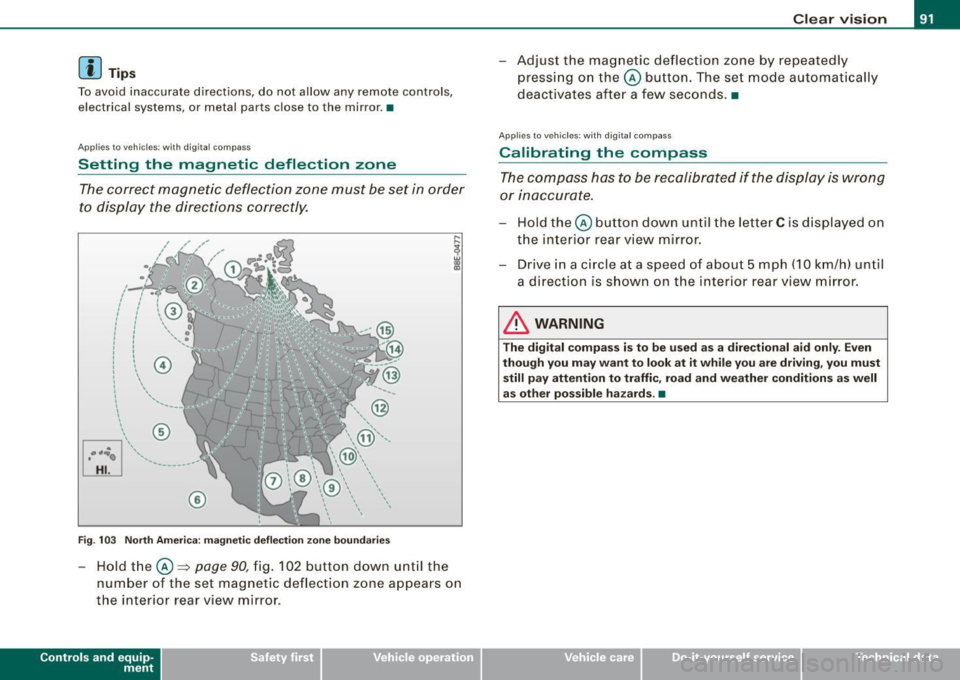
Setting the magnetic deflection zone
The correct magnetic deflection zone must be set in order
to display the directions correctly.
@
©
Fig . 103 North America: magnetic deflection zone boundaries
-Hold the © ~ page 90, fig. 102 button down until the
number of the set magnetic deflection zone appears on
the interior rear view mirror .
Controls and eq uip
ment
Clear vision
Adjust the magnetic deflection zone by repeatedly
pressing on the© button. The set mode automatically
deactivates after a few seconds. •
Applies to veh icles: with digi tal co mpass
Calibrating the compass
The compass has to be recalibrated if the display is wrong
or inaccurate.
Hold the© button down until the letter C is displayed on
the interior rear view mirror.
Drive in a circle at a speed of about 5 mph (10 km/h) until
a direction is shown on the interior rear view mirror.
& WARNING
The digital compass is to be used as a directional aid only. Even
though you may want to look at it while you are driving, you must
still pay attention to traffic, road and weather conditions as well
as other possible hazards . •
~ehicle care irechnical data
Page 94 of 340
Seats and storage
Seats and storage
General recommendations
Why is your seat adjustment so important?
The safety belts and the airbag system can only provide
ma ximum protection if the front
seats are correctly
a djusted.
There are var ious ways of adjusting the front seats to provide safe
and c omfortable support for the driver and the front passenger.
Adjust your seat properly so that:
• you can easily and quickly reach all the switches and controls in
the instrumen t pa nel
• your body is proper ly supported to reduce physical stress and
f atigue
• the safety belts and airbag system can offe r maximum protec
tion=>
page 768.
I n the fo llowing chapters, you wil l see exact ly how you can best
adjust your seats.
There are special regulations and instructions for instal ling a child
safety seat on the front passenger seat. A lways heed the informa
tion regarding child safety provided in=>
page 790, "Child Safety".
& WARNING
Inco rrect se ating po sition of the driver a nd all other pa ssengers
c an result in serious per sonal injury.
• Alway s keep your feet on the floo r when the vehi cle is in motion
- never put your feet on top of the in strument panel , out of the
window o r on top of the seat cushio n! This appl ies espe ciall y to
the pa ssenger s. If your seating position i s incorre ct you increase
the ri sk of inju ry in the c ase of sudden br aking or an accident .
If
& WARNIN G (continued )
the airb ag inflate s and the seating position is incorre ct thi s could
r e sult in per sonal injury or even death.
• It is important for both the driver and front p assenger to keep
a distan ce of at least 10 inche s (25 cm) betw een them se lve s and
the steering wheel and /or in strument p anel . If you are sitting any
closer than this , the airbag system cannot protect you properly . In
a ddition to this , the front se ats and head re str aints mu st be
adjusted to your body height so th at they can give you maximum
protection .
• Alway s try to keep as much distan ce as possible between your
s elf and the steerin g wheel or in strument p anel.
• Do not adjust the driver's or front pas senger seat while the
vehicle is mov ing . You r seat may mo ve unexpect edly , ca usin g
s udden los s of vehicle control and per sonal injury.
If you adjust
your seat while the vehi cle i s moving , you a re out of position .
0 Note
When the front seats are in the reclined position, make certain that
the seatbacks are not pushed against the built -in air deflector *
when you run the sea ts back toward the rear of the vehicle and
when you lower the seatback. This can damage the air deflector and
the latching mecha nis m. •
Driver seat
The correct seat position is importan t for safe and relaxed
drivin g.
We recomme nd tha t yo u adjust the dr iv e r's sea t in the
fol lowing ma nne r: