light AUDI S5 2008 8T / 1.G Owners Manual
[x] Cancel search | Manufacturer: AUDI, Model Year: 2008, Model line: S5, Model: AUDI S5 2008 8T / 1.GPages: 294, PDF Size: 12.13 MB
Page 146 of 294
Downloaded from www.Manualslib.com manuals search engine Audi parking system 144•
Do not allow the camera images in the MMI display to distract
you from watching the traffic.
•
When parking or manoeuvring do not rely solely on the MMI
display. Some objects (e.g. narrow posts or bars) may - due to the
resolution of the display screen - not be displayed in a satisfactory
manner or may not be displayed at all.
•
Only use the reversing camera to assist you if it is supplying
you with a good and clear picture. The quality of the picture could
be impaired by adverse light, dirt on the lens or a defect (accident
risk).
•
If the MMI display is switched on and the picture is obscured or
the area behind the vehicle is not visible (e.g. due to a dirty or
defective lens) you must not use the reversing camera to assist
you when manoeuvring (accident risk).
•
The reversing camera produces two-dimensional images.
Please remember that ridges in the ground, parts protruding on
other vehicles or fixed objects jutting out are all more difficult to
detect on the MMI display screen due to a lack of spatial depth. In
some cases it may not be possible to detect them at all.
•
For safety reasons, you should not use the system if the posi-
tion and installation angle of the camera have been changed, e.g.
in a rear-end collision. Have it checked by a qualified workshop.
•
Only use the reversing camera when the boot lid is completely
c lo s e d . P l e a se m a k e su re t h a t t here are no objects mounted to the
rear end of the vehicle which could block the view of the reversing
camera.Caution
•
Never remove snow and ice from the lens of the reversing
camera using warm or hot water - danger of cracks appearing on the
lens.
•
Never use abrasive cleaning agents on the lens.WARNING (continued)
document_0900452a81793dcc.book Seite 144 Mittwoch, 21. März 2007 5:42 17
Page 147 of 294
Downloaded from www.Manualslib.com manuals search engine HomeLink145
Controls
Safety
Driving tips
General maintenance
Self-help
Technical data
HomeLinkUniversal transmitterApplies to vehicles: with HomeLinkDescription
The HomeLink universal transmitter can be programmed
to replace the hand-held controls of devices already in
use.HomeLink allows you to conveniently activate garage doors, estate
gates, security systems, home or office lighting and other electric
devices by means of control buttons inside your car.
HomeLink can replace up to three hand-held transmitters operating
existing devices on your property with a single universal trans-
mitter. This will be possible for most transmitters which control the
drive units for a garage door or external gates, etc. You can
programme the individual hand-held transmitters for your remote
control at or near the centre of the radiator grille. This is where the
control unit is located.
To be able to control systems with HomeLink, you need to perform
initial programming on the HomeLink transmitter first. If systems
fail to respond after the initial programming, check whether these
systems work with a "rolling code" (variable security code)
⇒page 146.
WARNING
When you are programming the HomeLink universal transmitter,
make sure that no persons or objects are close to the devices
receiving the transmitter signals. If a gate or door is inadvertently
set into motion during programming, persons might be injured or
other damage caused by moving parts.
Note
•
For additional information on HomeLink
® and/or products
compatible with HomeLink
®, please call the toll-free HomeLink
®
hotline (0) 08000466 35465 or alternatively +49 (0) 6838 907 277, or
visit the HomeLink
® website at: www.homelink.com
•
HomeLink
® is a registered trademark of Johnson Controls.
Applies to vehicles: with HomeLinkProgramming the universal transmitter
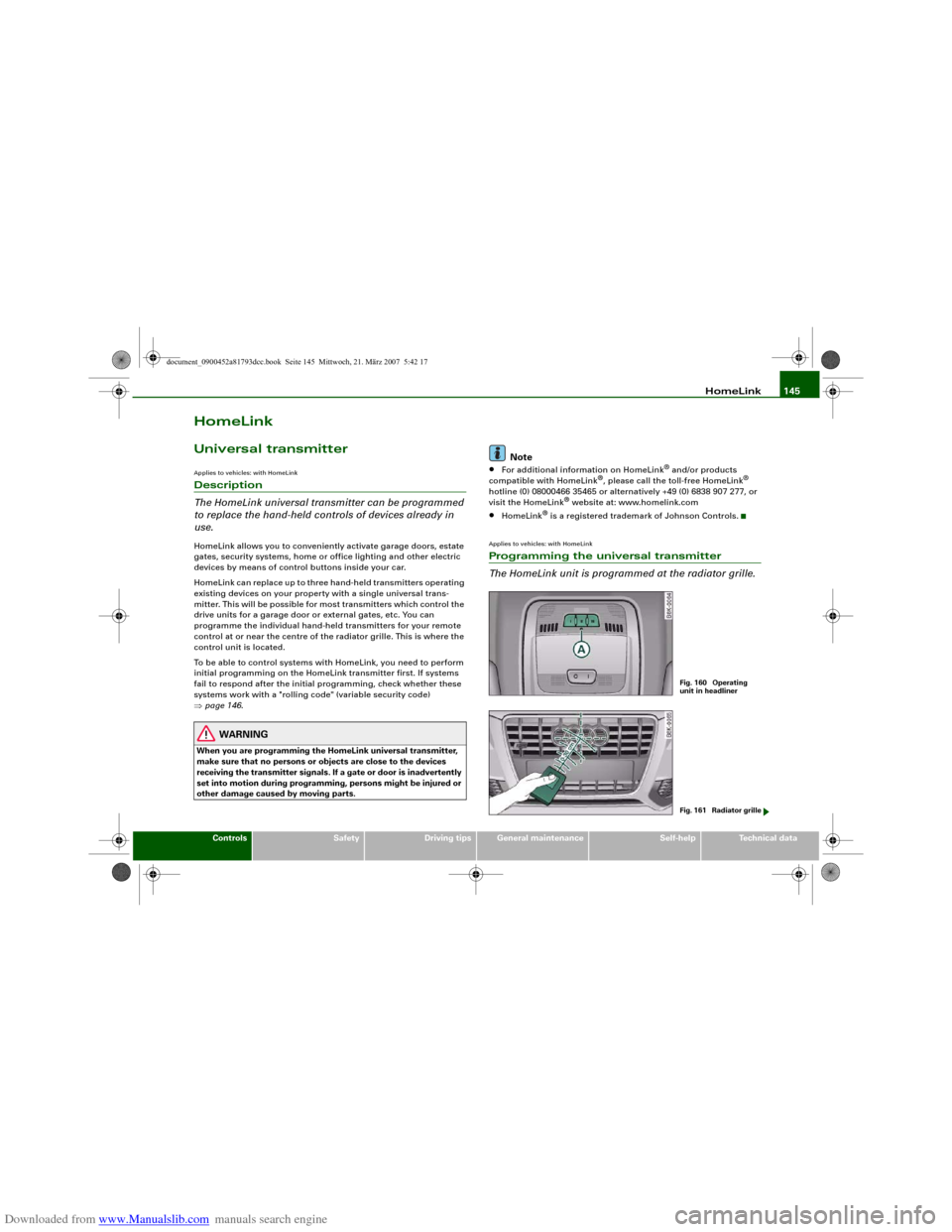
The HomeLink unit is programmed at the radiator grille.
Fig. 160 Operating
unit in headlinerFig. 161 Radiator grille
document_0900452a81793dcc.book Seite 145 Mittwoch, 21. März 2007 5:42 17
Page 148 of 294
Downloaded from www.Manualslib.com manuals search engine HomeLink 146
At the operating unit
1. Switch on the ignition (do not start the engine).
2. Press and hold down the two outer HomeLink buttons
⇒page 145, fig. 160 until the indicator diode
⇒page 145, fig. 160 begins to flash after about
20 seconds. This procedure will delete the standard
factory settings and does not need to be repeated when
programming the other buttons.
3. Press the particular HomeLink button which you would
like to program.
4. Wait until the diode begins to flash. The HomeLink
module now remains in training mode for 5 minutes.
5. Now step in front of your vehicle with the original hand-
held transmitter for the garage door opener or any other
device you wish to assign to the HomeLink control
button.
At the radiator grille
6. Hold the original hand-held transmitter at or near the
centre of your car's radiator grille ⇒page 145, fig. 161.
7. Press the activator button on the original hand-held
transmitter.
8. As you do so, watch the turn signals on your vehicle.
HomeLink confirms successful programming by flashing
all four turn signals three times.
9. If the turn signals fail to flash three times, repeat the
procedure with the transmitter held at a different
distance from the radiator grille.
The proper distance between the hand-held transmitter and the
HomeLink module at the radiator grille depends on the system you
want to train. It may require several attempts.
The turn signals will flash once if the time limit for the programming
mode has been exceeded. In this case the programming procedure
needs to be performed again. Repeat the sequence at the operating
unit starting with step 3.
The programming instructions above also apply to the other control
buttons. Start with step 3 if you wish to proceed and program the
other two buttons.
If the garage door or other devices still fail to be activated with the
HomeLink control buttons after programming is completed, it is
possible that these systems might be working with a rolling code
instead of the normal fixed security code. If this is the case, a rolling
code programming is required in addition to the steps described
above. ⇒page 146Applies to vehicles: with HomeLinkRolling code programming
Some devices require rolling code programming of the
HomeLink universal transmitter.Identifying a rolling code
– Press the already programmed HomeLink button again
and hold it down.
–Watch HomeLink diode ⇒page 145, fig. 160. If the
diode starts flashing rapidly and turns into a constant
light after about 2 seconds, this indicates that the device
you wish to operate (e.g. a garage door opener) is
equipped with a rolling code.
– Program the rolling code as follows:
AA
AA
AA
document_0900452a81793dcc.book Seite 146 Mittwoch, 21. März 2007 5:42 17
Page 149 of 294
Downloaded from www.Manualslib.com manuals search engine HomeLink147
Controls
Safety
Driving tips
General maintenance
Self-help
Technical data
Activating the garage door opener drive unit
– Locate the programming button on the garage door
drive. The exact location and colour of the button may
vary depending on the type of garage door opener.
– Press the programming button on the door drive unit
(this will normally cause a “programming mode indicator
lamp” on the unit to light up). You now have about 30
seconds to start and complete the programming of the
HomeLink control button on the operating unit.
Programming at the operating unit in the
headliner
– Press and release the already programmed HomeLink
button.
– Press the HomeLink button again to complete rolling
code programming.After programming at the operating unit in the headliner, the
garage door opener should recognize the HomeLink signal and
respond when the HomeLink button is pressed. Now the other
control buttons can be programmed as required.
Note
•
Having a second person assist you makes programming of the
rolling code easier and faster. For some makes of garage door
openers the HomeLink button may have to be pressed a third time
to complete the training sequence.
•
If you encounter problems programming the rolling code you
may find helpful information in the operating instructions of the
garage door opener or other device you wish to operate.
Applies to vehicles: with HomeLinkOperating HomeLink
The programmed devices are activated by means of the
HomeLink control buttons in the headliner.– Make sure that the ignition is on.
– Press the programmed HomeLink button ⇒page 145,
fig. 160. The device assigned to that button (e.g. garage
door) will be activated.The HomeLink indicator diode ⇒page 145, fig. 160 will light up
when you press the button.Applies to vehicles: with HomeLinkErasing the button programming
You can erase the complete HomeLink programming by
pressing the two outer buttons.– Switch on the ignition (do not start the engine).
– Press and hold down the two outer buttons until the indi-
cator diode starts to flash ⇒page 145, fig. 160.
– Then release the buttons.After the programming of the HomeLink buttons has been erased,
the system will return to the training mode and is ready to be re-
programmed at any time.
Note
•
Programmed buttons cannot be erased individually.
•
For security reasons it is advisable to erase the programming of
the HomeLink buttons prior to selling your vehicle.
document_0900452a81793dcc.book Seite 147 Mittwoch, 21. März 2007 5:42 17
Page 155 of 294
Downloaded from www.Manualslib.com manuals search engine Safe driving153
Controls
Safety
Driving tips
General maintenance
Self-help
Technical data
– Make sure that all lights and turn signals are working
properly.
– Check the tyre pressures.
– Make sure that all windows are clean and give good visi-
bility to the outside.
– Secure all luggage and other items carefully ⇒page 75.
– Make sure that no objects can interfere with the pedals.
– Adjust the front seat, head restraint and mirrors
correctly.
– Make sure that the head restraints for all passengers are
adjusted to the correct position.
– Make sure that children are protected with suitable
safety seats and properly worn seat belts ⇒page 175.
– Sit in the correct position in your seat and make sure that
your passengers do the same. ⇒page 70.
– Fasten your seat belt correctly. Make sure that your
passengers do the same ⇒page 160.What affects driving safety?
Safety on the road is directly related to how you drive, and
can also be affected by the passengers in the vehicle.The driver is responsible for the safety of the vehicle and all
its occupants. If your ability to drive is impaired in any way,
you endanger yourself and other road users ⇒. There-
fore:
– Do not let yourself be distracted by passengers or by
using a mobile phone, etc.– Never drive when your driving ability is impaired (by
medication, alcohol, drugs, etc.).
– Obey all traffic regulations and speed limits and always
maintain a safe distance to the vehicle in front.
– Always adjust your speed to suit the road, traffic and
weather conditions.
– Take frequent breaks on long trips. Do not drive for more
than two hours without a stop.
– If possible, avoid driving when you are tired or stressed.
WARNING
•
Distractions while driving or any kind of impairment to your
driving ability increase the risk of accident and injury.
•
Do not store loose objects on the dashboard. These objects
could fly around the interior when the vehicle is moving (under
acceleration or whilst cornering) and distract the driver – this
could lead to an accident.
document_0900452a81793dcc.book Seite 153 Mittwoch, 21. März 2007 5:42 17
Page 156 of 294
Downloaded from www.Manualslib.com manuals search engine Safe driving 154Correct sitting positionsCorrect sitting position for driver
The correct driving position is important for safe and
fatigue-free driving.For your own safety, and to reduce the risk of injury in the
event of an accident, we recommend the following driving
position.
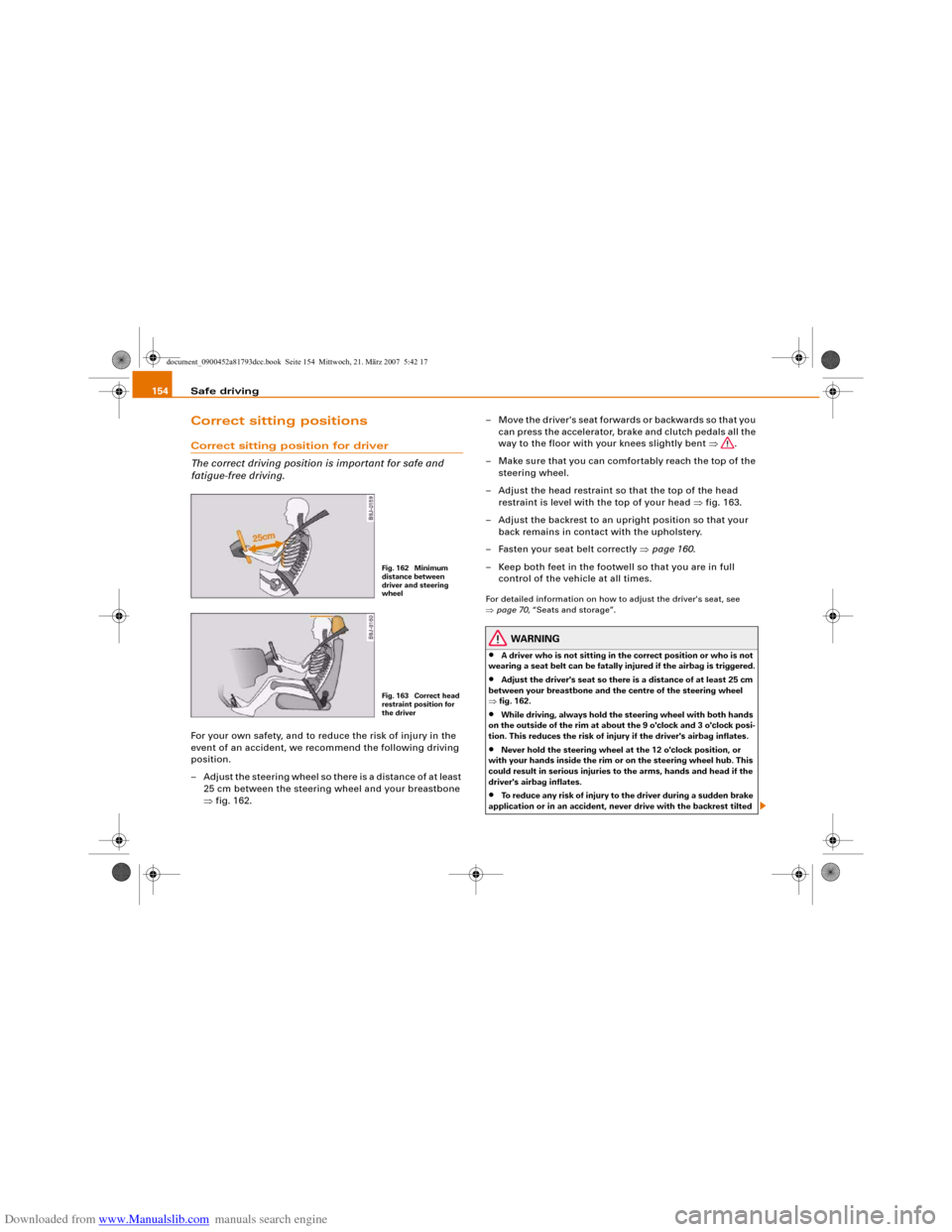
– Adjust the steering wheel so there is a distance of at least
25 cm between the steering wheel and your breastbone
⇒fig. 162.– Move the driver's seat forwards or backwards so that you
can press the accelerator, brake and clutch pedals all the
way to the floor with your knees slightly bent ⇒.
– Make sure that you can comfortably reach the top of the
steering wheel.
– Adjust the head restraint so that the top of the head
restraint is level with the top of your head ⇒fig. 163.
– Adjust the backrest to an upright position so that your
back remains in contact with the upholstery.
– Fasten your seat belt correctly ⇒page 160.
– Keep both feet in the footwell so that you are in full
control of the vehicle at all times.
For detailed information on how to adjust the driver's seat, see
⇒page 70, “Seats and storage”.
WARNING
•
A driver who is not sitting in the correct position or who is not
wearing a seat belt can be fatally injured if the airbag is triggered.
•
Adjust the driver's seat so there is a distance of at least 25 cm
between your breastbone and the centre of the steering wheel
⇒fig. 162.
•
While driving, always hold the steering wheel with both hands
on the outside of the rim at about the 9 o'clock and 3 o'clock posi-
tion. This reduces the risk of injury if the driver's airbag inflates.
•
Never hold the steering wheel at the 12 o'clock position, or
with your hands inside the rim or on the steering wheel hub. This
could result in serious injuries to the arms, hands and head if the
driver's airbag inflates.
•
To reduce any risk of injury to the driver during a sudden brake
application or in an accident, never drive with the backrest tilted
Fig. 162 Minimum
distance between
driver and steering
wheelFig. 163 Correct head
restraint position for
the driver
document_0900452a81793dcc.book Seite 154 Mittwoch, 21. März 2007 5:42 17
Page 161 of 294
Downloaded from www.Manualslib.com manuals search engine Safe driving159
Controls
Safety
Driving tips
General maintenance
Self-help
Technical data inside. In this case the child would be unable to get out of the
vehicle without help. This could have fatal consequences.
•
Never allow children to play in or around the vehicle. Always
close and lock the boot lid and all the doors when you leave the
vehicle.
•
Never let passengers ride in the luggage compartment. All
occupants must be properly restrained by the seat belts at all
times ⇒page 160.Note
•
Air circulation in the vehicle helps reduce fogging of the
windows. Used air escapes through ventilation slots in the rear of
the vehicle. Make sure that these ventilation slots are not
obstructed.
•
Suitable belts for securing loads to the fastening rings* are
commercially available.
Applies to vehicles: with fastening ringsFastening rings
Unsecured loads are a hazard to all vehicle occupants.There are fastening rings in the luggage compartment
which can be used to secure luggage and other objects
⇒page 76.
– Use the fastening rings to secure items safely in the
luggage compartment ⇒ in “Loading the luggage
compartment” on page 75.During a collision or an accident, even small and light objects can
possess so much energy that they can cause very severe injuries.
The amount of this “kinetic energy” depends on the speed of the vehicle and the weight of the object. The most significant factor,
however, is the speed of the vehicle.
An example: An object weighing 4.5 kg is lying unsecured in the
vehicle. During a frontal collision at a speed of 50 km/h, this object
generates a force corresponding to 20 times its weight. That means
that the effective weight of the object increases to about 90 kg. You
can imagine the severity of the injuries which might be sustained if
this “projectile” strikes an occupant as it flies through the
passenger compartment.
WARNING
If items of luggage or other objects are secured to the fastening
rings with inappropriate or damaged retaining cords, injuries
could result in the event of sudden braking or a collision.•
To prevent pieces of luggage or other objects from flying
forward, always use appropriate retaining cords which are prop-
erly secured to the fastening rings.
•
Never secure a child seat on the fastening rings.
WARNING (continued)
document_0900452a81793dcc.book Seite 159 Mittwoch, 21. März 2007 5:42 17
Page 173 of 294
Downloaded from www.Manualslib.com manuals search engine Airbag system171
Controls
Safety
Driving tips
General maintenance
Self-help
Technical data
Important safety notes on the side airbag system
There are a number of safety points concerning the airbag
system which you should remember. This will help to
reduce the risk of injury in an accident.
WARNING
•
If you do not wear a seat belt, if you lean forward, or are not
seated correctly while the vehicle is in motion, you are at greater
risk of injury should the side airbags be triggered in an accident.
•
If children are not seated correctly, they are at greater risk of
injury in an accident. This is particularly the case if the child is
travelling on the front passenger's seat and the airbag system is
triggered. This could result in serious or potentially fatal injury
⇒page 175, “Child safety”.
•
It is important not to attach any accessories (such as cup
holders) to the doors. This would impair the protection offered by
the side airbags.
•
The sensors for the airbags are located in the front doors. You
must therefore not make any modifications to the doors or door
trim (e.g. retrofitting loudspeakers), as this could impair the func-
tion of the side airbags. Any damage to the front doors could lead
to faults in the system. Repairs or any other work on the front
doors must therefore always be carried out by a qualified work-
shop.
•
The built-in coat hooks should only be used for lightweight
clothing. Do not leave any heavy or sharp-edged objects in the
pockets.
•
Do not apply excessive force to the sides of the backrests (such
as hard knocks or kicks), as this could damage parts of the system.
The side airbags could then fail to operate when required.
•
If you intend to fit protective covers over the seats, these must
be of the specific type approved for use on Audi seats with side
airbags. Conventional seat covers would obstruct the side airbag when it inflates out of the backrest, and seriously reduce the
airbag's effectiveness.
•
Any damage to the original seat upholstery or around the
seams of the side airbag units must be repaired immediately by a
qualified workshop.
•
Any work involving the side airbag system or removal and
installation of the airbag components for other repairs (such as
repairs to the seats) must always be performed by a qualified
workshop. Otherwise the airbag system may fail to work
properly.
Head-protection airbags (sideguard)Description of head-protection airbags
The head-protection airbags work together with the side
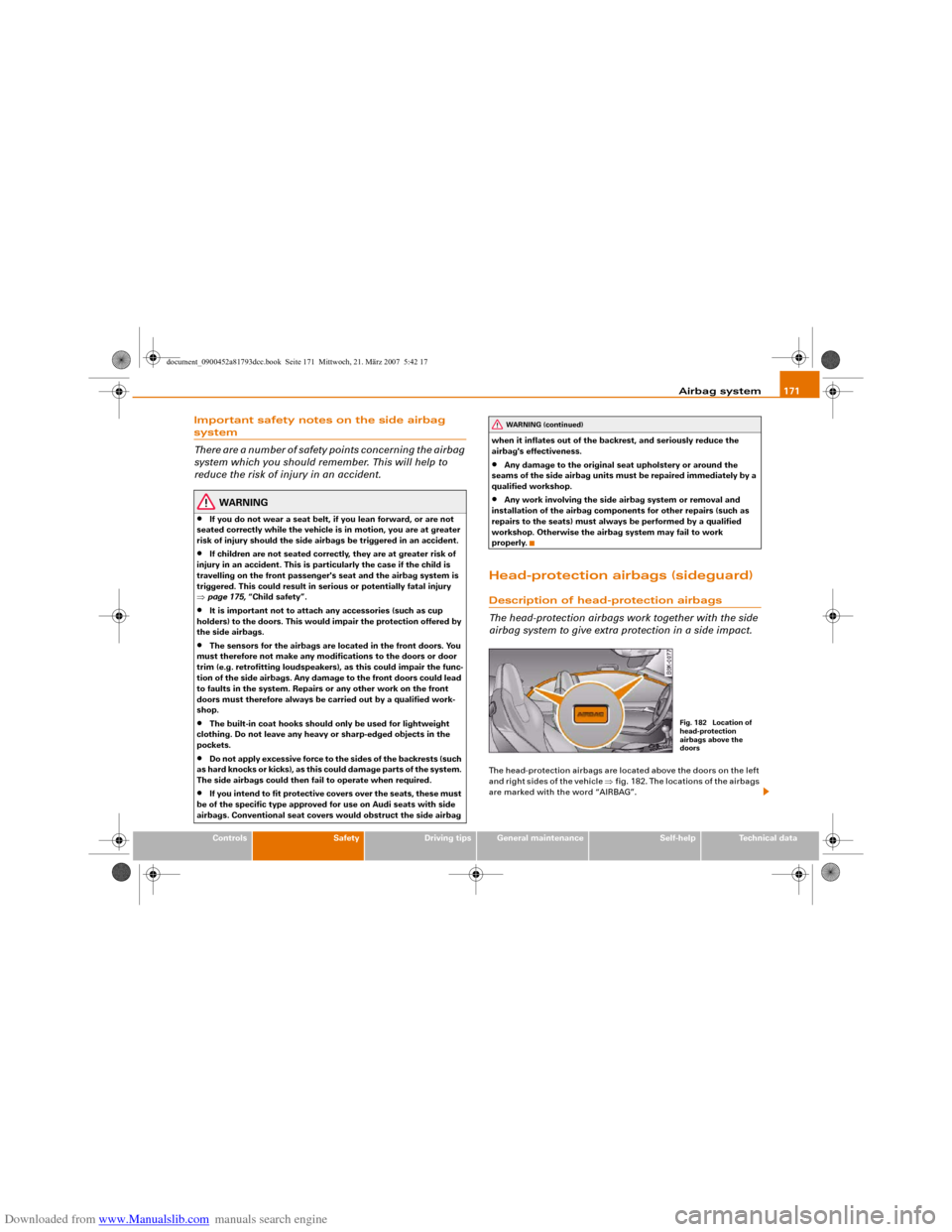
airbag system to give extra protection in a side impact.The head-protection airbags are located above the doors on the left
and right sides of the vehicle ⇒fig. 182. The locations of the airbags
are marked with the word “AIRBAG”.
WARNING (continued)
Fig. 182 Location of
head-protection
airbags above the
doors
document_0900452a81793dcc.book Seite 171 Mittwoch, 21. März 2007 5:42 17
Page 174 of 294
Downloaded from www.Manualslib.com manuals search engine Airbag system 172In conjunction with the three-point seat belts and side airbags, the
head-protection airbags give the occupants additional protection
against head and neck injuries in a severe side collision ⇒ in
“Important safety notes on the head-protection airbags” on
page 172.
Together with other design features (including cross-braces in the
seats and the overall strength of the body structure), the sideguard
system offers an effective further improvement to occupant protec-
tion in side impacts.How the head-protection airbags work
When fully inflated, the airbags reduce the risk of head or
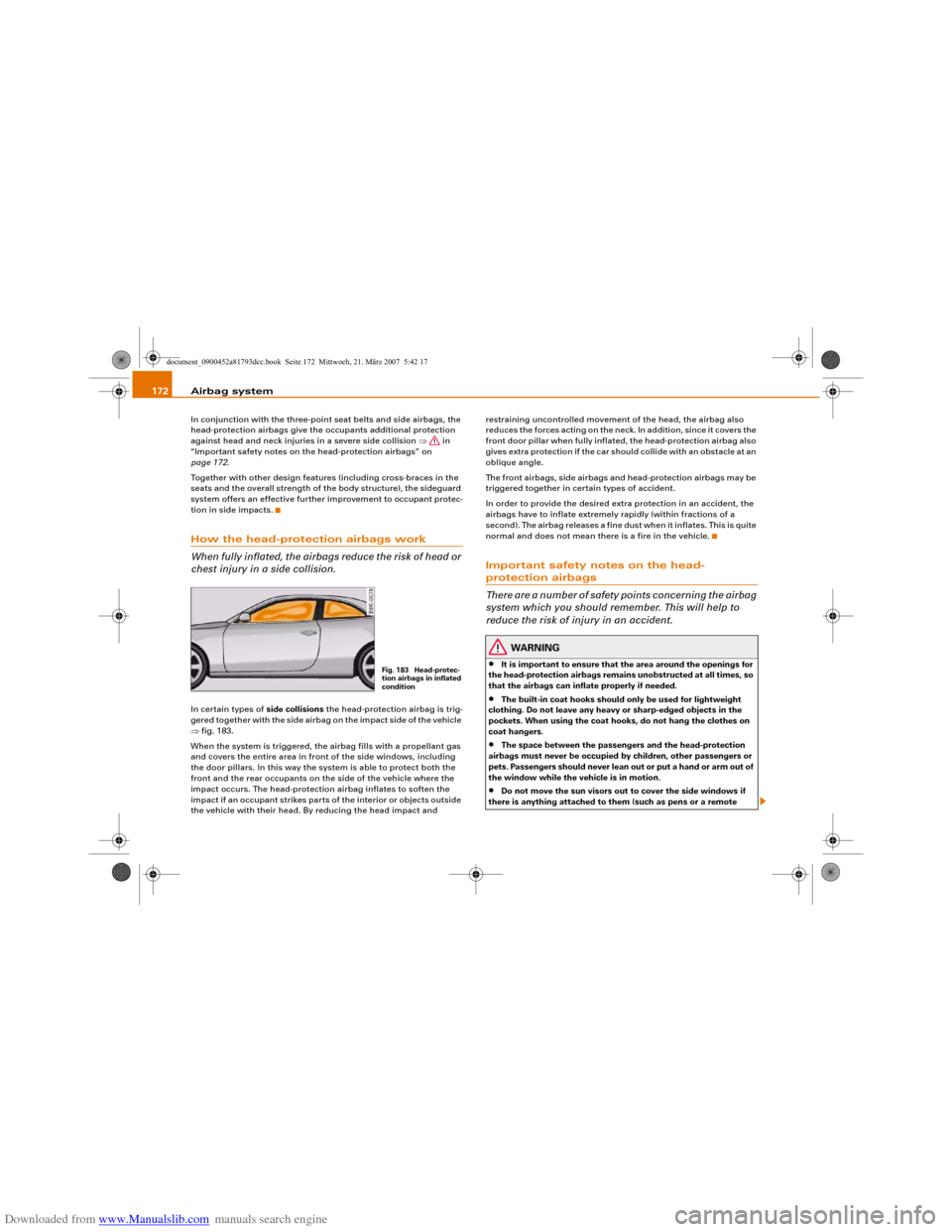
chest injury in a side collision.In certain types of side collisions the head-protection airbag is trig-
gered together with the side airbag on the impact side of the vehicle
⇒fig. 183.
When the system is triggered, the airbag fills with a propellant gas
and covers the entire area in front of the side windows, including
the door pillars. In this way the system is able to protect both the
front and the rear occupants on the side of the vehicle where the
impact occurs. The head-protection airbag inflates to soften the
impact if an occupant strikes parts of the interior or objects outside
the vehicle with their head. By reducing the head impact and restraining uncontrolled movement of the head, the airbag also
reduces the forces acting on the neck. In addition, since it covers the
front door pillar when fully inflated, the head-protection airbag also
gives extra protection if the car should collide with an obstacle at an
oblique angle.
The front airbags, side airbags and head-protection airbags may be
triggered together in certain types of accident.
In order to provide the desired extra protection in an accident, the
airbags have to inflate extremely rapidly (within fractions of a
second). The airbag releases a fine dust when it inflates. This is quite
normal and does not mean there is a fire in the vehicle.
Important safety notes on the head-protection airbags
There are a number of safety points concerning the airbag
system which you should remember. This will help to
reduce the risk of injury in an accident.
WARNING
•
It is important to ensure that the area around the openings for
the head-protection airbags remains unobstructed at all times, so
that the airbags can inflate properly if needed.
•
The built-in coat hooks should only be used for lightweight
clothing. Do not leave any heavy or sharp-edged objects in the
pockets. When using the coat hooks, do not hang the clothes on
coat hangers.
•
The space between the passengers and the head-protection
airbags must never be occupied by children, other passengers or
pets. Passengers should never lean out or put a hand or arm out of
the window while the vehicle is in motion.
•
Do not move the sun visors out to cover the side windows if
there is anything attached to them (such as pens or a remote
Fig. 183 Head-protec-
tion airbags in inflated
condition
document_0900452a81793dcc.book Seite 172 Mittwoch, 21. März 2007 5:42 17
Page 176 of 294
Downloaded from www.Manualslib.com manuals search engine Airbag system 174
– The front passenger's airbag can be reactivated by
turning the key to position .Deactivating front passenger's airbag when a child
safety seat is in use
If you have no alternative but to install a rearward-facing child safety
seat on the front passenger's seat you must deactivate the front
passenger's airbag beforehand.
We recommend, however, that child seats should be only fitted on
the rear seat so that the front passenger's airbag can remain func-
tional and provide protection in an accident ⇒page 175.
Monitoring of airbag system
The airbag warning lamp will light up for a few seconds every time
the ignition is switched on.
If the front passenger's airbag has been deactivated via the key-
operated switch, the indicator lamp “PASSENGER AIRBAG OFF” will
light up constantly as a reminder ⇒fig. 185. Please refer also to the
description of the
warning lamp in the instrument cluster
⇒page 16.
When the front passenger's airbag is deactivated using the key-
operated switch, the seat belt warning lamp for the front passenger
⇒page 17 is also switched off.
WARNING
•
If you have no alternative but to install a rearward-facing child
seat on the front passenger's seat, the front passenger's airbag
must be deactivated beforehand. Potentially fatal injuries to the
child can result if the front passenger's airbag is not deactvated!
⇒page 176, “Using a child safety seat on the front passenger's
seat”
•
If you have deactivated the front passenger's airbag, reactivate
it as soon as the child seat is no longer needed so that the airbag
can continue to give the required protection.
•
It is the driver's responsibility to ensure that the key-operated
switch is set to the correct position.Note
All the other airbags in the car will remain functional if the front
passenger's airbag has been deactivated with the key-operated
switch.
AON
WARNING (continued)
document_0900452a81793dcc.book Seite 174 Mittwoch, 21. März 2007 5:42 17