light AUDI S5 2008 8T / 1.G Manual Online
[x] Cancel search | Manufacturer: AUDI, Model Year: 2008, Model line: S5, Model: AUDI S5 2008 8T / 1.GPages: 294, PDF Size: 12.13 MB
Page 126 of 294
Downloaded from www.Manualslib.com manuals search engine Driving 124The cruise control system allows you to drive at a constant speed of
30 km/h or higher.
A constant speed is maintained by adjusting the engine power or
braking the vehicle accordingly (while in cruise mode).
The cruise control system is set using the control lever ⇒page 123,
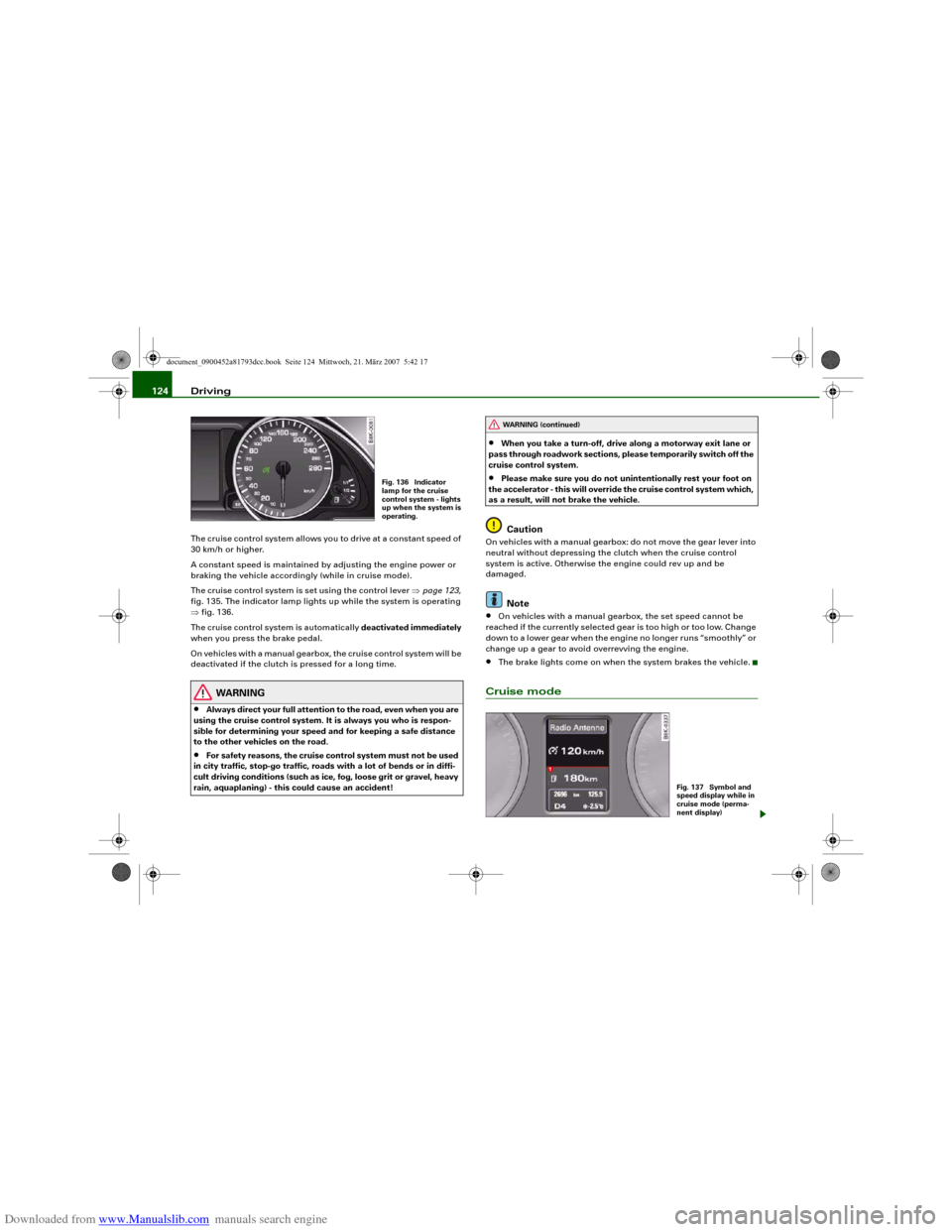
fig. 135. The indicator lamp lights up while the system is operating
⇒fig. 136.
The cruise control system is automatically deactivated immediately
when you press the brake pedal.
On vehicles with a manual gearbox, the cruise control system will be
deactivated if the clutch is pressed for a long time.
WARNING
•
Always direct your full attention to the road, even when you are
using the cruise control system. It is always you who is respon-
sible for determining your speed and for keeping a safe distance
to the other vehicles on the road.
•
For safety reasons, the cruise control system must not be used
in city traffic, stop-go traffic, roads with a lot of bends or in diffi-
cult driving conditions (such as ice, fog, loose grit or gravel, heavy
rain, aquaplaning) - this could cause an accident!
•
When you take a turn-off, drive along a motorway exit lane or
pass through roadwork sections, please temporarily switch off the
cruise control system.
•
Please make sure you do not unintentionally rest your foot on
the accelerator - this will override the cruise control system which,
as a result, will not brake the vehicle.Caution
On vehicles with a manual gearbox: do not move the gear lever into
neutral without depressing the clutch when the cruise control
system is active. Otherwise the engine could rev up and be
damaged.
Note
•
On vehicles with a manual gearbox, the set speed cannot be
reached if the currently selected gear is too high or too low. Change
down to a lower gear when the engine no longer runs “smoothly” or
change up a gear to avoid overrevving the engine.
•
The brake lights come on when the system brakes the vehicle.
Cruise mode
Fig. 136 Indicator
lamp for the cruise
control system - lights
up when the system is
operating.
WARNING (continued)
Fig. 137 Symbol and
speed display while in
cruise mode (perma-
nent display)
document_0900452a81793dcc.book Seite 124 Mittwoch, 21. März 2007 5:42 17
Page 127 of 294
Downloaded from www.Manualslib.com manuals search engine Driving125
Controls
Safety
Driving tips
General maintenance
Self-help
Technical data
– Pull the lever to position ⇒page 123, fig. 135 to
switch on the system.
– Drive at the speed you wish to set the system to (must be
higher than 30 km/h).
– Briefly press button .When the pushbutton is released, the current speed is stored in the
memory and the vehicle will maintain this speed. The cruise control
system is then operating. If you have selected the display for the on-
board computer 1 or 2, a green symbol in the instrument cluster
display indicates that the cruise control is operating ⇒page 124,
fig. 137. The speed which is being maintained is displayed next to
the symbol.
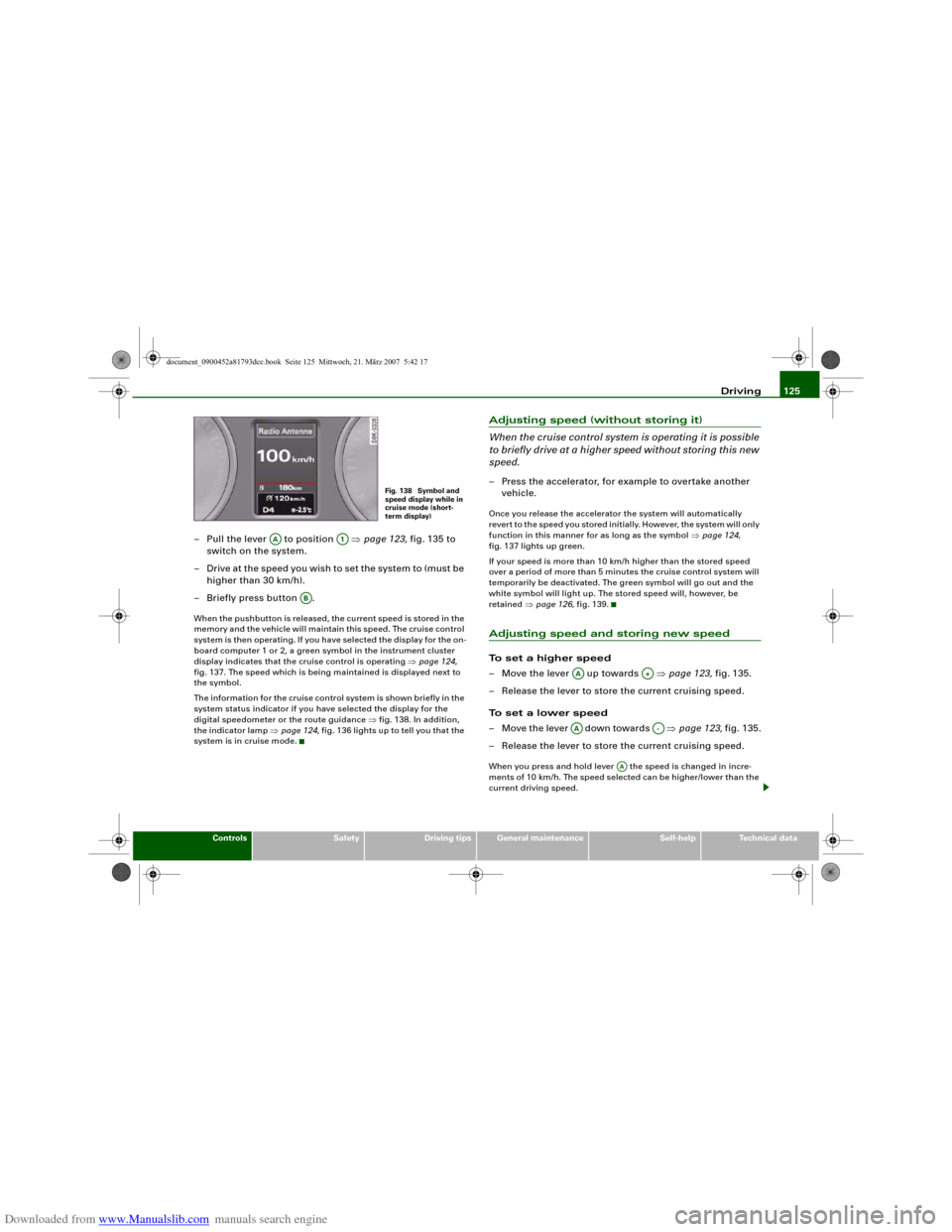
The information for the cruise control system is shown briefly in the
system status indicator if you have selected the display for the
digital speedometer or the route guidance ⇒fig. 138. In addition,
the indicator lamp ⇒page 124, fig. 136 lights up to tell you that the
system is in cruise mode.
Adjusting speed (without storing it)
When the cruise control system is operating it is possible
to briefly drive at a higher speed without storing this new
speed.– Press the accelerator, for example to overtake another
vehicle.Once you release the accelerator the system will automatically
revert to the speed you stored initially. However, the system will only
function in this manner for as long as the symbol ⇒page 124,
fig. 137 lights up green.
If your speed is more than 10 km/h higher than the stored speed
over a period of more than 5 minutes the cruise control system will
temporarily be deactivated. The green symbol will go out and the
white symbol will light up. The stored speed will, however, be
retained ⇒page 126, fig. 139.Adjusting speed and storing new speedTo set a higher speed
– Move the lever up towards ⇒page 123, fig. 135.
– Release the lever to store the current cruising speed.
To set a lower speed
– Move the lever down towards ⇒page 123, fig. 135.
– Release the lever to store the current cruising speed.When you press and hold lever the speed is changed in incre-
ments of 10 km/h. The speed selected can be higher/lower than the
current driving speed.
Fig. 138 Symbol and
speed display while in
cruise mode (short-
term display)
AA
A1
AB
AA
A+
AA
A-
AA
document_0900452a81793dcc.book Seite 125 Mittwoch, 21. März 2007 5:42 17
Page 130 of 294
Downloaded from www.Manualslib.com manuals search engine Audi parking system 128Audi parking systemParking aid systemsApplies to vehicles: with parking systemGeneral notes
Depending on the optional equipment fitted, there are
various parking aid systems to assist you when parking or
manoeuvring in tight spaces.parking system*:
The parking system comprises the rear acoustic parking aid
⇒page 128.
The rear acoustic parking system uses ultrasonic sensors to
measure the distance between the vehicle and an obstacle which
has been detected. There are four sensors which are located in the
rear bumper (two in the centre, two at the sides).
parking system plus*:
The parking system plus* comprises the rear and front acoustic
parking aid ⇒page 129 in conjunction with a graphic display.
The parking system plus* uses ultrasonic sensors to measure the
distance between the vehicle and an obstacle which has been
detected. There are a total of 8 sensors located in the front and rear
bumpers (2 in the centre and 2 on the side of each bumper).
parking system advanced*:
The parking system advanced* comprises the rear and front
acoustic parking aid in conjunction with the graphic display as well
as a reversing camera (Rear View) ⇒page 131.
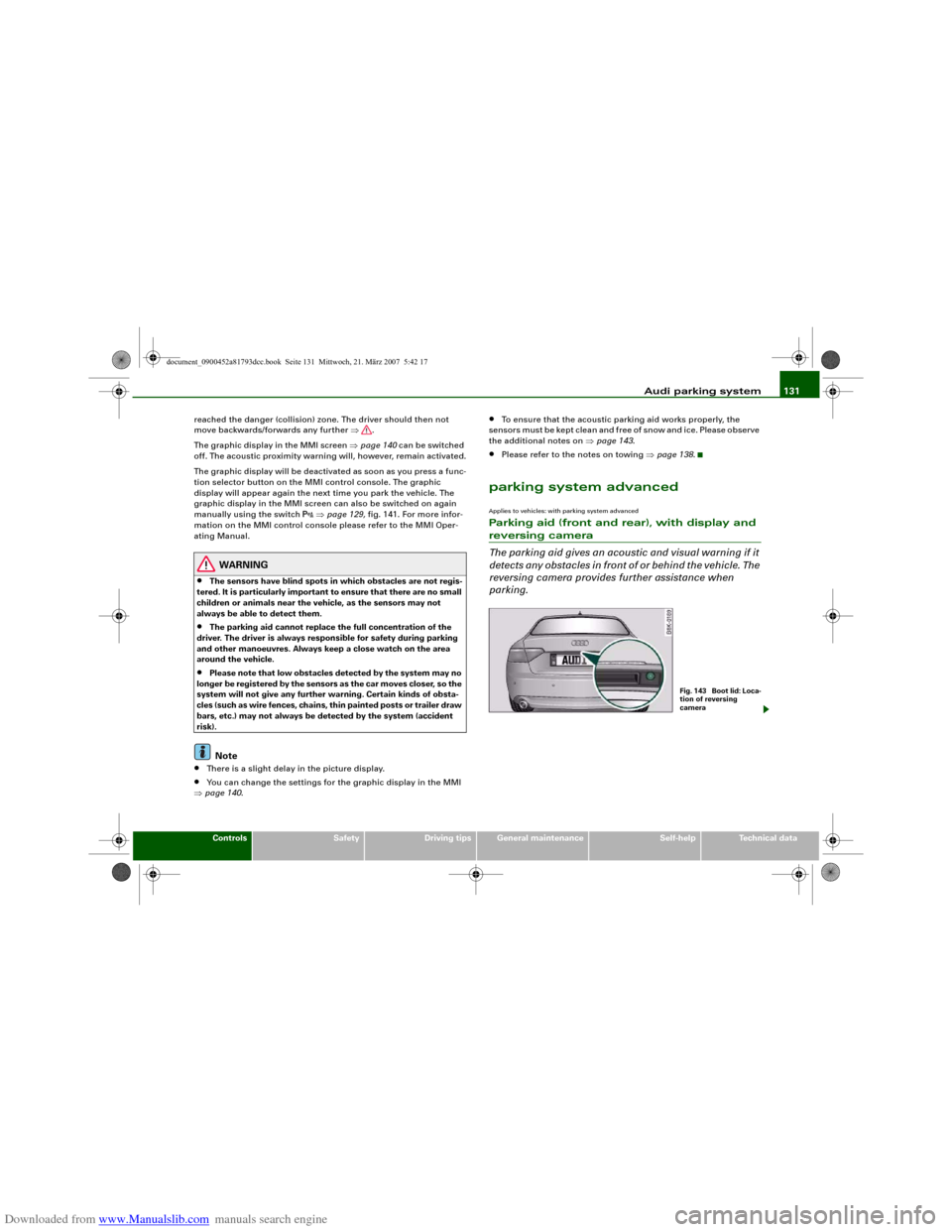
The reversing camera is located in the boot lid ⇒page 131, fig. 143
and assists the driver when parking or manoeuvring in tight spaces.
The reversing camera provides an image which is shown in the MMI display. It represents the mirror image of a section of the area
behind the vehicle ⇒page 135, fig. 148.
Note
There is a slight delay in the picture display.parking systemApplies to vehicles: with parking systemRear parking aid
The parking aid gives an acoustic warning if it detects any
obstacles behind the vehicle.– Engage reverse gear. You will hear a short beep to
confirm that the rear parking aid has been activated. The
rear parking aid remains active for as long as the reverse
gear is engaged.The measuring range of the sensors in the rear bumper starts at
approximately:
Reversing
When the vehicle is reversing, the system starts to beep when it
registers an obstacle within its detection range (see above). The
warnings will beep increasingly rapidly as the vehicle approaches
the obstacle.Rear
Side
0.60 m
Centre
1.60 m
document_0900452a81793dcc.book Seite 128 Mittwoch, 21. März 2007 5:42 17
Page 132 of 294
Downloaded from www.Manualslib.com manuals search engine Audi parking system 130
Activating
– Engage reverse gear to automatically activate the
parking system plus, or
– Press the switch
⇒page 129, fig. 141 in the centre
console to activate the parking system plus manually.
You will hear a short beep to confirm that the parking
system has been activated. The indicator lamp in the
switch will light up.
Deactivating
– Drive forwards faster than approx. 10 km/h, or
– Switch off the ignition to automatically deactivate the
complete parking system, or
– Press the switch
⇒page 129, fig. 141 to deactivate the
parking system plus manually. The indicator lamp in the
switch will go out.
Activate the system manually if you are driving forwards and would
like the system to give a warning as you approach potential obsta-
cles, for instance when parking.
The measuring range of the sensors in the front and rear bumpers
starts at approximately:
Warning beeps
The warning beeps are produced by sound boxes. The volume and
pitch of the beeps can be adjusted in the MMI ⇒page 139.Mute function
An acoustic proximity warning is cancelled when you apply the
parking brake or move the selector lever of the automatic gearbox
to position P. However, the system remains active. The warning
beeps will start again as soon as you release the parking brake or
move the selector lever out of position P if the system has detected
an obstacle.
Reversing/driving forwards
When the vehicle is reversing/driving forwards, the system starts to
beep if it registers an obstacle within its detection range (see
above). The warnings will beep increasingly rapidly as the vehicle
approaches the obstacle.
When the vehicle is less than approx. 0.30 m away from the obstacle
the warning tone will sound continuously. From here at the latest,
the driver should then not reverse/drive forwards any further.
The volume of the warning beeps will be gradually reduced after
about 4 seconds if the vehicle remains at a constant distance from
a detected obstacle (it will not be reduced if the obstacle is closer
than 0.30 m). The warnings will then return to the normal volume if
the vehicle approaches the detected obstacle again.
Parking
If the parking manoeuvre involves shunting backwards and
forwards, the warning sound will be switched off temporarily while
you change gear. The proximity graphic will, however, still be
displayed on the MMI screen. The warnings will then return to the
normal volume if the vehicle approaches the detected obstacle
again.
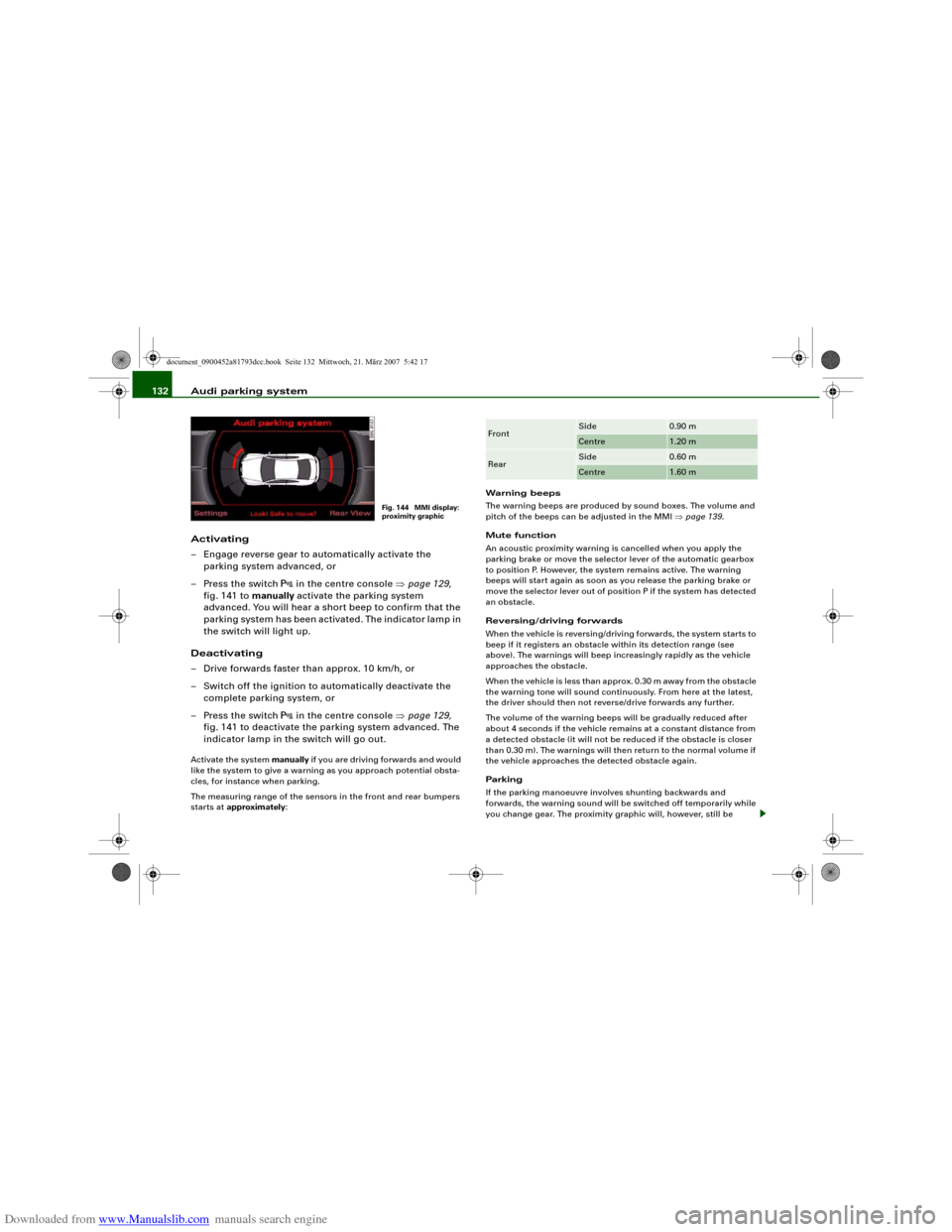
Graphic display
The segments in the MMI display indicate the distance between the
vehicle and a detected obstacle. The number of segments shown
depends on the obstacle in front of or behind the vehicle. The closer
the vehicle gets to the obstacle the closer the segments move
towards the vehicle in the graphic ⇒page 129, fig. 142. At the latest
when the penultimate segment is highlighted the vehicle has Front
Side
0.90 m
Centre
1.20 m
Rear
Side
0.60 m
Centre
1.60 m
document_0900452a81793dcc.book Seite 130 Mittwoch, 21. März 2007 5:42 17
Page 133 of 294
Downloaded from www.Manualslib.com manuals search engine Audi parking system131
Controls
Safety
Driving tips
General maintenance
Self-help
Technical data reached the danger (collision) zone. The driver should then not
move backwards/forwards any further ⇒.
The graphic display in the MMI screen ⇒page 140 can be switched
off. The acoustic proximity warning will, however, remain activated.
The graphic display will be deactivated as soon as you press a func-
tion selector button on the MMI control console. The graphic
display will appear again the next time you park the vehicle. The
graphic display in the MMI screen can also be switched on again
manually using the switch
⇒page 129, fig. 141. For more infor-
mation on the MMI control console please refer to the MMI Oper-
ating Manual.
WARNING
•
The sensors have blind spots in which obstacles are not regis-
tered. It is particularly important to ensure that there are no small
children or animals near the vehicle, as the sensors may not
always be able to detect them.
•
The parking aid cannot replace the full concentration of the
driver. The driver is always responsible for safety during parking
and other manoeuvres. Always keep a close watch on the area
around the vehicle.
•
Please note that low obstacles detected by the system may no
longer be registered by the sensors as the car moves closer, so the
system will not give any further warning. Certain kinds of obsta-
cles (such as wire fences, chains, thin painted posts or trailer draw
bars, etc.) may not always be detected by the system (accident
risk).Note
•
There is a slight delay in the picture display.
•
You can change the settings for the graphic display in the MMI
⇒page 140.
•
To ensure that the acoustic parking aid works properly, the
sensors must be kept clean and free of snow and ice. Please observe
the additional notes on ⇒page 143.
•
Please refer to the notes on towing ⇒page 138.
parking system advancedApplies to vehicles: with parking system advancedParking aid (front and rear), with display and reversing camera
The parking aid gives an acoustic and visual warning if it
detects any obstacles in front of or behind the vehicle. The
reversing camera provides further assistance when
parking.
Fig. 1 43 Bo o t lid : Lo c a-
tion of reversing
camera
document_0900452a81793dcc.book Seite 131 Mittwoch, 21. März 2007 5:42 17
Page 134 of 294
Downloaded from www.Manualslib.com manuals search engine Audi parking system 132
Activating
– Engage reverse gear to automatically activate the
parking system advanced, or
– Press the switch
in the centre console ⇒page 129,
fig. 141 to manually activate the parking system
advanced. You will hear a short beep to confirm that the
parking system has been activated. The indicator lamp in
the switch will light up.
Deactivating
– Drive forwards faster than approx. 10 km/h, or
– Switch off the ignition to automatically deactivate the
complete parking system, or
– Press the switch
in the centre console ⇒page 129,
fig. 141 to deactivate the parking system advanced. The
indicator lamp in the switch will go out.
Activate the system manually if you are driving forwards and would
like the system to give a warning as you approach potential obsta-
cles, for instance when parking.
The measuring range of the sensors in the front and rear bumpers
starts at approximately:Warning beeps
The warning beeps are produced by sound boxes. The volume and
pitch of the beeps can be adjusted in the MMI ⇒page 139.
Mute function
An acoustic proximity warning is cancelled when you apply the
parking brake or move the selector lever of the automatic gearbox
to position P. However, the system remains active. The warning
beeps will start again as soon as you release the parking brake or
move the selector lever out of position P if the system has detected
an obstacle.
Reversing/driving forwards
When the vehicle is reversing/driving forwards, the system starts to
beep if it registers an obstacle within its detection range (see
above). The warnings will beep increasingly rapidly as the vehicle
approaches the obstacle.
When the vehicle is less than approx. 0.30 m away from the obstacle
the warning tone will sound continuously. From here at the latest,
the driver should then not reverse/drive forwards any further.
The volume of the warning beeps will be gradually reduced after
about 4 seconds if the vehicle remains at a constant distance from
a detected obstacle (it will not be reduced if the obstacle is closer
than 0.30 m). The warnings will then return to the normal volume if
the vehicle approaches the detected obstacle again.
Parking
If the parking manoeuvre involves shunting backwards and
forwards, the warning sound will be switched off temporarily while
you change gear. The proximity graphic will, however, still be
Fig. 144 MMI display:
proximity graphic
Front
Side
0.90 m
Centre
1.20 m
Rear
Side
0.60 m
Centre
1.60 m
document_0900452a81793dcc.book Seite 132 Mittwoch, 21. März 2007 5:42 17
Page 135 of 294
Downloaded from www.Manualslib.com manuals search engine Audi parking system133
Controls
Safety
Driving tips
General maintenance
Self-help
Technical data displayed on the MMI screen. The warnings will then return to the
normal volume if the vehicle approaches the detected obstacle
again.
Graphic display
The segments in the MMI display indicate the distance between the
vehicle and an obstacle. The number of segments shown depends
on the obstacle in front of or behind the vehicle. The closer the
vehicle gets to the obstacle the closer the segments move towards
the vehicle in the graphic ⇒page 132, fig. 144. At the latest when
the penultimate segment is highlighted the vehicle has reached the
danger (collision) zone. The driver should then not move back-
wards/forwards any further ⇒.
The graphic display in the MMI screen ⇒page 140 can be switched
off. The acoustic proximity warning will, however, remain activated.
The graphic display will be deactivated as soon as you press a func-
tion selector button on the MMI control console. The graphic
display in the MMI screen can also be switched on again manually
using the switch
. For more information on the MMI control
console please refer to the MMI Operating Manual.
Reversing camera (Rear View)
The mirrored image of the picture supplied by the reversing camera
⇒page 136, fig. 149 is shown in the MMI display. The picture
supplied by the reversing camera also includes orientation lines
and area markings which are projected onto the image to assist you
when parking ⇒page 134. The red line in the picture ⇒page 134,
fig. 145/⇒page 134, fig. 146 shows the collision zone. From here at
the latest, the driver should not reverse any further ⇒.
If your vehicle is near an obstacle, the proximity graphic will also
appear in the reversing camera image. This superimposed graphic
helps the driver to localise the critical area of the vehicle.
If the MMI screen is showing the graphic display you can switch to
the image of the reversing camera by pressing the control button
for the function Rear View ⇒page 132, fig. 144.If the MMI screen is showing the image of the reversing camera you
can switch to the graphic display by pressing the control button for
the function Graphic ⇒page 136, fig. 149.
The image of the reversing camera in the MMI screen ⇒page 140
can be switched off. The acoustic proximity warning will, however,
remain activated.
The image of the reversing camera will be deactivated as soon as
you press a function selector button on the MMI control console.
The image of the reversing camera will be shown again the next
time you park the vehicle. The image of the reversing camera can
also be switched on again manually using the switch
. For more
information on the MMI control console please refer to the MMI
Operating Manual.
WARNING
•
The sensors have blind spots in which obstacles are not regis-
tered. It is particularly important to ensure that there are no small
children or animals near the vehicle, as the sensors may not
always be able to detect them.
•
The parking aid cannot replace the full concentration of the
driver. The driver is always responsible for safety during parking
and other manoeuvres. Always keep a close watch on the area
around the vehicle.
•
Please note that low obstacles detected by the system may no
longer be registered by the sensors as the car moves closer, so the
system will not give any further warning. Certain kinds of obsta-
cles (such as wire fences, chains, thin painted posts or trailer draw
bars, etc.) may not always be detected by the system (accident
risk).Note
•
There is a slight delay in the picture display.
•
You can change the settings for the graphic display and the
reversing camera in the MMI ⇒page 140.
document_0900452a81793dcc.book Seite 133 Mittwoch, 21. März 2007 5:42 17
Page 137 of 294
Downloaded from www.Manualslib.com manuals search engine Audi parking system135
Controls
Safety
Driving tips
General maintenance
Self-help
Technical data
•
Off (no display).
The reversing camera can be switched on and off in the MMI
⇒page 140. The acoustic proximity warning will, however, remain
activated.
WARNING
•
The reversing camera has blind spots in which obstacles are
not registered. It is particularly important to ensure that there are
no small children or animals near the vehicle, as the reversing
camera may not always be able to detect them (accident risk).
•
The parking aid cannot replace the full concentration of the
driver. The driver is always responsible for safety during parking
and other manoeuvres. Always keep a close watch on the area
around the vehicle.
•
Please note that low obstacles detected by the system may no
longer be registered by the sensors as the car moves closer, so the
system will not give any further warning. Certain kinds of obsta-
cles (such as wire fences, chains, thin painted posts or trailer draw
bars, etc.) may not always be detected by the system (accident
risk).Note
•
There is a slight delay in the picture display.
•
To ensure that the reversing camera works properly, the lens of
the camera ⇒page 131, fig. 143 must be kept clean and free of
snow and ice. Please observe the additional notes on ⇒page 143.
•
If the boot lid is open the angle covered by the camera will
change. For this reason, the image of the reversing camera will then
be shown without orientation lines and blue area markings.
•
Please refer to the notes on towing ⇒page 138.
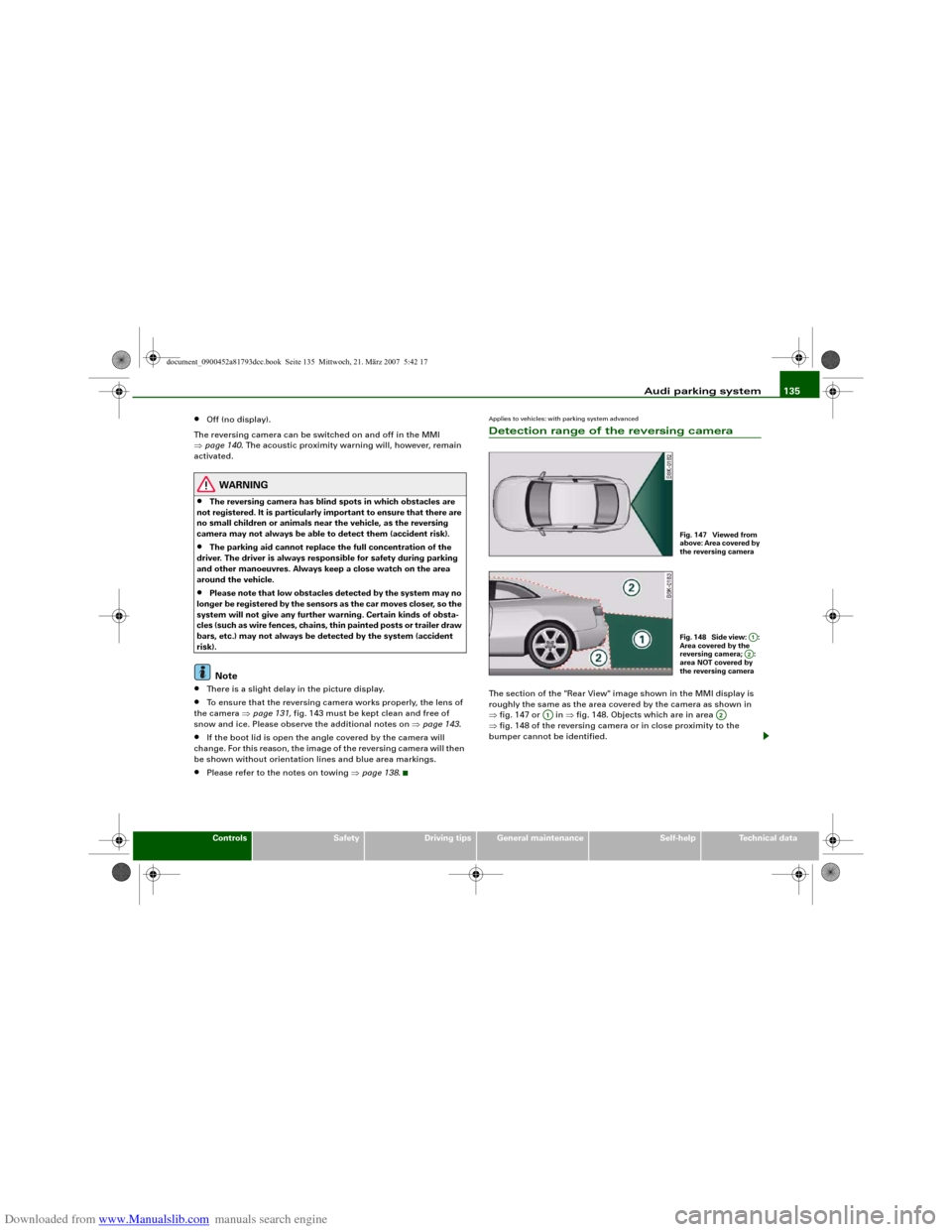
Applies to vehicles: with parking system advancedDetection range of the reversing cameraThe section of the "Rear View" image shown in the MMI display is
roughly the same as the area covered by the camera as shown in
⇒fig. 147 or in ⇒fig. 148. Objects which are in area
⇒fig. 148 of the reversing camera or in close proximity to the
bumper cannot be identified.
Fig. 147 Viewed from
above: Area covered by
the reversing cameraFig. 148 Side view: :
Area covered by the
reversing camera; :
area NOT covered by
the reversing camera
A1A2
A1
A2
document_0900452a81793dcc.book Seite 135 Mittwoch, 21. März 2007 5:42 17
Page 140 of 294
Downloaded from www.Manualslib.com manuals search engine Audi parking system 138
– Press the control button for Mode ⇒page 136,
fig. 150. “Parking mode 2” ⇒fig. 151 will appear in the
MMI display.
– Reverse and align the position of your vehicle in such a
way that the dark blue area marking ⇒fig. 151
borders onto the vehicle behind or onto the parking
space line marking. If you are not parking next to obsta-
cles ⇒page 141 the long side of the dark blue marking
should border onto the kerb. The complete dark blue
area marking must fit into the parking space ⇒page 134,
fig. 146.
– When the vehicle is stationary turn the steering wheel to
the right as far as it will go.
– Reverse into the parking space. If you are not parking
next to obstacles ⇒page 141 the dark blue marking
should touch the kerb ⇒page 137, fig. 152. Stop your
vehicle.
– Turn the steering wheel to the left as far as it will go
(vehicle is stationary).
– Continue to reverse into the parking space until the
vehicle is standing parallel to the kerb. When reversing
you must also keep a close watch on the front end of the
vehicle ⇒.You can use “Parking mode 2” to park on the left or the right side of
the road. For this reason, the blue markings are shown in various
shades of blue. The dark blue area marking and the dark blue
curve are used when parking on the right side of the road. The
light blue area marking and the light blue curve are used
when parking on the left side of the road.When the turn signals are on, the display will only show the mark-
ings for the relevant side. To change the display to the other side,
just switch on the opposite turn signals.
The light blue and dark blue curves show you when to turn the
steering wheel in the other direction, i.e. when the curve touches
the kerb. ⇒page 137, fig. 152.
The distance from your rear bumper to the red line is approx.
40 cm. From here at the latest, the driver should not reverse any
further ⇒page 142.
WARNING
Please note that objects which are not touching the ground may
appear to be further away than they actually are (e.g. the bumper
of a parked vehicle, a towing bracket or the rear end of a truck). In
this case you should not use the orientation lines for judging the
distance (accident risk).
Caution
The MMI display shows the path of the rear end of the vehicle if you
were to reverse using the current steering angle. NB: The front end
of the vehicle swings out further than the rear.
Note
To ensure that the reversing camera works properly, the lens of the
camera ⇒page 131, fig. 143 must be kept clean and free of snow
and ice. Please observe the additional notes on ⇒page 143.Applies to vehicles: with parking system and towing bracketTo w i n g b r a c k e tOnce the electrical connector for the trailer socket is plugged in on
vehicles with a factory-fitted towing bracket the rear sensors for the
AAA2
A4
A2
A4
A1
A3
A3
A4
A5
A6
document_0900452a81793dcc.book Seite 138 Mittwoch, 21. März 2007 5:42 17
Page 145 of 294
Downloaded from www.Manualslib.com manuals search engine Audi parking system143
Controls
Safety
Driving tips
General maintenance
Self-help
Technical data
Safety notesApplies to vehicles: with parking systemFault warning for the acoustic parking aidparking system:
If you hear a long beep when you engage reverse gear, the rear
parking aid is not functioning correctly.
parking system plus*/parking system advanced*:
If you hear a long beep for a few seconds when you engage reverse
gear and the diode in the switch
* starts flashing, there is a fault
in the rear and front parking system with graphic display.
You will be notified of a system fault
•
when you manually activate the parking system via the switch
* ⇒page 129•
the first time you engage reverse gear after switching on the
ignition, or
•
immediately, if the fault is identified while you are using the
parking system.Note
If the system alerts you to a fault please have the fault rectified by
an Audi workshop or other qualified workshop.Applies to vehicles: with parking system advancedNotes on reversing cameraWe recommend that you practise parking with the reversing camera
in a quiet location (car park or similar) in order to become familiar
with the system, including the orientation lines and all the other
features. Ideally, the weather and light conditions should be good.Vehicles or other objects shown in the MMI display appear to be
further away or closer, if:
•
you are reversing from a horizontal surface up a gradient or
down a hill,
•
you are reversing towards protruding objects,
•
the vehicle has been loaded with a greater load on the rear.
The accuracy of the orientation lines and the blue area markings
decreases if:
•
the reversing camera does not provide a reliable image, e.g. if
visibility is poor or the lens is dirty,
•
the sun is so dazzling that you cannot see the image on the
display screen.
How to clean the lens of the reversing camera:
•
Moisten the lens using a commercially available, alcohol-based
glass cleaning agent and clean the lens with a dry cloth.
•
Remove snow using a small brush.
•
If possible, use de-icing spray to remove any ice ⇒.
WARNING
•
Even when using the reversing camera, the driver must still
keep a close watch on the area behind the vehicle and use the
mirrors.
•
For technical reasons, the reversing camera cannot show the
complete area behind the vehicle ⇒page 135, fig. 148. It is partic-
ularly important to ensure that there are no small children or
animals near the vehicle, as the reversing camera may not always
be able to detect them (accident risk).
•
The parking aid cannot replace the full concentration of the
driver. The driver is always responsible for safety during parking
and other manoeuvres. Always keep a close watch on the area
around the vehicle.
document_0900452a81793dcc.book Seite 143 Mittwoch, 21. März 2007 5:42 17