wheel AUDI S5 2008 8T / 1.G User Guide
[x] Cancel search | Manufacturer: AUDI, Model Year: 2008, Model line: S5, Model: AUDI S5 2008 8T / 1.GPages: 294, PDF Size: 12.13 MB
Page 108 of 294
Downloaded from www.Manualslib.com manuals search engine Heating and cooling 106
NoteWhen the air conditioner is operating in the cooling mode, the air is
directed mainly to outlets and . To ensure an adequate cooling
effect, you should not close these outlets completely.Applies to vehicles: with deluxe automatic air conditioner plusAir outlets for rear passengers
The air outlets for the rear cabin are located in the centre
console.– The outlets can be opened and closed by turning the
thumbwheels.
– The direction of air delivery from these outlets can be
adjusted horizontally and vertically using the adjuster in
the centre of each outlet grille.The flow of air from the outlets is controlled either automatically or
manually, depending on the operating mode selected. All the
outlets can provide air which is either heated, unheated, or cooled.
The heater outlets for the rear footwells are located under the front
seats.
Note
When the air conditioner is operating in the cooling mode the air is
directed mainly to the outlets in the centre console. To ensure an
adequate cooling effect, you should not close these outlets
completely.
Applies to vehicles: with deluxe automatic air conditioner plusEconomical operation of the air conditioner
Economical operation of the air conditioner will help to
save fuel.When the air conditioner is operating in the cooling mode it
reduces engine power and increases fuel consumption. To
ensure that the cooling mode is activated only when really
necessary, please note the following points:
– Switch off the cooling mode by pressing the AC button
(LED off) if you wish to save fuel.
– You should also switch off the cooling mode by pressing
the AC button (LED off) if you open the windows or the
tilting panorama roof* while driving.
– If the vehicle has heated up after standing in the sun,
open the windows and doors for a short time to cool the
vehicle.
For the sake of the environmentBy saving fuel you also reduce the amount of pollutants emitted
from your vehicle.
A2
A3
document_0900452a81793dcc.book Seite 106 Mittwoch, 21. März 2007 5:42 17
Page 115 of 294
Downloaded from www.Manualslib.com manuals search engine Heating and cooling113
Controls
Safety
Driving tips
General maintenance
Self-help
Technical data
– Turn the rotary control to the desired setting.In setting 0 the seat heating is switched off. Possible settings range
from 1 to 6.
The seat heating setting will be shown on the MMI display
⇒page 112, fig. 129 for a few seconds if the MMI is switched on.
Caution
To avoid damaging the heating elements of the seat heating, please
do not kneel on the seat or apply sharp pressure at a single point.Applies to vehicles: with seat heating for rear seatsSeat heating for rear seats
The seat cushions and backrests of the two outer rear
seats can be heated electrically.– Turn the left thumbwheel (on the centre console) to
switch on and regulate the heating for the left rear seat.
– Turn the right thumbwheel (on the centre console) to
switch on and regulate the heating for the right rear seat.The heating is switched off when the thumbwheel is set to 0.
Possible settings range from 1 to 6.
The heating for the rear seats only operates when a sensor registers
the weight of the occupant in the seat. If nobody is travelling on the
rear seats, please switch off the rear seat heating to avoid activating
it unintentionally.
Caution
To avoid damaging the heating elements of the seat heating, please
do not kneel on the seat or apply sharp pressure at a single point.
document_0900452a81793dcc.book Seite 113 Mittwoch, 21. März 2007 5:42 17
Page 116 of 294
Downloaded from www.Manualslib.com manuals search engine Driving 114DrivingSteeringApplies to vehicles: with manually adjustable steering columnAdjusting the steering wheel position
The height and reach of the steering wheel can be
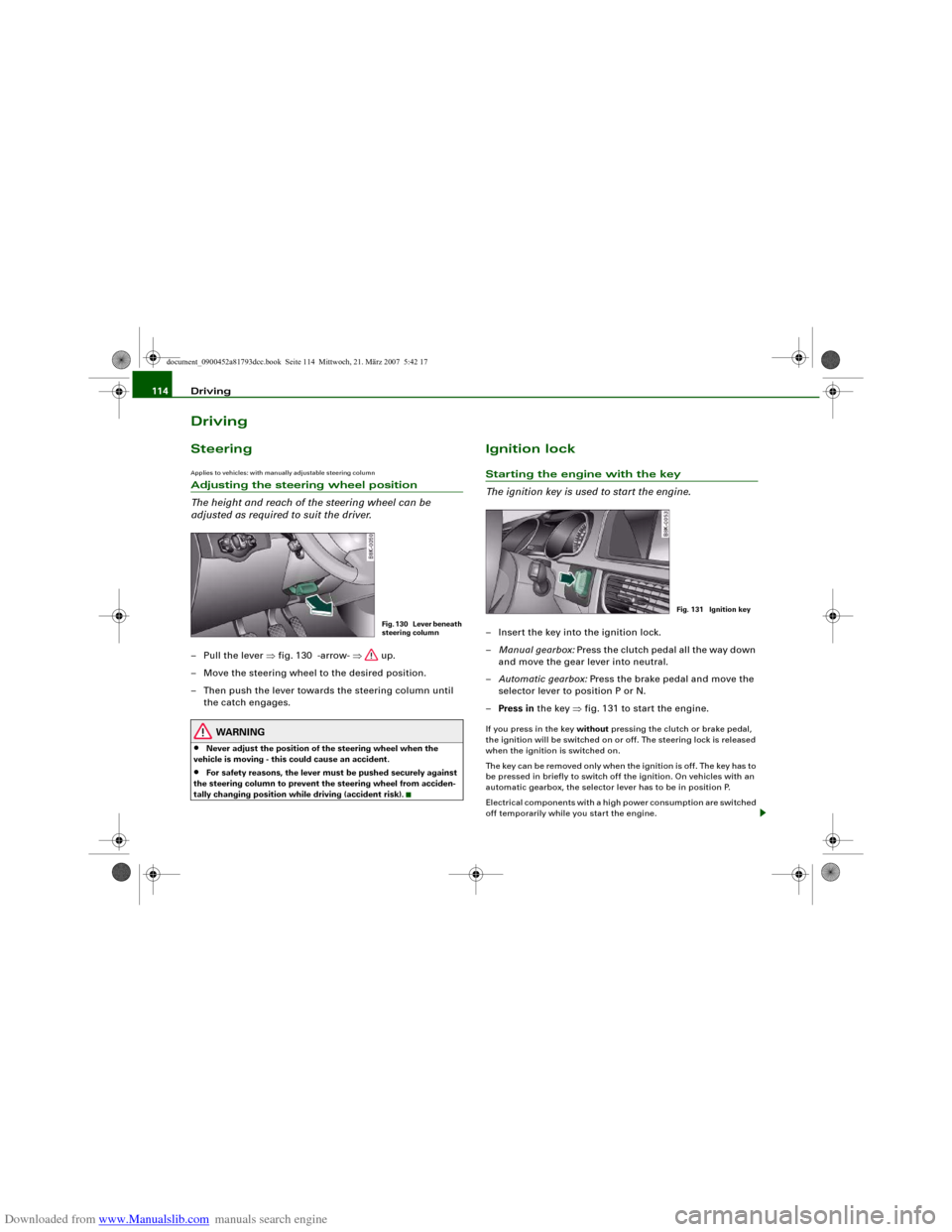
adjusted as required to suit the driver.– Pull the lever ⇒fig. 130 -arrow- ⇒ up.
– Move the steering wheel to the desired position.
– Then push the lever towards the steering column until
the catch engages.
WARNING
•
Never adjust the position of the steering wheel when the
vehicle is moving - this could cause an accident.
•
For safety reasons, the lever must be pushed securely against
the steering column to prevent the steering wheel from acciden-
tally changing position while driving (accident risk).
Ignition lockStarting the engine with the key
The ignition key is used to start the engine.– Insert the key into the ignition lock.
–Manual gearbox: Press the clutch pedal all the way down
and move the gear lever into neutral.
–Automatic gearbox: Press the brake pedal and move the
selector lever to position P or N.
–Press in the key ⇒fig. 131 to start the engine.If you press in the key without pressing the clutch or brake pedal,
the ignition will be switched on or off. The steering lock is released
when the ignition is switched on.
The key can be removed only when the ignition is off. The key has to
be pressed in briefly to switch off the ignition. On vehicles with an
automatic gearbox, the selector lever has to be in position P.
Electrical components with a high power consumption are switched
off temporarily while you start the engine.
Fig. 130 Lever beneath
steering column
Fig. 131 Ignition key
document_0900452a81793dcc.book Seite 114 Mittwoch, 21. März 2007 5:42 17
Page 121 of 294
Downloaded from www.Manualslib.com manuals search engine Driving119
Controls
Safety
Driving tips
General maintenance
Self-help
Technical data
Electro-mechanical parking brakeOperation
The electro-mechanical parking brake replaces the hand-
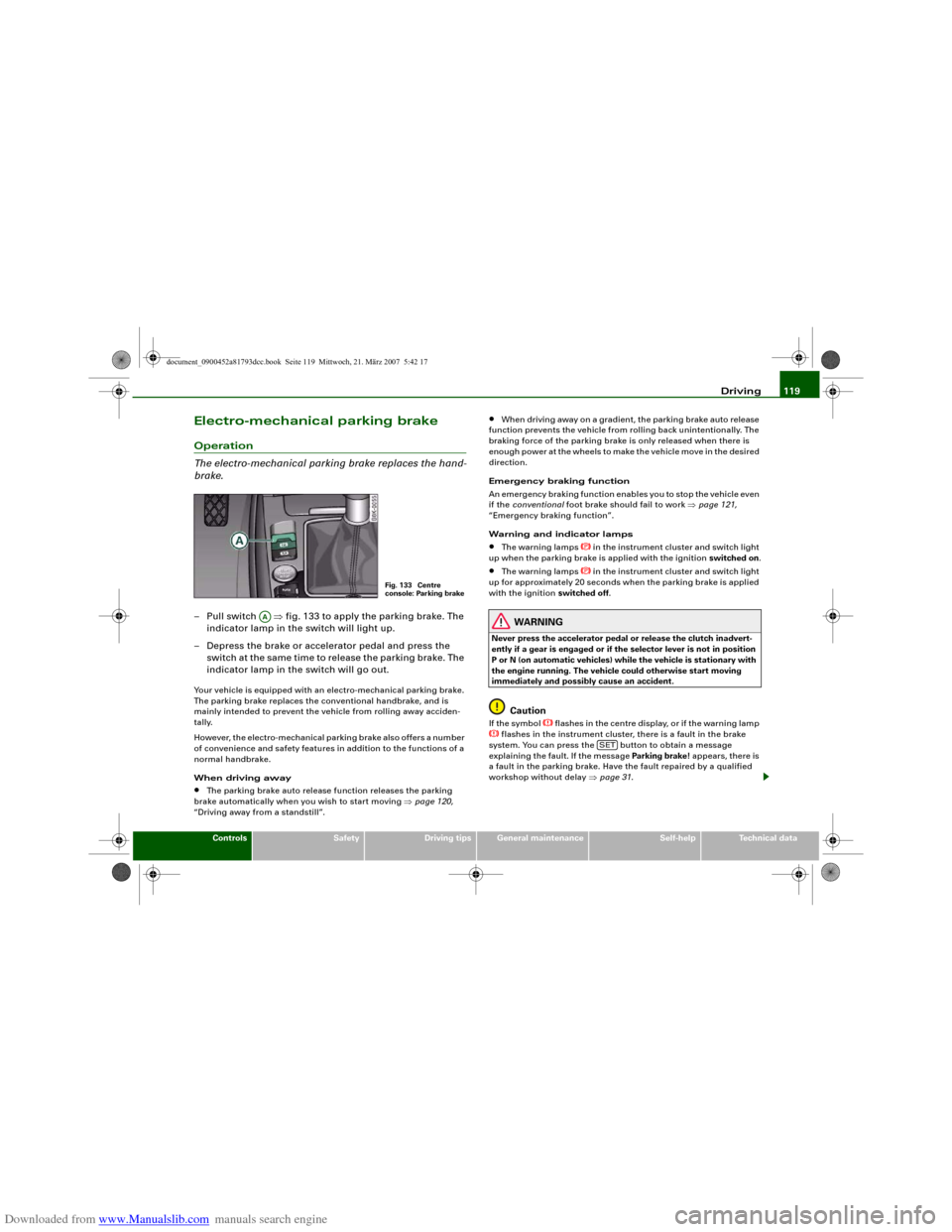
brake.– Pull switch ⇒fig. 133 to apply the parking brake. The
indicator lamp in the switch will light up.
– Depress the brake or accelerator pedal and press the
switch at the same time to release the parking brake. The
indicator lamp in the switch will go out.Your vehicle is equipped with an electro-mechanical parking brake.
The parking brake replaces the conventional handbrake, and is
mainly intended to prevent the vehicle from rolling away acciden-
tally.
However, the electro-mechanical parking brake also offers a number
of convenience and safety features in addition to the functions of a
normal handbrake.
When driving away•
The parking brake auto release function releases the parking
brake automatically when you wish to start moving ⇒page 120,
“Driving away from a standstill”.
•
When driving away on a gradient, the parking brake auto release
function prevents the vehicle from rolling back unintentionally. The
braking force of the parking brake is only released when there is
enough power at the wheels to make the vehicle move in the desired
direction.
Emergency braking function
An emergency braking function enables you to stop the vehicle even
if the conventional foot brake should fail to work ⇒page 121,
“Emergency braking function”.
Warning and indicator lamps
•
The warning lamps
in the instrument cluster and switch light
up when the parking brake is applied with the ignition switched on.
•
The warning lamps
in the instrument cluster and switch light
up for approximately 20 seconds when the parking brake is applied
with the ignition switched off.
WARNING
Never press the accelerator pedal or release the clutch inadvert-
ently if a gear is engaged or if the selector lever is not in position
P or N (on automatic vehicles) while the vehicle is stationary with
the engine running. The vehicle could otherwise start moving
immediately and possibly cause an accident.
Caution
If the symbol
flashes in the centre display, or if the warning lamp
flashes in the instrument cluster, there is a fault in the brake
system. You can press the button to obtain a message
explaining the fault. If the message Parking brake ! appears, there is
a fault in the parking brake. Have the fault repaired by a qualified
workshop without delay ⇒page 31.
Fig. 133 Centre
console: Parking brake
AA
SET
document_0900452a81793dcc.book Seite 119 Mittwoch, 21. März 2007 5:42 17
Page 122 of 294
Downloaded from www.Manualslib.com manuals search engine Driving 120
Note•
The parking brake can be applied at any time - even when the
ignition is switched off. However, the ignition must be switched on
before the parking brake can be released.
•
Any slight noise which may be heard when the parking brake is
applied or released is quite normal and no cause for concern.
•
The parking brake runs an automatic test cycle at regular inter-
vals when the vehicle is parked. This may also cause a slight noise,
which is normal.
Parking
Please note the following points to ensure there is no risk
of the car rolling away accidentally after it is parked.Parking t he c ar
– Use the foot brake to stop the vehicle.
– Pull the switch to apply the parking brake.
– Automatic gearbox: Move the selector lever to P.
– Switch off the engine ⇒.
– Manual gearbox: Engage the first gear.
When parking on slopes
– Turn the steering wheel so that the vehicle would roll into
the kerb if it did start to move accidentally.
WARNING
•
Always take the key with you when leaving the vehicle – even
if you only intend to be gone for a short time. This is especially
important if children are left in the car. They might otherwise be
able to start the engine, release the parking brake or use power-operated equipment such as the electric windows - this could lead
to injuries.
•
Do not leave anyone (especially children) in the vehicle when it
is locked. Locked doors could delay assistance in an emergency,
potentially putting lives at risk.
Driving away from a standstill
The parking brake auto release function releases the
parking brake automatically when you wish to start
moving.Applying the parking brake when stopping
– Pull the switch to apply the parking brake.
Releasing the parking brake when driving away
– Drive off in the normal way: the parking brake will be
released automatically and the vehicle will start moving.On vehicles with automatic gearbox, you can apply the parking
brake when stopping at traffic lights, etc. Then you do not have to
hold the car with the footbrake, as the parking brake will stop it
creeping forward while a gear is engaged in the automatic transmis-
sion. When you drive off in the normal way, the parking brake will be
released automatically and the vehicle will start moving.
Driving away on a slope
When driving away on a gradient, the parking brake auto release
function prevents the vehicle from rolling back unintentionally. The
braking force of the parking brake is only released when there is
enough power at the wheels to make the vehicle move in the desired
direction.
WARNING (continued)
document_0900452a81793dcc.book Seite 120 Mittwoch, 21. März 2007 5:42 17
Page 123 of 294
Downloaded from www.Manualslib.com manuals search engine Driving121
Controls
Safety
Driving tips
General maintenance
Self-help
Technical data
Note
For safety reasons the parking brake will only release automatically
if the driver's seat belt is engaged in its buckle.Driving away when towing a trailer
Please note the following points to prevent the vehicle
from rolling back unintentionally on a gradient.– Pull and hold the parking brake switch and press the
accelerator. The parking brake will remain engaged and
prevent any tendency to roll back down the slope.
– You can release the parking brake switch as soon as the
engine is delivering enough power to the wheels.Depending on the weight of the vehicle and trailer and the steep-
ness of the slope, there may be a tendency to roll back downhill
when driving away from a standstill. You can prevent this by pulling
out the parking brake switch as you press the accelerator (in the
same way as with a conventional handbrake).Emergency braking function
This feature enables you to stop the vehicle if the main
brake system should fail or if the pedal is obstructed.– Pull out and hold the parking brake switch to stop the
vehicle with the parking brake in an emergency.
– The brakes will be released immediately if you release the
switch or press down the accelerator.If you pull out and hold the parking brake switch at a road speed
above about 8 km/h, this will initiate an emergency brake applica-
tion. The brakes are then applied hydraulically at all four wheels. The effect is the same as an emergency stop (full brake application)
⇒
To prevent the emergency braking function from being used acci-
dentally, a warning buzzer sounds when the switch is operated. The
brakes are released immediately when you release the switch or
press down the accelerator.
WARNING
You should only use the emergency braking function in a real
emergency, for example if the brake system should fail or if the
brake pedal is obstructed. If you use the emergency braking func-
tion by activating the parking brake switch, the effect is similar to
a full brake application (emergency stop). Please remember that
the ESP (with its combined ABS, EDL and traction control func-
tions) is still subject to certain physical limits. In a corner or in bad
road or weather conditions an emergency stop can cause the
vehicle to skid or lose steering control.Driver messages in the instrument cluster displayCaution: Vehicle parked too steep
This message can appear when you apply the parking brake if the
car is parked on a gradient steeper than about 30%.
In this case the parking brake may not be strong enough to prevent
the vehicle from rolling back accidentally.
Please release parking brake
However, please remember that, for safety reasons, the parking
brake will only release automatically if the driver's seat belt is
buckled.
document_0900452a81793dcc.book Seite 121 Mittwoch, 21. März 2007 5:42 17
Page 140 of 294
Downloaded from www.Manualslib.com manuals search engine Audi parking system 138
– Press the control button for Mode ⇒page 136,
fig. 150. “Parking mode 2” ⇒fig. 151 will appear in the
MMI display.
– Reverse and align the position of your vehicle in such a
way that the dark blue area marking ⇒fig. 151
borders onto the vehicle behind or onto the parking
space line marking. If you are not parking next to obsta-
cles ⇒page 141 the long side of the dark blue marking
should border onto the kerb. The complete dark blue
area marking must fit into the parking space ⇒page 134,
fig. 146.
– When the vehicle is stationary turn the steering wheel to
the right as far as it will go.
– Reverse into the parking space. If you are not parking
next to obstacles ⇒page 141 the dark blue marking
should touch the kerb ⇒page 137, fig. 152. Stop your
vehicle.
– Turn the steering wheel to the left as far as it will go
(vehicle is stationary).
– Continue to reverse into the parking space until the
vehicle is standing parallel to the kerb. When reversing
you must also keep a close watch on the front end of the
vehicle ⇒.You can use “Parking mode 2” to park on the left or the right side of
the road. For this reason, the blue markings are shown in various
shades of blue. The dark blue area marking and the dark blue
curve are used when parking on the right side of the road. The
light blue area marking and the light blue curve are used
when parking on the left side of the road.When the turn signals are on, the display will only show the mark-
ings for the relevant side. To change the display to the other side,
just switch on the opposite turn signals.
The light blue and dark blue curves show you when to turn the
steering wheel in the other direction, i.e. when the curve touches
the kerb. ⇒page 137, fig. 152.
The distance from your rear bumper to the red line is approx.
40 cm. From here at the latest, the driver should not reverse any
further ⇒page 142.
WARNING
Please note that objects which are not touching the ground may
appear to be further away than they actually are (e.g. the bumper
of a parked vehicle, a towing bracket or the rear end of a truck). In
this case you should not use the orientation lines for judging the
distance (accident risk).
Caution
The MMI display shows the path of the rear end of the vehicle if you
were to reverse using the current steering angle. NB: The front end
of the vehicle swings out further than the rear.
Note
To ensure that the reversing camera works properly, the lens of the
camera ⇒page 131, fig. 143 must be kept clean and free of snow
and ice. Please observe the additional notes on ⇒page 143.Applies to vehicles: with parking system and towing bracketTo w i n g b r a c k e tOnce the electrical connector for the trailer socket is plugged in on
vehicles with a factory-fitted towing bracket the rear sensors for the
AAA2
A4
A2
A4
A1
A3
A3
A4
A5
A6
document_0900452a81793dcc.book Seite 138 Mittwoch, 21. März 2007 5:42 17
Page 156 of 294
Downloaded from www.Manualslib.com manuals search engine Safe driving 154Correct sitting positionsCorrect sitting position for driver
The correct driving position is important for safe and
fatigue-free driving.For your own safety, and to reduce the risk of injury in the
event of an accident, we recommend the following driving
position.
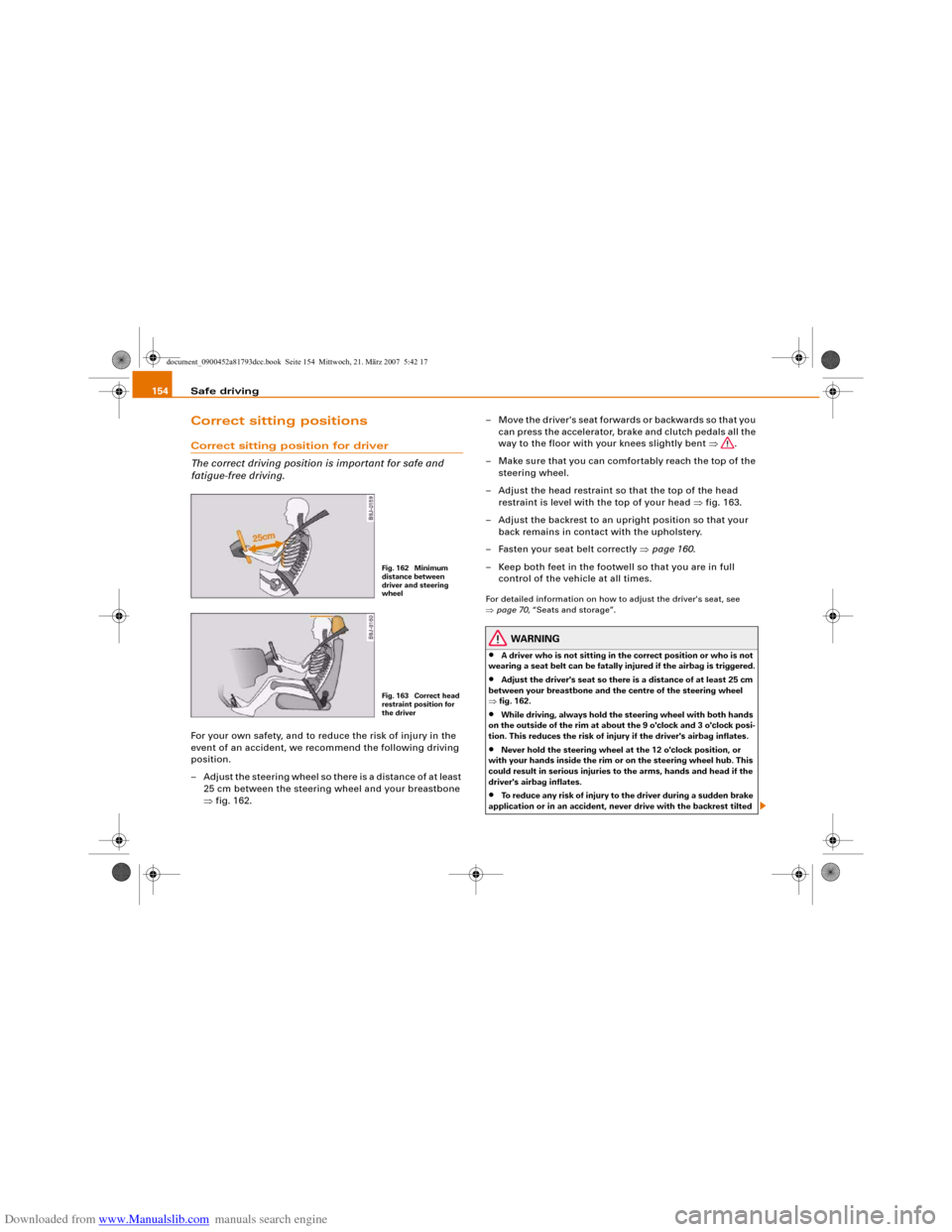
– Adjust the steering wheel so there is a distance of at least
25 cm between the steering wheel and your breastbone
⇒fig. 162.– Move the driver's seat forwards or backwards so that you
can press the accelerator, brake and clutch pedals all the
way to the floor with your knees slightly bent ⇒.
– Make sure that you can comfortably reach the top of the
steering wheel.
– Adjust the head restraint so that the top of the head
restraint is level with the top of your head ⇒fig. 163.
– Adjust the backrest to an upright position so that your
back remains in contact with the upholstery.
– Fasten your seat belt correctly ⇒page 160.
– Keep both feet in the footwell so that you are in full
control of the vehicle at all times.
For detailed information on how to adjust the driver's seat, see
⇒page 70, “Seats and storage”.
WARNING
•
A driver who is not sitting in the correct position or who is not
wearing a seat belt can be fatally injured if the airbag is triggered.
•
Adjust the driver's seat so there is a distance of at least 25 cm
between your breastbone and the centre of the steering wheel
⇒fig. 162.
•
While driving, always hold the steering wheel with both hands
on the outside of the rim at about the 9 o'clock and 3 o'clock posi-
tion. This reduces the risk of injury if the driver's airbag inflates.
•
Never hold the steering wheel at the 12 o'clock position, or
with your hands inside the rim or on the steering wheel hub. This
could result in serious injuries to the arms, hands and head if the
driver's airbag inflates.
•
To reduce any risk of injury to the driver during a sudden brake
application or in an accident, never drive with the backrest tilted
Fig. 162 Minimum
distance between
driver and steering
wheelFig. 163 Correct head
restraint position for
the driver
document_0900452a81793dcc.book Seite 154 Mittwoch, 21. März 2007 5:42 17
Page 164 of 294
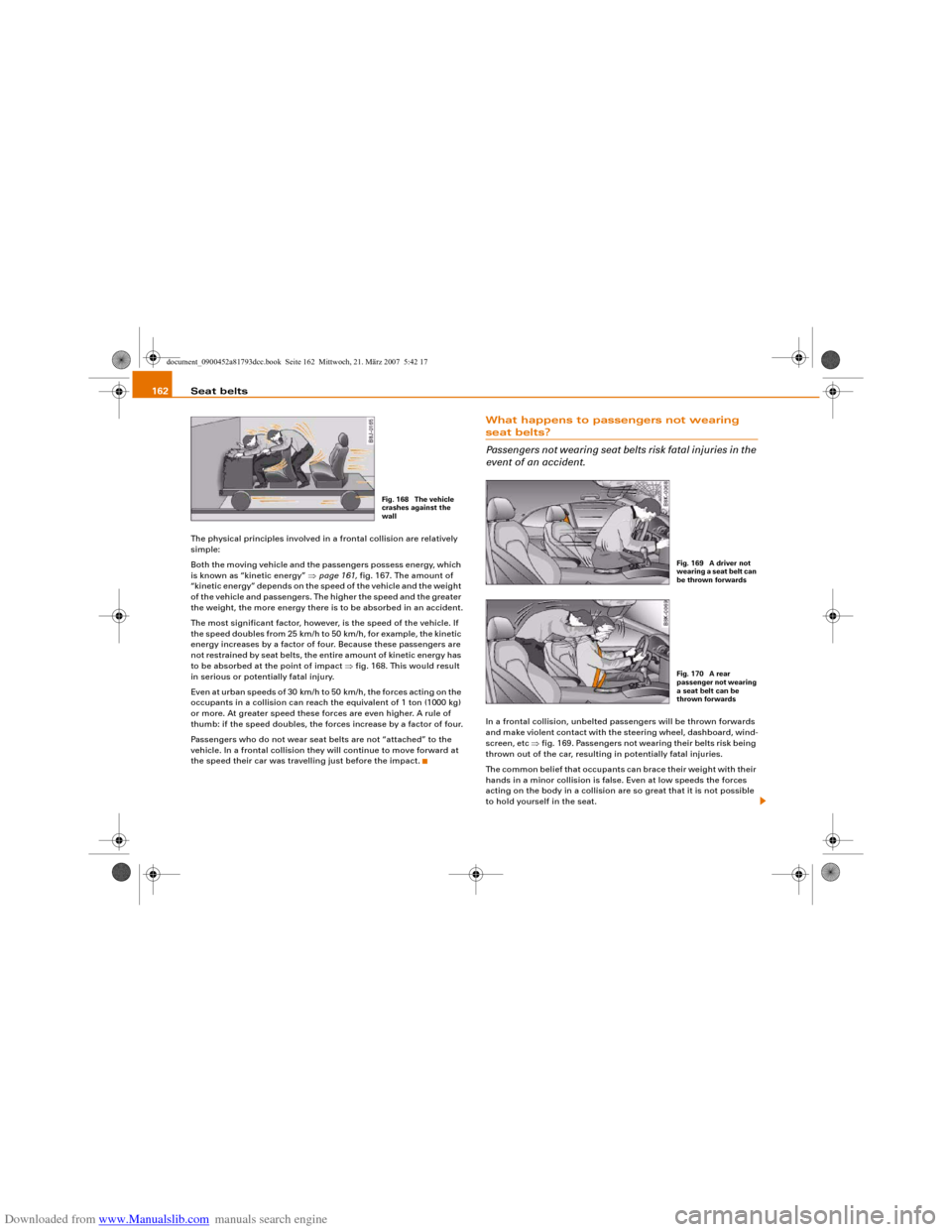
Downloaded from www.Manualslib.com manuals search engine Seat belts 162The physical principles involved in a frontal collision are relatively
simple:
Both the moving vehicle and the passengers possess energy, which
is known as “kinetic energy” ⇒page 161, fig. 167. The amount of
“kinetic energy” depends on the speed of the vehicle and the weight
of the vehicle and passengers. The higher the speed and the greater
the weight, the more energy there is to be absorbed in an accident.
The most significant factor, however, is the speed of the vehicle. If
the speed doubles from 25 km/h to 50 km/h, for example, the kinetic
energy increases by a factor of four. Because these passengers are
not restrained by seat belts, the entire amount of kinetic energy has
to be absorbed at the point of impact ⇒fig. 168. This would result
in serious or potentially fatal injury.
Even at urban speeds of 30 km/h to 50 km/h, the forces acting on the
occupants in a collision can reach the equivalent of 1 ton (1000 kg)
or more. At greater speed these forces are even higher. A rule of
thumb: if the speed doubles, the forces increase by a factor of four.
Passengers who do not wear seat belts are not “attached” to the
vehicle. In a frontal collision they will continue to move forward at
the speed their car was travelling just before the impact.
What happens to passengers not wearing seat belts?
Passengers not wearing seat belts risk fatal injuries in the
event of an accident.In a frontal collision, unbelted passengers will be thrown forwards
and make violent contact with the steering wheel, dashboard, wind-
screen, etc ⇒fig. 169. Passengers not wearing their belts risk being
thrown out of the car, resulting in potentially fatal injuries.
The common belief that occupants can brace their weight with their
hands in a minor collision is false. Even at low speeds the forces
acting on the body in a collision are so great that it is not possible
to hold yourself in the seat.
Fig. 168 The vehicle
crashes against the
wall
Fig. 169 A driver not
wearing a seat belt can
be thrown forwardsFig. 170 A rear
passenger not wearing
a seat belt can be
thrown forwards
document_0900452a81793dcc.book Seite 162 Mittwoch, 21. März 2007 5:42 17
Page 170 of 294
Downloaded from www.Manualslib.com manuals search engine Airbag system 168Front airbagsDescription of front airbags
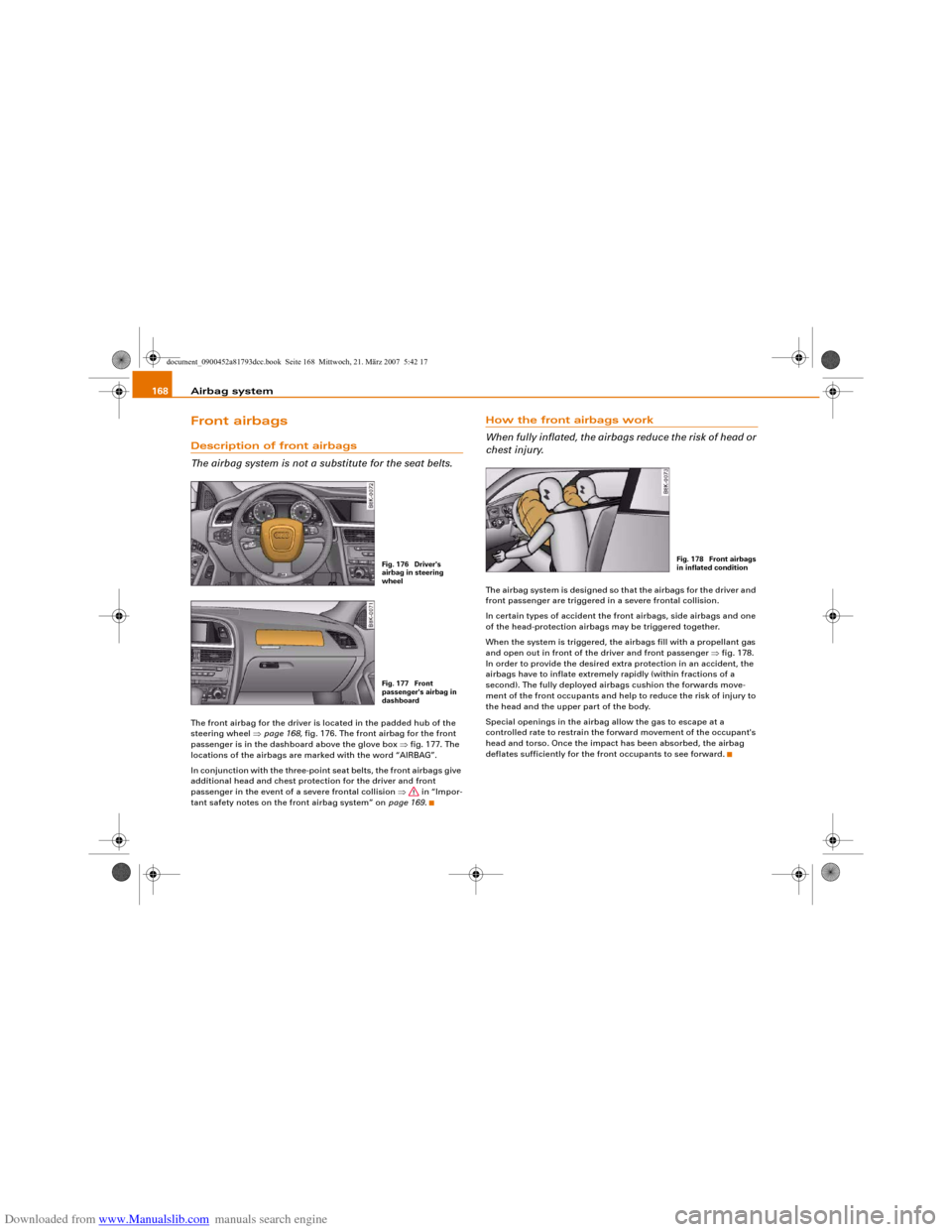
The airbag system is not a substitute for the seat belts.The front airbag for the driver is located in the padded hub of the
steering wheel ⇒page 168, fig. 176. The front airbag for the front
passenger is in the dashboard above the glove box ⇒fig. 177. The
locations of the airbags are marked with the word “AIRBAG”.
In conjunction with the three-point seat belts, the front airbags give
additional head and chest protection for the driver and front
passenger in the event of a severe frontal collision ⇒ in “Impor-
tant safety notes on the front airbag system” on page 169.
How the front airbags work
When fully inflated, the airbags reduce the risk of head or
chest injury.The airbag system is designed so that the airbags for the driver and
front passenger are triggered in a severe frontal collision.
In certain types of accident the front airbags, side airbags and one
of the head-protection airbags may be triggered together.
When the system is triggered, the airbags fill with a propellant gas
and open out in front of the driver and front passenger ⇒fig. 178.
In order to provide the desired extra protection in an accident, the
airbags have to inflate extremely rapidly (within fractions of a
second). The fully deployed airbags cushion the forwards move-
ment of the front occupants and help to reduce the risk of injury to
the head and the upper part of the body.
Special openings in the airbag allow the gas to escape at a
controlled rate to restrain the forward movement of the occupant's
head and torso. Once the impact has been absorbed, the airbag
deflates sufficiently for the front occupants to see forward.
Fig. 176 Driver's
airbag in steering
wheelFig. 177 Front
passenger's airbag in
dashboard
Fig. 178 Front airbags
in inflated condition
document_0900452a81793dcc.book Seite 168 Mittwoch, 21. März 2007 5:42 17