lock AUDI S5 COUPE 2016 Owner's Manual
[x] Cancel search | Manufacturer: AUDI, Model Year: 2016, Model line: S5 COUPE, Model: AUDI S5 COUPE 2016Pages: 264, PDF Size: 66.92 MB
Page 53 of 264
.... N
0 Ico ....
wipers can damage the wiper blades!
- Prior to using a car wash, the windshield
wipe r system must be switched off (lever in
position @). This helps to prevent uninten
tional switching on and damage to the
windsh ield wiper system.
(D Tips
- The windshield wipers are switched off
when the ignition is turned off. Activate the
windsh ield wipers after the ign it ion is
switched back on by moving the winds hield
wiper lever to any posit ion.
- Worn or dirty windshield wiper blades result
i n streak ing . This can affect the ra in sensor*
funct ion. Check your windshield wiper
blades regularly .
- The washer fluid nozzles of the windshield
washer system are heated at low tempera
tures when the ignition is on .
- When stopping temporarily, (e.g . at a traf
fic light) the set speed of the windshie ld
wipe rs is automatically reduced by one
speed.
Cleaning windshield wiper blades
Clean the windshield wiper blades when they be
gin to leave streaks. Use a soft cloth and g lass
cleaner to clean the w indshield wiper blades.
.,. Place the w indshield wipe r arms i n the service
pos it ion . Refer to ¢
page 51.
.,. Lift the wiper arm away from the front window.
8_ WARNING
Dirty w indshield wiper blades can impair your
view. This can lead to accidents.
Light and Vision
Replacing windshield wiper blades
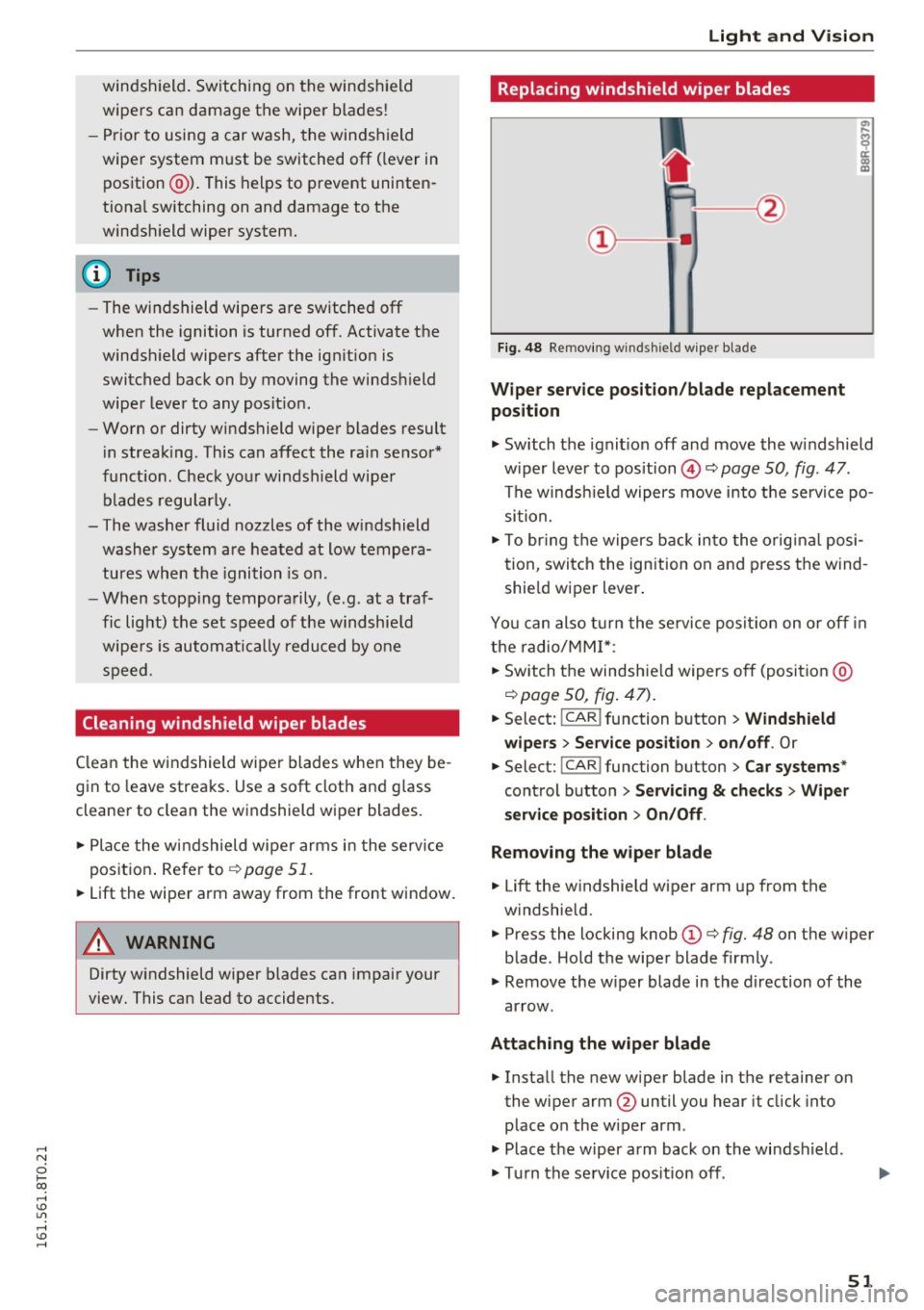
Fig. 48 Remov ing windsh ield wiper blade
Wipe r ser vice posit ion /blade repl acement
position
" Switch the ignit ion off and move the windshield
w iper lever to position @¢
page 50, fig. 47.
The windsh ield wipers move into t he service po
sition.
" To bring the wipers b ack in to the o riginal posi
t ion, switch the ignition on and press the w ind
shie ld wiper lever .
Yo u can also turn the service posit io n on o r off in
the radio/MMI *:
.,. Switch the windshie ld w ipers off (posit ion @
¢page 50, fig . 47) .
.. Select: iCAR ! function button > Windshield
wipe rs
> Se rvice po sition > on /off . Or
"Select: iCAR ! function button > Car systems "
control button > Servicing & check s> Wiper
service position > On /Off .
Remo ving the wiper blade
.. Lift the w indshie ld wiper arm up from the
w indshield.
" Press the locking knob
(D ¢ fig. 48 on the w iper
b lade . Hold the wiper blade firmly .
" Remove the wiper blade in the direction of the
ar row .
Attaching the wiper blade .,. Insta ll the new wiper blade in the retainer on
the wiper arm @until you hear it click into
place on the w iper arm .
" Place t he w iper arm back on the windshield .
" Tu rn the se rvice pos ition off. ..,.
51
Page 59 of 264
..... N
0 1-CX)
.....
"' U"I
.....
"' ......
Center armrest
The center armrest can be adjusted to several
levels .
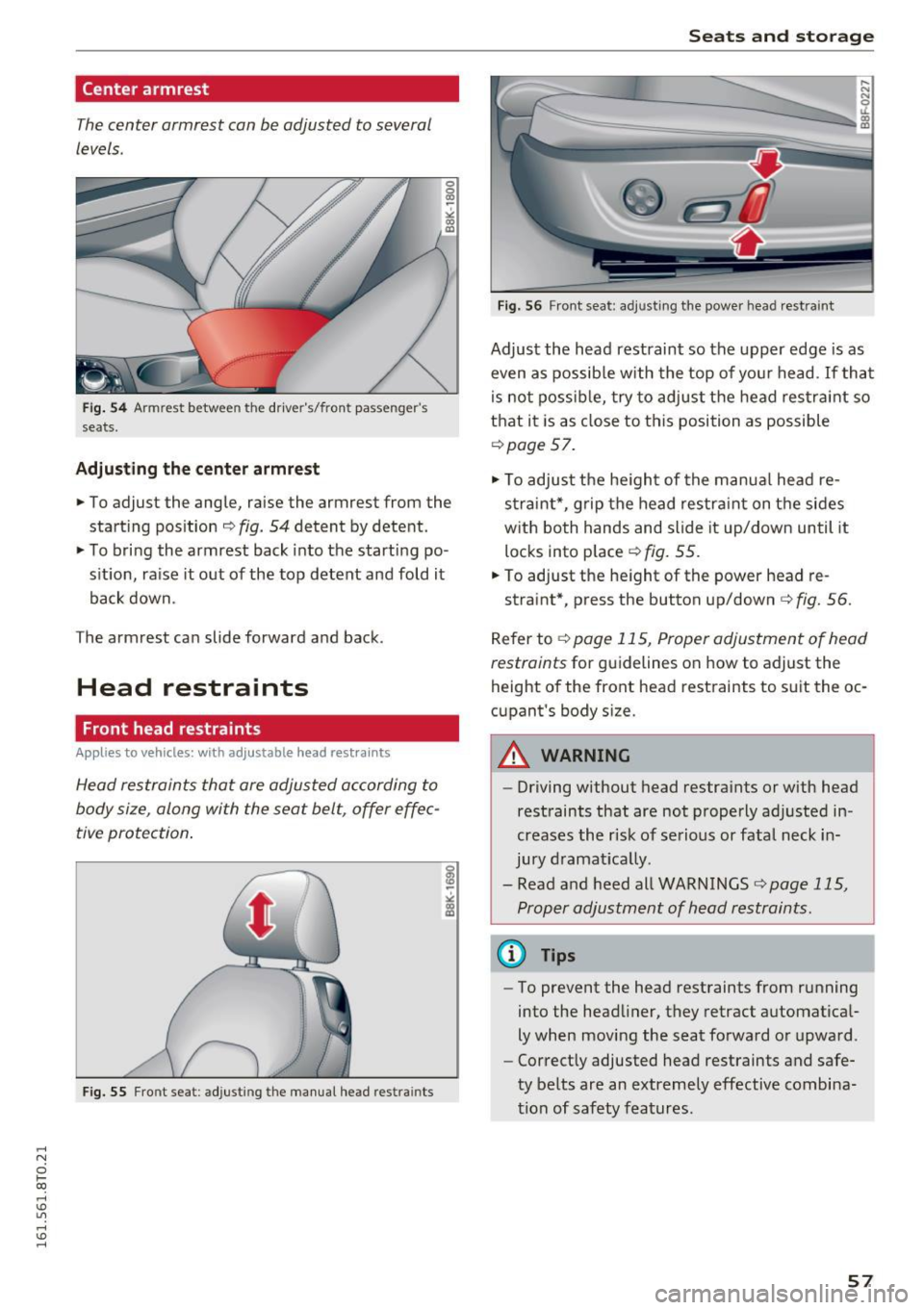
Fig. 54 Armrest betwee n the dr ive r's/ front passenger's
seats.
Adjusting the cent er armr est
.,. To adjust the angle, raise the armrest from the
starting position ¢
fig. 54 detent by detent.
"'T o bri ng the armrest back into the start ing po
s it ion, ra ise it out of the top detent and fold it
back down .
The armrest can slide forward and back .
Head restraints
Front head restraints
Applies to vehicles: with ad justable head restra in ts
Head restraints that are adjusted according to
body size, along with the seat belt, offer effec
tive protection .
Fig. 55 Fr ont sea t: adjusting the manual head restrain ts
Seats and storag e
Fig. 56 Front seat: adjus ting the power head rest rain t
Adjust the head restraint so the upper edge is as
even as possib le w ith the top of yo ur head . If tha t
is not possib le, try to adjust the head res traint so
that it is as close to this position as possible
¢page 57.
.,. To adjust the he igh t of the manua l head re
s trai nt*, grip the head res tra int on t he sides
w ith both hands and slide it up/down until it
locks into place ¢
fig. 55.
"' To adjust the he ight of the power head re -
straint*, press the button up/down
¢ fig. 56.
Refer to ¢ page 115, Proper adjustment of head
restraints
for g uidelines on how to adjust the
height of the front head restraints to s uit the oc
c u pant's body s ize.
A WARNING
-- Driving without head restra ints or with head
restraints that are not properly adj usted in
creases the r isk of se rious or fatal neck in
jury d ramat ica lly .
- Read a nd heed all WARNINGS
¢ page 115,
Proper adjustment of head restraints.
@ Tips
- To prevent the head restraints from r unning
into the head liner, they retract a utomat ica l
ly when mov ing the seat forward or upward .
- Correct ly adjusted head restraints and safe
ty be lts are an extremely effective combina
tion of safety features .
57
Page 60 of 264
Sea ts and stor age
Rear head restraints
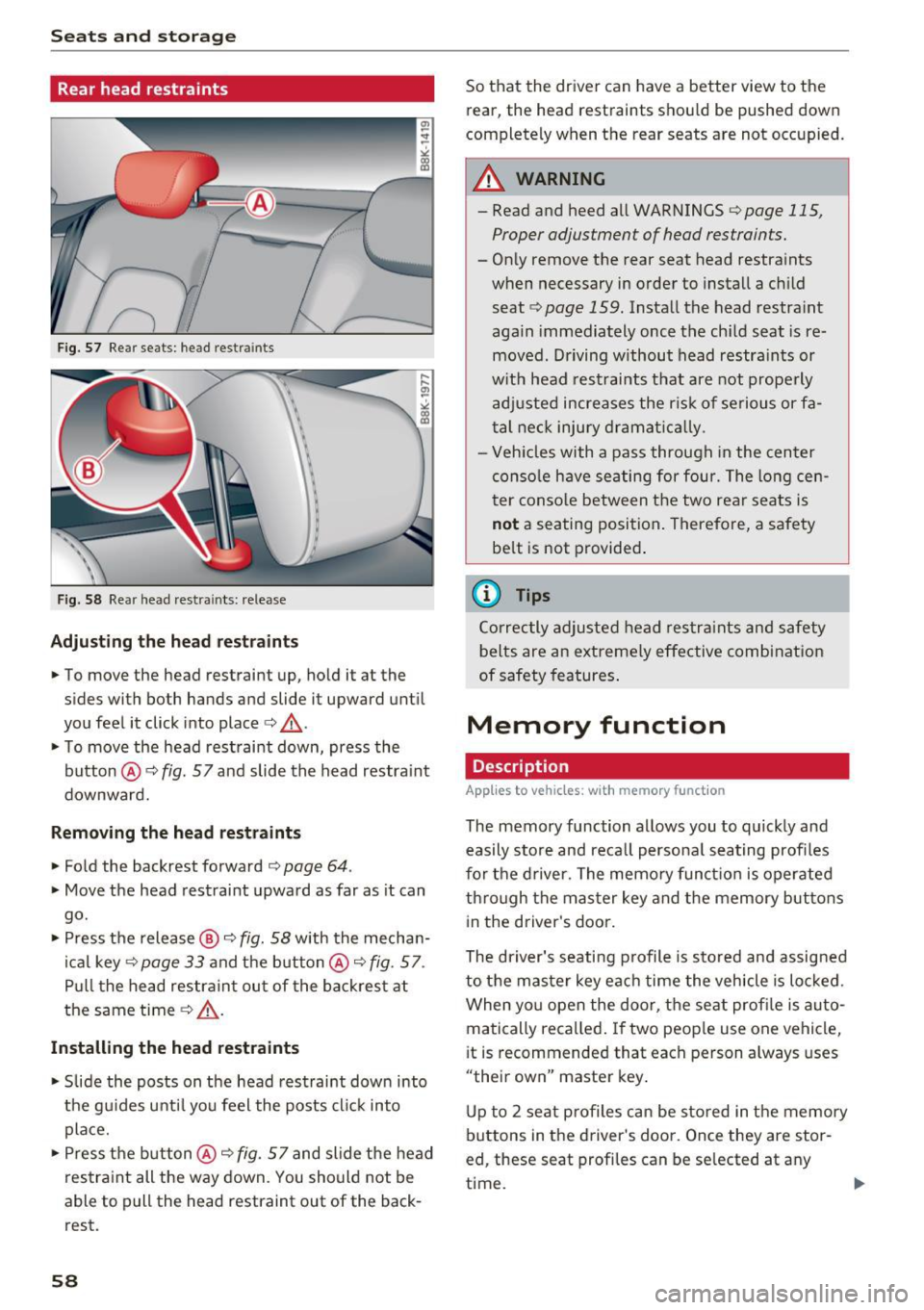
Fig. 57 Re ar seats: he ad res traints
Fig. 58 Rea r head restra ints: re lease
Adjust ing th e head re st rai nts
.. To move the head restraint up, hold it at the
sides with both hands and slide it upward until
you feel it click into place<=>& .
.. To move the head restraint down, press the
button @
c::> fig. 57 and slide the head restra int
downward.
Removing th e he ad re straint s
.. Fold the backrest forward <=> page 64.
.. Move the head restraint upward as far as it can
go.
.. Press the release @
i=:> fig. 58 with the mechan
ical key
c::> page 33 and the button @ c::> fig. 57 .
Pull the head restraint out of the backres t at
the same time¢.&_ .
Install ing the head restra ints
.. Slide the posts on the head rest raint down into
the gu ides unti l you feel the posts cl ick into
place.
.. Press the button @
c::> fig. 57 and slide the head
restraint all the way down. You should not be
able to pull the head restraint out of the back
rest.
58
So that the dr iver can have a better view to the
rear, the head restraints shou ld be pushed down
completely when the rear seats are not occupied.
_& WARNING
- Read and heed all WARNINGS <=:>page 115 ,
Proper adjustment of head restraints.
- Only remove the rear seat head restra ints
when necessary in order to install a ch ild
seat
¢ page 159. Install the head restra int
aga in immediately once the child seat is re
moved. Driving w ithout head restraints or
w it h head restraints that are not prope rly
adj usted increases the r isk of se rious or fa
tal nec k injury d rama tica lly .
- Veh icles with a pass through in the center
conso le have seating for four. The long cen
ter conso le between t he two rear seats is
not a seating position . Therefore, a safety
be lt is not provide d.
(0 Tips
Correctly adjusted head restra ints and safety
belts are an e xtreme ly effe ctive combinat ion
of safety features .
Memory function
Description
Applies to vehicles: with memory funct ion
The memory function allows you to quickly and
easily s tore and reca ll persona l seating profiles
for the d river. The memo ry funct io n is operated
through the master key and the memory but tons
in the driver's door .
The driver's seating p rofile is stored and assigned
to the master key eac h time the vehicle is locked .
When yo u open the door, t he seat profi le is auto
matically reca lled. If two peop le use one vehicle,
i t is recommended that each person always uses
"their own" master key .
Up to 2 seat profiles can be sto red in t he memory
buttons in the dr iver 's doo r. Once they are stor
ed , these seat profi les can be se lected at any
time . ..,_
Page 61 of 264
..... N
0 1-CX)
..... I.Cl U"I
..... I.Cl ......
In addition to the driver 's seat settings, you can
also store and access the exterior mirror adjust
ment settings* using the remote control key or
memory button.
Remote control key
Ap plies to vehi cles: with seat memory
To assign the driver's seat settings to the remote
control key when locking the vehicle, the function
must be act ivated in the radio or MMI*
• Se lect :
ICAR I fu nction button> S eat adjus t
ment > Driver's seat > Remot e control ke y
>
on .Or
• Select :
I CARI fu nct ion button> Car sy stem s*
contro l button > Vehicle setting s > Seats>
Driver' s seat > Remot e control ke y > On.
@ Tips
If you do not want ano th er d river's settings to
be assigned to the remote key, switch off the
memory function us ing t he r adio or MMI* or
the
I O N/O FF I button ~ page 59.
Memory buttons
Applies to vehicles: with seat memo ry
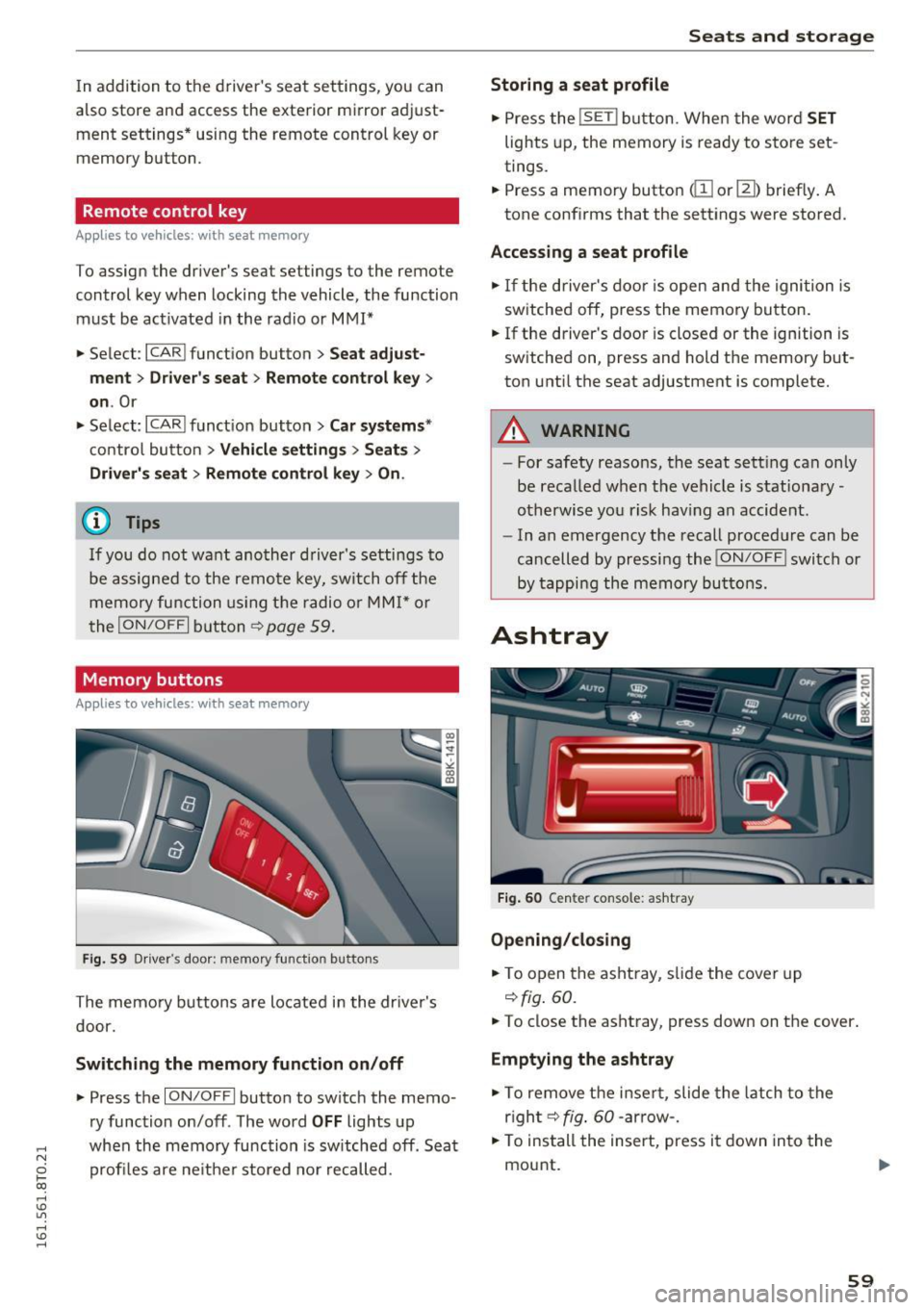
Fi g. 59 Drive r's doo r: m emory funct io n butto ns
The memo ry buttons are located in the dr iver's
door.
Switching the memory function on /off
• Press the ION/OF F I button to switch the memo
ry function on/off . The word
OFF lights up
when the memory function is sw itched off . Seat
profi les are ne ither stored no r recalled .
Seats and storag e
Storing a seat profile
• Press the ISE T! button. Whe n the word SET
lights up, the memory is ready to s tore set
tings.
• Press a memory button
dII or[ II) brief ly . A
tone conf irms that the settings were stored.
Acces sing a seat profile
• If the d river's doo r is open and the ignition is
sw itched off, press the memory button.
• If the driver's door is closed or the ignition is
switched on, press and hold the memory but
ton unti l the seat adjustment is complete.
A WARNING
- For safety reasons, the seat sett ing can on ly
be recalled when the vehicle is stationary
otherwise yo u risk hav ing an accident.
- In an emergency the recall proced ure can be
cancelled by pressing the
! ON/O FF I switch or
by tappi ng the memory buttons.
Ashtray
Fig. 60 Cen te r console : ash tray
Opening /closing
• To open the asht ray, s lide the cover up
~ fig . 60.
• To close the ashtray, press down on the cover .
Emptying the ashtray
• To remove the i nse rt, slide the latch to the
r igh t~
fig . 60 -arrow -.
• To ins tall the insert, press it down into the
mount.
59
Page 63 of 264
,-1 N
0 1-CX)
,-1 I.Cl U"I
,-1 I.Cl ......
Closing cupholders
• To close the cupholder, press on the center sec
tion between the two arms and push the cu
pholder in the slot as far as it will go.
.&_ WARNING
Spilled hot liquid can cause an accident and
personal injury.
- Never carry any beverage containers with
hot liquids, such as hot coffee or hot tea, in
the vehicle while it is moving. In case of an
accident, sudden braking or other vehicle
movement, hot liquid could spill, causing
scalding burns. Spilled hot liquid can also
cause an accident and personal injury.
- Use only soft cups in the cupholder. Hard
cups and glasses can cause injury in an acci
dent.
- Never use the cupholder or adapter as an
ashtray -risk of fire.
(y Note
Only drink containers with lids should be car
ried in the cupholder. Liquid could spill out
and damage your vehicle's electronic equip
ment or stain the upholstery, etc.
Glove compartment
The glove compartment is illuminated and can
be locked .
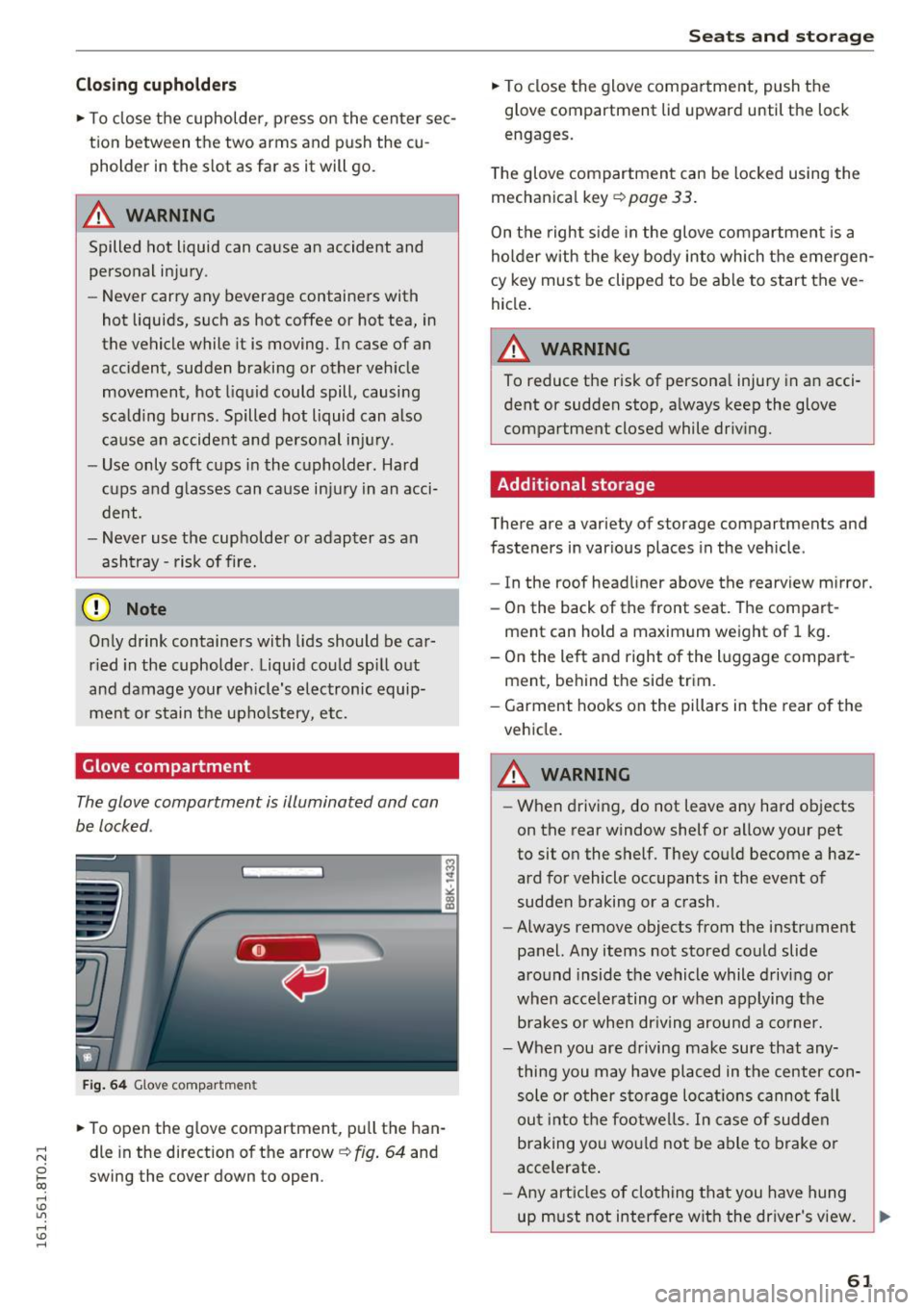
Fig. 64 Glove compartmen t
• To open the glove compartment, pull the han
dle in the direction of the arrow
c:,:. fig. 64 and
swing the cover down to open.
Seats and storage
• To close the glove compartment, push the
glove compartment lid upward until the lock
engages.
The glove compartment can be locked using the
mechanical key
c:,:. page 33 .
On the right side in the glove compartment is a
holder with the key body into which the emergen
cy key must be clipped to be able to start the ve
hicle.
A WARNING
-
To reduce the risk of personal injury in an acci-
dent or sudden stop, always keep the glove
compartment closed while driving.
Additional storage
There are a variety of storage compartments and
fasteners in various places in the vehicle .
- In the roof headliner above the rearview mirror.
- On the back of the front seat. The compart-
ment can hold a maximum weight of 1 kg.
- On the left and right of the luggage compart
ment, behind the side trim.
- Garment hooks on the pillars in the rear of the
vehicle.
A WARNING ,..___
- When driving, do not leave any hard objects
on the rear window shelf or allow your pet
to sit on the shelf. They could become a haz
ard for vehicle occupants in the event of
sudden braking or a crash .
- Always remove objects from the instrument
panel. Any items not stored could slide
around inside the vehicle while driving or
when accelerating or when applying the brakes or when driving around a corner.
- When you are driving make sure that any
thing you may have placed in the center con
sole or other storage locations cannot fall
out into the footwells. In case of sudden
braking you would not be able to brake or
accelerate.
- Any articles of clothing that you have hung
up must not interfere with the driver's view. .,_
61
Page 64 of 264
Sea ts and stor age
The coat hooks are designed only for light
weight cloth ing . Never hang any clothing
with hard, pointed or heavy objects in the
pockets on the coat hooks . Dur ing sudden
braking or in an accident - especia lly if the
airbag is dep loyed - these objects could in
jure any passengers inside the vehicle.
- To reduce the risk of pe rsonal inj ury in an
acc ident or sudden stop, always keep the
glove compa rtment closed while d riving .
- Read and follow all WARNINGS
q page 147, Important safety instructions
on the side airbag system.
- Hang clothes in such a way that they do not
impa ir the d rive r's v ision.
- The coat hooks must only be used for light
weight clot hing . Do not leave any heavy or
sharp edged obje cts in the pocke ts which
may in terfere w ith the side c urtain airbag
dep loyment and can cause pe rsonal injury in
a crash.
- Do not use coat hangers for hanging clo th
ing on the coat hooks as this can interfere
with prope r deployment of the side curtain
airbags in an accident.
- Do not hang heavy objects on the coat
hooks, as they could cause personal injury in
a sudden stop.
- Always keep the compartment above the
rearview mirror closed wh ile driving to re
duce the risk of injury in the event of sudden
braking maneuvers or a collision.
(D Note
Objects located on the rear shelf that r ub
against the rear window could damage the
heating wires for the rear window defogger.
(D Tips
- A vent slot is located between the shelf and
the rear w indow . Do not b lock the vent with
any items you may place on the rear window
shelf.
- Do not place bulky items on the rear window shelf as they could restr ict or block the driv
er's vision in t he rear view mirror .
62
Roof rack
Description and mounting locations
Additional cargo can be carried with a roof lug
gage rack.
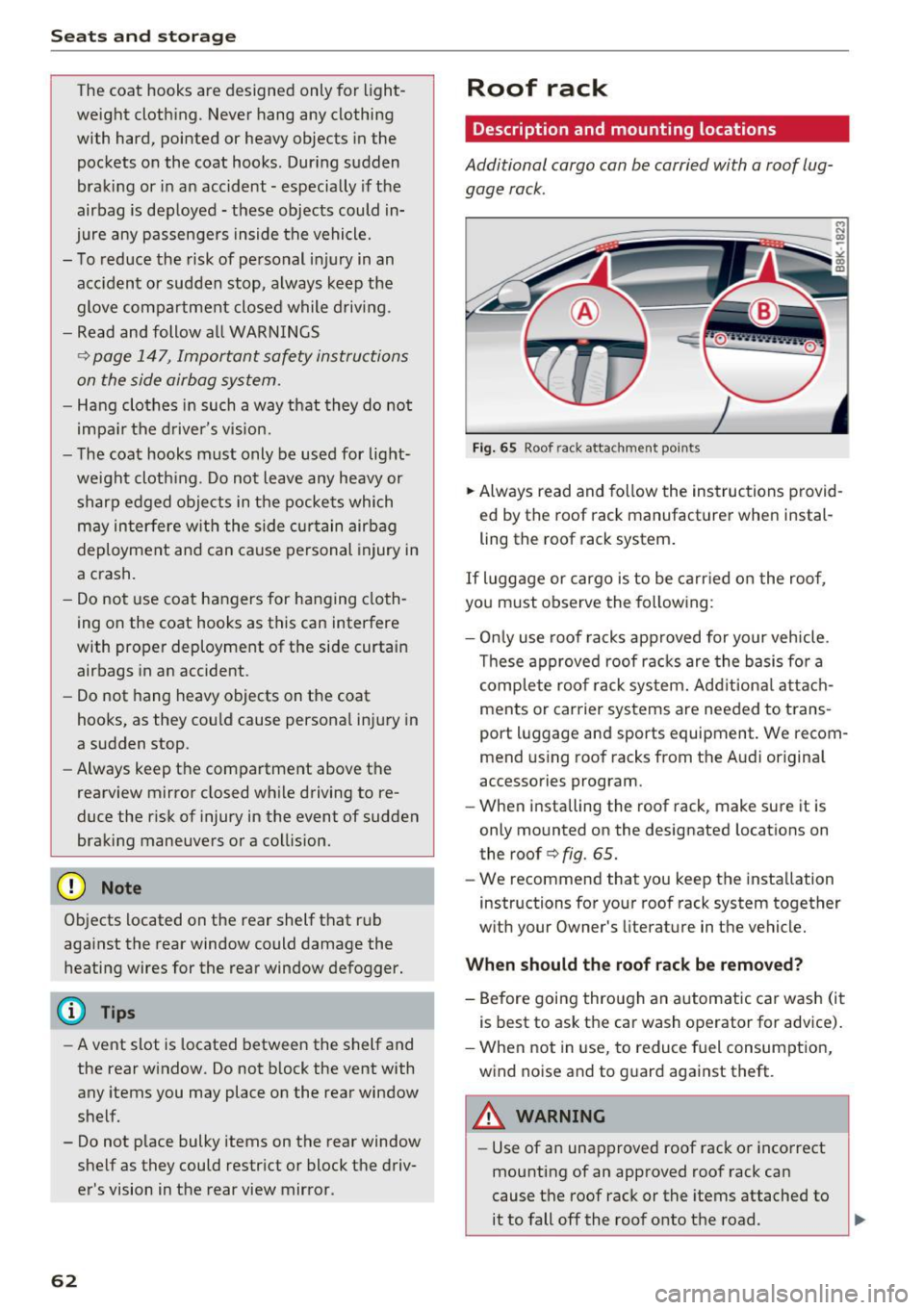
Fig. 65 Roof rack atta chment po in ts
.. Always read and fo llow the instruc tions provid
ed by the roof rack manufact urer when instal
ling the roof rack system .
If luggage or cargo is to be ca rried o n the roof,
you must observe the fo llowing :
- Onl y use roof racks approved for your veh icle .
Th ese approved roof racks are the basis fo r a
c omp le te roo f rack system. Add it iona l attach
ments or carrier systems are needed to trans
port luggage and sports equipment. We recom
mend us ing roof racks from the Audi original
accessories program .
- When installing the roof rack, make sure it is
only mounted on the designated locations on
the roof
q fig . 65.
- We recommend that you ke ep the installation
instructions for your roof rack system together
w ith your Owner 's literature in the vehicle.
When should th e roof rac k be remo ved?
- Before goi ng through an automatic ca r wash (it
i s best to ask the car wash operator for advice).
- When not in use, to reduce f uel consumption,
wind noise and to g uard against theft .
A WARNING
-Use of an unapproved roof rack or incorrect
mounting of an approved roof rack can
cause the roof rack or the items attached to it to fall off the roof onto the road . ...
Page 66 of 264
Sea ts and stor age
Luggage compartment
General information
A WARNING
Read and follow the important safety p recau
tions on
~ page 118, Storing cargo correctly.
Enlarging the luggage compartment
A pp lies to veh icles: w ith fol ding rear seatback
The backrests can be folded forward separately
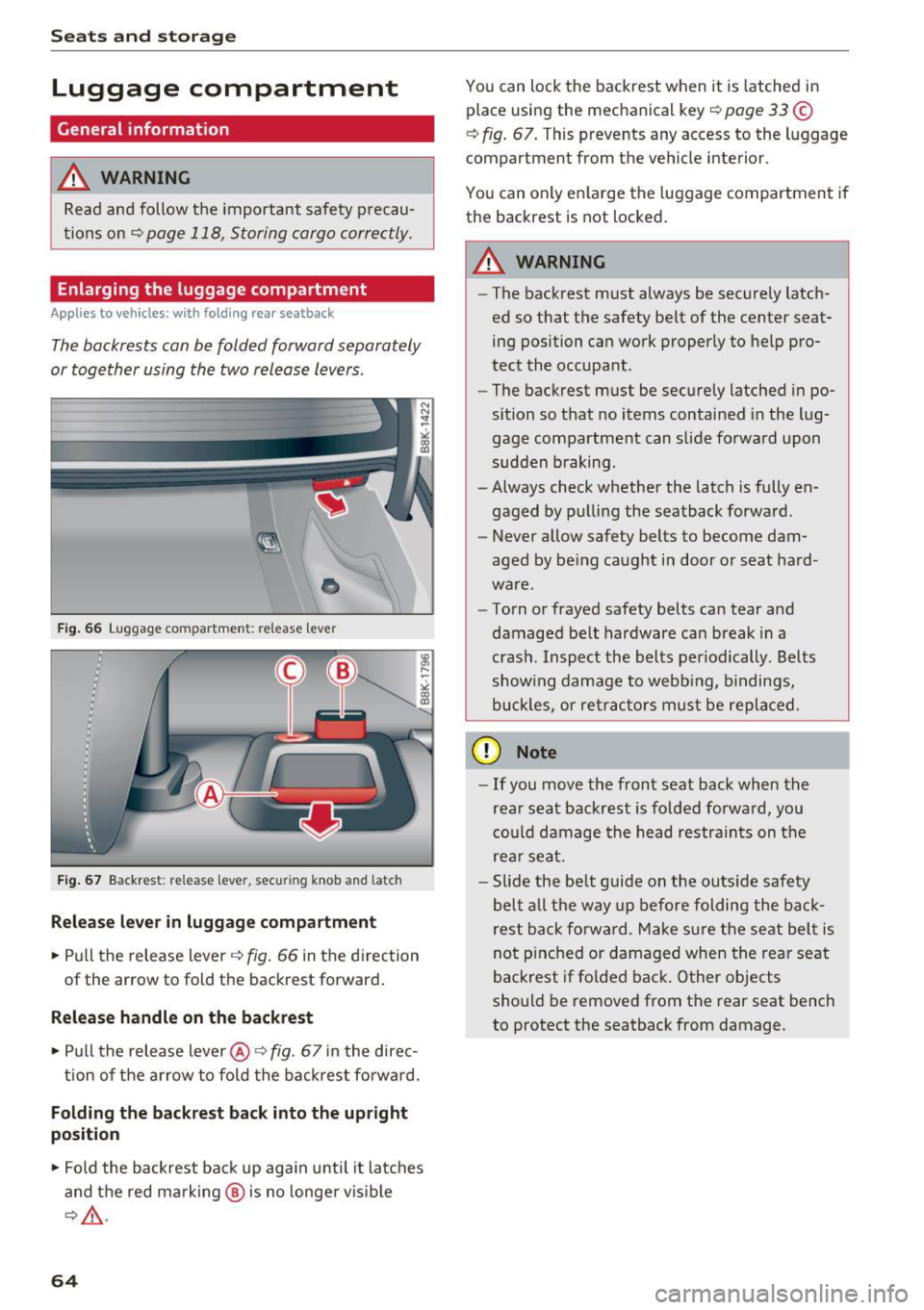
or together using the two release levers .
•
Fig . 66 Luggage compartment: release lever
Fig . 67 Backrest: re lease lever, secu ring knob and latch
Rel eas e lev er i n lug gage compartment
.. Pull the release lever c:> fig . 66 in the direction
of the arrow to fold the backrest forward .
Release handle on the backrest
.. Pull the release lever@¢ fig. 67 in the direc-
tion of the a rrow to fold the backrest forward.
Folding the backre st back into the upright
posit ion
.. Fo ld the backrest back up again until it latches
and the red marking @ is no longe r vis ible
~ A .
64
You can lock the backrest when it is latched in
place using the mechanical key
i::> page 33 ©
~ fig. 67 . This prevents any access to the luggage
compartment from the vehicle interior.
You can only enla rge the luggage compartment if
the backrest is not locked.
A WARNING
-The backrest must always be securely latch
ed so that the safety belt of the center seat
ing position can work properly to help pro
tect the occupant.
- The backrest must be securely latched in po
sition so that no items contained in the lug
gage compartment can slide fo rward upon
sudden b raking.
- Always check whether the latch is fully en
gaged by pulli ng the seatback forward .
- Never allow safety belts to become dam
aged by be ing caught i n door or seat hard
ware.
- Torn or frayed safety belts can tear and
damaged belt hardware ca n break in a
crash . Inspect the belts pe riodically. Belts
show ing damage to webbing, bindings,
buckles, or ret rac tors must be repla ced.
(D Note
- If you move the front seat back when the
rea r seat backrest is fo lded fo rward, you
cou ld damage the head restra ints on the
rear seat.
- Slide the be lt g uide on the outs ide safety
bel t all the way up be fore folding the back
rest b ack fo rward. Make s ure the seat belt is
not p inched or damaged when the rear seat
backrest if fo lded back . Other objects
should be removed from t he rear seat bench
to protect the seatback from damage .
Page 68 of 264
Seats and storage
@ Tips
-You can open the pass-through from the
luggag e compartment. Push the release
button down and push the cover forward.
- You can lock or unlock the pass-through us
ing the mechanical key. This prevents any
access to the luggage compartment from
the vehicle interior.
Securing the ski sack
Appl ies to veh icles: w ith s ki sac k
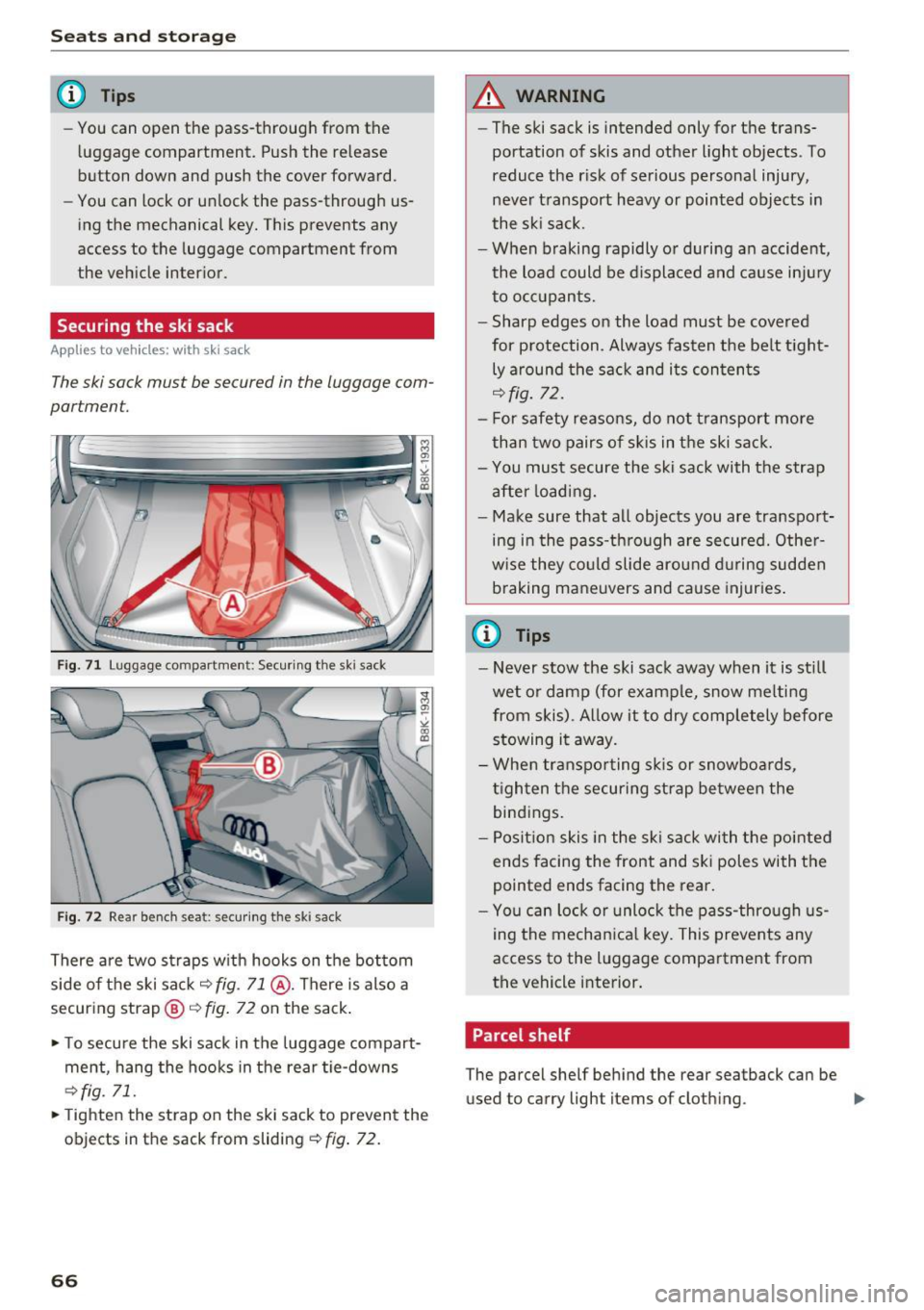
The ski sack must be secured in the luggage com
partment.
Fig. 71 Luggage compartme nt: Secur ing the ski sack
Fig. 72 Rear bench sea t: secu ring the ski sack
There are two straps with hooks on the bottom
side of the ski sack
~ fig. 71 @ . There is also a
securing strap@~
fig. 72 on the sack.
.. To secure the ski sack in the luggage compart
ment, hang the hooks in the rear tie-downs
~fig. 71.
.. Tight en the strap on the ski sack to prevent the
objects in the sack from sliding
~ fig. 72.
66
A WARNING
-The ski sack is intended only for the trans
portation of skis and other light objects . To
reduce the risk of serious personal injury,
never transport heavy or pointed objects in
the ski sack.
- When braking rapidly or during an accident,
the load could be displaced and cause injury to occupants.
- Sharp edges on the load must be covered
for protection . Always fasten the belt tight
ly around the sack and its contents
~fig . 72.
- For safety reasons, do not transport more
than two pairs of skis in the ski sack.
- You must secure the ski sack with the strap
after loading.
- Make sure that all objects you are transport
ing in the pass-through are secured. Other
wise they could slide around during sudden braking maneuvers and cause injuries.
@ Tips
-Never stow the ski sack away when it is still
wet or damp (for example, snow melting
from skis). Allow it to dry completely before stowing it away.
- When transporting skis or snowboards,
tighten the securing strap between the
bindings.
- Position skis in the ski sack with the pointed
ends facing the front and ski poles with the
pointed ends facing the rear.
- You can lock or unlock the pass-through us
ing the mechanical key. This prevents any
access to the luggage compartment from
the vehicle interior.
. Parcel shelf
The parcel shelf behind the rear seatback can be
used to carry light items of cloth ing. ..,.
Page 71 of 264
Warm and cold
Operation
We recommend pressing the !AUTO ! button and setting the temperature to 72 °F (22 °C).
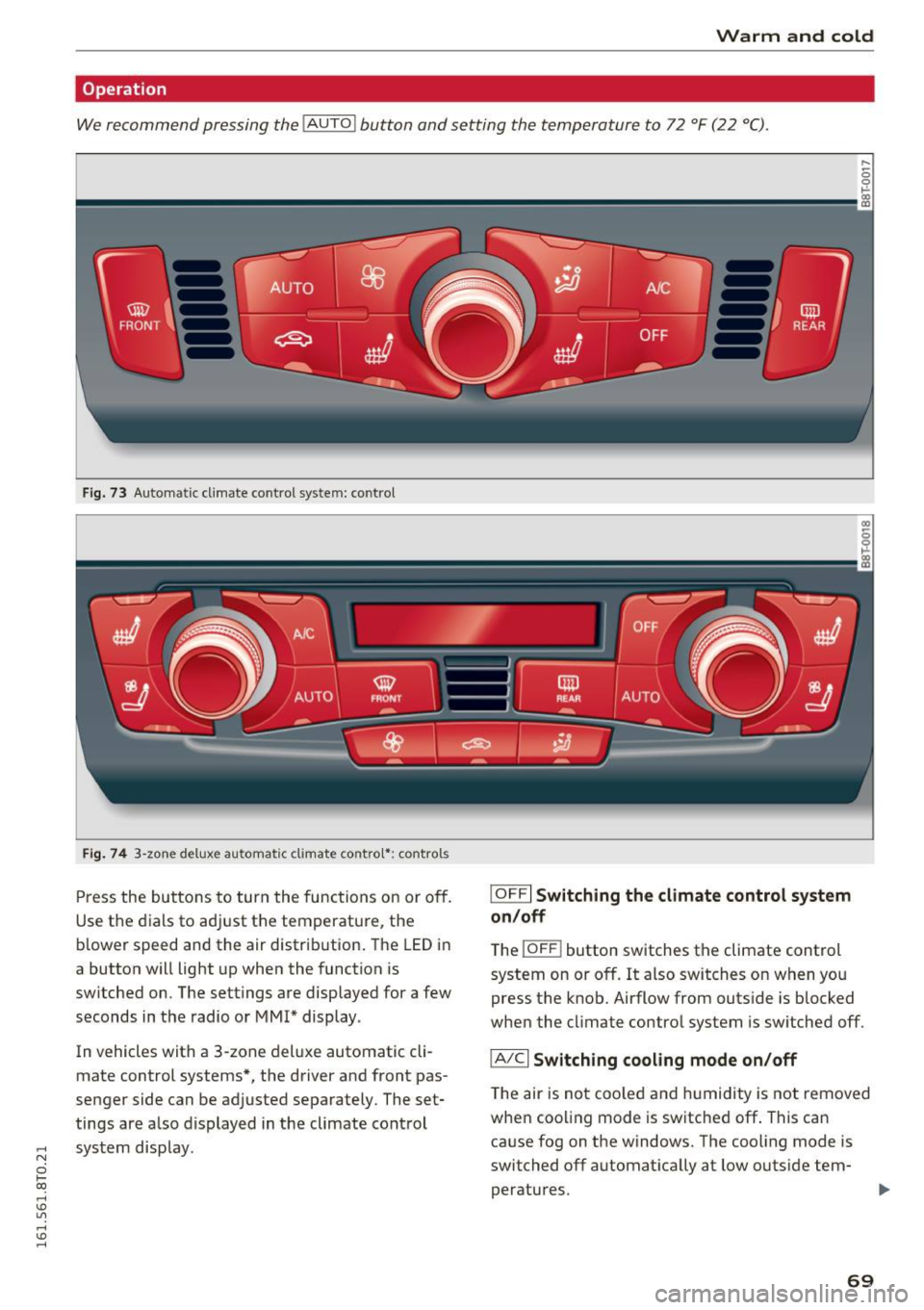
Fig. 73 Automatic climate control system: contro l
Fig. 74 3-zone deluxe automatic climate contro l*: controls
Press the buttons to turn the functions on or off.
Use the dials to adjust the temperature, the
b lower speed and the air distrib ution . The LED in
a button will light up when the function is
switched on. The settings are displayed for a few
seconds in the radio or MM!* display.
In vehicles with a 3-zone deluxe automatic cli
mate control systems*, the driver and front pas
senger side can be adjusted separately. The set
tings are a lso displayed in the climate control
,..., system display.
N
0 1-CX)
rl I.Cl U"I ,-1 I.Cl ......
I OFFI Switching the climate control system
on/off
T he iOFF i button switches the climate control
system on or off.
It also switches on when you
press the knob. Airflow from outside is blocked
when the cl imate control system is switched off.
IA/C l Switching cooling mode on/off
The air is not coo led and humidity is not removed
when cooling mode is switched off . This can
cause fog on the windows. The cooling mode is
switched off automat ically at low outside tem-
peratures.
IJl,,
69
Page 74 of 264
Driving
Driving
Steering
Manually adjustable steering wheel
The steering wheel position is fully adjustable up
and down and forward and back .
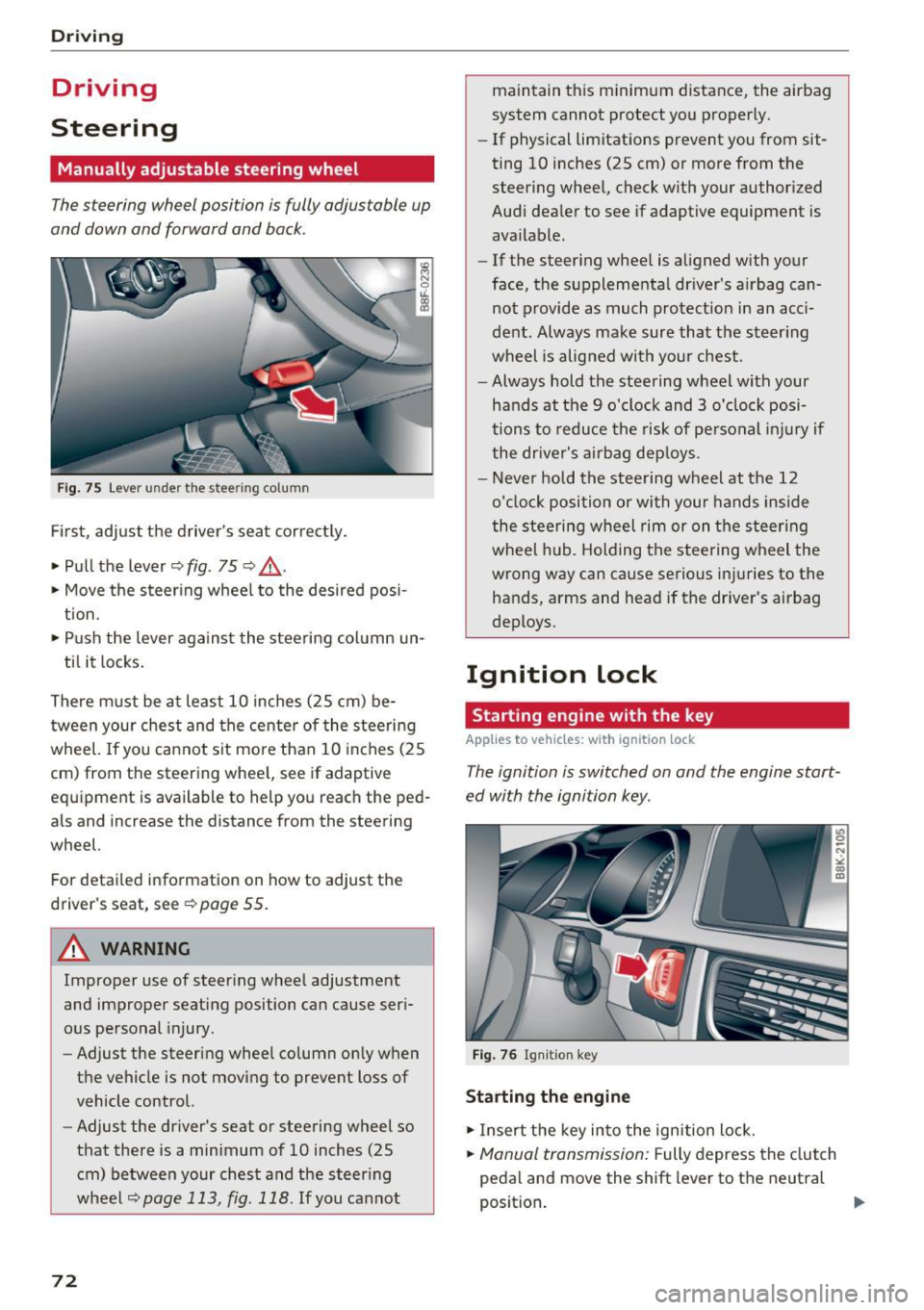
Fig. 75 Lever under the steering column
First, adjust the driver's seat correctly.
• Pull the lever¢
fig. 75 ¢ .&_ .
• Move the steering wheel to the desired posi
tion.
• Push the lever against the steering column un-
til it locks.
There must be at least 10 inches (25 cm) be tween your chest and the center of the steering
wheel. If you cannot sit more than 10 inches (25
cm) from the steering wheel, see if adaptive
equipment is available to help you reach the ped
als and increase the distance from the steering
wheel.
For detailed information on how to adjust the
driver's seat, see
¢page 55.
A WARNING
Improper use of steering wheel adjustment
and improper seating position can cause seri
ous personal injury.
- Adjust the steering wheel column only when
the vehicle is not moving to prevent loss of
vehicle control.
- Adjust the driver's seat or steering wheel so
that there is a minimum of 10 inches (25
cm) between your chest and the steering
wheel
¢page 113, fig. 118 . If you cannot
72
maintain this minimum distance, the airbag
system cannot protect you properly.
- If physical limitations prevent you from sit
ting 10 inches (25 cm) or more from the
steering wheel, check with your authorized
Audi dealer to see if adaptive equipment is
available.
- If the steering wheel is aligned with your
face, the supplemental driver's airbag can
not provide as much protection in an acci
dent. Always make sure that the steering
wheel is aligned with your chest.
- Always hold the steering wheel with your
hands at the 9 o'clock and 3 o'clock posi
tions to reduce the risk of personal injury if
the driver's airbag deploys.
- Never hold the steering wheel at the 12
o'clock position or with your hands inside
the steering wheel rim or on the steering
wheel hub. Holding the steering wheel the
wrong way can cause serious injuries to the
hands, arms and head if the driver's airbag
deploys.
Ignition lock
Starting engine with the key
Applies to vehicles: wit h ignition lock
The ignition is switched on and the engine start
ed with the ignition key .
Fig. 76 Ignition key
Starting the engine
• Insert the key into the ignition lock.
• Manual transmission: Fully depress the clutch
pedal and move the shift lever to the neutral
position. ..,.