brakes AUDI S6 2008 User Guide
[x] Cancel search | Manufacturer: AUDI, Model Year: 2008, Model line: S6, Model: AUDI S6 2008Pages: 390, PDF Size: 88.42 MB
Page 150 of 390
• ..__A_ d_a...: p:,..._ ti_v _ e_ C_ ru_ is_ e_ C_ o_n_ t_ r_ o _ l ___________________________________________ _
& WARNING
The radar sensor's vision can be reduced by rain, snow and heavy
spray. This can result in vehicles driving ahead being inadequately
detected or, in some circumstances, not detected at all. If neces
sary, take action yourself! •
Applies to ve hicle s: with Ad aptive Cruise Co nt rol
When driving around curves
L=~=======; ~
c'i
Entering a curve
Fig. 142 Vehicle
entering a curve
Fig. 143 Vehicle
leaving a curve
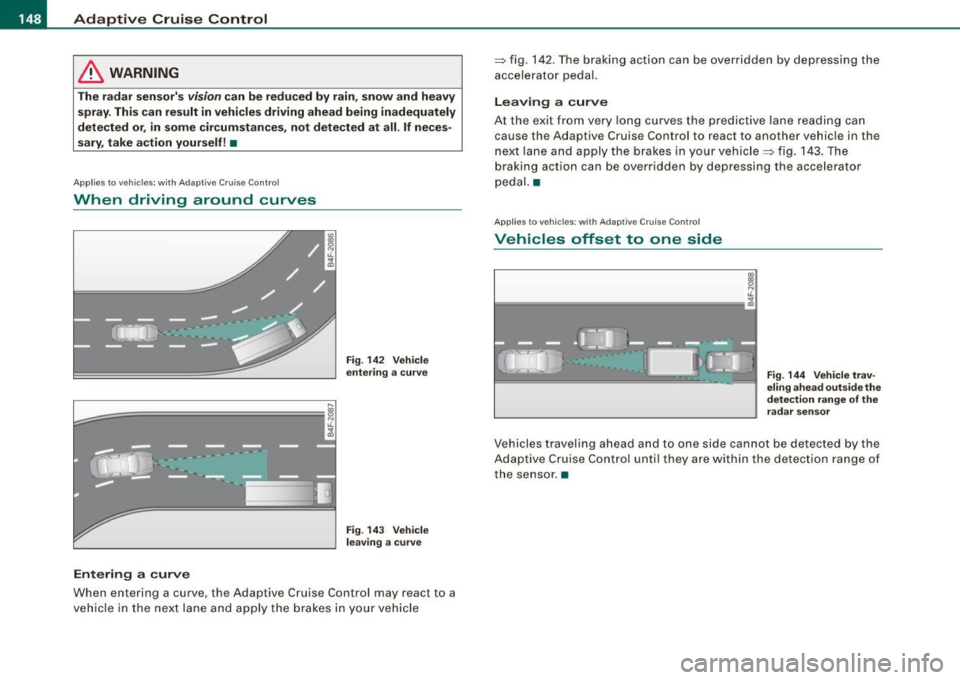
When entering a curve, the Adaptive Cruise Control may react to a
vehicle in the next lane and apply the brakes in your vehicle =>
fig. 142. The braking action can be overridden by depressing the
accelerator pedal.
Leaving a curve
At the exit from very long curves the predictive lane reading can
cause th e Adaptive Cruise Control to react to another vehicle in the
next lane and apply the brakes in your vehicle => fig. 143. The
braking action can be over ridden by depressing the accelerator
pedal. •
Applies to ve hicles: w ith Adaptive C ru ise Co nt rol
Vehicles offset to one side
Fig . 144 Vehicle trav
eling ahead outside the
detection range of the
radar sensor
Vehicles traveling ahead and to one side cannot be detected by the
Adaptive Cruise Control until they are within the detection range of
the sensor. •
Page 157 of 390
Automatic transmission -
------------------'
R -Reverse
The transmission will automatically select the lowest gear ratio
when you shift into reverse .
Select
R only when the vehicle is at a full stop and the engine is
running at idle speed::::;,
& in "Driving the automat ic transmission"
on
page 153 .
Before you move the se lector lever to R , press both the button in the
handle of the selector leve r
and the brake pedal at the same time .
When the ignition is on , the backup lights i lluminate when the
selector lever is moved into
R.
N -Neutral
The transmission is in neutral in this position . Shift to this position
for standing with the brakes applied=>
page 155.
When the vehicle is stationary or at speeds below 3 mph (5 km/h),
you must always apply the footbrake befor e and while moving the
lever out of
N.
D -Normal position for driving forward
Position Dis for norma l city and highway driving. It ranges from zero
to top speed and all six gears shift au tomatically, depending on
engine load, driving speed and automatica lly selected shift
programs. The gear engaged is shown in the right of the display
::::;, page 154, fig. 151.
When the vehicle is stationary or at speeds below 3 mph (5 km/h),
you must always apply the foot brake before and while moving the
lever to
D out of N .
In certain circumstances i t may be advantageous to temporarily
switch to the manual shift program to manua lly se lect gear ratios to
match specific driving conditions::::;,
page 157.
S -Sport position
Se lect this position for spor tier performance . In this position, the
transmission will not upshift as soon, allowing the vehicle to use the
Con tro ls and eq uip
ment
increased power available at higher engine speeds to achieve live
lier acceleration.
When the vehicle is stationary or at speeds below 3 mph (5 km/h),
you must always apply the foot brake before and while moving the lever to
S out of N.
& WARNING
Read and follow all WARNINGS ::::;, & in "Driving the automatic
transmission" on
page 153 .
0 Note
Coasting downhill with the transmission in N and the engine not
running will result in damage to the automatic transmission and
possibly the catalytic converter. •
Applies to ve hic les: with 6-spee d autom atic trans mission
Automatic Shift Lock (ASL)
The Automatic Shift Lock safeguards you against acciden
tally shifting into a forward or the reverse gear and
causing the vehicle to move unintentionally.
Fig. 152 Shift gate:
selec tor leve r loc k
positions and interlock
button highlight ed
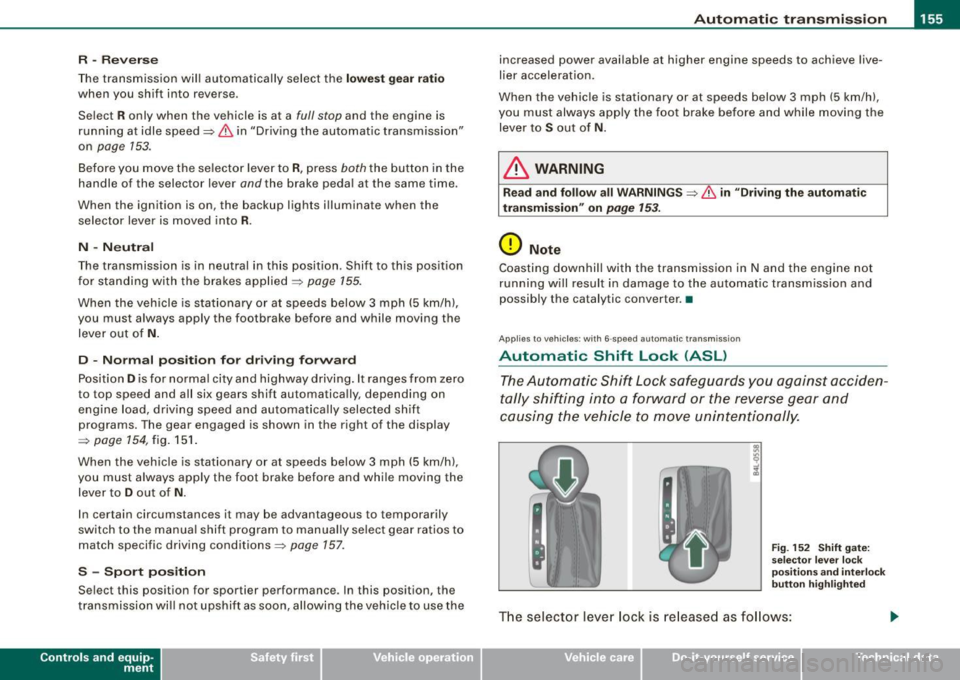
The selector lever lock is released as follows:
Vehicle care I I irechnical data
Page 164 of 390
• ..__A_ u_ t _o_ m_ a_ t_ i_ c _ t_r _a _n_ s_ m_ is_ s_i o _ n ________________________________________________ _
Before you move the selector lever to R, press both, the button in the
handle of the selector lever
and the brake pedal at the same time .
When the ignition is on, the backup lights illuminate when the
selector lever is moved into R.
N -N eutr al
Sh ift to this position for standing with brakes applied=> page 762.
When the vehicle is stationary or at speeds below 3 mph (5 km/h),
you must always apply the footbrake before and while moving the
lever out of
N .
Do not use N for coasting downhill.
D -Normal dr iving po sition f or forward
Depending on the load on the engine, vehicle speed and the
dynamic control program, the transm ission will select the
optimal
gear ratio.
In certain circumstances it may be advantageous to temporarily
switch to the manua l shift program to manually select gear ratios to
match specific driving conditions=>
page 164.
When the vehicle is s tationary or at speeds below 3 mph (5 km/h),
you must always apply the footbrake before and while moving the
lever to
D ou t of N.
S -Spor t p osition
Select this position for sportier performance. In this position, the
transmission wil l not upshift as soon, allowing the vehicle to use the
increased power avai lable at higher engine speeds to achieve live
lier acceleration.
When the vehicle is stationary or at speeds below 3 mph (5 km/h),
you must always apply the foot brake before and whi le moving the
lever to
S out of N .
& WARNING
Re ad a nd follo w all WARNIN GS=> & in "Dr iv ing th e multitr oni c®"
on
page 160 .
0 Note
Coasting downhill with the transm ission in N and the engine not
operating will result in damage to the automatic transmission and
possibly the catalytic converter. •
Applies to vehicles: with multitronic® Continuous ly Variable Transmission (CVT)
Automatic Shift Lock (ASL)
The Automatic Shift Lock safeguards you against acciden
tally shifting in to a forward or the reverse gear and
causing the vehicle to move unintentionally.
F ig . 160 Shift gate:
se lect or l ever loc k
pos it ions a nd int erl ock
butt on high lighted
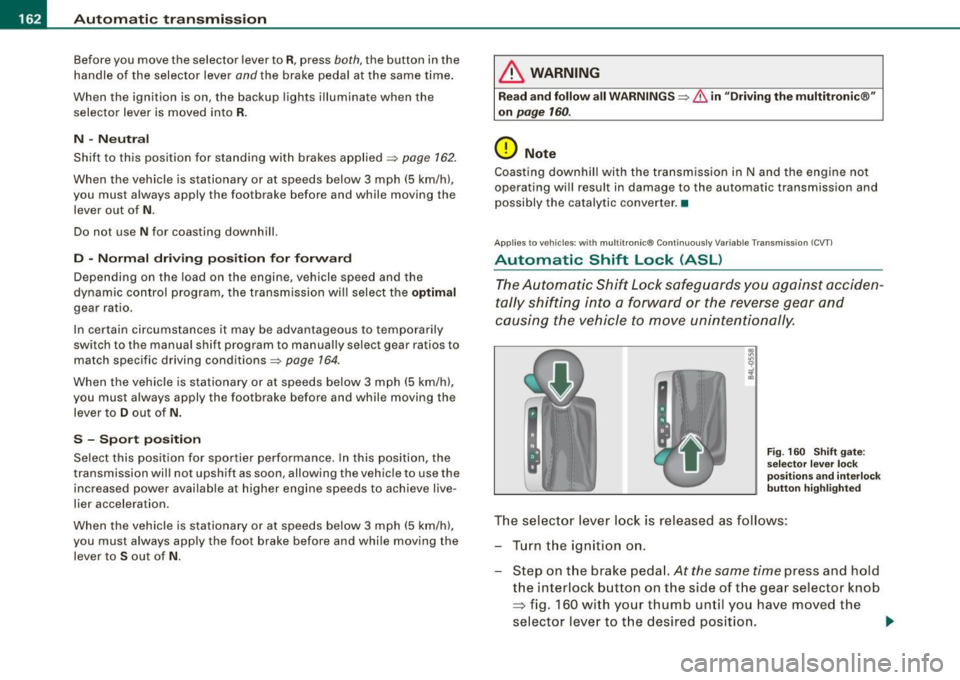
The selector lever l ock is rel eased as f ollows :
T u rn the ignition on .
Step on the brake peda l.
At the same time press and hold
the interlock button on the side of the gear selector knob
=> fig. 160 with your thumb until you have moved the
selector lever to t he desired position.
~
Page 261 of 390
The direction in which the driver wishes to travel is determined with
t he aid of the steering angle and vehicle speed and is continua lly
compared with the actual behavior of the vehicle. If the two do not
match, for example, when the vehic le starts hydrop laning on a wet
road, ESP will automatically brake the appropriate whee l to correct
the prob lem.
The vehicle is then stab ilized by the forces acting on the whee l
during braking. If the vehicle is
oversteering (rear tends to skid out
of the turn), the brakes are mainly app lied on the wheel that is on
the outside of the curve. In the case of a vehicle that is
understeering
(tendency to sl ide out of the curve), the brakes are applied at the
rear wheel that is on the inside of the curve . An acoustic signal indi
cates when ESP brake application cuts in
~ & .
The system operates across the entire speed range in combination
with the ABS system
~ page 262 . If the Anti -Lock Brake System
(ABS) malfunctions, the ESP wi ll be out of action as well.
Ac tivat ing
When you turn on the eng ine, ESP will automatically be activated
and will perform a se lf -test . As soon as the test is comp leted, the
system is in norma l operating mode.
You can activate a deactivated ESP or deactivated ESP/ASR if required by pressing the~
page 258, fig. 225 button . When they are
activated, the message
E S P/AS R on appears briefly in the display.
D eactiv ating
The ESP should normally be activated al l the time . If necessary, you
can deactivate An ti- Slip Regulation (ASR) or the E lectronic Stabiliza
tion Program (ESP) by pressing the button~
page 258, fig. 225.
• Dea ct ivat ing A SR: Tap the button . In certain exceptional situa
tions (e.g. driving with t ire chains) , the Anti-Sl ip Regulation (ASR)
can be deactivated ~
page 260. The message ASR off appears in the
display as we ll.
• Dea ctiv at ing E SP/ASR Press the button for more than 3 seconds.
With the ESP/ASR deactivated, the ESP check light comes on, see
Controls and equip
ment Safety first Vehicle operation
In
te llig ent tec hn olo gy
~ page 19 . The message ES P sw itched off appears in the disp lay as
we ll.
& WARNING
The Electroni c Stabili zation Program i s never thele ss subject to the
la ws o f physics . It is p articularl y import ant t o pay a ttent ion t o th is
f a ct on wet and slippery road s. It is ther efore important tha t y ou
a lw ays a dapt your dr iving to the c ondit ion of th e ro ad and t raffi c
c ondition s. Do n ot allow the inc rea sed safety pro vided b y th e Elec
tr on ic S ta bili zatio n Pr ogram sys tem to lull you in to acc epting
add iti onal safet y risk s. C
Electronic differential tock (EDL)
The electronic differential lock monitors the rotational
speed of the drive wheels.
Gener al note s
The electronic differential lock (EDU helps the car to start moving,
accelerate and c limb a gradient on surfaces providing poor or
almost no grip . Without EDL, this would be difficult, if not impos
sib le .
How th e sys te m wo rk s
The EDL operates automatical ly . It monitors the rotational speed of
the drive wheels on an axle with the he lp of the ABS sensors
~ page 262 . If a noticeable difference in rotational speed between
the drive wheels on one axle is detected (e.g. on slippery ground
on
one side),
the spinning wheel is braked, thereby transferring power
to the other drive wheel or whee ls (a ll -whee l drive) . Th is is done up
to a speed of about 60 mph ( 100 km/h). Noises from the brake
system signal that wheel spin is being control led .
Dr iving off
When driving off , always be sure to keep road conditions in mind as
you accelerate. If one drive wheel spins because it is on a surface
Iii>
•
Vehicle care Do-it-yourself service Technical data
Page 262 of 390
___ ln_ t _e_ ll-'"ig ...,_ e_ n_t _t_ e_ c_ h _ n_o _ l_o _,.g= y,_ __________________________________________ _
with less grip, gradually increase the pressure on the accelerator
pedal until the car starts to move.
Overheating of brakes
To prevent the disc brake of the braked wheel from overheating if
subjected to excessive loads on this wheel, the EDL cuts out tempo
rarily. The vehicle remains operational and behaves in the same way
as a vehicle without EDL.
As soon as the brake has cooled down, EDL switches on again auto
matically.
& WARNING
• When accelerating on slippery surfaces, such as on ice or snow,
always be careful when depressing the accelerator pedal. Even
with the EDL working, the drive wheels can spin and reduce your
ability to control your car. Risk of crash!
• The increased safety afforded by EDL does not mean that you
can take safety risks. Always adapt your driving style to the road
conditions and traffic situation.
[ i] Tips
If a fault occurs in the ABS, the EDL is also not functioning. This is
indicated by the ABS warning light=>
page 22. •
Ant"-Slip Regulation System (ASR)
The Anti-Slip Regulation System prevents the driven
wheels from spinning when the car is accelerating.
General notes
The Anti-Slip Regulation System (ASR) is integrated in the electronic
stabilization program (ESP). When the vehicle starts up and acceler
ates, the wheels are prevented from spinning by adjusting the engine power to match the amount of grip available from the road
surface.
How the system works
ASR
performs automatically, i.e. without the driver's intervention.
With the aid of the ABS sensors=>
page 262, ASR monitors the
speed of the driven wheels. If the wheels start to spin, the engine
torque is reduced automatically until the tires find enough grip to
lock onto the road surface. The system is active across the entire
speed range.
Th e ASR works in conjunction with the ABS. If a malfunction should
occur in the ABS, the ASR will also be out of action.
Activating
The ESP is automatically activated when the engine is started and it
performs a self -test . You can activate a deactivated ASR if required
by pressing the =>
page 258, fig. 225 button . When it is activated,
the message
ESP/ASR on appears briefly in the display. Vehicles
with front-wheel drive a deactivated ASR automatically re-activates
itself at a speed of 40 mph (70 km/h) .
Deactivating
You can deactivate the ASR if required by pressing the button (for
less than 3 seconds)=>
page 258, fig. 225. With the ASR deactivated,
the ESP check light comes on, see=>
page 19. The message ASR off
appears in the display as well. On vehicles with front-wheel drive:
deactivation is possible only up to 30 mph (50 km/h) for safety
reasons . Vehicles with all -wheel drive: the ASR can be deactivated
at any speed .
The ASR should normally be activated all the time. Only in certain
exceptional situations when some slip is desirable does it make
sense to deactivate the ASR. Examples:
• when driving with tire chains
• when driving in deep snow or on loose ground and
• when rocking the vehicle loose after it has become stuck .
Page 263 of 390
When the abnormal situation is over, you should activate the ASR
again.
& WARNING
The increased safety afforded by ASR does not mean that you can
take safety risks. Always adapt your driving style to the road
conditions and traffic situation.
[ i] Tips
To ensure that the ASR works properly, all four wheels must be fitted
with identical tires. Any differences in rolling radius of the tires can
cause the system to reduce engine power when this is not desired.
See also~
page 325, "New tires and replacing tires and wheels". •
Braking
General information
What affects braking efficiency?
Operating conditions and driving habits
The brakes on today's automobiles are still subject to wear,
depending largely on operating conditions and driving habits~& .
On vehicles which are driven mostly in stop-and-go city traffic or
which are driven hard, the brake pads should be checked by your
authorized Audi dealer more often than specified in the
Mainte
nance
& Warranty booklet.
On steep slopes, you should use the braking effect of the engine.
This way, you prevent unnecessary wear on the brake system. If you
must use your brakes, do not hold the brakes down continuously.
Pump the brakes at intervals.
Controls and equip
ment Safety first Vehicle operation
Intelligent technology
Moisture or road salt
If
you are driving faster than 50 mph (80 km/h) and the windshield
wipers are on, the brake pads will briefly touch the brake discs in regular intervals so as to improve reaction time when braking on
wet surfaces. You, the driver, will not notice anything.
Under certain conditions, for example, when driving through water
or very heavy rain, or even after washing your vehicle, the braking
effect can be reduced due to moisture (or in freezing conditions ice)
on the brake pads. A few careful brake applications should dry off
the brake pads or remove any ice coatings .
The effectiveness of the brakes can be reduced when the vehicle is driven on a salt-covered road and the brakes are not used. Here too,
you should clean off accumulated salt coating from brake discs and
pads with a few careful applications of the brake ~& .
Corrosion
There may be a tendency for dirt to build up on the brake pads and
corrosion to form on the discs if the car is not driven regularly or
only for short trips with little use of the brakes.
If the brakes are not used frequently, or if corrosion has formed on
the discs, it is advisable to clean off the pads and discs by braking
firmly a few times from a moderately high speed~&.
Faults in the brake system
If you should notice a sudden increase in brake pedal travel, then
one of the two brake circuits may have failed~& .
Low brake fluid level
Malfunctions can occur in the brake system if the brake fluid level is
too low . The brake fluid level is monitored electronically .
& WARNING
• You should perform braking maneuvers for the purpose of
cleaning the brake system only if road conditions permit. Other
road users must not be put at risk -you may cause an accident!
Vehicle care Do-it-yourself service Technical data
Page 264 of 390
___ ln_ t _e_ ll-'"ig ...,_ e_ n_t _t_ e_ c_ h _ n_o _ l_o _,.g= y,_ __________________________________________ _
& WARN ING (continued )
• Before des cending a steep grade , reduce speed and shift trans
mission into a lower gear or lower dr iving range. D o not r ide the
brakes or hold the pedal down too long or too often . This could
c au se the brake s to get hot and dimin ish braking effi ciency.
• Do not "ride the brakes " by resting your foot on the pedal when
you do not intend to b rake. This may cause the brakes to overheat ,
premature wear and in crea sed stopping distan ce.
• Under certain climat ic and oper ating condit ion s s uch as
passing through water, driving in heavy rain or after washing the
vehicle , the effectiveness of the brakes can be reduced. In winter ,
ice c an a ccumulate on the brake pads , linings , discs and drums .
Carefully apply brakes fo r a test. Brakes will dry and ice coatings
will be cleaned off after a few careful brake applications .
• Driving for an e xtended pe riod of time on salt-covered road s
without using your brakes can also affect braking efficiency . Clean
off accumulated salt coating from brake disc s and pads with a few
careful brake applications .
• If you damage the front spoile r, or if you install a different
spoiler , be sure the air flow to the front brakes is not obstructed .
Otherwise the brake system could overheat reducing the effective
ness of the entire br ake system .
• Failure of one brake circuit will impair the braking capability
resulting in an increased stopping distance . Avo id driving the
vehicle and have it towed to the nearest Audi dealer or qualified
workshop .
u
Brake booster
T he brake boo ster ad ds e xtra bra kin g pow er.
T he brake booster works with vacuum pressure which is created
only when t he en gine is run ning~ &.
& WARNING
• Never let the vehi cle roll to a stop with the engine shut off .
• If the brake boo ster is not working, for example when towing
your vehicle , or because the brake booster has somehow been
damaged, the brake pedal must be pre ssed considerably harder to
make up for the lack of booster assistance . •
Functioning of Anti-Lock Brake System (ABS)
-- --
ABS preven ts the wheels from l ocking up und er bra kin g.
T he ABS contributes effectively to vehicle contro l since it prevents
th e w hee ls fr om lo cking when the brakes a re app lied . T hi s m ea ns
that the vehicle remains steerable and is less l ikely to skid.
With ABS you do not need to pump the brake . Just hold the brake
pedal down .
H owever, do not expect the AB S to shorten braking distance under
all circu ms tances. When drivi ng on grave l or on newly fa lle n sn ow
on top of icy surfaces, braking distance may be even longer, there
f o re, unde r these c ircums ta nces , it is es pecially imp ortant th at you
drive slow ly and with great care .
How the ABS system works
An automatic check is made when a speed of about 4 mph (6 km/h)
i s r eac hed . W he n th is happens, a pumping n oise ca n be heard.
I f a n indiv idual wheel be gins to rotat e too slowly in relation to
vehic le speed and tends to lock, the ABS automatically reduces
brake pressur e to p revent that whee l from loc king .
T his automatic adjustment p rocess will cause a slight vibration of
t he brake peda l a nd some noi ses t o a le rt yo u th at ve hicle speed
must be adapted to ex isting road and traffic conditions. .,
Page 270 of 390
___ D_ r_iv _ in_... g"'- a_ n_ d_ e_ n_ v_i_r _o _n_ m_ e_n_ t _______________________________________________ _
New brake pads
--
Remember that new brake pads do not have a full braking
effect during the first 250 miles (400 kilometers) after they
are installed .
New brake pads have to be "burnished in" before they have optimal
grab =>& .
During the break -in period, you should avoid putting severe loads
on the brakes . Severe loads include, for examp le, sudden hard
braking, in particular at very high speeds or, for example, on moun
tain passes.
& WARNING
New brake pads don't have the best stopping power and must be
"broken-in" during the initial 100 to 150 miles (150 to 200 kilome
ters) of normal city driving. You can compensate for this by
pressing the brake pedal more firmly . This also applies later when
new pads are installed.
:J
Catalytic converter
It is very important that your emission control system
(catalytic converter) is functioning properly to ensure that
your vehicle is running in an environmentally sound
manner.
- Always use lead-free gasoline:=> page 291, "Fuel supply".
- Never run the tank down all the way to empty.
- Never put too much motor oil in your engine ==>
page 302,
"Adding engine oil 't=:;r\11
•
Never try to push- or tow-start your vehicle.
The catalytic converter is an efficient "clean-up" device built into the
exhaust system of the vehicle. The catalytic converter burns many
of the po llutants in the exhaust gas before they are released into the
atmosphere.
The exclusive use of unleaded fuel is critically important for the life
of the catalytic converter and proper functioning of the engine.
& WARNING
• Do not park or operate the vehicle in areas where the hot
exhaust system may come in contact with dry grass, brush, fuel
spill or other material which can cause a fire .
• Do not apply additional undercoating or rustproofing on or
near the exhaust manifold, exhaust pipes, catalytic converter or
heat shields. During driving, the substance used for undercoating
could overheat and cause a fire .
0 Note
• Be aware that just one tank filling with leaded fuel will alr eady
seriously degrade the performance of the catalytic converter.
• Do not exceed the correct engine oil level=>
page 302.
• Do not drive until the fuel tank becomes completely empty. The
engine could misfire. Unburned fuel could also get into the exhaust
system and this could cause the catalytic converter to overheat.
• Do not turn off the ignition while the vehicle is moving.
• Do not continue to operate your vehicle under these conditions,
as otherwise fuel can reach the catalytic converter. This could result
in overheating of the converter, requiring its replacement .
• To assure efficient operation of the Emission Control System:
- Have your vehicle maintained properly and in accordance with
the service recommendations in your Maintenance
& Warranty
booklet. •
Page 271 of 390
- Lack of proper maintenance as wel l as improper use of the
vehic le wi ll impair the func tion of the emission con tro l system
and could lead to damage.
<£> For the sake of th e envir onm ent
Even when the Emission Control System is operating properly, the
exhaust gas can have a su lfur -like exhaust gas smell under some
operating states . This depends on the sulfur content of the fuel
being used. Using a different brand of fue l may help, or filling the
tank with lead-free super grade gasoline. •
Avoid damaging the vehicle
When you are driving on poor roads, or over curbs, steep ramps,
etc., make certain that low- lying parts such as spoi lers and exhaust
system parts do not bottom out and get damaged.
This is especially true for vehicles with low-slung chassis (sports
chassis) * and fully loaded vehicles .
a
Operate your vehicle economically
and minimize pollution
General
Your personal style of driving will determine the economy
of your vehicle, as well as exhaust and noise levels.
Fuel economy, environmental impact, and wear on your engine,
brakes and tires largely depend on three factors:
• your personal driving style
• operating cond itions
• technica l limitations
Controls and equip
ment Safety first Vehicle operation
Dri
ving and environm ent
If you anticipate what you need to do next and drive economica lly,
you can easily cut your fuel consumption by 10 -15 percent . This
section wil l give you some tips on how you can help the environ
ment and your pocketbook.
[ i ] Tips
The consumption estimates as published by ENV IRONMENTAL
PRO TEC TION AGENCY (EPA) and Transport Canada may not corre
spond to your actua l consumption on the road, which wi ll vary
depending upon vehic le load and speed, road and weather condi
tions, trip length, etc. •
Drive smoothly and keep a lookout ahead
Vehicles use the most fuel when they ore accelerating.
-Avoid unnecessary accelerat ing and braking.
Vehicles use the most fuel when they are accelerating . If you antici
pate what is going to happen next, you wi ll need to brake less and,
thus, acce lerate less. Let the vehicle coast whenever possib le - for
examp le when you see that the next traffic light is red. •
Avoid full throttle
Driving at moderate speeds saves fuel and improves your
mileage.
-Try and keep well below your car 's max imum speed.
Acce lerating gently reduces fue l consumption , engine wear, and
does not disturb the environment.
Fue l consumption, exhaust emissions and engine noise increase
disproportionately at high speeds . If you drive at approximate ly
three quarters of top speed, fuel consumption wil l be reduced by
Vehicle care Do-it-yourself service Technical data
Page 275 of 390
Operating instructions
Max im um tra iler weight
A trailer for your vehicle is limited to a typical class 1 or class 2
trailer.
T ra ile r l oa d di stributio n
Be sure the load in the trailer is he ld securely in place to prevent it
from shifting forward, backward or sideways .
Never allo w a passe nger to r ide in a tr aile r~ & in "Driving instruc
tions" .
Engin e c oolin g sys te m
Towing a trailer makes the eng ine work harder. It is important that
the cooling system's performance is up to the additiona l load. Make
sure that the coo ling system has enough fluid .
Tire pr ess ure
When towing a trailer, inflate the tires of your vehicle to the co ld tire
pressure listed under "Full load" on the labe l located either on the
driver's side B -pil lar (visible when the door is open) or inside the fuel
filler flap . Inflate trai ler tires to trai ler and tire manufacturers' spec
ifications.
L ig ht s
The head light settings should be checked wit h the trai ler attached
before driving off. Check to make sure both vehicle and trai ler lights
are working properly .
Safe ty c ha in s
Be sure traile r safety chains are properly connected from the trailer
to the hitch on the vehicle. Leave enough slack in the chains to
perm it turning corners . When you i nsta ll safety chains, make sure
they will not drag on the road when you are driving.
T he chains should cross under the trailer tongue to prevent it from
dropping in case of separat ion from the hitch.
Controls and equip
ment Safety first Vehicle operation
Tr
aile r t owing
0 Note
If you are going to tow a trai ler, you must activate the trailer opera
tion mode ~
page 184, "Towing a trailer". •
Driving instructions
Driving with a trailer always requires extra care and
consideration.
To obtain the best possible handling of veh icle and trailer,
please note t he following :
- Do not tow a loaded trailer when your car itself is not
loaded.
Be espec ia lly careful whe n passing other vehicles.
- Observe s peed limits .
Do not drive at the maximum permiss ible speed .
Always apply brakes ear ly.
Moni tor t he temperature ga uge.
Weight distr ibution
Towing a loaded trailer with an empty car results in a highly
unstable distr ibution of weight. If this cannot be avoided, drive at
very low speeds only to avoid the risk of losing steering control.
A "balanced" rig is easier to operate and control. This means that
the tow vehicle should be loaded to the extent possible and perm is
s ib le, while keeping the trailer as light as possib le under the circum
stances . Whenever possible, transfe r so me cargo to t he luggage
compartment of the tow vehicle whi le observing tongue load
requirements and vehicle loading considera tions . .,
Vehicle care Do-it-yourself service Technical data