brakes AUDI S6 2008 Owners Manual
[x] Cancel search | Manufacturer: AUDI, Model Year: 2008, Model line: S6, Model: AUDI S6 2008Pages: 390, PDF Size: 88.42 MB
Page 24 of 390
Instruments and warning/indicator lights
ately in order to prevent damage to the underbody. The two
warning/indicator lights flashing together points to an extreme Low
level. A very
pronounced lowering of the vehicle (extreme Low level)
can result, for example, from a heavy load. As soon as the level has
returned to normal , the warning/indicator lights stop flashing, and
you can drive away.
0 Note
If the warning/indicator light flashes in conjunction with the
warning/indicator light, you should not drive the vehicle because
low -lying vehicle parts can bottom out as you drive over uneven
ground and be damaged as a result.•
High beam ~D
The ~Dwarning/indicator light illuminates when the high beams are
on or when you use the headlight flasher. For more information
about using the high beams, see:::::,
page 74. •
Cruise control
CRUISE (USA models) lvf (Canada models)
The warning/indicator light illuminates when the cruise control is
activated. •
Anti-lock brake system (ABS )
, (USA models ) / (Canada models)
This warning/indicator light monitors the ABS and the
electronic differential lock (EDL).
The warning/indicator light will come on for a few seconds when the
ignition is switched on . The light will go out after an automatic
check sequence is completed.
There is a malfunction in the ABS when:
• The warning/indicator light does not illuminate when you switch
on the ignition .
• The warning/indicator light does not go out after a few seconds.
• The warning/indicator light illuminates while driving.
The brake system will still respond even without the assistance of
the ABS system. See your authorized Audi dealer as soon as
possible to restore full braking performance.
For more information
regarding the ABS=>
page 262.
The ABS warning light and the brake warning light come on
together. The ABS will not work and you will notice a change in
braking response and performance.
Malfunction in the brake system
If the brake warning light=> page 23 and the ABS warning illuminate
together there may be a malfunction in the ABS, and there may also
be a malfunction in the brake system itself=>& .
In the event of a
malfunction in the brake system the warning/indi
cator light
BRAKE (USA models)/ ((j) (Canada models) in the instrument
cluster flashes. By pressing the [
CHECK] button, you can bring up a
driver message which explains the malfunction in more detail.
Please note =>
page 32.
Malfunction in the electronic differential lock (EDL)
The EDL works together with the ABS. The ABS warning light will
come on if there is a malfunction in the EDL system=>
page 259. See
your authorized Audi dealer as soon as possible.
& WARNING
• If the -. (USA models)/ ..,, (Canada models) warning light
does not go out, or if it comes on while driving, the ABS system is
not working properly. The vehicle can then be stopped only with
the standard brakes (without ABS). You will not have the protec
tion ABS provides. Contact your Audi dealer as soon as possible. _,,
Page 26 of 390
Instruments and warning/indicator lights
& WARNING (continued)
• Canada models: If the brake warning light «D> and the ABS
warning light come on together, the rear wheels could lock up
first under hard braking . Rear wheel lock-up can cause loss of
vehicle control and an accident. Have your vehicle repaired imme diately by your authorized Audi dealer or a qualified workshop .
Drive slowly and avoid sudden, hard brake applications.
• If the brake warning/indicator light does not go out after a few
seconds and the parking brake released, or lights up while you are
driving, the fluid level in the brake fluid reservoir is too low . If you
believe that it is safe to do so, proceed immediately at low speed
to the nearest authorized Audi dealer or qualified repair facility
and have the brake system inspected.
• Always keep in mind that after several brake applications, you
will need greater pressure on the brake pedal to stop your vehicle. Do not rely on strained brakes to respond with maximum stopping
power in critical situations. You must allow for increased braking
distances . The extra distance used up by fading brakes could lead
to an accident. •
Page 39 of 390
When this symbol 5' illuminates for the first time, the fuel reserve
in your vehicles is still about 2 Gallons (7 to 9 liters}. Refuel as soon
as possible~
page 292.
If the symbol lights up, even when there is ample fuel in the tank,
and the text
Tank system malfunction! Contact workshop appears
in the display, there is a fault in the system . Contact a qualified work
shop to have the fault rectified .•
Battery voltage LJ
If battery power drops below a specified level, idling current
management starts by switching off electrical loads. The driver
message
Power-saving mode activated is shown in the display.
If the battery's state of charge is not in the optimal range, the
U
symbol is shown in the display and the driver message Low battery
charge: battery will be charged while driving
appears .
While this driver notification is displayed, you have to be prepared
for limited starting capability.
Driver message appears and goes out again
If this driver message appears after the ignition is turned on or
while driving and it goes out again after a while, the battery has
been adequately recharged.
Driver message appears and does not go out again
If this driver notification appears after the ignition is turned on or
while driving and does not go out again, the battery's state of
charge is not in the optimal range. Starting capability is restricted.
Have the battery checked by an authorized Audi dealer as soon as
possible. •
Worn brake pads ... 1
C Brake pads!
Controls and equip
ment
Driver information display
If the symbol illuminates, contact your authorized Audi dealer to
have the front brake pads inspected (on that occasion have the rear
brakes inspected as well to be safel. •
Headlight range control defective
, Headlight range control defective
If the symbol illuminates, the dynamic headlight range control is no
longer working properly . Have the system checked and repaired at
your Audi dealer. •
Engine oil level r.
' Please check oil level
When the symbol illuminates, check the engine oil level as soon as
possible ~
page 301. Top off the oil at your earliest opportunity
~ page 302. •
Engine oil sensor defective ~1 .•
~ Oil level! sensor defective
If the symbol illuminates, contact your authorized Audi dealer and
have the oil sensor inspected. Until you have this done, check the oil
level each time you refuel just to be on the safe side~
page 301. •
Applies to veh ic les: w ith Adaptiv e Lig ht
Adaptive Light defective 1
' Adaptive Light defective
When this symbol .... illuminates, it means that Adaptive Light is
defective. Go to an authorized dealership to have the headlights or
the control unit for the Adaptive Light repaired.•
I • •
Page 109 of 390
![AUDI S6 2008 Owners Manual ________________________________________________ S_e_ a_ ts_ a_ n_d _ s_t _o _r_ a ....; g::;. e _ __._
0 Note
To avoid damaging the socket, only use plugs that fit properly.
[ i] Tips](/img/6/57596/w960_57596-108.png "AUDI S6 2008 Owners Manual ________________________________________________ S_e_ a_ ts_ a_ n_d _ s_t _o _r_ a ....; g::;. e _ __._
0 Note
To avoid damaging the socket, only use plugs that fit properly.
[ i] Tips")
________________________________________________ S_e_ a_ ts_ a_ n_d _ s_t _o _r_ a ....; g::;. e _ __._
0 Note
To avoid damaging the socket, only use plugs that fit properly.
[ i] Tips
When the engine is off and accessories are still plugged in and are
on, the vehicle battery can still be drained. •
Storage
General overview
There are numerous places to store items in your vehicle.
Glove compartment
Storage compartment in roof
Coat hooks
Storage compartment in the trunk
& WARNING
~ page 107
~ page 108
~ page 109
~ page99
• Always remove objects from the instrument panel. Any items
not stored could slide around inside the vehicle while driving or
when accelerating or when applying the brakes or when driving
around a corner.
• When you are driving make sure that anything you may have
placed in the center console or other storage locations cannot fall
out into the footwells. In case of sudden braking you would not be
able to brake or accelerate.
• Any articles of clothing that you have hung up must not inter
fere with the driver's view. The coat hooks are designed only for
lightweight clothing. Never hang any clothing with hard, pointed
or heavy objects in the pockets on the coat hooks. During sudden
Con tro ls and eq uip
ment
& WARNING !continued)
braking or in an accident -especially if the airbag is deployed -
these objects could injure any passengers inside the vehicle. •
Glove compartment
The media player is in the glove compartment.
To open glove compartment
Fig. 104 Unlocking
button for glove
compartment
Press the button ::!}...--==> fig. 104 (arrow) - the lid opens
automatically.
To close glove compartment
Push the glove compartment lid up until the lock
engages.
In the glove compartment lid you will find a place to store a pen and
a pad of paper.
CD changer*
The CD changer for the radio system and the Navigation drive* is located in the glove compartment . How to change CDs is described
in the pertinent Owner's Manual.
tJ,,,
Vehicle care I I irechnical data
Page 131 of 390
___________________________________________________ O_ n_ t_h _e_ r_o _a_ d _ ___.9I
and then the driver's door is opened. In this instance, the steering is
not locked . The steering is locked :
• If you press the
I STOP ] button aga in for more than 1 second.
• If you c lose the driver's door and lock your vehicle from the
outside .•
Electromechanical parking brake
Operation
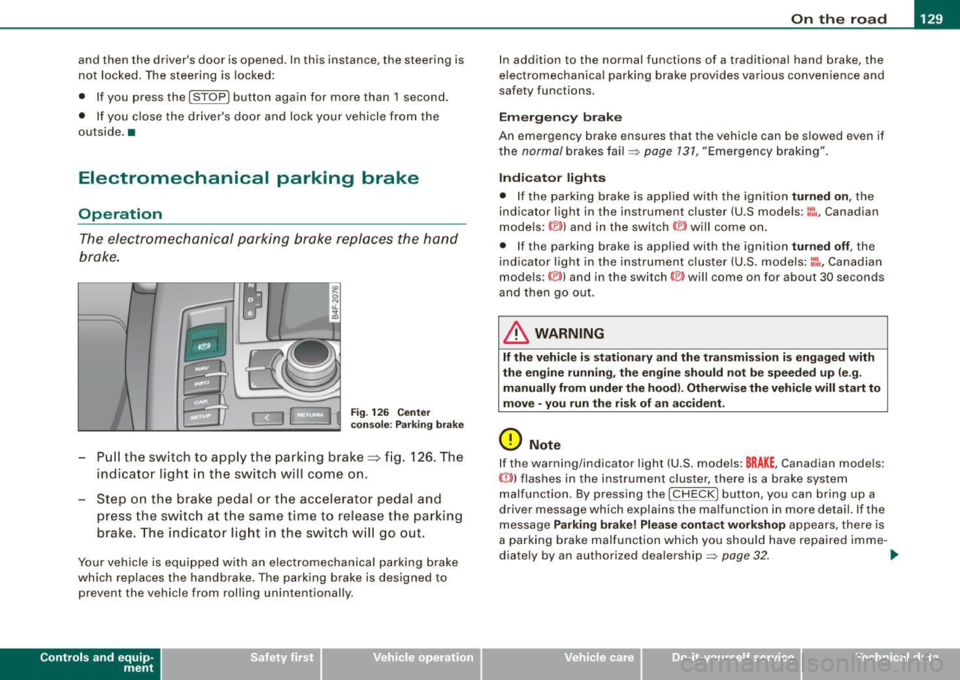
The electromechanical parking brake replaces the hand
brake.
Fi g. 12 6 Center
co nso le: Parki ng bra ke
- Pull the switch to app ly the park ing brake => fig. 12 6. The
indicator light in the switch will come on .
- Step on the brake pedal or the accelerator pedal and
press the switch at the same time to rel ease the parking
brake. The indicator lig ht in the switch wi ll go out.
Your vehicle is equipped with an elect romechanical parking brake
which replaces the handbrake . T he parking brake is designed to
prevent the vehicle from rol ling unintentional ly.
Con tro ls and eq uip
ment
I n add ition to the normal functions of a traditional hand brake, the
e lectromechanica l parking brake provides various convenience and
safety functions.
Emergen cy brake
An emergency brake ensur es that the vehicle can be slowed even if
t he
normal brakes fail=> page 131, "Emergency braking".
Ind icator lights
• If the parking brake is applied with the ignition tu rned on , the
indicator light in the instrument cluster (U.S models :
::i.:,, Canadian
models: ®)) and in the switch <®) will com e on .
• I f the parking brake is app lie d with the ignition
tu rn ed off , the
indicator light in the instrument cluster (U.S. models: ::.:\,, Canadian
models :(®) ) and in the switch© will come on for about 30 seconds
and then go out .
& WARNING
If the vehicle i s stationary and the tr ansmi ssion is engag ed with
the engine ru nning , the engine should not be speeded up (e .g .
manu ally from under the hood ). Otherwi se the vehicle will sta rt to
move -you run the risk of a n accident .
0 Note
If the warning/indica tor light (U.S . mode ls: BRAKE , Canadian mode ls :
(Ci)) ) flashes in the instrument clus ter, there is a brake system
malfunction . By pressing the
I CHECK] button, you can bring up a
driver message which explai ns the ma lfunc tion in more detail. If the
message
P a rki ng brake ! Plea se conta ct w ork shop appears, there is
a par king brake malfunction which you should have repaired imme -
d iate ly by an authorized dealership=>
page 32. ..
Vehicle care
I I irechnical data
Page 135 of 390
On the road -
----------------
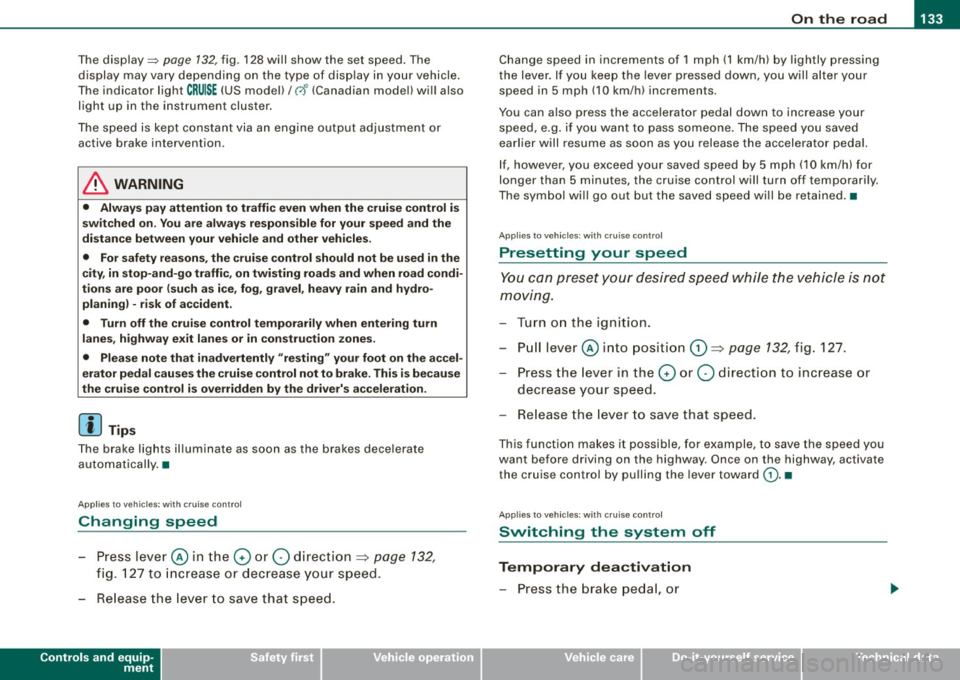
The display=> page 132, fig. 128 will show the set speed . The
display may vary depending on the type of disp lay in your vehicle .
The indicator light
CRU ISE (US model) I (')0 (Canadian mode l) wi ll also
light up in the instrument cluster.
The speed is kept constant via an engine output adjustment or active brake intervention .
_& WARNING
• Always pa y attent ion to traffic even whe n the crui se control is
switc hed on. You are alw ays r esp onsi ble for your speed and the
di sta nce b etween your vehi cle and other vehi cle s.
• For s afet y reason s, the crui se control should not be u sed in the
c ity , in stop- and-go traffic , on twi sting roads and when road condi
t ion s a re p oor (s uch a s ice , fo g, gra vel , he avy ra in and h ydro
planing ) - risk of accident.
• Turn off the crui se control tempor arily when e nte ring tu rn
lan es, highway exit lanes or in constru ction zone s.
• Plea se note that in adv ertentl y "re sting " yo ur foot on the accel
erator ped al cau se s the cruise control not to brake . Thi s is b ecau se
the crui se control i s overridden b y the dri ve r's acc eleration .
[ i] Tips
The brake lights il luminate as soon as the brakes decelerate
automatically .•
Ap plie s to v ehicl es: w it h c ruise contro l
Changing speed
-Press lever© in the 0 or O directi on => page 132,
fig. 127 t o in crease or d ec reas e your spe ed.
- Re lease the lever to s ave tha t speed.
Controls and equip
ment Change speed in increments of 1 mph (1 km/h) by
lightly pressing
the lever . If you keep the lever pressed down, you will a lter your
speed in 5 mph (10 km /h) increments .
You can a lso press the acce lerator pedal down to increase your
speed, e.g. if you want to pass someone. The speed you saved
earlier will resume as soon as you release the accelerator pedal.
If , however, you exceed your saved speed by 5 mph (10 km/h) for
longer than 5 minutes, the cruise control will turn off temporarily .
The symbol wi ll go ou t bu t the saved speed wi ll be retained. •
Applie s to v ehic le s: with c ruise cont ro l
Presetting your speed
You can prese t your desire d speed while the vehicle is not
moving.
- Turn o n the ignition .
Pu ll lever © into posit ion
G) => page 13 2, fig. 127 .
Press the lever in the
0 or O direction to increase or
decrease your speed .
- Release the lever to save that speed .
This function makes it possible, for example, to save the speed you
want before driving on the highway. Once on the highway , activate
the cruise contro l by pu lli ng the lever toward
G) . •
Ap plies to ve hic les: with c ruise contro l
Switching the system off
Temporary dea ctivation
- Press the brake pedal, or
I • •
Page 138 of 390
• .___A_ d_ a_ p =- t_iv _ e _ C_ r_u _is_ e_ C _ o_ n_ t _r _o_ l --------------------------------------------
& WARNING (continued)
• Always turn off Adaptive Cruise Control when entering turn
lanes, highway exit lanes and construction zones or similar situa
tions because the vehicle will automatically accelerate to the
stored speed.
• Never rest your foot on the accelerator pedal, especially when
the Adaptive Cruise Control is being used because doing so will
override the braking function and prevent the brakes from being
applied by the system when it detects a situation when the brakes
must be applied.
• Always remember that the Adaptive Cruise Control has limits -
it does not react when you drive towards an obstacle or some
thing else on or near the road that is not moving, such as vehicles stopped in a traffic jam, a stalled or disabled vehicle .
• Always remember that the Adaptive Cruise Control cannot
detect a vehicle that is driving towards you in your traffic lane and
that it cannot detect narrow vehicles such as motorcycles and
bicycles .
[ i) Tips
• For safety reasons, the stored speed is deleted when the ignition
is turned off.
• The Electronic Stabilization Program (ESP) and the Anti -Slip
Regulation (ASRl cannot be deactivated when the Adaptive Cruise
Control is switched on. If the ESP and the Anti -Slip Regulation (ASRl
has been deactivated and you then switch on the Adaptive Cruise
Control, the ESP function will also be activated automatically.
• Damage caused by accidents (e.g. if the vehicle is damaged
when parking) can affect the radar sensor settings. This can cause
the system to malfunction or switch off completely.
• The radar sensor cover is heated. In winter conditions, you
should still check before driving to make sure it is free of ice and
snow. If necessary, clean the area near the radar sensor carefully
=>
page 135, fig. 129. • To
ensure that the radar sensor is not blocked, foreign objects
(e.g. stickers, larger license plate mounts, add -on parts) must not
cover the area near the radar sensor=>
page 135, fig. 129. The area
near the radar sensor must not be painted, either. •
Applies to veh ic les: with Adaptive Cruis e Contro l
How does Adaptive Cruise Control work?
Vehicles traveling ahead are detected with the aid of a
radar sensor.
Fig. 130 Radar sensor
measurement range
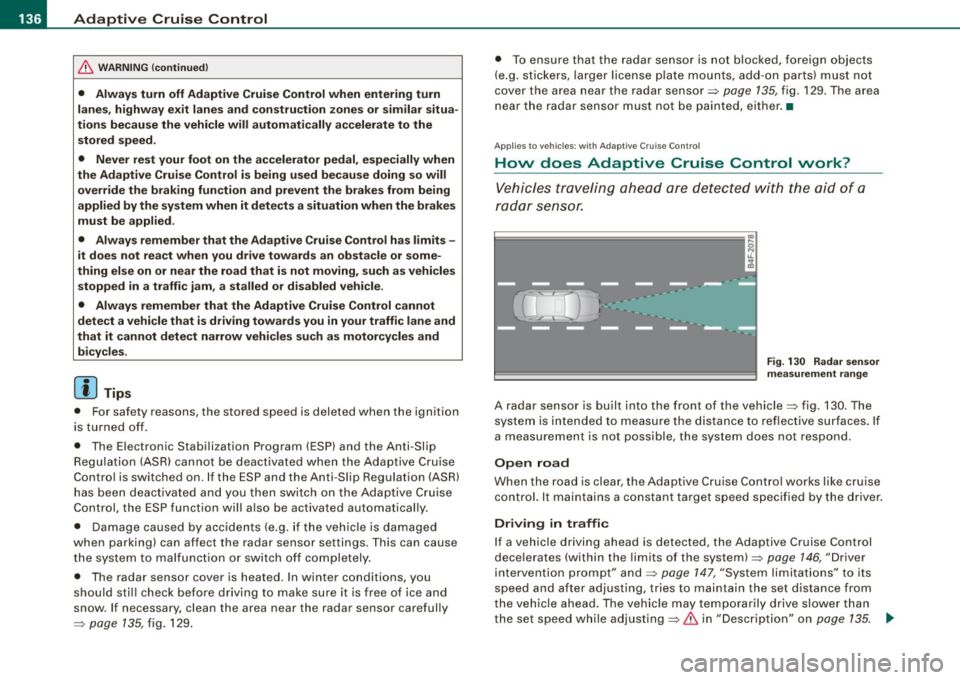
A radar sensor is built into the front of the vehicle=> fig. 130. The
system is intended to measure the distance to reflective surfaces. If
a measurement is not possible, the system does not respond.
Open road
When the road is clear, the Adaptive Cruise Control works like cruise
control. It maintains a constant target speed specified by the driver.
Driving in traffic
If a vehicle driving ahead is detected, the Adaptive Cruise Control
decelerates (within the limits of the system)=>
page 146, "Driver
intervention prompt" and=>
page 147, "System limitations" to its
speed and after adjusting, tries to maintain the set distance from
the vehicle ahead. The vehicle may temporarily drive slower than
the set speed while adjusting=>
& in "Description" on page 135. .,
Page 139 of 390
_____________________________________________ A_ d_a ...: p_ t_ i_ v _e_ C_ ru_ is_ e_ C_ o_n _ t_ r_o _ l _ __._
If the vehicle in front accelerates, Adaptive Cruise Control a lso accel
erates up to the speed tha t you have set.
Si tu ation requiring d river interv ention
In some situa tions you will have to use the footbrake to s low the
vehic le down in order to keep a safe distance from vehicle in front
of you or to avoid a rear -end collision . In this situa tion, a symbol
appears and a warning tone sounds~
page 146.
P ass ing an ot her vehicle
If you move into the passing lane and no vehicle is detected ahead,
the Adaptive Cruise Control accelerates to the speed you have set
and maintains it.
O ve rrid e
You can increase your speed at any time by stepping on the acceler
ator pedal. After you re lease the acce lerator pedal, the system
adjusts back down to the speed you previously set.
[ i ) Tips
Please note that the amount of acceleration the Adaptive Cruise
Control uses depends on the Distance se tt ing selected. DISTANCE 1
gives you acceleration that is dynamic and sporty . DISTANCE 4 , on
t he other hand, gives more moderate acce leration . For more infor
mation about the time intervals~
page 140, "H ow is the distance
(time interval) set?" .
• Please note that if the Adap tive Cruise Contro l has begun braking
t he vehicle and the driver chooses to brake the vehicle additiona lly,
the brakes may feel "hard". This is s imply due to the pressure build
up of the initial braking.
• Adaptive Cruise Contro l is switched off after pressing the foot
b rake . The speed saved up this point can be resumed . To resume the
saved speed, release the brake pedal and press the contro l lever
:;) page 139, "Turning Adaptive Cru ise Contro l off temporarily" .•
Con tro ls and eq uip
ment
A pp lies to veh ic les: with Ad aptive Crui se Co ntro l
Switching the system on and off
Fig . 131 C ontrol l ever :
Swi tchin g on an d off
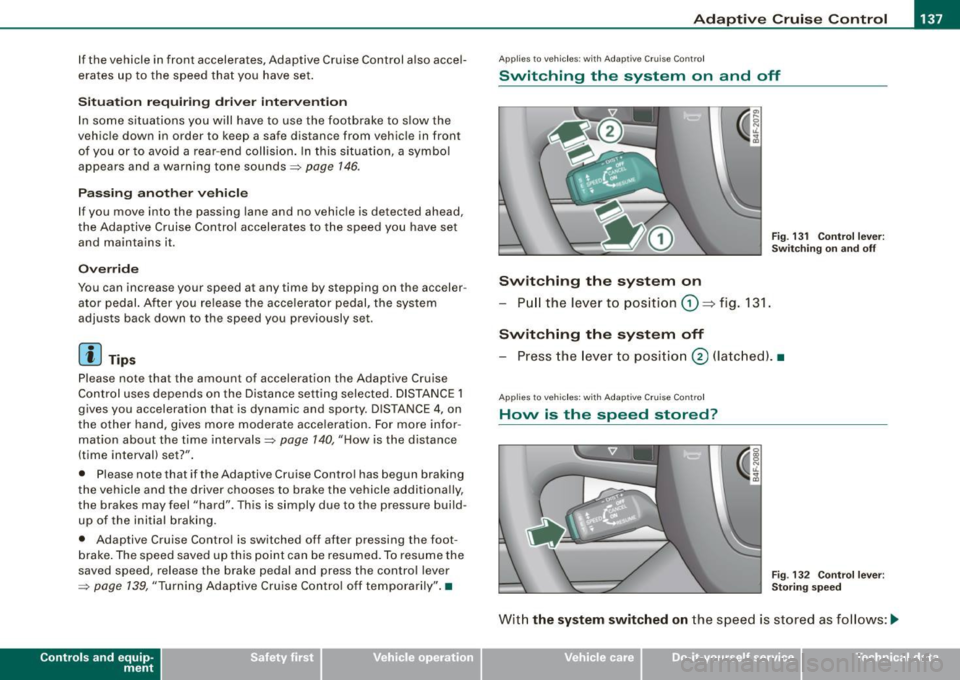
Switching the system on
- Pull the lever to position G) => fig. 131 .
Switching the system off
-Press the lever to pos ition @ (latc hed). •
Applies to vehic les : w ith Ada ptive Cruise C ont ro l
Hovv is the speed stored?
Fig . 13 2 Cont ro l l eve r:
St oring speed
Wit h the sy stem switched on the speed is stored as follows :-.,
Vehicle care I I irechnical data
Page 145 of 390
_____________________________________________ A_ d_a ...: p_ t_ i_ v _e_ C_ ru_ is_ e_ C_ o_n _ t_ r_o _ l _ __.11111
@ Di spl ay in t he instrum ent clust er
In display area@ information from the navigation system and the
trip computer is disp layed in addition to information about Adap tive
Cruise Cont rol.
You can select among the different information by repeated brie f
taps on the
[RESET) button on the w indsh ie ld wiper lever
=> page 41, "Operation" .
© Statu s indi cator
The information in area@ is not displayed permanently . Informa
tion is displayed only if you set or change the speed setting, change
t he time interval, when messages are disp layed or if the Adaptive
Cruise Control is turned off for safety reasons. •
Applies to veh ic les: with Ad apt ive Cru ise Co nt rol
Display in the speedometer
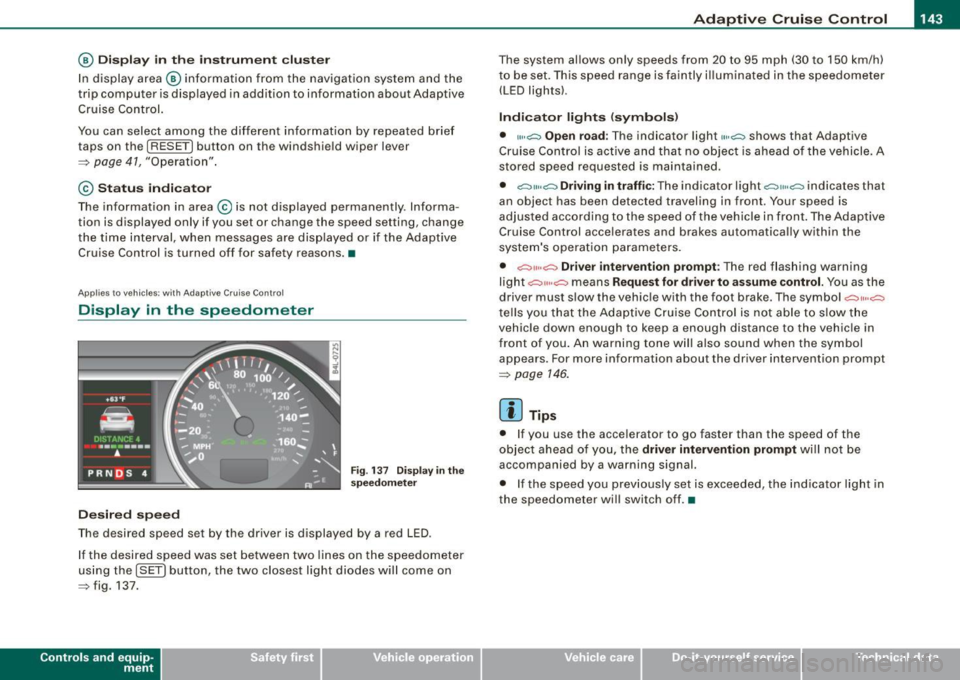
Desired speed
Fig . 1 37 Display in th e
s pe ed om eter
The desired speed set by the driver is displayed by a red LED .
I f the desired speed was set between two lines on the speedometer
us ing the
[ SET ) button, the two closest light diodes will come on
=> fig. 137.
Con tro ls and eq uip
ment
The system al lows only speeds from 20 to 95 mph (30 to 150 km/h)
t o be set. This speed range is faintly i lluminated in the speedome ter
(LED ligh ts) .
Ind icator light s (sy mbols )
• "'' ~ Open ro ad :
The indicator light""~ shows that Adaptive
Cruise Control is active and that no object is ahead o f the vehicle.
A
stored speed requested is maintained .
• ~'" '~ Driving in traffic: The indicator light~""~ indicates that
an object has been detected trav eling in front. Your speed is
adjusted according to the speed of the vehicle in fr ont . The Adap tive
Cruise Control acce lerates and brakes automatica lly within the
system's operation pa rameters.
• ~" "~ Driver inter vention p rompt : The red flashing warning
light
c::::, ,,, ,~ means Request for driver to a ssume control. Yo u as the
drive r must slow the vehic le with the foot brake . The symbol ~,, ..
~
tel ls you that the Adaptive Cruise Control is not able t o slow t he
vehicle down enough to keep a enough distance to the vehic le in
front of you . An warning tone will also sound when the symbol
appears. For more information about the driver intervention prompt
=> page 146.
[ i ] Tips
• I f you use the accelerator to go faster than the speed of the
object ahead of you, the
driver intervention prompt wi ll no t be
accompanied by a warning signal.
• I f the speed you prev iously set is exceeded, the ind icator light in
the speedometer will switch off. •
Vehicle care I I Technical data
Page 147 of 390
_____________________________________________ A_ d_a ...: p_ t_ i_ v _e_ C_ ru_ is_ e_ C_ o_n _ t_ r_o _ l _ __.11111
Ap plies to vehicles: with Adaptive Cru ise Co nt rol
System status indicator
The text messages and symbols shown in this area of the
display are not displayed perm anently.
T ime intervals
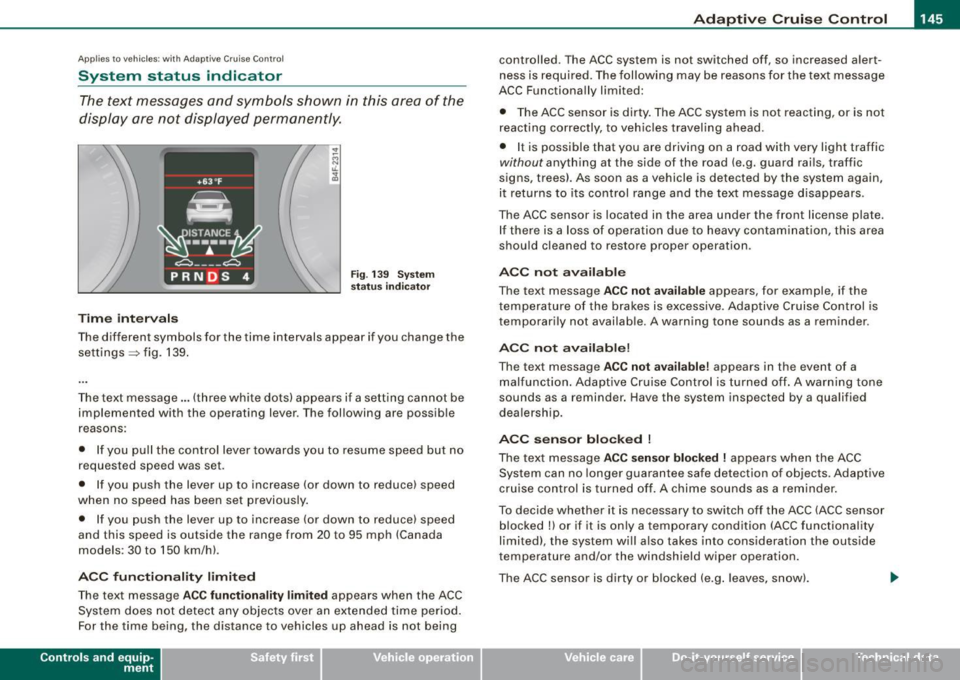
Fig . 139 Sy stem
sta tus indi cator
The different symbols for the time intervals appear if you change the
settings ~ fig. 139 .
The text message ... (three white dots) appears if a setting cannot be implemented with the operating lever . The following are possible
reasons:
• If you pul l the control lever towards you to resume speed but no
requested speed was set .
• I f you push the lever up to increase (or down to reduce) speed
when no speed has been set previously.
• If you push the lever up to increase (or down to reduce) speed
and this speed is outside the range from 20 to 95 mph (Canada
models : 30 to 150 km/h) .
ACC fun cti ona lity limited
The text message AC C functionalit y limited appears when the ACC
System does not detect any objects over an extended time period.
For the time being, the distance to vehicles up ahead is not being
Con tro ls and eq uip
ment
controlled. The ACC system is not switched off, so increased alert
ness is required. The following may be reasons for the text message
ACC Functiona lly limited:
• The ACC sensor is dirty. The ACC system is not reacting, or is not
reacting correctly, to veh ic les travel ing ahead.
• I t is possible that you are driving on a road with very light traffic
without anything at the side of the road (e.g. guard rai ls, traffic
signs, trees). As soon as a vehicle is detected by the system again,
it returns to its control range and the text message disappears .
The ACC sensor is located in the area under the front license plate.
If there is a loss of operation due to heavy contamination, this area
should cleaned to restore proper operation .
ACC not available
The text message ACC n ot ava ila ble appears, for example, if the
t emperature of the brakes is excessive. Adap tive Cruise Control is
temporarily not available . A warning tone sounds as a reminder .
ACC not available!
The text message ACC not ava ilable ! appears in the event of a
malfunction . Adaptive Cruise Contro l is tur ned o ff. A warning to ne
sounds as a reminder. Have the system inspected by a qua lified
dea lership .
ACC se nsor bl ocked !
The text message AC C sensor blocked ! appears when the ACC
System can no longer guarantee safe detection of objects . Adaptive
cruise control is turned off. A chime sounds as a rem inder .
To decide whether it is necessary to switch off the ACC (ACC sensor
blocked
!) or if it is only a temporary condition (ACC functionality
limited), the system wi ll also takes into consideration the outside
temperature and/or the windshield wiper operation.
The ACC sensor is dirty o r blocked (e .g . leaves, sn ow).
Vehicle care I I irechnical data