radio AUDI S6 2008 User Guide
[x] Cancel search | Manufacturer: AUDI, Model Year: 2008, Model line: S6, Model: AUDI S6 2008Pages: 390, PDF Size: 88.42 MB
Page 180 of 390
• .___A_ u_d_ i _P _a_ r_ k_ i_ n ..:g=-- S_ y=-- s_t _ e _m _____________________________________________ _
& WARNING (continued)
• Maintain plenty of distance from an obstacle, so that your
outside mirror or a corner of your vehicle does not collide with any
obstacles - danger of accident!
• The Audi Parking System is not a substitute for being careful
and alert when backing up. Be especially careful during parking
and similar maneuvers. Always watch where you are driving and
make sure that nothing is in the way.
• When maneuvering or parking, do not only use the MMI Display
for orientation. Certain objects -depending on the screen resolu
tion -may not, or not entirely, be displayed ; for example trailer
hitches, chains, narrow posts, or fences . •
Settings in the MMI
App lies to veh ic les: witn Av(li Pi, rk ing System (rear! and rear-view camera
Adjusting the chimes -option 1
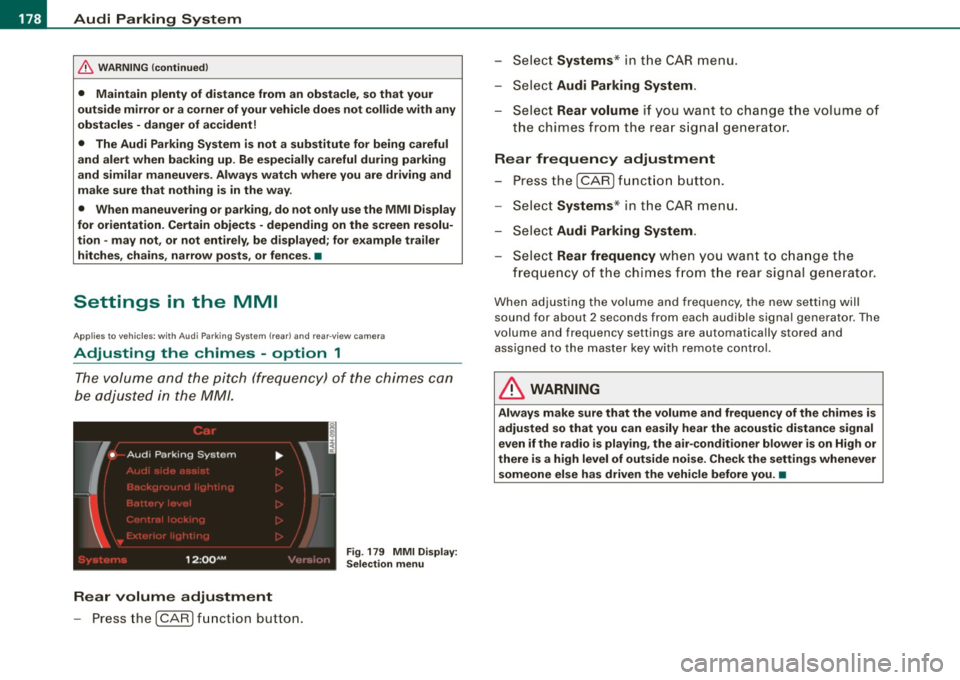
The volume and the pitch (frequency) of the chimes can
be adjusted in the MM/.
Fig . 179 MMI Display:
Selection menu
Rear volume adjustment
- Press the [CARI function button. -
Select
Systems * in the CAR menu .
- Select
Audi Parking System .
-Select Rear volume if you want to change the volume of
the chimes from the rear signal generator.
Rear frequency adjustment
- Press the [CAR I function button.
- Select
Systems* in the CAR menu .
- Select
Audi Parking System .
-Select Rear frequency when you want to change the
frequency of the chimes from the rear signal generator.
When adjusting the volume and frequency, the new setting will
sound for about 2 seconds from each audible signal generator . The
volume and frequency settings are automatically stored and assigned to the master key with remote control.
& WARNING
Always make sure that the volume and frequency of the chimes is
adjusted so that you can easily hear the acoustic distance signal
even if the radio is playing, the air-conditioner blower is on High or
there is a high level of outside noise. Check the settings whenever someone else has driven the vehicle before you. •
Page 181 of 390
_____________________________________________ A_u_ d_ i _P _a_ r_ k_ i_n -=g a..- S-=y'--- s_ t_ e_ m __ ....JJIIII
Ap plies to vehicles: with Audi Par king System (r ear) and rea r-vie w came ra
Adjusting the chimes -option 2
The menu for adjusting signal sounds can also be called
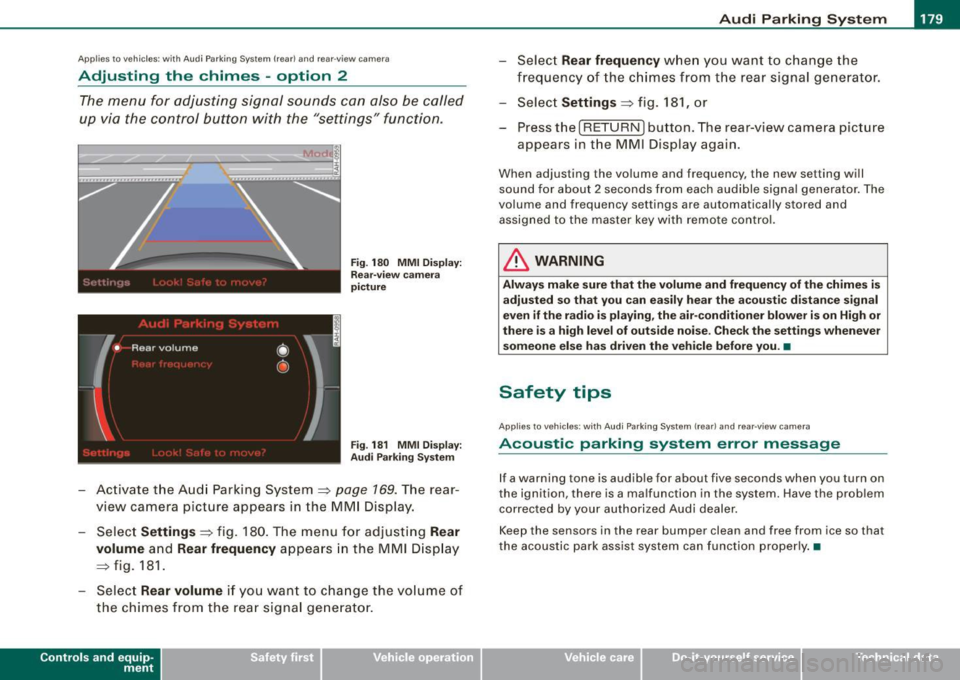
up via the control button with the "settings" function.
Fig. 180 MMI Display:
Rear-view camera
picture
Fig . 181 MMI Display:
Audi Parking System
- Activate the Audi Parking System=> page 169. The rear
view camera picture appears in the
MMI Display.
- Select
Settings => fig. 180. The menu for adjusting Rear
volume
and Rear frequency appears in the MMI Display
=> fig.
181.
Select Rear volume if you want to change the volume of
the chimes from the rear signal generator.
Contro ls and eq uip
ment
Select Rear frequency when you want to change the
frequency of the chimes from the rear signal generator.
Select
Settings => fig. 181, or
Press the [RETURN] button . T he rear-v iew camera picture
appears in the
MMI D isplay again.
When adjusting the volume and frequency , the new setting will
sound for about 2 seconds from each audible signal generator. The
volume and frequency settings are automatically stored and
assigned to the master key with remote control.
& WARNING
Always make sure that the volume and frequency of the chimes is
adjusted so that you can easily hear the acoustic distance signal
even if the radio is playing, the air-conditioner blower is on High or
there is a high level of outside noise. Check the settings whenever
someone else has driven the vehicle before you. •
Safety tips
Applies to vehic les: with Audi Par king System {rear) and rea r-v iew came ra
Acoustic parking system error message
If a warning tone is audible for about five seconds when you turn on
the ignition, there is a malfunction in the system. Have the problem
corrected by your authorized Audi dealer.
Keep the sensors in the rear bumper clean and free from ice so that
the acoustic park assist system can function properly.•
Vehicle care I I irechnical data
Page 188 of 390
• ..__H_ o_ m_ e_ L_in _ k_® ____________________________________________________ _
Homelink®
Universal remote control
Applies to vehicles: w ith Home Link® universal remote control
General information
The Homelink® feature can learn the up to three radio
frequency codes for most current transmitters used for
operating garage doors, estate gates, home or outdoor
lighting systems, and other devices.
You must first program the Homelink® transmitter before you can
use the system=>
page 186, "Programming the Homelink® trans
mitter".
In order to program the Homelink® transmitter for devices utilizing
rolling code, a second person on a ladder who can safely reach the
garage door opener motor is recommended. It is also necessary to
locate the "learn" button on your garage door opener motor. Refer
to the operating instructions for the opener, as the location and
color of this button may vary by manufacturer.
You can still use the original remote control for the device at any
time .
& WARNING
• Never use the Homelink"" transmitter with any garage door
opener that does have not the safety stop and reverse feature as
required by federal safety standards. This includes any garage
door opener model manufactured before April 1, 1982.
• A garage door opener which cannot detect an object, signaling
the door to stop and reverse does not meet current federal safety
standards . Using a garage door opener without these features
increases risk of serious injury or death .
& WARNING (continued)
• For safety reasons never release the parking brake or start the
engine while anyone is standing in front of the vehicle.
• A garage door or an estate gate may sometimes be set in
motion when the Homelink ® remote control is being
programmed . If the device is repeatedly activated, this can over
strain motor and damage its electrical components -an over
heated motor is a fire hazard!
• To avoid possible injuries or property damage, please always
make absolutely certain that no persons or objects are located in
the range of motion of any equipment being operated. •
Applies to vehicles: wit h Home link® universal remote contro l
Programming the Homelink ® transmitter
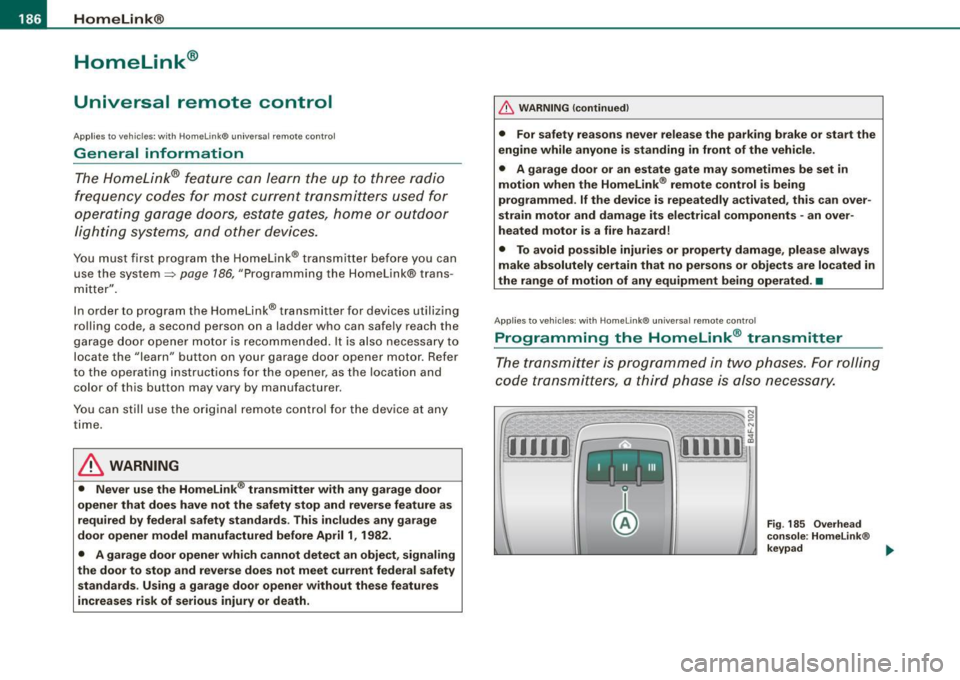
The transmitter is programmed in two phases. For rolling
code transmitters, a third phase is also necessary.
Fig . 185 Overhead
console: Homelink ®
keypad ...
Page 190 of 390
111..__H_ o_ m_ e_ L_in _ k_® ____________________________________________________ _
11. Locate the "learn" button on the garage door opener
motor (refer to the operating instructio ns for the opener,
as the location of this button may vary by manufacturer).
12. Press and release the learn button on the garage door opener motor .
-Note : once the button is pressed, there are 30 se cond s in
which to in itiate the next step.
13. On the Homeli nk® keypad inside the veh icle, f irmly
press and hold the Homelink ® button previously
programmed in phases 1 and 2 for two seconds and
release . Repeat th is sequence
twi ce.
- Some vehicles may req uire the press/hold/re lease
seque nce up to three t imes to complete the training
process.
Homelink® should now activate your rolling code
equipped device .
If the 5 minute time limit is exce eded, the e mer gency flas her s will
flas h one time to indicate that the process has been terminated . In
this cas e, r epeat steps 4 through 9.
If the emergency flashers do not flash
three times (after about 15-
60 seconds) , programmi ng was not successful. In this case , repea t
steps 4 through 9.
Remote con trol units for garage door opene rs in Canada a re set to
stop transm itting radio frequency s ignals after two seconds. Th is
t ime may not be sufficient for the Homelink ® system to learn the
radio frequency signal. Perform all o ther st eps as d escribed
above .•
A pp lies 10 veh ic les: wit h Home Link® unive rsa l remote control
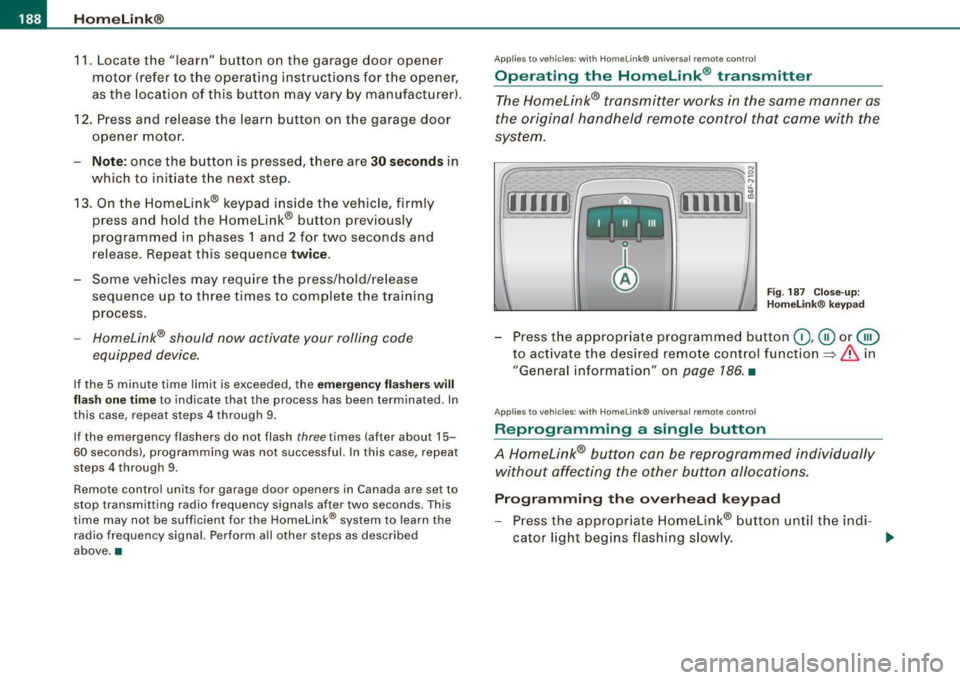
Operating the Homelink ® transmitter
The Homelink® transmitter works in the same manner as
the original handheld remote c ontrol that came with the
system.
[11111 ~
, _1 11 _ I Ill
N 0
~
~,,.-,-1 .,.-,--I I ,....,...,I W 1~
Fig . 187 C lose- up:
H omelink® keypad
- Press t he appropr iate programmed button (D , @ or@
to activate the desired remote control function=>&. in
"General information" on
page 186 . •
App lies 10 vehicles: wit h Home link® unive rsa l remote contro l
Reprogramming a single button
A Homelink® button can be reprogrammed individually
without affecting the other button a/locations.
Progr amming th e ove rhead keypad
- Press the appr opriate Homelink® button until the indi-
cator l ight beg ins flashing slowly. _..
Page 228 of 390
___ A_ ir_ b_ a-g _ s_y _s_ t_ e_ m _________________________________________________ _
& WARN ING (continued )
seating posit ion and have the airb ag system inspe cted by your
Audi dealer .
• A t ight tether or other strap on a rearward-fa cing child restr aint
att ached to the front pas senger se at can put too much pres sure
on the weight-sensing mat in the seat and reg ister more weight
than is actually on the seat. The heavier weight registered can
m ake the system work as though an adult were on the seat and
deploy the Advanced Airbag when it must be suppressed cau sing
ser ious or even fatal injury to the child .
• If, in exceptional circumstance s, you mu st in stall a forward
f a cing child restraint on the front passenger seat , always move the
seat into its rearmost position in the seat's fore and aft adjust
ment range , as far away from the airbag as po ssible . The ba ckrest
must be adjusted to an upright position. Make sure that the
PASSENGER AIR BAG OFF light comes on and stay s on all the time
whenever the ignition is switched on .
& WARNING
• If the PASSENGER AIR BAG OFF light does not go out when an
adult is sitting on the front passenger seat after tak ing the step s
described above, make sure the adult i s properly seated and
restrained at one of the rear seating posit ions .
• Have the airbag system inspected by your Audi dealer before
transport ing anyone on the front passenger seat .
[ i ] Tips
If the weight -sensing mat in the front passenger seat detects an
e m pty seat , the front a irbag on the passenge r side wil l be tur ned
off, and PASSENGER AIR BAG OFF will stay on.•
Repair, care and disposal of the airbags
P arts of the airbag system are installed at many different p laces on
you r Aud i. Insta ll ing, r emoving, servic ing or repa iring a pa rt in an
area of the vehicle can damage a part of an airbag system and
p revent that sys tem from working pr operly in a c ollisi on.
There are some important things you have to know to ma ke sure
t h at the effective ness of the system will not be impai red and that
discarded co mponents do not cause injury or po llute the env iro n
ment .
& WARNING
Improper care , servicing and repair procedures can increase the
risk of personal injury and death by pre venting an airbag from
deploying when needed or deploying an airbag unexpectedly:
• Never cover , obstruct , or change the steering wheel horn pad
or airbag cover or the instrument panel or modify them in any way .
• Never attach any objects such as cupholders or telephone
mountings to the surfaces covering the airbag units .
• For cleaning the horn pad or instrument panel , use only a soft,
dry cloth or one moistened with plain water. Solvents or cleaner s
c ould damage the airbag cover or change the stiffness or strength
of the material so that the airbag cannot deploy and protect prop
erly .
• Never repair , adju st, or change any parts of the airbag sy stem .
• All work on the steering wheel , instrument panel , front seats or
electrical system (including the installation of audio equipment ,
cellular telephones and CB radios , etc .I must be performed by a
qualified technician who has the training and special equipment
necessary .
• For any work on the airbag system, we strongly recommend
that you see your author ized Audi dealer or qual ified workshop .
• Never modify the front bumper or parts of the vehicle body .
Page 268 of 390
-Intelligent technology
----'""------- ~---------------------------------------
With the engine turned off
If you listen to the radio, for example, with the engine turned off or
use other MMI functions, the battery is being discharged.
If starting capability is jeopardized due to energy consumption , the
following warning appears in the MMI display:
Please start engine, otherwise system will switch off in
3 minutes.
The warning indicates that the system will be turned off automati
cally after 3 minutes. If you wish to continue using the functions,
you have to start the engine.
With the engine running
Although electrical energy is generated when the vehicle is being
driven, the battery can become discharged. This happens mostly
when little energy is being generated and a great deal consumed
and the battery's state of charge is not optimal.
To bring the energy balance back into equilibrium , consumers
which require especially large amounts of energy are temporarily cut back or switched off. Heating systems in particular require a
great deal of energy. If you notice, for example, that the heated
seats* or the heated rear window are not heating, they have been
temporarily cut back or switched off. These systems will be available
again as soon as the energy balance has been restored.
You will also notice that engine idle speed has been increased
slightly . This is normal and not a cause for concern. By increasing
engine idle speed the additional energy required is generated and
the battery is charged. •
Driver notification in the instrument cluster
d isplay
If battery power drops into the range where it can limit the ability of
the engine to start, this is shown in the instrument cluster display
with the following driver message:
'-' Low battery charge: battery will be charged while driving
This notification reminds you that the starting capability of the
engine may be limited. As soon as you start driving again, the
battery will be recharged and the notification will go out.
Driver notification appears and goes out again
If this driver notification appears after the ignition is turned on or
while driving and it goes out again after a while, the battery has
been adequately recharged.
Driver notification appears and does not go out again
If this driver notification appears after the ignition is turned on or
while driving and does not go out again, the battery's state of
charge is not in the optimal range. Starting ability is restricted . Have
the battery checked as soon as possible at a dealership. •
Page 313 of 390
Checking and filling Ill
--------------~-
•
-Now remove the clamps for the charging equipment.
- Close the red cover on the positive pole.
- Close the hood
~ page 297.
A discharged battery can freeze at temperatures of only O °C. Allow
a frozen battery to thaw completely before attempting to charge it
~ & .However, we recommend not using a thawed battery again
because the battery casing can be cracked due to ice formation and
can leak battery acid.
Battery charging (Maximum charging rate of 30
amps/14.8 Volt)
When charging at /ow voltages (e.g. with a trickle charger), the
battery cables do not have to be disconnected first. The battery caps
should
not be opened when charging a battery.
I t is not necessary to remove the battery from the luggage compart
ment.
Fast charging the battery (charging rate above 14.8
Volts)
For technical reasons do not use a battery charger that uses voltage
greater than 14.8 Volts to charge your vehicle's battery.
& WARNING
Charging a battery can be dangerous.
• Always follow the operating instructions provided by the
battery charger manufacturer when charging your battery.
• Never charge a frozen battery. It may explode because of gas
trapped in the ice. Allow a frozen battery to thaw out first.
• Do not reuse batteries which were frozen. The battery housing
may have cracked and weakened when the battery froze .
• Charge the battery in a well ventilated area. Keep away from
open flame or electrical spark. Do not smoke. Hydrogen gas gener
ated by the battery is explosive.
&_ WARNING (continued)
• To reduce the danger of explosion, never connect or disconnect
charger cables while the charger is operating.
• Battery acid that may spill during charging should be washed
off with a solution of warm water and baking soda to neutralize
the acid.
0 Note
Never use a fast charger as a booster to start the engine. This will
seriously damage sensitive electronic components, such as control
units, relays, radio, etc., as well as the battery charger. •
Battery replacement
The new battery must have the same specifications and
dimensions as the original equipment battery.
Intelligent energy management in your vehicle is responsible for
distributing the electrical energy throughout your vehicle
~ page 265. The intelligent energy management system will keep
the engine battery charged better then vehicles without this system.
To make sure the additional electrical energy is available once again
after you have changed the battery, we recommend that you install
batteries of the same type and manufacture only (the same as those
installed at the time your vehicle was delivered). Specifications are
listed on the battery housing. Your authorized Audi dealer will then
code the battery management control unit.
If it is not possible to use a battery of this type, the new battery must
have the same capacity, voltage (12 volts), amperage, construction
and plug sealing .
When installing the battery, make sure the ignition and all electrical
consumers are turned off.
~
Vehicle care I t •
Page 316 of 390
-~_T_ ir_e_ s_ a_ n_d _ w_ h_ e_e _l_s _________________________________________________ _
& WARNING (continued)
crashes and serious personal injuries . Have worn or damaged tires
replaced immediately.
• Tires age even if they are not being used and can fail suddenly,
especially at high speeds. Tires that are more than 6 years old can
only be used in an emergency and then with special care and at
low speed.
Glossary of tire and loading terminology
Accessory weight
means the combined weight (in excess of those standard items
which may be replaced) of automatic transmission, power steering,
power brakes, power windows, power seats, radio, and heater, to
the extent that these items are available as factory-installed equip
ment (whether installed or not).
Aspect ratio means the ratio of the height to the width of the tire in percent.
Numb ers of 55 or lower indicate a low sidewall for improved
steering response and better overall handling on dry pavement.
Bead
means the part of the tire that is made of steel wires, wrapped or reinforced by ply cords and that is shaped to fit the rim.
Bead separation means a breakdown of the bond between components in the bead.
Cord
means the strands forming the plies in the tire.
& WARNING (continued)
• Never mount used tires on your vehicle if you are not sure of
their "previous history." Old used tires may have been damaged
even though the damage cannot be seen that can lead to sudden
tire failure and loss of vehicle control.
• If you notice unusual vibration or if the vehicle pulls to one side
when driving, always stop as soon as it is safe to do so and check
the wheels and tires for damage . •
Cold tire inflation pressure
means the tire pressure recommended by the vehicle manufacturer
for a tire of a designated size that has not been driven for more than
a couple of miles (kilometers) at low speeds in the three hour period
before the tire pressure is measured or adjusted .
Curb weight means the weight of a motor vehicle with standard equipment
including the maximum capacity of fuel, oil, and coolant, air condi
tioning and additional weight of optional equipment.
Extra load tire
means a tire designed to operate at higher loads and at higher infla
tion pressures than the corresponding standard tire . Extra load tires
my be identified as "XL",
"xi", "EXTRA LOAD", or "RF" on the side
wall.
Gross Axle Weight Rating ("GAWR")
means the load-carrying capacity of a single axle system, measured
at the tire -ground interfaces .
Gross Vehicle Weight Rating ("GVWR"l
means the maximum total loaded weight of the vehicle.
Page 354 of 390
-Emerg ency situation s PW...__-=---=---------------
& WARN ING (c ontinu ed )
• Bef ore you chec k anything in the engin e compartment , always
re ad and h eed all W ARNINGS =>
page 289, "Engine compa rtment".
0 Note
• Applying a higher voltage booster battery wil l cause expensive
damage to sensitive electronic components, such as contro l units,
relays, radio, e tc.
• There must be no electrical contact between the vehicles as
otherwise current could already start to flow as soon as the positive
( + ) terminals are connected .
[ i ] Tip s
• The discharged battery must be properly connected to the
vehic le's e lectrical system. When jump starting or charging the
battery, never connect the negative ground cable to the battery
negative pos t because the battery manager system must be ab le to
detect the battery's state of charge . Always connect the negative
ground cable to the negat ive ground post of the battery manager
control unit. •
Use of jumper cables
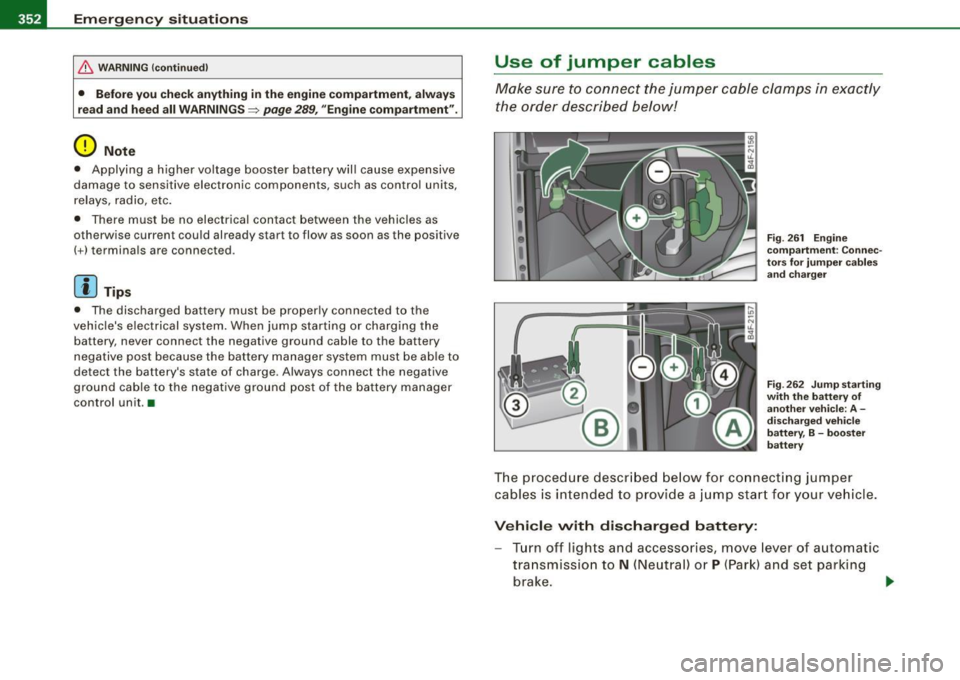
Make sure to connect the jumper c able clamps in exac tly
the order described below!
F ig . 26 1 Engin e
co mpartm ent : Co nnec
to rs for ju mp er ca ble s
and cha rger
F ig . 2 62 Jump starti ng
w ith th e battery of
anot her veh icle: A -
d isc harg ed veh ic le
b att ery, B -boost er
batt ery
The proced ure descr ibed below fo r connecti ng jumper
cables is int ended to prov ide a j ump start f or y our vehicle .
Vehi cle with dis charg ed battery:
- Turn off lights and accessories, move lever of automatic
transmission to
N (Neutral) or P (Par k) and set parking
brake .
~