fuel AUDI S6 2008 Owners Manual
[x] Cancel search | Manufacturer: AUDI, Model Year: 2008, Model line: S6, Model: AUDI S6 2008Pages: 390, PDF Size: 88.42 MB
Page 5 of 390
Safety first ........ ... ... .. .
Driving Safely ................. .
General notes ... .............. .
Proper occupant seating positions Peda l area ... ..... ....... .... . .
Sto\Ning luggage . .... .... .... . .
Reporting safety defects ....... .
Safety belts .......... ....... .. .
Genera l notes ...... ........... .
W hy safety belts? ............. .
Safety belts ............. ... .. .
Safety belt tensioners . ....• .. ..
Airbag system ........... ... .. .
Important things to kno\N ...... .
Front airbags . ... ... .......... .
Monitoring the Advanced Airbag
System ... .. ... .... ..... ..... .
Side airbags .......... ... ... .. .
Side curta in airbags (SIDEGUARD™l
Child Safety ................... .
191
192
192
194
198
199
201
202
202
203
206
210
212
212
216
223
228
231
234
Important things to kno\N . . . . . . . 234
Child safety seats . . . . . . . . . . . . . . 239
Install ing a ch ild safety seat . . . . . 244
Additional Information . . . . . . . . . . 247
Lo\Ner anchorages and tether for
children (LA TCH) . . . . . . . . . . . . . . . .
249
Vehicle operation . . . . . . . . 257
Intelligent technology . . . . . . . . . . 258
Notice about data recorded by
vehicle contro l modules . . . . . . . . .
258
Elect ronic Stabilizat ion Program
!ESP) . . . . . . . . . . . . . . . . . . . . . . . . . .
258
Braking . . . . . . . . . . . . . . . . . . . . . . . . 261
Servotronic® -advanced po\Ner
steer ing system . . . . . . . . . . . . . . . .
263
Driv ing \Nith your quattro® . . . . . . 264
Energy management . . . . . . . . . . . . 265
Driving and environment . . . . . . . 267
The first 1,000 miles (1,500 km) and
after\Nards . . . . . . . . . . . . . . . . . . . . .
267
Cata lytic converter . . . . . . . . . . . . . 268
Avoid damaging the vehicle . . . . . 269
Operate your vehicle economically
and minimize pollution . . . . . . . . . .
269
Trailer towing . . . . . . . . . . . . . . . . . . 272
Driv ing \Nith a trailer . . . . . . . . . . . . 272
Trai ler to\Ning tips . . . . . . . . . • . . . . 274
Table of contents
Vehicle care ....... ... ... ... 277
Cleaning and protection ........ 278
General information . . . . . . . . . . . . . 278
Care of exterior . . . . . . . . . . . . . . . . . 278
Care of inte rior . . . . . . . . . . . . . . . . . 285
Fuel supply and filling your fuel
tank ... .... ... .... ... .. .... ... .. 291
Gasoline . . . . . . . . • . . . . • . . . . . . . . . 291
Fuel tank . . . . . . . . . . . . . . . . . . . . . . . 292
Checking and filling . . . . . . . . . . . . 296
Engine hood . . . . . . . . . . . . . . . . . . . 296
Engine oil . . . . . . . . . . . . . . . . . . . . . . 299
Engine cooling syste1T1 . . . . . . . . . .
303
Brake fluid . . . . . . . . . . . . . . . . . . . . . 306
Battery . . . . . . . . . . . . . . . . . . . . . . . . 307
Windshield/headlight \Nasher
containe r .... .... .. ... .. .... ... 312
Tires and wheels ............... 313
Tires . . . . . . . . . . . . . . . . . . . . . . . . . . . 313
Vehicle care I I irechnical data
Page 13 of 390
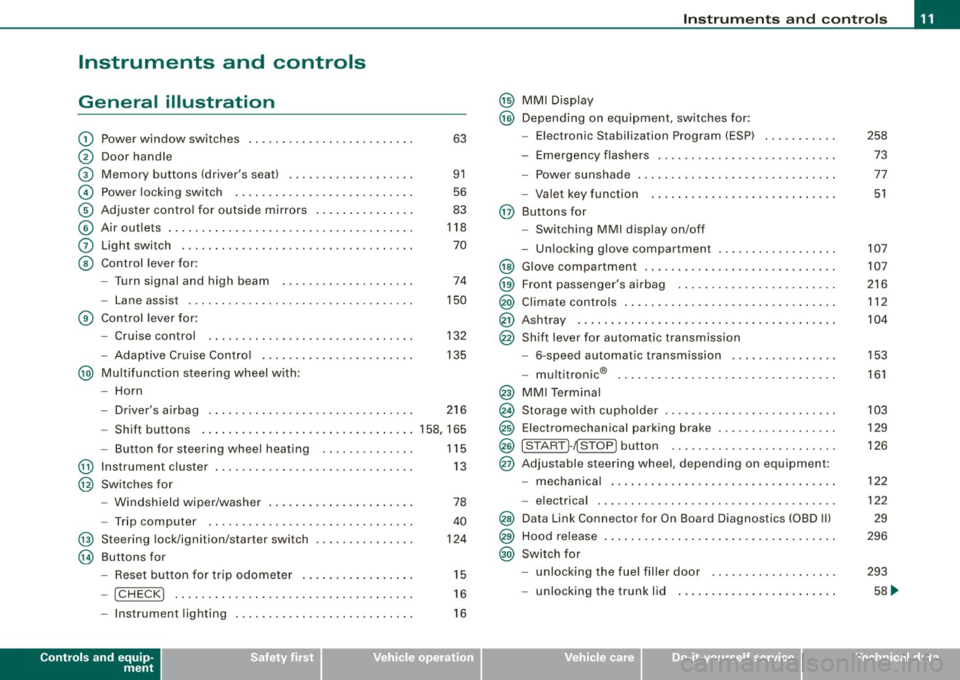
Instruments and controls
General illustration
G)
0
©
©
©
©
0
©
Power window switches .. ...... .... ... .. ...... . .
Door handle
Memory buttons (driver's seat)
Power locking switch ................ .......... .
Adjuster control for outside mirrors .. .... .. .. ... . .
Air outlets ..... .. .. . ... .... .... .. . ..... ... .... .
Light switch ...... ....... .. .... .... .... .... ... .
Control lever for :
- Turn signal and high b eam .......... ...... ... .
- Lane assist .... .... ... .... .... .... ... .... ... .
G) Control lever for:
-Cruise control .... ... .. .. ... ... .. .... .... ... .
- Adaptive Cruise Contro l .. .. .... .... .......... .
@ Multifunction steering wheel with:
- Horn 63
91
56
83
118
70
74
150
132
135
- Driver's airbag . . . . . . . . . . . . . . . . . . . . . . . . . . . . . . . 216
- Shift buttons ..................... ... .... .... 158, 165
- Button for steering wheel hea ting . . . . . . . . . . . . . . 115
@ Instrument cluster . . . . . . . . . . . . . . . . . . . . . . . . . . . . . . 13
@ Switches for
@
@
-Windshield wiper /washer ....... .... .... ... ... .
- Trip computer ..... .. .... .... ...... ....... .. .
St eering lock/ignition /starter sw itch
Buttons for
Reset button for trip odometer ... .. .... .... ... .
- !CHECK] .. ... ... ..... ...... ........ ... .. ... .
78
40
124
15
16
- Instrument lighting . . . . . . . . . . . . . . . . . . . . . . . . . . . 16
Controls and equip
ment
Instruments and controls
@ MMI Display
@ Depending on equipment , switches for:
- Elect ronic Stabilization Program (ESP)
- Emergency flashers .. ..... .... ... ... ... .... .. .
- Power sunshade ... ..... .... .... ... .... .. . ... .
- Valet key function . .... .... ..... ..... ... .. ... .
@ Buttons for
- Switching MMI display on/off
- Unlocking glove compartmen t
@ Glove compartment .. .... ... ... .. ..... ..... ... . .
@ Front passenger's a irbag ...... .... .... ... ..... . .
@ Climate controls .... . ... .... ... .. .... .... ...... .
@ Ashtray ... .. .... ................... .... ...... .
@ Shift lever for automatic transmission
- 6-speed automatic transmission .... .... ..... .. .
I .
.
® -mu t1trornc ... .. ... .... ... .... .... ... .. .. .. .
@ MMI Terminal
@ Storage with cupholder ... ..... .. .... .... ... .. .. .
@ Elec tromechanical parking brake ......... .. ...... .
@ ISTART ]-~STOP ] button .. ... .... .... .... .... ... .
@ Adjustable steering wheel, depending on equipment:
- mechanical .. .... .. .... ... .... .... .... .. .. .. .
- electrica l ... ...... ... .... ...... ...... .... ... .
@ Data Link Connector for On Board Diagnostics (OBD II)
@ Hood release ... .. .... ... .. .. .... .... .... .. . ... .
@ Switch for
- unlocking the fuel filler door ... ..... ... .... ... .
- unlocking the trunk lid ....... ...... .......... .
I • •
258
73
77
51
107
107
216
112
104
153
161
103
129
126
122
122
29
296
293
58 ...
Page 15 of 390
Instruments and warning /indicator lights
Instruments and warning/indicator lights
Instruments
Instrument cluster and controls
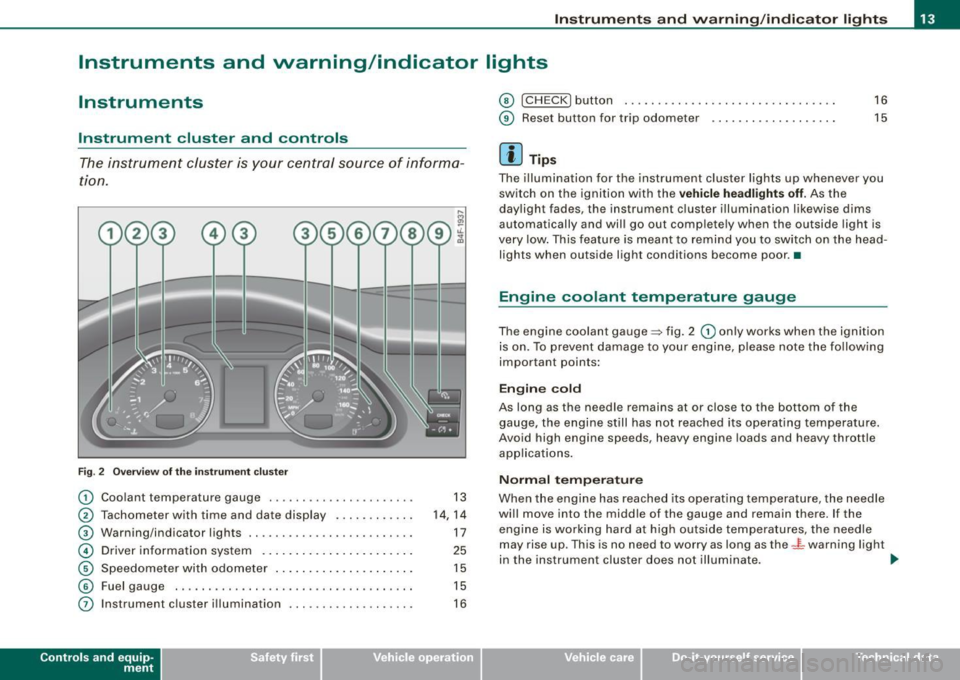
The instrument cluster is your central source of informa
tion .
Fig . 2 Overview of the instrument clu ster
G) Coolant temperature gauge ................... .. .
@ Tachometer with tim e and dat e display . ... .... ... .
® Warning/indicator lights .. ...... ...... .......... .
© Driver information system .... .... .... ... .. ..... .
© Speedometer with odometer .... ... ... ... .... ... .
© Fuel gauge . ..... ..... ........ ........ ... .... . .
0 Instrument cluster illumination ... ...... ....... .. .
Con tro ls and eq uip
ment
13
14, 14
17
25
15
15
16
© I CH ECK] button . ........... .... ... .... .. ...... .
© Reset bu tton for trip odome ter ...... ....... ..... .
[ i ] Tips
16
15
The illumination for the instrument cluster lights up whenever you
switch on the ignition with the
vehicle headlights off. As the
day light fades , the instrument c luster illumination likewise dims
automatically and will go out completely when the outsid e light is
very low. This feature is meant to remind you to switch on the head
lights when outside light conditions become poor. •
Engine coolant temperature gauge
The engine coolant gauge => fig. 2 G) only works when the ignition
is on. To prevent damage to your engine, please note the following
important points:
Engine cold
As long as th e needle remains at or close to the bottom of the
gauge, the engine still has not reached its operating temperature .
Avoid high engine speeds , heavy engine loads and heavy throttle
applications.
Normal temperature
When the engine has reached its operating temperature, the needle
wi ll move into the middle of the gauge and rema in there. If the
eng ine is working hard at high outside temperatures, the needle
may ris e up . This is no ne ed to worry as long as the
_f_ warning light
in the ins trument cluster does not illuminate . .,
Vehicle care I I irechnical data
Page 16 of 390
Instruments and warning/indicator lights
Warning light in the instrument cluster -t
When the _L warning light in the instrument cluster starts to flash,
this can mean one of two things: either the coolant
temperature is
too high, or the coolant
level is too low~ page 33.
If the needle is well in the upper area of the gauge, the coolant
temperature is too high.
Stop the vehicle, switch the engine off and
allow the engine to cool.
If the warning light comes on again after
driving a short distance, contact an authorized dealer.
& WARNING
• Always observe the warning in ~ page 289, "Engine compart
ment", before opening the hood and checking the engine coolant
level.
• Never open the engine hood if you see or hear steam, or if you
see engine coolant dripping from the engine compartment . You
could burn yourself. Let the engine cool off first so that you cannot
hear or see any steam or engine coolant.
0 Note
• Mounting additional lights or accessories in front of the air inlets
reduces the cooling effect of the radiator. At high outside tempera
tures or high engine load, the engine could overheat.
• The front spoiler has been designed to properly distribute the
cooling air when the vehicle is moving. If the spoiler is damaged,
this could reduce the cooling effect and the engine could then
over
heat. Ask your authorized Audi dealer for assistance. •
Tachometer (engine rev counter)
The tachometer indicates the engine RPM (revolutions per
minutes).
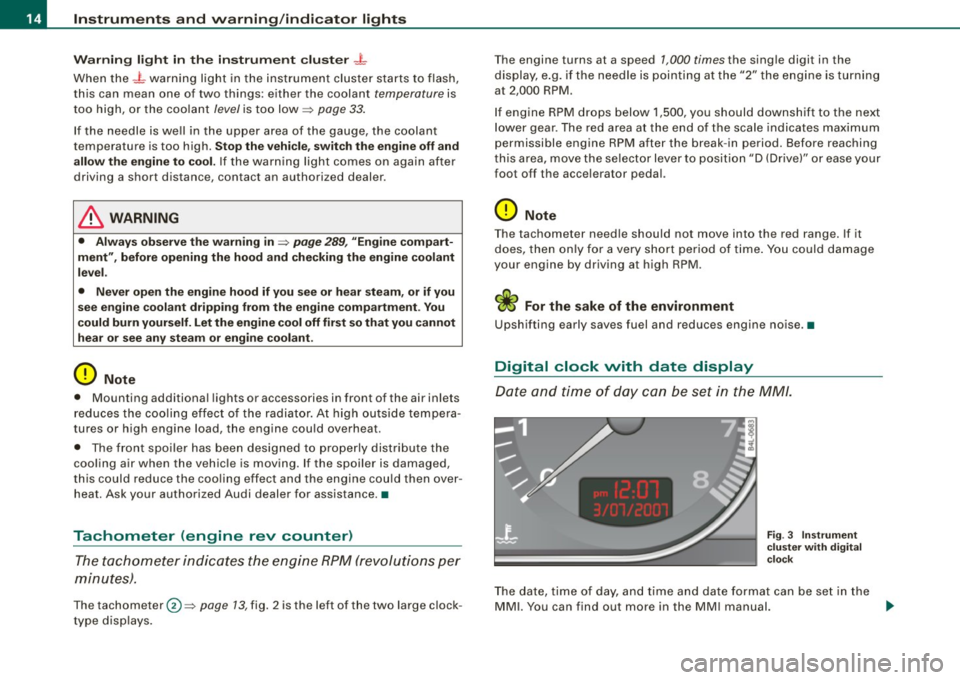
The tachometer 0 ~ page 13, fig. 2 is the left of the two large clock
type displays. The
engine turns at a speed
1,000 times the single digit in the
display, e.g. if the needle is pointing at the "2" the engine is turning
at 2,000 RPM.
If engine RPM drops below 1,500, you should downshift to the next
lower gear. The red area at the end of the scale indicates maximum
permissible engine RPM after the break -in period. Before reaching
this area, move the selector lever to position "D (Drive)" or ease your
foot off the accelerator pedal.
0 Note
The tachometer needle should not move into the red range. If it
does, then only for a
very short period of time. You could damage
your engine by driving at high RPM .
'£> For the sake of the environment
Upshifting early saves fuel and reduces engine noise.•
Digital clock with date display
Date and time of day can be set in the MM/.
Fig . 3 Instrument
cluster with digital
clock
The date, time of day, and time and date format can be set in the
MMI. You can find out more in the MMI manual. .,_
Page 17 of 390
[ i J Tips
• The digital c lock and the odometer are turned on for about 30
seconds when the driver's door is opened.
• When the ignition is turned off, the odometer reading and the
digital clock with date display can be switched on for about
30 seconds by pressing the !CHECK] button~
page 16, fig. 5. •
Speedometer with odometer
The speedometer shows you the vehicle speed, and the
odometer shows you how many miles (kilometers) you
have driven.
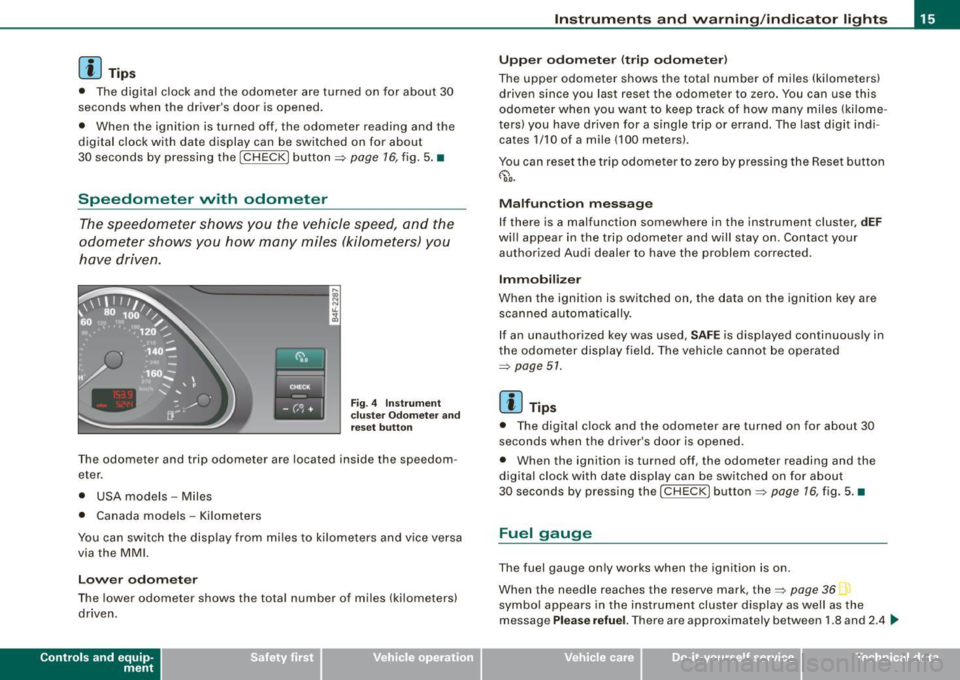
Fig. 4 Instrument
c luster Odometer and
reset button
The odometer and trip odometer are located inside the speedom
eter.
• USA models - Miles
• Canada models -Kilometers
You can switch the disp lay from miles to kilometers and vice versa
via the MMI.
Lower odometer
The lower odometer shows the total number of miles (kilometers)
driven .
Contro ls and eq uip
ment
Instruments and warning /indicator lights
Upper odometer (trip odometer)
The upper odometer shows the total number of miles (kilometers)
driven since you last reset the odometer to zero. You can use this
odometer when you want to keep track of how many miles (kilome
ters) you have driven for a single trip or errand. The last digit indi
cates 1/10 of a mile (100 meters).
You can reset the trip odometer to zero by pressing the Reset button
~ o.o.
Malfunction message
If there is a malfunction somewhere in the instrument cluster,
dEF
wil l appear in the trip odometer and will stay on . Contact your
authorized Audi dealer to have the problem corrected .
Immobilizer
When the ignition is switched on, the data on the ignition key are
scanned automatically.
If an unauthorized key was used,
SAFE is displayed continuously in
the odometer display field. The vehicle cannot be operated
~ page 51.
[ i J Tips
• The digital clock and the odometer are turned on for about 30
seconds when the driver's door is opened.
• When the ignition is turned off, the odometer reading and the
dig ital clock with date display can be switched on for about
30 seconds by pressing the
I CHECK] button ~ page 16, fig. 5. •
Fuel gauge
The fuel gauge only works when the ignition is on .
When the needle reaches the reserve mark, the~
page 36
symbo l appears in the instrument cluster display as well as the
message
Please refuel. There are approximately between 1.8 and 2.4 ~
Vehicle care I I Technical data
Page 18 of 390
Inst rum ent s a nd warning /indi cato r li ghts
gallons (7 -9 liters) of fuel left . This message is meant to remind you
t o
r e fu el.
The to tal tank capacity of your vehicle is listed in:::, page 363.
0 Note
Never run the tank completely dry . An irregular supply of fuel can
cause engine misfiring and fuel could enter the exhaust system . The
cata lytic converter could then overheat and be damaged .•
[ C HECK] button
You can perform different functions with this button.
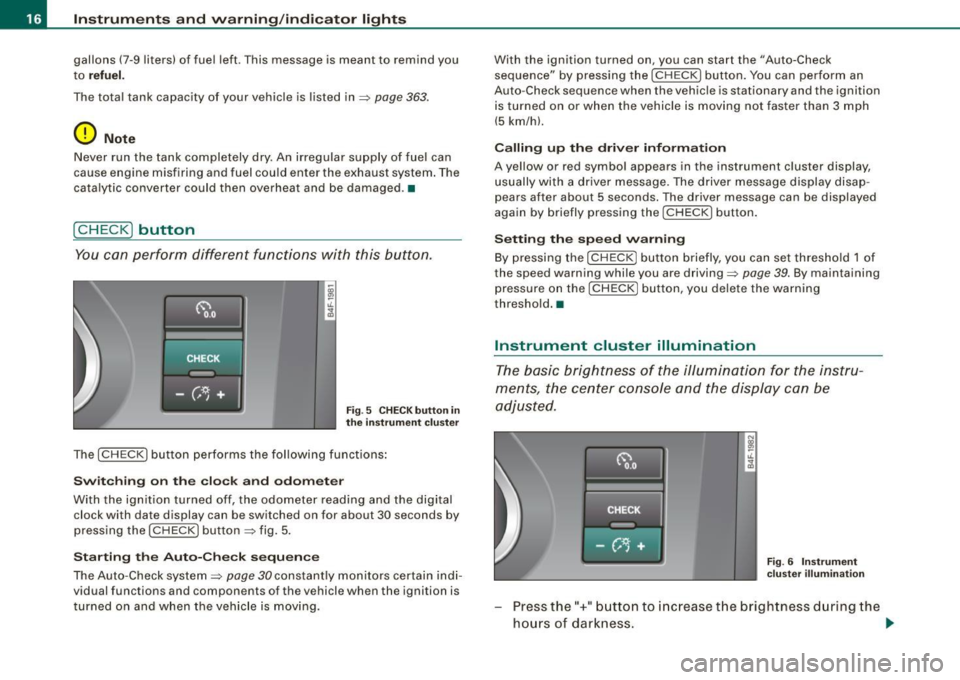
Fig . 5 C HECK b utton in
th e i nstru ment cluste r
The [ CHECK I button performs the following functions :
Swit c h in g on the c lock a nd odom ete r
With the ign ition turned off, the odometer reading and the digital
clock with date display can be switched on for about 30 seconds by
pressing the
( CHECK ] button~ fig . 5.
St arting th e Auto -C hec k seq uen ce
The Auto-Check system:::, page 30 constantly monitors certain ind i
vidual functions and compon ents of th e vehicle when the ignition is
turned on and when the vehicle is mov ing. With the ignition turned on, you can start the
"Auto-Check
sequence" by pressing the
I C HECK ] button. You can perform an
Auto-Check sequence when the vehic le is s tationary and the igni tion
is turned on or when the vehicle is moving not faster than 3 mph
(5 km/hl.
Ca lling up th e dri ver inform atio n
A yellow or red symbo l appears in the instrument cluster display,
usually with a driver message. The driver message display disap
pears after about 5 seconds. The driver message can be displayed
again by briefly pressing the
( C HECK ] button.
Settin g th e s pee d w arn in g
By pressing the [ CHECK] button briefly, you can set threshold 1 of
the speed warning while you are driving:::,
page 39. By maintaining
pressure on the
[ CHECK] button, you de lete the warning
threshold. •
Instrument cluster illumination
The basic brigh tness of the illumination for the instru
ments, the center console and the display can be
adjusted.
F ig . 6 Inst rum ent
c luste r illumin ati on
Press the"+" button to increase the brightness d uring the
hours of darkness . ..,.
Page 22 of 390
Instruments and warning/indicator lights
For more information about the ESP=> page 258. •
Airbag system
~ (USA models) / !_q· (Canada models)
This warning/indicator light monitors the airbag and the
tensioner systems.
The I (USA mode ls) t!l (Canada models) warning light illuminates
for a few seconds each time you switch on the ignition .
If the m (USA models)
t!.! r (Canada models) warning light does not
go out, or if it illuminates while you are driving, or if it starts to blink,
then there is a malfunction somewhere in the system. If the light
does not illuminate when you switch on the ignition, this also
means there is a malfunction.
& WARNING
If you have a malfunction in the airbag system, contact your autho
rized Audi dealer immediately. Otherwise the airbag or the belt
tensioner may not work properly in an accident . •
Tire pressure monitoring system -telltale
indicator lamp
J
The warning/indicator light appears in the event of a
significant loss of air pressure.
The i warning/indicator light il luminates for a few seconds after
the ignition is turned on as function check and then goes out.
If the .., symbol appears, pressure is too low in at least one tire.
When the system detects a malfunction, the warning/indicator light
wil l flash for approximately one minute and then remain continu
ously illuminated . This sequence wi ll continue upon subsequent vehicle starts up as long as the malfunction exists. Contact your
authorized Audi dealer and have the malfunction corrected.
For more information =>
page 44. •
Turn signals ¢ ¢
The indicator light blinks when you use either turn signal.
Whenever you use the left¢ or the right¢ turn signal, the indicator
light blinks . When you use the emergency flashers, both indicator
lights flash.
If one of the turn signa l light bu lbs burn out, the turn signal wil l
blink twice as fast as normal. •
Malfunction Indicator Lamp (MIL) U
The Malfunction Indicator Lamp (MIL) is part of the On-Board Diag
nostic (08D Ill system . The symbo l lights up when the ignition is
turned on and will turn off after the engine has started and has
settled at a constant idle speed. This indicates that the MIL is
working properly.
The warning light il luminates when there is a malfunction in the
engine electronic system. Contact your authorized Audi dealer and
have the malfunction corrected.
An improperly closed fuel filler cap may also cause the MIL light to
illuminate
=> page 293 .
For more information => page 29. •
Page 29 of 390
Digital speedometer
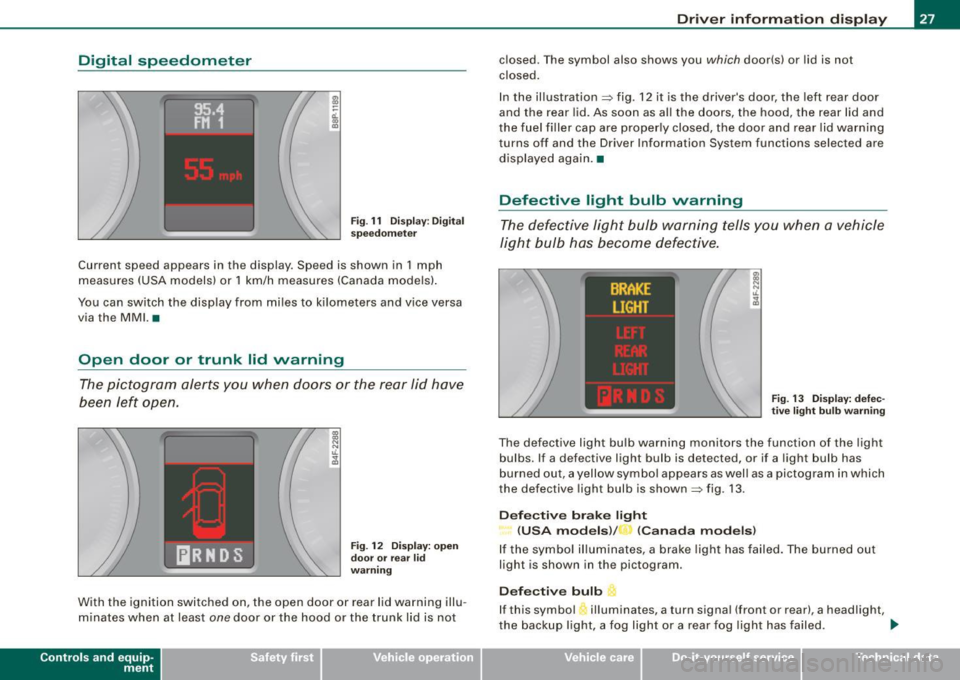
Fig. 11 Display: Digital
speedometer
Current speed appears in the display . Speed is shown in 1 mph
measures (USA models) or 1 km/h measures (Canada models).
You can switch the display from miles to kilometers and vice versa
via the MMI. •
Open door or trunk lid warning
The pictogram alerts you when doors or the rear lid have
been left open.
., ., N N t1. ;g
Fig . 12 Display: open
door or rear
lid
warning
With the ignition switched on, the open door or rear lid warning illu
minates when at least
one door or the hood or the trunk lid is not
Con tro ls and eq uip
ment
Driver information display
closed. The symbol also shows you which door(s) or lid is not
closed.
In the illustration=> fig. 12 it is the driver's door, the left rear door
and the rear lid. As soon as all the doors, the hood, the rear lid and
the fuel filler cap are properly closed, the door and rear lid warning
turns off and the Driver Information System functions selected are
displayed again .•
Defective light bulb warning
The defective light bulb warning tells you when a vehicle
light bulb has become defective.
Fig. 13 Display: defec
tive light bulb warning
The defective light bulb warning monitors the function of the light
bulbs . If a defective light bulb is detected, or if a light bulb has
burned out, a yellow symbol appears as well as a pictogram in which
the defective light bulb is shown=> fig. 13.
Defective brake light
(USA models)/ (Canada models)
If the symbol illuminates, a brake light has failed. The burned out
light is shown in the pictogram.
Defective bulb L.
If this symbol 'illuminates, a turn signal (front or rear), a headlight,
the backup light, a fog light or a rear fog light has failed . _,,
Vehicle care I I Technical data
Page 31 of 390
0 Note
If you disconnect the battery terminals, no calculations can be
made for the service interval display during this time and no service
reminder will appear. Remember that observing the proper service
intervals is vitally important to extending the life of your vehicle,
particularly the engine , and maintaining its value. Even if the
mileage driven is low, the maximum period of one year from one
service to the next must not be exceeded. •
On-Board Diagnostic system (OBD)
Malfunction Indicator Lamp (MIL)
The Malfunction Indicator Lamp (MIU -in the instrument cluster
=> page 17, fig. 7 is part of the On-Board Diagnostic (OBD II) system.
The warning/indicator light illuminates when the ignition is
switched on and goes out after the engine starts and the idle has
stabilized. This indicates that the MIL is working properly.
If the light does not go out after the engine is started, or illuminates
while you are driving , a malfunction may exist in the engine system .
If the light starts flashing, the catalytic converter could be damaged.
Continue driving
with reduced power (avoiding sustained high
speeds and/or rapid accelerations) and have the condition
corrected. Contact your authorized Audi dealer.
If the light illuminates , the electronic speed limiter may also be
malfunctioning . For more information =>
page 30, "Electronic speed
limiter".
An improperly closed fuel filler cap may also cause the MIL light to
illuminate
=> page 293. •
Contro ls and eq uip
ment
Driver information display
On -Board Diagnostics
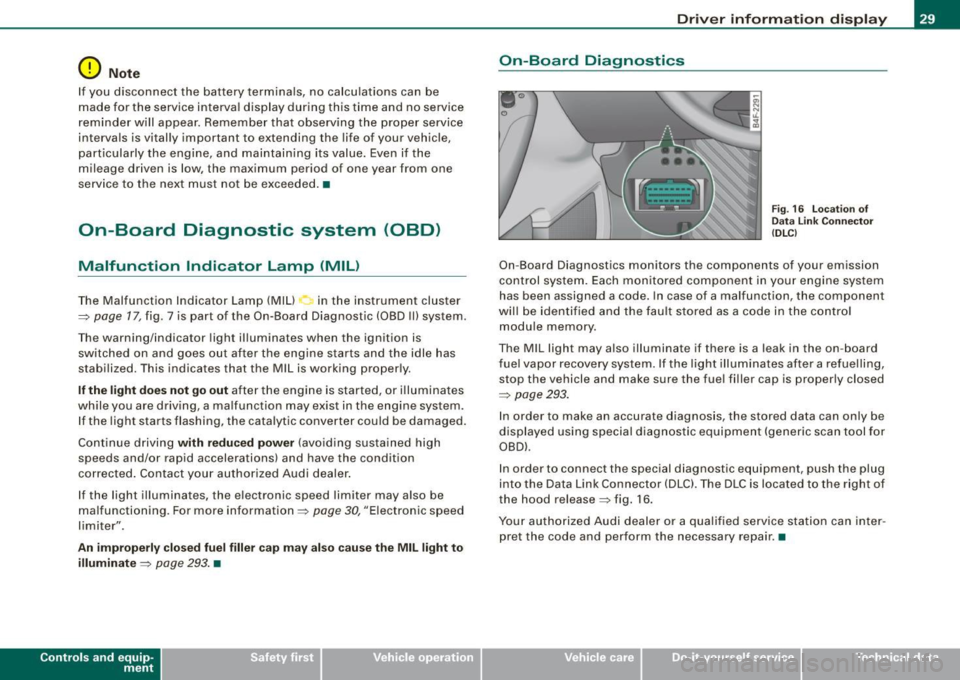
Fig. 16 Location of
Data Link Connector
(DLC)
On-Board Diagnostics monitors the components of your emission
control system. Each monitored component in your engine system
has been assigned a code. In case of a malfunction, the component
will be identified and the fault stored as a code in the control
module memory .
The MIL light may also illuminate if there is a leak in the on -board
fuel vapor recovery system. If the light illuminates after a refuelling,
stop the vehicle and make sure the fuel filler cap is properly closed
=>
page 293.
In order to make an accurate diagnosis, the stored data can only be
displayed using special diagnostic equipment (generic scan tool for
OBDl.
In order to connect the special diagnostic equipment, push the plug
into the Data Link Connector (DLC). The DLC is located to the right of
the hood release=> fig. 16.
Your authorized Audi dealer or a qualified service station can inter
pret the code and perform the necessary repair .•
Vehicle care I I irechnical data
Page 32 of 390
Driver information display
Electronic speed limiter
Your vehicle may be factory equipped with tires that are rated for a maximum speed of 130 mph (210 km/h) . This is less than the
maximum speed of your vehicle. To reduce the risk of sudden tire
failure and loss of control if the vehicle is operated at excessive
speeds, your vehicle also has an electronic speed limiter. The elec
tronic speed limiter prevents your vehic le from going faster than the
tire speed rating . For more information=>
page 325.
If the vehicle approaches the tire speed rating, the engine control
unit wi ll turn off the fuel injectors. You will notice an immediate loss
of engine power and a drop in road speed .
If the engine control unit receives faulty vehicle road speed signals,
the Malfunction Indicator Lamp (MIU will illuminate . If this
occurs, contact the nearest authorized Audi dealer for assistance .
& WARNING
Always observe the posted speed limits and adjust your speed to
suit prevailing road, traffi c and weather conditions. Never drive
your vehicle faster than the maximum speed rating of the tires
installed .•
Auto Check Control
Introduction
The Auto-Check control monitors the function of certain vehicle
features and components . It simply makes sure these features and
components are working properly. The Auto-Check control works as
long as the ignition is on, as well as whenever the vehicle is driven.
If a component is malfunctioning or if the need for an urgent repair
has been detected, this will appear in the instrument c luster display. You will
also hear an audible warning tone. The disp lays are co lor
coded in either red or yel low depending on their level of priority.
A red symbol means Danger , a yellow symbol indicates Warning . In
certain situations, information message for the driver appear in
addition to the red and yellow symbols.
Function test: automatic transmission
The Auto-Check Control will automatically perform a test each time
you switch on the ignition. With the selector lever in
P or N, the
following message appears in the display:
When stationary apply footbrake while selecting gear.
When you a se lect a different gear (for example: R, D , etc.l, the
message will disappear and the Auto-Check function is displayed.
If there is a malfunction, then the malfunction message wi ll appear
about 15 seconds after the you start the vehic le. At the same time
you will hear a warning tone .•
Driver information messages
Driver information messages are shown in the instrument
cluster display in addition to the red and yellow symbols.
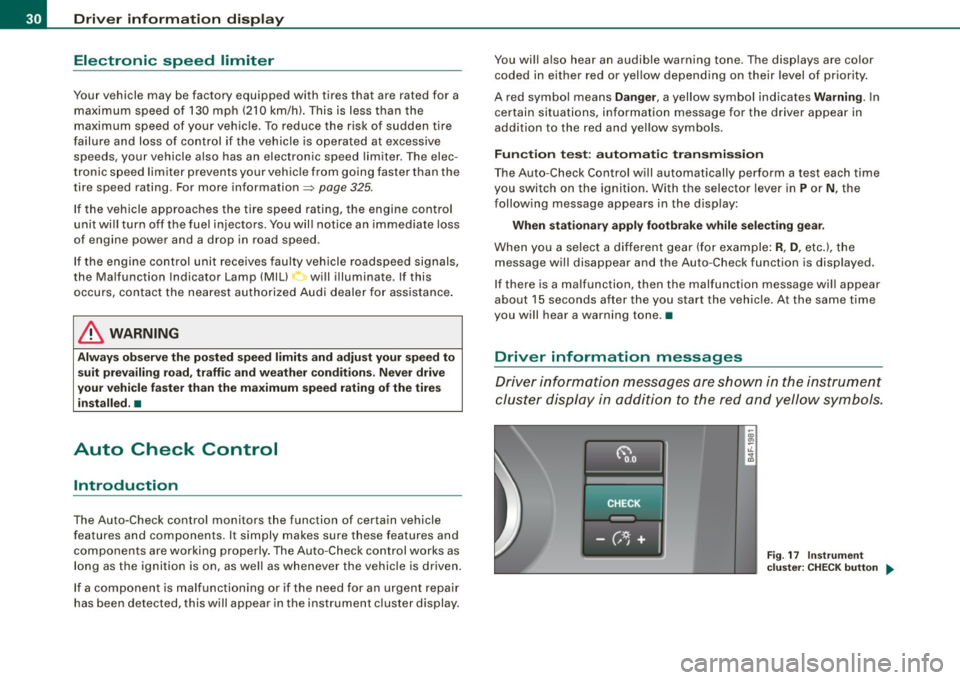
Fig. 17 Instrument
cluster: CHECK button ..