instrument cluster AUDI S6 2008 Owner's Manual
[x] Cancel search | Manufacturer: AUDI, Model Year: 2008, Model line: S6, Model: AUDI S6 2008Pages: 390, PDF Size: 88.42 MB
Page 76 of 390
Clear vision
[ i J Tips
You should turn on the emergency flashers when:
• you are the last vehicle standing in a traffic jam so that any other
vehicles coming can see you, or when
• your vehicle has broken down or you are in an emergency situa
tion, or when
• your vehicle is being towed by a tow truck or if you are towing
another vehicle behind you. •
Turn signal ¢ ¢ and high beam ~D lever
The lever on the left side of the steering column is used to
operate the turn signals and the high beam as well as the
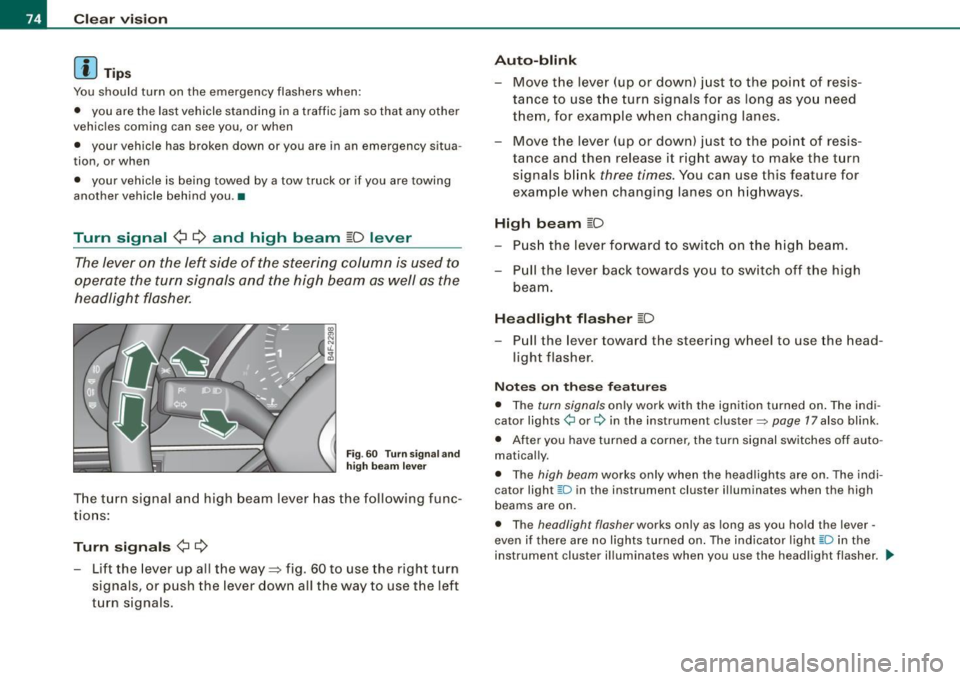
headlight flasher.
Fig . 60 Turn signa l and
high beam lever
The turn signal and high beam lever has the following func
tions :
Turn signals ¢ ¢
- Lift the lever up all the way=:> fig . 60 to use the right turn
signals, or push the lever down all the way to use the left
turn signals.
Auto -blink
- Move the lever (up or down) just to the point of resis
tance to use the turn signals for as long as you need
them, for example when changing lanes .
- Move the lever (up or down) just to the point of resis
tance and then release it right away to make the turn
signals blink
three times . You can use this feature for
example when changing lanes on highways.
High beam ~D
- Push the lever forward to switch on the high beam.
- Pull the lever back towards you to switch off the high
beam .
Headlight flasher ~D
Pull the lever toward the steering wheel to use the head
light flasher.
Notes on these features
• The turn signals only work with the ignition turned on. The indi
cator lights ¢ or¢ in the instrument cluster::::;, page 17 also blink.
• After you have turned a corner, the turn signal switches off auto
matically.
• The high beam works only when the head lights are on . The indi
cator light ~D in the instrument cluster illuminates when the high
beams are on.
• The headligh t flasher works only as long as you hold the lever -
even if there are no lights turned on. The indicator light ~Din the
instrument cluster illuminates when you use the headlight flasher. _.,
Page 117 of 390
Warm and cold 1111
-------------------'
Applies to vehicles: with heated rear se ats
Heated rear seats
The seat cushions and seat backs of the two outer rear
seats can be heated electrically.
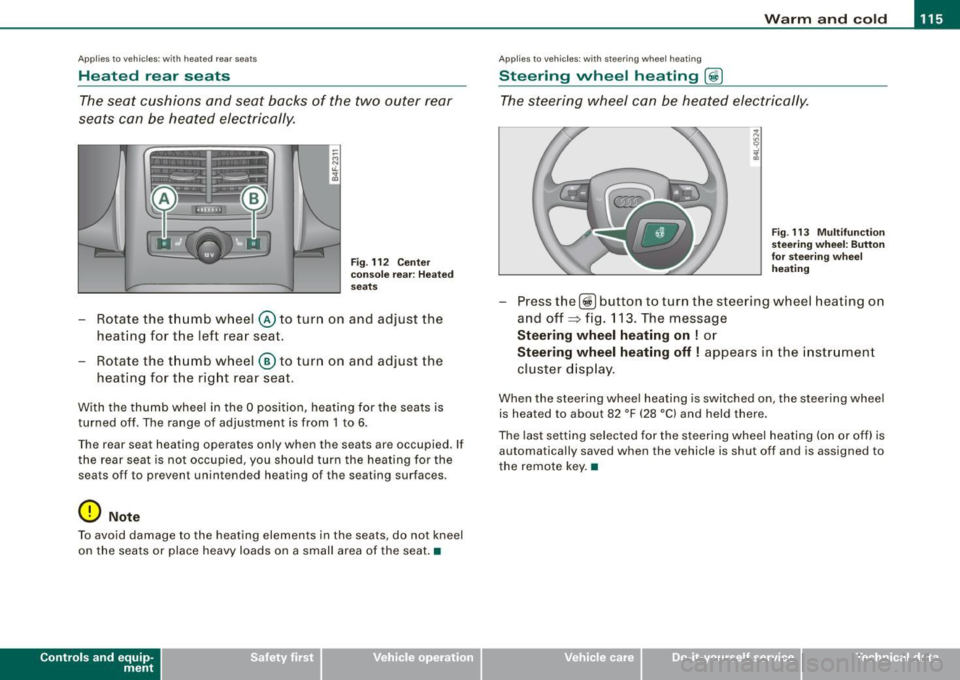
Fig . 112 Center
console rear : Heated
seats
- Rotate the thumb wheel @ to turn on and adjust the
heating for the left rear seat.
- Rotate the thumb wheel
® to turn on and adjust the
heating for the right rear seat.
With the thumb wheel in the O position, heating for the seats is
turned off . The range of adjustment is from 1 to 6.
The rear seat heating operates only when the seats are occupied. If
the rear seat is not occupied, you should turn the heating for the
sea ts off to preven t unintended heating of the seating sur faces .
0 Note
To avoid damage to the heating elements in the seats , do not kneel
on the seats or place heavy loads on a small area of the seat. •
Contro ls and eq uip
ment
Ap plies to vehi cle s: with ste erin g w heel heatin g
Steering wheel heating @
The steering wheel can be heated electrically.
Fig . 113 Multifunction
steering wheel: Button
for steering wheel
heating
Press the[@!] button to turn the steer ing wheel heating on
and off~ fig. 113. The message
Steering wheel heating on ! or
Steering wheel heating off! appears in the instrument
cluster display.
When the steering wheel heating is switched on , the steering wheel
is heated to about 82 °F (28 °Cl and held there.
The last setting selected for the steering wheel heating (on or off) is
automatically saved when the vehicle is shut off and is assigned to
the remote key. •
Vehicle care I I irechnical data
Page 130 of 390
• .___O_ n_ t_h _e _ r_o _a_ d __________________________________________________ _
& WARNING
• Never turn off the engine until the vehicle has come to a
complete stop.
• The brake booster and servotronic only work when the engine
is running. With the ignition turned off, you have to apply more
force when steering or braking. Since you cannot steer and stop
normally, this can lead to accidents and serious injuries.
• For safety reasons, you should always park your vehicle with
the selector lever in P. Otherwise, the vehicle could inadvertently roll away.
• After the engine has been switched off, the radiator fan can
continue to run for up to 10 minutes -even with the ignition
switched off. It can also switch on again after some time if the
coolant temperature rises as the result of a heat buildup or if the
engine is hot and the engine compartment is additionally heated
by the sun's rays.
0 Note
If the engine has been under heavy load for an extended period,
heat builds up in the engine compartment after the engine is
switched off -there is a risk of damaging the engine. Allow the
engine to run at idle for about 2 minutes before switching it off. •
Applies to vehicles: w ith Advanced Key
Driver messages in the instrument cluster
display
If a function is not present, a driver message appears.
No key identified
This message appears when the [STAR T) button is pressed if there
is no master key inside the vehicle or if the system does not recog
nize it. For example, the master key cannot be recognized if it is
covered by an object (e.g. aluminum brief case) which
screens the radio signal.
.Electronic devices such as cell phones can also inter
fere with the radio signal.
Press brake pedal to start engine
This message appears if you press the [ START) button to start the
engine and do not depress the brake pedal. The engine can only be
started if the brake pedal is depressed.
Engage N or P to start engine
This message appears when the engine is started if the selector
lever for the automatic transmission is not in the P or N position.
The engine can only be started with the selector in these positions.
? Key not in vehicle
This message appears along with the symbol if the master key is
removed from the vehicle with the engine running. It is intended to
remind you (e.g. when changing drivers) not to continue the journey
without the master key.
If the master key is no longer in the vehicle, you cannot switch off
the ignition after stopping the engine and you also cannot start the engine again. Moreover, you cannot lock the vehicle from the
outside with the key.
Shift to P, otherwise vehicle can roll away. Doors do not lock if lever
is not in
P.
This message appears for safety reasons along with a warning
buzzer if the selector lever for the automatic transmission is not in
the P position when the ignition is switched off with the
[STOP)
button and the driver's door is opened. Move the selector lever to
the P position, otherwise the vehicle is not secured against rolling
away. You also cannot lock the vehicle using the locking button on
the door handle or using the remote key.
To engage steering lock, press and hold STOP button
This message appears for safety reasons if the engine and the igni
tion have been switched off by pressing the [
STOP) button once, .,,_
Page 131 of 390
___________________________________________________ O_ n_ t_h _e_ r_o _a_ d _ ___.9I
and then the driver's door is opened. In this instance, the steering is
not locked . The steering is locked :
• If you press the
I STOP ] button aga in for more than 1 second.
• If you c lose the driver's door and lock your vehicle from the
outside .•
Electromechanical parking brake
Operation
The electromechanical parking brake replaces the hand
brake.
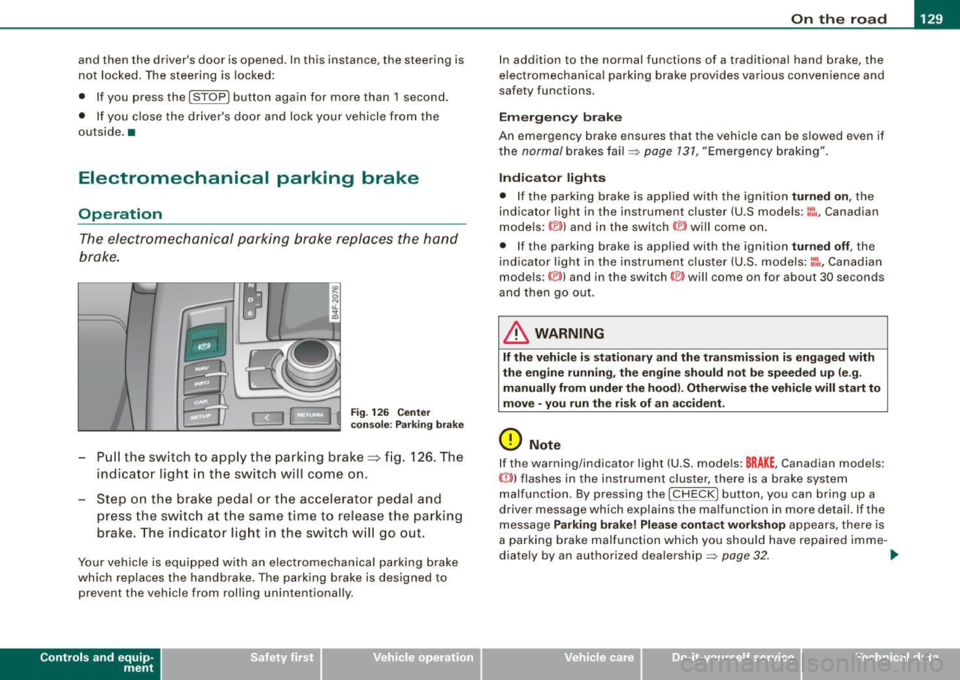
Fi g. 12 6 Center
co nso le: Parki ng bra ke
- Pull the switch to app ly the park ing brake => fig. 12 6. The
indicator light in the switch will come on .
- Step on the brake pedal or the accelerator pedal and
press the switch at the same time to rel ease the parking
brake. The indicator lig ht in the switch wi ll go out.
Your vehicle is equipped with an elect romechanical parking brake
which replaces the handbrake . T he parking brake is designed to
prevent the vehicle from rol ling unintentional ly.
Con tro ls and eq uip
ment
I n add ition to the normal functions of a traditional hand brake, the
e lectromechanica l parking brake provides various convenience and
safety functions.
Emergen cy brake
An emergency brake ensur es that the vehicle can be slowed even if
t he
normal brakes fail=> page 131, "Emergency braking".
Ind icator lights
• If the parking brake is applied with the ignition tu rned on , the
indicator light in the instrument cluster (U.S models :
::i.:,, Canadian
models: ®)) and in the switch <®) will com e on .
• I f the parking brake is app lie d with the ignition
tu rn ed off , the
indicator light in the instrument cluster (U.S. models: ::.:\,, Canadian
models :(®) ) and in the switch© will come on for about 30 seconds
and then go out .
& WARNING
If the vehicle i s stationary and the tr ansmi ssion is engag ed with
the engine ru nning , the engine should not be speeded up (e .g .
manu ally from under the hood ). Otherwi se the vehicle will sta rt to
move -you run the risk of a n accident .
0 Note
If the warning/indica tor light (U.S . mode ls: BRAKE , Canadian mode ls :
(Ci)) ) flashes in the instrument clus ter, there is a brake system
malfunction . By pressing the
I CHECK] button, you can bring up a
driver message which explai ns the ma lfunc tion in more detail. If the
message
P a rki ng brake ! Plea se conta ct w ork shop appears, there is
a par king brake malfunction which you should have repaired imme -
d iate ly by an authorized dealership=>
page 32. ..
Vehicle care
I I irechnical data
Page 133 of 390
On the road -
----------------
• Please also exercise exceptional care when you drive up or down
steep ramps or drive over curbs or other obstac les, f or which the
vehicle is not designed, because components of the veh ic le close to
the g round, suc h as bumper covers, spoi lers and suspension and
exhaust system components, may become damaged . •
Starting off with a trailer
To p reven t ro lling b ack unintentionally o n an incline, do
the foll owing:
- Keep the sw it c h pulled and depr ess the acce lera to r. The
p arking b rake stays a pplie d a nd pre ve nts the v ehi cle
f rom rolling backw ard .
- You can rele ase the switch o nce you are sure t hat you are
deve lo p ing e noug h forward mo mentum at the whee ls as
yo u de press the accelera tor.
Depending on the weight of the rig (vehicle a nd trailer) and the
severity of the inc line, you may roll backwards as you start. You can
prevent rolling bac kwards by holding the parking brake switch
pul led out and acce lerating -just as you would when starting on a
hill with a conven tiona l hand brake .•
Emergency braking
In the event that the conventional brake system fails or
locks .
-Pull the sw itch and cont inue to pu ll it to slow yo ur vehicle
with the parking b rake in an emergency.
- As soo n as you release the sw itch or acce le rat e, the
b raking proc ess s tops .
Controls and equip
ment
I f you pull the switch and hold it above a speed of about 5 mph (8
km/h), the emergency braking function is initia ted . The ve hic le is
braked at all four whee ls by activating the hydraulic brake system.
Brake performance is sim ilar to mak ing an eme rgency stop=>& .
So that emergency braking is not activated by mistake, an audible
warning tone (buzzer) sounds when the switch is pulled. As soon as
t he sw itch is released, or the accelera tor pedal is depressed, emer
gency braking stops.
& WARNING
Emergency braking should only be used in an emergency , when
the normal foot brake ha s failed or the brake pedal i s obstructed .
Using the parking brake to perform emergency braking will slow
your vehicle as if you had made a full brake application. The law s
of physi cs cannot be suspended even with E SP and its asso ciated
components (ABS , ASR , EDS ). In corner s and when road or
we ather conditions are bad , a full bra ke appl ication can cau se the
vehicle to skid or the rear end to break away -risking an
accident .•
Driver messages in the instrument cluster
Caution : Vehicle p arked too steep
This message appears when the park ing brake is app lied on an
inc line that exceeds about 30% .
I n this case the braking power of the parking brake may
not be
adequate
to prevent the vehicle from rol ling unintentional ly .
Please release parking brake
This message appears, when a gear is selected and the accelerator
pedal is depressed -re lease the parking brake. ...
I • •
Page 134 of 390
-L_:O:::... n:....:. t:..: h ~e :.....:.. ro::::.:: a:.:d::_ _________________________________________________ _
Press brak e peda l to re lease parking br ake
This driver message appears when the switch to release the parking
brake was pressed . The pa rking brake can only be released if you
press the brake or accelerator pedal and press the switch at the
same time.
Parking bra ke malfu nctio n !
This driver message appears together with the yel low symbol
when there is a parking brake ma lf u nction .
0 Note
If the warning/indicator l ight (U .S . models : BRAKE, Canadian mode ls:
«D> l flashes in the instrument cluster, there is a brake system
malfunct ion. By pressing the [ CH ECK] button, you can bring up a
driver message which explains the malfunction in more detail. If the
messag e
Parking br ake! Ple ase conta ct w ork shop appea rs , there is
a parking brake malfunction which you shou ld have repaired imme
dia te ly by an authori zed dealership =>
page 32. •
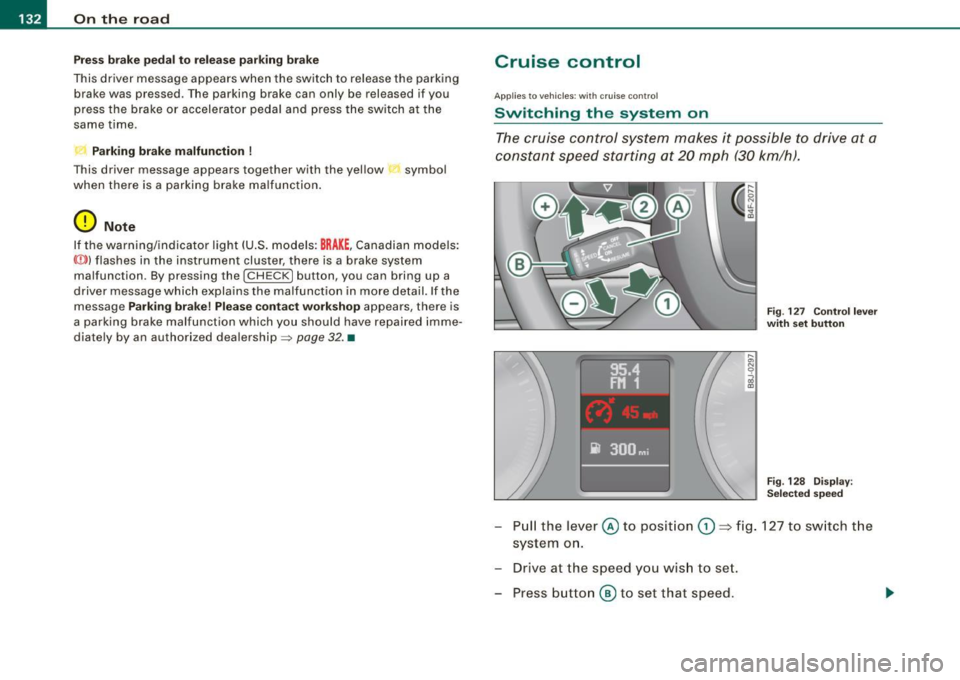
Cruise control
Ap plies to veh icles : with crui se co ntro l
Switching th e system on
The cruise control system makes it possible to drive at a
constant speed starting at 20 mph (30 km/h).
F ig . 127 Co ntrol l ever
w ith set button
Fi g. 128 D is p la y:
Se lecte d sp ee d
- Pull the lever @to posit ion 0 => fig. 127 to sw itch t he
system o n.
- Drive at the speed you wis h to set.
- Press button
® to set that speed .
Page 135 of 390
On the road -
----------------
The display=> page 132, fig. 128 will show the set speed . The
display may vary depending on the type of disp lay in your vehicle .
The indicator light
CRU ISE (US model) I (')0 (Canadian mode l) wi ll also
light up in the instrument cluster.
The speed is kept constant via an engine output adjustment or active brake intervention .
_& WARNING
• Always pa y attent ion to traffic even whe n the crui se control is
switc hed on. You are alw ays r esp onsi ble for your speed and the
di sta nce b etween your vehi cle and other vehi cle s.
• For s afet y reason s, the crui se control should not be u sed in the
c ity , in stop- and-go traffic , on twi sting roads and when road condi
t ion s a re p oor (s uch a s ice , fo g, gra vel , he avy ra in and h ydro
planing ) - risk of accident.
• Turn off the crui se control tempor arily when e nte ring tu rn
lan es, highway exit lanes or in constru ction zone s.
• Plea se note that in adv ertentl y "re sting " yo ur foot on the accel
erator ped al cau se s the cruise control not to brake . Thi s is b ecau se
the crui se control i s overridden b y the dri ve r's acc eleration .
[ i] Tips
The brake lights il luminate as soon as the brakes decelerate
automatically .•
Ap plie s to v ehicl es: w it h c ruise contro l
Changing speed
-Press lever© in the 0 or O directi on => page 132,
fig. 127 t o in crease or d ec reas e your spe ed.
- Re lease the lever to s ave tha t speed.
Controls and equip
ment Change speed in increments of 1 mph (1 km/h) by
lightly pressing
the lever . If you keep the lever pressed down, you will a lter your
speed in 5 mph (10 km /h) increments .
You can a lso press the acce lerator pedal down to increase your
speed, e.g. if you want to pass someone. The speed you saved
earlier will resume as soon as you release the accelerator pedal.
If , however, you exceed your saved speed by 5 mph (10 km/h) for
longer than 5 minutes, the cruise control will turn off temporarily .
The symbol wi ll go ou t bu t the saved speed wi ll be retained. •
Applie s to v ehic le s: with c ruise cont ro l
Presetting your speed
You can prese t your desire d speed while the vehicle is not
moving.
- Turn o n the ignition .
Pu ll lever © into posit ion
G) => page 13 2, fig. 127 .
Press the lever in the
0 or O direction to increase or
decrease your speed .
- Release the lever to save that speed .
This function makes it possible, for example, to save the speed you
want before driving on the highway. Once on the highway , activate
the cruise contro l by pu lli ng the lever toward
G) . •
Ap plies to ve hic les: with c ruise contro l
Switching the system off
Temporary dea ctivation
- Press the brake pedal, or
I • •
Page 137 of 390
__________________________________________ ...;A::::::..:: d::..: a~ p~t :..:iv ::_:e:::._: C~ ru~ is~e::....:: C:::.: o~ n:.!t :.'...ro ~ I _ _Jl'II
Adaptive Cruise Control
Speed and distance control system
Applies to vehic les : with Adaptive C ruise Cont rol
Description
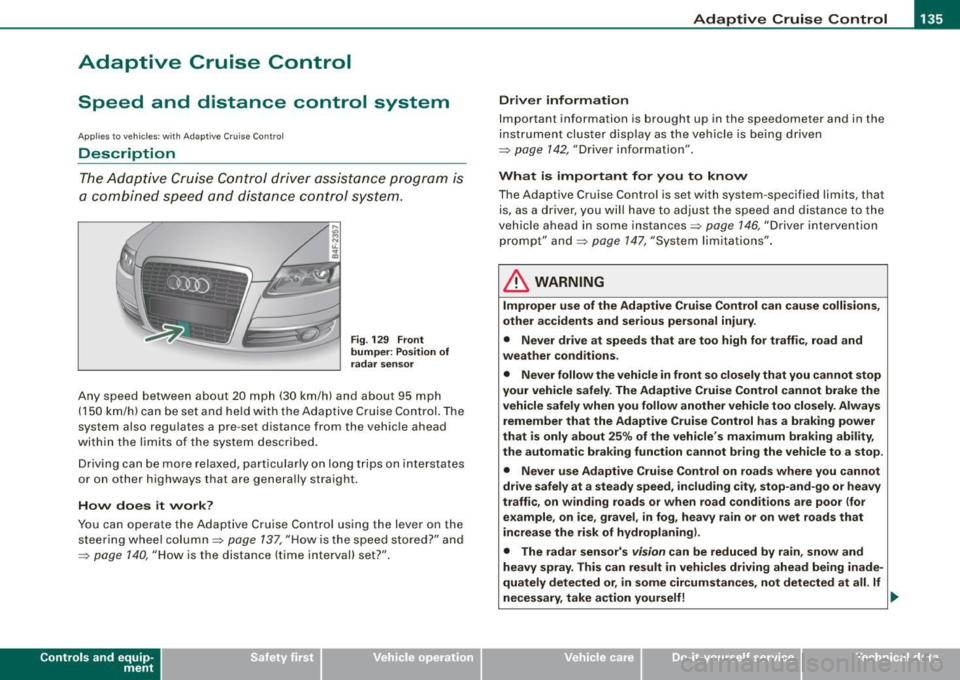
The Adaptive Cruise Control driver assistance program is
a combined speed and distance control system.
Fig. 129 Front
bumper: Position of
radar sensor
Any speed between about 20 mph (30 km/h) and about 95 mph
(150 km/h) can be set and he ld with the Adaptive Cruise Con trol. The
system also regulates a pre-set distance from the vehicle ahead
within the limits of the system described.
Driving can be more relaxed, particularly on long trips on interstates
or on other highways that are generally straight.
How does it work?
You can operate the Adaptive Cruise Control using the lever on the
steering wheel column::::> page 137, "How is the speed stored?" and
=> page 140, "How is the distance (time interval) set?".
Con tro ls and eq uip
ment
Driver information
Important information is brought up in the speedometer and in the
instrument cluster display as the vehicle is being driven
=> page 142, "Driver information" .
What is important for you to know
The Adaptive Cruise Control is set with system -specified limits, that
is, as a driver, you will have to adjust the speed and distance to the
vehic le ahead in some instances=> page 146, "Driver intervention
prompt" and=> page 147, "System limita tions".
& WARNING
Improper use of the Adaptive Cruise Control can cause collisions,
other accidents and serious personal injury .
• Never drive at speeds that are too high for traffic , road and
weather conditions.
• Never follow the vehicle in front so closely that you cannot stop
your vehicle safely. The Adaptive Cruise Control cannot brake the
vehicle safely when you follow another vehicle too closely. Always
remember that the Adaptive Cruise Control has a braking power
that is only about 25% of the vehicle's maximum braking ability,
the automatic braking function cannot bring the vehicle to a stop.
• Never use Adaptive Cruise Control on roads where you cannot
drive safely at a steady speed, including city, stop-and-go or heavy
traffic, on winding roads or when road conditions are poor (for
example, on ice, gravel , in fog , heavy rain or on wet roads that
increase the risk of hydroplaning).
• The radar sensor's
vision can be reduced by rain, snow and
heavy spray. This can result in vehicles driving ahead being inade
quately detected or, in some circumstances, not detected at all. If
necessary , take action yourself! ._
Vehicle care I I irechnical data
Page 142 of 390
• ..__A_ d_ a-:.. p_t _iv _ e_ C_r_ u_ i _s _ e_ C_ o_n_ t_ r_ o_ l _____________________________________________ _
Applies to ve hicles : w it h Ad aptive Crui se Co nt rol
How is the distance (time interval) set?
Distance can be set in four stages.
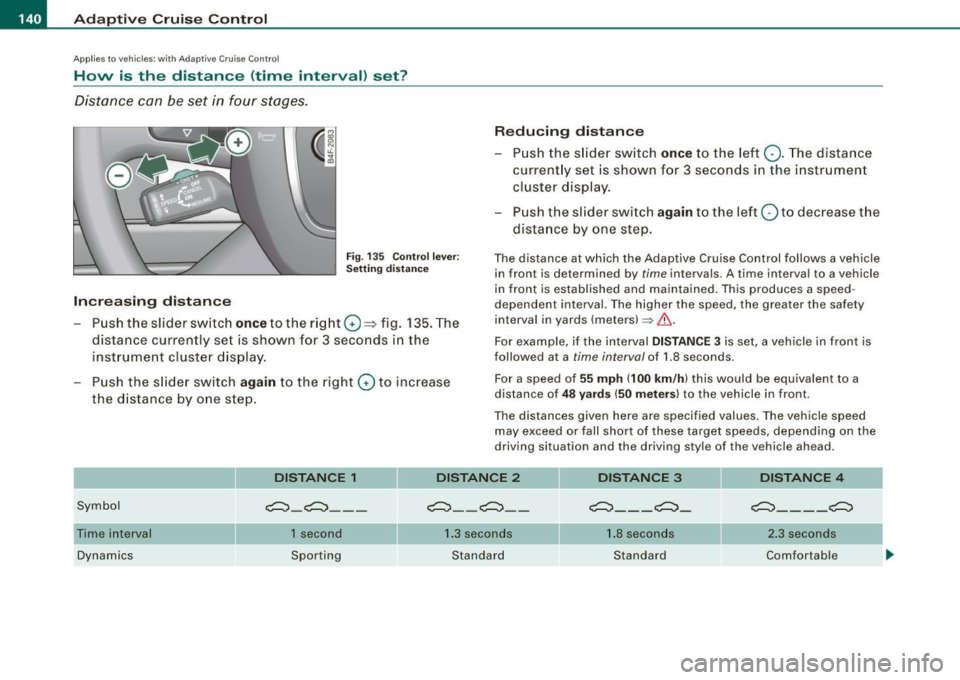
Fig . 135 Co ntrol lev er:
Se tting d is ta nce
Increasing distance
- Pus h the slid er switch once to the r ig ht G) ::::;> fig. 135. The
dista nce currently set is shown for 3 seconds in the
inst rument cluster d isp lay.
Push the s lid er sw itch
again to the right G) to increase
the d istanc e by o ne s tep .
Reducing distance
Push th e sli de r sw itch once to the left Q. The distance
current ly set is shown for 3 seconds in the instrument
cluster disp lay.
- Pu sh the s lider swi tch
again to the left Q to dec rease t he
dista nce by one step.
The distance at which the Adap tive Cruise Control follows a vehicle
in front is determ ined by
time intervals. A time interva l to a vehicle
in front is estab lished and mai nta ined . This produces a speed
dependent interval. The higher the speed , the greater the safety
interval in yards (meters)~& .
For example, i f the interval
DISTANCE 3 is set, a vehicle in front is
followed at a
t i me interval of 1.8 seconds .
Fo r a speed of
55 mph (100 km /h ) this would be equiva lent to a
distance of
4 8 yard s (50 mete rs ) to the vehicle in front.
The distances given here are specified values. The vehicle speed may exceed or fa ll shor t of these target speeds, depending on the
driving situation and the driving sty le of the v ehicle ahead.
DISTANCE 1
Symbol c:::::,_c:::::, __ _
DISTANCE 2
c:::::, __ c:::::, _ -
DISTANCE 3
c:::::,_ - _ c:::::,_
DISTANCE 4
c:::::,_ - - _c:::::,
Time interval
Dynamics 1 second
Sporting 1
.3 seconds
Standard 1.
8 seconds
Standard 2
.3 secon ds
Comfortable
Page 144 of 390
• ..__A_ d_a...: p:,..._ ti_v _ e_ C_ ru_ is_ e_ C_ o_n_ t_ r_ o _ l ___________________________________________ _
& WARNING (continued)
• Setting short distances to the traffic ahead reduces the time
and distance available to bring your vehicle to a safe stop and
makes it even more necessary to pay close attention to traffic.
• Always use good judgment and select a safe following distance
for the traffic, road and weather conditions.
[ i ] Tips
The distance setting is reset to the factory default DISTANCE 3 the
next time the ignition is turned on.•
Driver information
Applies to veh icles : with Ada ptive C ru is e Cont ro l
Displays in the instrument cluster
Depending on the driving situation, driver information is
displayed in the instrument cluster.
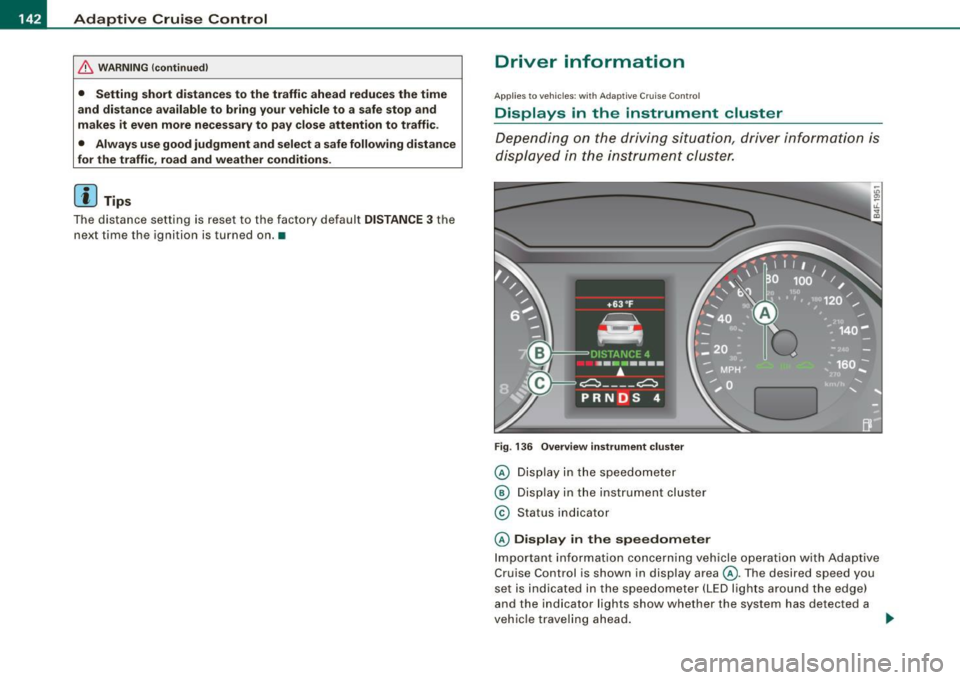
Fig. 136 Overview instrument cluster
© Display in the speedometer
® Display in the instrument cluster
© Status indicator
© Display in the speedometer
Important information concerning vehicle operation with Adaptive
Cruise Control is shown in display area@. The desired speed you
set is indicated in the speedometer (LED lights around the edge)
and the indicator lights show whether the system has detected a
vehicle traveling ahead. -.,