transmission AUDI S6 2008 Owner's Manual
[x] Cancel search | Manufacturer: AUDI, Model Year: 2008, Model line: S6, Model: AUDI S6 2008Pages: 390, PDF Size: 88.42 MB
Page 349 of 390
_______________________________________________ F_ u_ s...:....... e...;.s _ a_ n_d :.:.....:.: b:...: u:...: l:.:.: b :...:s:...___,J
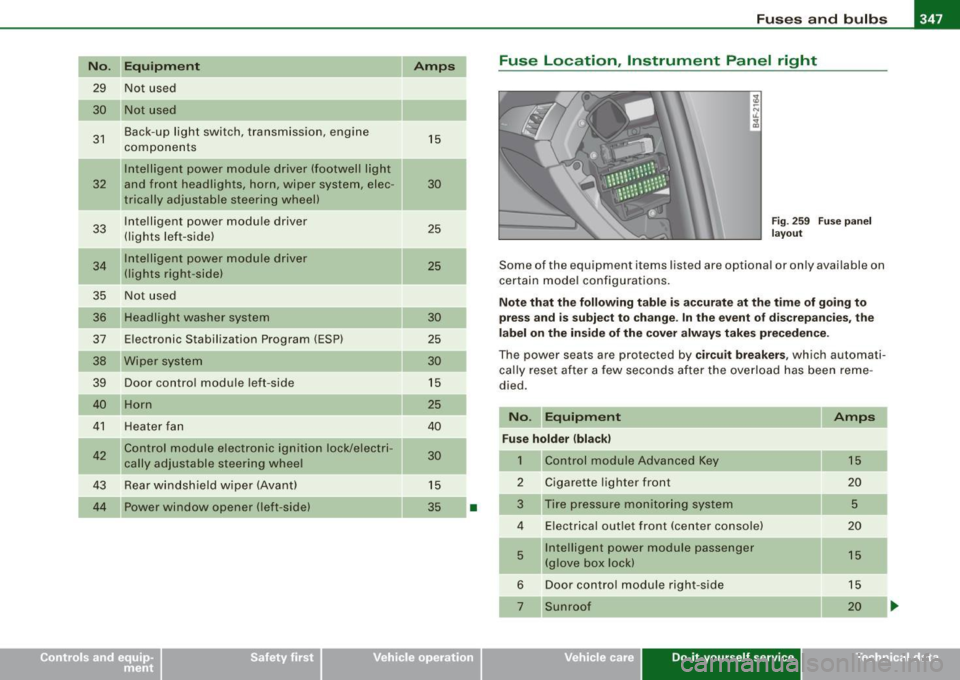
No . Equipm ent
29 Not used
30 Not used
31 Back-up light swi
tch, transmission , engine
components
Intelligent power mo dule driver (footwell l ight
32 and front headlights , horn, wiper system, elec
tr ically adjusta ble steering wheel)
33 I
ntelligent power modu le driver
(lights left -side)
---,--
34
35
36
37
38
39 I
nte lligent power modu le driver
(lights right -side)
Not used
Headlight washer system
E lectronic Stabilization Program (ESP)
Wip er system
Door control module left -side
Horn
41 Heater fan
42 Control module electronic ignition lock/electri
cally adjustable steering wheel
43 Rear windsh iel d wiper (Avant)
4 4 Power window opener (left-side)
Amps
15
30
25
25
30 25
30
15
25
40
30
15
35
-
•
Fuse Location , Instrument Panel right
Fig . 2 59 F use p an el
la yo ut
Some of the equipm ent items lis ted are op tional or on ly available on
certain m ode l configu rations.
Note that the following table is ac curate at the time of g oing to
press and is subject t o change . In the ev ent of d iscrepan cies , th e
l a b el on t he in side of the cover alw ay s take s prec eden ce.
Th e power seats are pr otected by circuit breaker s, which automa ti
ca lly reset after a few seconds a fter the ove rload has been reme
died .
No. Equipment Amps
Fu se holder (bla ck )
1 Control module Advanced Key 15
2 Cigarette
lighter front
20
3 Tire pressure moni tor ing system
5
4 E lectrica l outlet front (center conso le) 20
5 Intellige
nt power module passenger
15
(glove box lock)
6 Door control module right -side 15
Sunroof 20
Vehicle care Do-it-yourself service irechnical data
Page 350 of 390
111!1 Fuses and bulbs ..._ ____ .;__...;_;,;_ _______________________________ _
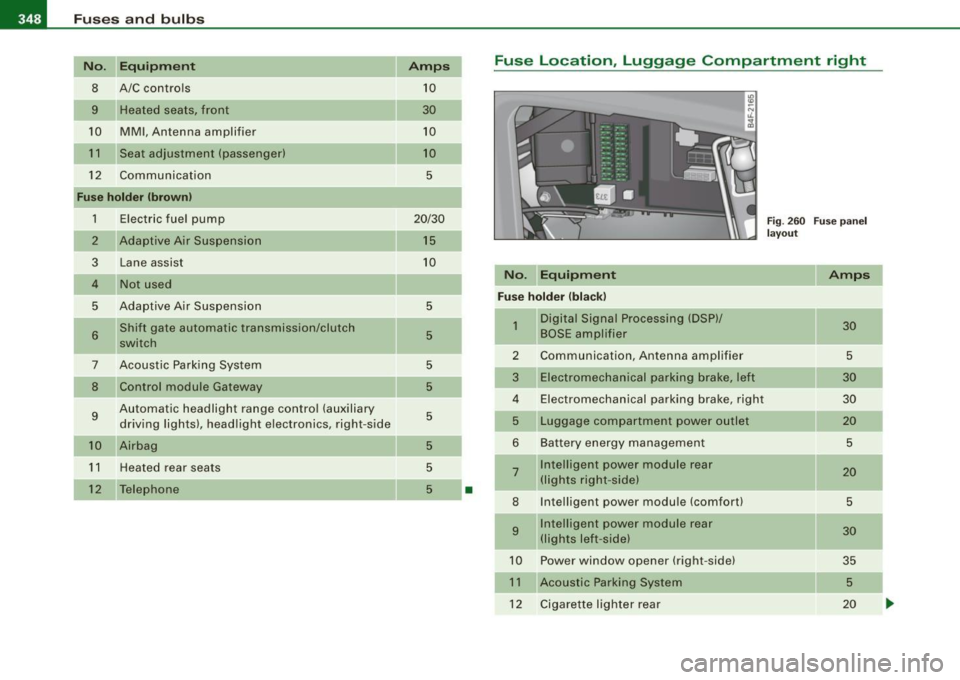
No. Equipm ent Amps
8 A/C controls 10
9 Heated seats, front 30
10
MMI , Antenna amplifier 10
11
Seat adjustment (passenger) 10
12
Communication 5
Fu se holder (b rown )
1 Electric fuel pump 20/30
2
Adaptive Air Suspension 15
3
Lane assist 10
4 Not used
5 Adaptive Air Suspension 5
6 Shift gate automatic transmission/clutch 5 switch
-
7 Acoustic Park ing System 5
8 Control module Gateway 5
9 Automatic headlight range contro l (auxiliary 5 driving lights), head light electronics, right -side
10 Airbag 5
11
Heated rear seats 5
12
Telephone 5 •
Fuse Location, Luggage Compartment r ight
No . Equipm ent
Fuse hold er (bl ack)
1 Digital Signal Processing (DSP)/
BOSE ampl ifier
2 Communication , Antenna amplifier
3 Electromechanical parking brake, l eft
4 Electromechanical parking brake, right
5 Luggage compartment powe r outlet
6 Bat tery energy management
7 Intelligent power module rear
(lights right -si de)
8 Intelligent power module (comfort)
9 Intelligent power module rear
(lights le ft-side)
10 Powe r window opener (right-side)
11 Acoustic Parking System
12 Cigarette lighter rear
Fig . 260 F use pa nel
l ay ou t
Amps
30
5
30
30
20
5
2 0
5
30
35 5
20
-
Page 354 of 390
-Emerg ency situation s PW...__-=---=---------------
& WARN ING (c ontinu ed )
• Bef ore you chec k anything in the engin e compartment , always
re ad and h eed all W ARNINGS =>
page 289, "Engine compa rtment".
0 Note
• Applying a higher voltage booster battery wil l cause expensive
damage to sensitive electronic components, such as contro l units,
relays, radio, e tc.
• There must be no electrical contact between the vehicles as
otherwise current could already start to flow as soon as the positive
( + ) terminals are connected .
[ i ] Tip s
• The discharged battery must be properly connected to the
vehic le's e lectrical system. When jump starting or charging the
battery, never connect the negative ground cable to the battery
negative pos t because the battery manager system must be ab le to
detect the battery's state of charge . Always connect the negative
ground cable to the negat ive ground post of the battery manager
control unit. •
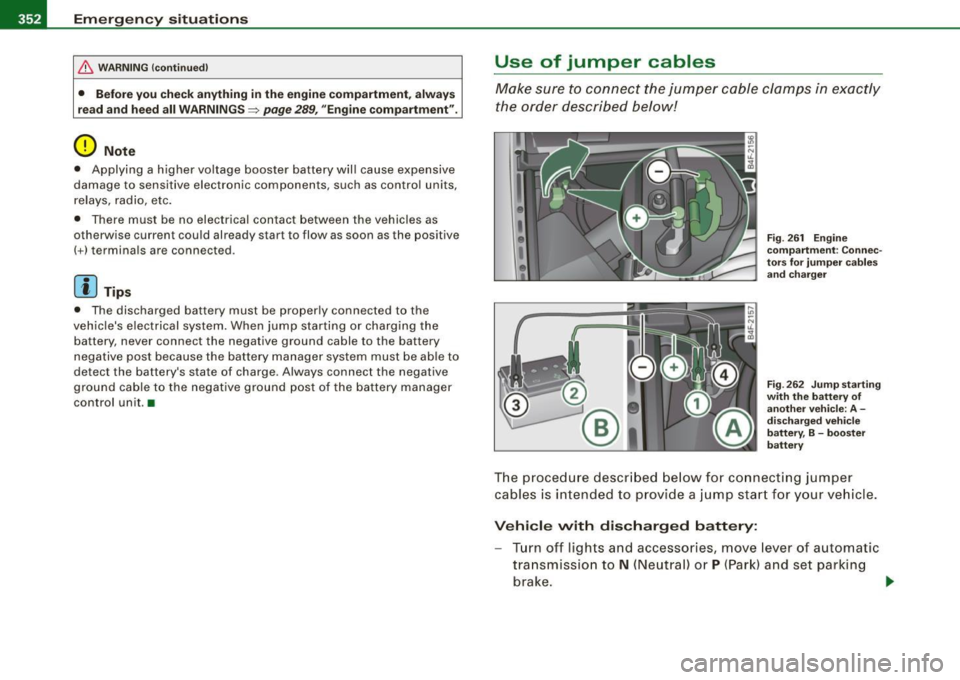
Use of jumper cables
Make sure to connect the jumper c able clamps in exac tly
the order described below!
F ig . 26 1 Engin e
co mpartm ent : Co nnec
to rs for ju mp er ca ble s
and cha rger
F ig . 2 62 Jump starti ng
w ith th e battery of
anot her veh icle: A -
d isc harg ed veh ic le
b att ery, B -boost er
batt ery
The proced ure descr ibed below fo r connecti ng jumper
cables is int ended to prov ide a j ump start f or y our vehicle .
Vehi cle with dis charg ed battery:
- Turn off lights and accessories, move lever of automatic
transmission to
N (Neutral) or P (Par k) and set parking
brake .
~
Page 356 of 390
IIIII...__E_ m _ e _r.;:g '-e_ n_ c-=y - s_ i_t _u _a _t_ i_o _n_ s _______________________________________________ _
Emergency towing with commercial
tow truck
General hints
Your Audi requires special handling for towing.
The following information is to be used by commercial tow truck
operators who know how to operate their equipment safely.
• Never tow your Audi, towing will cause damage to the engine
and transmission.
• Never wrap the safety chains or winch cables around the brake
lines.
• To prevent unnecessary damage, your Audi must be transported
with a flat bed truck.
• To load the vehicle on to the flat bed, use the towing loop found
in the vehicle tools and attach to the front or rear anchorage
~ page 354 and~ page 355.
& WARNING
A vehicle being towed is not safe for passengers. Never allow
anyone to ride in a vehicle being towed, for any reason. •
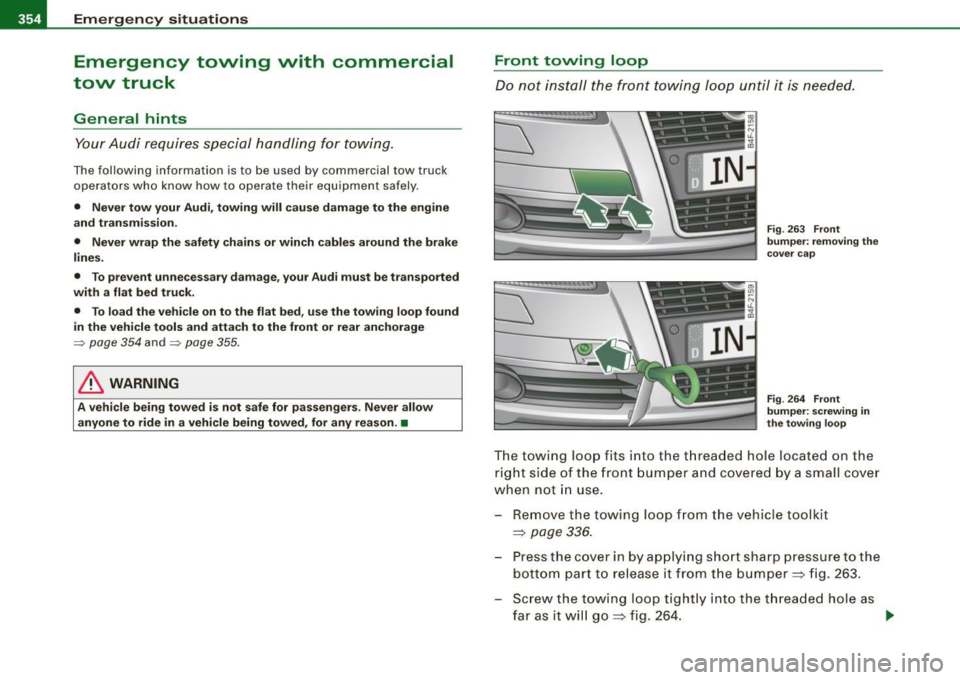
Front towing loop
Do not install the front towing loop until it is needed.
Fig. 263 Front
bumper: removing the
cover cap
Fig . 264 Front
bumper: screwing in
the towing loop
The towing loop fits into the threaded hole located on the
right side of the front bumper and covered by a small cover
when not in use.
- Remove the towing loop from the vehicle toolkit
=>
page 336.
- Press the cover in by applying short sharp pressure to the
bottom part to release it from the bumper => fig. 263.
- Screw the towing loop tightly into the threaded hole as
far as it will go=> fig. 264. ..,
Page 359 of 390
________________________________________________ E _m_ e_r.:g :;,. e_ n_c ...: y:.- s_ i_ t _u _a_ t_ i_ o _ n_ s __ lll
•
& WARNING
• To reduce the risk of serious injury and vehicle damage.
-Always lift the vehicle only at the special workshop hoist and
floor jack lift points illustrated
=> page 356, fig. 267 and
=> page 356, fig. 268.
- Failure to lift the vehicle at these points could cause the
vehicle to tilt or fall from a lift if there is a change in vehicle
weight distribution and balance. This might happen, for
example, when heavy components such as the engine block or
transmission are removed.
• When removing heavy components like these, anchor vehicle
to hoist or add corresponding weights to maintain the center of
gravity. Otherwise, the vehicle might tilt or slip off the hoist,
causing serious personal injury.
0 Note
• Be aware of the following points before lifting the vehicle:
- The vehicle should never be lifted or jacked up from under
neath the engine oil pan, the transmission housing, the front or
rear axle or the body side members . This could lead to serious
damage.
- To avoid damage to the underbody or chassis frame, a rubber
pad must be inserted between the floor jack and the lift points.
- Before driving over a workshop hoist, check that the vehicle
weight does not exceed the permissible lifting capacity of the hoist .
- Before driving over a workshop hoist, ensure that there is
sufficient clearance between the hoist and low parts of the
vehicle. •
Do-it-yourself service
Page 362 of 390
lllffll,___G_ e_ n_ e_r_a _ l_ i _n_ f_ o_ rm_ a _t_io _ n _______________________________________________ _
General information
Explanation of technical data
Some of the technical data listed in this manual requires
further explanation.
The technical data for your vehicle is listed in the charts starting on
~ page 363. This section provides general information, notes and
restrictions which app ly to this data. •
Vehicle identification
The key data is given on the vehicle identification number
(VIN) pla te and the vehicle data st icker.
F ig. 269 Ve hicl e Id enti
fi ca tion Number (V IN)
pl ate : lo cation on
d riv er 's s ide das h
pan el F
ig . 2 70 The vehi cle
i d e ntifi cat ion la be l -
i nside the lug gag e
com partm ent
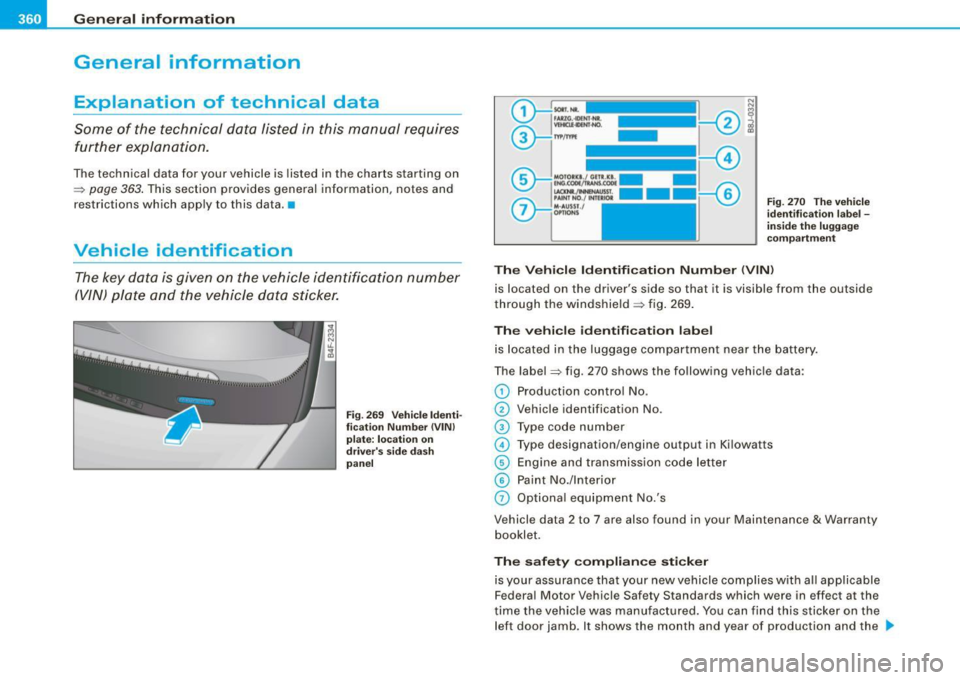
The Vehicle Id enti fication Numb er (V IN)
is located on the driver's side so that it is visible from the outside
through the windshield ~ fig . 269 .
The veh icle i de ntifi cat ion lab el
is located in the luggage compar tment near the battery.
The label~ fig. 270 shows the following vehic le data :
0 Production control No.
0 Vehicle identification No.
G) Type code number
© Type designation/engine output in Ki lowatts
@ Engine and transmission code letter
© Paint No./lnterior
0 Optiona l equipment No.'s
Vehicle data 2 to 7 are also found in your Maintenance
& Warranty
booklet.
Th e s afet y co mpli ance sti cker
is your assurance that your new vehicle complies with a ll app licable
Federa l Motor Vehicle Safety Standards which were in effect at the
time the vehicle was manu factured. You can find this sticker on the
left door jamb . It shows the month and year of production and the .._
Page 369 of 390
_______________________________________________ C _o_ n _ s_u _ m_ e_ r_l_n _f_o _ r_ m_ a_ t _i _o _ n __ PII
workshop personne l in order to assure proper performance, reli
abil ity and sa fe ty of the vehicle a nd i ts many sys te m s.
I mproper maintenance, adjustments and repairs can impair the
operation and reliabil ity of your vehicle and even void your vehicle
war ra nty. T here fore, proof o f serv ic ing in accorda nce with the main
tenance schedule may be a condition for uphold ing a possible
war ra nty claim made withi n th e warranty per iod .
Above all, operat ional safety can be adverse ly affected, creating
unnece ssary risks fo r you and you r passengers .
If in doubt about a ny servici ng, have it do ne by your authorized Aud i
dea ler or any other properly equipped and qua lified workshop. We
str ongly u rge you to give your auth orized Audi dealer the oppo rtu
nity to perform al l scheduled maintenance and necessary repairs.
You r deale r has the facil ities, origi nal par ts and trained special is ts
to keep your vehic le running proper ly.
Performing limited maintenance yourself
T he fo llow ing pages describe a limited numbe r of procedures which
can be perfo rme d on you r vehicle wi th ordi nary too ls, should the
need arise and trained personne l be unavailab le. Before performing
any of these proced ures, always thor oug hly read a ll of th e appli
cable text and carefu lly fo llow the instructions given. Always rigor
ously observe the WARNINGS provided.
Before you check anything in the engine compartment , alway s read
and heed all WARNINGS:::>
& and:::> & in "Wo rking in the engine
compartment" on
page 297.
& WARNING
• Ser ious persona l injury may occur as a result of improperly
performed maintenance , adjustments or repairs.
• Always be e xtremely careful when working on the vehicle .
Always follow commonly accepted safety practices and general
c ommon sense . Never ri sk per sonal injury .
Controls and equip ment Safety first
Vehicle operation
& WARNING (continued )
• Do not attempt any of the maintenance , checks or repairs
described on the following pages if you are not fully familiar with
these or other pro cedures with respect to the vehicle , or are uncer
tain how to proceed.
• Do not do any work without the proper tools and equipment.
Have the necessary work done by your autho rized Audi dealer or
another properly equipped and qualified workshop .
• The engine compartment of any motor vehicle is a potentially
hazardous area . Never reach into the area around or touch the
radiator fan . It i s temperature controlled and can switch on
suddenly - even when the engine is off and the ignition key has
been removed . The radiator fan switche s on automatically when
the coolant reaches a certain tempe rature and will continue to run
until the coolant temperature drops .
• Always remove the ignition key before anyone gets under the
vehicle.
• Always support your vehicle with safety stands if it is neces
sary to work underneath the vehicle. The jack supplied with the
vehicle is not adequate for this purpose and could collapse
causing serious personal injury .
• If you must work underneath the vehicle with the wheels on
the ground, always make sure the vehicle is on level ground , that
the wheels are always securely blocked and that the engine
cannot be started .
• Always make sure the transmission selector lever (automatic
transmission) is in "P " (Park position) and the park br ake is firmly
appl ied .
ffi For the sake of the environment
• Changing the engine settings wi ll adverse ly affect emission
leve ls. T his is detrimenta l to the envi ro nmen t and i ncreas es fu el
consumption.
Vehicle care Do-it-yourself service Tec hn ica l da ta
Page 375 of 390
Alphab eti ca l ind ex -
-------------=----
Anti-loc k brake syst em
H ow the ABS system works ....... . 262
War ning/i ndicato r lights ... ....... .. 22
Anti -Slip Regulation System (ASR)
How the system works ............ 260
Anti-theft systems Anti-theft alarm system . .... .... ... 61
Electronic immobilizer ... .. .... .... 51
Ti lt sensors . ... .. .... ..... .. ... ... 62
Ashtray Front . ...... .... .... ...... .... .. 104
Rear .... ... .. .... .... ... .... .... 105
ASR How the Anti -Slip Regu lation System
works . ... .. .... .... ... .... .... 260
As terisk
What does it mean when something is marked with an asterisk? .. ... ...... 6
Audi Parking System Acoustic parking sys tem tips ...... . 179
Adjusting the chimes -option 1 ... .. 178
Adjusting the chimes -option 2 ... .. 179
General Information ... .. .... .... . 167
Notes on distance information ..... 177
P arking next to obstacles .......... 176
rear . .............. .......... ... 167
rear, with rear-view camera ........ 169
Rear -view camera -parking mode 1 173
Rear -view camera -parking mode 2 . 175
Rear -view camera (Rear View) .. .... 17 1
Rear -view camera coverage area . ... 173
Rear-view camera tips .. ...... .... . 180
Specia l parking situations .... .... . 176
Controls and equip
ment Safety first
Audi Parking System
(rear)
Adjusting the chimes ... .. .... .... 168
Audi Service Repair Manua ls and Li terature
366
AUTO mode AC climate contro ls ............... 113
Au to Safety Hotline ..... .... .... ..... 201
Auto -Check Control .. .... ...... ....... 30
Automatic belt retractor ... .. .... .... . 206
Automatic car wash
See Was hing .. ... ..... ....... .... 279
Automatic Shift Lock (ASU ........ 155, 162
Automatic transmission
6 -speed automatic transmission .. .. 153
Automatic Shift Lock (ASU ... .. 1 55, 162
Driving .......................... 153
Dynamic shift program ............ 156
Emergency release for selector lever 159
Emergency release for selector lever
(mult itronic®) ...... .... .... .... 1 66
Fail -safe mode . ...... .... .... .... 158
I gnition key safety lock ............ 125
Kick -down . ....... .... .... .... ... 156
Manual shift program ............. 157
multitronic® ................... .. 159
Selector lever ................ 154, 161
Shift buttons ................ 158, 165
Steering wheel with tiptron ic® . 158, 165
Average speed ....................... 40
Avo id damaging the vehicle ...... .... . 269
B
Battery .. ........ ....... ........ ... 307
Battery location inside the lu ggage
compartment . ...... ... .... .... . 308
Charging .. .... ....... ..... .... .. 3 10
Important warnings when working on the
battery ...... .... ... .... ...... . 308
J ump starting ..... .... ... .... .... 35 1
Low ...... ... .... .... ...... ... .. 265
Replacing the battery ..... .... ... . 311
State of charge . .... ...... .... ... . 265
Voltage .. .... .................... 37
Winter operation ......... .... .... 307
Working on the battery ........ .... 308
Before driving ... .... .... ..... .. .... 193
Blended gasoline ...... ... .... .... ... 29 1
Body cav ity sealing .......... ........ 284
Booster seats .. ... .. .... .... .... ... . 242
How do I properly insta ll a b ooster sea t in
my vehicle? ....... ........ .... . 24 2
Safety instructions ................ 242
Brake assistant ....... ... .... .... ... 263
Brake booster .. ...... .... ... .... .... 262
Brake fluid Changing the brake fluid .......... . 307
Checking the brake fluid leve l ...... 306
Reservoir .. .... .... ............. . 306
What is the correct brake fluid leve l? 306
What should I do i f the brake f luid warning
light comes on? .. ....... ........ 306
Brake light Defective ... .. .... .... .... ...... .. 27
Vehicle operation Vehicle care Do-it-yourself service Technical data
Page 377 of 390
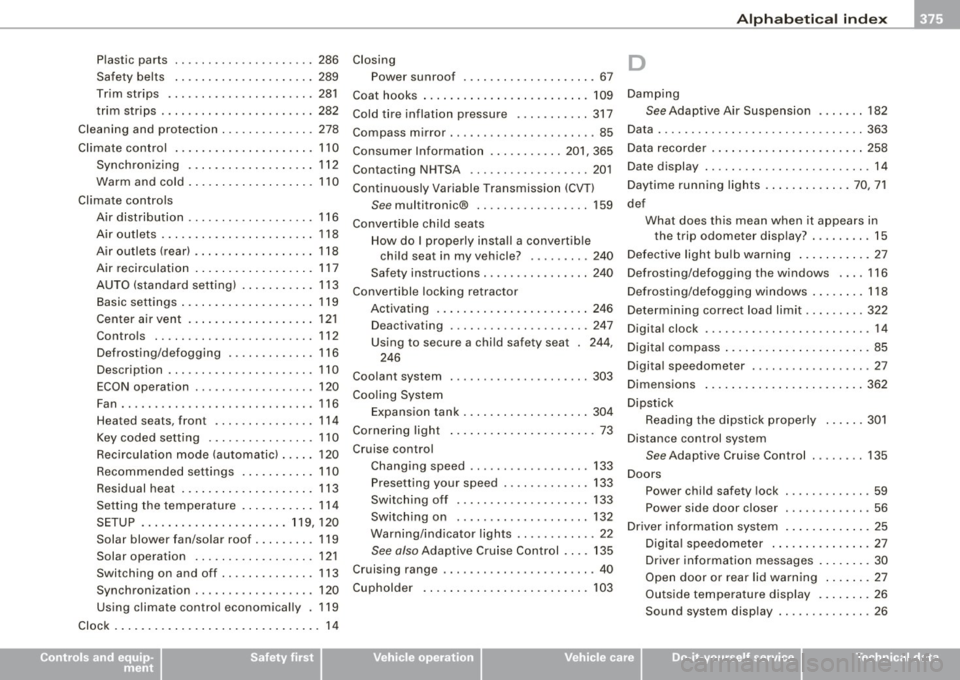
Alphab eti ca l ind ex -
--------------------------'-----
Plastic parts
Safety belts 286
289
Trim strips .... ... ....... ..... .. . 281
trim strips .... ........... ........ 282
Cleaning and protection .. .... ... ..... 278
Climate control ... .... .... .... .... .. 110
Synchronizing .. .... .... .... ..... 112
Warm and cold ........ .... .... ... 110
Climate controls Air distribution ........... .... .... 116
Air outlets ..... .. .... .... ...... .. 118
Air outlets (rear) ...... ....... .... . 118
Air recirculation .... .... .... .... .. 117
AUTO (standard setting) . .... .... .. 113
Basic settings . . . . . . . . . . . . . . . . . . . . 119
Center air vent ...... .... ....... .. 121
Controls ............. .... ....... 112
Defrosting/defogging . .... ... .... . 116
Description ... ..... .. .... ...... .. 110
ECON operation . . . . . . . . . . . . . . . . . . 120
Fan . .......... ...... .... ...... .. 116
Heated seats, front .... ... .... .... 114
Key coded setting ................ 110
Recirculation mode (automatic) ... .. 120
Recommended settings . .... .... .. 110
Residual heat .. ...... .... ...... .. 113
Setting the temperature . .... .... .. 114
SETUP ......... .... ... .. .... 119, 120
Solar blower fan/solar roof .. ...... . 119
Solar operation ... ........... .... 121
Switching on and off .. .... ...... .. 113
Synchronization .. .... ........... . 120
Using climate control economically . 119
Clock ......... ........ .... ... .... ... 14
Controls and equip
ment Safety first
Closing D
Power sun roof
. . . . . . . . . . . . . . . . . . . . 67
Coat hooks ... .... .... .... .... ... ... 109 Damping
Cold tire inflation pressure ....... .... 317
See Adaptive Air Suspension ...... . 182
Compass mirror .. ... ..... ... .... ... .. 85 Data ..
... .... .... .... ... .... .... ... 363
Consumer Information ......... .. 201, 365 Data recorder ..
...... .... ...... .... . 258
Contacting NH TSA .. .. .. ... ... .... .. 201 Date display
........... ........ ...... 14
Continuously Variable Transmission (CVT) Daytime
running lights ... .... .... .. 70, 71
See multitronic® .. .... .... .... ... 159 def
Convertible chi ld seats What does this mean when it appears in
How do I properly install a convertib le the trip odometer display? .
.... .... 15
child seat in my vehicle? ......... 240 Defective light bu
lb warning .... .... ... 27
Safety instructions ................ 240 Defrosting/defogging the windows .... 116
Convertible locking retractor Defrosting/defogging windows ..... ... 118
Activating .......... .... .... .... . 246
Determin ing correct load limit ........ . 322
Deactivating . .... .... ... ..... ... . 247
Digital clock ..... ..... ...... .... .... . 14
Using to secure a chi ld safety seat . 244,
246
Coolant system ..................... 303 Digital compass
... .. .... .... .... ..... 85
Digita l speedometer ........... ....... 27
Dimensions .... .... .... ........... . 362
Coo ling System
Expansion tank .. .... .... ... .. .... 304
Cornering light .... ... .... .... ... .. .. 73
Cruise control
Changing speed .................. 133
Presetting your speed ............. 133
Switching off .................... 133
Switching on .................... 132
Warning/indicator lights .. .... ...... 22
See also Adaptive Cruise Control . ... 135
Cruising range ......... ...... .... ... . 40
Cupholder . ... .. ...... ....... .... .. 103 Dipstick
Reading the dipstick properly .... .. 301
Distance control system
See Adaptive Cruise Control ........ 135
Doors Power child safety lock . ........ .... 59
Power side door closer ............. 56
Driver information system ...... .... . .. 25
Digita l speedometer . .. .. . ... .... .. 27
Driver information messages . .... ... 30
Open door or rear lid warning .... ... 27
Outside temperature display ...... .. 26
Sound system display .. .... .... .... 26
Vehicle operation Vehicle care Do-it-yourself service Technical data
Page 382 of 390
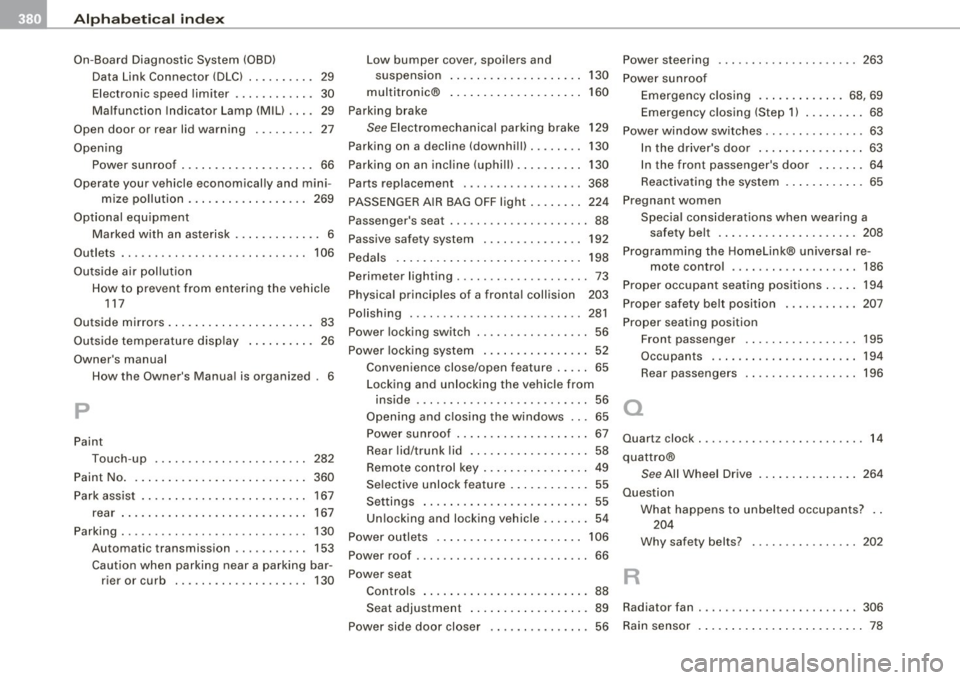
___ A_l.:,. p _h_ a_ b_e _t _ic _ a_l _in _ d_e _x ____________________________________________ _
On-Board Diagnostic System (08D)
Data Link Connector (DLC) .. .... ....
29
Electronic speed limiter ... ..... ... . 30
Malfunction Indicator Lamp (MIU .... 29
Open door or rear lid warning . .... .... 27
Opening
Power sunroof ..... .... ........... 66
Operate your vehicle economically and mini- mize pollution ... .... .... .... ...
269
Optional equipment
Marked with an asterisk . . . . . . . . . . . . . 6
Outlets . . . . . . . . . . . . . . . . . . . . . . . . . . . .
106
Outside air pollution
How to prevent from entering the vehicle
117
Outside mirrors . ... .. .... .... ...... ..
83
Outside temperature display ........ .. 26
Owner's manual How the Owner's Manual is organized . 6
p
Paint
Touch-up
282
Paint No. . . . . . . . . . . . . . . . . . . . . . . . . . . 360
Park assist . . . . . . . . . . . . . . . . . . . . . . . . . 167
rear ........ ... .. .... .... ....... 167
Parking . . . . . . . . . . . . . . . . . . . . . . . . . . . .
130
Automatic transmission ... .... .... 153
Caution when parking near a parking bar -
rier or curb .. .... ....... .... ...
130
Low bumper cover, spoilers and
suspens ion
130
multitronic® ........ .... ... .. ... 160
Parking brake
See Electromechanical parking brake 129
Parking on a decline (downhill) . ....... 130
Parking on an incline (uphill) . ...... ... 130
Parts replacement ................ .. 368
PASSENGER AIR BAG OFF light ........ 224
Passenger's seat . . . . . . . . . . . . . . . . . . . . . 88
Passive safety system . . . . . . . . . . . . . . .
192
Pedals . ........ ....... ...... .... .. 198
Perimeter lighting .................... 73
Physical principles of a frontal collision 203
Polishing ......... ... .... .... .... .. 281
Power locking switch ........ ... ... ... 56
Power locking system ..... .... .... ... 52
Convenience close/open feature ..... 65
Locking and unlock ing the vehicle from
inside .... .... ..... .. .... .... ... 56
Opening and closing the windows ... 65 Power sunroof ......... .... ... .... 67
Rear lid/trunk lid ...... .... .... .... 58
Remote control key . . . . . . . . . . . . . . . .
49
Se lective unlock feature .... ...... .. 55
Settings . . . . . . . . . . . . . . . . . . . . . . . . . 55
Un locking and locking vehic le ... .... 54
Power outlets . . . . . . . . . . . . . . . . . . . . . .
106
Power roof . . . . . . . . . . . . . . . . . . . . . . . . . . 66
Power seat Controls ...... ..... ..............
88
Power steering ... .... .... .... ..... . 263
Power sunroof
Emergency closing .. .... .. .... . 68, 69
Emergency c losing (Step 1) ... .. .... 68
Power window switches ...............
63
In the driver's door ......... .... ... 63
In the front passenger's door ....... 64
Reactivating the system .. ....... .. . 65
Pregnant women
Special considerations when wearing a
safety belt . . . . . . . . . . . . . . . . . . . . .
208
Programming the HomeLink® universal re-
mote control ..... ....... ... .... 186
Proper occupant seating positions .... . 194
Proper safety belt position ...........
207
Proper seating position
Fron t passenger ... .... ... .... ... 195
Occupants .... .... .... ... .... ... 194
Rear passengers ................. 196
a
Quartz clock ..... ........ ........ .... 14
quattro®
See All Wheel Drive .. ...... .... ... 264
Question
R
What happens to unbelted occupants? . .
204
Why safety belts? ........... ..... 202
Seat adjustment .......... .... ... . 89 Radiator fan .... .... .... .... .... .... 306
Power side door closer . . . . . . . . . . . . . . . 56 Rain sensor . ... .. .... .... .... ...... . 78