key AUDI S6 2008 Workshop Manual
[x] Cancel search | Manufacturer: AUDI, Model Year: 2008, Model line: S6, Model: AUDI S6 2008Pages: 390, PDF Size: 88.42 MB
Page 189 of 390
HomeLink®
------------------------------------
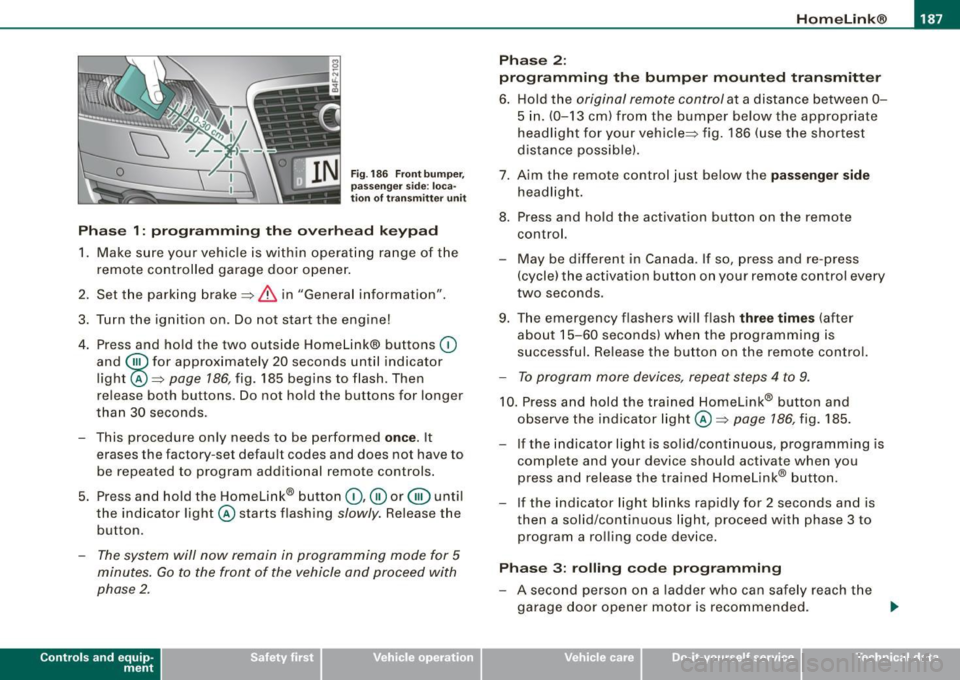
Fig. 186 Front bumper ,
passenger side: loca
tion of transmitter unit
Phase 1: programming the overhead keypad
1. Make sure your vehicle is within operating range of the
remote controlled garage door opener.
2. Set the parking brake::::>
& in "Genera l information".
3. Turn the ignition on. Do not start the engine!
4. Press and hold the two outside Homelink® buttons
(D
and @for approxim~tely 20 sec_onds until indicator
light ©::::>
page 186, fig. 185 begins to flash. Then
r elease both buttons. Do not hold the buttons for longer
than
30 seconds.
- This procedure only needs to be performed
once . It
erases the factory-set default codes and does not have to
be repeated to program additional remote controls.
5. Press and hold the Homelink® button
(D, ® or@ until
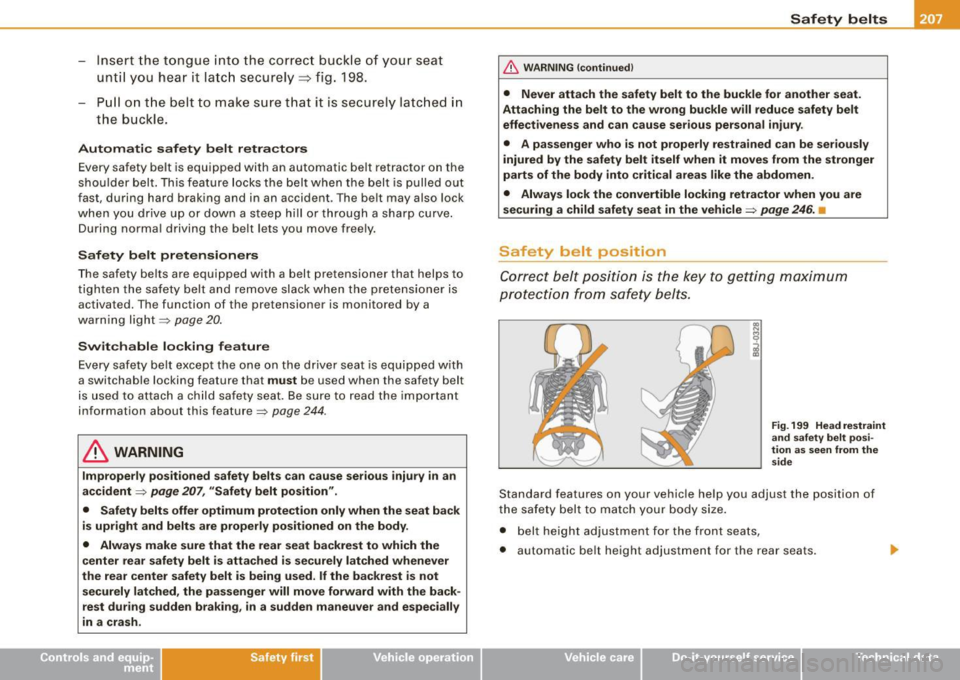
the indicator light © starts flashing
slowly. Release the
button .
-The system will now remain in programming mode for 5
minutes. Go to the front of the vehicle and proceed with
phase 2.
Contro ls and eq uip
ment
Phase 2:
programming the bumper mounted transmitter
6. Hold the original remote control at a distance between 0-
5 in. (0-13 cm) from the bumper below the appropriate
headlight for your vehicle::::> fig.
186 (use the shortest
distance possible).
7. Aim the remote control just below the
passenger side
headlight.
8. Press and hold the activation button on the remote control.
- May be different in Canada. If so, press and re-press
(cycle) the activation button on your remote control every
two seconds .
9. The emergency flashers will flash
three times (after
about
15-60 seconds) when the programming is
successful. Release the button on the remote control.
-To program more devices, repeat steps 4 to 9.
10. Press and hold the trained Homelink® b utton and
observe the indicator light© ::::>
page 186, fig. 185.
If the indicator ligh t is solid/continuous, programming is
complete and your device should activate when you press and release the trained Homelink® button.
- If the indicator light blinks rapidly for 2 seconds and is
th en a solid/continuous light, proceed with phase 3 to
program a rolling code device.
Phase 3: rolling code programming
-A second person on a ladder who can safely reach the
garage door opener motor is recommended. .,_
Vehicle care I I irechnical data
Page 190 of 390
111..__H_ o_ m_ e_ L_in _ k_® ____________________________________________________ _
11. Locate the "learn" button on the garage door opener
motor (refer to the operating instructio ns for the opener,
as the location of this button may vary by manufacturer).
12. Press and release the learn button on the garage door opener motor .
-Note : once the button is pressed, there are 30 se cond s in
which to in itiate the next step.
13. On the Homeli nk® keypad inside the veh icle, f irmly
press and hold the Homelink ® button previously
programmed in phases 1 and 2 for two seconds and
release . Repeat th is sequence
twi ce.
- Some vehicles may req uire the press/hold/re lease
seque nce up to three t imes to complete the training
process.
Homelink® should now activate your rolling code
equipped device .
If the 5 minute time limit is exce eded, the e mer gency flas her s will
flas h one time to indicate that the process has been terminated . In
this cas e, r epeat steps 4 through 9.
If the emergency flashers do not flash
three times (after about 15-
60 seconds) , programmi ng was not successful. In this case , repea t
steps 4 through 9.
Remote con trol units for garage door opene rs in Canada a re set to
stop transm itting radio frequency s ignals after two seconds. Th is
t ime may not be sufficient for the Homelink ® system to learn the
radio frequency signal. Perform all o ther st eps as d escribed
above .•
A pp lies 10 veh ic les: wit h Home Link® unive rsa l remote control
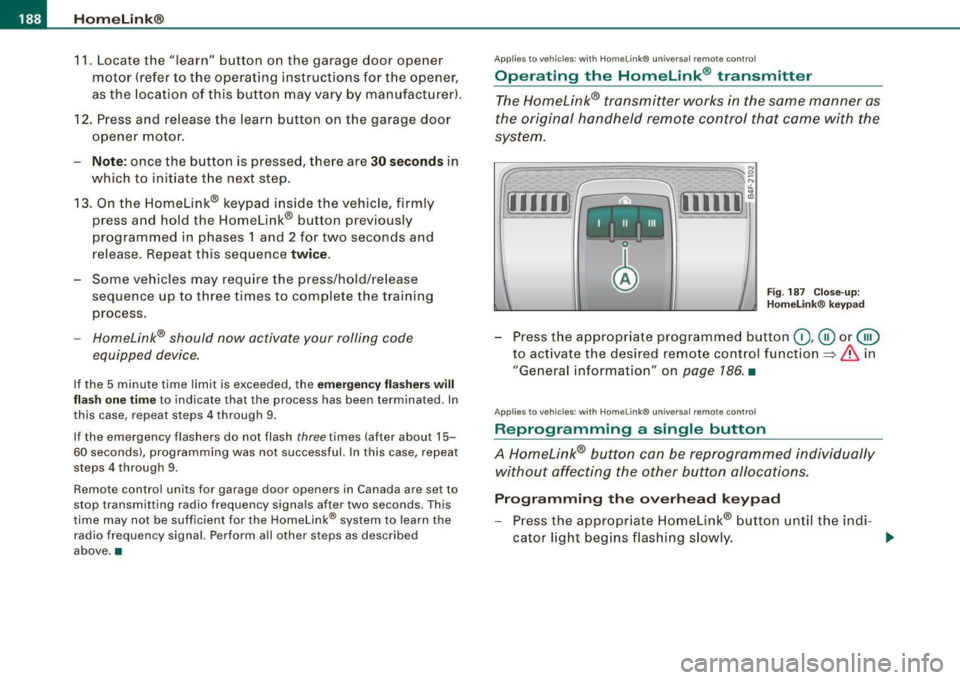
Operating the Homelink ® transmitter
The Homelink® transmitter works in the same manner as
the original handheld remote c ontrol that came with the
system.
[11111 ~
, _1 11 _ I Ill
N 0
~
~,,.-,-1 .,.-,--I I ,....,...,I W 1~
Fig . 187 C lose- up:
H omelink® keypad
- Press t he appropr iate programmed button (D , @ or@
to activate the desired remote control function=>&. in
"General information" on
page 186 . •
App lies 10 vehicles: wit h Home link® unive rsa l remote contro l
Reprogramming a single button
A Homelink® button can be reprogrammed individually
without affecting the other button a/locations.
Progr amming th e ove rhead keypad
- Press the appr opriate Homelink® button until the indi-
cator l ight beg ins flashing slowly. _..
Page 191 of 390
___________________________________________________ H_ o_m_ e_ L_ i_ n _ k_ @_ R __ JIIII
Pro gra mmin g th e bump er mounted tr ansmitt er
1. Hold th e original remote control at a distance between 0 -
5 in. (0- 13 cm) from the bumper below the appropriate
headlight for your vehicle (use the shortest distance
poss ible).
2. Aim the remote control just below the pass enger side
headlight.
3. Press and hold the activation button on the remote
control.
4 . The emergency flashers will flash three t ime s (after
abo ut
15-60 seconds) w hen the programming is
successful. Now release the button on the remote
control.
- I f the device utilizes a ro lling code, please follow phase
3
of ~ page 186, "Programmi ng the Home Link® trans
mitter" for rolling code programming .
This pr oce dure w ill cause the ex ist ing prog ram ming on the
H om eli nk® butto n to be eras ed! •
Applies to vehicles: with Homelink® unive rsal remote contro l
Erasing the programming of the HomeLink ®
transmitter
When you erase the programming, the programming on
all three of the transmitter channels with be lost!
- Perform steps 1 to 4 as described on~ page 187 , "Phase
1: programming the overhead keypad".
When comp leted, the Homelink ® system wil l be in the program
ming mode and is then ready to learn the codes for remote
controlled devices.
Controls and equip
ment
[ i ] Tip s
• Programmed buttons cannot be erased indiv idual ly.
• For security reasons you are advised to erase the programming
of the Homelink® system before you sell your vehicle. •
Applies to veh icles : w ith Homelink® universal remote control
Information and accessories
If you wou ld like more information on Homelink ®, where to
purchase the Homelink® compatib le products, or would like to
purchase the Homelink ® Home Lighting Package, please cal l toll
free: 1-800-355-3515.
[ i ] Tip s
• The Homelink ® universal transmitter complies with part 15 of
the FCC rules and RSS -210 of IC part 15 . Operation is subject to the
following conditions :
- this device may not cause harmful interference, and
- this dev ice must accept any interference that may be received
inc luding interference that may cause undesired operation.
• Changes or modifications not express ly approved by the party
responsible for compliance could void the user's authority to
operate the device (DOC : ISTC 1763 102 264 Prince MODEUFCC ID :
CB2 V94800). •
I • •
Page 208 of 390
___ S_a_ f_ e_ t-= y_ b_e_ l_ t _s _______________________________________________ _
& WARNING (continued)
• Never let any person ride with their feet on the instrument
panel or sticking out the window or on the seat.
• Never remove a safety belt while the vehicle is moving. Doing
so will increase your risk of being injured or killed.
• Never wear belts twisted.
• Never wear belts over rigid or breakable objects in or on your
clothing, such as eye glasses, pens, keys, etc., as these may cause
injury.
• Never allow safety belts to become damaged by being caught
in door or seat hardware.
• Do not wear the shoulder part of the belt under your arm or
otherwise out of position.
• Several layers of heavy clothing may interfere with correct posi
tioning of belts and reduce the overall effectiveness of the system.
• Always keep belt buckles free of anything that may prevent the
buckle from latching securely.
• Never use comfort clips or devices that create slack in the
shoulder belt. However, special clips may be required for the
proper use of some child restraint systems .
• Torn or frayed safety belts can tear, and damaged belt hard
ware can break in an accident. Inspect belts regularly. If webbing,
bindings, buckles, or retractors are damaged, have belts replaced
by an authorized Audi dealer or qualified workshop.
• Safety belts that have been worn and loaded in an accident
must be replaced with the correct replacement safety belt by an
authorized Audi dealer. Replacement may be necessary even if
damage cannot be clearly seen. Anchorages that were loaded
must also be inspected.
• Never remove, modify, disassemble, or try to repair the safety
belts yourself.
& WARNING (continued)
• Always keep the belts clean. Dirty belts may not work properly
and can impair the function of the inertia reel
=> page 289, "Safety
belts". •
Safety belts
Fastening safety belts
Seat first -everybody buckle up!
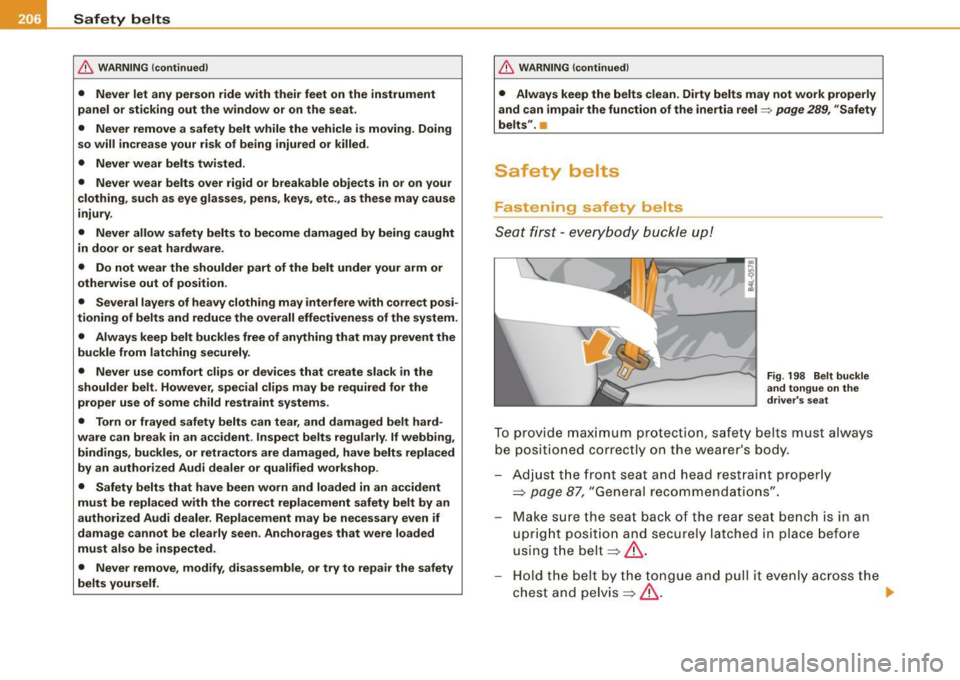
Fig . 198 Belt buckle
and tongue on the
driver's seat
To provide maximum protection, safety belts must always
be positioned correctly on the wearer's body.
Adjust the front seat and head restraint properly
=> page 87, "General recommendations".
Make sure the seat back of the rear seat bench is in an
upright position and secu rely latched in place before
using the belt~&.
Hold the belt by the tongue and pull it evenly across the
chest and pelvis~& .
~
Page 209 of 390
- Insert the t ongue into the corre ct buckle of your seat
unt il you hear it la tc h securely=> fig. 198.
- Pu ll on t he belt to make su re t hat it is securely latc hed i n
the buckle.
Automati c safet y belt r etracto rs
Eve ry safety belt is equipped with an automatic belt retractor on the
shou lder belt. This feature locks the belt when the belt is pulled out
fast, during hard braking and in an accident . T he belt may also lock
when you drive up or down a steep hill or through a sharp curve .
During normal driving the belt lets you move free ly.
S afety belt pretensi oners
The safety belts are equipped with a belt pretensioner that helps to
tighten the safety belt and remove slack when the prete nsioner is
activat ed . The function of the pretension er is monitored by a
warning light=>
page 20.
Switchable locking feature
Every safety belt except the one on the d river seat is equipped with
a switchable locking feature that
must be used when the safety belt
is used to attach a ch ild sa fety sea t. Be sure to read the important
information about this feature=>
page 244.
& WARNING
Improperly po sitioned safety belts can cau se seriou s injury in an
accident =>
page 207 , "Safety belt po sition ".
• Safet y belts offer optimum prote ction onl y when the seat bac k
i s upright and belt s are proper ly po sit ioned on the bod y.
• Alway s make sure that the rear seat backrest to which the
c ent er re ar safet y belt i s att ached i s se curely l atched whene ver
the re ar center safety b elt is being us ed. If the b ackre st is not
se curely latched , the p asseng er will mo ve forw ard with the back
rest d uring sudde n br aking, in a sudden maneu ver and especi ally
in a crash.
Safety first
Safety belts
& WARNING !continued )
• Never attach the safety belt to th e buckle for another seat.
Atta ch ing the belt to the wrong b uckle will reduce safety belt
effe ct iv eness and c an cause ser ious person al injury .
• A p assenger who i s not p roperly re str ained c an be ser iously
injur ed by the saf ety belt itself when it move s from the stronger
p art s of the b ody into critic al are as like the abdomen .
• Alway s lock the convertible locking retractor when you are
s e cu ring a child safet y seat in the vehi cle
=> page 246. •
Safety be lt position
Cor rect bel t position is the key to getting maximum
protec tio n from s afety belts.
Fig . 199 He ad r estrain t
a n d sa fe ty b elt p osi
tion as seen from th e
s ide
Standard features on your vehicle he lp you adjust the position of
the safety belt to match your body size.
• belt height adjustment for the front seats,
• automatic be lt height adjustment for the rear seats .
Vehicle care I I irechnical data
Page 267 of 390
Energy management
Starting ability is optimized
Energy management controls the distribution of electrical
energy and thus optimizes the availability of electrical
energy for starting the engine.
If a vehicle with a conventional energy system is not driven for a
long period of time, the battery is discharged by idling current
consumers (e.g. immobilizer). In certain circumstances it can resu lt
in there being insufficient energy available to start the engine .
Intelligent energy management in your vehicle handles the distribu
tion of electrical energy . Starting ability is markedly improved and
the life of the battery is extended.
Basical ly, energy management consists of
battery di agn osis, idling
current mana gement
and dynami c en ergy management .
Batter y diagn osis
Battery diagnosis continuously deter min es the state of the battery.
Sensors determine battery vo ltage, battery current and battery
temperature . This determines the cu rrent state of charge and the
power of the battery .
Idling c urrent man ag em en t
Idling current management reduces energy consumption while the
vehicle is standing. With the ign it ion switched off, it controls the
energy supply to the various electrical components. Data from
battery diagnos is is considered .
Depending on the battery's state of charge, individual consumers
are gradually turned off to prevent excessive discharge of the
battery and thus maintain starting capability.
Dynamic energ y managem ent
While the vehic le is being driven, dynamic energy management
distributes the energy gene rated acco rding to the needs of the indi -
Controls and equip
ment Safety first Vehicle operation
In
te llig ent tec hn olo gy
vidual components . It regulates consumption, so that more e lec
trical energy is not being used than is being ge nerated and ensures
an optimal state of charge for the battery.
[ i ] Tips
• But even energy management cannot negate the limits of
physics. Consider that the power and life of a battery are limited .
• I f starting ability is threatened, you are informed by a warning
=> page 266, "Drive r notifica tion i n the instrument cluster
display" .•
What you should know
The highes t pri ority is given to main tain ing starting capa
bility.
The battery is severe ly taxed in short-distance driving, in city traffic
and during the co ld time of year. Abundant electrical energy is
required, but only a little is generated. It is also critical if the engine
is not running and elect rica l components are turned on. In this
instance energy is being consumed but none is being generated .
I t is in precisely these situations that you will notice energy manage
ment active ly regula ting the distr ibut ion of energy.
Vehicle stands fo r an extended period
If you do not drive your vehicle over a period of several days or
weeks, electrical components are gradually cut back or switched off.
This reduces energy consumption and maintains starting capability
over a longer period.
Take into considerat ion that when you un lock your veh icle, some
convenience functions, such as the remote key or power seat
adjustment, may not be availab le . T he conven ience functions will be
available again when you turn on the ignition and start the engine.
Vehicle care Do-it-yourself service Technical data
Page 292 of 390
___ C_ le_ a _ n_i_n ~g _ a_ n_ d __ p_r _o _t _e _c_ t_ i_o _n ___________________________________________ _
essential to have a long-lasting corrosion protection reapplied to al l
s urf aces, sea ms, joi nts a nd compo nents i n th e en gine c om par t
m ent .
& WARNING
Be aware: The engine compartment of any motor vehicle is a
potentially hazardous area.
• Before working in the engine compartment , be sure to read the
information
=> page 289.
• Before reaching into the front plenum panel, always remove the
ignition key . Otherwise, the windshield wipe r system could unin
tentionally be switched on , possibly causing personal in jury from
the moving wiper linkage .
• Never reach into the area around or touch the radiator fan . The
auxiliary fan is temperature controlled and can switch on suddenly
- even when the ignition is off.
• Do not wash, wax or dry the engine with the engine running .
Moving or hot parts could injure you .
• Do not clean the underside of the chassis , fenders, wheel
covers, or other hard to reach parts without protecting your hands
and arms. You may cut yourself on sharp -edged metal parts.
• Always read and heed all WARNINGS and other information
=> page 278 . •
Page 299 of 390
___________________________________________ C_ h:....:e :....: c:....: k..:..: i..:.. n :..::g ::.....:: a:..:.n ..:..: d=---.:. f..:..:il ..:..:li ..:..n :.:::g !--_!11
•
Closing the engine hood
- Pull the hood down until the pressure from the struts is
reduced .
- Let the hood
drop down and latch in place. Do not try to
push it shut;
it may fail to engage => &.
& WARNING
A hood that is not completely latched could fly up and block your
view while driving.
• When you close the engine hood, check it to make sure the
safety catch has properly engaged. The hood should be flush with
the surrounding vehicle body parts.
• If you notice while driving that the hood is not secured prop
erly, stop at once and close it. •
Working in the engine compartment
Be especially careful whenever you work in the engine
compartment.
Whenever you must perform any work in the engine compartment,
for example checking and filling different fluids, there is a risk of injury, burns and accidents. To prevent personal injury always
observe the following WARNINGS. The engine compartment of any
vehicle is a hazardous area
~ & .
& WARNING
To help avoid injury, before you check anything under the hood :
• Turn off the engine.
• Remove the ignition key.
• Apply the parking brake .
& WARNING (continued)
• Move selector lever to "P" (Park).
• Always let the engine cool down. Hot components will burn
skin on contact.
• To reduce the risk of being burned, never open the hood if you
see or hear steam or coolant escaping from the engine compart
ment. Wait until no steam or coolant can be seen or heard before
carefully opening the hood.
• Keep children away from the engine compartment .
• Never spill fluids on hot engine components. They can cause a
fire.
• Never touch the radiator fan. The auxiliary electric fan is
temperature controlled and can switch on suddenly.
• Never open the coolant reservoir cap when the engine is still
warm . The coolant system is pressurized and hot coolant could
spray out.
• Protect your face, hands and arm from steam or hot engine
coolant by placing a thick rag over the cap when you open the
coolant reservoir.
• If work on the fuel system or the electrical system is necessary :
- Always disconnect the battery.
- Never smoke or work near heaters or open flames . Fluids in
the engine compartment could start a fire.
- Keep an approved fire extinguisher immediately available.
• To avoid electrical shock and personal injury while the engine
is running or being started, never touch:
- Ignition cables
- Other components of the high voltage electronic ignition system.
• If you must perform a check or repair with the engine running: -First, fully apply the parking brake, move selector lever to "P"
(Park). .,
Vehicle care
I t •
Page 310 of 390
lffl __ C _h_ e_ c_k _in --== g'-- a_n _d_ f_il _li _n ..:::g:::..- ___________________________________________ _
With certain types of airbag deployment, the battery is discon
nected from the vehicle electrical system for safety reasons=>&. in
"Repair, care and disposal of the airbags" on
page 226.
Di sc o nnect ing the b attery t ermin als
Some vehic le functions (power window regulators, for example) are
lost if the battery terminals are disconnected. These func tions have
to be relearned after the battery terminals are connected again . To
prevent this, the battery should only be disconnected from the
vehic le electrical system when absolute ly necessary for repairs.
V ehicle s not driven for long period s
If you do not drive your vehicle over a period of several days or
weeks, electrical components are gradually cut back or switched off .
This reduces energy consumption and maintains starting capability
over a longer period =>
page 265.
Take into consideration that when you un lock your vehicle, some
convenience functions, such as the master key remote function or
power seat adjustment, may not be available. The convenience
functions will be availab le again when you turn on the ignition and
start the engine .
Winter oper ation
During the w inter months, battery capacity tends to decrease as
temperatures drop. This is because more power is also consumed
while s tarti ng, an d the headlights, rear wi ndow defogger, etc ., are
used more often.
Avoid unnecessary p ow er consumption, particularly in ci ty traffic or
when trave ling only short distances. Let your authorized Audi dea ler
check the capacity of the vehicle battery before winter sets in
=> page 310. A we ll charged battery wil l not on ly prevent starting
problems when the weather is cold, but wi ll also last longer.
[ i J Tips
If your vehicle is left standing for severa l weeks at extremely low
t empera tures, the vehicle ba ttery should be r emoved and stored where it will not freeze
. This will prevent it from being damaged and
having to be replaced .•
Working on the battery
B e espec ially caref ul when working on or near the battery.
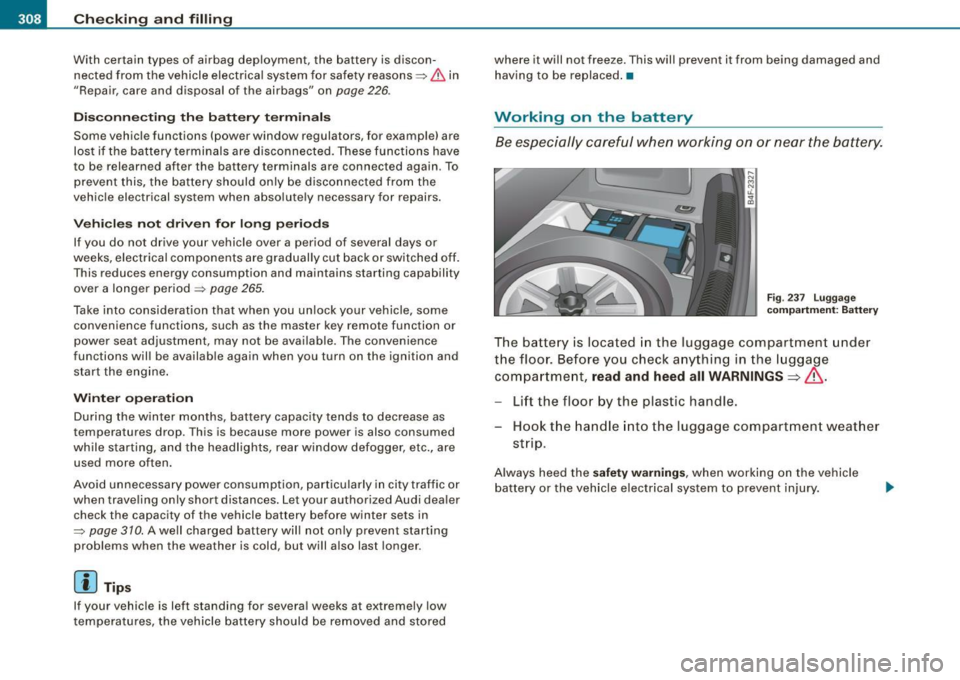
Fi g. 23 7 Lugg age
compartm ent : B attery
The battery is located in the luggage compartment under
the floor. Before you check a nything in the l uggage
com partme nt,
read and heed all WARNINGS=>& .
-Lift the floor by the plastic handle.
Hook t he hand le in to the luggage compartment weather
st rip.
Always heed the safety warnings , when working on the vehicle
ba ttery or the vehicle e lectrical system to prevent injury.
Page 347 of 390
_________________________________________________ F_ u_ s_ e_s _ a_n _d_ b_ u _ lb_ s _ __.1111
Fuses and bulbs
Fuses
Replacing a fuse
A problem in the electrical system may be caused by a
blown fuse.
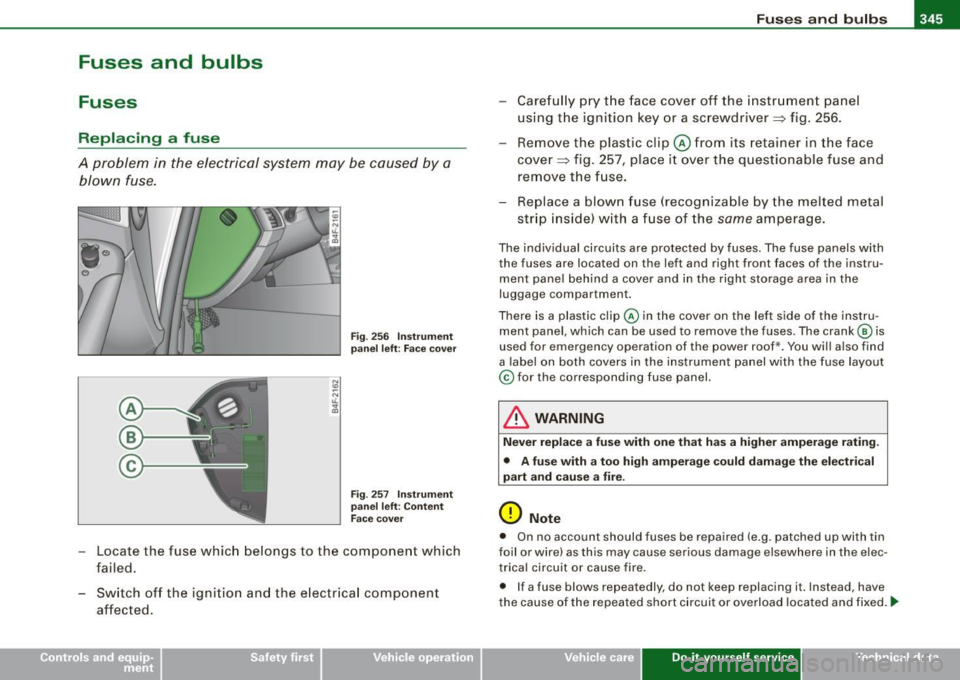
Fig . 256 Ins trumen t
pa nel left: Face c over
F ig . 257 I nst rume nt
pa nel left: Co ntent
F ac e cover
- Locate the fuse which belongs to the component which
failed.
- Switch off the ignition and the e lectr ica l component
affected. - Carefully p
ry t he face cover off the instr umen t pane l
using the ignition key or a screwdriver~ fig. 256.
- Rem ove the plastic clip @ from i ts retainer in the face
cove r~ fig. 257, p lace i t over the questionable fuse and
remove the fuse.
- Replace a blown fuse (recognizable by the melted metal
str ip inside) wi th a f use of the
same amperage.
The individual circuits are protected by fuses. T he fuse panels with
the fuses are located on the left and right front faces of the instru
ment pane l behind a cover and in the right storage area in the
luggage compartment.
There is a plastic clip @ in the cover on the lef t side of the instru
ment pane l, which can be used to remove the fuses . The crank © is
used for emergency operation of the power roof*. You will also find
a label on both covers in the instrument panel with the fuse layout
© for the corresponding fuse panel.
& WARNING
Nev er r eplac e a fuse with one that ha s a high er amperag e rati ng.
• A fu se w ith a to o high ampe rage co uld d amag e the ele ctr ical
pa rt a nd cau se a fire .
0 Note
• On no account should fuses be repaired (e .g. patched up wi th tin
foil or wire) as this may cause serious damage elsewhere in the e lec
trica l circuit o r cause fire.
• If a fuse blows repeatedly, do not keep replacing it. Instead , have
the cause of the repea ted short circuit or overload located and fixed.
ti>
Vehicle care Do-it-yourself service Technical data