fuel AUDI S6 2008 User Guide
[x] Cancel search | Manufacturer: AUDI, Model Year: 2008, Model line: S6, Model: AUDI S6 2008Pages: 390, PDF Size: 88.42 MB
Page 36 of 390
Driver information display
0 Note
Do not continue driving if the -F-symbo l illuminates . There is a
malfunction in the engine coo ling system -you could damage your
engine. •
Engine oil pressure malfunction ~
The red engine oil pressure warning symbol requires
immediate service or repair. Driving with a low -oil -pres
sure indication is likely to inflict severe damage to the
engine.
If the "l=7': symbol appears in the display and blinks, the oil
pressure is too low. An additional driver message can also
be displayed by pressing the [
CHECK] button:
Switch off engine and check oil level
Immediate actions
- Pull off the road .
- Stop the vehicle.
- Turn off the engine.
-Check the engine oil level with the dipstick:::::> page 301.
Dipstick readings checks too low
- Top off oil to the proper level :::::> page 302.
-Make sure that the oil pressure warning symbol "l=7':
appears no longer in the display before you start driving
again.
Dipstick reading checks OK
-If the oil pressure warning symbol "l=7': starts flashing
again even though the engine oil level checks OK on the
dipstick,
do not continue driving and do not let the
engine run in idle.
Instead, contact your authorized Audi
dealer for assistance.
[ i ] Tips
• The engine oil pressure symbol ~ is not an indicator for a low
engine oil level . Do not rely on it. Instead , check the oil level in your
engine at regular intervals, preferably each time you refuel, and
always before going on a long trip .
• The yellow oil level warning indication ... requires oil refill or
workshop service without delay. Do not wait until the red oil pres
sure warning
~ starts to flash before you respond to the low oil
level warning
= . By then, your engine may already have suffered
serious damage. •
Steering malfunction i
If there is a malfunction in the electronic steering column
lock, the steering cannot be unlocked.
If the ~ symbol in the display blinks, there is a malfunction
in the electronic steering column lock. An additional driver
message can also be displayed by pressing the
I CHECK]
button:
Do not drive vehicle: Steering defective
- Contact your nearest authorized repair facility.
- Do
not tow your vehicle.
Page 37 of 390
& WARNING
Your vehicle must not be towed in the event of a malfunction in the electronic steering column lock because it cannot be steered due
to the locked steering . If it is towed with the steering locked, there
is the risk of an accident. •
Ignition lock malfunction ~
A malfunction in the ignition lock must be repaired imme
diately.
If the .Pe symbol in the display blinks, there is a malfunction
in the electronic ignition lock. An additional driver message
can also be displayed by pressing the [ CHECK] button:
Ignition lock defective. Contact workshop!
-Do not turn the engine off.
- Drive immediately to an authorized Audi dealer to have
the malfunction corrected.
If there is a malfunction in the electronic ignition lock, the ignition
cannot be turned off. Drive immediately to an authorized Audi
dealer to have the cause of the malfunction corrected.
On vehicles wi th Advanced Key *, the engine should not be switched
off using the
I STOP I button because the engine cannot be started
again after the ignition is switched off .•
Controls and equip
ment
Driver information display
Yellow symbols
A yellow symbol means WARNING.
Fig. 19 Display: low
fuel level warning
(priority 2)
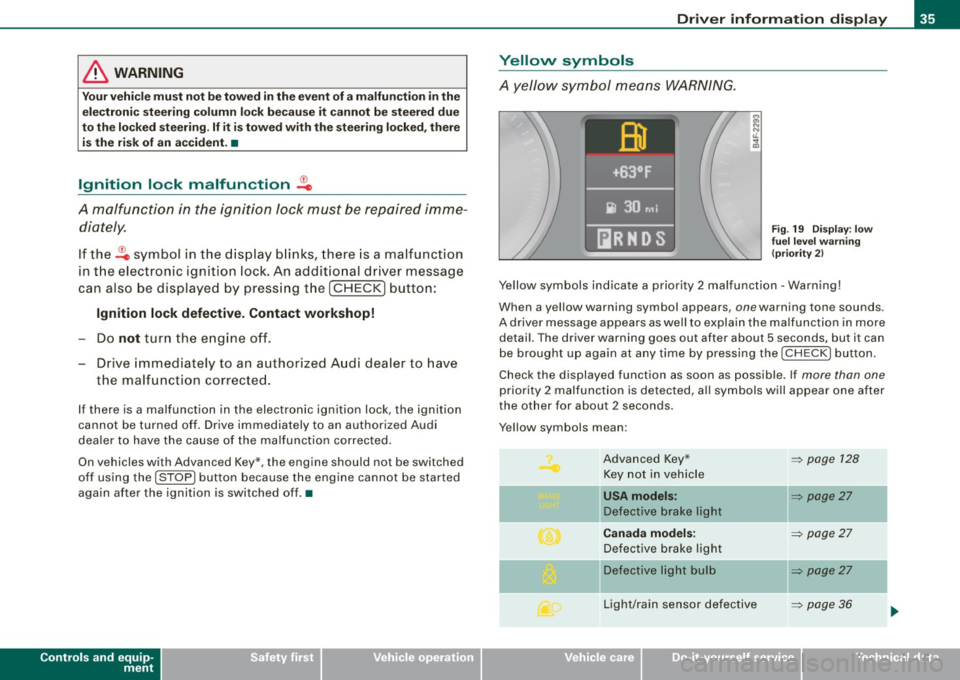
Yellow symbols indicate a priority 2 malfunction -Warning!
When a yellow warning symbol appears , one warn ing tone sounds.
A driver message appears as well to explain the malfunction in more
detail. The driver warning goes out after about 5 s econds, but it can
be brought up again at any time by pressing the I CHECK I button.
Check the displayed function as soon as possible . If more than one
priority 2 malfunction is detected, all symbols will appear one after
the other for about 2 seconds .
Y ellow symbols mean :
Advanced Key* Key not in vehicle
l[usA models:
Defective brake light
Canada models:
Defective brake light
]f Defective light bulb
Light/rain sensor defective
I • •
~ page 128
~ page27
-
~ page27
~ page27
-
~ page36
Page 38 of 390
Driver inf ormati on displ ay
Windshield washer fluid
leve l low
...
Low fue l level
-Battery voltage
Worn brake pads
-
Dynamic headlight range
control defective
Check engine oil level
=> page 301
Engine oil sensor malfunction
-
Adaptive Light* defective
-
Ignition lock malfunction
Windshie ld wiper defective
Tire pressure monitoring sys-
tern Loss of air pressure
Tire pressure monitoring sys -
tern
System not available
Ba ttery in remote control key
Electromechan ical
parking brake
=> page 36
=> page 36
-
=> page 37
=> page 37
-
=> page 37
=> page 37
=> page 37
=> page 37
-
=> page 38
=> page 38
=> page 44
:::::, page 46
=> page 49
:::::, page 131
•
Appl ies to vehic les: with Advanced Key
Key not in vehicle
,:, Key not in vehi cle
T his reminder appears a long with the -symbol if the master key is
removed from the vehic le with the engine running. It is intended to
remind you (e .g. when changing drivers) not to continue the journey
without the master key .
If the master key is no longer in the veh ic le, you cannot switch off
the ignition after stopping the engine and you also cannot start the
engine again. What is more, you cannot lock the vehicle from the
outside. •
Light/rain sensor defective )
c Automatic hea dlight s/aut oma tic w iper s def ective
If the symbo l il luminates, the light sensor has failed. For safety
reasons the low beams are turned on permanently with the switch
in
AUTO. However, you can continue to turn the lights on and off
using the light switch . In the case of a defect in the rain sensor, the
windshield wiper lever functions are still available. Have the
l ight/rain sensor checked as soon as possib le at a dealersh ip .•
Windshield washer fluid level too low
.5 Pl eas e top up w asher fl uid
If the symbol illuminates, add windshield washer fluid to the washer
system and also to the headlight washer system:::::,
page 312. •
Fuel supply too low L)
Please refuel
Page 39 of 390
When this symbol 5' illuminates for the first time, the fuel reserve
in your vehicles is still about 2 Gallons (7 to 9 liters}. Refuel as soon
as possible~
page 292.
If the symbol lights up, even when there is ample fuel in the tank,
and the text
Tank system malfunction! Contact workshop appears
in the display, there is a fault in the system . Contact a qualified work
shop to have the fault rectified .•
Battery voltage LJ
If battery power drops below a specified level, idling current
management starts by switching off electrical loads. The driver
message
Power-saving mode activated is shown in the display.
If the battery's state of charge is not in the optimal range, the
U
symbol is shown in the display and the driver message Low battery
charge: battery will be charged while driving
appears .
While this driver notification is displayed, you have to be prepared
for limited starting capability.
Driver message appears and goes out again
If this driver message appears after the ignition is turned on or
while driving and it goes out again after a while, the battery has
been adequately recharged.
Driver message appears and does not go out again
If this driver notification appears after the ignition is turned on or
while driving and does not go out again, the battery's state of
charge is not in the optimal range. Starting capability is restricted.
Have the battery checked by an authorized Audi dealer as soon as
possible. •
Worn brake pads ... 1
C Brake pads!
Controls and equip
ment
Driver information display
If the symbol illuminates, contact your authorized Audi dealer to
have the front brake pads inspected (on that occasion have the rear
brakes inspected as well to be safel. •
Headlight range control defective
, Headlight range control defective
If the symbol illuminates, the dynamic headlight range control is no
longer working properly . Have the system checked and repaired at
your Audi dealer. •
Engine oil level r.
' Please check oil level
When the symbol illuminates, check the engine oil level as soon as
possible ~
page 301. Top off the oil at your earliest opportunity
~ page 302. •
Engine oil sensor defective ~1 .•
~ Oil level! sensor defective
If the symbol illuminates, contact your authorized Audi dealer and
have the oil sensor inspected. Until you have this done, check the oil
level each time you refuel just to be on the safe side~
page 301. •
Applies to veh ic les: w ith Adaptiv e Lig ht
Adaptive Light defective 1
' Adaptive Light defective
When this symbol .... illuminates, it means that Adaptive Light is
defective. Go to an authorized dealership to have the headlights or
the control unit for the Adaptive Light repaired.•
I • •
Page 42 of 390
Driver informati on displ ay
Trip computer
Introduction
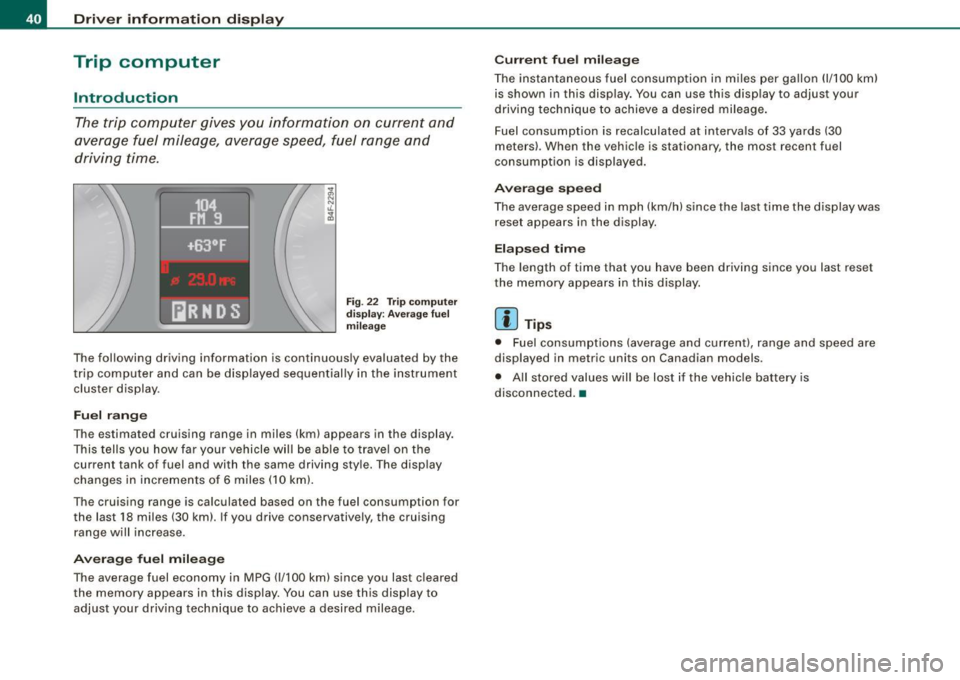
The trip computer gives you informati on on current and
average fuel mileage, average speed, fuel range and
driving time.
F ig. 22 T rip compu te r
di spl ay: Ave ra ge f uel
mil eage
The fol lowing driving information is continuously evaluated by the
t rip computer and can be displayed sequential ly in the instrument
cluster display.
Fuel r ang e
The estimated cruising range in miles (km) appears in the display.
This tells you how far your vehicle will be able to trave l on the
current tank of fuel and with the same driving sty le. The display
changes in increments of 6 miles (10 km).
The cruising range is ca lculated based on the fuel consumption for
the last 18 miles (30 km). If you drive conservatively, the cruising
range will increase .
Avera ge fu el mil eage
The average fuel economy in MPG (1/100 km) since you last cleared
the memory appears in this display. You can use this display to
adjust your driving technique to achieve a desired mileage.
C urr en t fu el mi leage
The instantaneous fuel consumption in m iles per gallon (1/ 100 km)
is shown in this disp lay. You can use this display to adjust your
driving technique to achieve a desired mileage .
Fuel consumption is recalculated at interva ls of 33 yards (30
meters) . When the vehicle is stationary, the most recent fuel
consumption is displayed .
Averag e sp eed
The average speed in mph (km/h) since the last time the display was
reset appears in the display.
E la psed time
The length of time that you have been driving since you last reset
the memory appears in this display.
[ i ] Tips
• Fuel consumptions (average and current), range and speed are
displayed in metric units on Canadian models .
• All stored values will be lost if the vehicle battery is
disconnected. •
Page 43 of 390
Memories
The trip computer is equipped with two fully automatic
memones.
104
FJ1 9
~Of
[ilRNDS Fig . 23 Trip computer
display: memory level 1
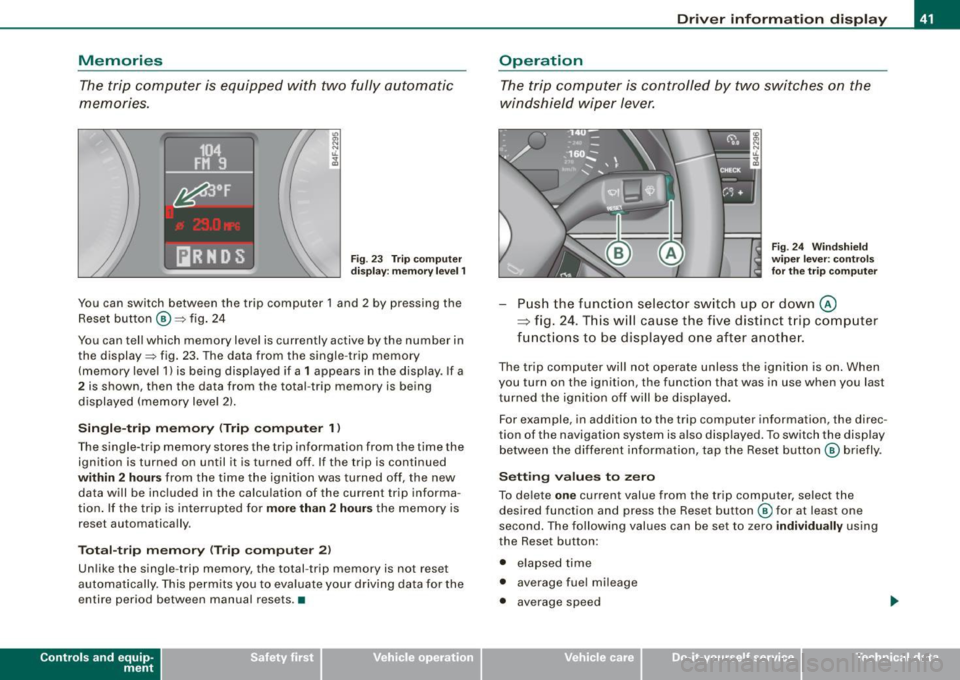
You can switch between the trip computer 1 and 2 by pressing the
Reset button
@ ::::> fig. 24
You can tell which memory level is currently active by the number in the display ::::> fig. 23. The data from the single -trip memory
(memory level 1) is being displayed if a
1 appears in the display . If a
2 is shown, then the data from the total -trip memory is being
displayed (memory level 2).
Single-trip memory (Trip computer 1)
The single-trip memory stores the trip information from the time the
ignition is turned on until it is turned off. If the trip is continued
within 2 hours from the time the ignition was turned off, the new
data will be included in the calculation of the current trip informa
tion. If the trip is interrupted for
more than 2 hours the memory is
reset automatically .
Total-trip memory (Trip computer 2)
Unlike the single-trip memory, the total -trip memory is not reset
automatically . This permits you to evaluate your driving data for the
entire period between manual resets .•
Con tro ls and eq uip
ment
Driver information display
Operation
The trip computer is controlled by two switches on the
windshield wiper lever.
Fig. 24 Windshield
wiper lever : controls
for the trip computer
Push the function selector switch up or down @
~ fig. 24. This will cause the five distinct trip computer
functions to be displayed one after another.
The trip computer will not operate unless the ignition is on. When
you turn on the ignition, the function that was in use when you last
turned the ignition off will be displayed.
For example, in addition to the trip computer information, the direc
tion of the navigation system is also displayed. To switch the display
between the different information, tap the Reset button
@ briefly .
Setting values to zero
To delete one current value from the trip computer, select the
desired function and press the Reset button
@ for at least one
second. The following values can be set to zero
individually using
the Reset button :
• elapsed time
• average fuel mileage
• average speed
Vehicle care I I irechnical data
Page 44 of 390
![AUDI S6 2008 User Guide Driver information display
In addition, all the values in the single -trip or the total -trip memory
can be deleted simultaneously.
[ i ] Tips
All stored values will be lost if the](/img/6/57596/w960_57596-43.png "AUDI S6 2008 User Guide Driver information display
In addition, all the values in the single -trip or the total -trip memory
can be deleted simultaneously.
[ i ] Tips
All stored values will be lost if the")
Driver information display
In addition, all the values in the single -trip or the total -trip memory
can be deleted simultaneously.
[ i ] Tips
All stored values will be lost if the vehicle battery is disconnected. •
MMI settings
Basic settings for the trip computer can be made in the
MM/.
Fig. 25 MMI display :
Trip computer
Setting values to zero
-Press the I CAR I function button.
- Select
Instrument cluster.
-Select Trip computer 1 or Trip computer 2.
-Select Reset to delete all the values in the memory
~ fig. 25.
Displaying and hiding driver information
-Press the I CAR I function button.
- Select
Instrument cluster.
- Selec t Trip computer 1 or Trip computer 2.
-Select, for example, Fuel range On to turn on the display
or
Off to turn the display off.
All values in the single-trip or the total-trip memory can be reset to
zero simu ltaneously in the MMI. In addition you can determine what
driving information from the trip computer shou ld be shown in the
instrument cluster display . If one of the pieces of driver information
is turned
off, that driver in formation will not be shown in the display.
The information will continue to be calculated by the trip computer
and can be turned back
on at any time. •
Tire pressure monitoring system
General notes
As an added safety feature, your vehicle has been equipped with a
tire pressure monitoring system (TPMS) that illuminates a low tire
pressure telltale when one or more of your tires is significantly
under-inflated . The TPMS on ly provides a low tire pressure warning
and does not reinflate your tires .
Accordingly, when the low tire pressure telltale illumin ates, you
should stop and check your tires as soon as possible, and inflate
them to the proper pressure. Driving on a significantly under
inflated tire causes the tire to overheat and can lead to tire failure.
Under -inflation also reduces fuel efficiency and tire tread life, and
may affect the vehicle's handling and stopping ability .
0 Note
• Please note that the TPMS is not a substitute for proper tire
maintenance, and it is the driver's responsibility to maintain correct
tire pressure, even if under-inflation has not reached the level to
trigger illumination of the TPMS low tire pressure telltale. .,,_
Page 46 of 390
![AUDI S6 2008 User Guide Driver inf ormati on displ ay
<£> For th e sak e of th e environm ent
Driving w ith under -inflated tires reduces fuel efficiency and tire
tread life.
[ i ] Tip s
• Each tire, inc](/img/6/57596/w960_57596-45.png "AUDI S6 2008 User Guide Driver inf ormati on displ ay
<£> For th e sak e of th e environm ent
Driving w ith under -inflated tires reduces fuel efficiency and tire
tread life.
[ i ] Tip s
• Each tire, inc")
Driver inf ormati on displ ay
<£> For th e sak e of th e environm ent
Driving w ith under -inflated tires reduces fuel efficiency and tire
tread life.
[ i ] Tip s
• Each tire, incl udin g the sp are, should be checked monthly when
cold and set to the recommended inflation pressure as specified on
the tire pressure label=>
page 317.
• The factory supplied spare whee l is equipped with a sensor for
the tire pressure monitoring system. As long as the spare whee l it
not mounted, the tire pressure of this tire will not be monitored.
• The tire pressure monitoring system he lps the driver to keep an
eye on t ire pressures. But the driver stil l has the responsibility for
maintaining the correct tire pressure.
• Tire pressure must only be adjusted when the temperature of the
tires is about the same as ambient air temperature .
• When tires are replaced, the sensors and valves shou ld not be
detached or exchanged. Only the valve core needs to be rep laced
and, i f necessary, the valve and the wheel electronics replaced.
• If you should put different wheels and tires on your vehicle (e.g.
winter wheels and tires), you must be certain that the wheels and
tires are compatible with the tire p ressure monitoring system.
Otherwise the system w ill register a ma lfunction and a fault
message will be displayed . For more information, contact your Audi
dea ler.
• Adjust the tire pressure and store the pressure in the tire pres
sure monitor ing system to the load you are carry ing. •
Significant loss of air pressure ft)
The yellow symbol appears in the event of a significant
loss of air pressure .
0
"' 8
i
Fig . 26 Disp lay: ye llow
s y mbo l w ith m essage
If the warni ng l ight in the i nstrument cluster comes on
and t hen the ' ) symbol appears in the display~ fig. 26,
press ure in at least one t ire is too low.
Stop driv ing as soo n as possible without endangeri ng
yourself and other drivers o n the road .
- Inspect all tires.
- Change the tire if necessary~
page 338.
The' warning ligh t in the instrument cluster comes on when the
tire is significantly underinflated.
In addition, the tire symbol appears in the display together with
the message
Pl ease check tir e pr ess ure::::> fig. 26 .
After a few seconds, the message disappears again. If you would
like to show the message again, press the [ CH ECK] button. _.,,
Page 47 of 390
![AUDI S6 2008 User Guide [ i ] Tip s
• In the case of an intentional loss of air pressure, for example,
when re -adjusting tire pressure, this has to be stored again after
wards :::::,
page 45.
•](/img/6/57596/w960_57596-46.png "AUDI S6 2008 User Guide [ i ] Tip s
• In the case of an intentional loss of air pressure, for example,
when re -adjusting tire pressure, this has to be stored again after
wards :::::,
page 45.
•")
[ i ] Tip s
• In the case of an intentional loss of air pressure, for example,
when re -adjusting tire pressure, this has to be stored again after
wards :::::,
page 45.
• Tire pressure must only be adjusted when the temperature of the
tires is about the same as ambient air temperature.
• The ye llow symbol disappears, when the tire pressure is
corrected and the new pressure is stored in the system=:>
page 45.
• After changing a wheel or rep lacing a wheel with the spare tire
you have to adjust the tire pressures on all wheels . In addition, you
must then initialize the new tire pressures in the tire pressure moni
toring system=:>
page 46. •
Storing tire pressures
Correct storage of specified pressure is the basic require
ment for reliable tire pressure monitoring.
Fi g. 27 Car: Tire pres
s ur e m onit oring
syste m
In order for the tire pressure monitoring system to operate
appropriately, you have to re -save the specified pressures in
the MMI whenever you adjust tire pressures, for example
when the load condition of your vehic le changes. Proceed
as follows :
Controls and equip
ment
Dr ive r informat ion di spl ay
C orr ec ting tir e pr essur e
Check the pressure in the tires.
- Adjust air pressure as needed to comp ly with t he infor
mation on the label located either on the driver's side 8-
pillar (visible when the door is open) or inside the fuel
filler flap.
Sav ing t ire pressur es
- Turn o n the ignition .
- Press the
I CAR I function button.
Select
System s in the CAR menu.
Select
Tire pressure mon itor ing .
Select Store curr . tire press ures~ fig . 27.
All pressure warning indicators in the disp lay will be canceled.
Following each intentional change in specified pressures , tire pres
sures must be resaved.
After the pressures are saved , the tire pressure monitoring system
measures the current tire pressures and saves them as the new
specified pressures.
[ i ] Tips
• The tire pressure is shown on the tire pressure label. On USA
vehicles, the tire pressure labe l is located on the driver's side B
pillar. On Canada vehicles, the tire pressure label is located either on
the driver's side B -pillar or inside the fuel filler f lap . T he tire pressure
label lists the recommended cold tire inflation pressures for the
vehicle at its maximum capacity weight and the tires that were on
your vehicle at the time it was manufactured. For recommended tire pressures for normal load conditions, please see chapter
=> page 317. .,.
I • •
Page 103 of 390
__________________________________________________ S_ e_ a_t _s _ a_n_ d_ s_ t_ o _r_a ..;:g::... e __ lJII
Roof rack
First things first
A roof rack can be fitted to carry additional luggage on
the roof.
- Always read and follow the i nstructions provided by the
roof rack manufacturer when t he roof rack system must
be installed.
If you are transporting luggage or other objects on the roof, please
note the following:
• Your vehicle has specially designed aerodynamic roof rails. On ly
install a roof rack specifically designed for your model. Contact the
nearest Audi dealer for information on approved modu lar roof racks
f or your vehicle.
• These approved roof racks are the basis for a complete roof rack
system. Addit ional attachments for the basic roo f rack are neces
sary to safely transport luggage, bicycles, surf boards, skis or small
boats . All necessary hardware for these systems is availab le at your
authori zed Audi dealer.
• We recommend that you keep the installation instructions for
your roof rack system together with your Owner's literature in the
veh ic le.
Wh en should th e roof ra ck b e remo ved?
• Before going through an automatic car wash (it is best to ask the
car wash operator for advice).
• When not in use, to reduce fuel consumption, wind noise and to
guard against theft .
Controls and equip
ment
& WARNING
• Use of an unappr oved roof r ack or in corre ct mounting of an
a pp ro ved roof r ack can cau se the roof rack or the ite ms attached
t o it t o fa ll off th e ro of ont o th e road .
• Obj ec ts falling fr om the roof of a v ehic le can c au se a cr ash and
per son al inju ry.
• Onl y mo unt th e sys te m betwe en the marking s shown in
=> page 102, fig. 9 6.
• The roo f rack sy stem mu st be in sta lled e xactly acc ording t o the
in stru ctio ns pr ov ided .
0 Note
• Your vehicle warranty does not cover any damages to the vehicle
caused by using roof racks or moun ting structures not approved by
Audi for your vehicle. The same applies to damage resulting from
incorrect roof rack installation.
• Always check the roof rack mountings and hardware before each
trip and during a trip to make sure everything is securely tightened .
If necessary , retighten the mountings and check the entire system
from time to time.
• After mounting a roof rack system, or when you transport
objects on the roof of your vehicle, the height of the vehic le is natu
ra lly increased . Be careful when driving under low bridges or in
parking garages for examp le . This could cause damage to the load
and even the vehicle itself. •
I • •