park assist AUDI S6 2008 Owners Manual
[x] Cancel search | Manufacturer: AUDI, Model Year: 2008, Model line: S6, Model: AUDI S6 2008Pages: 390, PDF Size: 88.42 MB
Page 4 of 390
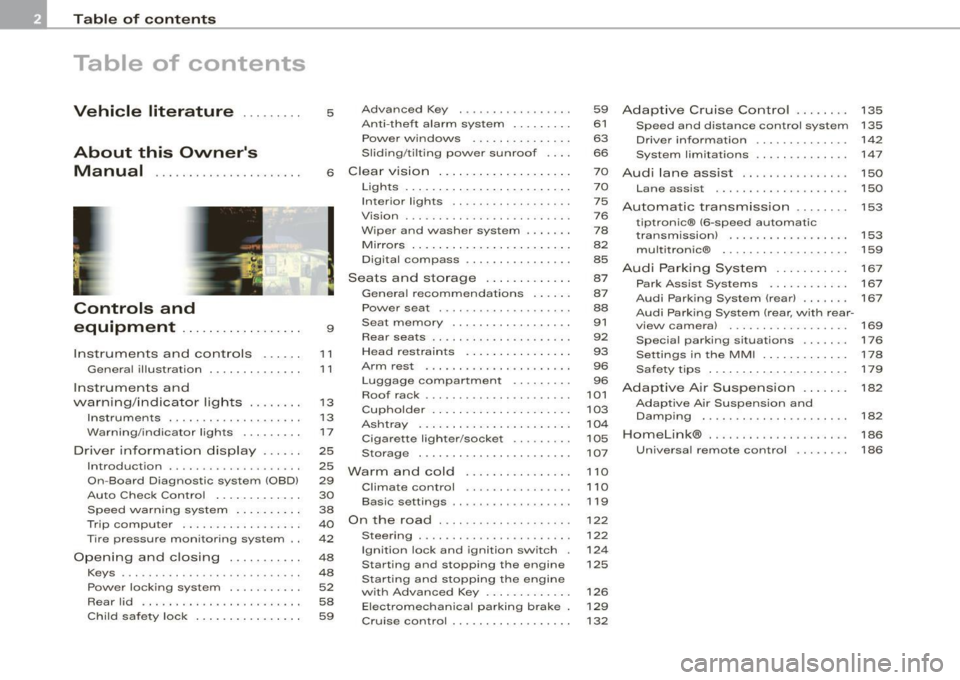
Table of contents
Table of contents
Vehicle literature ... ..... .
About this Owner's Manual .............. ...... . .
Controls and
equipment .. .. .... ..... ... . .
Inst rumen ts and con trols ..... .
Genera l ill ustration ............. .
Instruments and
warning/indica tor lig hts ....... .
Instruments .............. ..... .
Warning/indicator lights ... ..... .
Driver in forma tio n d isplay ..... .
Introduct ion ..... ...... ... ..... .
On-Board Diagnostic system (OBD)
Auto Check Control ............ .
Speed warning system ... ...... .
Trip computer ................. .
Tire pressure monitoring system ..
Op ening and closing .......... .
Keys ... ......... ... .. . ··· ·· ····
Powe r locking system .......... .
Rear lid ....................... .
Ch ild safe ty lock . ... ..... ... ... . 5 Advanced Key
..... ........ ... .
Ant i-theft a larm system ........ .
Power w indows ...... ... ... .. .
S lid ing/ti lt ing power sunroof ... .
6 Clear vision ... .... .. ... .. .... . .
9
11
1 1
1 3
1 3
17
25
25
29
30
38
40
42
48
48
52
58
59 Lights
................ ... ... .. .
Interior lights ...... .. ... .... .. .
V is ion ... .. ............. ... ... .
W iper and washer system ...... .
Mirrors .... ... ......... ..... . . .
Digital compass ............... .
Seats and sto rage .. ... ..... .. .
Genera l recommendat ions ..... .
Power seat ...... . .. ....... ... .
Seat memory .... ..... ........ .
Rear seats .. ... .......... .... . .
Head restrain ts ........ ..... .. .
Arm rest ..................... .
Luggage compartment ..... •.. .
Roof rack ....... .. ... ... ....• ..
Cupho lder .................... .
As htray . ... ... ... ......... ... .
Cigarette lighter/socket ......• ..
Storage ... .... .......... ..• ...
Wa rm and cold ............ ... .
Climate control .. .. ... .. .. .. .. .
Basic settings .... .... ...... ... .
O n t he road .... ...... .... ... .. .
Steering ... ..... .. ... ... .. ... . .
Ignition lock and ignition switch .
Sta rting and stopping the engine
Sta rting and stopping the engine
w it h Advanced Key ............ .
Elect romec hani cal pa rking b rake .
Cru ise control ......... ........ . 59
Adap
tive Cruise Contr ol . . . . . . . . 135
61 Speed and distance control system 135
63 Driver information . . . . . . . . . . . . . . 142
66 System limitations . . . . . . . . . . . . . . 147
7 0
Aud i lane assist . . . . . . . . . . . . . . . . 150
7 0
75
76
7 8
82
85
87
87
88
91
92
93
96
96
101
103
104
105
107
1 10
1 10
119
122
122
12 4
125
126
129
132 Lane assist
. . . . . . . . . . . . . . . . . . . . 150
Automatic transm ission ...... . .
tiptronic® (6 -speed automatic
transm ission) ................. .
multitron ic® .... ..... ...... ... .
A udi Parking Sy stem ......... . .
Park Assist Systems .......... . .
Audi Parking System (rear) .... .. .
Audi Parking System (rear, with rear -
view camera) .. .. ... ... .... ... .
Specia l parking situations ..... . .
Settings in the MM I ........... . .
Safety t ips .................... .
Adaptive Air Suspe nsion .. .. .. .
Adaptive Air Suspension and
Damp ing ...... ............... .
Homelink® ......... ..... ..... . .
Unive rsa l remote control ....... . 153
153
159
167
167
167
169
176
1
7 8
1 7 9
182
182
186
186
Page 13 of 390
Instruments and controls
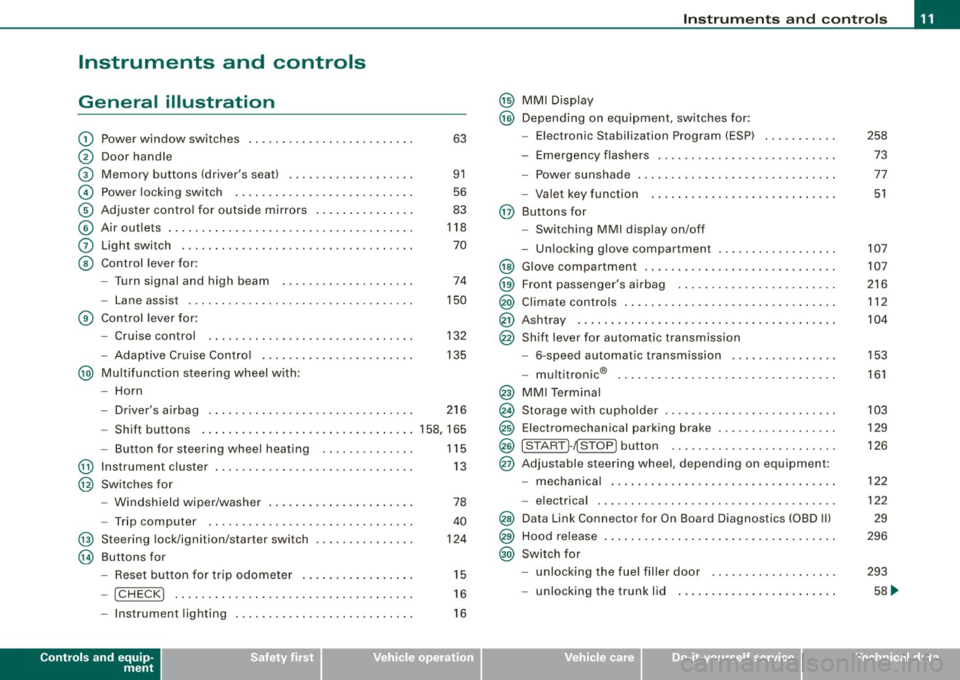
General illustration
G)
0
©
©
©
©
0
©
Power window switches .. ...... .... ... .. ...... . .
Door handle
Memory buttons (driver's seat)
Power locking switch ................ .......... .
Adjuster control for outside mirrors .. .... .. .. ... . .
Air outlets ..... .. .. . ... .... .... .. . ..... ... .... .
Light switch ...... ....... .. .... .... .... .... ... .
Control lever for :
- Turn signal and high b eam .......... ...... ... .
- Lane assist .... .... ... .... .... .... ... .... ... .
G) Control lever for:
-Cruise control .... ... .. .. ... ... .. .... .... ... .
- Adaptive Cruise Contro l .. .. .... .... .......... .
@ Multifunction steering wheel with:
- Horn 63
91
56
83
118
70
74
150
132
135
- Driver's airbag . . . . . . . . . . . . . . . . . . . . . . . . . . . . . . . 216
- Shift buttons ..................... ... .... .... 158, 165
- Button for steering wheel hea ting . . . . . . . . . . . . . . 115
@ Instrument cluster . . . . . . . . . . . . . . . . . . . . . . . . . . . . . . 13
@ Switches for
@
@
-Windshield wiper /washer ....... .... .... ... ... .
- Trip computer ..... .. .... .... ...... ....... .. .
St eering lock/ignition /starter sw itch
Buttons for
Reset button for trip odometer ... .. .... .... ... .
- !CHECK] .. ... ... ..... ...... ........ ... .. ... .
78
40
124
15
16
- Instrument lighting . . . . . . . . . . . . . . . . . . . . . . . . . . . 16
Controls and equip
ment
Instruments and controls
@ MMI Display
@ Depending on equipment , switches for:
- Elect ronic Stabilization Program (ESP)
- Emergency flashers .. ..... .... ... ... ... .... .. .
- Power sunshade ... ..... .... .... ... .... .. . ... .
- Valet key function . .... .... ..... ..... ... .. ... .
@ Buttons for
- Switching MMI display on/off
- Unlocking glove compartmen t
@ Glove compartment .. .... ... ... .. ..... ..... ... . .
@ Front passenger's a irbag ...... .... .... ... ..... . .
@ Climate controls .... . ... .... ... .. .... .... ...... .
@ Ashtray ... .. .... ................... .... ...... .
@ Shift lever for automatic transmission
- 6-speed automatic transmission .... .... ..... .. .
I .
.
® -mu t1trornc ... .. ... .... ... .... .... ... .. .. .. .
@ MMI Terminal
@ Storage with cupholder ... ..... .. .... .... ... .. .. .
@ Elec tromechanical parking brake ......... .. ...... .
@ ISTART ]-~STOP ] button .. ... .... .... .... .... ... .
@ Adjustable steering wheel, depending on equipment:
- mechanical .. .... .. .... ... .... .... .... .. .. .. .
- electrica l ... ...... ... .... ...... ...... .... ... .
@ Data Link Connector for On Board Diagnostics (OBD II)
@ Hood release ... .. .... ... .. .. .... .... .... .. . ... .
@ Switch for
- unlocking the fuel filler door ... ..... ... .... ... .
- unlocking the trunk lid ....... ...... .......... .
I • •
258
73
77
51
107
107
216
112
104
153
161
103
129
126
122
122
29
296
293
58 ...
Page 20 of 390
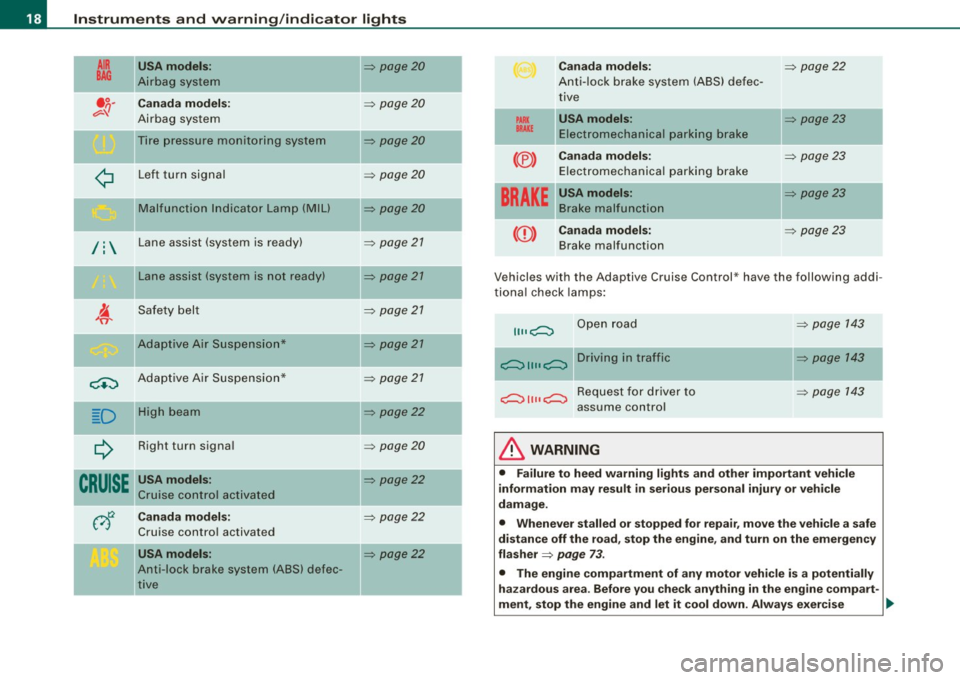
Instruments and warning/indicator lights
AIR
BAG
/:
USA models :
Air bag system
Canada model s:
Airbag system
Tire p ressu re monitorin g system
L ef t t urn signal
Mal function I ndicator Lamp (MIU
Lane assist (system is ready)
L ane assist (system is not ready)
Sa fety belt
Ada ptive A ir Sus pen sion*
<.:) Ada ptive A ir Suspe nsi on*
D H igh bea m
¢ R ight turn signa l
CRUISE USA models:
Cru ise c ontro l act iv ate d
Canada models :
Cruise contro l activated
USA models :
Ant i-lock bra ke system (ABS) defec
t iv e
=> page20
=> page20
=> page20
=> page20
=> page 20
=> page 21
=> page 21
=> page 21
=> pa ge 21
=> page 21
=> page22
=> page 2 0
=> page22
=> page22
=> pag e22
PARK
BRAKE
(®)
Canada models :
Ant i-lock brake system (ABS) defec
tive
USA models :
Ele ctrom ech ani ca l park ing br ake
Canada models :
E lect romechanica l pa rking b rake
----·--USA models :
B ra ke mal function
BRAKE
((D) Canada models:
Brake malfunction
=> page 22
=> page23
=> page 23
-=> page23
=> page 23
Vehicles wit h the Adaptive Cruise Control * have the following addi
t io nal ch eck lamps:
II II c;::::::::::, Ope n road
--c;::::::::::, 11 11 c;::::::::::, D r i v i n g i n t r aff i c
c;::::::::::, 11 11 c;::::::::::, R e q u e st f o r d r iv e r t o
assume control
& WARNING
=> page 143
=> p age 14 3
=> page 1 43
• Failure to heed warning lights and other important vehicle
information may result in ser ious personal injury or veh icle
damage .
• Whenever stalled or stopped for repa ir, move the vehi cle a safe
di stance off the road, stop the engine, and turn on the emergency
flasher
=> page 73 .
• The engine compartment of any motor vehicle is a potentially
hazardous area . Before you che ck anything in the engine compart-
ment , stop the engine and let it cool down . Always exer cise
~
Page 35 of 390
If the ABS system malfunctions, the ABS warning/indicator light illu
minates together with the brake system malfunction warning/indi
cator light~
&-
& WARNING
• Always observe the warnings in ~ page 289, "Engine compart
ment", before opening the hood and checking the brake fluid.
• Driving with low brake fluid is a safety hazard . Stop the car and
get professional assistance.
• USA models: If the
BRAKE warning light and the c~ warning
light come on together, the rear wheels could lock up first under
hard braking . Rear wheel lock-up can cause loss of vehicle control
and an accident. Have your vehicle repaired immediately by your
authorized Audi dealer or a qualified workshop. Drive slowly and
avoid sudden, hard brake applications.
• Canada models : If the brake warning light
«D> and the ABS
warning light come on together, the rear wheels could lock up
first under hard braking. Rear wheel lock-up can cause loss of
vehicle control and an accident. Have your vehicle repaired imme
diately by your authorized Audi dealer or a qualified workshop .
Drive slowly and avoid sudden, hard brake applications. •
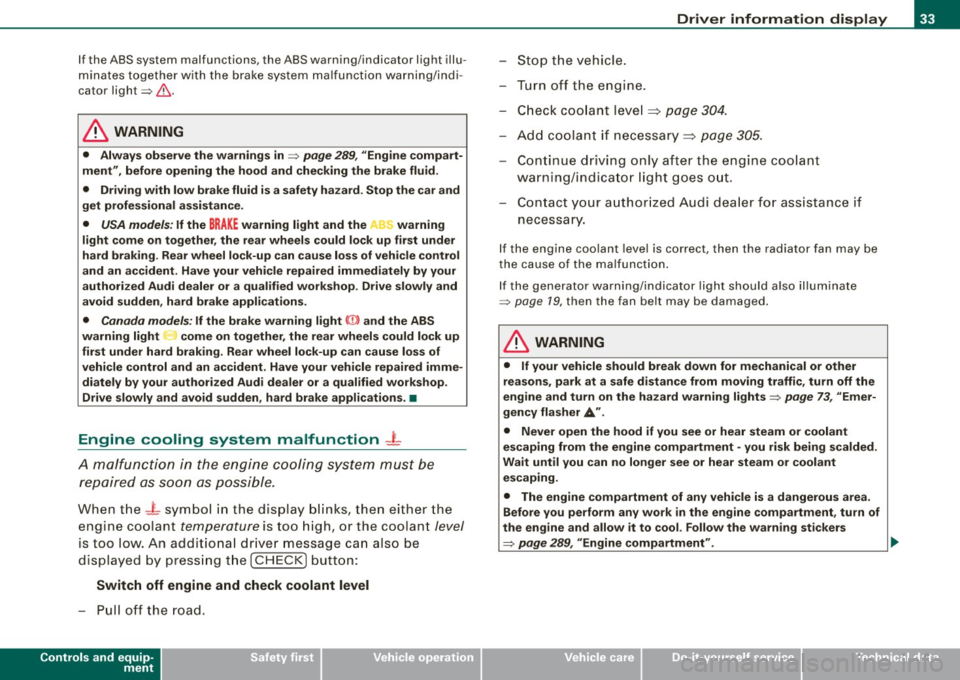
Engine cooling system malfunction -L
A malfunction in the engine cooling system must be
repaired as soon as possible.
When the -t symbol in the display blinks, then either the
engine coolant
temperature is too high, or the coolant level
is too low. An additional driver message can also be
displayed by pressing the [ CHECK] button:
Switch off engine and check coolant level
-Pull off the road .
Controls and equip
ment
Driver information display
Stop the vehicle.
- Turn off the engine.
Check coolant level
=> page 304 .
Add coolant if necessary=> page 305.
Continue driving only after the engine coolant
warning/ind icator light goes out.
Contact your authorized Audi dealer for assistance if necessary.
If the engine coolant level is correct, then the radiator fan may be
the cause of the malfunction.
If the generator warning/indicator light should also illuminate
~ page 79, then the fan belt may be damaged.
& WARNING
• If your vehicle should break down for mechanical or other
reasons, park at a safe distance from moving traffic, turn off the
engine and turn on the hazard warning lights
~ page 73, "Emer
gency flasher
A".
• Never open the hood if you see or hear steam or coolant
escaping from the engine compartment -you risk being scalded.
Wait until you can no longer see or hear steam or coolant
escaping.
• The engine compartment of any vehicle is a dangerous area.
Before you perform any work in the engine compartment, turn of
the engine and allow it to cool. Follow the warning stickers
~ page 289, "Engine compartment" . .,_
I • •
Page 69 of 390
Sliding the roof open all the way
- Turn the rotary switch to position
0-Airflow over the
fully opened sunroof may cause increase d wind noise.
Tilting the roof open - Turn the rotary switch to position @.
- In position @, briefly
press the control to tilt the roof up
completely.
To tilt the roof open to any intermediate position
press
and hold
the switch until the roof reaches the desired
position.
In position ©, the switch jumps back to position G) again as soon
as the switch is released.
When the glass roof opens, the sun visor, which is designed to ward
off strong sunlight, opens along with it. The visor can be closed
manually when the sunroof is closed.
[ i] Tips
• Be aware that the sunroof may actually be open when the sun
visor is closed. Check and make sure that the sunroof is shut when
parking the car or if it suddenly starts raining.
• If the sunroof is not fully closed but you have pressed and held
the switch for the tilt position, the sunroof will not tilt. •
Appl ies to vehicles: with sliding/tilt ing power sunroof
Closing the power sunroof
Sliding the roof shut
- Turn the rotary switch to position
0 => page 66, fig. 49
=>& .
Controls and equip
ment
Opening and closing
Tilting the roof shut Briefly
pull the rotary switch to close the roof.
To tilt the roof down to any intermediate position
pull and
hold
the switch until the roof reaches the desired posi
tion.
& WARNING
Improper use of the power sunroof can cause serious personal
injury.
• Be careful when closing the power sunroof . Not paying atten
tion could cause you or others to be trapped and injured as the roof closes.
• Always take the key with you when you leave the vehicle to
prevent injuries caused by the roof closing
• Never leave children or persons requiring assistance alone in
the vehicle, especially when they could access the vehicle keys. Unsupervised use of the keys can result in the engine being
started or use of vehicle systems such as the power windows. etc .
which could result in serious injury. The doors could be locked
with the remote key, delaying help in an emergency.
• The power sunroof will continue to operate until the ignition
key has been removed and one of the front doors has been
opened. •
Applies to veh icles: with sliding/t ilting power sunroof
Convenience closing feature
The power sunroof can be closed from outside with the
key in the driver's door lock.
-Insert the key into the driver's door lock.
I • •
Page 113 of 390
Warm and cold -
----------------
energy are temporarily cut bac k or switched off~ page 265 .
Hea tin g sys tems in particu lar requi re a g rea t dea l of energy. If yo u
not ice, for example, that the seat * or rear w indow heating is not
heati ng, they have bee n tempora rily cu t bac k or switche d off by
energy management . These systems are avai lable a gain as soon as
the energy balance has been resto re d.
& WARNING
Reduced visibility is dangerous and can cause accidents .
• For safe driving it is very important that all windows be free of
ice , snow and condensation.
• Completely familiarize yourself with the proper use and func
tion of the heating and ventilation system and especially how to defog and defrost the windows .
• Never use the windshield wiper /washer system in freezing
weather until you have warmed the windshield first , using the
heating and ventilation system. The washer solution may freeze
on the windshield and reduce visibility.
0 Note
• I f you suspect that the air conditioner has been damaged, turn
on ECO N and con tac t an authori ze d Aud i deale r to hav e the system
inspected .
• R epairs to the A udi air co nd it io ner requ ir e sp ecia l te chni cal
know ledge and special tools . Contact an authorized Audi dealer for
assista nce .
[ i J Tips
• Kee p th e air in ta ke s lots (in fron t of the w inds hield) free from i ce,
snow and debris in order to maintain the proper function of the
cl im ate c ontro l sy ste m.
Controls and equip
ment
• Air escapes through vents under the rear window . When p lacing
i te ms of c lothing on the luggage c ompartme nt c over, e nsu re th at
the openings are not covered .
• Climate c ontro l wor ks mo st e ffec tively if th e windo ws and the
power roof are c losed . However, if the interior of a parked vehicle is
e xt re me ly hot fro m the sun's rays , briefly open ing the windows can
speed up the cooling process .•
I • •
Page 162 of 390
• ..__A_ u_ t_ o_ m_ a_t _i c_ t_ r_ a _ n_ s_m _ is_ s _ io_ n _____________________________________________ _
App lies to vehic le s : w ith mul tit ron ic ® Cont inuous ly Varia ble Transm ission ( CVTl
Driving the multitronic ®
The gear ratio is continuously adapted to vehicle speed
and load .
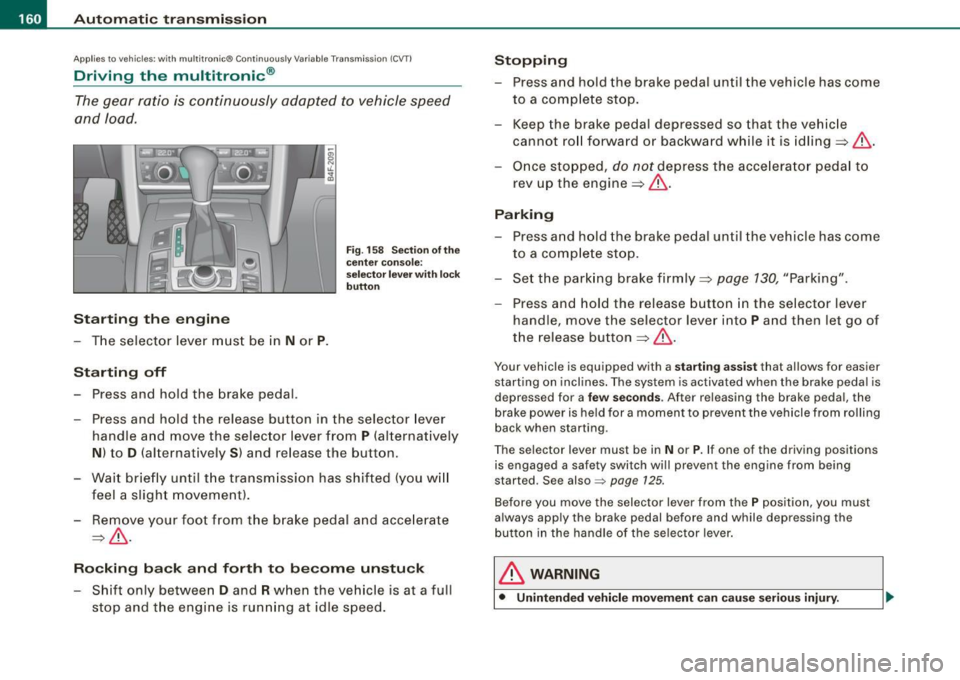
Starting th e engin e
- The selector lever must be in N or P.
Start in g off
- Press and hold the bra ke pedal.
F ig . 1 58 Sec tion o f the
c en ter conso le:
sele ctor leve r w ith l ock
b utt on
- Press and hold the release button in the selector lever
handle and move the selector lever from
P (alternatively
N ) to D (a lternatively S ) and release the button .
- Wait br ie fl y until t he transm iss ion has shifted (you w ill
feel a slight movement ).
- Remove your foot from the brake pedal and acce lerate
~ & -
Ro cking ba ck and forth to b ecom e un stu ck
- Shift only between D and R when the vehicle is at a full
stop and the engine is running at idle speed .
Stopping
-Press and hold the brake pedal until the vehicle has come
to a comp lete stop.
- Keep the brake pedal depressed so that the vehic le
cannot ro ll forward or backward while it is idling ~& .
Once stopped,
do not depress the acce lera to r pedal to
rev up the engine::::!>&.
Pa rking
- Press a nd hold the brake peda l until the vehicle has come
to a comp lete sto p.
- Set the park ing brake firmly ~
page 130, "Park ing".
- Press and hold the release button in the selector lever
handle , move the selecto r leve r into
P and then let go of
the release button
~ & .
Your vehicle is equipp ed with a sta rtin g assist that a llows for easier
starting on inclines . The sys tem is activated when the brake peda l is
d epr essed for a
few se co nd s. Aft er r eleasing the brak e peda l, the
brake power is held for a moment to prevent the vehicle from rolling
back when starting .
The se lector lever must be in
N or P. If one of the driving positions
is engaged a safety switch wi ll prevent the engine from being
started. Se e also =>
page 125.
Before you move the selector lever from the P position, you must
a lways apply the brake pedal before and while depr ess ing the
button in the handle of the selector lever .
& WARNING
• Unintended vehicl e movem ent can cau se seri ous injury.
Page 169 of 390
_____________________________________________ A_u_ d_ i _P _a_ r_ k_ i_n ..;:g =-- S...:y:- s_ t_ e_ m ___ !II
Audi Parking System
Park Assist Systems
Applies to vehicles: with Aud i Par king System
General Information
Different park assist systems may be used for parking or
maneuvering, depending on the vehicle's features .
Audi P ark ing Sys te m (rea r)*:
For the parking system, the acoustic park assist system is installed
in the rear of the vehicle~
page 167 .
The rear parking assist system uses ultrasonic sensors to determine
the distance of the vehicle from a detected obstacle. There are a
total of four sensors located on the rear bumper (two in the midd le
and two on the sides).
Audi P arki ng Sy stem (r e ar , with r ear -v ie w cam era)*:
For the Audi Parking System (rear, with rear-view camera), the rear
acoustic park assist system is integrated in the rear of the vehicle
and the rear-view camera is integrated in the rear lid~
page 169.
The Audi Parking System (rear, with rear-view camera) uses u ltra
sonic sensors to determine the distance of the vehicle from a
detected obstacle. There are a total of four sensors located on the
rear bumper (two in the m idd le and two on the sides). •
Controls and equip
ment
Audi Parking System (rear)
Applies to vehicles: with Audi Parking System (rear )
Rear acoustic park assist
The rear ac oustic park assist warns y ou of obsta cles or
objects behind your car.
D esc ripti on
The rear acoustic parking assist system determines the distance of
the vehicle from an obstacle using ultrasonic sensors. There are 4
sensors in the rear bumper .
The range at which the sensors start to measure is
about:
To the side
A cti va tio n
2 ft (0.60 ml
5.2 ft ( 1.60 ml
Acoustic parking assist is activated automatically when
rever se gear
is engaged . A brief tone confirms that the system is activated.
Warning tones
Distance warning is given by chimes which are generated by the
rear signal generator. The volume and the pitch of the chimes can
be adjusted in the MMI
~ page 168.
Reversing
Distance warning when reversing starts when an obstacle is
detected in the range of the parking assist system . As the distance
decreases, the time interval between the audible tones becomes
shorter .
When the distance is less than 1ft (0.30 ml, the tone becomes
continuous. At this point you should stop backing up .
I • •
Page 173 of 390
Audi Parking System -
----------------=----=------'
& WARNING ! continued )
detected by the system . They can still damage your vehicle
without warning .
• Always make sure that the volu me and frequency of the chimes
i s adjusted so that you can easily hear the acousti c di stance signal
ev en if the radio is playing , the air- cond it ioner blower is on High or
there i s a high level of outs ide noise .
- Che ck the settings whenever someone else has driven the
vehicle before you.
• Improp er reliance on the Audi Parking System can cause colli
s ions and serious personal inju ry .
- Never rely only on parking assist when backing up.
- Always check rear view mirrors to make sure it is safe to back
up.
[ i ) Tips
• The rea r-view came ra pic ture is avai lable a s soon as the MMI
D isplay or the MMI is switched on, or the start-up phase is
completed.
• K eep the sensors in the rear bumper and the rear-view camera
len s clean a nd free of snow and ice, so that the Aud i Pa rking Syste m
can work properl y. Please follow the additional notes on
~ page 179 . •
Con tro ls and eq uip
ment
App lies to veh icles: with Audi Parking System ( rear) and rear-view camera
Rear-view camera (Rear View)
T he rea r-vie w camer a picture , appearing in the MM/
Display, s hows t he are a behin d t he veh icle.
9
"' co m
Fig . 168 T op view :
Pa rking mode 1
0
Fig . 169 T op view :
Parking mode 2
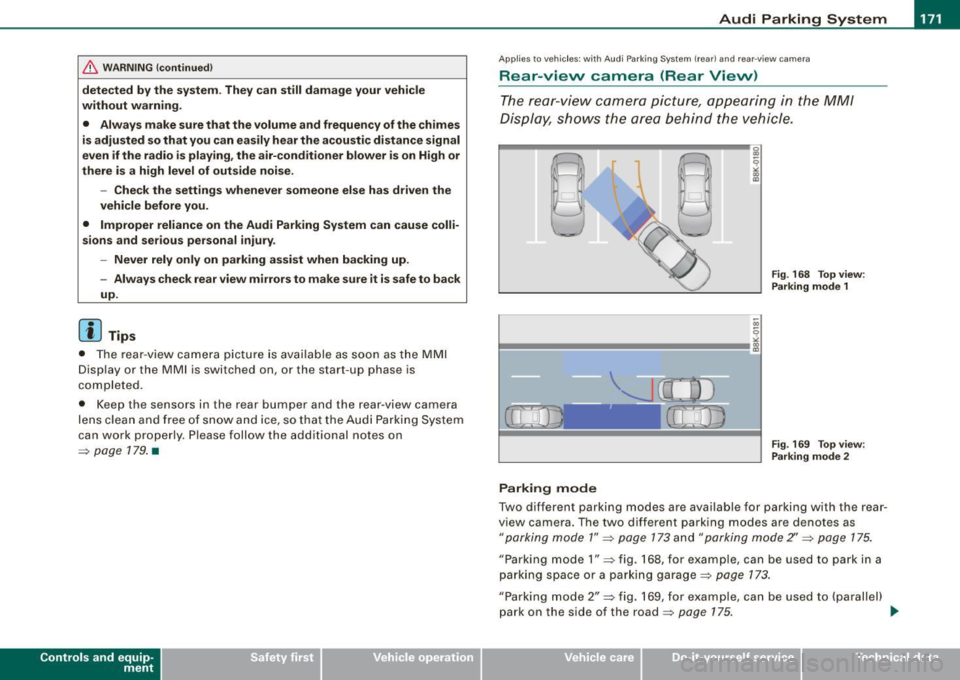
Parking mode
Two different parkin g modes are available for parking with the rear
v iew camera. The two different parking modes are denotes as
"parking mode 1" ~ page 173 a nd "parking mode 2" ~ page 175.
"Parking mode 1" ~ fig. 168, for e xamp le, can be used to park in a
parki ng space o r a par king garage ~
pag e 173 .
"Parking mode 2" ~ fig. 169, for example, can be used to {parallel)
park on the s ide of the road~
page 175. ..,
Vehicle care
I I irechnical data
Page 179 of 390
_____________________________________________ A_u_ d_ i _P _a_ r_ k_ i_n -=g a..- S-=y'--- s_ t_ e_ m __ ....J_
& W ARNING ! continued )
• The Audi Parking System is not a substitute for being careful
and alert when b acking up. Be e spe cially careful during parking
and similar maneuvers . Alw ays wat ch where you are dr iv ing and
make sure that nothing is in the way.
• When maneuvering or parking , do not only use the MMI Display
for orientation . Cert ain ob ject s · depending on the screen resolu
tion -may not , or not ent irely , be displ ayed ; for example trailer
hitches , chains, narrow posts , or fence s.
• Improper reliance on the Audi Parking System can cause colli
s ions and serious personal injury .
- Never rely only on parking assist when changing backing up.
- Always check rear view mirrors to make sure it is safe to back
up. •
Applies to vehic les : w it h Audi Pa rk in g System (rea rl and rear-v iew camera
Notes on distance information
Con tro ls and eq uip
ment
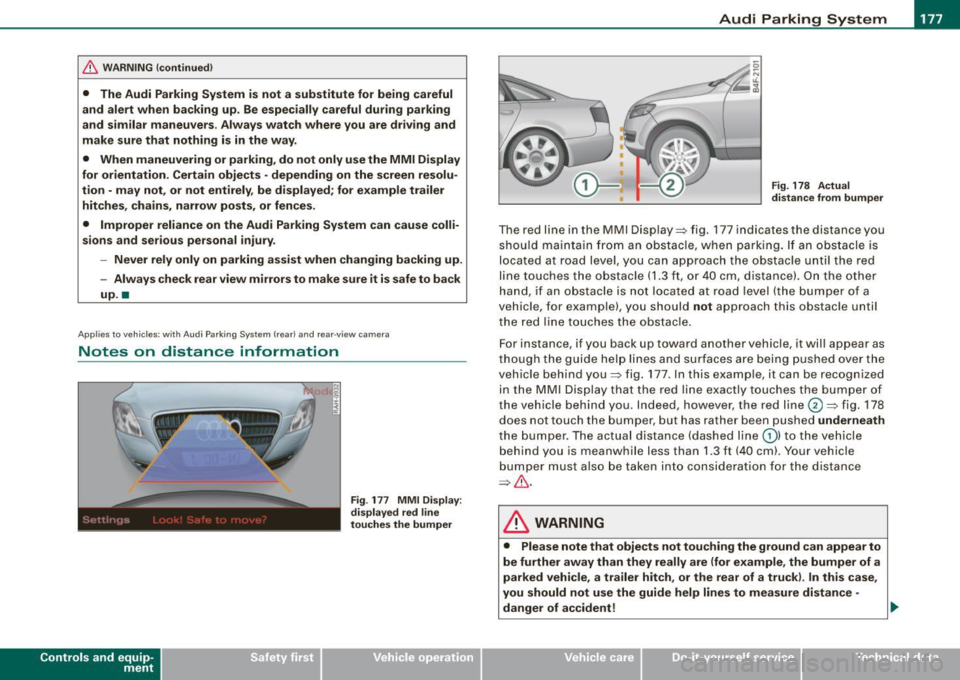
Fig . 177 MMI Displ ay :
di splay ed red l ine
t o uche s the bumpe r Fig
. 178 Actu al
di stan ce from bumpe r
The red line in the MMI Display=> fig. 177 indicates the distance you
should ma intain fr om an obs tacle, when park ing. If an ob stacle is
located at road level, you can approach the obstacle unti l the red
line touches the obstacle
(1.3 ft, or 40 cm, dis tance) . On the othe r
hand , if an obs tacle is not located at road level (the bumper o f a
vehic le, for example), you should
not approach this obstac le unti l
the red lin e touches the obstac le.
F or instance , if you back up toward another vehic le, it wil l appear as
t ho ugh the guide hel p lin es a nd su rfaces are being pushed over t he
vehic le behind you=> fig. 177 . In this example, it can be recognized
in the MMI Disp lay that the red lin e exactly touches the bumper of
the vehicle behind you . Indeed, however, the red line@=> fig. 178
does not touch the bumper, but has rather been pushed
underneath
t he bumper. The actual distance (dashed line G) ) to the veh icle
beh ind you is meanwhile less than
1.3 ft (40 cm). Your vehicle
bu mper mus t also be tak en in to conside rat ion f or the distance
=> & .
& WARNING
• Please note that objects not touching the ground can appear to
be further a way than they really are (for example , the bumper of a
p arked vehi cle, a trailer h itch , or the rear of a truck ). In this ca se ,
you should not use the guide help lines to measure distan ce -
d anger of accident! ..
Vehicle care I I irechnical data