light AUDI S6 2009 Owners Manual
[x] Cancel search | Manufacturer: AUDI, Model Year: 2009, Model line: S6, Model: AUDI S6 2009Pages: 398, PDF Size: 43 MB
Page 261 of 398
& WARNING !continued)
• The inflating airbag will hit the child safety seat or infant
carrier with great force and will smash the child safety seat and
child against the backrest, center arm rest, or door .
• A tight tether or other strap on a rearward-facing child restraint
attached to the front passenger seat can put too much pressure
on the weight -mat in the seat and register a heavier weight in the
Advanced Airbag System. The heavier weight registered can make
the system work as though an adult were on the seat and deploy
the Advanced Airbag when it must be suppressed causing serious
or even fatal injury to the child.
• If you must install a rearward facing child safety seat on the
front passenger seat because of exceptional circumstances and
the PASSENGER AIR BAG OFF light does not come on and stay on,
immediately install the rear-facing child safety seat in a rear
seating position and have the airbag system inspected by your
Audi dealer. •
Securing the upper tether strap to the anchor
bracket
Safety first
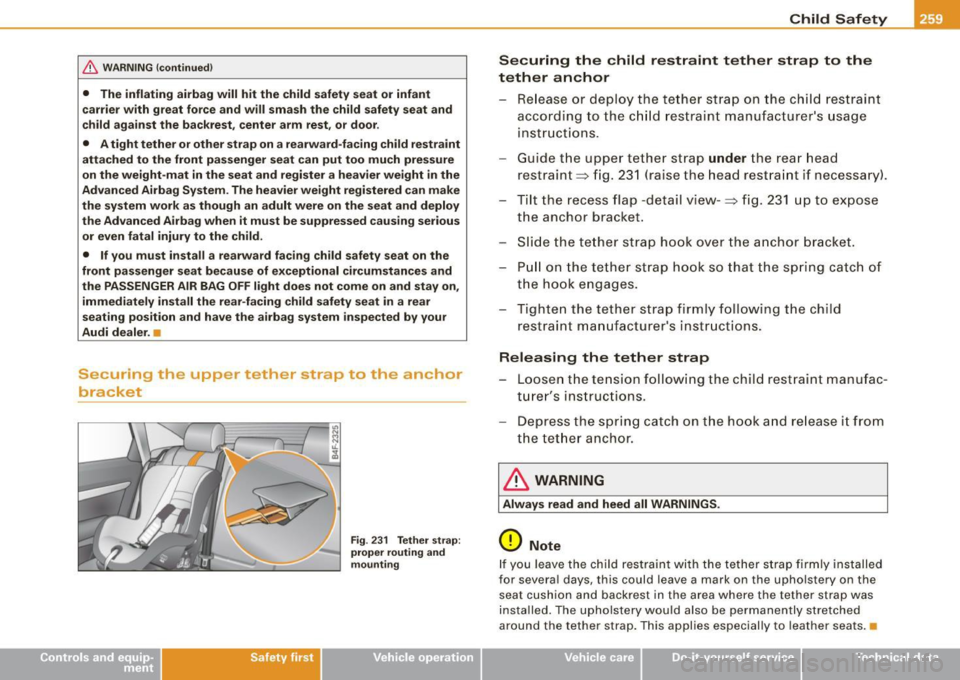
Fig. 231 Tether strap:
proper routing and
mounting
Child Safety
Securing the child restraint tether strap to the
tether anchor
- Release or deploy the tether strap on the child restraint
according to the child restraint manufacturer's usage
instructions.
Guide the upper tether strap
under the rear head
restraint ~ fig. 231 (raise the head restraint if necessary) .
- Tilt the recess flap -detail view-:::;, fig. 231 up to expose
the anchor bracket .
- Slide the tether strap hook over the anchor bracket.
- Pull on the tether strap hook so that the spring catch of
the hook engages.
- Tighten the tether strap f irmly following the child
restraint manufacturer's instructions.
Releasing the tether strap
- Loosen the tension following the child restraint manufac
turer's instructions.
- Depress the spring catch on the hook and release it from
the tether anchor.
& WARNING
Always read and heed all WARNINGS.
0 Note
If you leave the child restraint with the tether strap firmly installed
for several days, this could leave a mark on the upholstery on the seat cushion and backrest in the area where the tether strap was
installed. The upholstery would also be permanently stretched
around the tether strap. This applies especially to leather seats.•
•
Vehicle care I I irechnical data
Page 265 of 398
The direction in which the driver wishes to travel is determined with
t he aid of the steering angle and vehicle speed and is continua lly
compared with the actual behavior of the vehicle. If the two do not
match, for example, when the vehic le starts hydrop laning on a wet
road, ESP will automatically brake the appropriate whee l to correct
the prob lem.
The vehicle is then stab ilized by the forces acting on the whee l
during braking. If the vehicle is
oversteering (rear tends to skid out
of the turn), the brakes are mainly app lied on the wheel that is on
the outside of the curve. In the case of a vehicle that is
understeering
(tendency to sl ide out of the curve), the brakes are applied at the
rear wheel that is on the inside of the curve . An acoustic signal indi
cates when ESP brake application cuts in
~ & .
The system operates across the entire speed range in combination
with the ABS system
~ page 266 . If the Anti -Lock Brake System
(ABS) malfunctions, the ESP wi ll be out of action as well.
Ac tivat ing
When you turn on the eng ine, ESP will automatically be activated
and will perform a se lf -test . As soon as the test is comp leted, the
system is in norma l operating mode.
You can activate a deactivated ESP or deactivated ESP/ASR if required by pressing the~
page 262, fig. 232 button . When they are
activated, the message
E S P/AS R on appears briefly in the display.
D eactiv ating
The ESP should normally be activated al l the time . If necessary, you
can deactivate An ti- Slip Regulation (ASR) or the E lectronic Stabiliza
tion Program (ESP) by pressing the button~
page 262, fig. 232 .
• Dea ct iv at ing A SR: Tap the button . In certain exceptional situa
tions (e.g. driving with t ire chains) , the Anti-Sl ip Regulation (ASR)
can be deactivated ~
page 264. The message ASR off appears in the
display as we ll.
• Dea ctiv at ing E SP/ASR Press the button for more than 3 seconds.
With the ESP/ASR deactivated, the ESP check light comes on, see
Controls and equip
ment Safety first Vehicle operation
In
te llig ent tec hn olo gy
~ page 18 . The message ES P sw itched off appears in the disp lay as
we ll.
& WARNING
The Electroni c Stabili zation Program i s never thele ss subject to the
la ws o f physics . It is p articularl y import ant t o pay a ttent ion t o th is
f a ct on wet and slippery road s. It is ther efore important tha t y ou
a lw ays a dapt your dr iving to the c ondit ion of th e ro ad and t raffi c
c ondition s. Do n ot allow the inc rea sed safety pro vided b y th e Elec
tr on ic S ta bili zatio n Pr ogram sys tem to lull you in to acc epting
add iti onal safet y risk s. C
Electronic differential tock (EDL)
The electronic differential lock monitors the rotational
speed of the drive wheels.
Gener al note s
The electronic differential lock (EDU helps the car to start moving,
accelerate and c limb a gradient on surfaces providing poor or
almost no grip . Without EDL, this would be difficult, if not impos
sib le .
How th e sys te m wo rk s
The EDL operates automatical ly . It monitors the rotational speed of
the drive wheels on an axle with the he lp of the ABS sensors
~ page 266 . If a noticeable difference in rotational speed between
the drive wheels on one axle is detected (e.g. on slippery ground
on
one side),
the spinning wheel is braked, thereby transferring power
to the other drive wheel or whee ls (a ll -whee l drive) . Th is is done up
to a speed of about 60 mph ( 100 km/h). Noises from the brake
system signal that wheel spin is being control led .
Dr iving off
When driving off , always be sure to keep road conditions in mind as
you accelerate. If one drive wheel spins because it is on a surface
Iii>
Vehicle care Do-it-yourself service Technical data
Page 266 of 398
___ ln_ t _e_ ll-'"ig ...,_ e_ n_t _t_ e_ c_ h _ n_o _ l_o _,.g= y,_ __________________________________________ _
with less grip, gradually increase the pressure on the accelerator
pedal until the car starts to move.
Overheating of brakes
To prevent the disc brake of the braked wheel from overheating if
subjected to excessive loads on this wheel, the EDL cuts out tempo
rarily. The vehicle remains operational and behaves in the same way
as a vehicle without EDL.
As soon as the brake has cooled down, EDL switches on again auto
matically.
& WARNING
• When accelerating on slippery surfaces, such as on ice or snow,
always be careful when depressing the accelerator pedal. Even
with the EDL working, the drive wheels can spin and reduce your
ability to control your car. Risk of crash!
• The increased safety afforded by EDL does not mean that you
can take safety risks. Always adapt your driving style to the road
conditions and traffic situation.
[ i] Tips
If a fault occurs in the ABS, the EDL is also not functioning. This is
indicated by the ABS warning light=>
page 21. •
Ant"-Slip Regulation System (ASR)
The Anti-Slip Regulation System prevents the driven
wheels from spinning when the car is accelerating.
General notes
The Anti-Slip Regulation System (ASR) is integrated in the electronic
stabilization program (ESP). When the vehicle starts up and acceler
ates, the wheels are prevented from spinning by adjusting the engine power to match the amount of grip available from the road
surface.
How the system works
ASR
performs automatically, i.e. without the driver's intervention.
With the aid of the ABS sensors=>
page 266, ASR monitors the
speed of the driven wheels. If the wheels start to spin, the engine
torque is reduced automatically until the tires find enough grip to
lock onto the road surface. The system is active across the entire
speed range.
Th e ASR works in conjunction with the ABS. If a malfunction should
occur in the ABS, the ASR will also be out of action.
Activating
The ESP is automatically activated when the engine is started and it
performs a self -test . You can activate a deactivated ASR if required
by pressing the =>
page 262, fig. 232 button . When it is activated,
the message
ESP/ASR on appears briefly in the display. Vehicles
with front-wheel drive a deactivated ASR automatically re-activates
itself at a speed of 40 mph (70 km/h) .
Deactivating
You can deactivate the ASR if required by pressing the button (for
less than 3 seconds)=>
page 262, fig. 232. With the ASR deactivated,
the ESP check light comes on, see=>
page 18. The message ASR off
appears in the display as well. On vehicles with front-wheel drive:
deactivation is possible only up to 30 mph (50 km/h) for safety
reasons . Vehicles with all -wheel drive: the ASR can be deactivated
at any speed .
The ASR should normally be activated all the time. Only in certain
exceptional situations when some slip is desirable does it make
sense to deactivate the ASR. Examples:
• when driving with tire chains
• when driving in deep snow or on loose ground and
• when rocking the vehicle loose after it has become stuck .
Page 269 of 398
This automatic adjustment process will cause a slight vibration of
the brake pedal and some noises to alert you that vehicle speed
must be adapted to existing road and traffic conditions .
& WARNING
Although the ABS is very effective, always remember that braking
capability is limited by tire traction. Always adjust your driving
speed according to the road and traffic conditions. Do not let the
extra safety afforded by the ABS tempt you into taking extra risks.
The ABS cannot overcome the laws of physics .
[ i ] Tips
• If ABS is not functioning properly, a warning light will come on .
See ~
page 21.
• If a fau lt occurs in the ABS, the EDL is also not functioning. This
is indicated by the ABS warning light.
Brake assistant
The brake assistant is designed to achieve the optimum
braking effect.
The brake assistant helps to increase the effective braking power
and thus to achieve a shorter stopping distance . If the driver
presses the brake pedal very quick ly, the brake assistant automati
cally boosts the braking force to the maximum level, up to the point
where the anti-lock brake function (ABS) intervenes to stop the
wheels from locking . You should then keep the brake pedal pressed
until the vehicle has braked to the required speed. The brake assis
tant switches itself off as soon as you release the brake pedal.
T he brake assistant wil l not be operative if there is a malfunction in
the ABS .
Controls and equip
ment Safety first Vehicle operation
Intelligent technology
& WARNING
Please remember that the
accident risk always increases if you
drive too fast , especially in corners or on a slippery road, or if you
follow the vehicle ahead of you too closely. Increased risk of an
accident cannot be compensated for even by the brake assistant ,
so always maintain a safe speed. •
Servotronic® -advanced power
steering system
The power steering systems uses the power of the
running engine to allow precise steering with little effort.
The advanced Servotronic ® power steering system senses the road
speed and electronically adjusts power assistance to provide
comfortab le and safe steering response exactly matched to the
vehicle speed.
Power steering will not work if the engine is off. As a result, the
steering wheel will be hard to turn.
The power steering fluid level is checked during the scheduled
maintenance services .
0 Note
If there is an electronic ma lfunction, servotronic wi ll still function
like a conventional power steering system, providing a constant
steering support force that is no longer proportionate to the vehicle
speed . This is most noticeable when turning the steering whee l at
low speeds (for examp le when parking), -more effort will be
required than usual.
• Be aware of the different than usual steering response and
adjust your steering force accordingly.
• Have the problem checked and set right by an Aud i dealer as
soon as possible. ._
Vehicle care Do-it-yourself service Technical data
Page 272 of 398
ll}J!I Intelligent technology
----'""------- ~---------------------------------------
With the engine turned off
If you listen to the radio, for example, with the engine turned off or
use other MMI functions, the battery is being discharged.
If starting capability is jeopardized due to energy consumption , the
following warning appears in the MMI display:
Please start engine, otherwise system will switch off in
3 minutes.
The warning indicates that the system will be turned off automati
cally after 3 minutes. If you wish to continue using the functions,
you have to start the engine.
With the engine running
Although electrical energy is generated when the vehicle is being
driven, the battery can become discharged. This happens mostly
when little energy is being generated and a great deal consumed
and the battery's state of charge is not optimal.
To bring the energy balance back into equilibrium , consumers
which require especially large amounts of energy are temporarily cut back or switched off. Heating systems in particular require a
great deal of energy. If you notice, for example, that the heated
seats* or the heated rear window are not heating, they have been
temporarily cut back or switched off. These systems will be available
again as soon as the energy balance has been restored.
You will also notice that engine idle speed has been increased
slightly . This is normal and not a cause for concern. By increasing
engine idle speed the additional energy required is generated and
the battery is charged. •
Driver notification in the instrument cluster
d isplay
If battery power drops into the range where it can limit the ability of
the engine to start, this is shown in the instrument cluster display
with the following driver message:
'-' Low battery charge: battery will be charged while driving
This notification reminds you that the starting capability of the
engine may be limited. As soon as you start driving again, the
battery will be recharged and the notification will go out.
Driver notification appears and goes out again
If this driver notification appears after the ignition is turned on or
while driving and it goes out again after a while, the battery has
been adequately recharged.
Driver notification appears and does not go out again
If this driver notification appears after the ignition is turned on or
while driving and does not go out again, the battery's state of
charge is not in the optimal range. Starting ability is restricted . Have
the battery checked as soon as possible at a dealership. •
Page 275 of 398
- Lack of proper maintenance as wel l as improper use of the
vehic le wi ll impair the func tion of the emission con tro l system
and could lead to damage.
<£> For the sake of th e envir onm ent
Even when the Emission Control System is operating properly, the
exhaust gas can have a su lfur -like exhaust gas smell under some
operating states . This depends on the sulfur content of the fuel
being used. Using a different brand of fue l may help, or filling the
tank with lead-free super grade gasoline. •
Avoid damaging the vehicle
When you are driving on poor roads, or over curbs, steep ramps,
etc., make certain that low- lying parts such as spoi lers and exhaust
system parts do not bottom out and get damaged.
This is especially true for vehicles with low-slung chassis (sports
chassis) * and fully loaded vehicles .
a
Operate your vehicle economically
and minimize pollution
General
Your personal style of driving will determine the economy
of your vehicle, as well as exhaust and noise levels.
Fuel economy, environmental impact, and wear on your engine,
brakes and tires largely depend on three factors:
• your personal driving style
• operating cond itions
• technica l limitations
Controls and equip
ment Safety first Vehicle operation
Dri
ving and environm ent
If you anticipate what you need to do next and drive economica lly,
you can easily cut your fuel consumption by 10 -15 percent . This
section wil l give you some tips on how you can help the environ
ment and your pocketbook.
[ i ] Tips
The consumption estimates as published by ENV IRONMENTAL
PRO TEC TION AGENCY (EPA) and Transport Canada may not corre
spond to your actua l consumption on the road, which wi ll vary
depending upon vehic le load and speed, road and weather condi
tions, trip length, etc. •
Drive smoothly and keep a lookout ahead
Vehicles use the most fuel when they ore accelerating.
-Avoid unnecessary accelerat ing and braking.
Vehicles use the most fuel when they are accelerating . If you antici
pate what is going to happen next, you wi ll need to brake less and,
thus, acce lerate less. Let the vehicle coast whenever possib le - for
examp le when you see that the next traffic light is red. •
Avoid full throttle
Driving at moderate speeds saves fuel and improves your
mileage.
-Try and keep well below your car 's max imum speed.
Acce lerating gently reduces fue l consumption , engine wear, and
does not disturb the environment.
Fue l consumption, exhaust emissions and engine noise increase
disproportionately at high speeds . If you drive at approximate ly
three quarters of top speed, fuel consumption wil l be reduced by
Vehicle care Do-it-yourself service Technical data
Page 276 of 398
___ D_ r_i v_ in_... g"'- a_ n_ d_ e_ n_ v_i_r _ o _n_ m __ e_n _ t _______________________________________________ _
one half. Never drive faster than the posted speed limit and weather
conditions permit. •
Reducing unnecessary =citing
Even when your car is just idling it burns up fuel.
- Shut the eng ine off when you are not driving the vehicle .
- Do not warm up the vehicle by letting the engine run at
idle.
It makes sense to shut off the engine in traffic jams, when waiting
for trains to pass at rai lroad crossings , or at traffic lights that have
long waits on red. Turning the engine off for just 30 -40 seconds
saves more fuel than is burned starting the engine again .
It takes a long time for the engine to warm up fu lly when it is
running at idle. However, wear and noxious emissions are especially
high when the engine is warming up. So you should drive away as
soon as you start the engine and avoid running at high rpms while
the engine is still warming up.
0 Note
Do not leave engine idling unattended after starting . If warning
lights should come on to indicate improper operation, they would
go unheeded. Extended idling also produces heat, which could result in overheating or other damage to the vehicle or other
property .•
Regu1ar ma1--.tenance
A badly tuned engine unnecessarily wastes a lot of fuel.
-Have your vehic le serviced at regular intervals .
By having your vehicle regularly serviced by an Audi dealer helps to
ensure that it runs properly and economically. The condition of your
vehic le not only affects its safety and abi lity to hold its value, it also
affects
fuel con sumpt ion.
C hec k your o il e ach time you fill your t ank.
The amount of oil used is related to engine load and speed.
It is norma l for the oil consumption of a new engine to reach its
lowest va lue after a certain mileage has been driven.
You must drive your vehicle about 3,000 miles (5,000 kilometers) before you can properly assess oil consumption .
This also applies to fuel consumption and engine output .
0 Note
• Have your vehicle maintained properly and in accordance with
the service recommendations in your Warranty
& Maintenance
booklet. Lack of proper ma intenance as well as improper use of the
vehic le wi ll impair the function of the emission control system and
cou ld lead to damage.
• Do not alter or remove any component of the Emission Control
System unless approved by the manufacturer.
• Do not alter or remove any device, such as heat shields,
switches, ignition wires, valves, which are designed to protect your
vehicle's Em ission Control System and other important vehicle
components .•
Fewer short tr ips
Fuel consumption will always be relatively high on short
trips.
- Try to avoid driving short dista nces wi th a cold engine. _,
Page 278 of 398
ll}JI __ T_ r _a_ il_e _r_ t_ o_ vv_ in__... g,_ __________________________________________________ _
Trailer towing
Driving with a trailer
General information
Your Audi was designed primarily for passenger transpor
tation.
If you plan to tow a trailer, please remember that the additional load
wi ll affect durability, economy and performance.
Trai ler towing not on ly p laces more stress on the vehicle, it a lso ca lls
for more concentration from the driver.
For this reason, always fol low the operating and driving instructions
provided and use common sense.
0 Note
If you are going to tow a trai ler, you must activate the trailer opera
tion mode =>
page 186, "Towing a trailer".
Technical requirements
Tra iler hitch
Use a weight-carrying hitch conforming to the gross trailer weight .
The hitch must be suitable for your vehicle and trailer and must be
mounted secure ly on the ve hicle's chass is at a
technically sound
location. Use only a trailer hitch with a removable ball mount.
Always check with the trai ler hitch manufacturer to make sure that
you are using the correct hitch .
Do not use a bumper hit ch.
The hitch must be installed in such a way tha t it does not interfere
with the impact-absorbing bumper system. No modifications should be made to the vehic le exhaust and brake systems. From time to time, check that all hitch mounting bolts remain securely
fastened.
When you are no
t towing a trailer, remove the traile r hitch ball
mount. This prevents the hitch from causing damage shou ld your
vehic le be struck from behind=>& .
Traile r br akes
If your trailer is equipped with a braking system, check to be sure
that it conforms to al l regu lations .
The trai ler hydraulic brake system must no t be direct ly connected to
the vehicle's hydraulic brake system.
Safet y chains
Always use safety chains between your vehicle and the trailer.
Trailer light s
Trailer lights must meet a ll regulations. Be sure to check with your
Audi dealer for correc t wiring, sw itches and relays .
Mirrors
If you are unable to see the traf fic behind you using the regu lar
outside mirrors, then you
must install extended mirrors. It is impor
tant that you
always have c lear vision to the rear.
& WARNING
After rem oving the tr aile r hitch , do not store it in your vehi cle. In
ca se of sudde n braking , the hit ch co uld fl y for ward and injure you
or your p asseng ers. a
Page 279 of 398
Operating instructions
Max im um tra iler weight
A trailer for your vehicle is limited to a typical class 1 or class 2
trailer.
T ra ile r l oa d di stributio n
Be sure the load in the trailer is he ld securely in place to prevent it
from shifting forward, backward or sideways .
Never allo w a passe nger to r ide in a tr aile r~ & in "Driving instruc
tions" .
Engin e c oolin g sys te m
Towing a trailer makes the eng ine work harder. It is important that
the cooling system's performance is up to the additiona l load. Make
sure that the coo ling system has enough fluid .
Tire pr ess ure
When towing a trailer, inflate the tires of your vehicle to the co ld tire
pressure listed under "Full load" on the labe l located on the driver's
side B -pillar {visible when the door is open). Inflate trailer tires to
trailer and tire manufacturers' specifications .
Light s
The head light settings should be checked with the trailer attached
before driving off . Check to make sure both vehicle and trai ler lights
are working properly.
Safe ty chains
Be sure trailer safety chains are properly connected from the trailer
to the hitch on the vehicle. Leave e nough slack in the chains to
permit turning corners. When you insta ll safety chains, make sure
they will not drag on the r oad when you a re driving .
The chains should cross under the tra iler tongue to prevent it from
dropping in case of separation from the hitch.
Controls and equip ment Safety first Vehicle operation
Tr
aile r t owing
0 Note
If you are going to tow a trai ler, you must activate the trailer opera
tion mode ~
page 186, "Towing a trailer". •
Driving instructions
Driving with a trailer always requires extra care and
consideration.
To obtain the best possible handling of veh icle and trailer,
please note t he following :
- Do not tow a loaded trailer when your car itself is not
loaded.
Be espec ia lly careful whe n passing other vehicles.
- Observe s peed l imits .
Do not drive at the maximum permiss ible speed .
Always apply brakes ear ly.
Moni tor t he temperature ga uge.
Weight distr ibution
Towing a loaded trailer with an empty car results in a highly
unstable distr ibution of weight. If this cannot be avoided, drive at
very low speeds only to avoid the risk of losing steering control.
A "balanced" rig is easier to operate and control. This means that
the tow vehicle should be loaded to the extent possible and perm is
s ib le, while keeping the trailer as light as possib le under the circum
stances . Whenever possible, transfe r some cargo to t he luggage
compartment of the tow vehicle whi le observing tongue load
requirements and vehicle loading considera tions . .,
Vehicle care Do-it-yourself service Technical data
Page 280 of 398
___ T_ r _a_ il_e _r_ t_ o_ vv_ in__... g,_ __________________________________________________ _
Speed
The higher the speed, the more difficult it becomes for the driver to
control the rig. Do not drive at the maximum permissible speed. Reduce your speed even more if load, weather or wind conditions
are unfavorable -particularly when going downhi ll.
Reduce vehicle speed
im med ia tel y if the trailer shows the slightest
sign of swaying.
Do not try to s top the swayi ng by accelerating.
Observe speed limits. In some areas, speeds for vehicles towing
trai lers are lower than for regular vehicles .
Always apply brakes ear ly. When driving downhill, shift into a lower
gear to use the engine braking effect to slow the vehicle. Use of the
brakes a lone can cause them to overheat and fail.
C ool ant t emp era tur e
The coolant temperature gauge=> page 12 must be observed care
fully. If the needle moves close to the upper end of the scale, reduce
speed immed iately and/or turn off the air conditioner.
If the coolant temperature warning light in the instrument cluster
starts flashing
- F- , pull off the road, stop and let the engine idle for
about two minutes to prevent heat build-up.
& WARNING
A nyo ne n ot properly re str aine d in a moving vehi cle i s at a mu ch
g re ater ri sk in an accident . Never let any on e r ide in y our car who
is n ot pr operl y wea ring th e re stra ints pr ovided b y Audi . •
Trailer towing tips
Important to know
Your vehicle handles differently when towing a trailer because of
the additional weight and different weight distribution. Safety, performance and economy will greatly depend on how carefully you
l
oad your trailer and operate your r ig.
Before you actually tow your trailer, practice turning, stopping and
backing up in an area away from traffic . Keep practicing unti l you
have become comp letely familiar with the way your vehicle-trai ler
combination behaves and responds.
Back ing up is difficult and requires practice. Backing up with a
trailer generally requires steering action opposite to that when backing up your vehic le without a tra iler.
Ma intain a greater distance between your veh ic le and the one in
front of you . You will need more room to stop. To compensate for
the trai ler, you w ill need a larger than norma l turning radius.
When passing, remember that you cannot accelerate as fast as you nor mally wou ld because of the added load . Make su re you have
enough room to pass. After passing, allow plenty of room for your
trai ler befo re changing lanes again .
Avoid jerky starts, sharp turns or rapid lane changes.
[ i ] T ips
• Do not tow a trailer during the break -in period of your vehicle.
• I f you tow a trailer, your Audi may require more frequent main te
nance due to the extra load=>
page 372. •
Parking on a slope
Do n ot park on a slope with a trailer. If it cann ot be
avoi ded, do so only after d oing the followi ng:
When p arking :
-Apply the foot brake.
- Have someone p lace chocks under both the vehicle and
the trailer wheels. ._