instrument cluster AUDI S6 2009 User Guide
[x] Cancel search | Manufacturer: AUDI, Model Year: 2009, Model line: S6, Model: AUDI S6 2009Pages: 398, PDF Size: 43 MB
Page 37 of 398
Battery voltage ~
If the battery's state of charge is not in the optimal range, the
symbo l is shown in the display and the driver message
Low battery
c harge : battery will be charged wh ile dr iving
appears .
Whi le th is d river notification is displayed, you have to be p repa red
for limited starting capabi lity.
Driver message appears and goes out again
If this driver message appears after the ignition is turned on or
w hile driving and it g oes out agai n after a w hile , th e ba tte ry has
been adequately recharged.
Driver message appears and does not go out again
I f this dr iver notification appears after the ignition is turned on or
while driv ing and does n ot go out aga in, the bat tery's state of
charge is not in the optimal range. Starting capability is restricted.
H ave the ba ttery checke d by an au tho rize d Audi deale r as soon a s
poss ible .•
Worn brake pads
Brake pads!
If the wa rning light i lluminates, immediate ly contact your autho
rized Aud i d eal er or qualified wor kshop to have a ll brake pads
inspected. On USA models the warning light comes on together
wit h the warning light
BRAKE . Both sets of brak e pads o n an a xle must
a lways be replaced at the same time.
& WARNING
Driving with bad brakes can cause a collision and serious personal
injury.
• If the warning light • and the warning light
BRAKE11 with the
message Brake pads ! comes on in the instrument cluster display ,
Controls and equip
ment
Driv er information display
& W ARNING (continued )
immediately contact your author ized Audi dealer or qualified
workshop to have all brake pads checked or replaced if necessary .•
Headlight range control defective ">
l ) Headlight range control defective
If th e sy mbol ill uminates , the dyna mic headlig ht ra nge c ont rol is n o
longer working properly . Have the system checked and repa ired at
yo ur Au di d eale r.•
Engine oil level "'·
Please check oil level
When the symbol il luminates, check the engine o il leve l as soon as
possible =>
page 305. Top off the oi l at your earliest opportu nity
=>
page 306. •
Engine oil sensor defective ~,m,
Oil level! sensor defective
If the symbo l il luminates, contact your authorized Audi dealer and
h ave th e oil sensor insp ecte d. Unt il y ou hav e thi s do ne, c heck the oil
leve l each time you refue l just to be on the safe side=>
page 305. •
11 BRAKE : USA models only
I • •
Page 38 of 398
Driver inf ormati on displ ay
Ap plies to vehicles : wit h en gine sp eed limitat ion
Engine speed limitation ,-;,,
l.r1 Engine speed maximum XXXX RPM
The )t symbo l illuminates when there is an engine control malfunc
tion. The indicator light
C in the instrument cluster also illumi
nates . The engine speed is limited to the speed displayed in the
driver information system. Keep in mind that the engine speed will
not exceed the va lue displayed in the driver information system, for
example when downshifting.
P lease go to an authorized Audi dealer or other qua lified workshop
to have the ma lfunction repaired .•
Ap plies to vehicles: wit h A dapt ive Li ght
Adaptive Light defective t;: :
Adapti ve Li ght defect ive
When this symbol '" illuminates, it means that Adaptive Light is
defective. Go to an authorized dealership to have the head lights or
the control unit for the Adaptive Light repaired. •
Ignition lock malfunction ..,e
If the symbol in the d isplay c omes on, there is a malfunc -
tion in the e lectronic ignition lock. An additional driver
message can be displayed by press ing the [ CHECK ] button:
D efe ctiv e ignition swi tch
- Drive to an authorized service facility at your earliest
convenie nce to have the malfunction corrected .•
Windshield wipers faulty ->
. W in ds hield wi per m alfun ction
When this symbol il luminates, i t means tha t the electronics for
the windshield wipers are defective . Please go to an authorized
dea lership to have the windshield wiper system repaired .•
Speed warning system
Overview
The speed warning system helps you to keep your driving
speed below a set speed limit.
The speed warning system warns the driver if he exceeds a previ
ous ly stored maximum speed. A warning tone will sound as soon as
the vehicle speed exceeds th e set speed by about 3 mph (3 km/h). At
the same t ime, a warning symbol appears in the display .
The speed warning system has
t w o wa rnin g thr eshol ds that func
tion independent ly of each other and that have somewhat different
purposes:
S peed warnin g 1
You can use speed warning 1 to set the maximum speed while you
are driving. This setting will remain in effect until you turn off the
ignition , assuming that you have not changed or reset the se tting .
The speed warning symbol
0 (USA models) /0 (Canada models) in
the warning 1 display appears when you exceed the maximum speed . It goes out when the speed falls below the stored maximum
speed .
The speed warning symbol wi ll also go out if the speed
e xce eds the
stored maximum speed by more than about 25 mph
(40 km/h) for at
leas t 1 O seconds. The stored maximum speed is deleted .
Setting speed warning 1 :::::,
page 37.
Page 39 of 398
Speed warning 2
Storing warning 2 is recommended if you always want to be
reminded of a certain speed, for example when you are traveling in
a country that has a general maximum speed limit, or if you do not
want to exceed a specified speed for winter tires.
Th e speed warning 2 symbol,
8, (USA models)/ 8, (Canada models)
appears in the display when you exceed the stored speed limit.
Unlike warning 1, it will not go out until the vehicle speed drops
below the stored speed limit.
Setting speed warning 2
~ page 37.
[ i J Tips
Even though your vehicle is equipped with a speed warning system,
you should still watch the speedometer to make sure you are not
driving faster than the speed limit. •
Speed warning 1: setting a speed limit
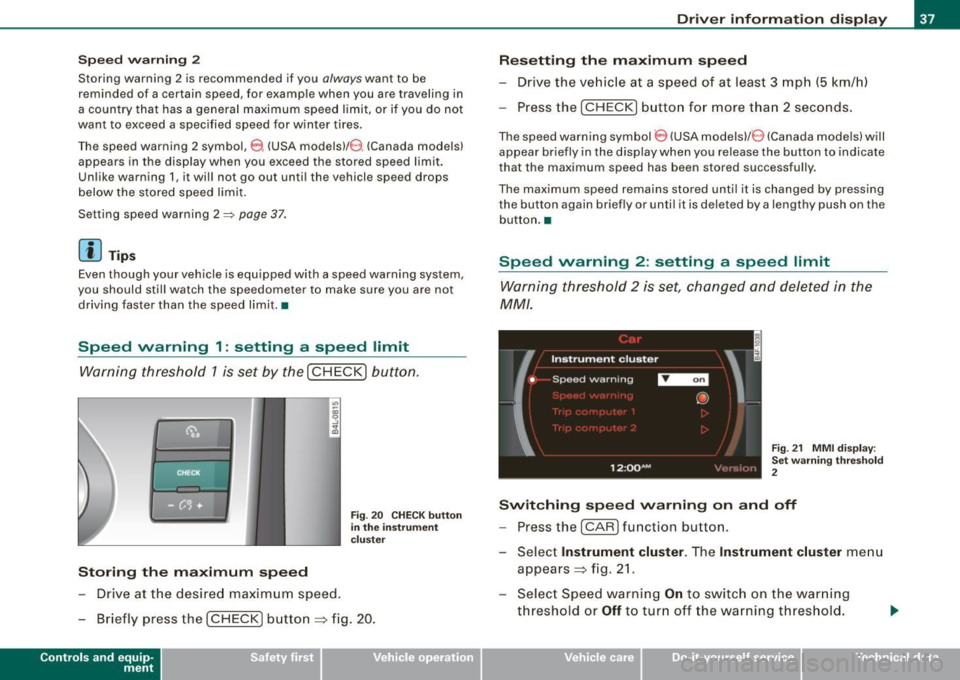
Warning threshold 1 is set by the (
CHECK) button.
Storing the maximum speed
-Drive at the desired maximum speed.
Fig. 20 CHECK button
in the instrument
cluster
- Briefly press the ( CHECK) button => fig. 20.
Contro ls and eq uip
ment
Driver information display
Resetting the maximum speed
- Drive the vehicle at a speed of at least 3 mph (5 km/h)
- Press the (
CHECK) button for more than 2 seconds.
The speed warning symbol 8 (USA models)/ e) (Canada models) will
appear briefly in the display when you release the button to indicate
that the maximum speed has been stored successfully.
The maximum speed remains stored until it is changed by pressing
the button again briefly or until it is deleted by a lengthy push on the
button. •
Speed warning 2: setting a speed limit
Warning threshold 2 is set, changed and deleted in the
MM/.
Fig. 21 MMI display :
Set warning threshold
2
Switching speed warning on and off
- Press the ( CARI function button.
- Select
Instrument cluster. The Instrument cluster menu
appears=> fig. 21.
- Select Speed warning
On to switch on the warning
threshold or
Off to turn off the warning threshold.
Vehicle care I I Technical data
Page 40 of 398
Driver inf ormati on displ ay
S ettin g and a djustin g th e w arnin g thr eshold
- Press the
I CAR I function button .
- Select
In strum ent cluster . The Instrum ent clust er menu
appears.
Select the second item in the
Sp eed wa rning menu. The
submenu
Sp eed th resh old appears ~ page 37, fig. 21.
- Set t he warning threshold you want.
Warning thresho ld 2 can be adjusted within a speed range of 30 to
200 km/h . Settings can be adjusted in intervals of 10 km/h each. •
Trip computer
Introduction
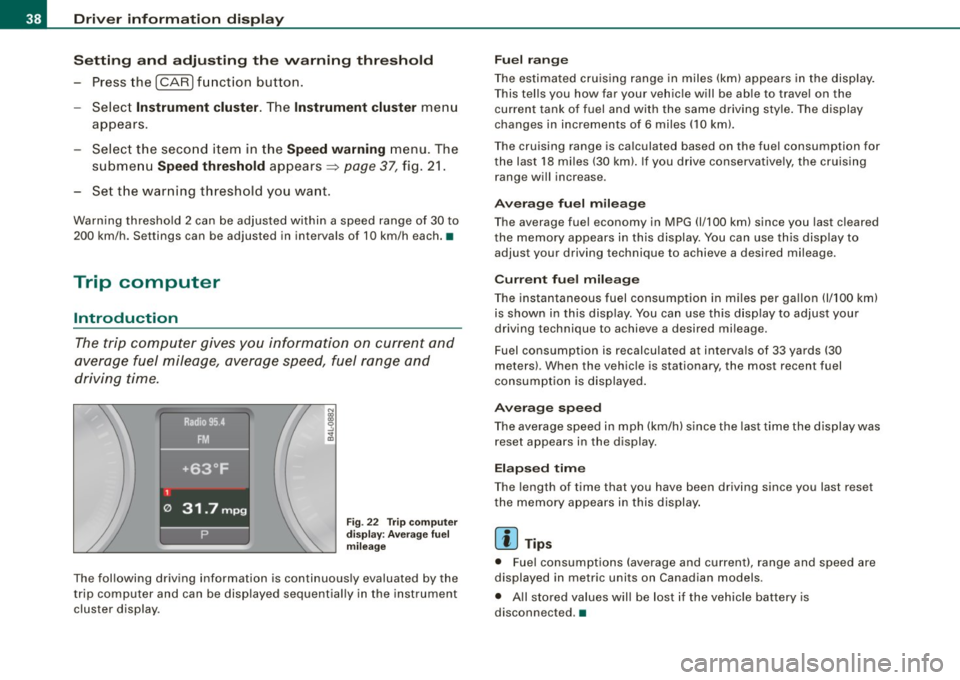
The trip computer gives you informati on on current and
average fuel mileage, average speed, fuel range and
driving time .
Fig. 22 T rip comput er
d isp lay: Ave rage fuel
mil eage
The following driving information is continuously evaluated by the
t rip computer and can be disp layed sequential ly in the instrument
cluster display.
Fu el ra ng e
The estimated cruising range in miles (km) appears in the disp lay.
This tel ls you how far your vehic le will be ab le to travel on the
current tank of fuel and with the same driving style . The display
changes in increments of 6 miles
(10 km).
The cruising range is calculated based on the fuel consumption for
the last 18 miles (30 km). If you drive conservative ly, the cruising
range will increase.
Ave rage fuel m ileag e
The average fuel economy in MPG (1/100 km) since you last cleared
the memory appears in this display. You can use th is disp lay to
adjust your driving technique to achieve a desired mileage.
C urr ent fu el mi leage
The instantaneous fuel consumption in m iles per gallon 0/100 km)
is shown in this display. You can use th is d isp lay to adjus t your
driving technique to achieve a desired mileage.
Fuel consumption is recalculated at intervals of 33 yards (30
meters) . When the vehicle is stationary, the most recent fuel
consumption is displayed .
Ave ra ge spee d
The average speed in mph (km/h) since the last time the display was
reset appears in the display.
E la p sed time
The length of time that you have been driving since you last reset
the memory appears in this display .
[ i ] Tips
• Fuel consumptions (average and current), range and speed are
displayed in metric units on Canadian models .
• All sto red values will be lost if the vehic le battery is
disconnected .•
Page 42 of 398
![AUDI S6 2009 User Guide Driver information display
In addition, all the values in the single-trip or the total-trip memory
can be deleted simultaneously.
[ i ] Tips
All stored values will be lost if the](/img/6/57595/w960_57595-41.png "AUDI S6 2009 User Guide Driver information display
In addition, all the values in the single-trip or the total-trip memory
can be deleted simultaneously.
[ i ] Tips
All stored values will be lost if the")
Driver information display
In addition, all the values in the single-trip or the total-trip memory
can be deleted simultaneously.
[ i ] Tips
All stored values will be lost if the vehicle battery is disconnected. •
MMI settings
Basic settings for the trip computer can be made in the
MM/.
Setting values to zero
Pressthe!CAR)function button.
Select
Instrument cluster.
Fig . 25 MMI display :
Trip computer
- Select Trip computer 1 or Trip computer 2.
-Select Reset to delete all the values in the memory
~ fig. 25.
Displaying and hiding driver information
- Pressthe!CAR)f unction button .
- Select
Instrument cluster.
-Select Trip computer 1 or Trip computer 2.
-Select, for example, Fuel range On to turn on the display
or
Off to turn the display off.
All values in the single -trip or the total-trip memory can be reset to
zero simu ltaneously in the MMI. In addition you can determine what
driving information from the trip computer shou ld be shown in the
instrument cluster display . If one of the pieces of driver information
is turned
off, that driver information will not be shown in the display.
The information wi ll continue to be calcu lated by the trip computer
and can be turned back
on at any time .•
Page 45 of 398
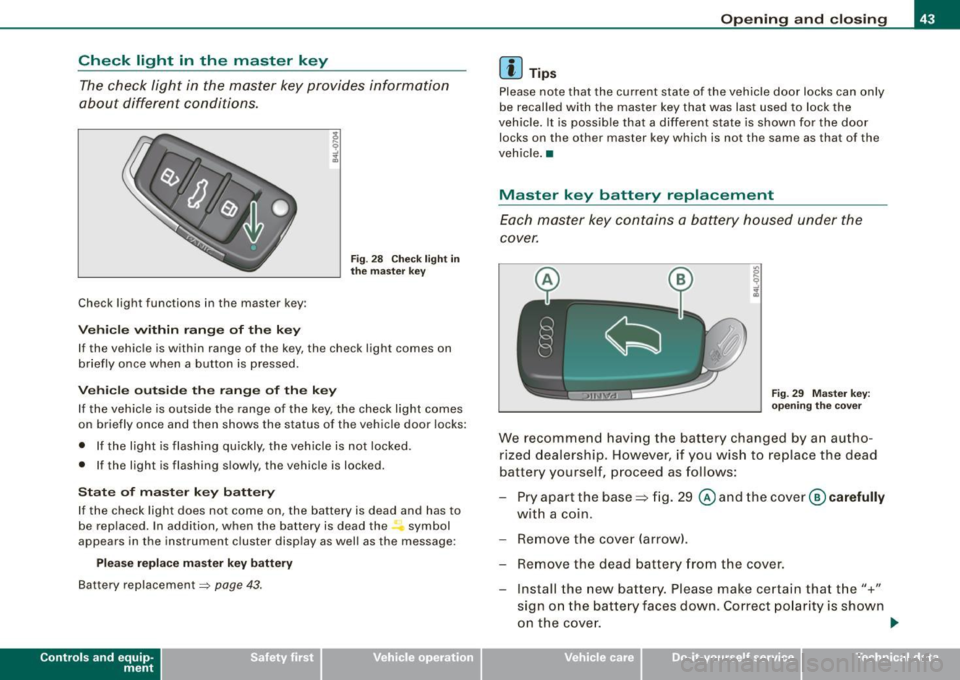
Check light in the master key
The check light in the master key provides information
about different conditions .
Check light functions in the master key :
Ve hic le within range of th e key
Fig . 2 8 Check ligh t in
th e m ast er k ey
If the vehicle is within range of the key, the check light comes on
briefly once when a button is pressed.
Ve hic le o utside th e ra nge of th e key
I f the vehic le is outside the range of the key, the check light comes
on briefly once and then shows the status of the vehicle door locks:
• If the light is flashing qu ickly, the vehicle is not locked.
• If the light is flashing slowly, the vehicle is locked.
S ta te o f m aster key batt ery
I f the check light does not come on, the battery is dead and has to
be rep laced. In addition , when the battery is dead the symbol
appears in the instrument cluster disp lay as well as the message :
Please re place ma ste r ke y battery
Battery replacement => page 43 .
Con tro ls and eq uip
ment
Op ening and clo sing
[ i ] Tip s
Please note that the current state of the vehicle door locks can only
be recalled with the master key that was last used to lock the
vehicle. It is possib le tha t a different state is shown for the door
locks on the other master key which is not the same as that of the
vehicle .•
Master key battery replacement
Each master key contains a battery housed under the
cover.
Fi g. 29 M aster key:
o peni ng th e cover
We recommend having the battery changed by an autho
rized dealership . However, if you wish to replace the dead
battery yourself, p roceed as follows:
- Pry apart the base => fig . 29
@ and the cover @ carefully
with a coin.
- Remove the cover (arrow).
- Remove the dead battery f ram the cover.
- Install the new battery. Please make certain that t he"+"
sign on the batte ry faces down. Correct po larity is shown
on the cove r.
ti>
Vehicle care I I irechnical data
Page 53 of 398
Opening the rear lid
- Press the center button c::5 on the master key or pull the
release button
c::5 in the driver's door=> page 50, fig. 37.
The rear lid is unlocked and opens.
Closing the rear lid
- Pull the rear lid down and allow it to drop gently into the
latch ~& -
& WARNING
• After closing the rear lid, always pull up on it to make sure that
it is properly closed. Otherwise it could open suddenly when the
vehicle is moving.
• To help prevent poisonous exhaust gas from being drawn into
the vehicle, always keep the rear lid closed while driving. Never
transport objects larger than those which fit completely into the luggage area, because then the rear lid cannot be fully closed.
• Never leave your vehicle unattended especially with the rear lid
left open. A child could crawl into the car through the luggage
compartment and pull the lid shut, becoming trapped and unable
to get out. To reduce the risk of personal injury, never let children
play in or around your vehicle. Always keep the rear lid as well as
the vehicle doors closed when not in use.
• Always ensure that no one is within range of the rear lid when
it is moving, in particular close to the hinges -fingers or hands can
be pinched.
[ i] Tips
• If the rear lid is open or not properly closed when the ignition is
turned on, the door and rear lid warning~
page 25 appears in the
instrument cluster display.
• Should you not be able to open the rear lid as described, make
sure the valet key function is not activated~
page 44.
Contro ls and eq uip
ment
Opening and closing
• If the central locking system fails (power supply), you can also
open the rear lid using the trunk escape handle from the inside
~ page 342. •
Child safety lock
Power child safety lock for the rear doors t
The power child safety lock prevents the rear doors from
being opened from the inside.
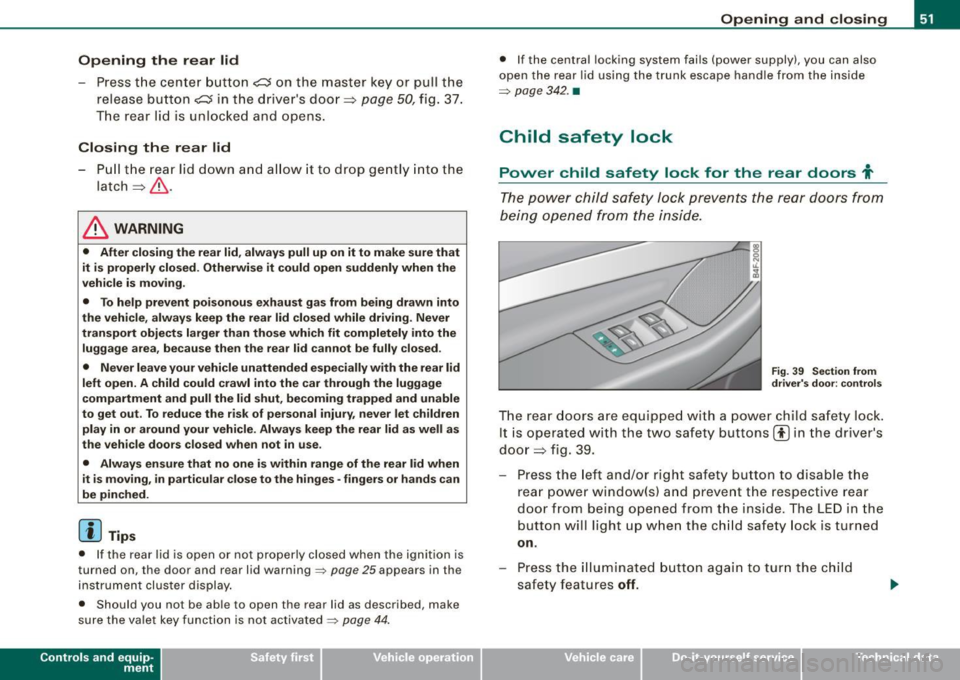
Fig. 39 Section from
driver's door: controls
The rear doors are equipped with a power child safety lock.
It is operated with the two safety buttons(!) in the driver's
door ~ fig. 39.
- Press the left and/or right safety button to disable the
rear power window(sl and prevent the respective rear
door from being opened from the inside. The LED in the
button will light up when the child safety lock is turned
on.
- Press the illuminated button again to turn the child
safety features
off.
Vehicle care I I irechnical data
Page 66 of 398
Clear vision
brightness increases again, the low beams are turned off again
a uto matically =>& .
In t he
AUTO pos it ion the low b eams ar e switched off automatically
when the ignition is turned off .
Light Sensor Malfunction
In the e vent of a lig ht sensor m alfu n ction, th e drive r is noti fie d in the
instrument cluster display:
e. Automat ic headlights /automatic wipers defective
F or safe ty r eas o ns th e low bea ms are tur ned o n perma nently w ith
th e switch in
AUTO . However, you can continue to tur n the lights on
and off u sing the ligh t switc h. Have the light sen sor checked as s oon
as possib le at a dealership.
& WARNING
• Never use daytime running lights to see where you are going.
They are not bright enough and will not let you see far enough ahead for safety , espe cially at dusk or when it is dark. Always
switch on the low beams at dusk or when it is dark .
• Automatic headlights are only intended to assist the driver .
They do not relieve the driver of his responsibility to check the headlights and to turn them on manually according to the current
light and visibility conditions. For example , fog and rain cannot be
detected by the light sensors . So always switch on the headlights
under these weather conditions and when driving in the dark
tD .
• Crashes can happen when you cannot see the road ahead and
when you cannot be seen by other motorists.
-Always turn on the headlights so that you can see ahead and
so that others can see your car from the back.
[ i ] Tips
• W it h the sw it ch in AUTO front fo g ligh ts and re a r fo g ligh ts
cannot be turned on i n addition . • T
he light sensor for head light control is located in the rear view
mi rror mount . Do no t ap ply a ny s ticker s to th e windshie ld in thi s
area to p revent malfunctions or failures.
• I f you remov e the ignition fr om the ignition l oc k whil e th e he ad
l ights are still on, a buzzer will sound as long as the driver's door is
open to re mind you t o turn off the li g ht s.
• Al ways observe the specific local regulations for your area as to
w he n to u se yo ur ligh ts .•
Adjusting exterior lighting
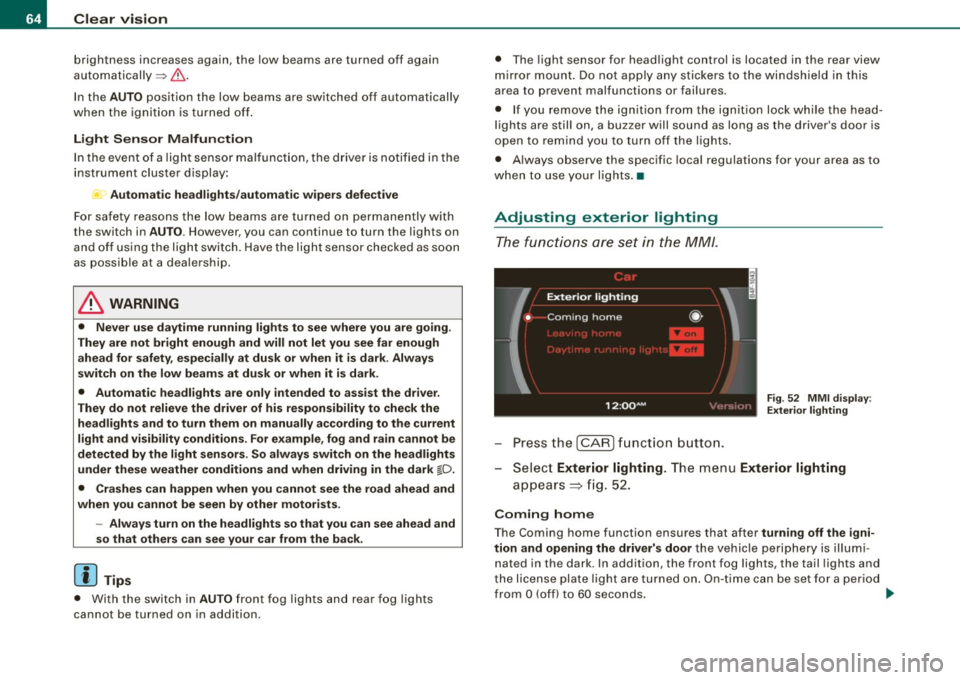
T he functi o ns are se t in th e MM /.
Fig. 52 MM I d is pl ay:
Exterior lighting
- Pre ss th e [ C AR] fun ction bu tto n.
- Selec t
Exterior lighting. The menu Exterior lighting
a pp ears => fig. 52.
Coming home
The Coming home function ensures that after turning off the igni
tion and opening the driver's door
t h e v ehicle per ip he ry is ill um i
nated in the dark. In addition, the front fog lights, the tail lights and
th e lic ense p la te li g ht are tur ned o n. O n-tim e ca n be set for a pe riod
from
O (off) to 60 seconds. .,,_
Page 69 of 398
Emergency flasher ~
The emergency flasher makes other motorists aware that
you or your vehicle are in an emergency situation.
~ -.:.i.t'
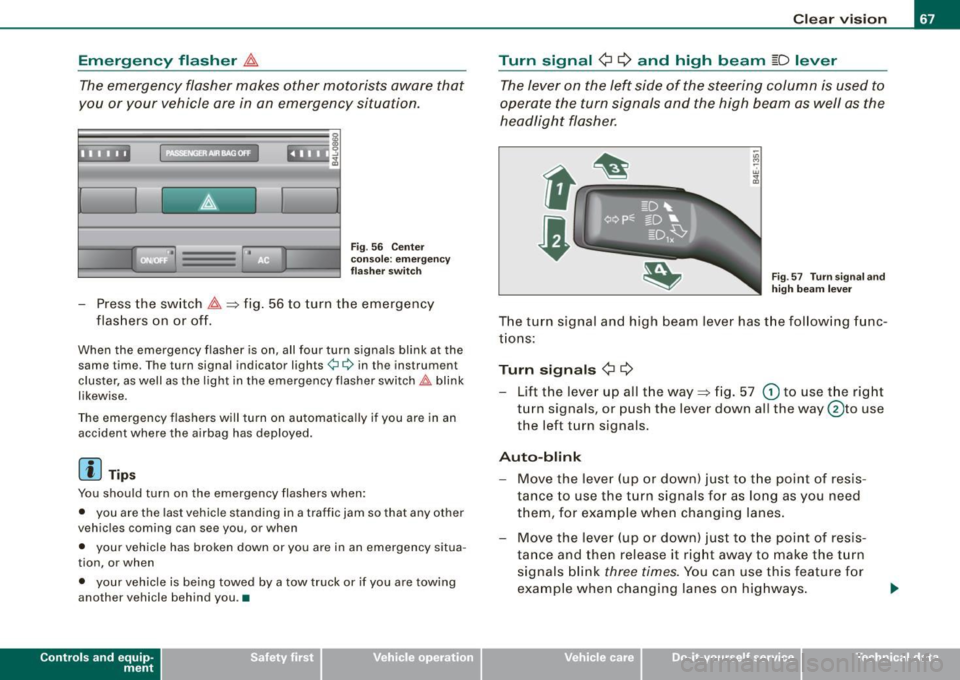
Fig . 56 Cente r
conso le: emergency
f lashe r swi tc h
- Press the switch ~~fig . 56 to turn the emergency
flashers on or off.
When the emergency flasher is on, all four turn signals blink at the same time. The turn signal indicator lights¢¢ in the instrument
cluster, as well as the light in the emergency flasher switch~ blink
likewise.
The emergency flashers will turn on automatica lly if you are in an
accident where the airbag has deployed.
[ i ] Tip s
You should turn on the emergency flashers when:
• you are the last vehicle standing in a traffic jam so that any other
vehicles coming can see you, or when
• your vehicle has broken down or you are in an emergency situa
tion, or when
• your vehicle is being towed by a tow truck or if you are towing
another vehicle behind you .•
Con tro ls and eq uip
ment
C lea r v is ion
Turn signal ¢ ¢ and high beam ~D lever
The lever on the left side of the steering column is used to
operate the turn signals and the high beam as well as the
headlight flasher.
-"' M
-w
"' a,
Fig . 57 T urn s igna l and
high beam lever
The turn signal and high beam lever has the follow ing func
tions:
Turn si gnals ¢ ¢
- Lift the lever up all the way~ fig. 57 G) to use the right
turn signals, or push the lever down al l the way @to use
the left turn signals.
Aut o-blink
- Move the lever (up or down) just to t he point of resis
tance to use the turn signals for as long as you need
them, for example when changing lanes.
- Move the lever (up or down) just to t he point of resis
ta nce and then release it right away to make the turn
signals blink
three times. You can use this feature f or
example when changing lanes on highways.
Vehicle care I ' irechnical data
Page 70 of 398
Clear vision
High beam
~D
-Push the lever forward 0 to switch on the high beam.
Pull the lever back towards you to switch off the high
beam.
Headlight flasher
~D
- Pull the lever toward the steering wheel © to use the
headlight flasher.
Notes on these features
• The turn signals only work with the ignition turned on. The indi
cator lights ¢ or¢ in the instrument cluster~ page 16 also blink.
• After you have turned a corner, the turn signal switches off auto
matically.
• The high beam works only when the headlights are on. The indi
cator light ~D in the instrument cluster illuminates when the high
beams are on.
• The headlight flasher works only as long as you hold the lever -
even if there are no lights turned on. The indicator light [Din the
instrument cluster illuminates when you use the headlight flasher.
0 Note
Do not use the high beam or headlight flasher if you know that these
could blind oncoming traffic. •
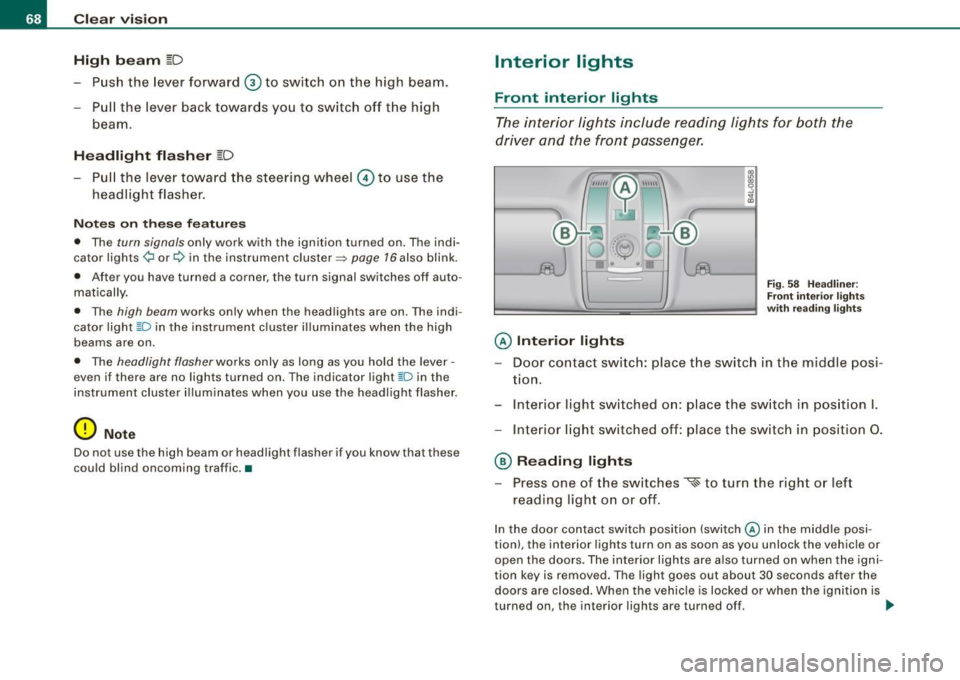
Interior lights
Front interior lights
The interior lights include reading lights for both the
driver and the front passenger.
@ Interior lights
Fig . 58 Headliner :
Front interior lights
with reading lights
- Door contact switch: place the switch in the middle posi -
tion.
- Interior light switched on: place the switch in position I.
- Interior light switched off: place the switch in position 0.
@ Reading lights
- Press one of the switches
~ to turn the right or left
reading light on or off.
In the door contact switch position (switch@ in the middle posi
tion), the interior lights turn on as soon as you unlock the vehicle or
open the doors. The interior lights are also turned on when the igni
tion key is removed. The light goes out about 30 seconds after the
doors are closed. When the vehicle is locked or when the ignition is
turned on, the interior lights are turned off. ..,_