lane assist AUDI S6 2009 User Guide
[x] Cancel search | Manufacturer: AUDI, Model Year: 2009, Model line: S6, Model: AUDI S6 2009Pages: 398, PDF Size: 43 MB
Page 149 of 398
_________________________________________________ A_u_ d _ i _s ... i __ d _e:....: a.:..: s:.. s:.. i:..: s :..:t;___ftllll
Deactivating
- Press t he button again . T he ind icato r light on the butto n
goes out.
T he system works at speeds faster than 19 mph (30 km/h) .
& WARNING
• Improper reliance on the side assist system can cause colli
sions and seriou s per sonal injury:
- Never rely only on side assist when changing lanes .
- Always check rear view mirrors to make sure that it is safe to c hange lanes.
• Side assist cannot detect all vehicles under all conditions
danger of accident!
• Side assist cannot detect vehicles in time to alert you when
they approach from behind at very high speed , or fall drop back
very quickly.
• The radar sensor's
vision can be reduced or entirely blocked by
rain , snow, and heavy spray . This can result in side assist not
adequately detecting veh icles or , in some cases, not detecting
them at all . Always keep an eye on the direction you are traveling
and the relevant area around the vehicle.
• Please note that side assi st indicates there are approaching
vehicles, or vehicles in your bl ind spot , only after your vehicle has
reached a driving speed of at lea st 19 mph (30 km /h).
• S ide assist signal does not work around tight corners (turning
radiu s less than 328 feet, or 100 m l.
• Side assist is no replacement for the driver's full attention . The
d river alone is responsible for lane changes and similar driv ing
maneuvers. Always keep an eye on the d ire ction you are travel ing
and the relevant area around the vehicle .
Controls and equip
ment
0 Note
• To e nsu re t hat you do not adverse ly a ffect s ide assist, do not
b lock the area on the rear bumper where the radar sensors are
located w it h f oreign objects (s uch as st ickers or bicycle rac ks).
• M ake su re that the signal light on the o utside mi rror is not
b loc ked by st ic ke rs or ot her items.
[ i ] Tips
• Side ass ist automaticall y deact ivates i f it detects t hat t he ra dar
sensors are blocked=> page
153. The indicator light on the button
goes out.
• The area on the bumper whe re the rada r sen so rs a re loca ted
must cons iste ntly re mai n fr ee o f snow, ice, and heavy so iling so t hat
side assist can function properly. Follow the additiona l notes on
=> page
154.
• Additiona l tinting on the front side windows can make it ha rder
t o see and co rrect ly unde rsta nd the s ignal light o n the outs ide
mirror.
• For Declaratio n of Comp liance to Un ited Sta tes FCC a nd I ndus try
Canada regulations => page
375 . •
I • •
Page 150 of 398
• .___A_ u_ d_ i_s_ i_ d _e_ a_ s_ s_i s_ t __________________________________________________ _
Applies to vehicles: with side ass ist
Sensor detection area
Fig. 149 Schem ati c
illu str ati on : Sens or
d etec tio n area
The detection ~ fig. 149 of the radar sensor detection area is made
up of:
• the approach area !light green area)
0, about 230 feet (70 ml
behind the veh icle, and
• the "blind spot" (dark green areal@.
The radar sensors cover the adjacent left and right lanes. Other
lanes are
not covered by the radar sensors .
[ i ] Tip s
Side assist does not measure actual lane width . The system
assumes a fixed lane width. Detection in the left and right lanes is based on this assumed lane width. When driving on narrow roads or
when driving to the left or right of the center of a travel lane, it is
possible that vehicles wi ll be detected that are
not in the lane next
to the lane you are using~
page 153 . •
Ap plies to vehicl es: with side assist
Operation
Side ass ist compares the distance and difference in speed of
detected vehicles with the speed of your vehicle. Whenever the
difference in speed and distance is registered as notab le if you were
to change lanes, a signal light appears on the respective mirror.
The signal can light up if you are passed by a vehic le or if you are
passing another vehicle.
If you pass another vehicle slowly (difference in speed less than 9 mph, or
15 km/h), the signal light will come on as soon as the other
vehicle is in your blind spot and is detected by side assist. When the
difference in speed is greater, the signa l light will not come on .•
Applies to vehic les : w ith side assist
Informational and alert stage signals
Side assist has two signal stages:
• the informational stage signal, and
• the alert stage signal.
Side assist helps you by using the appropriate signa l stage,
depend ing on whether or not you have act ivated the turn signal,
and thus have indicated that you are or are not changing lanes.
In fo rm ati onal stag e signal
As long as you have not activated the turn signa l, side assist informs
you of detected vehicles that are registered as being in a notable location if you were to change lanes. Whenever the detected
vehic le's difference in speed and distance is registered by side
assist as notable, the signa l light on the respective mirror produces
muted il luminatio n.
The brightness of the informationa l stage signal is designed not to
be as intense, so that it does not interfere with your view of the road
when you are driving and have no intention of changing lanes. .,,,
Page 151 of 398
___________________________________________________ A_u_ d_i_ s_ id_e_ a_ s_s _i_s _t _ __.BIII
When you look in the outside mirror, you can clea rly see the infor
mational s tage signal.
Ale rt sta ge signal
When you ac tivate the turn signal, and side assist has detected a
vehic le in a notab le location on that particu lar sid e, the signal light
on this side mirror flashes brightly. The repea ted brief and bright
flash ing of the aler t stage signa l reminds you to carefully check
t raffic to the rear in the outside mirror and over your shoulder, so
that you can safely complete the lane change=>
& in "Safety tips"
on
page 154.
[ i ] Tips
T he brightness of the signal light on the outside mirrors can be
adjusted with the
MMI => page 152 . •
Con tro ls and eq uip
ment
A pp lies to veh ic les: with s ide ass ist
Driving situation : Fast approaching vehicles
Fig . 15 0 Side ass ist : Fas t app roac hing veh ic le s
G) Si gn al o n outs ide mirror doe s not li ght up
No vehicle was detected by the sensors. The signal on the outside
mirror does not light up=>
& in "Safety tips" on page 754.
0 Informa tion al st age s ignal ligh ts up
A fast approaching vehicle -in the left-hand lane for example -was
detected by the sensors. Although this vehicle is still far away, it
shou ld be taken into account if you were to change lanes , due to the
consid erable difference in speed. The informationa l stage s ignal on
the outside mirror lights up=>
page 148 .
© Alert stage signal fl ashe s
If you activate your turn signal in driving situation 0 , the signal
briefly flashes repeated ly . Side assist is aler ting you to a vehicle that
you may not have not iced . _,.
Vehicle care I I irechnical data
Page 152 of 398
• ..__A_ u_ d_ i _s _i_d _e_ a_ s_ s _ is_ t __________________________________________________ _
[ i J Tips
• The faster a vehicle approaches from the rear, the sooner the
s ignal on the outside mirror lights up . Side assist will signal, at the
latest, when a detected vehicle enters your "blind spot".
• When vehicles approach very quickly, changing lanes can be
dangerous even if the signal on the outside mirror does not light
up. •
Applies to vehicles: with side assist
Driving situation : Slowly approaching
vehicles
Fig. 151 Side assist: Slowly approaching vehicles and vehicles in your blind
spot
G) Signal on outside mirror does not light up
A vehicle approaching slowly -in the left -hand lane for example -
was detected by the sensors. Because of the small difference in speed and the considerable distance from your vehicle, the signal
on
the outside mirror will not light up
~ & in "Safety tips" on
page 154.
© Informational stage signal lights up
The distance between your vehicle and that of the slowly
approaching vehicle has narrowed. The informational stage signal
on the outside mi rror lights up.
As soon as the difference in speed and distance is registered as notable if you were to change lanes, a signal on the mirror lights up .
Side assis t will signal a t the latest when a detected vehicle enters
your "blind spot".
© Alert stage signal flashes
If you activate your turn signal in driving situation©, the signal
light briefly flashes repeatedly . Side assist is alerting you of a
vehicle that you may not have noticed.
[ i J Tips
• The faster a vehicle approaches from the rear, the sooner the
signal on the outside mirror lights up . Side assist will signal , at the
latest, when a detected vehicle enters your "blind spot".
• When veh icles approach very quickly, changing lanes can be
dangerous even if the signal on the outside mirror does not light
up. •
Page 153 of 398
Audi side assist -
-------------------'
Applies to vehicle s: with side assist
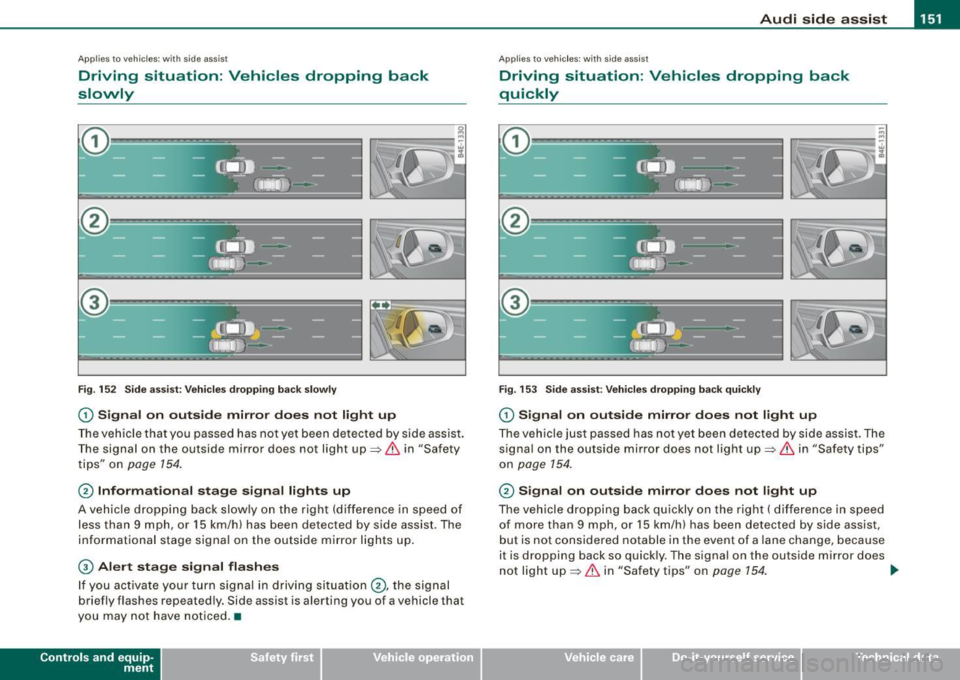
Driving situation : Vehicles dropping back
slowly
Fig. 152 Side assist: Vehicles dropping back slowly
G) Signal on outside mirror does not light up
The vehicle that you passed has not yet been detected by side assist.
The signal on the outside mirror does not light up=>
& in "Safety
tips" on
page 154.
@ Informational stage signal lights up
A vehicle dropping back slowly on the right (difference in speed of
less than 9 mph, or 15 km/h) has been detected by side assist . The
informational stage signal on the outside mirror lights up.
G) Alert stage signal flashes
If you activate your turn signal in driving situation@, the signal
briefly flashes repeatedly. Side assist is alerting you of a vehicle that
you may not have noticed. •
Contro ls and eq uip
ment
Ap plies to vehicles: with side assist
Driving situation : Vehicles dropping back
quickly
Fig . 153 Side assist: Vehicles dropping back quickly
G) Signal on outside mirror does not light up
The vehicle just passed has not yet been detected by side assist. The
signal on the outside mirror does not light up=>
& in "Safety tips"
on
page 154.
@ Signal on outside mirror does not light up
The vehicle dropping back quickly on the right ( difference in speed
of more than 9 mph, or 15 km/h) has been detected by side assist,
but is not considered notable in the event of a lane change, because
it is dropping back so quickly. The signal on the outside mirror does
not light up=>
& in "Safety tips" on page 154. tJ,,,
Vehicle care I I irechnical data
Page 154 of 398
1111 Audi side assist
--------------------
G) Sig nal o n outs ide mirr or does no t l ight up
If you activate your turn signal in driving situat ion @, the signal sti ll
does not light up on the outside mirror:::::,
& in "Safety tips" on
page 154. •
Applies to vehic les: with side assist
MMI settings
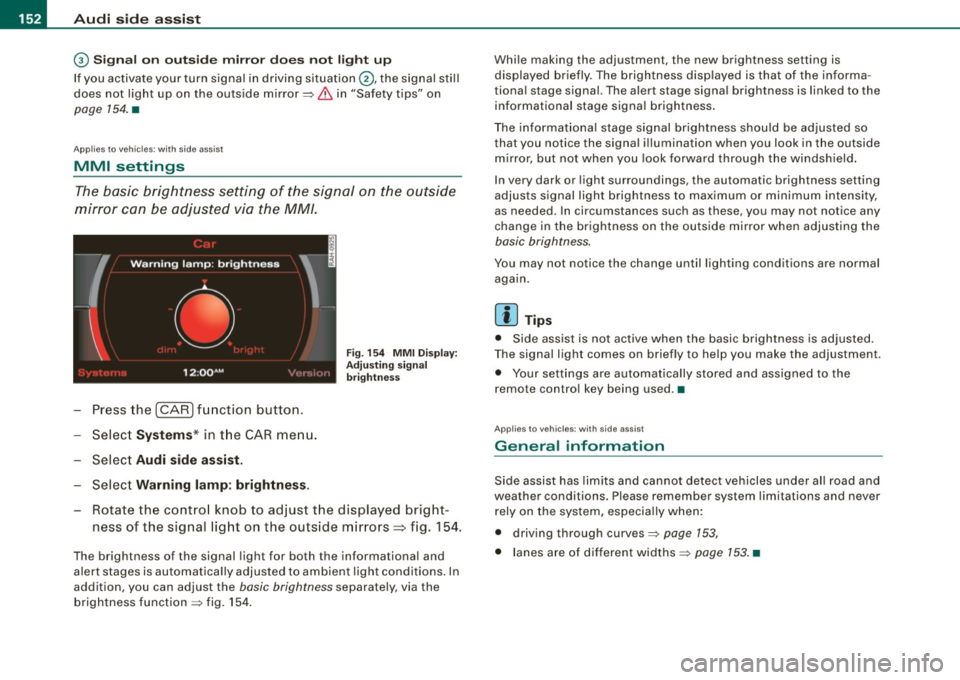
The basic brightness setting of the signal on the outside
mirror can be adjusted via the MM/.
- Press the I CAR I function button.
- Select
Syst ems * in t he CAR menu.
- Selec t
Audi side a ssis t.
Selec t Warning lam p: brightn ess.
Fig. 154 MMI Disp la y:
Adj ust ing s igna l
br ightn ess
Rotate the contro l knob to adjust the displayed bright
ness of the signal light on the outside mirrors~ fig. 154.
The brightness of the signal light for both the informational and
a lert stages is automatica lly adjusted to ambient light cond itions . In
addition, you can adjust the
basic brightness separately, via the
brightness function :::::, fig. 154 . Whi
le making the adjustment, the new brightness setting is
displayed briefly. The brightness disp layed is that of the informa
tiona l stage signal. The alert stage signa l brightness is linked to the
informational stage signal brightness .
The informat iona l stage signal brightness shou ld be adjusted so
that you notice the signal illumination when you look in the outside
m irror, but not when you look forward through the windsh ield .
I n very dark or light surroundings, the automatic brightness setting
adjusts signal light brightness to maximum or minimum intensity,
as needed . In circumstances such as these, you may not notice any
change in the brightness on the outside mirror when adjusting the
basic brightness.
You may not notice the change until lighting conditions are normal
aga in.
[ i ] Tips
• Side assist is not active when the basic brightness is adjusted.
T he signal light comes on briefly to he lp you make the adjustment.
• Your settings are automatically stored and assigned to the
remote contro l key being used .•
Ap plies to vehic les: with side assist
General information
Side assist has lim its and cannot detect vehicles under a ll road and
weather conditions. Please remember system limitations and never
rely on the system, especia lly when:
• driving through curves:::::,
page 153,
• lanes are of different widths:::::, page 153. •
Page 155 of 398
Audi sid e as sis t -
-------------------'
Applies to vehicle s: with side assist
When driving through curves
Side assist canno t detect veh ic les in curves with a turning radius of
less than 328 feet (100 m) .
When driving through a curve, it is possible that side assist may register a vehicle two lanes over, and the signal on the outside
mirror will light up .•
Appl ies t o vehicles: with side ass is t
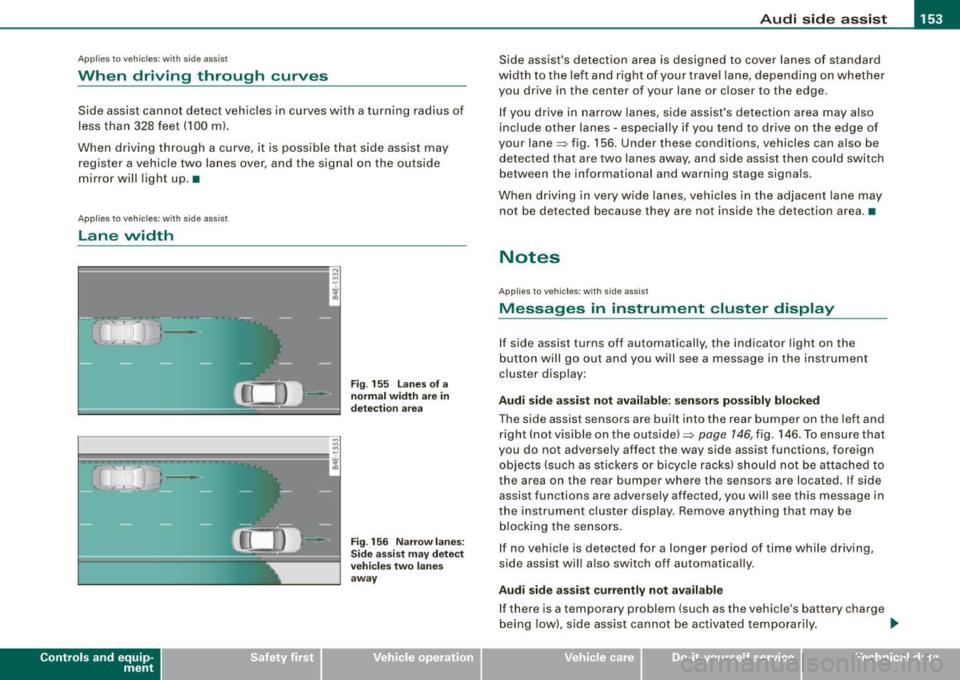
lane width
Con tro ls and eq uip
ment
•
-
-
Fi g. 155 lanes o f a
n ormal width are in
d etec tio n area
Fi g. 156 Nar row lane s:
Si de assis t may detec t
vehi cles tw o l ane s
away
Side assist's detection area is designed to cover lanes of standard
width to the left a nd r ight of your trave l lane, depending on whether
you drive in the center of your lane or c loser to the edge.
I f you drive in narrow lanes, side assist's detection area may also
inc lude other lanes - especially if you tend to drive on the edge of
your lane=> fig. 156. Under these conditions, vehicles can a lso be
detected tha t are two lanes away, a nd s ide assist then could switch
between the informationa l and warning stage signa ls.
When driving in very wide lanes, vehicles in the adjacent lane may
not be detected because they are not inside the detection area .•
Notes
App lies to vehic les : with side assist
Messages in instrument cluster display
If side assist turns off automatically, the indicator light on the
b utton will go out and y ou wi ll see a message in the instrument
cluster disp lay:
Audi side a ssist not avail able : s en sors po ssibly blocked
The side assist sensors are built into the rear bumper on the left and
right (not visible on the outside) =>
page 146, fig. 146. To ensu re that
you do not adversely affect the way side assist functions, foreign
objects (such as stickers o r bicyc le racks) should not be attached to
the area on the rear bumper where the sensors are located . If side
assist functi ons are adversely affec ted, you w ill see this message in
the instrument cluster display. Remove anything that may be
b locking the sensors.
I f no vehic le is detected for a longer pe riod of time while driving ,
side assist will also switch off automatically .
Audi sid e ass is t currently not available
If there is a temporary problem (such as the vehicle's ba ttery cha rge
being low) , side ass ist cannot be activated temporarily . .,_
Vehicle care I I irechnical data
Page 156 of 398
• .___A_ u_ d_ i_s_ i_ d _e_ a_ s_ s_is _ t __________________________________________________ _
Audi side assist : system fault
Have t he syste m checked by an a uthorize d Aud i dea ler o r qua lified
workshop .•
App lies to veh ic les : wi th side ass is t
Safety tips
The side assis t detec tio n m ay be li mit ed whe n driv ing a round
narrow street corners, on hilly streets, and under poor weather
con ditio ns.
It is possible t hat t he radar sensors may also detect other ob jec ts,
such as high or staggered guardrails .
S id e ass ist does no t measure ac tual lane w idth. The sys te m
assumes a fixed lane width. Detection in the left and r ight lanes is
based on thi s ass umed lane wid th . When d riving on narro w roads or
when driving to the left or right of the center of a travel lan e, it is
possible that vehicles wi ll be detected that are not in the lane next
to th e la ne you are us ing.
& WARNING
• Improper rel iance on the side assist system can cause colli
sions and serious personal injury:
-Never rely only on side assist when changing lanes .
- Always check rear view mirrors to make sure that it is safe to
change lane s.
• Side assist cannot detect all vehicles under all conditions
danger of accident!
• Side assist cannot detect vehicles in time to alert you when
they approach from behind at very high speed , or fall drop ba ck
very quickly.
• The radar sensor 's
vision can be reduced or entirely bloc ked by
rain , snow , and heavy spray . This can result in side assist not
adequately dete cting vehi cles or , in some cases , not dete cting
& WARNING (continued)
them at all . Always keep an eye on the direction you are traveling
and the relevant area around the vehicle .
• Please note that side assist ind icates there are approaching
vehicle s, or vehicles in you r blind spot, only after your vehicle has
reached a driving speed of at least 19 mph 130 km /h).
• Side as sist signal does not work around tight corners (turning
radius less than 328 feet , or 100 m) .
• Side assist is no replacement for the driver's full attention. The
driver alone is responsible for lane changes and similar driving
maneuvers . Always keep an eye on the direction you are traveling
and the relevant area around the vehicle .
0 Note
To ensure that side assist is not adve rsely affected, you shou ld not
b loc k the area o n th e r ea r bu mpe r w her e th e radar senso rs a re
l ocated with foreign objects (such as with stickers or bicycle racks) .
[ i ] Tips
If the posit ions of the radar sensors have been changed as a result
o f a rear e nd-c ollision, for insta nce, have si de ass is t che cked by an
authorized Audi dea ler for safety reasons .•
Page 356 of 398
IIJII Fuses and bulbs ..._ ____ .;__...;_;,;_ _______________________________ _
No. Equipment
8 A/C controls
9 Heated seats, front
10 MMI
11 Seat adjustment (passenger)
12 Communication
Fuse holder (brown)
1
2
3
4
5
6
7
8
9
10
11
12
Electric fuel pump
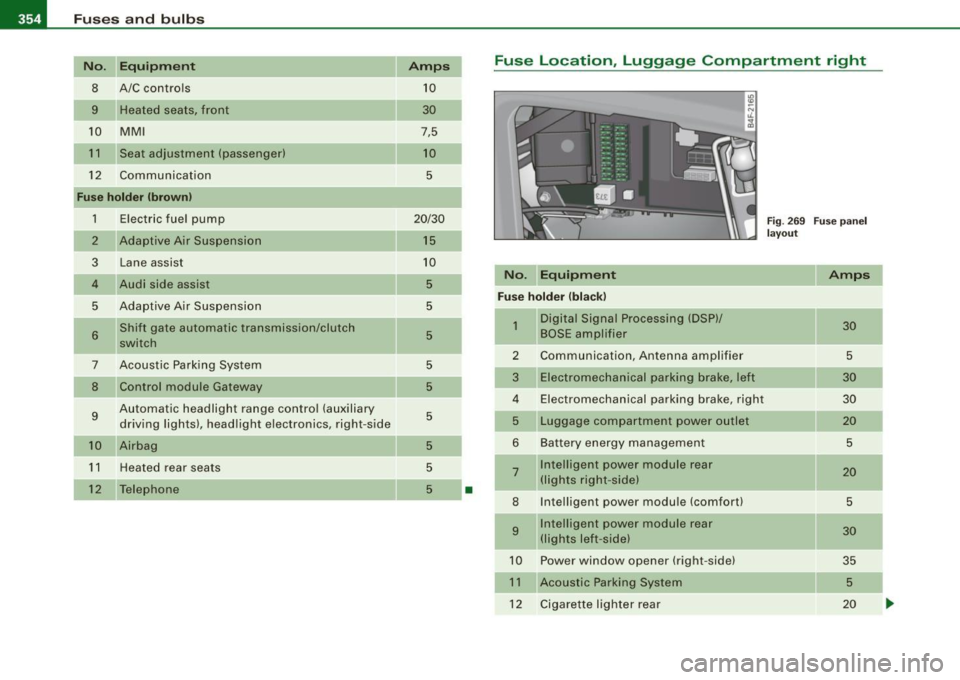
Adaptive Air Suspension Lane assist
Audi side assist
Adaptive Air Suspension Shift gate automatic transmission/clutch
switch
Acoustic Parking System Control module Gateway
Automatic headlight range control (auxiliary driving lights), headlight electronics, right-side
Airbag
Heated rear seats
Telephone Amps
10
30
7,5
10
5
20/30
15
10
5
5
5
-
5
5
5
5
5
5
•
Fuse Location, Luggage Compartment right
Fig. 269 Fuse panel
layout
No. Equipment Amps
Fuse holder (black)
-
1 Digital Signal Processing (DSP)/ 30 BOSE ampl ifier
2 Communication, Antenna amplifier 5
3
Electromechanical parking brake, left 30
4 Electromechanical parking brake, right 30
5
Luggage compartment power outlet 20
6 Battery energy management 5
7 Intelligent power module rear 20 (lights right -side)
8 Intelligent power module (comfort) 5
9 Intelligent power module rear 30 (lights left -side)
10 Powe r window opener (right-side) 35
11
Acoustic Parking System 5
12 Cigarette lighter rear 20
Page 388 of 398
llffl __ A_l.:,. p _h_ a_ b_e _t _ic _ a_l _in _ d_e _x ____________________________________________ _
Glove compartment -emergency unlocking .
100
Gross Vehic le Weight Rating (GVWRl ... 367
H
Head restraints . . . . . . . . . . . . . . . . . . . . . 199
Adjusting . .... .... ....... ...... . 199
Front seats . . . . . . . . . . . . . . . . . . . . . . . 86
Insta llation and remova l .... ....... 87
Rear seats . . . . . . . . . . . . . . . . . . . . . . . 87
Headlight washer reservoir ........... 316
Headlights . . . . . . . . . . . . . . . . . . . . . . . . . . 63
Adaptive Light .... .... .... ...... .. 66
Defective . . . . . . . . . . . . . . . . . . . . . . . . 25
Front fog lights . . . . . . . . . . . . . . . . . . . 65
Headlight range control defective .. . 35
Switching off ..................... 63
Switching on . .................. .. 63
Washer system . . . . . . . . . . . . . . . . . . . 73
Xenon headlights . ...... ... .. .... . 63
Heat ed outside mirrors . . . . . . . . . . . . . . . 76
Heated seats
Front ............. .... ........ .. 110
Rear ..................... ...... 110
Heated steering wheel . . . . . . . . . . . . . . . 111
Heat ed washer jets
Wiper and washer system . . . . . . . . . . 71
Heavy clothing and safety belts .. .... . 208
High beam . . . . . . . . . . . . . . . . . . . . . . . 63, 67
Warning/indicator lights ........... 20
High voltage warning label . ........ .. 366
Homelink® universal remote control .. 188 Hood
Opening 300 Interior
lights ..... ... . .... .. . .. .. .... 68
Rear .. ..... ....... .... ... .... . 68, 69
Release lever .. ...... .... ..... ... 300 Intermittent wiping
Horn .. ...... ............ ....... .... 11
How many a irbags does my vehicle have? ..
222
How often should I check my tire pressures?
324
How safety belt pretensioners work .... 213
Hydroplaning .... .... .... .... ...... 328
I
Ignition key ........................ 116
Ignition lock .. .... .... .... .... .... .. 116
Malfunction .. .... ...... .... ... 33, 36
Ignition lock posit ions .......... ..... 116
Immobilizer ......................... 14
Important things to do before driving .. 195
Improperly worn safety be lts ......... 213
Indicator lights ...... ....... ....... .. 16
Airbag system ............... 226, 227
PASSENGER AIR BAG OFF ......... 227
Infant seats .......... .... ....... ... 243
How do I properly install an infant seat in my veh icle? ........ .... ... .. ... 243
Safety instructions ............... 243
Inside rear view mirror . ............. .. 75
Installing child safety seats
Safety belts . . . . . . . . . . . . . . . . . . . . . 248
Instrument cluster illumination . ... .... 16
Instruments and controls . . . . . . . . . . . . . 12
General illustration ................ 11 Rain sensor
... .... .... ...... .... . 71
J
Jack 342
Jumper cables ...................... 358
Jump-starting 357
K
Key ................................ 41
Battery replacement ............... 43
Coded settings ................... 102
Convenience opening and closing of windows .. ........ ......... .... 57
Emergency key ............ .... .... 41
Key replacement . . . . . . . . . . . . . . . . . . 41
Mast er key ................. ...... 41
Valet key .. ............ ...... ... .. 41
Key coded settings
Climate controls . . . . . . . . . . . . . . . . . 102
Key less entry remote control ... ........ 42
Kick -down
multitronic® ... .... .... ... .... ... 165
tiptronic® ............ ........ ... 158
L
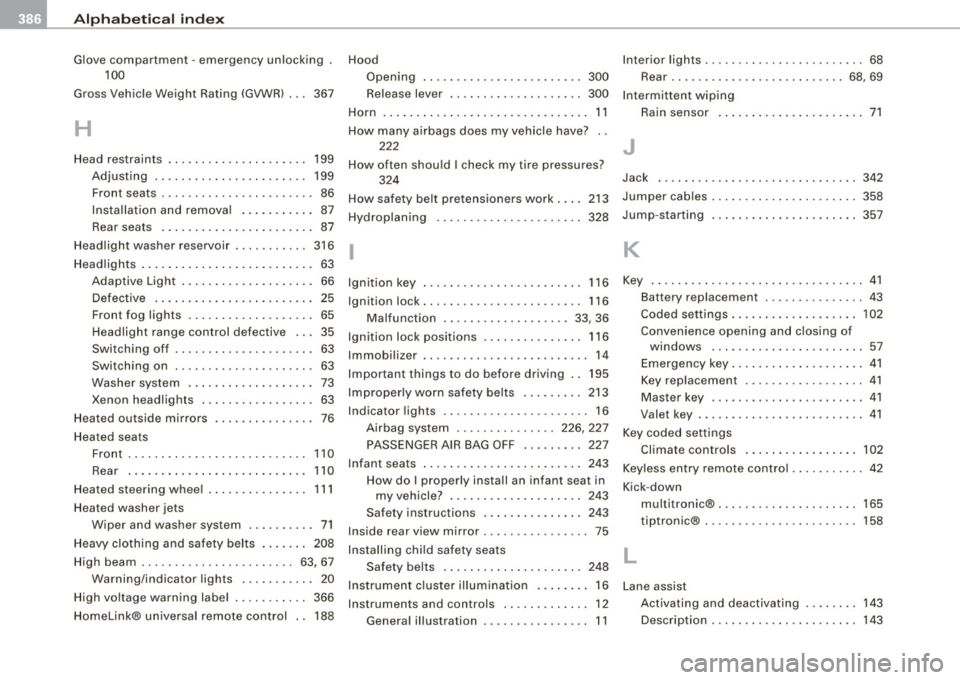
Lane assist
Activating and deactivating 143
Description . . . . . . . . . . . . . . . . . . . . . . 143