brake AUDI S6 2009 Owner's Manual
[x] Cancel search | Manufacturer: AUDI, Model Year: 2009, Model line: S6, Model: AUDI S6 2009Pages: 398, PDF Size: 43 MB
Page 123 of 398
![AUDI S6 2009 Owners Manual On th e road -
-------------------
and then the drivers door is opened. In this instance, the steering is
not locked . The steering is locked :
• If you press the
I STOP ] b](/img/6/57595/w960_57595-122.png "AUDI S6 2009 Owners Manual On th e road -
-------------------
and then the drivers door is opened. In this instance, the steering is
not locked . The steering is locked :
• If you press the
I STOP ] b")
On th e road -
-------------------'
and then the driver's door is opened. In this instance, the steering is
not locked . The steering is locked :
• If you press the
I STOP ] button aga in for more than 1 second.
• If you c lose the driver's door and lock your vehicle from the
outside .•
Electromechanical parking brake
Operation
The electromechanical parking brake replaces the hand
brake.
Fi g. 120 Center
co nso le: Parki ng bra ke
- Pull the switch to app ly the park ing brake => fig. 12 0. The
indicator light in the switch will come on .
- Step on the brake pedal or the accelerator pedal and
press the switch at the same time to rel ease the parking
brake. The indicator lig ht in the switch wi ll go out.
Your vehicle is equipped with an elect romechanical parking brake
which replaces the handbrake . T he parking brake is designed to
prevent the vehicle from rol ling unintentional ly.
Con tro ls and eq uip
ment
I n add ition to the normal functions of a traditional hand brake, the
e lectromechanica l parking brake provides various convenience and
safety functions.
Emergen cy brake
An emergency brake ensur es that the vehicle can be slowed even if
t he
normal brakes fail=> page 123, "Emergency braking".
Ind icator lights
• If the parking brake is applied with the ignition tu rned on , the
indicator light in the instrument cluster (U.S models :
::i.:,, Canadian
models: ®)) and in the switch <®) will com e on .
• I f the parking brake is app lie d with the ignition
turn ed off , the
indicator light in the instrument cluster (U.S. models: ::.:\,, Canadian
models :(®) ) and in the switch(®) will come on for about 30 seconds
and then go out .
& WARNING
If the vehicle i s stationary and the tr ansmi ssion is engag ed with
the engine ru nning , the engine should not be speeded up (e .g .
manu ally from under the hood ). Otherwi se the vehicle will sta rt to
move -you run the risk of a n accident .
0 Note
If the warning/indica tor light (U.S . mode ls: BRAKE , Canadian mode ls :
(Ci)) ) flashes in the instrument clus ter, there is a brake system
malfunction . By pressing the
I CHECK] button, you can bring up a
driver message which explai ns the ma lfunc tion in more detail. If the
message
P a rki ng brake ! Please conta ct w ork shop appears, there is
a par king brake malfunction which you should have repaired imme -
d iate ly by an authorized dealership=>
page 30. ..
Vehicle care
I I irechnical data
Page 124 of 398
![AUDI S6 2009 Owners Manual -On the road --------------------
[
i] Tips
• You can apply the parking brake at any time - even with the igni
tion turned off. The ignition must be turned on in order](/img/6/57595/w960_57595-123.png "AUDI S6 2009 Owners Manual -On the road --------------------
[
i] Tips
• You can apply the parking brake at any time - even with the igni
tion turned off. The ignition must be turned on in order")
-On the road --------------------
[
i] Tips
• You can apply the parking brake at any time - even with the igni
tion turned off. The ignition must be turned on in order to release
the parking brake .
• Occasional noises when the parking brake is applied and
released are normal and are not a cause for concern .
• The parking brake goes through a self -test cycle at regular inter
vals - when the vehicle is parked . Any associated noises are
normal. •
Parking
To prevent a parked vehicle from rolling away, there are a
few things you should do.
When you park your vehicle, do the following
- Stop the vehicle using the brake pedal.
- Pull the switch to apply the electromechanical parking
brake.
- Move the selector lever into the
P position ~& .
- Switch off the engine and remove the ignition key from
the ignition lock.
When you park your vehicle on hills, do the
following - Stop the vehicle using the brake pedal.
- Pull the switch to apply the electromechanical parking
brake.
- If you are parking headed downhill, turn the front wheels
toward the curb. - If you are
parking headed uphill, turn the front wheels
awayfrom the curb.
- Move the selector lever into the P position .
- Switch off the engine and remove the ignition key from
the ignition lock.
& WARNING
This is how you can reduce the risk of injury when leaving your
vehicle.
• Never park the vehicle where it can come in contact with dry
grass, spilled fuel or any other flammable materials.
• When parking on hills, always turn the wheels so that the front
wheels will first roll into the curb, if the vehicle should start to roll.
• Never allow anyone -especially small children -to remain in the
vehicle when it is locked. Locked doors make it more difficult for
rescuers to access the passenger compartment in the event of an
emergency. Danger to life!
• Never leave children unsupervised in the vehicle. Children
could release the parking brake or move the gearshift lever out of
gear. The vehicle could start to roll away and cause an accident.
• No matter what the season is, the temperature in a parked
vehicle can reach dangerous levels.
0 Note
• Please exercise care when you park your vehicle in parking areas
with parking barriers or curbs. Parking barriers and curbs vary in height and could damage your bumper and related components as
the front of your vehicle moves over a barrier or curb that is too
high, as you park or as you back out of a parking spot. In order to be
sure that no such damage can occur, you may wish to stop short of
having the front tires of your car touch the parking barrier or curb . ..,_
Page 125 of 398
On the road -
----------------
• Please also exercise exceptional care when you drive up or down
steep ramps or drive over curbs or other obstac les, f or which the
vehicle is not designed, because components of the veh ic le close to
the g round, suc h as bumper covers, spoi lers and suspension and
exhaust system components, may become damaged . •
Starting off with a trailer
To p reven t ro lling b ack unintentionally o n an incline, do
the foll owing:
- Keep the sw it c h pulled and depr ess the acce lera to r. The
p arking b rake stays a pplie d a nd pre ve nts the v ehi cle
f rom rolling backw ard .
- You can rele ase the switch o nce you are sure t hat you are
deve lo p ing e noug h forward mo mentum at the whee ls as
yo u de press the accelera tor.
Depending on the weight of the rig (vehicle a nd trailer) and the
severity of the inc line, you may roll backwards as you start. You can
prevent rolling bac kwards by holding the parking brake switch
pul led out and acce lerating -just as you would when starting on a
hill with a conven tiona l hand brake .•
Emergency braking
In the event that the conventional brake system fails or
locks .
-Pull the sw itch and cont inue to pu ll it to slow yo ur vehicle
with the parking b rake in an emergency.
- As soo n as you release the sw itch or acce le rat e, the
b raking proc ess s tops .
Controls and equip
ment
I f you pull the switch and hold it above a speed of about 5 mph (8
km/h), the emergency braking function is initia ted . The ve hic le is
braked at all four whee ls by activating the hydraulic brake system.
Brake performance is sim ilar to mak ing an eme rgency stop=>& .
So that emergency braking is not activated by mistake, an audible
warning tone (buzzer) sounds when the switch is pulled. As soon as
t he sw itch is released, or the accelera tor pedal is depressed, emer
gency braking stops.
& WARNING
Emergency braking should only be used in an emergency , when
the normal foot brake ha s failed or the brake pedal i s obstructed .
Using the parking brake to perform emergency braking will slow
your vehicle as if you had made a full brake application. The law s
of physi cs cannot be suspended even with E SP and its asso ciated
components (ABS , ASR , EDS ). In corner s and when road or
we ather conditions are bad , a full bra ke appl ication can cau se the
vehicle to skid or the rear end to break away -risking an
accident .•
Driver messages in the instrument cluster
Caution : Vehicle p arked too steep
This message appears when the park ing brake is app lied on an
inc line that exceeds about 30% .
I n this case the braking power of the parking brake may
not be
adequate
to prevent the vehicle from rol ling unintentional ly .
Please release parking brake
This message appears, when a gear is selected and the accelerator
pedal is depressed -re lease the parking brake. ...
I • •
Page 126 of 398
_L--_O=-..:.. n:......:. t:...; h :..:e :.......:.. ro.:...:: a:...;d:.;_ _________________________________________________ _
Press brak e peda l to re lease parking br ake
This driver message appears when the switch to release the parking
brake was pressed . The pa rking brake can only be released if you
press the brake or accelerator pedal and press the switch at the
same time.
Parking bra ke malfu nctio n !
This driver message appears together with the yel low symbol
when there is a parking brake ma lf u nction .
0 Note
If the warning/indicator l ight (U .S . models : BRAKE, Canadian mode ls:
«D> l flashes in the instrument cluster, there is a brake system
malfunct ion. By pressing the [ CH ECK] button, you can bring up a
driver message which explains the malfunction in more detail. If the
messag e
Parking br ake! Ple ase conta ct w ork shop appea rs , there is
a parking brake malfunction which you shou ld have repaired imme
dia te ly by an authori zed dealership =>
page 30. •
Cruise control
Ap plies to veh icles : with crui se co ntro l
Switching th e system on
The cruise control system makes it possible to drive at a
constant speed starting at 20 mph (30 km/h).
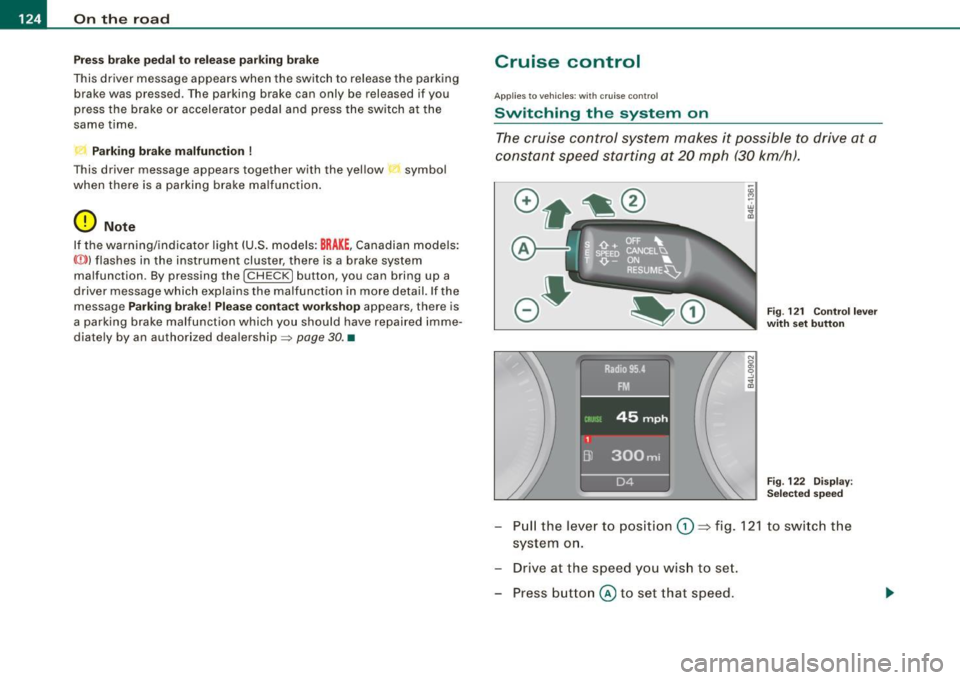
-"' M
-w ., a,
F ig . 121 Co ntrol l ever
w ith set button
Fi g. 122 D is p la y:
Se lecte d sp ee d
- Pull the lever to position G) ~ fig. 12 1 to s wit ch the
system o n.
- Drive at the speed you wish to set.
- Press button
@ to set that speed.
Page 127 of 398
On the road -
----------------
The display=> page 124, fig. 122 will show the set speed . The
display may vary depending on the type of disp lay in your vehicle .
The ind icator light
CRU ISE (US model) I (')0 (Canadian mode l) wi ll also
light up in the instrument cluster.
The speed is kept constant via an engine output adjust ment or
active brake intervention .
_& WARNING
• Always pay attent ion to traffic even when the crui se control is
s w it ched on. You are alw ays r esp onsi ble for your speed and the
di sta nce b etween your vehi cle and other vehi cle s.
• For s afet y reason s, the crui se control should not be u sed in the
c ity , in stop- and-go traffic , on twi sting roads and when road condi
t ion s a re p oor (s uch a s ice , fo g, gra vel , he avy ra in and h ydro
planing ) - risk of accident.
• Turn off the crui se control tempor arily when e nte ring tu rn
lan es, highway exit lanes or in constru ction zone s.
• Plea se note that in adv ertentl y "re sting " yo ur foot on the accel
erator ped al cau se s the cruise control not to brake . Thi s is b ecau se
the crui se control i s overridden b y the dri ve r's acc eleration .
[ i] Tips
The brake lights il luminate as soon as the brakes decelerate
automatically .•
Ap plie s to v ehicl es: w it h c ruise contro l
Changing speed
-Press lever in the 0 o r Q dir ection => page 124, fig. 121
to increase or decrease you r sp eed.
- Release the lever to s ave that speed.
Controls and equip
ment Change speed in increments of 1 mph (1 km/h) by
lightly pressing
the lever . If you keep the lever pressed down, you will a lter your
speed in 5 mph (10 km /h) increments .
You can a lso press the acce lerator pedal down to increase your
speed, e.g. if you want to pass someone. The speed you saved
earlier will resume as soon as you release the accelerator pedal.
If , however, you exceed your saved speed by 5 mph (10 km/h) for
longer than 5 minutes, the cruise control will turn off temporarily .
The symbol wi ll go ou t bu t the saved speed wi ll be retained. •
Applie s to v ehic le s: with c ru ise cont ro l
Presetting your speed
You can prese t your desire d speed while the vehicle is not
moving.
- Turn o n the ignition .
Pu ll lever into pos ition
G) => page 124, fig. 12 1.
Press the lever in the
0 or Q direction to increase or
decrease your speed .
- Release the lever to save that speed .
This function makes it possible, for example, to save the speed you
want before driving on the highway. Once on the highway , activate
the cruise contro l by pu lli ng the lever toward
G) . •
Ap plies to ve hic les: with c ruise contro l
Switching the system off
Temporary dea ctivation
- Press the brake pedal, or
I • •
Page 128 of 398
• .___O_ n_ t_h _e _ r_o _a_ d __________________________________________________ _
-Press the lever into position 0 (not clicked into place)
=> page 124, fig. 121, or
- Drive for longer than 5 minutes at more than 5 mph
(10 km/h) above the stored speed.
Switching off completely
-Press lever into position 0 (clicked into place), or
- Switch the ignition off.
The system retains the saved speed if you deactivate the cruise
control temporarily. To resume the saved speed, release the brake
pedal and pull the lever to position
G) .
Switching the ignition off erases the saved speed.
& WARNING
You should only return to the saved speed if it is not too fast for
the current traffic conditions -risk of an accident! •
Page 129 of 398
_____________________________________________ A_ d_a ...: p_ t_ i_ v _e_ C_ ru_ is_ e_ C_ o_n _ t_ r_o _ l _ __._
Adaptive Cruise Control
Speed and distance control system
Applies to vehic les : with Adaptive C ruise Cont rol
Description
The Adaptive Cruise Control driver assistance pr ogram is
a combined speed and distance control system .
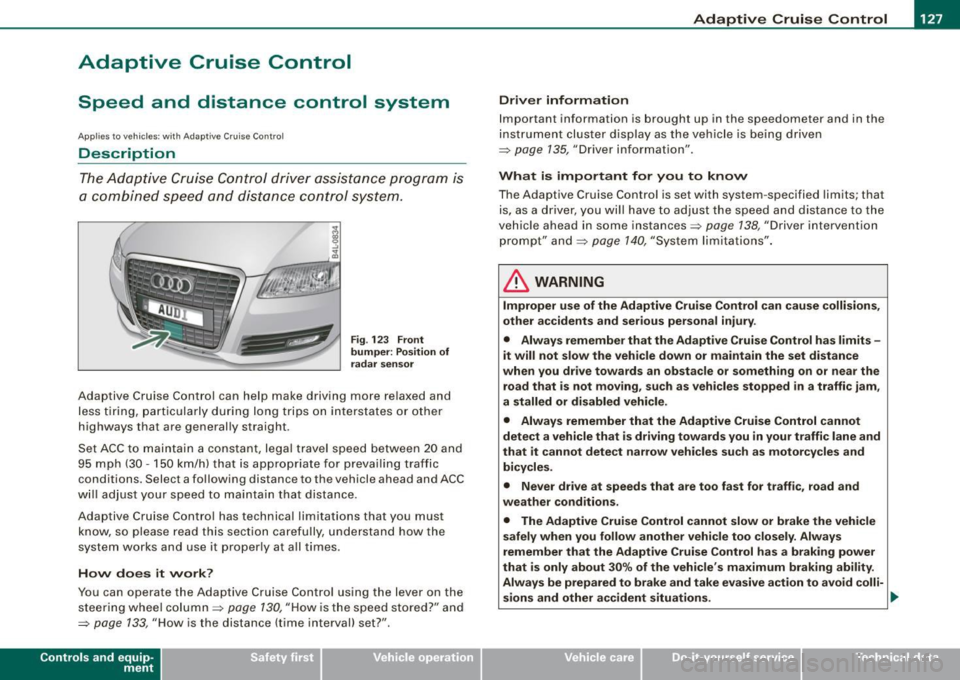
Fig. 123 Fro nt
bu mper: Pos it io n of
r adar senso r
Adaptive Cruise Control can help make driving more re laxed and
less t iring, particula rly during long trips on interstates or other
highways that are generally straight .
Set ACC to maintain a constant, legal travel speed between 20 and
95 mph (30 -150 km/h) that is appropriate for prevailing traffic
conditions. Select a following distance to the vehicle ahead and ACC
w ill adjust your speed to maintain that distance .
Adaptive Cruise Contro l has technical limitations that you must
know, so please read this section carefully, understand how the
system works and use it proper ly at all times .
How does it work ?
You can operate the Adaptive Cruise Control using the lever on the
steering wheel column=> page 130, "How is the speed stored?" a nd
=> page 133, "How is the distance (time interval) set? ".
Con tro ls and eq uip
ment
Driver inf ormation
Important information is brought up in the speedometer and in the
instrument cluster display as the ve hicle is being driven
=> page 135, "Driver information" .
What is important for y ou to kn ow
The Adaptive Cruise Control is set with system -specified limits; that
is, as a driver, you will have to adj ust the speed and distance to the
vehic le ahead in some instances=> page 138 , "Driver intervention
prompt" and=> page 140, "System limita tions" .
& WARNING
Improper u se of the Adapti ve Crui se Control can c ause colli sion s,
oth er ac cident s and s eriou s per sonal injur y.
• Alway s reme mber that the Adapt ive Cruise Control ha s limit s -
it will not slow the veh icle do wn or maintain the set dis tance
w hen you drive to w ard s an obst acle or something o n or ne ar the
road th at is not moving, such as vehicle s stopped in a traffi c jam ,
a stalled or disabled vehicle .
• Alwa ys remember th at the Adaptive Cru ise Control can not
dete ct a vehicle th at is driving to ward s you in your tr affi c lane and
th at it can not dete ct n arr ow vehi cles su ch as motorcycl es and
bicycle s.
• Never dr ive at speed s th at ar e too fa st for traff ic, road and
we ather co nd ition s.
• The Adaptive Cru ise Control cannot slow or brake th e vehi cle
sa fely wh en yo u follo w anothe r vehi cle too closely . Al wa ys
remember th at the Adaptive Crui se C ontrol ha s a braki ng power
t hat i s onl y ab out 30% of the veh icle 's maximum braking abilit y.
Alway s be p rep ared to br ake and take eva sive a ctio n to avoid colli-
s ion s and other a ccident situa tio ns. ._
Vehicle care
I I irechnical data
Page 130 of 398
• .___A_ d_a_ p:- t_iv _ e_ C_ r_u _is _ e_C_ o_ n_ t_ r_ o_ l --------------------------------------------
& WARNING (continued)
• Never allow the closing speed between you and other vehicles
to be so high that the Adaptive Cruise Control may not be able to slow your vehicle safely. If closing speed is too high , you must
apply the brakes yourself to reduce the risk of a rear -end crash.
• Never rest your foot on the accelerator pedal, especially when
the Adaptive Cruise Control is being used. Pressure on the acceler
ator will override the ACC braking function and prevent the brakes
from being applied when ACC detects a situation when the brakes must be applied .
• Never use Adaptive Cruise Control when you cannot drive
safely at a steady speed, including on city streets, on winding
roads or when road conditions are poor (for example, on ice,
gravel, in fog, heavy rain or on wet roads that increase the risk of
hydroplaning).
• The radar sensor's
vision can be reduced by rain, snow and
heavy road spray. These and similar conditions can prevent vehi
cles up ahead from being accurately detected and in some cases
they may not be detected at all. Do not use ACC when the radar sensors cannot accurately detect vehicles moving ahead of you in
traffic.
• Always turn off Adaptive Cruise Control when entering turn
lanes, exit lanes and construction zones or in similar situations
because the vehicle will automatically accelerate to the stored
speed when the road ahead is clear.
• To prevent unintended operation, always switch ACC off when
it is not being used.
[ i) Tips
• For safety reasons, the stored speed is deleted when the ignition
is turned off .
• The Electronic Stabilization Program (ESP) and the Anti-Slip
Regulation (ASR) cannot be deactivated when the Adaptive Cruise
Control is switched on. If the ESP and the Anti-Slip Regulation (ASRI has been deactivated and you then switch on the
Adaptive Cruise
Control, the ESP function will also be activated automatically.
• Damage caused by accidents and some minor collisions can
affect the radar sensor settings and cause the system to malfunc
tion or switch off completely.
• The radar sensor cover is heated. In winter conditions, you
should still check before driving to make sure it is free of ice and
snow. If necessary, clean the area near the radar sensor carefully
=>
page 127, fig. 123.
• To ensure that the radar sensor is not blocked, foreign objects
(e.g. stickers, larger license plate mounts, add -on parts) must not
cover the area near the radar sensor=>
page 127, fig. 123. The area
near the radar sensor must not be painted, either.
• For Declaration of Compliance to United States FCC and Industry
Canada regulations =>
page 375. •
Applies 10 veh ic les: w ith Ada ptive Crui se Contro l
How does Adaptive Cruise Control work?
Vehicles traveling ahead are detected with the aid of a
radar sensor.
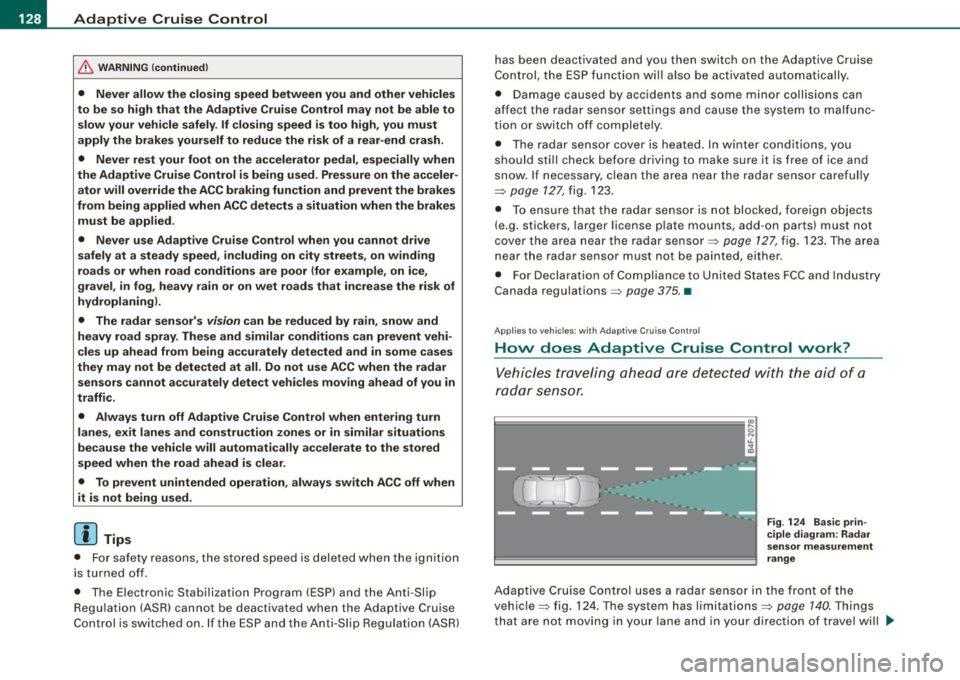
Fig. 124 Basic prin
ciple diagram : Radar
sensor measurement
range
Adaptive Cruise Control uses a radar sensor in the front of the
vehicle=> fig. 124. Th e system has limitations=>
page 140. Things
that are not moving in your lane and in your direction of travel will
~
Page 131 of 398

Adaptiv e Crui se Contro l IIJ!IIIII ---------------------------------..:....:.:=:...:.;_;....::.....::...._ \
_______ _
not be detected. The sensor measures the distance to reflective
surfaces that must have a certain size. The system responds only
after the distance measurement has been made . If a measurement
is not possible, the system cannot respond and wil l not react to a
vehicle or something else up ahead.
O pen ro ad
When the road is clear, the Adaptive Cruise Control works like cruise
control. It main tains a constant target speed specified by the driver.
D riv in g in tr affic
If a slower vehic le driving ahead is detected, the Adaptive Cruise
Control dece lerates (within the limits of the system)::::;,
page 138,
"Driver intervention prompt" and::::;, page 140, "System limitations"
to its speed and after adjusting, tries to maintain the set distance
from the vehicle ahead . The vehicle may temporarily drive s lower
than the set speed while adjusting::::;,
& in "Description" on
page 127.
If the vehicle in front accelerates, Adaptive Cruise Control a lso acce l
erates up to the speed that you have set.
Sit uation s re qui ring d rive r int erve ntion
In some situations you will have to use the footbrake to s low the
vehicle down in order to keep a safe distance from vehic le in front
of you or to avoid a rear -end collision. In this situation, a symbol
appears and a warning tone sounds::::;,
page 138.
P assing anoth er veh icle
If you move into the pass ing lane and no vehicle is detected ahead,
the Adaptive Cruise Control accelerates to the speed you have set
and ma intains it.
O ve rridin g ACC
You can increase your speed at any time by stepping on the acceler
ator pedal. After you re lease the acce lerator pedal, the system
adjusts back down to the speed you previously set.
Controls and equip
ment R
edu cin g s topping di sta nce
If the radar sensor detects that the distance to the vehicle ahead is
less than defined minimum distance, the brakes are automatical ly
prepared for emergency braking by the driver . The brake pads are
moved very c lose to the brake discs without actual ly braking the
vehic le. This brake assistant feature reacts more quick ly to the
driver's braking, and also works when Adaptive Cruise Control is off.
The stopping distance is reduced as a result of this advance brake
preparation. This function does not perform any emergency brak ing
maneuvers by itself; the driver must always app ly the brakes.
& WARNING
• Never r ely on the d istan ce control feature of ACC alone t o
p re vent re ar- end colli sio ns. Alwa ys be prep ared t o br ake and take
eva sive ac tion to a void colli sio ns and ot her acc ident sit uation s.
• Never allo w the clo sing sp ee d b etwe en you and other vehi cle s
to be so hi gh th at th e Ada ptive Crui se Control may not b e able to
s low your vehicl e safely . If clo sing spe ed i s too h igh , you must
a pp ly the brake s yours elf to reduce the risk of a rea r-end cras h.
[ i ] Tip s
Please note that the amount of acceleration the Adaptive Cruise
Contro l uses depends on the Distance setting selected . DISTA NCE 1
gives you acceleration that is dynamic and sporty . D ISTANCE 4, on
t he o ther hand, gives more moderate acce leration. For more infor
mation about the time intervals::::;,
page 133, "How is the distance
(time interval) set?" .
• Please note that if the Adaptive Cruise Control has begun braking
t he vehicle and the driver chooses to brake the vehicle additional ly,
the brakes may feel "hard". This is simply due to the pressure build
up of the initial braking .
• Adaptive Cruise Control is switched off after pressing the foot
brake . The speed saved up this point can be resumed. To resume the
saved speed, release the brake pedal and pu ll the control lever _.,
I • •
Page 133 of 398
Adaptive Cruise Control -
---------------=-------'
Applies to vehi cles: w it h Ada ptive Crui se Co nt rol
Changing stored speed
The speed can be changed without touching the acceler
ator or brake pedal .
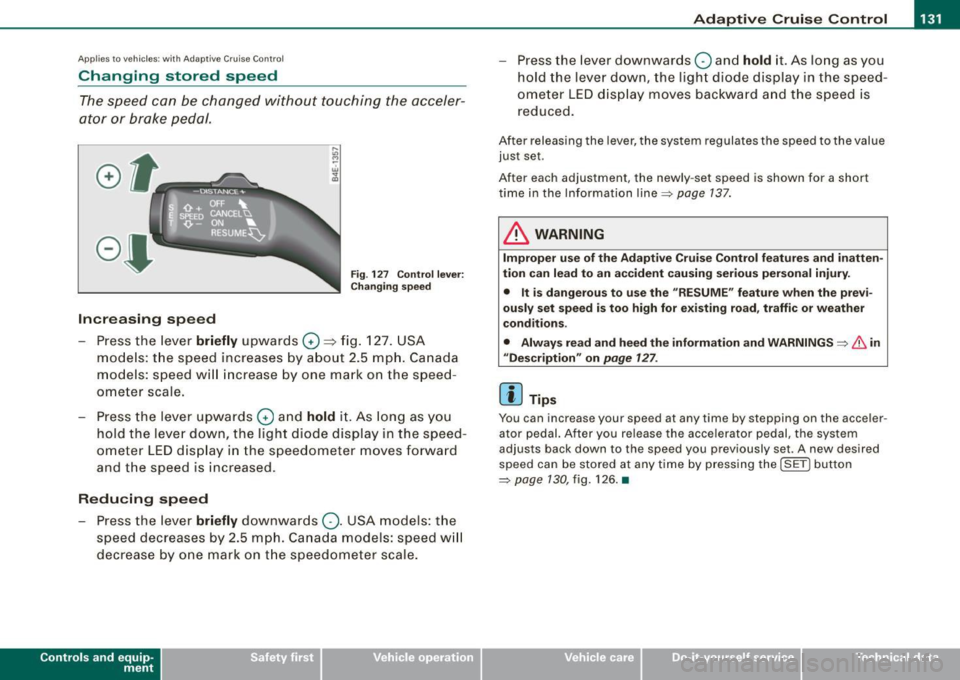
Fig. 127 Control lever:
Changing speed
Increasing speed
- Press the lever briefly upwards
G) ~ fig. 127. USA
models: the speed increases by about 2.5 mph. Canada
models: speed will increase by one mark on the speed
ometer scale.
- Press the lever upwards
G) and hold it. As long as you
hold the lever down, the light diode display in the speed
ometer LED display in the speedometer moves forward
and the speed is increased .
Reducing speed
- Press the lever briefly downwards
Q. USA models: the
speed decreases by 2.5 mph. Canada models: speed will
decrease by one mark on the speedometer scale.
Con tro ls and eq uip
ment
- Press the lever downwards Q and hold it. As long as you
hold the lever down, the light diode display in the speed
ometer LED display moves backward and the speed is
reduced.
After releasing the lever, the system regulates the speed to the value
just set .
After each adjustment, the newly -set speed is shown for a shor t
time in the Information line~ page
137.
& WARNING
Improper use of the Adaptive Cruise Control features and inatten
tion can lead to an accident causing serious personal injury.
• It is dangerous to use the "RESUME" feature when the previ
ously set speed is too high for existing road, traffic or weather
conditions.
• Always read and heed the information and WARNINGS ~
& in
"Description" on
page 127 .
[ i] Tips
You can inc rease your spe ed at any time by stepping on the ac celer
ator pedal. After you release the accelerator pedal, the system
adjust s back down to the speed you previously set . A new desired
speed can be stored at any time by pressing the !SET ) button
~ page 130 , fig. 126. •
Vehicle care I I irechnical data