tow AUDI S6 2009 Owner's Manual
[x] Cancel search | Manufacturer: AUDI, Model Year: 2009, Model line: S6, Model: AUDI S6 2009Pages: 398, PDF Size: 43 MB
Page 184 of 398
• .___A_ u_d_ i _P _a_ r_ k_ i_ n ..:g=-- S_ y=-- s_t _ e _m _____________________________________________ _
Applies to vehic les: with Audi Park ing System (rearl and rear-view camera
Rear-view camera tips
We recommend that you practice parking with t he rear -view camera
in a traff ic -free location, or parking lot, to become fami liar with the
system, the orientati on line s, a nd th eir functi on. When doi ng this,
there should be good light and weather conditions.
In the MMI Display, objects or vehicles ap pea r closer or further away
i f:
• you are driving in reverse gear from a level surface onto an
inc lin e, o r a downwa rd sl ope,
• you are driving in reverse gear toward protruding objects,
• the ve hicle is carrying too much load in the rear.
The accuracy of the orientation lines and blue surfaces diminishes if :
• the Adaptive Air Suspension* is defective, or th e dynamic, off
road, o r lift mode is swi tched on,
• the rear -view camera does not provide a reliable image, for
exam ple, in po or vi sibi lit y c ondi tio ns or if the lens is dirt y,
• the image on the screen is not visible due to sun g lare and reflec
t ion .
Caring for the rear-view camera lens:
• Dampen the lens with a household a lcoho l- based g lass c leaner,
and c lean th e lens wit h a dry cl oth.
• Remove snow with a hand brush.
• Remove ice, preferably with de -icing spray~
0.
& WARNING
• The rear-v iew camera does not replace the view to the rear and
the rear view mirrors .
• The rear-view camer a - because of technical limitat ions -does
not show the entire area behind the vehicle~
page 175 , fig. 178.
& WARNING (continued )
Be especially careful to che ck for small children and animals
before backing up . Small children and animals will not alway s be
shown in the rear-view display .
• The Audi Parking System is not a sub stitute for being careful
and alert when back ing up . Be especially careful during parking
and similar maneuver s. Always watch where you are driving and
make su re that nothing is in the way .
• Do not allow yourself to be distracted from traffic by the rear
view camera pi ctures .
• When maneuvering or parking , do not only u se the MMI Display
for orientat ion . Certain obje cts - depending on the screen resolu
tion -may not, or not entirely, be displayed ; for example tr ailer
hitches , cha ins , narrow posts , or fences .
• Only use the rear -view camera for aid if it shows a good , clear
picture . The image may be obscured , for example , by the sun
shining into the lens, dirt on the lens, or as the result of a defect -
danger of accident!
• If the image i s hazy when the MMI Display is switched on or the
area behind the vehicle is not visible (for e xample , as the result of
a dirty or defective lens ), the rear -view camera must not be used
for aid in maneuver ing - danger of accident!
• The rear -view camera generates two -dimensional images . For
this reason , please note that recesses in the ground and
protruding parts on another vehicle , or protruding objects fixed to
the ground , will be more difficult or impossible to recognize on the
MMI Di splay, due to the missing spacial depth .
• If the position and the installation angle of the camera has
changed, for example , after a rear end collision , do not continue to
use the system for safety reasons . Have it checked by an autho
rized Audi dealer or qualified work shop .
• Only use the rear-v iew camera when the rear lid is fully closed .
Make sure that objects mounted on the rear are not obscuring the
camera v iew .
Page 186 of 398
• .___A_ d_ a --=- p_t_ i_v _e _ A_ ir_ S_u_ s_,_ p_e_ n_ s_io _ n _____________________________________________ _
Adaptive Air Suspension
Adaptive Air Suspension and
Damping
A pplies to vehicles: wi th Adap tive Air Suspens ion
Description
Adaptive Air Suspension and damping can be regulated
and they adapt automatically to a request from the driver
and the driving situation at the time.
Adaptive Air Suspension is an electronically controlled springing
and damping system . This chassis system makes it easier on the
driver by adapting to the particular situation through imperceptible
control processes.
The
Adaptive Air Suspension component regulates ground clear
ance depending on vehicle speed, load condition and driver input.
When the system is in automatic mode, accelerating to a speed above a predetermined limit will make the vehicle lower itself. On
the other hand, driving more slowly results in the vehicle raising again at specific speeds.
The
damping component provides individual control of the
damping forces. For example, with damping characteristics set to
provide greater comfort, damping is set somewhat harder for a brief
period only as required, for example, when going around a curve or
over rough road surfaces as well as when braking.
Settings
Adaptive Air Suspension provides the driver with the opportunity to
set the chassis characteristics also to their individual preference.
With the driving modes
standard, automatic and dynamic the driver
has three chassis settings available, ranging from comfort to sporty .
In addition,
lift provides a fourth mode which can be selecting for
driving over poor stretches of road :::::,
page 185, "Chassis controls". The modes are set in
MMI:::::,
page 185.
& WARNING
The height of the parked vehicle can change due to temperature
fluctuations or changes in load.
0 Note
• Whenever you park your vehicle, always make sure there is
adequate clearance above and below the vehicle. The height of the parked vehicle can change as the result of temperature fluctuations,
changes in load condition and changes in the driving mode (ground
clearance!.
• If the vehicle is being transported (e.g. by tow truck, train, ship,
etc.) , mount the tie -down chains/cables over the running surface
(circumference) of the tires . Never secure the vehicle by the axle, the
suspension struts or the front or rear towline eye. For technical
reasons, the pressure in the suspension struts may change during
the transport, which could result in the vehicle no longer being
secured properly.
• To prevent damage to the vehicle underbody, remember that
your vehicle is not an off-road vehicle, even in the "lift" mode. The
ground clearance is insufficient for this type of operation.
• If you are going to tow a trailer, you must activate the trailer oper
ation mode :::::,
page 186.
[ i] Tips
Before you raising your vehicle using the vehicle jack (for example,
when changing a flat tire) you must activate the jacking mode
=> page 186. •
Page 188 of 398
• ..__A_ d_ a--=- p_t _iv _ e_ A_ i_ r _ S_ u_ s....; p=--- e_n_ s_ io_ n _____________________________________________ _
The ignition must be switched on to set the driving modes.
- Press the !CARI function button. The main menu
Adaptive Air Suspension appears=>
page 185, fig. 189.
- Select the desired mode with the control knob.
Please note that not every driving mode can be selected in every
driving situation. For example, it is not possible to switch to "lift"
mode at speeds above 50 mph (80 km/h). This mode is then shown
greyed out in the MMI display.
For additional information on the driving modes=>
page 185,
"Chassis controls". •
Applies to vehicles: with Adaptive Air Suspension
Jacking mode when changing a flat tire
This mode must be activated before raising the vehicle
with a vehicle jack.
Fig. 190 MMI display :
Activate jacking mode
Switching jacking mode on and off
-Press the (CAR] function button. The main menu
Adaptive Air Suspension appears.
- Press the !SETUP) function button. The main menu
Adaptive Air Suspension appears=> fig. 190. - Turn the control knob to
Vehicle jack mode and select on
or
off as required.
The vehicle jack mode must be activated before changing a wheel
so that the automatic control processes for the air suspension do
not make lifting with the vehicle jack more difficult.
[ i ] Tips
The vehicle jack mode is switched off automatically at speeds above
9 mph (15 km/h).•
Applies to vehicles: with Adaptive Air Suspension
Towing a trailer
Automatic lowering is not desirable when towing a trailer.
Fig. 191 MMI display:
Activate towing opera
tion
If you are going to tow a trailer, you must activate the trailer
towing mode.
Switching the trailer towing mode on and off
manually
- Pressthe!CARJfunction button. The main menu
Adaptive Air Suspension appears.
Page 189 of 398
____________________________________________ A_ d_a--' p=-- t_iv _e_ A_ ir_ S_u_ s-=- p_e _ n_ s _ io_ n __ !II
- Press the I SETUP I functio n button . The menu Ad aptiv e
Air
Su spen sion appears~ page 786, fig. 191.
- Select
Trailer towing mode on or off as requ ired .
Leve l A djus tment w he n t ow ing a tra il e r
• Before hitching up the trailer and before adjusting the tongue
weight at the trailer, the automatic or standard mode
mu st be
selected, so that the vehicle is at normal level=>
page 185, "Setting
the driving modes".
• If driving in dynamic mode is desired, this mode
mu st be
selected before hitching up the tra iler and before adjust ing the
tongue weight . However, note that your vehicle is lowered and
ground c learance is reduced .
• If you have to drive under difficult road conditions, you can
select lift mode after hitching up the trailer or after adjusting the
tongue weight .
Restri ctions when op erating wi th a trailer
When operating wi th a trailer, the lift mode can only be selected up
to about 25 mph (40 km/h) . The system automatically goes out of li ft
mode when speed exceeds about 31 mph (50 km/hl.
If the veh icle is in automatic, standard or lift mode before the tra iler
towing mode is activated, the dynamic mode cannot be activated.
I f the vehic le is in dynamic mode before towing operation is acti
vated, it can be driven in this mode. If the suspension is switched
from this mode to automatic mode, dynamic mode cannot be re
selected.
[ i ) Tips
If the trai ler towing mode has been activated, the vehicle will not
sink to the dynamic level if selected. •
Controls and equip
ment I • •
Page 199 of 398
________________________________________________ D_r_iv _ i _n_ g~ S_ a_ fe_ ly __ !II
& WARNING (continued)
to help reduce the risk of personal injury if the driver's airbag
inflates.
• Never hold the steering wheel at the 12 o'clock position or with
your hands at other positions inside the steering wheel rim or on
the steering wheel hub . Holding the steering wheel the wrong way
can cause serious injuries to the hands, arms and head if the
driver's airbag deploys .
• Pointing the steering wheel toward your face decreases the
ability of the supplemental driver's airbag to protect you in a colli
sion.
• Always sit in an upright position and never lean against or
place any part of your body too close to the area where the airbags
are located .
• Before driving, always adjust the front seats and head
restraints properly and make sure that all passengers are properly
restrained.
• Never adjust the seats while the vehicle is moving. Your seat
may move unexpectedly and you could lose control of the vehicle. • Never drive with the backrest reclined or tilted far back! The
farther the backrests are tilted back, the greater the risk of injury
due to incorrect positioning of the safety belt and improper
seating position.
• Children must always ride in child safety seats
=> page 238.
Special precautions apply when installing a child safety seat on
the front passenger seat
=> page 215. •
Controls and equip ment Safety first
Vehicle operation
Proper seating position for the front
passenger
The proper front passenger seating position is important
for safe, relaxed driving.
For your own safety and to reduce the risk of injury in the
event of an accident, we recommend that you adjust the
seat for the front passenger to the following pos ition:
- Move the front passenger seat back as far as possible.
There must be a minimum of 10 inches (25 cm) between
the breastbone and the instrument panel =>
&.
- Adjust the angle of the seatback so that it is in an upright
position and your back comes in full contact with it
whenever the vehicle is moving.
- Adjust the head restraint so that the upper edge is as
even with the top of your head as possible but not lower
than eye level and so that it is as close to the back of your
head as possible =>
page 199.
-Keep both feet flat on the floor in front of the front
passenger seat.
- Fasten and wear safety belts correctly=:>
page 209.
For detailed information on how to adjust the front passenger's
seat, see
=> page 80 .
& WARNING
Front seat passengers who are unbelted, out of position or too
close to the airbag can be seriously injured or killed by the airbag
as it unfolds. To help reduce the risk of serious personal injury : .,
Vehicle care Do-it-yourself service Technical data
Page 203 of 398
__________________________________________________ D _r_iv _ in_ g~ S_ a_f _e _l_ y __ llll
Use only floor mats that leave the pedal area unobstructed and that
are firmly secured so that they cannot slip out of position. You can
obtain suitable floor mats from your authorized Audi Dealer.
Floor mat fasteners are installed in your Audi.
Floor mats used in your vehicle must be attached to these fasteners.
Properly securing the floor mats will prevent them from sliding into
positions that could interfere with the pedals or impair safe opera
tion of your vehicle in other ways .
& WARNING
Pedals that cannot move freely can result in a loss of vehicle
control and increase the risk of serious personal injury.
• Always make sure that floor mats are properly secured.
• Never place or install floor mats or other floor coverings in the
vehicle that cannot be properly secured in place to prevent them
from slipping and interfering with the pedals or the ability to
control the vehicle.
• Never place or install floor mats or other floor coverings on top
of already installed floor mats. Additional floor mats and other
coverings will reduce the size of the pedal area and interfere with
the pedals.
• Always properly reinstall and secure floor mats that have been
taken out for cleaning.
• Always make sure that objects cannot fall into the driver foot
well while the vehicle is moving. Objects can become trapped
under the brake pedal and accelerator pedal causing a loss of
vehicle control. •
Controls and equip ment Safety first Vehicle operation
Stowing luggage
Loading the luggage compartment
All
luggage and other objects must be properly stowed
and secured in the luggage compartment.
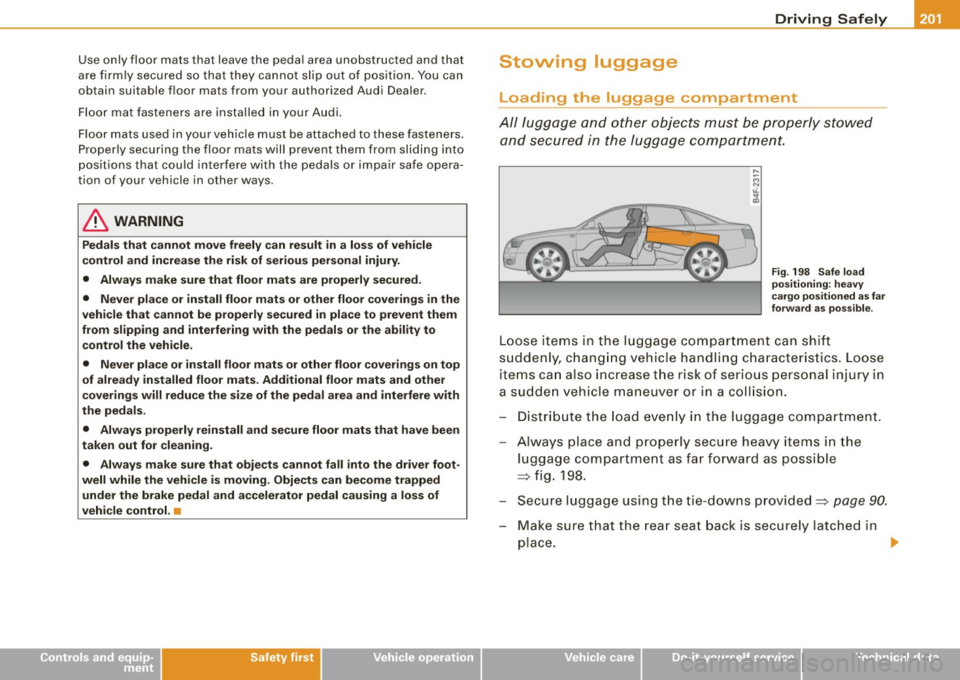
Fig. 198 Safe load
positioning: heavy
cargo positioned as far
forward as possible .
Loose items in the luggage compartment can shift
suddenly, changing vehicle handling characteristics . Loose
items can also increase the risk of serious personal injury in
a sudden vehicle maneuver or in a collision.
Distribute the load evenly in the luggage compartment .
- Always place and properly secure heavy items in the
luggage compartment as far forward as possible
=> fig. 198.
Secure luggage using the tie-downs provided=>
page 90.
- Make sure that the rear seat back is securely latched in
place.
~
Vehicle care Do-it-yourself service Technical data
Page 206 of 398
-Driving Safely
You can also obtain other information about
motor vehicle safety from:
http://www.safercar.gov
Applicable to Canada
Canadian customers who wish to report a
safety-related defect to Transport Canada,
Defect Investigations and Recalls, may tele
phone the toll free hotline:
Tel.: 1-800-333 -0371
or contact Transport Canada by mail at:
Road Safety and Motor Vehicle Regulation
Directorate
Transport Canada
Tower C, Place de Ville,
330 Sparks Street Ottawa, ON K1 A 0NS
For additional road safety information, please
visit the Road Safety website at:
http://www.tc.gc.ca/roadsafety/menu.htm •
Page 214 of 398
-Safety belts ----=-----------------
& WARNING
Improperly positioned
safety belts can cause serious personal
injury in an accident.
• Expectant mothers must always wear the lap portion of the
safety belt as low as possible across the pelvis and below the
rounding of the abdomen.
• Always read and heed all WARNINGS and other important infor
mation
~ & in "Fastening safety belts" on page 209. •
Unfastening safety belts
Unbuckle the safety belt with the red release button only
after the vehicle has stopped.
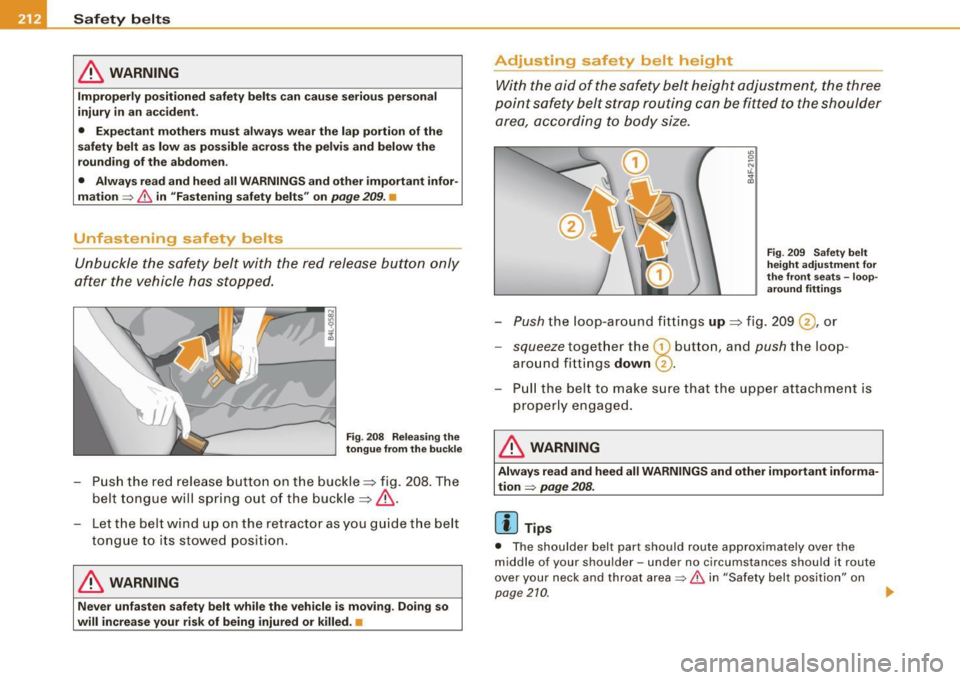
Fig . 208 Releasing the
tongue from the buckle
-Push the red release button on the buckle=> fig. 208. The
belt tongue will spring out of the buckle=>& .
- Let the be lt wind up on the retractor as you guide the belt
tongue to its stowed pos ition.
& WARNING
Never unfasten safety belt while the vehicle is moving. Doing so
will increase your risk of being injured or killed .•
Adjusting safety belt height
With the aid of the safety belt height adjustment, the three
point safety belt strap routing can be fitted to the shoulder area, according to body size.
Fig . 209 Safety belt
height adjustment for
the front seats -loop
around fittings
Push the loop -around fittings up => fig. 209 @ , or
- squeeze together the G) button , and push the loop
around f ittings
down @.
- Pull the belt to make sure that the upper attachment is
properly e ngaged .
& WARNING
Always read and heed all WARNINGS and other important informa
tion
~ page 208.
[ i ] Tips
• The shoulder belt part should route approximately over the
middle of you r shoulder -und er no circu mstanc es should it route
over your neck and throat area
~ & in "Safety belt position" on
pag e21Q
~
Page 225 of 398
Airbag system -----------------=--=--------
passenger seat should be turned off or not~ page 217, "Child
res traints o n the fr ont sea t - som e impo rtant t hin gs t o know".
• A sensor in the safety belt latch fo r the drive r and for the front
s e at passe nger that s enses wh ether th at safe ty belt i s la tch ed o r not
and transmits this information to the e lectronic contro l unit.
& WARNING
Damage to the front passenger seat can prevent the front airbag
from working properly .
• Improper repair or disassembly of the front passenger and
driver seat will prevent the Advanced Airbag System from func
tioning properly .
• Repairs to the front passenger seat must be performed by qual
ified and properly trained workshop personnel .
• Never remove the front passenger or dr iver seat from the
vehicle.
• Never remove the upholstery from the front passenger seat .
• Never disa ssemble or remove parts from the seat or disconnect
wires from it.
• Never carry sharp objects in your pockets or place them on the
seat . If the weight-sensing mat in the passenger seat is punctured
it cannot work properly.
• Never carry things on your lap or carry objects on the
passenger seat . Such items can increase the weight registered by
the weight-sensing mat and send the wrong information to the
airbag control unit .
• Never store items under the front passenger seat . Parts of the
Advanced Airbag System under the pa ssenger seat could be
damaged , preventing them and the airbag system from work ing
properly.
• Never place seat covers or replacement upholstery that have
not been specifically approved by Audi on the front seats.
Controls and equip ment Safety first
Vehicle operation
& WARNING (continued )
• Seat covers can prevent the Advanced Airbag System from
recognizing child restraints or occupants on the front passenger
seat and prevent the side airb ag in the seat backrest from
deploying properly.
• Never use cushions, pillows, blankets or similar items on the
front passenger seat. The additional padding will prevent the
weight-sens ing mat in the seat from accurately registering the
child re straint or person on the seat and prevent the Advanced
Airbag System from functioning properly .
• If you must use a child restraint on the front passenger seat
and the child restraint manufa cturer's instru ctions requ ire the use
of a towel , foam cushion or something else to properly position
the child restraint, make certain that the PASSENGER AIR BAG OFF
light comes on and stays on whenever the child restraint is
installed on the front passenger seat.
• If the PASSENGER AIR BAG OFF light does not come on and stay
on , immediately install child restraint in a rear seating position
and have the airbag system inspected by your Audi dealer. •
How the Advanced Airbag System
components
work together
The front Advanced Airbag System and the side airbags supplement
the protection offered by the front t hree -point safety belts with
pretens ioners and load limiters and the adjustable head restraints
to help reduce the risk of in jury in a wide range of accident and
c ras h situati ons . Be sure to read t he impo rtant informatio n abou t
safety and heed the WARNI NGS in th is chapter.
Dep loyme nt of the A dva nced Ai rbag Sys tem a nd the activati on of
the safety be lt pretensioners depend on the deceleration measured
by the c ra s h sens ors and regis te red by the electronic control unit.
Crash severity depends on speed and deceleration as we ll as the
mass and s tiff ness of the veh ic le or object invo lved in the crash.
9J.
Vehicle care Do-it-yourself service Technical data
Page 253 of 398
Child Safety ---------------------=------
& WARNIN G (continu ed )
• Alway s buckle the child safety s eat firmly in place even if a
child i s not sitting in it . A loose child safet y sea t ca n fly a round
during a sudden stop or in a cra sh .
• Alway s make sure the se at ba ckr es t to which the child re str ai nt
i s in stalled i s in an upright po sition and se curely latched into place
a nd cannot fold forw ard . Otherwi se, the seat back with the child
s a fety seat atta ched to it could fly forw ard in the event of an a cci
d ent o r other emergency situat ion .
• Alwa ys read and heed all WARNINGS wh enever u sing a child
re str ained in a vehicle is being u sed
=> page 238. Spe cial precau
tio ns appl y when install ing a child safety se at o n th e front
p ass enger seat =>
page 217 , "Ch ild re str ai nt s on t he front sea t -
s ome important t hings to know ".•
Deactivating the convertible locking retractor
The convertible locking retractor for child restraints will
be deactivated automatically when the belt is wound all
the way back into the retractor.
- Press the red button on the safety belt buck le . Th e belt
tongue will pop out of the buckle.
- Guide t he belt a ll the way back into its stowed position .
Always let the safety belt retract complete ly into its stowed posit ion .
The safety belt can now be used as an ordinary safety be lt without
the conve rtible locking retractor for child restra ints.
I f the convertible locking retractor should be activated inadvert
ently, the safety belt must be unfastened and guided comp lete ly
back into its stowed position to deactivate th is feature . If the
convertible locking retractor is not deactivated, the safety be lt will
gradually become tighte r and unc omf ortab le to wear .
Controls and equip
ment Safety first Vehicle operation
& WARNING
Impr
operly in stalled chi ld safety seat s in crea se th e ris k o f ser iou s
per sonal injury and death in a collision.
• Never unfaste n th e safety belt to dea ctivate the con vertib le
lockin g retractor for child re straint s while the veh icle i s moving .
You wou ld not be r estra ined a nd co uld be seriou sly inj ured in an
accident.
• Always re ad and heed all WARNING S whenever using a child
re str ained in a vehicle is be ing u sed
=> page 2 38. Spe cial pre cau
tion s appl y when in stalling a chi ld safet y seat on the front
pas senger seat
=> page 217 , "Child re straint s on the front seat -
so me important thing s to know ".•
Additional Information
What types of child restraint anchors are
available and how are they related to child
safety?
For years, child restraints have been installed using the safety belts
a lready present in every vehicle.
Since September 1, 1999, child restraint manufacturers have been
providing tether straps that attach the top of the chi ld restraint to
the vehic les structure, on most of their forward -facing systems in
order to comply with U.S. Federal regulations for child restraint
performance in a crash. Vehic le manufacturers are required to
phase -in tether anchorages for attachment of the tether strap in
t heir U.S. vehic les beginn ing September 1, 1999 .
The combination of the tether anchorages and the lower anchor
ages is now generally called the
LATCH system for " Lowe r Anchor
and Tether for Chi ldren ". ..,
Vehicle care Do-it-yourself service Technical data