lock AUDI S6 2009 Workshop Manual
[x] Cancel search | Manufacturer: AUDI, Model Year: 2009, Model line: S6, Model: AUDI S6 2009Pages: 398, PDF Size: 43 MB
Page 119 of 398
_________________________________________________ O_ n_ t_h _e _ ro_ a_d _ __._
& WARNING
• Ne ver re m ove the ke y from the ignition lo ck wh ile th e ve hicl e is
movin g. The steering wh eel will l ock , cau sing l oss of contr ol.
• I f yo u have t o le ave y our veh icle, e ven for ju st a mi nute , always
r e m ove the ign ition ke y and t ake it with you. T his is es pe ciall y
import ant if y ou are going t o leave c hildren unatt end ed in the
vehic le. The children could start the engin e or use other ve hicle
c ontr ols. Un sup erv is ed u se of veh icle c ontrol s (for e xam ple, pow er
w indow s) can cause se rious per sonal injurie s.
0 Note
• I f the ~ symbol in the display blinks, there is a malfunction in the
e lectronic steering column lock . Follow the instructions in
~ page 32 , "Steering malfunction i".
• If the ~ symbol in the display blinks , there is a malfunction in
the electronic ignition lock . Follow the instructions in~ page
33,
"Ignition lock malfunction ~"-
[ i ] Tip s
• If you release the ignition key in posit ion @, the key automati
cally r eturns to posit ion
G) .
• If you open the driver's door when the ignition is swi tched on , a
buzzer sounds and the message Ignition is on appears in the instru
ment cluster display. P lease switch the ignition off. •
Ignition key safety lock
The ignition key can only be removed when the selector
lever is in the "P" (Park) position.
After turning off the ignition, the ignition key can only be removed
from the ignition lock when the selec tor lever is in the "P" (Park)
Con tro ls and eq uip
ment position. Af
ter you have removed the key , the sele ctor lever is locked
and cannot be moved. •
Starting and stopping the engine
Starting the engine
The engine can only be started with your original Audi
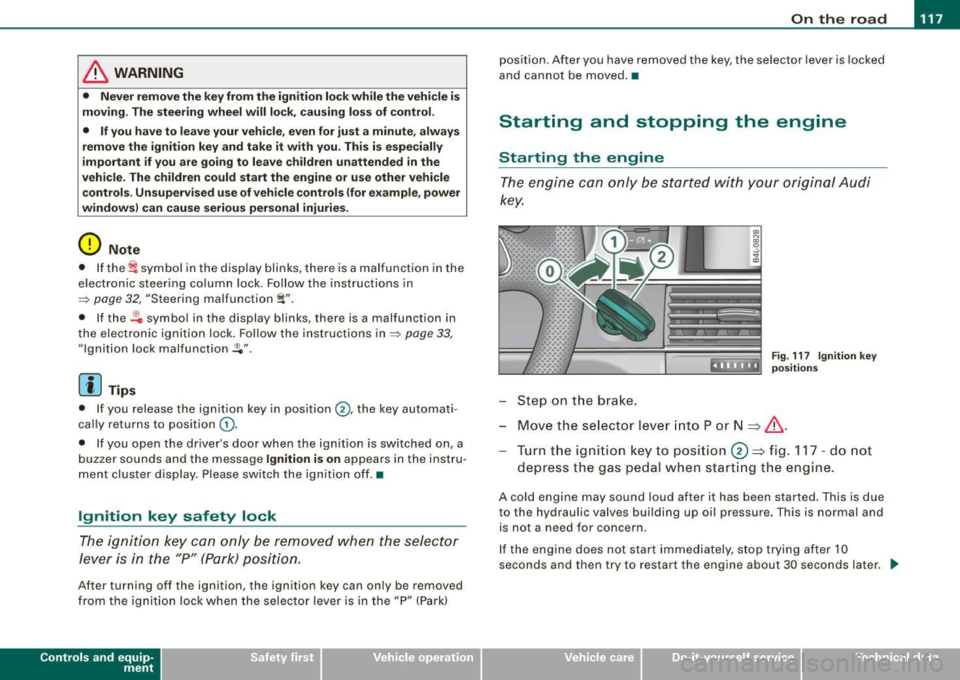
key.
.... _:::::•:
Step on t he brake.
Fig . 117 Ig ni tio n k ey
posit io n s
Move the selector lever into P or N => &,.
Tu rn the ignition key to pos ition 0 => fig . 117 - do not
depress the gas peda l when start ing the engine.
A co ld engine may sound loud after it has been started . This is due
to the hydrau lic valves building up oi l pressure. This is normal and
is not a n eed for concern .
If the engine does not start immediately, stop trying after 10
seconds and th en try to restart the engine about 30 seconds later . _.,
Vehicle care
I I irechnical data
Page 121 of 398
![AUDI S6 2009 Workshop Manual On th e road 111111 _________________________________ __::..:....:.......;,;_;_;_ _ __;____,J
Switching the ignition on
- Press t he [ S TART] button once to the first stage to switch
on](/img/6/57595/w960_57595-120.png "AUDI S6 2009 Workshop Manual On th e road 111111 _________________________________ __::..:....:.......;,;_;_;_ _ __;____,J
Switching the ignition on
- Press t he [ S TART] button once to the first stage to switch
on")
On th e road 111111 _________________________________ __::..:....:.......;,;_;_;_ _ __;____,J
Switching the ignition on
- Press t he [ S TART] button once to the first stage to switch
on on ly the ignition.
Starting the engine
- Step on t he brake.
- Move the se lector leve r to t he P or N posit ion
~ & .
- Press the [ STA RT ] button to t he second s tage to star t the
engine.
After a cold engine is started, there may be a brief period of
increased noise because oil pressure must first bui ld up in the
hydraulic valve adjusters . This is norma l and not a cause for
concern.
If the engine does not start immed iately, stop trying after 10
seconds and then try to restart the engine about 30 seconds later.
& WARNING
Ne ver all ow the e ngine to run in confined spa ce s -danger of
asphyxi atio n.
0 Note
• Avo id high engi ne rp m, full throttle and heavy engine loads unti l
the engine has reached operating temperature -otherwise you risk
engine damage .
• T he engine cannot be started by pushing or towing the vehic le.
c£> For the sake of the environment
Do not allow the engine to warm up with the vehicle stationary . Start
driving right away . In this way you avo id unnecessary emissions .
Contro ls and eq uip
ment
[ i ] Tip s
If you open the driver's door when t he ign itio n is switched on, a
buzzer sounds and the message
Ign ition i s on appears in the instru
ment cluster display. P lease switch the ignition off. •
Applies to vehic les : w ith C onven ien ce key
Switching engine off with the [STOP] button
Bring yo ur vehicle to a comp le te sto p.
Fig. 11 9 Con veni ence
k ey: E NGIN E STO P
button
Move the se lector lever to the P o r N position .
Press the [
STOP I button ~ fig. 119.
Pressing the ( STO P] button once switches off the engine and the
ignition . If you press the ( S T O P! button again for more than 1
second, the steering is locked, provided that the selector leve r is in
the P position
~ & .
Emergency OFF function
If necessary , the engine can be switched off with the selector leve r
in the R, Dor S positions. To do so, step on the brake peda l and
press and hold the ( STOP] button (vehicle speed must be less than
6 mph/ 10 km /h. .,,_
Vehicle care I I irechnical data
Page 122 of 398
• .___O_ n_ t_ h_ e_ r_ o_ a_d ____________________________________________________ _
& WARNING
• Never turn off the engine until the vehicle has come to a
complete stop.
• The brake booster and servotronic only work when the engine
is running. With the ignition turned off, you have to apply more
force when steering or braking. Since you cannot steer and stop
normally, this can lead to accidents and serious injuries.
• For safety reasons, you should always park your vehicle with
the selector lever in P. Otherwise, the vehicle could inadvertently roll away.
• After the engine has been switched off, the radiator fan can
continue to run for up to 10 minutes -even with the ignition
switched off. It can also switch on again after some time if the
coolant temperature rises as the result of a heat buildup or if the
engine is hot and the engine compartment is additionally heated
by the sun's rays.
0 Note
If the engine has been under heavy load for an extended period,
heat builds up in the engine compartment after the engine is
switched off -there is a risk of damaging the engine. Allow the
engine to run at idle for about 2 minutes before switching it off. •
Applies to vehicles: w ith Conven ience key
Driver messages in the instrument cluster
display
If a function is not present, a driver message appears.
No key identified
This message appears when the [STAR T) button is pressed if there
is no master key inside the vehicle or if the system does not recog
nize it . For example, the master key cannot be recognized if it is
covered by an object (e.g. aluminum brief case) which
screens the radio signal.
.Electronic devices such as cell phones can also inter
fere with the radio signal.
Press brake pedal to start engine
This message appears if you press the [ START) button to start the
engine and do not depress the brake pedal. The engine can only be
started if the brake pedal is depressed.
Engage N or P to start engine
This message appears when the engine is started if the selector
lever for the automatic transmission is not in the P or N position.
The engine can only be started with the selector in these positions.
? Key not in vehicle
This message appears along with the symbol if the master key is
removed from the vehicle with the engine running. It is intended to
remind you (e.g. when changing drivers) not to continue the journey
without the master key.
If the master key is no longer in the vehicle, you cannot switch off
the ignition after stopping the engine and you also cannot start the engine again. Moreover, you cannot lock the vehicle from the
outside with the key.
Shift to P, otherwise vehicle can roll away. Doors do not lock if lever
is not in
P.
This message appears for safety reasons along with a warning
buzzer if the selector lever for the automatic transmission is not in
the P position when the ignition is switched off with the
[STOP)
button and the driver's door is opened. Move the selector lever to
the P position, otherwise the vehicle is not secured against rolling
away. You also cannot lock the vehicle using the locking button on
the door handle or using the remote key.
To engage steering lock, press and hold STOP button
This message appears for safety reasons if the engine and the igni
tion have been switched off by pressing the [
STOP) button once, .,,_
Page 123 of 398
![AUDI S6 2009 Workshop Manual On th e road -
-------------------
and then the drivers door is opened. In this instance, the steering is
not locked . The steering is locked :
• If you press the
I STOP ] b](/img/6/57595/w960_57595-122.png "AUDI S6 2009 Workshop Manual On th e road -
-------------------
and then the drivers door is opened. In this instance, the steering is
not locked . The steering is locked :
• If you press the
I STOP ] b")
On th e road -
-------------------'
and then the driver's door is opened. In this instance, the steering is
not locked . The steering is locked :
• If you press the
I STOP ] button aga in for more than 1 second.
• If you c lose the driver's door and lock your vehicle from the
outside .•
Electromechanical parking brake
Operation
The electromechanical parking brake replaces the hand
brake.
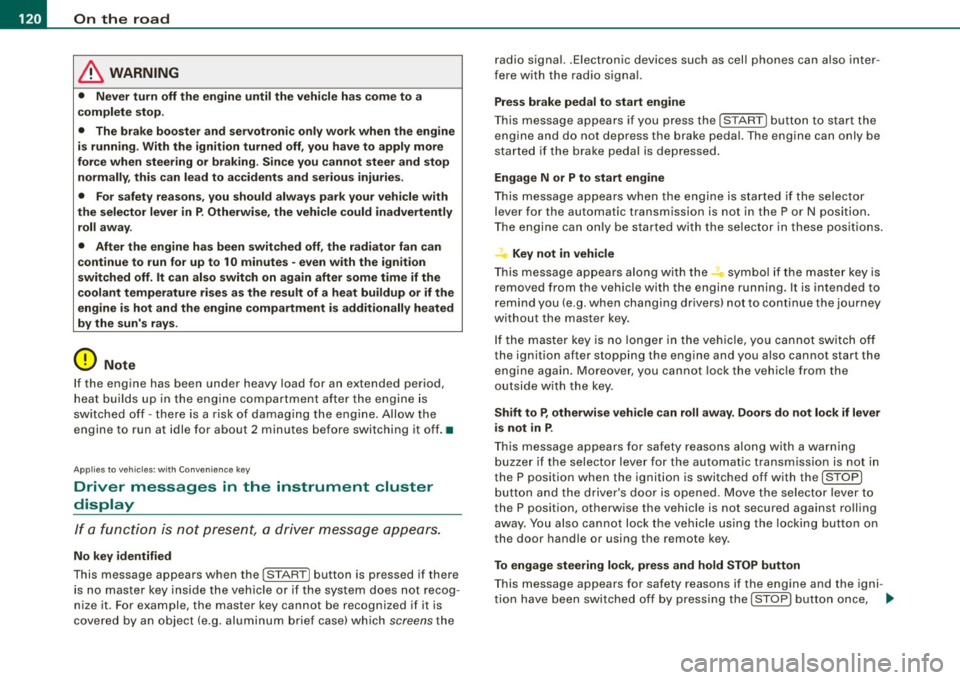
Fi g. 120 Center
co nso le: Parki ng bra ke
- Pull the switch to app ly the park ing brake => fig. 12 0. The
indicator light in the switch will come on .
- Step on the brake pedal or the accelerator pedal and
press the switch at the same time to rel ease the parking
brake. The indicator lig ht in the switch wi ll go out.
Your vehicle is equipped with an elect romechanical parking brake
which replaces the handbrake . T he parking brake is designed to
prevent the vehicle from rol ling unintentional ly.
Con tro ls and eq uip
ment
I n add ition to the normal functions of a traditional hand brake, the
e lectromechanica l parking brake provides various convenience and
safety functions.
Emergen cy brake
An emergency brake ensur es that the vehicle can be slowed even if
t he
normal brakes fail=> page 123, "Emergency braking".
Ind icator lights
• If the parking brake is applied with the ignition tu rned on , the
indicator light in the instrument cluster (U.S models :
::i.:,, Canadian
models: ®)) and in the switch <®) will com e on .
• I f the parking brake is app lie d with the ignition
turn ed off , the
indicator light in the instrument cluster (U.S. models: ::.:\,, Canadian
models :(®) ) and in the switch(®) will come on for about 30 seconds
and then go out .
& WARNING
If the vehicle i s stationary and the tr ansmi ssion is engag ed with
the engine ru nning , the engine should not be speeded up (e .g .
manu ally from under the hood ). Otherwi se the vehicle will sta rt to
move -you run the risk of a n accident .
0 Note
If the warning/indica tor light (U.S . mode ls: BRAKE , Canadian mode ls :
(Ci)) ) flashes in the instrument clus ter, there is a brake system
malfunction . By pressing the
I CHECK] button, you can bring up a
driver message which explai ns the ma lfunc tion in more detail. If the
message
P a rki ng brake ! Please conta ct w ork shop appears, there is
a par king brake malfunction which you should have repaired imme -
d iate ly by an authorized dealership=>
page 30. ..
Vehicle care
I I irechnical data
Page 124 of 398
![AUDI S6 2009 Workshop Manual -On the road --------------------
[
i] Tips
• You can apply the parking brake at any time - even with the igni
tion turned off. The ignition must be turned on in order](/img/6/57595/w960_57595-123.png "AUDI S6 2009 Workshop Manual -On the road --------------------
[
i] Tips
• You can apply the parking brake at any time - even with the igni
tion turned off. The ignition must be turned on in order")
-On the road --------------------
[
i] Tips
• You can apply the parking brake at any time - even with the igni
tion turned off. The ignition must be turned on in order to release
the parking brake .
• Occasional noises when the parking brake is applied and
released are normal and are not a cause for concern .
• The parking brake goes through a self -test cycle at regular inter
vals - when the vehicle is parked . Any associated noises are
normal. •
Parking
To prevent a parked vehicle from rolling away, there are a
few things you should do.
When you park your vehicle, do the following
- Stop the vehicle using the brake pedal.
- Pull the switch to apply the electromechanical parking
brake.
- Move the selector lever into the
P position ~& .
- Switch off the engine and remove the ignition key from
the ignition lock.
When you park your vehicle on hills, do the
following - Stop the vehicle using the brake pedal.
- Pull the switch to apply the electromechanical parking
brake.
- If you are parking headed downhill, turn the front wheels
toward the curb. - If you are
parking headed uphill, turn the front wheels
awayfrom the curb.
- Move the selector lever into the P position .
- Switch off the engine and remove the ignition key from
the ignition lock.
& WARNING
This is how you can reduce the risk of injury when leaving your
vehicle.
• Never park the vehicle where it can come in contact with dry
grass, spilled fuel or any other flammable materials.
• When parking on hills, always turn the wheels so that the front
wheels will first roll into the curb, if the vehicle should start to roll.
• Never allow anyone -especially small children -to remain in the
vehicle when it is locked. Locked doors make it more difficult for
rescuers to access the passenger compartment in the event of an
emergency. Danger to life!
• Never leave children unsupervised in the vehicle. Children
could release the parking brake or move the gearshift lever out of
gear. The vehicle could start to roll away and cause an accident.
• No matter what the season is, the temperature in a parked
vehicle can reach dangerous levels.
0 Note
• Please exercise care when you park your vehicle in parking areas
with parking barriers or curbs. Parking barriers and curbs vary in height and could damage your bumper and related components as
the front of your vehicle moves over a barrier or curb that is too
high, as you park or as you back out of a parking spot. In order to be
sure that no such damage can occur, you may wish to stop short of
having the front tires of your car touch the parking barrier or curb . ..,_
Page 125 of 398
On the road -
----------------
• Please also exercise exceptional care when you drive up or down
steep ramps or drive over curbs or other obstac les, f or which the
vehicle is not designed, because components of the veh ic le close to
the g round, suc h as bumper covers, spoi lers and suspension and
exhaust system components, may become damaged . •
Starting off with a trailer
To p reven t ro lling b ack unintentionally o n an incline, do
the foll owing:
- Keep the sw it c h pulled and depr ess the acce lera to r. The
p arking b rake stays a pplie d a nd pre ve nts the v ehi cle
f rom rolling backw ard .
- You can rele ase the switch o nce you are sure t hat you are
deve lo p ing e noug h forward mo mentum at the whee ls as
yo u de press the accelera tor.
Depending on the weight of the rig (vehicle a nd trailer) and the
severity of the inc line, you may roll backwards as you start. You can
prevent rolling bac kwards by holding the parking brake switch
pul led out and acce lerating -just as you would when starting on a
hill with a conven tiona l hand brake .•
Emergency braking
In the event that the conventional brake system fails or
locks .
-Pull the sw itch and cont inue to pu ll it to slow yo ur vehicle
with the parking b rake in an emergency.
- As soo n as you release the sw itch or acce le rat e, the
b raking proc ess s tops .
Controls and equip
ment
I f you pull the switch and hold it above a speed of about 5 mph (8
km/h), the emergency braking function is initia ted . The ve hic le is
braked at all four whee ls by activating the hydraulic brake system.
Brake performance is sim ilar to mak ing an eme rgency stop=>& .
So that emergency braking is not activated by mistake, an audible
warning tone (buzzer) sounds when the switch is pulled. As soon as
t he sw itch is released, or the accelera tor pedal is depressed, emer
gency braking stops.
& WARNING
Emergency braking should only be used in an emergency , when
the normal foot brake ha s failed or the brake pedal i s obstructed .
Using the parking brake to perform emergency braking will slow
your vehicle as if you had made a full brake application. The law s
of physi cs cannot be suspended even with E SP and its asso ciated
components (ABS , ASR , EDS ). In corner s and when road or
we ather conditions are bad , a full bra ke appl ication can cau se the
vehicle to skid or the rear end to break away -risking an
accident .•
Driver messages in the instrument cluster
Caution : Vehicle p arked too steep
This message appears when the park ing brake is app lied on an
inc line that exceeds about 30% .
I n this case the braking power of the parking brake may
not be
adequate
to prevent the vehicle from rol ling unintentional ly .
Please release parking brake
This message appears, when a gear is selected and the accelerator
pedal is depressed -re lease the parking brake. ...
I • •
Page 130 of 398
• .___A_ d_a_ p:- t_iv _ e_ C_ r_u _is _ e_C_ o_ n_ t_ r_ o_ l --------------------------------------------
& WARNING (continued)
• Never allow the closing speed between you and other vehicles
to be so high that the Adaptive Cruise Control may not be able to slow your vehicle safely. If closing speed is too high , you must
apply the brakes yourself to reduce the risk of a rear -end crash.
• Never rest your foot on the accelerator pedal, especially when
the Adaptive Cruise Control is being used. Pressure on the acceler
ator will override the ACC braking function and prevent the brakes
from being applied when ACC detects a situation when the brakes must be applied .
• Never use Adaptive Cruise Control when you cannot drive
safely at a steady speed, including on city streets, on winding
roads or when road conditions are poor (for example, on ice,
gravel, in fog, heavy rain or on wet roads that increase the risk of
hydroplaning).
• The radar sensor's
vision can be reduced by rain, snow and
heavy road spray. These and similar conditions can prevent vehi
cles up ahead from being accurately detected and in some cases
they may not be detected at all. Do not use ACC when the radar sensors cannot accurately detect vehicles moving ahead of you in
traffic.
• Always turn off Adaptive Cruise Control when entering turn
lanes, exit lanes and construction zones or in similar situations
because the vehicle will automatically accelerate to the stored
speed when the road ahead is clear.
• To prevent unintended operation, always switch ACC off when
it is not being used.
[ i) Tips
• For safety reasons, the stored speed is deleted when the ignition
is turned off .
• The Electronic Stabilization Program (ESP) and the Anti-Slip
Regulation (ASR) cannot be deactivated when the Adaptive Cruise
Control is switched on. If the ESP and the Anti-Slip Regulation (ASRI has been deactivated and you then switch on the
Adaptive Cruise
Control, the ESP function will also be activated automatically.
• Damage caused by accidents and some minor collisions can
affect the radar sensor settings and cause the system to malfunc
tion or switch off completely.
• The radar sensor cover is heated. In winter conditions, you
should still check before driving to make sure it is free of ice and
snow. If necessary, clean the area near the radar sensor carefully
=>
page 127, fig. 123.
• To ensure that the radar sensor is not blocked, foreign objects
(e.g. stickers, larger license plate mounts, add -on parts) must not
cover the area near the radar sensor=>
page 127, fig. 123. The area
near the radar sensor must not be painted, either.
• For Declaration of Compliance to United States FCC and Industry
Canada regulations =>
page 375. •
Applies 10 veh ic les: w ith Ada ptive Crui se Contro l
How does Adaptive Cruise Control work?
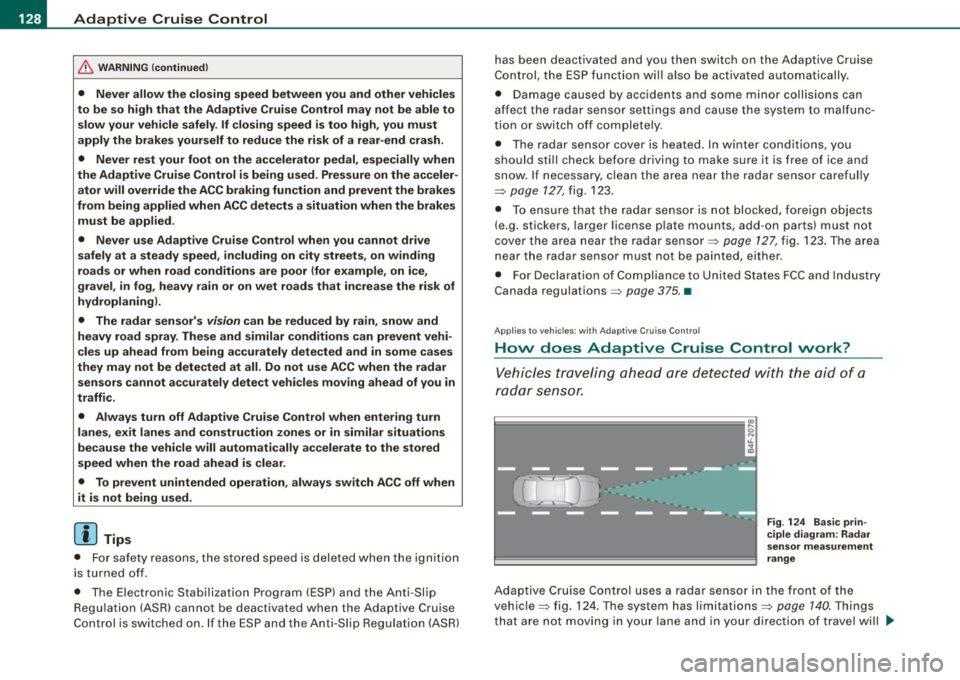
Vehicles traveling ahead are detected with the aid of a
radar sensor.
Fig. 124 Basic prin
ciple diagram : Radar
sensor measurement
range
Adaptive Cruise Control uses a radar sensor in the front of the
vehicle=> fig. 124. Th e system has limitations=>
page 140. Things
that are not moving in your lane and in your direction of travel will
~
Page 140 of 398
• ..__A_ d_a...: p:,..._ ti_v _ e_ C_ ru_ is_ e_ C_ o_n_ t_ r_ o _ l ___________________________________________ _
tained. The ACC system is not switched off, and increased attention
to the traffic situation is absolutely necessary. The following may be
reasons why the message
ACC functionality limited appears:
• The ACC sensor is dirty . The ACC system is not reacting, or is not
reacting correctly, to moving vehicles up ahead in your lane of
travel.
• There may be very light traffic on and there is nothing that marks
the side of the road (for example, guard rails, traffic signs, trees). As
soon as a moving vehicle up ahead is detected again, ACC becomes
active again and the message disappears .
The ACC sensor is located in the area under the front license plate.
If the ACC sensor is dirty or blocked, clean the area to restore system
operation.
ACC not available
The text message ACC not available appears, for example, if the
temperature of the brakes is excessive . Adaptive Cruise Control is
temporarily not available. A warning tone sounds as a reminder.
ACC not available!
The text message ACC not available! appears in the event of a
malfunction. Adaptive Cruise Control is turned off. A warning tone
sounds as a reminder. Have the system inspected by a qualified
dealership .
ACC sensor blocked !
The text message ACC sensor blocked ! appears when the ACC
System can no longer accurately detect vehicles moving up ahead
in your lane of travel. Adaptive Cruise Control is turned off. A
warning tone a lso sounds as a reminder.
To decide whether it is necessary to switch off the ACC (ACC sensor blocked
!) or if it is only a temporary condition (ACC Functionally
limited), the system will also takes into consideration the outside
temperature and/or the windshield wiper operation.
The ACC sensor is dirty or blocked (e.g. leaves, snow) . The
ACC sensor is located in the area under the front license plate .
If the ACC sensor is dirty or blocked, clean the area to restore system
operation.
EPB activation
Th e text message EPB activation appears if emergency braking was
manual ly initiated with the Electromechanical Parking Brake (EPB).
The Adaptive Cruise Con trol is turned off . This is accompanied by a
warning tone.
Speed
The set speed in mph (Canada km/h) always appears when saving or
changing the speed in Adaptive Cruise Control~
page 130 , "How is
the speed stored?" and~
page 131 , "Changing stored speed".
Selector lever position!
The text message Selector lever position! appears when the
selector lever is moved to position
N. In this position, Adaptive
Cruise Control is not available. •
Applies to vehicles : with Ada ptive Cruise Cont rol
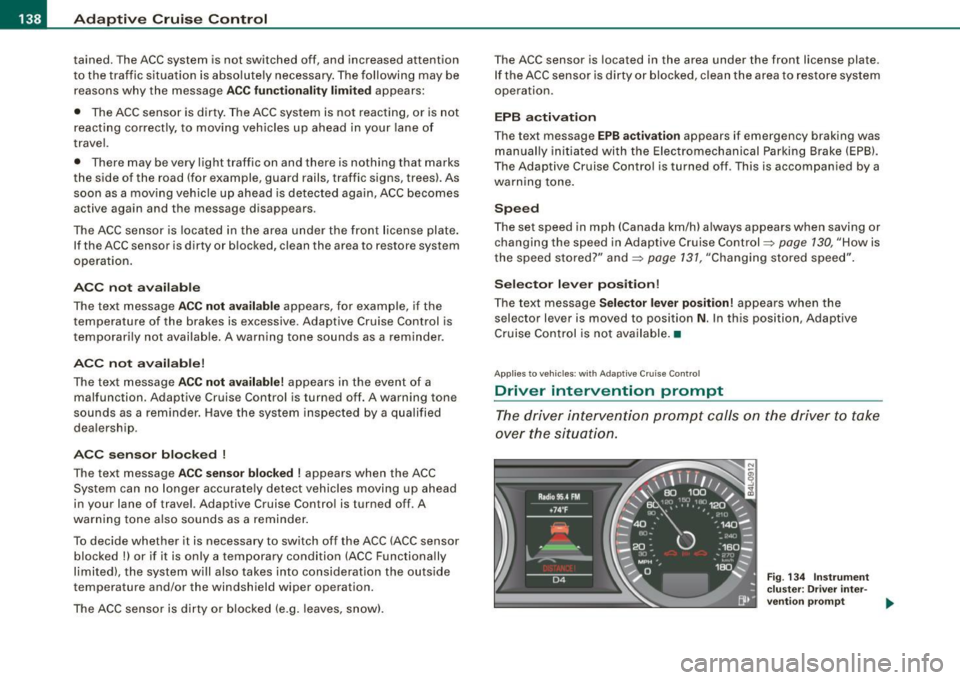
Driver intervention prompt
The driver intervention prompt calls on the driver to take
over the situation.
Fig . 134 Instrument
cluster: Driver inter-
vention prompt
~
Page 149 of 398
_________________________________________________ A_u_ d _ i _s ... i __ d _e:....: a.:..: s:.. s:.. i:..: s :..:t;___ftllll
Deactivating
- Press t he button again . T he ind icato r light on the butto n
goes out.
T he system works at speeds faster than 19 mph (30 km/h) .
& WARNING
• Improper reliance on the side assist system can cause colli
sions and seriou s per sonal injury:
- Never rely only on side assist when changing lanes .
- Always check rear view mirrors to make sure that it is safe to c hange lanes.
• Side assist cannot detect all vehicles under all conditions
danger of accident!
• Side assist cannot detect vehicles in time to alert you when
they approach from behind at very high speed , or fall drop back
very quickly.
• The radar sensor's
vision can be reduced or entirely blocked by
rain , snow, and heavy spray . This can result in side assist not
adequately detecting veh icles or , in some cases, not detecting
them at all . Always keep an eye on the direction you are traveling
and the relevant area around the vehicle.
• Please note that side assi st indicates there are approaching
vehicles, or vehicles in your bl ind spot , only after your vehicle has
reached a driving speed of at lea st 19 mph (30 km /h).
• S ide assist signal does not work around tight corners (turning
radiu s less than 328 feet, or 100 m l.
• Side assist is no replacement for the driver's full attention . The
d river alone is responsible for lane changes and similar driv ing
maneuvers. Always keep an eye on the d ire ction you are travel ing
and the relevant area around the vehicle .
Controls and equip
ment
0 Note
• To e nsu re t hat you do not adverse ly a ffect s ide assist, do not
b lock the area on the rear bumper where the radar sensors are
located w it h f oreign objects (s uch as st ickers or bicycle rac ks).
• M ake su re that the signal light on the o utside mi rror is not
b loc ked by st ic ke rs or ot her items.
[ i ] Tips
• Side ass ist automaticall y deact ivates i f it detects t hat t he ra dar
sensors are blocked=> page
153. The indicator light on the button
goes out.
• The area on the bumper whe re the rada r sen so rs a re loca ted
must cons iste ntly re mai n fr ee o f snow, ice, and heavy so iling so t hat
side assist can function properly. Follow the additiona l notes on
=> page
154.
• Additiona l tinting on the front side windows can make it ha rder
t o see and co rrect ly unde rsta nd the s ignal light o n the outs ide
mirror.
• For Declaratio n of Comp liance to Un ited Sta tes FCC a nd I ndus try
Canada regulations => page
375 . •
I • •
Page 155 of 398
Audi sid e as sis t -
-------------------'
Applies to vehicle s: with side assist
When driving through curves
Side assist canno t detect veh ic les in curves with a turning radius of
less than 328 feet (100 m) .
When driving through a curve, it is possible that side assist may register a vehicle two lanes over, and the signal on the outside
mirror will light up .•
Appl ies t o vehicles: with side ass is t
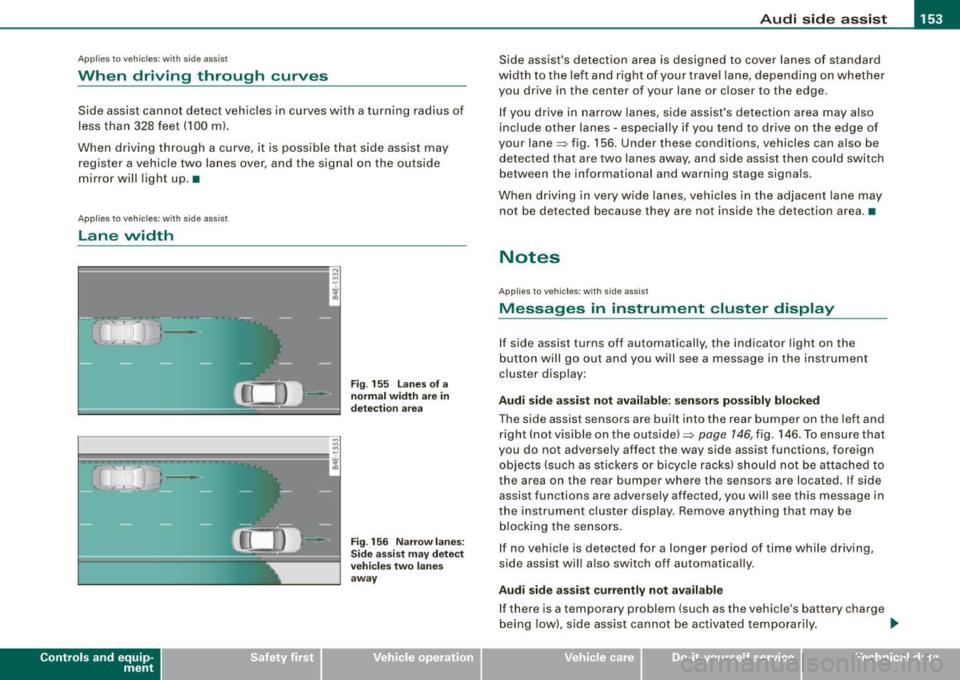
lane width
Con tro ls and eq uip
ment
•
-
-
Fi g. 155 lanes o f a
n ormal width are in
d etec tio n area
Fi g. 156 Nar row lane s:
Si de assis t may detec t
vehi cles tw o l ane s
away
Side assist's detection area is designed to cover lanes of standard
width to the left a nd r ight of your trave l lane, depending on whether
you drive in the center of your lane or c loser to the edge.
I f you drive in narrow lanes, side assist's detection area may also
inc lude other lanes - especially if you tend to drive on the edge of
your lane=> fig. 156. Under these conditions, vehicles can a lso be
detected tha t are two lanes away, a nd s ide assist then could switch
between the informationa l and warning stage signa ls.
When driving in very wide lanes, vehicles in the adjacent lane may
not be detected because they are not inside the detection area .•
Notes
App lies to vehic les : with side assist
Messages in instrument cluster display
If side assist turns off automatically, the indicator light on the
b utton will go out and y ou wi ll see a message in the instrument
cluster disp lay:
Audi side a ssist not avail able : s en sors po ssibly blocked
The side assist sensors are built into the rear bumper on the left and
right (not visible on the outside) =>
page 146, fig. 146. To ensu re that
you do not adversely affect the way side assist functions, foreign
objects (such as stickers o r bicyc le racks) should not be attached to
the area on the rear bumper where the sensors are located . If side
assist functi ons are adversely affec ted, you w ill see this message in
the instrument cluster display. Remove anything that may be
b locking the sensors.
I f no vehic le is detected for a longer pe riod of time while driving ,
side assist will also switch off automatically .
Audi sid e ass is t currently not available
If there is a temporary problem (such as the vehicle's ba ttery cha rge
being low) , side ass ist cannot be activated temporarily . .,_
Vehicle care I I irechnical data