tow AUDI S6 2009 Owners Manual
[x] Cancel search | Manufacturer: AUDI, Model Year: 2009, Model line: S6, Model: AUDI S6 2009Pages: 398, PDF Size: 43 MB
Page 5 of 398

Safety first ........ ... ... .. .
Driving Safely ................. .
General notes . .... ........... . .
Proper occ upant sea ting positions
Peda l area ... ..... ....... .... . .
Sto\Ning luggage . .... .... .... . .
Reporting Sa fety Defects ....... .
Safety belts .......... ....... .. .
Genera l notes ...... ........... .
W hy safe ty belts? .... ... ... ... .
Safety belts ..... ........ ... .. .
Safety belt pretensioners ... ... .
Airbag sy stem ..... ...... ... .. .
Important t hings to kno\N ...... .
Front airbags . ... ... .......... .
Monitoring the Advanced Airbag
System ... .. ... .... ..... ..... .
Side airbags ......... .... .. ... .
Side curtain a irbags ...... ..... .
Child Safety ................... . 193
194
194
196
200
201
203
205
205
206
209
2 13
215
2 15
2 19
226
231
234
238
Impo rtant things to kno\N . . . . . . . 238
Child safety seats . . . . . . . . . . . . . . 243
Insta lling a ch ild safe ty seat . . . . . 248
Add it ional Information . . . . . . . . . . 251
Lo\Ner anchorages and tether for
ch ildren (LA TC H) . . . . . . . . . . . . . . . .
253
Vehicle operation .... ... .
Inte lligent technology ......... .
Not ice about d ata reco rded by
ve hicle contro l modules ........ .
Elect ronic S tabilizat ion Program
!ESP) ...... .... ..... ..... ..... .
B raking ....... ................ .
Servotronic® -advanced po\Ner
s teer ing syst em ............... .
Driv ing \Nit h your quatt ro® ..... .
Energy management .... ....... .
Driving a nd enviro nment ...... .
The first 1,000 miles (1 ,500 km) and
after\Na rds .............. ... ... .
Cata lytic converter ............ .
Avo id damaging the vehicle .. .. .
Operate your vehicle economically
and minimize pollution ......... .
Trailer towi ng ................. .
Driving \Nit h a trailer ..... ... ... .
Trai ler to\Ning tips ....... ..• ....
261
262
262
262
265
267
2 6 8
269
2 7 1
2 7 1
27 2
273
273
276
2 7 6
278
Table of contents
Vehicle care ....... ... ... ... 281
C leaning and protection ........ 282
Gener al in fo rm atio n . . . . . . . . . . . . . 282
Care of exterior . . . . . . . . . . . . . . . . . 282
Care of inte rior . . . . . . . . . . . . . . . . . 28 9
F u el su pp ly and fillin g your fuel
ta nk . . . . . . . . . . . . . . . . . . . . . . . . . . . . 295
Gasoline . . . . . . . . • . . . . • . . . . . . . . . 295
Fuel tank . . . . . . . . . . . . . . . . . . . . . . . 296
C heck in g and filling . . . . . . . . . . . . 300
Engine hood . . . . . . . . . . . . . . . . . . . 300
Engine oil . . . . . . . . . . . . . . . . . . . . . . 303
Engi ne cooling sys te1 T1 . . . . . . . . . . 307
Brake fluid . . . . . . . . . . . . . . . . . . . . . 3 10
Battery . . . . . . . . . . . . . . . . . . . . . . . . 3 11
W indshield/headlight \Nasher
containe r .... .... .. ... .. .... ...
3 16
T iresa ndw hee ls ............ ... 317
T ires ........................ ... 3 17
Tire pressure monitoring system . . 336
Vehicle care I I irechnical data
Page 6 of 398
Table of contents
Weights . . . . . . . . . . . . . . . . . . . . . . . 367
Dimensions . . . . . . . . . . . . . . . . . . . . 368
Data . . . . . . . . . . . . . . . . . . . . . . . . . . . 369
300 hp, 3.0 liter, 6 -cylinder engine 369
255 hp, 3.2 liter, 6 -cy lind er engine 370
350 hp, 8-cylinder engine . . . . . . . 371
Do-it-yourself service ... 34
1 Consumer Information . . . . . . . . . 372
What do I do now? . . . . . . . . . . . . . 342
Trunk escape handle . . . . . . . . . . . . 342
Jack, tools and spare wheel . . . . . . 342
Changing a wheel . . . . . . . . . . . . . . 344
Fuses and bulbs . . . . . . . . . . . . . . . . 351
Fus es . . . . . . . . . . . . . . . . . . . . . . . . . . 351
Bulbs ................... •...... 355
Emergency situations . . . . . . . . . . 357
Genera l . . . . . . . . . . . . . . . . . . . . . . . . 357
Starting by pushing or towing . . . . 357
Starting with jumper cab les . . . . . . 357
Use of juniper cables . . . . . . . . . . . . 358
Em ergency towing with commercia l
tow truck . . . . . . . . . . . . . . . . . . . . . . 360
Lifting vehicle . . . . . . . . . . . . . . . . . . 362
Technical data
General information
Explanation of technical data ... .
Vehicle identification ........... .
Displaying Vehic le Ident ification
Number in the MMI ......... ... . 365
366
366
366
367 Warranty
coverages ........... .
Operating your vehicle outside the
U.S.A. or Canada .............. .
Audi Service Repair Manuals and
Literature ..................... .
Maintenance .............. ... .
Additional accessories, modifications and parts
rep lacement .................. .
Dec laration of Compliance,
Telecommunications and Electron ic
Systems .................. .... . 372
372
372
372
374
375
Alphabetical index
. . . . . . 379
Page 34 of 398
Driver information display
Engine oil pressure malfunction "t=;f':
The red engine oil pressure warning symbol requires
immediate service or repair. Driving with a low-oil-pres
sure indication is likely to inflict severe damage to the
engine.
If the ~ symbol appears in the display and blinks, the oil
pressure is too low. An additional driver message can also
be displayed by pressing the
!CHECK] button:
Switch off engine and check oil level
Immediate actions
- Pull off the road.
- Stop the vehicle.
- Turn off the engine.
-Check the engine oil level with the dipstick=:> page 305.
Dipstick readings checks too low
-Top off oil to the proper level ::::, page 306.
Make sure that the oil pressure warning symbol~
appears no longer in the display before you start driving
again.
Dipstick reading checks OK
- If the oil pressure warning symbol~ starts flashing
again even though the engine oil level checks OK on the
dipstick,
do not continue driving and do not let the
engine run in idle.
Instead, contact your authorized Audi
dealer for assistance.
[ i] Tips
• The engine oil pressure symbol ~ is not an indicator for a low
engine oil level. Do not rely on it. Instead, check the oil level in your
engine at regular intervals, preferably each time you refuel, and
always before going on a long trip.
• The yellow oil level warning indication ,.. requires oil refill or
workshop service without delay. Do not wait until the red oil pres
sure warning
~ starts to flash before you respond to the low oil
level warning ...... By then, your engine may already have suffered
serious damage. •
Steering malfunction i
If there is a malfunction in the electronic steering column
lock, the steering cannot be unlocked.
If the i symbol in the display blinks, there is a malfunction
in the electronic steering column lock. An additional driver
message can also be displayed by pressing the
I CHECK]
button:
Do not drive vehicle: Steering defective
-Contact your nearest authorized repair facility.
- Do
not tow your vehicle.
& WARNING
Your vehicle must not be towed in the event of a malfunction in the
electronic steering column lock because it cannot be steered due
to the locked steering. If it is towed with the steering locked, there
is the risk of an accident. •
Page 65 of 398
Clear vision
Lights
Switching the headlights on and off ·'t!-·
In the "AUTO " position, a light sensor automatically
s w itches t he head- and tailligh ts on and off in response to
l ight con ditio ns.
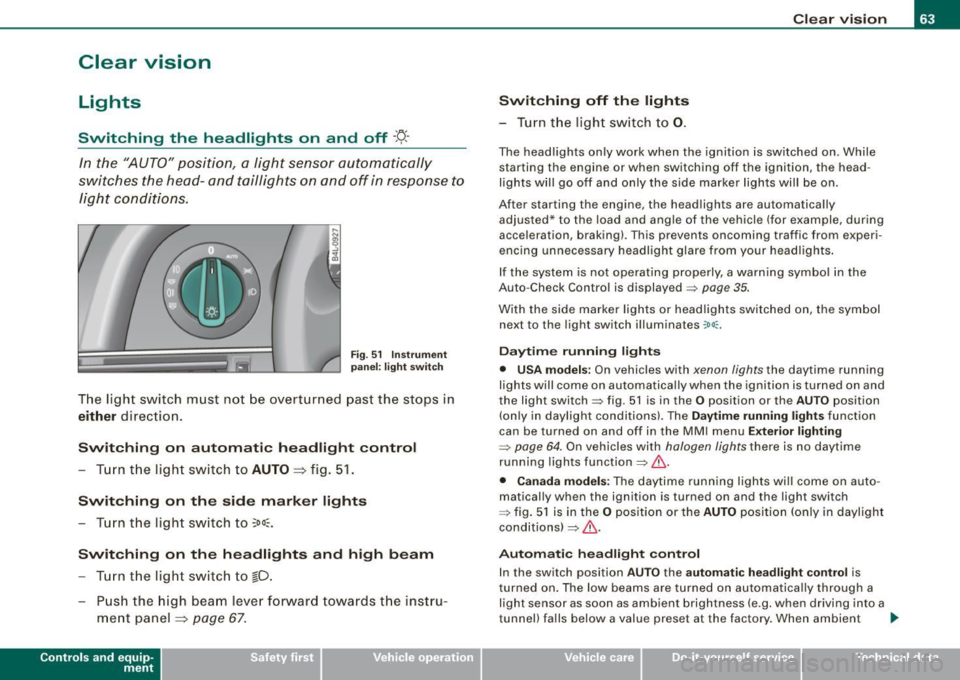
Fig . 5 1 In strument
p an el: l ight swit ch
The light switch must not be ove rt u rned pas t the stops in
either direction .
Switching on automatic headlight control
-Tu rn the light swi tch to AUTO => fig. 51 .
Switching on the side marker lights
- Turn t he light switch to ~oo~ .
Switching on the headlights and high beam
-Tur n t he light switch to gD.
- Pu sh th e hi gh bea m le v er for ward tow ards t he inst ru-
m ent panel
=> page 67 .
Con tro ls and eq uip
ment
Switching off the lights
- Tu rn the light sw itch to 0. Clear vision
The head
ligh ts only work when the ignitio n is switched on . While
starting the engine or when switching off the ignition, the head
lights wil l go off and only the side marker lights wil l be on.
After starting the engine, the headlights are automatica lly
adjus ted* to the load and ang le of the vehicle (for example, du ring
acceleration, braking) . This prevents oncoming traffic from experi
encing unnecessary headlight glare from you r headlights .
If the system is not operating properly, a warning symbol in the
Auto -Check Contro l is displayed
=> page 35.
With the side marker lights or headlights switched on, t he sym bol
next to the light switch illuminates
coo:.
Daytime running light s
• USA models :
On vehicles with xenon lights the daytime running
ligh ts will come on automa tically when the ignition is tur ned on and
the light switch=> fig. 51 is in the
O position or the AUTO position
(on ly in daylight conditions). The
Daytim e running lights func tion
can be turned on and off in the MMI menu
Exteri or lighting
=> page 6 4. On vehicles with halogen lights there is no daytime
running ligh ts function=> &,.
• Canada models: The daytime running lights wi ll come on au to
matically when the ignition is turned on and the ligh t switch
=> fig. 5 1 is in the O position or the AUTO positi on (only in dayligh t
conditions)
=> &, .
Automatic headlight control
In the switch posi tion AUTO the automatic headlight contro l is
turned on . The low beams are turned on automatica lly through a
light sensor as soon as ambient brightness (e .g. when driving into a
tunnel) fa lls below a value preset at the factory . When ambie nt ..,_
Vehicle care I I irechnical data
Page 69 of 398
Emergency flasher ~
The emergency flasher makes other motorists aware that
you or your vehicle are in an emergency situation.
~ -.:.i.t'
Fig . 56 Cente r
conso le: emergency
f lashe r swi tc h
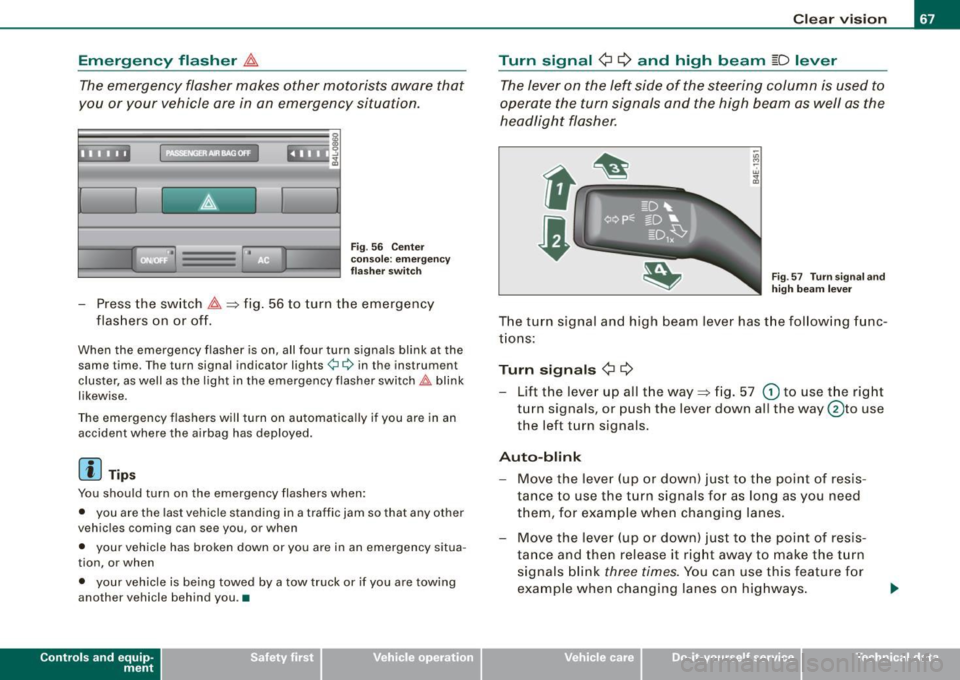
- Press the switch ~~fig . 56 to turn the emergency
flashers on or off.
When the emergency flasher is on, all four turn signals blink at the same time. The turn signal indicator lights¢¢ in the instrument
cluster, as well as the light in the emergency flasher switch~ blink
likewise.
The emergency flashers will turn on automatica lly if you are in an
accident where the airbag has deployed.
[ i ] Tip s
You should turn on the emergency flashers when:
• you are the last vehicle standing in a traffic jam so that any other
vehicles coming can see you, or when
• your vehicle has broken down or you are in an emergency situa
tion, or when
• your vehicle is being towed by a tow truck or if you are towing
another vehicle behind you .•
Con tro ls and eq uip
ment
C lea r v is ion
Turn signal ¢ ¢ and high beam ~D lever
The lever on the left side of the steering column is used to
operate the turn signals and the high beam as well as the
headlight flasher.
-"' M
-w
"' a,
Fig . 57 T urn s igna l and
high beam lever
The turn signal and high beam lever has the follow ing func
tions:
Turn si gnals ¢ ¢
- Lift the lever up all the way~ fig. 57 G) to use the right
turn signals, or push the lever down al l the way @to use
the left turn signals.
Aut o-blink
- Move the lever (up or down) just to t he point of resis
tance to use the turn signals for as long as you need
them, for example when changing lanes.
- Move the lever (up or down) just to t he point of resis
ta nce and then release it right away to make the turn
signals blink
three times. You can use this feature f or
example when changing lanes on highways.
Vehicle care I ' irechnical data
Page 70 of 398
Clear vision
High beam
~D
-Push the lever forward 0 to switch on the high beam.
Pull the lever back towards you to switch off the high
beam.
Headlight flasher
~D
- Pull the lever toward the steering wheel © to use the
headlight flasher.
Notes on these features
• The turn signals only work with the ignition turned on. The indi
cator lights ¢ or¢ in the instrument cluster~ page 16 also blink.
• After you have turned a corner, the turn signal switches off auto
matically.
• The high beam works only when the headlights are on. The indi
cator light ~D in the instrument cluster illuminates when the high
beams are on.
• The headlight flasher works only as long as you hold the lever -
even if there are no lights turned on. The indicator light [Din the
instrument cluster illuminates when you use the headlight flasher.
0 Note
Do not use the high beam or headlight flasher if you know that these
could blind oncoming traffic. •
Interior lights
Front interior lights
The interior lights include reading lights for both the
driver and the front passenger.
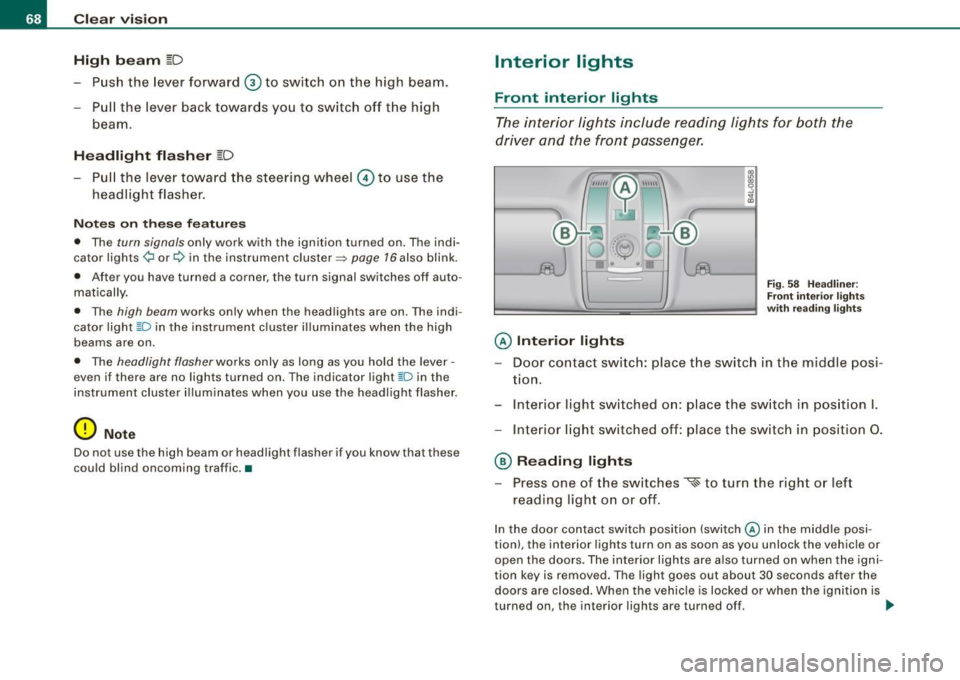
@ Interior lights
Fig . 58 Headliner :
Front interior lights
with reading lights
- Door contact switch: place the switch in the middle posi -
tion.
- Interior light switched on: place the switch in position I.
- Interior light switched off: place the switch in position 0.
@ Reading lights
- Press one of the switches
~ to turn the right or left
reading light on or off.
In the door contact switch position (switch@ in the middle posi
tion), the interior lights turn on as soon as you unlock the vehicle or
open the doors. The interior lights are also turned on when the igni
tion key is removed. The light goes out about 30 seconds after the
doors are closed. When the vehicle is locked or when the ignition is
turned on, the interior lights are turned off. ..,_
Page 71 of 398
When a door is open, the interior lights are turned off after about 10
minutes to prevent draining the battery.
The brightness of the lights is controlled automatically by a dimmer
when they are switched on and off. •
Rear int erior lights
There are reading lights in the rear for the passengers.
-
0~ ·0 0
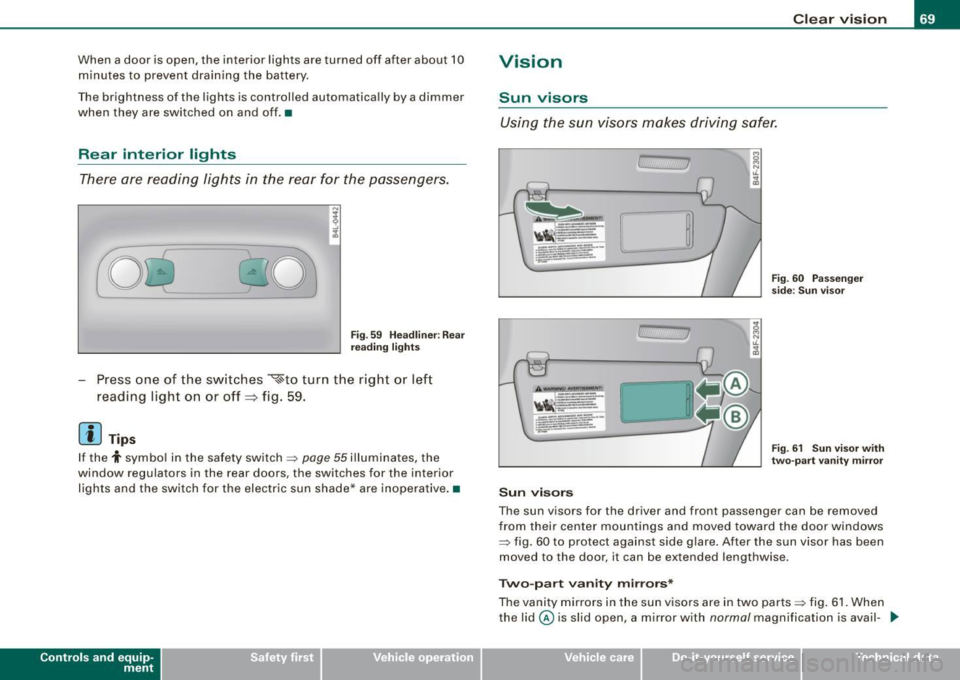
Fig. 59 Headliner: Rear
reading lights
- Press one of the switches ~to turn the right or left
reading light on or off =:> fig. 59.
[ i ) Tips
If the t symbo l in the safety switch~ page 55 illuminates, the
window regulators in the rear doors, the switches for the interior
lights and the switch for the electric sun shade* are inoperative .•
Con tro ls and eq uip
ment
Clear vision
Vision
Sun visors
Using the sun visors makes driving safer.
.1.
C, 7
Sun visors
Fig. 60 Passenger
side: Sun visor
Fig. 61 Sun visor with
two-part vanity mirror
The sun visors for the driver and front passenger can be removed
from their center mountings and moved toward the door windows
~ fig. 60 to protect against side glare . After the sun visor has been
moved to the door, it can be extended lengthwise.
Two-part vanity mirrors*
The vanity mirrors in the sun visors are in two parts ~ fig. 61. When
the lid@ is slid open, a mirror with
normal magnification is avail- .,_
Vehicle care I I irechnical data
Page 74 of 398
Clear vision
One-touch wiping
- Move the lever to position@, when you want to wipe the
windsh ield
briefly.
Automatic wiper /washer
- Pull the lever to pos ition © (toward the steering wheel)
and ho ld.
- Re lease t he lever. T he wash er stops a nd the wipers keep
g o ing for about fo ur secon ds. Dep ending on h ow long
t h e lever is held, d ifferent numbers of was h cyc les are
performed.
Turning off the wipers
- Move the lever back to position @ .
Gen era l inform ati on
The windshield wipers and the windshield washer system operate
only with the ignition on.
During a temporary stop, e.g. at a traffic signa l, the set wipe speed
is aut omatically reduced by one stage .
The windshield washer nozzles are heated at low temperatures
when the ignition is on .
Removing vv ater drop let s
About 5 seconds after the wash cycle is complete, the wiper system
performs a single automatic wipe cycle to remove any water drop
lets that remain on the windshield .
If you would like to deactivate this delayed wipe cyc le whi le dr iving,
you have to pull the lever to position © again within 10 seconds
af ter this w ipe cyc le .
Water droplet removal is reactivated after the ignition is switched off and then on again .
Rain se nsor
The ra in sensor operates on ly in the interval wiper position . When it
starts to rain, the interval wiper mode is activated automatically .
I f the windshie ld wiper lever is in the interval wipe position with the
ign ition sw itched off, the rain sensor is not activated unt il veh ic le
speed is above 4 mph (6 km/h) .
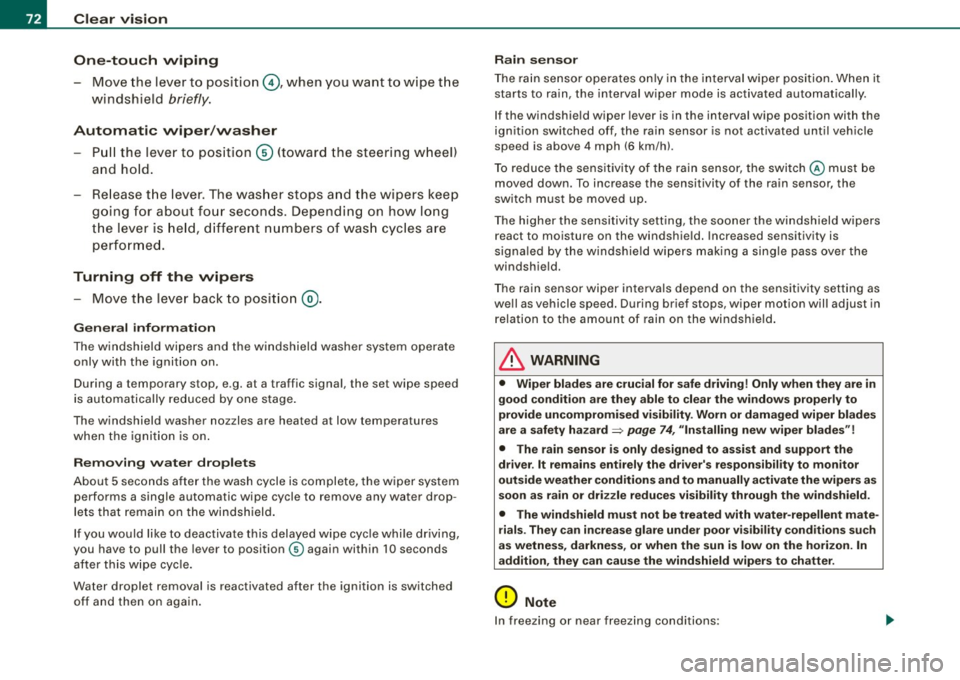
T o reduce the sens itivi ty of the rain sensor, the swi tch
© must be
moved down. To increase the sensitivity of the rain sensor, the
sw itc h must be moved up .
T he higher the sensitivity sett ing, the sooner the windshield wipers
react to moisture on the windshie ld. Increased sensitivity is
signa led by the windshie ld w ipers making a si ng le pass over the
windshield.
T he rain sensor wiper interva ls depend on the sens itivity setting as
we ll as vehicle speed. During brief stops, wiper motion will adjust in
r elation to the amount of rain on the windshield .
& WARNING
• Wiper blades are crucial for safe driving! Only when they are in
good cond ition are they able to clear the windo ws properly to
provide uncompromised visibility . Worn or d am aged wiper blades
are a safet y hazard ::::> page
74 , "I nst alli ng new wiper blades "!
• The rain sensor is only designed to a ssist and support the
dri ver . It remai ns entirel y the dr iver's respon sibil ity to monitor
out side weather conditions and to manually activate the wiper s as
so on a s rain or dri zzle reduce s vis ibility through the wind sh ield.
• The wind shield must not be treated with water -repellent mate
rials . The y can incre as e g la re under poor visibility condition s su ch
as wetness , darkne ss, or when th e sun is low on t he horizon. In
addition , they can cause the wind shield wiper s to ch att er.
0 Note
In freezing or near freezing conditions :
Page 91 of 398
Folding backrest down
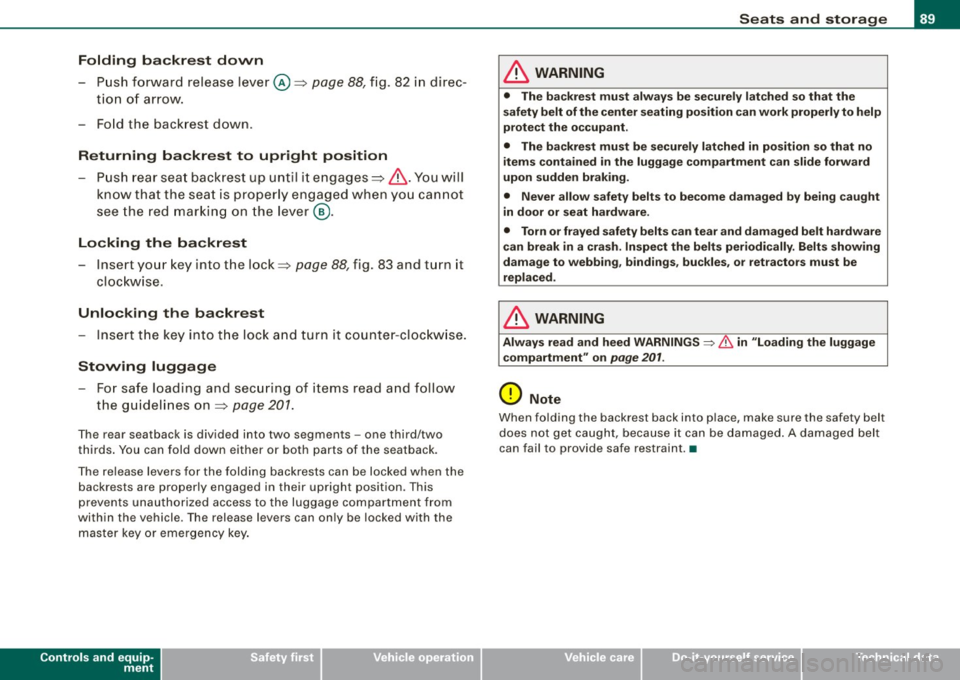
-Push forward release lever@~ page 88, fig. 82 in direc -
tion of arrow.
- Fold the backrest down .
Returning backrest to upright position
-Push rear seat backrest up until it engages~ &-You will
know that the seat is properly engaged when you cannot
see the red marking on the lever @.
Locking the backrest
- Insert your key into the lock~ page 88, fig. 83 and turn it
clockwise .
Unlocking the backrest
-Insert the key into the lock and turn it counter-clockwise.
Stowing luggage
-For safe loading and securing of items read and follow
the guidelines on~
page 201.
The rear seatback is divided into two segments -one third/two
thirds. You can fold down either or both parts of the seatback.
The release levers for the folding backrests can be locked when the
backrests are properly engaged in their upright position . This
prevents unauthorized access to the luggage compartment from
within the vehicle. The release levers can only be locked with the
master key or emergency key.
Controls and equip
ment
Seats and storage
& WARNING
• The backrest must always be securely latched so that the
safety belt of the center seating position can work properly to help
protect the occupant.
• The backrest must be securely latched in position so that no
items contained in the luggage compartment can slide forward
upon sudden braking.
• Never allow safety belts to become damaged by being caught
in door or seat hardware.
• Torn or frayed safety belts can tear and damaged belt hardware
can break in a crash. Inspect the belts periodically. Belts showing
damage to webbing, bindings, buckles, or retractors must be
replaced.
& WARNING
Always read and heed WARNINGS ~ & in "Loading the luggage
compartment" on
page 201.
0 Note
When folding the backrest back into place, make sure the safety belt
does not get caught, because it can be damaged. A damaged belt
can fail to provide safe restraint. •
I • •
Page 92 of 398
Seats and storage
Fastening eyelets
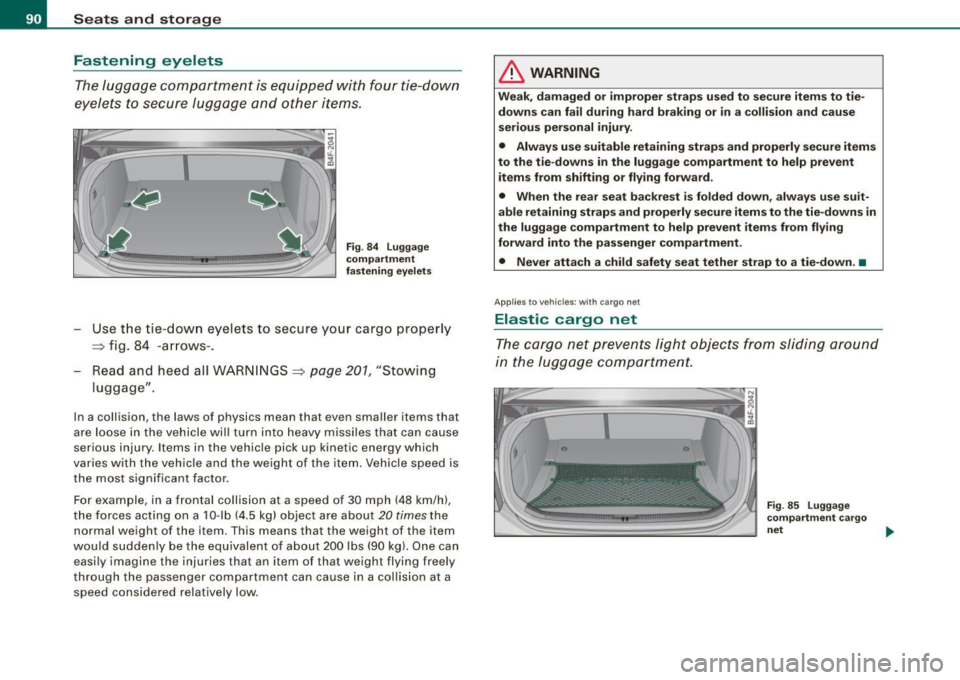
The luggage compartment is equipped with four tie-down
eyelets to secure luggage and other items.
Fig . 84 Luggage
compartment
fastening eyelets
- Use the t ie -down eyelets to secure your cargo proper ly
~ fig. 84 -arrows -.
Read and heed all WARNINGS
~ page 201, "Stowing
luggage" .
In a collision , the laws o f physics mean that even smaller items that
are loose in the vehicle will turn into heavy missiles that can cause
serious injury . Items in the vehicle pick up k inetic energy which
varies with the vehicle and the weight of the item. Vehicle speed is
the most signifi cant facto r.
For example, in a frontal collision at a speed of 30 mph (48 km /h),
the forces acting on a 10-lb (4.5 kg) object are about
20 times the
normal weight of the it em. This means that the we ight of the item
would suddenly be the equivalent of about 200 lbs (90 kg). One can easily imagine the injur ies that an i tem o f that weigh t flying freely
through the passenger compartment can cause in a collision at a speed considered relatively low .
& WARNING
Weak, damaged or improper straps used to secure items to tie
downs can fail during hard braking or in a collision and cause
serious personal injury .
• Always use suitable retaining straps and properly secure items
to the tie-downs in the luggage compartment to help prevent
items from shifting or flying forward.
• When the rear seat backrest is folded down, always use suit
able retaining straps and properly secure items to the tie-downs in
the luggage compartment to help prevent items from flying
forward into the passenger compartment.
• Never attach a child safety seat tether strap to a tie-down. •
Applies to vehicles: with cargo net
Elastic cargo net
The cargo net prevents light objects from sliding around
in the luggage compartment.
Fig . 85 Luggage
compartment cargo
net ..,,