mirror AUDI S6 2009 Owners Manual
[x] Cancel search | Manufacturer: AUDI, Model Year: 2009, Model line: S6, Model: AUDI S6 2009Pages: 398, PDF Size: 43 MB
Page 4 of 398
Table of contents
Table of contents
Vehicle literature ........ .
About this Owner's Manual .............. ...... . .
Controls and
equipment ............ ..... .
Instruments and controls ..... .
General il lustration ............. .
Instruments and
warning/indicator lights ....... .
Instruments .............. ..... .
Warning/indicator lights ........ .
Driver information display ..... .
Introduction ................... .
On-Board Diagnostic system (OBD)
Auto Check Control ............ .
Speed warning system ..... .. .. .
Trip computer ..... ... .. .. ... .. .
Opening and closing .......... .
Keys ... ..... .......... ... ..... .
Power locking system ..... ... .. .
Rear lid ....................... .
Child safety lock .... ......... .. . 5
6
9
11
1
1
12
12
16
23
23
27
28
36
38
41
41
45
50
51
Convenience key . . . . . . . . . . . . . . . . 52 Anti-theft
alarm system ........ .
Power windows ... ... .... .... .
S liding/ti lting power sunroof . .. .
Clear vision . .... .. .. .......... .
Lights ... ................ ... .. .
In ter ior l ights ...... ... .. .. .. .. .
Vision ... ... ......... ...... ... .
Wiper and washer system ...... .
Mirrors .................... ... .
Digital compass ............... .
Seats and storage ..... .... ... .
General recommendations ..... .
Power seat . ... ... ......... ... .
Seat m emory ...• ........ .... ..
Rear seats .......... ....... ... .
Head restraints ........ ..... .. .
Arm rest ....... ... ... ... ... •..
Luggage compartment ..... ... .
Roof rack ..... .......... ... .• ..
Cupholder .. ...... ... .. ... ..• ..
Ashtray ................... ... .
Cigarette lighter /socket ........ .
Storage ............ ....... ... .
Warm and cold ............... .
Climate control ........ .. ... .. .
Basic settings ......... •. ... ....
On the road . ... ..... .. ..... ... .
Steering .................... .. .
Ignition lock and ignition switch .
Starting and stopping the engine
Starting and stopping the engine
with Convenience key ....... .. .
Electromechanical parking brake .
Cruise control ......... ........ .
54
55
58
63
63
68
69
71
75
78
80
80
81
84
85
86
88
88
93
95
96
97
99
102
102
1 1 1
114
114
116
117
118
121 124
Adaptive Cruise Control ....... .
Speed and distance control system
Driver informa tion ....... ...... .
System limitations ............. .
Audi lane assist ............... .
Lane assist ......... ........ .. .
Audi side assist ............... .
Lane Change Assistant .. ..... .. .
Notes ....................... •.
Automatic transmission ....... .
tiptronic® (6-speed automatic
transmission) ... .... ... ... .... .
multitronic® ..........•........
Audi Parking System ......... . .
Park Assist Systems .... ... .... .
Audi Park ing System (rear) ...... .
Audi Parking System (rear, with rear-
view camera) .... .. ...... ..... .
Specia l parking situations ..... •.
Settings in the MMI ....... ..... .
Saf ety tips . ............ .... ... .
Adaptive Air Suspension ...... .
Adaptive Air Suspension and
Damping ............. ........ .
Homelink® . ................ ... .
Universal remote control ....... . 127
127
135
140
143
143
146
146
153
155
155
161
169
169
169
171
178
180
181
184
184
188
188
Page 13 of 398
Instruments and controls
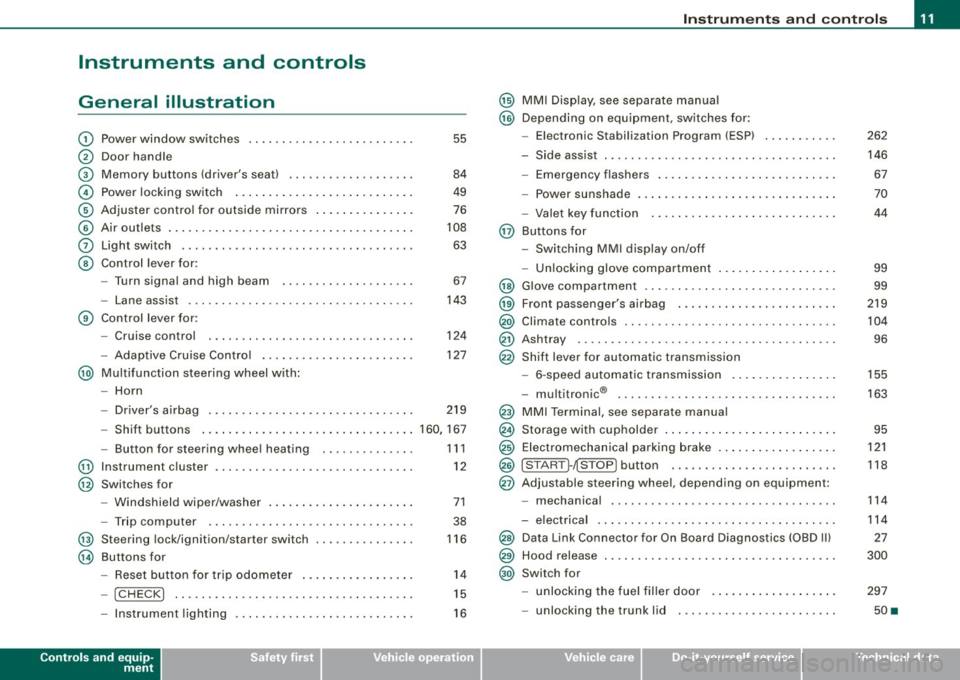
General illustration
G)
0
©
©
©
©
0
©
Power window switches ...... .... ..... .. ....... .
Door handle
Memory buttons (driver's seat)
Power locking switch .......................... .
Adjuster control for outside mirrors .. .... .... .... .
Air outlets ........ ... ...... .... ...... .... ... .. .
Light switch .... .... ........... .... .... .... ... .
Control lever for :
- Turn signal and high beam
- Lane assist .... .... ... .... .... .... .......... .
Control lever for:
- Cruise control
- Adaptive Cruise Contro l .......... ...... .... .. .
@ Multifunction steering wheel with:
- Horn
55
84
49
76
108
63
67
143
124
127
- Driver's airbag . . . . . . . . . . . . . . . . . . . . . . . . . . . . . . . 219
- Shift buttons ................................ 160, 167
@
@
@
@
-Button for steering wheel heating
Instrument cluster ... .... ... .... ...... ......... .
Switches for
- Windshield wiper/washer ..... ...... ..... .. ... .
- Trip computer ..... .. ..... ... .... ...... ... .. .
Steering lock/ignition/starter switch
Buttons for
- Reset button for trip odometer ... .. .... .... ... .
!CHECK] .. .... ....... .... .... ....... .... ... .
Instrument lighting .... ... .... .... ... ..... ... .
Controls and equip
ment
1 1 1
12
71
38
116
14
15
16
Instruments and controls
@ MMI Display, see separate manual
@ Depending on equipment, switches for:
- Electronic Stabilization Program (ESP)
- Side assist .. ... ..... .. .. .. .... .... .... ... ... .
- Emergency flashers .......................... .
- Power sunshade .... .... .... .... ... .... ..... . .
- Valet key function .... ....... ...... .... ...... .
@ Buttons for
- Switching MMI display on/off
- Unlocking glove compartment
@ Glove compartment ........... .... .... ......... .
@ Front passenger's airbag .. .... .... ... .. ...... .. .
@) Climate controls ......... .. .. .... .... .... .. . .. . .
@ Ashtray ..... .... .... ....... .... .... .... ... ... .
@ Shift lever for automatic transmission
- 6-speed automatic transmission .. .. .... .... ... .
I . .
® -
mu t1tron1c ... .... .... .... .... .... ... ...... .
@ MMI Terminal, see separate manual
@ Storage with cupholder . ........ ... .. .... .... ... .
@ Electromechanical parking brake ... .... .... .... .. .
@ ISTART ]-~STOP ] button .. ... ..... ... .... .... ... .
@ Adjustable steering wheel, depending on equipment:
- mechanica l .. .. .... .... ..... .. .... ..... ... .. .
- electrica l ... ...... .... ... .. .... .... ...... ... .
@) Data Link Connector for On Board Diagnostics (OBD II)
@ Hood release . .... .... ...... ... .. .... .... ... ... .
@) Switch for
unlocking the fuel filler door ..... ...... .... ... .
- unlocking the trunk lid . .... .... .... .... ... ... .
I • •
262
146 67
70
44
99
99
219
104
96
155
163
95
121
118
114
114
27
300
297
50 •
Page 44 of 398
Opening and closing
• For security reasons, replacement keys are only available from
Audi dealers. •
Master key with remote control
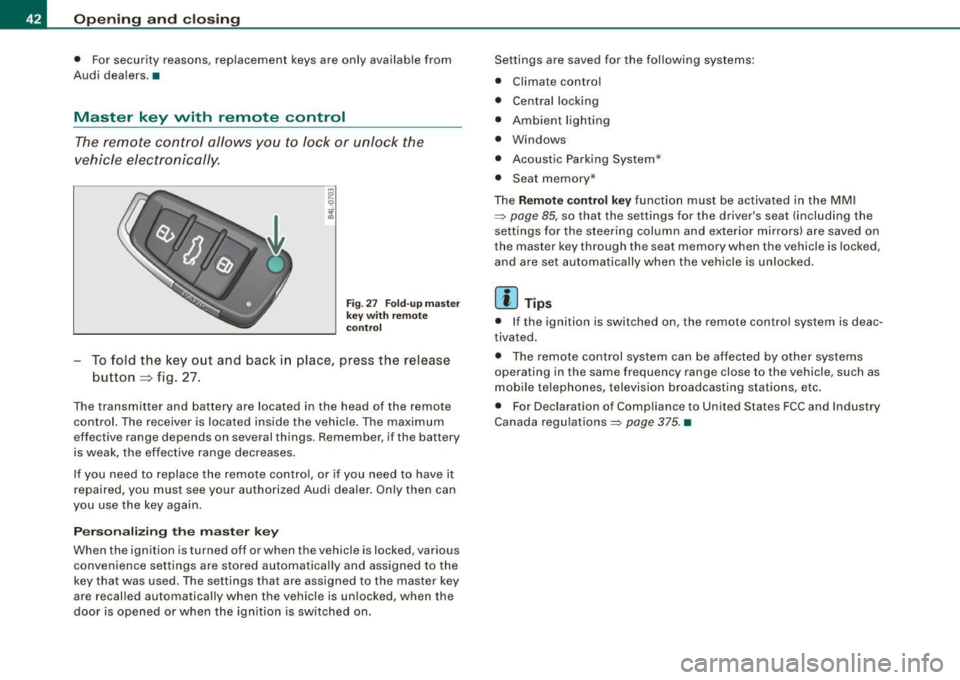
The remote control allows you to lock or unlock the
vehicle electronically .
Fig. 27 Fo ld -up m aste r
k ey with r emot e
c ontr ol
To fold the key out and back in place, press the release
button=> fig. 27.
The transmitter and battery are located in the head of the remote
control. The receiver is located inside the vehicle. The maximum
effective range depends on several things . Remember , if the battery
is weak, the effective range decreases .
If you need to replace the remote contro l, or if you need to have it
repaired, you must see your authorized Audi dealer . On ly then can
you use the key again.
Personalizing the master ke y
When the ignition is turned off or when the vehicle is locked , various
convenience settings are stored automatically and assigned to the
key that was used. The settings tha t ar e ass igned to the master key
are recal led automatically when the vehicle is unlocked, when the
door is opened or when the ignition is switched on . Settings are saved for the fo
llowing systems :
• Climate control
• Central locking
• Ambient lig hting
• Windows
• Acoustic Parking System*
• Seat memory *
T he
Remote control key function must be activated in the MM I
=:> page 85, so that the settings for the driver's seat (including the
settings for the steering column and exte rior mirrors) are saved on
the master key through the seat memory when the vehicle is locked,
and are set automatically when the vehicle is un locked .
[ i ] Tips
• I f the ignition is switched on, the remote c ontr ol system is deac
tivated.
• T he remote control system can be af fected by other systems
operating in the same frequency range close to the vehicle, such as
mobile telephones, television broadcasting stations, etc .
• For Declarat ion of Compliance to United States FCC and Industry
Canada regulations=:>
page 375. •
Page 68 of 398
![AUDI S6 2009 Owners Manual Clear vision
[ i] Tips
With the switch in AUTO front fog lights and rear fog lights cannot
be turned on in addition. •
Applies to vehic les: with Adapt ive Light
Adaptive Light](/img/6/57595/w960_57595-67.png "AUDI S6 2009 Owners Manual Clear vision
[ i] Tips
With the switch in AUTO front fog lights and rear fog lights cannot
be turned on in addition. •
Applies to vehic les: with Adapt ive Light
Adaptive Light")
Clear vision
[ i] Tips
With the switch in AUTO front fog lights and rear fog lights cannot
be turned on in addition. •
Applies to vehic les: with Adapt ive Light
Adaptive Light
When making a turn or driving around tight corners, the
relevant area of the road is better illuminated.
Adaptive Light (making turns)
Fig. 55 Adaptive Light
when turning and driving through curves
An additional bulb in the headlight provides a cornering light@ in
addition to the low beam@:::::, fig. 55. Adaptive Light is switched on
and off automatically depending on driving conditions .
When you activate the turn signal lever, the Adaptive Light for the
same side is switched on. Please note that the turn signal lever must
engage.
Adaptive Light is not switched on if you only move the turn signal
lever to the point of resistance to signal a lane change :::::,
page 67,
"Turn signal ¢i ¢ and high beam lsD lever".
When driving around bends, Adaptive Light is controlled according
to steering wheel angle. • It is switched on in tight corners. • It
is not switched on in long, open bends .
Adaptive Light (in curves)
When driving through curves, the low beams © are automatically
controlled depending on driving speed and the steering wheel
angle.
The two main beams pivot at different angles so that there is no
unilluminated area in front of the vehicle.
[ i] Tips
• The system works up to a speed of about 43 mph (70 km/h). If the
speed is higher, it is not activated.
• Adaptive Light (in curves) functions at a speed of about 6 mph
(10 km/h) and is deactivated at speeds below about 4 mph
(6 km/h). •
Applies to vehi cles: with light pac kage
Perimeter lighting in the mirror housing
LEDs in the exterior mirror housing illuminate the ground
during entry.
This function ensures that when unlocking, the vehicle periphery is
illuminated in the dark. LEDs in the exterior mirror housing are
switched on. The function cannot be turned off separately. •
Page 71 of 398
When a door is open, the interior lights are turned off after about 10
minutes to prevent draining the battery.
The brightness of the lights is controlled automatically by a dimmer
when they are switched on and off. •
Rear int erior lights
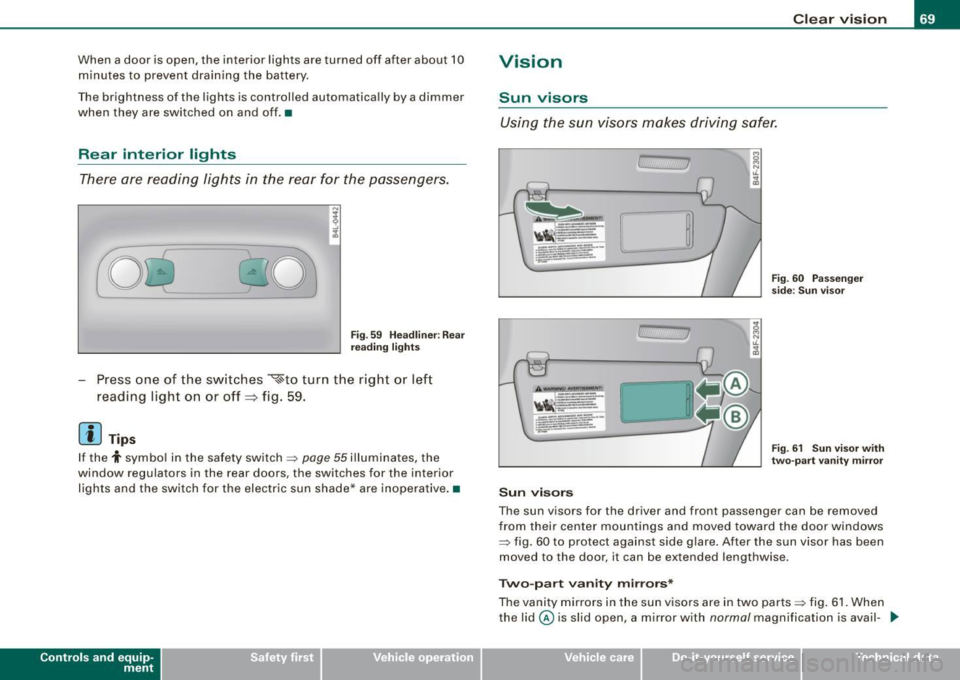
There are reading lights in the rear for the passengers.
-
0~ ·0 0
Fig. 59 Headliner: Rear
reading lights
- Press one of the switches ~to turn the right or left
reading light on or off =:> fig. 59.
[ i ) Tips
If the t symbo l in the safety switch~ page 55 illuminates, the
window regulators in the rear doors, the switches for the interior
lights and the switch for the electric sun shade* are inoperative .•
Con tro ls and eq uip
ment
Clear vision
Vision
Sun visors
Using the sun visors makes driving safer.
.1.
C, 7
Sun visors
Fig. 60 Passenger
side: Sun visor
Fig. 61 Sun visor with
two-part vanity mirror
The sun visors for the driver and front passenger can be removed
from their center mountings and moved toward the door windows
~ fig. 60 to protect against side glare . After the sun visor has been
moved to the door, it can be extended lengthwise.
Two-part vanity mirrors*
The vanity mirrors in the sun visors are in two parts ~ fig. 61. When
the lid@ is slid open, a mirror with
normal magnification is avail- .,_
Vehicle care I I irechnical data
Page 72 of 398
Clear vision
able and when the lid@ is slid open, a high-power magnifying
mirror is available. In addition, when one of the lids is opened, the
mirror light in the headliner turns on automatically . It turns off when
the lid is closed and the visor is folded up again. •
Applie s to v ehi cles: with su n shade
Sun shade
The windows in the rear doors and the rear window are
each equipped with a sun shade.
Sun shade (rear doors)
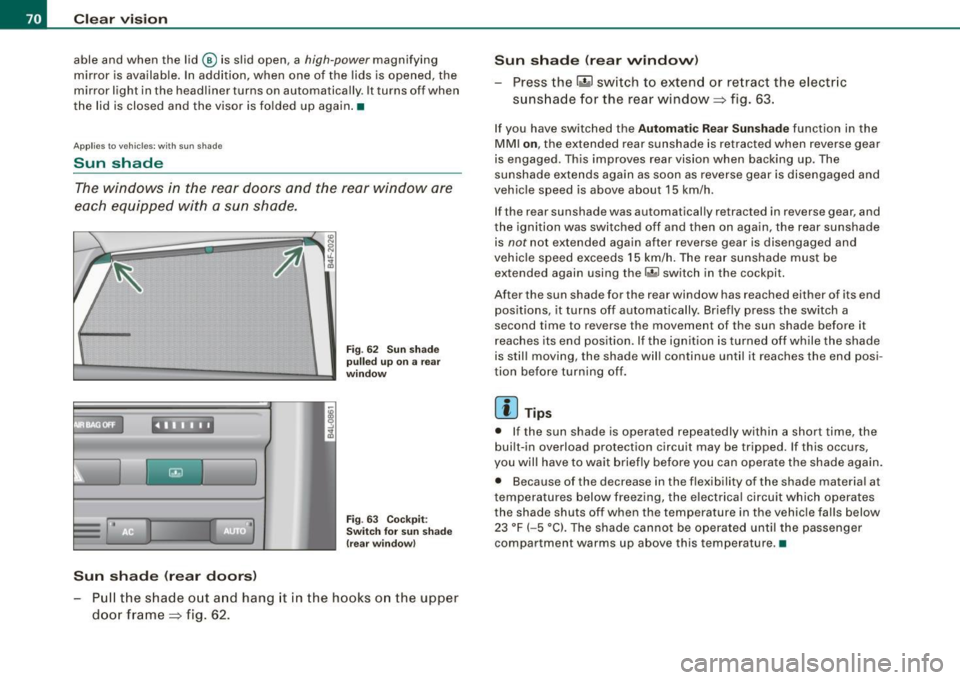
Fig. 62 Sun shade
pulled up on a rear
w ind ow
Fig . 63 Cockpit :
Switch for sun sh ade
(rear window)
Pull the shade out and hang it in the hooks on the upper
door frame=> fig. 62. Sun
shade (rear window)
Press the l~ •~ I switch to extend or retract the electric
sunshade for the rear window => fig. 63 .
If you have switched the Automatic Rear Sunshade function in the
MMI on, the extended rear sunshade is retracted when reverse gear
is engaged . This improves rear vision when backing up. The
sunshade extends again as soon as reverse gear is disengaged and
vehicle speed is above about 15 km/h.
If the rear sunshade was automatically retracted in reverse gear, and
the ignition was switched off and then on again, the rear sunshade
is
not not extended again after revers e gear is disengaged and
vehic le speed exceeds 15 km/h. The rear sunshade must be
extended again using the
r.iil switch in the cockpit .
After the sun shade for the rear window has reached either of its end
positions, it turns off automatically . Br iefly press the switch a
second time to reverse the movement of the sun shade before it
reaches its end position. If the ignition is turned off while the shade
is still moving, the shade will continue until it reaches the end posi
tion before turning off.
[ i ] Tips
• If the sun shade is operated repeatedly within a short time, the
built-in overload protection circuit may be tripped . If this occurs,
you will have to wait briefly before you can operate the shade again.
• Because of the decrease in the flexibility of the shade material a t
temperatures below freezing, the electrica l circuit which operates
the shade shuts off when the temperature in the vehicle falls below
23 °F
(- 5 °C). The shade cannot be operated until the passenger
compartment warms up above this temperature. •
Page 77 of 398
& WARNING
Be sure to in sp ec t the co n dition of your wip er bl ade s regularl y. See
your authori zed Audi de aler for replaceme nt blade s.
(D Note
To prevent damage to the wiper system:
• Always loosen blades which are frozen to the windshield before
operating wipers.
• Do not use gasoline, kerosene, paint thinner , or other solvents on
or near the wiper blades.
• Do not attempt to move the wipers by hand .
• The windshield wiper blades mus t only be replaced when in the
service position =>
page 73! Otherwise, you risk damaging the paint
on the hood or the windshield wiper motor.
[ i J Tips
Commercial hot waxes app lied by automatic car washes affec t the
cleanability of the windshie ld. •
Mirrors
Manual anti -glare adjustment
Standard setting
Move the sma ll lever ( located o n the bottom edge of t he
mirr or) to the front.
Anti-glare setting
-Move the sma ll lever ( loc ate d on t he bo ttom e dge of t he
m ir ror) to th e rear. •
Contro ls and eq uip
ment
Clear vision
A pp lies to vehicles: w ith automatically dimming in side mi rror w it h digita l com pass
Automatically dimming inside mirror
The automatic dimming function can be turned on and off
if required .
Disabling auto dimming
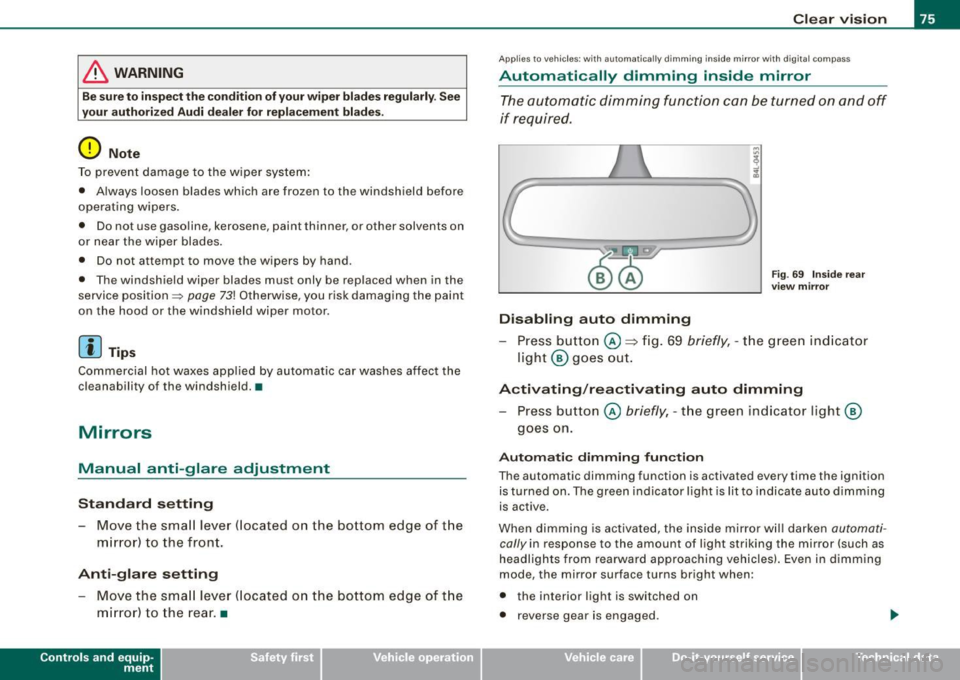
Fig . 69 In side rear
vi ew mirror
Pr ess button @ => fig. 69 briefly , -th e g reen ind ic ato r
light @ goes ou t.
Activating /rea ctivating auto dimming
Press button @ briefly, -th e green ind icator light @
goes on.
Automati c dimming fun ction
The automatic dimming function is activated every time the ignition is turned on. The green indicator light is lit to indica te auto dimming
is active .
When dimming is activated, the inside mirror w ill darken
automa ti
cally in response to the amount of light striking the mirror (such as
headlights from rearwa rd approaching vehicles). Even in d imm ing
mode, the mirror surface turns bright when:
• the interior light is switched on
• reverse gear is engaged .
Vehicle care I I irechnical data
Page 78 of 398
Clear vision
& WARNING
Broken glass of automatic dimming mirror can cause electrolyte
fluid leakage. Electrolyte fluid can irritate skin, eyes, and respira
tory system .
• Repeated or prolonged exposure to electrolyte can cause irrita
tion to the respiratory system, especially among people with
asthma or other respiratory conditions. Get fresh air immediately
by leaving the vehicle or, if that is not possible, open windows and
doors all the way.
• If electrolyte gets into the eyes, flush them thoroughly with
large amounts of clean water for at least 15 minutes; medical
attention is recommended.
• If electrolyte contacts skin, flush affected area with clean water
for at least 15 minutes and then wash affected area with soap and
water; medical attention is recommended. Thoroughly wash
affected clothing and shoes before reuse.
• If swallowed and person is conscious, rinse mouth with water
for at least 15 minutes. Do not induce vomiting unless instructed
to do so by medical professional. Get medical attention immedi
ately.
0 Note
Liquid electrolyte leaked from a broken mirror glass will damage any
plastic surfaces it comes in contact with . Clean up spilled electrolyte
immediately with clear water and a sponge .
[ i ] Tips
• If you switch off the automatic dimming function on the inside
mirror, automatic dimming of the outside mirrors will likewise be
disabled.
• Check to make sure there are no objects preventing light from
reaching the inside mirror. •
Do not attach any stickers to the windshield in front of the light
sensor, as this would interfere with the automatic operation of the
headlights and the automatic dimming of the inside mirror.
• Be aware that automatic dimming of the inside mirror can only
operate properly if the rear window sun blind * is retracted .•
Outside mirrors
The outside mirrors are electrically adjusted.
Adjusting the outside mirrors
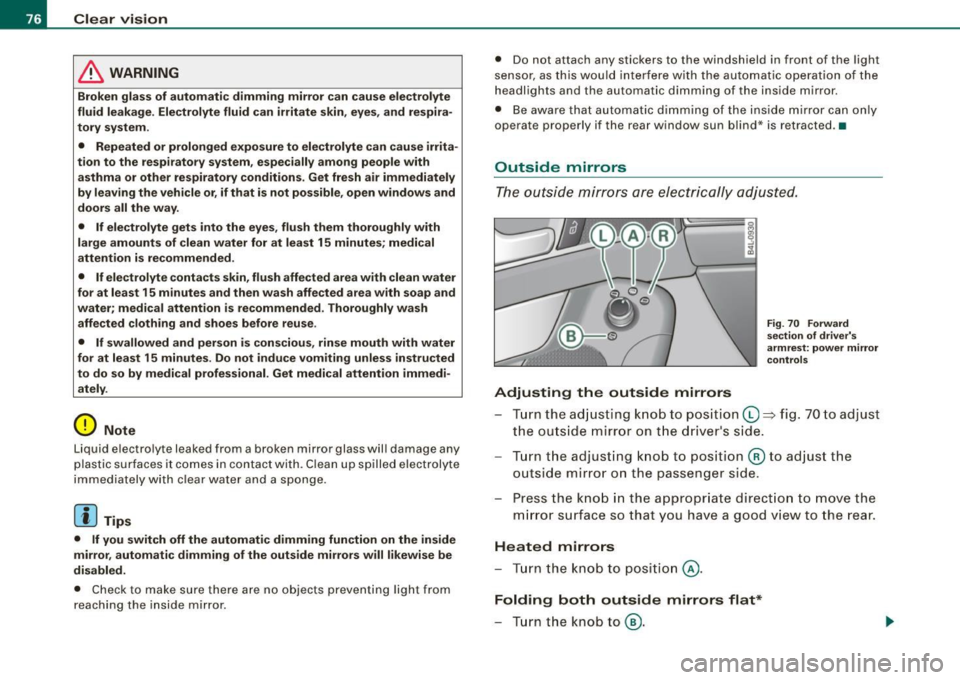
Fig. 70 Forward
section of driver's
armrest: power mirror
controls
Turn the adjusting knob to position (D => fig. 70 to adjust
the outside mirror on the driver's side.
Turn the adjusting knob to position
@ to adjust the
outside mirror on the passenger side .
Press the knob in the appropriate direction to move the
mirror surface so that you have a good view to the rear .
Heated mirrors
- Turn the knob to position
@.
Folding both outside mirrors flat*
- Turn the knob to® ·
Page 79 of 398
Depending on the outside temperature, the mirror surfaces are
heated unti l the ignition is switched off -even if the knob is no
longer in posi tion
@ .
We recommend folding * the outside mirrors flat to he lp when
par king your ve hicle or when maneuvering in very tight spaces .
Memory setting for the outside mirrors*
When the seat position is saved in the memory, the position of the
outside mirrors is saved at the same time~
page 84.
If the position o f the mi rror surface is changed o n a ti lted mirror, this
new pos ition wi ll be automatically saved to th e remote key when th e
vehicle is taken out o f reverse gear.
Tilting the passenger 's side out side mirror (on ly with
seat memory )
When you move the selector lever into R (Reverse), the mirror on the
front passenger's d oor (knob t urn ed to@ ~
page 76, fig. 70) will tilt
s lightly downward. This make is easier for you to see the curb when
you are backing into a parking space .
The mirror returns to its initia l position as soon as reverse gear is
disengaged and vehic le speed is above about 9 mph (15 km/h). The
mirror also returns to its initia l position if the switch is moved to the
driver's outside mirror
0 or the ignition is switched off.
Automatic anti -glare for the outside mirror s*
The outside mir ro rs dim at the same time as the inside mirro r. When
the ign ition is switched on, the mirrors automat ically dim
depending on the amount of light striking the mirrors (such as head
lights shining into the vehicle from the rear).
When you turn on the interior light, or wh en you move the selector
lever int o
R (Reverse), the ant i- g lare function stops a nd the mirro rs
return to their original condition (not darkened).
Controls and equip
ment
Cl ea r vision
0 Note
• Curved ( i.e . convex) mirror sur faces increase your fie ld o f view .
Remember that vehicles or other objects w ill appear smal ler and
f arther away than when seen in a flat mirror. If you use th is mi rror to
estimate distances of fol lowing vehicles when changing lan es, you
cou ld esti mate incor rect ly a nd cause an acc ident .
• I f the mirror housing is moved un intentionally (for example,
wh ile pa rking your veh ic le), then you must first fold the mirror elec
trically . Do not readjust the mirror housing manually. You cou ld
damage the motor which controls the mirror.
[ i ] Tips
If t here s hould be a malfunct io n in the electrica l system, you ca n
sti ll adjust the outside mirrors by pressing the edge of the mirror .•
Ap plies to vehicles: wit h automatic dimm in g for ou tsi de m irr ors
Automatic dimming for outside mirrors
The outside mirr ors are d immed t oge the r with the au tomati c
dimming of the inside mirror. When the ignition is switched on , the
mir ro rs darken automat ically depending on the light s triking the m
(e.g . headlights from the rear) .
When the interior lighting is switched on and when reverse gear is engaged, the mi rrors are switched back to the ir or iginal br ightness
(not dimmed).
_& WARNING
Broken glass of automatic dimming mirror can cause electrolyte
fluid leakage . Electrolyte fluid c an irritate skin , eyes , and respira
tory system .
• Repeated or prolonged exposure to electrolyte can c ause irrita -
tion to the respiratory system , e specially among people with .,_
I • •
Page 80 of 398
Clear vision
& WARNING (continued)
asthma or other respiratory conditions. Get fresh air immediately
by leaving the vehicle or, if that is not possible, open windows and
doors all the way.
• If electrolyte gets into the eyes, flush them thoroughly with
large amounts of clean water for at least 15 minutes ; medical
attention is recommended.
• If electrolyte contacts skin, flush affected area with clean water
for at least 15 minutes and then wash affected area with soap and
water; medical attention is recommended . Thoroughly wash
affected clothing and shoes before reuse.
• If swallowed and person is conscious, rinse mouth with water
for at least 15 minutes. Do not induce vomiting unless instructed
to do so by medical professional . Get medical attention immedi
ately.
0 Note
Electrolyte leaking from a broken mirro r glass attacks the vehicle
paint and plastic surfaces. Clean up spilled electrolyte immediately
with clear water and a sponge.
[ i] Tips
• If automatic dimming for the inside mirror is switched off, the
outside mirrors are also not dimmed automatically.
• Automatic dimming for the mirror only operates properly if the
sunshade* for the rear window is retracted, or the light striking the
inside mirror is not hindered by other objects. •
Digital compass
Applies to vehicles: with digital compass
Activating or deactivating the compass
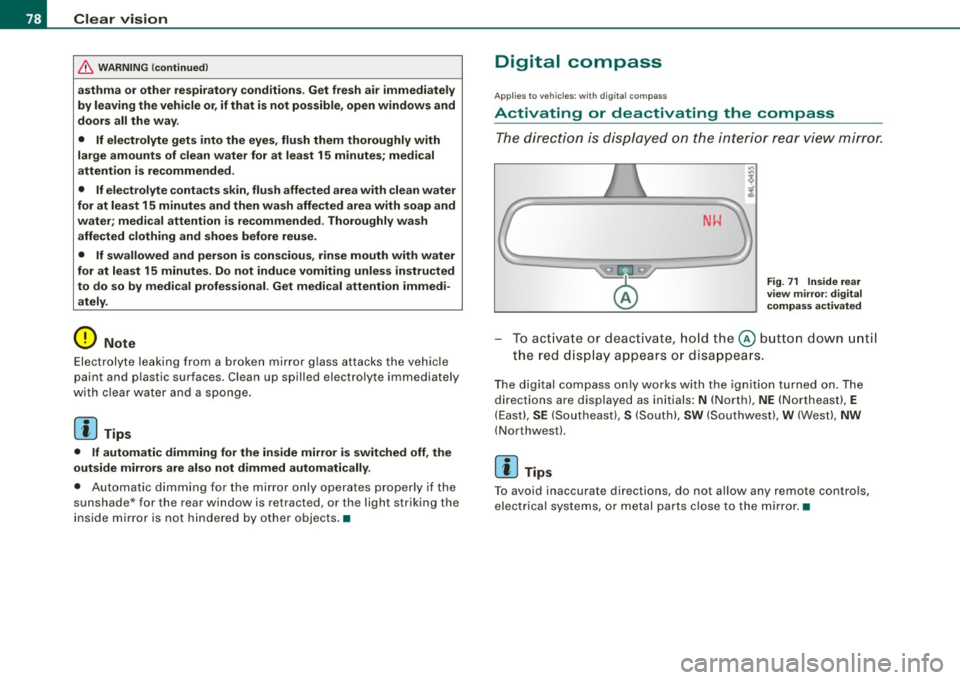
The direction is displayed on the interior rear view mirror.
Fig . 71 Inside rear
view mirror : digital
compass activated
- To activate or deactivate, hold the@ button down until
the red display appears or disappears.
The digital compass only works with the ignition turned on. The
directions are displayed as initials:
N (North), NE (Northeast), E
(East), SE (Southeast), S (South), SW (Southwest), W (West), NW
(Northwest).
[ i] Tips
To avoid inaccurate directions, do not allow any r emote controls,
electrical systems, or metal parts close to the mirror. •