center console AUDI S6 2010 User Guide
[x] Cancel search | Manufacturer: AUDI, Model Year: 2010, Model line: S6, Model: AUDI S6 2010Pages: 368, PDF Size: 86.82 MB
Page 160 of 368
llffl..__A_ u_ t_ o_ m_ a_ t _ ic_ t_r_a _ n_ s_m _ i_ s _s_ i_ o _ n _____________________________________________ _
(I) Tips
• When you sh ift into t he next lower gea r, the engine will downshift
only when there is no possibility of over-revving.
• When the kick-down comes on, the transm ission will shift down to
a lower gear depending on vehicle and engine speeds.
• The tiptron ic ® is inoperative when the transm ission is in the fail
safe mode .•
Applies to vehic les : w ith multitronic ® Continuously Variable Transm ission (CVT)
Steering wheel with tiptronic ®
The shift buttons on the steering wheel allow the driver to
shift gears manually.
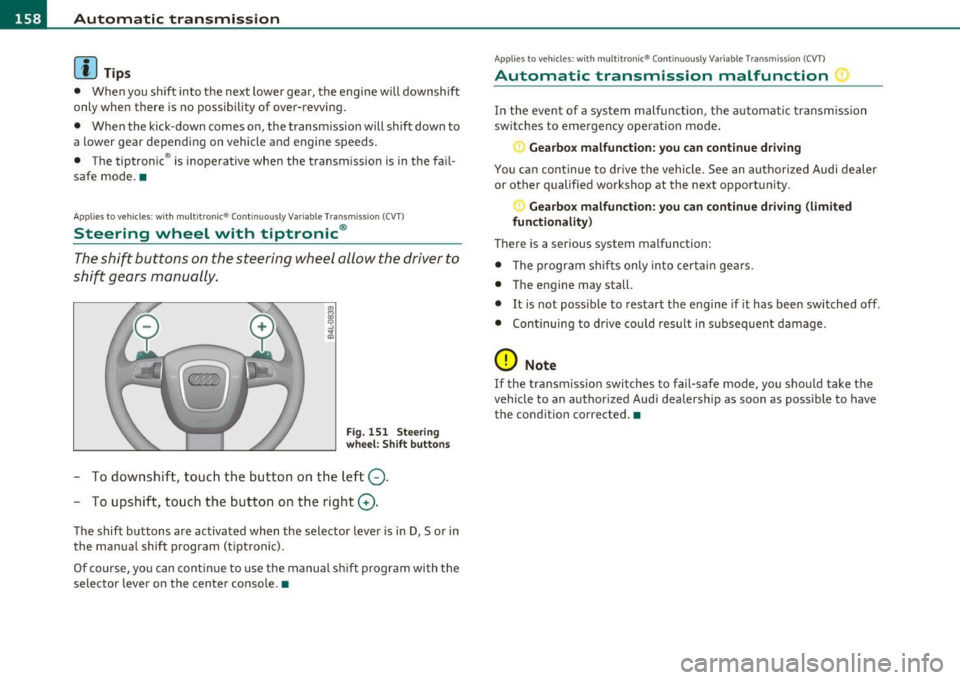
F ig. 15 1 Ste eri ng
whe el: Shift butt ons
- To downshift, touc h the bu tton on t he l eft Q .
- To upshift, touch the button on t he right G).
The shift buttons a re activated when the selector lever is in D, Sor in
the manua l shift program (tiptronic).
Of co urse, yo u can cont in ue to use t he manual sh ift p rogr am with t he
selector lever on the center console .•
Applies to veh icles: w ith multitron ic® Conti nuously Variable Transmission (CVT)
Automatic transmission malfunction :)
In the event of a system malfunction, the automat ic tra nsm iss ion
switches to emergency operation mode.
Ge arbox malfunction: you can continue driving
You ca n con tinue to dr ive the vehicle. See an autho rized Audi dealer
or other qualified workshop at the next opportunity.
Gearbox malfunction : you can c ontinue dr iving (limited
functionality)
There is a serious system malfunction:
• T he program sh if ts only into certa in ge ars.
• T he engine may sta ll.
• It is not poss ible to restart the engine if it has been switched off.
• Con tinuing to d rive cou ld res ult in subseq uen t damage.
0 Note
If the transmission switches to fail-safe mode, you sho uld take t he
vehicle to an authorized Aud i dealership as soon as poss ible to have
the cond ition corrected .•
Page 213 of 368

& WARNING
Changing the vehicle's susp ension including use of unapproved
tire -rim combination s can change Advan ced Airbag performance
and increase the risk of serious personal injury in a crash .
• Never install suspension component s that do not have the
same performance characteristics as the components originally
installed on your vehicle.
• Ne ver use tire-rim combinations that have not been approved
by Audi.
& WARNING
Items stored between the safety belt buckle and the center
console can cause the sensors in the buckle to send the wrong
information to the electronic control module and prevent the
Advanced Airbag System from working properly.
• Always make sure that nothing can interfere with the safety
belt buckles and that they a re not obstructed .
<£> For the sake of the environment
Undeployed airbag modu les and pretensioners might be class ified as
P erch lorate Materi al - sp eci al ha ndl ing m ay a pply, see
www.dtsc.ca.gov/hazardouswaste/perchlorate. When the vehicle or
parts of t he re st ra int s ystem includ in g air bag modu les and safe ty
belts with pretensioners are scrapped, all applicable laws and regula
tions m ust be o bserve d. Your authorized Audi dea le r is familiar with
t hese requirements and we recommend that you have yo ur dealer
per form th is service for you. •
Safety first Vehicle OP-eration
Airbag system
Side airbags
Description of side airbags
The airb ag sys tem can pro vide su pplemen ta l pro tection
t o pr operly restr ained occ upants .
Fig. 18 5 S ide air bag
loca tion in the d river's
seat
T he side airbags are located in t he sides of t he front seat backrests
~ fig. 185 and the rear backrest * facing the doors. They are ide nti
fie d by th e word "AIRBAG" .
The side airbag system basically consists of :
• the ele ctron ic cont rol mod ule and extern al side imp act se nsors
• the two side airbags located in t he sides of the front backrests
• two rear side airbags (as an o rde red
o p tion)
• the airbag wa rni ng light in the instr ument cluster .
Th e air bag sys tem is monitore d ele ct ronically to m ake ce rtain that it
is funct io ning properly at all times. Each t ime you turn on the igni
tion , the airb ag system indica tor light w ill come on fo r a few seconds
(self d iagnostics).
Th e side airbag sy stem sup plements the safety belts and can he lp to
re du ce the risk of inju ry to the dr ive r's, fron t and rear* passenger 's
upper torso on the side of the ve hicle that is struck in a side coll is ion.
The airbag d eploys o nly in s ide impac ts an d only when the ve hicl e
acce leration reg istered by the contro l un it is high enough. If this rate
~
Vehicle care Do-it-yourselt service iTechnical data
Page 242 of 368

Intelligent technology
'-----------------------------------------------
Intelligent technology
Notice about data recorded by
vehicle control modules
Your vehicle is not equipped with an Event Data Recorder (EDR),
installed by some manufacturers for the express purpose of
capturing data for retrieva l after an accident or crash event. ED R's are
sometimes called "crash recorders".
Some state laws restrict the retrieval or downloading of data stored
by ED R's that were installed in a vehicle for the express purpose of
retrieving data after an accident or crash event without the owner's
consent.
Although your vehicle is not equipped with an EDR, it is equipped w ith
a number of electronic control modu les for various vehicle systems
such as, for example, engine function, emission control, as well as for
the airbags and safety belts.
T hese electronic contro l modules also record vehicle-re lated data
during normal vehicle operation for diagnostic and repair purposes .
Th e recording capacity of the e lectronic control modu les is limited to
data (no sound is recorded) and only a sma ll amount of data is actu
ally recorded over a very limited period of time and stored when a
system fault or other condition is sensed by a control unit. Some of
the data then stored may relate to vehicle speed, direction, braking
as well as restraint system use and performance in the event of a
crash or other condition. Stored data can only be read and down
loaded with special equipment.
Electronic Stabilization Program
(ESP)
General information
The ESP improves the vehicle stability.
l, I
Fig. 201 Center
console with ESP
switch
ESP is des igned to help you maintain vehicle control in s ituations
where the car approaches the limits of "grip", especia lly when accel
erat ing and cornering. ESP reduces the risk of skidd ing and imp roves
stability under all road conditions.
Th e system operates across the entire speed range in combination
with the ABS system. If the Anti-Lock Brake System (ABS) malfunc
tions, the ESP will also shut down.
How the system works
The Anti-Lock Brake System (ABS), Electronic Differential Lock (EDL)
and the Anti-Slip Regulation System (ASR) are integrated in the elec
tronic stabilizatio n pro gram. In addition to the data provided by
these funct ions, the ESP control unit requires additional measure
ment data provided by high performance sensors. The rotational
speed of the vehicle about its vertical axis, veh icle acceleration in the ...
Page 329 of 368

______________________________________________ F _u_s _e_ s_ a_ n_ d _ b _u_l_b _ s _ ___.9I
No. Equipment
29 Not used
30 Not used
31 Back-up
light switch, transmission, engine com-
ponents
Intelligent power module driver (footwell light
32 and front headlights, horn, wiper system, elec-
trically adjustable steering wheel)
-
33 Intelligent power module dr
iver
(lights left-side)
34 Intelligent power module driver
(lights right-side)
35 Not used
36 Headlight
washer system
37 Electronic Stabilization Program (ESP)
38 Wiper system
39 Door control module
left-side
Horn
41 Heater fan
42 Control module electronic ignition lock/electri-
cally adjustable steering wheel
43 Rear
windshie ld wiper (Avant)
44 Power window opener (left-side)
Amps
15
30
25
25
30
25
30 15
25
40
30
15
-
-
35 •
Vehicle OP-eration
Fuse Location, Instrument Panel right
Fig. 236 Fuse panel
l ayou t
Some of the equipment items listed are optional or only available on
certain model configurations.
Note that the following table is accurate at the time of going to
press and is subject to change. In the event of discrepancies, the
label on the inside of the cover always takes precedence.
The power seats are protected by circuit breakers , which automati
cally reset afte r a few seconds after the overload has been remedied.
No. Equipment Amps
Fuse holder (black)
1 Control module Convenience
key
15
2 Cigarette lighter front 20
3 Tire pressure monitoring system
5
4 Electrical outlet front (center console)
20
-
5 Intelligent power module passenger
15
(glove box lock)
6 Door control module right-s ide
15
Sunroof 20
A/C controls 10
Vehicle care Do-it-yourself service iTechnical data
Page 354 of 368
-Alphabetical inde x lffi'f ___,__ ______________ _
Capacities .... ..................... 341
Car -Systems
Ambience lighting ... .............. 64
Lighting profiles . ................. 64
Car care .. .. .. ..................... 2S8
Interior ..... ............. .... .. 265
Plastic and vinyl .. .. .. .. ......... 262
Weatherstrips ................ ... 263
Care of exterior .. .... .. .. ..... ... ... 258
Cargo area
See Loading the luggage compartment ..
181
Cargo net .. .. ...... .... .. .. .. ..... . 85
Catalytic converter .................. 250
CD changer ............ .... .. .... ... 94
Center armrest adjusting .. .... .. .. .... .......... 82
Storage compartment ... .......... 82
Centra l locking
Emergency locking ............ .... 45
Cert ification .... ...... .... ......... 347
Changing a flat tire .. .. .. .. ......... 318
Changing a wheel ........... ...... .. 318
Changing engine oil .. .. ... ....... .. . 283
Chassis Undercoating . ................. .. 264
See also Adaptive Air Suspension . .. 166
CHECK button . .. .. ........ .......... 11
Checking Engine coolant level . ........... .. 284
Checking tire pressure ............ ... 300
Child restra int system anchors . ... .... 230 Child restraints
Danger of us ing child restraints in the front
seat . ... ............... .. ... .. 197
Where can I get additional information
about child restraints and their use? .. .
237
Child safety ....... ...... ... . .. .. .. . 217
Convert ible locking retractor .... .. . 227
Guidance fixtures for lower anchorages
233
Important safety instructions for using
child safety seats ......... ... .. . 220
Important things to know when driving with children ............ .. .. .. . 217
Installing a child restraint using the LATCH
system .................. ..... 234
Mounting and releasing the anchorage
hook .............. .... ....... 234
Tether anchors ...... ... .. .. .... . 235
Tether straps .............. ... .. . 23S
Child safety lock rear doors (power) ........ .. .. .. .. 47
Child safety seats ............ .. ..... 222
Booster seats .... .. .. .. .. .. .. .. . 225
Convertible child seats .......... .. 223
Convertible lock ing retractor ....... 227
Danger of us ing child restraints in the front
seat .. .... .. ........... .. .. .. . 197
How do I properly install a child safety seat in my vehicle? ........... .. .. .. . 220
In fant seats .............. .. .... . 222
Insta lling ...... .... .. .. .. ....... 227
LATCH system ....... ..... ....... 234
Safety instructions . ... .... ....... 220 Child seats
Lower anchorages . ...... ........ . 232
Cigarette lighter ................... .. 92
Cleaning Alcantara (synthetic suede) .. .. .. .. 268
Engine compartment .......... ... 269
Exhaust tail pipes . .. .. .. ......... 264
Fabrics and fabric coverings . ....... 265
Instrument pane l ... ............. 266
Interior ............. .... ..... .. 265
Leather ....... ... ... ... ..... ... 267
MMI control console .............. 265
MMI display .. .... .. ......... .... 265
Plastic and vinyl .. .. ............. 262
Plastic parts ... .. .. .......... ... 266
Safety belts .............. ... .. .. 269
Trim strips ..................... . 261
tr im strips . .. ................. .. 262
Cleaning and protection ....... .. .. .. 258
Climate control . . . . . . . . . . . . . . . . . . . . . 96
Synchronizing . ................. .. 98
Warm and cold ....... ... .. .. .. ... 96
Climate controls Air distr ibut ion ...... ...... ...... 100
Air outlets . .. ....... ...... .. .. .. 101
Air outlets (rear) ................. 102
Air recirculation . ... ............. 100
AUTO (standard setting) ............ 99 Basic settings ............ ... .. .. 104
Center vents . ............... .... lOS
Controls . . . . . . . . . . . . . . . . . . . . . . . . . 98
Defrosting/defogging ............ 100
Description .. .. ... ...... ..... .. .. 96