ECO mode AUDI S6 2010 Owner's Manual
[x] Cancel search | Manufacturer: AUDI, Model Year: 2010, Model line: S6, Model: AUDI S6 2010Pages: 368, PDF Size: 86.82 MB
Page 104 of 368
1111....__w __ a _r_ m __ a_n_ d_ c_ o _ l_d _______________________________________________ _
@ Air flows to driver/front passenger
© Air flows to driver/front passenger
© Air flows to footwell
T he ai r outlets are actuated either automatically or manually
depending on the operating mode selected.
[I] Tips
• When climate control is working, cooled air will flow primarily
from out lets @ and @. To assure adequate cooling, outlets @ and
© should never be completely closed.
• T he air flow coming from the vents © can be adjusted to be colder
or warmer than the selected set temperature. •
Air outlets in the rear
Outlets in the center console
- Rotate the thumb wheel located next to the outlet to open
or close it.
- To adjust the direction of the airflow from the outlet, move the tab in the center of the outlet in the desired
direction . T he direction of the air delivered from the vents
can be adjusted horizontally and vertically.
Outlets in the door pillars
- Rotate the thumb wheel located next to the outlet to open
or close it .
- To adjust the direction of the airflow from the outlet,
mov e the tab in the center of the o utlet in the desired
direction. The direction of the air delivered from the vents
can be adjusted horizontally and vertically.
The air outlets are actuated either automatically or manually
depending on the operating mode selected. Heated or unheated
fresh air, or cooled air flows from the vents.
T he air outlets to heat the rear footwell are located under the front
seats.
[I] Tips
If the climate control sys tem is operating in cooling mode, air flows
primarily from the outlets in the center console and in the door
pillars. To ach ieve adequate cooling, you sho uld never close the
outlets completely. •
Using climate control economically
Using the climate controls prudently can help save fuel.
When you use the air conditioner, engine power is reduced
and fuel consumption increases . To save fuel, you should use
the air conditioner only when necessary . Also please note the
following points:
To save fuel, turn off cooling mode by pressing the
[AC)
butto n (indicator ligh t goes out).
- In addit ion, if you open the window or the sunroof* while
driving, turn
off cooling mode by pressing the [AC] button
(indicator light goes out).
If the vehicle is extremely hot due to the heat of the sun,
briefly ope n doors and windows.
ffi For the sake of the environment
By reducing the amount of fue l you use, you also reduce the amount
of pollutants emitted into the air.•
Page 106 of 368

llll..__w __ a _r _m __ a_n _ d_ c_ o_ ld ________________________________________________ _
Applie s to veh icles : wi th s teering w heel he atin g
Steering wheel heating~
The steering wheel can be heated electrically.
Fig. 97 Multifunction
steer ing wheel : B utton
f or steering wheel
heat ing
- Press the(~] button to turn the steering wheel heating on
and off =>fig. 97. The message
Steering whee l heat ing on ! or
S teer ing whee l heat ing off! appears in the instrument
cluster display .
When the steer ing wheel heat ing is switched on, the steering wheel
is heated to about 82 °F (28 °() and held there.
T he last setting selected for the steering wheel heating (on or off) is
automatically saved when the vehicle is shut off and is assigned to the
remote key. •
Basic settings
General
The basic climate control settings can be adjusted in the
MMI.
- Select: Function button (CAR]> Control button AC.
The following functions can be selected:
• Auto recirculat .
~ page 104
• Synchronizat ion~ page 105
• Center vents~ page 105 •
Automatic recirculation mode
An air quality sensor detects increased concentrations of
pollutants in the outside air and automatically switches
to recirculation mode.
We recommend that you always keep automatic air recirculation ON
to prevent polluted outside air from entering the vehicle interior.
If the air qualit y sen sor located in the air conditioning system detects
polluted outside air, the sensor decides whether the air pollution can
be reduced by the factory -installed pollutant filter or whethe r it is
necessary to switch to air recirculation. With heavy concentrations of
poll utants, the a ir condit ion ing system is switched automatically to
recirculation mode and the supply of outside air is blocked . As soon
as the concen tration of pollutants in the o utside air drops, fresh air is
supplied to the vehicle in terior again .
In the event that the windows fog up during automatic air recircula
tion, you must press the® button immed iate ly.
Under certain operating conditions, automatic a ir recirculation is
switched off automa tically. With o utside temperat ures below about
SO °F ( +10 °(), automatic air recirculation is limited to 30 seconds.
With outside temperatures below about 30 °F (-1 °C) and the cooling
system is switched off, the automatic air recirculation is limited to 15
seconds. •
Page 115 of 368

On the road -_______________ __.
the driver's door is opened. In t his instance, the steer ing is not
locked. The s teer ing is locked:
• If you press the
(STOP) button again for more than 1 second .
• If you close the driver 's door and lock yo ur vehicle from the
outs ide .•
Electromechanical parking brake
Operation
The electromechanical parking brake replaces the hand
brake.
Fi g. 104 Cente r
co nsol e: Pa rki ng brak e
- Pull the switch to apply the parking brake ~fig . 104. The
indicator light in the switch will come on.
- Step on the brake pedal or the accelerator pedal and press the switch at the same time to re lease the parking bra ke.
The indicator light in the switch wil l go out .
Your vehicle is equipped with an electromec hanical park ing brake
w hich replaces the handb rake. The parking brake is d esigned to
prevent the vehicle from ro lling unintent iona lly .
Con tro ls a nd e quip
m en t Vehicle
OP-eration
In addit io n to the normal functions of a traditional hand brake, the
ele ct romechan ica l parki ng br ake p rovides various convenience and
safety functions .
Emergency brake
An emergency brake ensures that the vehicle can be slowed even if
t he
normal bra kes fail => page 115, "E merge ncy bra king" .
Indicator lights
• If the pa rking brake is applie d with the ig nition turned on , the
indicator light in the instrument cluster (U.S models:
:'.Ii , Canadian
mode ls: © ) and i n the swi tch
(e)) w ill come o n.
• If the parking brake is applied with the ign ition
turned off , the
indicator light in the in strument cluste r (U.S. models:
::'.l, , Ca nadian
models: ©) and in the switch© will come on for about 30 seconds
and then go out .
& WARNING
If the vehicle is stati onary and the transmi ssion is engaged with
the eng ine running, the e ngine should not be speeded up (e.g.
m anuall y from under th e hood ). Otherwi se the vehicle will st art to
mo ve -you run the risk of an ac cident.
0 Note
If the warning/ind icator light (U.S. models: BRAKE , Canadian mode ls:
(Ci)) ) flashes in the ins trumen t clus ter, t here is a brake sys tem
malfunction. By press ing the [
CHECK) b utton, yo u can bri ng up a
dr iver message which explains the malfu nction in mo re deta il.
If the
message
Parking brake! Please contact workshop appea rs, the re is a
parking brake malfunction which yo u should have repaired immedi-
ately by an au thorized dealership=>
page 26 . ..
Vehicle care Do-it-yourselt service iTechnical data
Page 164 of 368

1111...._ __ P_a _ r_ k_ a_ s_ s_is _ t ____________________________________________________ _
continue to be signaled. Objects such as barrier chains, trailer draw
bars, thin painted vertical poles or fences may not be detected by the
system, posing risk of damage .
• Never use warm or hot water to remove snow or ice from the rear
view camera lens - danger of crack formation on the lens!
• When cleaning the lens, never use products that are abrasive. •
Applies to veh icles: with park ing syste m (rear, with rear view camera)
Switching on/off
The rear view camera switches on automatically together
with the acoustic park assist* when you put the vehicle in
reverse .
Switching on
-Before parking with the rear view camera, the Adaptive Air
Suspension* comfort or automatic mode must be
switched on=>
page 16.
-Put the vehicle in reverse gear, the acoustic parking
system* with rear view camera is activated automatically.
Activation of the acoustic parking system is confirmed by a brief acknowledgement sound.*
Switching off
- Drive faster than 6 mph (10 km/h), or
- take the vehicle out of reverse gear. The acoustic parking
system* is immediately deactivated, and the rear view
camera picture is deactivated automatically after a period
of about 15 seconds, or
- switch off the ignition.
The delay in deactivating the camera prov ides an uninterrupted view
behind the vehicle especially when maneuvering in tight parking spaces and prevents the picture
from turning off the every time you
shift out of reverse.
If the warning message appears in the display but not the rear view
camera picture, read and confirm the warning message. The acoustic
distance signal is always active.*
If you press a function but ton on the MMI control console, the rear
view camera picture disappears. The rear view camera picture reap
pears the next time you park.
Further information on the warning message and the MMI control
console can be found in the MMI instruction booklet.
[I) Tips
• The rear view camera picture is available as soon as the MMI
Display or the MMI is switched on, or the start-up phase is completed.
• Keep the sensors in the rear bumper and the rear view came ra lens
clean and free of snow and ice, so that the parking system can work
properly . Please follow the additional notes on~
page 165. •
Applies to veh icles: with park ing syste m (rear, w ith rear vie w came ra)
Reverse Parking
Parking mode 1 can be used when parking in a garage or
parking space.
Fig. 158 MMI Display:
aiming at a parking
spot
~
Page 167 of 368

Park assist IIJII _________________________________ _____;.....:;_;_.:..:,____;;_ ____ _
0 Note
In the MMI display, the d irect ion of t ravel of the vehicle rear is rep re
sented depend ing on the steering wheel angle. The vehicle front
swi ngs ou t mo re t han t he ve hicle re ar. M ain tain ple nty of dist ance
from an obstacle so t hat your outs ide mirror or a corner of your
vehicle d oes no t collide with any o bstacles - dange r of accide nt!
[ i ) Tips
Th e left or right or ientat ion lines and s urfaces will be displ aye d,
depending on the tu rn signal being used. •
App lies to veh icles : with park ing syst em (rear, wit h rea r view cam era)
Adjusting the display and warning tones
Th e display and warning tones can be adjusted in the
MM I.
-Select: Funct ion button !CA R]> Systems *> Parking
system .
Display
• Off -when the parking system is switche d off, only audible sig na ls
are given.
• On -when t he pa rking system is swi tched on, the pic ture from the
rear view camera is displayed.
Warning tones (Canada models)
• Rear volume -rear sensor vo lume
• Rear frequency -rear sensor frequency
• In-car entertainment fader -w hen the p ark in g sys tem is switche d
on, t he volume of the active audio source is lowered.
Th e newly adj uste d value is briefly hear d from the signal generator .
Th e set tings are automat ically stored and assigned to the master key
with remote control.
Controls and equip
ment Safety first
& WARNING
•
Canada models: always make sure that the volume and
frequency of the chimes is adjusted so that you can easily hear the
acoustic distance signal even if the radio is playing, the air-condi
tioner blower is on High or there is a high level of outside noise.
• Check the settings whenever someone else has driven the
vehicle before you.
[I] Tips
• Cana da mo dels: the warning tones can a lso be adjusted directly
from t he rear -view came ra image* . Simply press the
!Settings)
control button.
• Cha nged settings are activated w hen parking assist is switched on
again. •
Appli es to ve hicle s: wit h pa rk ing system (rea r, wi th r ear vie w c amer a)
Error messages
If a wa rni ng tone* is aud ible for abo ut five seconds w he n you t urn on
the ignition , the re is a ma lfunction in the system. Have the prob lem
co rrected by yo ur aut ho rized Audi dea ler.
Keep the sensors in the rear b umper clean and free from ice so that
t he a cousti c p ark assis t* sys tem c an fun ction pro perly .•
Vehicle care Technical data
Page 169 of 368
__________________________________________ A _d_ a __,_ p_t_ i_v _e _ A_i_ r _ S_ u_s __,_p _ e_ n_s _ i_ o _n _ __.fflll
A pplie s to veh icles : with Ad aptive Air Su spen sion
Chassis controls
Four different driving modes can be set by the driver.
The automatic control processes are speed- and time-dependent. For
example, it is not possible to raise the suspension to the lift mode
above certain speeds.
Level adjustment
Automatic
Comfort
Dynam ic
Lift
Automatic Ground clearance
about 4
. 7 -4.1 inches
(120 -105 mm)
about 4. 7 inches (120 mm)
about 4.1 inches (105 mm)
about 5.3 inches (135 mm)
Select the automatic mode if you prefer suspens ion and damping
sett ings emphasizing comfort .
• Lowering : When a speed of about 75 mph (120 km/h) is exceeded
for more than 30 seconds, the vehicle is automatically lowered by
about 0 .6 inch (15 mm) to the dynamic level which is more suitable
for highway speeds. Road holding is optimized as a result of the lower
center of gravity and fuel consumption is reduced as a result of
reduced wind resistance.
• Raising: The vehicle is automatically raised again if the speed falls
below about 44 mph (70 km/h) for a period of 2 minutes. The veh icle
is raised immediately when speed falls below about 22 mph (35
km/h).
Comfort
Select the comfort mode if you desire a suspension setting with a
special emphasis on comfort. In the standard mode there is
no
lowering of the suspension. Even at high speeds, the vehicle stays at
the same level. Damping characteristics with a decided emphasis on
comfort are se lected in this mode .
Contro ls a nd e quip
m en t Vehicle
OP-eration
Dynamic
Select the dynamic mode if you prefer a sporty suspension setting . In
this mode, the vehicle is lowered while it is st ill stationary and sporty
damping characteristics are se lected. The wa rning light
cw in the
instrument cluster will come on for a few seconds just to remind you
of the reduced ground clearance.
If you switch off the engine wh ile the vehicle is in the dynamic mode
and then switch on the ignition once again, the
cw warning light will
also come on again for a few seconds as a reminder.
Lift
Select the lift mode when you have to travel over poor sections of
road (e.g. trails) . In the lift mode, the vehicle is raised by 0.6 inch (15
mm) compared to normal level w hile it is still stationary and damping
characteristics are adjusted to emphasize comfort.
Th e lift mode can be activated only at speeds below 50 mph (80
km/h) . When a speed of about 62 mph (100 km/h) is exceeded, the
system automatically leaves lift mode and the mode set previously
(standard, automatic, dynamic) is activated again.•
App lies to veh icles: w ith Adaptive Air Suspens ion
Setting the driving modes
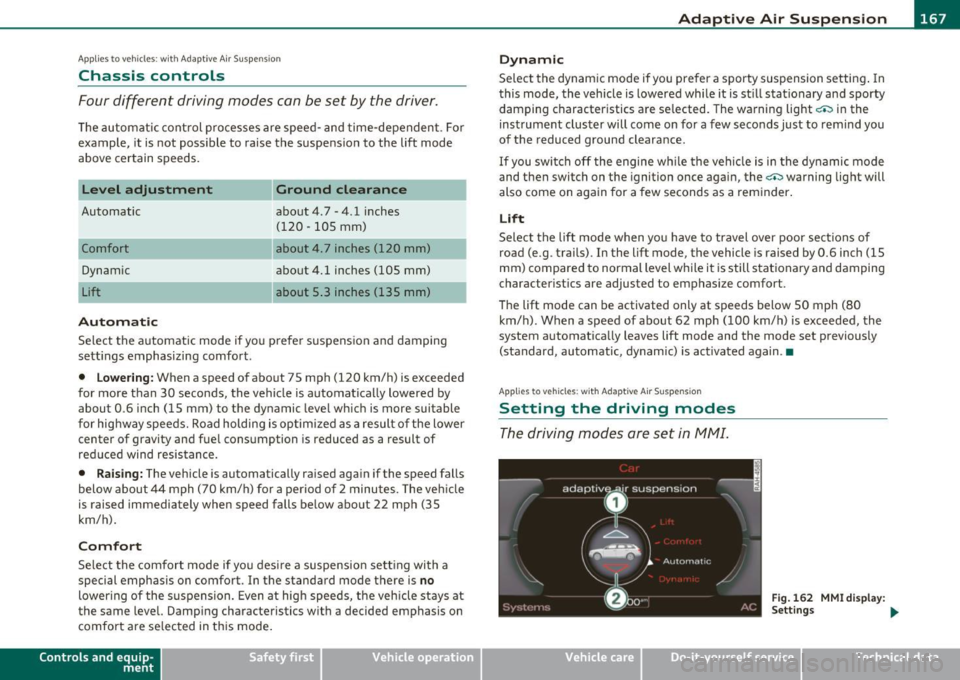
The driving modes are set in fv1fv1I.
Fig. 162 MMI display :
Settings ...
Vehicle care Do-it-yourselt service iTechnical data
Page 171 of 368
___________________________________________________ H_o_ m_ e_L_ i_ n _ k_ ® __ _
Homelink ®
Universal remote control
Applies to veh icles: w ith Hom eli nk ® universal remote control
General information
The Homelink ® feature can learn the up to three radio
frequency codes for most current transmitters used for
operating garage doors, estate gates, home or outdoor
lighting systems, and other devices.
You must first program the Homelink ® transm itter before you can
use the system=>
page 170, "Programming the Home link® trans
mitter".
I n order to program the Homelink ® transmitter for devices utilizing
rolling code, a second person on a ladder who can safe ly reach the
garage door opener motor is recommended. It is also necessary to
locate the "learn" button on your garage door opener motor. Refer to
the operating instructions for the opener, as the location and color of
this button may vary by manufacturer.
You can still use the original remote control for the device at any
time.
& WARNING
• Never use the Homelink'"' transmitter with any garage door
opener that does have not the safety stop and reverse feature as
required by federal safety standards. This includes any garage
door opener model manufactured before Aprill, 1982.
• A garage door opener which cannot detect an object, signaling
the door to stop and reverse does not meet current federal safety
standards. Using a garage door opener without these features
increases risk of serious injury or death.
Controls and equip
ment Safety first
& WARNING
(continued)
• For safety reasons never release the parking brake or start the
engine while anyone is standing in front of the vehicle.
• A garage door or an estate gate may sometimes be set in
motion when the Homelink ® remote control is being
programmed. If the device is repeatedly activated, this can over
strain motor and damage its electrical components -an over
heated motor is a fire hazard!
• To avoid possible injuries or property damage, please always
make absolutely certain that no persons or objects are located in
the range of motion of any equipment being operated.
rn Tips
• If you would like more informat ion on Homelink ®, where to
purchase the Homelink ® compatible products, or would like to
purchase the Homelink ® Home Lighting Package, please call toll
free: 1-800-355-3515.
• For Declaration of Compliance to United States FCC and Industry
Canada regulations=>
page 347 . •
Vehicle care Technical data
Page 172 of 368
ffl..__H_ o_m_ e_ L_ i _n_ k_ ® _______________________________________________ _
Applies to veh icles : w ith Homelin k® un iversa l remote control
Programming the Homel ink ® transmitter
The transmitter is programmed in two phases . For rolling
code transmitters, a third phase is also necessary .
illUl~~ . l
~-1 II I Ill
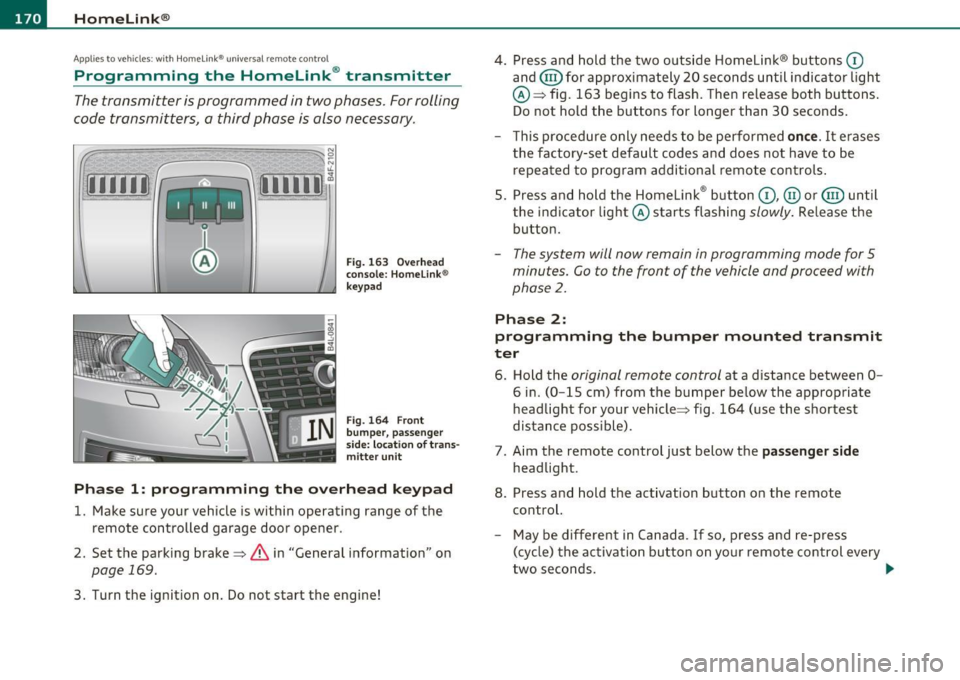
Fig. 163 Over head
conso le: Homelink ®
keypad
Fig. 164 F ront
bumper, passenger
s ide: loc ation of trans
mitter unit
Phase 1: progr amming th e overhead k eypad
1. Make sure your vehicle is within operating range of the
remote controlled garage door opener .
2. Set the parking brake~
& in "General information " on
page 169.
3. Turn the ignition on . Do not start the engine! 4
. Press and hold the two outside Homelink ® buttons
(D
and (@)for approximately 20 seconds until indicator l ight
@ ~ fig. 163 begins to flash . Then release both buttons .
Do not hold the buttons for longer than 30 seconds .
- This procedure only needs to be performed
on ce . It erases
the factory-set default codes and does not have to be repeated to program additional remote controls .
5. Press and hold the Homelink ® button
(D , @ or@ until
the indicator light © starts flashing
slowly . Release the
button .
-The system will now rema in in programming mode for 5
minutes.
Co to the front of the vehicle and proceed with
phase
2 .
Phase 2:
programming the bumper mounted tr ansmit
ter
6 . Hold the original r emote control at a distance between 0-
6 in. (0 -15 cm) from the bumper below the appropriate
headlight for your vehicle~ fig . 164 (use the shortest
distance possible) .
7 . Aim the remote control just below the
pa ss e nger sid e
headlight .
8. Press and hold the activation button on the remote control.
- May be d ifferent in Canada . If so, press and re-press
(cycle) the activation button on your remote control every
two seconds. .-,,
Page 174 of 368
-HomeLin k® •m ___________________ _
-Press th e ap pro priate programmed button G) , @ or@
to activate the desired remote control function ::::>
& in
"Genera l informat io n" on
page 169. •
Applies to ve hicles : w ith Hom eli nk® univer sa l rem ote c ont rol
Reprogramming a single button
A Homelink ® button can be reprogrammed individually
without affecting the other button allocations.
Programming the ov erh ead keypad
- Press the appropriate Homelink ® button until the indi-
cator light begins flashing slowly .
Programming the bumper mounted transmit
ter
1. Hold the original remote control at a distance between 0 -
5 in . (0-13 cm) from the bumper below the appropriate
headlight for your vehicle (use the shortest distance
possible).
2. Aim the remote control just below the
pas senger side
headlight .
3 . Press and hold the ac tivation button on the remote
control.
4 . The emergency flashers will flash
three times (after about
15 -60 seconds) when the programm ing is successful.
N ow release the b utton on the remote control.
- If the device utilizes a rolling code , please follow phase 3
of =>
page 170 , "Programming the Homelink ® trans
mitter" for rolling code programming.
This pr ocedur e will caus e th e ex is ting pr ogramming on th e
Homelink ® button to be era sed !•
Ap plies to veh icles: w ith Ho meli nk® un ive rsa l rem ote c ont rol
Erasing the programming of the
Homelink ® tr ansmitter
When you erase the programming, the programming on
all three of the transmitter channels with be lost!
- Perform steps 1 to 4 as described on::::> page 170, "Phase
1 : programming the overhead keypad".
When completed , the Homel ink ® system will be in the programm ing
mode and is then ready to learn the codes for remote controlled
devices .
[I) Tips
• Programmed buttons cannot be erased individually.
• For security reasons you are advised to erase the programming of
the Homelink ® system before you sell your veh icle .•
Page 212 of 368

-Airbag system ------=-~-----------------------------------
& WARNING (conti nued)
• Always make sure that the side a irbag can inflate without
interference :
- Never in stall seat covers or replacement uphol stery over the
front seatbacks that have not been specifically approved by
Audi .
- Never use addit ional se at cushions that cover the areas
where the side ai rbags inflate.
- Damage to the or iginal seat covers or to the seam in the area
of the side airbag module must always be repaired immedi
ately by an author ized Audi dealer.
• The airbag system can be activated only on ce. After an airbag
has inflated, it must be replaced by an authorized Audi dealer or
qualified technician who has the techni cal information, t raining
and special equipment necessary.
• The airbag sy stem can be deploy ed only once. After an airbag
has been dep loyed , it must be replaced with new replacement
parts designed and approved e specially for your Audi model
version. Replacement of complete airbag systems or a irbag
components must be performed by qualified workshops onl y.
Make sure that any airbag service action is entered in your Audi
Warranty
& Maintenance booklet under AIRBAG REPLACEMENT
RECORD .
• For s afety reason s in s evere accidents, the alternator and
starter are separated from the vehicle battery with a pyrotechnic
circuit interrupter.
-Work on the pyrotechnic circuit interrupter must only be
performed by a qualified dealer -risk of an accident!
- If the vehicle or the circuit interrupter is sc rapped , all appli
cable safety precautions must be followed.
W For the sake of the environment
Un deployed ai rbag modu les and p retensione rs might be class ified as
Perch lorate Mate rial -special handling may apply, see
www.dts c.ca.gov/ha za rdouswas te/pe rchlorate. When the vehicle or
parts of the restraint system includ ing airbag modules and saf ety
be lts wi th p retens ioners are sc rappe d, all applicable laws an d regu la
tions must be observed. Yo ur authorized Aud i dealer is familiar w ith
t hese requi reme nts and we recommend tha t yo u have yo ur dealer
perform th is service for you. •
Other things that can affect Advanced
Airbag performance
Chang ing the vehicle's suspension system can change the way that
t h e Advan ced Airbag System pe rforms in a cr ash . For e xamp le, usi ng
tire-rim combinations not app roved by Audi, lowering the vehicle,
c hang ing the stiffness o f th e suspension, incl uding the sp rings,
suspension struts, shock absorbers etc. can change the forces that
are meas ured by the a irbag sensors and sent to the ele ct ronic contro l
unit . Some suspension changes can, fo r exam ple, increase the force
levels measured by the senso rs and make the airbag system deploy in
crashes in which i t would not deploy if the changes had no t been
ma de . Other kinds of changes may reduce the force levels meas ured
by the sensors and p revent the airbag from dep loying when it should.
T he sensors in the safety belt b uckle for the drive r and front
p as senge r se at tell the e lectroni c cont rol mo dule if the sa fe ty belt is
latched or not . If the safety belt is being used, t he front a irbag w ill
dep loy a t a s lightly h igher r ate o f vehicle decele ration t han if t he
safety belt is not be ing used . Therefo re, in a par ticular collis io n, it is
possible that an a irba g w ill not dep loy at a seating position where the
safety belt is being used but w ill inflate at the posit ion where the
safety belt is not be ing use d. It is im portant that nothing interfere
w it h t he safety belt bu ckles so that t he sensors can se nd the co rrect
info rmation about safety be lt use to the electronic contro l unit.
~