sunroof AUDI S6 2010 Owners Manual
[x] Cancel search | Manufacturer: AUDI, Model Year: 2010, Model line: S6, Model: AUDI S6 2010Pages: 368, PDF Size: 86.82 MB
Page 4 of 368
Table of contents
Table of contents
Vehicle literature ..... .
About this Owner's Manual .......... ....... .. .
Controls and
equipment .............. .
Instruments and controls ... .
General illustration ........... .
Instruments and
warning/indicator Lights ..... . Instruments ... ... .......... .
Warning/indicator ligh ts ..... . .
Driver information display ... .
Introduction ...... ......... . .
On-Board Diagno stic sy ste m
(OBD) . ..... ....... .......... .
Auto Ch eck Control ........... .
Speed warning system ........ .
Tr ip computer ............ ... .
Opening and closing ......... . Keys ............ ............ .
Power locking system ........ .
Rear lid .... ..... ............ .
Child safety Lock ............. .
Convenience key ............. .
Anti-theft alarm sys tem ...... .
Power windows .............. .
Sliding/tilting power sunroof .. .
Clear vision .. .... ............ .
L ights ... .. ........ ......... .
Interior ligh ts ... ... .. ....... .
4
5
6
7
7
8
8
12
19
19
23
24
32
34
37
3 7
41
46
47
47
49
so
53
58
58
63 Vi
sion .................... .. .
Wiper and washer system Mirrors ... ............... ... .
Digital compass ............. .
Seats and storage ........ ... .
General recommendations .... .
Power seat . ................. .
S eat m emory ............... . .
Rear sea ts ... ... .. .......... .
Head res train ts ........... ... .
Armrest .. .. ................ .
Luggage compar tm en t ..... .. .
Roof ra ck . .... .... .......... .
Cupholder .................. .
Ashtray .. ................... .
Cigarette Lighter/socket ...... .
S torag e ................ .. .. .
Warm and cold .... .......... .
Cl imate control ....... ... .... .
Ba sic se tt ings ............... .
On the road ... .... .......... .
S tee ring .................... .
Igni tion lock and ignition swi tch
Start ing and stopp ing the engine
Start ing and stopping the engine
with Convenience key ......... .
E lectromechanical parking brake
Cru ise control ............... .
Adaptive Cruise Control ..... . Speed and distance con trol
sys tem .............. ....... .
Dr iver information ........... .
Syst em Limitations ........... .
Audi Lane assist ........... .. .
Lane ass ist .... .. ............ . 64
66
69
73
75
75
76
79
80
81
82
83
87
89
91
92
93
96
96
104
106
106
108
109
110
113
116
119
119
12 7
131
134
134 Audi side assist ...............
137
Lane Change Assistant ......... 137
No tes ....... .... ............. 144
Automatic transmission 146
tiptronic ® (6-sp eed au toma tic
tr ansmission) . . . . . . . . . . . . . . . . . 146
multitronic ® ............ ...... 152
Park assist . . . . . . . . . . . . . . . . . . . . 160
Park ing system (rear, with rear
view camera) . . . . . . . . . . . . . . . . . 160
Adaptive Air Suspension .. ... . 166
Adaptive Air Su spens ion and
Damping . . . . . . . . . . . . . . . . . . . . . 166
Homelink ® ............. ... ... 169
Univ ersal r emot e control 169
Safety first ............ ... 174
Driving Safely .. ............... 174
G eneral n otes ......... ........ 174
Proper occupant seating
po sition s . . . . . . . . . . . . . . . . . . . . . 176
Pedal area . . . . . . . . . . . . . . . . . . . . 180
S towing Luggage .............. 181
Report ing Safety Defects . . . . . . . 183
Safety belts . . . . . . . . . . . . . . . . . . . 185
General no tes . . . . . . . . . . . . . . . . . 185
Why safety belts? ............ . 186
Safe ty b elts . . . . . . . . . . . . . . . . . . . 189
Safety bel t pre ten sioner s . . . . . . . 193
Airbag system ................ 195
Im portan t thing s to kn ow ...... 195
F ront airbags .............. ... 199
Page 55 of 368

-Turn and hold the k ey in the lock posit ion®~ page 52,
fig. 40 until t he windows and th e power roof * are
comple tely closed .
Opening windows
-Inse rt the key into the lock o f th e driver's door.
Turn and hold the key in t he open posit ion @.
The a utomat ic close/open fu nction will cease if the key is returned to
i t s or iginal pos it io n.
& WARNING
• Be careful when closing the windows . Check to see that no one
is in the way, or serious injury could re sult!
• Always read and heed WARNING=>
& in "General des cription "
on
page 41 . •
Reactivating the system after battery
disconnection
If the vehicle battery is disco nnected and t hen reconnected ,
the automatic closing and opening function will not work
u nti l it is reactivated. To reactivate th is featu re, perform the
fo llowing steps:
Reactivating close /open feature
- Pull and hol d th e power w indow sw itc h until t he window is
comp letely closed .
- Release the switch.
- Pull the swi tch again for one second. The automat ic
closi ng/opening is now reactivated. •
Contro ls a nd e quip
m en t Vehicle
OP-eration
Opening and closing
Sliding/tilting power sunroof
Applies to veh icles: with slid ing/t ilting powe r sunroof
How the power sunroof works
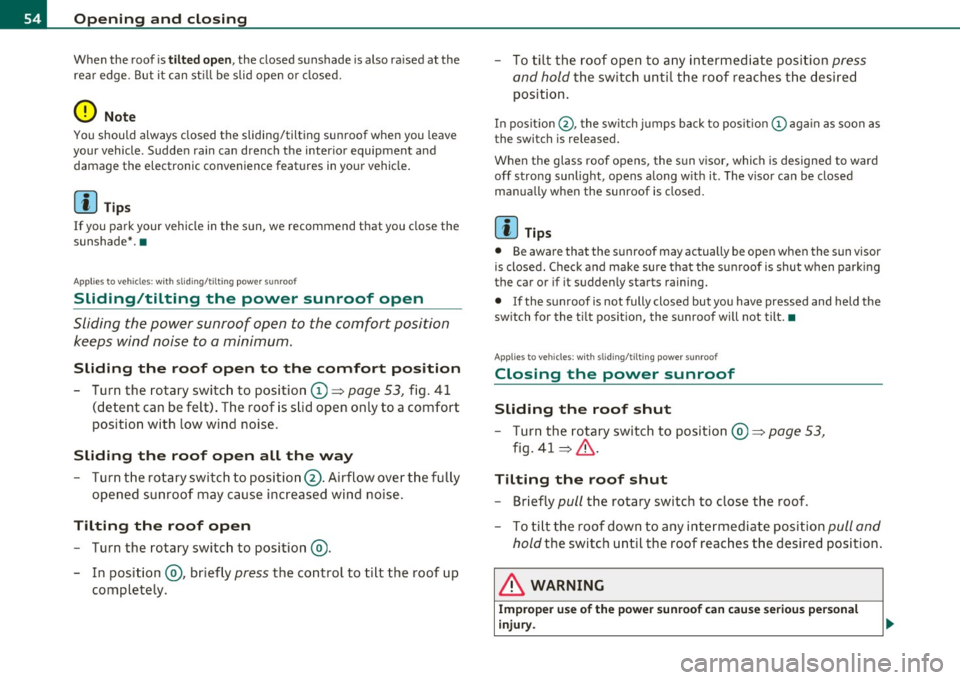
Fig . 41 Section of th e
h eadliner : su nroo f
s wit ch pos itio ns
The roof will slide open or ti lt up at the rear as required. When the
ignition is on, yo u can slide the roof open or close it to the des ired
position by turning the rotary control sw itch located overhead next to
the inte rior light. The roof is tilted open o r closed by p ressing or
pulling the control switch at posit ion ®=>fig. 41.
You can s till close or open the sunroof for up to ten minutes after you
have switched off the ignition with the key remaining in the ignition
lock. If either door is opened, powe red operation of the sun roo f will
be deact ivated.
Solar protection with sliding glass sun roof*
The sliding glass sun roof is equipped with an ad justable sunshade to
reduce the effects of strong sunlight. The so lar protection can be
moved at the recessed hand le to open and close it. To p revent the
vehicle interior f rom heat ing up, you should close the solar protection
when you park yo ur vehicle in the s un .
When the roof is
slid open , the sunshade is opened automat ica lly.
Whe n the roof is closed, the sunshade can be closed man ua lly. .,
Vehicle care Do-it-yourselt service iTechnical data
Page 56 of 368
Opening and closing
When the roof is tilted open, the closed sunshade is also raised at the
rear edge . But it can still be slid open or closed.
0 Note
You should always closed the sliding/tilting sunroof when you leave
your vehicle . Sudden rain can drench the interior equipment and
damag e the electronic convenienc e features in your v ehicle .
[ i ] Tips
If you park your vehicle in the sun , we recommend that you close the
sunshade*. •
Applies to vehicles : with slid ing/t il t ing po wer sunroof
Sliding/tilting the power sunroof open
Sliding the power sunroof open to the comfort position
keeps wind noise to a minimum .
Sliding the roof open to the comfort position
- Turn the rotary switch to position (D ~ page 53, fig. 41
(detent can be felt) . The roof is slid open only to a comfort
position with low wind noise .
Sliding the roof open all the way
-Turn the rotary switch to position@. Airflow over the fully
opened sunroof may cause increased wind noise .
Tilting the roof open
-Turn the rotary switch to position @.
- In position @, briefly
press the control to tilt the roof up
completely. -
To tilt the roof open to any intermediate position
press
and hold the switch until the roof reaches the desired
position.
In positio n@ , the switch jumps back to pos it ion © again as soon as
the swit ch is released.
When the glass roof opens, the s un visor, which is designed to ward
off strong sunlight, opens a long w ith it . The v isor can be closed
manually when the sunroof is closed.
[I) Tips
• Be aware that the sunroof may actually be open when the sun visor
is closed. Chec k and make sure that the sunroof is shut when park ing
the car or if it suddenly st art s raining.
• If the sunroof is not fully closed but you have pressed and held the
switch for the tilt pos ition, the sunroof will not tilt. •
App lies to veh icles: w ith sli ding/ tilting power sunroof
Closing the power sunroof
Sliding the roof shut
-Turn the rotary switch to position @~ page 53,
fig. 41 ~& -
Tilting the roof shut
- Briefly pull the rotary switch to close the roof .
- To tilt the roof down to any intermediate position
pull and
hold
the switch until the roof reaches the desired position.
& WARNING
Improper use of the power sunroof can cause serious personal
injury.
Page 57 of 368

& WARNING (continued)
• Be careful when closing the power sunroof. Not paying atten
tion could cause you or others to be trapped and injured as the roof
closes.
• Always take the key with you when you leave the vehicle to
prevent injuries caused by the roof closing.
• Never leave children or persons requiring assistance alone in
the vehicle, especially when they could access the vehicle keys.
Unsupervised use of the keys can result in the engine being started
or use of vehicle systems such as the power windows, etc. which
could result in serious injury. The doors could be locked with the
remote key, delaying help in an emergency.
• The power sunroof will continue to operate until the ignition
key has been removed and one of the front doors has been
opened. •
Applies to veh icl es: w ith s lid in g/ti lt ing powe r sunroof
Convenience closing feature
The power sunroof can be closed from outside with the
key in the driver 's door lock.
- Insert the key into the d river 's door lock .
- Turn and hold th e ke y in the lock position®=:>
page 43,
fig. 29 until the sunroof is completely closed=:>&, in
"Closing the power sunroof " on
page 54.
& WARNING
Be careful when closing the power sunroof. Not paying attention
could cause you or others to be trapped and injured as the roof
closes. •
Controls and equip
ment Safety first Opening and closing
App
lies to vehicles : w ith sliding/tilting power sunroof
Power emergency closing
The sunroof can still be closed electrically if for some
reason the overload protection function becomes acti
vated.
The power sunroof is equipped with an overload protection
feature. If, under normal conditions, the power sunroof will
not close, you can close it using this feature .
- Turn the rotary switch to position@=:>
page 53, fig. 41.
- Now pull the switch
and hold it in this position until the
power sunroof closes completely .
& WARNING
Improper use of the power sunroof can cause serious personal
injury.
• Be careful when closing the power sunroof. Not paying atten
tion could cause you or others to be trapped and injured as the roof
closes.
• Always take the key with you when you leave the vehicle to
prevent injuries caused by the roof closing.
• Never leave children or persons requiring assistance alone in
the vehicle, especially when they could access the vehicle keys.
Unsupervised use of the keys can result in the engine being started
or use of vehicle systems such as the power windows, etc. which
could result in serious injury. The doors could be locked with the
remote key, delaying help in an emergency.
• The power sunroof will continue to operate until the ignition
key has been removed and one of the front doors has been
opened. •
Vehicle care Technical data
Page 58 of 368
Open ing and closing
App lies to veh icles : w ith sliding/tilting power sunroof
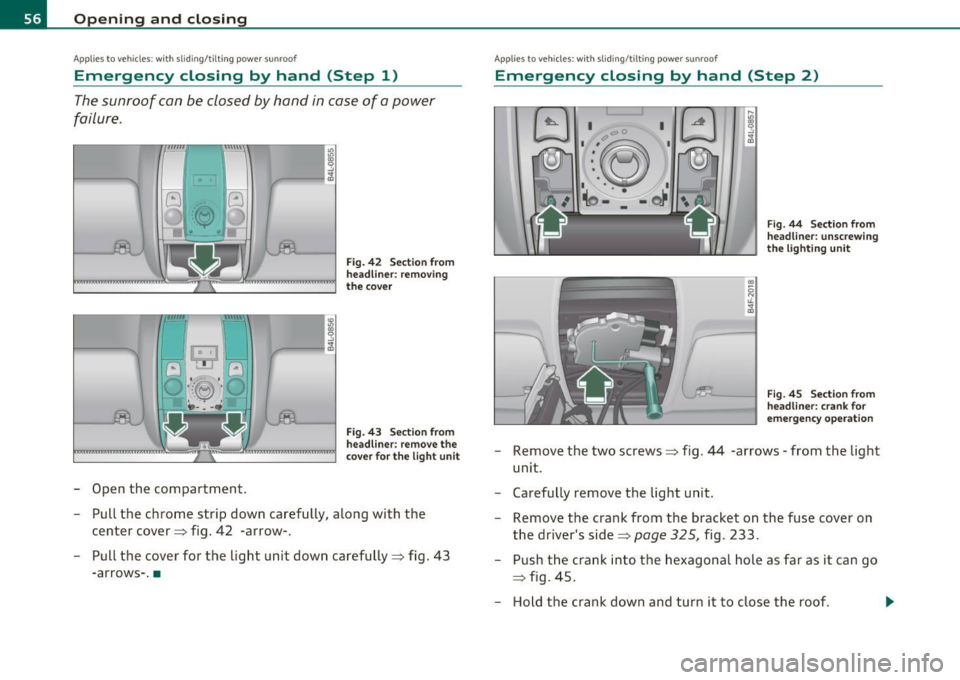
Emergency closing by hand (Step 1)
The sunroof can be closed by hand in case of a power
failure .
0
-Open the compartment.
Fig. 42 Sect ion from
head lin er: removing
the cover
Fig. 43 Section from
headli ner: remove the
cove r fo r th e light u nit
- Pull the chrome strip down carefully, along with the
center cover ::::, fig . 42 -arrow-.
- Pull the cover for the light unit down carefully::::, fig .
43
-arrows- .•
App lies to veh icles: w ith slid ing/t ilting power sunroof
Emergency closing by hand (Step 2)
I I C' C
•:~ I
I',.~ I
.• \o -·: -t)J ,_,,
J
F ig . 44 Sect ion from
head line r: unscrew ing
t h e lig hti ng u nit
Fi g. 45 Sect ion from
head line r: crank for
e m ergency ope ration
Remove the two screws::::, fig. 44 -arrows -from the light
unit .
Carefully remove the light unit .
Remove the crank from the b racket on the fuse cover on
the driver's side::::,
page 325, fig. 233.
Push the crank into the hexagonal hole as far as it can go
=> fig. 45 .
- Hold the crank down and turn it to close the roof . ...
Page 99 of 368

En ergy management
To prevent the ba ttery from be ing discharged and to resto re the
balance of energy, compone nts which req uire la rge amou nts of
ene rgy are temporari ly c ut back or switched off~
page 247. Heating
systems in part icu lar requ ire a g reat dea l of energy . If you not ice, fo r
example, that the seat * or rear w indow heating is not heating, they
have been temporari ly cut back or switch ed off by
energy manage·
ment .
These systems are available again as soon as the energy
balance has been res tored.
& WARNING
Reduced vi sibil ity i s dangerous and can cause accidents .
• For safe driving it i s very important that all window s be free of
ice, snow and condensation.
• Completely familiarize yourself with the proper use and func
tion of the heating and ventilation system and especially how to
defog and defrost the windows.
• Never use the windshield w iper/washer system in freezing
weather until you ha ve warmed the wind shield first , using the
heating and ventilation system . The washer solut ion may freeze
on the wind shield and reduce vi sibility.
0 Note
• If you s uspe ct tha t the clima te cont ro l system has been damaged,
switch the system off to avoid furthe r damages, and have i t in sp ected
by a q ua lified dealersh ip.
• Repa irs to the A ud i a ir cond it ioner require special tec hnical knowl
edge an d special tools. Cont act an au thor ized A udi dealer for assis
t ance .
Controls and equip
ment Safety first
Warm and cold
(I] Tips
•
Keep the air inta ke s lots (in front of the w indshield) free from ice,
snow and debris in orde r to maintai n the proper function of the
cl ima te contro l system.
• Th e air flowing out of the vents and throughout the vehicle's
e n tire in ter ior is discharged a t th e rea r of t he vehicle. Make sure t hat
the o utlet s lots are not covered by cloth ing, etc .
• Climate cont rol works most effectively i f the w indows and the
sunroof * are closed . However, if the interior of a par ke d vehicle is
extremely hot from t he sun's rays, briefly opening the wi ndows can
speed up t he cooling process .•
Vehicle care Technical data
Page 104 of 368
1111....__w __ a _r_ m __ a_n_ d_ c_ o _ l_d _______________________________________________ _
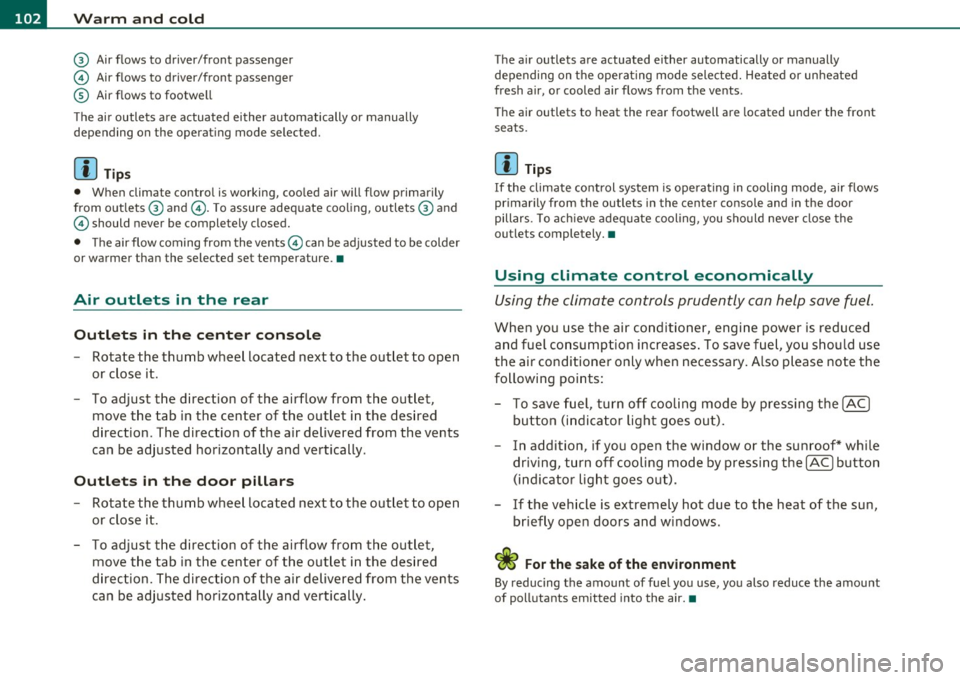
@ Air flows to driver/front passenger
© Air flows to driver/front passenger
© Air flows to footwell
T he ai r outlets are actuated either automatically or manually
depending on the operating mode selected.
[I] Tips
• When climate control is working, cooled air will flow primarily
from out lets @ and @. To assure adequate cooling, outlets @ and
© should never be completely closed.
• T he air flow coming from the vents © can be adjusted to be colder
or warmer than the selected set temperature. •
Air outlets in the rear
Outlets in the center console
- Rotate the thumb wheel located next to the outlet to open
or close it.
- To adjust the direction of the airflow from the outlet, move the tab in the center of the outlet in the desired
direction . T he direction of the air delivered from the vents
can be adjusted horizontally and vertically.
Outlets in the door pillars
- Rotate the thumb wheel located next to the outlet to open
or close it .
- To adjust the direction of the airflow from the outlet,
mov e the tab in the center of the o utlet in the desired
direction. The direction of the air delivered from the vents
can be adjusted horizontally and vertically.
The air outlets are actuated either automatically or manually
depending on the operating mode selected. Heated or unheated
fresh air, or cooled air flows from the vents.
T he air outlets to heat the rear footwell are located under the front
seats.
[I] Tips
If the climate control sys tem is operating in cooling mode, air flows
primarily from the outlets in the center console and in the door
pillars. To ach ieve adequate cooling, you sho uld never close the
outlets completely. •
Using climate control economically
Using the climate controls prudently can help save fuel.
When you use the air conditioner, engine power is reduced
and fuel consumption increases . To save fuel, you should use
the air conditioner only when necessary . Also please note the
following points:
To save fuel, turn off cooling mode by pressing the
[AC)
butto n (indicator ligh t goes out).
- In addit ion, if you open the window or the sunroof* while
driving, turn
off cooling mode by pressing the [AC] button
(indicator light goes out).
If the vehicle is extremely hot due to the heat of the sun,
briefly ope n doors and windows.
ffi For the sake of the environment
By reducing the amount of fue l you use, you also reduce the amount
of pollutants emitted into the air.•
Page 329 of 368

______________________________________________ F _u_s _e_ s_ a_ n_ d _ b _u_l_b _ s _ ___.9I
No. Equipment
29 Not used
30 Not used
31 Back-up
light switch, transmission, engine com-
ponents
Intelligent power module driver (footwell light
32 and front headlights, horn, wiper system, elec-
trically adjustable steering wheel)
-
33 Intelligent power module dr
iver
(lights left-side)
34 Intelligent power module driver
(lights right-side)
35 Not used
36 Headlight
washer system
37 Electronic Stabilization Program (ESP)
38 Wiper system
39 Door control module
left-side
Horn
41 Heater fan
42 Control module electronic ignition lock/electri-
cally adjustable steering wheel
43 Rear
windshie ld wiper (Avant)
44 Power window opener (left-side)
Amps
15
30
25
25
30
25
30 15
25
40
30
15
-
-
35 •
Vehicle OP-eration
Fuse Location, Instrument Panel right
Fig. 236 Fuse panel
l ayou t
Some of the equipment items listed are optional or only available on
certain model configurations.
Note that the following table is accurate at the time of going to
press and is subject to change. In the event of discrepancies, the
label on the inside of the cover always takes precedence.
The power seats are protected by circuit breakers , which automati
cally reset afte r a few seconds after the overload has been remedied.
No. Equipment Amps
Fuse holder (black)
1 Control module Convenience
key
15
2 Cigarette lighter front 20
3 Tire pressure monitoring system
5
4 Electrical outlet front (center console)
20
-
5 Intelligent power module passenger
15
(glove box lock)
6 Door control module right-s ide
15
Sunroof 20
A/C controls 10
Vehicle care Do-it-yourself service iTechnical data
Page 355 of 368

Alphabetical index -________________ fWI
Energy management ...... .. .. ..... 96
Fan .................... ... ... .. 100
Heated seats, front .............. . 103
Key coded setting ........ ...... ... 96
Recirculation mode (automatic) .. ... 104
Recommended sett ings ............ 96
Residual heat ..................... 99
Setting the temperature ............ 99
Switching air cooling on/off .... ... .. 99
Synchronization . ... .............. lOS
Turning on and off ....... ...... .. .. 99
Using climate control economically .. 102
Clock ................ .... .. .... .... . 9
Closing Power sunroof ... .. ... ... .. .. . .... S4
Coat hooks ........... ..... .... ... ... 9S
Cold ti re inflation pressure ..... .. ..... 297
Compass mirror ........ ...... .. .... .. 73
Compliance . ... ................ .... 347
Consumer Information . . . . . . . . . . 183, 344
Contacting NH TSA .... .............. 183
Continuously Variable Transmission (CVT)
See multit ronic ® ................. 152
Convenience key .................... . 47
Dr iver messages ....... ... .. .. ... . 112
Locking vehicle ...... ....... .. .... . 49
START button ............. .. ... .. 110
Starting engine .. ............. .. . 110
S TOP button ............ .. .. .... . 111
Switching eng ine off .............. 111
Switching on ignition ......... .. ... 110
Unlocking vehicle ................ .. 48
Convertible child safety seats ..... .... 223
Controls and equip
ment Safety first
Convert
ible lock ing retractor
Activating ............... .. ...... 229
Deactivating ..................... 230
Us ing to secure a chi ld safety seat .. 227,
229
Coolant system ..................... 284
Cooling System Expans ion tank ..... .. .. ... .... .. 284
Cruise control Changing speed ..... ... .......... 117
Presetting your speed ... .......... 117
Switching off . .. ................. 117
Switching on .................. .. 116
Warning/indicator lights ........ .. . 16
See also Adaptive Cruise Control .... 119
Cruising range ... ................ .... 34
(upholder .... ............. .. .. . 89,90
D
Damp ing
See Adaptive A ir Suspens ion ...... .. 166
Data . .... ....................... .. 341
Data record er .. . .... .. ... .......... 240
Date display ......................... . 9
Daytime running lights . . . . . . . . . . . . 58, 59
Declaration of compl ia nee
Adaptive Cruise Contro l ... ......... 347
Audi side assist .. .. . .. ...... .. ... 347
Cell phone package . .............. 347
Convenience key .... .. .. .. .. ..... 347
E lectronic immobilizer ............ 347 Homelink
® universal remote control . 347
Remote control key .. ....... ... ... 34 7
def What does this mean when it appears in
the trip odometer disp lay? .. .. ..... 10
Defective light bulb warn ing ......... .. 21
Defrosting/defogging the windows .. .. . 100
Defrosting/defogging w indows ........ 101
Determining correct load limit ....... .. 302
Digital clock . ........ ................ 9
Digital compass ..................... 73
Digital speedometer .................. 21
Dimensions ............ ... .. .. ..... 339
Dipstick Reading the dipstick properly ....... 281
Distance control system
See Adaptive Cruise Control ... .. .. . 119
Doors Power ch ild safety lock .. ....... .... 47
Driver information system ............. 19
Digital speedometer ............... 21
Driver information messages ........ 24
Open door or rear lid warning . ....... 21
Outs ide temperature display ........ 20
Sound system disp lay .............. 20
Driver seat
See Seating position .............. 176
Driver's seat ... .... .. .... ........... 76
Driver's seat memory ................. 79
Activating remote control key ....... 80
Recalling a seat pos it ion . ... ..... ... 79
Storing a seat position .. ....... .... 79
Vehicle operation Vehicle care Do-it-yourself service Technical data
Page 360 of 368

___ A_ l_. p_ h _ a_b_ e_ t_ic _a_ l_ in_ d_e _ x ____________________________________________ _
Opening
Power sunroof .................... 54
Operate your vehicle economically and mini-
m ize pollution ................. 251
Optional equipment Marked with an asterisk ... ........ .. 5
Outlets .. ...... .......... .......... 93
Outside air pollution How to prevent from entering the vehicle .
100
Outside mirrors .................. ... 71
Outside temperature display ........... 20
Owner's manual
How the Owner's Manual is organized .. 5
p
Paint
Touch-up
262
Paint No ............... .... .. .. .. .. 338
Park assist ......................... 160
rear, with rear view camera ........ 160
Parking .... .... .... .. ............. 114
Automatic transmission ........... 146 Caution when parking near a parking barri-
er or curb ..................... 114
Low bumper cover, spoilers and
suspension . . . . . . . . . . . . . . . . . . . . 114
multitronic® ............. .... ... 153
Parking brake
See Electromechanical parking brake 113
Park ing on a decline (downhill) ........ 114
Par king on an incline (uphill) ........ .. 114 Parking system (rear, with rear view camera)
.
160
Adjusting the display .. ..... ..... . 165
Adjusting the warning tones ... ... . 165
Parking mode 1 ............ ..... . 162
Parking mode 2 ...... ....... ..... 163
Safety precautions ............... 160
Switching on/off ................ . 162
Parts replacement ............ ... .. . 346
PASSENGER AIR BAG OFF light ........ 207
Passenger's seat .............. ... .. .. 76
Passive safety system . . . . . . . . . . . . . . . 17 4
Pedals ............................ 180
Perimete r lighting .......... . .. .. .... 61
Physical p rinciples of a f rontal collis ion . 186
Polishing .. .... ................... . 261
Pollen filter Climate controls . . . . . . . . . . . . . . . . . . 96
Power locking switch .............. ... 44
Power locking system .............. .. 41
Convenience close/open feature ..... 52 Locking and unlocking the vehicle from
inside ......................... 44
Opening and closing the windows ... . 52
Power sunroof ....... ... .. .. .... .. 55
Rear lid/trunk lid ..... ............. 46
Remote control key .. .. ...... .. .. .. 38
Selective unlock feature ............ 44
Settings ... .... .. .. .. .. . ..... .... 44
Unlocking and locking vehicle ....... 42
Power outlets ................ ..... . . 93
Power roof .. .......... ... .. .. .. .. .. 53 Power seat
Controls ......................... 76
Seat adjustment .................. 77
Power steering ... ................. . 245
Power sunroof
Emergency closing ............. 55, 56
Power window switches ....... ... ..... 50
In the driver's door ................ 51
In the front passenger's door ....... 52
Reactivating the system ............ 53
Pregnant women Special considerations when wearing a
safety belt .............. ... . .. 191
Programming the Homelink® universal re-
mote contro l ...... .. .. .. .... .. 169
Proper occupant seat ing positions ... .. 176
Proper safety belt position ........... 190
Proper seating position
Front passenger ................ . 177
Occupants ..... ... .............. 176
Rear passengers .... ............. 178
Q
Quartz clock . . . . . . . . . . . . . . . . . . . . . . . . . 9
quattro ®
See All Wheel Drive ....... .. ... .. 246
Question What happens to unbelted occupants? ...
187
Why safety belts? ............... . 185