reset AUDI S6 2011 User Guide
[x] Cancel search | Manufacturer: AUDI, Model Year: 2011, Model line: S6, Model: AUDI S6 2011Pages: 370, PDF Size: 87.15 MB
Page 98 of 370
Warm and cold
Warm and cold
Climate control
Description
The air conditioner is fully automatic and is designed to
maintain a comfortable and uniform climate inside the
vehicle.
We recommend the following settings:
- Set the temperature to 75 °F (+23 °C).
- Press the [AUTO] button.
With this setting, you attain maximum comfort in the least amount
of time. Change this setting , as desired, to meet your personal needs.
The climate controls are a combination of heating, ventilation and cooling systems, which automatically reduce humidity and cool the
air inside your vehicle.
The air temperature, air flow and air distribution are automatically regulated to achieve and maintain the desired passenger compart
ment temperature as quickly as possible .
The system automatically compensates for changes in outside
temperature and for the intensity of the sunlight entering the
vehicle. We recommend you use the
Automatic mode=> page 99 for
year-round comfort .
Please note the following:
Turn on the air conditioner to reduce humidity in the vehicle. This also
prevents the windows from fogging up .
When the outside temperature is high and the air is very humid,
condensation from the evaporator may drip under the vehicle. This is
normal and does not indicate a leak. If the outside temperature
is low, the fan normally only switches to a
higher speed once the engine coolant has warmed up sufficiently .
The air conditioner temporarily switches off when you drive off from
a standstill using full throttle to save engine power.
The compressor also switches off if the coolant temperature is too
high, so that the engine can be adequately cooled under extreme
loads.
Air pollutants filter
The air pollutants filter (a combined particle filter and activated char
coal filter) reduces or prevents outside air pollution (dust, or pollen)
from entering the vehicle. The air is also filtered in air recirculation
mode.
The air pollutants filter must be changed at the intervals specified in
your Warranty
& Maintenance booklet, so that the air conditioner can
properly work .
If you drive your vehicle in an area with high air pollution, the filter
may need to be changed more frequently than specified in your Audi
Warranty
& Maintenance booklet. If in doubt, ask your authorized
Audi Service Advisor for advice .
Key coded settings
The air conditioner settings selected are automatically stored and
assigned to the key being used. When the vehicle is started, the air
conditioner automatically selects the settings assigned to that key.
This way every driver will maintain his/her own personal settings and
does not have to reset them manually.
If a different driver uses your key and changes the air conditioner
settings, the latest adjustments will erase and replace the settings
you have stored . _.,
Page 102 of 370
![AUDI S6 2011 User Guide llffl!l.___w __ a _r_ m __ a_n_ d_ c_ o _ l_d _______________________________________________ _
Fan @
The automatically preset fan speed can be reduced or
increased.
- Press the [ ae] b](/img/6/57593/w960_57593-101.png "AUDI S6 2011 User Guide llffl!l.___w __ a _r_ m __ a_n_ d_ c_ o _ l_d _______________________________________________ _
Fan @
The automatically preset fan speed can be reduced or
increased.
- Press the [ ae] b")
llffl!l.___w __ a _r_ m __ a_n_ d_ c_ o _ l_d _______________________________________________ _
Fan @
The automatically preset fan speed can be reduced or
increased.
- Press the [ ae] button .
- Rotate the regulator to the desired fan speed.
The climate control system automatically regulates fan speed
depending on inte rior temperatu re . You can adjust the vo lume of air
produced by the fan to your own requirements.
T he fan speed setting wi ll appear for a few seconds in the MM I
display .
rn Tips
It is possible that the fan speed may change automatically . This
occurs to ens ure that the desired temperature setting is reached as
quickly as possib le. •
Air distribution [~)
The automatically controlled air distribution can be
changed manually .
-Press the [-..:o] button .
Rotate the regulator to the desired setting.
You can adjust the air d istr ibut ion so that air flows from specific
vents. In position
:0 air flows only to the windows, in position ;J, it
flows to the drive r o r passenger, and in pos it ion
~ it flows to the
footwe ll. There are additional combinations avai lable to adjust air
distribution as needed.
To regu late air d istribut ion automatically, switch to [AUTO] . The air distribution setting w
ill appear for a few seconds in the MMI
display .•
Defrosting (@]
The windshield and side windows are rapidly defrosted or
defogged.
- Press the[@] button to turn on the defroster.
- Press the[@] button again, or press the[AUTO] button to
turn it off.
T emperat ure is controlled a utomatically. The maximum amount of
air flows mainly from the vents below the windsh ield .•
Manual air circulation [,:::.g, )
Air recirculation prevents exhaust fumes or other pollu
tion from entering the vehicle.
Turning on ai r recirculation
- Press the I~] button ~ &
Turning off air recirculation
Press the~ button again, or
press the [AUTO] button, or
- press the I@] button .
In the air recirculation mode, the air in the passenger compartment
is recirc ul ated and fi ltered to prevent exhaust fumes and other pollu
tion from entering the veh icle. We recommend that you use the
man ual air rec irculat ion under the following conditions :
• when driving through tunnels
Page 119 of 370

_________________________________________________ O_ n_t_ h _ e_ ro_ a_d __ ffl'II
The display=> page 116, fig. 106 will show the set speed. The display
may vary depending on the type of display in your vehicle. T he indi
cator light
CRUISE (US model) I c-f (Canadian model) w ill also light up
in the instrument cluster.
The speed is kept constant via an engine output adjustment or active
brake intervention.
_& WARNING
• Always pay attention to traffic even when the cruise control is
switched on. You are always responsible for your speed and the
distance between your vehicle and other vehicles.
• For safety reasons, the cruise control should not be used in the
city, in stop-and-go traffic, on twisting roads and when road
conditions are poor (such as ice, fog, gravel, heavy rain and hydro
planing ) - risk of accident.
• Turn off the cruise control temporarily when entering turn
lanes, highway exit lanes or in construction zones.
• Please note that inadvertently "resting" your foot on the accel
erator pedal causes the cruise control not to brake . This is because
the cruise control is overridden by the driver's acceleration .
(I] Tips
The brake lights illuminate as soon as the brakes decelerate
automatically . •
A ppli es to ve hicles : w it h cr uise contro l
Changing speed
- Press lever in the G)orQ direction ==> page 116, fig. 105
to increase or decrease your speed.
- Release the lever to save that speed.
Controls and equip
ment Safety first
Change speed
in increments of 1 mph (1 km/h) by lightly pressing the
lever. If you keep the lever pressed down, yo u will alter your speed in
5 mph (10 km/h) increments.
You can also press the accelerator pedal down to increase your speed, e .g . if you want to pass someone. The speed you saved earlier wi ll
resume as soon as you release the accelerator pedal.
If, however, you exceed yo ur saved speed by 5 mph (10 km/h) for
longer than S m inutes, the cruise control will turn off temporarily.
The symbol will go out but the saved speed will be retained .•
App lies to ve hicle s: w it h cr uise c ontro l
Presetting your speed
You can preset your desired speed while the vehicle is not
moving.
- Turn on the ignition.
- Pull lever into position
(i) ==> page 116, fig. 105 .
- Press the lever in the
0 or 0 direction to increase or
decrease your speed.
- Release the lever to save that speed.
This function makes it possible, for example, to save the speed yo u
want before driving on the highway. Once on the highway, act ivate
the cruise contro l by pulling the lever toward
(D. •
A pp lies to ve hicles : wit h cr uise c ontro l
Switching the system off
Temporary deactivation
- Press the brake pedal, or
Vehicle care Technical data
Page 128 of 370
lffll.___A_ d_ a_,_ p_t _i_ v _e _ C_r_ u_ i_ s_ e_ C_ o_ n_ t_ r_ o_ l __________________________________________ _
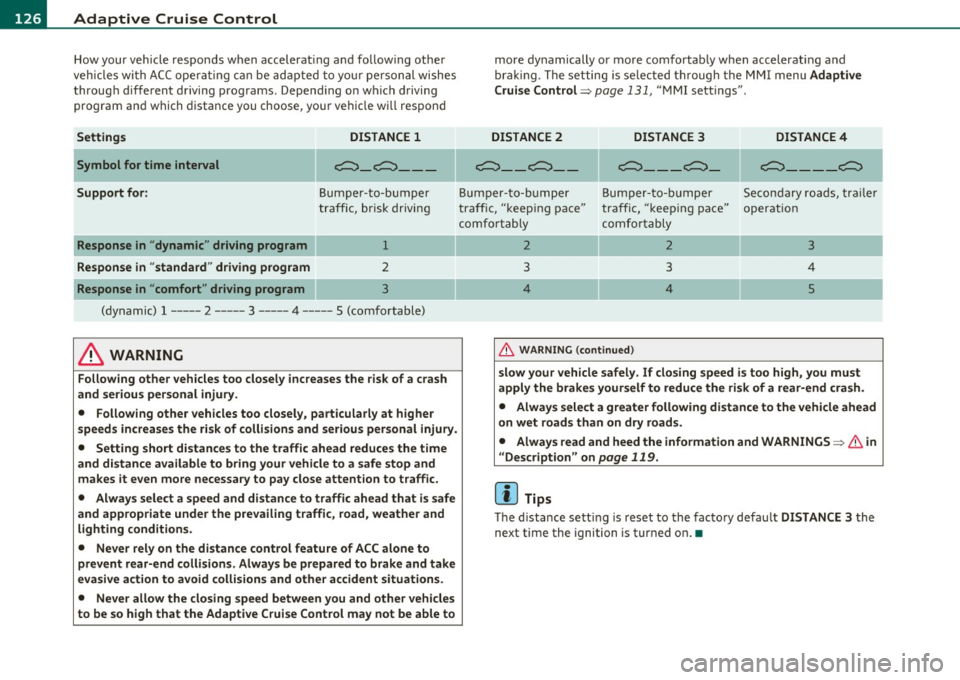
How your vehicle responds when accelerating and follow ing other
veh icles wi th AC C opera ting c an be ad apte d to you r person al wishes
through diffe rent driving programs. Depend ing o n which driving
pro gram an d which distance you choose, you r veh icle w ill respon d
Settings DISTANCE
1
Symbol for time interval c;:::::::::,_c;:::::::::, __ _
Support for: Bu mp er-t o-b um per
tra ff ic, br isk driving
Response in " dynamic " driving program 1
Response in "standard " driving program 2
Response in "comfort " driving program 3
(dy namic) 1 ----- 2 ----- 3 ----- 4 ----- 5 (comfortable)
& WARNING
Following other vehicles too closely increases the risk of a crash
and serious personal injury .
• Following other vehicles too closely , particularly at higher
s peeds increase s the risk of collisions and serious personal injury.
• Setting short distances to the traffic ahead reduces the time
and distance available to bring your vehicle to a safe stop and
makes it even more necessary to pay close attention to traffic.
• Always select a speed and distance to traffic ahead that is safe
and appropriate under the prevailing traffic, road , weathe r and
lighting conditions.
• Never rely on the distance control feature of ACC alone to
prevent rear-end collisions . Always be prepared to brake and take
ev asive action to avoid collisions and other accident situations .
• Never allow the closing spe ed between you and other vehicles
to be so high that the Adaptive Cruise Control may not be able to more dynamically or more com
fortab ly when accelerating a nd
bra king. The set ting is se lec ted t hrough the MMI m enu Adaptive
Cruise Control =>
page 131, "MM I sett ings" .
DISTANCE
2 DISTANCE 3 DISTANCE4
~- _ c;:::::::::,_ - c;:::::::::,_ - _ c;:::::::::,_
c;:::::::::,_ - - _c;:::::::::,
Bum p er-to- bum per Bum per -to- bum per Se co nd ary r oads, tr ail er
tra ff ic, "keep ing pace" traff ic, "k eep ing pace" o perat ion
c omf ortabl y comfort ab ly
2 2 3
3 3 4
4 4
5
&, WARNING (co ntinued )
slow your vehicle safely . If closing speed is too high, you must
apply the brakes yourself to reduce the risk of a rear-end cra sh .
• Always select a greater following distance to the vehicle ahead
on wet roads than on dry roads.
• Always read and heed the information and WARNINGS=>
& in
" Description " on
page 119.
[I) Tips
Th e d istance sett ing is reset to the facto ry defau lt DISTANCE 3 the
next time the ignition is turned on .•
Page 158 of 370
1111....__A_ u_ t_o _m_ a_ t_ic _ t_ r_ a_ n_s _m_ i _s_ s_ i_ o_ n ____________________________________________ _
warning appears in the instrument cluster display when the selector
is in
P and N:
When stationary apply footbrake while selecting gear
A time delay element prevents the selector lever from locking when
it is moved through the
N position (going from R to D). The locking
element will lock the selector lever if the lever is left in N (Neutral) for
more than approximately 1 second, without the brake pedal be ing
pressed .
At speeds above about 3 mph (5 km/h) the Automatic Shift Lock is
automatically deactivated in the
N position.
Interlock button
The lock button on the selector lever prevents the lever from being
accidentally shifted into certain positions. Pressing this button deac
tivates the selector lever lock. Depending on the direction of the
shift, the selector lever locks at different positions. The positions are
high light ed in the illustrat ion~
page 155 , fig. 148.
Ignition key safety interlock
The key cannot be removed from the ignition unless the selector lever
is in the
P park position. When the ignition key is removed, the
selector lever w ill be locked in the
P pos it ion .•
Ap plies to v ehicles : w ith mult itronic ® Contin uously Var iable Transm issio n (C VT)
Kick-down
The kick-down feature allows the vehicle to generate
maximum acceleration.
When you press the accelerator pedal beyond the resistance point
that is reached at full throttle, the transmission will select a lower
gear ratio based on vehicle speed and engine RPM . The engine RPM
w ill be contro lled to produce maximum vehicle acceleration as long
as you continue to press the accelerato r pedal beyond th is resistance
point .
& WARNING
Be careful when using the kick-down feature on slippery roads.
Rapid acceleration may cause the vehicle to skid. •
Applies to veh icl es: w it h mul tit ro nic® Con tin uous ly Va ria bl e Tran smis s io n ( CVT)
Dynamic shift program (DSP)
The multitronic ® transmission is electronically
controlled .
The transmission selects the appropriate gear ratio (upshifts and
downshifts) automatically based on preset d riving programs.
The transmission will select one of the
economy programs when you
drive at a steady speed or a gradua lly changing speeds without heavy
acceleration . Th is gives best fuel eff iciency, with early upshifting and
delayed downshifting.
Th e transmission will automatically select the
sporty shift programs
when you dr ive at higher speeds, or w ith heavy acceleration and
frequently changing speeds. Upshifts are delayed to make full use of
engine power . Downshifting takes place at higher engine speeds than
in the economy programs.
Th e selection of the most suitab le shift program is a continuous,
automatic process. The driver can a lso make the transmission switch
to a sporty program by
quickly pressing down the gas pedal.
This causes the transmiss ion to shift down into a lower gear ratio and
makes quick acceleration possible (to pass another vehicle) You do
not need to press the gas pedal into the kickdown range. After the
transmission has upshifted, the original program is selected
according to your driving style.
An additional shift prog ram allows the automatic t ransmission to
select the proper gear for uph ill and downh ill grad ients.
This prevents the transmiss ion from shifting up and down unneces
sari ly on hills. The transmission will shift down to a lower gear ratio _,,,
Page 318 of 370
IIIIL_T.:...:..: i r~ e:.: s~ a:::. n:..:..:: d:.....: w..:...:. h::e:.: e::.:: ls::::._ ______________________________________________ _
The tire pressure monitoring must be reset via MMI each t ime the
pressures are adjus ted (e.g. w hen swi tching between p art ial an d full
load pressure) or after chang ing o r replacing a tire o n your veh icle
~ page 31 6. Yo u can fi nd the recommended tire press ures for yo ur
veh icle on the label on the driver 's door pillar~ page
299 .
Tire tread circ umference and vibrat ion characteristics can change and
c a u se a tir e pressure war ning if:
• the t ire pressure in one o r more tires is too low,
• t he tire ha s structur al dam age,
• the tire press ure was changed, wheels rotated or rep laced but the
TPM S was no t reset~ page
316.
Warning symbols
1..1' Loss of press ure in at least one tire~ &. Check the tire or tires
and replace or repair if necessary. The indicator light (• in the instru
me nt clust er also illuminates~ page
12. Check/correct th e p res
sures o f all four tires and reset TPMS via MMI.
rr :; (T ire Pressu re M on itor ing System) Tire pres sure! System
malfunction.
If T ,.;> appears a fter switching the ignition on or w hile
dr iv ing ~ page
315, fig . 2 22 a nd t he indica to r lig ht 'in th e instr u
me nt clus ter b links for approx ima tely one m inute and the n stays on,
there is a system ma lf u nct io n. See your authorized Audi dealer as
soon as poss ible.
& WARNING
• If the tir e pres sure indicator appears in the instrument cluster
display, one or more of your tires i s significantly under-inflated.
Reduce your speed immediately and avoid any hard steering or
braking maneuvers. Stop as soon a s possible and check the tires
and their pressures . Inflate the tire pressure to the proper pres
sure as indicated on the vehicle 's tire pressure label~
page 299.
Driving on a significantly under -inflated tire causes the tire to
overheat and can lead to tire failure. Under -inflation also is likely
to impair the vehicle's handling and stopping ability.
& WARNING (co ntinued )
• The driver is re sponsible for maintaining the correct tire pres
sures . You must check the tire pres sures regularly .
• Under certain conditions (such as a sporty driving style , winter
conditions or unpaved roads) , the pressure monitor indicator may
be delayed.
• Ask your authorized Audi dealer if run-flat tires may be used on
your vehicle . Your vehicle registration becomes invalid if you u se
the se tires when not permitted. Damage to your vehicle or acci
dents could also result.
[ i ] Tips
• T he tire pressure monito ring system stops wor king when there is
an ES P/ABS malf u nctio n.
• Using snow cha ins may res ult in a system ma lf u n ct ion .
• The tire pressure mon itor ing system on your Au di was calibrated
using t ires with the "AO" or "RO " id ent ificat ion . We re comme nd
using these tires. •
Applies to vehicles: with tire p ressure monito ring system
Reset tire pressure monitoring system
I f the tire pressure is adjus ted, wheels are rotated or
changed, th e TPfvf S must b e re set via
fv1fv1 I.
-Turn on the ign it ion .
- Sele ct : Fu nct ion butt on
[C AR ]> Systems* > Tire pressure
monitoring
> Store now.
[ i ] Tips
Before resett ing the TPMS, the current pressures of all four t ires
mus t co rrespo nd to the specifie d val ues. A djust the tire pre ssure and
~
Page 319 of 370

________________________________________________ T_i_re _ s_ a _ n_d_ w_ h_ e_ e_l_s __ nn
reset the pressure in the tire pressure mon itoring system accord ing
t o the loa d you are car rying ~
page 299. •
Safety first Vehicle care Technical data
Page 357 of 370

Alphabetical index -________________ fNi'II
Energy management ...... .. .. ..... 96
Fan .................... ... ... .. 100
Heated seats, front .............. . 103
Key coded setting ........ ...... ... 96
Recirculation mode (automatic) .. ... 104
Recommended sett ings ............ 96
Residual heat ..................... 99
Setting the temperature ............ 99
Switching air cooling on/off .... ... .. 99
Synchronization . ... .............. lOS
Turning on and off ....... ...... .. .. 99
Using climate control economically .. 102
Clock ................ .... .. .... .... . 9
Closing Power sunroof ... .. ... ... .. .. . .... S4
Coat hooks ........... ..... .... ... ... 9S
Cold ti re inflation pressure ..... .. ..... 299
Compass mirror ........ ...... .. .... .. 73
Compliance . ... ................ .... 349
Consumer Information . . . . . . . . . . 18S, 346
Contacting NH TSA .... .............. 18S
Continuously Variable Transmission (CVT)
See multit ronic ® ................. 152
Convenience key .................... . 47
Dr iver messages ....... ... .. .. ... . 112
Locking vehicle ...... ....... .. .... . 49
START button ............. .. ... .. 110
Starting engine .. ............. .. . 110
S TOP button ............ .. .. .... . 111
Switching eng ine off .............. 111
Switching on ignition ......... .. ... 110
Unlocking vehicle ................ .. 48
Convertible child safety seats ..... .... 225
Controls and equip
ment Safety first
Convert
ible lock ing retractor
Activating ............... .. ...... 231
Deactivating ..................... 232
Us ing to secure a chi ld safety seat .. 229,
231
Coolant system ..................... 286
Cooling System Expans ion tank ..... .. .. ... .... .. 286
Cruise control Changing speed ..... ... .......... 117
Presetting your speed ... .......... 117
Switching off . .. ................. 117
Switching on .................. .. 116
Warning/indicator lights ........ .. . 16
See also Adaptive Cruise Control .... 119
Cruising range ... ................ .... 34
(upholder .... ............. .. .. . 89,90
D
Damp ing
See Adaptive A ir Suspens ion ...... .. 168
Data . .... ....................... .. 343
Data record er .. . .... .. ... .......... 242
Date display ......................... . 9
Daytime running lights . . . . . . . . . . . . 58, 59
Declaration of compl ia nee
Adaptive Cruise Contro l ... ......... 349
Audi side assist .. .. . .. ...... .. ... 349
Cell phone package . .............. 349
Convenience key .... .. .. .. .. ..... 349
E lectronic immobilizer ............ 349 Homelink
® universal remote control . 349
Remote control key .. ....... ... ... 349
def What does this mean when it appears in
the trip odometer disp lay? .. .. ..... 10
Defective light bulb warn ing ......... .. 21
Defrosting/defogging the windows .. .. . 100
Defrosting/defogging w indows ........ 101
Determining correct load limit ....... .. 304
Digital clock . ........ ................ 9
Digital compass ..................... 73
Digital speedometer .................. 21
Dimensions ............ ... .. .. ..... 341
Dipstick Reading the dipstick properly ....... 283
Distance control system
See Adaptive Cruise Control ... .. .. . 119
Doors Power ch ild safety lock .. ....... .... 47
Driver information system ............. 19
Digital speedometer ............... 21
Driver information messages ........ 24
Open door or rear lid warning . ....... 21
Outs ide temperature display ........ 20
Sound system disp lay .............. 20
Driver seat
See Seating position .............. 178
Driver's seat ... .... .. .... ........... 76
Driver's seat memory ................. 79
Activating remote control key ....... 80
Recalling a seat pos it ion . ... ..... ... 79
Storing a seat position .. ....... .... 79
Vehicle operation Vehicle care Do-it-yourself service Technical data
Page 363 of 370
_____________________________________________ A_ L .... p_ h _ a_b_ e_ t_ ic_a_ l_ in_ d_e _ x __ _
Question
What happens to unbelted occupants? 189
Why safety belts? ............. ... 187
R
Radiator fan ................... ... . 288
Rain sensor .. .. .. ......... ...... .. .. 66
Rain sensor defective ............. .... 30
Reading lights Front ............................ 63
Rear ........ .. .. .. .. .. ... ....... 64
Rear ashtray . .. .. ............... .. .. 91
Rear fog lights ......... ...... .. .. .. .. 60
Rear lid
Escape handle ... .. .............. 318
Opening and closing .. .. ........... 46
Valet key function ............ ..... 40
Rear light Defective .......... .... .. .. .. .. .. 21
Rear seat bench .............. .. .. .. .. 83
Rear view camera Parking mode 2 ... ........... .... 165
Parking mode 1 .............. .... 164
Rear view mir ror
Ins ide rear view mirror . . . . . . . . . 69, 70
Rear window defogger ........... .... 101
Rear window shelf .................... 80
Rear window sun shade .. .. ........... 65
Red symbols .............. ...... .. .. 25
Refuell ing . .. ............... .... .. . 275 Remote control garage door opener
(Homel ink ®) . .. .. .. .... .. .. .. .. 171
Remote control key . .... .. .. .......... 38
Unlocking and locking .. .... .... .... 42
Remote rear lid release ............ ... 46
Repa ir manua ls .. .. ........ ....... .. 346
Repairs Airbag system ................... 211
Replacing light bulbs .. . .. .. ......... 330
Replacing tires and wheels ....... .. ... 308
Replacing windshield wiper blades ... ... 68
Reporting Safety Defects ........ 185, 186
Reset button .......... .............. 10
Residual heat . .. ... ................ . 98
Retractor . ....................... .. 191
Rims Cas t alloy .. .. .. ................. 265
Roof rack ................... ... .. .. . 87
Loading ................. ... .. .. . 88
Mounting locations .... ............ 88
Roof weight ... ............. .. .. .. .. . 88
s
Safe dr iving habits ... .. .. .. .. .. ..... 176
Safety belt position .. .. .. .. ......... 192
Safety belt height adjustment .. ... . 194
Safety belts worn by pregnant women .. .
193
Safety belt pretensioner Service and disposal ............ .. 196
Safety belt pretensioners .. .. .. .. ..... 195
Release lever for hood ...... .. .. .. .. . 2 78 Safety belt warning light . . . . . . . . . 15, 187 Safety belts ......
... ... . .. .. .. .. .. . 191
cleaning ............ ... .. .. .. ... 271
Danger to passengers who do not wear a safety belt ......... ... .. .... ... 189
Fastening ....................... 191
height adjustment ... .. .... .... .. . 194
Improperly worn . .. .............. 195
Not worn ... ............. ...... . 189
Safety belt position . .... ... .. . ... . 192
Safety instructions ... . .. .. .. .. .. . 190
Securing child safety seats ...... ... 229
Special considerations for pregnant women ........... .... .. .. .. ... 193
Unfastening .... .... .. .... .. . ... . 194
Warning/indicator light .......... . 187
Why YOU MUST wear them . ... .. .. . 187
Worn properly .............. .. ... 190
Safety compliance sticker .... . ........ 340
Safety equipment ...... ...... .. .. .. . 176
Safety features for occupant restraint and protection ... .. .. .............. 176
Safety guidelines Seat adjustment ................. . 75
Safety instructions Engine compartment ...... .... .. . 279
for side curtain airbags ............ 218
for using child safe ty seats .. .. .. .. . 222
for using safety belts ........ .. ... 190
Monitoring the Advanced Airbag System .
210
Safety lock Ignition key, automatic transmission 109
Controls and equip
ment Safety first Vehicle operation
Vehicle care Do-it-yourself service Technical data
Page 365 of 370
Alphabetical index -___________________________________ ____._ _______ _
Symbols
Red .. .................. .... ... ..
25
Yellow ...................... ... .. 29
Synchronization
Climate controls .......... ... ... .
105
Synchron izing climate control ...... ... . 98
T
Tachometer ............... .. .... .. .. . 9
Tank flap Unlocking the fuel filler flap by hand .
277
Technical modifications . ... .......... 349
Tem perature
Climate controls .......... .. .. .. ..
99
Setting for the driver's and front passen-
ger's side ......... .. .. .... ...... 99
Tether anchors ............. .... .... 237
Tether strap ........... .... .. .... .. . 23 7
The first
1,000 miles (1,500 km) and
afterwards ........ .. .. .. .. .. .. .
251
Tie-downs ............ .... .. .. .... . 185
Tips for the environment
Saving fuel ............... .. ... ...
88
Using the air conditioner only when
necessary ......... .. .... .. .. .. .
102
tiptronic ® ............ .. .. .. ... ... . 146
Automatic Shift Lock (ASL) ......... 148
Driving ............ .. .. .. .. .... . 146
Dynamic shift program ..... .. .. .. . 149
Fail-safe mode ..... .. .. .. .... .... 151
Kick-down .............. ... ..... 149
Controls and equip
ment Safety first
Manual
shift program .. .. .. .. .. .. . 150 Tools ... ..... ... ... ... . .. ... ... .. . 319
Selector lever ................. ... 147 T orn or frayed safety belts ............ 190
Tire pressure ..... ..... .. .. .. .. .. ... 302 Touch-up paint .... . ..... ........ ... 264
Tire pressure monitoring system ....... 314 Towing
Loss of air pressure ...... .....
15,315 Front eyelet ... .... ....... .. .. .. . 335
Malfunction .. .... ............. .. 315 Rear eyelet .... ..... ...... ... ... . 336
Resetting tir e pressures ......... .. 316 Tow truck procedures ........ ..... 335
Tire service life ................ ... .. 306 TPM S
T ires ..............................
295 Tire pressure monitoring system ... . 315
Service life ......... .. .. .. ....... 306 T railer towing .. .. .... ............. . 256
speed rating letter ,code .. ....... .. 309 Operating instructions .. .......... 257
Tire manufactu ring date ... ........ 309 T echnical requirements .. .. .. . 256,257
Tire specifications . .. .... .. ... .. .. 308 Tr ailer towing tips ............. .. . 258
Tread depth ..................... 306 Transmission
Uniform tire quality grading ........
310 tiptronic ® .......... ...... .... .. . 146
Winter tires .. .. ..... ...... ...... 311 Transport Canada ............ ...... . 186
Tires and vehicle load limits ... .. .... .. 303
Tread Wear Indicator (TWI) .......... . 306
Tires and wheels
Checking tire pressure ........... ..
302
Cold tire inflation pressure ......... 299
Dimensions ................... .. 307
General notes ........... ...... .. 295
Glossary of tire and loading terminology .
296
New tires and wheels ........... .. 307
Replacing .... .. ... ... .. ......... 308
Snow chains .. ................ ... 312
Tires and vehicle load limits ... ..... 303
Wheel bolts .................. ... 313
Trip computer
Fuel consumption .................
34
Mi leage ................ ... ... ... 34
Single-trip memory ........ .. . ... .. 35
Tota l-trip memory ......... ... . .. .. 35
Trip odometer .. .. .... ............... 10
What does it mean when dEF appears in
the trip odometer display? . ... .. ...
10
Trunk
See Rear lid .... . .. .... ... ..... ... 46
Trunk escape handle ....... .. .. ...... 318
Winter tires ................... .. 311 T urn s ignals ................ ... .. .. .. 62
Tir es/Wheels Warning/indicator
lights ... .. .. .. .. 15
Low aspect ratio tires ...... .. .. ... 314
Tire pressure monitoring system 15, 314
Vehicle operation Vehicle care Do-it-yourself service Technical data