brake light AUDI S6 2012 User Guide
[x] Cancel search | Manufacturer: AUDI, Model Year: 2012, Model line: S6, Model: AUDI S6 2012Pages: 298, PDF Size: 74.43 MB
Page 74 of 298
7 2 On the road
-If yo u leave the vehicle wi th the ignition
switched on, the ignition will switch off
after a certa in period of time . Please
note that e lectrica l equipment such as
exter ior lights w ill switch off as well
when that happens .
Stopping the engine
.,. Bring your vehicle to a complete stop .
.,. Move the selector lever to the
P o r N posi
t ion.
.,. Press the
!S TAR T ENGINE S TOPI button
9 page 70, fig. 72 .
Emergency off
If necessary, the eng ine can be sw itched off
with the selector leve r in the
R or D /S posi
tion . The engine stops if you press the
I START ENGINE STOP! button at speeds below
6 mph (10 km/h) and press the brake pedal.
A WARNING
- Never turn off the engine unti l the vehi
cle has come to a complete stop.
- The brake booster and power steering
only work when the engine is running. If
the engine is off, you have to use more
force when steering or braking. Because
you cannot steer and brake as you usua l
ly wou ld, this could lead to crashes and
serious injur ies.
- For safety reasons, you should always
park your vehicle with the selector lever
in P. Othe rwise, the veh icle could inad
vertent ly roll away.
- After the engi ne has been switched off,
the radiator fan can continue to run fo r
up to 10 m in utes - even with the ig nitio n
swit ched off.
It can a lso switch on ag ain
afte r some time if the coolant tempera"
t u re rises as the result of a heat buildup
or if the engine is hot and the engine compartment is addit ionally heated by
the sun's rays.
(D Note
Do not stop the eng ine immediately after
hard or extended driving . Keep the engine
running for approximate ly two minutes to
prevent excessive heat bu ild-up .
Starting the engine if there is a
malfunction
It may not be possible to start the engine un
der certain circumstances, for example if the battery in the vehicle key is drained, if inter
ference is affe cted the key or if there is a sys
tem malfunction.
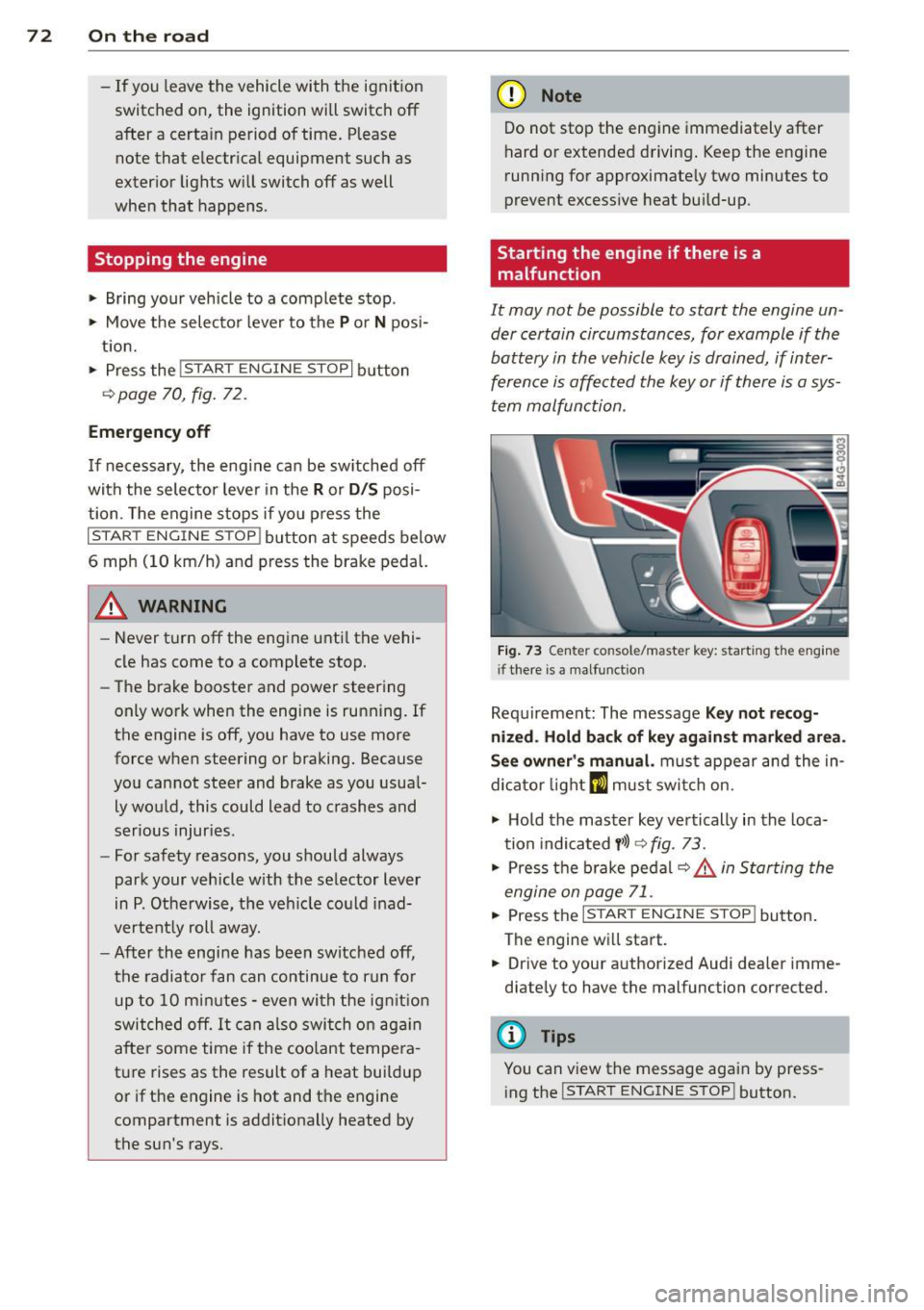
F ig. 73 Center co nsole/master key: start ing the eng ine
i f there is a malfunct io n
Requ irement: The message Key not r ecog
nized . H old back of key ag ainst marked are a.
See owner 's manual.
must appear and the in
dicator light
m must swi tch on.
.,. Ho ld the mas ter key vertically in the loca
tion indicated
y >l) 9 fig. 73.
.,. Press t he b rake pedal ~ .&. in Starting the
engine on page 71 .
... Press the ..., IS"'T :,-,A -,,R "'T ,.., E"" N...,..,,, G""IN ,-,-: E-,s"'T ,...,O ,.., P,..,I button .
The engine wi ll start.
.,. Dr ive to your authorized Audi dea ler imme
diately to have the malfunction corrected.
(D Tips
You can v iew the message again by press
ing the
I STAR T ENGINE STOP ! button.
Page 75 of 298
Electromechanical
parking brake
Operation
The electromechanical parking brake replaces
the hand brake.
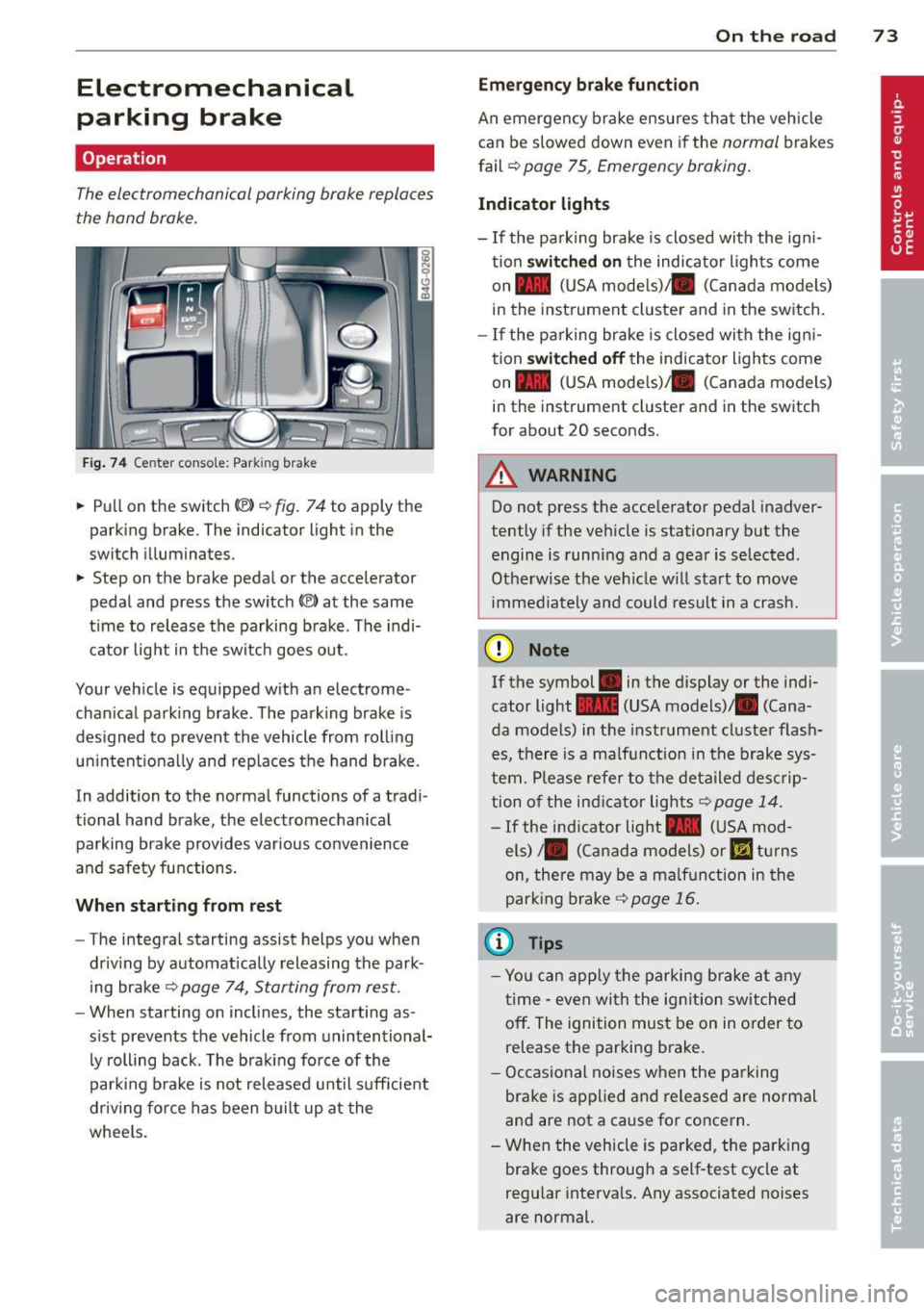
Fig. 74 Center conso le: Park ing brake
.. Pull on the switch<®> Q fig. 74 to apply the
parking brake. The indicator light in the
switch illuminates.
.. Step on the brake pedal or the accelerator
pedal and press the switch
(®) at the same
t ime to release the parking brake. The indi
cator light in the switch goes out.
Your vehicle is equipped with an electrome
chan ical park ing brake . The parking brake is
designed to prevent the vehicle from rolling
un intent ionally and rep laces the hand brake.
In addition to the normal functions of a tradi
tional hand brake, the electromechan ical
parking brake provides var ious convenience
and safety functions.
When starting from rest
-The integral starting assist helps you when
driving by automat ically releasing the park
ing brake ¢
page 74, Starting from rest.
-When starting on inclines, the starting as
sist prevents the vehicle from unintentional
ly rolling back . The braking force of the
parking brake is not released until suff icient
driv ing force has been built up at the
wheels.
On the road 73
Emergency brake function
An emergency brake ensures that the vehicle
can be slowed down even if the
normal brakes
fail ¢
page 75, Emergency braking.
Indicator lights
-If the parking brake is closed with the ign i
tion
switched on the indicator lights come
on - (USA mode ls)/ . (Canada models)
in the instrument cluster and in the switch.
- If the parking brake is closed with the ign i
tion
switched off the indicator lights come
on - (USA mode ls)/ . (Canada models)
in the instrument cluster and in the switch
for about 20 seconds.
A WARNING
Do not press the accelerator pedal inadver
tently if the veh icle is stationary but the
engine is running and a gear is selected .
Otherwise the vehicle w ill start to move
immediately and could result in a crash.
(D Note
If the symbol . in the display or the indi
cator light
1111 (USA models)/ . (Cana
da models) in the instrument cluster flash
es, there is a malf unction in the brake sys
tem. Please refer to the deta iled desc rip
tion of the indicat or lights¢
page 14.
-If the ind icator light - (USA mod-
els)/ . (Canada models) or
I.I turns
on, there may be a ma lfunction in the
parking brake
Q page 16.
(0 Tips
-Yo u can apply the parking brake at any
time -even with the ignition switched
off. The ignition must be on in order to
release the parking brake.
- Occasional noises when the parking
brake is applied and released are normal
and are not a cause for concern .
- When the vehicle is parked, the parking
brake goes through a self-test cycle at
regu lar intervals. Any associated noises
are normal.
Page 77 of 298

Emergency braking
In the event that the conventional brake system fails or locks .
11-In an emergency, pull the switch(®) and
conti nue to pull it to slow your vehicle down
with the parking brake .
11-As soon as you release the sw itch (®) or ac-
celerate, the braki ng p rocess stops.
If you pull the sw itch
(®) and hold it above a
speed of about 5 mph (8 km/h), the emergen
cy braking function is in itiated. The vehicle is
b ra ked at a ll four wheels by activating the hy
d raul ic br ake system. The b ra ke performance
i s sim ilar to making an emergency stop~.&. .
I n o rder not to activate the emergency brak
i ng by m ista ke, an audible warning tone (bu z
z er) sounds when the switch<®> is p ulled. As
soon as the switch(®) is released, or the accel
erator pedal is dep ressed, emergency braking
stops .
.&_ WARNING
Emergency braking shou ld only be used in
an eme rgency, when the normal foot brake
has failed or the brake pedal is obstructed.
Using t he parking brake to perform emer
gency braking will slow you r vehicle down
as if you had made a fu ll brake applicat ion.
The laws of phy sic s ca nnot be s uspended
eve n w ith ESP and its associated compo
nents (ABS, ASR, ED L) . In co rners and
when road or weather conditions are bad,
a full brake application can cause the vehi
cle to skid or the rear end to b reak away -
r isking an accident.
Speed warning system
Introduction
The speed warning system helps you to stay
under a specified maximum speed.
The speed warning system warns you if you
are exceed ing the max imum speed that you
h ave set . You will hea r a warn ing tone when
your speed exceeds the stored va lue by ap-
On th e ro ad 75
proximately 3 mph ( 3 km/h) . An indicator
light . (USA
models) ;a (Canada mode ls) in
the instr ument cluster d isp lay also turns on at
the same time. The indicator light./.
turns off when the speed decreases be low the
stored maximum speed .
Setting a t hreshold is recommended if you
would like to be rem inded w hen you reach a
certain maxim um speed . S ituations where you
may wa nt to do so include driv ing in a country
with a general speed limit o r if the re is a
specified maximum speed for w inte r tires .
(D Tips
Even though your vehicle is eq uipped w ith
a speed warn ing system, you sho uld still
watch the speedometer to ma ke sure you
a re not dr iv ing faster t han the speed limi t.
Setting the threshold
You can set, change and delete the threshold
in the MMI.
11-Select: I CAR! function button > Car systems
control butto n > Driver assist > Speed warn
ing .
You can set any threshold between 20 mph
(30 km/h) and 150 mph (240 km/h). Sett ings
can eac h be ad justed in increments of 5 mph
(10 km/h).
Page 78 of 298
76 On the road
Cruise control
Switching on
Applies to vehicles: wit h crui se contro l
The cruise control system makes it possible to
drive at a constant speed starting at 20 mph
(30 km/h).
0
f
~
0
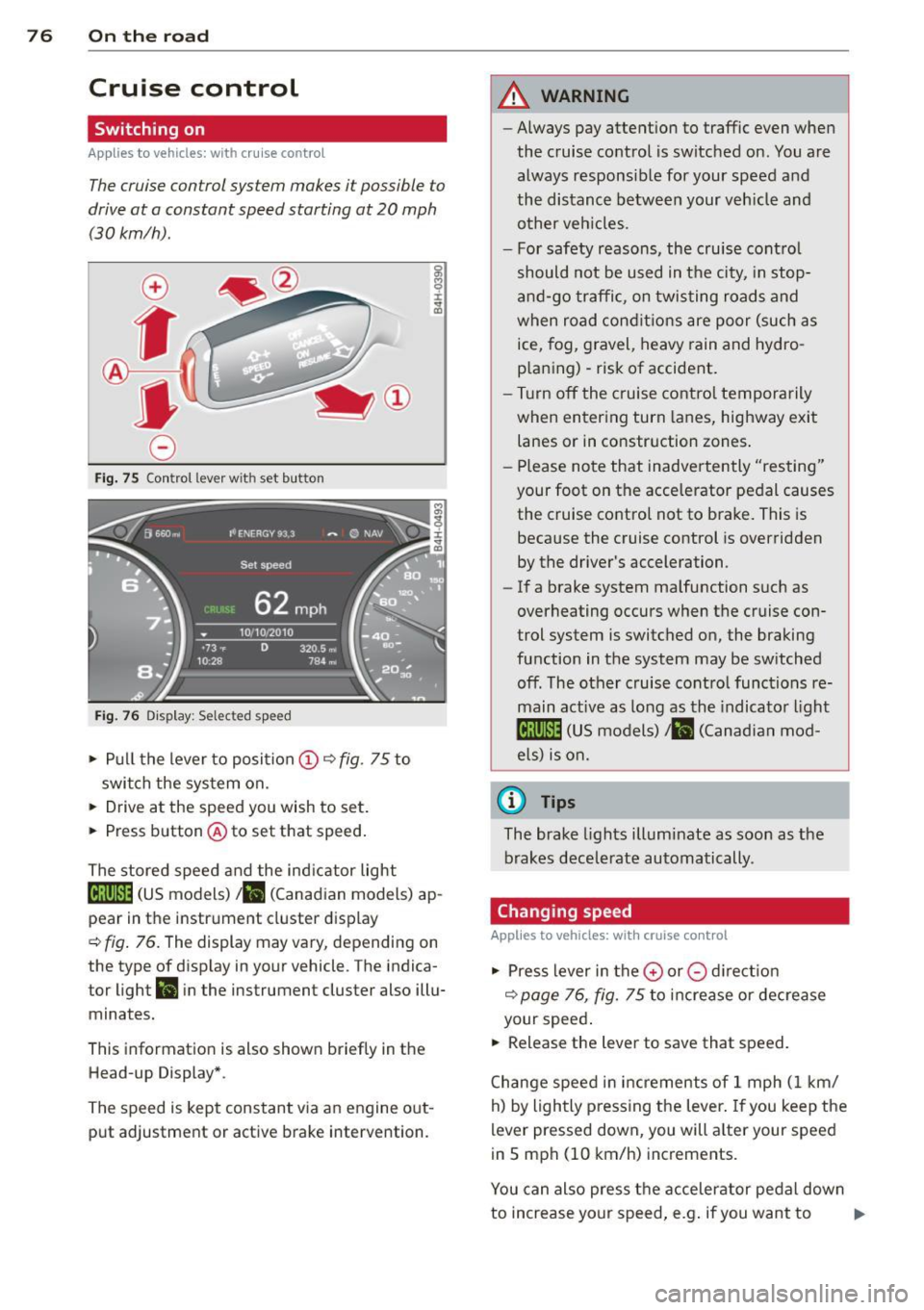
Fig. 75 Control lever with set b utto n
Fig. 76 Display: Selected speed
• Pull the lever to position @~ fig. 75 to
switch the system on.
• Drive at the speed you wish to set.
• Press button @to set that speed.
The stored speed and the indicator light
18;\0~1~ (US models)/ . (Canadian models) ap
pear in the instrument cluster display
~ fig. 76. The display may vary, depending on
the type of display in your vehicle . T he indica
tor light
ll in the instrument cluster also illu
minates.
This information is also shown briefly in the
Head-up Display* .
The speed is kept constant via an engine out
put adjustment or active brake intervention.
A WARNING
-- Always pay attention to traffic even when
the cruise control is switched on. You are always responsible for your speed and
the distance between your vehicle and
other veh icles.
- For safety reasons, the cruise contro l
should not be used in the city, in stop
and-go traffic , on twisting roads and
when road condit ions are poor (such as
ice, fog, gravel, heavy rain and hydro
p laning) - risk of accident.
- Turn off the cruise control temporarily
when entering turn lanes, highway exit
lanes or in construction zones.
- Please note that inadvertently "resting"
your foot on the accelerator pedal causes the cruise control not to brake. This is
because the cruise control is overridden
by the driver's acceleration.
- If a brake system malfunction such as
overheating occurs when the cruise con
trol system is switched on, the braking
function in the system may be switched
off. The other cruise control functions re
main active as long as the indicator light
mmJI (US models)/ . (Canadian mod
els) is on.
(D Tips
The brake lights illuminate as soon as the
brakes decelerate automatically .
Changing speed
Applies to vehicles: w ith cruise co ntrol
• Press lever in the 0 or 0 direct ion
~ page 76, fig. 75 to increase or decrease
your speed .
• Release the lever to save that speed.
Change speed in increments of 1 mph (1 km/
h) by lightly pressing the lever . If you keep the
lever pressed down, you will alter your speed
in 5 mph (10 km/h) increments.
You can also press the accelerator pedal down
to increase your speed, e.g . if you want to .,..
Page 83 of 298
Adaptive cruise control and braking guard 81
Setting the speed and activating
regulation
~ To set the current speed, press the !SET !
button ¢ fig. 81. The set speed is shown in
the tachometer @and in the display
¢
fig . 82. You must also press the brake
pedal when the vehicle is stopped .
Switching adaptive cruise control off
~ Push the lever away from you into position
@ until it clicks into p lace. The message
ACC off appears.
Indicator lamps and messages in the instru
ment cluster display inform you about the cur
rent system status and settings.
@ Indicator lights
Pl -adaptive cruise control is switched on. No
vehicles are detected up ahead . The stored
speed is ma intained.
I -A moving vehicle is detected up ahead.
The adaptive cruise control system regulates
the speed and distance to the moving vehicle
ahead and acce lerates/brakes automatica lly.
Mi -adaptive cruise control is swit ched on. A
moving vehicle up ahead was detected . Your
vehicle remains stopped and will not start
driving automatically.
I -When automat ic brakin g is not able to
keep enough distance to a previously detected
moving vehicle up ahead, you must take con
trol and brake¢
page 82, Prompt for driver
intervention.
© Display
If adaptive cruise control is not shown in the
disp lay, you can call it up with the multifunc
tion steering wheel buttons
¢page 23.
Based on the symbo ls in the display, you can
determine if the system is maintaining a dis
tance to the vehicle ahead and what that dis
tance is .
No vehicle -No veh icle ahead was detected.
White vehicle -A vehicle ahead was detected .
Red vehicle -Prompt for the driver to take ac
tion ¢
page 82.
Both arrows on the scale© indicate the dis
tance to the vehicle ahead. No arrow appears
when the vehicle is on an open road and there
is no object ahead. If an object is detected
ahead, the arrow moves on the scale.
T he green zone on the scale shows the stored
distance . For information on changing the
stored distance ¢
page 83. If the distance
selected is too close or may soon become too
close, the arrows move into the red zone on
the scale .
A WARNING
Improper use of the adaptive cruise con
trol can cause collisions, other accidents
and serious personal injur ies.
- Pressing the
! SET ! button when driv ing at
speeds below
20 mph (30 km/h), will au
tomatically accelerate the vehicle to
20
mph (30 km/h), which is the minimum
speed that can be set.
(D Tips
-If you switch the ignit ion or the adaptive
cruise control off, the set speed is erased
from the system memory.
- You cannot switch the Electronic Stabili
zation Program (ESP) to the SPORT mode
w hen adaptive cruise control is switched
on.
Driving in stop-and-go traffic
Applies to veh icles: w ith adaptive c ruise control
The adaptive cruise contro l system also as
sists you in stop-and-go traffic. If a previous
detected vehicle ahead stops, your veh icle will
brake to a stop, within the limits of the sys
tem .
~ To resume driving with adaptive cruise con
trol, tap the acce lerator pedal or
~ Pull the lever toward you into position @
¢ page 80, fig. 81. ..,_
Page 84 of 298
82 Adaptive cruise control and braking guard
@ Tips
-If adaptive cruise contro l is active and
your vehicle does not start dr iving as ex
pected after pulling the lever once, you
can start out aga in by tapp ing the accel
erator pedal.
- If an obstacle is detected when your ve
hicle starts dr iv ing, the system w ill
prompt you to take over
c> page 82.
Your vehicle w ill dr ive more slowly when
starting. This may a lso happen in some
situations when there no obstacle is ap
parent.
Interrupting cruise control
Applies to vehicles: with adaptive cruise control
Requirement: adaptive cruise control must be
switched on.
Overriding cruise control
., To accelerate manually, pull the lever to
ward you into position @~
page 80, fig. 81
and hold it there. The message ACC override
appears . Or
.. press the accelerator peda l.
.. To resume cruise control, release the lever
or take your foot off the accelerator pedal.
Canceling cruise control while driving
.. Move the lever into position @. The mes
sage
ACC standby appears. Or
.. press the brake peda l.
.. To resume the stored speed, move the lever
into position @.
Canceling cruise control when stopped
.. Push the lever away from you into position
· @ . The message
ACC standby appears .
.. To resume cruise control, press the brake
pedal and pull the lever toward you into po
sition @.
A WARNING
Improper use of the adaptive cruise con
trol can cause collisions, othe r acc idents
and serious personal injuries. -
Never resume t he stored speed if the
speed is too high for prevailing road,
traffic or weather conditions.
Prompt for driver intervention
Applies to vehicles: with adaptive cruise control
Fig. 83 Instrument cluster: requ est for driv er interve n·
tion
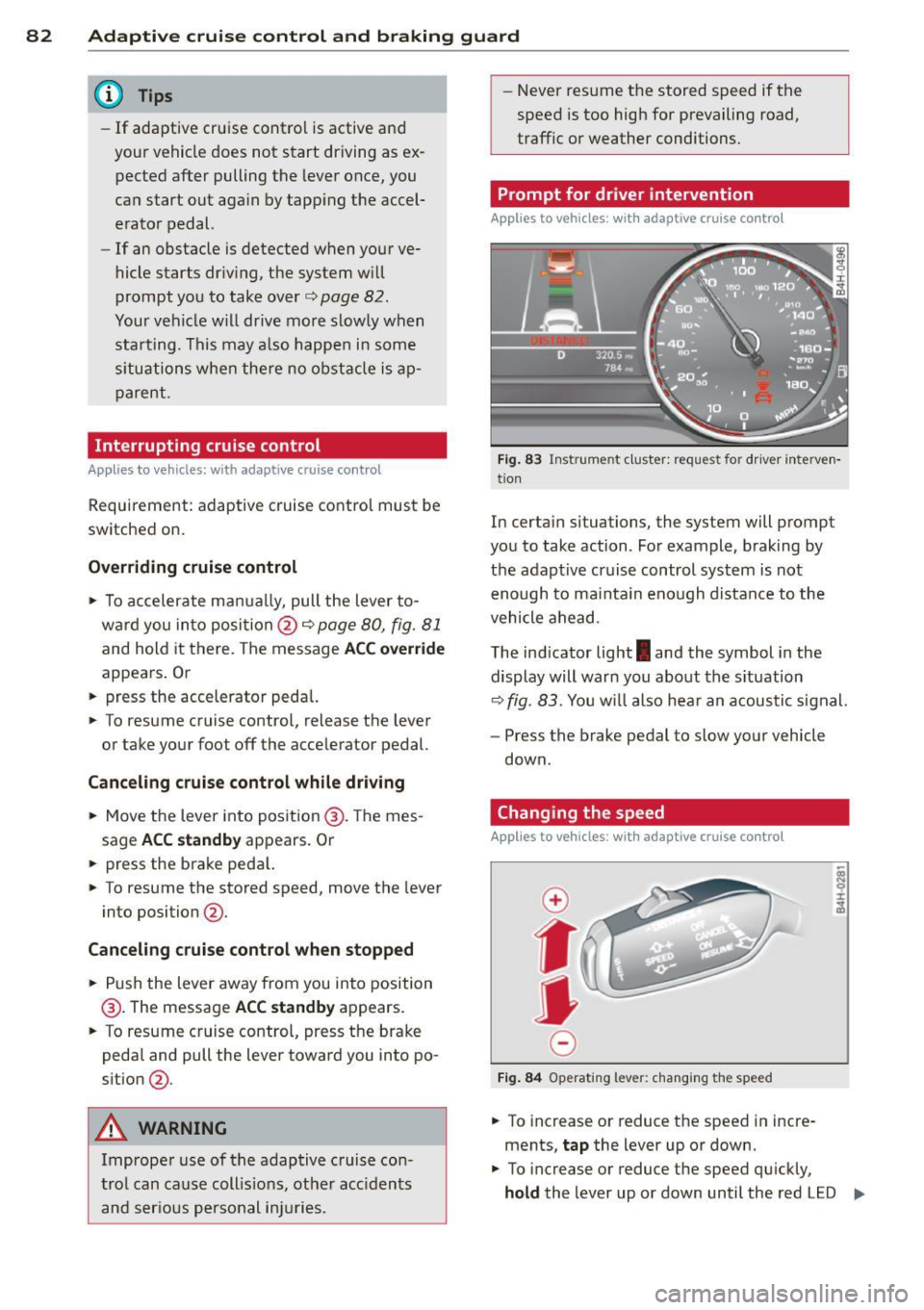
In certa in situations, the system will prompt
you to take action . For example, braking by
the adaptive cruise control system is not enough to mainta in enough distance to the
vehicle ahead.
The indicator light
I and the symbol in the
display will warn you about the situation
~ fig. 83. You wi ll also hear an acoustic signal.
- Press the brake pedal to slow your vehicle
down.
Changing the speed
Applies to vehicles: with adaptive cruise control
0
f
jJ
0
Fig. 84 Operating lever: changing the speed
.. To increase or reduce the speed in incre
ments,
tap the lever up or down.
.. To increase or reduce the speed qu ickly,
hold the lever up or down until the red LED ..,.
Page 86 of 298
84 Adapti ve crui se control and bra king guard
@ Tips
- Di sta nce 3 is set automatically each time
you switch the ignition on.
- Your standard settings are automatically
stored and assigned to the remote con
trol key being used.
Audi braking guard
Description
Ap plies to vehicles: with a daptive cruise co ntrol
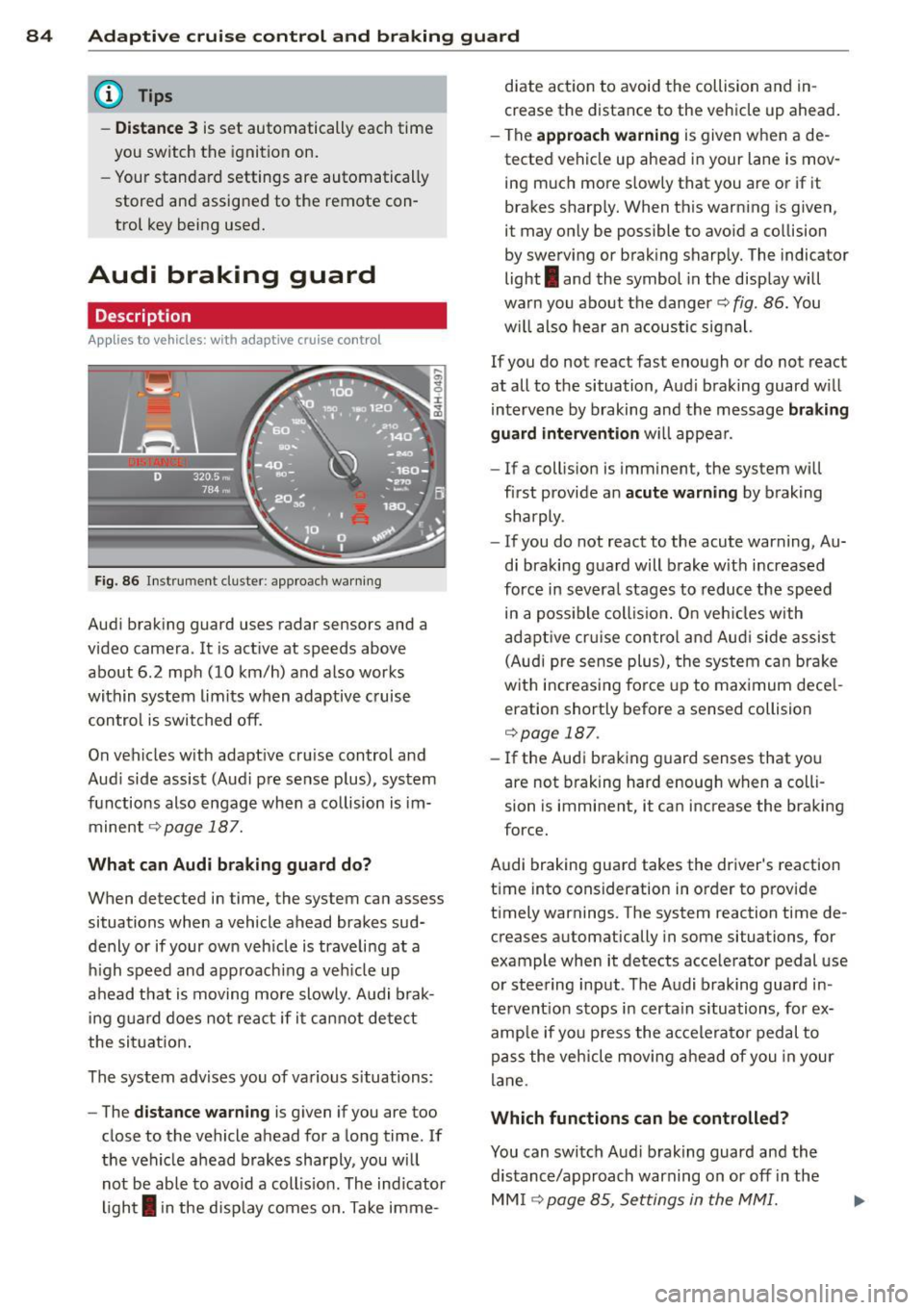
Fig. 86 Inst rument cluster: app roach wa rning
Aud i braking guard uses radar sensors and a
video camera. It is act ive at speeds above
about 6.2 mph (10 km/h) and also works
within system limits when adaptive cruise contro l is switched off.
On vehicles with adapt ive cruise control and
Aud i side assist (Audi p re sense plus), system
functions also engage when a co llision is im
minent
¢ page 187.
What c an Audi br aking gu ard do?
When detected in time, the system can assess
situations when a vehicle ahead brakes sud
denly or if your own veh icle is trave ling at a
h igh speed and approachi ng a veh icle up
ahead that is moving more slowly . A udi brak
i ng guard does not react if it ca nnot detect
the sit uat ion .
The system advises you of various situations:
- The
distan ce w arn ing is given if you are too
close to the vehicle ahead for a long time . If
the vehicle ahead brakes sharply, you will not be able to avoid a coll is ion . The ind icator
ligh t
I in the disp lay comes on. Take imme- diate action to avoid the collision and in
crease the distance to the vehicle up ahead
.
- The
appr oach warning is given when a de
tected vehicle up ahead in your lane is mov
ing much more slowly that you are or if it
brakes sharp ly. When this warning is given,
it may only be possible to avo id a co llision
by swerving or brak ing sharp ly. The indicator
light
I and the symbol in the display will
warn you about the danger¢
fig. 86. You
w ill also hear an acoustic signal.
If you do not react fast enough or do not react
at all to the situation, Aud i braking guard w ill
intervene by braking and the message
br aking
guard interv ention
w ill appear.
- If a collis ion is imminent, the system will
first provide an
a cute warning by braking
sharply .
- If you do not react to the acute warning, Au
di braking guard will brake w ith increased
force in severa l stages to reduce the speed
in a poss ible coll is ion. O n veh icles with
adapt ive cr uise con tro l a nd Aud i side assist
(Audi pre sense plus), the system can brake
w it h increas ing fo rce up to max imum dece l
eration shortly before a sensed collision
¢page 187.
- If
the Audi braking guard senses that you
are not braking hard enough when a colli
sion is imminent, it can increase the braking
force.
Audi braking guard takes the driver's reaction
time into consideration in order to provide
t imely warnings. The system reaction time de
creases automat ically in some situations, for
example when it detects acce lerator pedal use
or steering input. The Audi braking guard in
tervent io n stops in certa in situations, for ex
amp le if you p ress the accele ra to r pedal to
pass the vehicle moving a head of you in your
lane.
Which function s can be controlled?
You can switch Aud i brak ing guard and the
distance/approach warning on or off in the
MM I ¢page 85, Settings in the MMI.
Page 103 of 298
Automatic Transmission
multitronic ®
Introduction
Appl ies to vehicles: with multitr oni c
Your veh icle is equipped with an electronically
controlled,
continuously variable transmis
sion
(multitronic ®). In contrast to convention
al automatic transmi ssions using shifting op
erations, the transmission ratio in the contin
uously variab le transmission is changed con
tinuously. This optimizes the comfort level
and conserves fuel.
The gear ratio in the transmission is selected
(upshift and downshift) completely automati
cally as a function of the defined driving pro
grams.
If desired, the driver can also select the gears
manually (tiptronic mode).
Instead of the torque converter in convention
al automatic transmissions, your multitronic ®
transmission uses a multidisk clutch for pow
er transmission . Therefore, the "creep behav
ior" of the veh icle dur ing idling when tempo
rarily stopped in selecto r lever pos it ion 0/S or
R is less pronounced.
Driving the automatic transmission
A ppl ies to vehicles: with multitr onic
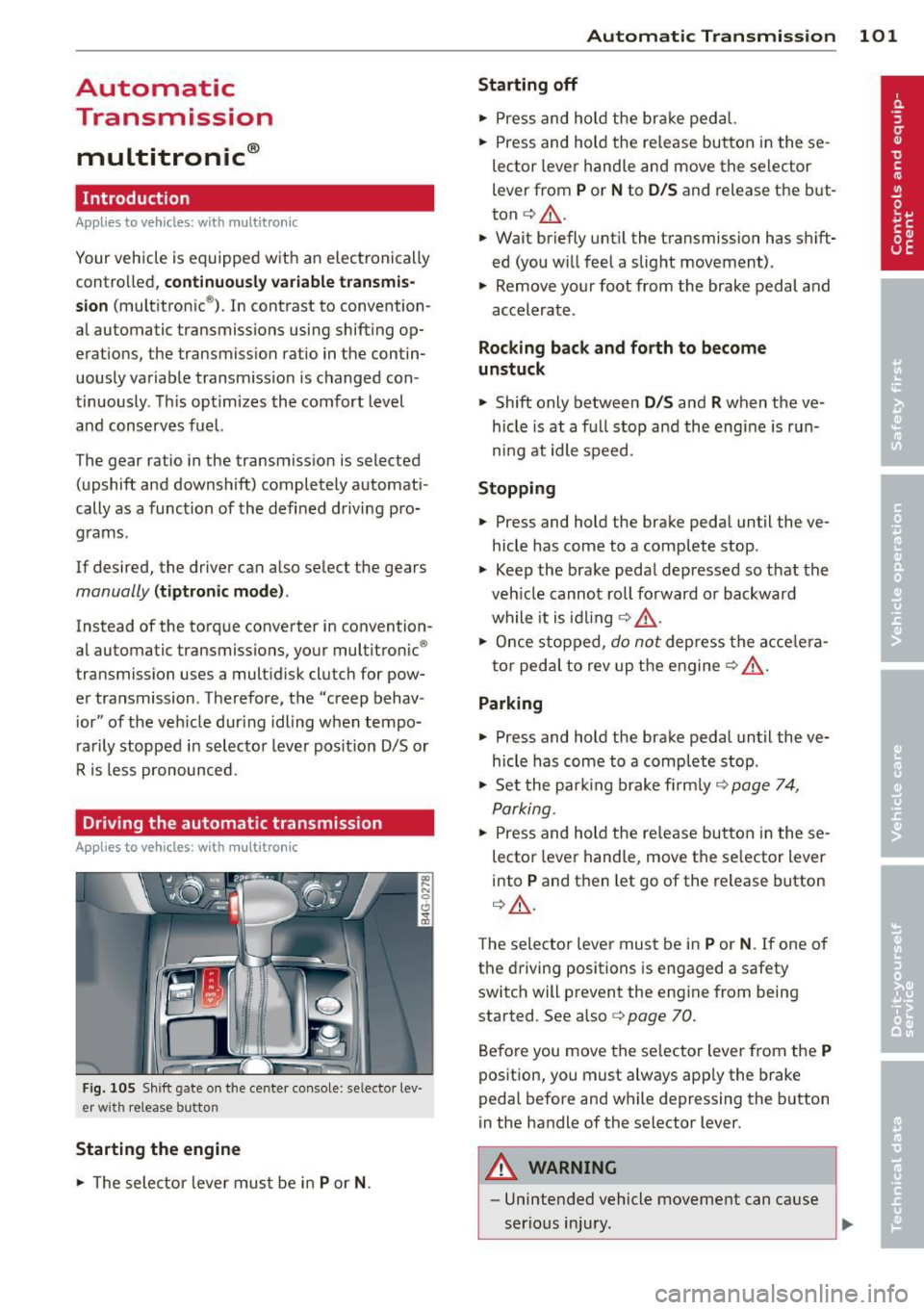
Fig . 105 Shift gate on the cente r console: se lecto r lev
er wi th release button
Starting the engine
• The selector leve r must be in P or N. Automatic Transmission 101
Starting off
•
Press and hold the brake pedal.
• Press and hold the re lease button in these
lector lever handle and move the selector
lever from
P or N to D/S and release the but
ton
c:> _&. .
.,. Wait briefly until the transmission has shift
ed (you will feel a slight movement) .
.,. Remove your foot from the brake pedal and
accelerate .
Rocking back and forth to become
unstuck
.,. Shift only between D/S and R when the ve
hicle is at a full stop and the engine is run
ni ng at idle speed .
Stopping
.,. Press and hold the brake pedal until the ve
hicle has come to a complete stop .
• Keep the brake pedal depressed so that the
veh icle cannot roll forward or backward
while it is idling
c:> _&. .
• Once stopped, do not depress the acce le ra
tor peda l to rev up the engine
c:> _&. .
Parking
.,. Press and hold the brake pedal until the ve
hicle has come to a complete stop .
• Set the park ing brake firmly
c:> page 7 4,
Parking .
• Press and hold the release button in these
lector lever handle, move the se lector lever
into
P and then let go of the release button
c:> _&..
The selector lever must be in P or N. If one of
the driving positions is engaged a safety
switch will prevent the eng ine from being
started . See also co
page 70.
Before you move the selector lever from the
P
position, you must always app ly the brake
pedal before and while depressing the button
in the handle of the selector lever.
A WARNING
-- Unintended vehicle movement can cause
serious injury.
Page 104 of 298
102 Autom atic Tran smi ssi on
-When the selector lever is in a driving
position, the veh icle may creep, even at
id le speed. Therefore do not release
the park ing brake or foot brake until
you are ready to move, because power
is transmitted to the wheels as soon as
a driving posit ion is engaged.
- Do not accelerate while selecting a
driving position. At this time the en
g ine must be at idle speed so that un
d ue stress is no t placed on the clutches
in the t ransmission.
- Remembe r: Even when stopped briefly
with the automatic transmission in D/S
or R, engine power is being transmit
ted to the whee ls. Yo ur vehicle could
"creep" forward or backward . When
stopped, keep the brake peda l fully de
pressed and use the parking brake if
necessary to keep the vehicle from roll
ing .
-If the selector lever is unintentionally
moved into N wh ile you are driving, take
yo ur foot off the accele rator pedal and
wa it for the engine to return to idle
speed befo re selec ting a drivi ng position.
- Never shift into R or P when the veh icle is
in mo tion.
- Never get out of the dr iver's seat when
the engine is runn ing.
- If you must get out of the vehicle, move
the se lector lever securely into the P po
si ti on a nd apply the park ing brake fi rm ly.
- If the eng ine must remain running, never
have any driv ing pos ition engaged when
chec king under the hood. Make sure the
selector lever has securely engaged and
is locked in P with the parking brake
firmly set¢
page 214, Engine comport
ment .
Otherwise, any increase in engine
speed may set the vehicle in mot ion,
even with the parking brake applied.
Selector lever positions
Applies to vehicles: wit h mult itronic
This section describes the selector lever posi
tions and driving ranges.
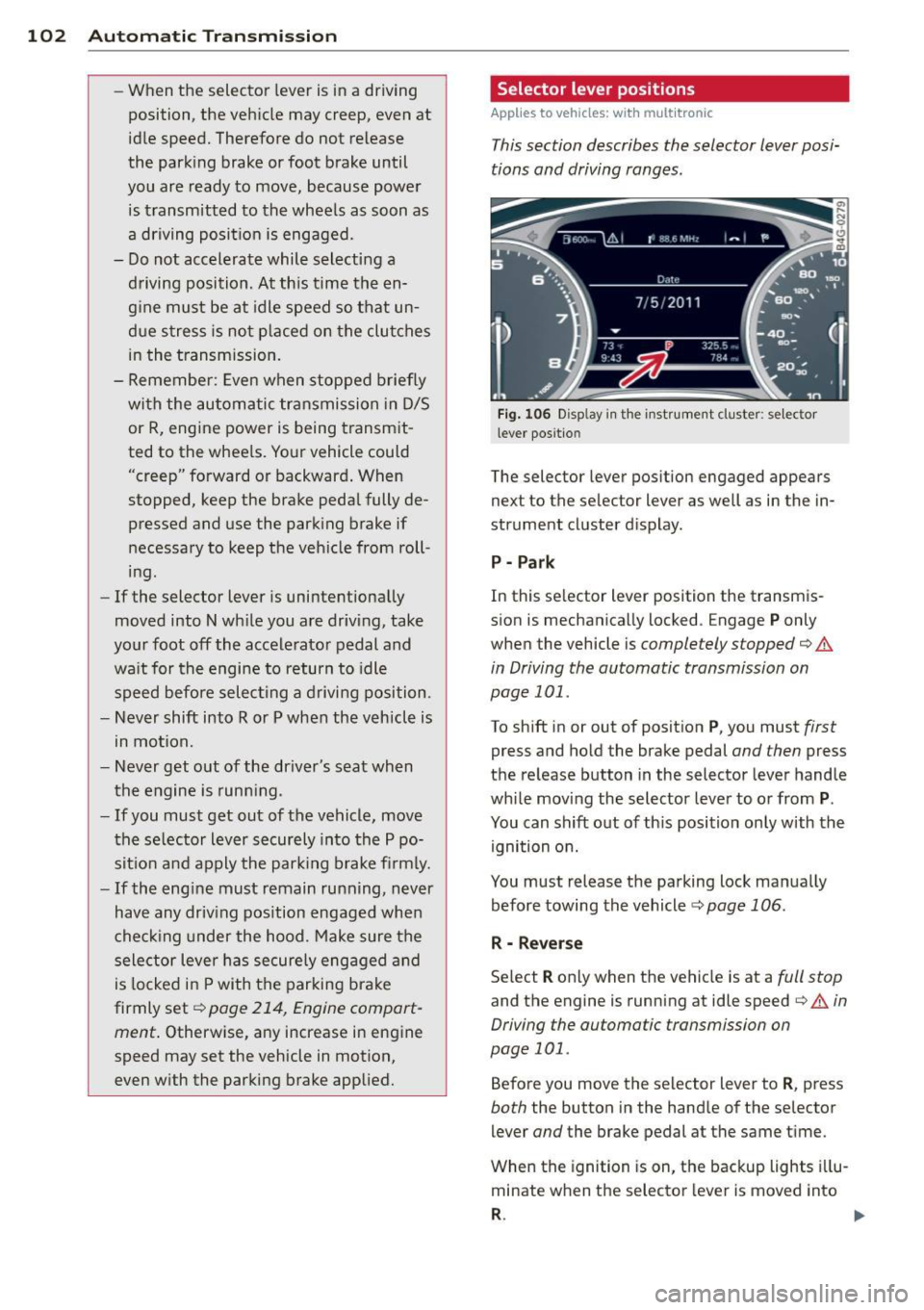
F ig . 106 Display in th e inst rument cluster: se lector
l ever positio n
The selector lever position engaged appears
next to the selector lever as well as in the in
strument cluster d isplay.
P - Par k
In this se lector lever position the transm is
sion is mechanically locked . Engage
P only
when the vehicle is
completely stopped¢.&
in Driving the automatic transmission on
page 101 .
To shift in or out of posit ion P , you must first
press and hold the brake pedal and then press
the re lease button in the selector lever handle
whi le moving the selector lever to o r from
P .
You can shift out of th is position only with the
ignition on.
You must release the parking lock manually before towing the vehicle ¢
page 106.
R - Reverse
Se lect R only when the vehicle is at a full stop
and the engine is running at idle speed¢.& in
Driving the automatic transmission on
page 101.
Before you move the selector lever to R , press
both the button in the hand le of the se lector
lever
and the brake pedal at the same t ime.
When the ignition is on, the backup lights i llu
minate when the selector lever is moved into
R . 1111-
Page 106 of 298

104 Automatic Tran sm iss ion
At speeds above about 3 mph (5 km/h) the
Automatic Shift Lock is automatically deacti
vated in the
N position.
I nte rlock butt on
The lock button on the selector lever prevents
the lever from being acc identally shifted into
certain positions. Pressing this button deacti
vates the se lector lever lock. Depending on
the direction of the shift, the se lector lever
locks at different positions. The positions are
h ighlighted in the illustration
c:> fig. 107.
Kick-down
App lies to vehicles: with multitronic
The kick-down feature allows the vehicle to
generate maximum acceleration.
When you depress the accelerator pedal be
yond the resistance point, the transmission downshifts into a lower gear ratio depending
on the vehicle speed and engine speed. As long as the accelerator pedal is depressed, the
engine speed is automat ically regulated for
maximum acceleration.
A WARNING
Be ca reful when using the kick-down fea
ture on slippe ry roads. Rapid acce lerat ion
may cause the vehicle to skid.
Dynamic shift program (DSP)
Applies to vehicles: with multitr on ic
The automatic transmission is electronically
controlled.
The transmission is self adapting and will au
tomat icall y
select the best shift program su it
ed to the driving condit ions and d riving s tyle.
The transmission will se lect one of the
econo
my
programs when you drive at a steady
speed or a gradually chang ing speed without
heavy acceleration . T h is ach ieves optimum
f u e l efficiency, with early upshifting and de
layed downshifting .
The transmission will a utomat ica lly select the
s porty shift prog rams whe n you drive at high- er speeds, or with heavy acceleration and fre
quently changing speeds. Upshifts are delayed
to make full use of engine power . Downshift
ing takes place at higher engine speeds than
in the economy programs.
The selection of the most suitable s hift pro
gram is a continuous, automatic process. The
driver can a lso make the transm iss ion sw itch
to a sporty program by
qu ick ly pressing down
the gas pedal.
This causes the transm ission to shift down to
a lower gear to ach ieve rapid acce lerat ion, e.g.
for quickly passing another vehicle. You do not need to press the gas pedal into the kick-down
range. After the transm ission has upshifted,
the or iginal program is selected according to
you r dr iv ing style .
An additional sh ift program allows the auto
matic transmission to select the proper gea r
for uphill and downh ill grad ients.
This keeps the transm ission from shifting up
and down unnecessarily on hills. The trans
mission will sh ift down to a lower gear when
the driver presses the brake pedal on a down
hill g radient. This ma kes use of the braking ef
fect of t he engine w ithou t the need to s hift
down man ually .