lights AUDI S6 2012 Owner's Manual
[x] Cancel search | Manufacturer: AUDI, Model Year: 2012, Model line: S6, Model: AUDI S6 2012Pages: 298, PDF Size: 74.43 MB
Page 31 of 298
Instruments and warning/indicator lights 29
In o rder to connect the special diagnostic
equipment, push the plug into the Data Link
Connector (DLC) . The DLC is located to the
right of the hood re lease ¢
fig. 15.
Your authorized Audi dealer or a qualified
service station can interpret the code and per
form the necessary repair.
Electronic speed limiter
Your vehicle may be factory equipped with
tires that are rated for a maximum speed of 130 mph (210 km/h) . Thi s is less than the
maximum speed of your vehicle . To reduce the
ri sk of sudden tire failure and loss of control if
the vehicle is ope rated at excessive speeds,
your veh icle also has an electronic speed limit
er. The electronic speed limiter prevents your
vehicle from going faster than the tire speed
rating . For more information ¢
page 246.
If the engine control unit receives faulty vehi
cle road speed signals, the Malfunction Indi
cator Lamp (MIL)
II will i lluminate. If this
occurs, contact the nearest author ized Audi
dea ler for assistance.
A WARNING
-
Always observe the posted speed limits
and adjust your speed to suit prevailing
road, traffic and weather conditions . Never
drive your vehicle faster than the maxi
mum speed rating of the tires insta lled.
Page 43 of 298
Clear vision Lights
Switching the headlights on and off
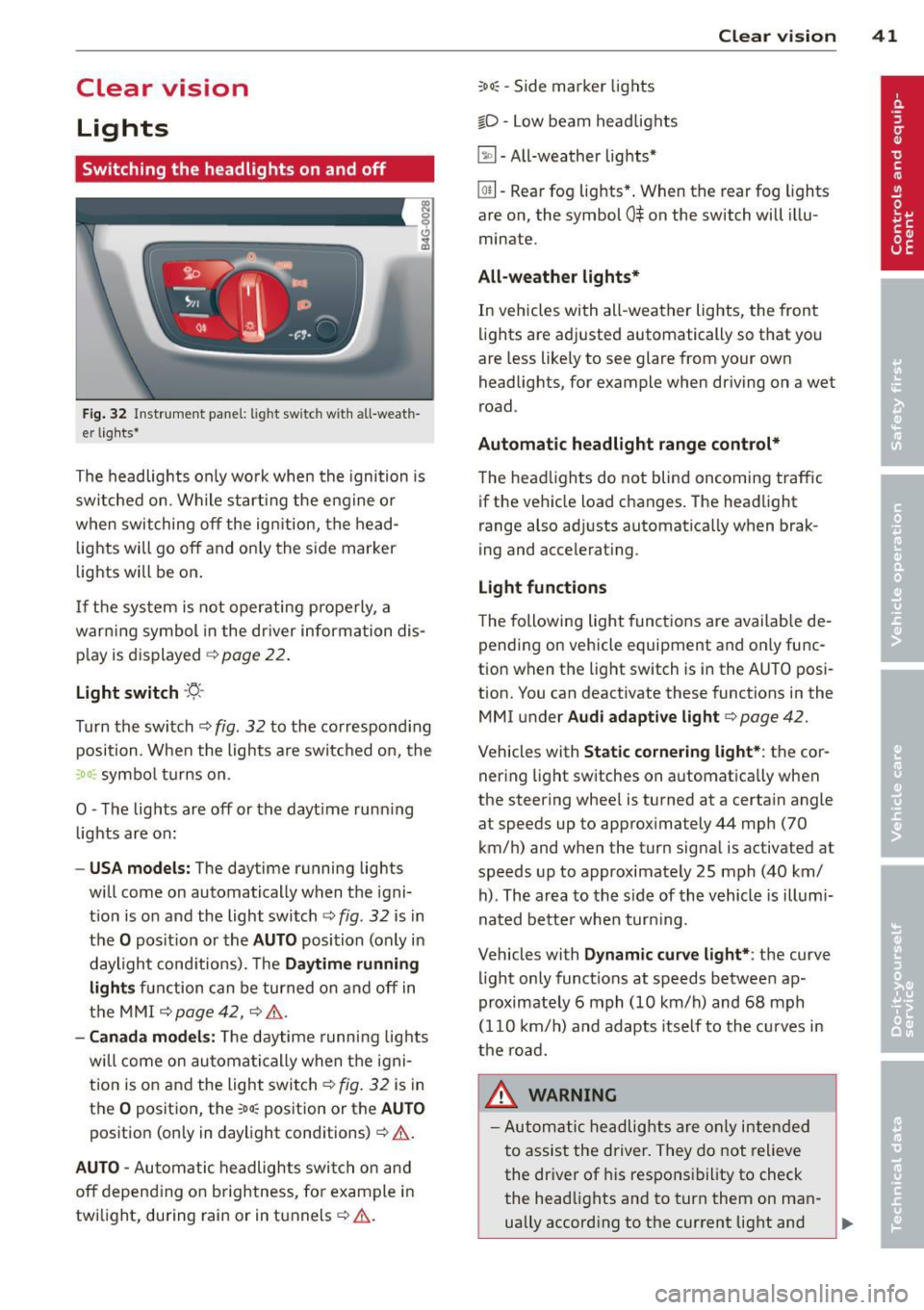
Fig . 32 Instrument pane l: lig ht sw itc h wit h all -weath
er lights•
The headlights only wo rk when the ignition is
switched on. Wh ile start ing the eng ine o r
when switching off the ign ition, the head
lights will go off and on ly the side marker
lights will be on .
If the system is not operating p rope rly, a
war ning symbol in the dr iver information dis
p lay is d isplayed
c::> page 22 .
Light switch ·'t!- -
Tu rn the switch c::> fig . 32 to the correspond ing
position . When the lights a re switched on, the
:oo: symbo l tu rns on .
0 -The lig hts are off or the dayt ime runn ing
lights are on:
- USA models: The daytime running ligh ts
will come on automatically when the igni
t ion is on and the light switch
c::> fig . 32 is in
the O posit ion or the AUTO position (only in
daylight cond itions). The Daytime running
light s function can be turned on and off in
the MMI
c::> page42, c::>A .
-Ca nada model s: The daytime running lig hts
will come on automa tically when the igni
t ion is on and the light switch
c::> fig . 32 is in
the O position, the
:oo: pos ition or the AUTO
position (only in daylight conditions)
c::> A .
AUTO -Automatic headlights swi tch on and
off depend ing o n brightness, for example i n
tw ilight, during rain or in tunnels
c::> &. .
:oo: -Side marke r lights
io -Low beam headlights
~ -All-weather lig hts*
Clear vi sion 41
[Q!l -Rear fog lights* . When th e rear fog lights
a re on, the symbol
0$ on the switch will illu
mina te.
All-weath er lights*
In vehicles with all-weather lights, the front
li ghts are adj usted automatically so that you
are less like ly to see glare from your own
headligh ts, for example when driving on a wet
road .
Automatic headlight range cont rol*
The head lights do not blind oncoming traffic
if the vehicle load changes . The headlight
range also ad justs automatica lly when brak
i ng and accelerat ing .
Light function s
T he following light funct ions are avai lab le de
pending on vehicle equipment and on ly func
tion when the light switch is i n the AUTO posi
tion. You c an deactiv ate these functions in the
MMI under Audi adaptive light
c::> page 42 .
Vehicles w ith Static cornering light* : the cor
ner ing light sw itches on automatica lly when
the stee ring whee l is tu rned at a ce rta in angle
at speeds up to approx imately 44 mph (70
km/ h) and when the turn signa l is ac tiva ted a t
speeds up to approximately 25 mph (40 km/
h) . The area to the s ide of the vehicle is illumi
nated bette r whe n turn ing .
Vehicles with Dynamic curve light* : the
curve
li ght only functions at speeds betwee n ap
proximately 6 mph (10 km/h) and 68 mph
(110 km/ h) and adapts itself to the cu rves in
the ro ad.
_& WARNING
- Autom atic headlig hts are only intended
to assist the driver. They do not relieve
the dr iver of his responsibility to check
the head lights and to turn them on man -
ually accord ing to the current light and
~
Page 44 of 298
42 Clear vision
visibility conditions. For example, fog cannot be detected by the light sensors.
So always switch on the headlights
io
under these weather conditions and
when driving in the dark.
- Crashes can happen when you cannot see
the road ahead and when you cannot be
seen by other motorists . Always turn on
the headlights so that you can see ahead and so that others can see your car from
the back.
(D Note
The rear fog lights should only be turned
on in accordance with traffic regulation, as
the lights are bright for following traffic.
@ Tips
-In the event of a light sensor malfunc
tion, the driver is notified in the instru
ment cluster display~
page 22.
- You will hear a warning tone if you open
the driver door when the exterior lights
are switched on.
- Please observe legal regulations when
using the lighting systems described .
Emergency flasher
The emergency flasher makes other motorists
aware that you or your vehicle are in an emer
gency situation.
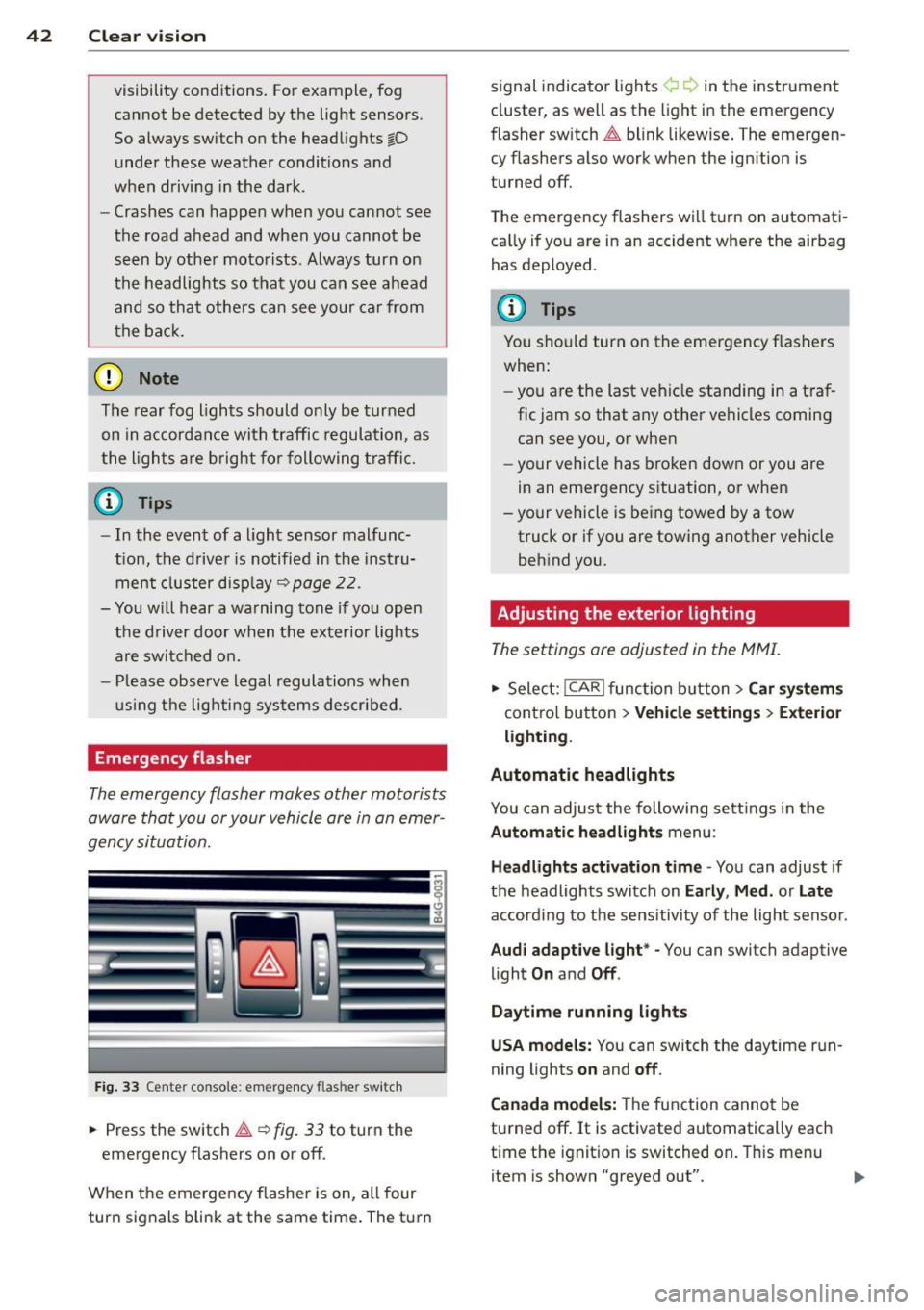
Fig. 33 Center console : emerge ncy flasher switch
• Press the switch~~ fig. 33 to turn the
emergency flashers on or off.
When the emergency flasher is on, all four
turn signals blink at the same time. The turn signal
indicato r lights ¢ Q in the instrument
cluster, as well as the light in the emergency
fl asher switch ~ blink likewise. The emergen
cy flashers also work when the ignition is
turned off.
The emergency flashers will turn on automati
cally if you are in an accident where the airbag
has deployed .
(D Tips
You should turn on the emergency flashers
when:
- you are the last vehicle standing in a traf
fic jam so that any other vehicles coming
can see you, or when
- your vehicle has broken down or you are
in an emergency situation, or when
- your vehicle is being towed by a tow
truck or if you are towing another vehicle
behind you.
· Adjusting the exterior lighting
The settings ore adjusted in the MMI.
• Select: I CAR I function button > Car systems
control button > Vehicle settings> Exterior
lighting.
Automatic headlights
You can adjust the following settings in the
Automatic headlights menu :
Headlights activation time -You can adjust if
the headlights switch on
Early , Med. or Late
according to the sensitivity of the light sensor .
Audi adaptive light* -You can switch adaptive
light
On and Off .
Daytime running lights
USA models:
You can switch the daytime run
ning lights
on and off.
Canada models:
The function cannot be
turned off.
It is activated automatically each
time the ignition is switched on. This menu
item is shown "greyed out".
Page 45 of 298
Coming home , Leav ing home
The coming home function il luminates the
area outside the vehicle when you switch the
ignition off and open the driver 's door . To turn
the function on, select
Light s when le aving
c a r > On .
The leav ing home function illuminates the
area outside the vehicle when yo u un lock the
veh icle . To turn the function on, select
Li gh ts
when unloc kin g ca r> On.
The coming home and leaving home functions
only operate when it is dark and the light
switch is in the
AUTO pos ition.
Turn signals and high beam lever
The lever on the le~ side of the steering col
umn is used to operate the turn signals and
the high beam as well as the headlight flash
er .
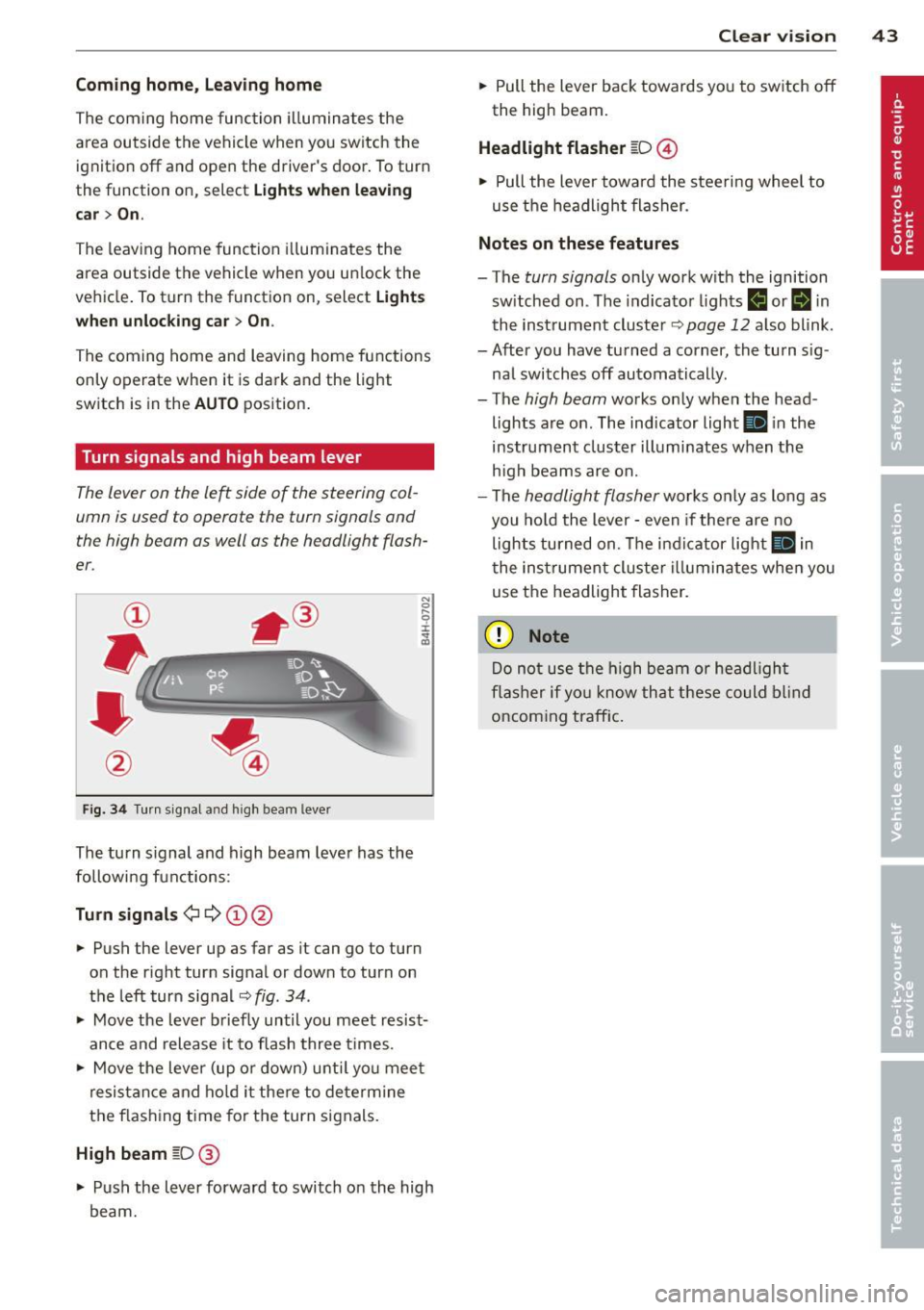
Fig. 3 4 Tu rn signal a nd h igh beam lever
The turn s ignal and high beam lever has the
followi ng functions:
Tu rn sign als ¢ ¢ @@
.. Push the lever up as far as it can go to turn
on the r ight turn signal or down to turn on
the left turn sig nal
c:::;, fig . 34 .
.. Move the lever b riefly until you meet resist
ance and release it to flash three times .
.. Move the lever (up or down) unti l you mee t
resistance and ho ld it there to dete rmine
the f las hing t ime for the turn signals.
High beam [D @
.. Push the lever forward to switch on the high
beam.
Clear vi sion 43
.. Pull the lever back towards you to switch off
the high beam.
Headlight fla sher [D ©
.. Pull the lever towa rd the stee ring wheel to
use the headlight flasher.
Note s on these features
- The turn signals on ly work with the ignition
sw itched on . The indicator lights
f,j or II in
the inst rument cluster~
page 12 also blink.
- After you have turned a corner, the turn s ig -
nal switches off automatically .
- The
high beam works only when the head
lights are on . The indicator light
Ill in the
instrument cluster illuminates when the
h igh beams are on.
- The
headlight flasher works only as long as
you hold the lever -even if the re a re no
lights turned on. The indicator light
Ill in
the inst rument cluster i lluminates whe n you
use the headlight flasher.
(D Note
Do no t use the high beam or headligh t
flasher if yo u know that these could blind
oncoming traffic.
Page 46 of 298
44 Clear vis ion
Interior lights
Front and rear interior lighting
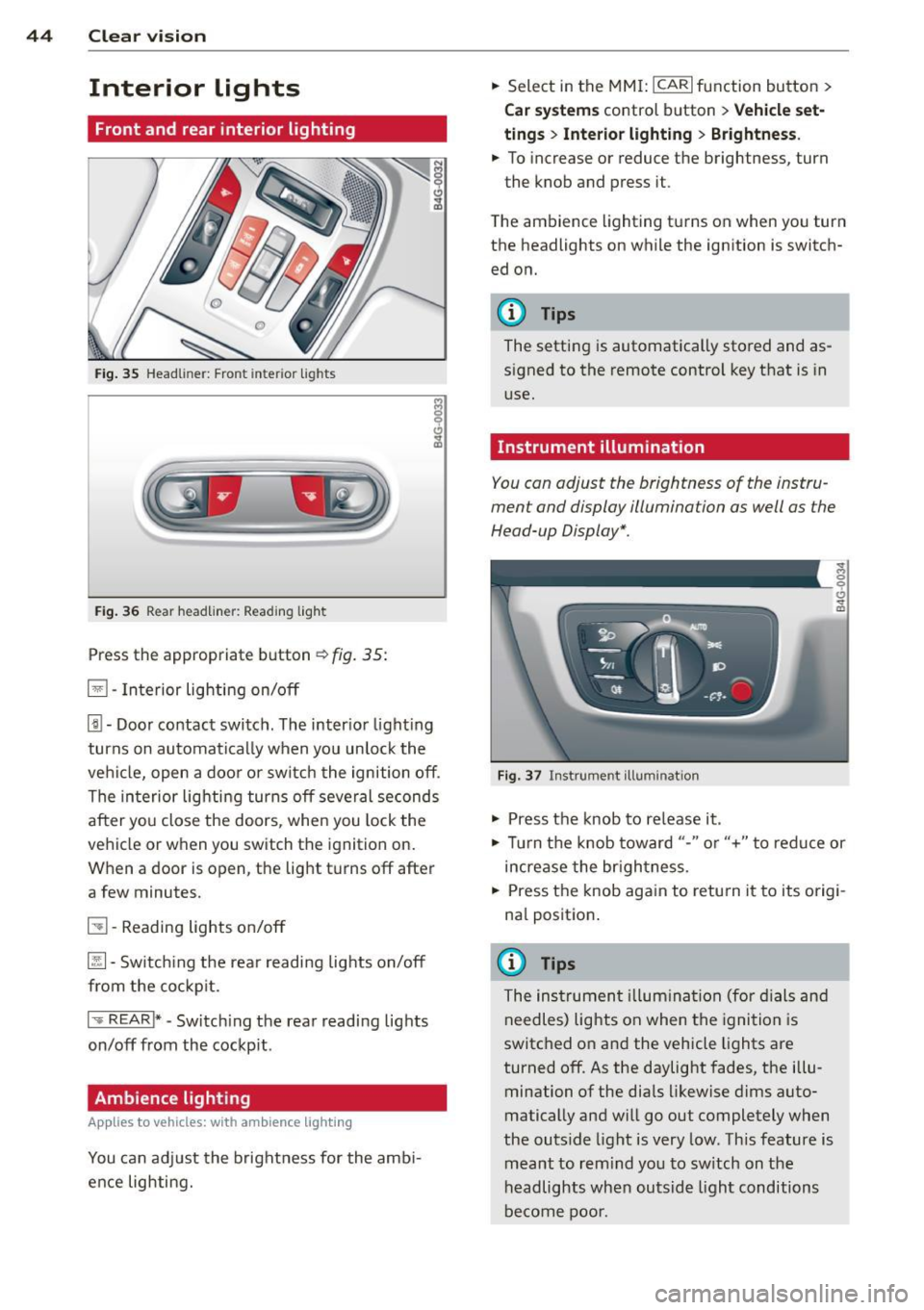
Fig. 35 Head liner: Fron t int eri or ligh ts
Fig. 36 Rear headlin er: R ead in g light
Press the appropriate b utton ~ fig. 35:
El -Interior lighting on/off
[j) -Door contact switch . The inter io r l ight ing
turns on automatically when you unlock the
vehi cle, open a doo r or switch the ignition off .
The interior lighting turns off several seconds
after you close the doors , when you lock the
vehicle or when you switch the ignition on.
When a door is open, the light t urns off after
a few minutes.
51 -Reading lights o n/off
~ -Sw itch ing the rear readi ng lights on/off
from the co ckpit.
I .,.. REAR !* -Switch ing the rear reading lights
on/off from the cockp it .
Ambience lighting
Appl ies to vehicles: wit h ambience lighting
You can adj ust the brightness for the amb i
ence lighting. .,.
Select in the MM I: ICARlfunction button>
C ar sys tem s control button > Vehicle set
ting s
> Interio r light ing > Brightne ss .
.,. To increase or reduce the brightness, turn
the knob and press it .
T he ambience lighting turns on when you turn
the headlights on while the ignition is switch ed on.
@ Tips
The setting is automatically stored and as
signed to the remote control key that is in
use.
Instrument illumination
You can adjust the brightness of the instru
ment and display illumination as well as the
Head-up Display *.
F ig. 37 In strume nt ill umin ation
.,. Press the knob to re lease it .
~ 0
"'
.,. Tur n the knob toward "-" or"+" to redu ce or
increase the br ightness.
.,. Press the knob aga in to retu rn it to its origi
na l position .
(I} Tips
The instrumen t illum ina tion (for dials and
needles) lights on when the ignition is
switc hed o n and the vehicle lights are
turned off . As the daylight fades, the illu
mination of the dia ls likewise d ims auto
matically and will g o out completely when
the outs ide light is very low. This feature is
meant to rem ind yo u to sw itch on the
headlights when outsid e light conditions
be come poo r.
Page 48 of 298
46 Clear vis ion
Wiper and washer
system
Switching the windshield wipers on
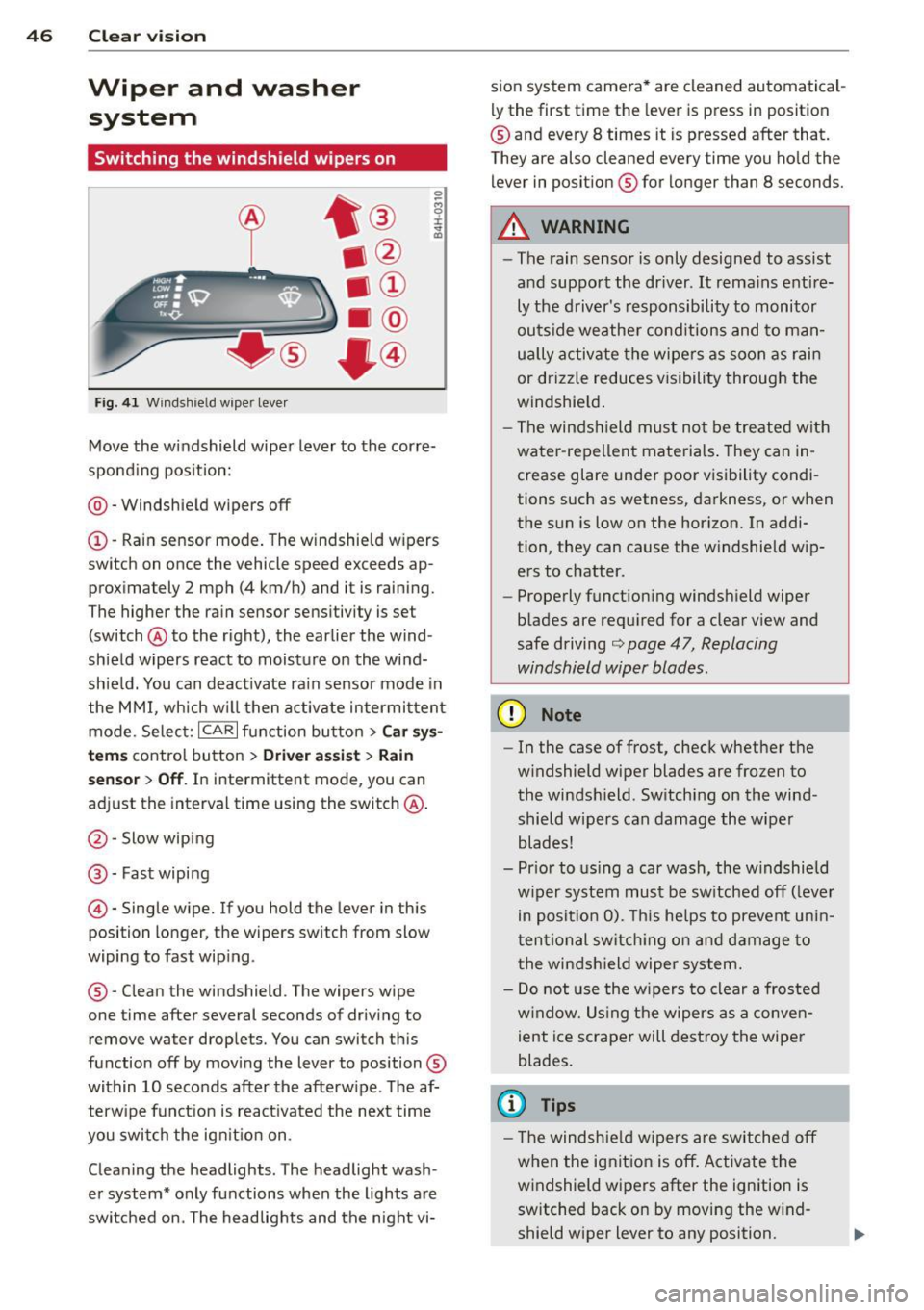
F ig. 4 1 Windsh ie ld wipe r lever
Move the windshield wiper lever to the corre
spond ing pos ition:
@ -Windshie ld wipers off
(I) -Rain sensor mode . The windshield w ipers
switch on once the vehicle speed exceeds ap
proximately 2 mph (4 km/h) and it is raining.
The higher the rain sensor sens it ivity is se t
(switch @to the right), the earlier the wind
shield wipers react to moisture on the wi nd
shie ld. You can deact ivate rain sensor mode in
the MMI, which w ill then activate intermi ttent
mode. Selec t:
ICAR I function bu tton > C ar s ys
t e m s
contro l bu tton > Dri ver a ssis t > Rain
se nsor
> Off . In intermittent mode, you can
adjust the interval time using the switch @.
@-Slow wiping
@-Fast wiping
©-Single wipe. If you hold the lever in this
posi tion longer, the wipers sw itch from slow
wiping to fast wip ing .
® - Clean the windshield . The wipers wipe
one time after several seconds of driv ing to
remove water drop le ts. You can switch this
function off by mov ing the lever to position ®
within 10 seconds after the afterw ipe . The af
terw ipe fun ct ion is react ivated the next time
you swit ch the ig nitio n on .
Clean ing the headlights . The headlight wash
e r system* only functions when the lights are
switched on . The headlights and the night vi- s
ion system camera * are cleaned automatical
ly the first time the lever is press in position
® and every 8 times it is pressed after that.
They a re also cleaned every time you ho ld the
lever in posit ion ® for longer than 8 seconds.
A WARNING
--The rain sensor is only designed to assist
and support the dr iver .
It rema ins enti re
ly the d river's responsibility to monitor
outs ide weather cond itions and to ma n
u a lly activate the wipe rs as soon as rai n
or drizzle reduces visibility through the
windshie ld .
- The windsh ield mu st not b e tre ate d w ith
water -repellent materials . They can in
crease glare under poor v isibility condi
tions such as wetness, da rkness, or when
the sun is low on the hor izon. In addi
tion , they can cause the w indshield w ip
ers to chatter.
- Properly function ing windsh ield wiper
b lades are req uired for a clea r view and
safe driving
i::> page 47, Replacing
windshield wiper blades.
(D Note
- In the case of frost, check whether the
w indshield wiper blades are fr ozen to
the windsh ield . Sw itching on the wind
shield wipers can damage the wiper blades!
- Pr ior to us ing a car wash, the w indshield
w iper system must be sw itched off ( lever
in posit ion 0). This he lps to prevent un in
t en tional switch ing o n and dam age to
t he winds hield wiper system.
- Do not use the w ipers to clear a frosted
w indow. Us ing the wipers as a conve n
ient ice scraper will destroy the wiper
blades.
(D Tips
- T he windshie ld wipers are sw itched off
w hen the ig nit io n is off . Activate the
windshield wipers after the ignition is
switched back o n by moving the w ind
shield wiper lever to any position.
Page 51 of 298

Manual anti-glare adju stment
"' Move the small lever (located on the bot
tom edge of the mirror) to the r ear.
Automaticall y dimming mirror s*
"' To dim the rearv iew mirror and both exteri
or mirrors, press the@ button. The diode
@ turns on . The rearview and exte rior mi r
rors dim automatically when l ight sh ines on
them, for example from h eadlights on ave
hicle to the rear.
A WARNING
E lectrolyte flu id can leak from automatic
dimming mirrors if the glass is broken.
Electrolyte flu id can irritate skin, eyes and
resp iratory system .
- Repeated or prolonged exposure to elec
tro lyte can cause irritation to the resp ira
tory system, espec ially among people
with asthma or other respiratory cond i
tio ns. Get fresh ai r immediately by leav
ing the vehicle or, if that is not possible,
open windows and doors all the way.
- If electrolyte gets into the eyes, flush
them tho ro ughly wi th la rge amoun ts of
clean water for at least 15 m in utes;
medica l attention is recommended .
-If elec trolyte contacts s kin, f lush affec t
ed area with clean water for at least 15
minutes and then wash affected area
with soap and water; medical attention
is recommended . Thoroughly wash af
fected clothing and shoes before reuse.
- If swa llowed and person is conscious,
rinse mouth w ith water for at least 15
minutes . Do not induce vom iting un less
instructed to do so by medical professio
nal. Get medical attention immedia tely .
(D Note
Liquid electrolyte leaking from broken mir
ror glass will damage any p lastic surfaces
it comes in contact with . Clean up spilled
electrolyte immediately with clean water
and a sponge.
Clear vis ion 49
(D Tips
- Switching
off the dimming function of
the inside rear view mirror also deacti
vates the automatic dimming function of the exter ior mirrors.
- The automatic dimming mirrors do not dim when the interior lighting is turned
on or the reverse gear is selected.
-Automatic d imming for the mirror only
operates properly if the light striking the
inside m irror is not hindered in any way .
Page 56 of 298

54 Seats and storage
• To store a seating profi le, press the ISETI
button and then one of the memory but
tons.
• To reca ll a seating profile , press and hold
the memory button until the seat is adjust ed to the stored settings .
• To sw itch the memory function fo r th e d riv
er or front passenger off, p ress the
I OFFI
button. The word OFF lights up when the
memory fu nction is switched off. Seating
profiles will not be stored .
~ WARNING
-For safety reasons, the seat setting
should only be recalled when the vehicle
is stationary -otherwise you risk having
an acc ident.
- If necessary, you stop the process by
pressing the
! O FFI button or any of the
memory buttons.
Ashtray
Fi g. 51 Cente r console : front ashtray•
F ig. 52 Rear ashtray
Opening /closing
• To open the front ashtray, slide the cover
up . •
To close the front ash tray, press down on
the cover.
• To open the rear ashtray, tap the cover on
the rim.
Emptyin g
• To empty the front ashtray, pull it upward
and out .
• To empty the rear ashtray, press the rear
side of the cover down when it is open
q fig. 52 . The ashtray will lift up out of its
mount.
.,. To insert the ashtray aga in, press it down in
to the mount unt il it locks i nto place .
A WARNING
Never put waste paper in the ashtray. Hot
as hes or other ho t objects in the ashtray
could se t waste paper on fi re .
Cigarette lighter
Applies to vehicles: wit h cigarette lighter
Fig . 53 Center co nsole: ciga rette lighte r
• Push the knob on the cigarette lighter in.
• Remove the cigarette lighter when it pops
out.
The socket of the c igarette lighter may be
used for 12-volt appliances
q page 55 .
A WARNING
-
The c igarette lighter or sockets and any
e lectr ica l accessories con nected to them
operate only when the ign ition is switched
on. Incorrect usage can lead to ser ious in
j u ries o r burns. For th is reason, children
-
Page 74 of 298
7 2 On the road
-If yo u leave the vehicle wi th the ignition
switched on, the ignition will switch off
after a certa in period of time . Please
note that e lectrica l equipment such as
exter ior lights w ill switch off as well
when that happens .
Stopping the engine
.,. Bring your vehicle to a complete stop .
.,. Move the selector lever to the
P o r N posi
t ion.
.,. Press the
!S TAR T ENGINE S TOPI button
9 page 70, fig. 72 .
Emergency off
If necessary, the eng ine can be sw itched off
with the selector leve r in the
R or D /S posi
tion . The engine stops if you press the
I START ENGINE STOP! button at speeds below
6 mph (10 km/h) and press the brake pedal.
A WARNING
- Never turn off the engine unti l the vehi
cle has come to a complete stop.
- The brake booster and power steering
only work when the engine is running. If
the engine is off, you have to use more
force when steering or braking. Because
you cannot steer and brake as you usua l
ly wou ld, this could lead to crashes and
serious injur ies.
- For safety reasons, you should always
park your vehicle with the selector lever
in P. Othe rwise, the veh icle could inad
vertent ly roll away.
- After the engi ne has been switched off,
the radiator fan can continue to run fo r
up to 10 m in utes - even with the ig nitio n
swit ched off.
It can a lso switch on ag ain
afte r some time if the coolant tempera"
t u re rises as the result of a heat buildup
or if the engine is hot and the engine compartment is addit ionally heated by
the sun's rays.
(D Note
Do not stop the eng ine immediately after
hard or extended driving . Keep the engine
running for approximate ly two minutes to
prevent excessive heat bu ild-up .
Starting the engine if there is a
malfunction
It may not be possible to start the engine un
der certain circumstances, for example if the battery in the vehicle key is drained, if inter
ference is affe cted the key or if there is a sys
tem malfunction.
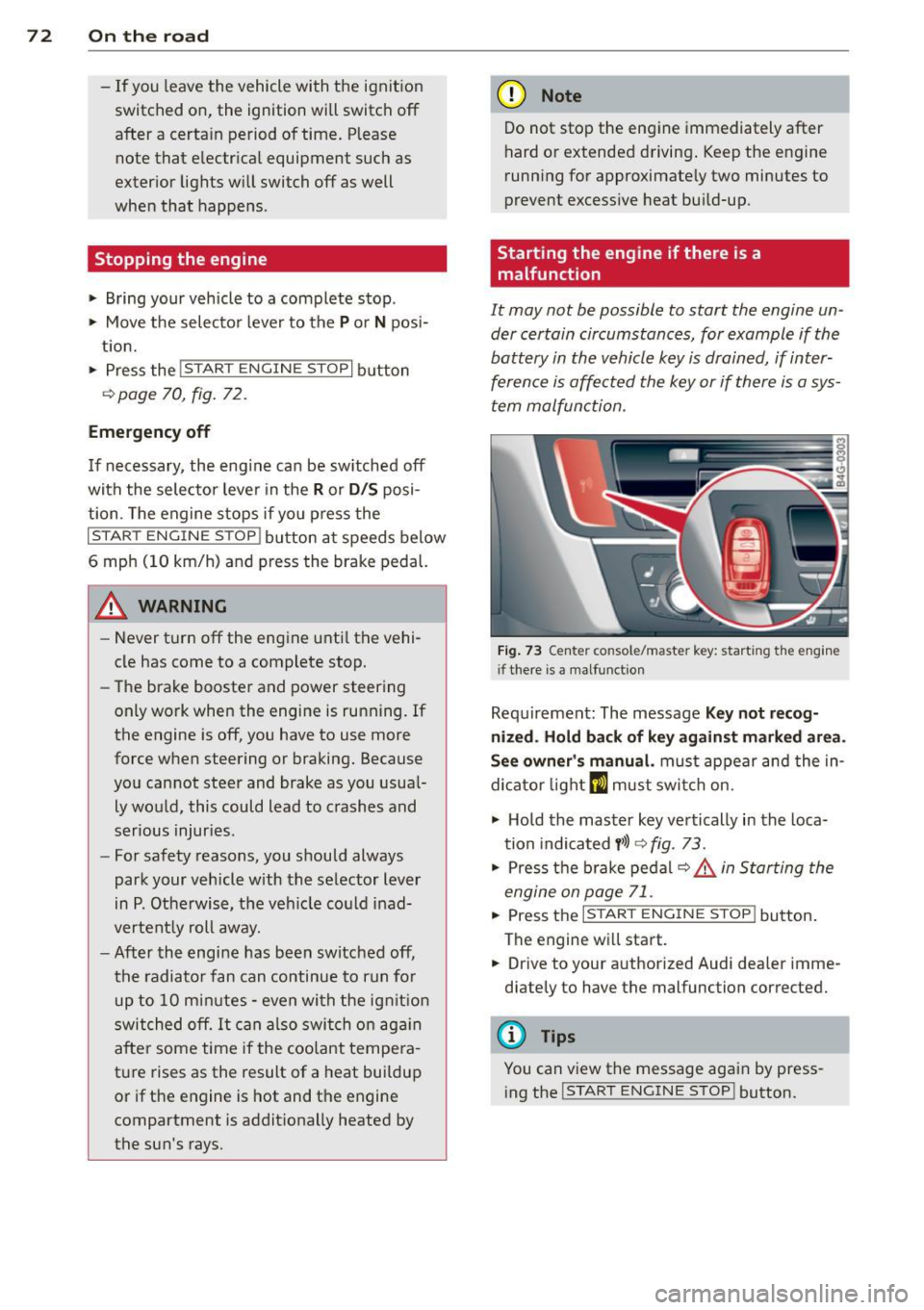
F ig. 73 Center co nsole/master key: start ing the eng ine
i f there is a malfunct io n
Requ irement: The message Key not r ecog
nized . H old back of key ag ainst marked are a.
See owner 's manual.
must appear and the in
dicator light
m must swi tch on.
.,. Ho ld the mas ter key vertically in the loca
tion indicated
y >l) 9 fig. 73.
.,. Press t he b rake pedal ~ .&. in Starting the
engine on page 71 .
... Press the ..., IS"'T :,-,A -,,R "'T ,.., E"" N...,..,,, G""IN ,-,-: E-,s"'T ,...,O ,.., P,..,I button .
The engine wi ll start.
.,. Dr ive to your authorized Audi dea ler imme
diately to have the malfunction corrected.
(D Tips
You can v iew the message again by press
ing the
I STAR T ENGINE STOP ! button.
Page 75 of 298
Electromechanical
parking brake
Operation
The electromechanical parking brake replaces
the hand brake.
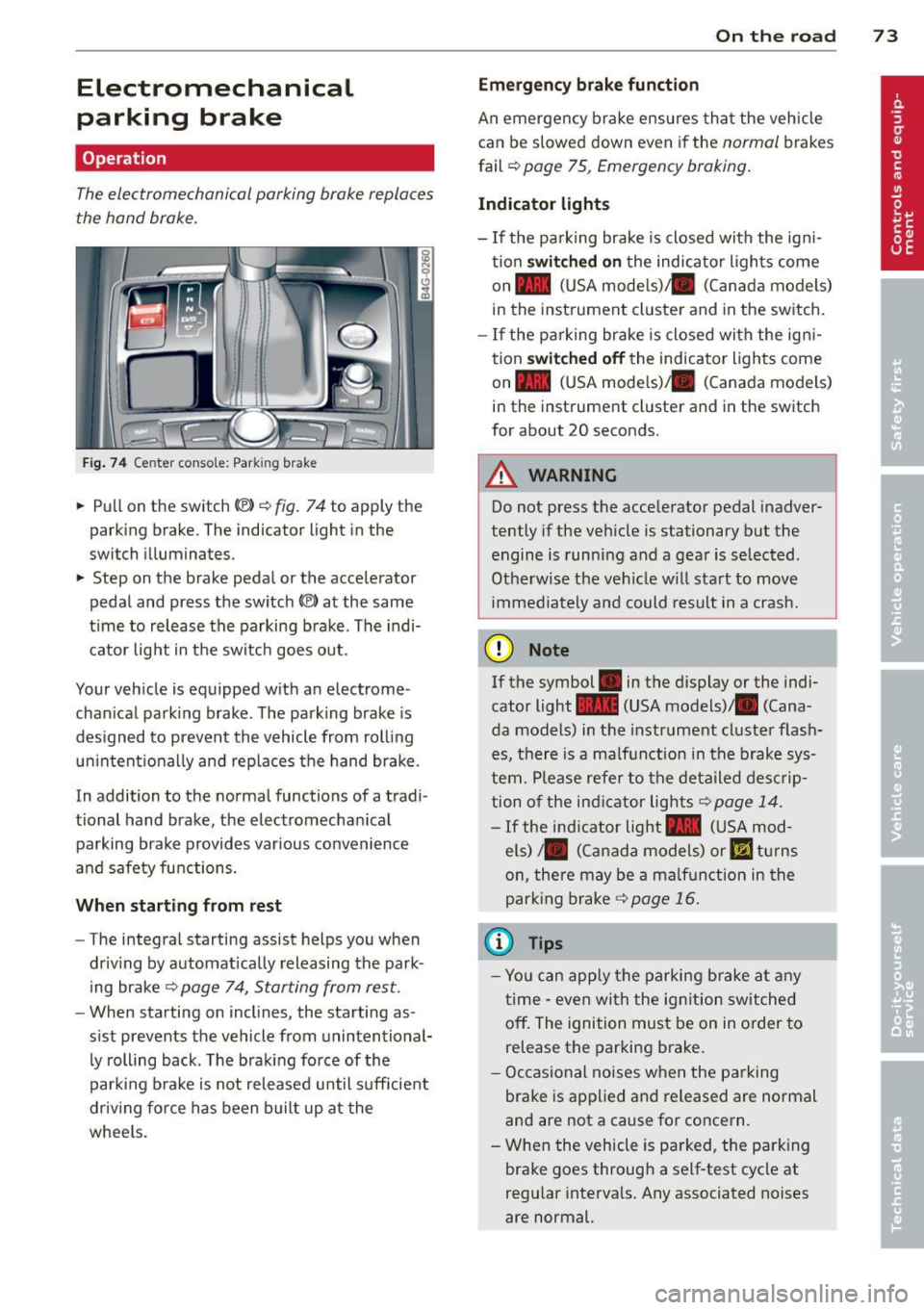
Fig. 74 Center conso le: Park ing brake
.. Pull on the switch<®> Q fig. 74 to apply the
parking brake. The indicator light in the
switch illuminates.
.. Step on the brake pedal or the accelerator
pedal and press the switch
(®) at the same
t ime to release the parking brake. The indi
cator light in the switch goes out.
Your vehicle is equipped with an electrome
chan ical park ing brake . The parking brake is
designed to prevent the vehicle from rolling
un intent ionally and rep laces the hand brake.
In addition to the normal functions of a tradi
tional hand brake, the electromechan ical
parking brake provides var ious convenience
and safety functions.
When starting from rest
-The integral starting assist helps you when
driving by automat ically releasing the park
ing brake ¢
page 74, Starting from rest.
-When starting on inclines, the starting as
sist prevents the vehicle from unintentional
ly rolling back . The braking force of the
parking brake is not released until suff icient
driv ing force has been built up at the
wheels.
On the road 73
Emergency brake function
An emergency brake ensures that the vehicle
can be slowed down even if the
normal brakes
fail ¢
page 75, Emergency braking.
Indicator lights
-If the parking brake is closed with the ign i
tion
switched on the indicator lights come
on - (USA mode ls)/ . (Canada models)
in the instrument cluster and in the switch.
- If the parking brake is closed with the ign i
tion
switched off the indicator lights come
on - (USA mode ls)/ . (Canada models)
in the instrument cluster and in the switch
for about 20 seconds.
A WARNING
Do not press the accelerator pedal inadver
tently if the veh icle is stationary but the
engine is running and a gear is selected .
Otherwise the vehicle w ill start to move
immediately and could result in a crash.
(D Note
If the symbol . in the display or the indi
cator light
1111 (USA models)/ . (Cana
da models) in the instrument cluster flash
es, there is a malf unction in the brake sys
tem. Please refer to the deta iled desc rip
tion of the indicat or lights¢
page 14.
-If the ind icator light - (USA mod-
els)/ . (Canada models) or
I.I turns
on, there may be a ma lfunction in the
parking brake
Q page 16.
(0 Tips
-Yo u can apply the parking brake at any
time -even with the ignition switched
off. The ignition must be on in order to
release the parking brake.
- Occasional noises when the parking
brake is applied and released are normal
and are not a cause for concern .
- When the vehicle is parked, the parking
brake goes through a self-test cycle at
regu lar intervals. Any associated noises
are normal.