lights AUDI S6 2012 Owner's Guide
[x] Cancel search | Manufacturer: AUDI, Model Year: 2012, Model line: S6, Model: AUDI S6 2012Pages: 298, PDF Size: 74.43 MB
Page 78 of 298
76 On the road
Cruise control
Switching on
Applies to vehicles: wit h crui se contro l
The cruise control system makes it possible to
drive at a constant speed starting at 20 mph
(30 km/h).
0
f
~
0
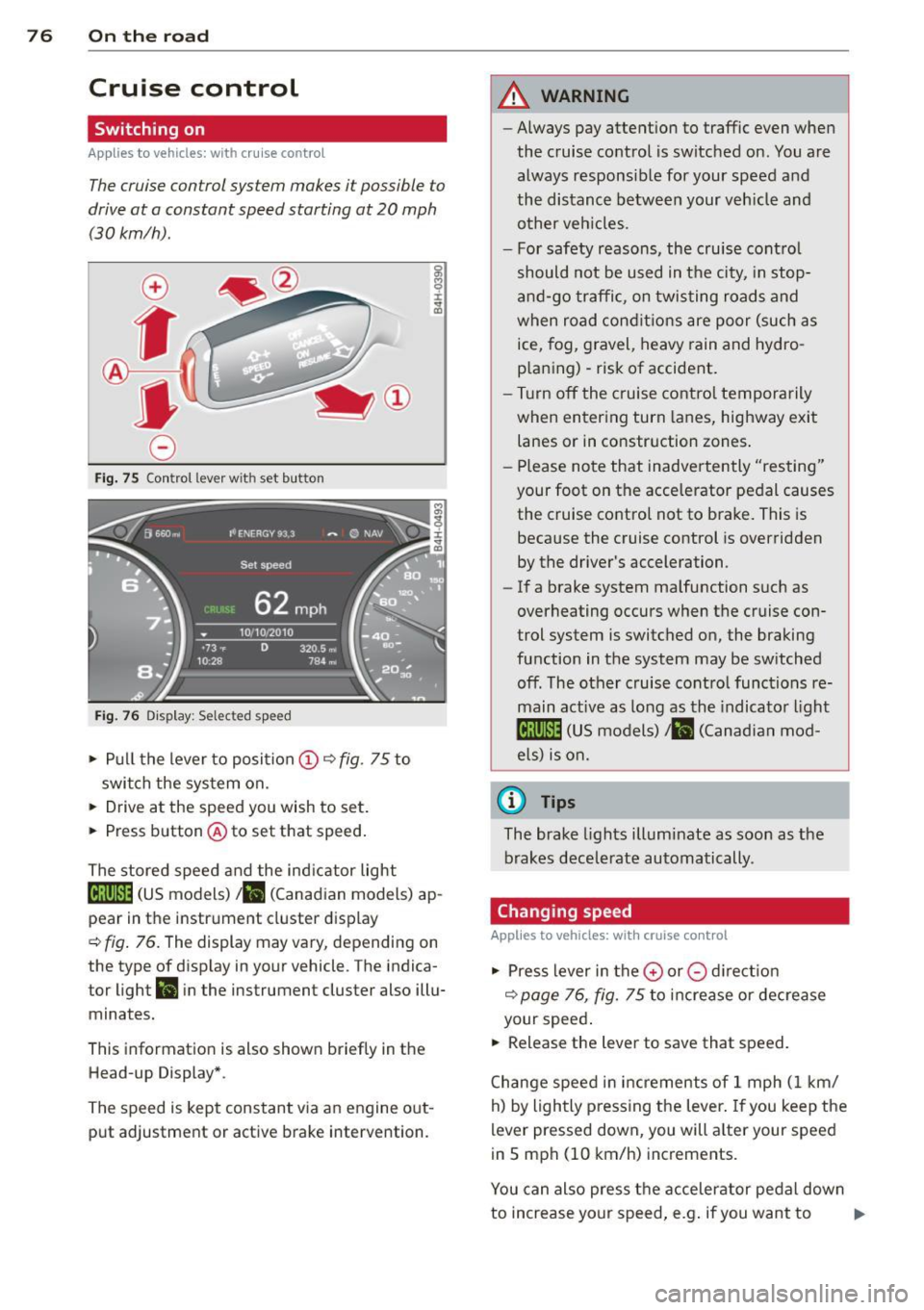
Fig. 75 Control lever with set b utto n
Fig. 76 Display: Selected speed
• Pull the lever to position @~ fig. 75 to
switch the system on.
• Drive at the speed you wish to set.
• Press button @to set that speed.
The stored speed and the indicator light
18;\0~1~ (US models)/ . (Canadian models) ap
pear in the instrument cluster display
~ fig. 76. The display may vary, depending on
the type of display in your vehicle . T he indica
tor light
ll in the instrument cluster also illu
minates.
This information is also shown briefly in the
Head-up Display* .
The speed is kept constant via an engine out
put adjustment or active brake intervention.
A WARNING
-- Always pay attention to traffic even when
the cruise control is switched on. You are always responsible for your speed and
the distance between your vehicle and
other veh icles.
- For safety reasons, the cruise contro l
should not be used in the city, in stop
and-go traffic , on twisting roads and
when road condit ions are poor (such as
ice, fog, gravel, heavy rain and hydro
p laning) - risk of accident.
- Turn off the cruise control temporarily
when entering turn lanes, highway exit
lanes or in construction zones.
- Please note that inadvertently "resting"
your foot on the accelerator pedal causes the cruise control not to brake. This is
because the cruise control is overridden
by the driver's acceleration.
- If a brake system malfunction such as
overheating occurs when the cruise con
trol system is switched on, the braking
function in the system may be switched
off. The other cruise control functions re
main active as long as the indicator light
mmJI (US models)/ . (Canadian mod
els) is on.
(D Tips
The brake lights illuminate as soon as the
brakes decelerate automatically .
Changing speed
Applies to vehicles: w ith cruise co ntrol
• Press lever in the 0 or 0 direct ion
~ page 76, fig. 75 to increase or decrease
your speed .
• Release the lever to save that speed.
Change speed in increments of 1 mph (1 km/
h) by lightly pressing the lever . If you keep the
lever pressed down, you will alter your speed
in 5 mph (10 km/h) increments.
You can also press the accelerator pedal down
to increase your speed, e.g . if you want to .,..
Page 83 of 298
Adaptive cruise control and braking guard 81
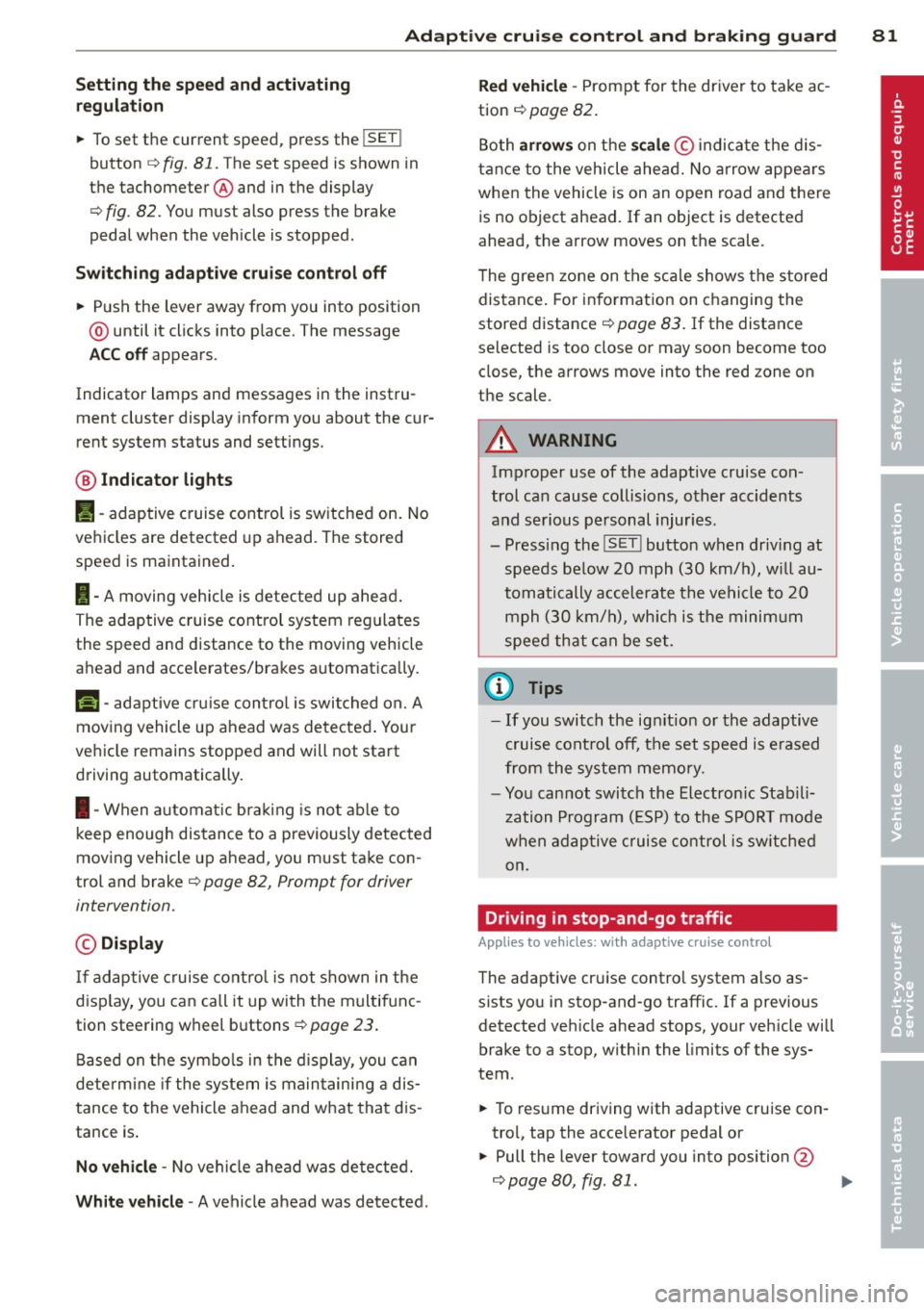
Setting the speed and activating
regulation
~ To set the current speed, press the !SET !
button ¢ fig. 81. The set speed is shown in
the tachometer @and in the display
¢
fig . 82. You must also press the brake
pedal when the vehicle is stopped .
Switching adaptive cruise control off
~ Push the lever away from you into position
@ until it clicks into p lace. The message
ACC off appears.
Indicator lamps and messages in the instru
ment cluster display inform you about the cur
rent system status and settings.
@ Indicator lights
Pl -adaptive cruise control is switched on. No
vehicles are detected up ahead . The stored
speed is ma intained.
I -A moving vehicle is detected up ahead.
The adaptive cruise control system regulates
the speed and distance to the moving vehicle
ahead and acce lerates/brakes automatica lly.
Mi -adaptive cruise control is swit ched on. A
moving vehicle up ahead was detected . Your
vehicle remains stopped and will not start
driving automatically.
I -When automat ic brakin g is not able to
keep enough distance to a previously detected
moving vehicle up ahead, you must take con
trol and brake¢
page 82, Prompt for driver
intervention.
© Display
If adaptive cruise control is not shown in the
disp lay, you can call it up with the multifunc
tion steering wheel buttons
¢page 23.
Based on the symbo ls in the display, you can
determine if the system is maintaining a dis
tance to the vehicle ahead and what that dis
tance is .
No vehicle -No veh icle ahead was detected.
White vehicle -A vehicle ahead was detected .
Red vehicle -Prompt for the driver to take ac
tion ¢
page 82.
Both arrows on the scale© indicate the dis
tance to the vehicle ahead. No arrow appears
when the vehicle is on an open road and there
is no object ahead. If an object is detected
ahead, the arrow moves on the scale.
T he green zone on the scale shows the stored
distance . For information on changing the
stored distance ¢
page 83. If the distance
selected is too close or may soon become too
close, the arrows move into the red zone on
the scale .
A WARNING
Improper use of the adaptive cruise con
trol can cause collisions, other accidents
and serious personal injur ies.
- Pressing the
! SET ! button when driv ing at
speeds below
20 mph (30 km/h), will au
tomatically accelerate the vehicle to
20
mph (30 km/h), which is the minimum
speed that can be set.
(D Tips
-If you switch the ignit ion or the adaptive
cruise control off, the set speed is erased
from the system memory.
- You cannot switch the Electronic Stabili
zation Program (ESP) to the SPORT mode
w hen adaptive cruise control is switched
on.
Driving in stop-and-go traffic
Applies to veh icles: w ith adaptive c ruise control
The adaptive cruise contro l system also as
sists you in stop-and-go traffic. If a previous
detected vehicle ahead stops, your veh icle will
brake to a stop, within the limits of the sys
tem .
~ To resume driving with adaptive cruise con
trol, tap the acce lerator pedal or
~ Pull the lever toward you into position @
¢ page 80, fig. 81. ..,_
Page 89 of 298
Audi side assist Lane Change Assistant
Description
App lies to vehicles: with si de assist
The side assist helps you when changing
lanes .
H AUDI I
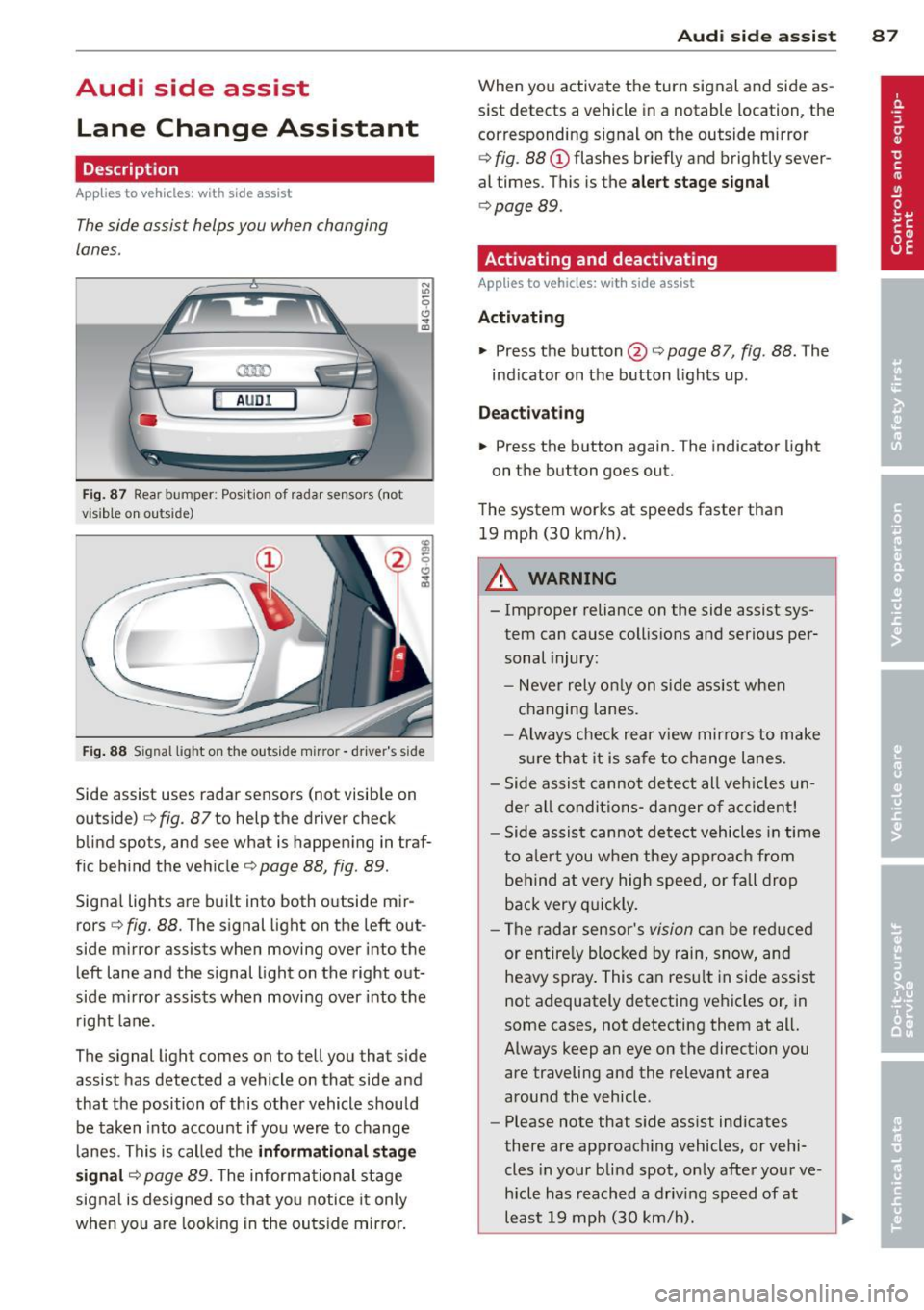
Fig. 87 Rear bumper : Pos ition of rada r sen sors (not
v isib le on outs ide)
Fig . 88 S ig n al l ight on the outside m irro r - drive r's side
Side assist uses radar sensors (not visib le on
outside)
c::> fig. 87 to help the driver check
blind spots, and see what is happening in traf
f ic beh ind the veh icle
c::> page 88, fig. 89 .
Signal lights are built into both outside mir
rors <=>
fig. 88. The signal light on the left out
side mirror assists when moving over into the left lane and the signal light on the right out
side m irror assists when moving over into the
right lane .
The signal light comes on to tell you that side
assist has detected a vehicle on that side and
that the position of this other vehicle should be taken into account if yo u were to change
lanes. This is called the
informati onal stag e
s ignal
c::> page 89. The informational stage
signal is designed so that you notice it only
when yo u are look ing in the outside mirro r.
Aud i side assist 8 7
When you activate the turn signal and side as
sist detects a vehicle in a notable location, the
corresponding signal on the outside mirror
c::> fig . 88 (D flashes br iefly and brightly sever
al times . This is the
aler t stage signal
c::> page 89 .
Activating and deactivating
Applies to vehicles: wit h side assist
Activating
.., Press the button @c::> page 87, fig. 88 . The
ind icator on the button lights up .
Dea ctivating
.., Press the button again. The indicator light
on the button goes out.
The system works at speeds faster than 19 mph (30 km/h).
A WARNING
-
- Improper reliance on the side assist sys-
tem can cause collisio ns and serious per
sonal injury:
- Never rely on ly on s ide assist whe n
changing lanes.
- Always check rear view mir rors to make
sure that it is safe to change lanes.
- Side assist cannot detect all veh icles un
de r al l conditions- danger of accident!
- Side assist cannot detect vehicles in time
to a le rt you when they approa ch from
behind a t very high speed, or fall drop
back very q uickly.
- The radar sensor's
vision can be red uced
or entire ly blocked by rain, snow, and
heavy spray . This can resu lt in side assis t
not adequately detecting vehicles or, in
some cases, not detecting them at all.
Always keep an eye on the direction you are traveling and the relevant area
around the vehicle .
- Please note that s ide assist indicates
there are approac hing vehicles, or vehi
cles in your blind spot, on ly afte r you r ve
hicle has reach ed a driv ing speed of at
least 19 mph (30 km/h).
~
Page 91 of 298
signal light will come on as soon as the other
vehicle is in your blind spot and is detected by
side assist. When the difference in speed is
greater, the signa l light will not come on.
Informational and alert stage signals
App lies to vehicles: with side assist
Side assis t has two s ignal stages:
- the informationa l stage signal, and
- the a le rt stage signa l.
Side assist he lps you by usi ng the approp riate
signal s tage, depending on whether or not
you have activ ated the tu rn signal, and thus
have indicated that you are or are not chang
ing lanes .
Informational stage signal
As long as you have not a ctivated the tu rn sig
n al , side a ssis t inf orms you of detec ted vehi
cles th at are registered as being in a notable
l ocation if you were to change lanes. Whenev
er the detected vehicle's difference i n speed
and d istance is registered by side assist as no
table, the signal lig ht on the respective m irror
prod uces muted illuminat ion.
The brightness of the informat io na l stage sig
na l is designed not to be as intense, so that it
does not interfere wit h your view of the road
when you are driving and have no intention of
changing lanes. When you look in the o utside
mirror, you can clear ly see the info rmat iona l
stage signal.
Alert stage signal
When you activate the turn signa l, and side
assist has detec ted a vehicle i n a notable loca
tion o n that particular side, the s ignal l ight on
this sid e mirro r flashes b right ly . The repeated
b rie f and bright flashing of the alert stage
signal re minds yo u to carefully check tr aff ic to
the rear in the o utside mirror and ove r your
shoulder, so that yo u can safe ly complete the
l ane change
c:> & in Safety tips on page 93.
Aud i side assist 89
@ Tips
The br ightness of the s ignal li ght on the
outside m irr ors can be adjusted with the
MMI c:> page 92.
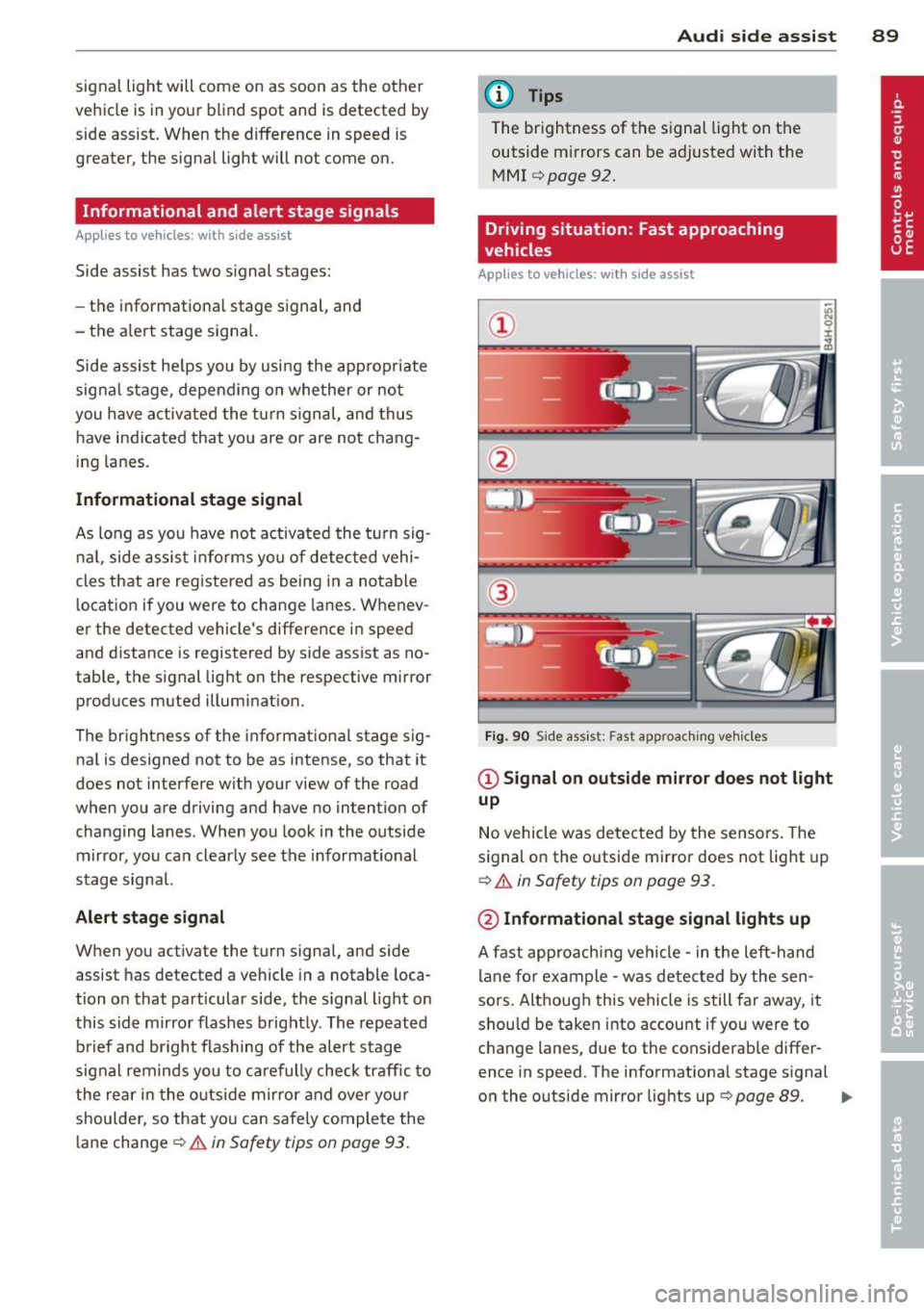
Driving situation: Fast approaching
vehicles
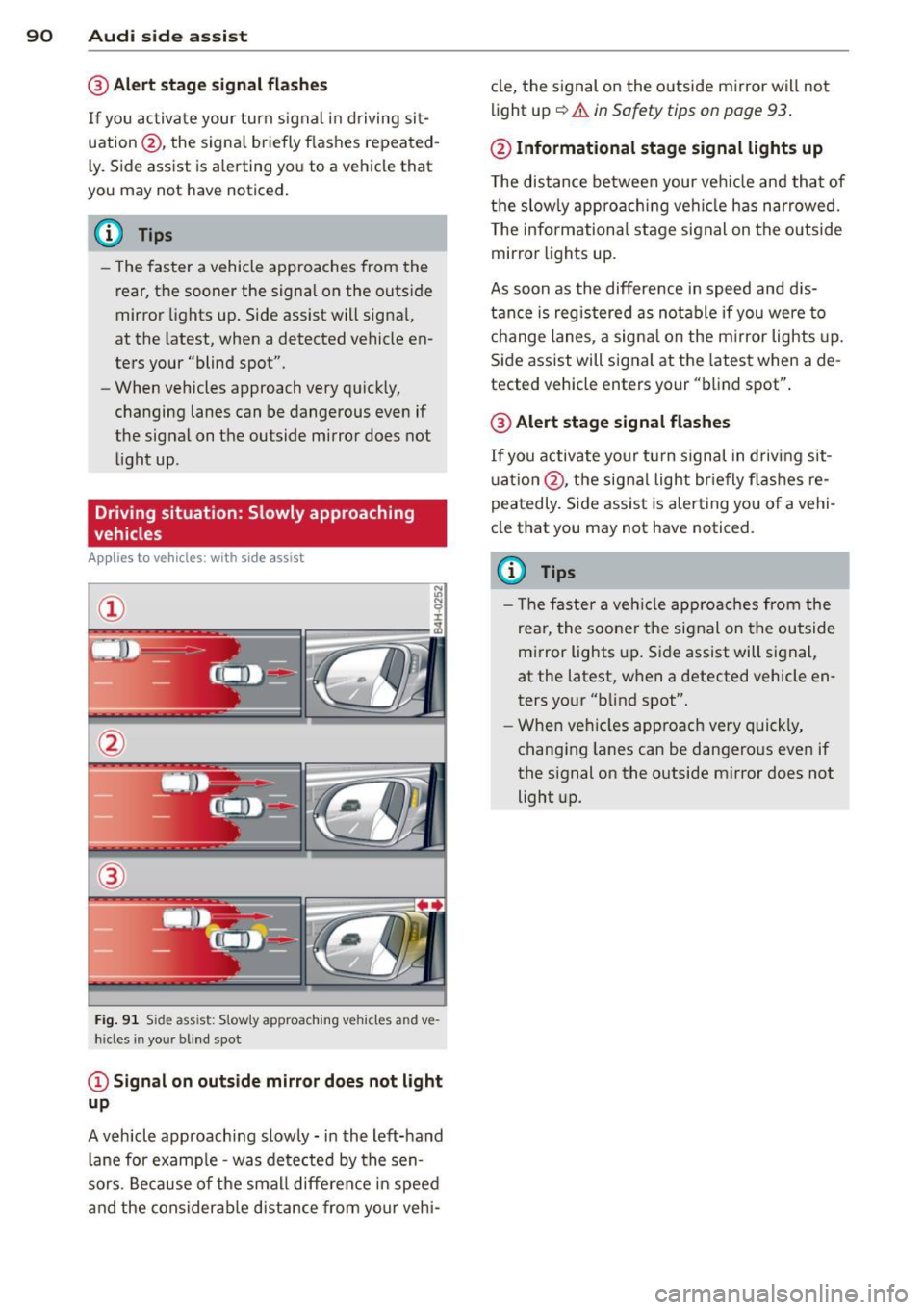
Applies to vehicles: with side assist
@
Fig. 9 0 Side as sis t: Fast approac hing ve hicle s
@ Signal on outside mirror does not light
up
No vehicle was detecte d by the sensors . The
s ignal on the o utside mirror does not lig ht up
c:> .&. in Safety tips on page 93 .
@ Informational stage signal lights up
A fast appro ach ing vehicle -in the left-h and
l ane fo r example - was detected by the sen
sors . Although this vehicle is still fa r away, it
sho uld be taken into accou nt if yo u were to
c hange lanes, due to the cons iderab le differ
ence in speed. The informationa l stage s ignal
o n the outside mirror lig hts up
r=> page 89. ..,.
Page 92 of 298
90 Audi side assist
@ Alert stage signal flashes
If you activate your turn signal in driving sit
uation @, th e signa l br iefly f lashes repeated
l y. Side assist is a lerting yo u to a vehicle that
you may not have noticed.
@ Tips
- The faster a vehicle approaches from the
rear, the sooner the signa l on the outs ide
mirror lights up. Side assist will signa l,
at the latest, when a detected vehicle en
ters your "blind spot".
- When vehicles approach very quickly,
changing lanes can be dangerous even if
the signal on the outside mirror does not
li ght up.
Driving situation: Slowly approaching
vehicles
Applies to vehicles : w it h side ass ist
®
Fig. 91 S ide ass ist: S lowly approaching vehicles and ve
hicles in your blind spot
© Signal on outside mirror does not light
up
A vehicle approaching slowly -in the left-hand
lane for example -was detected by the sen
sors. Because of the small difference in speed
and the considerab le distance from your vehi- cle,
the signal on the outside mirror will not
light up
c::> &. in Safety tips on page 93 .
@ Informational stage signal lights up
The distance between your vehicle and that of
the slowly approaching vehi cle has narrowed.
T he informational stage signal on the outside
mirror lights up.
As soon as the difference in speed and dis
tance is registered as notable if you were to
change lanes, a signal on the mirror lights up.
Side assist will signal at the latest when a de
tected vehicle enters your "blind spot".
@ Alert stage signal flashes
If you activate your turn signal in driving sit
uation @, the signal light br ie fly flashes re
peatedly. Side assist is alerting you of a vehi
cle that you may not have noticed.
(D Tips
- Th e faster a veh icle approaches from the
rea r, the sooner the signal on the outside
mirror lights up. Side assist will signal,
at the latest, when a detected vehicle en
ters your "blind spot".
- When vehicles app roach very quickly,
changing lanes can be dangero us even if
the signal on the outside mirror does not light up.
Page 93 of 298
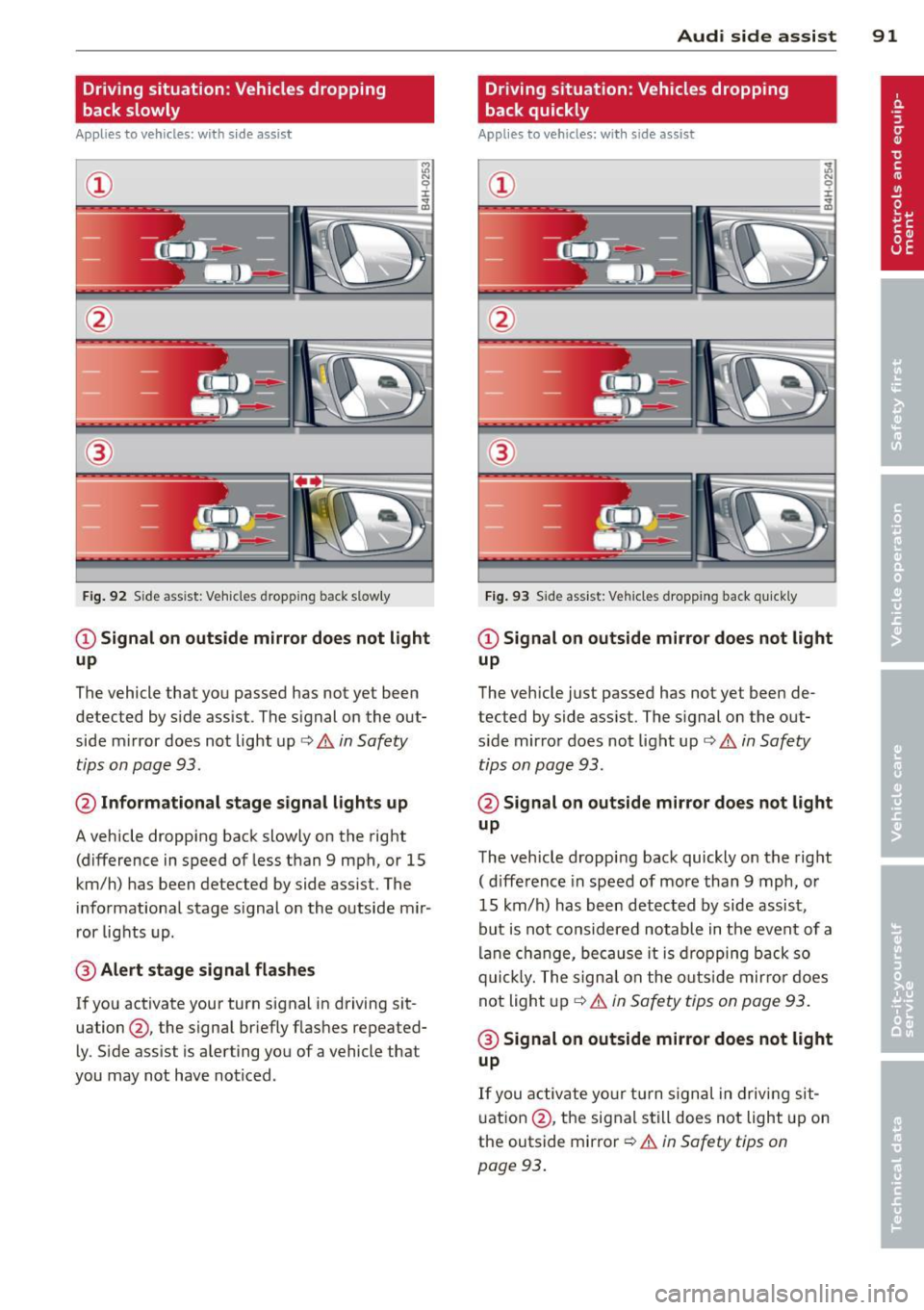
Driving situation: Vehicles dropping
back slowly
Applies to vehicles: with s ide assis t
~ 9 I
---- ----:~
®
Fig . 92 S ide ass ist: Vehicles dropping back s low ly
CD Signal on outside mirror does not light
up
The vehicle that you passed has not yet been
detected by side assist. The signal on the out
side mirror does not light up ¢
& in Safety
tips on page 93.
@ Informational stage signal lights up
A vehicle dropping back slowly on the right
(difference in speed of less than 9 mph, or 15
km/h) has been detected by side assist. The
informational stage s ignal on the outside mir
ror lights up.
@ Alert stage signal flashes
If you activate your turn signal in driving sit
uation @, the signal briefly flashes repeated
ly. Side assist is alerting you of a vehicle that
you may not have noticed.
Audi side assist 91
Driving situation: Vehicles dropping
back quickly
Applies to vehicles: wi th side assist
®
Fig. 93 Side assist: Vehicles dropping back qui ck ly
CD Signal on outside mirror does not light
up
The vehicle just passed has not yet been de
tected by side assist. The signal on the out
side mirror does not light up ¢
& in Safety
tips on page 93 .
@ Signal on outside mirror does not light
up
The vehicle dropping back quickly on the right
( d ifference in speed of more than 9 mph, or
15 km/h) has been detected by side assist,
but is not considered notable in the event of a
lane change, because it is dropping back so
quickly. The signa l on the outs ide mirror does
not light up
Q &. in Safety tips on page 93.
@ Signal on outside mirror does not light
up
If you activate your turn signal in driving sit
uation @, the signal still does not light up on
the outside mirror
Q & in Safety tips on
page 93.
Page 99 of 298

Night vision assistant
Night vision assistant
with detected pedestrian marking
Description
App lies to vehicles: with night v isio n assistant
Fig . 97 D isplay: n ight vision ass istant
"Night v is ion assistant with pedestrian detec
tion" uses an infrared camera to monitor the
area in front of your vehicle at night. Within
the limits of the system, it can display objects
up to about 1000 feet (300 meters) away. The
heat image of a pedestrian detected by the
camera is shown in the instrument cluster dis
play
Q fig . 97 . Warm areas appear lighter and
cold areas appear darker .
Pedestrian detection
Applies to vehicles: with n ig ht v ision ass istant
F ig. 98 Display : yellow pedest rian mark in g
Night vision assistant 97
Fig. 99 Display: symbol when infrared image is not
visible
Night vision assistant can detect pedestrians
that are between about 50 and 300 feet (15
and 90 meters) in front of the vehicle, under
ideal conditions . If a pedestrian is detected
when it is dark outside and the vehicle head
lights are switched on, the pedestrian is high
l ighted in yellow
Q fig . 98, Q page 98, Gen
eral information .
If another display such as
navigation replaces the image from the night
vision assistant , the symbo l~,, appears in a
tab
r::',> fig . 99.
(D Tips
If the night vision assistant image does
not appear when the system is switched
on, you can access it with the buttons on
the m ultifunction steering wheel
¢pa ge 24.
Page 102 of 298

100 Night vision assistant
Night vision assistant: only available in dark
ness and with lights switched on
N ig ht vision assist ant only wo rk s when i t is
da rk ou tside and the headlig hts are o n.
Night vision assistant: pedestrian detection
not available
The system has deactivated the pedestrian de
tec tion f unct ion.
Page 104 of 298
102 Autom atic Tran smi ssi on
-When the selector lever is in a driving
position, the veh icle may creep, even at
id le speed. Therefore do not release
the park ing brake or foot brake until
you are ready to move, because power
is transmitted to the wheels as soon as
a driving posit ion is engaged.
- Do not accelerate while selecting a
driving position. At this time the en
g ine must be at idle speed so that un
d ue stress is no t placed on the clutches
in the t ransmission.
- Remembe r: Even when stopped briefly
with the automatic transmission in D/S
or R, engine power is being transmit
ted to the whee ls. Yo ur vehicle could
"creep" forward or backward . When
stopped, keep the brake peda l fully de
pressed and use the parking brake if
necessary to keep the vehicle from roll
ing .
-If the selector lever is unintentionally
moved into N wh ile you are driving, take
yo ur foot off the accele rator pedal and
wa it for the engine to return to idle
speed befo re selec ting a drivi ng position.
- Never shift into R or P when the veh icle is
in mo tion.
- Never get out of the dr iver's seat when
the engine is runn ing.
- If you must get out of the vehicle, move
the se lector lever securely into the P po
si ti on a nd apply the park ing brake fi rm ly.
- If the eng ine must remain running, never
have any driv ing pos ition engaged when
chec king under the hood. Make sure the
selector lever has securely engaged and
is locked in P with the parking brake
firmly set¢
page 214, Engine comport
ment .
Otherwise, any increase in engine
speed may set the vehicle in mot ion,
even with the parking brake applied.
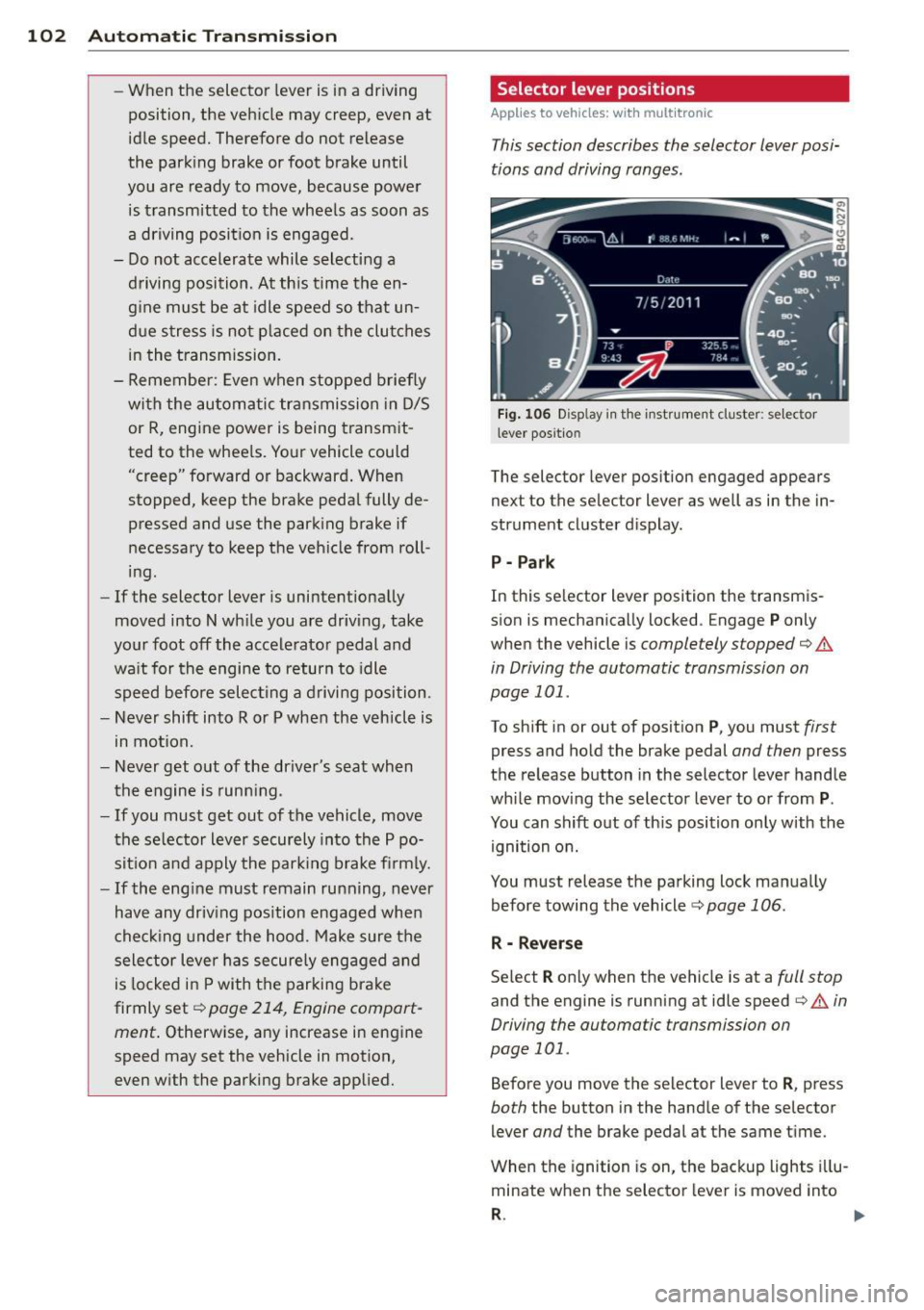
Selector lever positions
Applies to vehicles: wit h mult itronic
This section describes the selector lever posi
tions and driving ranges.
F ig . 106 Display in th e inst rument cluster: se lector
l ever positio n
The selector lever position engaged appears
next to the selector lever as well as in the in
strument cluster d isplay.
P - Par k
In this se lector lever position the transm is
sion is mechanically locked . Engage
P only
when the vehicle is
completely stopped¢.&
in Driving the automatic transmission on
page 101 .
To shift in or out of posit ion P , you must first
press and hold the brake pedal and then press
the re lease button in the selector lever handle
whi le moving the selector lever to o r from
P .
You can shift out of th is position only with the
ignition on.
You must release the parking lock manually before towing the vehicle ¢
page 106.
R - Reverse
Se lect R only when the vehicle is at a full stop
and the engine is running at idle speed¢.& in
Driving the automatic transmission on
page 101.
Before you move the selector lever to R , press
both the button in the hand le of the se lector
lever
and the brake pedal at the same t ime.
When the ignition is on, the backup lights i llu
minate when the selector lever is moved into
R . 1111-
Page 110 of 298
108 Automatic Transmission
-If you must g et out of the vehicle, move
the selector lever securely into the P po
sition and apply the parking brake f irmly.
-If the engine must remain running, never
have any driving position engaged when
checking under the hood. Make sure the
selector lever has securely engaged and
is locked in P with the parking brake
firmly set
r:!;> page 214, Engine compart
ment.
Otherwise, any increase in engine
speed may set the vehicle in motion,
even with the parking brake applied.
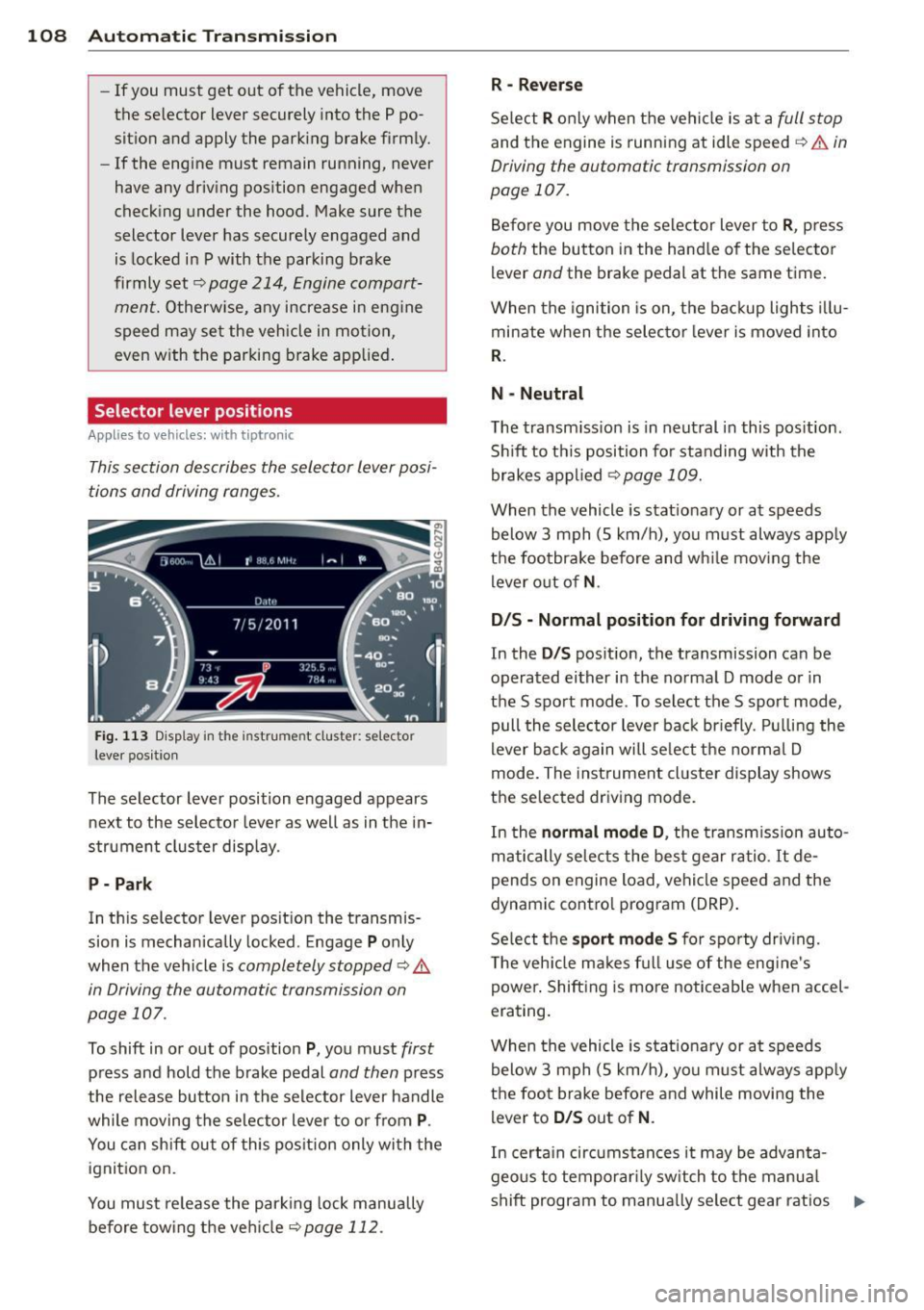
Selector lever posit ions
Appl ies to vehicles: with tiptronic
This section describes the selector lever posi
tions and driving ranges.
Fig. 113 Display in the instrume nt cluster: se lector
lever pos itio n
The selector lever position engaged appears
next to the selector lever as well as in the in
strument cluster display.
P - Park
In this selecto r lever position the transmis
sion is mechanically locked . Engage
P only
when the vehicle is
completely stopped ¢ A
in Driving the automatic transmission on
page 107 .
To shift in or out of position P, you must first
press and hold the brake pedal and then press
the release button in the selector lever handle
while moving the selector lever to or from
P.
You can shift out of this position only with the
ignition on.
You must release the parking lock manually
before towing the vehicle
<:!;>page 112.
R -Reverse
Select R only when the vehicle is at a full stop
and the engine is running at idle speed r:!;> ,& in
Driving the automatic transmission on
page 107.
Before you move the selector lever to R, press
both the button in the handle of the selector
l ever
and the brake pedal at the same time.
When the ignition is on, the backup lights illu
minate when the selector lever is moved into
R.
N - Neutral
The transmission is in neutral in this position .
Shift to this position for standing with the
brakes applied
<:!;>page 109.
When the vehicle is stationary or at speeds
below 3 mph (5 km/h), you must always apply
the footbrake before and while moving the
lever out of
N.
D/S - Normal position for driving forward
In the D/S position, the transmission can be
operated either in the normal D mode or in
the S sport mode . To select the S sport mode,
pull the selector lever back briefly. Pulling the
lever back again will select the normal D
mode. The instrument cluster display shows
the selected driving mode.
In the
normal mode D , the transmission auto
matically selects the best gear ratio.
It de
p ends on engine load, vehicle speed and the
dynamic control program (DRP).
Select the
sport mode S for sporty driving.
The vehicle makes full use of the engine's
power. Shifting is more noticeable when accel
erating.
When the vehicle is stationary or at speeds
below 3 mph (5 km/h), you must always apply
the foot brake before and while moving the
lever to
D/S out of N .
In certain circumstances it may be advanta
geous to temporarily switch to the manual
shift program to manually select gear ratios .,..