warning AUDI S6 2014 Manual Online
[x] Cancel search | Manufacturer: AUDI, Model Year: 2014, Model line: S6, Model: AUDI S6 2014Pages: 304, PDF Size: 76.32 MB
Page 103 of 304
(D Note
-Make sure there is enough clearance
above and below the veh icle when park
ing. The height of the vehicle can change
once it is parked due to temperature
fluctuations, changes to the load cond i
tions and changes to the dr iv ing modes,
which can affect clearance .
- When t ransporting the veh icle on a car
carr ier, tra in, ship or by other means, on
l y tie the veh icle dow n at the runni ng
su rface of the tires, which is the ou ter
ci rcumference . Secur ing t he vehicle at
the a xle components, s uspension str uts
or tow ing eyes is not pe rm itted because
the pressu re in the air suspension st ruts
can change during transport. The vehicle may not be secu red sufficiently if this
happens.
- If you are going to tow a trailer, you
must activate the trailer operation mode
<=> page 206.
{!) Tips
-In some models, the maximum vehicle
speed can only be reached in the
Auto
and Dynami c modes.
- Se lecting the
Dynamic mode results in
spo rty sh ifting character istics. The S
gear posit ion engages automatically.
- In vehicles with spo rt differential", the
Dynamic mode is deactivated when tow
i ng a trailer.
Adjusting the Individual mode
Audi dri ve sele ct 101
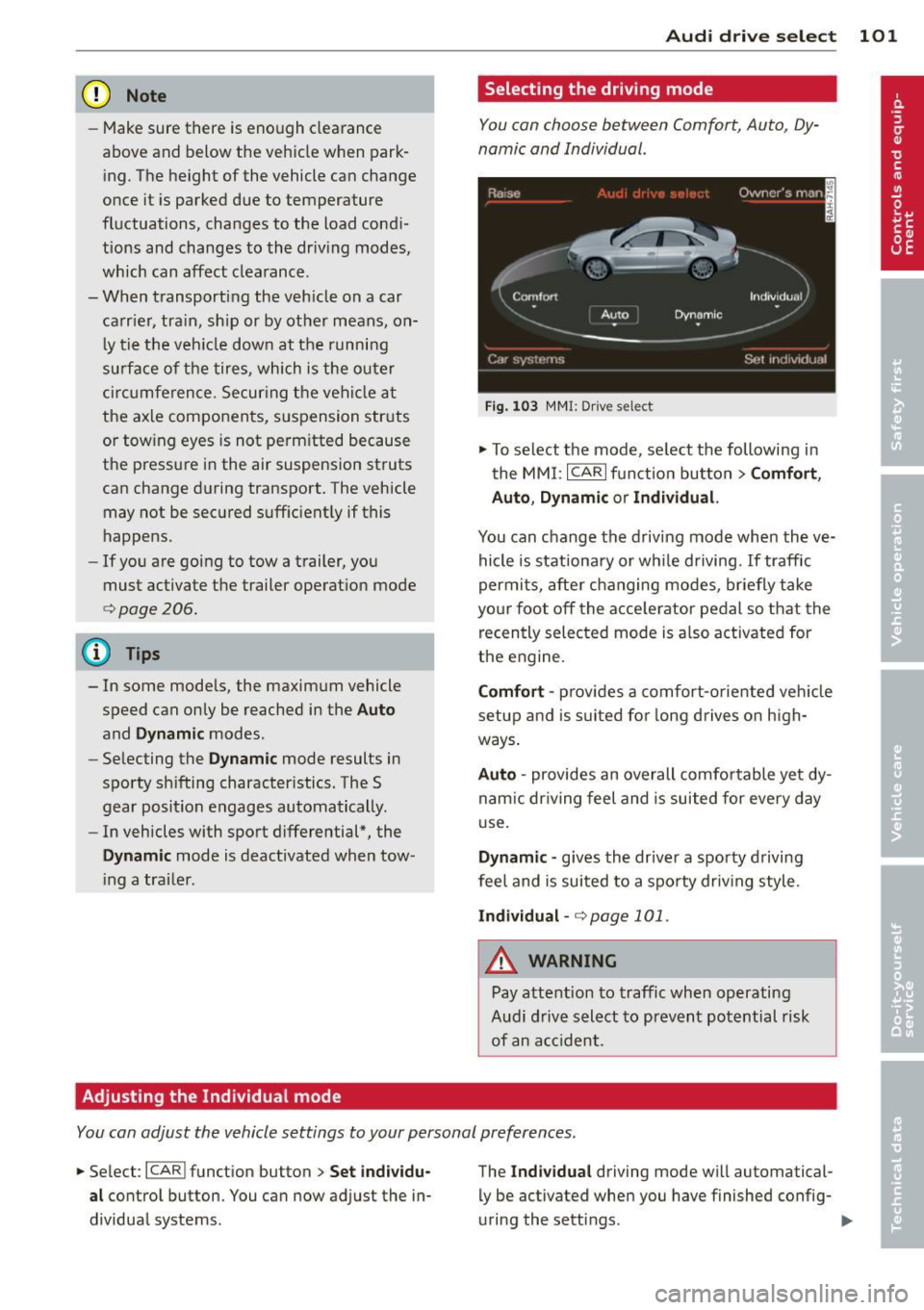
Selecting the driving mode
You can choose between Comfort, Auto, Dy
namic and Individual .
Fig. 103 MMI: D rive select
.,.. To select the mode, se lect the following in
the MMI: ICARlf unction button>
Comfort ,
Auto , Dynamic or Individual.
You can change the d riv ing mode when the ve
hicle is stationary or wh ile driving.
If traffic
permi ts, after changing modes, briefly take
yo ur f oot off the acce lerator pedal so that the
recently selected mode is a lso activated for
the engine.
Comfort -prov ides a comfor t-orie nted veh icle
setup and is s uited fo r long drives on h igh
ways .
Auto -provides an overall comfo rtable yet dy
nam ic dr iving feel and is suited for every day
u se .
Dynamic -gives the driver a sporty d riving
feel and is suited to a spo rty driv ing style .
Individual -<=> page 101.
_.& WARNING
-Pay attention to traffic when operating
Audi d rive select to prevent potential risk
of an ac cident.
-
You can adjust the vehicle settings to your personal preferences .
.,.. Se lect : I CARI funct ion button> Set ind ividu
al
control button. You can now adjust the in
dividua l systems. The
Indi
vidu al driving mode wi ll automatical
ly be activated when you have finished config-
uring the sett ings. ..,_
Page 106 of 304
104 Night visi on assis tant
Pedestrian warning
Applies to vehicles: with night vision assistant
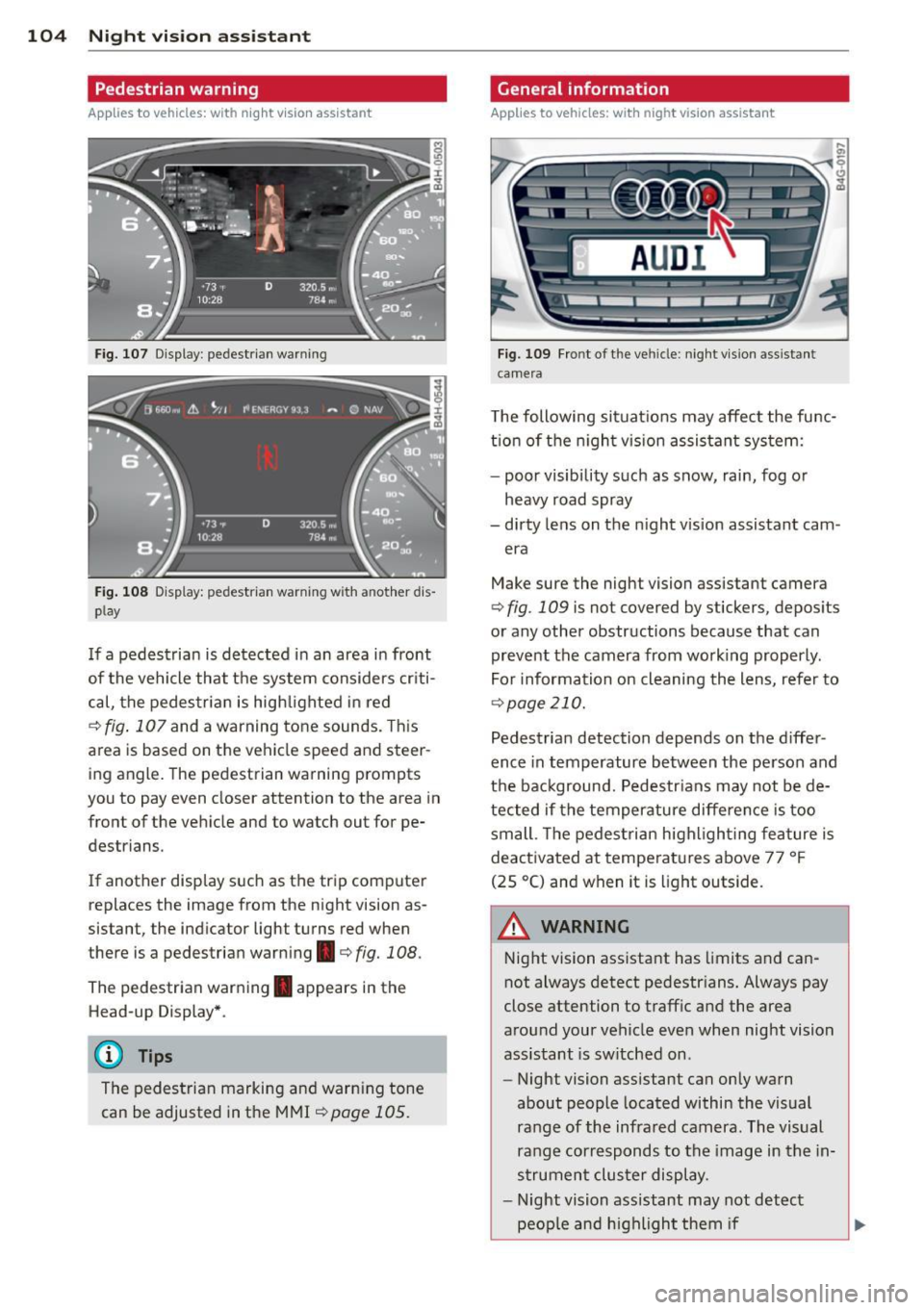
Fig. 107 Display : pedestrian warning
Fig . 108 D is p lay: pedestrian warning w ith a nother dis
p lay
I f a pedestrian is detected in an area in front
of the vehicle that the system considers criti
cal, the pedestrian is high lighted in red
¢ fig . 107 and a warning tone sounds. This
area is based on the vehicle speed and steer
ing angle. The pedestrian warning prompts
you to pay even closer attention to the area in
front of the vehicle and to watch out for pe
destrians.
If another display s uch as the tr ip computer
replaces the image from the night vision as
sistant, the indicator light turns red when
there is a pedestrian warning.¢
fig. 108 .
The pedestrian warning . appears in the
Head-up Display *.
(D Tips
The pedestrian marking and warn ing tone
can be adjusted in the MMI
!:!) page 105.
General information
Applies to vehicles: with night vision assistant
Fig. 109 Fro nt of th e ve hicle: night v ision assistant
camera
T he following situat ions may affect the func
t ion of the n ight vision assistant system:
- poor visibility such as snow, rain, fog or
heavy road spray
- dirty lens on the n ight vis ion assistant cam -
era
Make sure the night vision assistant camera
¢
fig . 109 is not covered by stickers, deposits
or any other obstructions because that can
prevent the camera from working properly.
For information on cleaning the lens, refer to
¢ page 210.
Pedestrian detection depends on the d iffer
ence in temperature between the person and
the background. Pedestr ians may not be de
tected if the temperature diffe rence is too
small . Th e pedestrian highl ighting feature is
deactivated at tempe ratures above 77 ° F
(25 °C) and when it is light outside.
A WARNING
Night vision assistant has limits and can
not always detect pedestr ians. Always pay
close attention to traffic and the area
around your vehicle even when night vision
assistant is sw itched on .
- Night vision assistant can only warn
about people located within the visual
range of the infrared camera. The visual
range corresponds to the image in the in
strument cluster display .
- Night vision assistant may not detect
-
peop le and highlight them if .,.
Page 107 of 304
-they are not in an upright position, for
examp le if they are s itting, crouching
or lying down and/or
- if the outline in the display is incom
p lete or interrupted, for example be
cause the person is partially hidden by
a parked veh icle .
(D Tips
-Pedestrian detection and the pedestrian
warming are lim ited to objects that are
detected as pedestr ians. The system
does not detect animals . Even though
the shape and warmth radiated by each
object det ected is evaluated, the system
does have lim itations and it can give in
correct warnings.
- Fo r techn ical reasons , the image pauses
in split second interva ls.
Switching on and off
Appl ies to vehicles: with night vision assistant
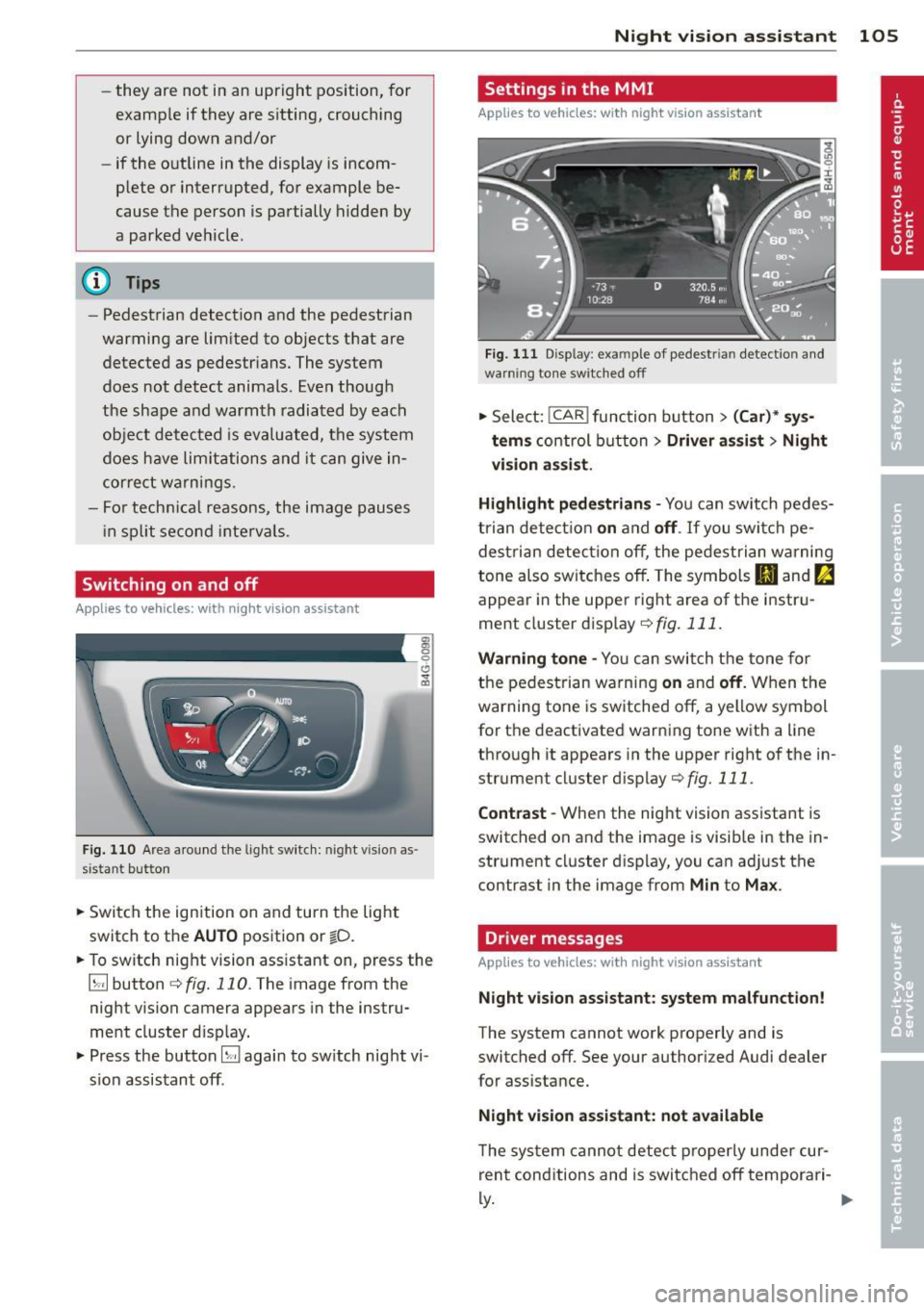
Fig . 110 Area a round the lig ht switch: night vis io n as
si st ant button
.. Switch the ignition on and turn the light
switch to the
AUTO position or io.
.. To switch night vision ass istant on, press the
~ button c::> fig. 110. T he image from the
night vision camera appears in the instru
ment cluster d isp lay.
.. Press the button~ again to sw itch night vi
s ion assistant off .
Night vision assistant 105
Settings in the MMI
Applies to vehicles: with night vision assistant
Fig. 111 Disp lay : exa mple of pedest rian detect io n and
warn ing to n e sw it c hed off
.. Select: !CAR ! function button> (Car)* sys
tems
control button > Driver assist > Night
vision assist.
Highlight pedestrians -
You can switch pedes
trian detec tion
on and off. If you switch pe
destrian detection off, the pedestrian warning
tone also switches off . The symbols
Ill and fa
appear in the upper right area of the instru
ment cluster disp lay
¢ fig. 111.
Warning tone -You can switch the tone for
the pedestrian warning
on and off. When the
warning tone is sw itched off, a yellow symbol
for the deactivated warning tone with a line
through it appears in the upper right of the in
strument cluster d isplay
c::>fig. 111 .
Contrast -When the night vision assistant is
switched on and the image is visib le in the in
strument cluster display, you can adjust the
contrast in the image from
Min to Max .
Driver messages
Applies to vehicles: with night vision assistant
Night vision assistant: system malfunction!
The system cannot work properly and is
switched off. See your authorized Audi dealer
for assistance.
Night vision assistant: not available
The system cannot detect properly under cur
rent conditions and is switched off temporari-
~ ~
Page 110 of 304
108 Automatic Transmission
N - N eutr al
The transmission is in neutral in this position.
Shift to this position for stand ing with the
brakes applied
q .&. in Driving the automatic
transmission on page 11 O.
When the ve hicle is stationary o r at speeds
be low 1 mph (2 km/h), you must always apply
the footbrake befo re and while moving the
l ever out of N .
DIS -Normal position for driving forward
In the D/S position, the transmiss io n can be
operated e ither in the normal mode Dor i n
the sport mode S. To select the sport mode S,
pu ll the se lector lever back briefly . Pulling the
lever back aga in will select the normal mode
D. The instrument cluster display shows the
selected driving mode.
In the normal mode D, the transmission a uto
mat ica lly selects the suitab le gea r ratio.
It de
pends on engine load, veh icle speed and driv
ing style.
Select the sport mode S for sporty driving .
The vehicle makes fu ll u se of the engine's
power. Shifting may become noticeable when
accelerating.
When the ve hicle is stationary o r at speeds
be low 1 mph (2 km/h), you must always apply
the foot brake before and while moving the lever to D/S out of N .
A WARNING
Read and follow all WARNINGS q .&. in
Driving the automatic transmission on
page 110.
(D Note
-
Coast ing downh ill with the transmission in
N and the e ngine not r unning w ill result in
damage to the automatic transm iss io n
and possib ly the catalyt ic converter.
@ Tips
- Audi drive select : you ca n adj ust the
sporty s hift c haracte ristics in th e
Dy-
namic driving mode.Swi ll appea r in the
instrument cluster display instead of D.
-If you a cc iden tally selec t N whi le driving,
take your foot off the accelerato r pedal
immediately and wa it for the engine to
slow down to idle before select ing D/S.
- If there is a power fai lure, the selector
lever w ill not move out of the P position.
The emergency release can be used if
this happens
c::>page 113.
Automatic Shift Lock (ASL)
Applies to vehicles: with multitronic/5 tronic/tiptron ic
The Automatic Shift Lock safeguards you
against accidentally shifting into a forward or the reverse gear and causing the vehicle to
move unintentionally.
' ) ( )
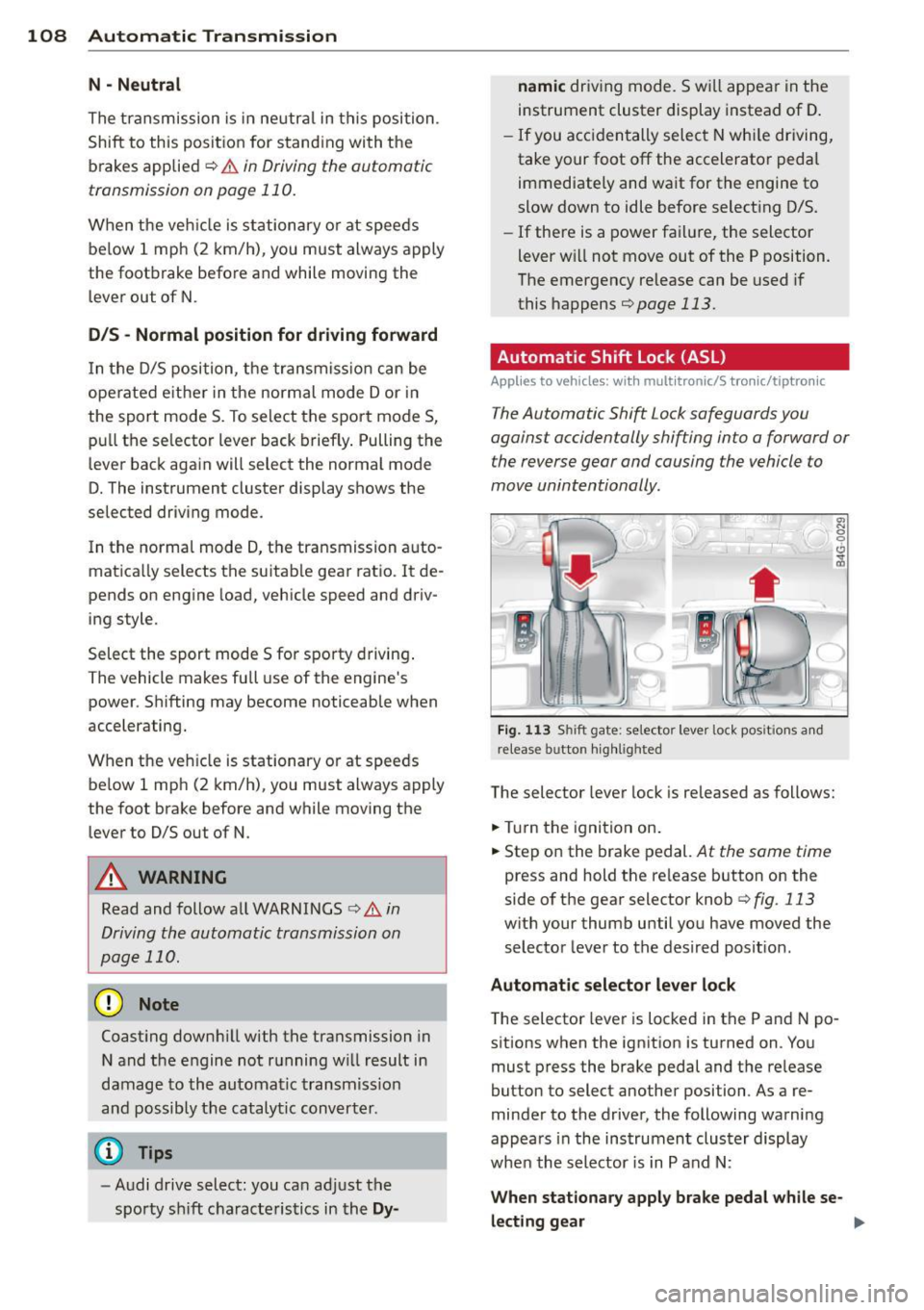
Fig . 113 Shi ft gate: selector leve r lock pos it ions a nd
re lease button high lig h ted
The selector lever lock is re leased as follows:
.,. Tur n the ignition on .
.,. Step on the brake pedal.
At the same time
press and hold the re lease button on the
side of the gear selector knob
c:> fig . 113
with your thumb until you have moved the
selector lever to the desired posit ion.
Automatic selector leve r lo ck
The selector lever is locked in the P and N po
s itions when the ignit ion is turned on . Yo u
must press the brake pedal and the re lease
button to select another position . As a re
minder to the driver, the following warni ng
appea rs in the instrument clus ter display
whe n the selector is in P and N:
When stationary apply brake peda l while se-
lecting gear ..,_
Page 112 of 304
110 Automatic Tran sm iss ion
multitronic transmission : Your vehicle is
equipped with
hill hold assist allowing you to
start while on an incline. The system is acti
vated when the brake pedal is pressed down
and held
f o r a few s econds . The brake pres
sure will hold for
a moment after the brake
pedal loosens to prevent the veh icle from roll
ing backwards whi le starting up .
A WARNING
- The veh icle can also roll when the engine
is stopped.
- Unintended veh icle movement can cause
serious injury .
- Never leave your vehicle with the eng ine
running wh ile in gea r. If you must leave
yo ur vehicle when the engine is running,
act ivate the park ing brake and move the
selector lever to P .
- Power is st ill transmitted to the whee ls
when the engine is running at idle . To
prevent the vehicle from "creeping", you
must keep your foot on the brake when
the engine is running and the selector
lever is in D/S or R or "tiptronic" mode is
selected.
- Do not press the accelerator pedal when
changing the selector lever pos ition
wh ile the vehicle is stat io nary and the
engine is running .
- Never shift into R or P wh ile driving .
- Before driv ing down a steep slope, re-
duce your speed and shift into a lower
gear with "tiptronic" .
- Do not ride the brakes or press the brake
pedal too often or too long when dr iving
down a hill. Constant braking causes the
brakes to overheat and substant ially re
duces b raking performance, inc reases
braking distance or causes comp lete fail
ure of the brake system.
- T o prevent the veh icle from rolling back
when stoppi ng on incl ines, always hold it
in place with the brake peda l or parking
brake.
- Never hold the veh icle on an incl ine with
a slipping clutch. The clutch opens auto
matically when it becomes too hot from the overload. An indicato
r lamp
[O] illu
minates and a driver message appears
¢ page 112 when the clutch is overload
ed.
- If the engine must remain running, never
have any driving posit io n engaged when
checking under the hood . Make sure the
selector lever has securely engaged and is locked in P with the park ing brake set
¢ page 224. O therwise, any increase in
engine speed m ay se t the vehicle in mo
tion, even with the parking brake ap plied .
(D Note
-S tronic- and tiptronic transmission :
When stopping on an incl ine , do not try
to hold the vehicle in place by pressing
the acce lerator pedal while a driving gear
is se lected. This can cause the transmis
sion to overheat and can damage it. Acti
vate the parking brake or press the brake
peda l to prevent the vehicle from roll ing.
- S tronic- and tiptronic transmission : A l
lowing the vehicle to ro ll when the en
gine is stopped and the selector lever is
in N will damage the transmission be
cause it is not l ubricated unde r those cir
cumstances.
{!) Tips
For safety reasons, the parking brake is re
l eased automatically only when the d riv
er's safety belt is engaged in the buckle.
Hill descent control
Applies to vehicles: with multitro nic/5 tronic/t iptronic
The hill descent control system assists the
driver when driving down declines .
Hill descent control is activated when these
lector lever is in D/S and you press the brake
pedal. The transmission automatically selects
a gear that is sui table fo r the incline. H ill de
scent contro l tries to ma inta in the speed ach-
ieved at the time of b raking, with in physica l .,.
Page 113 of 304
and technical limitations. If may still be necessary to adjust the speed with the brakes.
H ill descent control switches off once the de
cline levels out or you press the accelerator
pedal.
On vehicles w ith the c ruise control system*
c::> page 82, hill descent con trol is also activat
ed when the speed is set.
A WARNING
-
Hil l descent control cannot overcome
physical limitations, so it may not be able
to maintain a constant speed under all
conditions. Always be ready to app ly the
brakes.
Manual shift program
App lies to vehicles: with multitron ic/S tronic/t iptronic
Using the manual shift program you can
manually select gears.
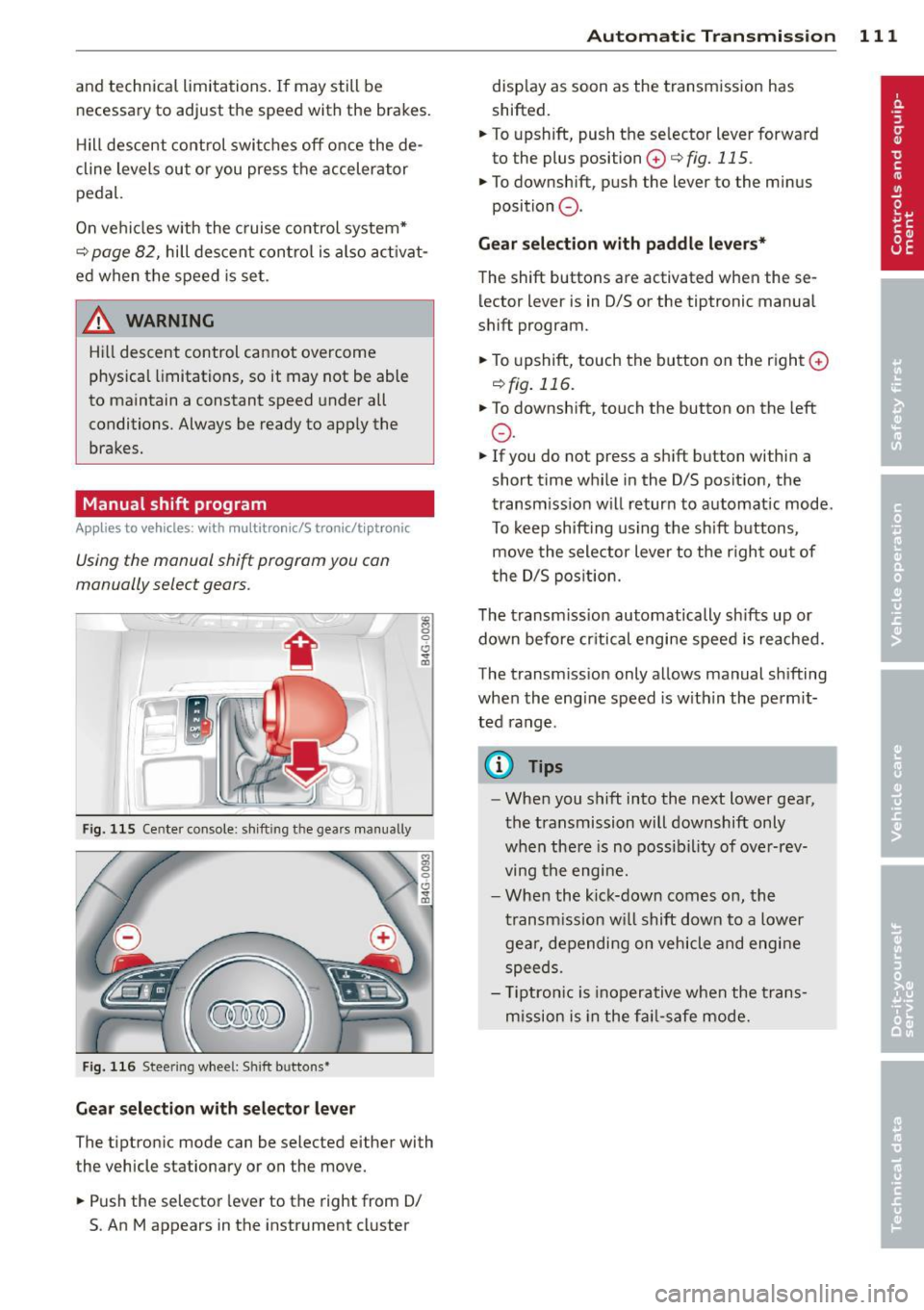
Fig . 115 Center co nsole: sh ift ing the gears manually
Fig . 116 Steering wheel: S hift b uttons*
Gear selection with selector lever
The tiptron ic mode can be selected either with
the vehicle stationary or on the move .
.,. Push the selector lever to the right from D/
5. An M appears in the instrument cluster
Automatic Transmission 111
display as soon as the transmission has
shifted.
.,. To upshift, push the selector lever forward
to the plus position
0 c::> fig. 115 .
.,. To downshift, push the lever to the minus
position
0 .
Gear selection with paddle levers*
The shift buttons are activated when the se
lector lever is in D/S or the tiptronic manual
shift program.
.,. To upshift, touch the button on the right
0
c::>fig. 116.
.,. To downshift, touch the button on the left
0 .
.,. If you do not press a shift button within a
short time while in the D/S posit ion, the
transmission will return to automatic mode.
To keep shifting using the shift buttons,
move the selector lever to the r ight out of
the D/S position.
The transm iss ion automatically sh ifts up or
down before cr itical engine speed is reached.
The transmission only allows manual shifting
when the engine speed is with in the permit
ted range .
(D Tips
-When you shift into the next lower gear,
the transmission will downshift only
when the re is no possibility of over-rev
ving the engine.
- When the kick-down comes on, the
transmission will shift down to a lower
gear, depending on vehicle and engine
speeds.
- T iptron ic is inoperative when the trans
mission is in the fail-safe mode.
Page 114 of 304
112 Automatic Tran sm iss ion
Kick-down
Applies to vehicles: with multitron ic/S tronic/t iptronic
Kick-down enables maximum acceleration .
Applies to ve hicle s w ith a multit ro nic
t ransmi ssion
When you depress the accelerator pedal be
yond the resistance po int, the transmission
downshifts into a lower gear ratio depend ing
on the vehicle speed and engine speed. As
l ong as the accelerator peda l is depressed, the
engine speed is automat ica lly regulated for
maximum accelera tion.
Appli es to veh icl es with a S tronic -/,
tiptronic tran smi ssion
When you depress the accelerato r pedal be
yond the resistance po int, the a utomat ic
transmission downshifts into a lower gear, de
pending on vehicle speed and engine speed.
T he upshift into the next higher gear takes
p lace once the maximum specified engine
speed is reached.
A WARNING
,-
Please note that the drive wheels can spin
if kick-down is used on a smooth slippery
road - there is a risk of skidding .
Launch Control Program
Applies to vehicles: with S tronic
The Launch Control Program provides the
best acceleration possible when starting from
a stop .
Requirement : The engine must be at operat
ing temperature and the steering wheel must
not be turned .
.. Press the
I~ O FFI button c> page 196 while
the engine is running. The
1B indica tor light
illuminates in the instrument cluster and
Sta bilization contr ol (ESC ): Off Warn ing!
R educed stabi lit y
appears in the dr iver in
fo rmat io n system disp lay .
.. Move the selecto r lever to position D/S to
select sport mode (5) or select
D ynam ic
mode in Audi dr ive select <=> page 101 . ..
Press the brake pedal strongly with your left
foot and hold it down for at least 1 second .
.. At the same time, press the acce lerator ped
al down completely with your right foot un
til the eng ine reaches and maintains a high
RPM .
.. Remove your foot from the brake pedal
w ith in 5 seconds <=>,&. .
_&. WARNING
-Always adapt your dr iving to the traff ic
f low.
- On ly use the Launch Contro l Program
when road and t raff ic condi tions a llow it
and other d rivers w ill not be endangered
or annoyed by your driving and the vehi
cle's acceleration.
- Please note that the driving wheels can spin and the vehicle can b reak away
when sport mode is switched on, espe
cially when the road is slippery.
- Once you have accelerated, you shou ld
sw itch sport mode off by pressing the
I~ OFF I button.
(D Tips
- The transmission temperature may in
crease signif icantly after using the
Launch Control Program. If that hap
pens, the program may not be availab le
for a few minutes. It will be ava ilable
again after a cool-down period.
- When accelerating using the Launch
Contro l Program, all vehicle parts are
subject to heavy loads . Th is can result in
increased wear .
Transmission malfunction
Applies to vehicles: with multitronic/S tronic/tiptronic
[O] Tran smi ssio n: Pr ess brake pedal and se
lect ge ar again
Press the brake peda l and select the desired
selector lever position again. You can the n
continue d riving .
[O] Tran smi ssion overheating: Plea se drive
con servatively
Page 116 of 304
114 Parking system s
Parking systems
General information
A ppl ies to vehicles: with parkin g system plus/rear view
camera/peripheral cameras
Depending on your vehicle's equ ipment, vari
ous parking a ids wi ll help you when pa rk ing
and maneuvering.
The
p ar king sy st e m plu s assists you when
pa rking by audib ly and visually indicat ing ob
jects detected
in front of and behind the vehi
cle
~ page 115.
The rear view ca m era shows the area behind
the vehicle in the Infotainment d isp lay. This
d isplay assists you when you are c ross o r par
allel parking
q page 116. In addit ion, you are
assisted by the functions from the parking
system plus
~ page 115 .
The peripher al cam era s ass ist you with park
ing and maneuvering. You are aided by var ious
cameras depending on the vehicle equipment leve l
¢page 119. In addition, you are assist
ed by the functions from the parking system
plus ¢ page 115.
A WARNING
- Always look for traff ic and check the area
around your vehicle by looking at it di
rectly as well . The parking system cannot
rep lace the d river's attent ion. The dr iver
is always respons ible for safety during
p arki ng and for all other maneuvers.
- Please note that some surfaces, such as
clothing, a re not detected by the system.
- Senso rs and cameras have blind spots in
wh ich peop le and objects ca nnot be de
te cted. Be especially cau tious of children
and animals.
- T he sensors can be displaced by impacts
or damage to the radia to r grille, bumpe r,
wheel housing and the unde rbody. The
par king systems may become impaired
as a resu lt . Have your authorized Audi
dealer or qualified workshop check their
function. -
Make s ure the sensors are not covered by
stickers, deposits or any other obstruc
tions as it may impair the sensor func
tion . For information on cleaning, refer
to
~ page 210.
(D Note
- Some objects are not detected by the
system under certain c ircumstances:
- Obje cts su ch as ba rrie r chains, trailer
draw bars, vertical po les or fences
- Objects above t he senso rs such as wall
extensions
- Objects w ith specific surfaces or struc
tures su ch as chain link fences or pow
der snow.
- If you conti nue d riving closer to a low- ly
ing object, it may disappea r from the
sensor range. Note th at yo u w ill no lon
ger be warned abo ut this obstacle.
(j) Tips
- T he system may provide a wa rni ng even
t ho ugh the re are no obs ta cl es in the cov
erage a rea in some situa tions, such as:
- certain road surfaces or for long grass.
- externa l ultrasonic sources e.g. from
clean ing vehicles.
- heavy rain, snow or thick vehicle ex
ha ust.
- We recommend that you practice park
ing in a traff ic-free location or park ing
lot to become familiar w ith the system.
When doing this, there should be good light and weather cond itions .
- You can change the volume and pitch of
the s ignals as we ll as the disp lay
¢page 124.
- Please refer to the instructions for tow
ing a t railer
¢ page 125.
- What appears in the infotainment dis
play is somewhat time-delayed.
Page 117 of 304
Parking system plus
Description
Applies to vehicles: with parking system plus
Audi parking system plus provides audio and
visual signals when parking.
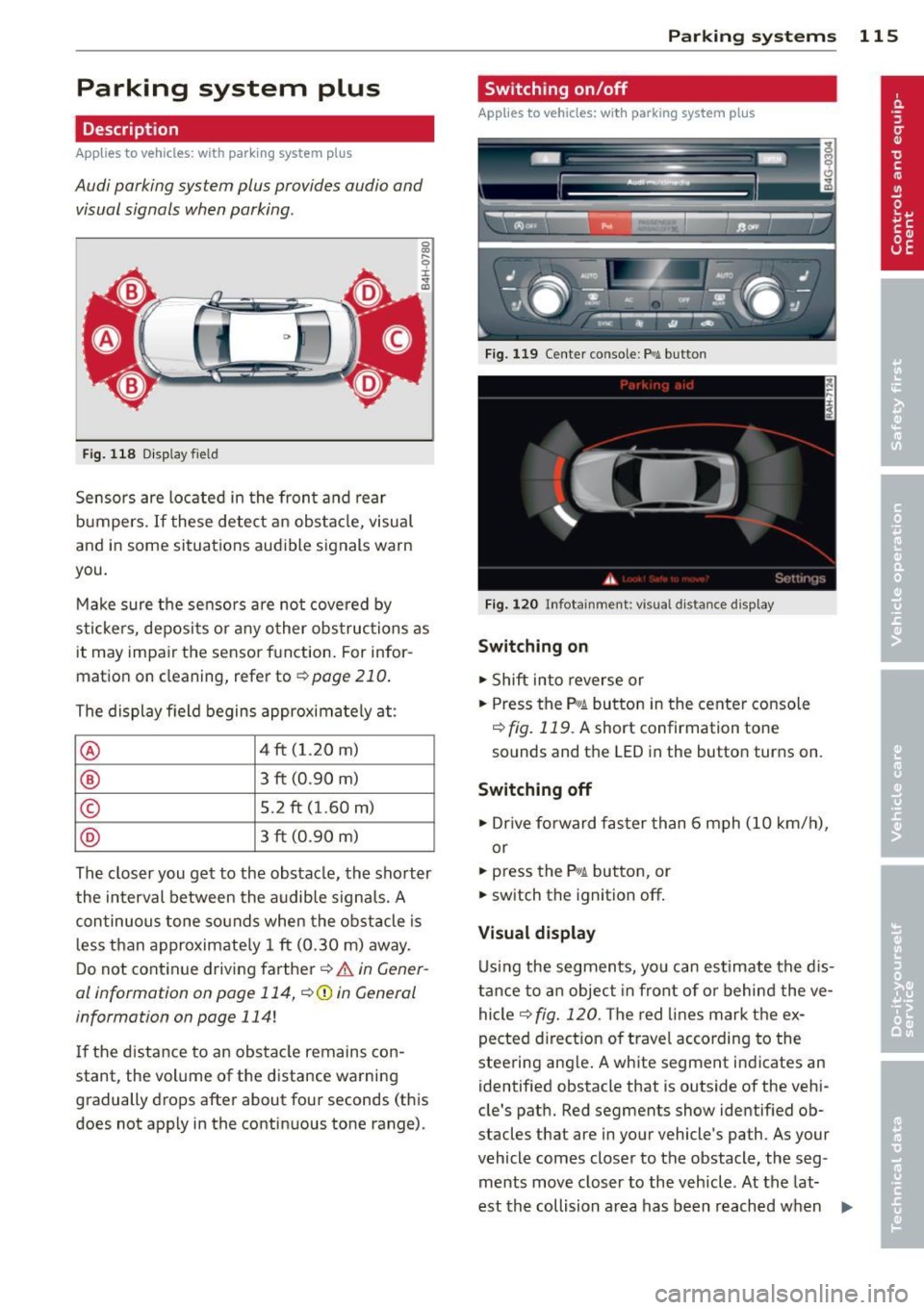
Fi g. 118 Dis p lay f ie ld
Sensors are located in the front and rear
bumpers.
If these detect an obs tacle, visual
and in some situations aud ible signals warn
you.
M ake sure t he sensors are not cove red by
s t icke rs, deposits or any o ther obs truc tions as
it may impair the sensor function. For infor
mation on cleaning, refer to
c::> page 210 .
The display field begins approximately at:
® 4 ft (1.20 m)
® 3 ft (0 .90 m)
© 5.2 ft (1.60 m)
@ 3 ft (0 .90 m)
The clos er you get to the obstacle, the sho rter
the interval between the audible signa ls. A
con tinuous tone sounds when the obstacle is
l ess than approximate ly 1 ft (0.30 m) away .
Do not continue driving farther¢
& in Gener
al information on page 114, ¢(Di n General
information on page
114 !
If the d istance to an obstacle remains con
stant, the volume of the d istance warning
gradually drops after about four seconds (this
does not apply in the continuous tone range).
P arking systems 115
Switching on/off
Applies to vehicles: with parking system plus
Fig. 119 Center co nso le : Pv! button
Fig . 1 20 Infota in m ent : vi su al d is ta n ce d isplay
Switching on
.,. Shift into reverse or
.,. Press the
p,;A button in the center console
c::> fig. 119 . A short confirmation tone
sounds and the LED in the button turns on .
Switching off
.,. Dr ive fo rward fas ter than 6 mph (10 km/ h),
or
.,. press the
P"IA button, or
.,. sw itch the ignit ion off.
Visual d isplay
U sing the segments, yo u can estimate the dis
tance to a n object in front of o r behind the ve
hicle ¢
fig. 120 . The red lines mark the ex
pected d irect ion of travel according to the
steering ang le . A wh ite segment indicates an
identified obstacle that is outside of the vehi
cle's pat h. Red segments show identified ob
stacles that are in your vehicle's path . As your
vehicle comes close r to the obstacle, the seg
ments move closer to the vehicle . At the lat-
est th e collision area has been reached when ..,.
Page 118 of 304
116 Parking systems
the next to last segment is disp layed . Obsta
cles in the collision area, including those out
side of the vehicle 's path, are shown in red. Do
not continue driving farther forward or in re
verse
q .&. in General information on
page 114, q(f) in General information on
page 114 .
Rear view camera
Introduction
Applies to vehicles: with parking system plus with rear
view camera
Fig. 121 Illustration: Cross parking
F ig. 122 Illustrat ion: paralle l parking
In addition to parking system p lus
q page 115, this parking system also has a
rear view camera .
You can use
cross parking for examp le, to
park in a parking space or in a garage
q fig. 121 . You can use parallel parking if you
wou ld like to park on the side of the road
r::;, fig . 122.
General information
Applies to vehicles: with parking system plus with rear
view camera
F ig. 123 Area covered (D a nd area not covered @by
the rear v iew camera
Fig. 1 24 Rea r lid: Locat ion of t he rear view camera
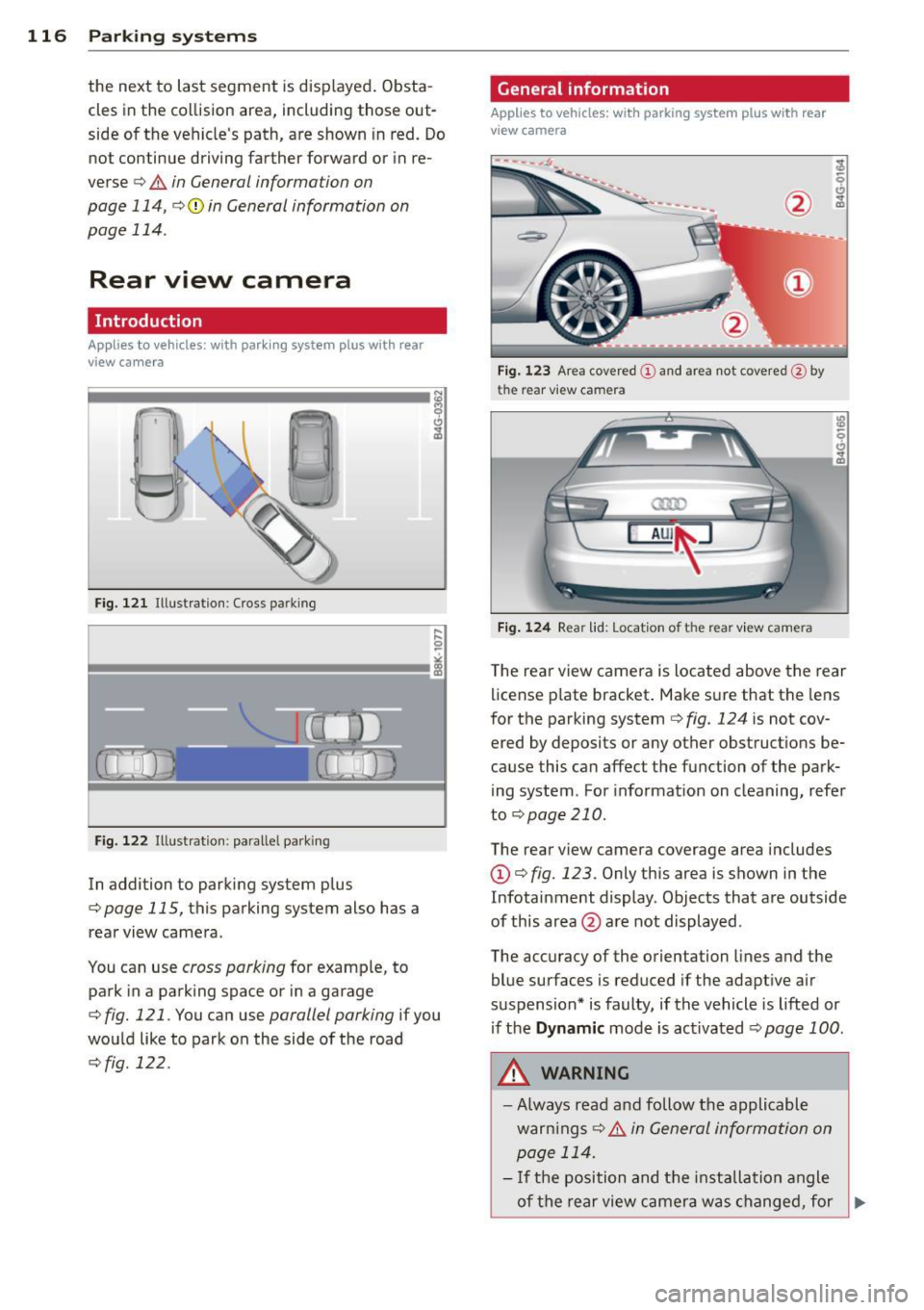
T he rea r view camera is located above the rear
license p late bracket . Make s ure that the lens
for the parking system
q fig. 124 is not cov
ered by deposits or any other obstruct ions be
cause this can affect the function of the park
ing system . For informat ion on cleaning, refer
to
q page 210.
The rear view camera coverage area includes
(D q fig. 123. Only this area is shown in the
Infotainment display . Objects that are outside
of this area @are not displayed.
The accuracy of the orientation lines and the
blue surfaces is reduced if the adapt ive air
suspension* is faulty, if the vehicle is lifted or if the
Dynamic mode is activated r::;, page 100 .
A WARNING
-
-Always read a nd follow the applicable
warn ings
r::;, .&. i n Ge neral information on
p age 114.
- If the position and the installation angle
-
of the rear view camer a was changed, for ~