ignition AUDI S6 2015 User Guide
[x] Cancel search | Manufacturer: AUDI, Model Year: 2015, Model line: S6, Model: AUDI S6 2015Pages: 314, PDF Size: 77.57 MB
Page 29 of 314
M N
0 I.J "". rl I.O
"' rl
"' rl
Instrument s and warning /indicator lights 2 7
Fuel economy messages
Fuel economy messages are disp layed when
fuel consumption is increased by certain con
ditions ~
fig. 10 . If you follow these fuel
economy messages, you can reduce your vehi
cle's consumption of fuel. The messages ap
pear automatically and are only displayed in
the efficiency program. The fuel economy messages turn off automatically after a cer
tain period of time .
To turn an economy message off immediately after it appears, press any button on the mul
tifunction steering wheel.
@ Tips
- If the data are deleted in the efficiency
program, those values are also reset in
trip computer .
- Once you have turned a fuel economy
message off, it will only appear again af
ter you turn the ignition on aga in .
- The fuel economy messages are not dis
played in every instance, but rather in in
tervals over a period of ti me .
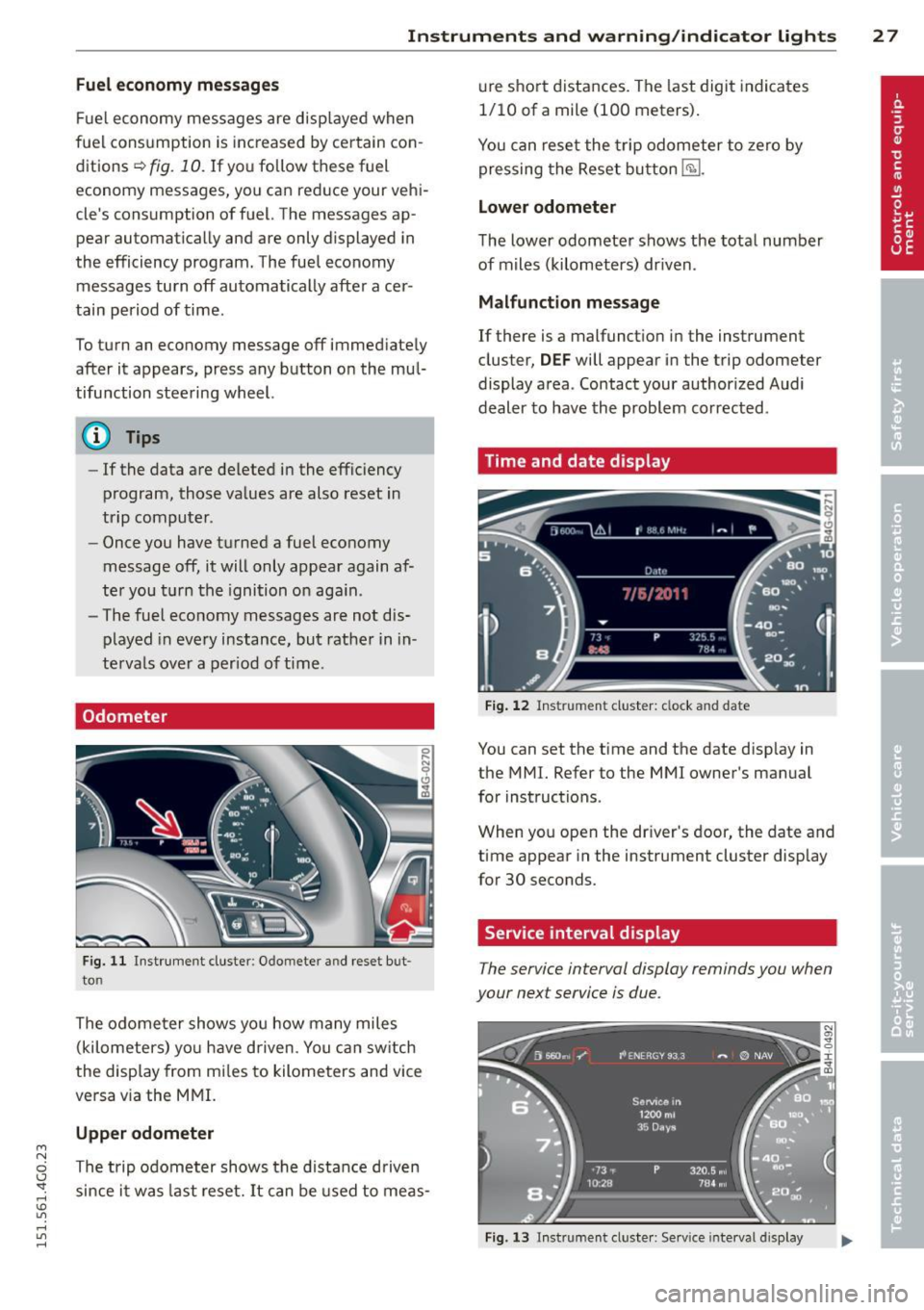
Odometer
Fig. 11 Instrument cluster: O domete r an d rese t but
to n
The odome ter shows you how many miles
(kilometers) yo u have d riven . You can switch
the display from mi les to kilometers and vice
versa via the MMI.
Upper odometer
The trip odometer shows the distance driven since it was last reset. It can be used to meas- ure
short distances. The last digit indicates
1/10 of a mile (100 meters).
You can reset the trip odometer to zero by
pressing the Reset button
E§l.
Lower odometer
The lower odometer shows the total number
of miles (kilometers) dr iven .
Malfunction message
If there is a malfunct ion in the instrument
cluster,
DEF will appear in the trip odometer
display area . Contact your authorized Audi
dealer to have the problem corrected .
Time and date display
Fig. 12 Instrume nt cluster: clock and date
You can set the time and the date disp lay in
the MMI. Refer to the MMI owner's manual
for instructions .
When you open the dr iver's door, the date and
time appear in the instrument cluster display
for 30 seconds.
Service interval display
T he service interval display reminds you when
your next service is due .
Fig. 13 Instrumen t cl uster: Serv ice interva l display
Page 30 of 314
28 Instruments and warning /indicator lights
The schedule fo r the next oil change o r inspec
t ion is calculated automatically and d isplayed
according ly . T he display works in two stages :
Service reminder
30 days befo re the ne xt service is due, a serv
i ce rem inder appears in the di splay when yo u
switch the ignit ion on
¢ fig . 13.
Afte r abo ut 5 seconds the display sw itches
b ack to normal. The di sta nce and time re
maining a re update d eac h time the ignition is
switched on unt il the date due for service is
reac hed .
Service due
When the due date for service is reached , the
message
Service due! appears in the instr u
men t clus ter immedia tely after you switch the
i gnition on. Additionally, a war ning tone
sounds . After about 5 seconds the display
switches back to normal.
Calling up the service schedules
If o r whe n an oil change o r inspect ion is due,
can be shown in the MM I disp lay by select ing
the service interva l disp lay in the car menu .
Select the
! CAR ! function b utton> (Ca r)* s ys
tems
contro l button > Servicing & chec ks >
Service interval displays.
Resetting the service interval display
Your author ized A udi dealer w ill reset the cor
responding service sched ule after perform ing
the app rop riate serv ice on yo ur vehicle. Yo u
a ls o have the possibility to reset the oi l
change schedule after having performed an
oil change according to Audi specifications.
Selec t the
I CAR ! function button > (Car) * sys
tems
cont ro l button > Servicing & checks >
Service Intervals > Re set oil change interval.
(D Note
- Only reset the o il change d isp lay when
you hav e compl eted an o il change .
- If you d isconnect t he battery te rm inals,
no calc ulations can be made for the serv
i ce interv al display during this t ime and
n o servi ce re mi nder w ill appear . Reme m- ber th
at o bse rv ing the p roper service in
tervals is vita lly im po rtant to extend ing
the life of your vehicle, part icularly the
eng ine , and maintain ing its value. Eve n if
the mileage driven is low, the maxim um
p er iod of one year fro m one service to
t he next mus t not be e xceed ed .
@ Tips
The information in the Service Reminder
r ema ins sto red even when the vehicle bat
tery is disconnected.
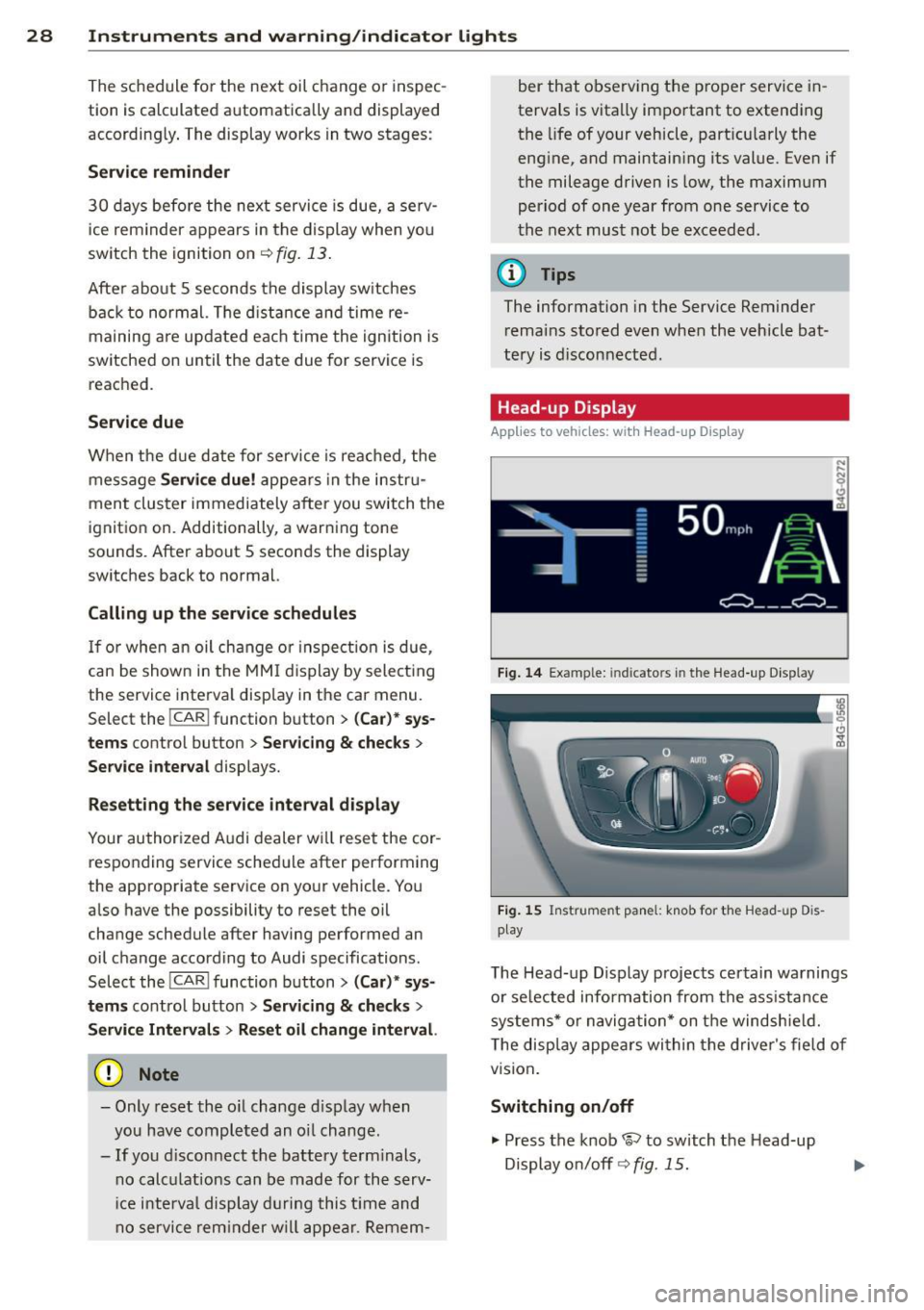
Head -up Display
Applies to veh icles: w ith Head-up D isp lay
Fig. 14 Exa mple: in dic ato rs in th e Head -up D isplay
Fi g. 1 5 Ins trume nt panel: k nob for t he Head -u p D is
play
The Head -up D isplay projects cer tain warnings
o r se lected info rmation from the ass istance
syste ms* or na vigatio n* on t he windsh ie ld .
T he disp lay appe ars wi thin the drive r's field o f
vision .
Switching on/off
.,. Press the knob 1rl to switch t he Head-up
Display o n/off ¢
fig. 15.
Page 33 of 314
M N
0 I.J "". rl I.O
"' rl
"' rl
Opening and closing Keys
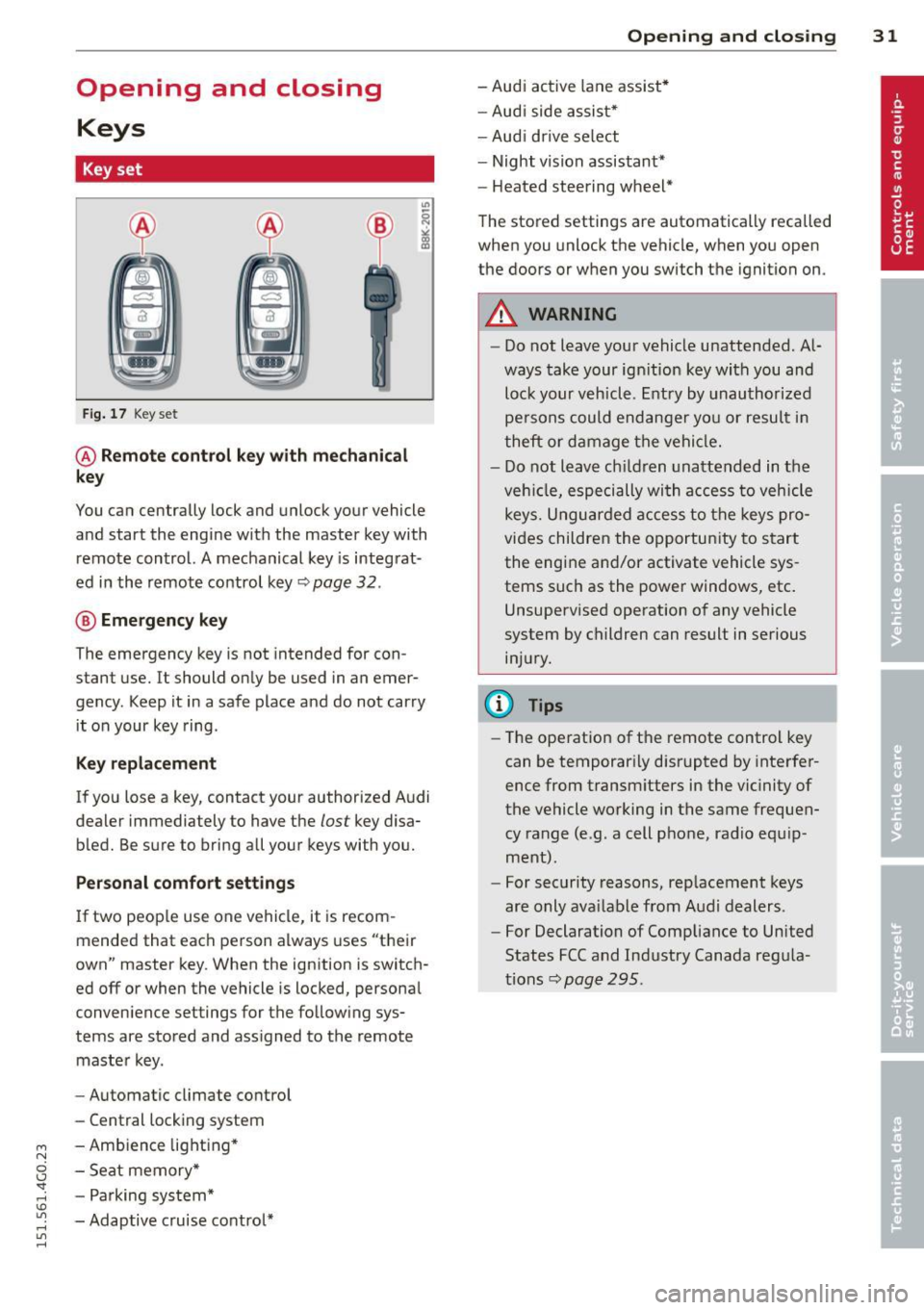
Key set
F ig. 17 Key set
@ Remote control k ey with mechanical
key
You can centrally lock and unlock your vehicle
and start the engi ne with the master key with
remote control. A mechanical key is integ rat
ed in the remote co ntrol key~ page
32 .
® Emergency key
The emergency key is not intended for con
stant use.
It should on ly be used in an emer
gency. Keep it in a safe place and do not car ry
it on your key ring .
Key replacement
If you lose a key, contact your authorized A udi
dealer immediately to have the
lost key disa
b led. Be s ure to bring all your keys with you.
Personal comfort settings
If two peop le use one vehicle, it is recom
mended that each person always uses "t heir
own" master key . When the ignition is switch
ed off or when the vehicle is locked, persona l
conven ience settings for the follow ing sys
tems are stored and ass igned to the remote
maste r key.
- Automatic cl imate contro l
- Central locking system
- Amb ience lig hting *
- Seat memory *
- P arking sys tem*
- Adaptive c ruise control*
Opening and clo sin g 31
- Audi ac tive lane assist *
- Au di side as sis t*
- Aud i drive se lect
- Night vision assistant*
- Heated stee ring wheel*
The stored settings are automatically recalled
when you unlock the vehicle, when you open
the doors or w hen you switch t he ignition on.
A WARNING
- Do not leave you r vehicle unattended. A l
ways take your ig nition key wi th you and
loc k your v ehicle. Entry by unau th or ize d
pe rsons could endanger yo u or resul t in
theft or d amage t he vehi cle.
- D o not leave c hildren una ttended in t he
veh icle, especi ally wi th a ccess to vehicle
key s. U ngu ard ed a ccess to t he keys pro
vi des childre n the o pportu nity to s tart
the eng ine a nd/or activate vehicle sys
tems such as the power windows, etc .
Unsupervised operation o f any vehicle
system by c hildren can result in serious
in ju ry .
(D Tips
- Th e ope ration of t he remote control key
can be temporar ily disrupted by inte rfer
ence fr om transm itters in the vic inity of
the vehicle working in the same fr equen
cy range (e.g. a cell p hone, radio e quip
m ent).
- Fo r security reasons, r eplacement keys
are only ava ilable from Audi dealers.
- For Declaration of C omp liance to Un ited
States FCC and Ind ustry Canada reg ula
tions~ page
295.
Page 35 of 314
M N
0 <.J 'SI: ,...., \!) ..,.,
,...., ..,., ,....,
for another vehicle or a transponder is located on the key ring.
- For Declaration of Compliance to United
States FCC and Industry Canada regula
tions
¢ page 295.
Power locking system
General description
The power locking system locks or unlocks all
doors and the rear lid simultaneously.
You can lock and unlock the vehicle centrally.
You have the following choices:
- Remote master key¢
page 34,
- Door handles with convenience key*
¢page 35 ,
- Lock cylinder at the driver's door
¢page 36, or
- Power locking switch inside¢
page 36.
Selective unlocking
When you lock the vehicle, the power locking
system will lock the doors and the rear lid.
When unlocking, you can set in the MMI
whether only the driver's door or the entire
vehicle should be unlocked
¢page 34.
Automatic locking
The automatic locking feature locks all the ve
hicle doors and the rear lid when you drive
faster than 9 mph (1S km/h).
T he car is unlocked again, when the opening
function in the power locking system switch
or at one of the door levers is actuated .
Anti-theft alarm warning system
If the anti-theft alarm warning system de
tects a break-in into the vehicle, acoustic and
visual warning signals are triggered .
T he anti-theft warning system is activated au
tomatically when you lock the vehicle . It is de
activated when unlocking using the remote key, with the mechanical key, and when you
switch the ignition on.
The alarm also turns off when the alarm cycle has expired .
Opening and closing 33
Turn signals
When you unlock the vehicle, the turn signals
flash twice. When you lock the vehicle the
turn signals flash once. If they do not flash ,
one of the doors, the rear lid or the hood is not locked.
Unintentionally locking yourself out
In the following cases there safeguards to
prevent you locking your remote master key in
the vehicle:
- The vehicle does not lock with the central
locking switch¢
page 36 if the driver's
door is open.
- On vehicles with convenience key*, if the
most recently used master key is in the lug
gage compartment, the rear lid is automati
cally unlocked again after it is closed.
Do not lock your vehicle with the
remote mas
ter key or convenience key*
until all doors
and the rear lid are closed. In this way you
avoid locking yourself out accidentally.
Power side door closer*
The vehicle doors are equipped with a power
side door closer. When closing a door, you on
ly have to let it fall lightly into the latch. The
door will then automatically close by itself
¢..1, .
A WARNING
-
- When you lock your vehicle from outside,
nobody -especially children -should re
main inside the vehicle. Remember,
when you lock the vehicle from the out
side the windows cannot be opened from
the inside.
- When you leave the vehicle, always take
the ignition key with you . This will pre
vent passengers (children, for example) from accidentally being locked in the ve
hicle should they accidentally press the
power locking switch in the doors.
- Do not leave children inside the vehicle
unsupervised. In an emergency it would
be impossible to open the doors from
the outside without the key.
Page 40 of 314
38 Opening and closing
- Always ensure that no one is within
range of the rear lid when
it is mov ing, in
particular close to the hinges - fingers or
hands can be pinched.
(D Tips
When the vehicle is locked, the rear lid can
be opened separately by pressing the but
ton
l .::::s l on the master key. When you close
the rear lid again, it locks automatically .
luggage compartment with movement
activated opening
Applies to vehicles : wit h co nvenience key and se nsor -con
tro ll ed luggage compartmen t lid
Fig. 28 Rear of vehicle: foot movement
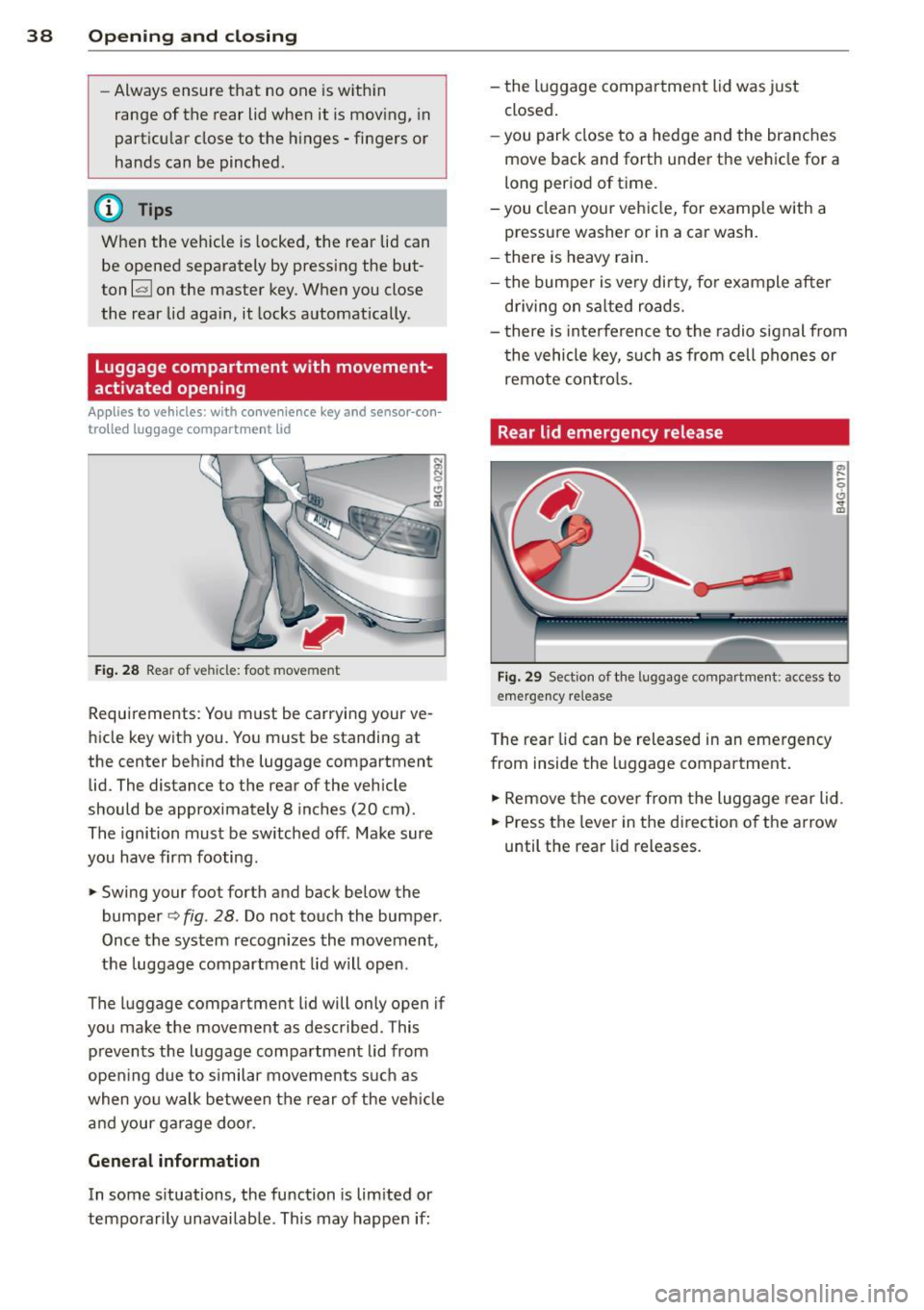
Requirements : You must be carrying your ve
hicle key with you. You must be standing at
the center behind the luggage compartment
lid. The distance to the rear of the vehicle
should be approximately 8 inches (20 cm).
The ignition must be sw itched off . Make sure
you have firm footing.
,.. Swing your foo t forth and back below the
bumper
o fig . 28. Do not touch the bumper .
Once the system recognizes the movement,
the luggage compartment lid will open.
The luggage compartment l id will only open if
you make the movement as described . This
p revents the luggage compartment lid from
opening due to s imilar movements such as
when you walk between the rear o f the vehicle
and your garage door.
General information
In some situations, the function is lim ited or
temporarily unavailab le. This may happen if: -
the luggage compartment lid was just
closed.
-you park close to a hedge and the branches
move back and forth under the vehicle for a
long per iod of time.
-y ou clean your vehicle, for example with a
pressure washer or in a car wash.
- there is heavy rain.
- the bumper is very dirty, fo r example after
driving on salted roads.
- there is interference to the radio signal from
the vehicle key, such as from cell phones or
remote controls.
Rear lid emergency release
Fig. 29 Sect io n of the luggage compartmen t: access to
e m erge ncy re lease
T he rear lid can be released in an emergency
from inside the luggage compartment.
,.. Remove the cover from the luggage rear lid.
,.. Press the lever in the direction o f the arrow
until the rear lid releases.
Page 41 of 314
M N
0 I.J "". rl I.O
"' rl
"' rl
Child safety lock for
the rear doors
The power child safety lock locks the rear win
dows and prevent the rear doors from being
opened from the inside .
Fig. 30 Sectio n fr om driv er' s door : child sa fety lock
b uttons
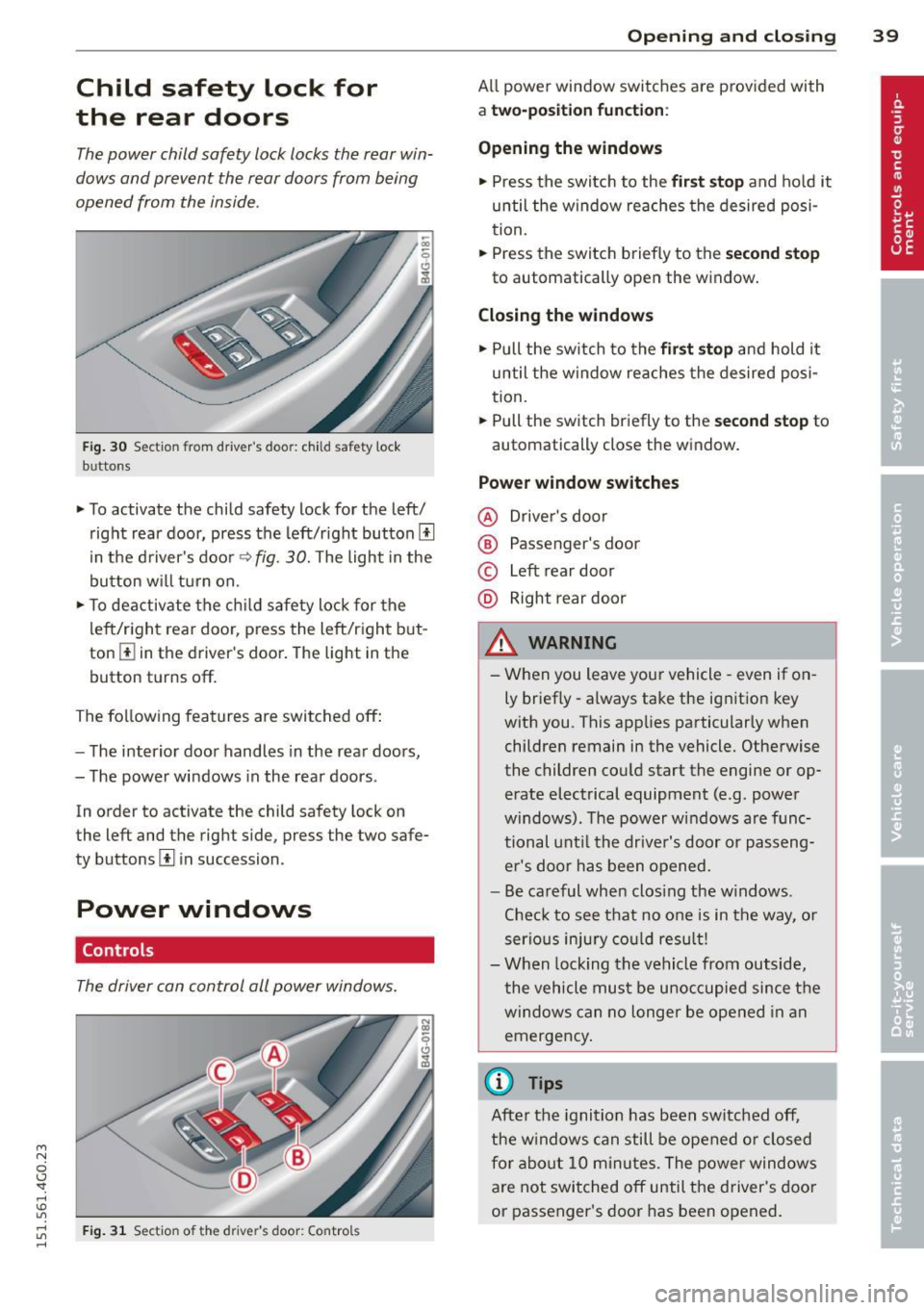
• To activate the child safety lock for the left/
right rear door, press the left/right button
[!l
in the driver's door¢ fig. 30. The light in the
button w ill turn on.
• To deactivate the child safety lock for the
left/right rear door , press the left/right but
ton [!] in the driver's door. The light in the
button turns off.
The following features are switched off:
- The interior door handles in the rear doors,
- The power windows in the rear doors .
In order to activate the ch ild safety lock on
the left and the right side , press the two safe
ty buttons
[!l in succession .
Power windows
Controls
The driver can control all power windows.
Fig . 31 Sectio n of t he dr iv er 's d oor: Control s
Opening and closing 39
All power window switches are prov ided with
a two-po sition function :
Opening the windows
• Press the switch to the first stop and hold it
until the window reaches the desired posi
tion.
• Press the switch briefly to the
second stop
to automatically open the window.
Closing the windows
• Pull the switch to the first stop and hold it
until the window reaches the desired posi
tion.
• Pull the switch briefly to the
second stop to
automatically close the window.
Power window switches
@ Driver's door
® Passenger's door
© Left rear door
@ Right rear door
& WARNING
-When you leave your vehicle -even if on
ly briefly -always take the ignition key
with you . This applies particularly when
children remain in the vehicle. Otherwise
the children could start the engine or op
erate electrical equipment (e .g . power
windows). The power windows are func
tional until the driver's door or passeng
er's door has been opened.
- Be careful when clos ing the w indows .
Check to see that no one is in the way, or
serious injury could result!
- When locking the vehicle from outside,
the vehicle must be unoccupied since the
windows can no longer be opened in an
emergency.
(D Tips
After the ignition has been switched off,
the windows can still be opened or closed
for about 10 minu tes. The power windows
are not switched off until the driver's door
or passenger's door has been opened.
Page 42 of 314
40 Opening and clo sing
What to do after a malfunction
The one-touch open and close function must
be reactivated if the battery has been discon
nected .
,. Pull and hold the power window switch until
the window is fully closed .
,. Release the switch and then pull it again for
at least one second.
Valet parking
The valet parking feature protects the lug
gage compartment from unauthorized ac cess.
Fig. 32 Luggage compartment : valet park ing button
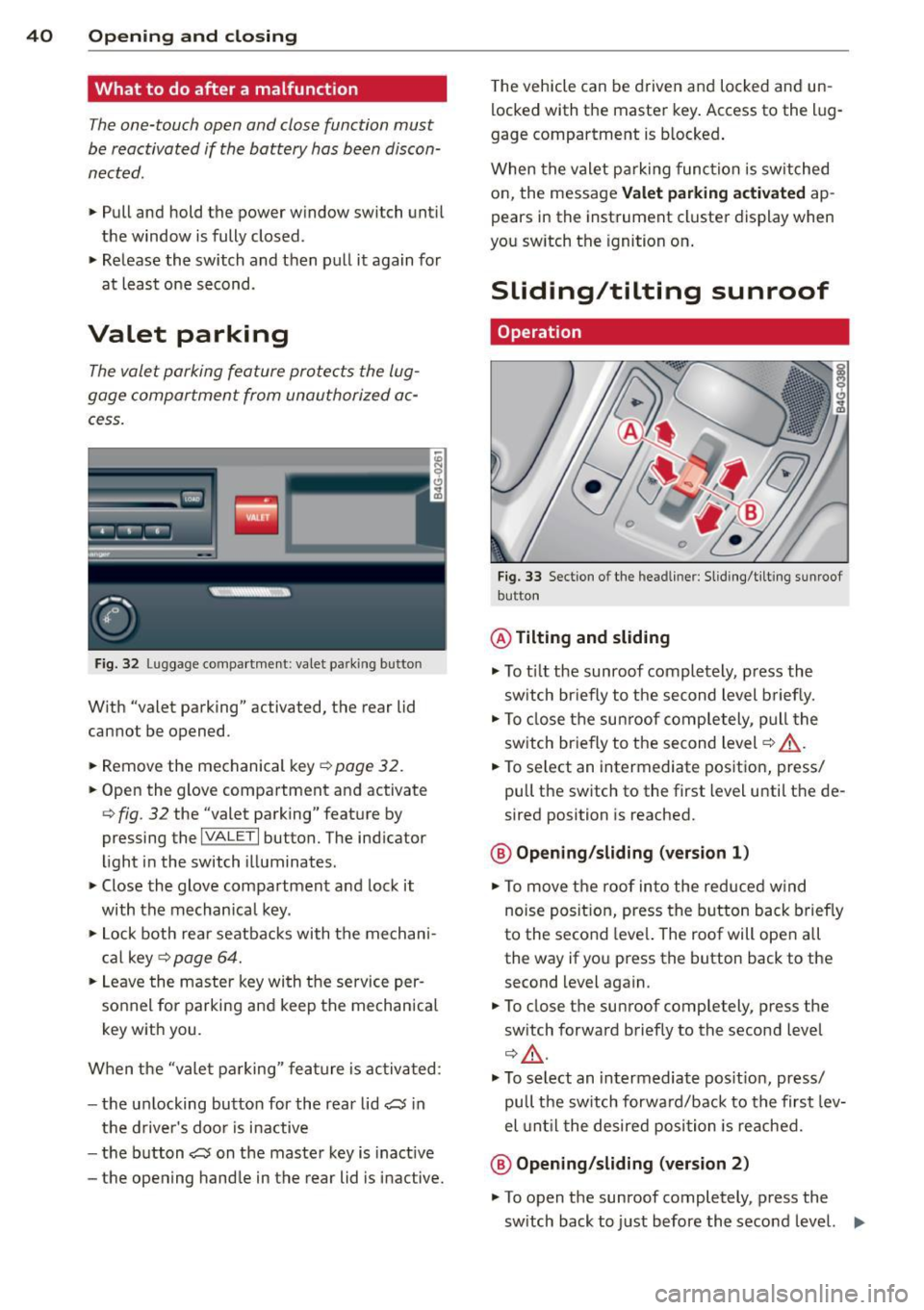
W ith "valet parking" activated, the rear lid
cannot be opened.
... Remove the mechan ical key
¢ page 32.
"' Open the glove compartment and activate
<=> fig. 32 the "valet parking" feature by
pressing the
I VA LET I button. The ind icator
light in the switch illuminates .
,. Close the glove compartment and lock it
with the mechanica l key .
"' Lock both rea r seatbacks with the mechani
c a l key ¢
page 64.
"' Leave the master key wi th the service per
sonnel for parking and keep the mechanical
key with you.
When the "vale t parking" fea ture is activa ted :
- the u nlocking button for the rear lid c:;, in
the d river's doo r is inactive
- the b utton c:;, on the maste r key is inact ive
- the opening hand le in the rear lid is inactive. T
he vehicle can be driven and locked and un
locked with the master key . Access to the lug
gage compartment is b locked .
When the valet pa rking func tion is switched
on, the message
Valet parking acti vated ap
pears in the instrument cluste r display when
you sw itch the ignition on .
Sliding/tilting sunroof
Operation
Fig . 33 Sect io n of th e headl iner : Sl idi ng/t ilti ng su nroof
but ton
@ Tilting and sliding
,. To t ilt the sunroof completely , press the
sw itch br iefly to the second level b riefly.
"' To close the su nroof comp letely, pull the
sw itch br iefly to the second level¢,& .
"' To select an intermediate pos it ion, press/
pull the switch to the first level until t he de
sired position is reached.
@ Opening /sliding (version 1 )
"'To move the roof into the reduced w ind
noise posit ion, press the button back brief ly
to the second leve l. The roof will ope n all
the way if you press the button back to the second level again .
"' To close the sunroof completely, press the
sw itch forward briefly to the second level
¢ £ .
,. To select an intermediate pos it ion, press/
pull the switch forwa rd/back to the first lev
el unti l the desired posi tion is reached.
@ Opening /sliding (version 2)
"' To open the sunroof completely, p ress the
sw itch back to j ust before the second level. ..,_
Page 44 of 314
42 Opening and clo sing
Programming the buttons
App lies to vehicles: with garage door opener ( Homelink)
Fig. 35 Headl iner: co ntro l un it
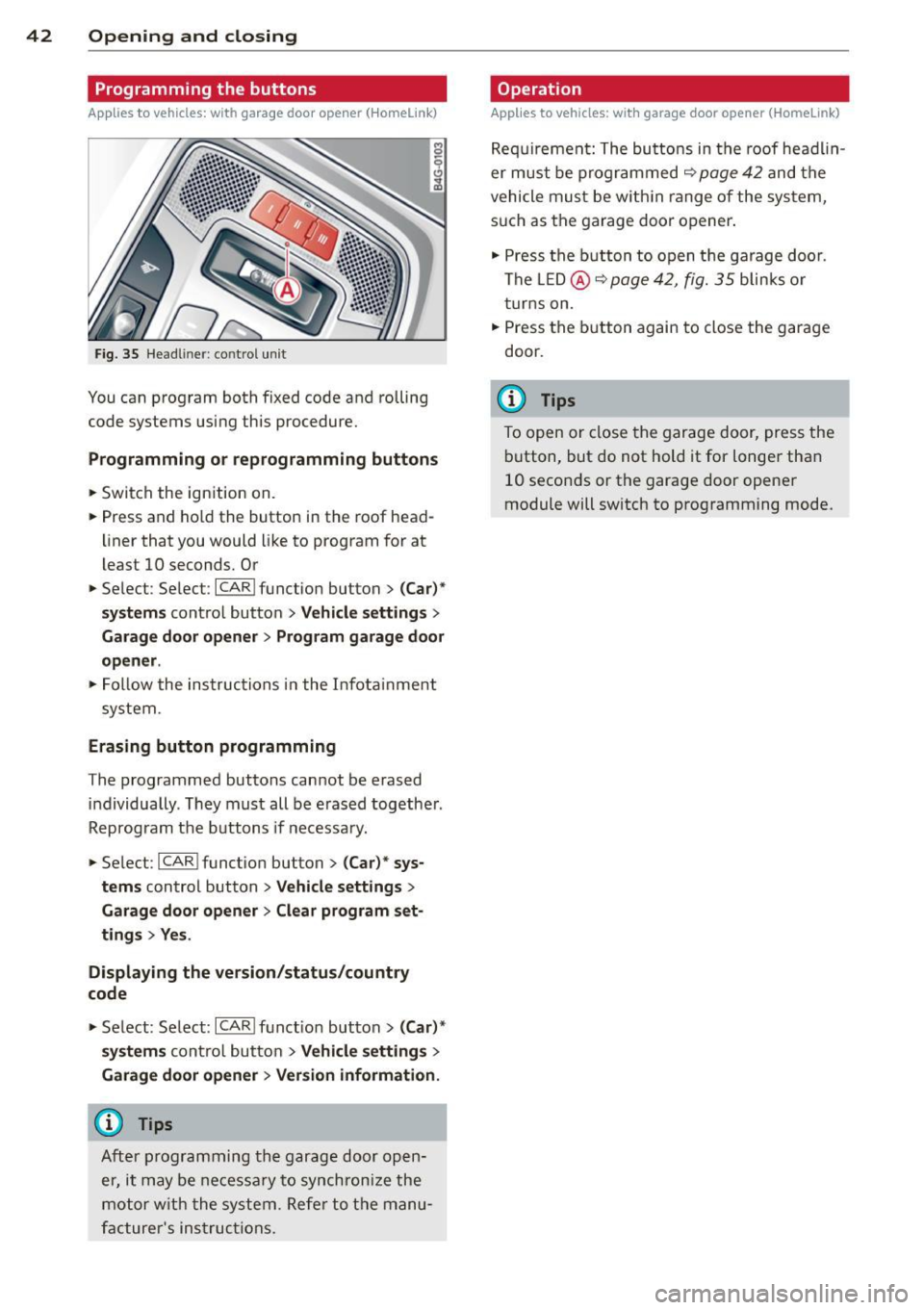
You can program both fixed code and rolling
code systems using this procedure.
P rogramming o r reprogramming buttons
.. Switch the ignition on.
.. Press and ho ld the button in the roof head
li ner that you would like to program for at
least 10 seconds. Or
.. Se lect : Select :
ICARI function button> ( C ar)"
s y ste ms
contro l button > Ve hicl e se tting s >
Garag e door open er> Program garag e door
op ener .
.. Fol low the instructions in the Infota inment
system.
Erasing button programming
The programmed buttons cannot be erased individually . They must all be e rased together .
Reprogram the buttons if necessa ry .
.. Select :
I CARI function button> (C ar)* sys
tem s
control button > Vehicle sett ings >
Garage door opene r> Clear program set
ting s> Yes .
Di spl aying the ve rsion /statu s/country
code
.. Select : Select: ICARI funct io n button> (Car )*
sy stem s
contro l button > V eh icle se tt ing s >
Garage d oor opener > V ers io n inf ormation .
(D) Tips
After programming th e garage door open
er, it may be necessa ry to synchron ize the
motor w ith the system. Refe r to the manu
facturer 's ins truc tions.
Op eration
Applies to vehicles: w ith garage door opener (Homelink)
Requ irement: The butto ns in the roof head lin
er must be programmed
~ page42 and the
vehicle must be w ith in range of the system,
such as the garage door opener .
.. Press the b utton to open the garage door.
The LED@ ~
page 42, fig. 35 blinks or
t urns on .
.. Press the button again to close the garage
door.
(D Tips
To open or close the garage door, press the button, but do not hold it for longer than 10 seconds or the garage door opener
module will switch to programming mode .
Page 45 of 314
M N
0 I.J "". rl I.O
"' rl
"' rl
Clear vision Lights
Switching the headlights on and off
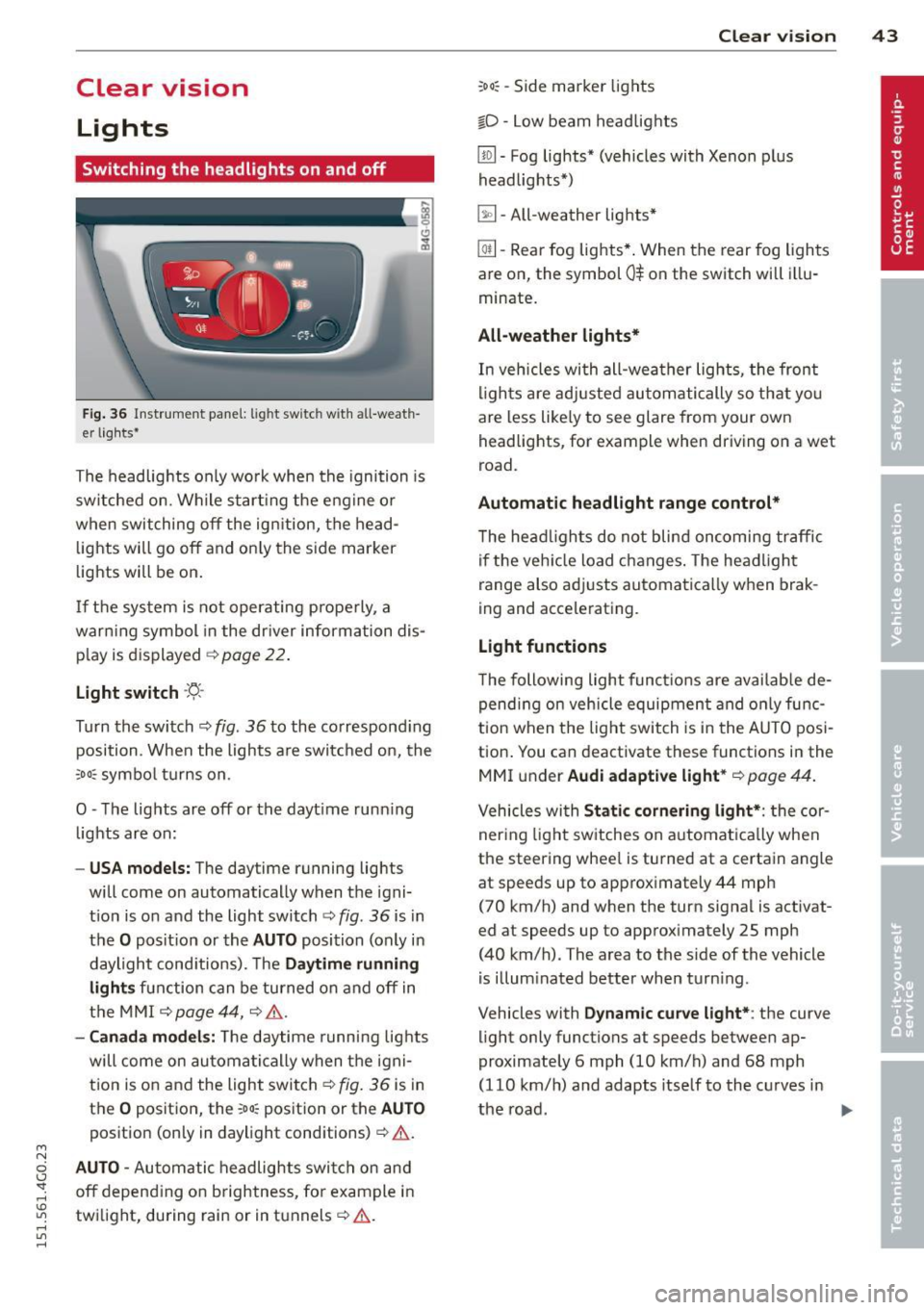
Fig . 36 Instrument pane l: lig ht sw itc h wit h all -weath
er lights•
The headlights only wo rk when the ignition is
switched on. Wh ile start ing the eng ine o r
when switching off the ign ition, the head
lights will go off and on ly the side marker
lights will be on .
If the system is not operating p rope rly, a
war ning symbol in the dr iver information dis
p lay is d isplayed
c::> page 22 .
Light switch -'tj_ -
Tu rn the switch c::> fig . 36 to the co rrespond ing
position . When the lights a re switched on, the
oD o: symbo l tu rns on .
0 -The lig hts are off or the dayt ime runn ing
lights are on:
- USA models: The day time running lights
will come on automatically when the igni
t ion is on and the light switch
c::> fig . 36 is in
the
O posit ion or the AUTO position (only in
daylight cond itions). The
Daytime running
light s
function can be turned on and off in
the MMI
c::> page44, c::>A .
-Canada model s: The daytime running lig hts
will come on automa tically when the igni
t ion is on and the light swi tch
c::> fig . 36 is in
the
O position, the : Do: pos ition or the AUTO
position (only in daylight conditions) c::> A .
AUTO -Automatic headlights swi tc h on and
off depend ing o n brightness, for example i n
tw ilight, during rain or in tunnels
c::> &. .
:Do: -Side marker lights
io -Low beam headlights
Clear vi sion 43
lm -Fog lights* (vehicles with Xenon p lus
headlights *)
~ -All-weather lights *
@il-Rear fog lights* . When the rear fog lights
are on, the symbol
0$ on the switch will i llu
minate.
All-weather lights*
In vehicles with all-wea ther lights , the front
ligh ts are ad justed au tomatically so that yo u
are less like ly to see glare from your own
head lights , for exam ple when driving on a wet
road.
Automatic headl ight range control*
T he he adlights do not blind on coming traffic
i f the veh icle load changes . The headligh t
range also adj usts automatica lly w hen brak
ing and accelerating .
Light functions
The following light funct io ns are availab le de
pend ing on vehicle equipment and o nly func
tion when t he lig ht switch is in the AUTO posi
tion . You can deactivate these functions in the
MMI under
Audi adaptive light * c::> page 44.
Vehicles with Static corn ering light* : the cor
ner ing ligh t sw itches on a utomat ically when
the steering whee l is turned at a certain angle
at speeds up to approximately 44 mph
( 7 0 km/h) and when the turn signa l is activat
ed at speeds up to approximately 25 mph
(40 km/h) . The area to the side of the vehicle
is illum inated better when turn ing .
Vehicles w ith
Dynamic cu rve light* : the curve
light only functions at speeds between ap
proximately 6 mph (10 km/h) and 68 mph
(110 km/h) and adapts itself to the curves in
the road .
~
Page 47 of 314
M N
0 I.J "". rl I.O
"' rl
"' rl
Automatic headlights
You can adjust the following settings in the
Automatic headlights menu:
Headlights activation time -You can adjust if
the headlights switch on
Early, Med . or Late
according to the sensitivity of the ligh t sensor.
Audi adaptive light* -You can switch adaptive
light
On and Off.
Daytime running lights
USA models:
You can switch the dayt ime run
n ing lights
on and off .
Canada models :
The function cannot be
turned off . It is activated automatically each
time the ignition is switched on. This menu
item is shown "greyed out" .
Coming home, Leaving home
The coming home function illuminates the
area outside the vehicle when you switch the
ignition off and open the driver's door. To turn
the function on, select
Lights when leaving
car > On .
The leaving home function illuminates the
area outside the vehicle when you un lock the
vehicle. To turn the funct ion on, select
Lights
when unlocking car > On .
The coming home and leaving home functions
only operate when it is dark and the light
switch is in the
AUTO position. Clear
vision 45
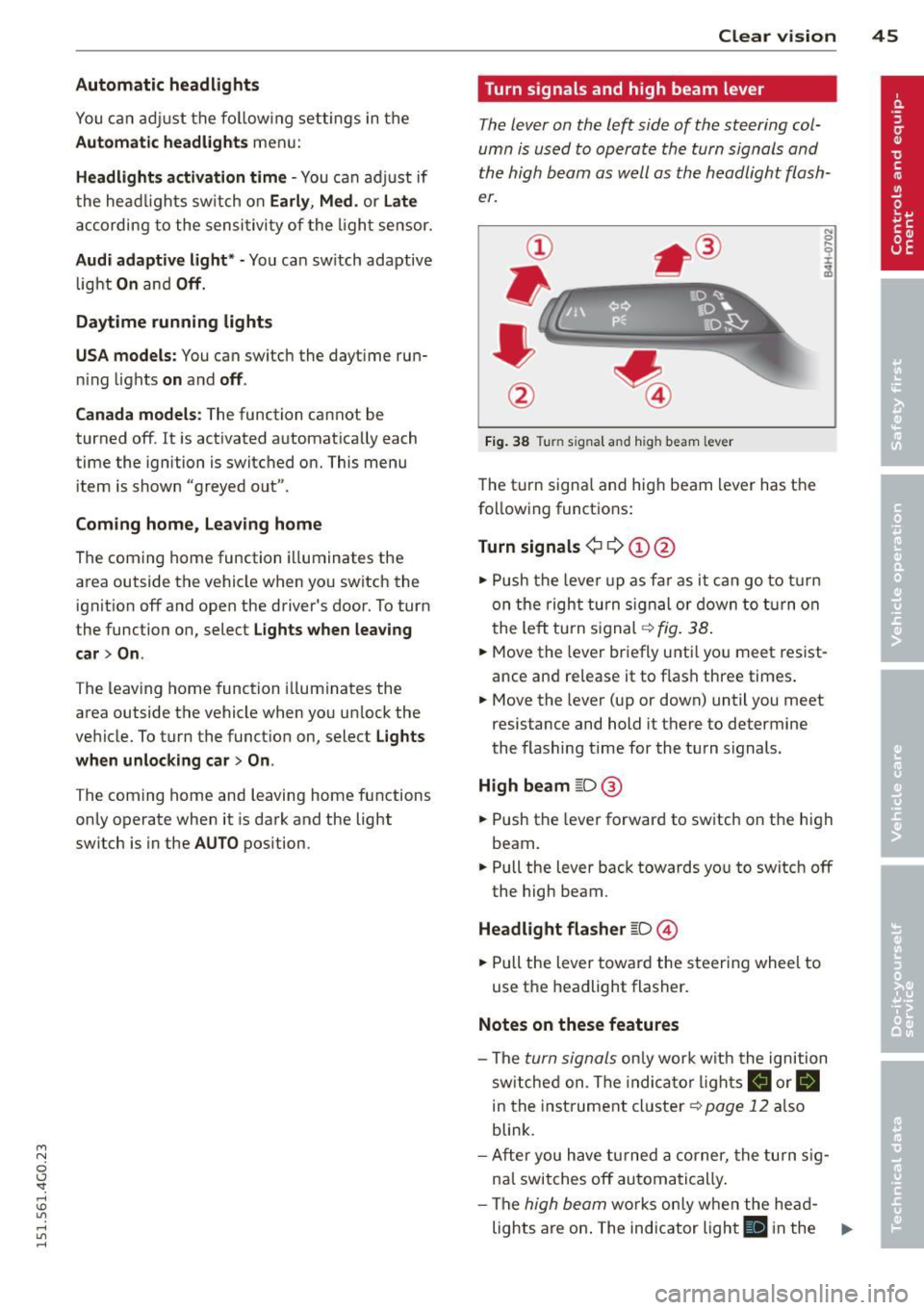
Turn signals and high beam lever
The lever on the left side of the steering col
umn is used to operate the turn signals and
the high beam as well as
the headlight flash
er.
Fig. 38 Tu rn signal and high beam lever
The turn signal and high beam lever has the
following functions:
Turn signals ¢ 9 ©@
.,. Push the lever up as fa r as it can go to turn
on the right turn signa l or down to turn on
the left tu rn s ignal ¢
fig. 38.
.. 0 ....
~
... Move the lever briefly unti l you meet resist
ance and re lease it to flash three times.
.,. Move the lever (up or down) until you meet
resistance and hold it there to determine
the flashing time for the turn signals.
High beam ~D @
... Push the lever forward to switch on the high
beam .
.,. Pull the lever back towards you to switch off
the high beam.
Headlight flasher ~D ©
... Pull the lever toward the steering wheel to
use the headlight flasher.
Notes on these features
-The turn signals on ly work w ith the ignition
sw itched on. The indica tor l ights
a or.
in the instrument cluster¢
page 12 also
blink.
- After you have turned a corner, the turn sig
nal switches off automatically .
- The
high beam works only when the he ad-
lights are on . The indicator light
El in the ..,.