instrument cluster AUDI S6 2015 Owner's Manual
[x] Cancel search | Manufacturer: AUDI, Model Year: 2015, Model line: S6, Model: AUDI S6 2015Pages: 314, PDF Size: 77.57 MB
Page 90 of 314
88 Audi adaptive cruise control and braking guard
Following any changes, the new stored speed
will be disp layed briefly in the disp lay @
r::!) page 86, fig. 90 .
Driving in stop-and-go traffic
Applies to vehicles: with Audi adaptive cruise control
The adaptive cruise control system also as
sists you in stop-and-go traffic. If a previous
detected vehicle ahead stops, your vehicle will brake to a stop, within the limits of the sys
tem.
• To resume driv ing with adaptive cruise con
trol, tap the accelerator pedal or
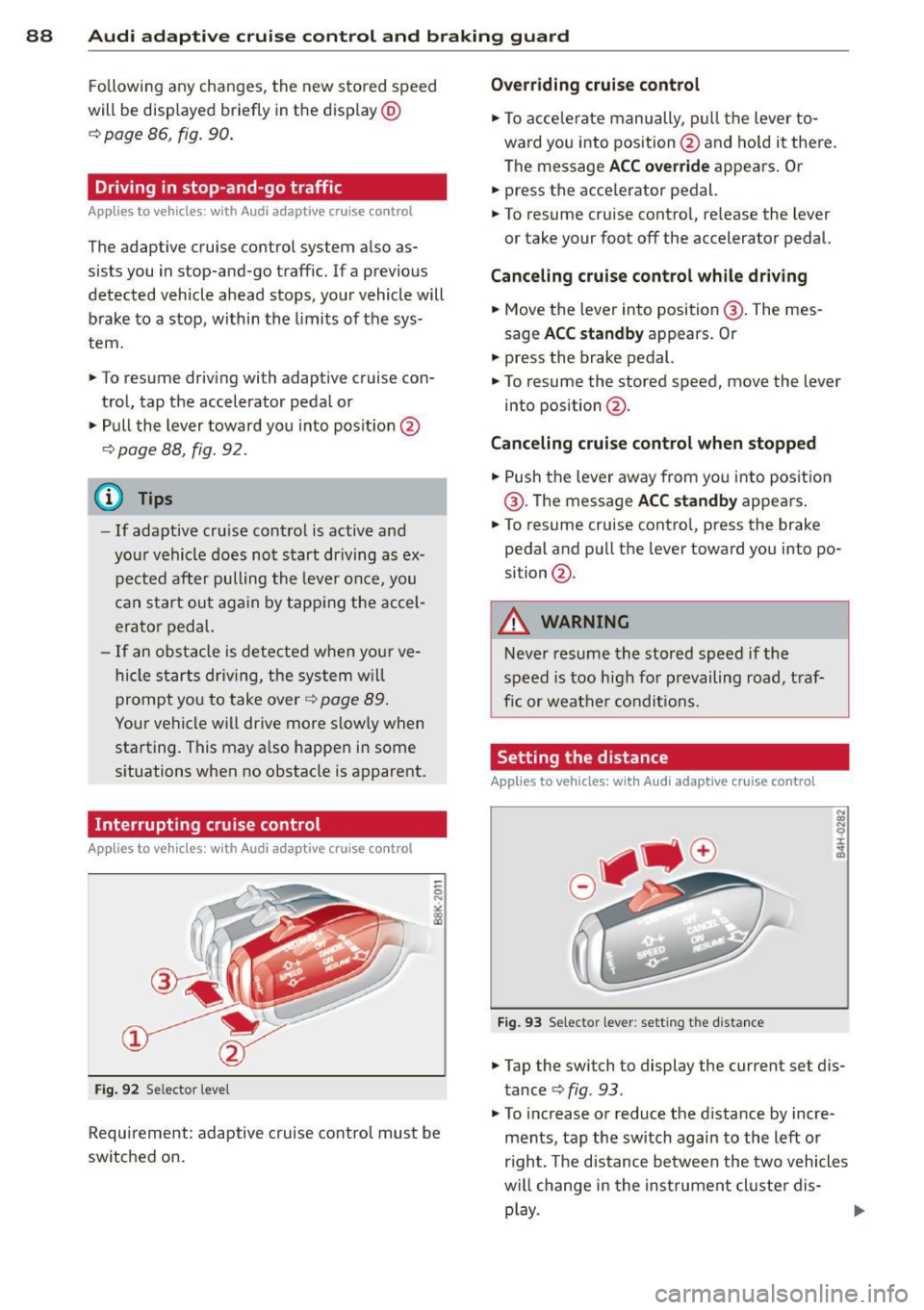
• Pull the lever toward you into posit ion @
r::!) page 88, fig. 92 .
(D Tips
-If adaptive cru ise control is active and
your vehicle does not start driving as ex
pected after pulling the lever once, you
can start out again by tapping the accel
e rator pedal.
- If an obstacle is detected when your ve
hicle starts driving, the system w ill
prompt you to take over¢
page 89.
Your vehicle will drive more slow ly when
starting. This may a lso happen in some
s ituations when no obstacle is apparent.
Interrupting cruise control
App lies to vehicles: with Audi adaptive cruise co ntrol
Fig. 92 Se lector leve l
Requirement: adaptive cruise control must be
switched on.
Overriding cruise control
• To accelerate manually, pull the lever to
ward you into position@and hold it there.
The message
ACC override appears. Or
• press the acce lerator pedal.
• To resume cruise contro l, re lease the lever
or take your foot off the accelerator pedal.
Canceling cruise control while driving
• Move the lever into position @. The mes
sage
ACC standby appears. Or
• press the brake pedal.
• To resume the stored speed, move the lever
into position @.
Canceling cruise control when stopped
• Push the lever away from you into position
@ . The message
ACC standby appears .
• To resume cruise contro l, press the brake
pedal and pu ll the lever toward you into po
sition @.
_&. WARNING ~ -
Never resume the stored speed if the
speed is too high for prevailing road, t raf
fic or weather condit ions.
Setting the distance
Applies to vehicles: wit h Audi adapt ive cruise control
Fig. 93 Selecto r lever : setting the distance
• Tap the switch to display the current set dis
tance
<=> fig. 93.
• To increase or reduce the distance by incre
ments, tap the switch again to the left or
r ight. The distance between the two vehicles
w ill change in the instrument cluster dis-
play .
IJII>
Page 91 of 314
M N
0 I.J "". rl I.O
"' rl
"' rl
Audi adaptive cruise control and braking guard 89
When approaching a moving vehicl e up ahead,
the adaptive cruise contro l system automati
cally brakes to match that object's speed and
then maintains the stored distance.
If the ve
hicle ahead accelerates, adaptive cruise con
trol will also accelerate up to the stored
speed .
The higher the speed, the greater the distance
in yards (meters) ¢.&. . The
Distance 3 setting
is recommended .
The distances prov ided are specified values .
Depending on the driving situation and the
how the vehicle ahead is driving, the actual
distance may be more or less than these tar
get distances.
The various symbols for the time increments appear briefly in the information line @
¢
page 86, fig . 90 when you change the set
tings .
,::::::,_,::::::, ___ Distance 1: This setting corre-
sponds to a distance of 92 feet/28 meters
when traveling at 62 mph (100 km/h), or a
time interval of 1 second.
,::::::, __ ,::::::, __ Distance 2: This setting corre
sponds to a distance of 118 feet/36 meters
when traveling at 62 mph (100 km/h), or a
time interval of 1.3 seconds .
,::::::, ___ ,::::::,_ Distance 3: This setting corre-
sponds to a distance of 164 feet/SO meters
when traveling at 62 mph (100 km/h), or a
time interval of 1.8 seconds .
,::::::, __ __ ,::::::, Distance 4: This setting corre-
sponds to a distance of 210 feet/64 meters
when traveling at 62 mph (100 km/h), or a
time interval of 2.3 seconds .
A WARNING
Following other vehicles too closely in
creases the risk of collisions and serious
personal injur y.
- Setting short distances to the traffic
ahead reduces the time and distance
available to bring your vehicle to a safe
stop and makes it even more necessary
to pay close attention to traffic. -
Always obey applicable traffic laws, use
good judgment, and select a safe follow
ing d istance for the traff ic, road and
weather conditions .
(D Tips
-Distance 3 is set automatically each time
you switch the ignition on.
- Your standard settings are automatically
stored and assigned to the remote con
trol key being used.
Selecting the driving mode
Applies to vehicles: with Audi adaptive cruise control
.. Select the desired driving mode in dr ive se
lect <=;>
page 100.
(D Tips
Your settings are automat ically stored and
assigned to the remote control key being
used.
Prompt for dr iver intervention
Applies to vehicles: with Audi adaptive cruise contro l
Fig. 94 Instrument cluster: req ues t fo r drive r inte rven
tio n
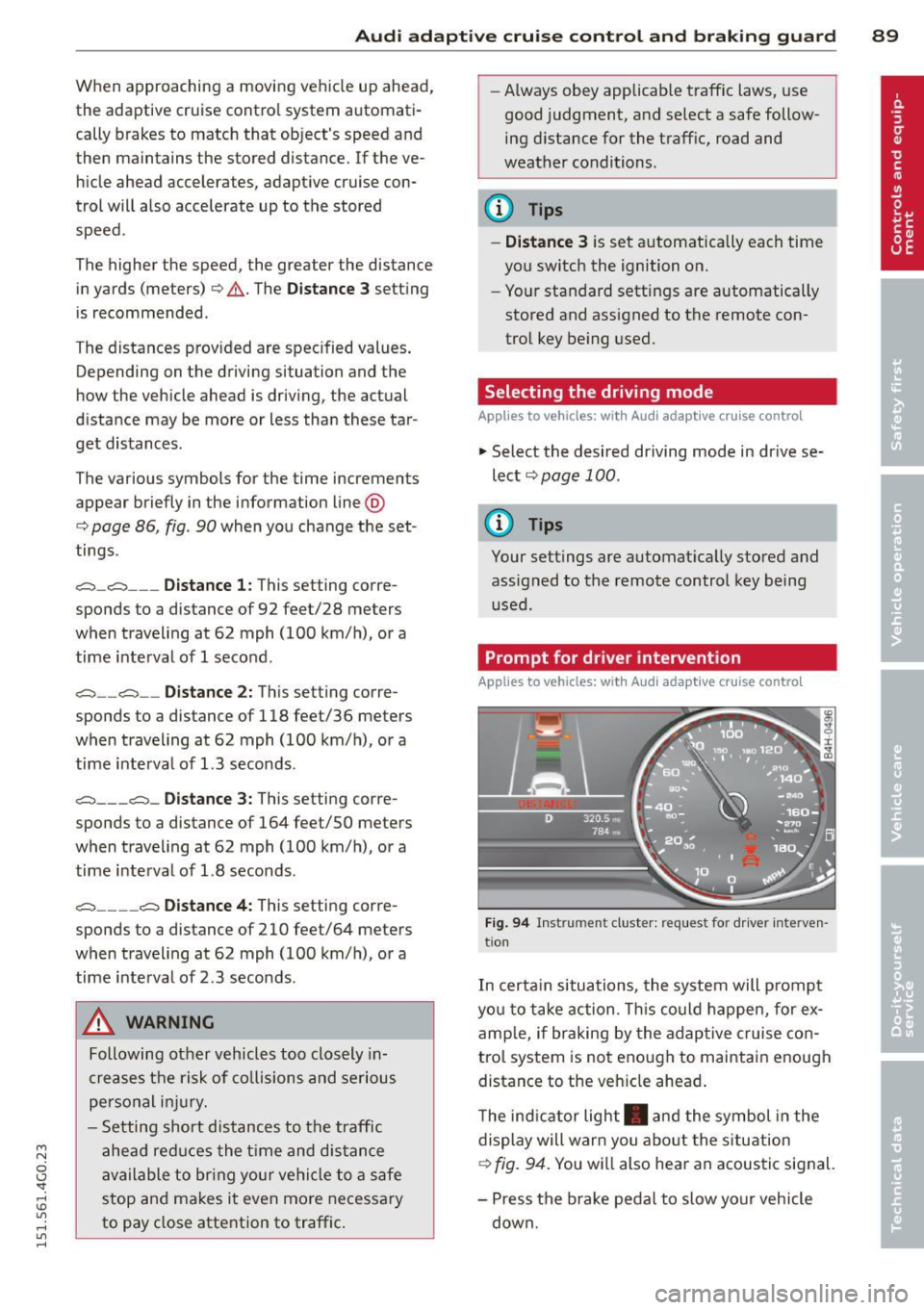
In certain situations, the system will prompt
yo u to take action . This could happen, for ex
amp le, if braking by the adaptive cruise con
trol system is not enough to maintain enough
distance to the veh icle ahead .
The indicator light . and the symbol in the
display will warn you about the situation
<=;> fig. 94. You wi ll also hear an acoustic signal.
- Press the brake pedal to slow your vehicle
down.
Page 92 of 314

90 Audi adaptive cruise control and braking guard
Audi braking guard
Descript ion
Applies to vehicles: with Audi adaptive cruise control
Fig. 95 Instrument cluster: approach warn ing
Braking guard uses radar sensors and a video
camera . It also functions within the limits of
the system when adapt ive cruise control is
switched off .
What can braking guard do?
When detected in time, the system can assess
situations when a vehicle ahead brakes sud
denly or if your own vehicle is traveling at a
high speed and approaching a vehicle up
ahead that is moving more slowly . Brak ing
guard does not react if it cannot detect the
situation .
The system advises you of various situations:
- The
distance warning is given if you are too
close to the vehicle ahead for a long time. If
the vehicle ahead brakes sharply, you will not be able to avoid a collision . The indicator
light. in the display comes on .
- The
approach warning is given when a de
tected vehicle up ahead in your lane is mov
i ng much more slowly than you are or if it
brakes sharply . When this warning is given,
it may only be possible to avoid a collision
by swerving or braking sharply . Th e indicator
light. and indicator in the display will
warn you about the danger
c::> fig. 95. You
will also hear an acoustic signa l.
ll This is not ava ilable in some co un tri es .
If you do not react fast enough or do not react
at all to the situation, braking guard will inter·
vene by braking.
- If a coll is ion is imminent, the system will
first provide an
acute warning by briefly and
sharply applying the brakes.
- If you do not react to the acute warning,
braking guard can brake wit h increasing
force w ith in the limits of the system . This
reduces the vehicle speed in the event of a
collision.
- The system can initiate maximum braking
short ly before a collision
1l . Full deceleration
at high speeds occurs only in vehicles with
adapt ive cruise control and side assist (pre
sense plus).
- If the braking guard senses that you are not
braking hard enough when a collision is im·
m inent, it can increase the braking force.
- The pre sense functions also engage when a
collision is imminent
c::> page 190.
Which functions can be controlled?
You can switch braking guard and the dis
tance/approach warning on or off in the MMI
c::> page 91, Settings in the MMI.
A WARNING
Lack of attention can cause collisions, oth
er accidents and serious personal injuries.
The braking guard is an assist system and
cannot prevent a collision by itself. The
driver must always intervene. The driver is
always respons ible for braking at the cor
rect time.
- Always pay close att ent ion to traffic,
even when the braking guard is switched
on. Be ready to intervene and be ready to
take comp lete control whenever necessa
ry . Always keep the safe and legal dis
tance between your vehicle and vehicles up ahead.
- Braking guard works within limits and
will not respond outside the system lim· its, for example when approaching a ..,.
Page 96 of 314
94 Audi active lane assist
Activating and deactivating
A pp lies to vehicles: with active lan e assis t
Fig. 96 Turn signal leve r: Active lan e ass ist butto n
Fig. 97 Windshie ld: Active lane assist ca mera viewing
wi ndow
-
I
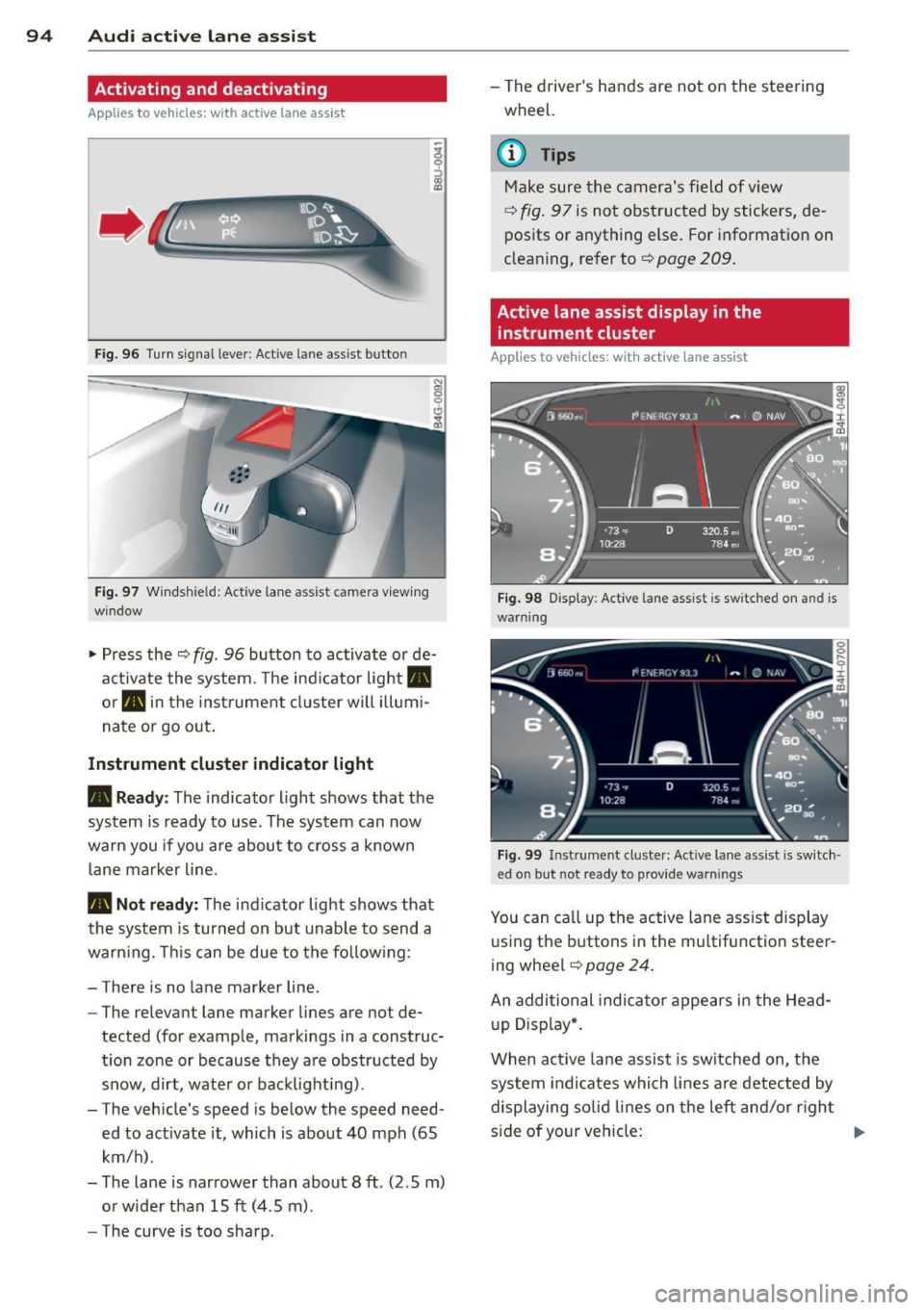
~ Press the ¢ fig. 96 button to activate or de
activate the system. The indicator light .
or . in the instrument cluster will illumi
nate or go out.
Instrument cluster indicator light
• Ready: The indicator light shows that the
system is ready to use . The system can now
warn you if you are about to cross a known
lane marker line .
• Not ready: The ind icator light shows that
the system is turned on but unable to send a
warning . This can be due to the following :
- There is no lane marker line .
- The relevant lane marker lines are not de-
tected (for example, markings in a construc
tion zone or because they are obstructed by
snow, dirt, water or backlight ing).
- The vehicle' s speed is below the speed need
ed to activate it, which is about 40 mph (65
km/h) .
- The lane is narrower than about 8 ft . (2 .5 m)
or wider than 15 ft (4 .5 m).
- The curve is too sharp . - The driver's hands are not on the steering
wheel.
(D Tips
Make sure the camera's field of view
¢fig. 97 is not obstructed by stickers, de
posits or anything else. For information on
cleaning, refer to¢
page 209.
Active lane assist display in the
instrument cluster
App lies to vehicles: wit h act ive lane assist
Fig. 98 Display : Activ e la ne ass is t i s s witc hed on and is
warning
Fig. 99 Instrume nt cl ust er: Act ive lane a ssist is switch ·
ed o n but no t re ady to pro vid e wa rning s
You can call up the active lane assist display
using the buttons in the multifunction steer
ing wheel ¢
pag e 24.
An additional indicator appears in the Head
up Display*.
When active lane assist is switched on, the
system indicates which lines are detected by
displaying solid lines on the left and/or right
side of your vehicle: .,..
Page 97 of 314
M N
0 <.J 'SI' ,...., \!) 1.1'1 ,...., 1.1'1 ,....,
White Active l ane assist is sw itched on
line(s) and ready to p rov ide warnings
on the side that is ind icated
¢ fig. 98.
Red line Act ive lane assist is warning you
(left or that you are about to leave your
right) lane
¢ fig . 98. In addition, the
steeri ng wheel vibrates s light ly.
Gray Act ive l ane assist is switched on
line(s) but is not ready to provide warn-
ings
¢ fig . 99.
Mes sages in the instrument clu ster
display
When the active lane ass ist turns off automat
i cally, the i nstrument cluster ind icator goes
out and one of the fo llow ing messages ap
pears on the display :
Audi active lane a ssist : Currently un availa
bl e. No camera view
This message appears if the camera is no lon
ger funct ional after the system has cont inous
ly failed to detect the lane markings . This
could happen if :
- The camera field of view¢
page 94, fig. 97
is d irty or covered in ice. Clean the area on
the windshie ld.
- The camera field of view is fogged over. Wait
until the fog has cleared before switching
active lane assist on .
- The system has been unable to detect the
lanes for an extended period of time due to
road cond it ions . Switch active lane ass ist
back on when the lines are more visible .
Audi active lane a ssist : Currently un available
A temporary ma lf u nction is preventing lane
assist from operating. Try sw itching active
lane assist on again later.
Audi acti ve lane a ssist : S ys tem fault!
Drive to you r autho rized Aud i dea le r soon to
h ave the ma lfunction co rrec ted.
Audi active lane a ssis t: Pl ea se take over
s te ering
Audi acti ve lane a ssis t 95
This message appears if yo u do not s teer the
vehicle yourself . If this is the case, active lane
ass ist does not switch off, b ut it does sw itch
to the "not ready" stat us. The system can help
you keep the ve hicle in the lane. However it is
your own responsibility to steer and control
t h e ve hicle .
Setting the steering wheel vibration
Applies to vehicles: with active lane assist
11> Select: !CAR ! function button> (Car )* sys
tem s
control button > Driver a ssis t > Audi
a ctive lan e as sis t.
You can switch the vibrat ing warn ing in t he
stee ring wheel
o n or off .
(D Tips
Your setting is a utomat ically stored and
assigned to the remo te control key being
used.
Page 101 of 314

M N
0 <.J 'SI: ,...., \!) 1.1"1 ,...., 1.1"1 ,....,
@ Tips
-Side assist is not active while you are
making the adjustment.
- Your settings are automatically stored
and assigned to the remote control key
being used.
Driver messages
Applies to vehicles: with side assist
If side assist switches off by itself, the LED in
the button turns off and a message will ap
pear in the instrument cluster display:
Audi side assist: Currently unavailable. No
sensor vision
The radar sensors' vision is affected. Do not
cover the area in front of the sensors with bike
wheels, stickers, dirt or other objects. Clean
the area in front of the sensors, if necessary
c>page97, fig.103.
Audi side assist: Currently unavailable
Side assist cannot be switched on temporarily
because there is a malfunction (for example,
the battery charge level may be too low).
Audi side assist: System fault!
The system cannot guarantee that it will de
tect vehicles correctly and it is switched off .
The sensors have been displaced or are faulty.
Have the system checked by an authorized
Audi dealer or authorized Audi Service Facility
soon.
Audi side assist: Unavailable when towing.
Side assist switches off automatically when a
factory-installed trailer hitch is connected to
the electrical connector on the trailer. There is
no guarantee the system will switch off when
using a retrofitted trailer hitch. Do not use
side assist when towing a trailer.
Audi side assist 99
Page 105 of 314
M N
0 I.J "". rl I.O
"' rl
"' rl
Night vision assistant
Night vision assistant
with detected pedestrian marking
Description
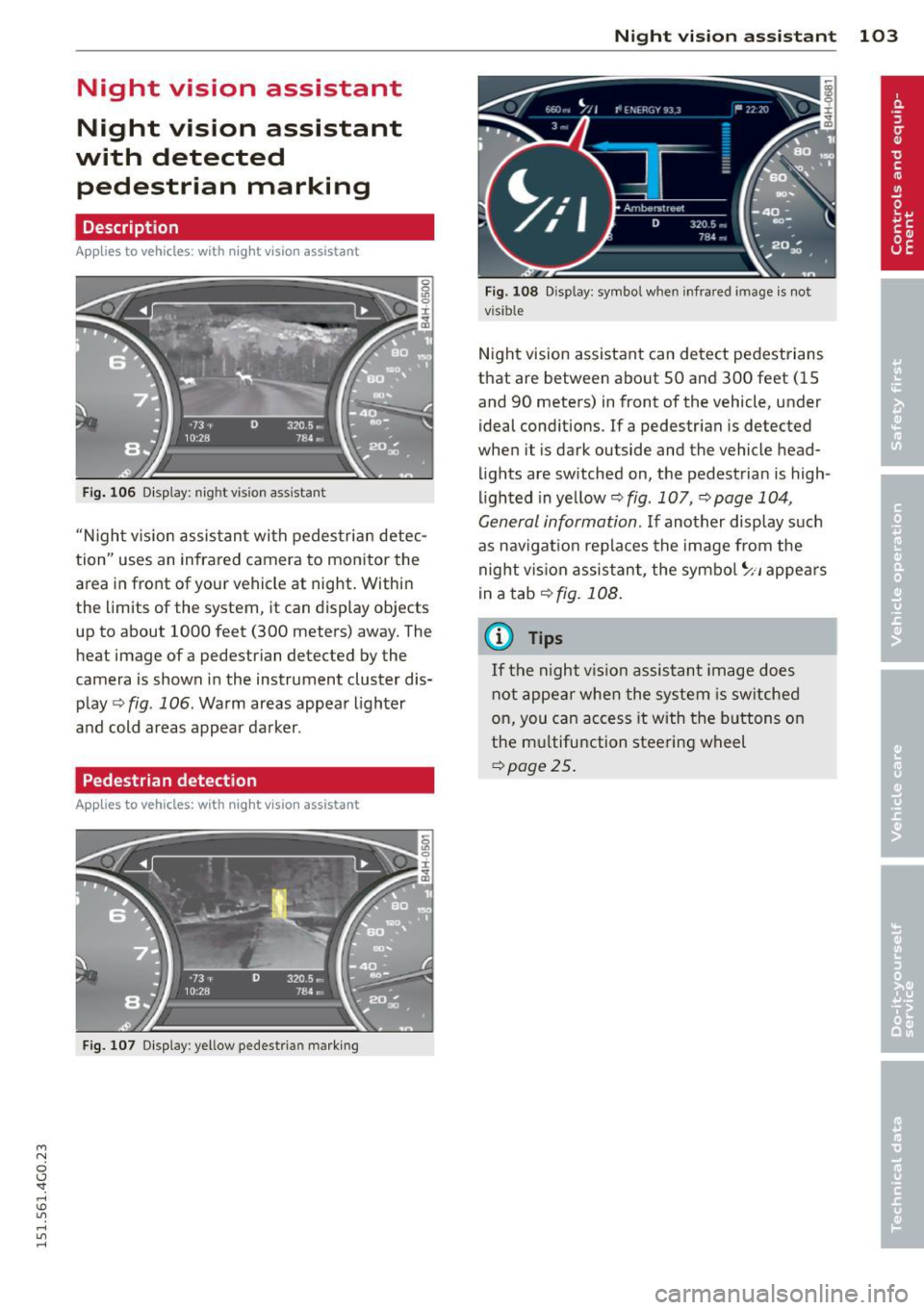
App lies to vehicles: with night v isio n assistant
Fig . 106 Display: nig ht v is ion assistant
"N ight v is ion assistant with pedestrian detec
tion" uses an infrared camera to monitor the
area in front of your vehicle at night. Within
the limits of the system , it can display objects
up to about 1000 feet (300 meters) away. The
heat image of a pedestrian detected by the
camera is shown in the instrument cluster dis
play
Q fig . 106 . Warm areas appear lighter
and cold areas appear darker .
Pedestrian detection
Applies to vehicles: with n ig ht v ision ass istant
Fig. 107 Display : yellow pedestrian marking
Night vision assistant 103
Fig. 108 D isp lay: symbo l w hen infrare d image is not
visi ble
Night vision assistant can detect pedestrians
that are between about 50 and 300 feet (15
and 90 meters) in front of the vehicle, under
ideal conditions .
If a pedestrian is detected
when it is dark outside and the vehicle head
lights are switched on, the pedestrian is high
lighted in yellow
Qf/g . 107, Qpage 104,
General information.
If another display such
as navigation replaces the image from the
night vision assistant, the symbo l~,, appears
in a tab
Q fig. 108.
(D Tips
If the night vision assistant image does
not appear when the system is sw itched
on, you can access it with the buttons on
the multifunction steering wheel
Q page25.
Page 109 of 314
M N
0 I.J "". rl I.O
"' rl
"' rl
Automatic Transmission
multitronic, S tronic,
tiptronic
Introduction
The automatic transmission is controlled elec
tronically . The transmission upsh ifts or down
shifts automatically depending on which drive
program is se lected .
When a
moderate driving style is used, the
transmission selects the most economical
driving mode . It will then change up early and
delay the downshifts to give better fuel econ
omy.
The transmission switches to a sporty mode
after a kick-down or when the driver uses a
sporty driving style characterized by quick ac
celerator pedal movements, heavy accelera
tion, frequent changes in speed and traveling
at the maximum speed.
If desired, the driver can als o se lect the gears
manually (tiptronic mode) q page 111.
Various automatic transmissions may be in
stalled , depending on the model:
multitronic transmission
The multitron ic transmission is a continuously
variable transmission. Power is transferred us
ing a multidisk clutch . In contrast to conven
tional automat ic transm iss ions using shift ing
ope rat ions, the transmiss ion ratio in the con
tinuously variab le transmission is changed
continuously. This optimizes the comfort level
and conserves fuel.
S tronic transmission
The S tronic is a dual-clutch transmission .
Power is transferred using two clutches that
work independently from one another. They
replace the torque converter used in conven
tional automatic transm issions and allow the
vehicle to accelerate without a noticeable in
terruption in traction.
Automatic Transmission 107
tiptronic transmission
In the tiptronic transmission, power is trans
ferred by a torque converter.
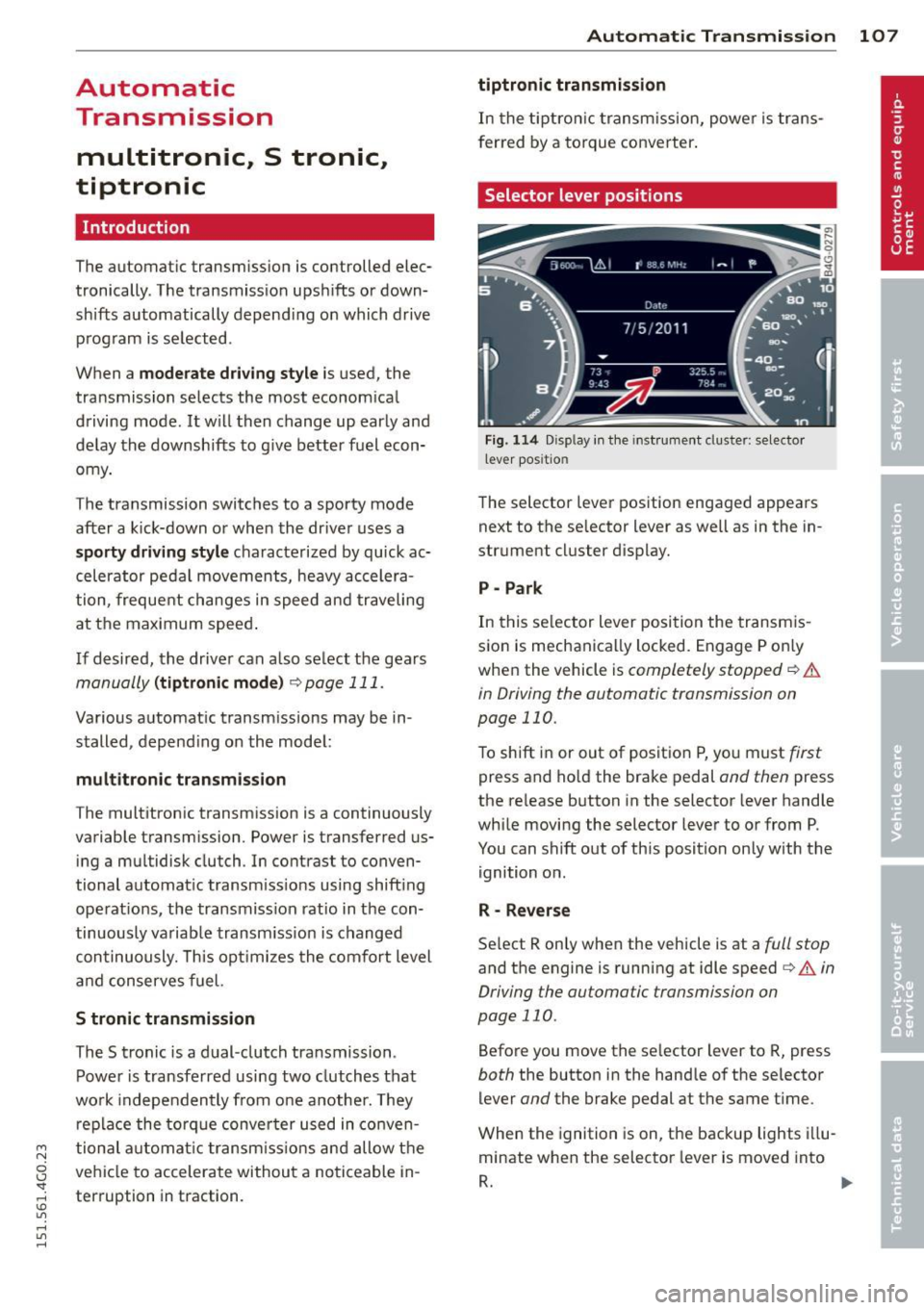
Selector lever positions
Fig. 114 Disp lay in the instrument cluster: selector
l ever positio n
The selector lever position engaged appears
next to the se lector lever as we ll as in the in
strument cluster display.
P- Park
In this selector lever position the transmis
sion is mechanically locked. Engage P on ly
when the vehicle is
completely stopped q .&.
in Driving the automatic transmission on
page 110.
To shift in or out of positio n P, you must first
press and hold the brake pedal and then press
the re lease button in the selector lever handle
while moving the selector lever to or from P.
You can shift out of this position only with the
ignition on.
R - Reverse
Select R only when the vehicle is at a full stop
and the engine is running at idle speed i:> & in
Driving the automatic transmission on
page 110 .
Before you move the se lector lever to R, press
both the button in the handle of the selector
lever
and the brake pedal at the same time .
When the ignition is on, the backup lights illu
minate when the selector lever is moved into
R. ..,.
Page 110 of 314
108 Automatic Transmission
N -N eutr al
The transmission is in neutral in this position.
Shift to this position for stand ing with the
brakes applied
q .&. in Driving the automatic
transmission on page 11 O.
When the ve hicle is stationary o r at speeds
be low 1 mph (2 km/h), you must always apply
the footbrake befo re and while moving the
l ever out of N.
D IS -Normal position for driving forward
In the D/S position, the transmiss io n can be
operated e ither in the normal mode Dor i n
the sport mode S. To select the sport mode S,
pu ll the se lector lever back briefly . Pulling the
lever back aga in will select the normal mode
D. The instrument cluster display shows the
selected driving mode.
In the normal mode D, the transmission a uto
mat ica lly selects the suitab le gea r ratio.
It de
pends on engine load, veh icle speed and driv
ing style.
Select the sport mode S for sporty driving .
The vehicle makes fu ll u se of the engine's
power. Shifting may become noticeable when
accelerating.
When the ve hicle is stationary o r at speeds
be low 1 mph (2 km/h), you must always apply
the foot brake before and while moving the lever to D/S out of N.
A WARNING
Read and follow all WARNINGS q .&. in
Driving the automatic transmission on
page 110.
(D Note
-
Coast ing downh ill with the transmission in
N and the e ngine not r unning w ill result in
damage to the automatic transm iss io n
and possib ly the catalyt ic converter.
@ Tips
- Audi drive select : you ca n adj ust the
sporty s hift c haracte ristics in th e
Dy-
namic driving mode.Swi ll appea r in the
instrument cluster display instead of D.
-If you a cc iden tally selec t N whi le driving,
take your foot off the accelerato r pedal
immediately and wa it for the engine to
slow down to idle before select ing D/S.
- If there is a power fai lure, the selector
lever w ill not move out of the P position.
The emergency release can be used if
this happens
qpage 113.
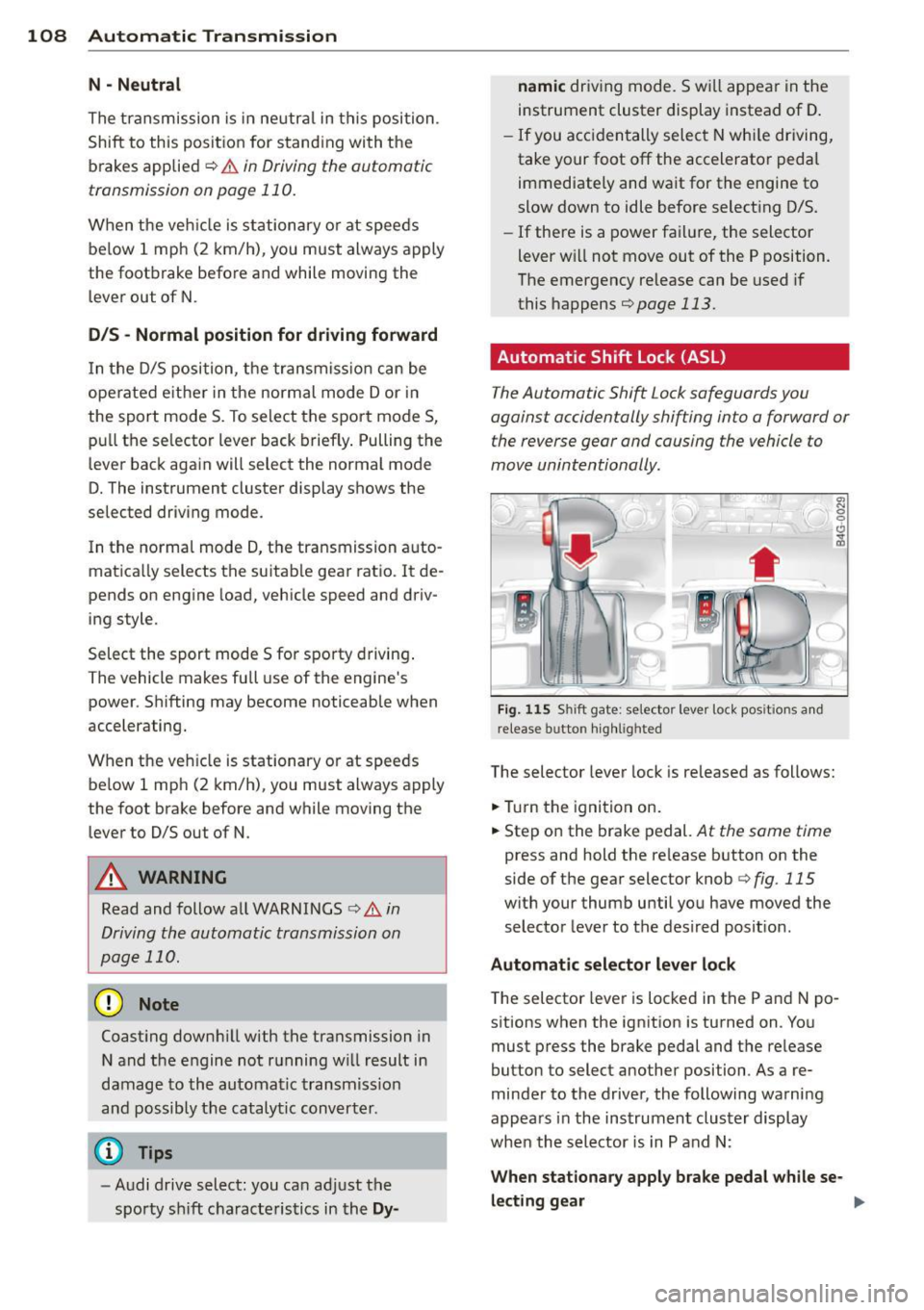
Automatic Shift Lock (ASL)
The Automatic Shift Lock safeguards you
against accidentally shifting into a forward or the reverse gear and causing the vehicle to
move unintentionally.
0, N ! ' g
i
) ( )
-
Fig. 1 15 Shift gate: selector leve r lock positions a nd
r e lease button highl ighted
The selector lever lock is released as follows:
... Tur n the igni tion on.
... Step o n the brake pedal.
At the same time
press and hold the re lease button on the
side of the gear selector knob
¢ fig. 115
with your thumb until yo u have moved the
selector lever to the desired posit ion.
Automat ic selector leve r lo ck
The selector lever is locked in the P and N po
sitions when the ignition is turned on. Yo u
must press the brake pedal and t he re lease
button to select another position . As a re
minder to the driver, the following warni ng
appears in the instrument cluster display
when the selector is in P and N:
When stationary apply brake pedal while se -
lecting gear
ll>
Page 113 of 314
M N
0 I.J "". rl I.O
"' rl
"' rl
Hill descent control switches off once the de
cline levels out or you press the accelerator pedal.
On vehicles with the cruise control system*
¢ page 82, hill descent control is also activat
ed when the speed is set.
A WARNING
Hill descent control cannot overcome
physical limitations, so it may not be able
to maintain a constant speed under all
conditions. Always be ready to apply the
brakes .
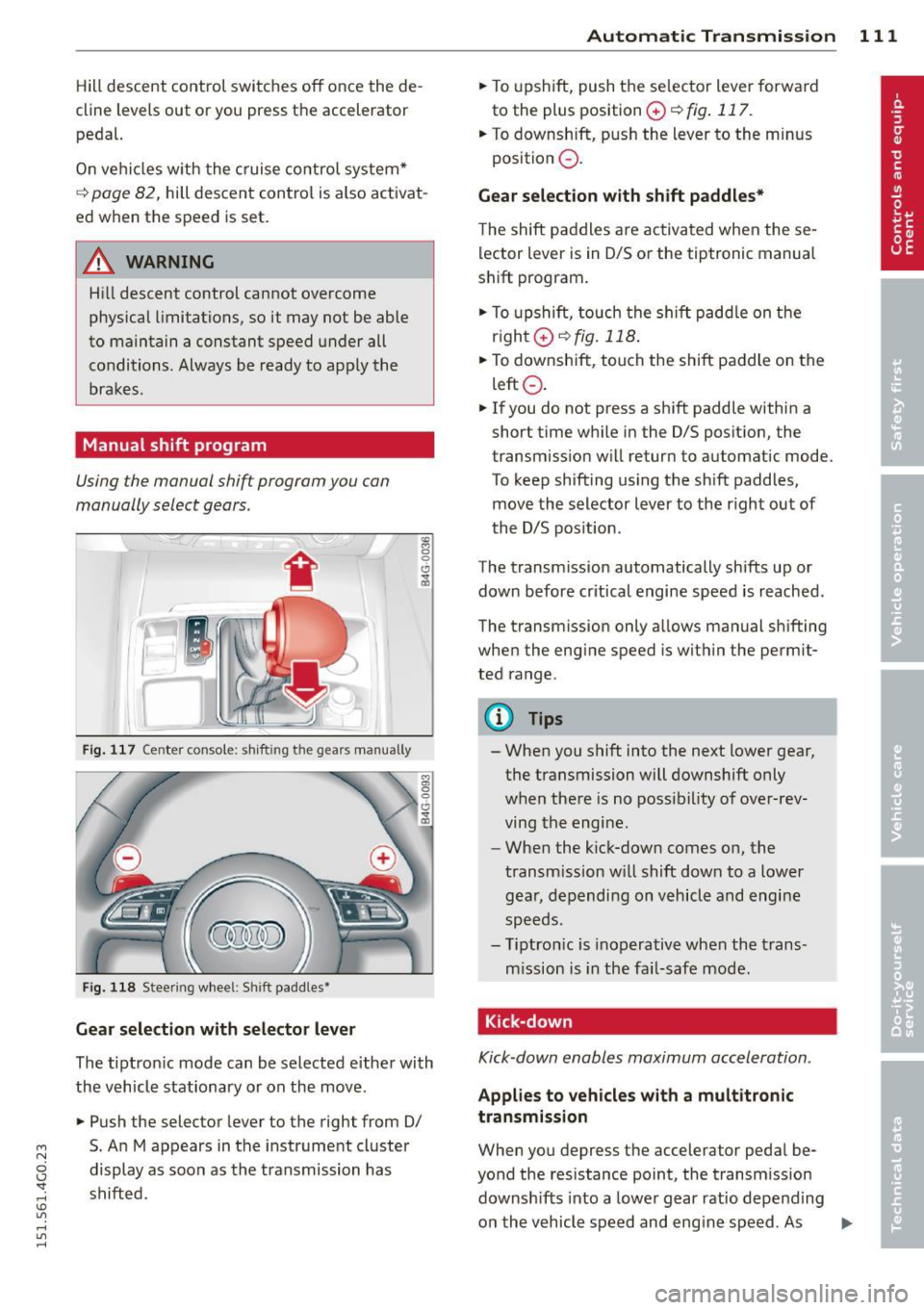
Manual shift program
Using the manual shift program you can
manually select gears.
Fig. 117 Center console; shift ing the gears manually
Fig. 118 Steering wheel: Shift paddles•
Gear selection with selector lever
The tipt ron ic mode can be selected either with
the vehicle stationary or on the move.
.,. Push the selector lever to the right from 0/
5. An M appears in the instrument cluster
display as soon as the transmission has
shifted.
Automatic Transmission 111
.,. To upshift, push the se lector lever forwa rd
to the plus position
0 ¢ fig . 117.
.,. To downshift, push the lever to the minus
position
0 .
Gear selection with shift paddles*
The shift paddles are activated when these
lector lever is in 0/S or the tiptronic manual
shift program.
.,. To upshift, touch the shift paddle on the
right 0¢fig.118 .
.,. To downshift, touch the shift paddle on the
left
0 .
.,. If you do not press a shift paddle within a
short time while in the 0/S position, the
transm iss ion will return to automatic mode.
To keep shifting using the shift paddles,
move the selector lever to the r ight out of
the 0/S position.
The transmission automatically shifts up or
down before critical engine speed is reached.
The transm ission only allows manual sh ifting
when the engine speed is with in the permit
ted range.
@ Tips
- When you shift into the next lower gear,
the transmission will downshift only
when there is no possibility of over-rev
ving the engine.
- When the kick-down comes on, the
transmission will shift down to a lower
gear, depending on vehicle and engine
speeds.
- Tiptronic is inoperative when the trans
mission is in the fai l-safe mode.
, Kick-down
Kick-down enables maximum acceleration.
Applies to vehicles with a multitronic
transmission
When you depress the accelerator pedal be
yond the resistance point, the transmission
downshifts into a lower gear ratio depend ing
on the vehicle speed and engine speed. As .,.