lock AUDI S6 2015 Owner's Manual
[x] Cancel search | Manufacturer: AUDI, Model Year: 2015, Model line: S6, Model: AUDI S6 2015Pages: 314, PDF Size: 77.57 MB
Page 51 of 314
M N
0 <.J 'SI: ,...., \!) 1.1'1 ,...., 1.1'1 ,....,
rain sensor function. Check your
windshield wiper b lades regularly.
- The washer fluid nozzles of the wind
sh ield washer system are heated at low
temperatures when the ignit ion is on .
- When stopping temporarily, e .g . at a
traffic light , the set speed of the wind
shield wipers is automatically red uced by
one speed.
Cleaning windshield wiper blades
Clean the wind shield wiper bl ades when they
begin to leave streaks . Use a soft cloth and
glass cleaner to clean the windsh ield wiper
b lades.
.,. Pl ace the wind shield wiper arm s in the serv
ice position . Refer to ¢
page 49.
.,. Lift the w iper arm away from the front win
dow.
_& WARNING
Dirty w indshie ld w iper blades can imp air
your view. This can lead to accidents.
Replacing windshield wiper blades
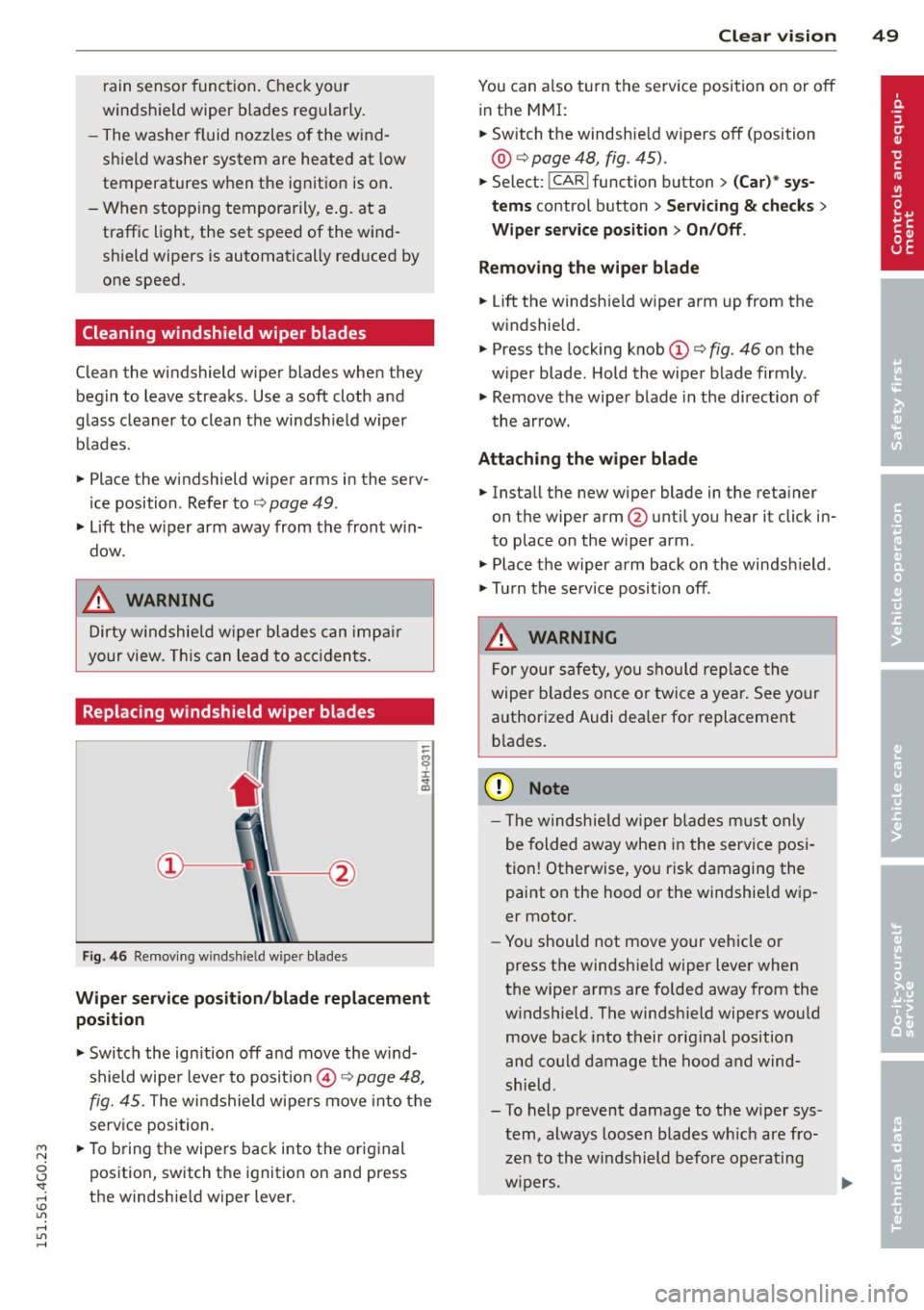
Fig. 46 Re movi ng winds hield w ipe r blade s
-
Wiper ser vice position /blade replacement
position
.,. Switch the ign ition off and move the w ind
shield wipe r lever to posit io n @ ¢
page 48,
fig. 45. The windshield wipers move into the
service position.
.,. To b ring th e wipe rs back into the original
position, switch the ignition on and press
the windshie ld wipe r lever.
Clear v is ion 49
You can also t urn the se rv ice position on or off
in the MMI:
.,. Switch the windsh ie ld wipers off (position
@ ¢ page 48, fig. 45) .
.,. Select: !CAR ! function but ton> (Car )* sy s
tem s control button > Servicing & check s >
Wiper service po sition > On /Off .
Remo ving th e wiper bl ade
.,. Lift the windsh ie ld wipe r arm up from the
w indshield.
.,. Press the locking knob
(D ¢ fig. 46 on the
w iper blade. Hold the wiper blade firmly .
.,. Remove the wiper blade in the direction of
the arrow .
Attaching the wipe r blade
.,. Install the new wiper blade in the reta iner
on the wipe r arm @unti l you hear it click in
to place on the w iper arm .
.,. Place the w iper arm back on the windshield .
.,. Tu rn the se rvice position off.
_& WARNING
-
F or your safety, you s hou ld rep lace the
wiper b lades once or twice a yea r. See your
authorized Audi dea ler for replacement
b la d es .
Q) Note
- Th e windsh ie ld wiper b lades must only
be folded away when in the service posi
tion! Otherwise, yo u ris k damaging the
paint on the hood or the windshie ld wip
er motor.
- Yo u should not move your vehicle or
press the windshield wiper lever when
the wiper arms are folded away from the
w indshield . The windsh ield wipers wou ld
move back into their original position
and could damage the hood a nd wind
shield .
- To help prevent damage to the w iper sys
tem, always loosen blades w hich are fro
zen to the windshield before operating
w ipers. ..,.
Page 52 of 314
50 Clear vision
-To help prevent damage to wiper blades,
do not use gasoline, kerosene, paint
thinner, or other solvents on or near the
wiper blades.
- To help prevent damage to the wiper
arms or other components, do not at
tempt to move the wipers by hand.
@ Tips
- Commercial hot waxes applied by auto
matic car washes affect the cleanability
of the windshield .
- You can also use the service position, for
example, if you want to protect the
windshield from icing by using a cover .
- You cannot activate the service position
when the hood is open.
Mirrors
Adjusting the exterior mirrors
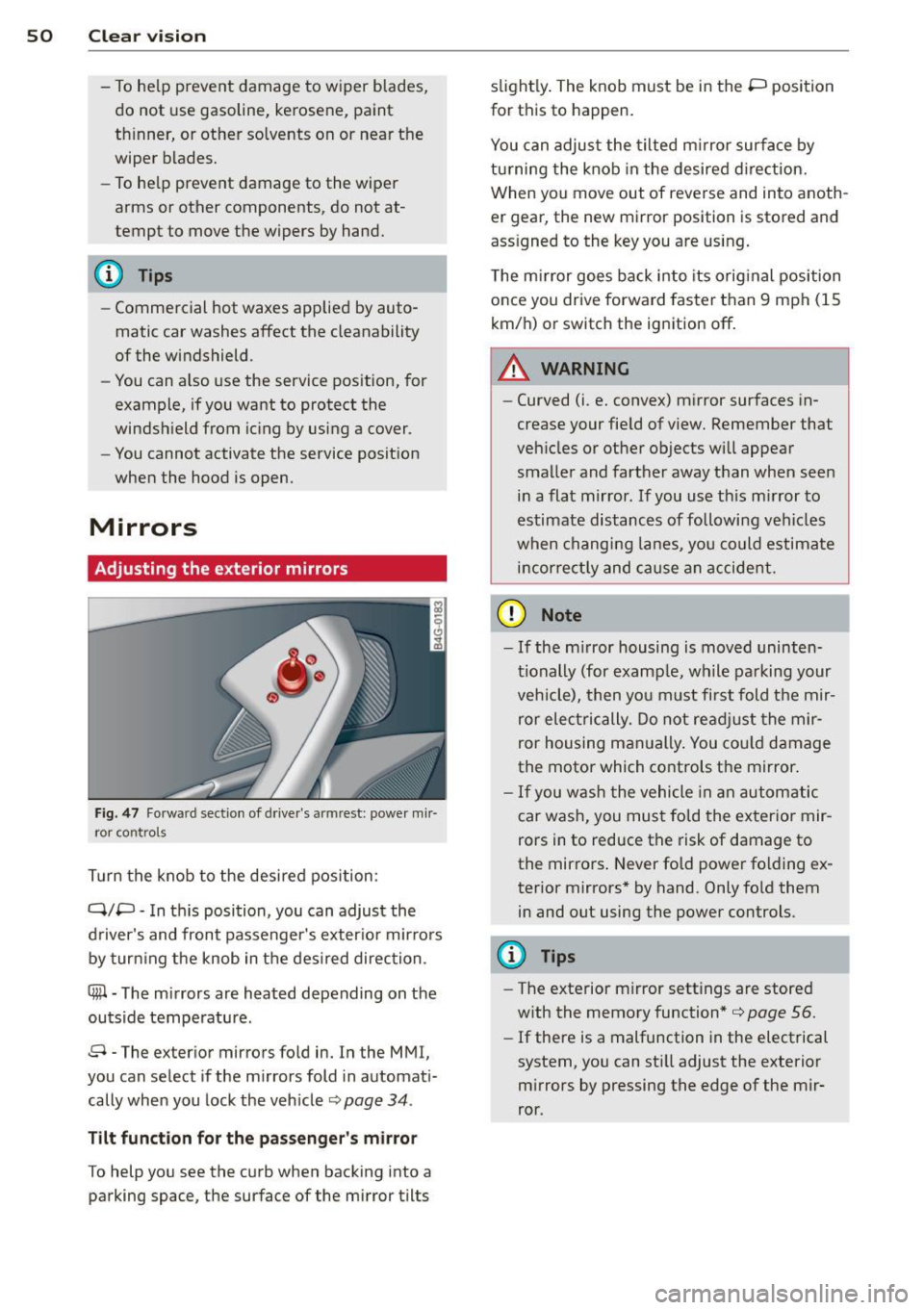
Fig . 47 Fo rw ar d sect ion of driver's a rmrest: power mir
r or co ntrols
Turn the knob to the desired position :
Q/P -In this position, you can adjust the
driver's and front passenger's exterior mirrors
by turning the knob in the desired direction .
4ill-The mirrors are heated depending on the
outside temperature .
8 -The exterior mirrors fold in. In the MMI,
you can select if the mirrors fold in automati
cally when you lock the vehicle ¢
page 34.
Tilt function for the passenger's mirror
To help you see the curb when backing into a
parking space, the surface of the mirror tilts slightly.
The knob must be in the P position
for this to happen.
You can adjust the tilted mirror surface by
turning the knob in the desired direction.
When you move out of reverse and into anoth
er gear, the new mirror posit ion is stored and
assigned to the key you are using.
The mirror goes back into its original position
once you drive forward faster than 9 mph (15
km/h) or switch the ignition
off.
.&_ WARNING
--
-Curved (i.e. convex) mirror surfaces in-
crease your field of view. Remember that
vehicles or other objects will appear
smaller and farther away than when seen in a flat mirror. If you use this mirror to
estimate distances of following vehicles
when changing lanes, you could estimate
incorrectly and cause an accident.
(D Note
-If the mirror housing is moved uninten
tionally (for example, while parking your
vehicle), then you must first fold the mir
ror electrically. Do not readjust the mir
ror housing manually. You could damage
the motor which controls the mirror.
- If you wash the vehicle in an automatic
car wash, you must fold the exterior mir
rors in to reduce the risk of damage to
the mirrors. Never fold power folding ex
terior mirrors* by hand . Only fold them
in and out using the power controls.
(D Tips
- The exterior mirror settings are stored
with the memory function*¢
page 56.
-If there is a malfunction in the electrical
system, you can still adjust the exterior
mirrors by pressing the edge of the mir
ror.
Page 57 of 314
M N
0 I.J "". rl I.O
"' rl
"' rl
Armrest
There is a storage compartment under the
armrest .
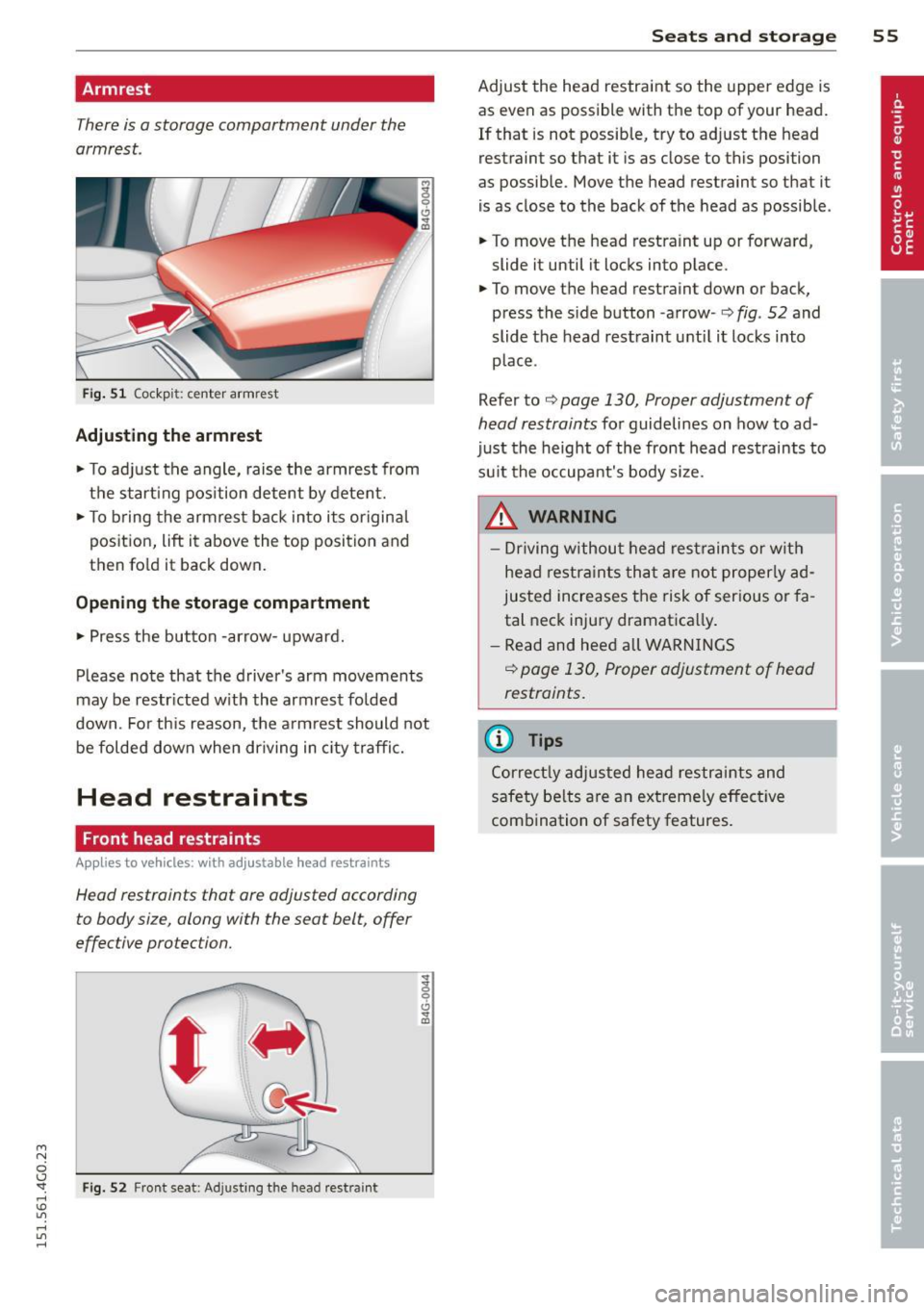
Fig. 51 Cockp it: center armrest
Adjusting th e armrest
.. To adjust the angle, raise the armrest from
the start ing pos ition detent by detent.
.. To b ring the armrest back into its origina l
position, lift it above the top position and
then fold it back down.
Opening th e st orag e co mpartment
.. Press the button -arrow- upward.
Please note that the driver's arm movements
may be restr icted w ith the armrest folded
down. Fo r this reason, the armrest should not
be folded down when driving in c ity traffic.
Head restraints
Front head restraints
Applies to vehicles: with adjustable head restraints
Head restraints that ore adjusted according
to body size, along with the seat belt, offer
effective protection.
F ig. 52 Front seat: Adjusting the head restra int
S ea ts a nd s to rage 55
Adjust the head restraint so the upper edge is
as even as possible with the top of your head.
If that is not possible, try to adjust the head
restraint so that it is as close to this position
as possible. Move the head restraint so that it
is as close to the back of the head as possible .
.. To move the head restra int up or forward,
slide it until it locks into p lace .
.. To move the head restraint down or back,
press the side button -arrow-
c:> fig. 52 and
slide the head rest raint until it locks into
place .
Refer to
c:> page 130, Proper adjustment of
head restraints
for guidelines on how to ad
just the height of the front head restraints to
su it the occupant's body size.
.&_ WARNING
- Driving without head restraints or with
head restra ints that a re not proper ly ad
justed increases the risk of serious or fa
tal neck injury dramatica lly .
- Read and heed all WARN INGS
i=> page 130, Proper adjustment of head
restraints.
(D Tips
Correct ly adjusted head restraints and
safety be lts are an extreme ly effective
combination of safety features.
-
Page 58 of 314
56 Seats and storage
Rear head restraints
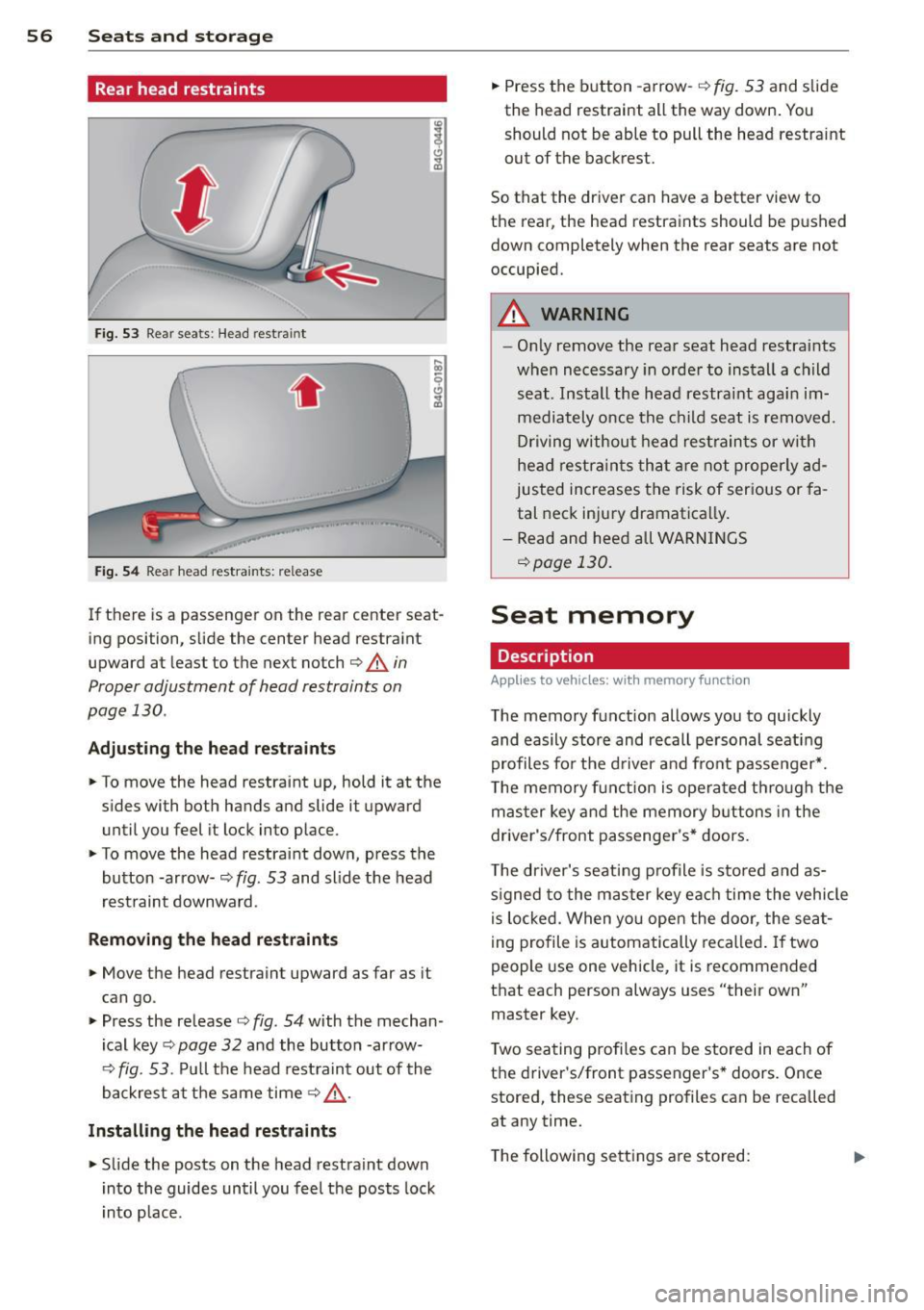
Fig. 53 Rear seats: Head restra int
. .
Fig . 54 Rear head restraints: release
If there is a passenger on the rear center seat
ing position, slide the center head restraint
upward at least to the next notch
c::> A in
Proper adjustment of head restraints on
page 130 .
Adjusting the he ad restr aint s
• To move the head restraint up, hold it at the
s ides with both hands and slide it upward
until you feel it lock into place.
• To move the head restraint down, press the
button -ar row-
c::> fig. 53 and slide the head
rest raint downward.
Rem oving the head re straints
• Move the head restraint upward as far as it
can go.
• Press the release
c::> fig. 54 with the mechan
ical key
c::> page 32 and the button -ar row-
c::> fig. 53. Pu ll the head rest raint out of the
backrest at the same time
c::> .,&. .
Install ing th e he ad re str aints
• Slide the posts on the head restraint down
into the guides until you feel the posts lock
i nto place. •
Press the b utton -arrow-
c::> fig. 53 and slide
the head restraint all the way down . You
should not be able to pull the head restraint
out of the backrest.
So that the dr iver can have a better view to
the rear, the head restraints should be p ushed
down completely when the rear seats are not
occupied.
A WARNING
-- On ly remove the rear seat head restraints
when necessary in order to install a child
seat . Install the head restraint agai n im
mediately once the child seat is removed.
Dr iving without head rest rain ts or wi th
head restra ints tha t a re no t properly ad
justed increases the risk of ser ious or fa
tal neck injury dramatically .
- Read and heed all WARN INGS
c::> page 130 .
Seat memory
Description
Applies to vehicles: with memory function
The memory function allows you to quickly
and easily stor e and recall pe rsonal seati ng
profiles for the d river an d front passenger *.
T he memory f un ction is opera ted th ro ugh the
mas ter key and the memory buttons in the
driver's/front passenger's* doors .
T he driver's seat ing profile is stored and as
s igned to the master key ea ch time the vehicle
i s lo cked. When yo u open the door, the sea t
i ng profile is automatically reca lled . If two
people use one vehicle, it is recommended
that each person always uses "their own"
master key.
T wo sea ting profiles can be stored in each of
the d river's/front passenger's * doors. Once
stored, these seating profiles can be recalled
at any time.
T he following sett ings a re stored:
Page 59 of 314
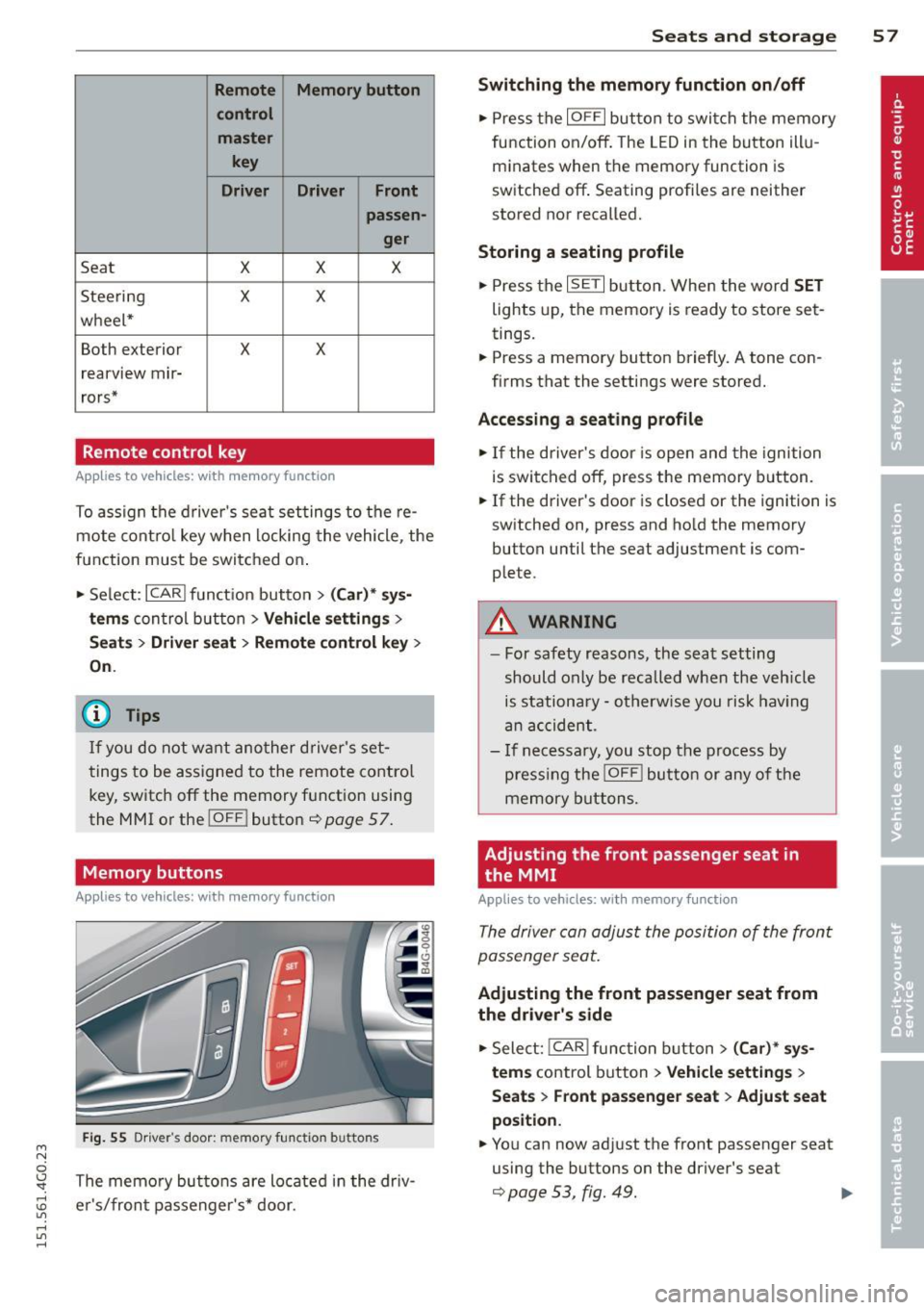
M N
0 \,J
"". rl I.O
"' rl
"' rl
Remote Memory button control master
key
Driver Driver Front passen-
ger
Seat X X X
Stee ring X X
wheel*
Both exterior
X X
rearview mir-
rors*
Remote control key
Applies to vehicles: with memory function
To assign the d river 's sea t settings to the re
mote cont ro l key w hen locking the vehicle, the
function must be swi tc h ed on .
• Se lect:
I CARI funct io n button > (Car )* sys
tems
con trol button > Vehicle settings >
Seats > Driver seat > Remote control key >
On .
@ Tips
If you do not wa nt ano ther d river' s set
t ings to be a ssigned to the remote control
key, switch off the memory f unction usin g
the MMI or the
! OFF ! button ce:> page 57.
Memory buttons
Applies to vehicles: with memory function
Fig. 55 Dr iver·s door: memory fu n ct io n buttons
The memo ry but tons are located in the dr iv
e r's/fron t passenger 's * door.
Seats and storage 5 7
Switching the memory function on/off
• Press the IOFFI but ton to swi tch the memory
fu nction on/off . The LED in the button ill u
m inates when the memory function is
sw itched off . Seating profiles are neither
stored nor recalled.
Storing a seating profile
• Press the ISET I button. When the word SET
lights up, the memory is ready to store set
tings.
• Press a memory button briefly. A tone con
firms that the settings were stored.
Accessing a seating profile
• If the driver's door is open and the ignition
is swi tched off, press t he memory b utton.
• If the driver's door is closed or the ignition is
sw itched on, press and ho ld the memory
button until the seat adjustment is com
plete.
A WARNING
- For safety reasons, the sea t setting
should only be recalled when the veh icle
is stationary - o therw ise y ou risk hav ing
an acc ident.
- I f necessary, you stop th e process by
press ing the
jOFF ! butt on o r any o f the
memory buttons.
Adjusting the front passenger seat in
the MMI
Applies to veh icles: w ith memory function
The driver con adjus t the posi tion of the front
passenger seat.
Adjusting the front passenger seat from
the driver's side
• Sele ct: !CAR I functio n button> (Car)* sy s
tem s
control button > Vehicle settings >
Seat s > Front passenger seat > Adjust seat
position .
• You can now ad just the front passenger seat
using the buttons on the driver's seat
¢ page 53, fig. 49. .,..
Page 60 of 314
58 Seats and storage
M atching th e pos ition of the driv er' s se at
.,. To adj ust the front passe nger seat to match
the driver 's seat settings, select the
!CARI
function b utton > (C ar)* s ystem s control
button
> V ehicle setting s > Seats > F ront
pa ssenger seat> Sym metr y to d river s eat .
.,. Press and hold the control knob until the ad
justment process is complete.
@ Tips
When matching seat settings, the settings
for the lumbar support and seating sur-
face w ill not transfer to the front passeng
er 's seat .
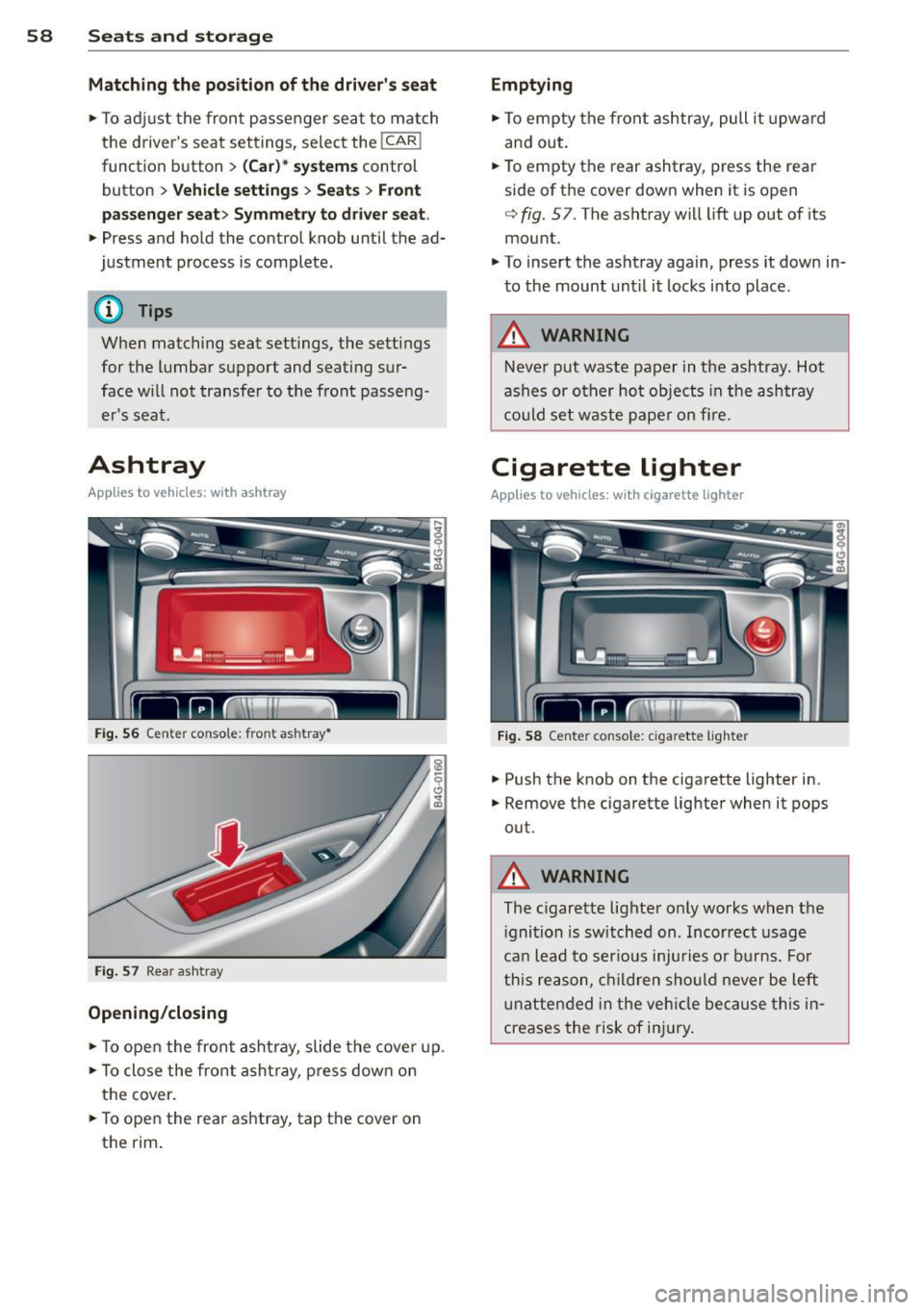
Ashtray
Applies to vehicles: with ashtray
Fig. 56 Center conso le: front ashtray*
Fig . 57 Rear ash tray
Opening /clo sing
.,. To ope n the front asht ray, slide the cover up .
.,. To close the front asht ray, press down on
the cover .
.,. To open the rear ashtray, tap the cover on
the rim.
Emptying
.,. To empty the front ashtray, pull it upward
and out.
.. To empty the rear ashtray, press the rear
side of the cover down when it is open
q fig. 57. The ashtray will lift up out of its
mount .
.,. To insert the ashtray again, press it down in
to the mount unt il it locks into place.
A WARNING
-Never put waste paper in the ashtray. Hot
ashes or ot her ho t objects in the ashtray
could set waste pape r o n fire.
Cigarette lighter
Applies to vehicles: w ith cigarette lighter
Fig . 58 Center console: cigarette lighte r
.,. Push the knob on the cigarette lighter in .
.,. Remove the cigarette lighter when it pops
out.
A WARNING
-The c igarette lighter only works when the
i gnition is sw itched on . Incorrect usage
ca n lead to ser ious injuries or burns. Fo r
this reason, children sho uld never be left
unatten ded in the veh icle because this in
creases the risk of in jury .
Page 62 of 314
60 Seats and st o rage
Front cuphold er
.,. To open the cupholder, tap the cover
~ fig. 61.
Rear cuphold er*
.,. To open the rear cupholder, press on the
symbol
'i @ ~ fig. 62 .
.,. To ad just the arm @, swing it in the direc
tion of t he arrow .
.,. Place the beverage in the holder and release
the arm. The arm swings back by itself and automatica lly secures the beverage .
.,. To close the rear cupho lder, press on the
center section between the two arms and
push the cupholder in the slot as far as it
will go .
A WARNING
Spilled hot liquid can cause an accident
and pe rsonal inj ury.
-
- Never carry any beve rage containe rs with
hot liquids, such as hot coffee or hot tea,
in t he veh icle while it is moving. I n case
of an accident, s udden brak ing or other
vehicle movement, hot liquid could spill,
causing sca lding burns. Spi lled hot liqu id
can also cause an accident and personal
injury.
- Use only soft cups in the cupholder . Hard
cups and glasses can cause in jury in an
acc ident.
- Never use the cupholder or adapter as an
ashtray- risk of f ire.
Q;) Note
On ly drink containers wi th lids should be
carried in the cupho lder. Liquid could spill
out and damage your vehicle's e lectronic
equ ipment or sta in the upholstery, etc.
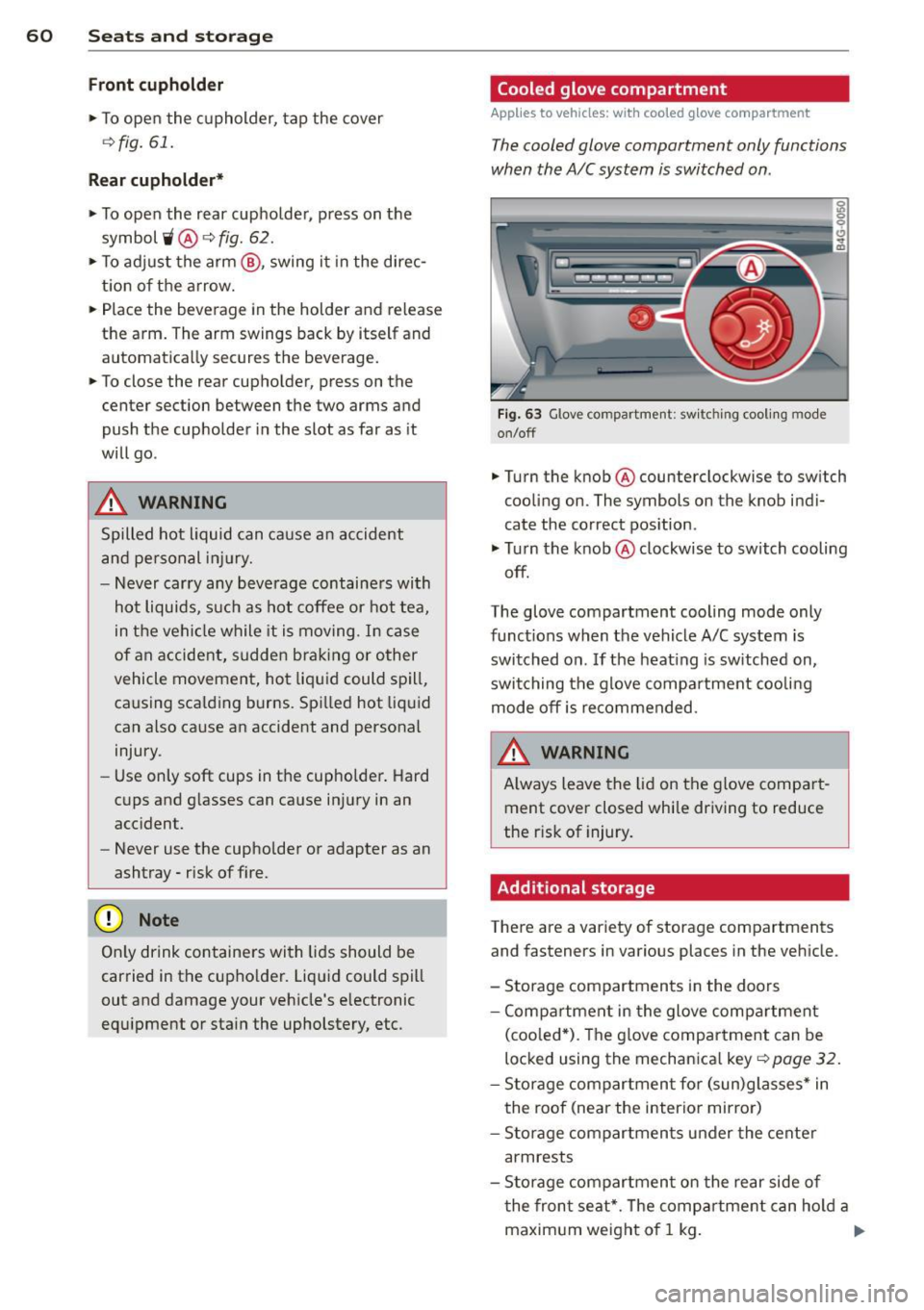
Cooled glove compartment
Applies to vehicles: with cooled g love compartment
The cooled glove compartment only functions
when the A/C system is switched on .
Fig . 63 Glove compartme nt: sw itching cooli ng mode
on/off
.,. Turn the knob @ counterclockwise to sw itch
cooling on. The symbols on the knob indi
cate the correct pos ition .
.,. Tu rn the knob @ clockwise to switch cooling
off.
The glove compartment cooling mode only
funct ions when the vehicle A/C system is
switched on . If the heating is sw itched on,
switching the g love compa rtment coo lin g
mode off is recommended.
WARNING
A lways leave the lid on the glove compar t
ment cover closed while driving to reduce
the r isk of injury.
Additional storage
There are a variety of storage compartments
and fasteners in various places in the vehicle.
- Storage compartments in the doors
- Compartmen t in the glove compa rtment
(coo led *) . T he g love compar tment can be
locked using the mechanica l key~
page 32.
- Storage comp artmen t fo r (sun)glasses * in
the roof (near the interior mirro r)
- Storage compartments under the cente r
armrests
- Storage compartmen t on the rear side of
t he fron t seat*. The comp artment can hold a
maxim um weight of 1 kg . ..,_
Page 66 of 314
64 Seats and storage
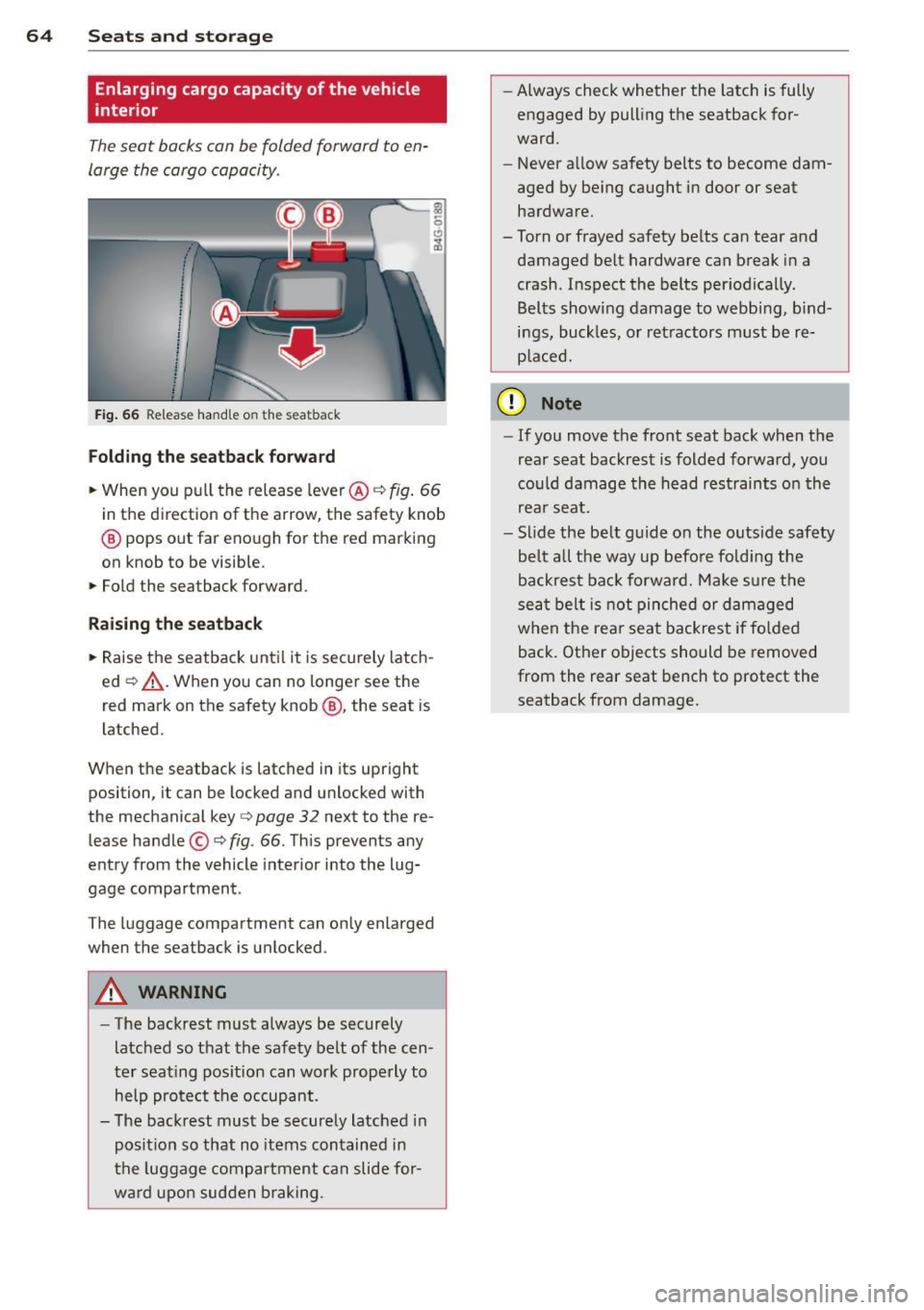
Enlarging cargo capacity of the vehicle
interior
The seat backs can be folded forward to en
large the cargo capacity .
Fig . 66 Re lease hand le on the seatback
Folding th e seatback forward
.. When you p ull the release lever @c:::> fig. 66
in the d irection o f the arrow, the safety knob
@ pops out far enough for the red marking
on knob to be visible.
.. Fold the seatback forward.
Rai sing th e seatback
.. Raise the seatback until it is securely latch
ed
c:::> &_ . When you can no longer see the
red mark on the safety knob @, the seat is
l atched.
When the seatback is latched in its upright position, it can be locked and unlocked with
the mechanical key
c:::> page 32 next to the re
lease handle ©
c:::>fig. 66. Th is prevents any
entry from the vehicle interior into the lug
gage compartment .
The luggage compartment can only enlarged when the seatback is unlocked .
A WARNING
-
-The backrest must a lways be securely
latched so that the safety belt of the cen
ter seating pos ition can work properly to
help protect the occupant .
- The backrest must be securely latched in
posit ion so that no items contained in
the luggage compar tment can slide for
wa rd upo n sudden b raking . -
Always check whether the latch is fully
engaged by pull ing the seatback for
ward.
- Never allow safety belts to become dam
aged by be ing caught in door or seat
hardware.
-Torn or frayed safety be lts can tear and
damaged be lt hardware can break in a
crash . Inspect the belts periodica lly.
Belts show ing damage to webb ing, b ind
ings, buckles, o r retractors must be re
p laced.
(D Note
- If you move the front seat back when the
rear seat backrest is folded forward, you
cou ld damage the head r estraints on th e
rea r seat.
- Slide the be lt guide on the outside safety
be lt a ll the way up befo re fold ing the
backrest back forward. Make sure the
sea t belt is not pinched or damaged
when the rear seat backrest if fo lded
back. Other objects should be removed
from the rear seat bench to protect the
seatback from damage.
Page 70 of 314
68 Warm and cold
Three-zone climate control
Operation
Applies to vehicles: with three -zone climate control
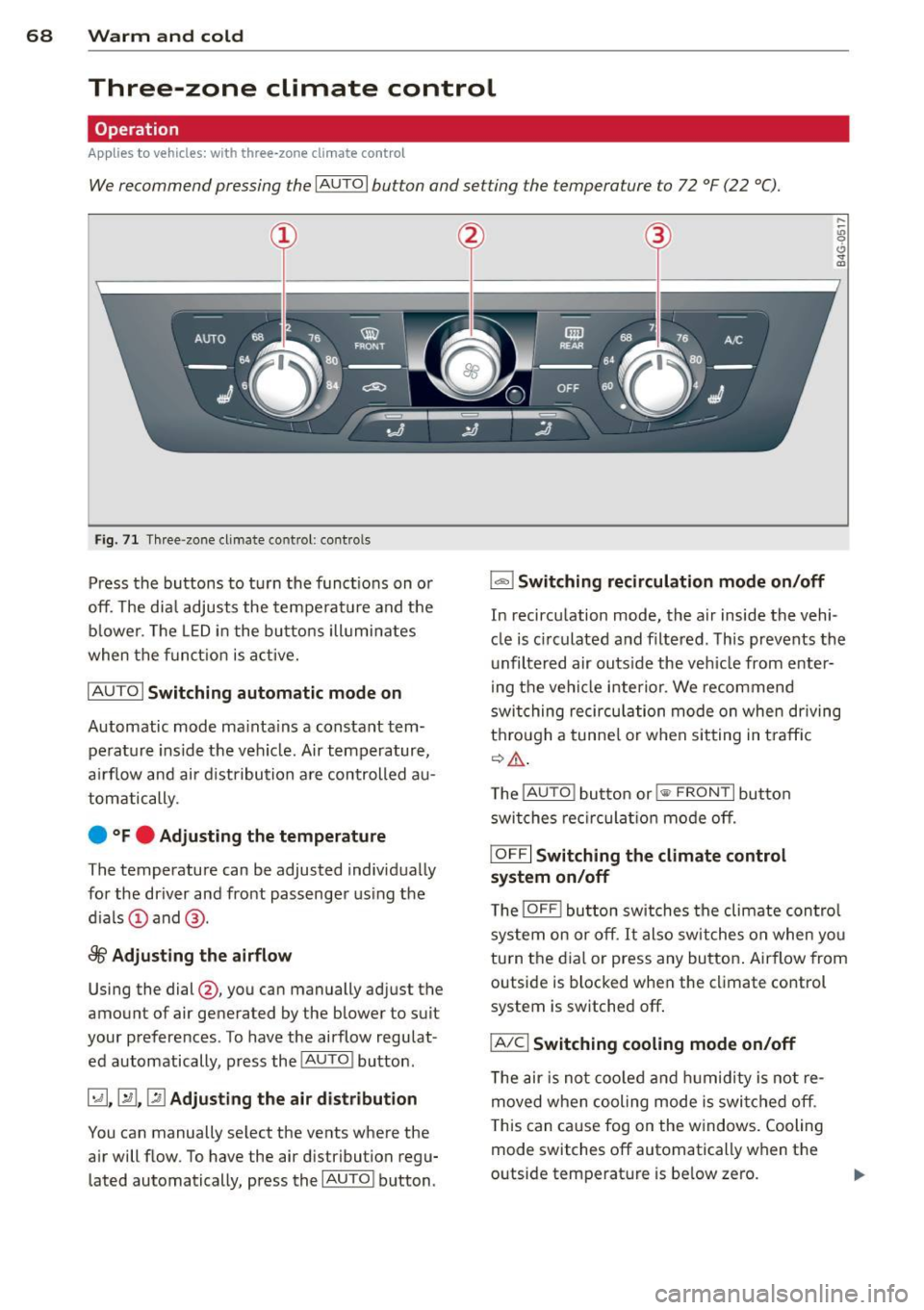
We recommend pressing the IA UT O I button and setting the temperature to 72 °F (22 °C).
Fig . 71 Thr ee-zone cl imate control: co ntro ls
Press the buttons to t urn the func tions on o r
off. The dia l adjusts the te mperat ure and the
bl ower. The LED i n the bu tto ns ill umi nates
when the funct ion is a ctive.
IAU TO I Switching automatic mode on
Automatic mode ma inta ins a constant tem
pe rat ure ins ide the vehi cle. Air temp erature,
a ir flow an d air d ist ribution a re controlled au
tom atically.
e °Fe Adjusting the temperature
The temperature can be adjusted individ ua lly
for the dr iver and fro nt passenger using the
d ials @and @.
8fr Adjusting the airflow
Using the dial@, you can manually adj ust t he
amount of air generated by the blower to suit
your preferences . To have the ai rflow regu lat
ed automatically, p ress the
!AU TO ! bu tton .
~.~ .~ Adjusting the air distribution
You can manually se lect the vents whe re the
a ir will flow. To have the air distribution regu
lated automatically, press the
I AUTOI b utton .
1..,., 1 Switching recirculation mode on/off
In recirc ulation mode, the a ir inside the vehi
cle is c irculated a nd filtered . T his prevents th e
unfiltered air outs ide the ve hicle from enter
ing t he ve hicl e inte rio r. We recommend
swi tching recirc ulati on mode on when driving
t hr ou gh a tunne l o r w hen sit ting in t ra ffic
¢ ,& .
The !AUTO ! button or !
I OFF I Switching the climate control
system on/off
T he IOFF ! button switches the cli mate con trol
s y ste m on or off. It also sw it c hes on whe n yo u
tu rn the dia l or press any bu tton . Airflow from
o utside is blocked when the climate control
system is switched off .
IA/Cl Switching cooling mode on/off
The air is n ot co oled a nd hu midity is not re
moved when cooling mode is swi tched off .
T his can ca use fog on the w in dows. Cooling
mode switches off automatically when t he
outside temperat ure is be low ze ro.
Page 72 of 314
70 Warm and cold
Four-zone automatic climate control
Operation
Applies to vehicles: with four -zone automa tic clima te control
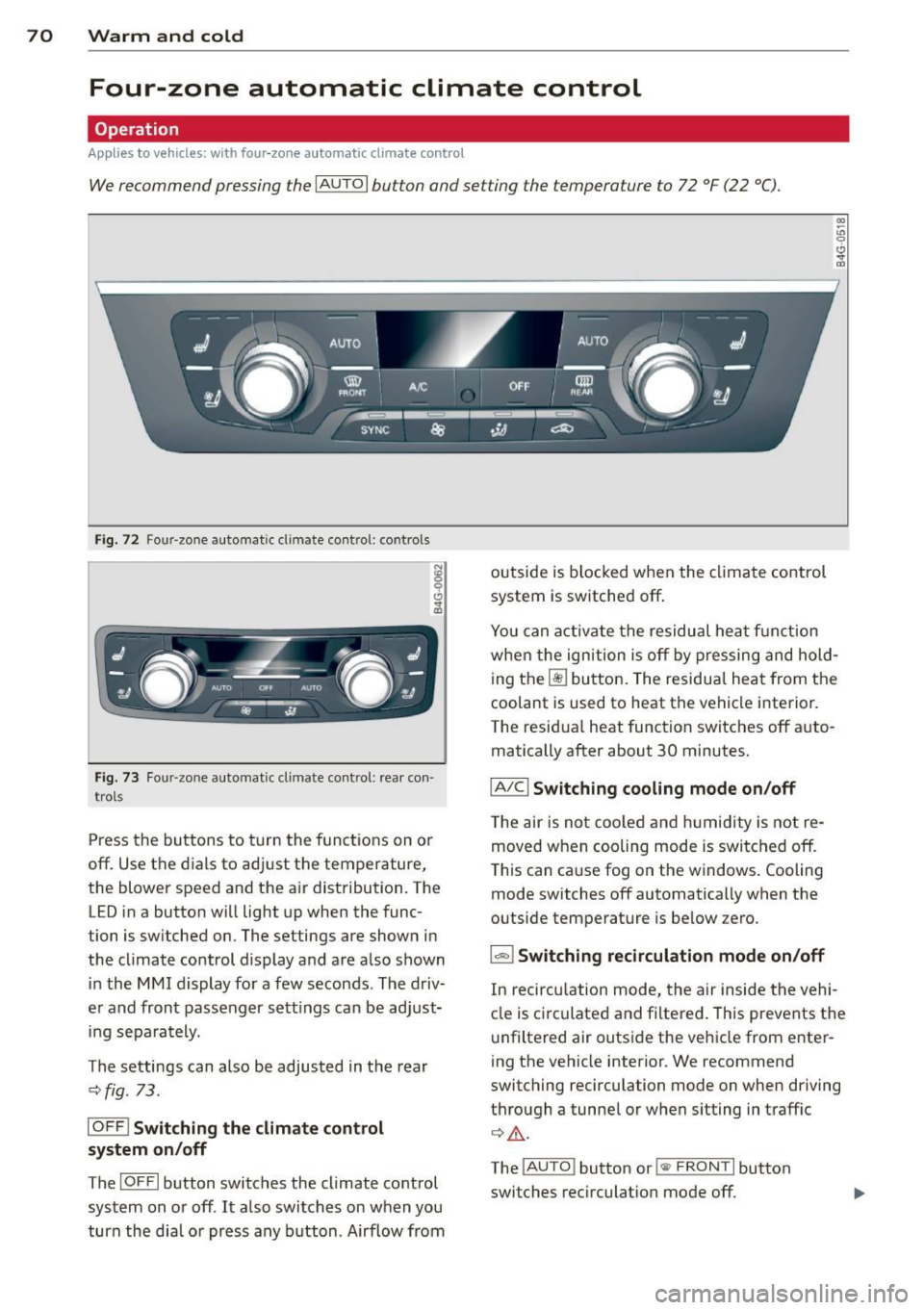
We recommend pressing the IAUTO I button and setting the temperature to 72 °F (22 °C).
00 ~
"' 0
0 ..,.
"'
-- I -·1 1 -! - - -
'i ~ ~-~ AU.O ;
~• J;a:=IIT 11
---:::
___ -=-..-.. /"'-• --
SYNC ~ .jA __,
-----
Fig. 72 Four-zone automat ic climate contro l: controls
Fig . 73 Fou r-zone automatic cl imate cont ro l: rear con
trol s
Press the buttons to turn the functions on or
off. Use the dials to adjust the temperature,
the blower speed and the air distribution. The LED in a button will light up when the func
tion is switched on. The settings are shown in
the climate control display and are also shown in the MMI display for a few seconds . The driv
er and front passenger sett ings can be adjust
ing separately.
The settings can also be adjusted in the rear
<::;> fig. 73.
IOFFj Switching the climate control
system on/off
The I O FFI button switches the climate control
system on or off .
It also switches on when you
turn the dia l or press any button. Airflow from outside is blocked when the
climate control
system is switched off .
You can activate the residual heat function
whe n the ignition is off by pressing and hold
ing the ~ button. The residua l heat from the
coolant is used to heat the vehicle interior .
The residual heat function switches off auto
matically after about 30 minutes.
jA/C j Switching cooling mode on/off
The air is not coo led and humidity is not re
moved when cooling mode is switched off.
T his can cause fog on the windows. Cooling
mode switches off automatically when the
outside temperature is be low zero .
1- 1 Switching recirculation mode on/off
In recircu lation mode, the air inside the vehi
cle is circu lated and filtered. This prevents the
unfiltered air outside the vehicle from enter
ing the vehicle interior . We recommend
switching recirculation mode on when driving
through a tunnel or when sitting in traffic
¢ .&, .
The !AUTO I button or l