light AUDI S6 2015 Service Manual
[x] Cancel search | Manufacturer: AUDI, Model Year: 2015, Model line: S6, Model: AUDI S6 2015Pages: 314, PDF Size: 77.57 MB
Page 60 of 314
58 Seats and storage
M atching th e pos ition of the driv er' s se at
.,. To adj ust the front passe nger seat to match
the driver 's seat settings, select the
!CARI
function b utton > (C ar)* s ystem s control
button
> V ehicle setting s > Seats > F ront
pa ssenger seat> Sym metr y to d river s eat .
.,. Press and hold the control knob until the ad
justment process is complete.
@ Tips
When matching seat settings, the settings
for the lumbar support and seating sur-
face w ill not transfer to the front passeng
er 's seat .
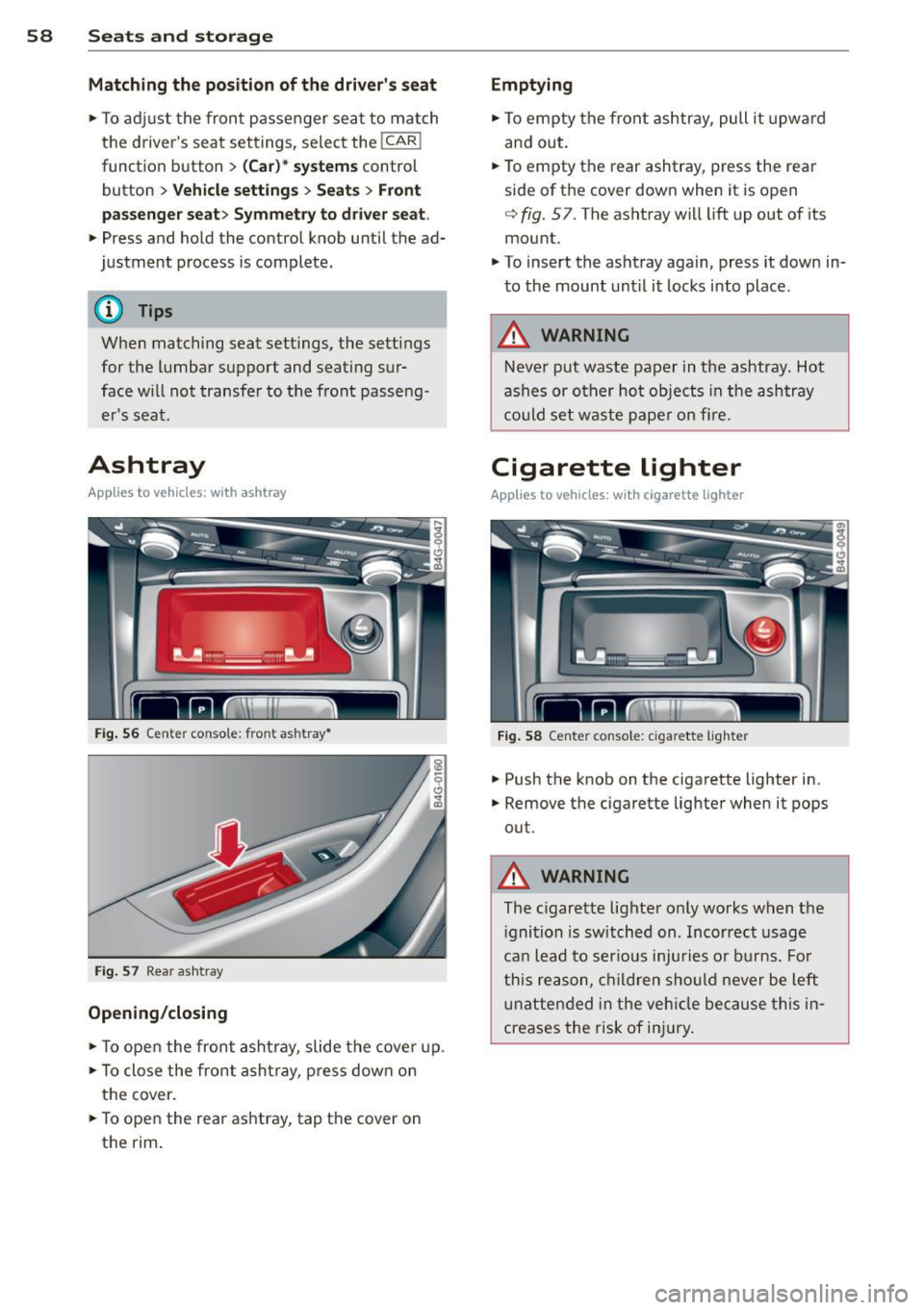
Ashtray
Applies to vehicles: with ashtray
Fig. 56 Center conso le: front ashtray*
Fig . 57 Rear ash tray
Opening /clo sing
.,. To ope n the front asht ray, slide the cover up .
.,. To close the front asht ray, press down on
the cover .
.,. To open the rear ashtray, tap the cover on
the rim.
Emptying
.,. To empty the front ashtray, pull it upward
and out.
.. To empty the rear ashtray, press the rear
side of the cover down when it is open
q fig. 57. The ashtray will lift up out of its
mount .
.,. To insert the ashtray again, press it down in
to the mount unt il it locks into place.
A WARNING
-Never put waste paper in the ashtray. Hot
ashes or ot her ho t objects in the ashtray
could set waste pape r o n fire.
Cigarette lighter
Applies to vehicles: w ith cigarette lighter
Fig . 58 Center console: cigarette lighte r
.,. Push the knob on the cigarette lighter in .
.,. Remove the cigarette lighter when it pops
out.
A WARNING
-The c igarette lighter only works when the
i gnition is sw itched on . Incorrect usage
ca n lead to ser ious injuries or burns. Fo r
this reason, children sho uld never be left
unatten ded in the veh icle because this in
creases the risk of in jury .
Page 63 of 314
M N
0 I.J "". rl I.O
"' rl
"' rl
- Compartments* on the back of the front seat backrests
- Garment hooks on the sides of the pillars in
the rear of the vehicle and in the rear grab handles
- Compartment in the rear center armrest
- Two mounting hooks* unde r the base of the
rear window inside the luggage compart
ment. You can attach light objects to these
hooks. The mounting hooks are spring-load
ed and will return to their normal position
when not in use.
A WARNING
-
- Always remove objects from the instru
ment panel. Any items not stored could
sl ide around inside the vehicle while driv
ing or when accelerating or when apply
ing the brakes or when driving a round a
corner.
- When you are driving make sure that
anything you may have placed in the cen
ter console or other storage locations cannot fa ll out into the footwells. In case
of sudden braking you would not be able
to brake or accelerate.
- Always keep the lid of the compartment
for (sun)glasses* closed while driving to
reduce the risk of injury dur ing a sudden
braking maneuver or in the event of an
accident.
-Any articles of clothing that you have
hung up must not interfere with the driv
er's v iew. The coat hooks are designed
only for lightweight clothing. Never hang
any clothing w ith ha rd, pointed or heavy
objects in the pockets on the coat hooks.
During sudden braking or in an accident -
especially if the airbag is deployed -
these objects cou ld injure any passen
gers inside the vehicle.
- To reduce the risk o f persona l injury in an
accident or sudden stop, always keep the
glove compartment closed while driving.
- Read and fo llow all WARN INGS
¢ page 166, Important safety instruc
tions on the side airbag system.
S ea ts a nd s to rage 61
- Hang clothes in such a way that they do
not impair the driver's vision.
- The coat hooks must only be used for
lightweight clothing. Do not leave any
heavy or sharp edged objects in the pock
ets which may interfere with the side cur
tain airbag deployment and can cause pe rsonal injury in a crash .
- Do not use coat hangers for hanging
cloth ing on the coat hoo ks as th is can in
terfere with prope r deployment of the
side curta in a irbags in an acc ident.
- Do not hang heavy objects on the coat
hooks, as they could cause personal in
jury in a sudden stop.
- For strength-re lated reasons, the mount
ing hooks can only be used to secure ob
jects weigh ing up to 10 lb. (5 kg). Heavi
er objec ts will not be adequately sec ured
- there is a risk of injury.
(D Note
Objects located on the rear shelf that rub
against the rea r window could damage the
hea ting wires for the rear window defog
ger.
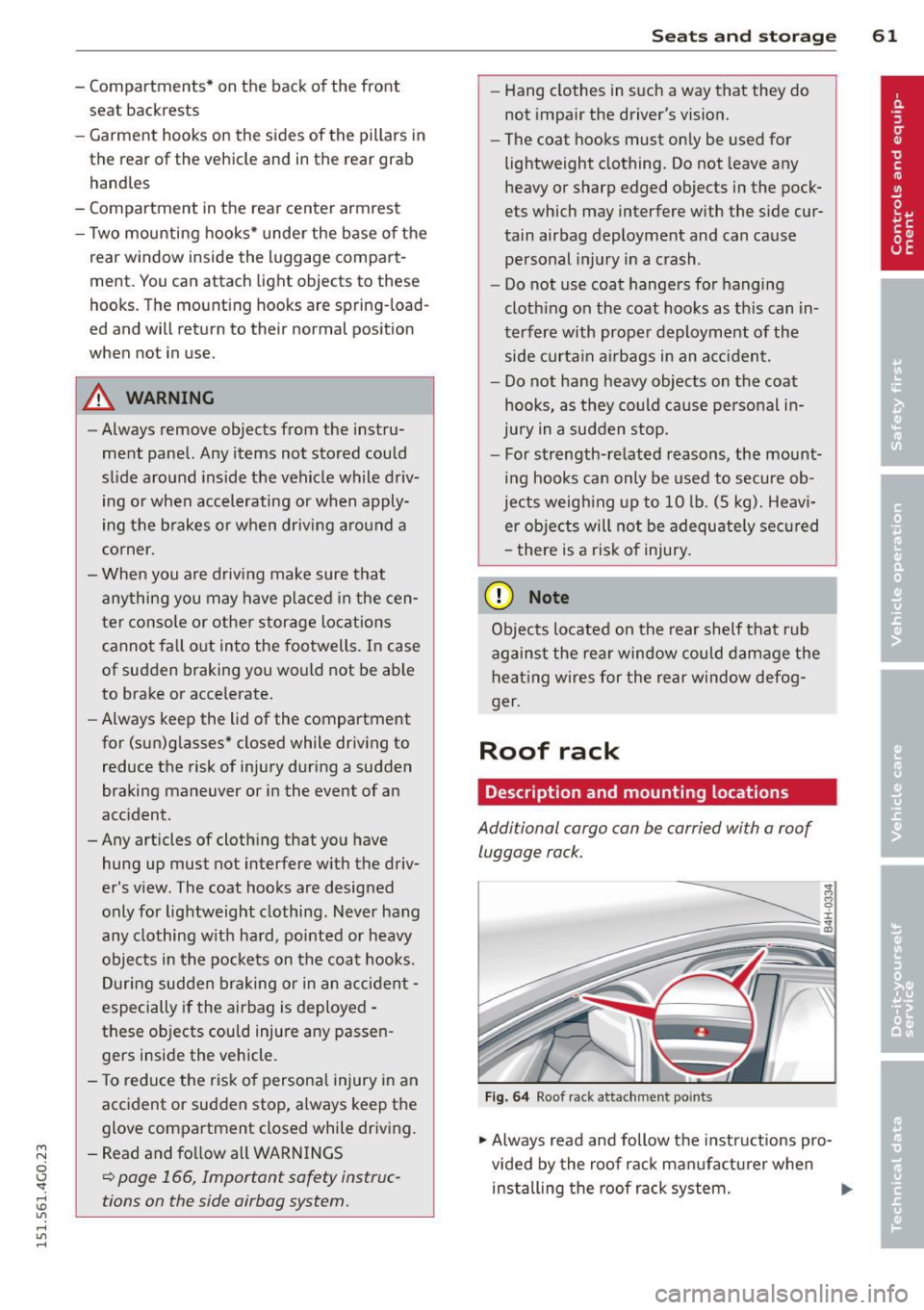
Roof rack
Description and mounting locations
Additional cargo can be carried with a roof
luggage rack.
F ig. 6 4 Roof r ack attac hment po ints
.., Always read and follow the instructions pro
vided by the roof rack manufa ctu rer when
installing the roof rack system. .,.
Page 68 of 314
66 Seats and storage
Opening the trunk pass-through
.. Fold the center armrest in the rear forward
and out .
.. Pull the release handle ¢
fig. 69 and fold
down the cover of the pass -through in the
vehicle interior .
.. Open the rear lid .
.. Push the ski sack* through the opening from
the luggage compartment .
Securing the ski sack*
.. Insert the ski sack strap @¢ fig. 70 in the
center buck le @ .
.. Pull the safety belt taut on the free end of
the belt @.
A WARNING
-The ski sack is intended only for the
t ransportation of skis and other light ob
jects . To reduce the risk of serious per
sonal inj ury never t ransport heavy o r
pointed objects in the ski sack .
- When brak ing rapidly or during an acci
dent the load could be displaced and
cause injury to occupants .
- Sharp edges on the load must be covered
for protection . Always fasten the belt
tightly around the sack and its contents
¢ fig. 70.
(D Tips
- Never stow the ski sack away when it is
still wet or damp (for example, snow
melting from skis). Allow it to dry com
pletely before stowing it away.
- Position skis in the ski sack with the
pointed ends facing the front and ski
poles with the pointed ends facing the
rear.
Page 72 of 314
70 Warm and cold
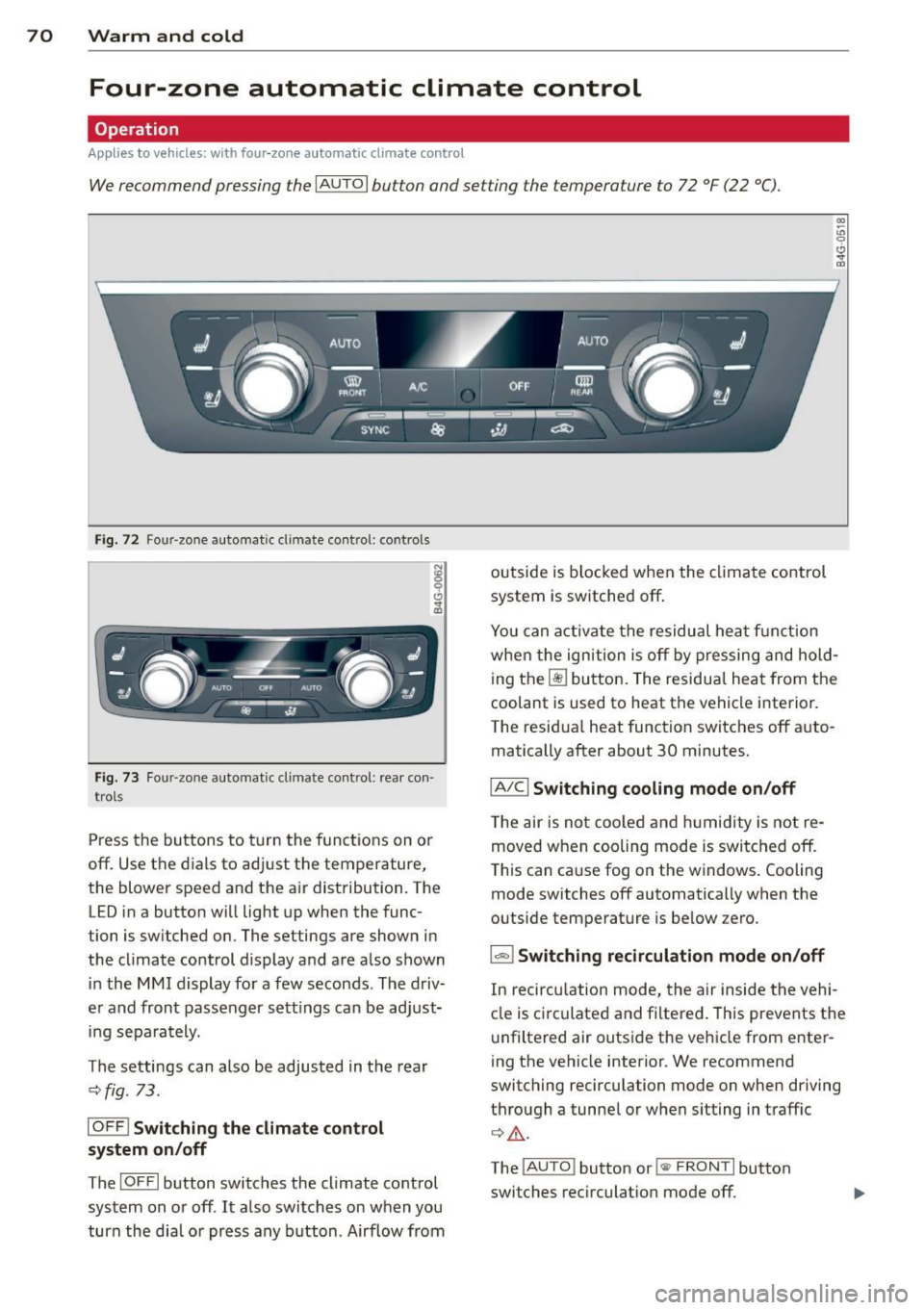
Four-zone automatic climate control
Operation
Applies to vehicles: with four -zone automa tic clima te control
We recommend pressing the IAUTO I button and setting the temperature to 72 °F (22 °C).
00 ~
"' 0
0 ..,.
"'
-- I -·1 1 -! - - -
'i ~ ~-~ AU.O ;
~• J;a:=IIT 11
---:::
___ -=-..-.. /"'-• --
SYNC ~ .jA __,
-----
Fig. 72 Four-zone automat ic climate contro l: controls
Fig . 73 Fou r-zone automatic cl imate cont ro l: rear con
trol s
Press the buttons to turn the functions on or
off. Use the dials to adjust the temperature,
the blower speed and the air distribution. The LED in a button will light up when the func
tion is switched on. The settings are shown in
the climate control display and are also shown in the MMI display for a few seconds . The driv
er and front passenger sett ings can be adjust
ing separately.
The settings can also be adjusted in the rear
<::;> fig. 73.
IOFFj Switching the climate control
system on/off
The I O FFI button switches the climate control
system on or off .
It also switches on when you
turn the dia l or press any button. Airflow from outside is blocked when the
climate control
system is switched off .
You can activate the residual heat function
whe n the ignition is off by pressing and hold
ing the ~ button. The residua l heat from the
coolant is used to heat the vehicle interior .
The residual heat function switches off auto
matically after about 30 minutes.
jA/C j Switching cooling mode on/off
The air is not coo led and humidity is not re
moved when cooling mode is switched off.
T his can cause fog on the windows. Cooling
mode switches off automatically when the
outside temperature is be low zero .
1- 1 Switching recirculation mode on/off
In recircu lation mode, the air inside the vehi
cle is circu lated and filtered. This prevents the
unfiltered air outside the vehicle from enter
ing the vehicle interior . We recommend
switching recirculation mode on when driving
through a tunnel or when sitting in traffic
¢ .&, .
The !AUTO I button or l
Page 77 of 314
M N
0 <.J 'SI: ,...., \!) ..,.,
,...., ..,., ,....,
Starting the engine
"'Press the brake pedal c::> _&..
"'Pr ess the !START ENGINE STOPI button
c::> fig. 77. The engi ne will start.
"' It is possible that there will be a slight delay
when starting the engine for diesel vehicles
in colder temperatures. Therefore, you must
hold the brake pedal down until the engine
starts. The indicator lamp
Ii illuminates
when the engine is preheated.
If the engine should not start immedi ately,
the starting process is automatically stopped
after a short time . Repeat starting procedure.
Start-Stop-System*:
Note the information on c::> page 79, Start
Stop-System.
A WARNING
- Never allow the engine to run in confined
spaces -danger of asphyxiation .
- Never turn off the engine until the vehi
cle has come to a complete stop.
- The brake booster and power steering
only work when the engine is running.
If
the engine is off, you have to use more
force when steering or braking. Because
you cannot steer and brake as you usual
ly would, this could lead to crashes and
serious injuries.
-Avoid high engine rpm, full throttle and
heavy engine loads until the engine has
reached operating temperature - other
wise you risk engine damage.
- The engine cannot be started by pushing
or towing the vehicle.
(D Tips
-After a cold engine is started, there may
be a brief period of increased noise be
cause oil pressure must first build up in
the hydraulic valve adjusters. This is nor mal and not a cause for concern.
- If you leave the vehicle with the ignition
switched on, the ignition will switch off
On the road 75
after a certain period of time. Please
note that electrical equipment such as
exterior lights will switch off as well
when that happens.
Stopping the engine
"'Bring your vehicle to a complete stop.
"' Move the selector lever to the P or N posi
tion .
"'Press the
I STAR T ENGINE ST OP I button
c::> page 7 4, fig. 77.
Steering lock
The steer ing locks when you turn the engine
off using the
I STAR T ENGINE STOP I button
and open the driver's door. The locked steer ing helps prevent vehicle theft.
Emergency off
If necessary, the engine can be switched off
with the selector lever in the R or D/S posi
tion. The engine stops if you press the
I START ENGINE STOPI button at speeds below
6 mph (10 km/h).
A WARNING
-Never turn off the engine until the vehi
cle has come to a complete stop.
- The brake booster and power steering
only work when the engine is running. If
the engine is off, you have to use more
force when steering or braking. Because
you cannot steer and brake as you usual
ly would, this could lead to crashes and
serious injuries.
- For safety reasons, you should always
park your vehicle with the selector lever
in P. Otherwise, the vehicle could inad
vertently roll away.
- After the engine has been switched off,
the radiator fan can continue to run for
up to 10 minutes -even with the ignition
switched off.
It can also switch on again
after some time if the coolant tempera
ture rises as the result of a heat buildup
.
or if the engine is hot and the engine .,..
Page 78 of 314

76 On the road
compartment is additionally heated by
the sun's rays.
(D Note
Do not stop the engine immediate ly after
hard or extended driving. Keep the engine r un ning for approximately two minutes to
prevent excessive heat build -up.
Driver message in the instrument
cluster display
Turn off ignition before leaving car
This message appears and a warning tone
sounds if you open the dr iver 's door when the
i gnit ion is switched on .
Press brake pedal to start engine
This message appears if you press the
I START ENGINE STOP! button to start the en
gine and do not depress the brake peda l. The
engine can on ly be started if the brake pedal
is depressed.
Ill Is key in the vehicle?
If the indicator light turns on and the mes
sage appears, the remote control key was re
moved from the vehicle while the engine was
running . If the ignition key is not in the vehi
cle you will not be ab le to switch on the igni
tion or restart the engine after it has been
switched off. You w ill also not be able to lock
the vehicle from the outside .
Shift to P, otherwise vehicle can roll away.
Doors do not lock if lever is not in P.
This message appears for sa fe ty reasons
a long with an audib le warning tone if the P
selector lever position is not engaged when
stopping the engine with the
I STAR T ENGIN E ST OP ! button . Select the P se
lector lever position . Otherwise the vehicle
could roll and it can not be locked .
II Key is not recognized. Hold back of key
against marked area . See owner's manual.
If the indicator light turns on and this mes
sage appears, there is a malfunction
¢ page 76.
Turn off ignition before leaving car. Battery
is discharging
T h is message appears if the driver's door is
opened while the ignition is switched on. Al
ways switch off the ignit ion if you are leav ing
the vehicle . See also ¢
page 80.
Shift to P and turn off ignition before leav
ing car, otherwise vehicle can roll away
This message appears if the driver's door is
opened wh ile the ignition is switched on and
the selec tor lever is not in the P position. Shift
the selec tor lever into the P position and
swi tch off the ignition when you exit the vehi
cle. Otherwise the vehicle could roll . See also
¢ page 80.
Starting the engine if there is a
malfunction
It may not be possible to start the engine un
der cer tain circums tances, for example if the
ba ttery in the vehicle key is drained, if in ter
ference hos affected the key or if there is a
system malfunction .
Fig. 78 Center co nsol e/master key: star ting the eng ine
i f the re is a mal funct ion
Requirement: The message Key not recog
nized. Hold back of key against marked area.
See owner's manual.
must appear and the in
dicator light
II must sw itch on .
.,. Hold the master key vertically in the loca
tion indicated
f >l) ¢ fig . 78 .
.,. Press the brake pedal ¢ A in Starting the
engine on page
75 .
Page 79 of 314
M N
0 I.J "". rl I.O
"' rl
"' rl
.. Press the !S TAR T ENGINE STOP I button. The
engine will start.
.. Drive to your author ized Audi dealer imme
diately to have the malfunction corrected .
@ Tips
You can view the message again by press ing the
! START ENGINE STOPI button.
Electromechanical
parking brake
Operation
The electromechanical parking brake replaces
the hand brake.
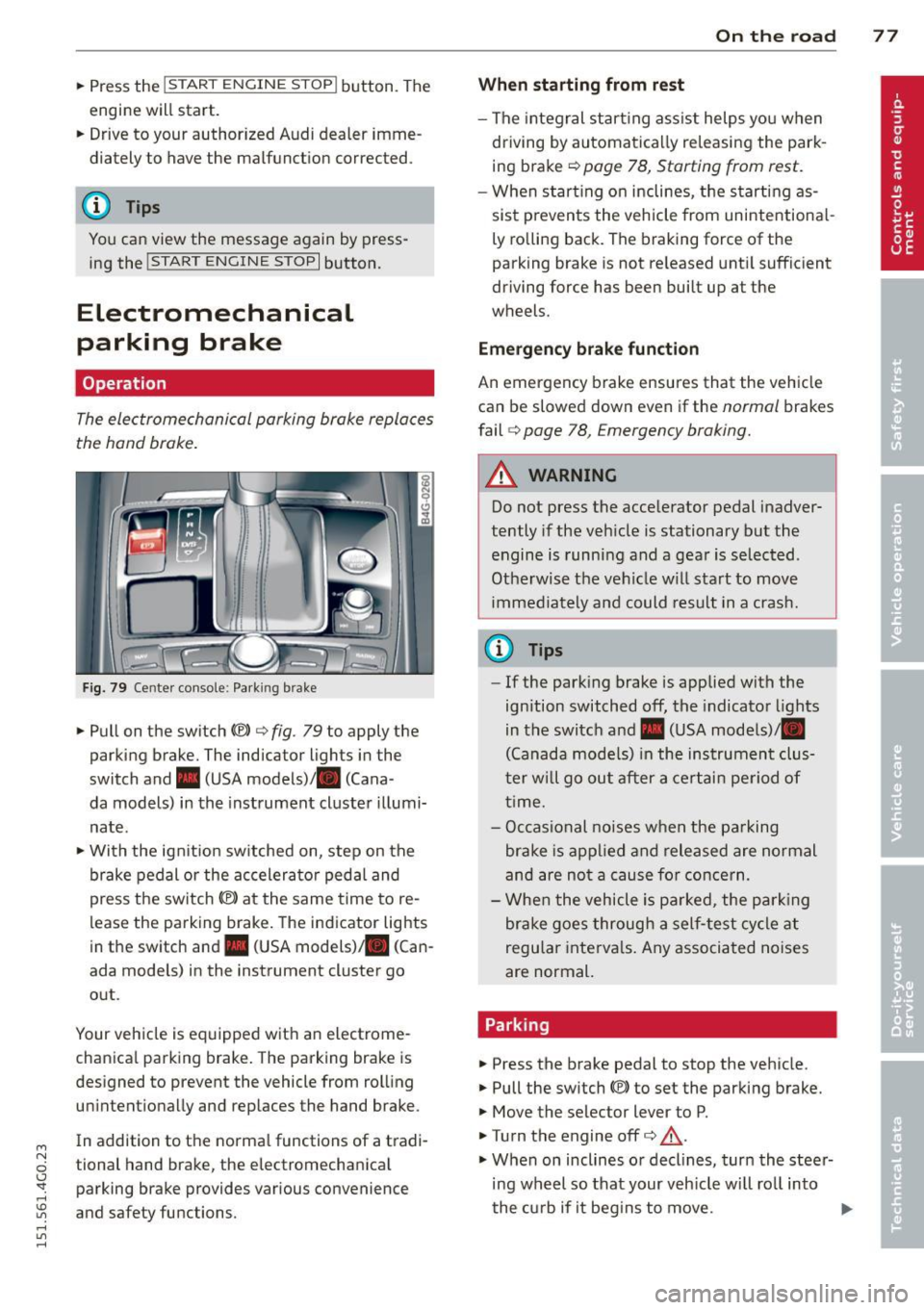
Fig. 79 Center console: Park ing brake
.. Pull on the switch<®> c:;, fig . 79 to apply the
parking brake. The indicator lights in the
switch and. (USA models)/ . (Cana -
da models) in the instrument cluster illumi
nate .
.. With the ignit ion sw itched on, step on the
brake pedal or the accelerator pedal and
press the sw itch<®> at the same time to re
lease the parking brake. The indicator lights
in the switch and. (USA models) . (Can
ada models) in the instrument cluster go
out .
Your vehicle is equipped with an electrome
chanica l parking brake. The parking brake is
designed to prevent the vehicle from rolling unintentionally and replaces the hand brake .
In addition to the norma l functions of a tradi
tional hand brake, the electromechanical parking brake provides various convenience
and safety functions.
On the road 77
When starting from rest
- The integral start ing assist helps you when
driving by automatically re leasing the park
ing brake c>
page 78, Starting from rest.
-When start ing on inclines, the starting as
sist p revents the vehicle from unintentiona l
ly rolling back. The braking force of the
parking brake is not re leased until sufficient
driving force has been built up at the
wheels.
Emergency brake function
An emergency brake ensures that the vehicle
can be slowed down even if the
normal brakes
fail
c:;, page 78, Emergency braking.
A WARNING
Do not press the accelerator pedal inadver
tently if the veh icle is stationary but the
engine is running and a gear is selected .
Otherwise th e vehicle w ill start to move
immediately and could result in a crash.
@ Tips
- If the parking brake is applied with the
ignition switched
off, the indicator lights
in the switch and. (USA models)/ •
(Canada models) in the instrument clus
t er w ill go out after a certain period of
time.
- Occasional noises when the parking
brake is applied and released are normal
and are not a cause fo r concern.
- When the vehicle is pa rked, the parking
brake goes through a self-test cycle at
regu lar intervals. Any associated noises
are normal.
Parking
.. Press the brake pedal to stop the vehicle.
.. Pull the switch(®) to set the parking brake.
.. Move the selector lever to P .
.. Tu rn the engine offc>
.&.
.,. When on inclines or decl ines, turn the steer
ing wheel so that your veh icle wi ll roll into
the curb if it begins to move. ""
Page 81 of 314
soon as the switch(®) is released, or the accel
erator pedal is depressed, emergency braking
stops.
.&_ WARNING
Emergency braking should only be used in
an emergency, when the normal foot brake
has failed or the brake pedal is obstructed .
Using the parking brake to perform emer
gency braking will slow your vehicle down
as if you had made a full brake applicat ion.
The laws of physics cannot be suspended
even with ESC and its associated compo
nents (ABS, ASR, EDL). In corners and
when road or weather conditions are bad
'
a full brake application can cause the vehi-
cle to skid or the rear end to break away -
r isking an accident.
Start-Stop-System
Description
Appl ies to vehicles : wit h Start-Stop-System
The Start-Stop-System can help increase fuel
economy and reduce CO
2 emissions.
I n the Start-Stop-mode, the engine shuts off
automatically when the vehicle is stopped,
such as at a traffic light. The ignit io n remains
sw itched on dur ing th is stop phase. The en
gine will be automatically restarted when
needed.
The last Start-Stop-System setting (on/off us
ing the button
l
l --1 but
ton turns on when the Start-Stop-System is
switched off manually.
Basic requirements for the Start-Stop
mode
- The driver's door is closed .
- The driver' seat belt is latched.
- The hood is closed.
- T he veh icle must have been driven faster
~ than 2.5 mph (4 km/h) since the last stop.
~ -A tra iler is not hitched to the veh icle.
rl I.O
"' rl
"' rl
On the road 79
.&_ WARNING
-Never let the vehicle roll with the engine
sw itched off . You could lose control over
the vehicle. This can lead to a collision
and serious injuries.
- The brake booster and the steering sup
port do not work while the engine is
sw itched off. More force is required to
stop and to steer the vehicle.
- To reduce the risk of injuries, make sure
that the Start-Stop-System is turned off
when working in the eng ine compart
ment ¢
page 81.
(D Note
Always switch off the Sta rt-Stop-System
when driving through water¢
page 81.
Starting/stopping the engine
Applies to vehicles: w ith Start -Stop-System
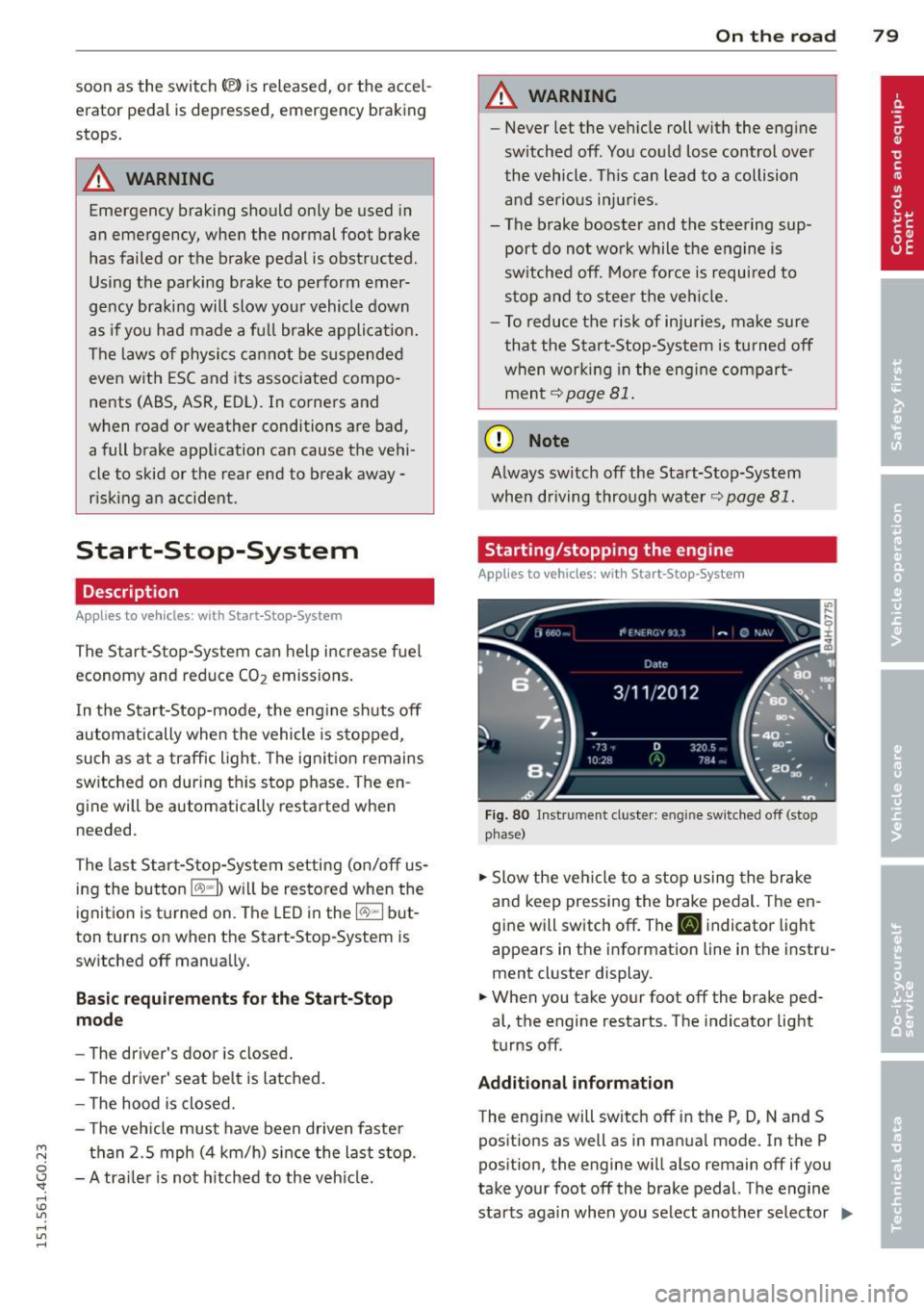
Fig. 80 Instrument cluste r: engine sw itched off (stop
p hase)
.,. Slow the vehicl e to a stop using the brake
and keep pressing the brake pedal. The en
gine will switch off. The
tlJ indicator light
appears in the information line in the instru
ment cluster display.
.. When you take your foot off the brake ped
al, the engine restarts. The indicator light
turns off.
Additional information
The eng ine will switch off in the P, D, N and S
positions as well as in manual mode. In the P
position, the engine will also remain off if you
take your foot off the brake pedal. The engine
starts aga in when you select another selector ..,_
Page 82 of 314
80 On the road
lever position and take your foot off the brake
pedal.
If you select the R position during a Stop
phase, the engine will start again.
Shift from
D to P quickly to prevent the engine
from starting unintentionally when shifting
through
R.
You can determine for yourself if the engine
will stop or not by reducing or increasing the
amount of force you use to press the brake
pedal. For example, if you only lightly press
on the brake pedal in stop-and and-go traffic
or when turning, the engine will not switch off
when the vehicle is stationary. As soon as you
press the brake down harder, the engine will
switch off.
General information
App lies to vehicles: with Start-Stop-System
The standard Start-Stop-mode can be cancel
led for different system-related reasons.
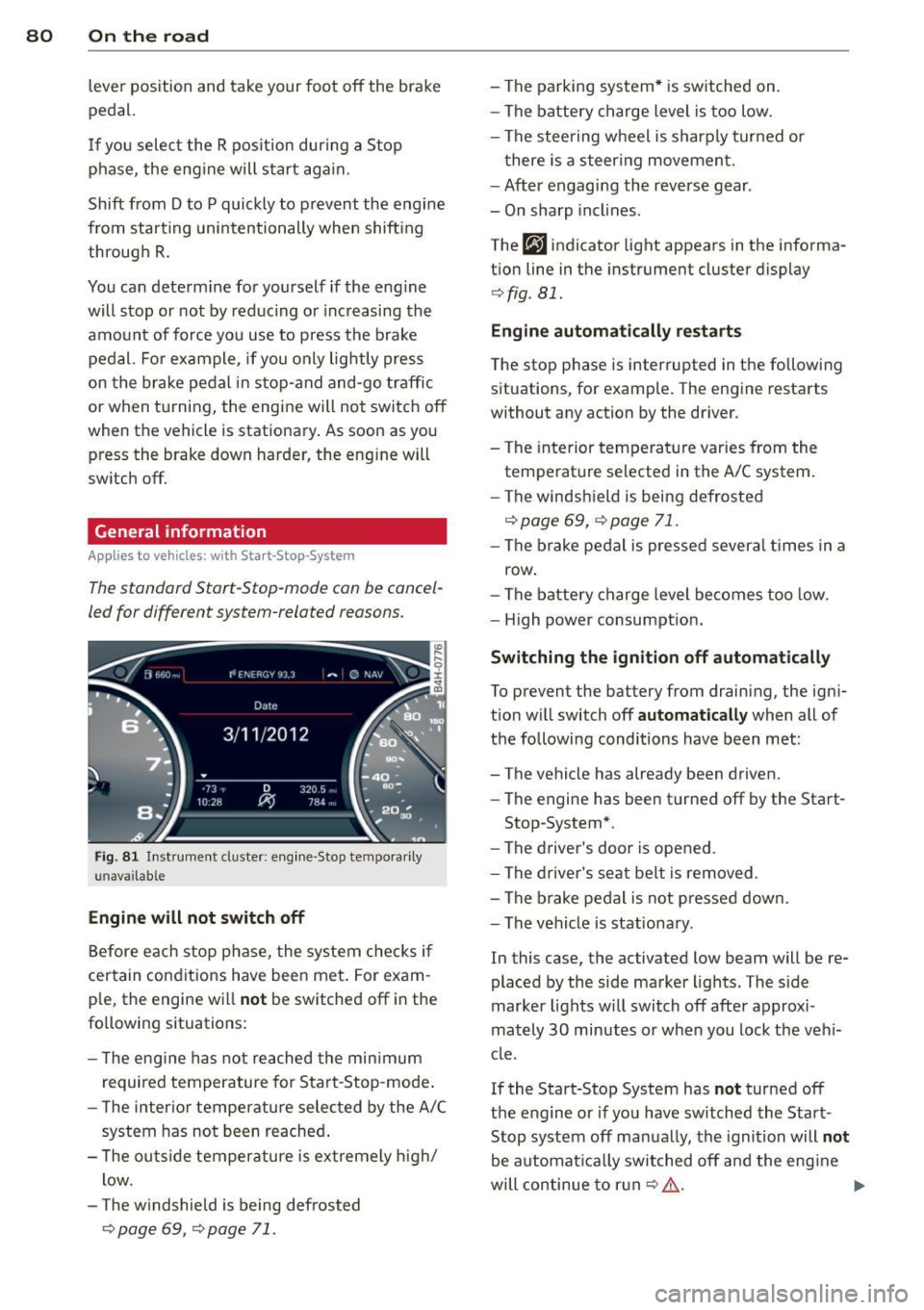
Fig . 81 Instrument cluster: engine -Stop tempo rarily
unava ilable
Engine will not switch off
Before each stop phase, the system checks if
certain conditions have been met. For exam·
ple, the engine will
not be switched off in the
following situations:
- The engine has not reached the minimum
required temperature for Start-Stop-mode.
- The interior temperature selected by the A/C
system has not been reached.
- The outside temperature is extremely high/
low .
- The windshield is being defrosted
¢ page 69, ¢ page 71.
-The parking system* is switched on.
- The battery charge level is too low.
- The steering wheel is sharply turned or
there is a steering movement.
- After engaging the reverse gear .
- On sharp inclines.
The
fjJ indicator light appears in the informa
tion line in the instrument cluster display
¢fig . 81.
Engine automatically restarts
The stop phase is interrupted in the following
situations, for example. The engine restarts
without any action by the driver.
- The interior temperature varies from the
temperature selected in the A/C system.
- The windshield is being defrosted
c:!;> page 69, ¢ page 71.
-The brake pedal is pressed several times in a
row.
- The battery charge level becomes too low.
- High power consumption.
Switching the ignition off automatically
To prevent the battery from draining, the igni
tion will switch off
automatically when all of
the following conditions have been met :
- The vehicle has already been driven.
- The engine has been turned off by the Start-
Stop-System*.
- The driver's door is opened.
- The driver's seat belt is removed .
- The brake pedal is not pressed down.
- The vehicle is stationary.
In this case, the activated low beam will be re
placed by the side marker lights. The side
marker lights will switch off after approxi
mately
30 minutes or when you lock the vehi
cle.
If the Start-Stop System has
not turned off
the engine or if you have switched the Start
Stop system off manually, the ignition will
not
be automatically switched off and the engine
will continue to run
c:!;> ,&. .,..
Page 83 of 314
M N
0 I.J "". rl I.O
"' rl
"' rl
WARNING
Never allow the engine to run in confined
spaces - danger of asphyxiation.
@ Tips
If you shift into the 0, N or S positions af
ter shift ing into reverse, the vehicle must
be driven faster than 6 mph (10 km/h) in
order for the engine to switch off again .
Switching the Start-Stop-System on/off
manually
Applies to vehicles: with Start-Stop-System
If you do not wish to use the system, you can
switch it off manually .
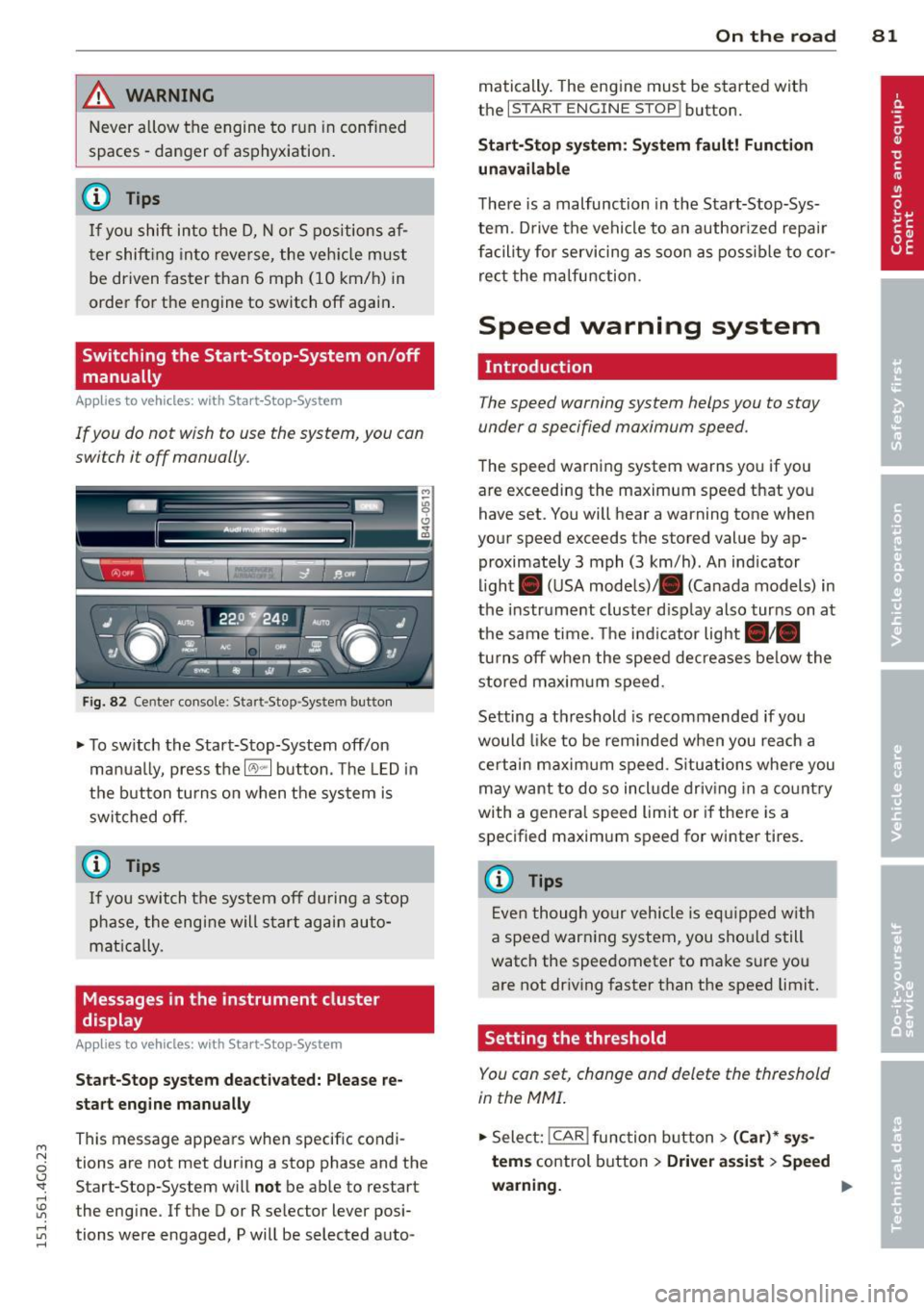
Fig. 82 Cente r console : Sta rt-Stop -System button
.., To sw itch the Start-Stop-System off/on
manua lly, press the
16'> .. I button. The LED in
the button turns on when the system is
switched off.
{t) Tips
If you switch the system off during a stop
phase, the engine will start again auto
mat ically.
Messages in the instrument cluster
display
Applies to vehicles: with Start-Stop -System
Start-Stop system deactivated: Please re
start engine manually
This message appears when specific condi
tions are not met during a stop phase and the Start-Stop-System will
not be able to restart
the eng ine. If the D or R selector lever posi
tions were engaged, P will be selected auto-
On the road 81
matically. The engine must be started with
the
I START ENGINE STOP! button.
Start-Stop system: System fault! Function
unavailable
There is a malfunction in the Start-Stop-Sys
tem. Drive the vehicle to an author ized repa ir
facility for servicing as soon as possible to cor
rect the malfunction .
Speed warning system
Introduction
The speed warning system helps you to stay
under a specified maximum speed .
The speed warning system warns you if you
are exceeding the maximum speed that you have set. You will hear a warning tone when
your speed exceeds the stored value by ap proximately 3 mph (3 km/h) . An indicator
light. (USA models)/ . (Canada models) in
the instrument cluster disp lay also turns on at
the same time. The indicator light./.
turns off when the speed decreases be low the
stored maxim um speed.
Setting a threshold is recommended if you
would like to be reminded when you reach a
certain maximum speed . Situations where you
may want to do so incl ude driving in a country
with a general speed limit or if there is a
specified maximum speed for winter tires .
@ Tips
Even though your vehicle is eq uipp ed w ith
a speed warning system, you sho uld still
watch the speedometer to make sure you
are not driving faster than the speed limit.
Setting the threshold
You can set, change and delete the threshold
in the MMI.
.., Select: !CAR ! function button> (Car)* sys
tems
control button > Driver assist > Speed
warning.
~