light AUDI S6 2015 Repair Manual
[x] Cancel search | Manufacturer: AUDI, Model Year: 2015, Model line: S6, Model: AUDI S6 2015Pages: 314, PDF Size: 77.57 MB
Page 107 of 314
M N
0 I.J ""'. rl I.O
"' rl
"' rl
-they are not in an upright position, for
examp le if they are s itting, crouching
or lying down and/or
- if the outline in the display is incom
p lete or interrupted, for example be
cause the person is partially hidden by
a parked veh icle .
(D Tips
-Pedestrian detection and the pedestrian
warming are lim ited to objects that are
detected as pedestr ians. The system
does not detect animals . Even though
the shape and warmth radiated by each
object det ected is evaluated, the system
does have lim itations and it can give in
correct warnings.
- Fo r techn ical reasons , the image pauses
in split second interva ls.
Switching on and off
Appl ies to vehicles: with night vision assistant
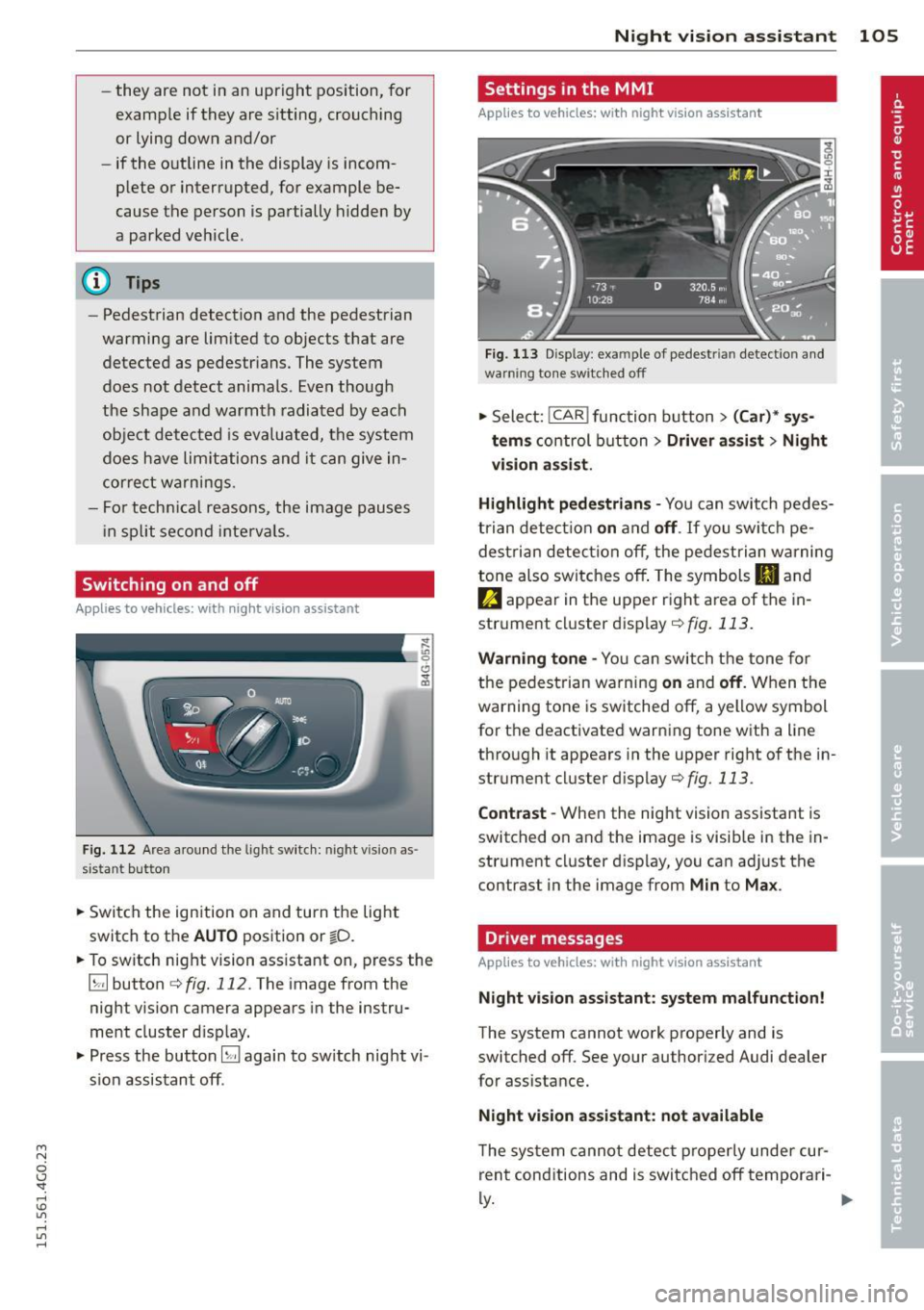
Fig . 112 Area a round the lig ht switch: night vis io n as
si st ant button
.. Switch the ignition on and turn the light
switch to the
AUTO position or io.
.. To switch night vision ass istant on, press the
~ button ¢
fig. 112. The image from the
night vision camera appears in the instru
ment cluster d isp lay.
.. Press the button~ again to sw itch night vi
s ion assistant off .
Night vision assistant 105
Settings in the MMI
Applies to vehicles: with night vision assistant
Fig. 113 Disp lay : exa mple of pedest rian detect io n and
warn ing to n e sw itched off
.. Select: !CAR ! function button> (Car)* sys
tems
control button > Driver assist > Night
vision assist.
Highlight pedestrians -
You can switch pedes
trian detec tion
on and off. If you switch pe
destrian detection off, the pedestrian warning
tone also switches off . The symbols
II and
e appear in the upper r ight area of the in
strument cluster display
r:!) fig. 113.
Warning tone -You can switch the tone for
the pedestrian warning
on and off. When the
warning tone is sw itched off, a yellow symbol
for the deactivated warning tone with a line
through it appears in the upper right of the in
strument cluster d isplay
¢fig. 113 .
Contrast -When the night vision assistant is
switched on and the image is visib le in the in
strument cluster display, you can adjust the
contrast in the image from
Min to Max .
Driver messages
Applies to vehicles: with night vision assistant
Night vision assistant: system malfunction!
The system cannot work properly and is
switched off. See your authorized Audi dealer
for assistance.
Night vision assistant: not available
The system cannot detect properly under cur
rent conditions and is switched off temporari-
~ ~
Page 108 of 314
106 Night vision assistant
Night vision assistant: only available in dark
ness and with lights switched on
N ig ht vision assist ant only wo rk s when i t is
da rk ou tside and the headlig hts are o n.
Night vision assistant: pedestrian detection
not available
The system has deactivated the pedestrian de
tec tion f unct ion.
Page 109 of 314
M N
0 I.J "". rl I.O
"' rl
"' rl
Automatic Transmission
multitronic, S tronic,
tiptronic
Introduction
The automatic transmission is controlled elec
tronically . The transmission upsh ifts or down
shifts automatically depending on which drive
program is se lected .
When a
moderate driving style is used, the
transmission selects the most economical
driving mode . It will then change up early and
delay the downshifts to give better fuel econ
omy.
The transmission switches to a sporty mode
after a kick-down or when the driver uses a
sporty driving style characterized by quick ac
celerator pedal movements, heavy accelera
tion, frequent changes in speed and traveling
at the maximum speed.
If desired, the driver can als o se lect the gears
manually (tiptronic mode) q page 111.
Various automatic transmissions may be in
stalled , depending on the model:
multitronic transmission
The multitron ic transmission is a continuously
variable transmission. Power is transferred us
ing a multidisk clutch . In contrast to conven
tional automat ic transm iss ions using shift ing
ope rat ions, the transmiss ion ratio in the con
tinuously variab le transmission is changed
continuously. This optimizes the comfort level
and conserves fuel.
S tronic transmission
The S tronic is a dual-clutch transmission .
Power is transferred using two clutches that
work independently from one another. They
replace the torque converter used in conven
tional automatic transm issions and allow the
vehicle to accelerate without a noticeable in
terruption in traction.
Automatic Transmission 107
tiptronic transmission
In the tiptronic transmission, power is trans
ferred by a torque converter.
Selector lever positions
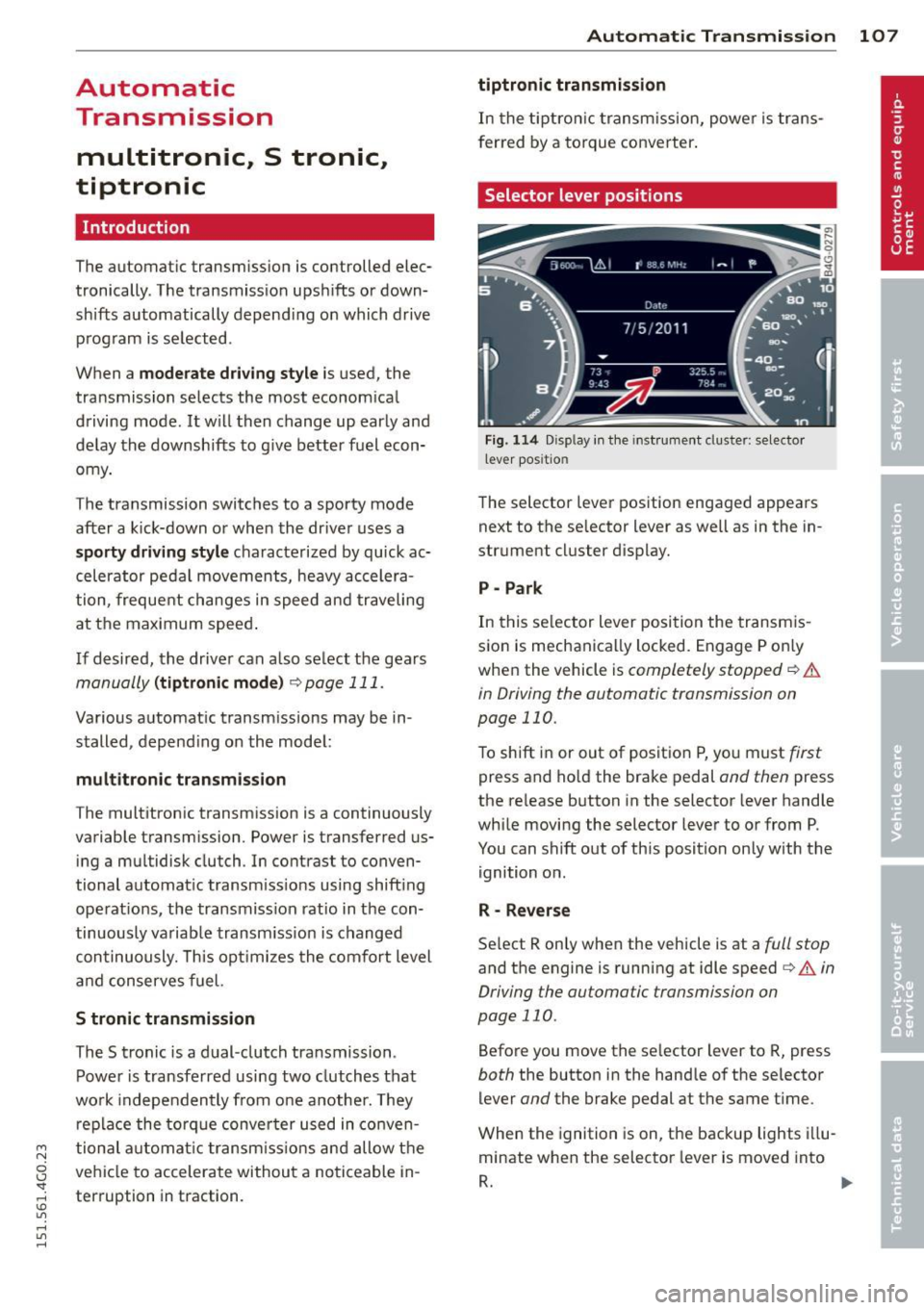
Fig. 114 Disp lay in the instrument cluster: selector
l ever positio n
The selector lever position engaged appears
next to the se lector lever as we ll as in the in
strument cluster display.
P- Park
In this selector lever position the transmis
sion is mechanically locked. Engage P on ly
when the vehicle is
completely stopped q .&.
in Driving the automatic transmission on
page 110.
To shift in or out of positio n P, you must first
press and hold the brake pedal and then press
the re lease button in the selector lever handle
while moving the selector lever to or from P.
You can shift out of this position only with the
ignition on.
R - Reverse
Select R only when the vehicle is at a full stop
and the engine is running at idle speed i:> & in
Driving the automatic transmission on
page 110 .
Before you move the se lector lever to R, press
both the button in the handle of the selector
lever
and the brake pedal at the same time .
When the ignition is on, the backup lights illu
minate when the selector lever is moved into
R. ..,.
Page 111 of 314
M N
0 I.J "". rl I.O
"' rl
"' rl
The Automatic Shift Lock only functions when
the vehicle is stationary or at speeds below
1 mph (2 km/h).
At speeds above about 1 mph (2 km/h) the
Automatic Shift Lock is automatically deacti
vated in the N position.
A time delay element prevents the se lector
l eve r from locking when it is moved thro ugh
the N position (going from R to 0/5). The lock
ing e lement will lock the selector lever if the
lever is left in N (Neutral) for more than ap
prox imately 2 second, without the brake ped
al being pressed.
R elease button
The release button on the selector lever pre
vents the lever from being accidenta lly shifted
into certain positions. Depending on the direc
tion of the shift, the selector lever locks at d if
ferent positions. The positions are h ighlighted
in the illustration
¢ fig . 115 .
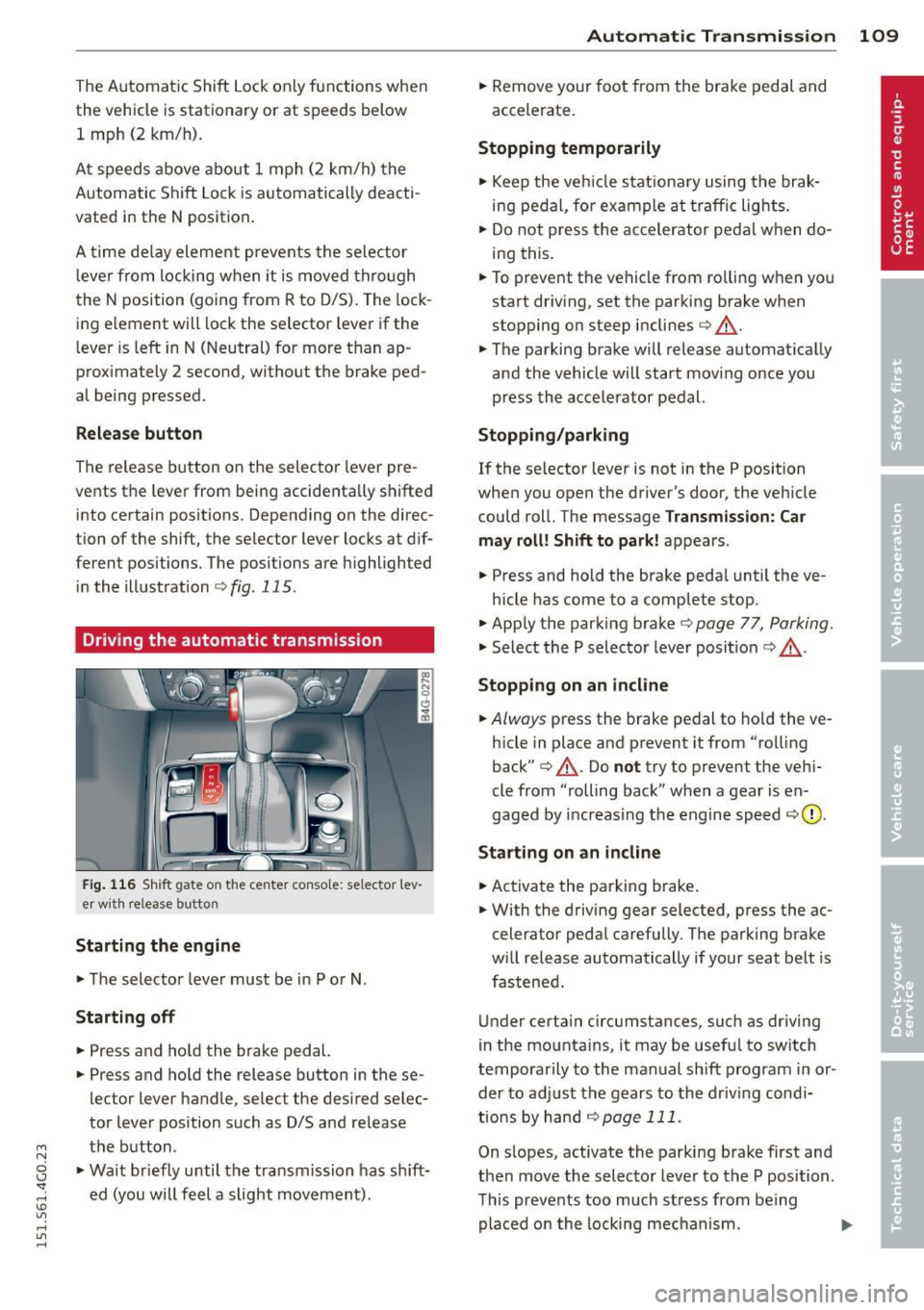
Driving the automatic transmission
Fig. 116 Shift gate on the center conso le: selector lev
er w ith release button
Starting the engin e
• The selector lever must be in P or N.
Starting off
• Press and ho ld the brake pedal.
• Press and hold the release button in these
lector lever handle, select the desired selec
tor lever pos ition such as D/S and release
the button .
• Wait br iefly until the transmission has sh ift
ed (you will feel a slight movement).
Automatic Tra nsmi ssi on 109
• Remove your foot from the brake pedal and
accelerate.
Stopping t emporarily
• Keep the veh icle stationa ry using the brak
ing pedal, for example at traffic lights.
• Do not press the accelerator peda l w hen do
ing this .
• To prevent the vehicle from ro lling when you
start dr iving, set the parking brake when
stopping on steep inclines¢.&_ .
• The parking brake will release automat ically
and the vehicle will start mov ing once you
press the accelerator pedal.
Stopping /parking
If the selector lever is not in the P position
when you open the driver's door, the vehicle
could roll. The message
Transm ission: Car
may roll! Shift to park !
appears.
• Press and hold the brake peda l until the ve-
hicle has come to a complete stop.
• Apply the parking brake¢
page 77, Parking.
• Select the P selector lever posit ion c::> ,&. .
Stopping on a n incline
• Always press the brake pedal to ho ld the ve
hicle in place and prevent it from "rolling
back"
c::> .&_ . Do not try to prevent the veh i
cle from "rolling back" when a gear is en
gaged by increas ing the engine speed
c:::, (D ,
Sta rting on an incline
• Activate the parking brake .
• With the driving gear selected, press the ac
celerator peda l carefully. The parking brake
w ill release automatically if your seat belt is
fastened .
Under certain circumstances, such as driving
in the mounta ins, it may be useful to switch
temporarily to the manual shift program in or
der to ad just the gears to the driv ing cond i
tions by han d
¢page 111.
On s lopes, activate the parking brake first and
then move the selector lever to the P position .
This prevents too much stress from being placed on the locking mechanism. .,.
Page 114 of 314
112 Automatic Tran sm iss ion
long as the accelerator peda l is depressed, the
engine speed is automatica lly regulated for
maximum acceleration.
Appli es to v ehicl es with a S tronic -/,
tip tronic t ransmis sion
When you depress the acce lerator pedal be
yond the resistance point, the automatic transmission downshifts into a lower gear, de
pending on vehicle speed and engine speed.
The upshift into the next higher gear takes
place once the maximum specified eng ine
speed is reached.
A WARNING
Please note that the d rive wheels can spin
if kick-down is used on a smooth slippery
road - there is a risk of skidding .
Launch Control Program
Applies to vehicles: with 5 tronic
The Launch Control Program provides the
best acceleration possible when starting from
a stop .
Requirement: The engine must be at operat
i ng temperature and the steering wheel must
not be tu rned.
,,. Press the
I" O FFI button ¢ page 195 while
the engine is running. The
II ind icator light
illuminates in the instrument cluster and
Sta bilizati on co ntrol (E SC): Off W arning!
Redu ced st a bilit y
appears in the driver in
f ormation system display.
,,. Move the selector lever to position D/S to
select sport mode (S) or select
Dynam ic
mode in Audi dr ive select ¢ page 101.
,,. Press the brake pedal strongly with your left
foot and hold it down for at least 1 second.
,,. At the same t ime, press the accelerator ped
al down complete ly w ith your r ight foot un
t il the engine reaches and maintains a h igh
RPM.
,,. Remove your foot from the brake pedal
within S seconds¢ .&_.
A WARNING
-Always adapt your driving to the traffic
flow .
- Only use the Launch Control Program
when road and traff ic conditions allow it
and other drivers w ill not be endangered
or annoyed by your driving and the vehi
cle's acceleration.
- Please note that the driving wheels can
spin and the vehicle can break away
when sport mode is switched on, espe
cially when the road is slippe ry.
- Once you have accelerated, you shou ld
sw itch sport mode off by pressing the
I J'J OFF I button.
(D Tips
'
-The tra nsmission temperature may in
crease significantly after using the
Launch Control P rogram. If that hap
pens, the p rogram may not be avai lab le
for a few minutes . It w ill be ava ilable
again after a cool-down period .
- When accelerating using the La unch
Contro l Program, a ll vehicle parts are
subject to heavy loads. This can result in
increased wear.
Transmission malfunction
ID T ransm ission: Pre ss bra ke pedal and se
l e ct ge ar a gai n
Press the brake peda l and select the desired
selector lever position again. You can then continue driving.
[O] Transmi ssion o verh eatin g: Plea se dri ve
con ser va tivel y
-
The transm iss ion temperat ure has inc reased
significantly due to the sporty driving manner .
Drive in a less sporty manner until the tem
perature returns to the normal range and the
indicator light switches of.
ID T ra nsmis sion malfun ction : Y o u can con-
tinue dri ving ..,
Page 116 of 314
114 Parking system s
Parking systems
General information
A ppl ies to vehicles: with parkin g system plus/rear view
camera/peripheral cameras
Depending on your vehicle's equ ipment, vari
ous parking a ids wi ll help you when pa rk ing
and maneuvering.
The
p ar king sy st e m plu s assists you when
pa rking by audib ly and visually indicat ing ob
jects detected
in front of and behind the vehi
cle
~ page 115.
The rear view ca m era shows the area behind
the vehicle in the Infotainment d isp lay. This
d isplay assists you when you are c ross o r par
allel parking
q page 116. In addit ion, you are
assisted by the functions from the parking
system plus
~ page 115 .
The peripher al cam era s ass ist you with park
ing and maneuvering. You are aided by var ious
cameras depending on the vehicle equipment leve l
¢page 119. In addition, you are assist
ed by the functions from the parking system
plus ¢ page 115.
A WARNING
- Always look for traff ic and check the area
around your vehicle by looking at it di
rectly as well . The parking system cannot
rep lace the d river's attent ion. The dr iver
is always respons ible for safety during
p arki ng and for all other maneuvers.
- Please note that some surfaces, such as
clothing, a re not detected by the system.
- Senso rs and cameras have blind spots in
wh ich peop le and objects ca nnot be de
te cted. Be especially cau tious of children
and animals.
- T he sensors can be displaced by impacts
or damage to the radia to r grille, bumpe r,
wheel housing and the unde rbody. The
par king systems may become impaired
as a resu lt . Have your authorized Audi
dealer or qualified workshop check their
function. -
Make s ure the sensors are not covered by
stickers, deposits or any other obstruc
tions as it may impair the sensor func
tion . For information on cleaning, refer
to
~ page 209.
(D Note
- Some objects are not detected by the system under certain c ircumstances:
- Obje cts su ch as ba rrie r chains, trailer
draw bars, vertical po les or fences
- Objects above t he senso rs such as wall
extensions
- Objects w ith specific surfaces or struc
tures su ch as chain link fences or pow
der snow.
- If you conti nue d riving closer to a low- ly
ing object, it may disappea r from the
sensor range. Note th at yo u w ill no lon
ger be warned abo ut this obstacle.
(j) Tips
- T he system may provide a wa rni ng even
t ho ugh the re are no obs ta cl es in the cov
erage a rea in some situa tions, such as:
- certain road surfaces or for long grass.
- externa l ultrasonic sources e.g. from
clean ing vehicles.
- heavy rain, snow or thick vehicle ex
ha ust.
- We recommend that you practice park
ing in a traff ic-free location or park ing
lot to become familiar w ith the system.
When doing this, there should be good light and weather cond itions .
- You can change the volume and pitch of
the s ignals as we ll as the disp lay
¢page 124.
- Please refer to the instructions for tow
ing a t railer
¢ page 125.
- What appears in the infotainment dis
play is somewhat time-delayed.
Page 129 of 314
M N
0 I.J "". rl I.O
"' rl
"' rl
.. Make sure to use the right child rest raint
correct ly to protect children
Q page 171,
Child Safety .
.. Sit properly in your seat and make sure that
your passengers do the same¢
page 52,
General recommendations .
.. Fasten your safety belt and wear it properly.
Also instruct your passengers to fasten their
safety belts properly ¢
page 136 .
What impairs driving safety?
Safe driving is directly related to the condi
tion of the vehicle, the driver as well as the
driver 's ability to concentrate on the road
without being distracted.
The driver is respons ible for the safety of the
veh icle and all of its occupants.
If your ability
to drive is impai red, safety r isks for everybody
in the vehicle increase and you also become a
hazard to everyone else on the road ¢
A.
Therefore:
.. Do not let yourself be distracted by passen
gers or by using a cellular telephone.
.. NEVER drive when your driving ability is im
paired (by medications, alcohol, drugs, etc.).
.. Obse rve all traffic laws, rules of the road
and speed limits and plain common sense .
.. ALWAYS adjust your speed to road, traff ic
and weather conditions .
.,. Take frequent breaks on long trips . Do not
drive for more than two hours at a stretch.
.. Do NOT drive when you are t ired, under
pressure or when you are stressed.
A WARNING
Impaired driving safety increases the risk
of serious personal injury and death when
ever a vehicle is being used.
Driving Safely 12 7
Proper occupant
seating positions
Proper seating position for the driver
The proper driver seating position is impor
tant for safe, relaxed driving .
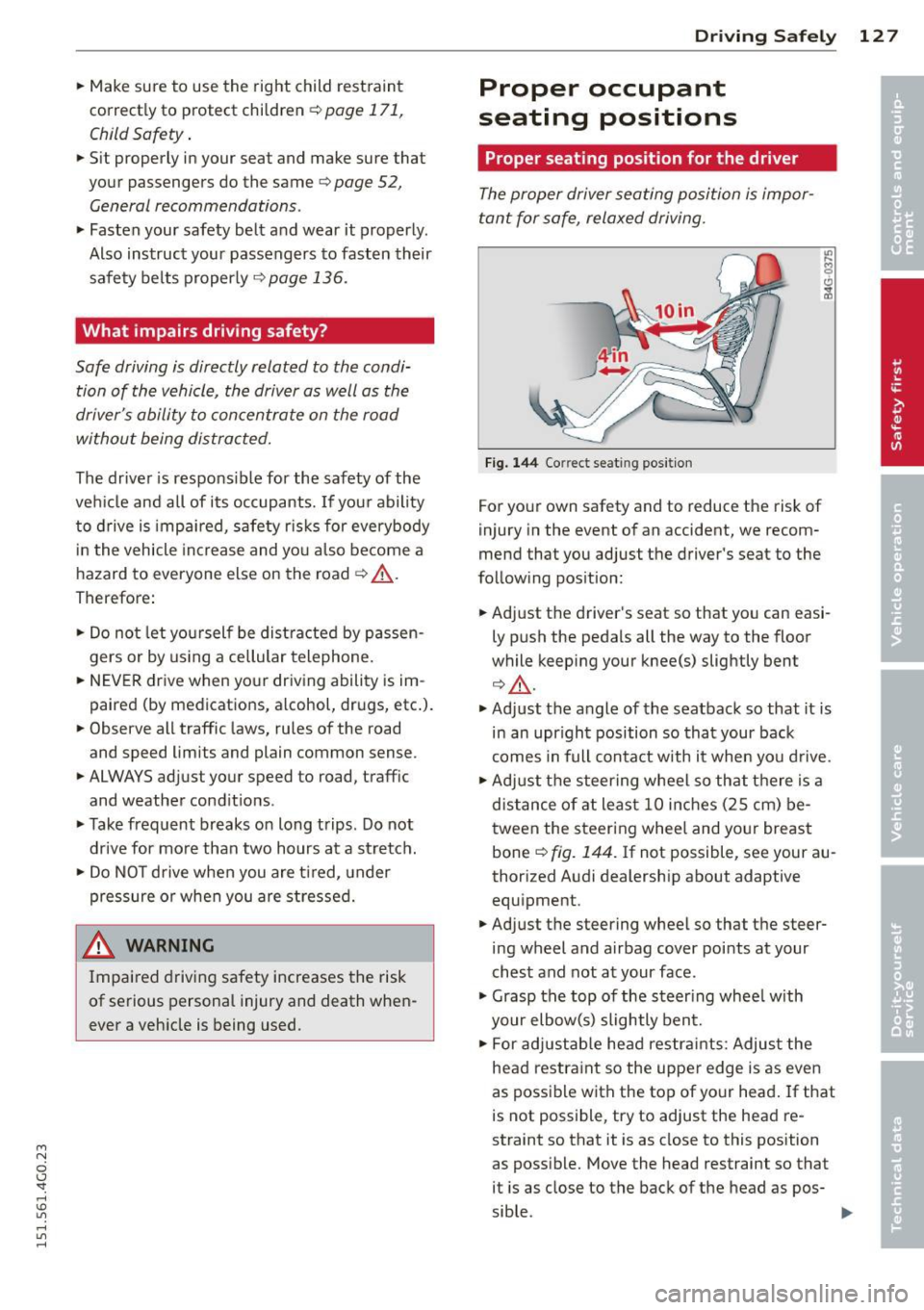
Fig. 144 Correct seat ing pos it ion
For your own safety and to reduce the risk of
injury in the event of an accident, we recom
mend that you adjust the driver's seat to the
follow ing pos ition:
.. Adjust the driver's seat so that you can easi
ly push the pedals all the way to the floor
wh ile keeping your knee(s) slightly bent
¢.&_ .
.. Adjust the angle of the seatback so that it is
in an upr ight position so that your back
comes in full contact w ith it when you drive.
.. Adjust the steering wheel so that th ere is a
distance of at least 10 inches (25 cm) be
tween the steering wheel and yo ur breast
bone
Q fig. 144. If not possible, see your au
thorized Audi dealership about adaptive
equipment .
.. Adjust the steering wheel so that the steer
ing wheel and airbag cover points at your
chest and not at your face.
.,. Grasp the top of the steering wheel with
your elbow(s) slightly bent.
.. For adjustable head restra ints: Adjust the
head restraint so the upper edge is as even
as possible with the top of your head. If that
is not possible, try to adjust the head re
straint so that it is as close to this position
as poss ible. Move the head restraint so that
it is as close to the back of the head as pos-
sible . .,.
Page 138 of 314
136 Safety belts
Safety belts
General notes
Always wear safety belts!
Wearing safety belts correctly saves lives!
This chapter explains why safety be lts are nec
essary, how they work and how to adjust and
wear them correctly .
.. Read a ll the information that fo llows and
heed all of the instructions and WARNINGS.
A WARNING
Not wearing safety belts or wearing them
improperly increases the risk of ser ious
personal in jury and death .
- Safety belts are the sing le most effective
means avai lab le to reduce the risk of se
r ious injury and dea th in a utomob ile acci
dents. For your protection and that of
yo ur passenge rs, always co rrectly wear
safety belts when the vehicle is moving.
- Pregnant women, injured, or physically
im paired perso ns m ust also use safety
belts. Lik e all veh icle occup ants, they are
more like ly to be ser iously injured if they
do not wea r safety be lts . The best way to
protect a fetus is to protect the mother -
throughout the entire pregnancy.
Number of seats
Your Audi has a total of five seating positions: two in the front and three in the rear. Each
seating position has a safety belt.
A WARNING
Not wea ring safety belts or weari ng them
improp erly increases the risk of ser ious
pe rsonal i njury and deat h.
- Never st rap more than one pe rson, in
cl uding small ch ild ren, into any belt.
It is
e speci ally dange rous to pla ce a safety
belt over a child s itting on yo ur lap.
- N ever le t mo re people ride in the ve hicl e
than there are s afe ty be lts avail able. -
Be s ure everyone riding in the vehicle is
properly restrained w ith a separate safe
ty belt or child restra int.
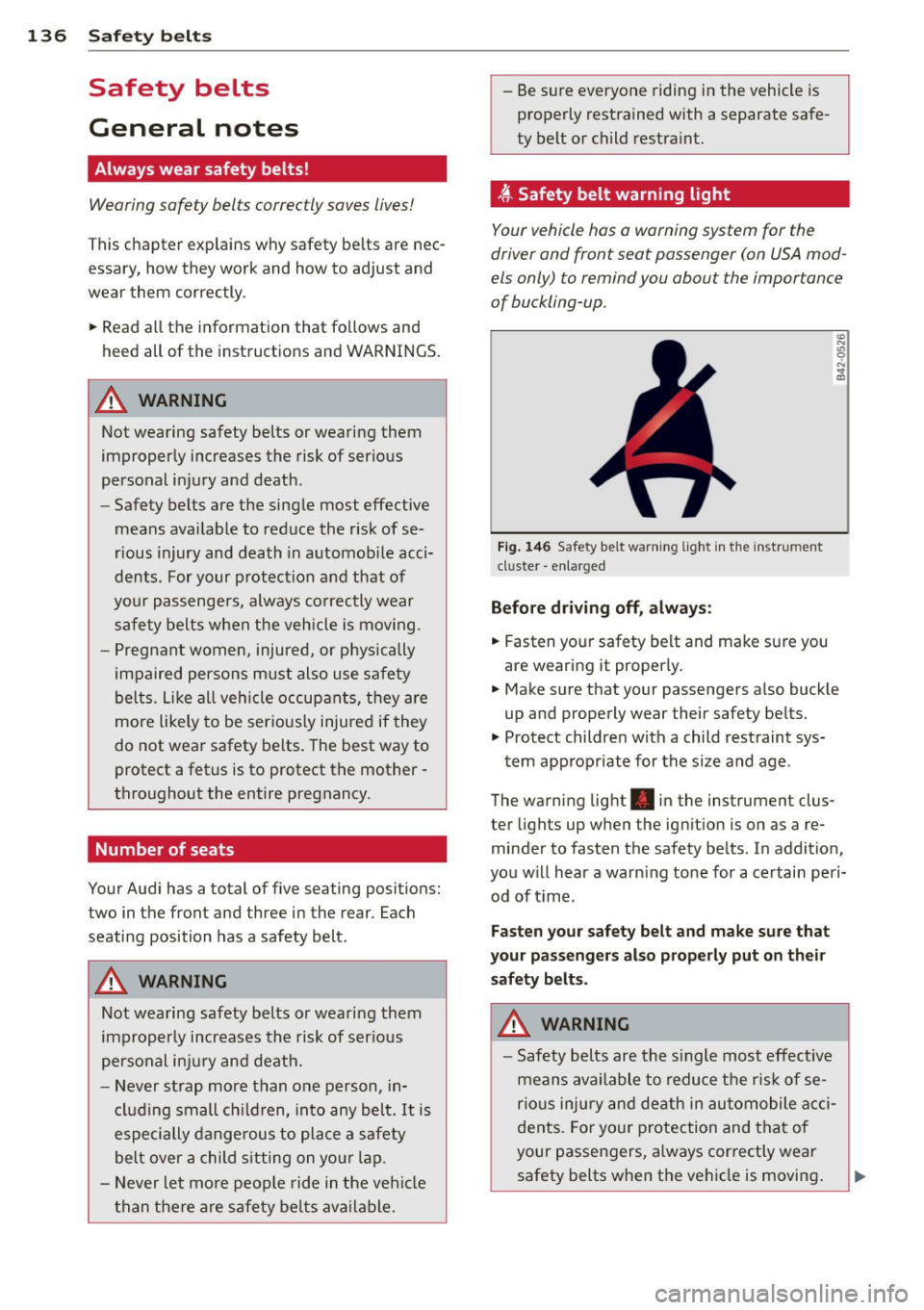
t Safety belt warning light
Your vehicle hos o warning system for the
driver and front seat passenger (on USA mod
els only) to remind you about the importance
of buckling-up .
Fi g. 146 Safety belt warni ng light in the instrument
cluster -en larged
Before driv ing off, alway s:
.. Fasten yo ur safety belt and make su re you
are wearing it properly .
.. Make s ure that your passengers also buck le
up and properly wear their safety be lts.
.. Protect childre n w ith a child restraint sys-
tem app ropriate for the s ize and age.
The warn ing light . in the instrument clus
ter lights up when the ign ition is on as a re
minder to fasten the safety be lts. In addition,
you w ill hear a warn ing tone for a ce rtai n pe ri
od of t ime.
Fasten you r safety belt and make sure that
your pass eng ers also properly put on the ir
s afety belt s.
A WARNING .....=-
-Safety b elts are the s ingle most eff ect ive
means avai lable to reduce t he ri sk of se
rio us inju ry and de ath in au tomobile acci
dents. Fo r you r protection and that of
your passengers, a lways cor rectly wear
safety belts when t he vehicle is moving .
Page 139 of 314
M N
0 I.J '
"' rl
-Failure to pay attention to the warning
light that come on, could lead to person
al injury.
Why safety belts?
Frontal collisions and the law of physics
Frontal crashes create very strong forces for
people riding in vehicles .
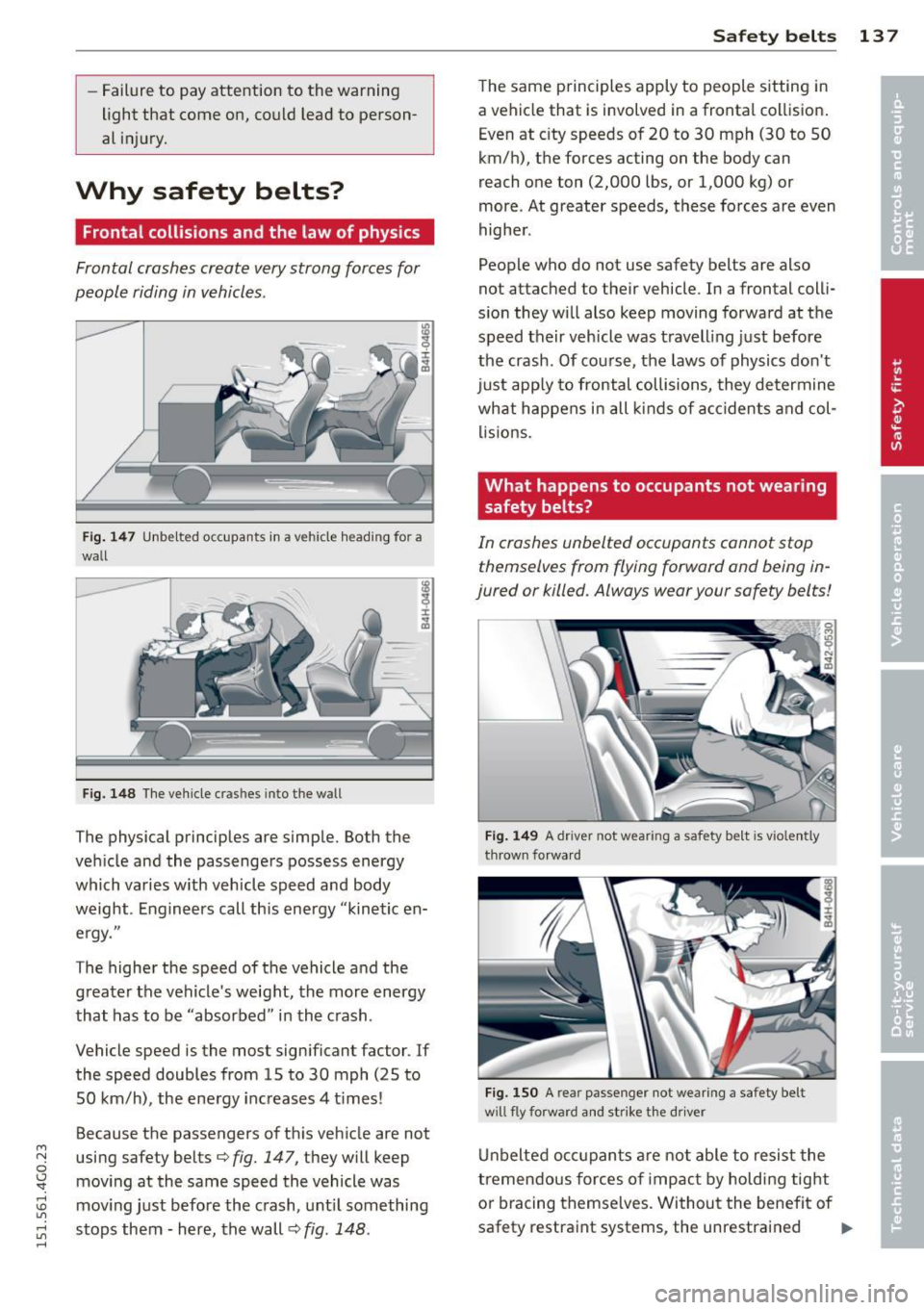
Fig. 147 Unbelted occupants in a ve hicle heading for a
wall
Fig. 148 The vehicle cras hes into the wall
The physical principles are simple. Both the
vehicle and the passengers possess energy
which varies w ith veh icle speed and body
weight . Engineers call this energy "kinetic en
ergy."
The higher the speed of the vehicle and the
greater the vehicle's weight, the more energy
that has to be "absorbed" in the crash .
Vehicle speed is the most significant factor . If
the speed doubles from 15 to 30 mph (25 to
SO km/h), the energy increases 4 t imes!
Because the passengers of this vehicle are not
using safety belts¢
fig. 147, they will keep
moving at the same speed the vehicle was
moving just before the crash, until something
stops them - here, the wall ¢
fig. 148.
Safety belts 13 7
The same principles apply to people sitting in
a vehicle that is involved in a frontal collision.
Even at city speeds of 20 to 30 mph (30 to 50
km/h), the forces acting on the body can
reach one ton (2,000 lbs, or 1,000 kg) or
more . At greater speeds, these forces are even
higher.
People who do not use safety belts are also
not attached to their vehicle . In a frontal colli
sion they will also keep moving forward at the
speed their vehicle was travelling just before
the crash . Of course, the laws of physics don't
just app ly to frontal collisions, they determine
what happens in all kinds of accidents and col
lisions.
What happens to occupants not wearing safety belts?
In crashes unbelted occupants cannot stop
themselves from flying forward and being in
jured or killed. Always wear your safety belts!
Fig. 149 A driver not wea ring a safety be lt is vio lently
thrown forward
Fig. 150 A rear passenger not wearing a safety belt
w ill fly forward and strike the driver
Unbelted occupants are not able to resist the
tremendous forces of impact by holding tight
or bracing themselves. Without the benefit of
safety restraint systems, the unrestrained .,..
Page 142 of 314
140 Safet y belts
To provide maximum protection, sa fety belts
must always be positioned correctly on the
wearer 's body.
.,. Adjus t the front seat and head restr aint
properly ¢
page 52, General recommenda
tions .
.,. Make sure the seatback of the rear seat
bench is in an upright position and securely
latched in place before using the belt¢ .&,.
.,. Hold the be lt by the tongue and pull it even
ly across the chest and pelvis¢ .&,.
.,. Inse rt the tongue into the correct buckl e of
yo ur sea t until you hea r it latc h securely
¢fig. 152.
.,. Pull on the be lt to make sure that it is se-
cu rely latched in th e buckle.
Automatic safety belt retractors
Every safety belt is equipped w ith an automat
i c belt retracto r on the shoulder be lt. This fea
ture locks the be lt whe n the belt is pulled out
fast, dur ing hard braking and in an accident.
The belt may also lock when yo u drive up or
down a steep hill or throug h a sharp curve.
During normal driving the belt lets you move
freely.
Safety belt pretensioners
The sa fety belts are equipped with a belt pre
tensioner that helps to tighten the safety be lt
and remove slack when the pretensione r is ac
tivated ¢
page 143. The function of the pre
tensioner is mon itored by a warning light
¢page 19.
Convertible locking retractor
Every safety belt except the one on the driver
seat is eq uipped w ith a convertib le loc king re
tractor that
must be used when the safety
be lt is used to attach a child seat. Be sure to
read the important information about this
featu re
¢page 182 .
.,& WARNING
Imprope rly posit ioned safety belts can
cause se rious injury in an accident
¢ page 140, Safety bel t posi tion.
- Safety belts offer opt imum protection
only when the seatback is upr ight and
be lts are properly posit ioned o n the
body .
- Always make sure that the rear seat
backrest to wh ich the center rear safety
be lt* is attached is securely latched
wheneve r the rea r center safety belt is
be ing used.
If th e bac krest is not secu re
ly latched, the passenge r will move fo r
ward with the ba ckr est dur ing s udden
brak ing, in a sudden maneuver and es pe
cially in a crash.
- Never at tach the safety bel t to the buck
le for ano ther seat. Attaching the belt to
the wron g buckle will reduce safety be lt
effectiveness and can cause serio us per
sonal injury .
- A passenger who is not proper ly restrain
ed can be seriously injured by the safety
be lt itself w hen it moves from the stron
ger parts of the body into cr itical areas
like the abdomen .
- Always lock the conve rtible locking re
tracto r when you are secu ring a child
seat in the vehicle¢
page 184.
(D Tips
Fo r inf ormation on safety belt pretension
ers, refer to ¢
page 143.
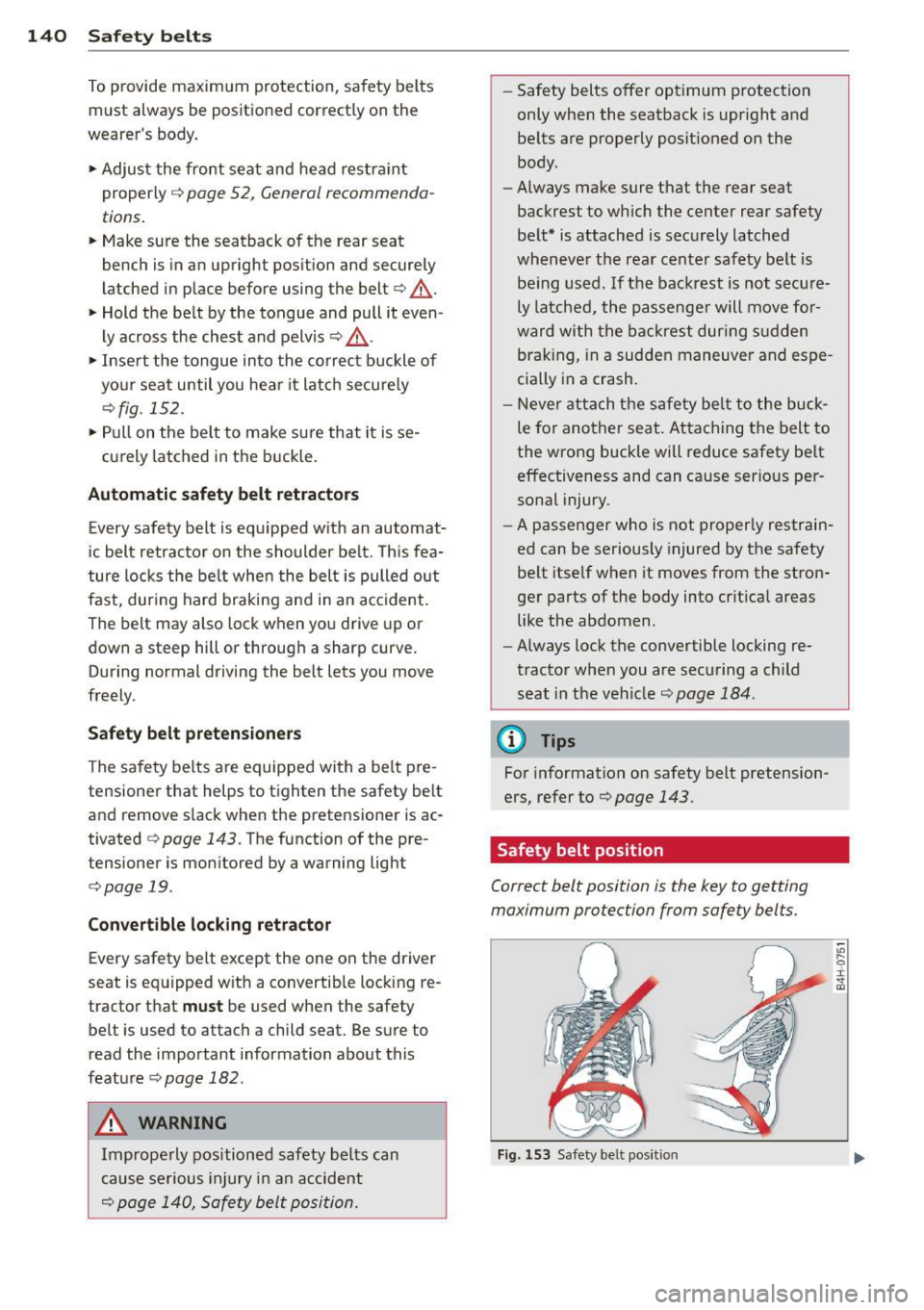
Safety belt position
Correct belt position is the key to getting
maximum protection from safety belts.
Fig . 15 3 Safety belt posit ion
"' .... 0
~ CD