engine AUDI S6 2016 Owner's Manual
[x] Cancel search | Manufacturer: AUDI, Model Year: 2016, Model line: S6, Model: AUDI S6 2016Pages: 294, PDF Size: 73.88 MB
Page 41 of 294
.... N
0 CJ '
- you park close to a hedge and the branches move back and forth under the vehicle for a
long period of time.
- yo u clean yo ur vehicle, for example with a pres
sure washer or in a car wash.
- there is heavy rain.
- the bumper is very dirty, for example afte r driv-
ing on salt-covered roads.
- there is interfe rence to the radio signal from
the veh icle key, s uch as from cell phones or re
mote controls.
Luggage compartment lid emergency
release
The luggage compartment lid can be released in
an emergency from inside the luggage compart
ment.
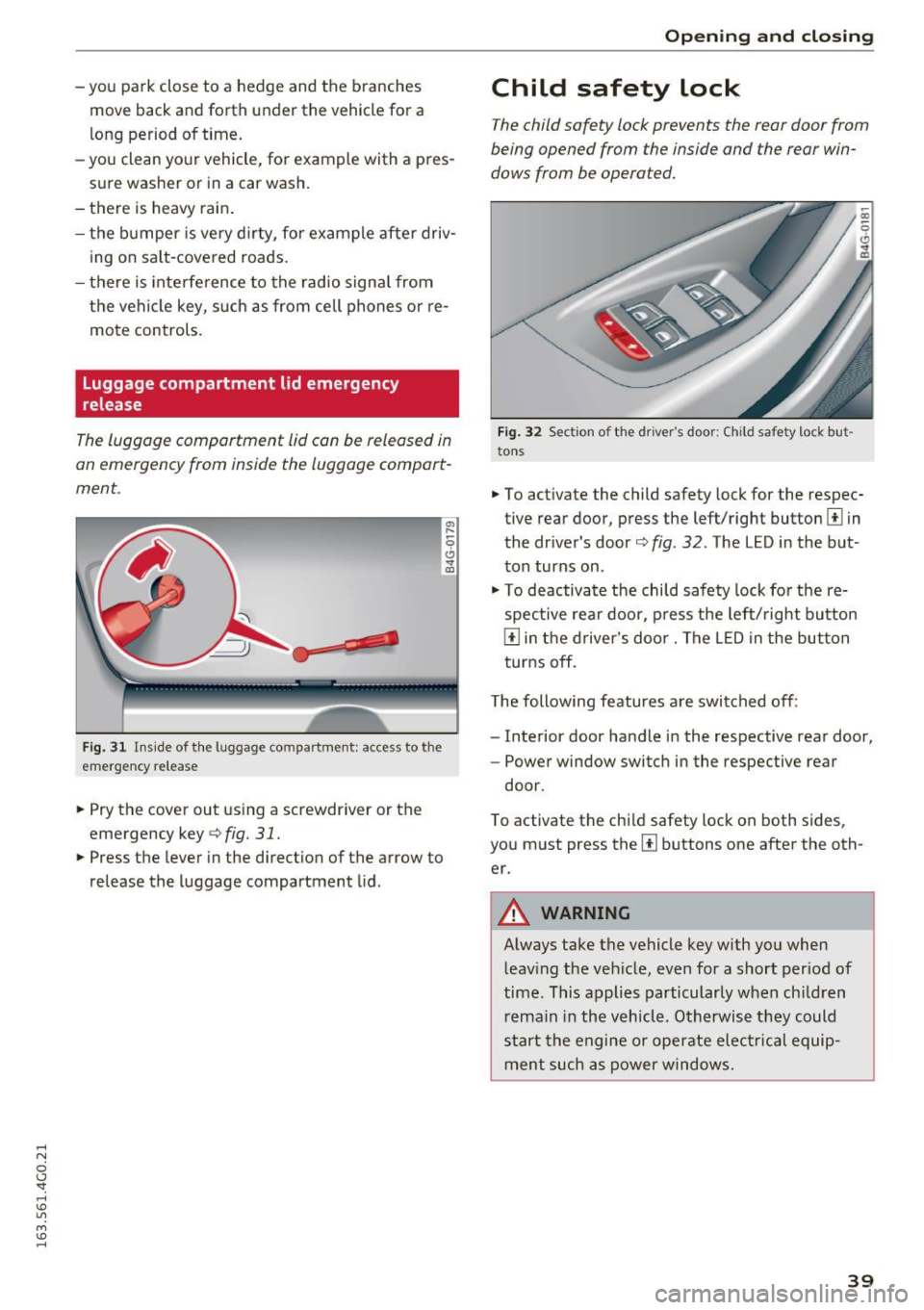
F ig. 31 Ins ide of the luggage compartme nt: access to the
emergency re lease
"' Pry the cover out using a screwdriver or the
emergency key
¢ fig. 31.
"'Press the lever in the direction of the arrow to
release the luggage compartment lid.
Open ing and closing
Child safety lock
The child safety lock prevents the rear door from
being opened from the inside and the rear win
dows from be operated.
Fig. 32 Sectio n of the driver's door: Ch ild sa fety lock but
to ns
• To activate the child safety lock for the respec
tive rear door, press the left/right button
1±1 in
the dr iver's door¢
fig. 32 . The LED in the but
ton turns on .
"' To deactivate the child safety lock fo r the re
spective rear door, press the left/right button
1±1 in the driver's door. The LE D in the button
turns off.
The following features a re switched off:
- Interior door handle in the respective rear door,
- Power window switch in the respective rear
door.
T o activate the chi ld safety lock on both sides,
you must press the
[ii buttons one after the oth
er.
A WARNING
-Always take the vehicle key with you when leaving the vehicle, even for a short period of
time. This applies particularly when ch ildren
remain in the vehicle. Otherwise they could
start the engine or operate electrical equip
ment such as power windows .
39
Page 42 of 294
Opening and closing
Power Windows
Controls
The driver can control all power windows.
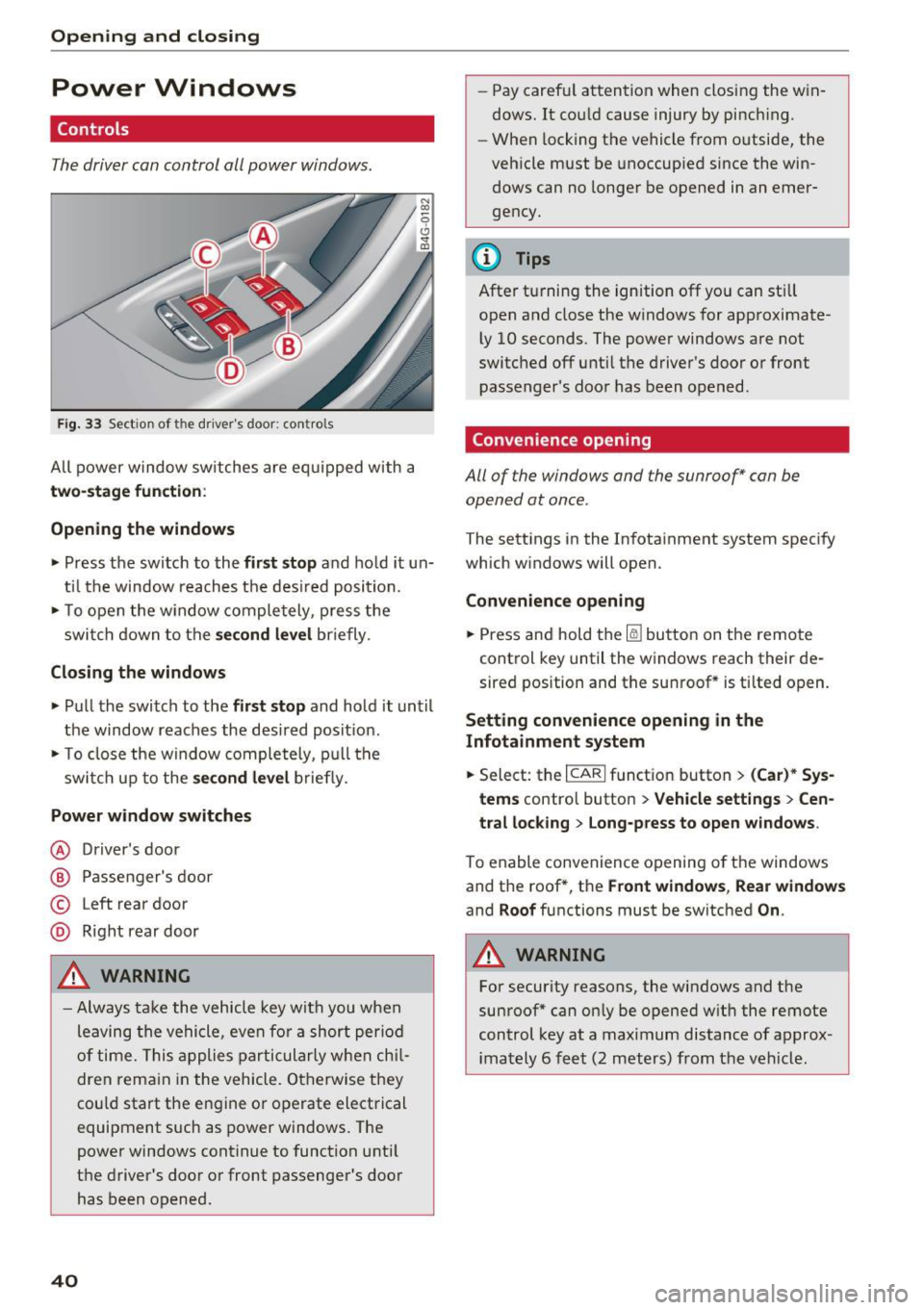
Fig. 33 Section of the driver's door: controls
All power window switches are equipped with a
two-stage function :
Opening the windows
• Press the switch to the first stop and hold it un
til the window reaches the desired position.
• To open the w indow completely, press the
switch down to the
second level briefly.
Closing the windows
• Pull the switch to the first stop and hold it until
the window reaches the desired posit ion.
• To close the window completely, pull the
switch up to the
second level briefly.
Power window switches
@ Driver 's door
@ Passenger's door
© Left rear door
@ Right rear door
A WARNING
-Always take the vehicle key with you when
leaving the vehicle, even for a short period
of time. This applies particularly when chil
dren remain in the vehicle. Otherwise they
could start the engine or operate electrical
equipment such as power windows. The
power windows continue to function until
the driver's door or front passenger's door
has been opened .
40
"
-Pay carefu l attention when closing the win
dows. It could cause injury by pinch ing.
- When locking the vehicle from o utside, the
vehicle must be unoccupied since the win
dows can no longer be opened in an emer
gency.
{!) Tips
After turning the ignition off you can still
open and close the windows for approximate
ly 10 seconds . The power windows are not
switched off until the driver's door or front
passenger's door has been opened .
Convenience opening
All of the windows and the sunroof* can be
opened at once .
The settings in the Infotainment system specify
which windows will open.
Convenience opening
• Press and hold the~ button on the remote
control key until the windows reach their de
sired position and the sunroof * is tilted open.
Setting convenience opening in the
Infotainment system
• Select: the I CARI funct ion button > (Car)* Sys
tems
contro l button > Vehicle settings > Cen
tral locking
> Long-press to open windows.
To enable convenience opening of the windows
and the roof *, the
Front windows, Rear windows
and Roof functions must be switched On .
A WARNING
-
For security reasons, the windows and the
sunroof* can only be opened with the remote
control key at a maximum distance of approx
imately 6 feet (2 meters) from the vehicle.
Page 69 of 294
Warm and cold Climate control system
Description
App lies to vehicles: with three-zone climate control or four
zone a utomat ic climate contro l
The climate control system warms, cools and
adds humidity to the air in the vehicle interior . It
is the most effective when the windows and sun
roof* are closed .
If the temperature inside the
parked vehicle becomes very warm, opening the
window briefly will speed up the cooling process.
In all heating mode functions except
defrost, the
blower only switches to a higher speed once the
engine coolant has reached a certain tempera
ture.
Condensat ion from the cooling system can drip
and form a puddle of water under the vehicle.
This is normal and does not mean there is a leak.
Pollutant filter
The pollutant filter removes pollutants such as
dust and pollen from the air.
T he air pollutants filter must be changed at the
intervals specified in your Warranty
& Mainte
nance booklet, so that the air conditioner can
properly work .
If you drive your vehicle in an area with high air pollution, the filter may need to be changed
more frequently than specified in your Audi War
ranty
& Maintenance booklet . If in doubt, ask
your authorized Audi Service Advisor for advice .
Key coded settings
Three-zone climate control: The blower setting
and air distribution are stored automatically and
assigned to the remote contro l key that is in use.
Four-zone automatic climate control: Th e cli
mate control settings are automatically stored
and assigned to the remote contro l key that is in
use.
Warm and cold
A WARNING
Reduced visibility is dangerous and can cause
accidents .
- For safe driving it is very important that all
windows be free of ice, snow and condensa
tion .
- Completely familiarize yourself with the
proper use and function of the heating and
ventilation system and especially how to de
fog and defrost the windows .
- Never use the windshield wiper/washer sys tem in freezing weather until you have warmed the windshield first, using the heat
ing and vent ilation system. The washer so lu
tion may freeze on the w indshield and re
duce visibility.
(D Note
- If you suspect that the air conditioner has
been damaged, sw itch the system off to
avoid further damage and have it inspected
by a qualified dealership.
- Repa irs to the Aud i air cond itioner require
special technical knowledge and special
tools. Contact an authorized Audi dea ler for
assistance.
@ For the sake of the environment
By reduc ing the amount of fuel you use, you
also reduce the amount of pollutants emitted
into the air.
(D Tips
- Keep the air intake slots (in front of the
windshield) free from ice, snow and debris
in order to maintain the proper function of
the climate control system.
- The energy management system may switch
the seat heating* or rear window defroster off temporarily . These systems are availab le
again as soon as the energy balance has
been restored .
- Air escapes through vents under the rear
window. When placing items of clothing on the luggage compartment cover, ensure
that the openings are not covered.
67
Page 71 of 294
mode switches off. The temperature shou ld be
set to approximate ly 72 °F (22 °C).
The
IAU TOI button switches the defroster off.
IQiD REAR I Switching the rea r window defo gger
on /off
The rear window heate r o nl y operates when the
engine is running. It sw itches off automatical ly
afte r a few minutes, depend ing on the outs ide
temperature.
To prevent the rear w indow heater from switch
ing off automatically , press and ho ld the
llliil R EAR I
button fo r more than 2 seconds . T his remains
stored until the ignition is switched off.
~ Ad justing seat h eating *
Pressing the button switches the seat heating on
at the highest setting (level 3) . The L EDs ind icate
the temperature level. To reduce the tempera
ture, press the button aga in. To switch the seat
heating off, p ress the button repeated ly until the
LED turns off.
Afte r 10 minutes, the seat heating automatically
switches from level 3 to level 2.
Air vents
You can open or close the center and rear vents in
the cockpit and the vents in the rear center con
sole using the r idged thumbwhee ls . T he levers
adj ust the d irection of the airflow from the ven ts.
Warm and c old
A WARNING
- You shou ld not use the recircu lation mode
for an extended period since no fres h air is
drawn in. With the a ir-conditioning switch
ed off, the windows can fog up, which in
creases the risk of an accident.
- Individuals w ith reduced sensit ivity to pa in
or temperature could develop b urns when
using the seat heat ing funct ion. To red uce
the risk of i njury, these individu als sho uld
not use seat heating.
(!;) Note
To avoid damage to the heating elements in
the seats, do not knee l on the seats o r place
heavy loads on a small area of the sea t.
Basic settings
Applies to vehicles: with three-zo ne climate control
The climate control system basic settings are ac
cessed in the Infotainment system.
~ Select : the I CAR I functio n button > (Car) * Sy s-
tem s
contro l button > A C.
Auxiliary he ater*
In veh icles with diesel engines, the auxiliary
heater helps to warm the vehicle interior more
quickly . T he auxiliary heater is controlled auto
matically in the
Auto setting .
69
Page 73 of 294
At both of these settings, the climate control sys
tem runs continuously at maximum cooling or heating power. T here is no temperature regula
tion .
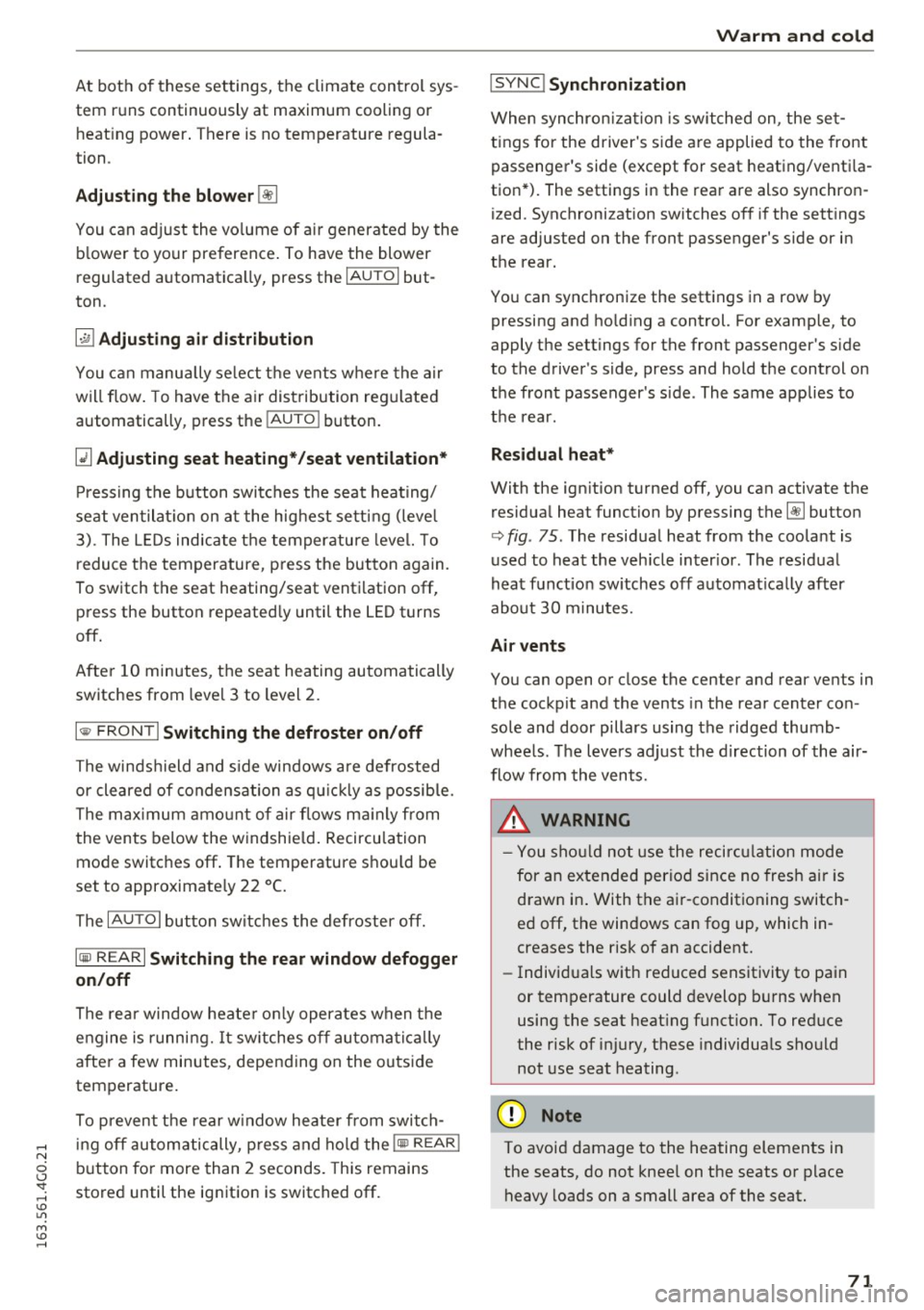
Adjusting the blower~
You can adjust the volume of air generated by the
b lower to your preference. To have the blower
r e gulated automatica lly, press the
IAUTO I but
ton .
~ Adjusting air distribution
You can manually select the vents where the air
will flow. To have the air distribution regu lated
automatically , p ress the
IAU TO ! button.
~ Adjusting seat heating*/seat ventilation*
Pressing the button switches the seat heating/
seat ventilat ion on at the highest setting (leve l
3). The LEDs indicate the temperature level. To
r educe the temperature, press the button again .
To switch the seat heating/seat venti lation off,
press the button repeatedly until the LED turns
off.
Afte r 10 minutes, the seat heating automatically
switches from level 3 to level 2.
l
or cleared of condensation as quickly as possible.
The maximum amount of air flows mainly from
the vents below the windshield. Recirculation
mode switches off . The temperature shou ld be
set to approximate ly 22
° C.
The IAU TOI button sw itches the defroster off.
IQ:il REAR I Switching the rear window defogger
on/off
The rear window heate r o nl y operates when the
engine is running. It sw itches off automatically
after a few minutes, depending on the outs ide
temperature.
To prevent the rear w indow heater from switch
ing off automatically, press and hold the
lljjjl REAR I
button for more than 2 seconds. This remains
stored until the ignition is switched off.
Warm and cold
I SYNC ! Synchronization
When synchronization is switched on, the set
tings for the driver's s ide are applied to the front
passenger's side (except for seat heating/ventila
tion *). The s ettings in the rear are also synchron
i z ed. Synchronization switches off if the settings
are adjusted on the front passenger's side or in
the rear.
You can synchronize the settings in a row by
pressing and holding a control. For example, to
apply the settings for the front passenge r's side
to the driver's side, press and hold the control on
the front passenger's s ide . The same applies to
the rear.
Residual heat*
With the ign ition turned off, you can activate the
residual heat function by pressing the~ button
<=> fig. 75. The residual heat from the coolant is
used to heat the veh icle inter ior . The residual
heat function sw itches off automat ica lly after
about 30 minutes.
Air vents
You can open or close the center and rear vents in
the cockpit and the vents in the rear center con
sole and door pillars using the ridged thumb
whee ls. Th e levers adjust the direction of the air
flow from the vents.
_&. WARNING
-You should not use the recirculation mode
for an extended period since no fresh air is
drawn in. With the air-conditioning switch
ed off, the windows can fog up, which in
creases the risk of an accident.
- Individuals with reduced sensitivity to pain
or temperature could develop burns when
using the seat heat ing funct ion. To reduce
the risk of injury, these individuals should
not use seat heating .
(D Note
To avoid damage to the heating elements in
the seats, do not kneel on the seats or place
heavy loads on a small area of the seat.
71
Page 74 of 294
Warm and cold
Basic settings
Applies to vehicles: with four-zone automatic climate control
The climate control system basic settings are ac
cessed in the Infotainment system.
• Se lect : the ICARI function button> (Car)* Sys-
tems
control button > AC.
Rear seat settings
When this function is selected, all settings for
the rea r can be adjusted through the climate con
trol system in the cockpit . The climate control
system sett ings cannot be adjusted in the rear
seat at the same time. Th is function switches
off
after a certa in period of time or when one of the
controls in the cockpit is pressed .
Recirculation mode
The sensit ivity level of the automatic recircula
tion mode can be set at various levels from
Off to
Sensitive . Recirculation mode is controlled auto
matically .
If the windows fog up, press the
I@ FRONT I button .
Footwell temperature
You can adjust the footwell temperature so that
it is coo ler or warmer.
Auxiliary heater*
I n vehicles with diesel engines*, the auxiliary
heate r helps to warm the ve hicle interio r more
quickly . The auxiliary heater is controlled auto
matically in the
Auto sett ing .
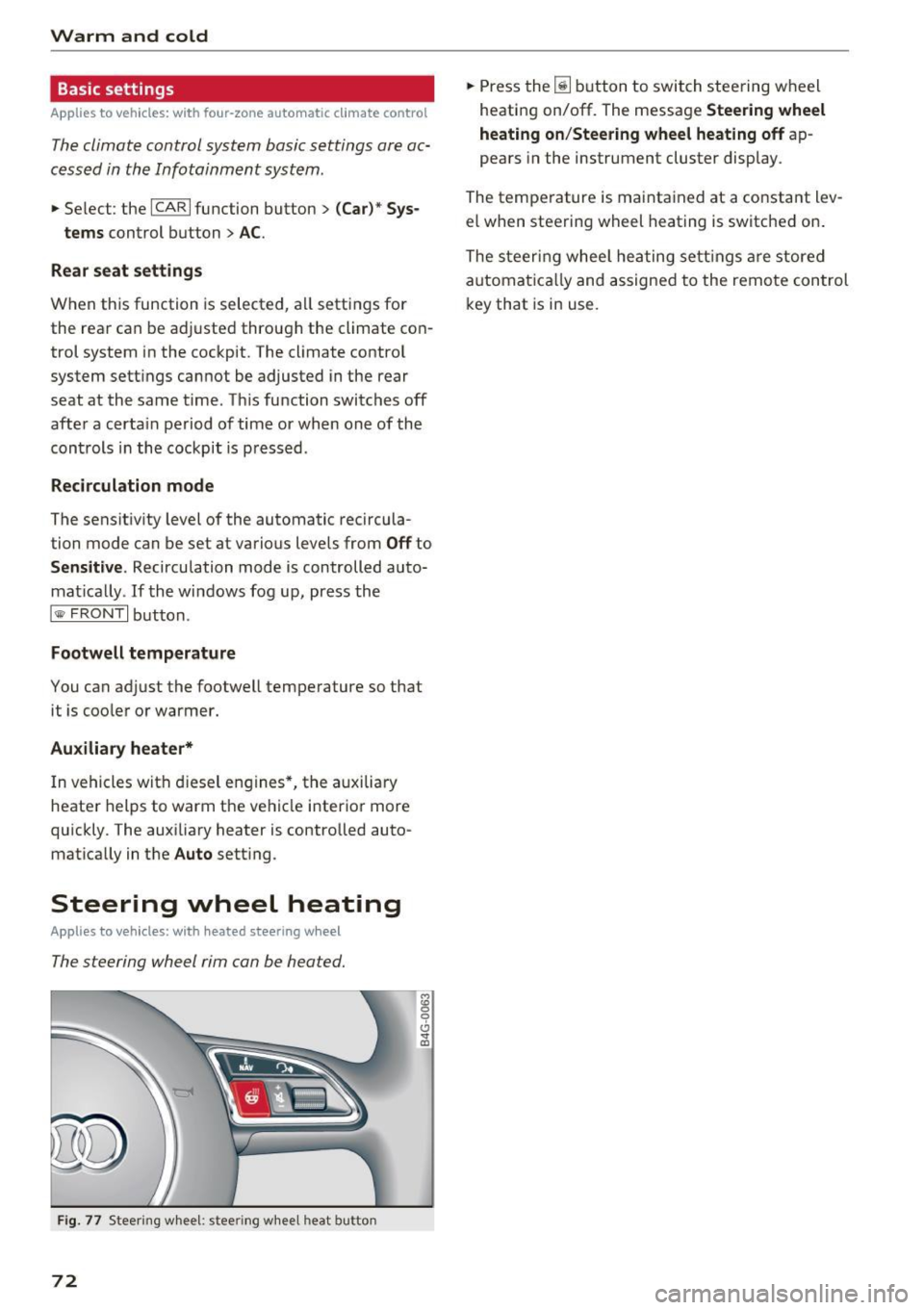
Steering wheel heating
Applies to veh icles: w ith heate d steering wheel
The steering wheel rim can be heated.
Fig. 77 Steer ing whee l: s tee ring w hee l h eat button
72
M :g 0
t!i
"' m
• Press the [ii button to switch steering wheel
heating on/off. The message
Steering wheel
heating on /Steering wheel heating off
ap
pears in the instrument cluster display .
The temperature is mai nta ined at a constant lev
el when steering wheel heating is switched on .
The steering wheel heating settings are stored
automatica lly and assigned to the remote control
key that is in use.
Page 76 of 294
Driving
There must be at least 10 inches (25 cm) be
tween your chest and the center of the steering
wheel. If you cannot sit more than 10 inches (25
cm) from the steer ing wheel, see if adaptive
equipment is available to help you reach the ped
als and increase the distance from the steering
wheel.
For detai led information on how to adjust the
driver's seat, see
¢ page 54 .
In vehicles with the memory function*, the steer
ing column sett ings are stored together with the
seat position.
A WARNING
Improper use of steer ing whee l adjustment
and improper seating position can cause ser i
ous pe rsonal injury.
- Adjust the steering wheel column only when
the vehicle is not moving to prevent loss of
vehicle control.
- Adjust the driver's seat or steering wheel so
that there is a minimum of 10 inches (25
cm) between your chest and the steer ing
wheel
r::.> page 126, fig. 143. If you cannot
mainta in this min imum distance, the airbag
system cannot protect you properly.
- If phys ica l limitations prevent you from sit
t ing 10 inches (25 cm) or more from the
steering wheel , check with your authorized
Audi dealer to see if adaptive equ ipment is
available.
- If the steering wheel is aligned with your
face, the supp lemental driver's airbag can
not provide as m uch protection in an acci
dent. Always make sure that the steering
wheel is aligned w ith your chest.
- Always hold the steer ing whee l with your
hands at the 9 o'clock and 3 o'clock posi
tions to reduce the risk of personal injury if
the driver's airbag deploys .
- Never hold the steer ing wheel at the 12
o'clock posit ion or w ith your hands inside
the steering wheel rim or on the steering
wheel hub . Holding the steer ing whee l the
wrong way can cause ser ious injuries to the
hands, arms and head if the driver's airbag
deploys.
74
-
Easy seat entry
Applies to vehicles: with power steering wheel adjustment
Easy seat entry makes it easier to enter and exit
the vehicle by adjusting the steering column au
tomatically .
.,. In the Infotainment system, selec t: the ICARI
function button > (Car )* Systems control but
ton
> Vehicle settings > Seats > Driver's seat>
Easy seat entry> On.
When easy seat entry is switched on, the steer ing
column goes back up into the park position when
the ignit ion is switched off . After enter ing the ve
hicle, the steering col umn returns to t he sto red
pos ition once the ign it ion is swi tched on.
Starting and stopping
the engine
Starting the engine
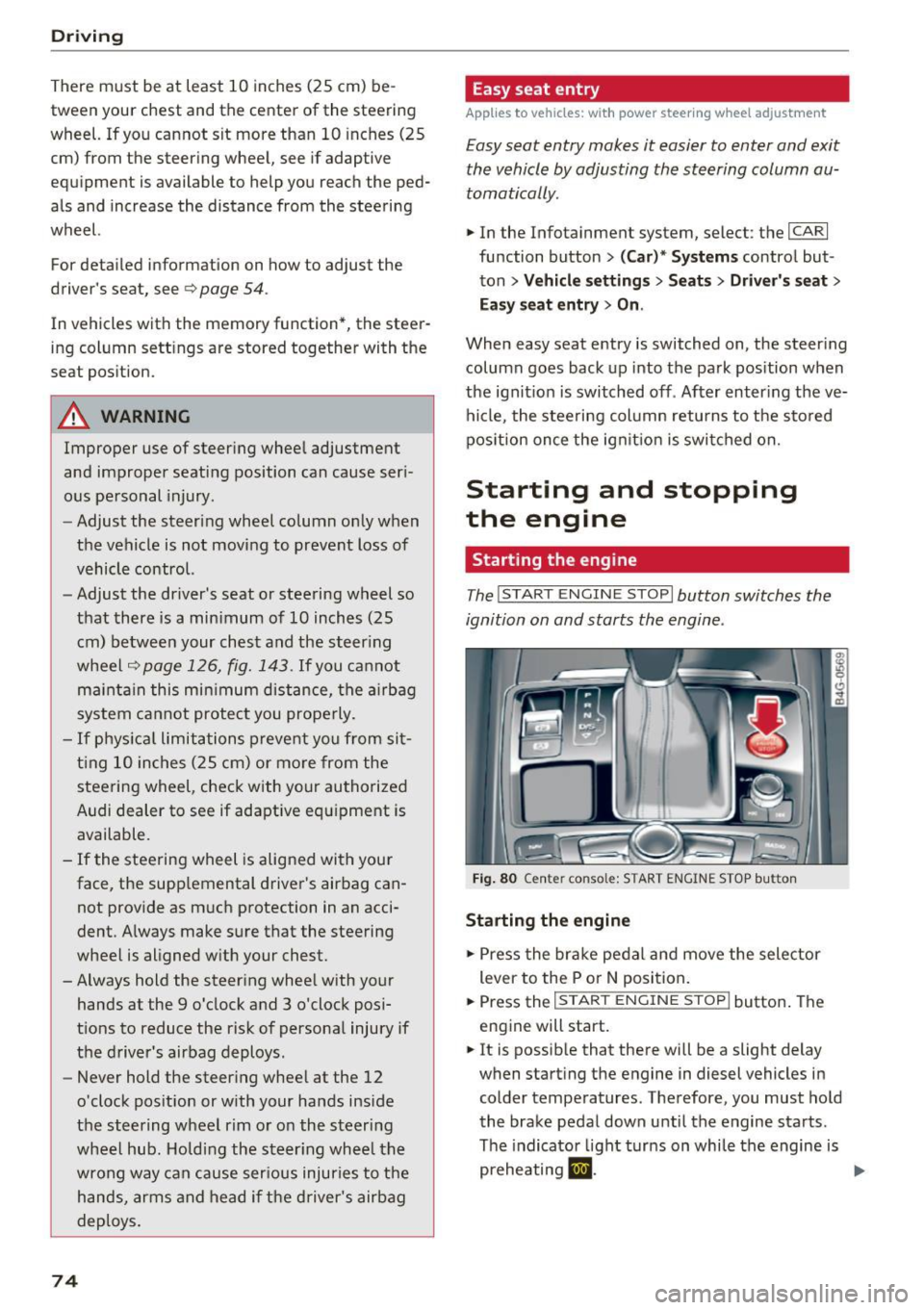
The I START ENGINE STOP I button switches the
ignition on and starts the engine .
Fig. 80 Cente r conso le: S TART ENGINE STOP b utt on
Starting the engine
.,. Press the brake pedal and move the selector
lever to the P or
N position.
... Press the
!STAR T ENGINE ST OP ! button. The
engine will start.
.,. It is possible that there will be a slight delay
when starting the engine in diesel vehicles in colder temperatures . Therefore, you must hold
the brake pedal down until the engine starts.
The indicator light turns on while the engine is
preheating
1,1 . ..,.
Page 77 of 294
Switching the ignition on/off
If you would like to switch the ignition on with
out starting the engine, follow these steps:
.,. Press the
I STAR T ENGINE STOPI button with·
out pressing the brake pedal.
.,. To switch the ignition off, press the button
again. The needle in the tachometer moves into
the
OFF position.
The prewarming runs automatically in diesel
vehicles when the ignition is switched on.
Equipment that uses a lot of electricity is switch
ed off temporarily when you start the engine.
If the engine should not start immediately, the
starting process is automatically stopped after a
short time. Repeat starting procedure .
Start-Stop-System*
Note the information in c> page 79, Start-Stop
System.
A WARNING
- Never allow the engine to run in confined
spaces, because this increases the risk of as
phyxiation.
- Never turn off the engine before the vehicle
has come to a complete stop.
- The brake booster and power steering no
longer function when you stop the engine.
You must use more force when braking or
steering. Because you cannot brake and
steer as you usually would, this could lead
to accidents and serious injuries. These
functions are still active if the Start-Stop
System* has stopped the engine.
(D Note
Avoid high engine speed, full throttle, and
heavy engine load as long as the engine has
not reached operating temperature yet. You
could damage the engine.
@ For the sake of the environment
Do not let the engine run while parked to
warm up. Begin driving immediately. This re
duces unnecessary emissions.
-
Driving
{!) Tips
- After starting a cold engine, there may be a
brief period of increased noise because the
oil pressure must first build up in the hy
draulic valve adjusters. This is normal and
not a cause for concern .
- If you leave the vehicle with the ignition
switched on, the ignition will switch off af
ter a certain amount of time. Make sure that electrical equipment such as the exterior
lights are switched off.
Stopping the engine
.,. Bring your vehicle to a complete stop.
.,. Move the selector lever to the P or N position.
.. Press the
!START ENGINE STOP ! button
r:!>poge 74, fig. 80.
Steering lock
The steering locks when you turn the engine off
using the
I START ENGINE STOPI button and
open the driver's door. The locked steering helps
prevent vehicle theft.
Emergency off
If necessary, the engine can be switched off with
the selector lever in the R or D/S position. The
engine stops if you press and hold the
!START ENGINE STOP ! button at speeds below
6 mph (10 km/h) and press the brake pedal.
A WARNING
-Never turn off the engine until the vehicle
has come to a complete stop.
- The brake booster and power steering only
work when the engine is running.
If the en
gine is off, you have to use more force when
steering or braking. Because you cannot
steer and brake as you usually would, this
could lead to crashes and serious injuries.
- For safety reasons, you should always park
your vehicle with the selector lever in P.
Otherwise, the vehicle could inadvertently
roll away.
-
75
Page 78 of 294
Driving
-After the engine has been sw itched off, the
rad iator fan can continue to run for up to 10
minutes - even with the ign ition switched
off . It ca n also switch on again after some
t ime if the coolant temperature rises as the
r esult of a heat buildup o r if the eng ine is
hot and the eng ine compartme nt is addi
ti onal ly he ated by the su n's rays.
@ Note
Do not stop the engine immed iate ly after
hard o r ex tended d riving. Keep the engine
running for app rox im ately two m inutes to
prevent exces sive hea t build-up.
Messages
Turn off ignition before leaving car
T his message appe ars and a warn ing tone so unds
if you o pen the d river's door when the ignition is
sw itche d on .
Press brake pedal to start engine
This message appea rs if you do not press the
brake pedal whe n starting the engine.
fll Is key in the vehicle?
T his indi cato r light turn s on and t his mess age ap
pea rs i f the ig nition key was removed from the
ve hicle when t he engine was ru nning. If the igni
tion key is no longer in the veh icle, yo u can not
switch on the ignition or start the engine once
you stop it. You also cannot lock the vehicle from
the outside.
Shift to P , otherwise vehicle can roll away .
Doors do not lock if le ver is n ot in P.
This message appears for safety reasons if the
transmission is not in the P pos it ion when you
sw itch the ignition off . Move the selector lever to
the P position. Otherwise the vehicle is not pro
tected from rolling and it ca nnot be locked.
DJ Key is not recognized. Hold back of key
against marked area . See owner's manual
If the i ndicator lig ht tu rns on and th is mess age
appears, there is a mal function
q page 76 .
76
Turn off ignition before leaving car. Battery is
discharg ing
This driver message appears if the drive r's door is
opened wh ile the ign ition is switche d on. Always
swi tch off the ignition i f yo u are leav ing the ve hi
cle. Refer to
~ page 80.
Shift to P and turn off ignition before leaving
car, otherwise vehicle can roll away
This message appears if the d river 's door is
opened wh ile the ignition is switc hed on and the
selector lever is not in the P po sition . Move the
selector lever i nto the P posi tion and sw itch the
igni tion off when you exit the veh icle. O therwise
the ve hicle co uld ro ll. Refer to~
page 80 .
'
Starting the engine when there is a
malfunction
It may not be possible to start the engine under
certain circumstances, for example if the battery
in the vehicle key is drained, if interference is af
fected the key or if there is a system malfunc
tion.
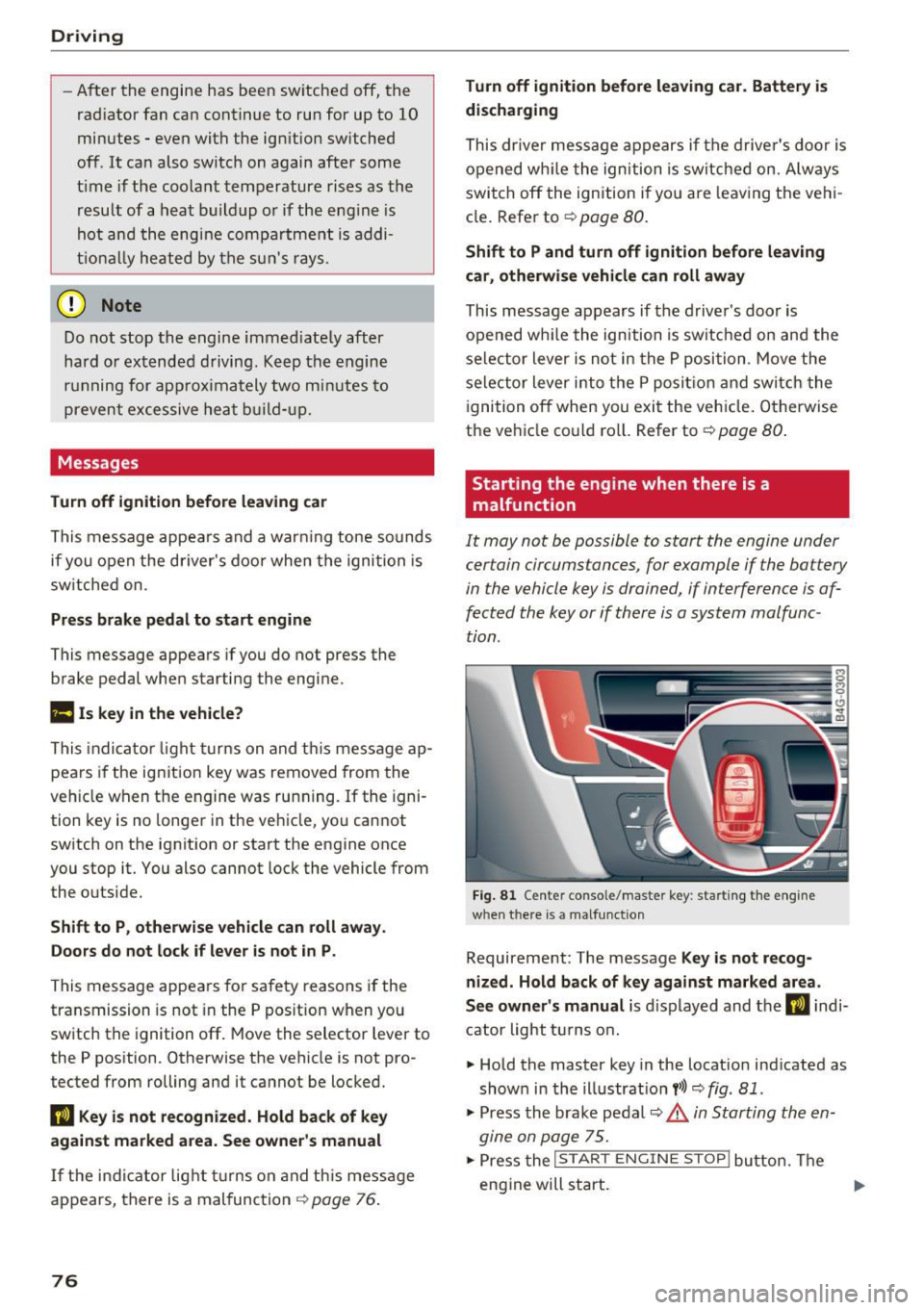
F ig. 81 Cente r conso le/mas te r key : sta rting the eng ine
w hen th ere is a malfunct io n
Requirement: The message Key is not recog
nized. Hold back of key against marked area .
See owner's manual
is d isplayed and t he DJ indi
c at or light t urns o n.
• Hold the master key in the locat io n ind icated as
show n in the ill ustrat io n
y>l) q fig . 81 .
• Press the bra ke pe dal q &_ in Starting the en
gine on page 75.
.,. Press the ~I S_ T_A_R_ T_E_ N_G_I_N_E_S_ T_O_P ~I bu tto n. Th e
eng ine will s tart.
Page 79 of 294
.. Drive to an authorized A udi dealer or author
ized Audi Service Facility immediately to have
the malfunction corrected.
@ Tips
You can view the message again by pressi ng
the
I START E NGINE STOP! button.
Electromechanical
parking brake
Operation
The elec trome chanical parking brake replaces
the hand brake.
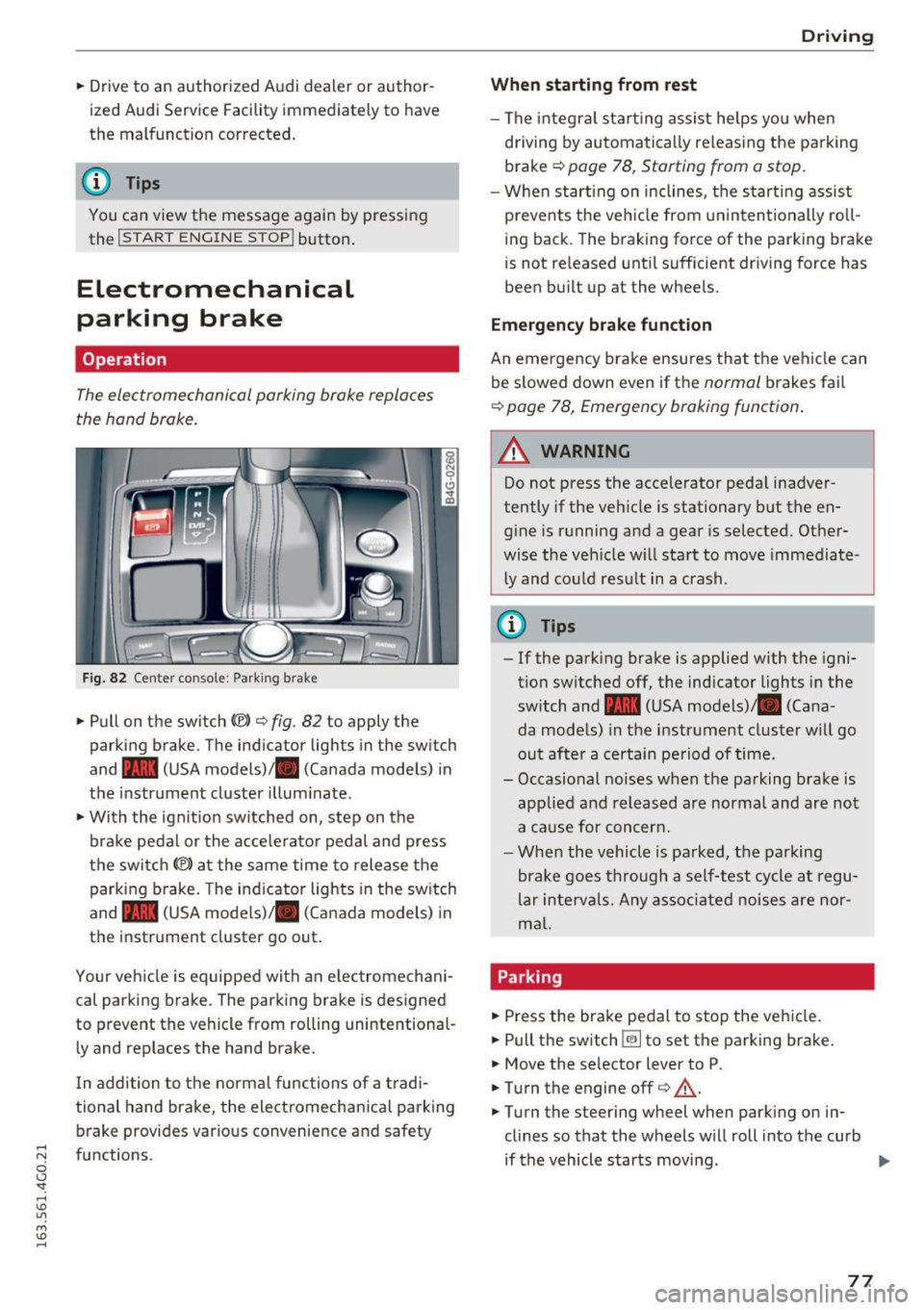
Fig. 8 2 Center co nsole : Park ing b rake
.. Pull on the switch C®> c> fig . 82 to apply the
parking brake . The ind icator lights in the sw itch
and - (USA
models) ,11 (Canada models) in
the instr ument cluster illum inate .
.. With the ign it ion sw itched on, step on the
bra ke pedal or the a cce le rato r pedal and press
the switch
(®) at the same time to release t he
parking b rake. The ind icator lights in the sw itch
and - (USA
models) ,11 (Canada models) in
the instrument cluster go out .
Your ve hicle is equipped with an e lec tromechani
cal parking brake. The parking brake is designed
to prevent the vehicle from rolling unintentional
l y and rep laces the hand brake.
I n addition to t he norma l func tions of a tradi
tional hand brake, the electromechanica l parking
b rake provides various conve nience and safety
;::j fu nctions .
0 CJ '
Drivi ng
When starting from rest
-The integra l sta rting assist helps yo u when
driving by au toma tically re leas ing the parking
brake
Q page 78 , Starting from a stop.
- When start ing on inclines, t he s tarti ng assist
prevents the veh icle from un in ten tionally ro ll
ing back . The braking force of the parking bra ke
is not re leased unti l sufficient dr iving force has
been bu ilt up at the whee ls.
Emergency brake function
An emergency brake ensures that t he vehicle can
be s lowed down even if t he
normal brakes fail
Q page 78, Emergency braking function .
A WARNING
--
Do not press the accelerator peda l inadver
tently if the veh icle is stationary but the en
g ine is running and a gear is selected. Other
wise the veh icle w ill sta rt to move immediate
l y and co uld res ult in a crash.
@ Tips
- If the park ing bra ke is applied w ith the igni
tion switched off, the indicator lights in the
switch and -(USA
models) ,11 (Cana
da models) in the instr ument cluster will go
out afte r a certain pe riod of time.
- Occasional noises when the parking brake is
applie d and released are normal and are not
a ca use for con cern.
- When the vehicle is pa rked, the parking
brake goes through a self-test cycle at regu
lar in tervals. Any as so ci ate d noi ses are nor
ma l.
Parking
.. Press the brake pedal to stop the veh icle.
.. Pull the switch ~ to set the pa rking brake .
.. Move the selector lever to P .
.. Turn the engine off
c> &, .
.,. Turn the steering wheel when park ing on in
clines so that the wheels w ill roll into the curb
if the vehicle starts moving.
77
...