lock AUDI S6 2016 Owner's Manual
[x] Cancel search | Manufacturer: AUDI, Model Year: 2016, Model line: S6, Model: AUDI S6 2016Pages: 294, PDF Size: 73.88 MB
Page 49 of 294
.... N
0 CJ '
The leaving home function illuminates the area
outside the vehicle when you un lock the vehicle.
To turn the function on, select
Lights when un
locking car> On.
The coming home and leaving home functions
only operate when it is dark and the light switch
is in the
AUTO position.
Emergency flasher
The emergency flasher makes other motorists
aware that you or your vehicle are in an emer
gency situation.
Fi g. 41 Cente r console: emergency flasher swit ch
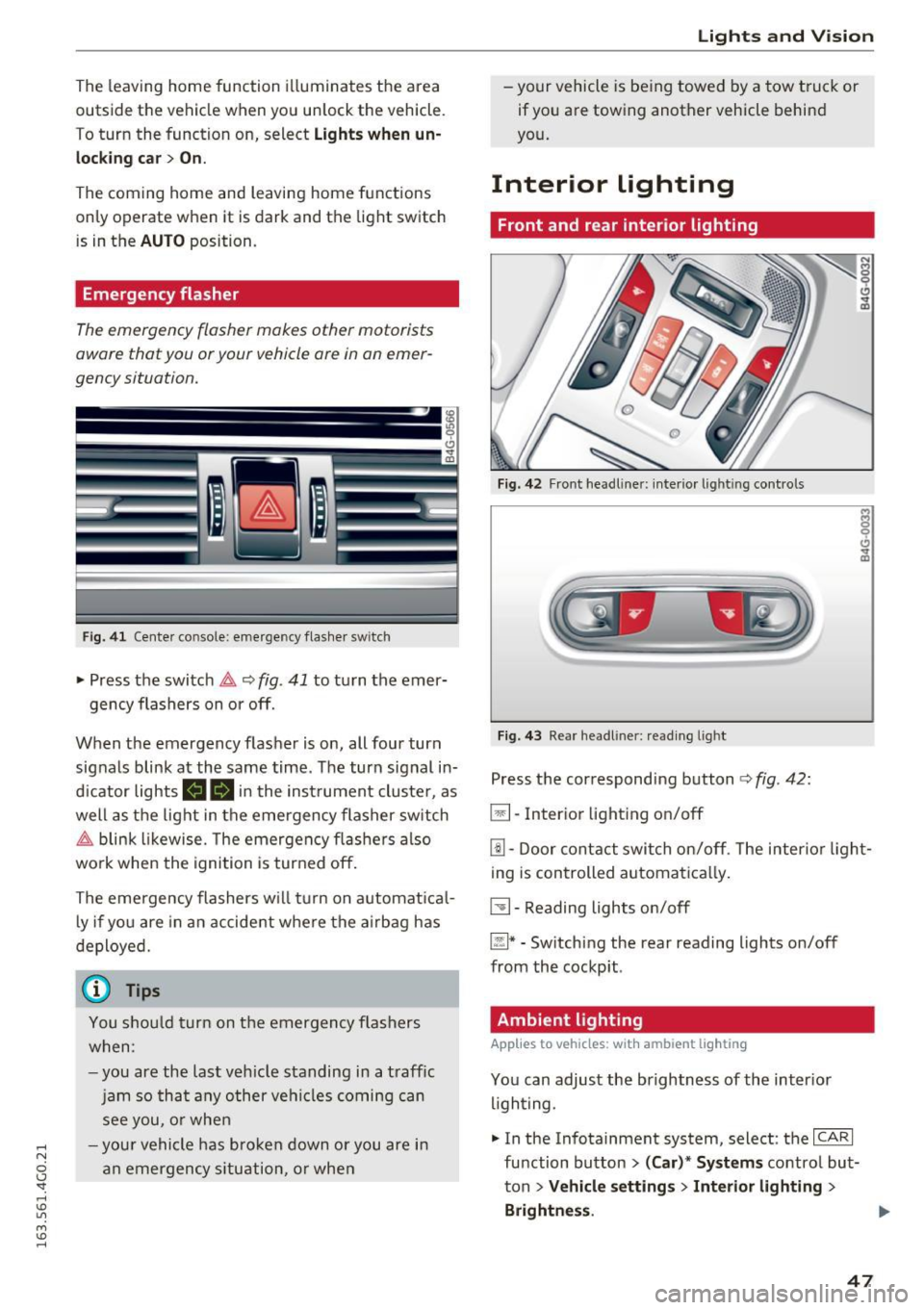
• Press the switch &,. ~ fig. 41 to turn the emer-
gency flashers on or off.
When the emergency flasher is on, all four turn
signals blink at the same time. The turn signal in
d icator lights
(4B in the inst rument cluste r, as
well as the light in the emergency flasher switch
&,. blink likewise. The emergency flashers also
work when the ignition is turned off.
The emergency flashers w ill turn on automatical
l y if you are in an accident where the airbag has
deployed.
(0) Tips
You shou ld turn on th e emergency flashers
when:
-you are the last veh icle standing in a traff ic
jam so that any other vehicles coming can
see you, or when
- you r vehicle has broken down or you are in
an emergency situation, or when
Lights and V ision
-your vehicle is being towed by a tow truck or
if you are towing another vehicle behind
you.
Interior lighting
Front and rear interior lighting
Fig. 42 Front headl iner : in terio r light ing con trols
Fig. 43 Rea r headl iner : read ing light
Press the correspond ing button ¢ fig. 42:
El-Inter ior lighting on/off
[!] -Door contact switch on/off. The interior light
ing is controlled automatica lly.
~- Reading lights on/off
~* -Sw itch ing the rear reading lights on/off
from the cockpit .
Ambient lighting
Applies to vehicles: with ambient ligh ting
You can adjust the brightness of the inter ior
lighting.
• In the Infotainment system, select: the
ICARI
function button > (Car)'" Systems control but
ton
> Vehicle settings> Interior lighting >
Brightness . .,.
47
Page 50 of 294
Lights and Vision
.. To increase or reduce the brightness, turn the
knob and press it.
The interior lighting turns on when you switch
the headlights on while the ignition is on .
(i)} Tips
The setting is a utomat ica lly stored and as
signed to the remo te control key th at is in
use.
Instrument illumination
The brightness of the illumination for the instru
ments, display and head-up display* con be ad
justed .
Fig . 44 Inst rument illuminat ion
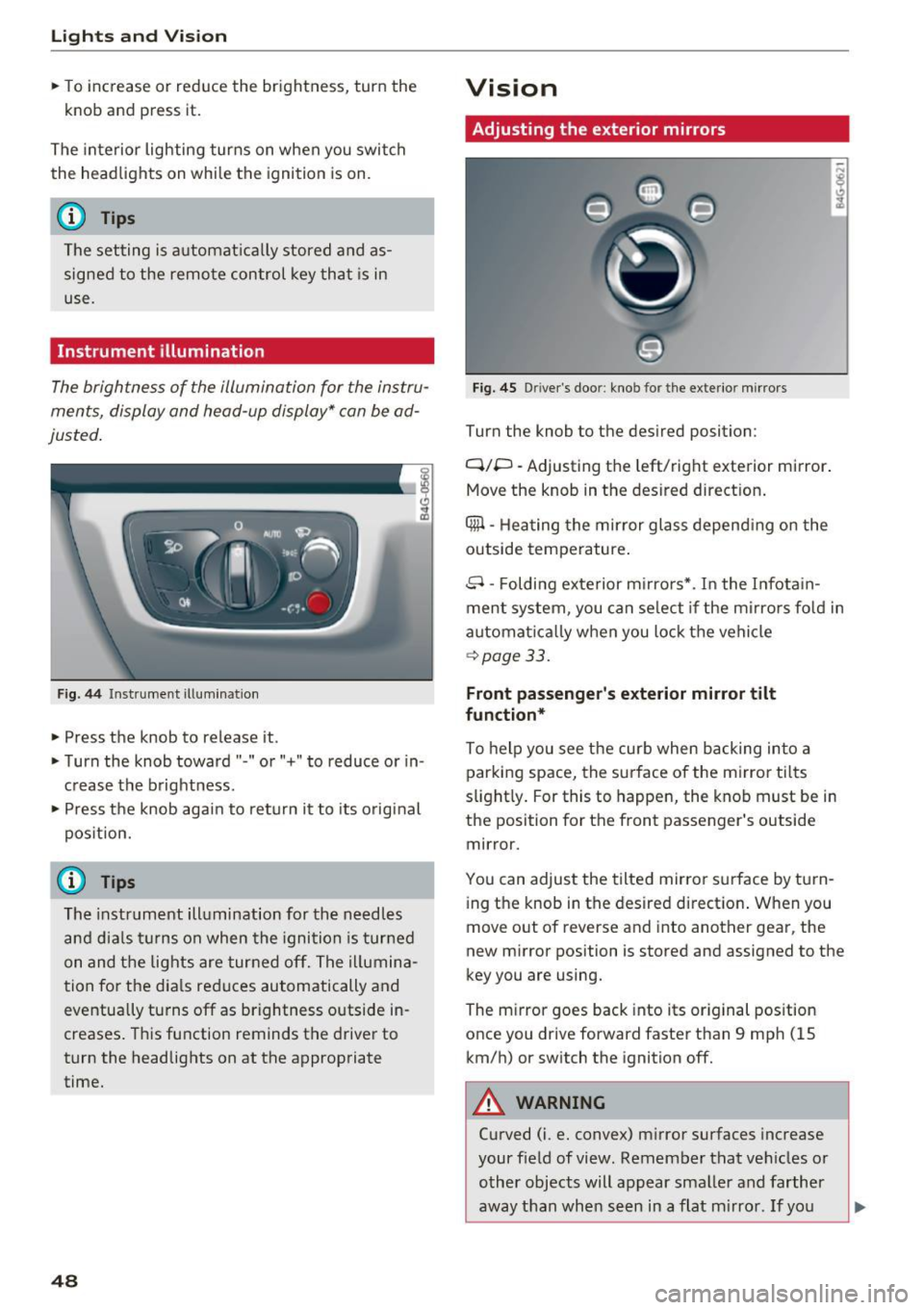
.. Press the knob to release it.
.. Turn the knob toward" -" o r"+" to reduce or in
c rease the brightness .
" Press th e knob again to re turn it to its original
pos ition.
(D Tips
The instr um ent ill umination for th e need les
a n d dia ls tur ns on when the igni tio n is tur ned
on and t he lights are turned off. The i llumina
t ion for t he dia ls reduces automatically and
eventua lly tu rns off as brightness outside in
creases . T hi s function reminds the drive r to
turn the headlights on at the appropriate
time.
48
Vision
Adjusting the exterior mirrors
Fig. 45 Driver's door: kno b for the ex terio r mirrors
Turn the knob to the desired position :
Q/P -Adjusting the left/right exterior mirror.
Move the knob in the des ired dir ect ion .
Qill -Hea ting the mirror glass depend ing on the
outside temperature .
8 -Folding exterior m irro rs*. I n the I nfota in
ment system , you can se lect if the m irro rs fo ld in
automat ica lly when you lock the vehicle
~ page 33.
Front passenger 's exterior mirror tilt
function*
To help you see the curb when backing into a
par king space, the surface of the m irror tilts
s light ly . For this to happen, the knob must be in
the position for the front passenger's outside
mirror.
You can adjust the tilted mirror s urface by tu rn
i ng the knob in the desired directio n. When you
move out of reverse and i nto anot her gea r, the
new m irror position is stored and assigned to the
key you are using.
The m irror goes back into its or ig inal pos ition
once you drive forward faster than 9 mp h (15
km/h) or switch the ignition off.
A WARNING
Curved (i .e. convex) m irror surfaces increase
your f ield of view. Remember that ve hicles or
o ther objects will appear sma ller and farther
away than when s een in a flat m irro r. If yo u
Page 54 of 294
Lights and Vi sion
Cleaning w indshield wiper blades
Clean the wiper blades when you see wiper
s treaks. Use a soft cloth and a glass cleaner .
... Place the w indshield wiper arms in the service
pos ition
c::> page 52 .
... Fo ld the windshield wipe r arms away from the
winds hield.
A WARNING
Dirty windshield wiper blades can impair vi
sion, which increases the risk of an accident.
Replacing windshield wipe r blades
Fig. 51 Remov ing w indshi eld wiper b lades
Wiper service position/blade replacement
posit ion
:= M 0 ±
" CD
... Switch the ignition off and move the windsh ield
wiper lever to position @) briefly
c::> page 51,
fig. 50. Th e windshie ld wipers move into the
service position.
... To bring the wiper blades back into the original
position, switch the ignition on and operate the
windshield wiper lever.
You can also turn the service position on or off in
the Infotainment system:
... Switch the windshield wipers off (position @
¢ page 51, fig. 50) .
... Select: the
ICA RI function button> (Car)* Sys
tems
control button > Service & control > Wip
er change position
> On/Off .
Removing the wiper blade
... Fo ld the windshield wiper arm away from the
windshield .
52
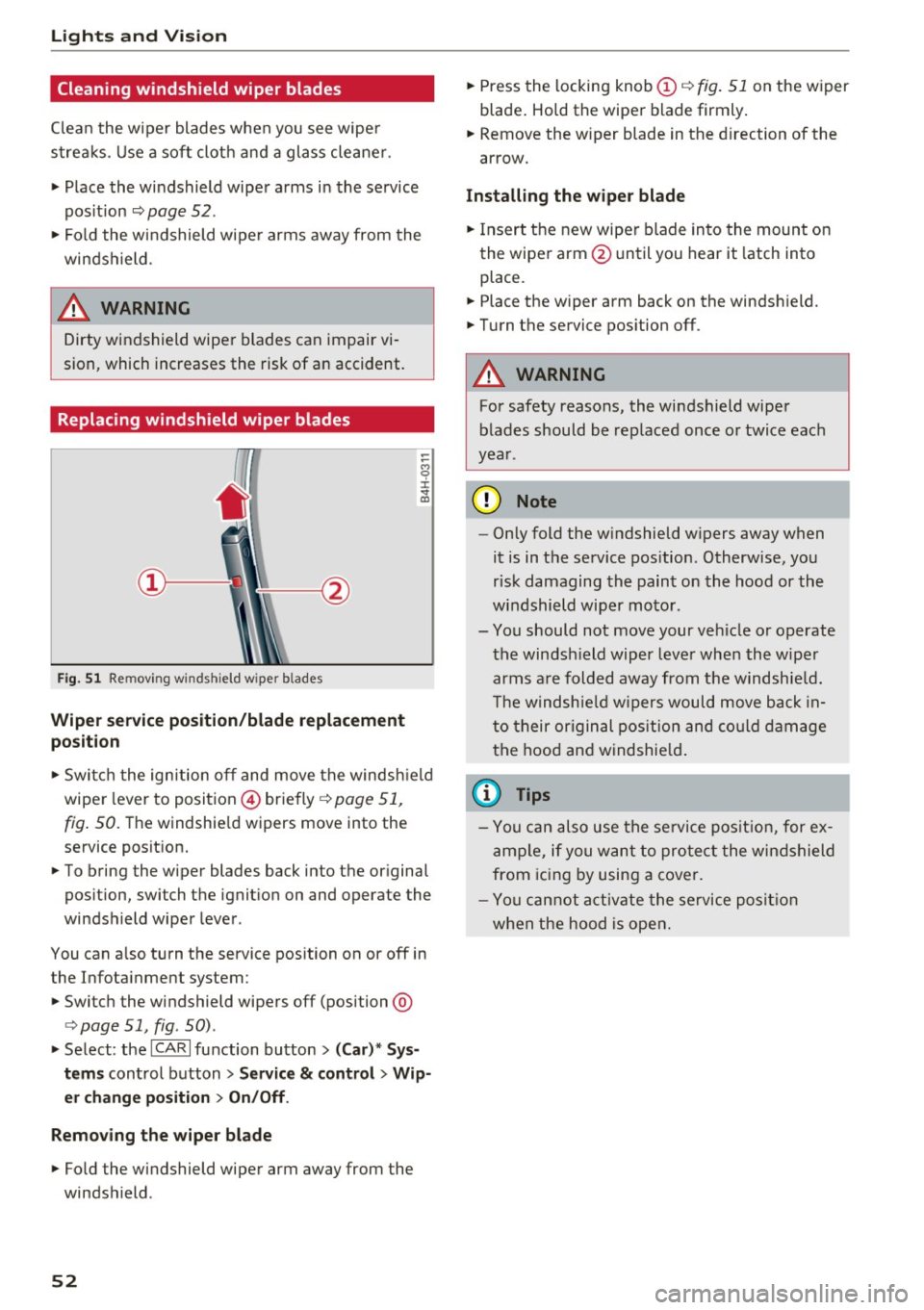
... Press the locking knob (D c::> fig. 51 on the wiper
blade . Hold the wiper blade firmly.
... Remove the wiper blade in the direction of the
arrow .
Installing the wiper blade
... Insert the new wiper blade into the mount on
the wiper arm @until you hear it latch into
place .
... Place the wiper arm back on the windshield.
... Turn the service position off.
A WARNING
-
For safety reasons, the windshield wiper
blades should be replaced once or twice each
year .
(D Note
-Only fold the w indshield w ipers away when
it is in the service position. Otherwise, you
risk damaging the paint on the hood or the
windshield wiper motor.
- You should not move your veh icle or operate
the windsh ield wiper lever when the wiper
arms are folded away from the w indshie ld.
Th e windshie ld wipers would move back in
to their original position and could damage
the hood and windshield .
{i) Tips
- You can also use the service position, for ex
ample, if you want to protect the windshield
from icing by using a cover.
- You cannot activate the service position
when the hood is open.
Page 58 of 294
Seats and storage
Armrest
There is a storage compartment under the arm
rest.
Fig. 54 Cockp it: center armrest
Adjusting the armrest
• To adjust the angle, raise the armrest from the
start ing position detent by detent.
• To bring the armrest back into its original posi
tion, lift it above the top position and then fold
it back down.
Opening the storage compartment
• Press the button -arrow- upward.
Please note that the driver's arm movements
may be restricted with the armr est folded down.
For this reason, the armrest should not be folded
down when driving in city traffic.
Head restraints
Front head restraints
Ap plies to veh icles: w ith adjustable head restraints
Heod restraints that are adjusted according to
body size, along with the seat belt, offer effec
tive protection.
F ig. 55 Front seat: Adjust ing the head restraint
56
Adjust the head restraint so the upper edge is as
even as possible with the top of your head. If that
i s not possible, try to adjust the head restraint so
that it is as close to th is position as possible .
Move the head restraint so that it is as close to
the back of the head as possible .
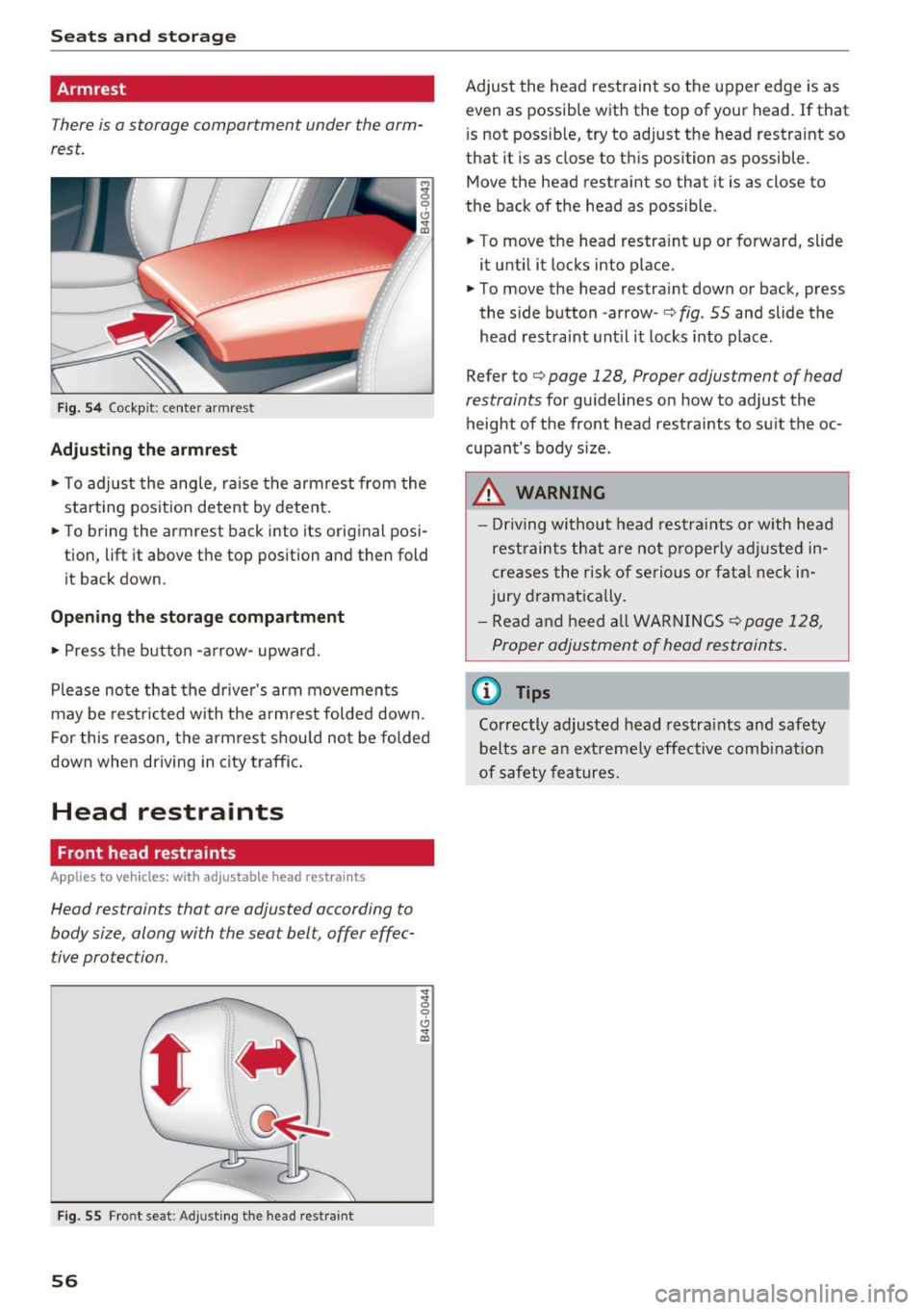
• To move the head restra int up or forward, slide
it until it locks into place.
• To move the head restra int down or back, press
the s ide button -arrow -
c:> fig. 55 and slide the
head restraint until it locks into place .
Refer to
c:> page 128, Proper adjustment of head
restraints
for gu idelines o n how to ad just the
height of the front head restraints to suit the oc
cupant 's body size.
.&_ WARNING
-Driving without head restraints or with head
restraints that are not properly adjusted in
creases the risk of serious or fatal neck in
jury dramatically.
- Read and heed all WARNINGS
<=>page 128,
Proper adjustment of head restraints.
@ Tips
Correctly adjusted head restraints and safety
belts are an extremely effective combination
of safety features.
Page 59 of 294
.... N
0 CJ '
Rear head restraints
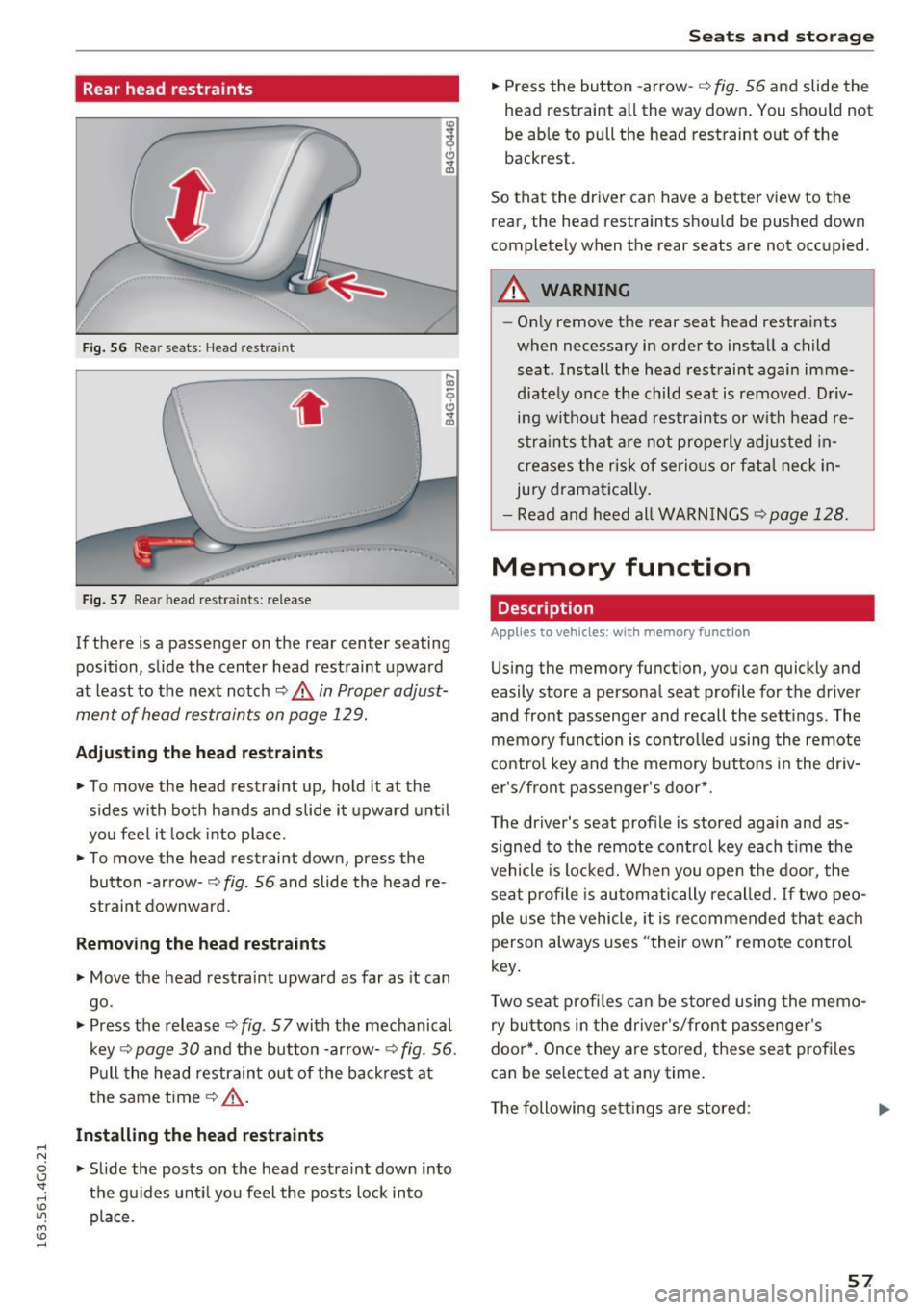
Fig. 56 Re ar seat s: Head restra int
•
Fig. 57 Rea r head restra ints: re lease
If there is a passenger on the rear center seating
position, slide the center head restraint upward
at least to the next notch
~ & in Proper adjust
ment of head restraints on page 129.
Adju sting the he ad re straints
• To move the head restraint up, hold it at the
sides with both hands and slide it upward until
you feel it lock into place.
• To move the head restraint down, press the
button -arrow- ¢
fig. 56 and slide the head re
straint downward.
Removing the head re straints
• Move the head restraint upward as far as it can
go .
• Press the release ¢
fig. 57 with the mechanical
key -=>
page 30 and the button -arrow- ¢ fig. 56.
Pull the head restrain t out of the backrest at
t h e same time¢&_ .
Installing th e head re st raints
• Slide the posts on the head restraint down into
the gu ides unti l you feel the posts lock into
pla ce.
Seats and storag e
• Press the button -arrow- -=> fig. 56 and slide the
head restraint all the way down . You shou ld not
be able to pull the head restraint out of the
backrest.
So that the driver can have a better view to the rear, the head restraints should be pushed down
completely when the rear seats are not occupied .
A WARNING
--On ly remove the rear seat head restraints
when necessary in order to install a child seat . Install the head restraint again imme
diately once the child seat is removed. D riv
ing without head restraints or with head re
s tra ints that are not prope rly adjusted in
creases the risk of serious or fat al neck in
jury dramat ica lly.
- Read and heed all WARN INGS
¢page 128 .
Memory function
Description
Applies to vehicles : with memory funct ion
Using the memory function, you can quickly and
easily store a personal seat profile for the driver
and front passenger and recall the sett ings . The
memory funct ion is co ntrol led using the remote
contro l key and the memory buttons i n the dr iv
er's/front passe nger's door* .
The driver's seat prof ile is stored again and as
s igned to the remote control key each t ime the
vehicle is locked. W hen you open the door, the
seat profile is automatically recalled. If two peo
ple use the vehicle , it is recommended that each
person always uses "their own" remote control
key.
T wo seat p rofiles can be stored using the memo
ry bu ttons in the driver 's/front passenger's
doo r*. Once they are stored, these seat prof iles
can be selected at any time .
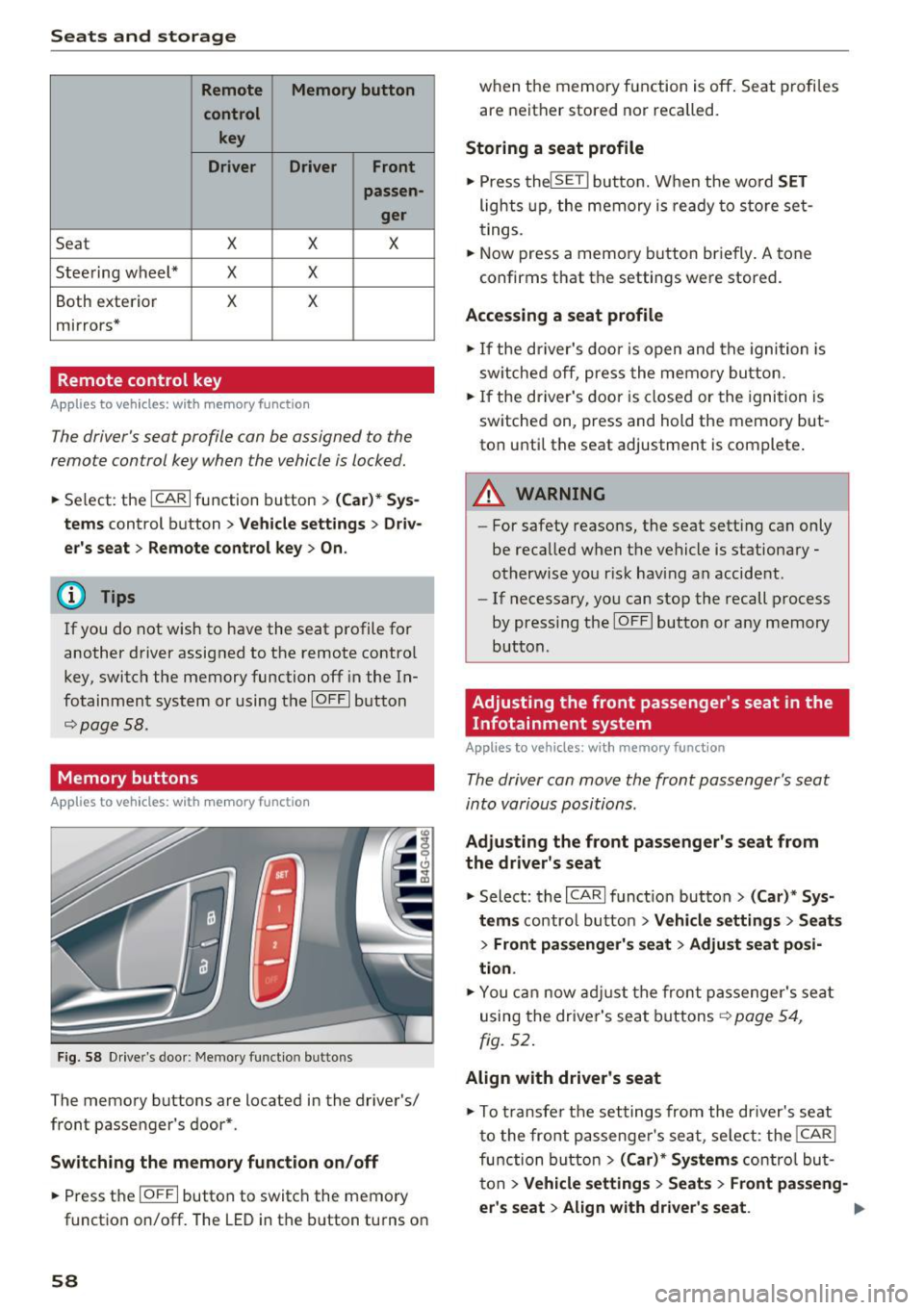
T he following sett ings are stored :
57
Page 60 of 294
Seats and storage
Remote Memory button
control key
Driver Driver
Front
passen-
ger
Seat X X X
Steering wheel* X
X
Both exterior X X
mirrors*
Remote control key
Applies to vehicles: w ith memory function
The driver 's seat profile con be assigned to the
remo te control key when the vehicle is locked.
• Se lect : the ICARI function button > (Car)* Sys
tems
control button > Vehicle settings > Driv
er's seat
> Remote control key > On.
(D Tips
If you do not wish to have the seat profile for
another driver assigned to the remote contro l
key, switch the memory function off in the In
fotainment system or using the IOFFI button
r::::;,poge 58.
Memory buttons
Applies to vehicles: with memory function
F ig. 58 Drive r's door : Me mory funct io n button s
The memory buttons are located in the driver's/
front passenger 's door*.
Switching the memory function on/off
• Press the IO FFI button to switch the memory
functio n on/off. The
LED in the button turns on
58 when the memory function is off
. Seat profiles
are neither stored nor recalled.
Storing a seat profile
• Press thelSE TI button. When the word SET
lights up, the memory is ready to store set
tings .
• Now press a memo ry button briefly.
A tone
confirms that th e settings were stor ed.
Accessing a seat profile
• If the driver's door is open and the ignition is
sw itched off, press the memory button.
• If the driver's door is closed or the ignition is
switched on, press and hold the memory but
ton until the seat adjustment is complete .
A WARNING
-For safety reasons, the seat sett ing can only
be recalled when the vehicle is stationary -
otherwise you r isk having an accident .
- If necessary, you can stop the recall process
by press ing the IOF FI butto n or any memory
button .
Adjusting the front passenger's seat in the
Infotainment system
Applies to vehicles: with memory function
The driver con move the front passenger's seat
into various positions .
Adjusting the front passenger's seat from
the driver's seat
• Select: the I CARI function button > (Car)* Sys
tems
control button > Vehicle settings > Seats
> Front passenger's seat > Adjust seat posi
tion .
• You can now adjust the front passenger's seat
using the driver's seat buttons
r:::;, page 54,
fig. 52.
Align with driver's seat
""To transfer the settings from the dr iver's seat
to the front passenge r's seat, se lect : the
I CAR I
function button
> (Car)* Systems contro l but
ton
> Vehicle settings > Seats > Front passeng-
er 's seat
> Align with driver 's seat . .,.
Page 61 of 294
.... N
0 CJ '
.. Press and hold the control knob until the ad
justing process is complete.
(D Tips
The lumbar support and upper thigh support
settings are not transferred when aligning
the front passenger's seat with the driver's
seat .
Ashtray
Applies to vehicles: with ashtray
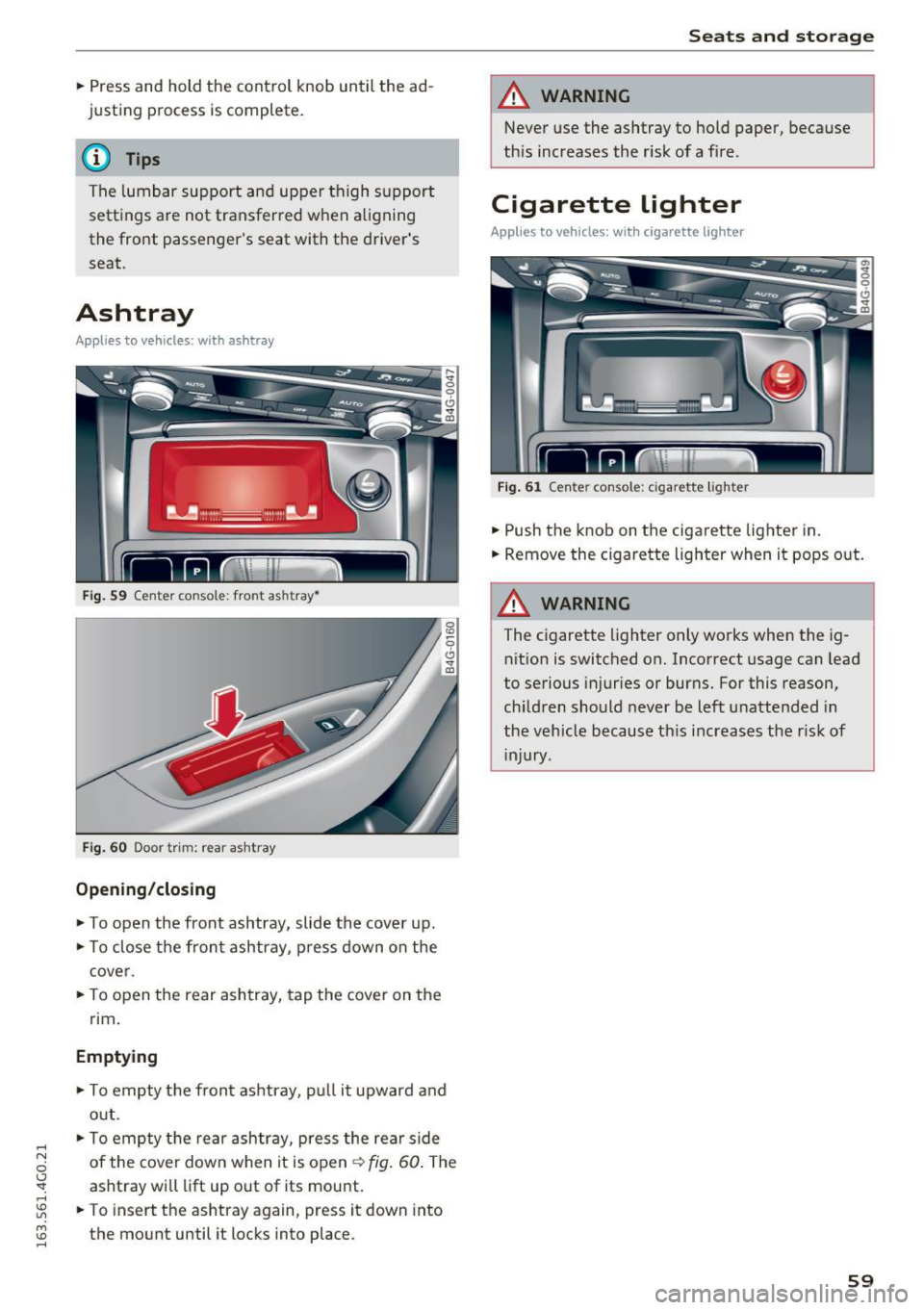
Fig. 59 Center console: front ashtray•
Fig. 60 Door trim: rear ashtray
Opening /closing
.. To open the front ashtray, slide the cover up .
.. To close the front ashtray, press down on the
cover .
.. To open the rear ashtray, tap the cover on the
rim.
Emptying
.. To empty the front ashtray, pull it upward and
out .
.. To empty the rear ashtray, press the rear side
of the cover down when it is open~
fig. 60. The
ashtray will lift up out of its mount.
.. To insert the ashtray again, press it down into
the mount until it locks into place .
Seats and storage
A WARNING
-Never use the ashtray to hold paper, because
this increases the risk of a fire.
Cigarette lighter
Applies to vehicles: with cigare tte ligh ter
Fig. 61 Center console : cigarette lighter
.. Push the knob on the cigarette lighter in .
.. Remove the cigarette lighter when it pops out.
A WARNING ~
The cigarette lighter only works when the ig-
nition is switched on. Incorrect usage can Lead
to serious injuries or burns. For this reason,
children should never be left unattended in
the vehicle because this increases the r isk of
injury .
59
Page 63 of 294
-Never carry any beverage containers with
hot liquids, such as hot coffee or hot tea, in
the vehicle while it is moving. In case of an
accident, sudden braking or other vehicle
movement , hot liquid could spill, causing
scalding burns. Spilled hot liquid can also
cause an accident and personal injury .
- Use only soft cups in the cupholder . Hard
cups and glasses can cause injury in an acci
dent.
- Never use the cupholder or adapter as an
ashtray -risk of fire.
(D Note
Only drink containers with lids should be car
ried in the cupholder . Liquid could spill out
and damage your vehicle's electronic equip
ment or stain the upholstery, etc.
Cooled glove compartment
Applies to vehicles : wit h cooled glove compartment
The cooled glove compartment only functions
when the AIC system is switched on .
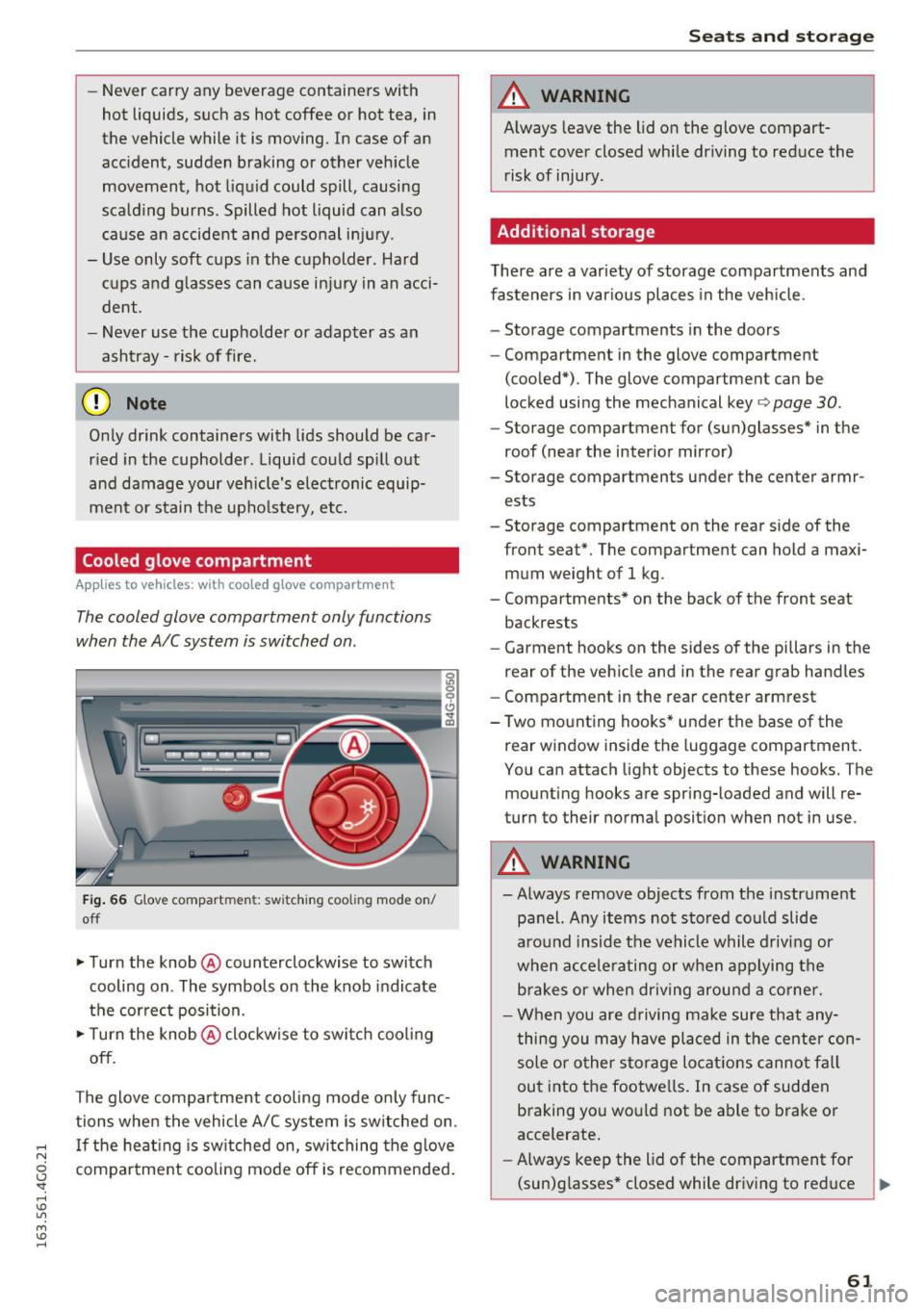
Fig. 66 Glove compartmen t: sw itching cooli ng mode on/
off
.. Turn the knob @counterclockwise to switch
cooling on . The symbols on the knob indicate
the correct position.
.,. Turn the knob @clockwise to switch cool ing
off.
The glove compartment cooling mode only func
tions when the vehicle A/C system is switched on .
..... If the heating is switched on, switching the glove
N
g compartment cooling mode off is recommended.
'
Seats and storage
A WARNING
-Always leave the lid on the glove compart-
ment cover closed while driving to reduce the
risk of injury.
Additional storage
There are a variety of storage compartments and
fasteners in various places in the vehicle.
- Storage compartments in the doors
- Compartment in the glove compartment
(cooled*) . The glove compartment can be
locked using the mechanical key ¢
page 30.
-Storage compartment for (sun)glasses* in the
roof (near the interior mirror)
- Storage compartments under the center armr ests
- Storage compartment on the rear side of the
front seat*. The compartment can hold a maxi
mum weight of 1 kg .
- Compartments* on the back of the front seat
backrests
- Garment hooks on the sides of the pillars in the
rear of the vehicle and in the rear grab handles
- Compartment in the rear center armrest
- Two mounting hooks* under the base of the rear window inside the luggage compartment.
You can attach light objects to these hooks. The
mounting hooks are spring-loaded and will re
turn to their normal position when not in use .
A WARNING
--Always remove objects from the instrument
panel. Any items not stored could slide
around inside the vehicle while driving or
when accelerating or when applying the
brakes or when driving around a corner.
- When you are driving make sure that any
thing you may have placed in the center con
sole or other storage locations cannot fall
out into the footwells. In case of sudden
braking you would not be able to brake or
accelerate.
- Always keep the lid of the compartment for
(sun)glasses* closed while dr iving to reduce ..,.
61
Page 66 of 294
Sea ts and stor age
Luggage compartment
Loading luggage compartment
Luggage items must be stowed securely.
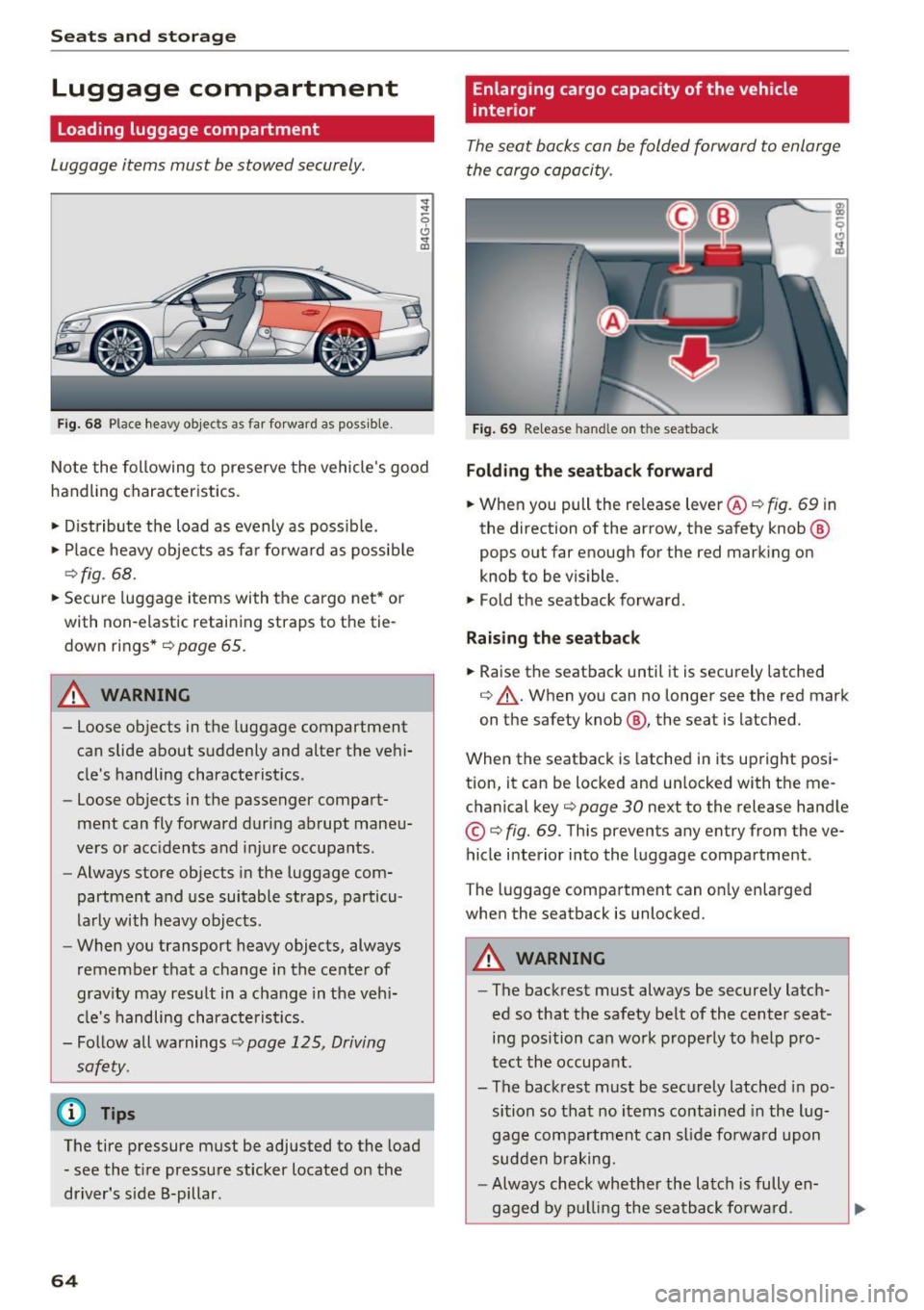
Fig . 68 Place heavy objec ts as far forward as poss ib le .
~
-0
0 ... co
No te the following to preserve the vehicle 's good
handling characteristics .
• Distribute the load as evenly as possible.
• Place heavy objects as fa r fo rward as possib le
~ fig . 68.
• Secure luggage items with the cargo net * or
with non-elastic retaining straps to the tie
down rings *
<=> page 65.
A WARNING
- Loose objects in the luggage compartment
can slide about suddenly and alter the vehi
cle's handling characte ristics.
- Loose objects in the passenger compart
ment can fly forward during abrupt maneu
vers or acc idents and injure occupants.
- Always store objects in the luggage com
partment and use suitable straps, particu
larly with heavy objects .
- When you transport heavy objects, always
remember that a change in the center of
grav ity may result in a change in the veh i
cle's handling characte ris tics.
- Follow all warnings<=>
page 125, Driving
safety.
@ Tips
The tire pressure must be adjusted to the load - see the t ire pressure sticker located on the
driver's side B-pillar.
64
Enlarg ing cargo capacity of the vehicle
interior
The seat backs can be folded forward to enlarge
the cargo capacity.
Fig . 69 Re lease hand le on t he seatback
Fold ing th e seatback forward
• When you pull the re lease lever@<=> fig. 69 in
the direction of the arrow, the safety knob @
pops out far enough for the red marking on
knob to be visible.
• Fold the seatback forward.
Rai sing th e seatback
• Raise the seatback until it is securely latched
<=> .&,. . When you can no longer see the red mark
on the safety knob @, the seat is latched.
When the seatback is latched in its up right posi
tion, it can be locked and un locked with the me
chanical key~
page 30 next to the release hand le
© <=>fig. 69. This prevents any entry from the ve
hicle interior into the luggage compartment .
The luggage compartment can on ly enlarged
when the seatback is unlocked.
A WARNING
- The backrest must always be securely latch
ed so that the safety belt of the center seat
ing position can wo rk properly to help pro
tect the occupant.
- The backrest must be securely latched in po sition so that no items contained in the lug
gage compartment can s lide fo rwa rd upon
sudden b raking.
- Always check whether the latch is fully en-
gaged by p ulling the seatback fo rwa rd.
~
Page 70 of 294

Warm and cold
Three-zone climate control
Operating
Applies to vehicles: w ith three zo ne cl imate contro l
Fig. 74 T hree-zone climate co ntrol: contro ls
P ress the buttons to tur n the func tions on or off.
The dial adj usts t he temperatu re and the blower.
The LED in a button will light up when the func
tion is sw itche d on.
IAUTO I Switching automatic mode on
Automatic mode ma inta ins a constant tempera
ture inside the vehicle . Air tempe rature, airflow
and a ir distribution are controlled automatically.
Adjusting the temperature
The temperatu re can be adjusted individually fo r
the dr iver and front passenger us ing t he dials
(D
and @.
Adjust ing the blower 8f?
Using the dial@, you can manually adjust the
amount of air generated by the blower to suit
your preferences. To have the blowe r regu lated
automatically, p ress the
IAUTO ! button.
~. ~ .~ Adjusting air distribution
You can manually select the vents where the air
will flow. To have the air distribution regulated
automatically, press the
IAUTO! button.
l""" I Switch ing recirculation m ode on/off
In recirculation mode, the air inside the vehicle is
circulated and filtered. This prevents the unfil-
68
tered air outs ide the ve hicle from entering the
vehicle interior. We recommend sw itching recir
cu lation mode on when driving through a tu nnel
or when sitting in traffic ~.&. .
The
! AUTO I button or I@ FRONT ! button switches
recircu lation mode off .
IOFFI Switching the climat e control system
on /off
The !OFF ! button switches the climate con trol
system on or off.
It a lso switches on when you
press the b lower control. Airflow from outside is
blocked when the climate control system is
switched off.
IA/Cl Switching cooling mode on/off
The air is not coo led and humidity is not removed
whe n coo ling mode is switched off . This can
cause fog on the windows. The cooling mode
switches off automatically when there are cold
outside temperatures.
l«w FRONT I Switching the defr oster on /off
The w indshield and side w indows a re defrosted
or cleared of condensation as quick ly as poss ible .
The maximum amount of air flows mainly from
the vents below the windshield. Recircu lation .,.