ignition AUDI S7 2012 Owner's Manual
[x] Cancel search | Manufacturer: AUDI, Model Year: 2012, Model line: S7, Model: AUDI S7 2012Pages: 294, PDF Size: 73.33 MB
Page 49 of 294
.. Remove the wiper blade in the direction of
the arrow .
Installing the wiper blade
.. Inse rt the new wiper blade into the moun t
on the w iper arm @until you hea r it latch
i nto place.
.. Place the wiper arm back on the windshie ld .
.. Switch the ignition on.
.. Press the w indshield wiper lever.
Or .. Se lect : ICAR lf u nction button>
Car sy stem s
control button > Servicing & check s > Wiper
se rvice position
> Off .
A WARNING
-If the wi ndshield wipe rs smear the wind
shield, clean the w iper blades with w ind
shield washe r fl uid . If the wiper blades
are extremely d irty, yo u can also clean
th em with a soft sponge or cloth.
- For yo ur safe ty, you should replace the
wiper blades once or twice a year . See
yo ur aut horiz e d Aud i dea ler for rep lace
me nt blades .
(D Note
-The wi ndshield wiper blades mus t only
b e fo lded away when in t he se rv ice posi
tion! Otherwise, you risk damaging the
paint on the hoo d or the wi ndshield wip
e r mo to r.
- Y ou sho uld not m ove y our vehicle or
press the w indshie ld w iper lever when
the wiper arms are folded away from the
windsh ield . The windshield w ipers would
move back into the ir o rig inal position
and could damage the hood and w ind
s h ield.
- To he lp prevent damage to the wiper sys
tem, a lways loosen blades which are fro
zen to the windsh ield before operat ing
wipers.
- To he lp prevent damage to w iper blades,
do not use gasoline, ke rosene, pa int
t hi nner, or othe r solve nts on or nea r th e
wipe r blades. Clear vi
sion 4 7
- T o help p revent damage to the wiper
arms or other components, do not at
tempt to move the wipers by hand.
(D Tips
- Commercial hot waxes appli ed by a uto
matic ca r washes affect the cleanability
o f the windshie ld .
- Yo u can also use the serv ice po sit ion, for
example, if yo u want to p rotect the
w indshield from icing by using a cover .
- Yo u cannot activate the se rv ice position
w hen the hood is ope n.
Mirrors
Adjusting the exterior mirrors
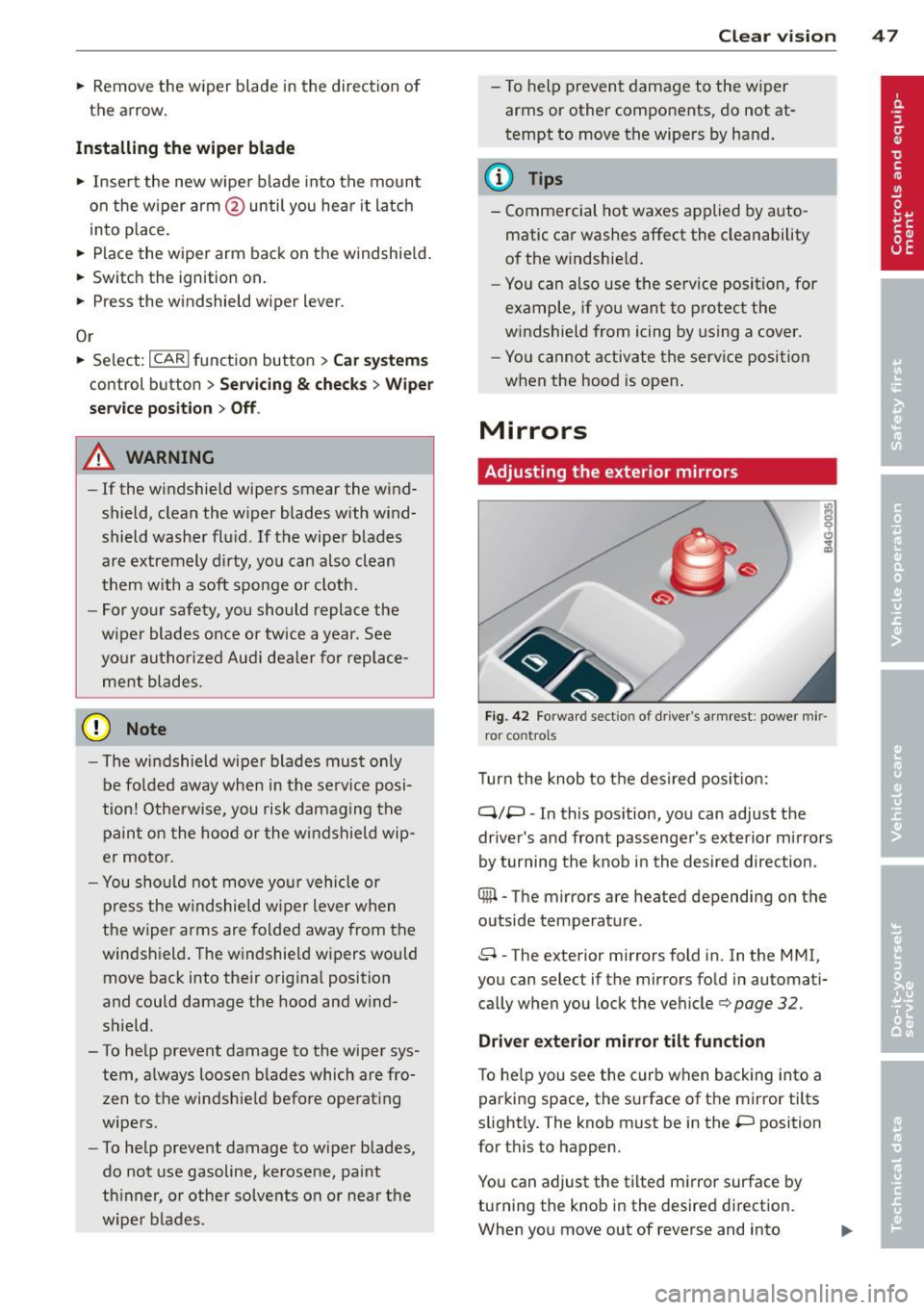
Fig. 42 Forwar d sect io n of dr ive r's ar mrest : power mir
r o r cont rol s
Turn the knob to t he des ired po sition:
q;p -In this pos ition, you can adjust the
drive r's and fro nt pass enge r's exte rior mi rrors
by turning the knob in the desired d irection.
® -The mirrors are heated depending on the
outside temperature .
8 -The exterior mirrors fold in. In the MMI,
you can select if the mirrors fo ld in automati
ca lly when you lock t he vehicle¢
page 32.
Driver exterior mirror tilt function
To he lp you see the curb when backing into a
par king space , the s urface of t he mirror tilts
slight ly. The knob must be in the
P position
for t his to happen .
You can adjust the tilted m irror surface by
turning the kno b in the desire d di rect ion.
When you move out of reverse and into
Page 50 of 294
48 Clear vis ion
another gear, the new mirror position is stor
ed and assign ed to the key you a re using.
The mirror goes back in to its origina l posit io n
once yo u drive forward faster than 9 mph (15
km/h) or switch the ignition
off.
~ WARNING
- Curved ( i.e. convex) mirror s urfaces in
crease your field of view. Remember that
vehicles or other objects will appear
smaller a nd fa rther away than when seen
in a flat m irror . If you use this mirro r to
est imate distances of following vehicles
when changing lanes, you cou ld estimate
incorrectly and cause an ac cident .
-
@ Note
-If the mirro r hous ing is moved uninten
t ionally (for example, whi le park ing your
vehicle), then you must first fo ld the mi r
r or electri cally. Do not readjust the m ir
r or ho us in g manua lly . You could damage
the motor which con trols the mirror .
- If you wash t he vehi cle in an au tomatic
c ar wash, yo u m ust fold the e xterior m ir
rors in to reduce the risk of damage to
the mirrors. Never fold power fo lding ex
terior mi rrors* by hand. Only fold them
i n and out us ing t he power contro ls.
@ Tips
- The exterior mirror settings are stored
with the memory funct ion *
~ page 53.
- If there is a malfunct ion i n the elect rical
system, you can still adjust the exter ior
mirrors by pressing the edge of the mir
ror.
Dimming the mirrors
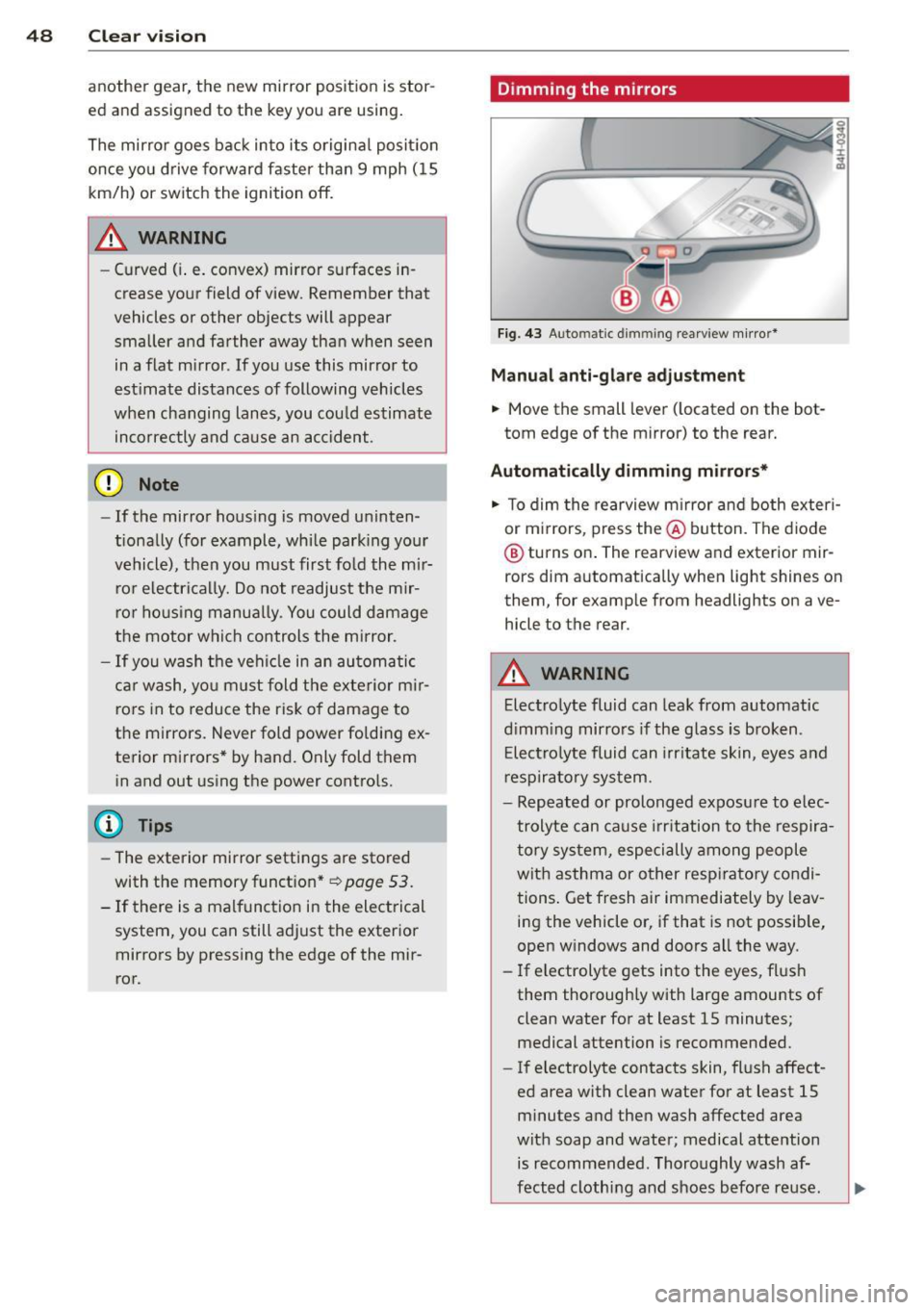
F ig . 4 3 Auto ma tic d immin g rearview mirro r*
Manu al anti-glare adjustment
.,. Move the small leve r (located on the bot
tom edge of the mirror) to the rear.
Automatically dimming mirrors*
.,. To dim the rearview m irror and both exteri
or m irrors, press the@ button . The diode
® turns on . The rearview and exterior mir
rors dim automatically when light shines on
them, for examp le from headlights on ave
hicle to the rear .
A WARNING
=
Electrolyte fluid can lea k from automatic
d imm ing mirro rs if the g lass is broken .
E lectro lyte fluid can irr itate sk in, eyes a nd
r espira to ry system .
- Repeated or prolonged exposu re to e lec
trolyte can ca u se irritation to the respira
t ory sys tem, especially among people
wit h asthma or other resp iratory condi
tions . Get fresh air immediately by leav
ing the vehicle or, if that is not possib le,
open w indows and doors all the way .
- If electrolyte gets into the eyes, fl ush
them thorough ly with large amou nts of
clean water for at least 15 minutes; medical attention is recommended.
- If electrolyte contacts skin, fl ush affect
ed area with clean water for at least 15 minutes a nd then wash affected area
with soap and water; medical atte ntion
is recommended. Thoroughly wash af
fect ed clothing and shoes before re use .
Page 53 of 294
Front passenger's seat
Always move the front passenger seat into the rearmost position.
To avoid contact with the airbag while it is de
ploying, do not sit any closer to the instru
ment panel than necessary and always wear
the three-point safety belt provided adjusted
correctly. We recommend that you adjust the
passenger's seat in the following manner:
.. Move the front passenger seat into the rear
most position of the fore and aft adjustment
range
~ .&. in Why is your seat adjustment
so important? on page 50.
• Bring the backrest up to an (almost) upright
position.
Do not ride with the seat reclined .
.. Adjust the head restraint so the upper edge
is as even as possible with the top of your
head. If that is not possible, try to adjust
the head restraint so that it is as close to
th is position as possible ¢
page 52.
.. Place your feet on the floor in front of the
passenger's seat .
Front seats
Controls
The operating logic for the switches corre
sponds to the construction and function of
the seat.
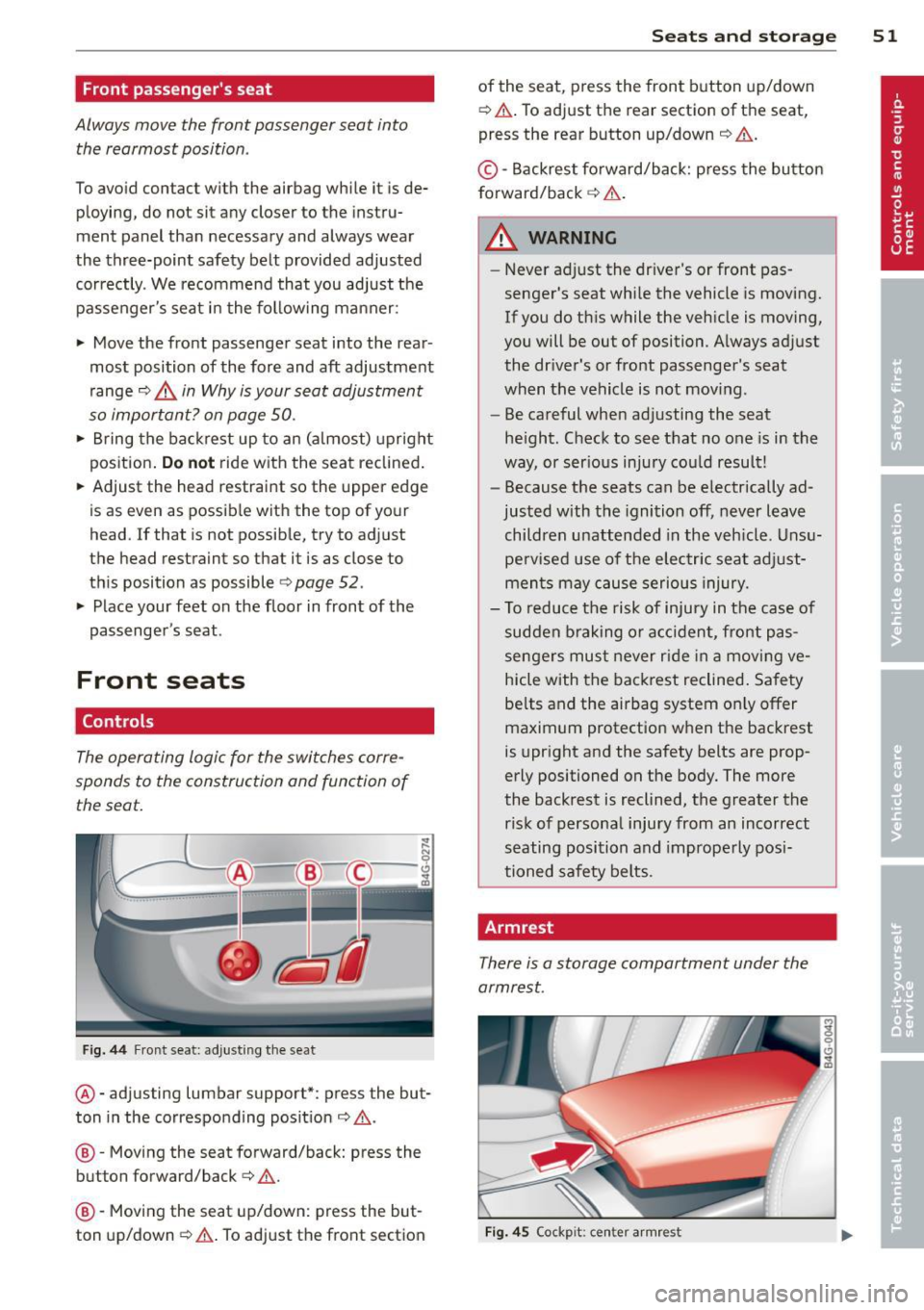
Fig. 44 Front seat: adjusting the seat
@ -adjusting lumbar support*: press the but
ton in the corresponding position¢.&,.
@ -Moving the seat forward/back: press the
button forward/back ¢ ,&. .
@ -Mov ing the seat up/down: press the but
ton up/down ¢,&. . To adjust the front section
Seats and storage 51
of the seat, press the front button up/down
¢ ,&. .To adjust the rear section of the seat,
press the rear button up/down ¢,&. .
© -Backrest forward/back: press the button
forward/back
~ ,&. .
A WARNING
-
-Never adjust the driver's or front pas
senger's seat whi le the vehicle is moving.
If you do this while the veh icle is moving,
you will be out of position. Always adjust
the dr iver's or front passenger's seat
when the vehicle is not moving.
- Be careful when adjusting the seat
he ight. Check to see that no one is in the
way, or serious injury cou ld result!
- Because the seats can be electrically ad
justed with the ignition off, never leave
children unattended in the vehicle. Unsu
pe rvised use of the electric seat adjust
ments may cause serious injury .
- To reduce the risk of injury in the case of
sudden braking or accident, front pas
sengers must never r ide in a moving ve
hicle with the backrest reclined. Safety
be lts and the airbag system on ly offer
maximum protection when the backrest
is upright and the safety belts are prop
erly positioned on the body. The more
the backrest is reclined, the greater the risk of personal injury from an incorrect
seating position and improperly posi
tioned safety belts.
Armrest
There is a storage compartment under the
armrest.
Fig. 45 Cockp it : center armrest
Page 57 of 294

12-volt sockets
Fig. 53 Section of the trim panel of the luggage com
partment: 12-volt socket
Fig . 54 Rear center console: 12-volt socket
~ To reach the 12-volt socket in the luggage
compartment, press the net down or re
move the bracket from the mounts
Qfig . 53.
There is an additional 12-volt socket in the
front and rear center console¢
fig. 54.
0 5 0
/li
The 12 volt sockets may be used for 12-volt
appliances with max imum cons umption of up
to 120 watts.
Before you purchase any accessories, always
r ead and fol low the information in
¢ page 2 75, Additional accessories and parts
replacement .
A WARNING
The sockets and the e lectrica l accessories
connected to them operate on ly when the
ignition is switched on. Incorrect usage
can lead to serious injuries or burns. To re
duce the risk of injuries, never leave chil
dren unattended in the vehicle with the ve
hicle key.
S ea ts a nd s to rage 55
(D Note
To avoid damaging the socket, only use
plugs that fit properly.
- Never connect equipment that generates
electrical current, such as a solar pane l
or battery charger, to the 12 volt socket.
This could damage the vehicle's electri cal system.
- The 12 volt socket shou ld only be used
for a short period of ti me as a power
source for electrical equ ipment. Please
use the electr ical sockets in the vehicle
when con necting equ ipment for longer
periods.
- To avoid damaging the socket, only use
plugs that fit properly.
(D Tips
When the engine is off and accessories are
still plugged in and are on, the vehicle ba t
tery can still be d rained.
Storage
(upholder
Fi g. 55 Ce nter console: cupholder
Fig. 56 Rear center armrest: cupholde r extended
Page 68 of 294
66 Warm and cold
l
ed or cleared o f condensation as quickly as
possib le. The maximum amo unt of air flows
mainly from the vents below the windshield.
Recirculation mode switches off .
The
IAU TOI b utton switches the defroster off.
ICmJ REAR I Switching rear window heater
on /off
The rear w indow heater only operates when
the engine is running . It switches off auto
matica lly after a few minutes, depending on
the outside temperature.
To prevent the rear w indow heater from
switch ing off automatically, press and hold
the ~ button for more than 2 seconds. This
remains stored unti l the ignition is switched
off.
~ Ad justing s eat h eat ing
Press ing the button switches the seat heat ing
on at the highest setting ( leve l 3) . T he LEDs
indicate the temperature leve l. To reduce the
temperature, press the button again. To
switch the seat heating off, press the button
repeatedly unt il the LED turns off.
After 10 minutes, the seat heating automati
cally switches from leve l 3 to level 2.
The seat heating for both outer rear seats* is
ad justed using the buttons in the center con
sole.
Air vents
You can open or close the center and outer
vents in the cockpit and the vents in the rear center console using the ridged thumbwhee ls.
The levers adj ust the direction of the airflow
from the vents.
T he air temperature in the rear can be ad just
ed so that it is warmer or co lder by turning
the knob to the red or blue area.
A WARNING
- Do not use th is sett ing for extended peri
ods of time. The w indows could fog up
since no fresh air can enter the vehicle. If
the wi ndows fog up, press the air rec ircu
lation button again immed iate ly to
sw itch off the air recircu lation function
or select defrost.
- I ndividuals w ith reduced sensitivity to
pa in or temperature cou ld deve lop burns
when using the seat heating fu nction. To
red uce the risk of injury, these indiv idu
a ls shou ld not use seat heating.
0 Note
To avoid damage to the heat ing elements
i n the seats, do not kneel o n the sea ts or
place heavy loads on a sma ll area of the
seat.
Page 69 of 294
Warm and cold 67
Four-zone automatic climate control
Operation
Applies to vehicles: with four -zone a utomat ic climate control
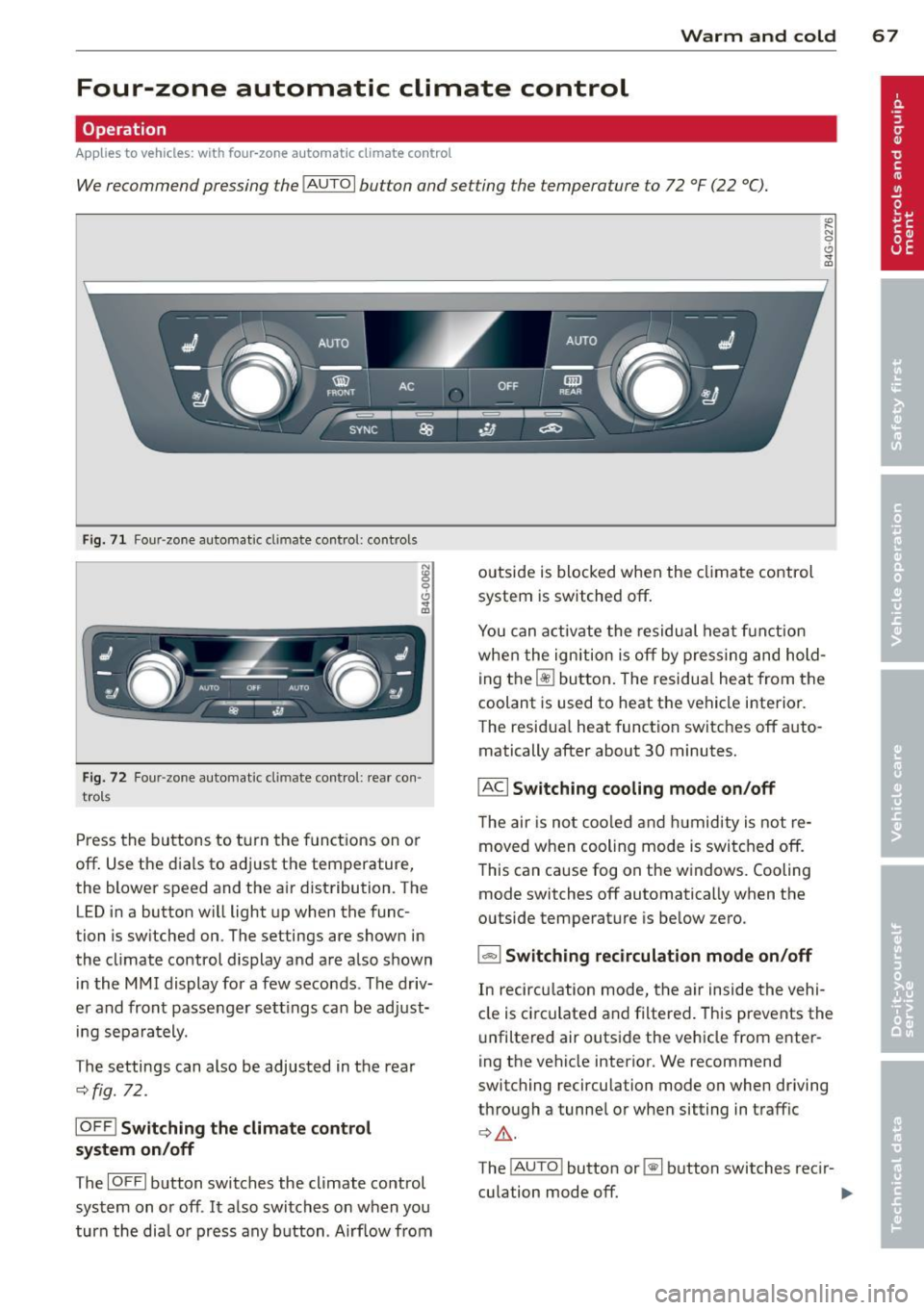
We recommend pressing the IAUTOI button and setting the temperature to 72 °F (22 °C).
F ig. 71 Four -zone automat ic climate control: controls
Fig. 72 Four -zone automat ic climate control: rear con·
trols
Press the buttons to turn the functions on or
off. Use the dials to adjust the temperature,
the blower speed and the air distribution. The
LED in a button will light up when the func
tion is switched on. The settings are shown in
the climate control display and are also shown in the MMI display for a few seconds . The driv
er and front passenger settings can be adjust·
ing separately.
The settings can also be adjusted in the rea r
<::>fig. 72.
IOFFl Switching the climate control
system on/off
The IOFFI button switches the climate control
system on or off .
It also switches on when you
turn the dial or press any button. Airf low from outside is blocked when the
climate control
system is switched off.
You can activate the residual heat funct ion
when the ignition is off by pressing and hold
ing the ~ button. The residual heat from the
coolant is used to heat the vehicle interior.
The residua l heat function switches off auto
matically after about 30 minutes.
IACI Switching cooling mode on /off
T he air is not coo led and humidity is not re
moved when cooling mode is switched off.
This can cause fog on the windows. Cooling
mode switches off automatically when the
outside temperature is below zero.
1-1 Switching recirculation mode on/off
In recircu lation mode, the air inside the vehi
cle is circ ulated and filtered. This prevents the
unfiltered air outside the vehicle from enter
ing the vehicle interior. We recommend
switching recirculation mode on when driving
through a tunnel or when sitting in traffic
¢ Li). .
The !AUTO ! button or~ button switches recir-
culation mode off. .,..
Page 70 of 294

68 Warm and cold
IAUTO I Switching automatic mode on
Automatic mode m ainta ins a constant tem
perat ure inside the vehi cle. Air tempera ture,
airflow and air d istribution a re controlled a u
tomatically.
Adjusting the temperature
T empe ratu res between 60 °F (+16 °C) and
84 °F ( +28 ° C) c an be se t. O uts ide of this
range,
lo or hi w ill appear in the climate con
trol system disp lay. At both of these settings,
the cl imate control system r uns continuously
at max imum cooling or heat ing power. There
is no temperature regu lation.
~ Adjusting the airflow
You can a djust the airf low manually to s uit
your needs . To have the airf low reg ulated a u
tomatically, press the
! AUTO ! button.
~ Adjusting the air distribution
You can manu ally se lect the ve nts w here the
a ir will flow. To have the air d istribu tion reg u
l ated automatically, press the
IAUTOI bu tton.
~ I~ * Adjusting seat heating/
ventilat ion*
Pr ess ing the button swi tches the sea t heat
ing/ventilation on at the highest sett ing ( leve l
3). The LEDs indicate the heating/venti lat ion
leve l. To reduce the heating/vent ilation, press
the butto n aga in. To switch the seat heat ing/
ve nti lation off, press the button repeatedly
u ntil the LED turns off.
After 10 minutes, the seat heating automati
cally switches from leve l 3 to level 2.
l
e d or cleared of con densation as quickly as
possib le. The max imum amo unt of air flows
mainly from the vents be low the windshield.
Recirculation mode switches off.
The
IAUTOI bu tton switches the defroster off.
lliiil REAR ! Switching rear window heater
on /off
T he rea r window heate r only operates w hen
the engine is running. It sw itches off auto
matically after 10 to 20 minutes, depending
o n the outside temperature.
T o p revent the rea r window heate r from
switching off automatically, p ress and ho ld
t h e ~ button for more than 2 seconds. Th is
rema ins stored until the ignition is switched
off .
ISYNC I Synchronization*
When synchronization is switched on, the
same settings are applied to bot h the dr iver
and fr ont passenger, except for the seat heat
i ng/venti lation *. The rear zo ne is also
synchronized. Synchronization switches off
whe n the se ttings for the front passenge r side
o r r ear are ad justed.
You can also switch synchronizati on o n by
pressing and holding a dial. For example, if
you press and hold t he di al on the front pas
senger si de, the setti ngs for that s ide a re
t ran sfer red to t he d rive r si de. The same ap
plies to the re ar.
Air vents
You can open o r close the center and ou ter
vents i n the cockpit and the vents in the rear
c ente r console and doo r pillars us ing t he
ridged t humbwheels. The levers adjust the d i
r ect ion o f the airfl ow from the vents.
A WARNING
-Do not use t his se tt ing fo r extended peri
ods of time . The w indows cou ld fog up
since n o fresh air can enter the vehicle. I f
the windows fog up, press the air rec ircu
lation butt on agai n immed iate ly to
sw itch off the air recirc ulation function
or sel ect defrost.
- Individ uals w ith reduced se nsitivity to
pa in or te mperature cou ld deve lop burns
when using the s eat heating fu nction . To
re duc e the risk of i njury, these i nd iv idu-
a ls should n ot us e sea t heating.
~
Page 73 of 294

steering column will continue moving as long as you are pressing the switch.
There must be at least 10 inches (25 cm) be
twe en your chest and the cente r of the steer
ing wheel. If you cannot sit more than 10 in
ches (25 cm) from the steering wheel, see if
adaptive equipment is available to help you
reach the pedals and increase the distance
from the steer ing wheel.
F or detailed information on how to adjust the
driver's seat, see
r::> page 51.
In vehicles with the memory f unction*, the
steering column settings are stored together
with the seat position.
A WARNING
Improper use of steering wheel adjust
ment and improper seating position can
cause serious personal injury.
- Adjust the steering wheel column only
when the vehicle is not moving to pre
vent loss of veh icle control.
-
- Adjust the driver's seat or steering wheel
so that there is a min imum of 10 inches
(25 cm) between your chest and the
steering wheel¢
page 119, fig. 128. If
you cannot maintain this minimum dis
tance, the airbag system cannot protect
you p roperly.
- If phys ical limitations prevent you from
sitting 10 inches (25 cm) or more from
the steering wheel, check with your au
thorized Audi dealer to see if adaptive
equipment is availab le.
- If the steering wheel is aligned with your
face, the supplemental driver's airbag
cannot provide as much protection in an accident. Always make sure that the
steering wheel is aligned with your
chest.
- Always hold the steering wheel with your
hands at the 9 o'clock and 3 o'clock posi
t ions to reduce the risk of personal injury
if the driver's airbag deploys.
- Never hold the steering whee l at the 12
o'clock posit ion or w ith your hands inside
On the road 71
the steerin g wheel rim or on the steering
wheel hub. Holding the steering wheel
the wrong way can cause serious injuries
to the hands, arms and head if the driv
er 's airbag deploys.
Easy entry feature
Applies to vehicles: with electrically adjustable steer ing
wheel
The easy entry feature makes it easier to en
ter and exit the vehicle by automatically ad
justing the steering wheel.
.. Select in the MMI : ICAR lfunction button>
Car systems control button > Vehicle set
tings
> Seats > Driver's seat > Easy entry >
On.
When the easy entry feature is turned on, the
stee ring wheel moves up to the park position
when you switch off the ignition. After you en
ter the vehicle, the steering wheel moves to
the stored position as soon as you switch on
the ignit ion .
Starting and stopping
the engine
Starting the engine
This button switches on the ignition and
starts the engine.
Fig . 76 Center console: S TART ENGINE ST OP button
.. Step on the brake pedal and move the selec
tor lever to
P or N ¢ _&...
.. Press on the ~ ,s_T_A_R_T_E_N_G_I_N_E_S_T_O_P~I button
~ fig. 76 -the engine will start. ..,.
Page 74 of 294

72 On the road
By pressing the I STAR T ENGINE S TOP I button
without depressing the brake peda l, the igni
tion is on and switched
off by pressing it
again .
After a cold engine is started, the re may be a
brief period of increased noise because oil
pressure must first bu ild up in the hydraulic
va lve adjusters. This is normal and not a cause
f or concern.
If the engine should not start immediately,
the starting process is automatically stopped
after a short time . Repeat starting procedure.
Driver m essag e in th e in strum ent clu ster
d is pl ay
P re ss brake pedal to sta rt engi ne
This message appears if you press the
I START ENGINE STOP ! button to start the en
gine and do not depress the brake peda l. The
engine can on ly be started if the brake pedal
is depressed.
B C o nve nience ke y: Is ke y not in th e vehi
cle?
This message appears a long with the B sym
bol i f the master key is removed from the ve
hicle with the engine r unning . It is intended
to remind you (e .g . when changing drivers)
not to continue the journey without the mas
te r key .
If the master key is no longer in the vehicle,
you cannot switch on the ignit ion after stop
ping the engine and yo u also cannot start the
engine again. Moreover, you cannot lock the
vehicle from the outs ide with the key.
S hift to P , o ther wise v ehicl e can roll away.
Doors do not lock if le ver i s not i n P.
This message appears for sa fe ty reasons
a long w ith an audib le warning tone if the
P
selector lever posit ion is not engaged when
stopping the eng ine with the
I STAR T ENGINE S TOP ! button. Select the P se
lector lever posit ion. Otherwise the veh icle
could roll and it cannot be locked .
Key not recogni sed . H old bac k of ke y against
ma rked are a. See o wner' s manual.
If the indicator l ight turns on and this mes
sage appears, there is a malf unct ion
¢ page 73.
Steering lock
The steering locks when you turn the eng ine
off using the I STAR T ENGINE S TOP I butto n
and open t he driver's doo r. T he loc ked s teer
i ng helps prevent vehicle theft.
& WARNING ~
- Never a llow the engine to run in confined
spaces -danger of asphyx iat ion .
- Never turn
off the engine until the vehi
cle has come to a complete stop .
- The brake booster and powe r steering
only work when the engine is running . If
the engine is
off, you have to use more
force when steering or brak ing . Because
you cannot steer and brake as you usual ly would, th is cou ld lead to crashes and
serious injuries .
(Q) Note
-Avo id h igh engine rpm, full thrott le and
heavy eng ine loads until the eng ine has
reached operating temperature -other
wise you risk engine damage .
- The engine cannot be started by pushing
or towing the vehicle.
- If the eng ine has been under heavy load
for an extended per iod, heat builds up in
the engine compartment after the en
gine is switched
off -there is a risk of
damaging th e engine. Allow the engine
to run at idle for about 2 minutes before
switching it
off .
@ Tips
-If you open the driver's doo r with the ig
nition on, a buzzer sou nds and the mes
sage
Ignition i s on appears in the instru
ment cl uste r display . Sw itch the ignition
off . ll-
Page 75 of 294

-If you leave the vehicle with the ignition
switched on, the ignition will switch off
after a certain period of time . Please
note that e lectrica l equipment such as
exterior lights will switch off as well
when that happens.
Stopping the engine
.,. Bring your vehicle to a complete stop.
.,. Move the selector lever to the
P or N posi
t ion.
.,. Press the
!START ENGINE STOPI button
¢page 71, fig. 76.
Emergency off
If necessary, the engine can be sw itched off
with the selector leve r in the
R or D/ S posi
tion . The engine stops if you p ress the
I START ENGINE STOPI button at speeds below
6 mph (10 km/h) and press the brake pedal.
A WARNING
- Never turn off the engine until the vehi
cle has come to a complete stop.
- The brake booster and power steering
only work when the engine is running. If
the engine is off, you have to use more
force when steering or braking. Because
you cannot steer and brake as you usua l
ly would, this could lead to crashes and
serious injur ies.
- For safety reasons, you should always
park your vehicle with the selector lever
in P. Othe rwise, the veh icle could inad
vertent ly roll away.
- After the engine has been switched off,
the radiator fan can continue to r un for
up to 10 minutes - even with the ign it ion
swit ched off.
It can a lso swi tch on aga in
after some time if the coo lant tempera
ture rises as the result of a heat buildup
or if the engine is hot and the engine
compartment is additionally heated by
the sun's rays.
On th e road 73
(D Note
Do not stop the engine immediately after
hard or extended driving. Keep the engine
running for approximately two minutes to
prevent excess ive heat bu ild-up.
Starting the engine if there is a
malfunction
It may not be possible to start the engine un
der certain circumstances, for example if the
battery in the vehicle key is drained, if inter
ference is affected the key or if there is a sys
tem malfunction.
F ig . 77 Center console/master key: start ing the eng ine
i f there is a malfunction
Requirement : The message K ey not recog
nized . Ho ld back of k ey against mark ed area .
Se e own er's manual.
must appear and the in
di cator light
I] must swi tch on.
.,. Hold the master key vertically in the loca
tion indicated
y >>) 9 fig. 77.
.,. Press the b rake pedal¢
& in Starting the
engine on page
72.
... Press the '"" I s"'T ,..,A ""'R ,.,,T ,..., E"' N...,. G = I N~ E-=s"'T '""o '"" P,..,I button.
The engine will start.
... Drive to your authorized Audi dea ler imme
diately to have the malfunction corrected.
(D Tips
You can view the message again by press i ng the
I STAR T ENGINE STOP ! button.