warning AUDI S7 2012 Owner's Manual
[x] Cancel search | Manufacturer: AUDI, Model Year: 2012, Model line: S7, Model: AUDI S7 2012Pages: 294, PDF Size: 73.33 MB
Page 31 of 294
Opening and closing Keys
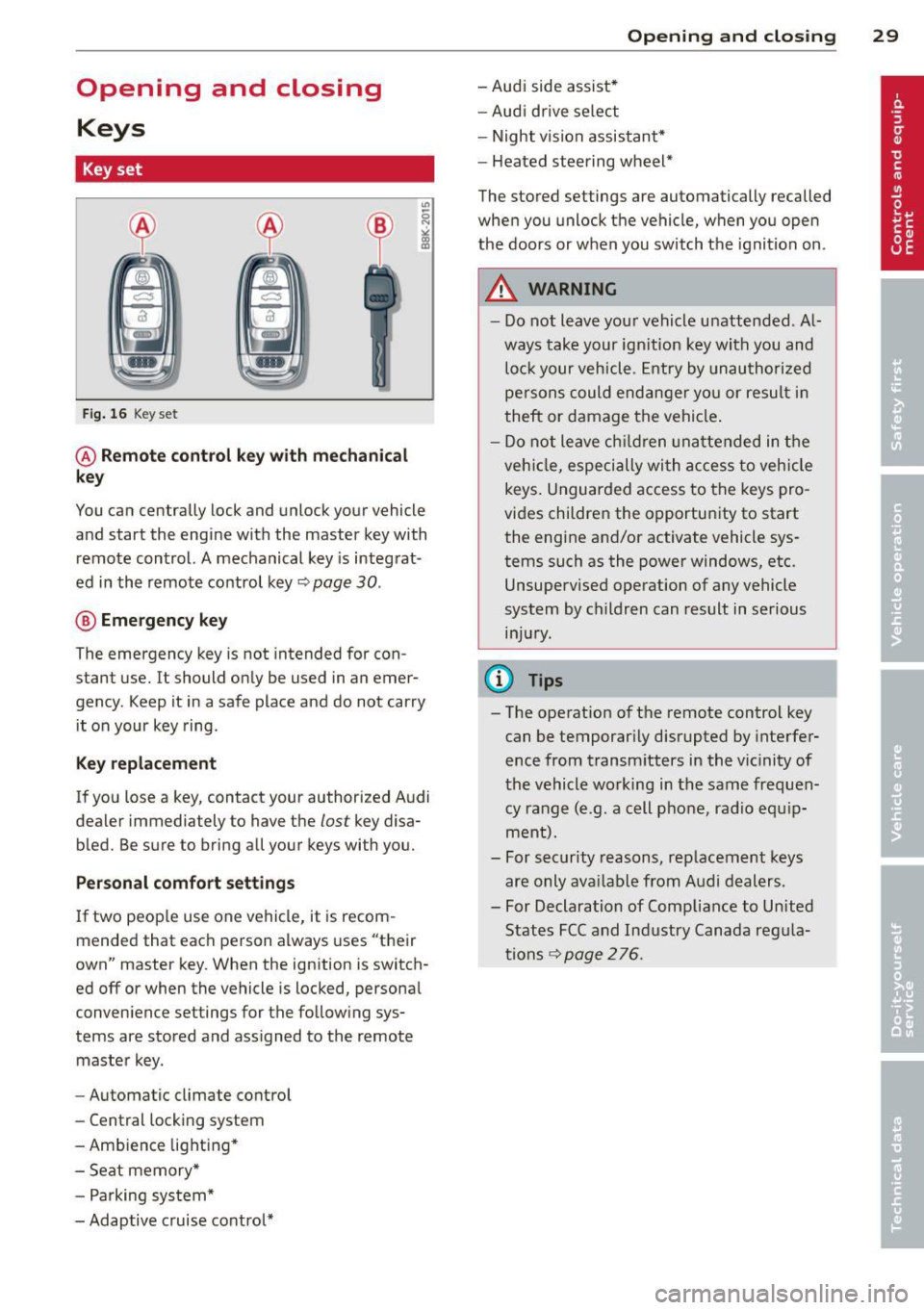
Key set
Fig. 16 Key set
@ Remote control key with mechanical
key
You can centrally lock and unlock your vehicle
and start the engine with the master key with
remote control. A mechanical key is integrat
ed in the remote control key~
page 30.
® Emergency key
The emergency key is not intended for con
stant use.
It should only be used in an emer
gency . Keep it in a safe place and do not carry
it on your key ring .
Key replacement
If you lose a key, contact your authorized Audi
dealer immediately to have the
lost key disa
bled. Be sure to bring all your keys with you.
Personal comfort settings
If two people use one vehicle, it is recom
mended that each person always uses "their
own" master key. When the ignition is switch
ed
off or when the vehicle is locked, personal
convenience settings for the following sys
tems are stored and assigned to the remote
master key.
- Automatic climate control
- Central locking system
- Ambience lighting*
- Seat memory*
- Parking system*
- Adaptive cruise control*
Opening and closing 29
- Audi side assist*
- Audi drive select
- Night vision assistant*
- Heated steering wheel*
The stored settings are automatically recalled
when you unlock the vehicle, when you open
the doors or when you switch the ignition on.
A WARNING
---Do not leave your vehicle unattended . Al
ways take your ignition key with you and
lock your vehicle. Entry by unauthorized
persons could endanger you or result in
theft or damage the vehicle.
- Do not leave children unattended in the
vehicle, especially with access to vehicle
keys. Unguarded access to the keys pro
vides children the opportunity to start the engine and/or activate vehicle sys
tems such as the power windows, etc. Unsupervised operation of any vehicle
system by children can result in serious
injury.
{!) Tips
- The operation of the remote control key can be temporarily disrupted by interfer
ence from transmitters in the vicinity of
the vehicle working in the same frequen
cy range (e .g. a cell phone , radio equip
ment).
- For security reasons, replacement keys
are only available from Audi dealers.
- For Declaration of Compliance to United
States FCC and Industry Canada regula
tions
~ page 276.
Page 32 of 294
30 Opening and clo sing
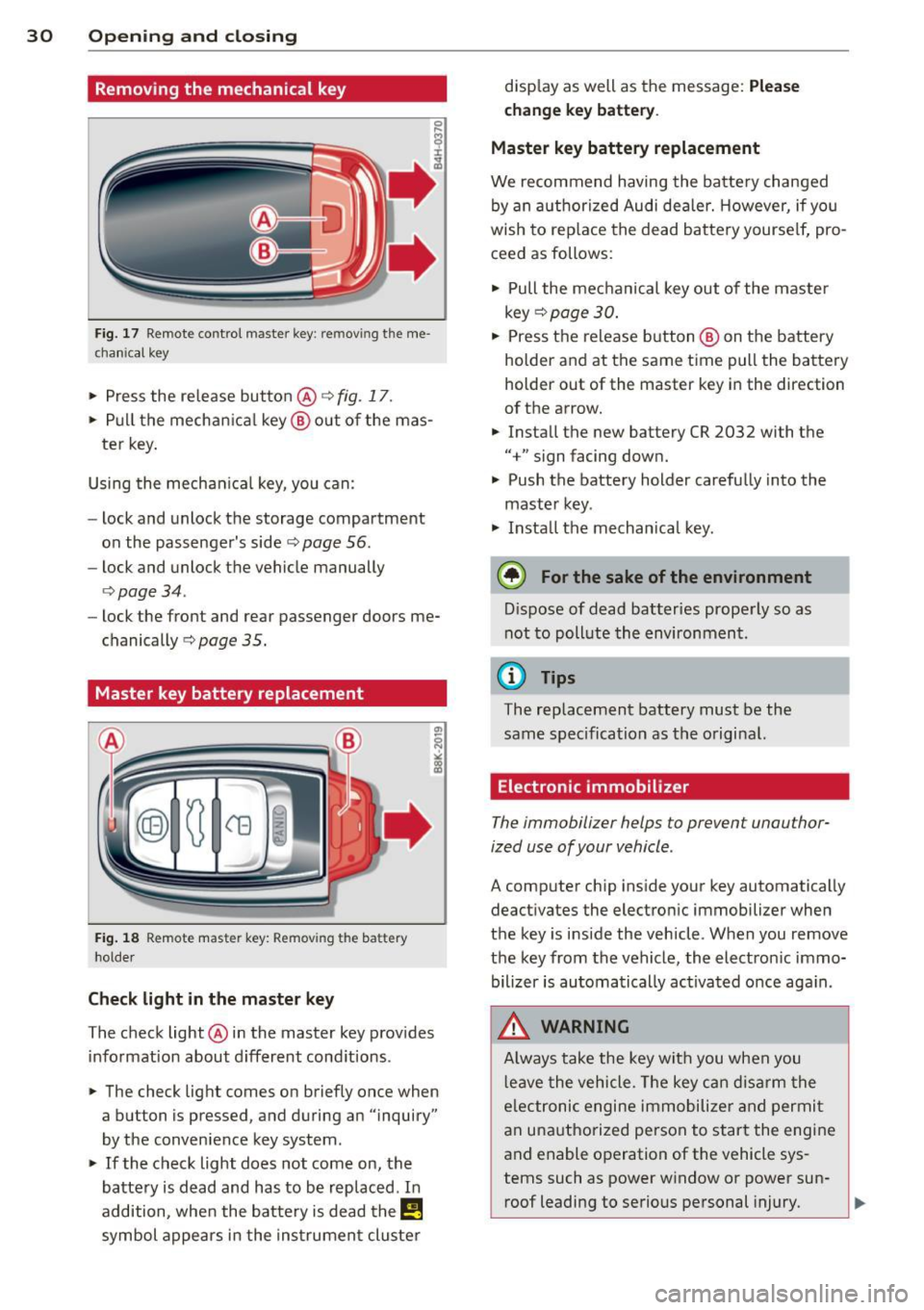
Removing the mechanical key
Fig. 17 Remote control master key: remo vin g the me
ch ani cal key
> Press the release button @ c:> fig. 17 .
.. Pull the mecha nica l key @out of the mas
te r key.
Using the mechan ica l key, you can:
- lock and unlock the storage compartment
on the passenger's side
c:> page 56.
- lock and unlock the vehicle manually
<=>page 34.
-lock the front and rear passenger doors me
chanically
c:> page 35.
Master key battery replacement
Fig . 18 Remote mas ter key: Removing the batter y
ho lder
Ch eck light in the master ke y
The check light @in the master key provides
information about d ifferent cond itions .
.. The check light comes on briefly once when
a button is pressed , and during an "inquiry"
by the convenience key system .
> If the check light does not come on, the
battery is dead and has to be replaced . In
addition, when the bat tery is dead the
I!
symbol appears in the instrument cluster disp
lay as well as the message:
Ple ase
c h ange key batt ery.
Ma ster key batter y replacement
We recommend having the batte ry changed
by an authorized Audi deale r. However, if you
wish to rep lace the dead battery yourse lf, pro
ceed as follows:
> Pull the mechanical key out of the master
key
c:> page 30 .
.. Press the release button @ on the battery
holder and at the same time pull the battery
holder out of the master key in the direction
of the arrow .
.. Install the new battery CR 2032 with the
"+" sign facing down.
> Push the battery holder carefully into the
maste r key .
> Insta ll the mechanical key.
@ For the sake of the env ironment
D ispose of dead batteries properly so as
not to pollute the environment.
(D Tips
The replacement battery must be the
same specification as the original.
Electronic immobilizer
The immobilizer helps to prevent unauthor
ized use of your vehicle .
A computer chip ins ide your key automatically
deactivates the electronic immobilizer when
the key is inside the vehicle . When you remove
the key from the vehicle, the electron ic immo
bilizer is automatically ac tivated once aga in .
.&, WARNING
-
A lways take the key with you when you
l eave the vehicle . T he key can disarm the
e lectronic engine immobilize r and permi t
an unauthorized person to start the engine
and enable operation of the vehicle sys
tems such as power window or power sun- roof leading to serious personal injury.
~
Page 33 of 294
@ Tips
-The vehi cle ca nnot be sta rte d if an unau
thorized key is used. The vehicle may not
start if another radio device such as a key
for another vehicle or a transponder is
l ocated on the key ring.
- For Declarat ion of Compliance to United
States FCC and Industry Canada regula
tions ¢
page 2 76.
Power locking system
General description
The power l ocking system locks or unlocks all
doors and the rear lid simultaneously.
You ca n lock and un lock the v eh icle cent rally.
You have the following choices:
- Remote master key¢
page 33,
-Door handles with convenience key*
¢ page 33,
-lock cylinder at the dr iver 's door
¢page 34, or
- Power locking switch inside¢
page 34.
Selective unlocking
When t hey a re closed, the door and re ar lid
are loc ked . When unlocki ng, you can set in the
M MI whether only the driver's door or the en
tire vehicle sho uld be un locked
r::!) page 32 .
Automatic locking
The automat ic lo cking fea ture locks all the ve
hi cle doo rs and the rear lid whe n you drive
faster than 9 mph ( 15 km/h) .
The c ar is un locked aga in , when the opening
f u nction in the power lo cking system sw itch
or at one of the door leve rs is ac tuated. The
Auto lock f unction can be turned on and
off in
the M MI
¢ page 32.
Anti-theft alarm warning system
If th e a nti-theft alarm wa rning sys tem de
tec ts a bre ak-in into the vehi cle, aco ust ic and
v isua l wa rning signals are t riggered.
Opening and clo sin g 31
The anti -theft wa rning system is activated au
tomat ica lly when you lock the ve hicle .
It is de
activated when unlocking using the remote
key, w ith the mechan ica l key, and when you
switch the ign ition on .
The alarm a lso t urns
off when the a larm cycle
has expired .
Turn signals
When you unl ock the ve hicle, the turn s ignals
f lash twice . When yo u lock the veh icle t he
tu rn s ignals f lash once.
If t hey do not flash ,
one of the doo rs, the rear lid o r th e hood is
not locked.
Unintentionally locking yourself out
In the fo llow ing cases there sa feg uards to
prevent yo u locki ng you r remo te mas ter key in
the ve hicl e:
- The vehicle does not lo ck wit h the cen tral
lo ck ing swit ch
r::!) page 34 if t he drive r's
door is open.
- On veh ides with co nvenience key*, if the
mos t recen tly use d m aste r key is in the lug
gage compartment, the rear lid is a utomat i
cally un locked again after it is closed.
Do no t lock your ve hicle with the
re mote mas
ter key or convenience key*
unti l all doors
and the rear lid are closed. In this way you
avo id lock ing yo urself out acc identally .
Power side door closer*
The vehicle doo rs a re equippe d with a powe r
s ide d oor closer . W he n clos ing a doo r, y ou o n
l y have to le t it fall light ly in to the latch . The
doo r will the n automatically close by itself
¢ ,& .
&_ WARNING
-When you lock yo ur vehicle from o utside,
nobody -espec ially childre n -should re
main inside the ve hicle. Remember,
when yo u lock the vehicle from t he out
side the wi ndows cannot be o pened from
the inside. .,.
Page 35 of 294
Locking and unlocking the vehicle with
the remote control
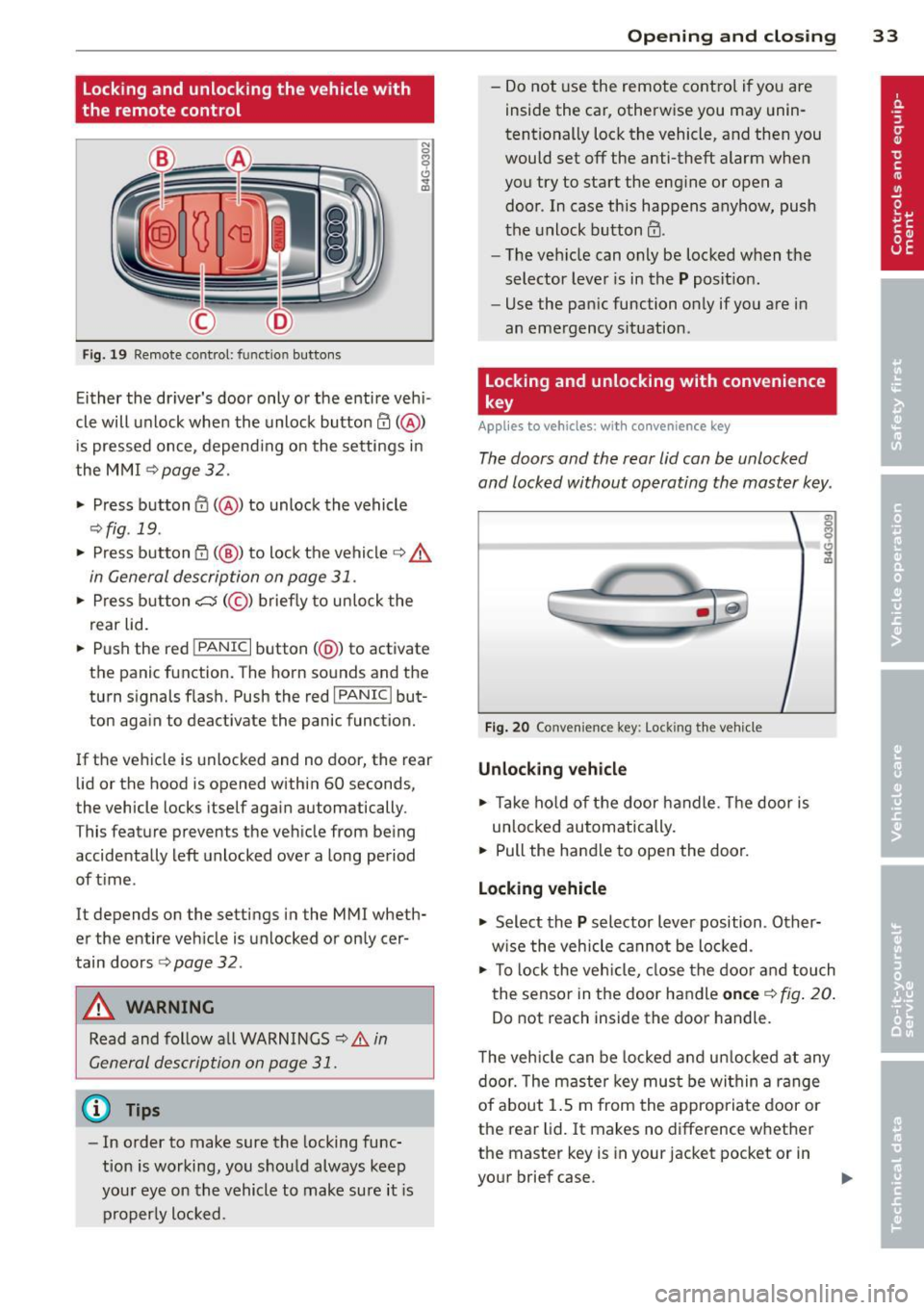
F ig. 19 Remote control: func tion buttons
Either the dr iver's door only or the entire veh i
cle will unlock when the unlock button
en(@)
is pressed once, depend ing on the settings in
the MMI
c>page 32.
.. Press button 0 (@ ) to unlock the vehicle
¢fig. 19 .
.. Press button {f) (@ ) to lock the vehicle q .&.
in General description on page 31 .
.. Press button cs(@) briefly to unlock the
rear lid .
.. Push the red
!PANIC I button( @) to activate
the panic function. The horn sounds and the
turn signal s flash. Push the red
I PANIC ! but
ton again to deactivate the panic function.
If the vehicle is unlocked and no door, the rear
lid or the hood is opened within 60 seconds,
the vehicle locks itself again automatically .
This featu re prevents the vehicle from being
accidentally left unlocked over a long period
of time .
It depends on the settings in the MMI wheth
er the entire vehicle is unlocked or only cer
tain doors
r::> page 32.
A WARNING
Read and follow all WARNINGS ¢.&. in
General description on page
31.
@ Tips
-In order to make sure the locking func
tion is working, you should always keep
your eye on the vehicle to make sure it is
properly locked.
Opening and closing 33
-Do not use the remote cont rol if you are
inside the car, otherwise you may unin
tentionally lock the vehicle, and then you
would set
off the anti-theft alarm when
you try to start the engine or open a
door . In case this happens anyhow, push
the unlock button@ .
- The veh icle can only be locked when the
selector lever is in the
P posit ion.
- Use the panic function only if you are in
an emergency situation .
Locking and unlocking with convenience
key
Applies to vehicles: w ith conven ience key
The doors and the rear lid can be unlocked
and locked without operating the master key .
Fig. 20 Conve nience key : Lock ing th e vehicle
Unlocking vehicle
.. Take hold of the door handle . Th e door is
un locked automat ically.
.. Pull the handle to open the door.
Locking vehicle
.. Select the P selector lever position . Other
w ise the veh icle cannot be locked.
.. To lo ck the veh icle, close the door and touch
the sensor in the door handle
once c> fig. 20.
Do not reach inside the door handle .
T he vehicle can be locked and unlocked at any
door. The master key must be within a range
of about 1.5 m from the appropriate door or
the rear lid. It makes no difference whether
the master key is in your jacket pocket or in
your brief case.
Page 36 of 294
34 Openin g and clo sing
It is not possible to re-open the door for a
brief period direct ly after closing it. This al
l ows you to ensure that the doors are properly
locked.
I t depends on the settings in the MMI wheth
er the entire vehicle is unlocked or one of the
doors
c:::> page 32.
A WARNING
Read and follow a ll WARNINGS c:> & in
General description on page
31.
(D Tips -
If your vehicle has been stand
ing fo r an ex
tended period, please note the follow ing:
- The proximity sensors are deactivated af-
ter a few days to save power. Yo u then
have to pull on the door handle once to
unlock the ve hicle and a second time to
open the veh icle.
- To prevent the battery from being dis
charged and to preserve your veh icle's
ability to start for as long as possible,
the energy manageme nt system gradu
a lly switches off unnecessary co nven
i en ce f unct ions.
It is po ssible t hat you
will not be able to unlock yo ur vehicle us
i ng these conven ience f unctions.
- Fo r De clarat ion of Compliance to Uni ted
St ates FCC an d Indus try C anad a regu la
tions
c::> page 2 76.
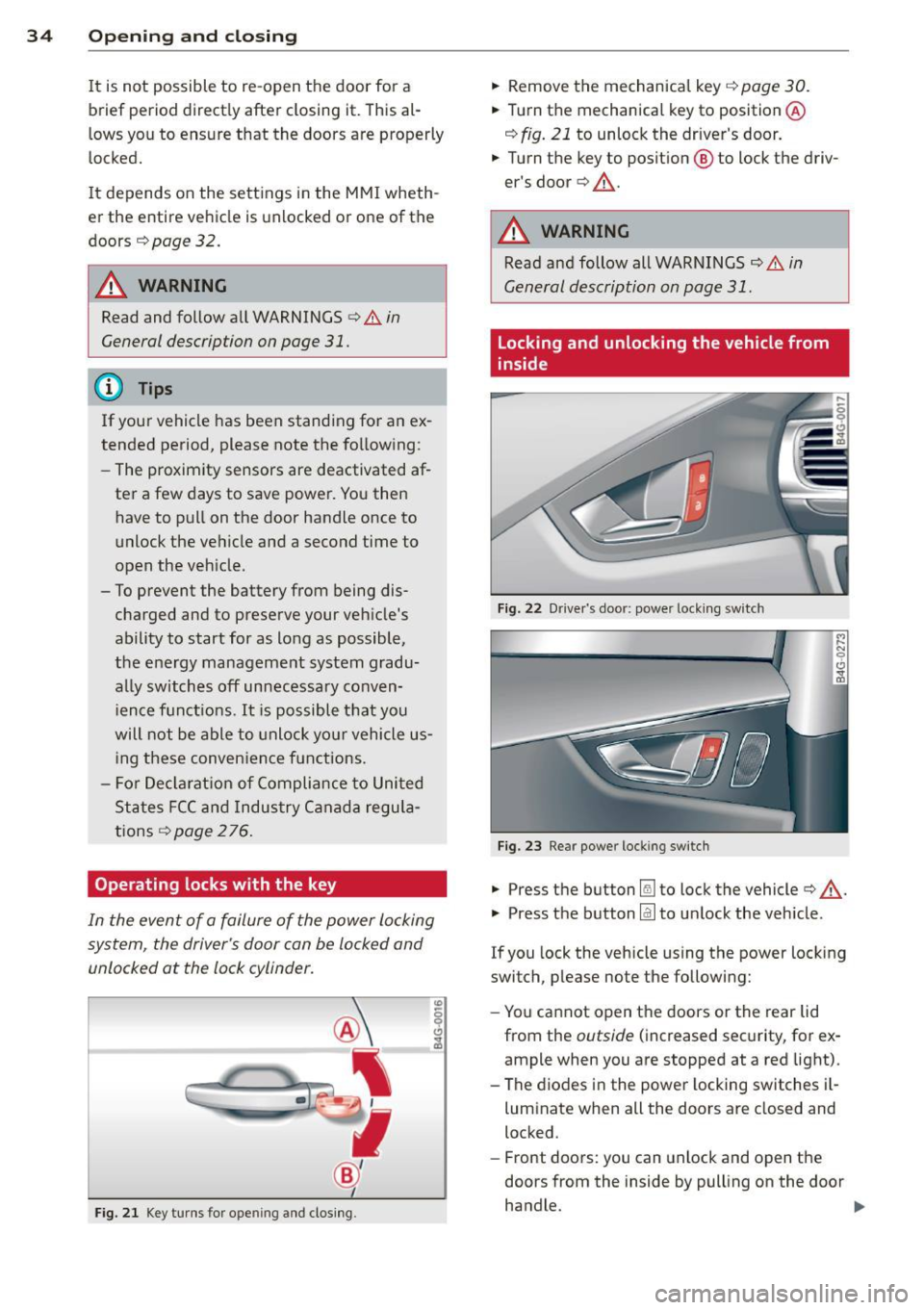
Operating locks with the key
In the event of a failure of the power locking
system, the driver's door con be locked and
unlocked at the lock cylinder.
F ig . 21 Key tu rns for opening and clos ing .
.,. Remove the mechanica l key c::> page 30 .
.,. Tu rn th e mechanical key to position @
c:::> fig. 21 to unlock the driver's door .
.,. Turn the key to posit ion @ to lock the driv
er's door
c:> ,& .
A WARNING
Read and follow all WARNINGS c::> & in
General description on page
31 .
Locking and unlocking the vehicle from
inside
Fig. 22 Dr ive r's door: power lock ing swi tch
Fig . 2 3 Rear power locking switch
.,. Press th e button Im to lock the vehicle c:> ,& .
.,. Press th e button @J to un lock the vehicle.
If you lock the vehicle using the power locking
switch, please note the following:
- Yo u cannot open the doors or the rear lid
from the
outside ( increased sec urity, for ex
ample when you are stopped at a red light).
- The diodes in the powe r locking switches i l-
luminate when all the doors are closed and
locked.
- Front doors: you can unlock and open the
doors from the inside by pulling on the door
handle. .,.
Page 37 of 294
- Rear doors: pull the door handle once to re
lease the lock. Pull the hand le
again to open
the door .
- If you have a crash and the airbag is activat
ed, the doors automatically un lock .
.&_ WARNING
- The power locking switch works with the
ignition off and automatically locks the
entire vehicle when it is actuated.
- On a vehicle locked from the outside the
power locking system switch is inopera
tive.
- locking doors from the inside can help
prevent inadvertent door opening during
an acc ident and can also prevent unwant
ed entry from the outside. locked doors
can, however, delay assistance to veh icle
occupants and hold up rescue efforts
from the outside in an acc ident or other
eme rgency .
@ Tips
Your vehicle is locked automatically at a
speed of9 mph (15 km/h)
qpoge 31. You
can unlock the vehicle again usin g the
opening funct ion in the power locking sys
tem switch.
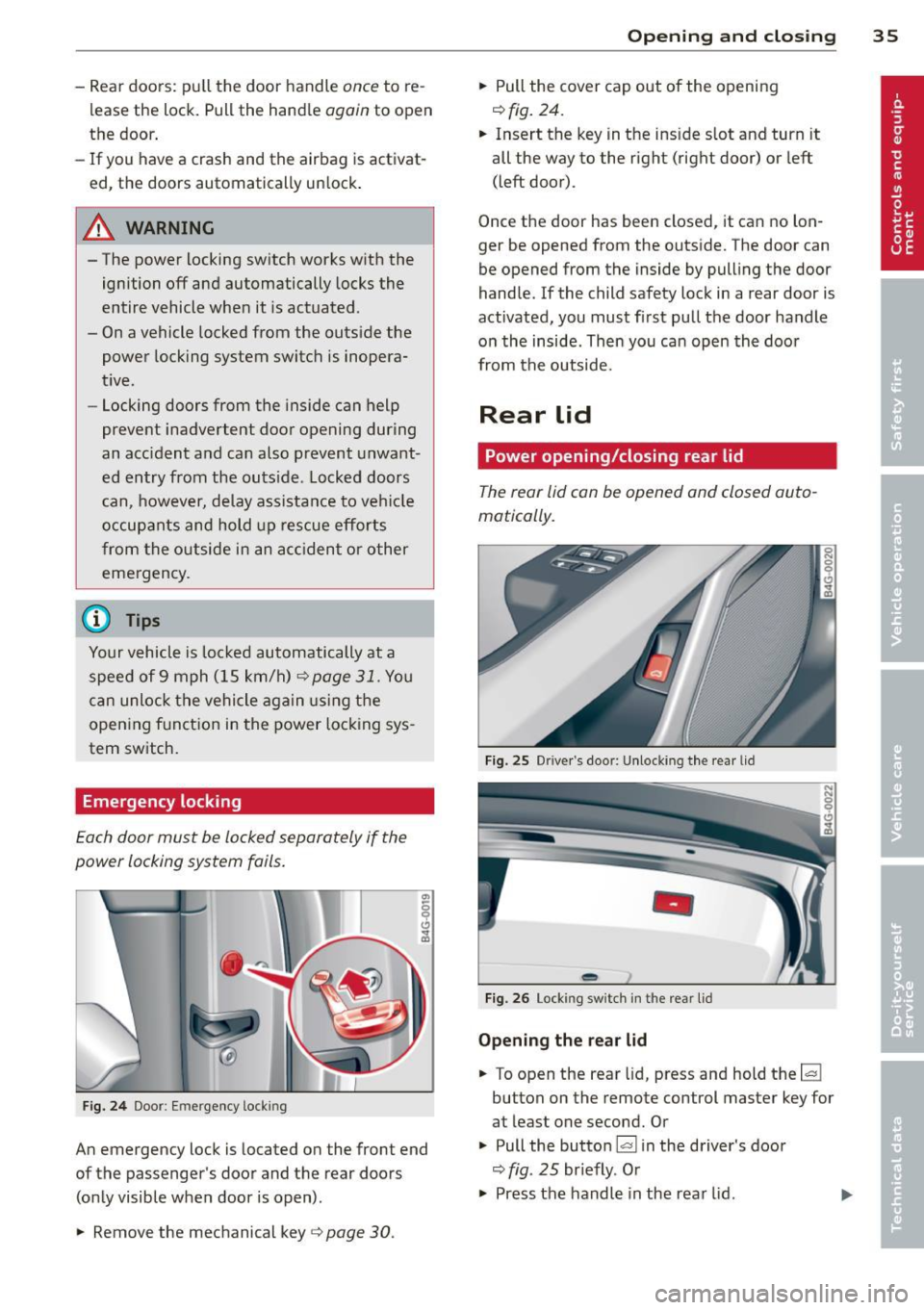
Emergency locking
Each door must be locked separately if the
power locking system foils .
Fig. 24 Doo r: Em ergency lock ing
An emergency lock is located on the front end
of the passenger's door and the rear doors (only visible when door is open) .
.,. Remove the mechanical key
q page 30 .
Opening and closing 35
.,. Pull the cover cap out of the opening
r=> fig. 24.
.. Insert the key in the ins ide s lot and turn it
all the way to the right (right door) or left
(left door) .
Once the door has been closed, it can no lon
ger be opened from the outside. The door can
be opened from the inside by pulling the door
handle .
If the child safety lock in a rear door is
activated, you must first pull the door handle
on the inside . Then you can open the door
from the outside.
Rear lid
Power opening/closing rear lid
The rear lid con be opened and closed auto
matically.
Fig. 25 Drive r's doo r: Unlocki ng the rear lid
-
Fig. 26 Lock ing switch in t he rear lid
Opening the rear lid
.. To open the rear lid, press and hold the~
button on the remote control master key for
at least one second. Or
.,. Pull the button~ in the driver 's door
r=> fig. 25 br iefly. Or
.,. Press the handle in the rear lid. ..,.
Page 38 of 294
36 Openin g and clo sing
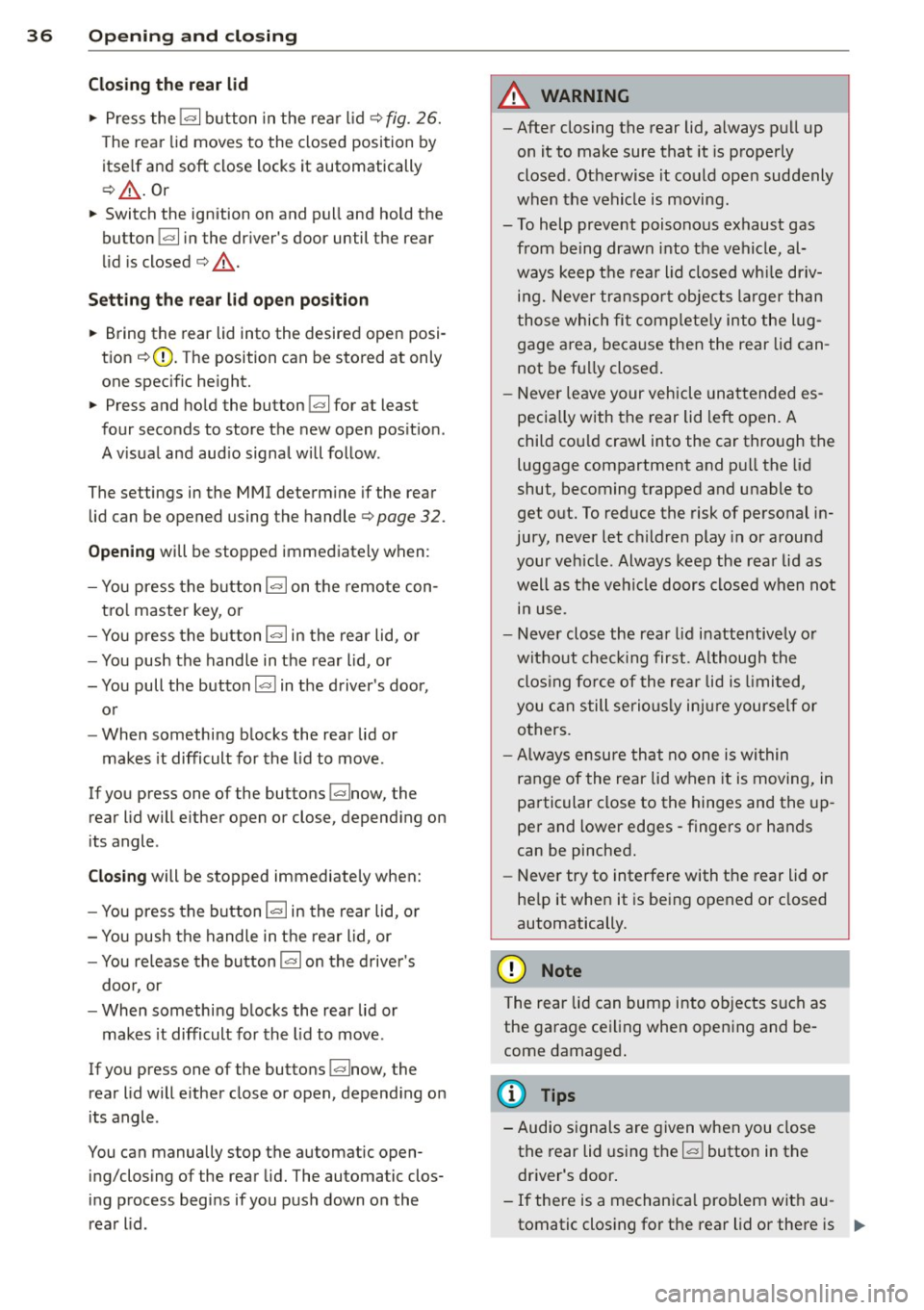
Cl os ing th e rea r lid
.. Press the lc:::, 1 button in the rear lid ¢ fig. 26.
T he rear lid moves to the closed position by
itse lf and soft close locks it automatically
¢ _& .Or
.. Switch the ignition on and pull and hold the
button
!c:::, I in the driver 's door until the rear
lid is closed ¢
_A.
Setting th e rear lid op en po siti on
.. Bring the rear lid into the desired open posi
tion ¢(D. The position can be stored at only
one specif ic height.
.. Press and hold the button
!c:::, I for at least
four seconds to store the new open pos ition.
A v isual and aud io signal will follow .
The settings in the MMI determine if the rear lid can be opened using the handle ¢
page 32.
Opening will be stopped immediately when :
- You press the b utton
lc:::, I on the remote con -
tro l master key, or
- You press the button
la l in the rear lid, or
- You push the handle in the rear lid , or
- You pull the button
l a! in the driver's door,
or
- When something blocks the rear lid or
makes it difficult for the lid to move.
If you press one of the buttons ~now, the
rear lid will either open or close, depending on
its angle .
Closing will be stopped immediate ly when:
- You press the button
lc:::, I in the rear lid, or
- You push the handle in the rear lid , or
- You release the button
la l on the driver's
door , or
- When something blocks the rear lid or
makes it difficult for the lid to move .
If you press one of the buttons ~now, the
rear lid will either close or open, depending on
its angle .
You can manually stop the automatic open ing/closing of the rear lid. The automatic clos
ing process begins if you push down on the
rear lid .
A WARNING
-After closing the rear lid, always pull up
on it to make sure that it is properly
closed . Otherwise it could ope n suddenly
when the vehicle is moving .
- To help prevent poisonous exhaust gas from being drawn into the vehicle, al
ways keep the rear lid closed wh ile driv
ing. Never transpo rt objects la rger than
those which fit complete ly into the lug
gage area, beca use then the rear lid can
not be fu lly closed .
- Never leave your veh icle unattended es
pecia lly with the rear lid left open. A
child cou ld craw l into the car through the
luggage compartment and pu ll the lid
shut, becoming trapped and unable to
get out. To reduce the risk of personal in
jury, never let c hildren play in or around
your ve hicle. Always keep the rear lid as
well as the vehicle doors closed when not i n use .
- Never close the rear lid inattentively o r
without check ing first . Although the
clos ing force of the rear lid is limited,
you can still serious ly injure yourself or
others.
- Always ensure that no one is within
range of the rear lid when it is moving, in
particular close to the hinges and the up
per and lower edges -fingers or hands
can be pinched.
- Never try to interfere with the rear lid or
he lp it when it is be ing opened or closed
automatically.
(D Note
The rear lid can bump into ob jects such as
the garage ceiling when opening and be
come damaged .
(D Tips
-Audio signals a re given when you close
the rear lid using the
l a! button in the
driver's door .
- If there is a mechanica l problem with au
tomatic closing for the rear lid or there is .,..
Page 40 of 294
38 Opening and closing
Power windows
Controls
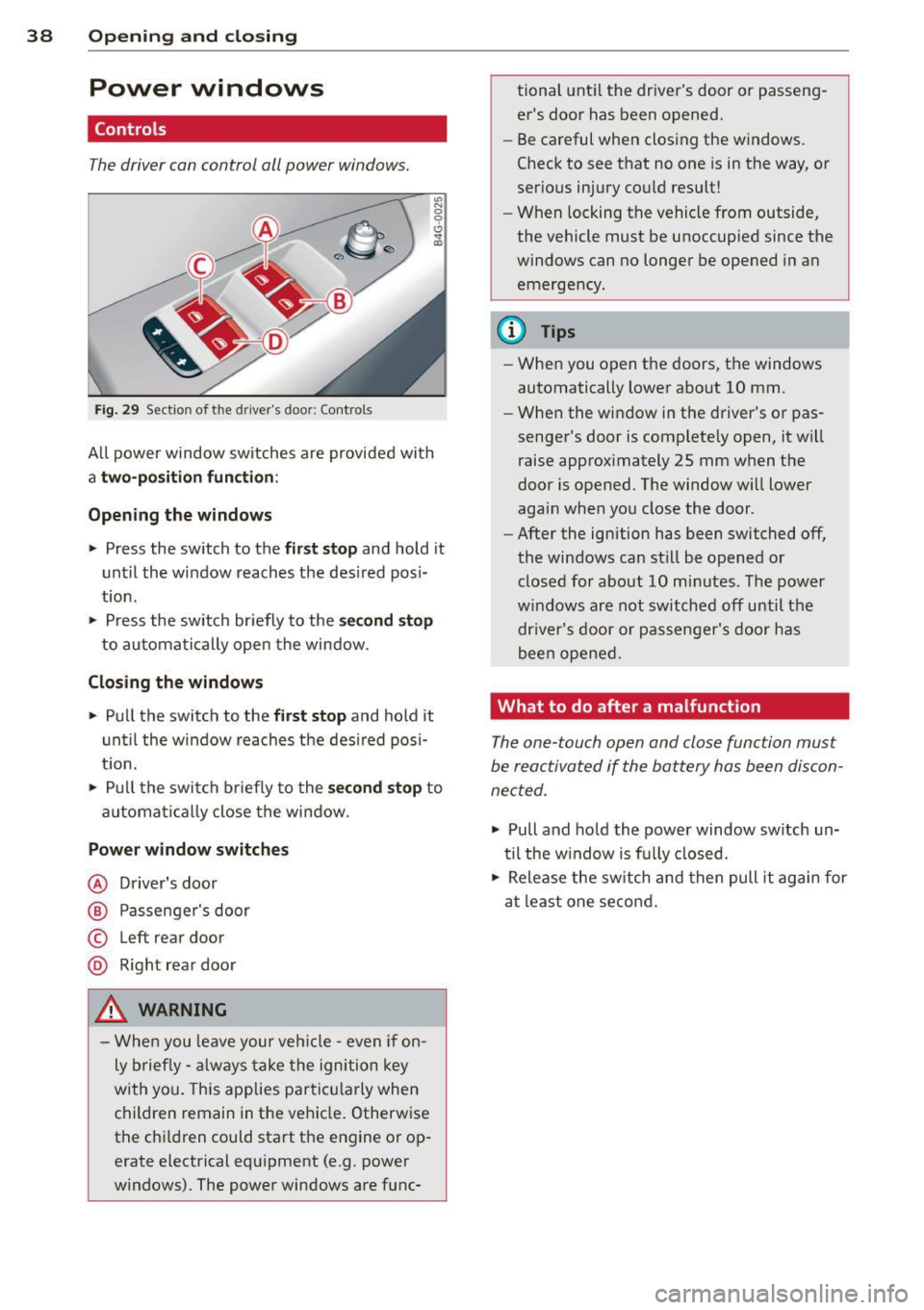
The driver can con trol all power windows.
"' N 0 0 6
Fig . 29 Sect io n of the drive r's d oor : Contro ls
"' m
All power window sw itches are provided with
a two -pos ition function:
Opening the windows
.. Press the switch to the first stop and ho ld it
until the window reaches the desired posi
tion .
.. Press the switch briefly to the
second stop
to automatically open the window .
Closing the windows
.. Pull the switch to the first stop and hold it
until the window reaches the desired pos i
t ion.
.. Pull the switch briefly to the
second stop to
automa tically close the window .
Power window switches
@ Driver's door
@ Passenger's door
© Left r ear door
@ Right rear door
_& WARNING
- When you leave your veh icle -even if on
ly brief ly -always take the ignition key
with you. This applies particu larly when
children remain in the veh icle. Otherwise
the chi ldren could start the engine or op
erate electrical equipment (e.g . power
windows). The power windows are func- tional
until the driver's door or passeng
er's door has been opened.
- Be careful when closing the windows.
Check to see that no one is in the way, or
serious injury could result!
- When locking the vehicle from outside,
the vehicle must be unoccupied since the
windows can no longer be opened in an
emergency.
@ Tips
- When you open the doors, the windows
automatically lower about 10 mm .
- When the window in the driver's or pas
senger's door is complete ly open, it wi ll
raise approximately 25 mm when the
door is opened . The window will lower
again when you close the door .
- After the ignition has been switched off,
the windows can still be opened or closed for about 10 minutes . The power
w indows are not switched off until the
dr iver's door or passenger's door has
been opened.
What to do after a malfunction
The one-touch open and close function must
be reactivated if the battery has been discon
nected .
.. Pull and hold the power window switch un
til the w indow is fully closed .
.. Release the switch and then pull it again for
at least one second.
Page 42 of 294
40 Openin g and clo sing
The sun shade can be opened and closed by
hand when the sunroof is closed.
A WARNING
Pay careful attention when closing the
sliding/tilting sunroof - otherw ise serious
injury could result! A lways take the key
w ith you when leaving the vehicle .
(D Note
Always close your sliding/tilting sunroof
when leaving your vehicle. Sudden rain can
cause damage to the interior equipment of
your veh icle, part icu larly the electronic
equ ipment .
Emergency closing of the sliding/tilting
sunroof
If the sun roof detects an object in its path
when it is closing, it will open again automati
cally. In this case, yo u can close the roof w ith
the power emergency closing function.
~ Wi thin five seconds after the sunroof opens
automatica lly, pull the switch until the roof
closes .
Page 43 of 294
Clear vision Lights
Switching the headlights on and off
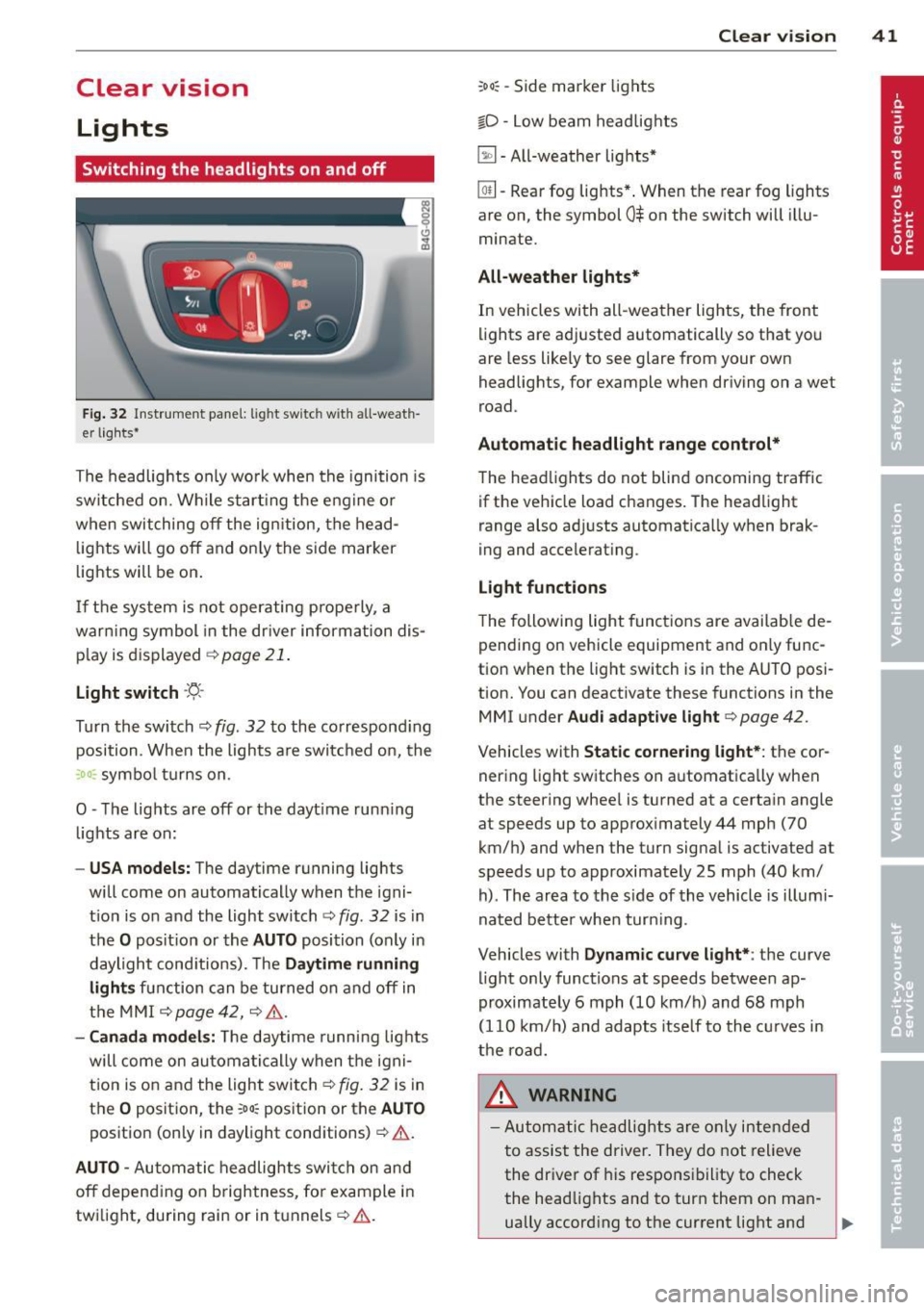
Fig . 32 Instrument pane l: lig ht sw itc h wit h all -weath
er lights•
The headlights only wo rk when the ignition is
switched on. Wh ile start ing the eng ine o r
when switching off the ign ition, the head
lights will go off and on ly the side marker
lights will be on .
If the system is not operating p rope rly, a
war ning symbol in the dr iver information dis
p lay is d isplayed
c::> page 21 .
Light switch ·'t!- -
Tu rn the switch c::> fig . 32 to the correspond ing
position . When the lights a re switched on, the
:oo: symbo l tu rns on .
0 -The lig hts are off or the dayt ime runn ing
lights are on:
- USA models: The daytime running ligh ts
will come on automatically when the igni
t ion is on and the light switch
c::> fig . 32 is in
the O posit ion or the AUTO position (only in
daylight cond itions). The Daytime running
light s function can be turned on and off in
the MMI
c::> page42, c::>A .
-Ca nada model s: The daytime running lig hts
will come on automa tically when the igni
t ion is on and the light switch
c::> fig . 32 is in
the O position, the
:oo: pos ition or the AUTO
position (only in daylight conditions)
c::> A .
AUTO -Automatic headlights swi tch on and
off depend ing o n brightness, for example i n
tw ilight, during rain or in tunnels
c::> &. .
:oo: -Side marke r lights
io -Low beam headlights
~ -All-weather lig hts*
Clear vi sion 41
[Q!l -Rear fog lights* . When th e rear fog lights
a re on, the symbol
0$ on the switch will illu
mina te.
All-weath er lights*
In vehicles with all-weather lights, the front
li ghts are adj usted automatically so that you
are less like ly to see glare from your own
headligh ts, for example when driving on a wet
road .
Automatic headlight range cont rol*
The head lights do not blind oncoming traffic
if the vehicle load changes . The headlight
range also ad justs automatica lly when brak
i ng and accelerat ing .
Light function s
T he following light funct ions are avai lab le de
pending on vehicle equipment and on ly func
tion when the light switch is i n the AUTO posi
tion. You c an deactiv ate these functions in the
MMI under Audi adaptive light
c::> page 42 .
Vehicles w ith Static cornering light* : the cor
ner ing light sw itches on automatica lly when
the stee ring whee l is tu rned at a ce rta in angle
at speeds up to approx imately 44 mph (70
km/ h) and when the turn signa l is ac tiva ted a t
speeds up to approximately 25 mph (40 km/
h) . The area to the s ide of the vehicle is illumi
nated bette r whe n turn ing .
Vehicles with Dynamic curve light* : the
curve
li ght only functions at speeds betwee n ap
proximately 6 mph (10 km/h) and 68 mph
(110 km/ h) and adapts itself to the cu rves in
the ro ad.
_& WARNING
- Autom atic headlig hts are only intended
to assist the driver. They do not relieve
the dr iver of his responsibility to check
the head lights and to turn them on man -
ually accord ing to the current light and
~