warning AUDI S7 2012 Repair Manual
[x] Cancel search | Manufacturer: AUDI, Model Year: 2012, Model line: S7, Model: AUDI S7 2012Pages: 294, PDF Size: 73.33 MB
Page 80 of 294
78 On the road
pass someone. The speed you saved earlier
will resume as soon as you release the acceler
ator peda l.
If , however, you exceed your saved speed by
6 mph (10 km/h) for longer than 5 minutes,
the cruise contro l wi ll turn off temporarily.
The green symbo l
IB;(l)~i~ (US models) ;II
(Canad ian models) in the display will go out
but the saved speed remains the same.
Presetting your speed
Applies to vehicles: with cruise control
You con preset your desired speed while the
vehicle is not moving .
.. Switch on the ignition .
.. Pu ll lever into position@¢
page 77,
fig. 79.
> Press the lever in the 0 or 0 direction to
i ncrease or decrease your speed .
.. Release the lever to save that speed .
This funct ion makes it possible, for example,
to save the speed you want before driving on
the highway . Once on the highway, activate
the cruise control by pull ing the lever toward
@ .
Switching the system off
Applies to vehicles: with cruise control
Temporary deactivation
.. Press the brake peda l, or
.. Press the lever into position @ (not clicked
into pla ce)
¢ page 77, fig. 79, or
.. Drive for longer than 5 minutes at more
than 5 mph (10 km/h) above the stored
speed.
Switching off completely
.. Press lever into position @(clicked into
pla ce), o r
.. Switch the ignition off.
The system reta ins the saved speed if you de
activate the cruise control tempo rari ly. To re
sume the saved speed, release the brake ped
a l and pull the lever to position@. Switching
the ignition off erases the saved
speed.
A WARNING
-You shou ld only return to the saved speed
if it is not too fast for the c urrent traffic
conditions -risk of an accident!
Page 81 of 294

Adaptive cruis e control an d bra kin g guard 79
Adaptive cruise control
and braking guard
Introduction
App lies to vehicles: with adaptive cruise co ntrol
The adaptive cruise control system assists the
driver by regulating vehicle speed and helping
to maintain a set distance to the vehicle
ahead, within the limits of the system. If the
system detects a moving veh icle up ahead,
adaptive cruise control can brake and then ac
celerate your vehicle . T his helps to make dr iv
ing more comfortable both on long highway
stretches and in stop-and-go traffic.
Aud i brak ing guard can warn you about an im
pending col lision w ith a vehicle up a head that
is slower or has s lowed down and start slow
ing your vehicle down with the brakes
¢page 85.
Adaptive cruise control and Audi brak ing
guard have technica l limitations that you
must know, so p lease read this sect ion care
fu lly, understand how the system works and
use them properly at all times.
General information
General information
Ap plies to vehicles: with adaptive cruise co ntrol
Fig. 81 Fr ont of th e ve hicle : sensors an d video camera
The areas that contain the radar and ultrason
ic sensors and the video camera
¢ fig. 81
must never be covered by stickers, or other
things or coated with dirt, insects, snow or ice
that will interfe re with the adapt ive cru ise
control system and Audi braking guard . Re
move snow with a hand brush and remove ice with a de-icing spray that does not contain
solvents.
T
he function of the Adaptive cruise cont ro l
system and A udi braking guard is limited un
der some conditions.
- Objects can on ly be detected when they are
w ith in sensor range
¢page 81, fig. 84 .
-The system has a limited ability to detect
objects that are a shor t distance ahead,
off
to the side of your vehicle or moving into
your lane from the front or moves into your
lane from the side .
-When driving through curves
¢ page 80.
- Some kinds of veh icles are hard to detect;
for examp le motorcycles, veh icles with high
ground clearance or overhanging loads may
be detected when it is too late or they may
not be detected at a ll.
- Stationa ry objects
c::> page 80.
A WARNING
Improper use of the adaptive cruise con
trol can cause collisions, other accidents
and serious personal injury.
- Never let the comfort and convenience
that adaptive cruise control and Audi brak ing guard offer distract you from the
need to be alert to traffic conditions and
the need to remain in full control of your
veh icle at a ll t imes,
- Always remember that the adaptive
cru ise cont rol and Aud i brak ing guard
have lim its -they will not s low the vehi
cle down or maintain the set d istance
when yo u drive towards an obstacle or
someth ing on or near the road tha t is not
mov ing, such as vehicles stopped in a
traffic jam, a stalled or disabled vehicle.
If registered by the radar sensors, vehi
cles or obstacles that are not moving can
trigger a collision warning and if con
f irmed by the video camera, an acute col
lision warning.
- Always remember that the adaptive
cru ise contro l cannot detect a vehicle
that is driving towards you in your traffic
-
lane and that it cannot detect narrow ..,.
Page 84 of 294

82 Adaptive cruise control and braking guard
Setting the speed and activating
regulation
.. To set the current speed, press the I SET !
button ¢ fig. 85. The set speed is shown in
the tachometer @and in the display
¢
fig . 86. You must also press the brake
pedal when the vehicle is stopped.
Switching adaptive cruise control off
.. Push the lever away from you into position
@ until it clicks into p lace. The message
ACC off appears.
Indicator lamps and messages in the instru
ment cluster display inform you about the cur
rent system status and settings.
@ Indicator lights
II -adaptive cruise control is switched on. No
vehicles are detected up ahead. The stored
speed is ma intained.
I -A moving vehicle is detected up ahead.
The adaptive cruise control system regulates
the speed and distance to the moving vehicle
ahead and acce lerates/brakes automat ically.
fij-adaptive cruise control is switched on. A
moving vehicle up ahead was detected. Your
vehicle remains stopped and will not start driving automatically.
I-When a utomat ic brak ing is not able to
keep enough distance to a previously detected
moving vehicle up ahead, you must take con
trol and brake¢
page 83, Prompt for driver
intervention.
© Display
If adaptive cruise control is not shown in the
display, you can call it up with the multifunc
tion steering wheel buttons¢
page 22.
Based on the symbo ls in the display, you can
determine if the system is main taining a dis
tance to the vehicle ahead and what that dis
tance is .
No vehicle -No vehi cle ahead was detected.
White vehicle -A vehicle ahead was detected.
Red vehicle -Prompt for the driver to take ac
tion ¢
page 83 .
Both arrows on the scale © indicate the dis
tance to the vehicle ahead. No arrow appears
when the vehicle is on an open road and the re
is no object ahead. If an object is detected
ahead, the arrow moves on the scale.
T he green zone on the scale shows the stored
distance . For information on changing the
stored distance ¢
page 84. If the distance
selected is too close or may soon become too
close, the arrows move into the red zone on
the scale.
A WARNING
Improper use of the adaptive cruise con
trol can cause collisions, other accidents
and serious personal injur ies.
- Pressing the
!SET ! button when driv ing at
speeds below
20 mph (30 km/h), w ill au
tomatically accelerate the vehicle to
20
mph (30 km/h), which is the minim um
speed that can be set.
(D Tips
-If you switch the ignit ion or the adaptive
cruise contro l off, the set speed is e rased
from the system memory.
- You cannot switch the Electron ic Stabili
zation Program (ESP) to the SPORT mode
when adaptive cruise control is sw itched
on.
Driving in stop-and-go traffic
Applies to vehicles: with adaptive cruise control
The adaptive cruise control system also as sists you in stop-and-go traffic. If a previous
detected vehicle ahead stops, your vehicle will
brake to a stop, within the limits of the sys
tem.
.. To resume driving with adaptive cruise con
trol, tap the acce lerator pedal or
.. Pull the lever toward you into position @
¢ page 81, fig. 85. .,.
Page 85 of 294

Adaptive cruise control and braking guard 83
@ Tips
-If adaptive cruise contro l is active and
your vehicle does not start dr iving as ex
pected after pulling the lever once, you
can start out aga in by tapping the accel
erator pedal.
- If an obstacle is detected when your ve
hicle starts dr iv ing, the system w ill
prompt you to take over
c:> page 83.
Your vehicle w ill dr ive more slowly when
starting. This may also happen in some
situations when there no obstacle is ap
parent .
Interrupting cruise control
App lies to vehicles: with a daptive cruise co ntrol
Requirement : adaptive cruise control must be
switched on.
Overriding cruise control
• To accelerate manually, pull the lever to
ward you into position@¢
page 81, fig. 85
and hold it th ere . The message ACC override
appears . Or
• press the accelerator peda l.
• To resume cruise control, release the lever
or take your foot off the accelerator pedal.
Canceling cruise control while driving
• Move the lever into position @. Th e mes
sage
ACC standby appears. Or
• press the brake pedal.
• To resume the stored speed, move the lever
into position @.
Canceling cruise control when stopped
• Push the lever away from you into position
@ . The message
ACC standby appears.
• To resume cruise control, press the brake
pedal and pull the lever toward you into po
sition @.
A WARNING
Improper use of the adaptive cruise con
trol can cause coll is io ns, othe r acc idents
and ser ious personal inj uries. -
Never resume the stored speed if the
speed is too high for prevailing road,
traffic or weather conditions.
Prompt for driver intervention
Applies to vehicles: wit h adapt ive c ruise contro l
Fig. 87 Instrument cluste r: req uest for driv er interve n
tion
In certain situations, the system will prompt
you to take action . For example, braking by
the adapt ive cruise control system is not
enough to maintain enough distance to the
vehicle ahead.
The indicator light
I and the symbol in the
display will warn you about the situation
c:> fig. 87. You w ill also hear an acoustic signal.
- Press the brake pedal to slow your vehicle
down .
Changing the speed
Applies to veh icles: w it h adaptive c ru ise contro l
0
f
• 0
Fig. 88 Operatin g lever: changing the speed
• To incr ease or reduc e the speed in incre
ments,
tap the lever up or down.
• To increase or reduce the speed qu ickly,
hold the lever up or down until the red LED .,._
Page 86 of 294
84 Adaptive cruise control and braking guard
@ reaches the desired speed ¢ page 81,
fig. 86.
Setting the distance and driving
program
App lies to vehicles: with adaptive cruise control
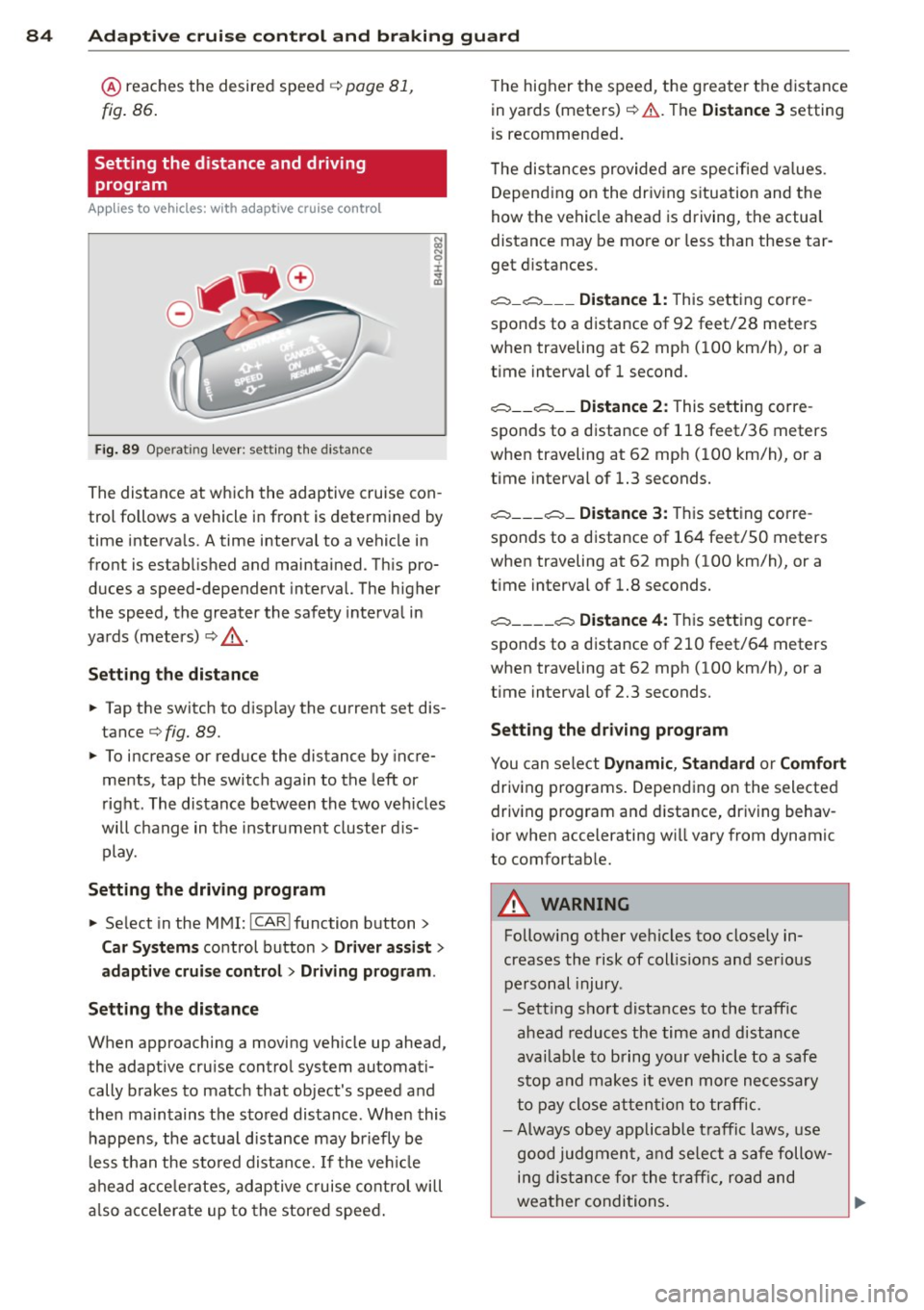
Fig. 89 Opera ting lever: set ting the distance
The distance at which the adaptive cruise con
trol fo llows a vehicle in front is determined by
time intervals. A time interval to a vehicle in
front is established and maintained. This pro
duces a speed-dependent interval. The higher
the speed, the greater the safety interval in
yards (meters)
i::> ,& .
Setting the distance
• Tap the switch to disp lay the current set dis
tance
i::> fig. 89.
• To increase or reduce the distance by incre
ments , tap the switch again to the left or
right . The distance between the two vehicles
wi ll change in the instrument cluster dis
play.
Setting the driving program
• Select in the MMI:
!CAR I function button>
Car Systems control button > Driver assist>
adaptive cruise control
> Driving program .
Setting the distance
When approaching a moving vehicle up ahead,
the adaptive cruise control system automati
cally brakes to match that object's speed and
then maintains the stored distance. When this
happens , the actual d istance may briefly be
less than the stored distance.
If the vehicle
ahead accele rates, adaptive cruise control will
also accelerate up to the stored speed. T
he higher the speed, the g reate r the distance
in yards (meters)
i::> .& . Th e Distance 3 setting
is recommended.
T he distances provided are specified va lues .
Depending on the driving situation and the
how the vehicle ahead is driving, the actua l
distance may be more or less than these tar
get distances .
c::::,_c::::, ___ Distance 1: This setting corre-
sponds to a distance of 92 feet/28 meters
when traveling at 62 mph (100 km/h), or a
t ime interval of 1 second.
c::::, __ c::::, __ Distance 2: This setting corre
sponds to a distance of 118 feet/36 meters
when traveling at 62 mph (100 km/h), or a
time interval of 1.3 seconds.
c::::, ___ c::::,_ Distance 3: This setting corre-
sponds to a distance of 164 feet/SO meters
when traveling at 62 mph (100 km/h), or a
t ime interval of 1.8 seconds.
c::::, ____ c::::, Distance 4: This setting corre-
sponds to a distance of 210 feet/64 meters
when traveling at 62 mph (100 km/h), or a
t ime interval of 2.3 seconds.
Setting the driving program
You can select Dynamic , Standard or Comfort
driving programs. Depending on the selected
driving program and distance, driving behav
ior when accelerating wi ll vary from dynamic
to comfortab le.
A WARNING
Following other vehicles too closely in
creases the risk of collis ions and ser ious
personal injury .
- Sett ing short distances to the traffic
ahead reduces the time and distance
availab le to bring your vehicle to a safe
stop and makes it even more necessary
to pay close attention to traffic .
-
-Always obey applicable traffic laws, use
good judgment, and select a safe follow
ing distance for the traffic, road and
weather conditions.
Page 87 of 294
Adaptive cruise control and braking guard 85
@ Tips
- Distance 3
is set automatically each time
you switch the ignition on.
- Your standard settings are automatically
stored and assigned to the remote con
trol key being used.
Audi braking guard
Descript ion
Applies to vehicles: with adaptive cruise contro l
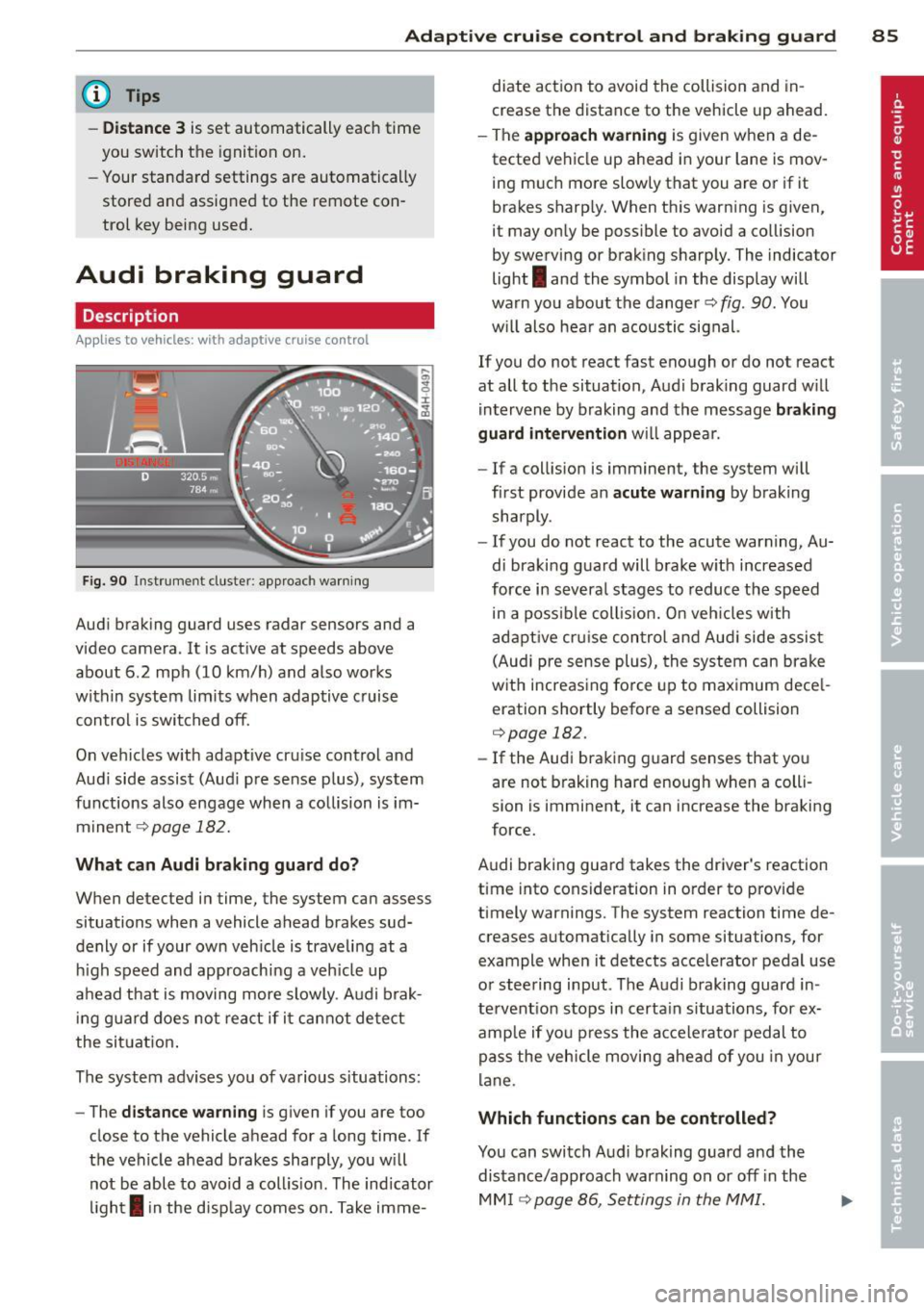
Fig. 90 Instrument cluster: approach warning
Audi braking guard uses radar sensors and a
video camera. It is active at speeds above
about 6.2 mph (10 km/h) and also works
within system limits when adaptive c ruise
control is switched off.
On vehicles w ith adaptive cru ise control and
Audi side assist (Aud i pre sense plus), system
functions also engage when a collision is im
minent
c::> page 182.
What can Audi braking guard do?
When detected in time, the system can assess
situations when a vehicle ahead brakes sud
denly or if your own veh icle is traveling at a
h igh speed and approaching a veh icle up
ahead that is moving more slowly . Audi brak
in g guard does not react if it cannot detect
the situation.
The system advises you of various s ituations:
- The
distance warning is given if you are too
close to the vehicle ahead for a long time. If
the vehicle ahead brakes sharply, you will not be able to avoid a coll is ion . The ind icator
light
I in the disp lay comes on. Take imme- diate action to avoid
the collision and in
crease the distance to the vehicle up ahead.
- The
approach warning is given when a de
tected vehicle up ahead in your lane is mov
ing much more slowly that you are or if it
brakes sharp ly. When this warning is given,
it may only be possible to avoid a collision
by swerving or braking sharply. The indicator
light
I and the symbol in the display will
warn you about the danger
c::> fig . 90 . You
w il l also hear an acoustic signal.
If you do not react fast enough or do not react
at all to the situation, Audi braking guard w ill
intervene by braking and the message
braking
guard intervention
will appear.
- If a collision is imminent, the system will
first provide an
acute warning by braking
sharply.
- If you do not react to the acute warning, Au
di braking guard will brake w ith increased
force in severa l stages to reduce the speed
in a poss ible collis ion. On veh icles with
adaptive cruise control and Audi side assist
(Audi pre sense plus), the system can brake
with increasing force up to maximum dece l
eration shortly before a sensed collision
c::>page 182.
-If the Audi braking guard senses that you
are not brak ing hard enough when a colli
sion is imminent, it can increase the braking
force.
Audi braking guard takes the driver's reaction
time into consideration in order to provide
timely warnings. The system reaction time de
creases automatically in some situations, for
example when it detects acce lerator pedal use
or steering input . The Audi braking guard in
tervent ion stops in certa in situations, for ex
amp le if you press the accelerato r pedal to
pass the vehicle moving ahead of you in your
lane .
Which functions can be controlled?
You can switch Audi braking guard and the
distance/approach warning on or
off i n the
MM I ¢ page 86, Settings in the MMI.
Page 88 of 294

86 Adapti ve crui se co ntrol a nd bra king guard
& WARNING
The Audi braking guard is an assist system
and cannot prevent a collision by itself.
The driver must always intervene . The driv
er is always responsible for braking at the
correct time.
- Always pay close attention to traffic, even when the Audi braking guard is
switched on. Be ready to intervene and
be ready to take comp lete control when
ever necessary. Always keep the safe and
legal distance between your vehicle and
vehicles up ahead.
- Audi braking guard works within limits
and w ill not respond outs ide the system
limits, for examp le when approaching a
stopped vehicle or stationary obstacle
(end of a traffic jam or vehicle that has
broken down in traffic).
- Always remember that the radar sensor
for the Audi braking guard works only
within defined detection and range limits
that may prevent the proper detection of
other vehicles.
- The radar sensor's function and range
can be reduced by rain, snow and heavy
spray. moving vehicles up ahead may not
be promptly detected or may not be de
tected at all.
- Reflective surfaces includ ing crash barr i
ers or tunnel entrances may impair the
function of the radar sensor .
(D Tips
Lack of attention can cause coll is ions, oth
er accidents and ser ious personal injuries.
- You can stop the Audi braking guard in- tervention w ith increas ing braking force
by applying the brakes yourself or by ac
celerat ing rapidly .
- Audi braking guard error messages
.:> page 86.
Settings in the MMI
Applies to vehicles: wit h adaptive cruise contro l
., Sele ct: I CAR I function button > Car system s
contro l button > Driv er a ssis t> Audi brak
in g gu ard .
S ys tem -
Switch Audi braking guard On and
Off. When you switch the ignit io n on, the
message
Audi brakin g gu ard off appears in
the instr ument cluster disp lay if the system is
switched off.
Earl y wa rnin g -The distan ce and approach
warnings in the d isplay can be switched
On /
Off .
(D Tips
-Yo ur settings are automatically stored
and assigned to the remote contro l key
being used at the times the settings are
made.
- If you switch the ESP to sport mode, A u
di braking guard switches off a utomati
cally¢
page 186.
Messages
Applies to vehicles: wi th adaptive c ruise control
ACC unav ailable
ACC and braking guard: unavailabl e
The system cannot detect moving vehicles up
ahead co rrectly and is sw itched off . The sen
sors have been displaced or a re not working
properly. The Audi pre sense functions may a l
so be affected.
ACC: unava ilable at this time. No sensor vi
sion
A CC and b raking gu ide: un available at this
time . No sensor vision
This message appears if the sensor view is ob
structed, for examp le by leaves, snow, heavy
spray or d irt. Clean the sensors¢
page 79,
fig. 81.
ACC: un availabl e at this time. Incline too
steep
Page 90 of 294
88 Audi side a ssist
Audi side assist
Lane Change Assistant
Description
App lies to vehicles: wit h side ass ist
The side assist helps you when changing
lanes.
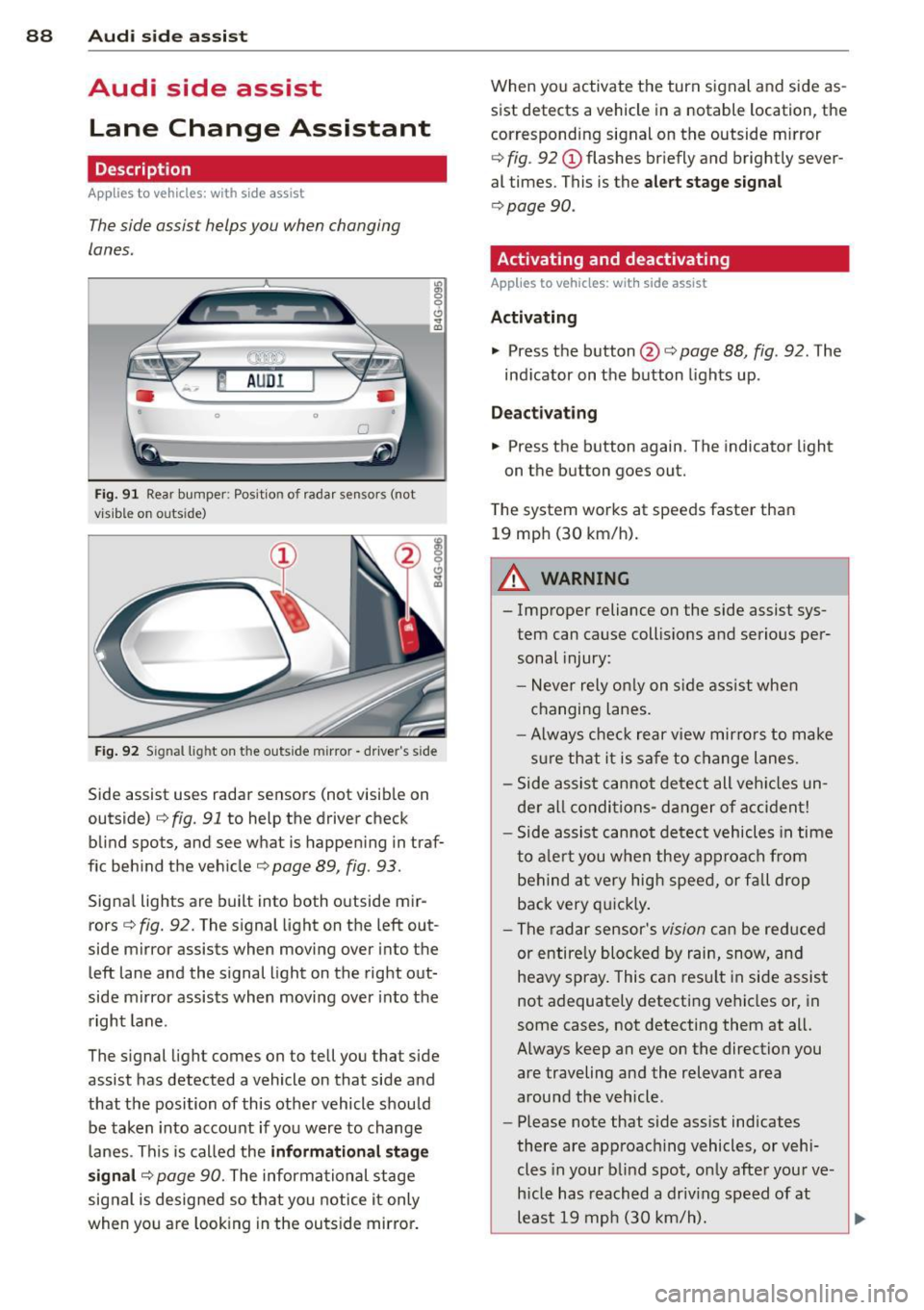
F ig . 91 Rear bumper : Pos it ion of rada r se nsors (not
v is ib le on outs ide)
:R 0 0 C)
" a,
F ig . 92 S ignal lig ht on the outside m irror -driver's side
Side assist uses radar sensors (not visib le on
outside)¢
fig. 91 to help the driver check
blind spots, and see what is happen ing in traf
f ic beh ind the vehicle¢
page 89, fig. 93.
Signa l lights are built into both o utside mir
rors ¢
fig. 92. The s ignal light on the left out
side mirror assists when moving over into the
left lane and the signal light on the right out
side mirror assists when moving over into the right lane.
The s ignal light comes on to tell you that side
assist has detected a vehicle on that side and
that the position of this othe r vehicle should
be taken into account if yo u were to change
l anes . This is called the
informati ona l stag e
s ignal ¢
page 90. The informational stage
signal is designed so that you notice it only
when you are look ing in the ou ts ide mirror. When you activate the turn signal and side as
sist detects a vehicle in a notable location, the
corresponding signal on the outside mirror
¢ fig. 92 (!) flashes br iefly and brightly sever
al times. This is the
alert stage signal
¢ page 90.
Activating and deactivating
Appl ies to veh ic les : w it h side assist
Activating
• Press th e button @¢ page 88 , fig . 92 . The
ind icator on the button lights up .
Deactivating
• Press the button again. The indicator light
on the button goes out.
T he system works at speeds faster than
19 mp h (30 km/h).
A WARNING
-
-Improper reliance on the side assist sys-
tem can cause collis ions and serious per
sonal injury:
- Never rely on ly on s ide ass ist whe n
changing lanes.
- Always chec k rear v iew mirro rs to make
su re that it is sa fe to change l anes.
- Side assist cannot de te ct all veh icles un
der a ll condi tions- d anger of a cc iden t!
- Side assist cannot detect vehicles in time
to a le rt you when they ap proa ch from
be hind at very hig h spee d, or fall drop
back very q uickly.
- The radar sensor's
vision ca n be reduced
or entire ly blocked by rain, snow, and
heavy spray . This can resu lt in side assist
not adequately detecting vehicles or, in
some cases, not detecting them at all.
Always keep an eye on the direction you are traveling and the relevant area
around the vehicle .
- Please note that side ass ist indicates
there are approaching vehicles, or vehi
cles in your blind spot, o nly after you r ve
h icle has reach ed a driv ing speed of at
least 19 mph (30 km/h). ..,
Page 96 of 294
94 Audi side assist
right of your travel lane, depending on wheth
er you drive in the center of your lane or closer
to the edge.
If you drive in narrow lanes, s ide ass ist's de
tection area may a lso include other lanes -es
pecia lly if you tend to drive on the edge of
your lane¢
fig. 99. Under these condit ions,
vehicles can also be detected that are two lanes away, and side assist then could switch
between the informat ional and warning stage
signals .
When driving in very w ide lanes, vehicles in
the adjacent lane may not be detected be
cause they are not inside the detection area .
Notes
Messages in instrument cluster display
Applies to vehicles: with side assis t
If side assist turns off automatically, the indi
cator light on the button wi ll go out and you
will see a message in the instrument cluster
d isplay:
Audi side assist: not available. sensors
blocked
The side assist sensors are built into the rear
bumper on the left and right (not visible on
the outside)
¢ page 88, fig. 91 . To ensure that
you do not adversely affect the way side assist
functions, foreign objects (such as stickers or
b icycle racks) should not be attached to the
a rea on the rear bumper where the sensors
are located. If side assist functions are ad
versely affected, you will see this message in
the instrument cluster display. Remove any
thing that may be blocking the sensors .
If no vehicle is detected for a longer period of
time while driving, side assist will also switc h
off a utomatica lly.
Audi side assist currently not available
If there is a temporary problem (such as the
ve hicle's battery charge being low), s ide ass ist
cannot be activated tempo rari ly.
Audi side assist: system fault
Have the system checked by an authorized Au
di dealer or qualified workshop.
Audi side assist: not available when
towing
T he radar senso r's view is limited when tow
ing a trai le r. For vehicles with a fa ctory instal
led towing hitch or a trailer hitch that was in
stalled later according to factory specifica
tions, side assist is automatically deactivated
as soon as the electrical connection to the
trailer's electrical socket is made, and this sta
tus message appears in the instrument clus
ter display . Deactivation cannot be guaran
teed when using a retrofitted towing hitch
that was
not installed according to factory
specifications.
Safety tips
Appl ies to vehicles : wi th side assist
The side assist detection may be limited when
driving aro und narrow street corners, on hilly
streets, and under poor weather cond itions.
It is possible that the radar sensors may also
detect other objects, such as high or stag
gered guardrails .
Side assist does not measure actual lane
width. The system assumes a fixed lane width.
Detection in the left and right lanes is based
o n this ass umed lane width . When driving on
narrow roads or when driving to the left or
right of the center of a trave l lane, it is poss i
ble that vehicles will be detected that are
not
in the lane next to the lane you are using.
A WARNING
- Improper reliance on the side assist sys
tem can cause collis ion s and serious per
sonal injury:
- Never rely only on side assist when
changing lanes .
- Always check rear view mirrors to make
sure that it is safe to change lanes.
- Side assist cannot detect all vehicles un-
der all conditions- danger of accident! ..,.
Page 99 of 294

Individual-¢page 97.
Adjusting the Individual mode
Audi drive select 97
A WARNING
Pay attention to traffic when operating Au
d i drive select to prevent potential risk of
an accident.
You can adjust the vehicle settings to your personal preferences.
~ Se lect: ICARI function button > Set individ
ual
control button. You can now adjust the
individual systems.
The
Individual driving mode will automatica l
ly be activated when you have finished config-
uring the settings.
Systems Comfort
Engine/Transmission
balanced
Steering comfortable
Cornering light* comfortable
Belt tensioner* Standard
II
(D Tips
Your Individual mode settings are auto
matically stored and assigned to the re
mote contro l key being used. T
he equipment in your vehicle will determine
which settings you can adjust. The following
table provides an overview of the characteris
tics of each driving mode.
Auto Dynamic
balanced sporty
balanced sporty
ba lanced sporty
Standard Deployment time
adapted
-