wheel AUDI S7 2013 User Guide
[x] Cancel search | Manufacturer: AUDI, Model Year: 2013, Model line: S7, Model: AUDI S7 2013Pages: 310, PDF Size: 77.45 MB
Page 54 of 310
52 Seat s a nd s tor ag e
Seats and storage
General recommen
dations
Why is your seat adjustment so
important?
The safety belts and the airbag system can
only provide maximum protection if the front
seats are correctly adjusted.
There are various ways of adjust ing the front
seats to provide safe and comfortable support
for the driver and the front passenger . Adjust
you r seat prope rly so that :
- you can easily and quick ly reach all the
switches and controls in the instrument
panel
-your body is prope rly supported thus reduc
ing physical stress and fatigue
- the safety be lts and a irbag system can offer
maximum protection
¢ page 149 .
In the following sec tions, you will see exactly
how you can best adjust you r seats .
There are special regulations and instructions
for insta lling a child seat on the front pas
senger's seat. Always fo llow the information
regarding ch ild safety provided in
q page 175, Child Safety.
A WARNING
Incorrect seating position of the driver and
all other passengers can result in serious
personal in jury.
- Always keep your feet on the floor when
the vehicle is in motion -never p ut your
f eet on top of the instrument panel, out
of the w indow or on top of the seat cush
ion . Th is app lies especially to the passen
gers .
If your seating posi tion is incorrect,
yo u increase the r isk of injury in the case
of sudden braking or an acc ident.
If the
a irbag infla tes and the seating positio n
is incorrect, this could result in personal
injury o r even death.
- It is import ant for bo th the driver and
front passenger to keep a distance of at least 10 inches (25 cm) between them
selves and the steering wheel and/or in
strument panel. If you're s itting any
closer than th is, the a irbag system can
not protect you properly . In addition, the
front seats and head restraints must be
adjusted to your body height so that they
can give you max imum protect ion.
- Always try to keep as much distance as
possible between yourself and the steer
ing wheel o r inst rument pane l.
- Do not adjust the driver's o r front pas
senger's seat whi le the vehicle is moving.
Your sea t may move unexpected ly, caus
ing sudden loss of vehicle cont rol and
personal injury . If you adjust yo ur seat
while the veh icle is moving, yo u are out
of posit ion.
Driver's seat '
The correct seat position is important for safe
and relaxed driving.
We recommend tha t you adjus t the dr iver's
seat in the fo llowing manner :
.,. Adjust t he seat in fo re and aft direction so
t ha t you can eas ily pus h the peda ls to the
floor w hile keeping your knees sl igh tly bent
q A in Why is your seat adjustment so im
portant? on page 52.
.. Adjust the back rest so that when you sit
w ith your back against t he backrest, you can
still grasp the top of the steering wheel.
.. Adjust the head restraint so the upper edge
is as even as poss ible with the top of your
head . If that is not poss ible , try to adjust
t he head restraint so that it is as close to
t his pos it ion as possib le
q page 55.
A WARNING
Neve r place any objects in the dr iver's foot
well. An object could get into the pedal
area and interfere with pedal function . In
case of sudden braking or an acc ident, you
would not be able to brake or accelerate .
Page 58 of 310
56 Seats and storage
until you feel it lock into p lace c::> .& in Prop
er adjustment of head restraints on
page 134.
• To move the head restraint down, press the
button -arrow-
c::> fig. 49 and slide the head
restraint downward .
Removing the head restraints
• Fold the backrest forward ¢ page 64.
• Move the head restraint upward as far as it
can go.
• Press the release
c::> fig. SO with the me
chanical key¢
page 33 and the button
-arrow- ¢
fig. 49 . Pull the head restraint out
of the backrest at the same time¢ ,&.
Installing the head restraints
• Slide the posts on the head restraint down
into the guides until you feel the posts lock
into place .
• Press the button -ar row-
c::> fig . 49 and slide
the head restraint a ll the way down. You
should not be able to pull the head restraint
out of the backrest .
So that the driver can have a better view to
the rea r, the head restraints shou ld be pushed
down completely when the rear seats are not
occupied.
& WARNING
- Only remove the rear seat head restraints
when necessary in order to install a child
seat. Install the head restraint again im
med iately once the child seat is removed.
Driv ing without head restra ints or with
head restraints that are not properly ad
justed increases the r isk of serious or fa
tal neck injury dramatically .
- Read and heed all WARNINGS
¢page 134.
Seat memory
Description
Applies to vehicles: with memory function
The memory function allows you to quick ly
and easi ly store and recall personal seating profiles for
the driver and front passenger*.
The memory function is operated through the
master key and the memory buttons in the
driver's/front passenger's* doors.
T he driver's seating profile is stored and as
signed to the master key each time the vehicle
is locked . The seating profile is reca lled auto
matically when the vehicle is unlocked. If two
people use one vehicle, it is recommended
that each person always uses "their own" master key .
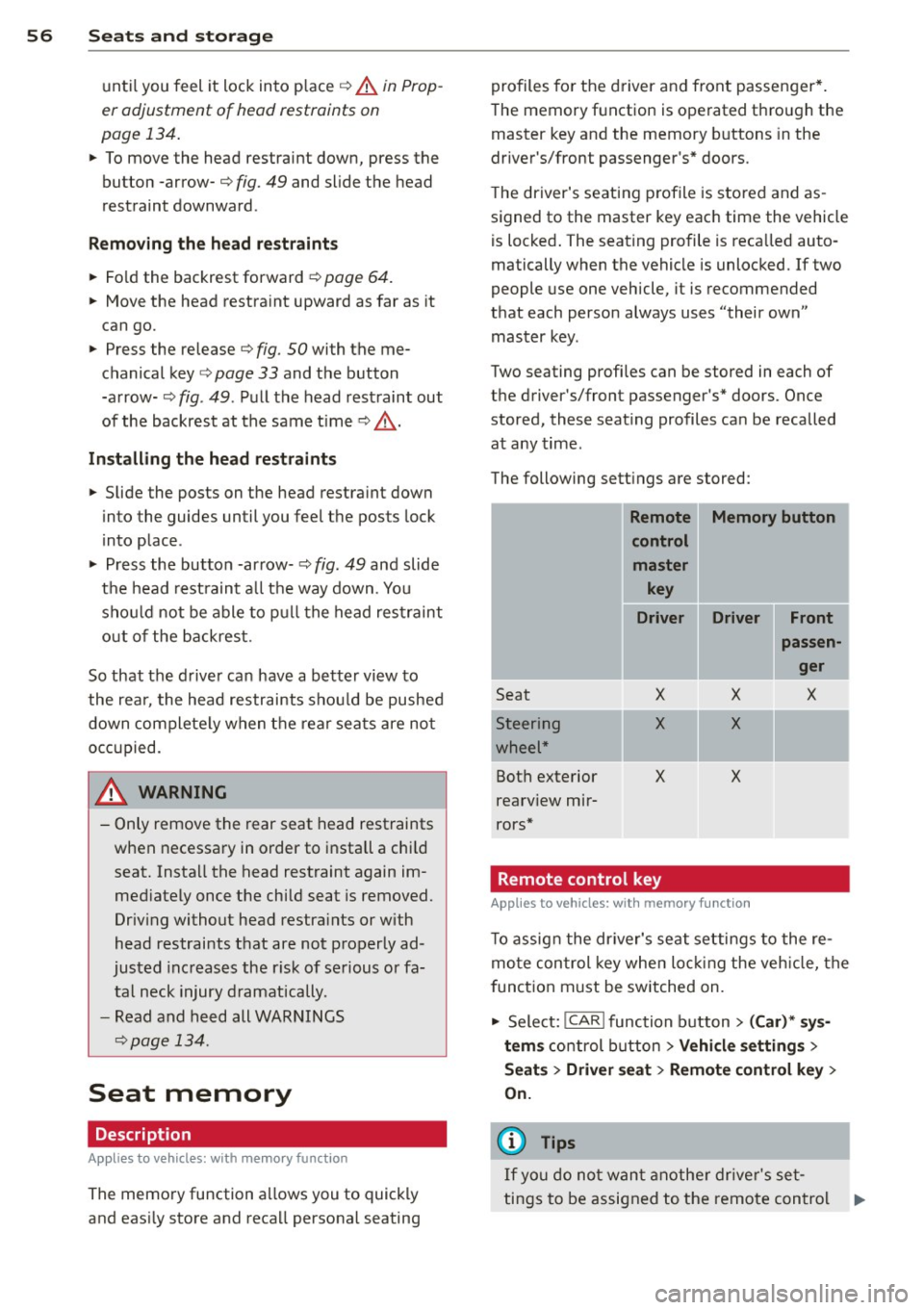
Two seating profiles can be stored in each of
the driver's/front passenger's* doors. Once
stored, these seating profiles can be recalled at any time.
The following sett ings are stored:
- --Remote Memory button
control
master key
Driver Driver Front
I
Seat
-Steering
wheel*
Both exterior
rearv iew mir
rors*
X
X
X
Remote control key X
X
X
Applies to
vehicles: with memory function
passen
ger
X
-
T o assign the driver's seat settings to the re
mote control key when locking the vehicle, the
f unction must be switched on.
• Select:
!CAR ! function button> (Car)* sys
tems
control button > Vehicle settings >
Seats > Driver seat > Remote control key >
On.
(D Tips
If you do not want another driver's set-
tings to be assigned to the remote control .,.
Page 74 of 310
72 Warm and cold
IAUTO I Switching automatic mode on
Automatic mode m ainta ins a constant tem
perat ure inside the vehi cle. Air tempera ture,
airflow and air d istribution a re controlled a u
tomatically.
Adjusting the temperature
T empe ratu res between 60 °F (+16 °C) and
84 °F ( +28 ° C) c an be se t. O uts ide of this
range,
lo or hi w ill appear in the climate con
trol system disp lay. At both of these settings,
the cl imate control system r uns continuously
at max imum cooling or heat ing power. There
is no temperature regu lation.
~ Adjusting the airflow
You can a djust the airf low manually to s uit
your needs . To have the airf low reg ulated a u
tomatically, press the
! AUTO ! button.
~ Adjusting the air distribution
You can manu ally se lect the ve nts w here the
a ir will flow. To have the air d istribu tion reg u
l ated automatically, press the
IAUTOI bu tton.
~ I~ * Adjusting seat heating/
ventilat ion*
Pr ess ing the button swi tches the sea t heat
ing/ventilation on at the highest sett ing ( leve l
3). The LEDs indicate the heating/venti lat ion
leve l. To reduce the heating/vent ilation, press
the butto n aga in. To switch the seat heat ing/
ve nti lation off, press the button repeatedly
u ntil the LED turns off.
After 10 minutes, the seat heating automati
cally switches from leve l 3 to level 2.
l <;j) FRON T I Switch the defroster on/off
The win dsh ield and s ide windows are defrost
e d or cleared of con densation as quickly as
possib le. The max imum amo unt of air flows
mainly from the vents be low the windshield.
Recirculation mode switches off.
The
IAUTOI bu tton switches the defroster off.
lliiil REAR ! Switching rear window heater
on /off
T he rea r window heate r only operates w hen
the engine is running. It sw itches off auto
matically after 10 to 20 minutes, depending
o n the outside temperature.
T o p revent the rea r window heate r from
switching off automatically, p ress and ho ld
t h e ~ button for more than 2 seconds. Th is
rema ins stored until the ignition is switched
off .
ISYNC I Synchronization*
When synchronization is switched on, the
same settings are applied to bot h the dr iver
and fr ont passenger, except for the seat heat
i ng/venti lation *. The rear zo ne is also
synchronized. Synchronization switches off
whe n the se ttings for the front passenge r side
o r r ear are ad justed.
You can also switch synchronizati on o n by
pressing and holding a dial. For example, if
you press and hold t he di al on the front pas
senger si de, the setti ngs for that s ide a re
t ran sfer red to t he d rive r si de. The same ap
plies to the re ar.
Air vents
You can open o r close the center and ou ter
vents i n the cockpit and the vents in the rear
c ente r console and doo r pillars us ing t he
ridged t humbwheels. The levers adjust the d i
r ect ion o f the airfl ow from the vents.
A WARNING
-Do not use t he recirc ulation for ex tended
pe riods of time . The windows could fo g
up since no f resh a ir can enter the vehi
cle. If the windows fog up, p ress the air
recirc ulation butto n again immediately
to switch off the air reci rcu latio n fu nc
tion o r se lect defros t.
- Individ uals w it h reduced se nsitivity to
pa in or te mperature cou ld deve lop burns
when us ing the s eat heating fu nction . To
re duc e the risk of i nju ry, these i nd iv idu-
als should n ot us e sea t heating.
~
Page 75 of 310
(D Note
To avoid damage to the heating elements in the seats, do not kneel on the seats or
place heavy loads on a small area of the
seat.
Setup
App lies to vehicles: with four-zone a utomat ic climate con·
tro t
The climate con trol system setup is accessed
through the MMI.
" Select: ICARI function button > ( Car) * sys-
tems con trol but ton > AC.
Rear cabin settings*
When this function is selected, all settings for
the rear can be adjusted through the climate
control system in the cockpit. The climate
control system settings cannot be adjusted in
the rear seat at the same time. This function
switches
off after a certain period of time or
when one of the dials in the cockpit is press
ed .
Auto recirculation*
The sensitivity level of the automatic rec ircu
la tion mode can be set at various leve ls from
off to sensitive. The recirculation mode is con
trolled automat ica lly. You must press the~
button if fog forms on the windows.
Footwell temperature
You can adjust the footwell temperat ure so
that it is cooler or warmer.
AC mode
The strength of the airflow can be adjusted to
light, med ium or strong.
Warm and cold 7 3
Steering wheel heating
Applies to vehicles: wit h hea ted stee ring wheel
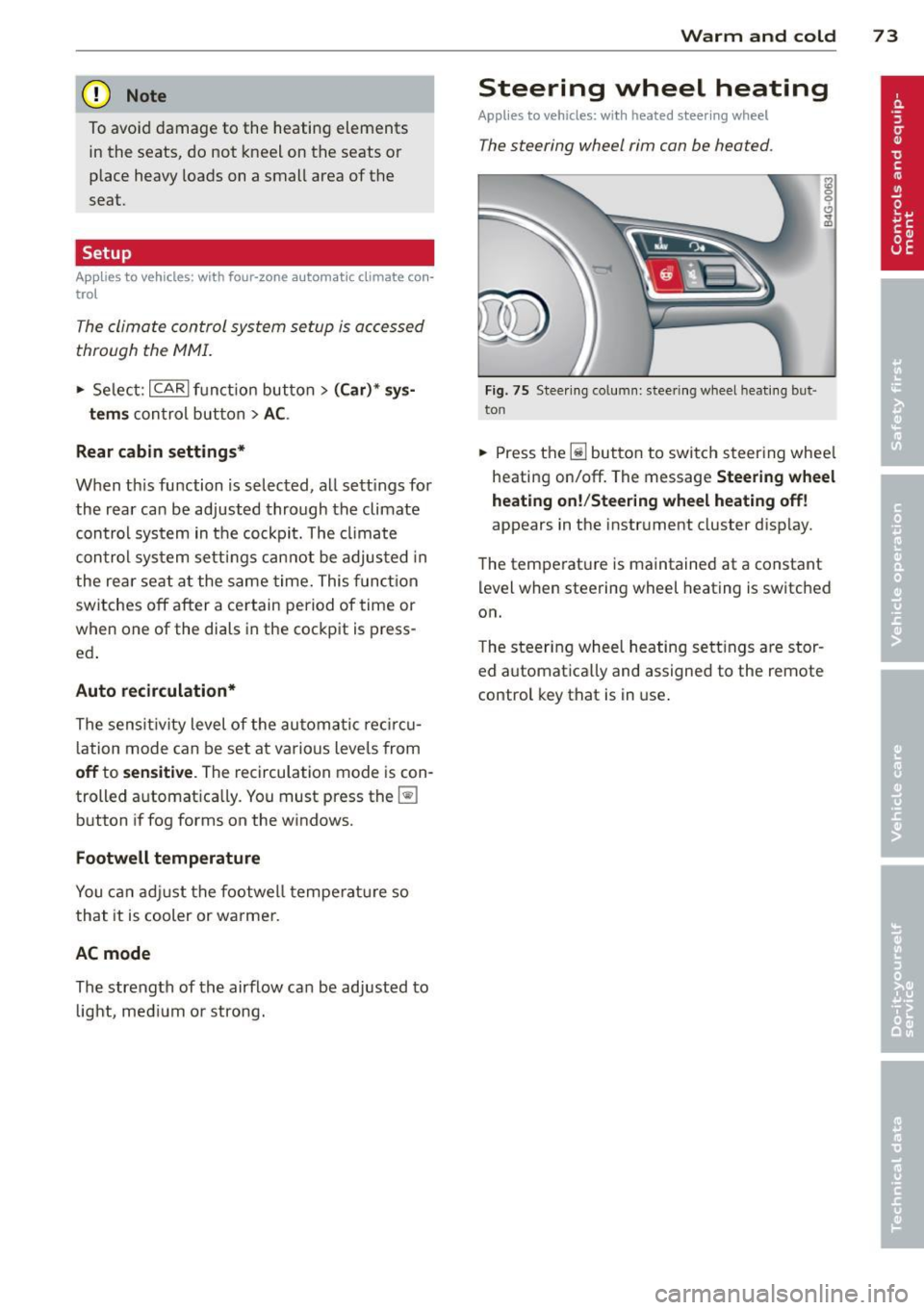
The steering wheel rim con be heated .
Fig. 75 Steering column: steering w heel hea tin g but ·
ton
.. Press the lil bu tton to switch steering whee l
heating on/off. The message
Steering wheel
heating on! /Steering wheel heating off!
appears in the instrument cluster d isp lay.
The temperat ure is maintained at a constant
level when steering wheel heating is switched
on.
T he steering wheel heating settings are stor
ed automat ica lly and assigned to the remote
control key that is in use .
Page 76 of 310
7 4 On the road
On the road
Steering
Manually adjustable steering wheel
Applies to vehicles: with man ua lly adjustable steering
w hee l
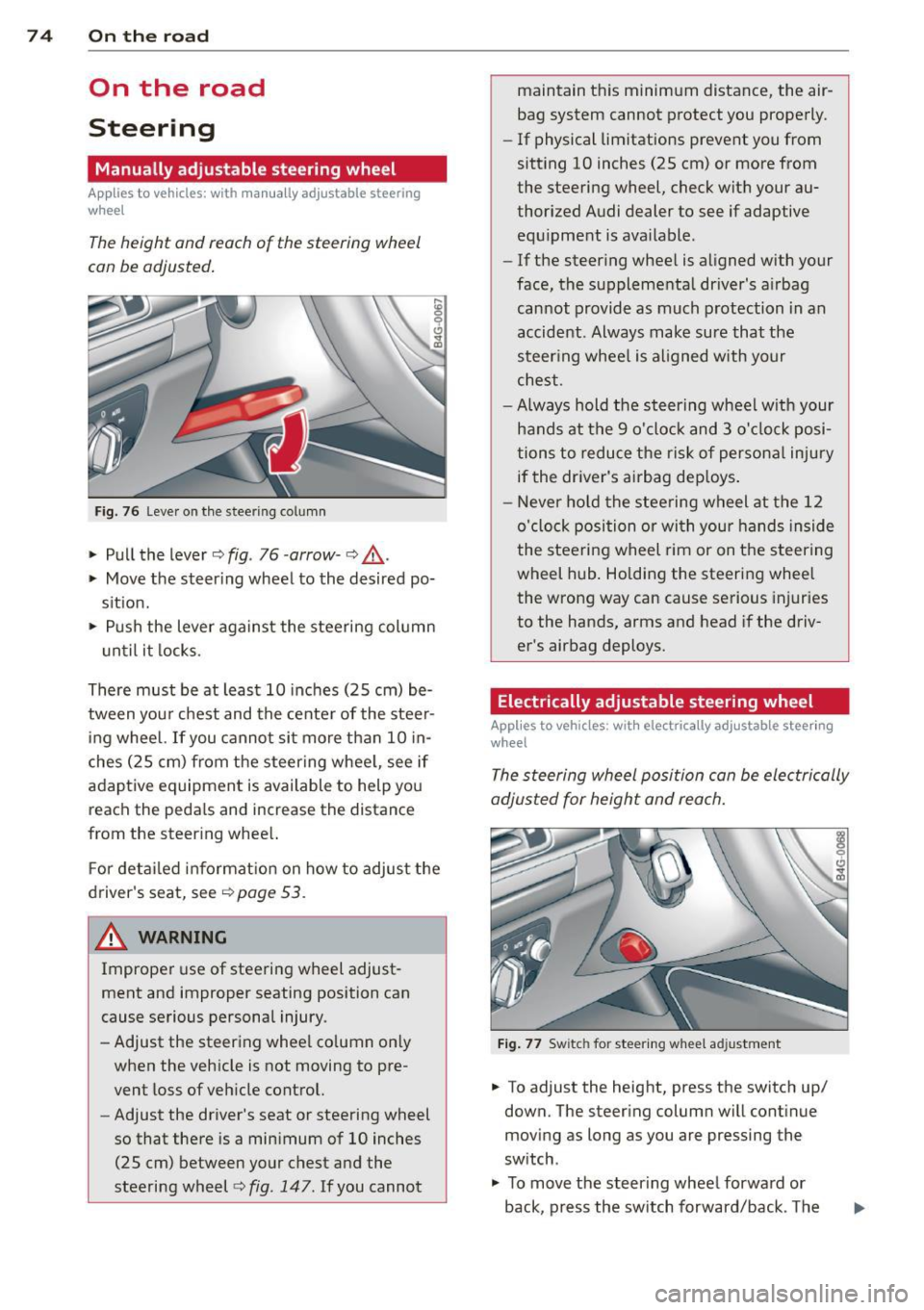
The height and reach of the steering wheel
can be adjusted.
Fig. 76 Leve r on the steering co lumn
" Pull the lever c::> fig . 76 -arrow-c::> &_ .
" Move the steer ing wheel to the desired po
sit ion.
" Push the lever against the steering column
until it locks.
There must be at least 10 inches (25 cm) be
tween you r chest and the center of the steer
ing wheel.
If you cannot sit more than 10 in
ches (25 cm) from the steer ing whee l, see if
adaptive equipment is available to help yo u
reach the peda ls and increase the distance
from the steer ing whee l.
F or detailed information on how to adjust the
driver's seat, see
c::>page 53.
~ WARNING
Improper use of steering wheel adjust
ment and improper seating position can
cause serious personal injury.
- Adjust the steering whee l co lumn on ly
when the vehicle is not moving to pre
vent loss of veh icle control.
-
- Adjust the driver's seat or steering wheel
so that there is a minimum of 10 inches
(25 cm) between your chest and the
steering wheel
c::> fig . 147. If you cannot maintain this minimum distance, the air
bag system cannot protect you properly.
-
If physical limitations prevent you from
sitting 10 inches (25 cm) or more from
the steering wheel, check with your au
thorized Audi dealer to see if adaptive
equ ipment is ava ilable .
- If the steer ing wheel is aligned with your
face, the supplementa l driver's a irbag
cannot provide as much protection in an
accident . Always make sure that the
steering wheel is aligned with your
chest.
- Always hold the steering wheel w ith your
hands at the 9 o'clock and 3 o'clock posi
tions to reduce the risk of personal injury
if the driver's airbag dep loys .
- Never hold the steering wheel at the 12
o'clock position or with your hands inside
the steering wheel rim or on the steering
wheel hub. Holding the steering wheel
the wrong way can cause serious injuries
to the hands, arms and head if the driv
er's airbag deploys.
Electrically adjustable steering wheel
App lies to vehicles: wit h electrically adj ustable stee ring
wheel
The steering wheel position can be electrically
adjusted for height and reach.
Fig. 77 Switc h for steering wheel adjustment
" To adjust the height, press the switch up/
down. The steer ing column will continue
moving as long as you are pressing the
switch .
" To
move the steer ing wheel forward or
back, press the switch forward/back . The
Page 77 of 310

steering column will continue moving as long as you are pressing the switch.
There must be at least
10 inches (25 cm) be
tween your chest and the cente r of the steer
ing wheel. If you cannot sit more than
10 in
ches (25 cm) from the steering wheel, see if
adaptive equipment is available to help you
reach the pedals and increase the distance
from the steer ing wheel.
F or detailed information on how to adjust the
driver's seat, see
r::> page 53 .
In vehicles with the memory f unction* , the
steering column settings are stored together
with the seat position.
A WARNING
Improper use of steering wheel adjust
ment and improper seating position can
cause serious personal injury .
- Adjust the steering wheel column only
when the vehicle is not moving to pre
vent loss of veh icle control.
-
- Adjust the driver's seat or steering wheel
so that there is a min imum of
10 inches
(25 cm) between your chest and the
steering wheel ¢
fig. 147. If you cannot
mainta in this min imum d istance, the a ir
bag system cannot protect you properly.
- If physica l limitations prevent you from
sitting
10 i nches (25 cm) or more from
the steering wheel, check with yo ur au
thorized Aud i dea ler to see if adaptive
equipment is availab le.
- If the steering wheel is aligned with you r
f ace, the supp lemental driver's airbag
cannot provide as much protection in an
accident. A lways make sure that the
steering wheel is aligned with your
chest.
- Always hold the steering wheel with your
hands at the 9 o'clock and 3 o'clock posi
t ions to reduce the risk of personal injury
if the driver's airbag deploys.
- Never hold the steering wheel at the 12
o'clock posit ion or with your hands inside
the steering wheel rim or on the steer ing
On th e road 7 5
wheel hub. Holding the steering wheel
the wrong way can cause serious injuries
to the hands, arms and head if the driv
er's airbag deploys.
Easy entry feature
App lies to vehicles: with electrically adj ustable steer ing
wheel
The easy entry feature makes it easier to en
ter and exit the vehicle by automatically ad
justing the steering wheel.
.,. Select in the MMI: ICAR lfunction bu tton>
(C ar)* sys tems control button > Vehicle set
t ing s > Se ats
> Drive r's sea t > Easy entry >
On.
When the easy entry feature is turned on, the
steering wheel moves up to the park position
when you switch off the ignition . After you en
ter the vehicle, the steering wheel moves to
the stored posit ion as soon as you switch on
the ignition.
Starting and stopping
the engine
Starting the engine
This button switches on the ignition and
starts the engine.
F ig. 78 Center console: S TART ENGINE S TOP button
.,. Step on the brake pedal and move the selec
tor lever to
P or N ¢ £..
.,. Press on the ...., , s=T ""'A --=R=T ,..., E= N~ G-::,I N:-:-= E-=s= T::-::0 :-:: Pc-i l button
c::> fig. 78 -the engine will start. ..,.
Page 80 of 310

78 On the road
running for approximately two minutes to
prevent excessive heat build-up .
Starting the engine if there is a
malfunction
It may not b e possible to start the engine un
der cer tain circumstances , for example if the
battery in the vehicle key is drained , if inter
ference is affected the key or if there is a sys
tem malfunction.
Fig. 79 C en ter console/ma ster key: startin g th e eng ine
if th ere is a mal function
Requirement : The message Key not recog
nized. Hold back of key against marked area.
See owner's manual.
must appear and the in
dicator light
II must switch on .
.,. Hold the master key vertically in the loca
tion indicated
f>l) ¢ fig . 79 .
.,. Press the brake pedal~.& in Starting the
engine on page 77.
.. Press the !~ S_ T_A_R_ T_E _N_G_I_N_ E_S_ T_O_P~I button.
T he eng ine will start.
.,. Drive to your authorized Audi dealer imme
diately to have the malfunction corrected.
{D) Tips
You can view the message again by press
ing the
!S TAR T ENGINE STOP I button.
Electromechanical
parking brake
Operation
The electromechanical parking brake replaces
the hand brake.
Fig. 80 Center co nsole: Parking b ra ke
.,. Pull on the switch (V) ¢ fig. 80 to apply the
parking brake . The indicator light in the
switch illuminates.
.,. Step on the brake pedal or the accelerator
pedal and press the switch
© at the same
time to release the parking brake. The indi
cator light in the switch goes out.
Your vehicle is equipped with an electrome
chanical parking brake . The parking brake is
designed to prevent the vehicle from rolling
unintentionally and replaces the hand brake .
In addition to the normal functions of a tradi
tional hand brake, the electromechanical
parking brake provides various convenience
and safety functions .
When starting from rest
-The integral starting assist helps you when
driving by automatically releasing the park
ing brake
~ page 79, Starting from rest .
-When starting on inclines, the starting as
sist prevents the vehicle from unintentional
ly rolling back. The braking force of the
park ing brake is not released until sufficient
driving force has been built up at the
wheels. .,,_
Page 81 of 310

Emergency brake fun ction
An emergency brake ensures that the vehicle
can be slowed down even if the
normal b rakes
fail
c::> pag e 80 , Emergency broking .
Indicat or light s
-If the par king b rake is closed w ith the igni
t ion
s wit ched on the indicator lights come
on - (USA models)/ . (Canada models)
in the instrument cluster and in the switch.
- If the par king brake is closed w ith the igni
tion
s witc hed off the indicator lights come
on - (USA models)/ . (Canada models)
in the instr ument cluster and in the switch
for about 20 seconds.
A WARNING
Do not press the accelerator peda l inadver
tently if the vehicle is stat ionary but the
eng ine is running and a gear is selected .
Otherw ise the vehicle will start to move
immediately and cou ld result in a crash .
(D Note
If the symbol . in the display or the ind i
cato r light
1111 (USA models) . (Cana
da models) in the instrument cluster flash
es , the re is a malfunction in the bra ke sys
tem. Please refer to the detai led descr ip
tion of the indicator lights ¢
page 15.
- If the indicato r light - (USA mod-
els) . (Canada mode ls) or
IIJ tu rns
on, there may be a malfunction in the
parking brake
r=> page 16.
@ Tips
-You can apply the pa rking brake at any
time -even w ith the ignition swi tched
off. The ignition must be on in order to
release the parking brake.
- Occasiona l noises when the parking
brake is applied and re leased are norma l
and are not a ca use for concern .
- When the vehicle is parked, the parking brake goes thro ugh a se lf-test cycle at
r egular intervals . Any assoc iated noises
are norma l.
On the ro ad 79
Parking
Parking
~ Stop the vehicle with the foot brake .
~ Pull the switch(®) to apply t he pa rking
bra ke .
~ Select the P se lec to r lever posit ion
r=> poge 109.
~ Turn the engine off c::> &_.
In addition on inclines and grades
~ Tu rn the steering wheel so that your vehicle
w il l roll aga inst the c urb in c ase it shou ld
s tart to move .
T he park ing brake activates automat ica lly
when you swit ch the ign ition off. This does not
happe n if you select the N selector lever posi
tion or switch the parking off with the~ but
ton before switching the ignition off .
A WARNING
-When you leave your vehicle -even if on
ly briefly -always take the ign it ion key
with you . This applies particularly when
children remain in the vehicle . Othe rwise
the children could start the engine, re lease the parking brake or operate elec
trica l equipment (e.g. power wi ndows).
There is the r is k of an accident.
- When the veh icle is locked, no one -par
ticularly not childre n should rema in in
the vehicle . Locked doors ma ke it mo re
difficult for emergency wo rke rs to ge t in
to the vehicle -putting lives at risk .
Starting from rest
The starting assist function ensures that the
parking broke is released automatically upon
starting .
Stopping and applying parking brake
~ Pull the switch(®) to apply the pa rking
bra ke .
Page 82 of 310

80 On the road
Starting and automatically releasing the
par king brake
.. When you sta rt to drive as usua l, the park
ing brake is automatically re leased and your
vehicle begins to move.
When stopping at a traffic signa l or stopping
in city traffic, the parking brake can be ap
plied. The veh icle does not have to be held
with the footbrake. The parking brake elimi nates the tendency to creep with a drive range
engaged . As soon as you dr ive off as usual,
the park ing brake is released automatically
and the veh icle sta rts to move .
Starting on slopes
When starting on inclines, the starting assist
prevents the vehicle from unintentionally roll
ing back . The braking force of the parking
brake is not released until sufficient dr iving
fo rce has been bu ilt up at the whee ls.
(D Tips
For safety reasons, the park ing brake is re
leased automatically only when the dr iv
er 's safety belt is engaged in the buck le.
Starting off with a trailer
To prevent rolling back unintentionally on an
incline, do the following:
.. Keep the switch
accelerator. The park ing brake stays applied
and prevents the vehicle from rolling back
ward.
.. You can release the switch
C®l once you are
sure that you a re developing enough for
ward momentum at the wheels as you de
press the accelerator .
Depending on the weight of the rig (vehicle
and trai ler) and the seve rity of the incline, you
may roll backwards as you start. You can pre
vent rolling backwards by holding the parking brake switch(®) pulled out and accelerating -
just as you would when starting on a hill with a conventional hand brake .
Emergency braking
In the event that the conventional brake sys
tem fails or locks .
.. In an emergency, pull the switch C®l and
con tinue to pull it to slow your vehicle down
w ith the park ing brake.
.. As soon as you release the switch (®) or ac-
celerate, the brak ing process stops.
If you pull the switch C®l and hold it above a
speed of about 5 mph (8 km/h), the emergen
cy brak ing funct ion is initiated . T he vehicle is
braked at all fou r whee ls by activating the hy
draulic brake system. The brake performance
is similar to making an emergency stop~&. .
In order not to act ivate the emergency brak
ing by mis take, an audib le warning tone (buz
zer) sounds whe n the switch(®) is pulled . As
soon as the sw itch C®l is released , or the accel
erator pedal is depressed, emergency braking
stops.
_& WARNING
-Emergency braking should only be used in
an emergency, when the normal foot brake
has failed or the brake pedal is obstructed.
Using the parking brake to perform emer
gency braking will slow your veh icle down
as if you had made a full brake application .
The laws of physics cannot be suspended
even with ESC and its associated compo
nents (ABS, ASR, EDL) . In corners and
when road or weather conditions are bad,
a full brake application can cause the vehi
cle to skid or the rear end to break away -
risking an accident.
Start-Stop-System
Description
Applies to vehicles: with Start -Stop -System
T he Start -Stop-System can help increase fuel
economy and reduce CO 2 emissions.
In the Start-Stop-mode, the engine shuts off
automat ically when the veh icle is stopped,
such as at a traffic light. The ignition remains .,.
Page 84 of 310

82 On the road
@ Tips
When you stop and the start-stop-system
turns the engine off, the ignition remains
on. Make sure that the ignition is switched
off before exiting the vehicle.
General information
Applies to vehicles: with S tart-Stop -System
The standard Start-Stop-mode can be cancel
led for different system-related reasons .
Fig. 82 Instrument cluster: eng ine-Stop tempo rar ily
unavai lable
Engine will not switch off
Before each stop phase, the system checks if
certain conditions have been met. For exam
p le, the engine will
not be switched off in the
following situations:
- The engine has not reached the minimum
r equired temperature for Start-Stop -mode .
- T he interior temperature selected by the A/C
system has not been reached .
- T he outs ide temperature is extremely h igh/
low .
- T he w indshield is being defrosted
9page 70, 9page 72.
- The pa rking system* is switched on.
- The battery charge level is too low .
- The steering wheel is sharply turned or there is a steering movement.
- After engaging the reverse gear.
- On sharp inclines .
The
r,J indicator light appears in the informa
tion line in the instrument cluster disp lay
9 fig. 82.
Engine automatically restarts
The stop phase is interrupted in the following
situations, for example. The engine restarts
without any action by the driver.
- The inte rior temperature varies from the
temperature selected in the A/C system.
- The windsh ield is being defrosted
9 page 70, 9page 72.
-The brake pedal is pressed severa l times in a
row.
- The battery charge level becomes too low .
- High power consumption .
@ Tips
If you shift into the D, Nor S posit ions af
ter shifting into reverse, the vehicle must
be driven faster than 6 mph (10 km/h) in
o rd er for the engine to switch off aga in.
Switching the Start-Stop-System on/off
manually
Appl ies to vehicles : wi th Start-S top-Sys te m
If you do not wish to use the system, you can
switch it off manually.
Fig. 83 Center console: Start-Stop-System button
.,. To switch the Start-Stop -System off/on
manually, press the
! iiil ~·I button. The LED in
the button turns on when the system is
switched off.
(D Tips
If you switch the system off during a stop
phase, the engine will start again auto
matically.