brake AUDI S7 2013 Owner's Guide
[x] Cancel search | Manufacturer: AUDI, Model Year: 2013, Model line: S7, Model: AUDI S7 2013Pages: 310, PDF Size: 77.45 MB
Page 112 of 310
110 Automatic Transmission
brakes applied ¢ & in Driving the automatic
transmission on page
112.
When the veh icle is stationary or at speeds
be low 1 mph (2 km/h), you must always apply
the footbrake before and while moving the
lever out of N.
D/S -Normal position for driving forward
In the D/S position, the transmiss io n can be
operated e ither in the normal mode Dor in
the sport mode S. To select the sport mode S,
pull the se lector lever back briefly . Pulling the
lever back again will select the normal mode
D. The instrument cluster display shows the
selected driving mode.
In the
normal mode D, the transmission auto
matica lly selects the suitab le gear ratio. It de
pends on engine load, vehicle speed and driv
ing style.
Select the
spo rt mode S for sporty driving.
The vehicle makes fu ll use of the engine's
power. Shifting may become noticeable when
accelerating.
When the vehicle is stationary or at speeds
be low 1 mph (2 km/h), you must always apply
the foot brake before and while moving the lever to D/S out of N.
A WARNING
Read and follow all WARNINGS¢ & in
Driving the automatic transmission on
page
112.
d) Note
-
Coasting downhill with the transmission in
N and the engine not running w ill result in
damage to the automatic transmission
and possibly the catalytic converter.
@ Tips
- Audi drive select: you can adjust the
sporty sh ift characteristics in the
Dy
namic driving mode.Swill appear in the
i nst rument cluste r d isplay instead of D.
-If you accidentally select N while driv ing,
take your foot off the acce lerator pedal immediately and wait
for the engine to
slow down to idle before selecting D/S.
-If there is a power failure, the selector
lever will not move out of the P position.
The emergency release can be used if
this happens
¢page 115.
Automatic Shift Lock (ASL)
Applies to vehicles : wit h S t ronic/tipt ro ni c
The Automatic Shift Lock safeguards you
against accidentally shifting into a forward or
the reverse gear and causing the vehicle to
move unintentionally.
( )
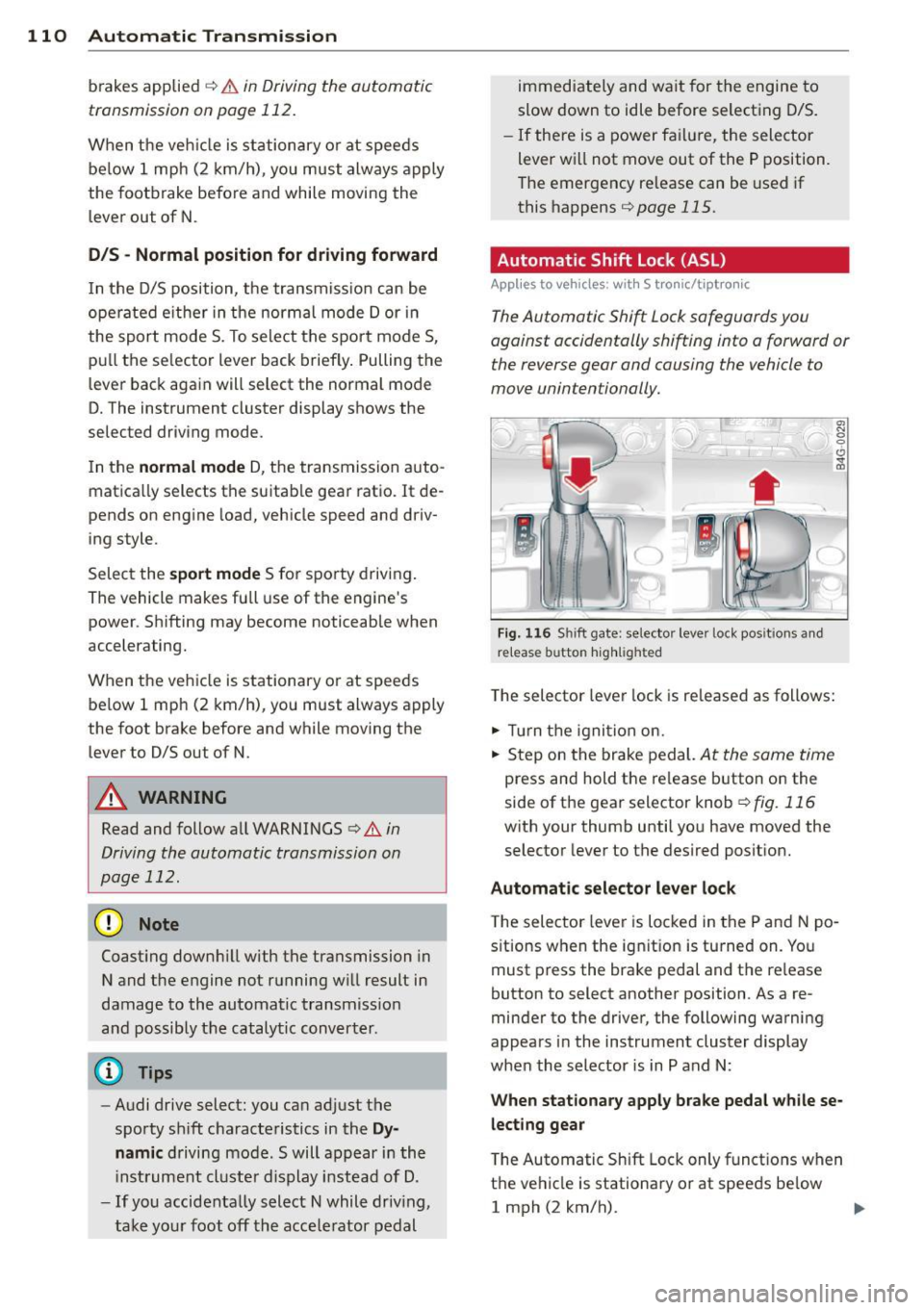
Fig. 116 Shi ft gate: selector leve r loc k pos it ions and
r e lease button highlighted
The selector lever lock is released as follows:
.,. Tu rn the ignition on.
.,. Step on the brake pedal.
At the same time
press and hold the release button on the
side of the gear selector knob
¢ fig. 116
with your thumb until you have moved the
selector lever to the desired position.
Automatic selector lever lock
The selector lever is locked in the P and N po
s itions when the ignit ion is tu rned on. You
must press the brake pedal and the re lease
button to select another position . As a re
minder to the driver, the following warning
appears in the instrument cluster display
when the selector is in P and N:
When stationary apply brake pedal while se
lecting gear
T he Automatic Shift Lock only functions when
the vehicle is stationary or at speeds be low
1 mph (2 km/h).
Page 113 of 310

At speeds above about 1 mph (2 km/h) the
Automatic Shift Lock is automatically deact i
vated in the
N position .
A time de lay element prevents the se lector
l ever from locking when it is moved through
the N position (go ing from R to D/S). The lock
ing e lement will lock the selecto r lever if the
l ever is left in N (Neutral) for more than ap
proximately 2 second, without the brake ped
al being pressed .
Relea se butt on
The release button on the selector lever pre
vents the lever from being accidentally shifted
into certain positions . Depending on the direc
tion of the shift, the se lector lever locks at d if
ferent positions. The positions are h ighlighted
i n the illustration
¢ fig . 116 .
Driving the automatic transmission
Applies to vehicles: with S tronic/tiptronic
Fig . 1 17 Sh ift gate on the center conso le: se lector lev
er w it h relea se button
Startin g the engin e
• The selector lever must be in P or N.
Starting off
• Press and ho ld the brake pedal.
• Press and hold the release button in these
lector lever handle, se lect the desired se lec
tor lever pos ition such as D/S and release
the button .
• Wait briefly until the transmission has shift
ed (you will feel a slight movement).
• Remove your foot from the brake pedal and
acce le rate .
Automatic Tra nsmi ssi on 11 1
Stopping t emporaril y
• Keep the veh icle stationa ry using the brak
ing pedal , for example at traffic lights .
• Do not press the accelerator peda l when do
ing this .
• To prevent the vehicle from rolling when
you start driving, set the parking brake
when stopp ing on steep inclines¢,& .
• The parking brake will release automat ically
and the vehicle will start mov ing once you
press the acce lerator pedal.
Stopping /parking
If the selector lever is not in the P position
when you open the driver's door, the veh icle
could roll. The message
Tran smi ssion: Car
ma y roll! Shift to park!
appears .
• Press and hold the brake pedal until the ve
hicle has come to a comp lete stop .
• Apply the parking brake
q page 79, Park-
ing.
• Select the P selector lever posit ion q ,& .
Stopping on an incline
• Always press the brake pedal to hold the ve
hicle in place and prevent it from "rolling
back "
q ,&. Do no t try to prevent the veh i
cle from "rolling back " when a gear is en
gaged by increas ing the engine speed
¢ 0.
St arting on an incline
• Act ivate the park ing brake.
• With the driving gear selected, press the ac
celerator pedal carefully . The parking brake
w ill release automatically if your seat belt is
fastened.
Under certa in circumstances, such as driving
i n the mounta ins, it may be usefu l to sw itch
temporarily to the manual sh ift program in or
der to ad just the gears to the driv ing cond i
t ions by hand
q & .
On s lopes, activate the parking brake first and
then move the selecto r lever to the P position.
T his prevents too much stress from be ing
placed on the locking mechanism.
ll>
Page 114 of 310
112 Automatic Tran sm iss ion
_& WARNING
-The veh icle can also roll when the engine
is stopped .
- Unintended vehicle movement can cause
serious injury.
- Never leave your vehicle with the eng ine
running wh ile in gear. If you must leave
yo ur vehicle when the engine is running,
act ivate the parking brake and move the
selector lever to P.
- Power is sti ll transmitted to the whee ls
when the engine is running at idle. To
prevent the vehicle from "creeping", you
must keep your foot on the brake when
the engine is runn ing and the selector
lever is in D/S or R or "tiptron ic" mode is
selected.
- Do not press the accelerator pedal when
chang ing the selector lever pos ition
wh ile the vehicle is stat ionary and the
eng ine is running.
- Never shift into
R or P wh ile driving.
- Before driv ing down a steep slope, re-
duce your speed and shift into a lower
gear with "tiptronic".
- Do not ride the brakes or press the brake
peda l too often or too long when dr iving
down a hill. Constant braking causes the
brakes to ove rheat and s ubstant ially re
duces braking per formance, increases
braking distance or causes comp lete fail
ure of the brake system.
- To prevent the veh icle from rolling back
when stopping on inclines, a lways hold it
in place with the bra ke peda l or parking
brake.
- Never hold the ve hicle on an inc line with
a slipping clutch . The clutch opens auto
matically when it becomes too hot from
the overload. An indicator lamp
[O] illu
mi nates and a dr iver message appears
¢ page 114 when the clutch is overload
ed.
- If the eng ine must remain running, never
have any driv ing pos ition engaged when
c heck ing under the hood. Make sure the
selector lever has securely engaged and is locked in P w
it h the park ing brake set
¢ page 224, Engine compartment. Oth
erwise, any increase in engine speed may
set the veh icle in motion, even with the
parking brake applied.
(D Note
- When stopping on an incl ine, do not try
to hold t he vehicle in place by pressing
the acce lerator pedal while a driving gear
is se lected. This ca n cause the transmis
sion to ove rheat and can damage it . Acti
vate the pa rking brake or press the bra ke
peda l to preven t the vehicle from roll ing.
- Allowing th e vehicle to ro ll when the en
gine is stopped and the selecto r lever is
in N will d amage the tr ansmission be
cause it is not l ubricated unde r those cir
cumstances .
(D Tips
Fo r saf ety reaso ns, the pa rking br ake is re
l eased automatically on ly when the d riv
er's safety belt is engaged in the buckle.
Hill descent control
Appl ies to vehicles: wit h S t ronic/tiptro nic
The hill descent control system assists the
driver when driving down declines.
Hill des cent con trol is activated when these
lector lever is in D/S and yo u press the brake
peda l. The transmission automatica lly selects
a gear that is suitable for the incline . Hi ll de
scent contro l tries to maintain the speed ach
ieved at the time of braking, within phys ica l
and technical lim itations. If may st ill be nec
essary to adjust the speed with the brakes .
Hill descent cont ro l switches off once the de
cline leve ls out or you press the acce lerator
pedal.
On vehicles with the cruise contro l system*
¢ page 83, hill descent control is also activat-
ed when the speed is set. .,..
Page 115 of 310
_& WARNING
Hill descent control cannot overcome
physical limitations, so it may not be able
to ma intain a constant speed under all
conditions. Always be ready to apply the
brakes.
Manual shift program
Applies to vehicles: with 5 tronic/tiptronic
Using the manual shift program you can
manually select gears .
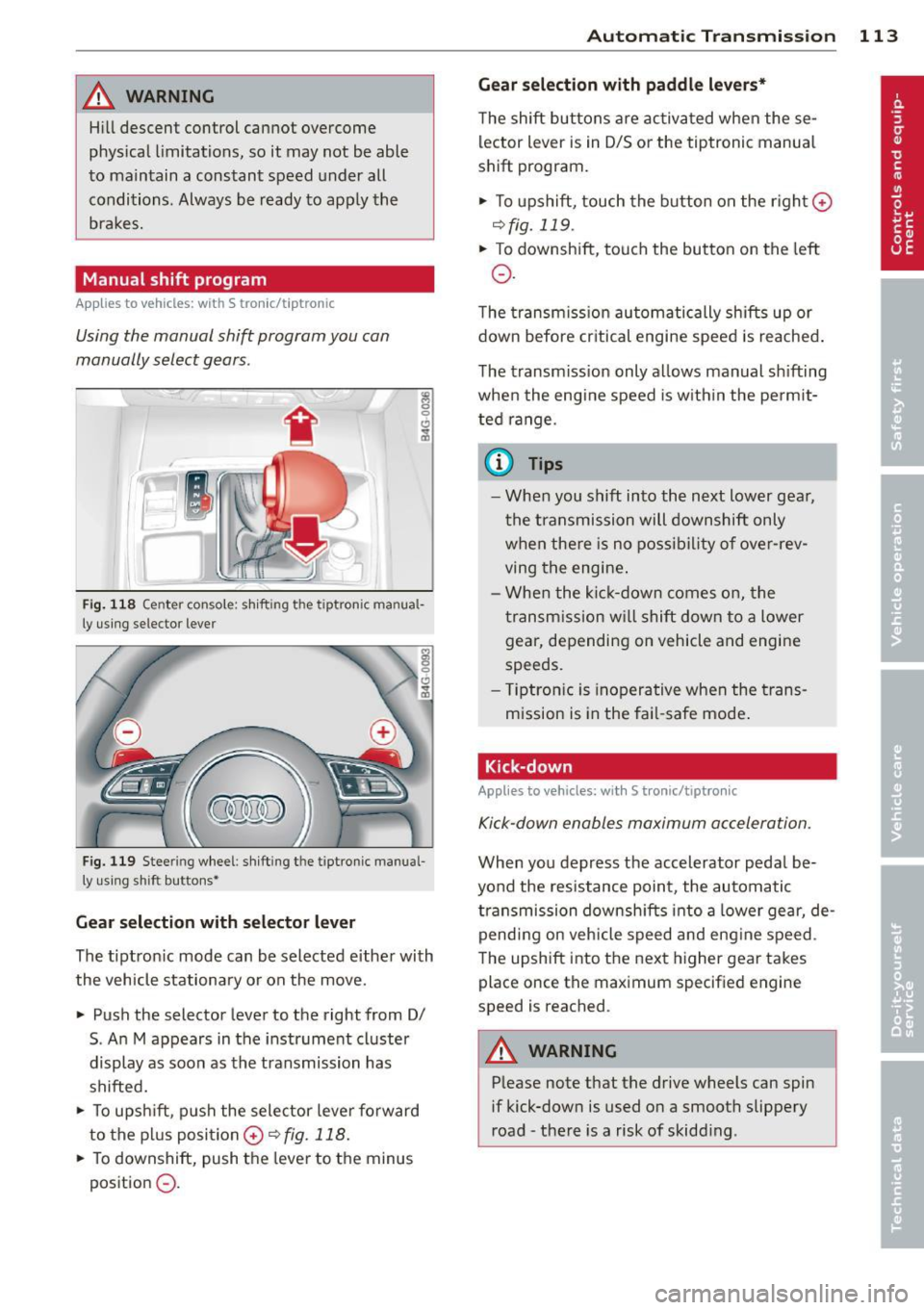
Fig. 118 Ce nter con sole : s hi fting t he tiptronic ma nua l
ly using selector lever
Fig. 119 Stee ring wheel: sh ift ing t he tiptron ic manua l
ly using shi ft buttons•
Gea r selection with selecto r le ver
The t iptron ic mode can be selected either with
the vehicle stationary or on the move.
• Push the selector lever to the right from 0/
S . An M appears in the instrument cluster
display as soon as the transmission has
shifted.
• To upsh ift, p ush the selector leve r fo rward
to the p lus posi tion
0 ~ fig. 118.
• To downshift, push the lever to the minus
position
0 .
Automatic Tra nsmi ssi on 11 3
Gear select ion w ith padd le l evers*
The shift buttons are activated when these
lector lever is in D/S or the tiptronic manua l
shift program.
• To upshift, touch the button on the r ight
0
~fig. 119.
• To downshift, touch the button on the left
0 .
The transm iss ion automatically shifts up or
down before cr itical engine speed is reached .
The transm iss ion only allows manual sh ifting
when the engine speed is w ith in the pe rmit
ted range.
a) Tips
- When you shift into the next lower gea r,
the t ransmission will downshift only
w hen there is no possibility of ove r-rev
ving the engine .
- Whe n the ki ck-down comes on, the
transm ission wi ll shift down to a lower
gear, depending on vehicle and engine
speeds.
- T iptro nic is inoperative when the trans
mission is in the fai l-safe mode .
Kick-down
Applies to vehicles: wit h S tronic/t iptronic
Kick-down enables maximum acceleration.
When you depress the accelerator peda l be
yo nd the resistance point, the automatic
transmission downsh ifts i nto a lower gear, de
pending on veh icle speed and eng ine speed .
The upshift into the next higher gear takes
place once the maximum specified engine
speed is reached .
A WARNING
--Please note t hat the drive wheels can spin
if kick-down is used o n a smooth slippery
road -the re is a risk of skidding .
Page 116 of 310

114 Automatic Transmission
Launch Control Program
Applies to vehicles: with S tro nic
The Launch Control Program provides the
best acceleration possible when starting from
a stop .
Requirement: The engine must be at operat
ing temperature and the steering wheel must
not be turned .
.. Press the
I~ O FFI button <=> page 198 while
the engine is running. The
II indicator light
illuminates in the instrument cluster and
Stabilization control (ESC): Off Warning!
Reduced stability
appears in the driver in
formation system display.
.. Move the selector lever to position D/S to
select sport mode (5) or select
Dynamic
mode in Audi drive select<=> page 103.
.. Press the brake pedal strongly with your left
foot and hold it down for at least
1 second.
.. At the same time, press the accelerator
pedal down completely with your right foot
until the engine reaches and maintains a
high RPM.
.. Remove your foot from the brake pedal
within S seconds ¢
Li)..
.&_ WARNING
-Always adapt your driving to the traffic
flow .
- Only use the Launch Control Program
when road and traffic conditions allow it
and other drivers will not be endangered
or annoyed by yo ur driving and the vehi
cle's acce lerat ion.
- Please note that the driving wheels can
spin and the vehicle can break away
when ESC is sw itched off, espec ially
when the road is slippery.
- Once the vehicle has started moving,
press the
I~ OF F! button br iefly to turn
the ESC on.
- The transmission temperat ure may in
crease significantly after using the
launch control program. If that happens, the program
may not be available for a
few minutes . It wi ll be available again af
ter a cool-down period.
- When accelerating using the la unch con
tro l program, all vehicle parts are subject
to heavy loads. This can resu lt in in
creased wear .
Transmission malfunction
Applies to vehicles: wit h S tronic/tiptro nic
[O] Transmission: Press brake pedal and se
lect gear again
Press the brake pedal and select the desired
selector lever position again. You can then continue driving .
[O] Transmission overheating: Please drive
conservatively
The transmission temperature has increased
s ignificantly due to the sporty driving manner .
Drive in a less sporty manner until the tem
perature returns to the normal range and the
indicator light switches of.
[O] Transmission malfunction: You can con
tinue driving
T he re is a system mal function in the transmis
sion . You may continue driving. Drive to your
authorized Audi dea ler or qualified repair fa
cility soon to have the malfunction corrected.
[O] [O] Transmission malfunction: You can
continue driving with limited functionality
There is a system malfunction in the transmis
s ion. The transmission is switching to emer
gency mode. This mode on ly shifts into cer
tain gears or will no longer shift at all. The en
gine may sta ll. Drive to your authorized Audi
dealer or qualified repair facility immediately
to have the malfunction corrected.
[O] Iii Transmission malfunction: No reverse
gear. You can continue driving
S tronic® transmission: There is a system mal
f unct ion in the transmission. The transmis
sion is switching to emergency mode . This
mode only shifts into certain gears or will no
l onger shift at a ll. The engine may stall. You .,..
Page 130 of 310
128 Homelink®
Homelink®
Universal remote
control
General information
Applies to vehicles: with Homelink® unive rsal remote
co ntrol
The Homelink universal remote control can
be programmed with hand-held transmitters
from existing equipment.
With Homelink, you can control devices such
as the garage door, security systems, house lights, etc. comfortably from the inside of you
vehicle.
H omelink makes it possible for you to rep lace
three different remote controls from devices in your home with one universal remote . Th is
feature works for most garage door and exte rior door moto r signals. Programming the in
d iv idual remo te control fo r you r remote con
trol takes p lace near the center of the radiator
grille. There is a control module attached at
this location .
A one-t ime programm ing of the sensor mus t
be performed before you are able to use sys
tems w ith Homelink.
A WARNING
- Never use the Homelink ® transmitter
with any garage door opener that does have not the safety stop and reverse fea
ture as required by federa l safety stand
ards. This includes any garage door open
er mode l manufact ured before April 1,
1982.
- A garage door opener which cannot de
tect an object, signaling the door to stop
and reverse does not meet cur rent feder
al safety s tandar ds. Us ing a garage doo r
o pener witho ut these fea tures in creases
risk of serious inj ury or death.
- F or safe ty reasons never release t he
parking brake or s tart the engine while
anyone is standing in front of the vehicle .
- A garage door or an est ate gate may
sometimes be set in motion when the Homelink
® remote control is being pro
grammed. If the device is repeatedly ac
tivated, this can overstrain motor and
damage its electrica l components - an
overheated motor is a fire hazard!
- To avo id possible injuries or property
damage, please always make absolutely
certa in that no persons or objects are lo
cated in the rang e of motion of any
equ ipme nt bei ng ope rated.
(0 Tips
- If you would like add itional information
on the Home Link® Unive rsal Transce iver,
Homelink compatib le p roducts, or to
purc hase other accessories s uch as the
HomeL ink® Light ing Package, please
contact Homelink at 1-800 -355 -3515 o r
on the Internet at www.homelink .com.
- For Declaration of Comp liance to Unite d
States FCC and Ind ustry Canada reg ula
tions
¢ page 292.
- For security reasons, we recommend that
you clear the programmed b uttons be
fore selling the vehicle .
Operation
Applies to vehicles: wit h Ho meli nk
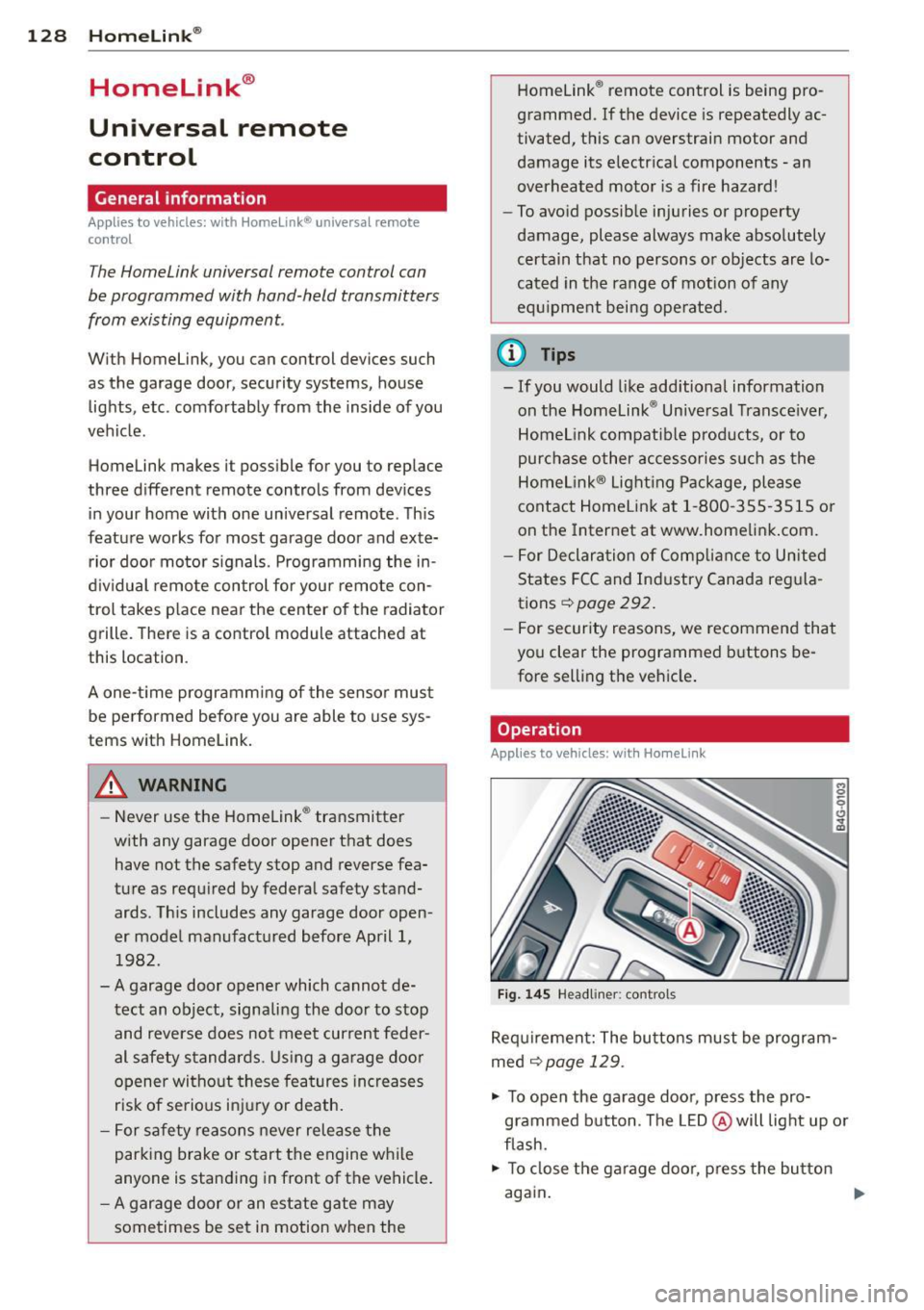
Fig . 14 5 Headliner: controls
M 0
9 (!)
~
Requi rement: The bu tto ns must be program
med
¢ page 129 .
"' To open the garage doo r, press the pro
grammed b utton. The LED @ will light up o r
flash.
"' To close the ga rage doo r, press the button
aga in .
Ill>
Page 137 of 310
-never sit on the edge of the seat
- never sit sideways
- never lea n out the w indow
- never put your feet out the window
- never put your feet on the instrument panel
- never rest your feet on the seat cushion or
back of the seat
- never ride in the footwe ll
- never ride in the cargo area
8_ WARNING
Improper seat ing positions increase the
r isk of serious personal injury and death
whenever a veh icle is being used .
- Always make sure that all vehicle occu
pants stay in a proper seating pos ition
and are properly restra ined whenever the
vehicle is be ing used.
Driver and passenger
side footwell
Important safety instructions
Applies to vehicles: with knee airbags
8_ WARNING
Always ma ke su re that the knee a irbag can
inflate without inte rfe rence. Objects be
t ween yourse lf and the airbag can increase
t he risk of in jury in an acc ident by interfer
ing with the way the a irbag deploys or by
being p ushed into you as the airbag de
ploys.
- No persons (ch ildren) or animals should
ride in the footwell in front of the pas
senger seat. If the airbag deploys, this
can result in serious or fata l injuries.
- No objects of any k ind sho uld be carried
in the footwell area in front of the driv
er's or passenger's seat . Bulky objects
(shopping bags, for example) can ham
per or prevent p roper deployment of the
airbag. Small objec ts can be thrown
thro ugh the vehi cle if the airbag deploys
and injure you o r your passengers.
-
Dr iving S afel y 135
Pedal area
Pedals
The pedals must always be free to move and
must never be interfered with by a floor mat
or any other object.
Make sure that a ll peda ls move free ly without
interfe rence and that nothing prevents them
from return ing to their orig inal positions .
Only use floor mats t hat leave t he pedal area
free and can be secured with floor mat fasten ers .
If a brake circ uit fai ls, increased brake pedal
trave l is required to b ring the vehicle to a f ull
stop.
8_ WARNING
Pedals that cannot move free ly can cause
loss of vehicle co ntrol and increase the risk
of s erious injury.
- Never p lace any objects in the drive r's
footwell. An ob ject cou ld get into the
pe dal area and inte rfe re with pedal func
tion. In case of sudden brak ing o r an ac
cident, yo u wo uld not be able to b rake or
accelerate!
- Always ma ke sure tha t no thing can f all
or move into the driver's footwel l.
Floor mats on the driver side
Always use floor mats that can be securely
attached to the floor ma t fasteners and do
not in terfere with the free movement of the
pedals.
"' Ma ke s ure that the floor mats are prope rly
secured and cannot move and in terfere with
t he peda ls ¢ ..&_ .
U se only floor mats that leave the peda l area
u nobst ructed and th at are firmly secu re d so
that they c annot slip o ut o f posi tion. You c an
obta in suitab le floor mats from yo ur aut ho r
ized Audi Dealer.
Floor mat fastene rs a re in stall ed in your Aud i.
1111>
•
•
Page 138 of 310
136 Driving Saf ely
Fl oor mats used in your vehicle must be at
tached to these fasteners. Proper ly securing
the floor mats will prevent them from s liding
into pos itions that could interfere with the
pedals or impair safe operation of your vehicle
in other ways .
A WARNING
Pedals that cannot move freely can result
in a loss of veh icle contro l and increase the
r isk of serious personal injury .
- Always make sure that floor mats are
properly secured.
- Never place or insta ll floor mats or other
floor coverings in the vehicle that cannot be properly secured in place to prevent
them from slipping and interfering w ith
the pedals or the ability to control the
vehicle.
- Never place o r insta ll floor ma ts or other
floor coverings on top of a lready insta l
led floor mats. Additional floor mats and
other coverings w ill reduce the size of
the pedal area and interfere with the
pedals.
- Always properly reinstall and secure floor
mats that have been taken out for clean
ing.
- Always make sure that objects cannot fall into the driver footwell wh ile the ve
hicle is moving. Objects can become
trapped under the brake pedal and accel
erator peda l causing a loss of veh icle
control.
Stowing luggage
Loading the luggage compartment
All luggage and other objects must be prop
erly stowed and secured in the luggage com
partment.
L oose items in the luggage comp art ment can
shift suddenly, changing veh icle hand ling
characteristics. Loose items can also increase
the risk of serious personal injury in a sudden
vehicle maneuver or in a collision . ..
Distribute the load even ly in the luggage
compartment .
.. Always place and proper ly secure heavy
items in the luggage compartment as far
forward as possible .
.. Secure luggage using the tie -downs prov id
ed
¢ page 63, Luggage compartment.
.. Make s ure that the rear seatback is securely
la tc hed in place.
A WARNING
Imp roperly store d luggage or other items
can fly thro ugh the vehi cle causing ser ious
personal injury in the event of hard brak
i ng or an accident. To help reduce the risk
of ser ious personal in jury:
- Always put objects, fo r example, luggage
or other heavy items in the luggage com pa rtment.
- Always secure objects in the luggage
compartment using the t ie-down hooks
and suitable straps.
A WARNING
=
Heavy loads w ill influence the way your ve-
hi cle handles . To help reduce the risk of a
l oss of contro l leading to serious pe rsonal
i njury :
-Always keep in mind when transporting
heavy objects, that a change i n the cen
ter of gravity can also cause changes in
veh icle ha ndling:
- Always distribute the load as evenly as
poss ible.
- Place heavy objects as far forward in
the luggage compartment as possible .
- Never exceed the Gross Axle Weight Rat
ing or the Gross Vehicle We ight Rating
specified on the safety compliance stick
er on the left door jamb. Exceed ing per
miss ible weight standards can cause the
veh icle to slide and handle differently .
- Please observe information on safe dr iv
ing¢
page 130.
Page 198 of 310
196 Intelligent technology
Intelligent technology
Notice about data
recorded by vehicle
control modules
Your vehicle is not equipped with an Event Da
ta Recorder (EDR), installed by some manu
facturers fo r the express purpose of capturing
data for retrieval after an accident or crash
event . EDR's are sometimes ca lled "crash re
corders".
Some state laws restrict the retr ieval or down
loading of data stored by EDR's that were in
stalled in a vehicle for the express purpose of
retrieving data after an accident or crash
event without the owner's consent.
A lthough your vehicle is not equipped with an
EDR, it is equipped with a number of electron
ic control modules for various vehicle systems
such as, for examp le, eng ine function, em is
sion control, as well as for the airbags and
safety belts.
These electronic contro l modules also record
vehicle-re lated data during normal vehicle op
eration for diagnostic and repair purposes.
The recording capacity of the electronic con
trol modules is limited to data (no sound is re
corded) and only a small amount of data is ac
tually recorded over a very limited pe riod of
time and stored when a system fault or other
condition is sensed by a control unit. Some of
the data then stored may relate to vehicle
speed, direction, braking as we ll as restraint
system use and performance in the event of a
crash or other condition. Stored data can only
be read and downloaded with special equip
ment.
Electronic Stabilization
Control (ESC)
Description
ESC helps to improve road holding and vehicle
dynamics to help reduce the probability of
skidd ing and loss of vehicle control. It works
only when the engine is running. ESC detects certain difficult driving situat
ions, including
when the vehicle is beginning to spin (yaw)
out of control and helps you to get the veh icle
back under control by se lectively braking the
wheels, and/or reducing engine power and
providing steering assistance to help hold the
vehicle on the driver's intended course. The in
dicator light
G) in the instrument cluster
blinks when ESC is taking action to help you
control the vehicle.
ESC has limitations.
It is important to remem
ber that ESC cannot overcome the laws of
physics. It wi ll not always be able to help out
under all conditions you may come up against.
For example, ESC may not always be able to
help you master situations where there is a
sudden change in the coefficient of friction of
the road surface. When there is a section of
dry road that is suddenly covered with water,
slush or snow, ESC cannot perform the same
way it wou ld on the dry surface . If the vehicle
hydroplanes (rides on a cushion of water in
stead of the road surface), ESC will not be
able to help you steer the vehicle because con
tact with the pavement has been interrupted
and the vehicle cannot be braked or steered.
During fast cornering, particularly on winding
roads, ESC cannot always deal as effectively
with difficult driving situations than at lower
speeds. When towing a trailer, ESC is not able
to help you regain control as it would if you
were not tow ing a trailer.
Always adjust your speed and driving style to road, traffic; and weather condit ions. ESC can
not override the vehicle's physical limits, in
crease the available traction, or keep a vehicle
on the road if road departure is a result of
drive r inattention. Instead, ESC improves the
poss ibility of keeping the vehicle under con
trol and on the road during ex treme maneu
vers by using the driver's steering inputs to
help keep the vehicle going in the intended di
rection . If you are traveling at a speed that
causes you to run off the road before ESC can
provide any assistance, you may not experi
ence the benefits of ESC.
Page 199 of 310
ESC includes and/or works together with the
anti-lock brake system (ABS) , brake assist sys
tem, anti -slip regulation (ASR) , electronic dif
ferential lock (E DL) and e lectronic interaxle
d ifferential lock*. ESC is swi tched on all the
time. In certain situat ions when you need less
traction , you can switch off ASR by pressing
the button
[ru ~ fig . 181 . Be sure to switch
ASR on again when you no longer need less
traction.
Anti-lock braking system (ABS)
ABS prevents the wheels from locking up
when braking. The vehicle can still be steered even during hard braking . Apply steady pres
sure to the brake pedal. Do not pump the ped
al. A puls ing in the brake pedal indicates that
the system is he lping you to brake the vehicle.
Brake assist system
The brake assist system can decrease brak ing
d istance.
It increases braking power when the
driver presses the brake pedal quickly in emer
gency situations. You must press and hold the
brake pedal until the situation is over . In
vehicles with adaptive cruise control* , the
brake assist system is more sensitive if the
d istance detected to the vehicle ahead is too
small.
Anti-slip regulation (ASR)
ASR reduces engine power when the drive
wheels begin to spin and adapts the force to
the road condit ions. This makes it eas ier to
s tart, accelerate and drive up hills.
Electronic differential lock (EDL)
The EDL brakes wheels that are spinn ing and
transfers the drive power to the other drive
wheel or whee ls if the vehicle is equipped with
all-whee l drive*. This function is available up
to about 75 mph (120 km/h).
I n extreme cases , EDL automatically switches
off to help keep the brake on the braked wheel
from overheating. EDL wi ll switch on again au
tomatically when conditions have returned to
normal.
Intelligent technology 197
Electronic interaxle differential lock*/
selective wheel torque control*
The electronic interaxle differential lock (front
whee l drive) or the se lective wheel torque
cont rol (all-wheel dr ive) operates when dr iv
ing through curves . The front wheel on the in
s ide of the curve or both wheels on the inside
of the curve are braked selectively as needed .
T his min imizes sliding in the front wheels and
allows for more precise driving through
curves . Th e applicable system may no t acti
vate when driv ing in wet or snowy conditions.
A WARNING
-
-ESC, ABS, ASR, EDL and the electronic in
teraxle differential lock function* cannot
overcome the laws of physics. This is es
pecially important on slippery or wet
roads . If the systems begin acting to sta
bilize your vehicle, you should immedi
ately change your speed to match the
road and traffic conditions. Do not let
the increased safety provided by these
systems tempt you to t.;1ke risks. Doing
so will increase the risk o f a loss of vehi
cle control, collision and serious personal
injuries.
-Always adapt your speed to road, traffic
and weather conditions . The risk of los
ing control of the vehicle increases when
driving too fast, espec ially through
curves and on slippery or wet roads, and
when dr iving too close to vehicles up
ahead . ESC, ABS, the brake assist sys
tem, EDL, ASR and the elec tronic inter
axle differential lock function* cannot
prevent collisions .
- Always accelerate with special care on
even, smooth surfaces such as those that
are wet or covered with ice and snow.
The drive wheels can spin even with
these assistance systems that cannot al
ways he lp to red uce the risk of loss of ve -
hicle control. .,.
•
•