brake light AUDI S7 2014 Owner's Manual
[x] Cancel search | Manufacturer: AUDI, Model Year: 2014, Model line: S7, Model: AUDI S7 2014Pages: 306, PDF Size: 76.83 MB
Page 93 of 306

Audi adaptive cruise control and braking guard 91
When approaching a moving vehicl e up ahead,
the adaptive cruise contro l system automati
cally brakes to match that object's speed and
then maintains the stored distance.
If the ve
hicle ahead accelerates, adaptive cruise con
trol will also accelerate up to the stored
speed .
The higher the speed, the greater the distance
in yards (meters) ¢.&. . The
Distance 3 setting
is recommended .
The distances prov ided are specified values .
Depending on the driving situation and the
how the vehicle ahead is driving, the actual
distance may be more or less than these tar
get distances.
The various symbols for the time increments appear briefly in the information line @
¢
page 88, fig . 92 when you change the set
tings .
,::::::,_,::::::, ___ Distance 1: This setting corre-
sponds to a distance of 92 feet/28 meters
when traveling at 62 mph (100 km/h), or a
time interval of 1 second.
,::::::, __ ,::::::, __ Distance 2: This setting corre
sponds to a distance of 118 feet/36 meters
when traveling at 62 mph (100 km/h), or a
time interval of 1.3 seconds .
,::::::, ___ ,::::::,_ Distance 3: This setting corre-
sponds to a distance of 164 feet/SO meters
when traveling at 62 mph (100 km/h), or a
time interval of 1.8 seconds .
,::::::, __ __ ,::::::, Distance 4: This setting corre-
sponds to a distance of 210 feet/64 meters
when traveling at 62 mph (100 km/h), or a
time interval of 2.3 seconds .
A WARNING
Following other vehicles too closely in
creases the risk of collisions and serious
personal injur y.
- Setting short distances to the traffic
ahead reduces the time and distance
available to bring your vehicle to a safe
stop and makes it even more necessary
to pay close attention to traffic. -
Always obey applicable traffic laws, use
good judgment, and select a safe follow
ing d istance for the traff ic, road and
weather conditions .
(D Tips
-Distance 3 is set automatically each time
you switch the ignition on.
- Your standard settings are automatically
stored and assigned to the remote con
trol key being used.
Selecting the driving mode
Applies to vehicles: with Audi adaptive cruise control
.. Select the desired driving mode in dr ive se
lect
c::> page 102 .
(D Tips
Your settings are automat ically stored and
assigned to the remote control key being
used.
Prompt for dr iver intervention
Applies to vehicles: with Audi adaptive cruise contro l
Fig. 96 Instrument cluster: req ues t fo r drive r inte rven
tio n
In certain situations, the system will prompt
you to take action . This could happen, for ex
amp le, if braking by the adaptive cruise con
trol system is not enough to maintain enough
distance to the vehicle ahead .
The indicator light
I and the symbol in the
display will warn you about the s ituat ion
c::> fig. 96. You will also hear an acoustic signal.
- Press the brake pedal to slow your vehicle
down.
Page 94 of 306

92 Audi adaptive cruise control and braking guard
Audi braking guard
Descript ion
Applies to vehicles: with Audi adaptive cruise control
Fig. 97 Instrument cluster: approach warn ing
Braking guard uses radar sensors and a video
camera . It also functions within the limits of
the system when adapt ive cruise control is
switched off .
What can braking guard do?
When detected in time, the system can assess
situations when a vehicle ahead brakes sud
denly or if your own vehicle is traveling at a
high speed and approaching a vehicle up
ahead that is moving more slowly . Brak ing
guard does not react if it cannot detect the
situation.
The system advises you of various situations:
- The
distance warning is given if you are too
close to the vehicle ahead for a long time. If
the vehicle ahead brakes sharply, you will not be able to avoid a collision . The indicator
light
I in the display comes on .
- The
approach warning is given when a de
tected veh icle up ahead in your lane is mov
i ng much more slowly than you are or if it
brakes sharply . When this warning is given,
it may only be possible to avoid a collision
by swerving or braking sharply. Th e indicator
light
I and indicato r in the display will warn
you about the danger¢
fig. 97. You will a lso
hear an acoustic signal.
ll This is not ava ilable in some co un tri es .
If you do not react fast enough or do not react
at all to the situation, braking guard will inter·
vene by braking.
- If a coll is ion is imminent, the system will
first provide an
acute warning by briefly and
sharply applying the brakes.
- If you do not react to the acute warning,
braking g uard can brake wit h increas ing
force w ith in the limits of the system . This
reduces the vehicle speed in the event of a
collision.
- The system can initiate maximum braking
short ly before a collision
1l . Full deceleration
at high speeds occurs only in vehicles with
adapt ive cruise control and side assist (pre
sense plus).
- If the braking guard senses that you are not
braking hard enough when a collision is im·
m inent, it can increase the braking force.
- The pre sense functions also engage when a
collision is imminent¢
page 194.
Which functions can be controlled?
You can switch braking guard and the dis
tance/approach warning on or off in the MMI
¢ page 93, Settings in the MMI.
A WARNING
Lack of attention can cause collisions, oth
er accidents and serious personal injuries.
The braking guard is an assist system and
cannot prevent a collision by itself. The
driver must always intervene. The driver is
always respons ible for braking at the cor
rect time.
- Always pay close att ent ion to traffic,
even when the braking guard is switched
on. Be ready to intervene and be ready to
take comp lete control whenever necessa
ry . Always keep the safe and legal dis
tance between your vehicle and vehicles up ahead.
- Braking guard works within limits and
will not respond outside the system lim· its, for example when approaching a ..,.
Page 111 of 306

Automatic Transmission
S tronic, tiptronic
Introduction
Applies to vehicles: with S tro nic/t iptronic
The automat ic transmission is controlled elec
tronically. The transmission upshifts or down
shifts automatically depending on which drive
program is se lected.
When a
moderate driving style is used, the
transmission selects the most economica l
driving mode. It will then change up early and
de lay the downshifts to give better fuel econ
omy.
The transmission switches to a sporty mode
after a kick-down or when the driver uses a
sporty driving style characterized by quick ac
celerator pedal movements, heavy accelera
tion, frequent changes in speed and traveling
at the maximum speed.
If desired, the driver can also select the gears
manually (tiptronic mode) r:::> page 113.
Various automatic transmissions may be in
stalled, depending on the mode l:
S tronic transmission
The 5 tronic is a dual-clutch transmission .
Power is transferred using two clutches that
work independently from one another . They
replace the torque converter used in conven
tional automatic transmissions and allow the
vehicle to accelerate without a noticeable in
terruption in traction.
tiptronic transmission
In the tiptronic transmission, power is trans
ferred by a torque converter.
Automatic Transmission 109
Selector lever positions
App lies to vehicles: wit h S tronic/tiptro nic
Fig. 116 Display in the instrument cluste r: selector
lever pos ition
T he selector lever position engaged appears
next to the selector lever as well as in the in
strument cluster display.
P -Park
In this selector lever position the transmis
sion is mechanically locked. Engage P only
when the vehicle is
completely stopped Q .&.
in Driving the automatic transmission on
page 112.
To shift in or out of position P, you must first
press and hold the brake pedal and then press
the release b utton in the selector lever handle
whi le moving the selector lever to or from P.
You can shift out of this position only with the
ignition on .
R- Reverse
Select R on ly when the vehicle is at a full stop
and the engine is running at idle speed r:::> .&. in
Driving the automatic transmission on
page 112.
Before you move the selector lever to R, press
both the button in the hand le of the selector
lever
and the brake pedal at the same t ime.
When the ignition is on, the backup lights illu
minate when the selector lever is moved into
R.
N -Neutral
The transmission is in neutral in this position.
Sh ift to th is position for standing with the ..,.
Page 112 of 306
110 Automatic Transmission
brakes applied ¢ & in Driving the automatic
transmission on page 112.
When the veh icle is stationary or at speeds
be low 1 mph (2 km/h), you must always apply
the footbrake before and while moving the
lever out of N.
D/S -Normal position for driving forward
In the D/S position, the transmiss io n can be
operated e ither in the normal mode Dor in
the sport mode S. To select the sport mode S,
pull the se lector lever back briefly . Pulling the
lever back again will select the normal mode
D. The instrument cluster display shows the
selected driving mode.
In the
normal mode D, the transmission auto
matica lly selects the suitab le gear ratio. It de
pends on engine load, vehicle speed and driv
ing style.
Select the
spo rt mode S for sporty driving.
The vehicle makes fu ll use of the engine's
power. Shifting may become noticeable when
accelerating.
When the vehicle is stationary or at speeds
be low 1 mph (2 km/h), you must always apply
the foot brake before and while moving the lever to D/S out of N.
A WARNING
Read and follow all WARNINGS¢ & in
Driving the automatic transmission on
page 112.
d) Note
-
Coasting downhill with the transmission in
N and the engine not running w ill result in
damage to the automatic transmission
and possibly the catalytic converter.
@ Tips
- Audi drive select: you can adjust the
sporty sh ift characteristics in the
Dy
namic driving mode.Swill appear in the
i nst rument cluste r d isplay instead of D.
-If you accidentally select N while driv ing,
take your foot off the acce lerator pedal immediately and wait
for the engine to
slow down to idle before selecting D/S.
-If there is a power failure, the selector
lever will not move out of the P position.
The emergency release can be used if
this happens
¢page 115.
Automatic Shift Lock (ASL)
Applies to vehicles : wit h S t ronic/tipt ro ni c
The Automatic Shift Lock safeguards you
against accidentally shifting into a forward or
the reverse gear and causing the vehicle to
move unintentionally.
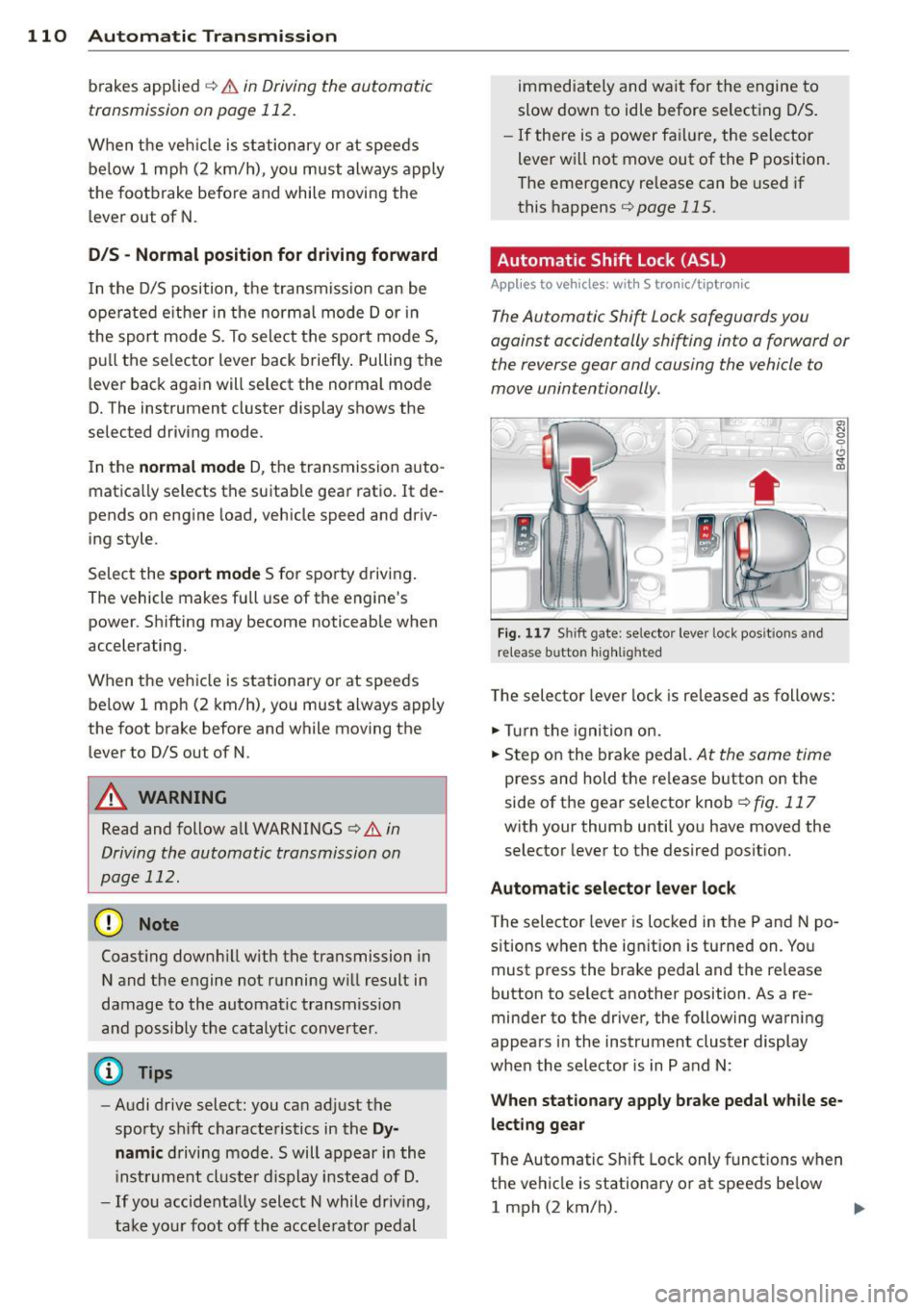
( )
Fig. 117 Shi ft gate: selector leve r loc k pos it ions and
r e lease button highlighted
The selector lever lock is released as follows:
.,. Turn the igni tion on.
.,. Step on the brake pedal.
At the sam e tim e
press and hold the release button on the
side of the gear selector knob
¢ fig. 117
with your thumb until you have moved the
selector lever to the desired position.
Automatic selector lever lock
The selector lever is locked in the P and N po
s itions when the ignit ion is turned on. You
must press the brake pedal and the re lease
button to select another position . As a re
minder to the driver, the following warning
appears in the instrument cluster display
when the selector is in P and N:
When stationary apply brake pedal while se
lecting gear
T he Automatic Shift Lock only functions when
the vehicle is stationary or at speeds be low
1 mph (2 km/h).
Page 113 of 306

At speeds above about 1 mph (2 km/h) the
Automatic Shift Lock is automatically deact i
vated in the N position .
A time de lay element prevents the se lector
l ever from locking when it is moved through
the N position (go ing from R to D/S). The lock
ing e lement will lock the selecto r lever if the
l ever is left in N (Neutral) for more than ap
proximately 2 second, without the brake ped
al being pressed .
Relea se butt on
The release button on the selector lever pre
vents the lever from being accidentally shifted
into certain positions . Depending on the direc
tion of the shift, the se lector lever locks at d if
ferent positions. The positions are h ighlighted
i n the illustration
c:> fig . 117 .
Driving the automatic transmission
Applies to vehicles: with S tronic/tiptronic
Fig . 1 18 Sh ift gate on the center conso le: se lector lev
er w it h relea se button
Startin g the engin e
• The selector leve r must be in P or N .
Starting off
• Press and hold the brake pedal.
• Press and hold the release button in these
lector lever handle, select the desired se lec
tor lever pos ition such as D/S and release
the button .
• Wait br iefly until the transmission has shift
ed (you will feel a slight movement).
• Remove your foot from the b rake pedal and
acce le rate .
Automatic Tra nsmi ssi on 11 1
Stopping t emporaril y
• Keep the veh icle stationary using the brak
ing pedal , for example at traffic lights .
• Do not press the accelerator peda l when do
ing this .
• To prevent the vehicle from ro lling when you
start driv ing, set the parking brake when
stopping on steep inclines
c:> .&_ .
• The parking brake will release automat ically
and the vehicle will start mov ing once you
press the acce lerator pedal.
Stopping /parking
If the selector lever is not in the P position
when you open the driver's door, the veh icle
could roll. The message
Tran smi ssion: Car
ma y roll! Shift to park!
appears .
• Press and hold the brake pedal until the ve-
hicle has come to a comp lete stop .
• Apply the parking brake
c:> page 80, Parking .
• Select the P selector lever posit ion c:> .&_ .
Stopping on an incline
• Always press the brake pedal to ho ld the ve
hicle in place and preven t it from "rolling
back"
c:> .&_ . Do not try to prevent the vehi
cle from "rolling back " when a gear is en
gaged by increasing the engine speed
c:> 0.
Starting on an incline
• Activate the parking brake.
• With the driving gear selected, press the ac
celerator pedal carefully . The parking brake
w ill release automatically if your seat belt is
fastened.
Under certa in circumstances, such as driving
in the mounta ins, it may be usefu l to sw itch
temporar ily to the manual sh ift p rogram in or
der to adj ust the gears to the driving cond i
ti ons by hand
<:? _&. .
On slopes, activate the parki ng b rake first and
then move the selector lever to the P position.
T his prevents too much st ress from being
placed on the locking mechanism.
Page 116 of 306
114 Automatic Transmission
Launch Control Program
Applies to vehicles: with S tro nic
The Launch Control Program provides the
best acceleration possible when starting from
a stop .
Requirement: The engine must be at operat
ing temperature and the steering wheel must
not be turned .
.. Press the
I~ O FFI button 9 page 198 while
the engine is running. The
II indicator light
illuminates in the instrument cluster and
Stabilization control (ESC): Off Warning!
Reduced stability
appears in the driver in
formation system display.
.. Move the selector lever to position D/S to
select sport mode (5) or select
Dynamic
mode in Audi drive select ¢page 103.
.. Press the brake peda l strongly with your left
foot and hold it down for at least
1 second.
.. At the same t ime, press the accelera tor ped
al down completely w ith your r ight foot un
t il the engine reaches and maintains a high
RPM.
.. Remove your foot from the brake pedal
within S seconds ¢
Li)..
.&_ WARNING
-Always adapt your driving to the traffic
flow .
- Only use the Launch Control Program
when road and traffic conditions allow it
and other drivers will not be endangered
or annoyed by yo ur driving and the vehi
cle's acce lerat ion.
- Please note that the driving wheels can
spin and the vehicle can break away
when sport mode is sw itched on, espe
c ially when the road is slippery .
- Once yo u have accelerated, you should
switch sport mode off by pressing the
j .i, OFF I button.
- The transmission temperat ure may in
crease significantly after using the
Launch Control Program . If that hap- pens,
the program may not be available
for a few minutes . It will be available
again after a cool-down period.
- When accelerating using the Launch
Contro l Program, a ll vehicle parts are
subject to heavy loads. This can result in
increased wear.
Transmission malfunction
Applies to vehicles: wit h S tronic/tiptro nic
[O] Transmission: Press brake pedal and se
lect gear again
Press the brake pedal and select the desired
selector lever position again. You can then continue driving .
[O] Transmission overheating: Please drive
conservatively
The transmission temperature has increased
s ignificantly due to the sporty driving manner .
Drive in a less sporty manner until the tem
perature returns to the normal range and the
indicator light switches of.
[O] Transmission malfunction: You can con
tinue driving
T he re is a system mal function in the transmis
sion . You may continue driving. Drive to your
authorized Audi dea ler or qualified repair fa
cility soon to have the malfunction corrected.
[O] [O] Transmission malfunction: You can
continue driving with limited functionality
There is a system malfunction in the transmis
s ion. The transmission is switching to emer
gency mode. This mode on ly shifts into cer
tain gears or will no longer shift at all. The en
gine may sta ll. Drive to your authorized Audi
dealer or qualified repair facility immediately
to have the malfunction corrected.
[O] Iii Transmission malfunction: No reverse
gear. You can continue driving
S tronic transmission: There is a system mal
fu nct ion in the transm ission. The transmis
sion is switching to emergency mode . This
mode only shifts into certain gears or will no
l onger shift at a ll. The engine may stall. You .,..
Page 130 of 306

128 Homelink
Homelink
Universal remote
control
General information
Applies to vehicles: with Homelink u nive rsal remote con
tro l
The HomeLink universal remote control can
be programmed with hand-held transmitters
from existing equipment.
With Homelink, you can control devices such
as the garage door, security systems, house
lights, etc. comfortably from the inside of you
vehicle.
Homelink makes it possible for you to replace
three different remote controls from devices in your home with one universal remote . Th is
feature works for most garage door and exte
rior door motor signals. Programming the in
d iv idual remo te control fo r your remote con
trol takes p lace near the center of the radiator
grille. There is a control module attached at
this location .
A one-t ime programm ing of the sensor mus t
be performed before you are able to use sys
tems w ith Homelink.
A WARNING
- Never use the Homelink transmitter
with any garage door opener that does
have not the safety stop and reverse fea
ture as requ ired by federal safety stand
ards. Th is includes any garage door open
er model manufactured before April 1, 1982.
- A garage door opener which cannot de
tect an object, signaling the door to stop
and reverse does not meet current feder
al safety standards . Us ing a garage doo r
opener witho ut these fea tures increases
risk of serious injury or death.
- For safety reasons never release the
parking brake or start the engine while
anyone is standing in front of the vehicle .
- A garage door or an estate gate may
sometimes be set in motion when the Homelink remote control is being pro
grammed. If the device is repeatedly ac
tivated, this can overstrain motor and
damage its electrical components -an
overheated motor is a fire hazard!
- To avo id possible injuries or property
damage, please always make absolutely
certa in that no persons or objects are lo
cated in the range of motion of any
equ ipment being operated.
(0 Tips
- If you would like additional information
on the Homelink Un iversal Transceiver,
Homelink compatible products, or to
purchase other accessories su ch as the
Homelink Lighting Package, please con
tact Homelink at 1 -800-355-3515 or on
the Internet at www.homelink.com.
- For Declara tion of Comp liance to United
States FCC and Ind ustry Canada reg ula
tions¢
page 288 .
-For security reasons, we recommend that
you clear the programmed b uttons be
fore selling the ve hicle .
Operation
Appl ies to vehicles: wit h Ho melink
Fig . 14 6 Headliner: controls
M 0
9 (!)
~
Requirement: The buttons must be program
med ¢
page 129 .
"'To open the garage door , press the program
med b utton . The LED @ will light up o r
flash.
"' To close the garage door, press the button
again .
Ill>
Page 198 of 306
196 Intelligent technology
Intelligent technology
Notice about data
recorded by vehicle
control modules
Your vehicle is not equipped with an Event Da
ta Recorder (EDR), installed by some manu
facturers fo r the express purpose of capturing
data for retrieval after an accident or crash
event . EDR's are sometimes ca lled "crash re
corders".
Some state laws restrict the retr ieval or down
loading of data stored by EDR's that were in
stalled in a vehicle for the express purpose of
retrieving data after an accident or crash
event without the owner's consent.
A lthough your vehicle is not equipped with an
EDR, it is equipped with a number of electron
ic control modules for various vehicle systems
such as, for examp le, eng ine function, em is
sion control, as well as for the airbags and
safety belts.
These electronic contro l modules also record
vehicle-re lated data during normal vehicle op
eration for diagnostic and repair purposes.
The recording capacity of the electronic con
trol modules is limited to data (no sound is re
corded) and only a small amount of data is ac
tually recorded over a very limited pe riod of
time and stored when a system fault or other
condition is sensed by a control unit. Some of
the data then stored may relate to vehicle
speed, direction, braking as we ll as restraint
system use and performance in the event of a
crash or other condition. Stored data can only
be read and downloaded with special equip
ment.
Electronic Stabilization
Control (ESC)
Description
ESC helps to improve road holding and vehicle
dynamics to help reduce the probability of
skidd ing and loss of vehicle control. It works
only when the engine is running. ESC detects certain difficult driving situat
ions, including
when the vehicle is beginning to spin (yaw)
out of control and helps you to get the veh icle
back under control by se lectively braking the
wheels, and/or reducing engine power and
providing steering assistance to help hold the
vehicle on the driver's intended course. The in
dicator light
G) in the instrument cluster
blinks when ESC is taking action to help you
control the vehicle.
ESC has limitations.
It is important to remem
ber that ESC cannot overcome the laws of
physics. It wi ll not always be able to help out
under all conditions you may come up against.
For example, ESC may not always be able to
help you master situations where there is a
sudden change in the coefficient of friction of
the road surface. When there is a section of
dry road that is suddenly covered with water,
slush or snow, ESC cannot perform the same
way it wou ld on the dry surface . If the vehicle
hydroplanes (rides on a cushion of water in
stead of the road surface), ESC will not be
able to help you steer the vehicle because con
tact with the pavement has been interrupted
and the vehicle cannot be braked or steered.
During fast cornering, particularly on winding
roads, ESC cannot always deal as effectively
with difficult driving situations than at lower
speeds. When towing a trailer, ESC is not able
to help you regain control as it would if you
were not tow ing a trailer.
Always adjust your speed and driving style to road, traffic and weather condit ions. ESC can
not override the vehicle's physical limits, in
crease the available traction, or keep a vehicle
on the road if road departure is a result of
drive r inattention. Instead, ESC improves the
poss ibility of keeping the vehicle under con
trol and on the road during ex treme maneu
vers by using the driver's steering inputs to
help keep the vehicle going in the intended di
rection . If you are traveling at a speed that
causes you to run off the road before ESC can
provide any assistance, you may not experi
ence the benefits of ESC.
Page 203 of 306
overheat, premature wear and increased
stopp ing distance.
- Under certain climatic and operating
conditions such as passing through wa
ter, driving in heavy rain or after wash ing
the vehicle, the effect iveness of the
brakes can be reduced. In winter, ice can
accumulate on the brake pads, linings,
discs and drums. Carefully apply brakes
for a test. Brakes will dry and ice coat ings will be cleaned off after a few ca re
f ul brake applications.
- Driv ing for an extended period of time on
salt-covered roads w ithout using your
brakes can also affect braking efficiency.
Clean off accumulated salt coating from
brake discs and pads w ith a few caref ul
brake applicat ions.
- If you damage the front spoiler, or if you
install a different spoiler, be sure the air
flow to the front brakes is not obstruct ed. Otherwise the brake system could
overheat reducing the effectiveness of
the ent ire brake system.
- Failure of one brake c ircuit will impair
the braking capability resulting in an in
c reased stopp ing distance. Avoid driv ing
the vehicle and have it towed to the near
est Aud i dea ler o r q ualified workshop.
- Never let the vehicle roll to a stop w ith
the engine shu t off.
- If the brake booster is not work ing, the
brake pedal must be pressed conside ra
bly harder to make up for the lac k of
booster assistance.
Electro-mechanical
power assist
The electro-mechanical power assist helps
the driver when steering.
Powe r steering adapts electronically based on
the vehicle speed.
Indicator lights and message s
• Steerin g defective! Stop th e vehicle
Int ellig ent technolog y 201
If this indicato r light turns on and stays on
and t his message appears, the power steering
may have failed.
Do
not con tinue dr iv ing . See your au thor ized
Audi dealer or other qualified repair facility
for assistance .
'I-Y Steering: System malfun ction! You may
c ontinue dri ving
If the indicato r light turns on and the mes
sage appea rs, the stee ring may be more diffi
c ult to move o r more sens itive than usual.
Drive slowly to your authorized Aud i dealer or
qualified workshop to have the ma lfunction
corre cted.
0) Tips
If the . or 1:z;lj indicator light on ly stays
on for a short t ime, yo u may continue dr iv
i ng.
Driving with your
quattro
App lies to veh icl es: w ith all-w hee l drive
With all-wheel drive, all four wheels are driv
en.
General information
Wi th a ll W heel Drive, power is distributed to
all four wheels . This happens automatically
depending on your driving style and the road
conditions at the time . See also
~ page 196.
With the sport different ia l* , power distribu
tion to the rear wheels is variable and can be
adjusted with Audi dr ive select*
~ page 102.
Always read and follow safety precautions
~ .&. .
Winter tires
When dr iving in the winter, yo ur vehicle with
all-wheel drive has an advantage, even wit h
regular tires . In winter road conditions it may
be advisable to mount winter tires (or all-sea
son tires) for improved driveability and brak
ing: these tires must be moun ted o n
all four
wh eel s.
See also~ page 258, Winter tires. ..,.
•
•
Page 211 of 306

Trailer towing Driving with a trailer
General information
Your Audi was designed primarily for passen
ger transportation .
If you plan to tow a tra iler, p lease remember
that the addit ional load will affect durab ility,
economy and performance .
Trailer towing not on ly places more stress on
the vehicle, it also calls for more concentra
tion from the driver.
F or this reason, a lways fo llow the operating
and driving instructions provided and use
common sense.
(D Note
If you are going to tow a trai ler, you must
ac tivate the trailer operation mode
c::> page 209, Operating instructions.
Technical requirements
Traile r hitch
Use a weig ht-carrying hitch conforming to the
gross trailer we ight. The hitch must be suita
b le for your veh icle and trailer and must be
mounted securely on t he ve hicle's chassis at a
technically sound location . Use only a trail er
hi tch w ith a removab le ball moun t. A lways
check wi th t he tra ile r hi tch man ufa ctur er to
make sure that you are using the cor rect
h itch.
Do not us e a bumper hitch .
The hitch m ust be installed in such a way that
i t does not interfe re with the impac t-absorb
i ng bumper syst em. No mod ificat ions should
b e made to the vehi cle e xhaus t and br ake sys
tems . From t ime to time, check th at a ll hitc h
mo unt ing bo lts rem ain securely fas tened.
When you are not towing a trail er, remove the
tra ile r hi tch ball moun t. T h is prevents the
hi tch from causing damage sho uld your ve hi
cle be str uck from behind~ .&.
Trailer towin g 209
Trailer brakes
If your trailer is equippe d wi th a bra king sys
tem, check to be s ure that i t conforms to all
regulations .
T he trailer hyd ra u lic bra ke sys tem mus t not be
d irec tly connec ted to the vehicle's hydraulic
brake system .
Safety chains
Always use safety chains be tween your ve hicle
and t he tra ile r.
Trailer lights
Trai ler lights must meet all reg ulations. Be
su re to c heck with your Audi dea ler for correct
wir ing, switches and relays .
Mirrors
If you a re unable to see the traffic behind you
u sing the regula r outside mirrors, then you
must insta ll extended mir rors. It is important
t h at you
always have clea r vis io n to the rear.
_&. WARNING
-
Afte r removi ng the trailer hitch , do no t
s tor e i t in yo ur v ehicl e. In case of sudden
b raki ng, the hi tch co uld fly forwar d and in
j ur e you o r yo ur pass enge rs.
Operating instructions
Maximum trailer weight
A tra ile r fo r you r vehi cle is l imited to a typi cal
cla ss 1 o r class 2 tr ailer.
Trailer load distribution
Be sure the load in the tra ile r is held secure ly
in place to p revent it from shift ing fo rward,
ba ckward or sideways.
Never allow a passenger to ride in a trailer
c::> .& in Driving instructions on page 211 .
Engine cooling sy stem
Towing a t railer ma kes the engine wor k hard
er . It is impo rtant that the cooling system's
performance is up to the additional load.
•
•