steering AUDI S7 2015 Workshop Manual
[x] Cancel search | Manufacturer: AUDI, Model Year: 2015, Model line: S7, Model: AUDI S7 2015Pages: 316, PDF Size: 78.09 MB
Page 202 of 316

200 Intelligent technology
nearest Audi dealer or qualified work
shop.
- Never let the vehicle ro ll to a stop with
the engine shut off.
- If the brake booster is not working, the
brake pedal must be pressed considera
bly harder to make up for the lack of
booster assistance.
Electromechanical
power assist, dynamic
steering
The electromechanical power assist helps the
driver when steering.
Power steering adapts electronically based on
the vehicle speed.
Indicator lights and messages
• Steering defective! Stop the vehicle
If this indicator light turns on and stays on
and this message appears, the power steering
may have failed.
Do
not continue driving. See your authorized
Audi dealer or other qualified repair facility
for assistance.
l>:r-ij Steering: System fault You can continue
driving
If the indicator light turns on and the mes
sage appears, the steering may be more diffi
cult to move or more sensitive than usual. The
steering wheel may also be at an angle when
driving straight.
Drive slow ly to your authorized Audi dealer or
qualified workshop to have the malfunction
corrected.
'Tl Dynamic steering: Initializing
If th is driver message appears and the ind ica
tor light is flashing on the inst rument panel,
dynamic steering* is be ing reinitialized. After
starting the engine, the steering whee l wi ll
move slightly. Re-initialization might be nec
essary if the steering wheel was moved hard
to the left and right while the vehicle was not moving. The display
goes out as soon as initi
alization is complete.
Drive slowly to your authorized Audi dealer or
qualified wo rkshop to have the malfunct ion
corrected.
A WARNING
Have the dynamic steering * system mal
function repaired as soon as possible by an
authorized Audi dealer or qualified work
shop -risk of accident!
(D Tips
If the . or '1:I indicator light only stays
on for a short time, you may continue driv
ing.
- The dynamic steering* stability systems
are not availab le in the event of a system
malfunction .
- For additional information on dynamic
steering*, refer to¢
page 102.
Driving with your
quattro
-
With all-wheel drive, all four wheels ore driv
en .
General information
With all-wheel drive, power is distributed to
all four wheels. This happens automatically
depending on your driving style and the road
conditions at the time. See also
¢page 195.
A center differential distributes the driving
power variably to the front and rear axle.
It
works together with selective wheel torque
control, which activates when driving through
curves¢
page 196. With the sport differen
tial*, power distribution to the rear wheels is
variable and can be adjusted with drive se lect
¢ page 102.
The all-wheel drive concept is des igned for
high eng ine power. Your veh icle is except ion
ally powerfu l and has excellent driving charac
teristics both under normal driving conditions
and on snow and ice. Always read and follow
safety precautions ¢,&. . .,.
Page 211 of 316
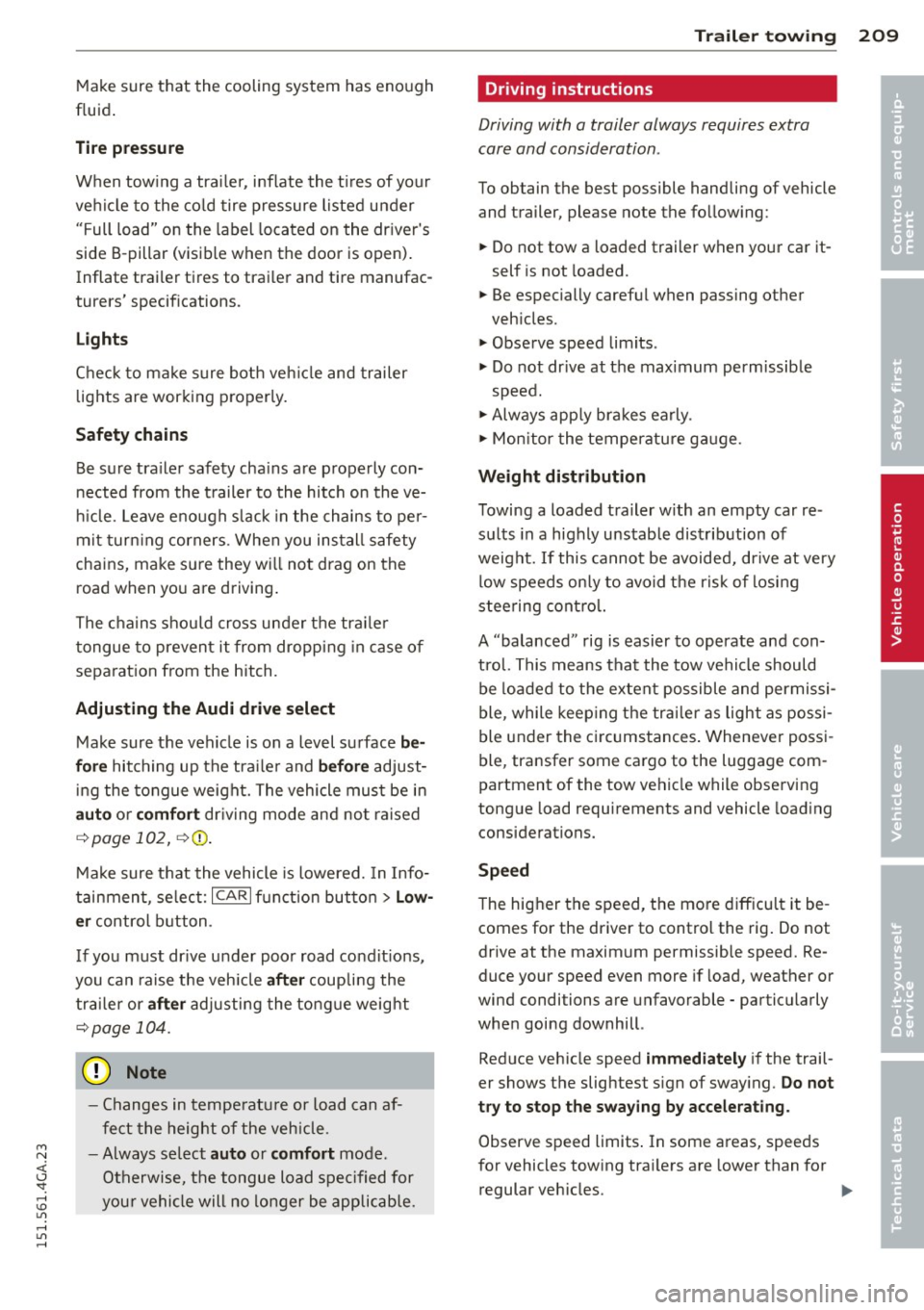
Make sure that the cooling system has enough
fluid.
Tire pressure
When towing a trailer, inflate the tires of your
vehicle to the cold tire pressure listed under
"Full load" on the label located on the driver's
side B-pillar (visible when the door is open).
Inflate trailer tires to trailer and tire manufac
turers' specifications.
Lights
Check to make sure both vehicle and trailer
lights are working properly.
Safety chains
Be sure trailer safety chains are properly con
nected from the trailer to the hitch on the ve
hicle. Leave enough slack in the chains to per
mit turning corners . When you install safety
chains, make sure they will not drag on the
road when you are driving.
The chains should cross under the trailer
tongue to prevent it from dropping in case of
separation from the hitch.
Adjusting the Audi drive select
Make sure the vehicle is on a level surface be
fore hitching up the trailer and before adjust
ing the tongue weight. The vehicle must be in
auto or comfort driving mode and not raised
qpage 102, ~CD .
Make sure that the vehicle is lowered. In Info
tainment, select:
ICARI function button> Low
er
control button.
If you must drive under poor road conditions,
you can raise the vehicle
after coupling the
trailer or
after adjusting the tongue weight
qpage 104.
- Changes in temperature or load can af
fect the height of the vehicle .
- Always select
auto or comfort mode.
Otherwise, the tongue load specified for
your vehicle will no longer be applicable.
Trailer towing
Driving instructions
Driving with a trailer always requires extra
care and consideration .
To obtain the best possible handling of vehicle
and trailer, please note the following:
... Do not tow a loaded trailer when your car it
self is not loaded.
... Be especially careful when passing other
vehicles.
... Observe speed limits .
... Do not drive at the maximum permissible
speed.
... Always apply brakes early .
... Monitor the temperature gauge.
Weight distribution
Towing a loaded trailer with an empty car re
sults in a highly unstable distribution of
weight. If this cannot be avoided, drive at very
low speeds only to avoid the risk of losing
steering control.
A "balanced" rig is easier to operate and con
trol. This means that the tow vehicle should
be loaded to the extent possible and permissi
ble, while keeping the trailer as light as possi
ble under the circumstances. Whenever possi
ble, transfer some cargo to the luggage com
partment of the tow vehicle while observing
tongue load requirements and vehicle loading
considerations.
Speed
The higher the speed, the more difficult it be
comes for the driver to control the rig. Do not
drive at the maximum permissible speed. Re
duce your speed even more if load, weather or
wind conditions are unfavorable -particularly
when going downhill .
Reduce vehicle speed
immediately if the trail
er shows the slightest sign of swaying .
Do not
try to stop the swaying by accelerating.
Observe speed limits. In some areas, speeds
for vehicles towing trailers are lower than for
regular vehicles . ..,..
209
•
•
Page 212 of 316
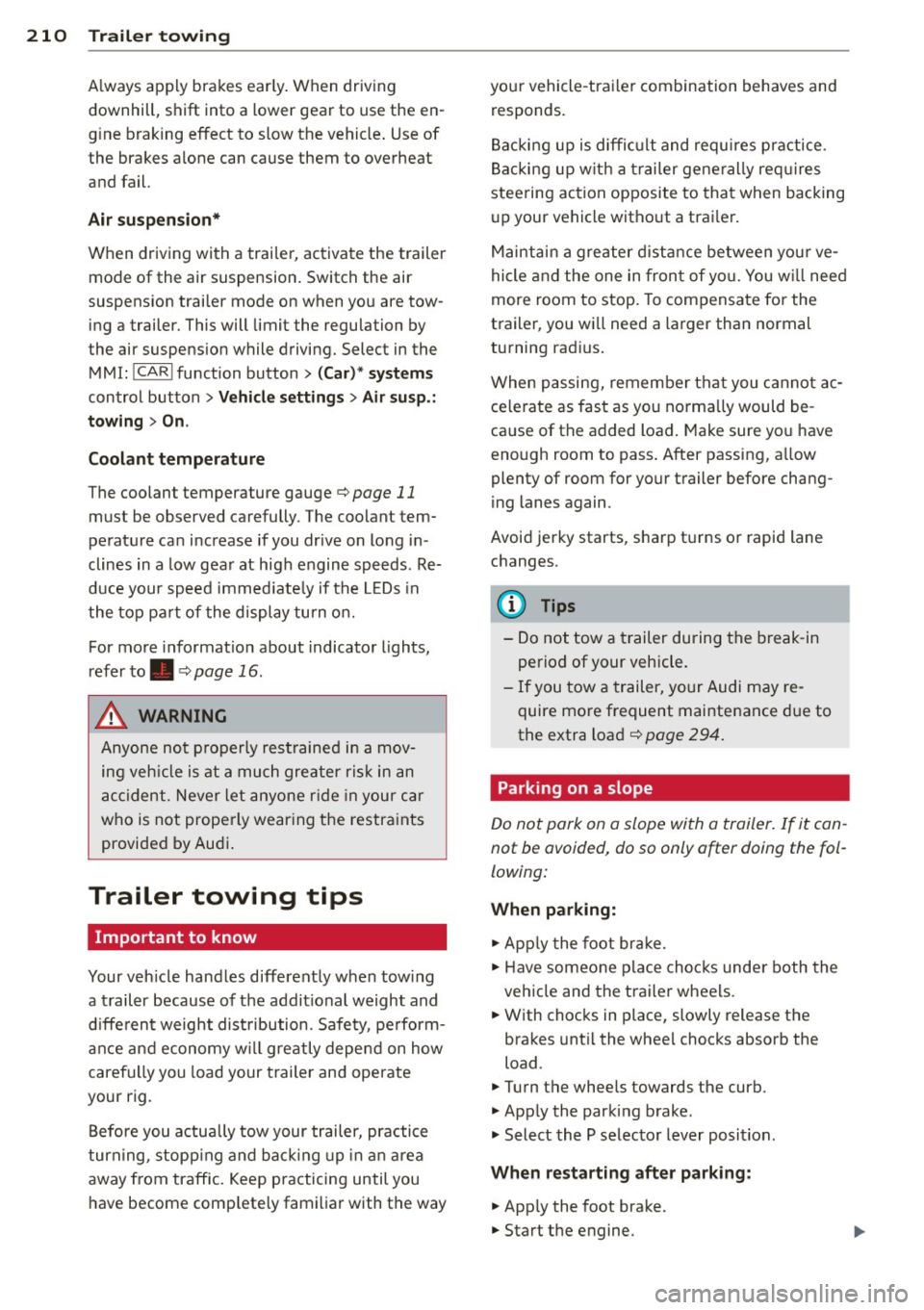
210 Trailer towing
A lways apply brakes early. When driving
downhill, shift into a lower gear to use the en
g ine braking effect to slow the vehicle . Use of
the brakes alone can cause them to overheat
and fail.
Air su spen sion *
When driving with a trai ler, activate the trailer
mode of the air suspension. Switch the air
suspension trailer mode on when you are tow
ing a trailer. This will limit the regulation by
the air suspens ion while driving. Select in the
MMI:
! CARI function button> (C ar)* sys te m s
control button > Vehicl e se tting s> Air s usp .:
t o wing > On .
Coolant t emperatur e
The coolant temperature gauge¢ page 11
must be observed carefully. The coolant tem
perature can increase if you drive on long in
clines in a low gear at high engine speeds. Re
duce your speed immed iate ly if the LEDs in
the top pa rt of the display turn on.
For more information about indicator lights,
refer to. ¢ page 16 .
A WARNING
Anyone not properly restrained in a mov
ing veh icle is at a much greater risk in an
accident. Never let anyone r ide in your car
who is not prope rly wearing the restraints
provided by Audi .
Trailer towing tips
Important to know
Your vehicle handles differently when tow ing
-
a trailer because of the addit ional weight and
d ifferent weight dist ribution. Safety, perform
ance and economy w ill greatly depend on how
carefu lly you load your trailer and operate
your rig.
Before you actually tow your trailer, practice
turn ing, stopp ing and back ing up in an area
away from traffic. Keep practicing until you
have become comp letely familiar with the way your vehicle
-trailer combination behaves and
responds .
Backi ng up is diffic ult and requi res p ractice.
Backing up w ith a trailer generally req uires
steering action opposite to that when backing
up your vehicle without a trailer.
Maintai n a greater d ista nce between yo ur ve
hicle and the one in fron t of yo u. You w ill need
more room to stop. To compensate for the
trailer, you will need a larger than normal
turning radius.
When passing, remember that you cannot ac ce le rate as fast as you norma lly would be
ca use of the added load. Make sure you have
enough room to pass . After passing, allow
plenty of room for your trailer before chang
ing lanes again.
Avoid jerky starts, sharp tu rns o r rapid lane
changes.
(D Tips
- Do not tow a trailer during the break-in
period of your vehicle.
- If you tow a trailer, your Audi may re
quire more frequent maintenance due to
the extra load ¢
page 294.
Parking on a slope
Do not park on a slope with a trailer. If it can
not be avoided, do so only after doing the fol
lowing:
When parking:
.,. App ly the foot brake .
.,. Have someone place choc ks unde r both the
vehicle and the trailer wheels.
.,. With chocks in place, slowly release the
brakes unt il the whee l chocks absorb the
load .
.,. Turn the whee ls towards the curb.
.,. Apply the parking brake.
.,. Select the P selector lever posit ion.
When re sta rting after p ark in g :
.,. App ly the foot brake .
.,. Start the engine.
Page 244 of 316

242 Tires and wheels
-If you notice unusual vibra
tion or if the vehicle pulls to
one side when driving, al
ways stop as soon as it is
safe to do so and check the
wheels and tires for dam
age.
0 Note
-Please note that summer and winter tires are de
signed for the conditions
that are typical in those sea
sons. Audi recommends us
ing winter tires during the
winter months. Low tem peratures significantly de
crease the elasticity of
summer tires, which affects
traction and braking ability. If summer tires are used
in
very cold temperatures, cracks can form on the tread
bars, resulting in perma
nent tire damage that can
cause loud driving noise and
unbalanced tires. Audi is not
responsible for this type of
damage.
-Burnished, polished or chromed rims must not be used in winter road condi
tions. The surface of the
rims does not have suffi
cient corrosion protection
for this and could be perma
nently damaged by road salt
or similar substances.
Glossary of tire and loading terminology
Accessory weight
means the combined weight (in
excess of those standard items
which may be replaced) of auto matic transmission, power
steering, power brakes, power
windows, power seats, radio, and heater, to the extent that
these items are available as fac
tory-installed equipment (whether installed or not).
Aspect ratio
means the ratio of the height to
the width of the tire in percent.
Numbers of 55 or lower indi
cate a low sidewall for im
proved steering response and
better overall handling on dry
pavement.
...
Page 261 of 316

M N <( (.J
'SI: ,...., \!) 1.1'1 ,...., 1.1'1 ,....,
Driving style
Driving fast around curves,
heavy acceleration and hard
braking increase tire wear.
Rotating tires for more even
wear
For all four tires on your vehicle
to have the same service life,
we recommend that the front
and rear tires are rotated ac
cording to the tire manufactur
er's suggested tire rotation in
tervals. Please remember the
following:
-Tire rotation intervals may dif fer from the vehicle service intervals outlined in your Warranty
& Maintenance booklet .
-The longer one tire is used in one location on the vehicle,
the more it wears at certain points; therefore, we recom
mend that you follow the tire
manufacturer's suggested tire
rotation intervals.
-Vehicles with front-wheel drive experience more tread
wear on the front wheels com
pared to all-wheel drive (quat
tro).
-Please rotate ti res as shown
¢ fig. 203.
Tires and wheels 259
-Extra care must be taken when rotating direction-specific
tires ¢ page
280.
Wheel balancing
The wheels on new vehicles are
balanced. However, various sit
uations during everyday driving
can cause them to become un balanced, resulting in vibra
tions you can usually feel
through the steering wheel.
Unbalanced wheels must be re
balanced to avoid excessive
wear on steering, suspension
and tires. A wheel must also be rebalanced when a new tire is
installed.
Incorrect wheel alignment
Incorrect wheel alignment can
cause excessive tire wear, impairing the safety of the vehi
cle. If tires show excessive
wear, have the wheel alignment checked by an authorized Audi
dealer or qualified workshop.
All-wheel drive
Vehicles with quattro must al
ways have tires of the same size, construction and tread
type . For details see
¢ page
200.
•
•
'
Page 273 of 316

M N <( I.J "". rl I.O
"' rl
"' rl
Tire pressure indicator appears
The tire pressure indicator in the instrument
cluster informs you if the tire pressure is too
low or if there is a system malfunction.
Fig. 205 Display: underinflation warning
Fig. 206 Display: System malfunction
Using the ABS sensors, the tire pressure moni
toring system compares the tire tread circum ference and vibration characteristics of the in
dividual tires. If the pressure decreases in one
or more tires, this is indicated in the instru
ment cluster with a warning symbol
rD] and a
message
c:> fig . 205.
The tire pressure monitoring system must be
reset via MMI each time the pressures are ad
justed (e.g. when switching between partial
and fu ll load pressure) or after changing or re
placing a tire on your vehicle
c:> page272 . The
TPMS indicator only monitors the tire pres
sure that you have previously stored. You can
find the recommended tire pressures for your
vehicle on the label on driver's side 8-pillar
c:>page247.
Tire tread circumference and vibration charac
teristics can change and cause a tire pressure
warning if:
- the tire pressure in one or more tires is too
low,
Tires and wheels 2 71
- the tire has structural damage,
- the tire pressure was changed, wheels rotat-
ed or replaced but the TPMS was not reset
c:>poge272.
- the spare tire* is mounted .
Warning symbols
[I] Loss of pressure in at least one tire¢.& .
Check the tire or tires and replace or repair if
necessary. The indicator light
rD] in the instru
ment cluster also illuminates <=:>
page 12.
Check/correct the pressures of all four tires
and resetTPMS via MMI.
l!I (Tire Pressure Mon itoring System) Tire
pressure! System malfunction .
Ifljl appears
after switching the ignition on or while driving
¢
fig. 206 and the indicator light rD] in the in
strument cluster blinks for approximately one
minute and then stays on, there is a system
malfunction. Attempt to store the correct tire
pressure
c:> page 272. If the indicator light
does not turn off or if it turns on shortly
thereafter, immediately drive your vehicle to
an authorized Audi dealer or authorized repair
facility to have the malfunction corrected.
_& WARNING
- If the tire pressure indicator appears in
the instrument cluster display, one or
more of your tires is significantly under
inflated. Reduce your speed immediately
and avoid any hard steering or braking
maneuvers. Stop as soon as possible and
check the tires and their pressures. In
flate the tire pressure to the proper pres
sure as indicated on the vehicle's tire
pressure label<=:>
page 247 . Driving on a
significantly under-inflated tire causes
the tire to overheat and can lead to tire
failure. Under-inflation also is likely to
impair the vehicle's handling and stop
ping ability.
- The driver is responsible for maintaining
the correct tire pressures. You must check the tire pressures regularly.
.
Page 284 of 316
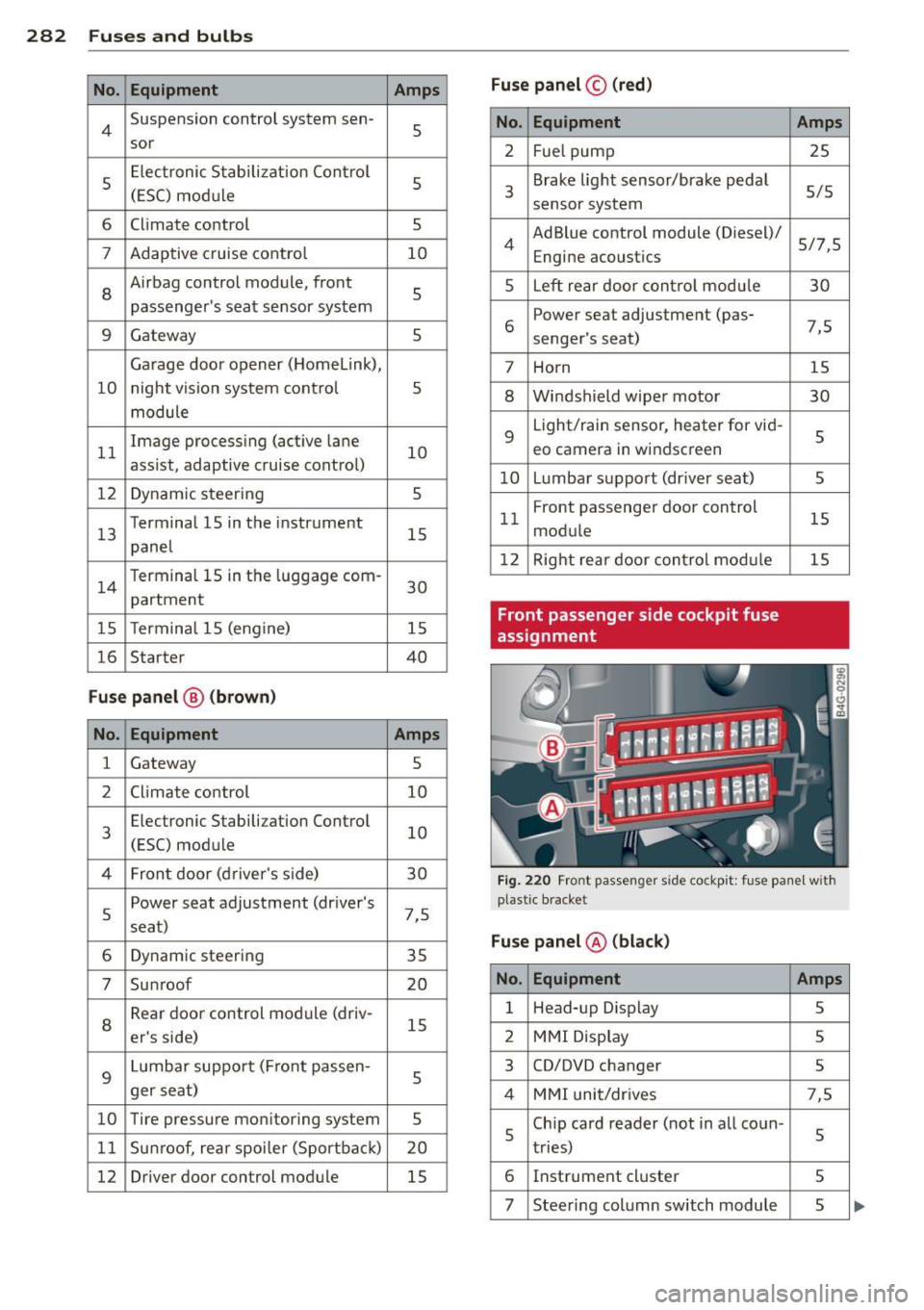
282 Fuses and bulbs
No . Equipment Amps
4 Suspension control system sen-
5
sor
5 Electron
ic Stabilization Control
5
(ESC) mod ule
6 Climate
control
5
7 Adaptive cruise control 10
8
Airbag control module, front
5
passenger's seat sensor system
9 Gateway 5
Garage door opener (Homelink),
10 night vision system contro l 5
module
11 Image processing (active
lane
10
ass ist, adaptive cruise control)
12 Dynamic steering 5
13 Terminal 15
in the instrument
15
panel
14 T
ermina l 15 in the luggage com-
partment 30
15 T
erminal 15 (engine)
15
16 Starter 40
Fuse panel @ (brown)
No . Equipment Amps
1 Gateway
5
2 Climate control 10
E lec tronic Stabilization Contro l
10
3
(ESC) module
4 Front door (driver's
side)
30
5 Power seat adjustment (driver's
7,5
seat)
6 Dynamic steering
35
7 Su nroof 20
Rear door control module (driv- 15
8
er's side)
9 Lumbar support (Front passen-
5
ger seat)
10 Tire pressure monitoring system
5
11 Su
nroof, rear spoiler (Sportbac k)
20
12 Driver door
control module
15
Fuse panel© (red)
No . Equipment
2 Fuel pump
3 Brake light sensor/brake pedal
sensor system
4 AdBlue control module (Diesel)/
Engine acoustics
5 Left rear door contro l modu le
6 Power
seat adjustment (pas-
senger's seat)
7 Horn
8 Windshield wiper motor
9
Light/rain sensor, heater for vid-
eo camera in windscreen
10 Lumbar support (dr iver seat)
11 Front
passenger door control
module
12 Right rear door control mod ule
Front passenger side cockpit fuse
assignment Amps
25
5/5
5/7,5 30
7,5 15
30
5
5
15
15
Fig. 220 Front passenger side cockpit: fu se pane l w ith
plastic bracket
Fuse panel @ (black)
No. Equipment Amps
1 Head-up Display
5
2 MMI Display 5
3 CD/DVD changer
5
4 MMI unit/dr ives 7,5
5 Chip card reader (not
in all coun-
5
tries)
6 Instrument cluster
5
7 Steering column switch module 5
Page 285 of 316
M N <( I.J "". rl I.O
"' rl
"' rl
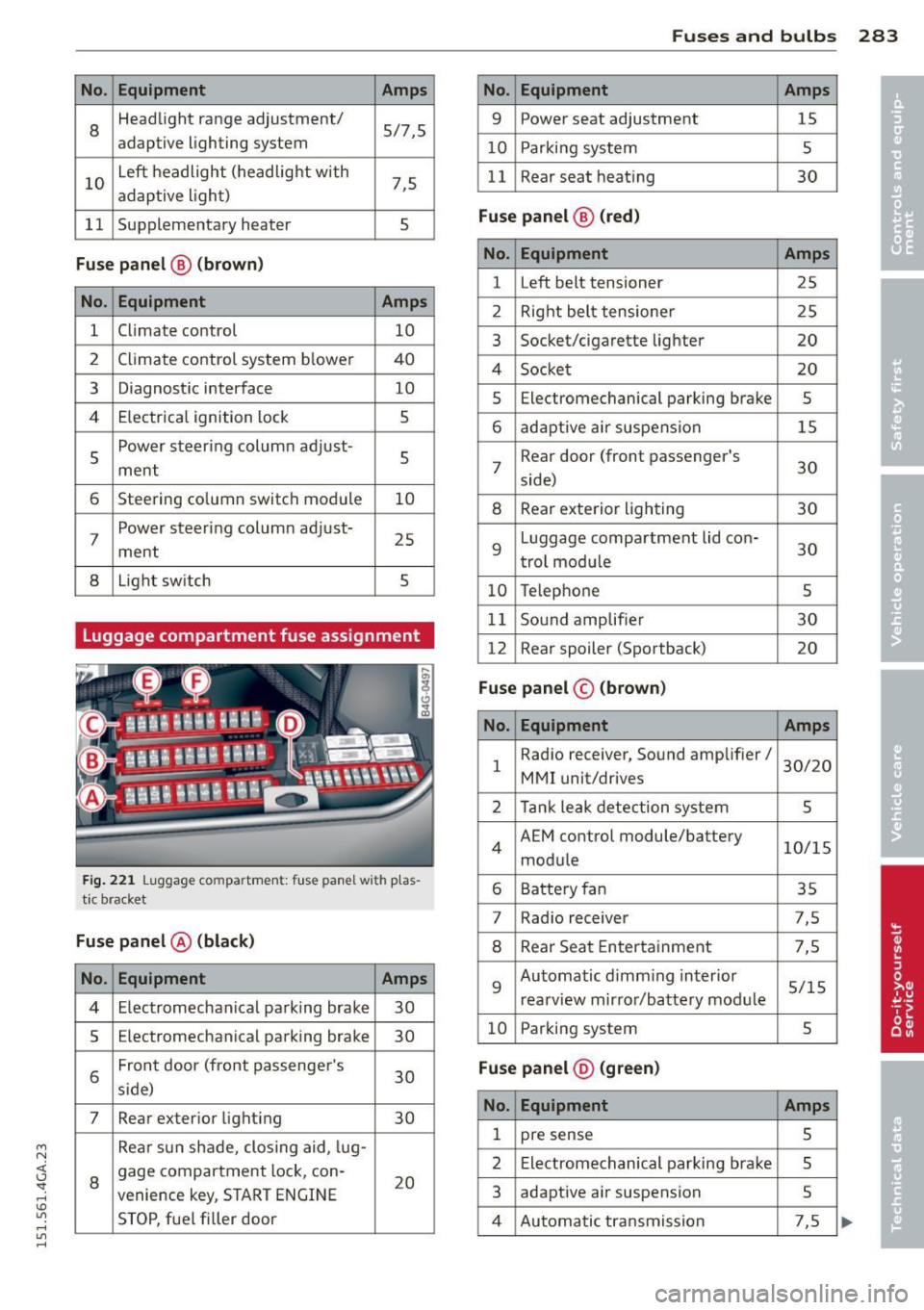
No. Equ ipment Amps
8
Headlight range adjustment/ 5/7,5
adaptive lighting system
10
Left headlight (headlight with 7,5 adaptive light)
11 Supplementary heater s
Fuse p anel @ (b ro w n)
No . Equipment Amps
1 Climate control 10
2
Climate control system blower 40
3
Diagnostic interface 10
4
E lectrical ignition lock s
5
Power steering column adjust-
ment
s
6 Steering column switch module 10
7
Power steering column adjust-
ment
25
8 Light switch 5
Luggage compartment fuse assignment
Fig . 221 Luggage compa rtmen t: fuse panel wit h p las
tic bracket
Fuse p anel @ (black )
No. Equipment Amps
4 Electromechan ical parking brake 30
5
Electromechanical parking brake 30
6
Front door (front passenge r's
30 s ide)
7 Rear exterior light ing 30
Rea r sun shade, closing aid, lug-
8
gage compartment lock, con-
20 venience key, START ENGINE
STOP, fuel filler door
Fu se s and bulb s 283
No. Equipment Amps
9 Power seat adjustment 15
10
Parking system 5
11
Rear seat heating 30
Fu se p an el@ (r e d )
No . Equipment Amps
1 Left belt tensioner 25
2
Right belt tensioner 25
3
Socket/cigarette lighter 20
4
Socket 20
5
Electromechanical parking brake 5
6 adaptive air suspension 15
7
Rear door (front passenger's
30 side)
8 Rear exterior lighting 30
9
Luggage compartment lid con-
30 trol modu le
10 Telephone 5
11
Sound amplifier 30
12
Rear spoiler (Sportback) 20
Fuse panel© (brown)
No . Equ ipment Amps
1
Radio receiver, Sound amplifier/
30/20
MMI unit/drives
2 Tank leak detection system 5
4
AEM control module/battery 10/15
module
6 Battery fan 35
7
Rad io receiver 7,5
8 Rear Seat Entertainment 7,5
9
Automatic d imm ing interior 5/15
rearview mirror/battery module
10 Parking system 5
Fu se pan el@ (gr ee n)
No . Equipment Amps
1 pre sense 5
2
Electromechanical parking brake 5
3
adaptive air suspension 5
4 Automatic transmission 7,5
Page 301 of 316

A
A/C (automatic climate control) .... .. .. 72
A/C (climate control) . . . . . . . . . . . . . . . . . 70
Accessories .. ............. .... .. .. . 296
Active lane assist . . . . . . . . . . . . . . . . . . . . 95
Activating and deactiva ting . .. .. .. .. .. 96
C leaning the camera area ... ... .. .. . 2 13
Descript ion ...... ..... ... ... ... .... 95
Instrument cluster indicator light . . . . . 96
Messages . . . . . . . . . . . . . . . . . . . . . . . . . 96
Notes on instrument cluster display . . . . 96
Sett ing the steering wheel vibrat ion .. .. 97
Adaptive a ir s uspension/sport . ... .. .. . 102
Adapt ive cruise control . . . . . . . . . . . . . . . . 86
C lea ning the sensor ....... .. .. .. .. . 213
Messages . . . . . . . . . . . . . . . . . . . . . . . . . 93
Request for driver intervention . ... .. .. 91
Stop-and-go traffic .... ... .. .. .. .. .. 90
Adapt ive Lig ht (defective) ... .. .. .. .. .. 22
AdBlue .. .. .. ................. .. ... 221
F il ling . .. .. ................. .. ... 223
Messages in the instrument cluster dis -
play . .. .. .. .. ........ ... .. ... ... . 222
Adding Eng ine coolant ........... .... .. .. . 232
Eng ine oil .. .. ........... .. .. .. ... 229
W indshield washer fluid ....... ... .. 238
Addit ives
Eng ine oi l .. ............. .... .. ... 229
Adj usti ng
A ir dist ribution (au toma tic climate con-
trol) . . . . . . . . . . . . . . . . . . . . . . . . . . . . . . 73
air distribution (cl imate control) ... .. .. 70
Front seats . . . . . . . . . . . . . . . . . . . . . . . . 53
Instrument illum inat ion ... .. .. .. .. .. 47
Steer ing colum n elec trically .. .. .. .. .. 75
Steer ing colum n manually . .. .. .. .. .. 75
Temperature (automat ic climate co ntrol) 73
Temperature (climate control) .. ... ... 70
Airbag system . . . . . . . . . . . . . . . . . 147, 168
Advanced Airbag System ... .. .. .. .. . 151
Advanced Airbag System components . 155
Care ...... ... ................ .... 163
M N Chi ld ren ... ... .. .. ...... .. .. .. .. . 175 <(
~ Chi ld restra ints ........... .. .. .. ... 175
~ Components (front airbags) .. .. .. .. . 155 1.1"1 ,...., 1.1"1 ,....,
Inde x 299
Danger of fitting a ch ild seat on the front
passenger seat ..... . ... ...... ... .. 149
•
Disposa l .. .. .. .. .. . .. ... .... ... .. 163 •
Front a irbags . . . . . . . . . . . . . . . . 151, 153
How do the front airbags work? .... .. 157
How many a irbags does my vehicle
have? .. .. .. .. .. .. . .. .... .... .... 155
How the Advanced Airbag System com-
ponents work togethe r ......... .... 15 7
Impo rtant sa fe ty instru ctions on the
knee airbag sys tem ... .. .... ... .. .. 166
Important t hings to know .... ... .. .. 147
Knee airbags ... .... . ... ...... ... .. 164
Monitoring .. .. .. ................. 159
PASSENGER AIR BAG OFF light ..... .. 160
Repairs ... .. .. .. .... ............. 163
Safety instructions .. .............. . 162
S ide a irbags ... .. .. . .. .... .... .. .. 166
S ide curtain airbags . ... ..... ... .... 169
Warning/ind icator lights ........ .. .. . 19
Warning/Indicato r lights ....... .. .. 159
When must the system be inspected? 159
A ircraft
Transpo rting your vehicle 289
A lcantara
Cleaning .. .. .. .. ................. 215
A ll-wheel drive .. .... . ... ...... ... .. 200
Winter tires ..... .. . .. .. ..... ... .. 267
Alternator . . . . . . . . . . . . . . . . . . . . . . . . . . 17
Amb ience lighting . ................. . 47
Anti -freeze
refer to Engine coolant . ..... ... .. .. 231
Anti- lock b raking system ............ . 195
Warning/ind icator lights ........ .. .. . 19
Anti-slip regu lation .. ........... .... 195
Warning/ind icator lights .. .. ... ... .. . 19
Anti-theft systems Electronic immobi lizer ....... ... .. .. . 32
Asht ray .... .. .. .. .. . ............... 59
Audi braking guard
refer to brak ing guard ............. .. 86
Audi drive select
refer to drive select ... ............. 102
A udi Se rv ice Repair Manuals and Liter a-
tu re .. ... .. .. .... .. . .. ... .... ... .. 294
Page 304 of 316

302 Index
Daytime running lights .... .. .. .. .... . . 44
Declaration of compl iance
Adaptive c ruise control .... .. .. .... .
297
Aud i side assis t ... ... .... .. .. .. .. . 297
Cell phone package ... .... .. .. .... . 297
Convenience key ....... ... .. .. .... . 297
Electronic immobilizer ... .. .. .. .... . 297
Garag e door opener (Homelink) ... .. . 297
Remote control key ....... .. .. .. .. . 297
D ecorative parts/ trim
C leaning ... ... .. ..... ... .. .. .... .
214
DEF
What does t his mean when it appea rs in
the trip odomete r d isplay? . .. .. .. .. . .
27
De fective light bulb warning . . . . . . . . . . . 22
D efrosting (windows)
automatic climate control . ... ... ... ..
73
climate contro l . . . . . . . . . . . . . . . . . . . . . 71
Determin ing cor re ct load limi t ... .. ... 257
Diese l fuel . .. .......... ...... ... .. . 218
D iese l partic ulate fi lter . . . . . . . . . . 2 1, 205
D imensions .. ... . ...... ... .. .. .. .. . 292
Dimming the rearview mirror .. .. ...... 51
D isp lays
C leaning ... ... . ...... ... .. .. .... .
214
Distance . . . . . . . . . . . . . . . . . . . . . . . . . . . 25
Door/rear lid warning . . . . . . . . . . . . . . . . . 24
Doors
Power child safety loc k .. .. .. .. .... . .
4 0
D river information system
CD/radio display . . . . . . . . . . . . . . . . . . . .
24
D oor/ rear lid warning . . . . . . . . . . . . . . . 24
Exte rio r tempe rat ure d isplay . .. .. .. . . 24
On -boa rd compute r . . . . . . . . . . . . . . . . . 2 5
D river seating position . . . . . . . . . . . . . . . 129
drive select .... ........... .. .. .... . 102
adaptive a ir s uspension/sport . .. .... .
Adaptive dampers .......... .. .... .
Curve light ........... .... ... .. .. .
E ng ine sound ......... .... ... .. .. .
Safety belt tensioner .......... .. .. .
Sport differen tial ......... .. .. .. .. .
Driving safely 102 102
102
102
102
10 2
128
D riving through water . ... .. .. .. .... . 204
D . . . nvmg time .... .... ...... .. .. .. .. .. 25
Dup licate key . . . . . . . . . . . . . . . . . . . . . . . 31
D ust filter
refer to Poll utant fi lter . ..... ... .. .. . 69
Dynam ic steering
2 00
E
Easy entry feature . . . . . . . . . . . . . . . . . . . . 76
Efficiency program Fuel economy messages ........ .. .. .
26
Other equ ipment . ............. .... . 26
Electr ica l accessories (soc ke ts) . ... .. .. . 60
Electromechanical pa rking brake
Emergency bra king . .. ...... ... .. .. .
80
Operation . . . . . . . . . . . . . . . . . . . . . . . . . 79
Parking . .. .. .. .. .. ........... .. .. . 79
Re leas ing and closing .. ..... .... . .. . 79
Starting assist ... .. .... .... ... .. .. . 80
Starting from rest . .... ..... ... .. .. . 80
Starting off w ith a trailer .......... .. . 80
Warning/ind icator lights ........ .... . 16
Elec tromechanica l power assist . ... .. .. 2 00
El ectronic d ifferential lock
Warning/ind icator lights ........... ..
19
Electronic differential lock (EDL) . . . . . . . 195
Warning/ind icator lights ........ .... . 19
Electronic immob ilizer . . . . . . . . . . . . 27, 32
Electronic power cont rol (EPC)
wa rning/indicator light ......... .... .
20
Electronic speed limiter .......... .... . 30
Elec tronic Stabilization Con tro l (ESC) . .. 195
Warning/ind icator lights ..... ... .. .. . 19
Emergency actuat ion
Doo rs .... .. .. .. .. ........... .... .
37
Power sunroof . .. ............. .. ... 42
Rea r lid ... .... .. .. .... . ... ... .. .. . 39
Em b k'
ergency ra 1ng . .......... ...... .. 80
Emergency flasher ... ... ..... ... .. .. . 45
Warning/ind icator lights .......... .. . 23
Emergency re le a se
Se lector lever .... .. .... .... ... .. ..
115
E mergency start ing ..... .. ... ..... .. 285
Emergency towing . ............. .... 287
E mergency wa rn in g triangle .... .. .. .. 2 73
Energy management .... .. ... ..... .. 201
Engine
Compartment .... .. ... ..... ... .. ..
227
Coolant ... .... .. ............. .... 231